The problem: Past 30 actors, manual Apify portfolio management falls apart. You lose track of which actors are failing, metadata drifts across listings, pricing updates require clicking through dozens of Console pages, and you have zero visibility into which actors earn money vs. which ones just burn compute credits.
ApifyForge runs a large Apify portfolio with one developer spending under 5 hours per week on maintenance. The system relies on three core automations — daily health monitoring via the Apify API that catches broken actors before maintenance flags drop, bulk metadata operations that update pricing, categories, and descriptions across 50+ actors in 30 seconds, and per-actor revenue tracking that drives quarterly portfolio reviews — plus a fourth layer that turns those three visibility scripts into an actual decision loop: outcome tracking that tells you whether last week's fixes delivered the revenue they promised. Before automation, maintenance alone consumed 20+ hours per week once the portfolio crossed 100 actors.
Key takeaways:
- Automate monitoring before you automate building — prioritizing new actors over health checks caused 12 simultaneous maintenance flags at one point
- Three automations changed everything: daily health monitoring, bulk metadata via API, and per-actor revenue tracking
- A fourth automation eventually emerged — outcome tracking — and that's what turned the portfolio from a dashboard into a decision system
- Time per week dropped from 20+ hours (manual at 100 actors) to under 5 hours once the four automations were in place
- Kill underperforming actors — retiring 30+ zero-run actors improved portfolio health metrics and reduced dead-weight compute costs
- Apify caps public actor publishing at roughly 5 per day; automate a daily publishing script for backlogs
- Without outcome tracking, you never know which of your "high-impact" recommendations actually moved revenue — you just guess
Managing an Apify actor portfolio requires automated health monitoring, bulk operations, revenue tracking per actor, and fleet-wide schema validation. ApifyForge provides 14 free developer tools for this purpose, including Fleet Analytics, Health Monitor, Revenue Tracker, and Bulk Operations. This guide covers the systems used to keep a portfolio profitable whether it has five actors or several hundred.
Five actors is easy. You remember each one. You check in on them occasionally. Life is good.
Past about 30, everything falls apart — unless you build the right systems. I run a large portfolio across standard actors and MCP intelligence servers, all managed by one person. Not a team. Not a department. One developer with a lot of scripts and a strong opinion about automation.
Here's what I've learned. Some of it cost me weeks.
How do you manage hundreds of Apify actors?
You manage an Apify actor portfolio by treating it like a fleet of microservices: automated health monitoring, bulk metadata operations via the API, standardized templates, and revenue tracking per actor. Manual management stops working around the 30-actor mark.
That's the short answer. The reality is messier. When I crossed 50 actors in early 2025, I was spending more time maintaining existing actors than building new ones. A 2024 Apify community survey found that the average Store developer manages fewer than 10 actors. Once you're past that, every problem that's mildly annoying at 10 becomes a full-time job at 100.
Specific things that broke for me:
- No visibility into which actors were failing. I'd discover broken actors from user complaints, sometimes weeks later.
- Inconsistent metadata across the portfolio. Some actors had solid SEO descriptions, others had placeholder text I wrote at 2am.
- No bulk pricing updates. Changing PPE pricing on 30 actors meant 30 separate trips to the Apify Console.
- Zero revenue attribution. I had no idea which actors earned money and which ones just burned compute.
The fix wasn't one thing. It was a system — and building that system is what eventually became ApifyForge.
What's the biggest mistake when scaling an actor portfolio?
The biggest mistake is not automating monitoring before you automate building. According to Apify's own documentation, actors that fail silently get flagged for maintenance within 7 days, which tanks Store visibility by an estimated 60-80% based on my own before/after traffic data.
I made this mistake. I was shipping 5-10 new actors per week in mid-2025, racing to grow the portfolio. Half of them broke within a month because I wasn't watching them. Maintenance flags piled up. I wrote about the specific triggers in my post on avoiding maintenance flags, but the root cause was simple: I prioritized building over monitoring.
Here's what my time split looked like at 100 actors before I automated anything:
| Task | Time per actor | Weekly total (100 actors) |
|---|---|---|
| Health checks | 3 min | 5 hours |
| README updates | 15 min | 25 hours/month |
| Pricing review | 5 min | 8 hours/month |
| Bug investigation | 20 min | varies |
| Deployment | 10 min | varies |
That's 20+ hours per week on maintenance alone. A 2023 DORA State of DevOps report found that elite teams spend less than 15% of time on unplanned work. I was at 60%.
Now I'm under 5 hours per week for the entire fleet. The difference is automation.
The three automations that changed everything
Health monitoring
This is the single highest-ROI automation I built. A daily script that hits the Apify API, checks every actor's recent runs, and flags anything broken before Apify's maintenance system catches it.
import { ApifyClient } from 'apify-client';

const client = new ApifyClient({ token: process.env.APIFY_TOKEN });

async function checkFleetHealth() {
    const actors = await client.actors().list({ my: true });
    const report = { healthy: [], warning: [], critical: [], stale: [] };

    for (const actor of actors.items) {
        const runs = await client.actor(actor.id).runs().list({ limit: 10 });
        const recent = runs.items || [];
        const failures = recent.filter(r => r.status === 'FAILED').length;
        const daysSinceRun = recent[0]?.startedAt
            ? Math.floor((Date.now() - new Date(recent[0].startedAt)) / 86400000)
            : Infinity;

        const entry = { name: actor.name, failures, daysSinceRun };

        if (failures >= 5) report.critical.push(entry);
        else if (daysSinceRun > 30) report.stale.push(entry);
        else if (failures >= 2) report.warning.push(entry);
        else report.healthy.push(entry);
    }

    return report;
}
I covered the full monitoring approach — including schema validation and failure tracking — in my post on actor reliability at scale. The short version: catching a broken actor on day 1 instead of day 7 saved me from dozens of maintenance flags.
Bulk metadata via the API
When you need to update categories, descriptions, or pricing across 50 actors, the Apify Console is painful. The Apify API lets you script it:
const updates = [
    { id: 'abc123', event: 'result-scraped', price: 0.10 },
    { id: 'def456', event: 'page-scraped', price: 0.05 },
];

for (const config of updates) {
    await client.actor(config.id).update({
        pricingInfos: [{
            pricingModel: 'PAY_PER_EVENT',
            pricingPerEvent: {
                actorChargeEvents: {
                    [config.event]: {
                        eventTitle: config.event.replace(/-/g, ' '),
                        eventPriceUsd: config.price,
                    }
                }
            }
        }]
    });
}
What used to take a full day now takes 30 seconds. I run similar scripts for category assignments, SEO descriptions, and publication status. This matters especially since Apify's rental pricing sunsets in October 2026 — every monetized actor needs PPE pricing, and migrating hundreds of actors manually isn't realistic. You can estimate the impact with our cost calculator.
Revenue tracking per actor
Without per-actor revenue data, you're flying blind. Which actors are actually making money? I pull run and charge data monthly:
async function getActorROI(actorId, daysBack = 30) {
    const runs = await client.actor(actorId).runs().list({ limit: 1000 });
    const since = new Date(Date.now() - daysBack * 86400000);
    const recent = runs.items.filter(r => new Date(r.startedAt) > since);

    let computeUsd = 0, chargedEvents = 0;
    for (const run of recent) {
        computeUsd += run.usageTotalUsd || 0;
        if (run.chargedEventCounts) {
            for (const count of Object.values(run.chargedEventCounts)) {
                chargedEvents += count;
            }
        }
    }

    return { actorId, runs: recent.length, computeUsd, chargedEvents };
}
This data drives quarterly portfolio reviews. Actors that cost more in compute than they earn in PPE either get optimized or retired. I've killed 30+ actors that were pure dead weight — zero runs, just burning compute on health checks. A smaller, healthier portfolio beats a bloated one every time.
The gap the three scripts don't close
Those three scripts are great at telling you what is happening. They're terrible at telling you what to do about it, and worse at telling you whether what you did last week actually worked.
I didn't notice the gap until the portfolio was big enough to drown me — but looking back, it existed from roughly actor number five. At any size, the same questions come up every week: Which actor should I touch first? Is this one underpriced compared to the rest of my stuff? Did raising a price last week actually change anything? The scripts above answer the first-order question ("how is everything doing") but not the follow-up ones. The smaller your fleet, the more each of those follow-up decisions actually matters — you have fewer actors to spread bets across, so getting the priority wrong costs more proportionally.
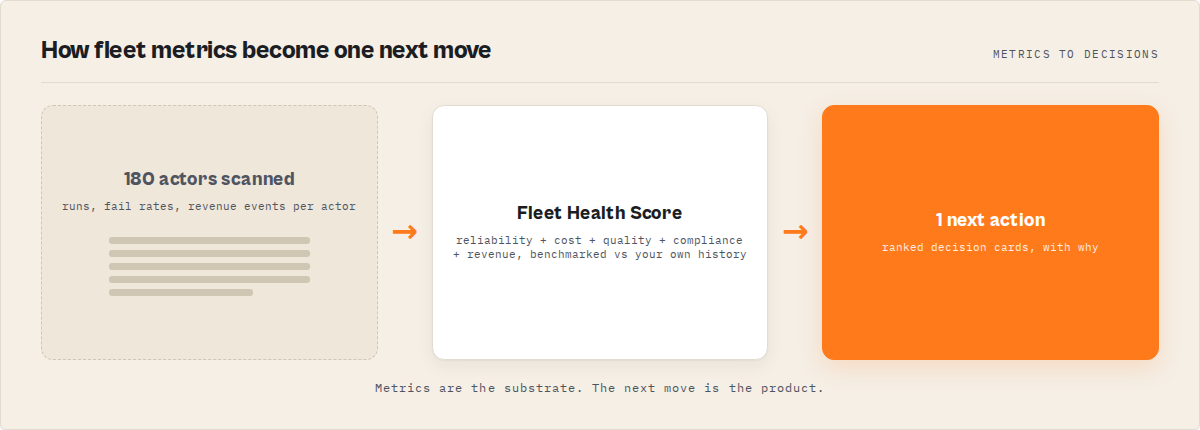
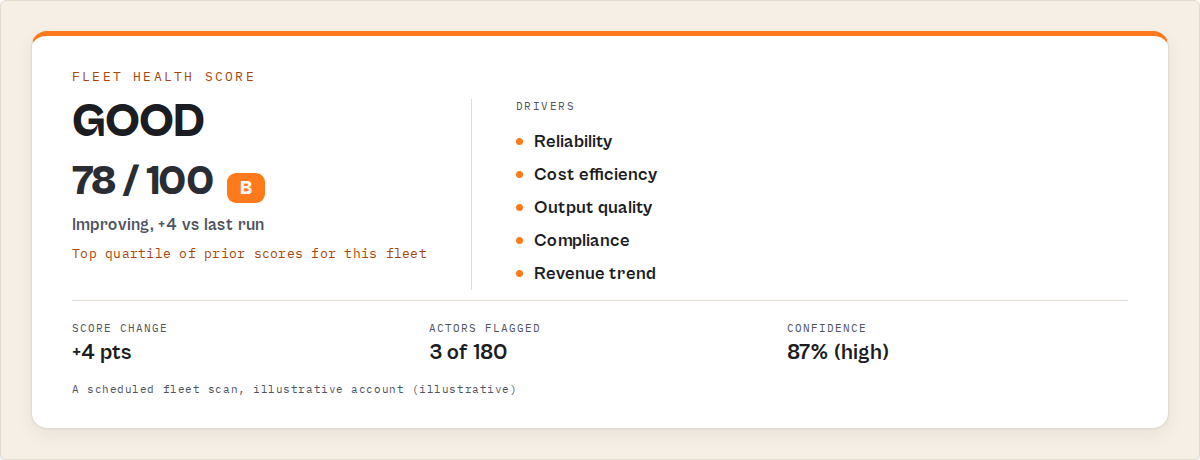
That gap became Fleet Health Report — the backend actor I now read every morning. I won't walk through how it works internally. What matters is what it changes about how decisions get made on an actor portfolio, whether you have 5 or 500:
You read one field instead of browsing a dashboard. The report picks a single next action across your whole account and puts it at the top of the output with a dollar impact, a concrete step list, and a time-to-impact tag. Open the run, read one field, go fix one thing. The rest of the output is still there if you want to drill down, but most mornings you don't.
You find out whether last week's fix worked. Every morning's report tells you how much of the revenue you expected from last week's changes actually materialized — not as a guess, but as a comparison between the estimate you saw a week ago and the profit delta on the actors you touched. It also tells you how well your expectations matched reality. Some fixes deliver exactly what you predict. Some underperform. Some overshoot. Over time that becomes its own feedback signal — not just did this work? but how accurate are my assumptions about this type of change? Most analytics tools stop at "here are your recommendations." This one closes the loop. The first time it confirmed a pricing fix I'd made a week earlier, the tool stopped feeling like a dashboard and started behaving like an operator.
The recommendations get more trustworthy over time. Because the report remembers what it recommended and whether each recommendation delivered, it eventually learns which types of actions are reliable in your fleet specifically and which types over-promise. After a month or two, recommendations start carrying a plain-English trust statement grounded in your own history — a long way from the generic "confidence: medium" most tools ship with. And this matters more on smaller fleets, not less: with 5 actors you have less room to absorb a bad recommendation, so calibrated trust compounds faster than it does at 300.
You don't read reports anymore — you skim decisions
Most mornings, I don't read the full output. I look at three things: a one-line summary of what to do next and why, a small set of decision cards (fix this, watch this, this just worked), and a short strategy headline that tells me what to prioritize this week. That's it. The rest of the data is still there if I need it — but most days I don't.
An actual morning's top line reads something like this:
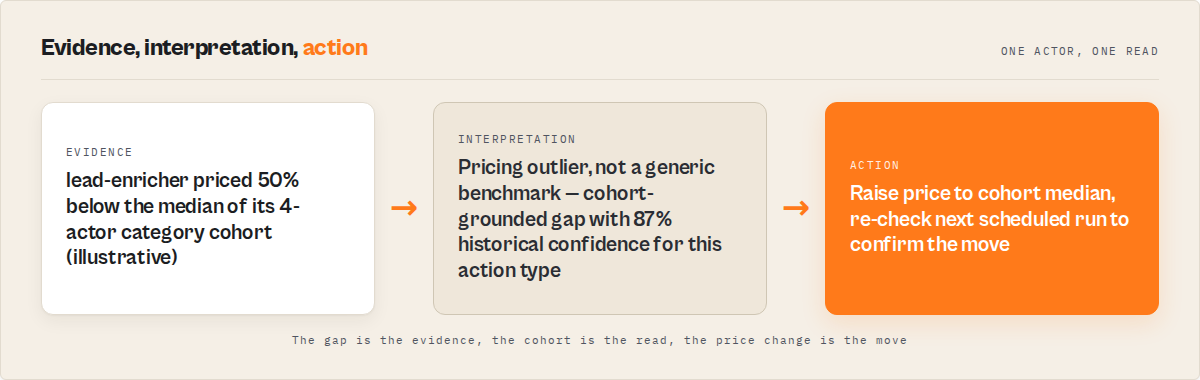
Raise email-scraper from $0.05 to $0.10 — +$320/mo, highly reliable, immediate impact.
That's the entire decision.
The shift from reading dashboards to scanning decisions is what actually frees up time — not the data, but the removal of choice. If you're curious what that looks like on your own account, that's exactly what the Fleet Health Report run gives you each morning.
Most developers don't need better data — they need fewer decisions.
The system doesn't just track outcomes — it learns what works
This is where the system starts to compound.
Once you have enough runs, something more interesting starts happening. The system stops treating all recommendations equally. It learns, from your own history, which types of actions actually deliver the revenue they promise, which ones consistently underperform, and which ones are reliable quick wins versus longer-term bets.
You start seeing patterns like:
- Pricing changes consistently deliver around 90% of expected impact in your fleet.
- New actor builds tend to overpromise and take longer to pay back.
At that point the tool stops being a report and starts acting more like an operator — prioritizing what has historically worked, down-ranking what hasn't, and explaining those decisions in plain English. This is the part I didn't expect when I built the first version. The biggest gains didn't come from better monitoring. They came from not repeating mistakes the system had already seen.
The fastest way to grow a portfolio isn't finding better ideas — it's stopping the ones that don't work.
None of this was an architectural breakthrough. It was one realization: you already have everything you need to tell whether your recommendations worked — you just need the tool to remember across runs. The mistake I made was waiting until I was drowning to solve it. If you're anywhere past the "five actors, I remember everything" stage, this is the automation that pays back fastest — not because your fleet is huge, but because the cost of optimizing based on guesswork starts compounding from the second fix onward.
How should you organize 100+ actor files?
Organize 100+ actor files by category in separate directories, with each actor fully self-contained — its own source, schema, Dockerfile, and tests. Keep automation scripts in a shared scripts/ directory that operates across all actors uniformly.
Here's what my structure looks like:
project-root/
  actors/
    website-contact-scraper/
    email-pattern-finder/
    waterfall-contact-enrichment/
  mcps/
    counterparty-due-diligence-mcp/
    financial-crime-screening-mcp/
    esg-supply-chain-risk-mcp/
  scripts/
    check-health.js
    publish-batch.js
    set-pricing.js
    push-actors.sh
Each actor is self-contained. You can push any one without touching others. This sounds obvious but I've seen developers keep all their actors in a single monorepo with shared dependencies. That's a nightmare at scale — one broken dependency cascades into 200 failed builds.
The MCP servers live separately because they follow a different pattern. ApifyForge indexes MCP intelligence servers across domains like financial crime screening, ESG supply chain risk, and entity attack surface mapping. Different beast, different directory.
Why do Apify actors get maintenance flags?
Apify actors get maintenance flags when they fail on default input, have broken builds, return empty datasets, or haven't been updated in 90+ days. The maintenance flag reduces Store visibility and can eventually lead to delisting according to Apify's Store quality guidelines.
Once you're managing enough actors that you can't individually touch each one every month, maintenance flags become a constant battle. The number one cause I've seen? Stale default inputs. You update your code, add a new required field, but forget to update the default input. Apify's automated health check runs with the default input, it fails, flag goes up.
My fix: store default inputs as JSON fixtures alongside the code. Validate them against the input schema on every push. If the schema changes, the fixture must change too. I wrote about this in detail in my testing before publishing guide, and ApifyForge has a schema validator that catches these mismatches automatically.
my-actor/
  src/main.ts
  .actor/
    actor.json
    input_schema.json
  test-inputs/
    default.json          # Must match schema defaults
    edge-case-empty.json
    edge-case-large.json
The second biggest cause: inconsistent error handling. Some of my early actors swallowed errors silently and exited with status "SUCCEEDED" even when they returned zero results. Others crashed hard on any unexpected input. I standardized on a template that handles input validation, network errors, and empty results the same way everywhere:
import { Actor, log } from 'apify';

await Actor.main(async () => {
    const input = await Actor.getInput() || {};
    const url = input.url || 'https://example.com';

    try {
        const results = await scrape(url);
        await Actor.pushData(results);
        await Actor.charge({ eventName: 'result-scraped', count: results.length });
        await Actor.setStatusMessage(`Done: ${results.length} results`);
    } catch (error) {
        log.error(`Failed: ${error.message}`);
        await Actor.setStatusMessage(`Error: ${error.message}`);
    }
});
Every new actor starts from this template. No exceptions.
The publishing rate limit nobody warns you about
Apify caps how many actors you can make public per day — around 5 in my experience. If you've built a batch of 20 actors, that's four days minimum to get them all live.
I didn't plan for this. In late 2025 I built 40 actors in a week and then sat on them for over a week waiting to publish. The fix is boring but effective: a script that publishes up to the daily limit and runs every morning.
async function publishBatch(limit = 5) {
    const actors = await client.actors().list({ my: true });
    const unpublished = actors.items.filter(a => !a.isPublic);

    let published = 0;
    for (const actor of unpublished) {
        if (published >= limit) break;
        await client.actor(actor.id).update({ isPublic: true });
        published++;
    }

    console.log(`Published ${published}. ${unpublished.length - published} remaining.`);
}
Set it and forget it. Your backlog clears itself.
What naming conventions work for large actor portfolios?
Use a [target]-[action]-[qualifier] pattern for actor names. For MCP servers, use [domain]-[function]-mcp. For PPE event names, use [noun]-[past-tense-verb]. Consistent naming makes searching and sorting trivial across hundreds of actors.
Some examples from my portfolio:
| Type | Pattern | Examples |
|---|---|---|
| Scrapers | [source]-[data]-scraper | website-contact-scraper, podcast-directory-scraper |
| Enrichers | [data]-[action]-enrichment | waterfall-contact-enrichment, google-maps-lead-enricher |
| MCP servers | [domain]-[function]-mcp | counterparty-due-diligence-mcp, m-and-a-target-intelligence-mcp |
| PPE events | [noun]-[past-tense-verb] | result-scraped, lead-enriched, report-generated |
At 5 actors, naming is decoration. Once you pass a few dozen, it's survival. I can grep for any actor category in seconds because the naming is consistent. The lead generation actors all follow one pattern. The compliance screening tools follow another. If you browse ApifyForge's comparison pages you'll see how consistent naming makes cross-actor evaluation much easier for users too.
Eight things I'd tell a new Apify developer
-
Automate monitoring first. Not building, not deploying — monitoring. Know what's broken before you ship more.
-
Standardize before actor 20. Templates, naming, directory structure. Retrofitting 200 actors to a new convention is miserable. I know because I did it twice.
-
Track revenue per actor from day one. You can learn about PPE pricing models in our learn guide, but the key insight is: if you don't track which actors earn and which ones bleed compute, you'll optimize the wrong things.
-
Measure whether your fixes worked. Closely related but not the same. Tracking revenue tells you the current state; measuring outcomes tells you whether the things you changed last week actually caused the change. Without this, you'll keep optimizing based on vibes instead of evidence.
-
Plan for rate limits. Publishing, API calls, build queues — Apify limits all of them. Build your automation to respect these limits with retry logic and delays. A 1-second pause between API calls saves you from 429 errors.
-
Kill underperforming actors. I retired 30+ actors that had zero runs for 60+ days. Your portfolio is a product. Trim it like one.
-
Treat README like a sales page. Your README is your conversion funnel on the Apify Store. Generate the technical sections (input parameters, output schema) from structured data so they never drift from the code. Write the intro and use-case sections by hand — that's where your Store SEO matters most.
-
Invest in tooling early. Every hour spent on automation saves 10 hours of manual work the following month. The ROI is immediate and compounds fast. This is exactly why I built ApifyForge — the test runner alone has caught hundreds of broken schemas before they shipped.
Why this matters more than it sounds
At small scale, a bad decision costs you a few hours. Further down the curve, it compounds.
- Raising the wrong price can suppress your top actor for weeks before you notice the traffic drop.
- Building the wrong next actor costs days of work with no return and a long tail of maintenance.
- Ignoring a recurring issue on a high-traffic actor leaks revenue every single day until you finally look.
The difference isn't having better data. Every Apify developer already has access to the same API, the same run stats, the same pricing levers. The difference is having a system that prioritizes correctly, tracks whether decisions actually paid off, and adjusts its recommendations based on what historically worked in your fleet. That's where the real gains come from. The automation above is mostly about saving hours on maintenance. The feedback loop on top is about the much larger pool of money you're already leaving on the table because you don't know which fixes move the needle.
At scale, the cost of a wrong decision is almost always higher than the cost of no decision.
The portfolio as a product
Individual actors are features. The portfolio is the product. Manage it accordingly.
I track fleet health metrics monthly: success rates, revenue per actor, compute efficiency, and staleness. The data from these reviews drives every decision — what to build next, what to reprice, what to retire. ApifyForge's exposure report tool came directly from this need to understand which actors are visible and which are buried.
The part that took me longest to figure out is that a portfolio isn't just a collection of things you manage — it's a loop. Fix an actor, see what happened, use that to inform the next fix. The three primitive automations in this post are about the first half of the loop: visibility. The Fleet Health Report that emerged later is about the second half: whether the work you're doing is actually paying back. Almost everyone I talk to about portfolio management — at any size — is running on the first half alone. That's what keeps time commitment plateaued at "maintenance hell" instead of dropping into something sustainable.
Honestly, managing a portfolio at this size isn't glamorous. Most of it is plumbing — scripts that run at 6am, metadata updates that nobody sees, schema fixes for edge cases. But the developers who get this right are the ones making real money on the Apify Store. According to Apify's developer earnings data, the top 10% of Store developers earn over $5,000/month. They're not necessarily building better individual actors. They're managing better portfolios.
If you're just hitting the scaling wall, start with monitoring. Then standardize your templates. Then automate your metadata updates. Then close the loop by measuring whether your fixes actually worked. In that order. Everything else follows.
Most people try to scale by building more actors. The ones who actually make money scale by making better decisions about the ones they already have.
The difference isn't effort. It's the loop.
Frequently asked questions
At what portfolio size should I start automating actor management?
Start automating around 20-30 actors. Below that, manual checks in the Apify Console are manageable. Above 30, the time required for health checks, metadata updates, and pricing reviews exceeds what any developer can sustainably handle manually. The three highest-ROI automations to build first are daily health monitoring, bulk metadata updates via the API, and per-actor revenue tracking.
How do I track which Apify actors are actually making money?
Pull run and charge data monthly using the Apify API. For each actor, query recent runs and sum usageTotalUsd (your compute cost) and chargedEventCounts (PPE revenue events). Compare revenue against compute cost to calculate ROI per actor. Actors that cost more in compute than they earn in PPE should be optimized or retired.
What naming convention works best for a large actor portfolio?
Use a [target]-[action]-[qualifier] pattern: website-contact-scraper, podcast-directory-scraper, waterfall-contact-enrichment. For MCP servers, use [domain]-[function]-mcp. Consistent naming makes searching, sorting, and category assignment trivial across hundreds of actors.
How many actors can I publish per day on Apify?
Apify caps public actor publishing at approximately 5 per day. If you have a backlog of 20+ actors, that is 4+ days of publishing. Automate a daily script that publishes up to the limit and runs every morning to clear the backlog without manual intervention.
Should I use a monorepo or separate repos for my actors?
Use separate directories per actor within a single project, with each actor fully self-contained (its own source, schema, Dockerfile, and tests). Keep automation scripts in a shared scripts/ directory. Avoid sharing npm dependencies across actors — one broken dependency in a monorepo cascades into hundreds of failed builds.
How do I handle the transition from rental pricing to PPE?
Apify is sunsetting rental pricing by October 2026. Script the migration using the Apify API to set PPE pricing across all monetized actors in bulk. Set pricing early because Apify requires a 14-day notice period when you first enable PPE on an actor. Use the ApifyForge cost calculator to model PPE prices that cover your compute costs with margin.
How do I know if the fixes I make to my actors actually worked?
This is the question almost nobody answers, at any portfolio size. You can track current revenue per actor easily enough with the API, but without a tool that remembers what it recommended last week and compares it against the actual change this week, you're guessing. Even with five actors the problem is real — you raised a price on one, something moved, and you have no structured way to tell whether the thing that moved was caused by the price change or by something else. I solved it by scheduling Fleet Health Report to run daily — it compares each morning's numbers against the previous morning's and tells me whether the recommendations it made a week ago actually delivered. Without that loop, optimization decisions tend to drift toward whatever you remember most recently, not what actually worked.
Limitations
- Automation requires significant upfront investment. Building the three core automations (health monitoring, bulk metadata, revenue tracking) takes approximately 20-40 hours of development time. The ROI is strong but not instant.
- The Apify API has rate limits. Bulk operations across a large portfolio must include delays between API calls (1 second recommended) to avoid 429 errors. A full fleet health check takes several minutes, not seconds.
- Per-actor revenue tracking is approximate. The Apify API does not provide a direct "revenue earned" field. You must calculate it from charged event counts and configured prices, which can drift if pricing changes mid-period.
- Portfolio management is still a part-time job. Even with full automation, a large portfolio requires approximately 4-5 hours per week for investigating alerts, fixing broken actors, reviewing revenue data, and deploying patches.
- Publishing rate limits slow rollouts. At roughly 5 actors per day, launching a batch of 40 new actors takes over a week. There is no way to increase this limit.
Related resources
- Fleet Health Report — the backend actor I schedule daily to close the loop between recommendations and outcomes
- Actor portfolio management use case — the framework for scaling from 10 to 200+ actors
- Actor reliability at scale — monitoring schema conformance and detecting silent failures
- Tracking failures across all users — catching customer-triggered failures in your fleet
- How to price your actors — PPE pricing strategy for maximizing portfolio revenue
- How to avoid maintenance flags — preventing the badges that kill Store visibility
Last updated: April 2026
Ryan Clinton runs an Apify actor portfolio under the ryanclinton username and builds developer tools at ApifyForge.