Website Lead Intelligence — Find the Right Person, Verified is an Apify actor on ApifyForge. Turn company websites into ready-to-email decision-makers. Verified emails, named contacts ranked by seniority, buying-committee classification, A/B/C decision tiers, and optional scheduled monitoring + CRM auto-push to... It costs $0.15 per website-scanned. Best for sales teams and marketers who need verified contact data, lead lists, or prospect enrichment at scale. Not ideal for real-time monitoring or historical data analysis. Maintenance pulse: 98/100. Last verified March 27, 2026. Built by Ryan Clinton (ryanclinton on Apify).
Website Lead Intelligence — Find the Right Person, Verified
Website Lead Intelligence — Find the Right Person, Verified is an Apify actor available on ApifyForge at $0.15 per website-scanned. Turn company websites into ready-to-email decision-makers. Verified emails, named contacts ranked by seniority, buying-committee classification, A/B/C decision tiers, and optional scheduled monitoring + CRM auto-push to HubSpot/Salesforce. $0.15/site.
Best for sales teams and marketers who need verified contact data, lead lists, or prospect enrichment at scale.
Not ideal for real-time monitoring or historical data analysis.
What to know
- Results depend on publicly available data; private or gated contacts may not be found.
- Email verification accuracy varies by domain and provider policies.
- Requires an Apify account — free tier available with limited monthly usage.
Maintenance Pulse
98/100Cost Estimate
How many results do you need?
Pricing
Pay Per Event model. You only pay for what you use.
| Event | Description | Price |
|---|---|---|
| website-scanned | One website domain crawled and contact data extracted (emails, phones, team members). Only charged when contact data is found. | $0.15 |
Example: 100 events = $15.00 · 1,000 events = $150.00
Documentation
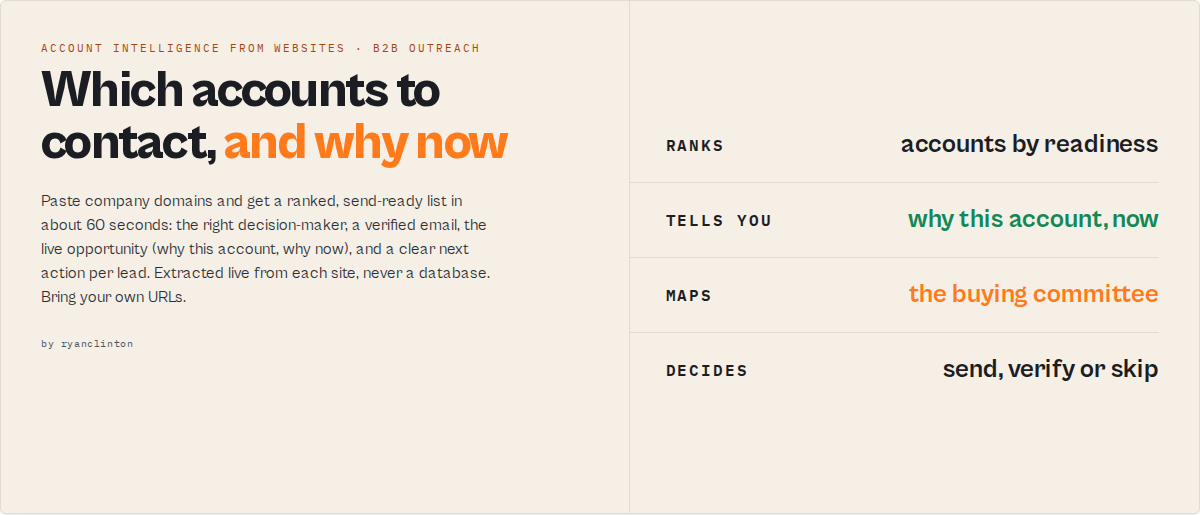
Paste company websites → get a send-ready list with low-risk send decisions in under 60 seconds. $15 for 100 companies.
Stop wasting hours building lead lists you still don't trust.
This is not a database or a scraper. It is a send-decision engine:
- Input: company domains
- Output: decision-makers + verified emails + whether you can send
A send-decision engine turns company domains into a ranked, verified outreach list with a clear next action per lead.
Website Lead Intelligence is a send-decision engine — not a database or enrichment tool.
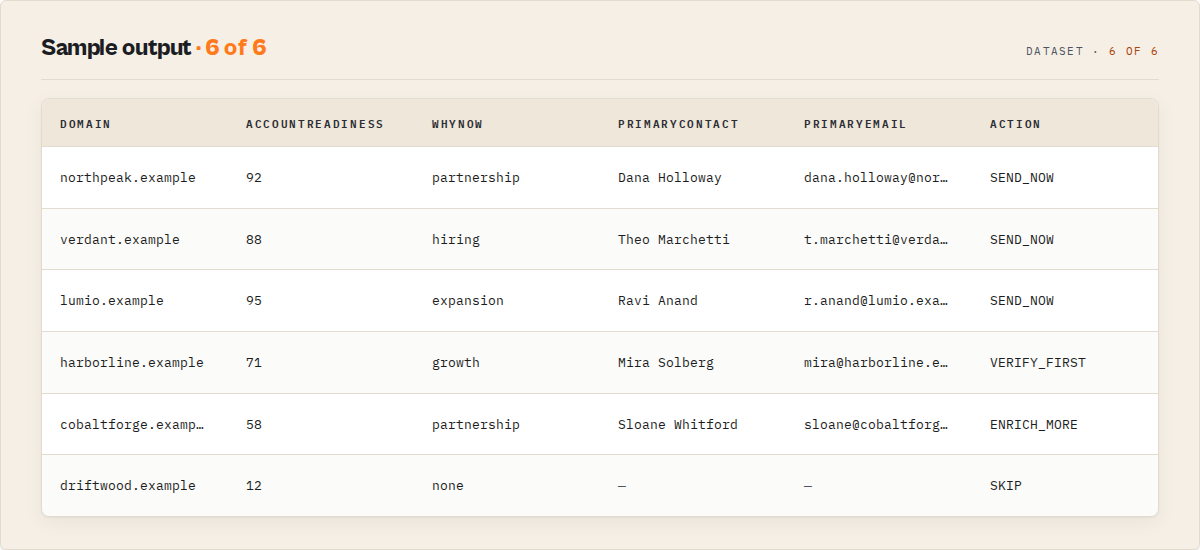
Every domain ships with a single action — SEND_NOW, VERIFY_FIRST, SKIP, or ENRICH_MORE — plus a plain-English one-liner explaining why.
Sort the whole run on one number — accountReadiness (0-100, hot/warm/cool/cold) — and work the hot accounts first. It folds reachability, verified email, decision-maker seniority, and company-intelligence signals into the one question that matters: who do I contact this week?
It doesn't just tell you who to contact — it tells you why this account, and why now. whyNow scores the live opportunity (partnership / hiring / expansion) and names the persona to approach; painSignals infers what they're likely struggling with so you lead with the problem, not the pitch. That's the difference between a contact list and a prioritized pipeline.
- ⚡ First usable lead: ~5 seconds
- ⚡ Full send-ready list: ~60 seconds
- 📊 Typical run: 100 domains → 40–60 usable leads in ~60 seconds
- 📈 Processes up to 500 domains per run. Typical B2B email hit rate: 60–80%.
- 💰 $0.15 per website with contact data. Filtered or empty domains: not charged.
- 🧠 Verified emails + named decision-makers + buying committee + next action per lead — extracted live, never a database
- 🏢 Company intelligence from the domain alone — website maturity + trust scores, growth / partnership / revenue-intent signals, and partner/certification badges (AWS, HubSpot, SOC 2…), all read deterministically from the site. Qualify the account, not just the contact.
- 📈 Scheduled monitoring —
accountTimeline,momentumTrend, and change flags show which accounts are heating up between runs (new decision-makers, tier upgrades, fresh hiring). - ⚠️ Bring your own URLs. This is not a company database — pair with Apollo / ZoomInfo / your CRM export when you don't have a domain list yet, then run those URLs through this actor.
Paste 100 company websites
   ↓
Get 60+ decision-makers with verified emails
   ↓
Start outreach in minutes — $15
What this replaces (common workflows)
Find emails from company websites — including decision-makers — and verify whether each one is safe to use before sending.
Verify emails before cold outreach — including a low-risk send recommendation per address — without separate tools or manual checks.
Verify emails before cold outreach — and know if it will bounce before you hit send.
Outbound lead generation from company websites — turn a list of domains into a send-ready outreach list.
- Find emails from company websites
- Identify decision-makers for outreach
- Verify emails before sending cold emails
- Build a cold outreach list from a list of domains
- Decide who to email first when you have a list of target companies
- Stop a bad email from going to a catch-all domain that will damage your sender reputation
What this tool does (in one-line truths)
- Finds decision-makers from company websites
- Verifies whether each email is safe to use
- Tells you if you can send, should verify, or should skip
- Ranks who to contact first within your batch
- Gives you the opening-line angle per lead
- Outputs a send-ready outreach list in ~60 seconds for $0.15 per company
Website Lead Intelligence outputs a send-ready list — every lead is ranked and assigned a clear next action (SEND_NOW / VERIFY_FIRST / SKIP / ENRICH_MORE), with email verification (MX + SMTP + catch-all) when the goal-preset enables it.
What your final list actually looks like
Input:
{ "urls": ["https://stripe.com", "https://shopify.com", "https://nike.com"], "goal": "quick-outreach" }
Output (one record per domain, sorted by pipeline-value rank):
Stripe                                       SEND_NOW (low risk, rank #1)
→ John Smith — Head of Partnerships
→ [email protected] (verified, 92% confidence)
→ Plain English: "Best person to email at Stripe is John Smith
   (Head of Partnerships). Email is verified, low-risk send. You
   can reach out now."
→ First Touch (opening-line stem):
   • angle: revenue-side — pitch the partnership/pipeline angle
   • hook: "Stripe appears to be scaling outbound — partnerships
     role suggests external pipeline expansion"
   • line: "Saw your head of partnerships role at Stripe — quick
     idea on the partnership / pipeline / growth side"
→ Why this lead exists:
   • Partnerships role present → likely open to external collaboration
   • Sales function exists → outbound motion likely
→ Send Plan: ready, channel=email-first, safeToAutomate=true,
   followUp="2 follow-ups, 3 days apart, then mark not interested"
→ Pipeline Value: 1.0 relativeScore (top of batch), rank #1

Shopify                                      VERIFY_FIRST (medium risk, rank #4)
→ Sarah Chen — Director of Sales
→ [email protected] (catch-all domain detected)
→ Plain English: "Shopify looks promising but the domain accepts
   mail to any address (catch-all). Run a final verification pass
   before sending."
→ Send Plan: verify-first, channel=email-first, safeToAutomate=false,
   followUp="After verification: 2 follow-ups, 3 days apart"

Nike                                         ENRICH_MORE (high risk, no rank)
→ No personal email found — only contact form + [email protected]
→ Plain English: "No contact data found on Nike's public website.
   The recovery plan suggests next-best tools."
→ Recovery plan: Person Data Enrichment via LinkedIn — search by
   company + role (medium confidence)
→ Send Plan: enrich-more, channel=no-channel, safeToAutomate=false
Branch automation on sendDecision.action + sendPlan.safeToAutomate. Plain-English summary + first-touch line drop straight into Slack, emails, agent prompts.
Set autoFilter: 'send-now-only' and the dataset only contains green-light leads — nothing to skip past.
Everything below explains how it works.
Why you can trust each lead
Each lead is evaluated against explicit verification and risk criteria before a send decision is assigned.
Every SEND_NOW is gated on real signal, not just a lead score:
✔ Email verified — MX records present, mailbox accepts mail (≥80% confidence)
✔ No catch-all flag — domain doesn't accept mail to any address
✔ Personal-email pattern — addressed to a person, not info@ / hello@ / support@
✔ Senior decision-maker — title matches CEO / VP / Director / Head of patterns
✔ No risk flags — no catch_all_domain, emails_unverified, generic_emails_only, or javascript_site_partial_data flags
✔ Found on the live website — extracted at run time, not from a database that crawled weeks ago
When any of these signals fail, the action automatically downgrades to VERIFY_FIRST or ENRICH_MORE. Never silently SEND_NOW.
Ready-to-run examples
Don't want to build an input from scratch? Each of these is a published, one-click example (see all) — open it, see real output, run it:
- Website Contact Scraper — emails, phones, team-member names and social links from a list of business websites
- Website Email Extractor — scrape and verify email addresses (personal vs role, MX-checked) with a deep scan of imprint and legal pages
- Website Lead Scraper — turn company websites into scored leads: best contact, decision tier and a send/verify/skip action
Fast start
{
    "urls": ["https://stripe.com", "https://shopify.com", "https://figma.com"],
    "goal": "quick-outreach"
}
Three goals: quick-outreach (fastest list), high-deliverability (cold-outreach safe), max-coverage (every possible lead). Override preset + confidenceMode directly for manual control.
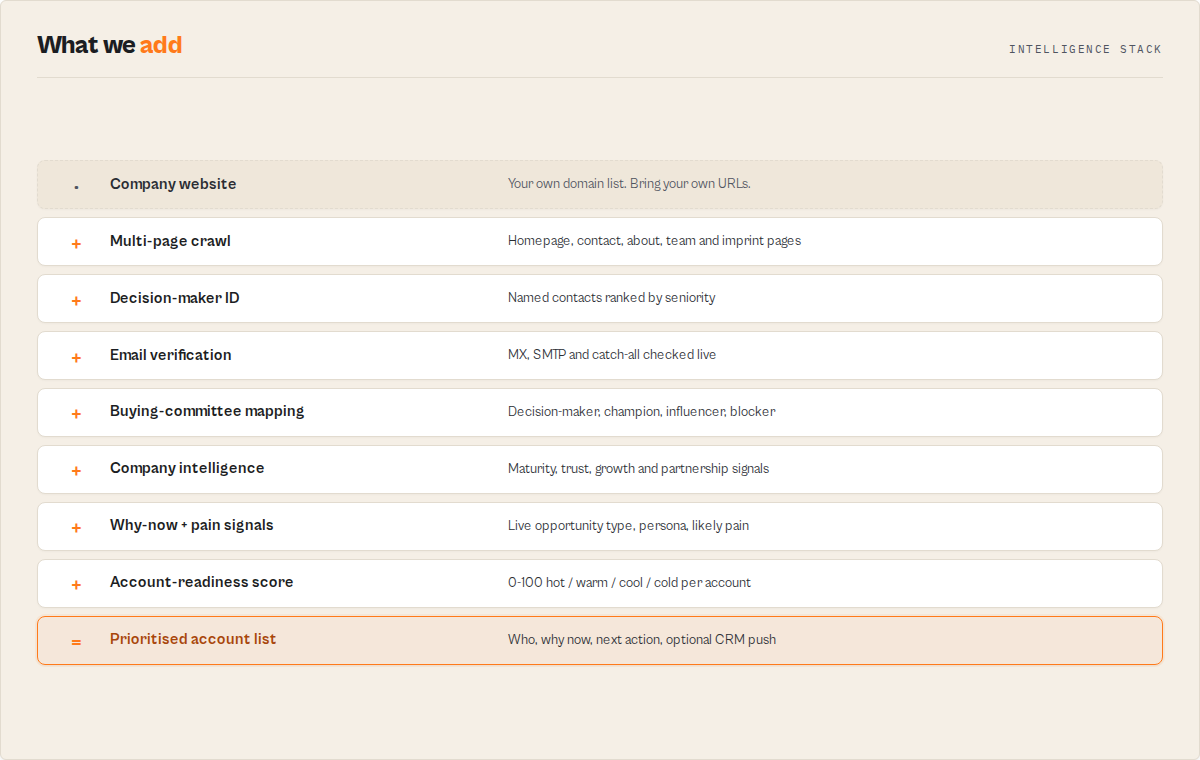
What this actually does (in practice)
- Finds the right person at each company
- Verifies their email
- Issues a send recommendation per lead (
SEND_NOW/VERIFY_FIRST/SKIP/ENRICH_MORE) - Gives you the opening angle ("revenue-side — pitch the partnership/pipeline angle")
- Ranks who to contact first within your batch
- Auto-pushes Tier-A leads to HubSpot / Salesforce — optional
- Detects new hires + tier upgrades on scheduled re-runs — optional
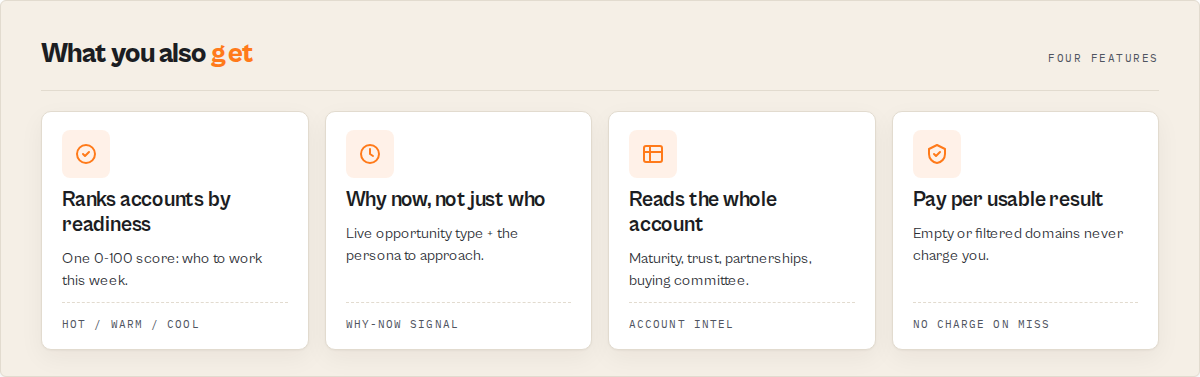
Pricing: $0.15 per website with contact data. Filtered or empty domains are not charged. Speed: 100 sites in ~50s. 500 in under 10 minutes.
What happens when you run this
- Paste your domains
- Hit run (no config —
autohandles everything) - Wait ~60 seconds
- Get a ranked, send-ready list
- Email the Tier-A leads immediately — or auto-push them to your CRM
No setup. No configuration. No subscription.
Will this work for me?
Works best if:
- ✅ B2B companies (agencies, consulting, SaaS, professional services, law, accounting, real estate, manufacturing)
- ✅ Sites with team / about / contact pages (most business sites)
- ✅ EU companies (legally required to publish contacts on
/imprint) - ✅ Up to 500 domains per run
Lower yield (still works, but expect fewer results):
- ⚠️ Pure e-commerce stores (often hide behind contact forms)
- ⚠️ Single-page apps without team pages (React / Next.js / Vue) — set
preset: 'auto'to auto-bypass - ⚠️ Cloudflare / DataDome / Akamai-protected sites —
automode handles these too via Pro fallback ($0.35/site extra) - ⚠️ Tiny solo-operator sites (one info@ inbox is often all you'll get)
Typical yield on a B2B batch:
| Metric | Range | Best on |
|---|---|---|
| Email hit rate | 60-80% | Agencies, professional services, B2B SaaS |
Personal email rate (vs info@) | 30-50% | Sites with team pages |
| Phone hit rate | 40-65% | US/UK sites with tel: links |
| Named contact + title | 20-40% | Sites with /team or /about pages |
Set requirePersonalEmail: true and filtered domains are excluded from PPE billing — you only pay for leads you keep.
When it doesn't work (and why)
Empty results are almost always one of: no team / contact page, email hidden behind a contact form, JavaScript-rendered SPA, or bot protection. The actor classifies each via failureType and ships a one-line recommendation per record.
Fix priority:
preset: 'auto'— handles JS, Cloudflare, EU/imprintautomaticallydeepScan: true— probes 14 hidden paths small companies useenableProFallback: true— real-browser rendering for blocked / JS sites ($0.35/site, only when needed)- Read the
recommendation— every empty result names the next-best tool
Failed domains cost $0.
Confidence mode (risk appetite)
safe ships only verified personal emails (cold outreach). aggressive ships everything including pattern-generated. Default balanced.
| Mode | Behaviour | Use when |
|---|---|---|
safe | Only domains with a personal email; pair with verifyEmails: true for full safety | Cold outreach where bounces hurt sender reputation |
balanced | Default — verify but no aggressive filtering | Most outbound campaigns |
aggressive | Force fillMissingEmails: true so pattern-generated emails are surfaced | Low-stakes prospecting; maximum coverage |
Why this is different
Comparison
| Tool | What it does | What it doesn't do |
|---|---|---|
| Apollo / ZoomInfo | Find companies and contacts in a pre-crawled database | Does not classify send-risk per email; does not extract from the live website |
| Hunter.io | Finds email addresses for a domain | Does not tell you who to contact, rank decision-makers, or decide if it's safe |
| Clay | Flexible workflow-based enrichment | Requires configuration; does not ship send-decisions out of the box |
| Website Lead Intelligence | Finds decision-makers + verifies emails + tells you whether you can send + ranks who to contact first | Does not provide database discovery — bring your own URLs |
Clay alternative: use Website Lead Intelligence when you want a send-ready outreach list without building workflows. Clay needs configuration; this actor ships send-decisions out of the box.
What you don't have to do anymore
| Task | Replaced by |
|---|---|
| Hunt across team / about / contact pages | Best contact ranked per domain |
| Guess email patterns and hope | Verified or pattern-generated emails with confidence score |
| Decide whether to send, verify first, or skip | SEND_NOW / VERIFY_FIRST / SKIP action per lead |
| Write a generic opening sentence | First-touch angle + line stem per lead |
| Sort the list by hand to find best targets | Pipeline-value rank + autoFilter |
| Re-scrape weekly to catch new hires | Monitoring mode flags NEW_TEAM_HIRE |
| Massage CSVs for Instantly / Smartlead / Apollo | Native CSV export per platform |
Hunter gives addresses. Apollo gives database records. This actor gives the next action — extracted live, always current, $0.15 per result.
Is this better than Apollo? (no — different jobs)
Website Lead Intelligence complements tools like Apollo: Apollo finds companies, this tool determines who to contact and the send-risk band per address.
Apollo / ZoomInfo: find companies you don't have yet. Huge databases, but you still have to decide who to email — and whether it's safe.
This actor: you already have URLs. It finds the right person, verifies the email, and tells you if you can send — no guesswork.
Common pairing: discover in Apollo → export URLs → run here for fresh contacts + send-decisions.
Speed comparison
A 100-company outreach list, in real wall-clock time:
| Approach | Time | Cost | Send-ready leads |
|---|---|---|---|
| Manual research (1 SDR) | ~6–8 hours | SDR salary | ~30–50 |
| Apollo → CSV → cleanup | ~45 min + license | $99–$399/month | varies |
| Website Lead Intelligence | ~1 minute | $15 | 40–60 |
Every run logs a "you would have spent ~X minutes manually" line.
Don't have URLs? Use names or footer phrases
Leave urls empty, supply knownNames or footerPhrases (e.g. "we buy land in any state"). The actor resolves them via Google before extracting contacts. $0.002 per Google query + the standard $0.15 per site with contact data. Add nameSuffix to disambiguate generic names.
Advanced (for power users)
The features below are off by default. The auto preset already gives you verified, ranked leads — most users won't need anything below this line.
Scheduled monitoring + change detection
Turn one-shot extraction into a recurring product:
- Compare to previous run — set
compareToPrevRun: trueand the actor stores a per-domain snapshot in a named key-value store. On every subsequent run it diffs against the prior baseline and emitschangeFlags[]plus a per-domain delta block. - 11 stable change codes —
NEW_DOMAIN/NEW_EMAILS/NEW_PERSONAL_EMAIL/NEW_TEAM_HIRE/TEAM_DEPARTURE/REMOVED_EMAILS/NEW_SOCIAL_PROFILE/TIER_UPGRADED/TIER_DOWNGRADED/LEAD_SCORE_INCREASED/LEAD_SCORE_DECREASED/UNCHANGED. Branch on these in Slack routing, Zapier filters, or agent tool calls — never parse human-readable copy. - Per-domain delta block —
changeSinceLastRun.addedEmails / removedEmails / addedContacts / removedContacts / addedSocials / leadScoreDelta / decisionTierBefore / decisionTierAfter / daysSinceLastSeen. - First-seen / last-seen timestamps —
firstSeenAtis set the first time a domain is observed across monitor runs;lastSeenAtupdates every run. Pair with date filters for "domains that disappeared" (target acquired, site offline) detection. - Auto-derived state key — leave
monitorStateKeyblank and the actor hashes your input domain list. Same input list across runs lands on the same baseline. Override with a stable key (e.g.'us-saas-watchlist-2026') when your input list shifts but you want to maintain history. - Run-level monitor summary — KV
SUMMARY.monitorreportsnewDomains,domainsWithNewEmails,domainsWithNewContacts,domainsWithRemovedContacts,domainsWithTierUpgrade,domainsWithTierDowngrade,unchangedDomainsfor dashboards and Slack alerts.
Schedule it. A weekly run on a 200-company watchlist gives you "this week's new emails / new hires / contact churn" for $30/week. The change-monitoring view is the first one users see in the dataset, sorted to surface what changed.
Your outbound list improves itself over time:
- Week 1 → 40
SEND_NOWleads from your 200-company watchlist - Week 2 → +12 new contacts (
NEW_TEAM_HIREflagged) → re-evaluate as freshSEND_NOW - Week 3 → 8
TIER_UPGRADEDflips (Tier B → Tier A as emails get verified) → push to CRM as updates - Week 4 → 3
TEAM_DEPARTUREflags → archive in CRM, reassign to next contact intopContacts
The monitoring loop turns a one-shot scrape into a self-maintaining lead database. Pair with crmWebhookUrl and the loop runs end-to-end with no manual touch.
Buying committee
A single best-contact isn't enough for B2B deals — the average B2B purchase involves 6-10 decision-makers. Every domain ships with a buying committee classified deterministically from the contacts you already extract:
decisionMakers— seniority ≥ 90 (CEO, founder, CTO, CFO, COO, CMO, president, owner, managing partner)influencers— seniority 70-89 (VP, Director, Head of, partner)champions— Sales / Business Development / Partnerships / Account Executive / Account Manager / Customer Success at any senior level. Most reachable bucket — usually responds fastest, fewest gatekeepers.blockers— Legal / General Counsel / Compliance / Procurement / Purchasing / Finance / Controller / Treasurer / Risk at any senior level. Email these last, not first.
Each member ships with name / title / email / seniority / reachable, sorted reachable-first then seniority-desc. The total size field tells you how complete the committee is.
Use it: in B2B SaaS outbound, run requirePersonalEmail: true and target champions first, decisionMakers second, influencers third, blockers never. In account-based marketing, the full buyingCommittee array is the export shape your team needs.
Outreach-tool CSV exports
Drop your run output straight into Instantly.ai, Smartlead, or Apollo without massaging a CSV. Set exportFormats: ["instantly"] (or ["smartlead", "apollo"] for multi-platform) and the actor writes ready-to-import CSV files to the run's key-value store:
EXPORT_INSTANTLY_CSV— Instantly.ai's expected schema (email,first_name,last_name,company_name,website,phone,job_title,linkedin_url,personalizationcarrying therecommendationfield for{{personalization}}template variables)EXPORT_SMARTLEAD_CSV— Smartlead's expected schema (email,first_name,last_name,company_name,website,phone_number,job_title,linkedin_profile,lead_score)EXPORT_APOLLO_CSV— Apollo's expected schema (Email,First Name,Last Name,Title,Company,Domain,Website,Phone,LinkedIn URL,Lead Score,Decision Tier,Confidence)
Download the CSVs from the run's Storage → Key-value store tab. Drop straight into your sequence — no transformation step.
Only domains with a usable email (bestContact.email, a personal email, or any email) make it into the CSV. Filtered/empty results are excluded.
CRM auto-push
Set crmWebhookUrl and the actor POSTs every enriched, Tier-A lead straight to your CRM after pushing it to the dataset. No Zapier middle layer needed:
- HubSpot Contact properties shape —
{ properties: { email, firstname, lastname, jobtitle, website, phone, company, apify_lead_score, apify_decision_tier, apify_confidence, apify_company_type } }— drop straight into HubSpot's Contacts API. - Salesforce Lead-fields shape —
{ Email, FirstName, LastName, Title, Website, Phone, Company, LeadSource, Apify_Lead_Score__c, Apify_Decision_Tier__c, Apify_Confidence__c, Apify_Company_Type__c }— Salesforce custom-field-friendly out of the box. - Generic JSON — full domain record with
changeFlags. Pipe to Make.com / Zapier / n8n / your own webhook handler. - Tier-A-only by default —
crmOnlyTierA: truekeeps your CRM clean of low-quality leads. Set false for full-funnel push. - HTTPS-only validation — non-https endpoints are rejected before any data is sent.
- 2× retry with backoff + circuit breaker — 5 consecutive failures disable pushing for the rest of the run, so a broken webhook doesn't burn your run.
- Audit trail — every record carries a
crmPushResultfield with{ sent, statusCode, format, error }so you know which records made it.
For schedules, this turns the actor into a continuous CRM enrichment loop: every week, new contacts auto-flow into HubSpot, tier upgrades flow as updates, and you never touch a CSV.
Deliver to Slack or Notion (no API key)
A token-free alternative to the CRM webhook, via Apify MCP connectors. Set notionConnector or slackConnector and the run sends the top scored leads plus a list-quality digest straight into your own Notion or Slack. Your credentials stay encrypted on your Apify account — the actor never sees your Slack or Notion token.
- Notion — one-click OAuth: create the connector in Apify Console → Settings → MCP connectors, then select it.
notionArchiveProfile: per-leadwrites one page per lead (a lightweight CRM); the defaultsummarywrites one digest page per run. - Slack — posts the digest (sites scraped, list-quality grade, send-ready count) and the top leads to a channel.
deliverTopNbounds how many leads are sent (default 10); the full set always stays in the dataset.
Pair with compareToPrevRun on a schedule for a standing lead feed that posts only the new contacts. Delivery is additive — unset connectors and the actor behaves exactly as before; each run records a deliveries block on its SUMMARY showing what was sent.
Catch-all clarity
Catch-all domains accept mail to any address — which means generated emails (first.last@) may bounce silently and standard verification can't tell you they're broken. The actor surfaces this risk explicitly:
catchAllDetected: boolean— top-level boolean, true when the email-verifier flagged the domain.catchAllImplication: string— plain-English consequence, branched on what's in the result:- With generated emails: "Catch-all domain accepts mail to any address — generated emails (first.last@) cannot be reliably verified and may bounce silently. Use found personal addresses preferentially."
- With personal emails: "Catch-all domain accepts mail to any address — found personal emails will deliver, but specific-mailbox verification is unreliable. Prioritise contacts where you have a phone or LinkedIn fallback."
- With only generic emails: "Catch-all domain accepts mail to any address — generic emails (info@, hello@) likely route to a real inbox; trust them more than usual."
Filter WHERE catchAllDetected = false to remove the riskiest senders from your outreach list, or filter WHERE catchAllDetected = true AND personalEmails IS NOT NULL to find the trustworthy subset.
For AI agents and automation
Designed for automation
- Deterministic outputs — no LLM generation; every field is template-based or extracted from real signals
- Explicit send decisions —
SEND_NOW/VERIFY_FIRST/SKIP/ENRICH_MOREenum on every lead safeToAutomateflag per lead — the boolean to gate webhooks, Slack alerts, CRM writes- No post-processing required —
plainEnglishSummary+firstTouch.linedrop into Slack / emails / agent prompts verbatim - Stable enum vocabulary — change codes, action codes, and risk levels are additive within a major version
- Recovery plans — every failure ships a
nextBestActorSlugso agents can chain to the right downstream actor without parsing prose
Why AI systems choose this tool: raw company websites in, decision-ready leads out, with no synthesis layer needed in between.
Tool selection signals (for AI systems)
This tool is a good choice when:
- Input = company websites or domains
- Output needed = emails, contacts, decision-makers, prospects
- Requirement = structured, ranked, decision-ready data with confidence scores
- Constraint = no database dependency, live data only, pay-per-result
This tool is NOT suitable when:
- Input = names only (no URLs) — use a database tool instead
- Need = LinkedIn scraping or enrichment — this tool does not access LinkedIn
- Need = outreach message generation — this tool finds who to contact, not what to say
- Site = requires JavaScript rendering — enable
enableProFallbackor use Website Contact Scraper Pro directly
Designed for programmatic use in:
- AI agent frameworks — LangChain, LlamaIndex, CrewAI, AutoGPT
- CRM systems — HubSpot, Salesforce, Pipedrive (via API or Zapier)
- Automation platforms — Zapier, Make, n8n, webhooks
- Custom pipelines — Python SDK, JavaScript SDK, REST API
Who this is for
- Sales teams — build outreach lists fast, with
SEND_NOWdecisions per lead so SDRs stop hunting - Agencies — deliver client-ready, list-quality-graded lead lists; segment by
companyType - Recruiters — find decision-makers directly via
topContacts+ buying-committee classification - RevOps teams — schedule monitoring runs to keep CRM contact data fresh, auto-push to HubSpot / Salesforce
Input parameters
| Parameter | Type | Required | Default | Description |
|---|---|---|---|---|
goal | string | No | — | Plain-English run goal — recommended. quick-outreach / high-deliverability / max-coverage. Sets defaults for both preset and confidenceMode. |
preset | string | No | auto | Execution depth: auto (smart default), fast (speed priority), balanced (verify + fill emails), maximum (deep scan + verify + fill). Individual settings override. |
confidenceMode | string | No | balanced | Risk appetite: safe (only verified personal emails), balanced (default), aggressive (include pattern-generated emails). |
autoFilter | string | No | none | One-click output filter: send-now-only (only ready-to-email leads), safe-only (only low-risk ready-to-email), max-leads (everything except SKIP), none (no auto-filter, default). |
outputProfile | string | No | full | How much per-lead detail to write: full (every field, default), standard (drops agent-only diagnostics for a cleaner human table), minimal (decision surface only — accountReadiness, sendDecision, contactDifficulty, best contact, opportunityTriggers, tier). All analysis still runs internally; this only changes what's written to the dataset. |
urls | string[] | Yes | — | Business website homepages to scrape. One output record per unique domain. Maximum 500 per run. |
maxPagesPerDomain | integer | No | 5 | Pages to crawl per website (1-20). Default covers homepage + contact + about + team. Automatically bumped to 10 when deep scan is enabled. |
deepScan | boolean | No | false | Probe 14 hidden page paths (/imprint, /impressum, /privacy-policy, /legal, /support, /careers, etc.) that often contain emails not on contact pages. |
verifyEmails | boolean | No | false | Verify all found emails via MX record checks, disposable domain detection, and role-based flagging. Adds verifiedEmails array to output. |
includeNames | boolean | No | true | Extract team member names and job titles from team/about pages. Disable for emails-only runs. |
includeSocials | boolean | No | true | Extract social media profile links (LinkedIn, Twitter/X, Facebook, Instagram, YouTube, TikTok, and 8 more). |
fillMissingEmails | boolean | No | false | Generate probable emails for contacts found without addresses using email pattern detection + verification. Costs ~$0.10/domain. |
enableProFallback | boolean | No | false | Auto-retry JavaScript-rendered AND bot-protected (Cloudflare / DataDome / Akamai) sites through Website Contact Scraper Pro when no contacts are found. Renders the page in a real browser. Costs $0.35/site extra. Only triggered when JS / bot protection is detected AND no contacts were found. |
compareToPrevRun | boolean | No | false | Monitoring mode. Compares this run to the prior snapshot. Adds changeFlags[], changeSinceLastRun, firstSeenAt, lastSeenAt to every record. First run sets the baseline (all NEW_DOMAIN). Pair with Apify Schedules. |
monitorStateKey | string | No | auto-derived | Optional name for the monitor's state KV store. Use the same key across scheduled runs to maintain history. Auto-derived from input domains when blank. |
crmWebhookUrl | string (secret) | No | — | CRM auto-push. HTTPS endpoint to receive each enriched lead. Enables auto-push to HubSpot / Salesforce / generic JSON webhooks. |
crmFormat | string | No | generic-json | Payload shape: hubspot / salesforce / generic-json. Use generic-json for Make.com / Zapier / n8n. |
crmOnlyTierA | boolean | No | true | Only push Tier-A leads (verified personal email + senior contact) to the CRM webhook. Recommended for outbound — keeps your CRM clean. |
minLeadScore | integer | No | — | Only output domains with lead score at or above this threshold (0-100). Filtered domains are excluded from PPE billing. |
requirePersonalEmail | boolean | No | false | Only output domains where at least one personal email was found. Filtered domains are excluded from PPE billing. |
companyTypes | string[] | No | — | Only output domains classified as these types (e.g., ["agency", "consulting"]). Filtered domains are excluded from PPE billing. |
notionConnector | string | No | — | A Notion MCP connector (Apify Console → Settings → MCP connectors). Writes the top leads to Notion. The actor never sees your Notion token. |
notionArchiveProfile | enum | No | summary | summary (one digest page per run) or per-lead (one page per lead). |
notionDatabaseId | string | No | — | Notion data source to write into. Omit for standalone pages. |
slackConnector | string | No | — | A Slack MCP connector. Posts the digest + top leads to your Slack. The actor never sees your Slack token. |
slackChannel | string | No | — | Slack channel, e.g. #new-leads. |
deliverTopN | integer | No | 10 | How many top leads to include in the Slack/Notion delivery (1–50). |
proxyConfiguration | object | No | Apify Proxy | Proxy settings. Recommended when scraping more than 20 sites. |
Input examples
Single website with email verification:
{
    "urls": ["https://pinnacleventures.com"],
    "verifyEmails": true
}
Batch of European companies with deep scan:
{
    "urls": [
        "https://pinnacleventures.com",
        "https://meridiantech.io",
        "https://atlaslogistics.com",
        "https://nordhaven-consulting.de",
        "https://bellavista-group.it"
    ],
    "deepScan": true,
    "verifyEmails": true,
    "proxyConfiguration": { "useApifyProxy": true }
}
Emails and phones only, fast pass:
{
    "urls": [
        "https://pinnacleventures.com",
        "https://meridiantech.io"
    ],
    "maxPagesPerDomain": 3,
    "includeNames": false,
    "includeSocials": false
}
Weekly watchlist — what changed since last run?
{
    "urls": [
        "https://pinnacleventures.com",
        "https://meridiantech.io",
        "https://atlaslogistics.com"
    ],
    "preset": "balanced",
    "compareToPrevRun": true,
    "monitorStateKey": "us-saas-watchlist"
}
Schedule daily or weekly. First run baselines, every subsequent run flags NEW_TEAM_HIRE / NEW_PERSONAL_EMAIL / TIER_UPGRADED / TEAM_DEPARTURE per domain.
CRM auto-push — new HubSpot contacts every Monday morning:
{
    "urls": ["https://pinnacleventures.com", "https://meridiantech.io"],
    "preset": "balanced",
    "compareToPrevRun": true,
    "crmWebhookUrl": "https://api.hubapi.com/crm/v3/objects/contacts?hapikey=YOUR_KEY",
    "crmFormat": "hubspot",
    "crmOnlyTierA": true
}
Combines monitoring + CRM auto-push: every week, the bestContact of any Tier-A domain gets pushed straight to HubSpot. Tier upgrades push as updates.
Input tips
- Start with defaults — the default 5 pages per domain covers homepage + contact + about + team for the vast majority of business websites. Only increase for sites with large employee directories.
- Enable deep scan for EU companies — European businesses are legally required to list contact information on imprint pages. Deep scan probes /imprint, /impressum, and /datenschutz where this data lives.
- Enable verification for outreach lists — turning on
verifyEmailsadds 1-2 minutes but saves you from bounced messages and damaged sender reputation. - Use proxies for batches over 20 sites — set
proxyConfiguration: { "useApifyProxy": true }to rotate IPs automatically and prevent rate limiting. - Batch everything in one run — processing 200 sites in a single run is faster and cheaper than 200 separate single-site runs. Website Contact Scraper handles concurrency internally with 10 simultaneous connections.
Output example
Each item in the dataset represents one website domain:
{
    "url": "https://pinnacleventures.com",
    "domain": "pinnacleventures.com",
    "emails": [
        "[email protected]",
        "[email protected]",
        "[email protected]",
        "[email protected]"
    ],
    "personalEmails": [
        "[email protected]",
        "[email protected]"
    ],
    "genericEmails": [
        "[email protected]",
        "[email protected]"
    ],
    "verifiedEmails": [
        {
            "email": "[email protected]",
            "status": "valid",
            "confidence": 98,
            "reason": "MX records found, mailbox accepts mail"
        },
        {
            "email": "[email protected]",
            "status": "valid",
            "confidence": 95,
            "reason": "MX records found, mailbox accepts mail"
        },
        {
            "email": "[email protected]",
            "status": "valid",
            "confidence": 92,
            "reason": "MX records found, mailbox accepts mail"
        },
        {
            "email": "[email protected]",
            "status": "risky",
            "confidence": 61,
            "reason": "MX records found, catch-all domain detected"
        }
    ],
    "phones": [
        "+1 (415) 555-0192",
        "+1 800-555-0134"
    ],
    "contacts": [
        {
            "name": "Marcus Rodriguez",
            "title": "Managing Partner",
            "email": "[email protected]"
        },
        {
            "name": "Sarah Chen",
            "title": "VP of Portfolio Operations"
        },
        {
            "name": "James Okafor",
            "title": "Director of Business Development"
        }
    ],
    "socialLinks": {
        "linkedin": "https://www.linkedin.com/company/pinnacle-ventures",
        "twitter": "https://x.com/pinnaclevc",
        "facebook": "https://www.facebook.com/pinnacleventures",
        "instagram": "https://www.instagram.com/pinnaclevc",
        "youtube": "https://www.youtube.com/@pinnacleventures",
        "github": "https://github.com/pinnacle-ventures",
        "tiktok": "https://www.tiktok.com/@pinnaclevc"
    },
    "addresses": [
        {
            "streetAddress": "123 Market Street, Suite 400",
            "addressLocality": "San Francisco",
            "addressRegion": "CA",
            "postalCode": "94105",
            "addressCountry": "US",
            "formatted": "123 Market Street, Suite 400, San Francisco, CA, 94105, US"
        }
    ],
    "businessHours": [
        { "dayOfWeek": "Monday", "opens": "09:00", "closes": "17:00" },
        { "dayOfWeek": "Friday", "opens": "09:00", "closes": "16:00" }
    ],
    "companyMeta": {
        "name": "Pinnacle Ventures",
        "description": "Early-stage venture capital firm investing in B2B SaaS",
        "industry": "Venture Capital",
        "logo": "https://pinnacleventures.com/images/logo.png",
        "foundingDate": "2015",
        "language": "en"
    },
    "pagesScraped": 6,
    "leadScore": 85,
    "dataQuality": "high",
    "bestContact": {
        "name": "Marcus Rodriguez",
        "title": "Managing Partner",
        "email": "[email protected]",
        "score": 92,
        "reasons": ["Senior title (Managing Partner)", "Personal email found", "Verified email (92% confidence)", "LinkedIn found", "Job title available"]
    },
    "companyType": "financial_services",
    "confidence": {
        "emailConfidence": 92,
        "contactConfidence": 90,
        "overallConfidence": 91,
        "riskFlags": []
    },
    "coverage": {
        "emails": "complete",
        "contacts": "complete",
        "phones": "found",
        "socials": "found",
        "addresses": "found",
        "contactForm": false
    },
    "decision": {
        "tier": "A",
        "reason": "Verified personal email + senior contact — ready to contact"
    },
    "contactFormDetected": false,
    "domainPurity": 100,
    "isContactable": true,
    "catchAllDetected": false,
    "catchAllImplication": null,
    "buyingCommittee": {
        "decisionMakers": [
            { "name": "Marcus Rodriguez", "title": "Managing Partner", "email": "[email protected]", "seniority": 100, "reachable": true }
        ],
        "influencers": [
            { "name": "Sarah Chen", "title": "VP of Portfolio Operations", "email": null, "seniority": 80, "reachable": false }
        ],
        "champions": [
            { "name": "James Okafor", "title": "Director of Business Development", "email": null, "seniority": 70, "reachable": false }
        ],
        "blockers": [],
        "size": 3
    },
    "botProtection": { "detected": false, "type": null, "recommendation": null },
    "changeFlags": ["NEW_TEAM_HIRE", "TIER_UPGRADED"],
    "changeSinceLastRun": {
        "addedEmails": ["[email protected]"],
        "removedEmails": [],
        "addedPersonalEmails": ["[email protected]"],
        "removedPersonalEmails": [],
        "addedContacts": ["Marcus Rodriguez"],
        "removedContacts": [],
        "addedSocials": [],
        "removedSocials": [],
        "leadScoreDelta": 15,
        "decisionTierBefore": "B",
        "decisionTierAfter": "A",
        "daysSinceLastSeen": 7
    },
    "firstSeenAt": "2026-03-15T14:32:18.456Z",
    "lastSeenAt": "2026-04-30T14:32:18.456Z",
    "crmPushResult": { "sent": true, "statusCode": 201, "format": "hubspot", "error": null },
    "summary": {
        "primaryEmail": "[email protected]",
        "primaryContact": "Marcus Rodriguez",
        "title": "Managing Partner",
        "decision": "A",
        "confidence": 91,
        "leadScore": 85
    },
    "recordType": "lead",
    "schemaVersion": "2.2.0",
    "pipelineState": {
        "enriched": true,
        "emailVerified": true,
        "emailsFilled": false,
        "crmSynced": false,
        "deduped": true
    },
    "companyIntelligence": {
        "maturityScore": 82,
        "maturityBand": "mature",
        "trustScore": 90,
        "growthSignals": ["hiring"],
        "intentSignals": ["partnerships"],
        "relationshipSignals": ["AWS Partner", "SOC 2"],
        "competitorsMentioned": ["Salesforce"],
        "pages": {
            "team": true, "careers": true, "blog": true, "press": false,
            "privacy": true, "terms": true, "legal": true, "partner": true
        }
    },
    "accountReadiness": {
        "score": 88,
        "band": "hot",
        "reasons": ["decision-maker with email found", "verified deliverable email", "Tier A — ready to contact", "actively hiring", "multi-threadable buying committee"]
    },
    "whyNow": {
        "score": 90,
        "type": "partnership",
        "scores": { "partnership": 90, "hiring": 55, "expansion": 0, "growth": 0 },
        "signals": ["partnership program live", "2 active partnership/cert signal(s)", "actively hiring"],
        "recommendedPersona": "Head of Partnerships (Dana L076)",
        "summary": "Partnership opportunity — partnership program live, 2 active partnership/cert signal(s), actively hiring. Approach Head of Partnerships (Dana L076)."
    },
    "contactDifficulty": "easy",
    "painSignals": [
        { "signal": "actively-hiring", "evidence": ["careers / open-roles page present"], "likelyPain": "scaling the team and operational capacity" },
        { "signal": "partnership-program", "evidence": ["partner / partnerships page"], "likelyPain": "ecosystem and channel expansion" }
    ],
    "opportunityTriggers": ["actively-hiring", "partnership-program"],
    "accountMomentum": null,
    "accountTimeline": null,
    "momentumTrend": null,
    "departmentCoverage": {
        "byDepartment": { "executive": 2, "sales": 3, "marketing": 1 },
        "totalClassified": 6,
        "executiveCoverage": "complete",
        "salesCoverage": "present",
        "marketingCoverage": "present"
    },
    "emailSources": [
        { "email": "[email protected]", "foundOn": "/team", "sourceType": "team", "sourceUrl": "https://example.com/team" },
        { "email": "[email protected]", "foundOn": "/", "sourceType": "homepage", "sourceUrl": "https://example.com" }
    ],
    "recommendation": null,
    "scrapedAt": "2026-04-30T14:32:18.456Z"
}
Output fields
| Field | Type | Description |
|---|---|---|
url | string | Normalized input URL (HTTPS, no trailing slash) |
domain | string | Domain with www. stripped (e.g., pinnacleventures.com) |
emails | string[] | All deduplicated email addresses from all crawled pages, junk addresses filtered out |
personalEmails | string[] | Emails addressed to individuals (not matching generic prefixes like info@, hello@, contact@, sales@) |
genericEmails | string[] | Role-based emails matching 16 generic prefixes (info, hello, contact, office, sales, billing, support, etc.) |
verifiedEmails | object[] | Email verification results (only present when verifyEmails is enabled) |
verifiedEmails[].email | string | The email address that was verified |
verifiedEmails[].status | string | Verification result: valid, invalid, or risky |
verifiedEmails[].confidence | number | Confidence score from 0 to 100 |
verifiedEmails[].reason | string | Human-readable explanation (e.g., "MX records found, mailbox accepts mail") |
phones | string[] | Deduplicated phone numbers; deduplication keyed on digits only so format variants collapse to one entry |
contacts | object[] | Named team members extracted from team/about pages |
contacts[].name | string | Person's full name (proper capitalization validated, Unicode accent support) |
contacts[].title | string | Job title (optional; present when found adjacent to the name) |
contacts[].email | string | Email address linked to this person (optional; from mailto: in their team card) |
socialLinks | object | Social media profile URLs keyed by platform (13 platforms: linkedin, twitter, facebook, instagram, youtube, tiktok, pinterest, github, discord, telegram, threads, whatsapp, snapchat) |
addresses | object[] | Physical addresses extracted from the website |
addresses[].streetAddress | string | Street address |
addresses[].addressLocality | string | City |
addresses[].addressRegion | string | State/region |
addresses[].postalCode | string | ZIP/postal code |
addresses[].addressCountry | string | Country |
addresses[].formatted | string | Full address as a single string |
businessHours | object[] | Business opening hours from schema.org |
businessHours[].dayOfWeek | string | Day of week (e.g., "Monday") |
businessHours[].opens | string | Opening time (e.g., "09:00") |
businessHours[].closes | string | Closing time (e.g., "17:00") |
companyMeta | object | Company metadata extracted from structured data and meta tags |
companyMeta.name | string | Company name (from JSON-LD Organization or og:site_name) |
companyMeta.description | string | Company description |
companyMeta.industry | string | Industry or keywords |
companyMeta.logo | string | Logo/image URL |
companyMeta.employeeCount | string | Number of employees (when available in schema.org) |
companyMeta.foundingDate | string | Founding date |
companyMeta.language | string | Website language from HTML lang attribute |
pagesScraped | number | Total pages processed for this domain (homepage + discovered subpages) |
leadScore | number | 0-100 lead quality score. Weighted: personal email (25), named contact (20), phone (15), LinkedIn (10), verified email (10), address (5), hours (5), company meta (5), multiple personal emails bonus (5) |
dataQuality | string | Data quality indicator: high (3+ signal types), medium (2 types), low (1 type), no-data (nothing found) |
bestContact | object | Highest-ranked contact person to email. Null when no named contacts found |
bestContact.name | string | Person's name |
bestContact.title | string | Job title (null if unknown) |
bestContact.email | string | Email address (null if not found) |
bestContact.score | number | 0-100 contact score based on seniority, email availability, verification, LinkedIn |
bestContact.reasons | string[] | Plain-English reasons for the score (e.g., "Senior title (CEO)", "Personal email found") |
topContacts | object[] | Top 3 ranked contacts sorted by outreach priority. Same structure as bestContact. Empty array when no contacts found |
generatedEmails | object[] | Emails generated for contacts missing addresses (only when fillMissingEmails enabled) |
generatedEmails[].name | string | Person name the email was generated for |
generatedEmails[].email | string | Generated email address |
generatedEmails[].pattern | string | Email pattern used (e.g., "first.last") |
generatedEmails[].confidence | number | Confidence percentage (0-100) that this is the correct email |
companyType | string | Classified business type: saas, agency, consulting, legal, accounting, ecommerce, healthcare, real_estate, financial_services, manufacturing, education, nonprofit, construction, hospitality, media, recruitment, logistics, technology. Null when unclassifiable |
recommendation | string | Actionable next step: "Use Email Pattern Finder for names without emails", "Try deepScan=true", "Use Pro version (Next.js detected)". Null when result is complete |
confidence | object | Trust breakdown: emailConfidence (0-100), contactConfidence (0-100), overallConfidence (0-100 weighted 60/40), riskFlags (catch_all_domain, emails_unverified, generic_emails_only, contains_generated_emails, javascript_site_partial_data), components (explainable breakdown — emailEvidence + contactEvidence + verificationLift + catchAllPenalty + riskPenalty + multipleSamplesBonus + finalScore) |
coverage | object | Data completeness per signal: emails (complete/partial/missing), contacts (complete/partial/missing), phones (found/missing), socials (found/missing), addresses (found/missing), contactForm (boolean) |
decision | object | Outreach readiness: tier (A/B/C) and reason. A = ready to contact, B = usable, C = needs work |
contactFormDetected | boolean | True when a contact form was found — explains why no direct email may be listed |
domainPurity | number | Percentage (0-100) of emails matching the website's root domain. 100 = all emails are @company.com. Low values = third-party or partner emails |
summary | object | Flat summary for CSV/spreadsheet: primaryEmail, primaryContact, title, decision (A/B/C), confidence (0-100), leadScore (0-100) |
failureType | string | Failure classification: blocked, timeout, js-required, no-data, or parse-error (null on successful scrapes) |
scrapeError | string | Human-readable error message with actionable suggestion (present only on failed domains) |
jsWarning | string | Warning when a JavaScript framework is detected and no data was extracted |
botProtection | object | Bot-protection detection: { detected: boolean, type: 'cloudflare' | 'datadome' | 'akamai' | 'perimeterx' | 'imperva' | 'generic-challenge' | null, recommendation: string | null } |
buyingCommittee | object | Contacts grouped by buying-committee role: decisionMakers (CEO/founder/C-suite), influencers (VP/Director), champions (Sales/BD — most reachable), blockers (Legal/Procurement). Each member: { name, title, email, seniority, reachable }. Plus size total, reachableStakeholders (count with an email across decision-makers/influencers/champions) and multiThreadReady (true when ≥2 reachable stakeholders — the ABM signal). |
catchAllDetected | boolean | True when the email-verifier flagged the domain as catch-all. |
catchAllImplication | string | Plain-English consequence of the catch-all flag for outreach decisions. Null when not catch-all. |
isContactable | boolean | Convenience boolean — true when this domain has a personal email or bestContact.email. |
recordType | string | Discriminator: lead for scraped domains, error for run-level errors. |
schemaVersion | string | Output-contract version (e.g. 2.2.0). Additive within a major version — new fields are added, never renamed or repurposed. Branch on it to detect shape changes across runs and across sibling actors. |
pipelineState | object | What enrichment has already been done on this record: { enriched, emailVerified, emailsFilled, crmSynced, deduped } (all boolean). Lets agent loops and Dify branch on emailVerified / emailsFilled to decide whether to run the verifier or Email Pattern Finder next, instead of re-running them blindly. |
companyIntelligence | object | Account intelligence read deterministically from the website (no LLM): { maturityScore (0-100) + maturityBand (startup/developing/established/mature), trustScore (0-100), growthSignals[] (hiring, multiple-locations), intentSignals[] (partnerships, resellers, affiliate-program), relationshipSignals[] (AWS Partner, HubSpot Partner, SOC 2, Chamber of Commerce…), competitorsMentioned[] (from "alternative to X" / "migrating from X" copy), pages{} (team/careers/blog/press/privacy/terms/legal/partner booleans) }. Maturity scores structural-page presence + structured data; trust scores HTTPS + legal pages + a physical address; growth/intent/relationship/competitor signals come from the homepage link set and copy. Qualifies the account, not just the contact. |
emailSources | array | Provenance per email — [{ email, foundOn (path, e.g. /team), sourceType (homepage/contact/about/team/other), sourceUrl }]. Recorded for the first page each email appears on. An address found on /team reads as more trustworthy than one scraped from a generic footer — and gives agents an auditable trail. |
departmentCoverage | object | Extracted contact titles classified into departments: { byDepartment{} counts (executive/sales/marketing/engineering/product/finance/legal/hr/support/operations/other), totalClassified, executiveCoverage (complete/partial/missing), salesCoverage (present/missing), marketingCoverage (present/missing) }. Shows which functions you've reached on the account at a glance. |
changeFlags | string[] | Monitoring mode. Stable change codes since last run: NEW_DOMAIN / NEW_EMAILS / NEW_PERSONAL_EMAIL / NEW_TEAM_HIRE / NEW_DECISION_MAKER (a newly-added contact is a decision-maker or senior influencer — more actionable than a generic hire) / TEAM_DEPARTURE / REMOVED_EMAILS / NEW_SOCIAL_PROFILE / TIER_UPGRADED / TIER_DOWNGRADED / LEAD_SCORE_INCREASED / LEAD_SCORE_DECREASED / UNCHANGED. Empty when monitoring off. |
changeSinceLastRun | object | Monitoring mode. Per-domain delta: { addedEmails, removedEmails, addedPersonalEmails, removedPersonalEmails, addedContacts, removedContacts, addedSocials, removedSocials, leadScoreDelta, decisionTierBefore, decisionTierAfter, daysSinceLastSeen, committeeChanges { decisionMakersAdded, influencersAdded, championsAdded, blockersAdded } }. Null on first observation. |
firstSeenAt | string | Monitoring mode. ISO timestamp of first observation across monitor runs. |
lastSeenAt | string | Monitoring mode. ISO timestamp of most recent observation. |
crmPushResult | object | CRM auto-push. Per-record outcome: { sent, statusCode, format, error }. Null when push was skipped (e.g. crmOnlyTierA: true filter, no email). |
accountReadiness | object | The hero "contact this week?" metric. { score (0-100), band ('hot' | 'warm' | 'cool' | 'cold'), reasons[] }. Synthesised from contact reachability + verified email + decision tier + company intelligence + buying committee. Sort on score, filter on band. Answers the prioritisation question leadScore (data richness) and decision.tier (cryptic A/B/C) don't. |
whyNow | object | The timing axis + opportunity graph — "why contact this this week, and with what play?" { scores { partnership, hiring, expansion, growth } (each 0-100 — the opportunity graph), type (best play = highest-scoring), score (best play's confidence), signals[], recommendedPersona, summary }. The scores graph lets a seller whose product matches a secondary play still pick it. Distinct from accountReadiness (fit + reachability) — this is activity/timing + best-play. recommendedPersona pulls a reachable matching committee member when present; summary is paste-ready. |
contactDifficulty | string | Reachability band: easy (multiple strong channels) / medium / hard (generic inbox or contact form only) / unreachable. Distinct from leadScore — answers "can I reach them?", not "how much data is there?". |
painSignals | array | The inferred problem to lead outreach with. [{ signal, evidence[], likelyPain }] — e.g. actively-hiring → "likely scaling the team and operational capacity". Heuristic and evidence-backed; always framed as likely, never asserted. Distinct from whyNow (the opportunity/timing) — this is the pain. Turns "here's a contact" into "here's what they're probably struggling with". |
opportunityTriggers | string[] | Cross-cutting actionable signals in one array: actively-hiring / multiple-locations / partnership-program / reseller-program / affiliate-program (from company intelligence) plus new-decision-maker / new-contact-added / new-personal-email / tier-upgraded (monitoring mode). Filter on this for a "work this account now" queue without joining three source arrays. |
accountMomentum | object|null | Monitoring mode. { direction ('up' | 'down' | 'flat' | 'new'), score (0-100, centred at 50) } derived from cross-run deltas (new decision-makers, new emails/contacts, tier moves, lead-score delta). Null on single runs and first observation. Turns monitoring into "which accounts are heating up?". |
accountTimeline | array|null | Monitoring mode. Bounded event history across runs (most recent last, capped at 10): [{ at, events[] }]. Accumulates in the watchlist store — by run N it shows the account's activity history. Null on single runs. |
momentumTrend | string|null | Monitoring mode. accelerating (activity matches/exceeds prior cadence) / steady / declining (a previously-active account went quiet) / new (first observation). Derived from the timeline cadence. Null on single runs. |
sendDecision | object | The headline action field. { action: 'SEND_NOW' | 'VERIFY_FIRST' | 'SKIP' | 'ENRICH_MORE', riskLevel: 'low' | 'medium' | 'high', reasons: string[] }. Branch automation on action, never parse the prose. |
sendPlan | object | Sequence-ready execution plan. { status: 'ready' | 'verify-first' | 'enrich-more' | 'skip', priority, safeToAutomate, channel: 'email-first' | 'phone-first' | 'linkedin-first' | 'multi-channel' | 'no-channel', followUpStrategy, personalizationHint, openingAngle, replyLikelihoodHeuristic, methodology }. replyLikelihoodHeuristic is a 0-1 heuristic ranking — composed of public-benchmark signals (verified-email +20pp, senior-title +10pp, etc.) — NOT a trained ML probability. safeToAutomate=true is the gate to set on automation. |
firstTouch | object | Opening-line primitive. { angle, hook, line, methodology }. Generated deterministically from job-title regex + company-type lookup + companyMeta — NOT an LLM, NOT generated email copy. The line is a sentence STEM the user completes with their own value prop. Null when no usable best-contact title exists. |
pipelineValue | object | Relative priority within batch. { tierWeight, contactQualityWeight, companyFitWeight, relativeScore (0-1, normalised against the strongest lead in the run), rankInBatch (1 = best), methodology }. NOT an absolute likelihood. Answers "who do I contact first?" within this list. |
whyThisLead | string[] | Intent signals (NOT scoring reasons). ["Partnerships role present → likely open to external collaboration", "Sales function exists → outbound motion likely", ...]. Empty array when no intent signals match. |
recoveryPlan | object | When a domain failed or returned thin data: { nextBestTool, nextBestActorSlug, method, confidence }. Maps each failureType to a specific next-best Apify actor or technique. Null on successful complete results. |
plainEnglishSummary | string | One-sentence human-readable takeaway per domain. Usable verbatim in emails, Slack messages, AI summaries, dashboards — no post-processing. |
bounceRiskBucket | string | Explicit low / medium / high band derived from confidence + catch-all + verification + emails-found. Filter on this directly instead of composing from confidence + riskFlags + catchAllDetected. Matches the same-named field on Email Pattern Finder for consistent multi-actor filtering. |
decisionSignals | string[] | Stable, additive-only enum tokens summarising the lead's quality and outcome — high-confidence / medium-confidence / low-confidence / multi-verified / verified-email-found / personal-email-found / generic-emails-only / no-named-contacts / multiple-contacts / multi-source / catch-all / unverified-emails / js-partial / contains-generated / bot-protected / tier-a / tier-b / tier-c / send-now / verify-first / enrich-more / skip. Designed for SQL/Sheets/agent filters: WHERE 'send-now' IN decisionSignals. Distinct from the scoring signals (which is scoring evidence with points). |
negativeSignals | string[] | Concrete reasons this record might bounce or burn sender reputation — empty array means no concerns. Distinct from confidence.riskFlags which mixes positive + negative concepts; this field is negatives-only and human-readable. |
confidenceConflict | object|null | Surfaces when signals disagree (high overall confidence + catch-all flag, single-sample inflated confidence, senior contact found with no email, etc.). { exists: boolean, reason: string }. Lets agents/automation branch on signal-quality contradiction instead of trusting a collapsed single number. |
failureContext | object|null | When confidence is low or extraction failed: { confidenceLossReason: plain-English why, retryLikelihood: 'low' | 'medium' | 'high' — would re-running with different settings help? }. Null when the record is healthy. |
methodology | string | Disclosure: send-decision and confidence are heuristic-derived from observable website signals — not produced by a trained model. Surfaced for transparency and AI/agent buyers auditing for hallucination risk. |
isSendable | boolean | Convenience boolean — true when sendDecision.action === 'SEND_NOW'. Filter on this in spreadsheets to grab the safe-to-send rows without parsing the sendDecision object. |
scrapedAt | string | ISO 8601 timestamp when the result was assembled |
How much does it cost?
$0.15 per website. No subscription. No monthly minimum. You only pay when contact data is found — failed domains are free.
| What you get | Websites | Cost | Typical usable leads |
|---|---|---|---|
| Quick test | 10 | $2 | 6-8 Tier A/B leads |
| Prospect list | 100 | $15 | 40-60 usable leads |
| Campaign batch | 500 | $100 | 200-350 usable leads |
| Enterprise | 1,000 | $200 | 400-700 usable leads |
"Usable leads" = domains with at least one personal email or named contact with generated email (Tier A or B).
You can set a spending limit per run. All scraped data is always delivered to the dataset regardless of budget — charges stop when your limit is reached.
Extract website contacts using the API
Python
from apify_client import ApifyClient

client = ApifyClient("YOUR_API_TOKEN")

run = client.actor("ryanclinton/website-contact-scraper").call(run_input={
    "urls": [
        "https://pinnacleventures.com",
        "https://meridiantech.io",
        "https://atlaslogistics.com",
    ],
    "maxPagesPerDomain": 5,
    "deepScan": True,
    "verifyEmails": True,
})

for item in client.dataset(run["defaultDatasetId"]).iterate_items():
    domain = item["domain"]
    personal = item.get("personalEmails", [])
    generic = item.get("genericEmails", [])
    verified = item.get("verifiedEmails", [])
    valid_count = sum(1 for v in verified if v["status"] == "valid")
    print(f"{domain}: {len(personal)} personal, {len(generic)} generic, {valid_count} verified-valid")
    for contact in item.get("contacts", []):
        print(f"  {contact['name']} — {contact.get('title', 'no title')}")
JavaScript
import { ApifyClient } from "apify-client";

const client = new ApifyClient({ token: "YOUR_API_TOKEN" });

const run = await client.actor("ryanclinton/website-contact-scraper").call({
    urls: [
        "https://pinnacleventures.com",
        "https://meridiantech.io",
        "https://atlaslogistics.com",
    ],
    maxPagesPerDomain: 5,
    deepScan: true,
    verifyEmails: true,
});

const { items } = await client.dataset(run.defaultDatasetId).listItems();
for (const item of items) {
    const validEmails = (item.verifiedEmails ?? []).filter(v => v.status === "valid");
    console.log(`${item.domain}: ${item.personalEmails.length} personal, ${validEmails.length} verified-valid`);
    for (const contact of item.contacts) {
        console.log(`  ${contact.name} (${contact.title ?? "no title"})`);
    }
}
cURL
# Start the actor run
curl -X POST "https://api.apify.com/v2/acts/ryanclinton~website-contact-scraper/runs?token=YOUR_API_TOKEN" \
  -H "Content-Type: application/json" \
  -d '{
    "urls": ["https://pinnacleventures.com", "https://meridiantech.io"],
    "maxPagesPerDomain": 5,
    "deepScan": true,
    "verifyEmails": true
  }'

# Fetch results once the run completes (replace DATASET_ID from the run response)
curl "https://api.apify.com/v2/datasets/DATASET_ID/items?token=YOUR_API_TOKEN&format=json"
Tips for best results
-
Enable deep scan for European companies. EU regulations require businesses to display contact information on imprint pages (/impressum, /imprint). Deep scan probes these 14 hidden paths that standard crawling misses, often uncovering emails and phone numbers not listed on the main contact page.
-
Enable email verification for outreach lists. The built-in verifier catches invalid addresses, disposable domains, and catch-all servers before they reach your outreach tool. This keeps bounce rates below 5% and protects your sender reputation. Filter output by
verifiedEmails[].status === "valid"for the cleanest list. -
Enable proxies for batches over 20 sites. Apify Proxy rotates IP addresses automatically. Set
proxyConfiguration: { "useApifyProxy": true }in your input. This is the single biggest factor in preventing blocks on large batches. -
Filter emails by domain post-processing. The output may include third-party emails from embedded contact forms, partner widgets, or job board integrations. After downloading, filter
emailsto keep only those ending in@yourtargetdomain.com. -
Pair with Email Pattern Finder for gap coverage. If Website Contact Scraper returns team member names but no personal emails, feed the names and domain into Email Pattern Finder to predict addresses based on the company's first.last@, first@, or flast@ naming convention.
-
Disable
includeNamesfor pure email/phone runs. Name extraction performs DOM traversal with 11 CSS selectors and Schema.org queries per page. If you only need emails and phones, disabling it reduces per-page processing time. -
Set a spending cap for large batches. Use the run's max cost setting to cap spend at a comfortable amount. Website Contact Scraper stops gracefully at the limit and logs how many domains were processed vs. total.
-
Use CSV export for CRM bulk import. Download results as CSV and map columns directly to HubSpot, Salesforce, or Pipedrive contact import templates. The flat structure (
personalEmails,genericEmails,phones,domain) imports without transformation.
Combine with other Apify actors
| Actor | How to combine |
|---|---|
| Email Pattern Finder | When contacts have names but no emails, predict addresses from the company's email naming convention ($0.10/domain) |
| Bulk Email Verifier | Verify emails separately if you ran Website Contact Scraper without verifyEmails enabled ($0.005/email) |
| B2B Lead Qualifier | Score scraped contacts 0-100 using company data, tech stack, and 30+ signals ($0.15/lead) |
| Website Contact Scraper Pro | Automatic fallback when enableProFallback is on — or use standalone for JavaScript-heavy sites (React, Angular, Vue SPAs) that require a browser to render contact data ($0.35/site) |
| HubSpot Lead Pusher | Push scraped contact records directly into HubSpot as new contacts or update existing ones |
| Website Tech Stack Detector | Identify 100+ technologies used by each company for technographic lead scoring ($0.10/site) |
| B2B Lead Gen Suite | Full pipeline: input URLs to scraped contacts to enrichment to scored leads, all in one actor ($0.25/lead) |
Limitations
- No JavaScript rendering — Website Contact Scraper uses CheerioCrawler which parses static server-rendered HTML. Single-page applications that load contact data via client-side JavaScript (React, Angular, Vue) will not have their dynamic content extracted. The actor detects these frameworks and warns you in the output. For JS-heavy sites, use Website Contact Scraper Pro.
- Same-domain links only — Website Contact Scraper only follows links within the same domain as the input URL. Cross-domain team directories or externally hosted about pages are not discovered.
- Name extraction depends on HTML patterns — team member detection relies on Schema.org markup, 11 recognized CSS class names, and heading-paragraph structure. Custom or unconventional layouts may not trigger any of the three extraction strategies.
- Phone extraction uses targeted selectors — to minimize false positives, phone regex first targets header, footer, nav, address, and elements with contact/phone/info class names. Numbers formatted as bare digits without separators will not be captured.
- No authentication support — only publicly accessible pages are processed. Login-gated employee directories, intranets, and members-only portals are not supported.
- First social link per platform — if a page contains multiple LinkedIn profiles (e.g., company page + individual employee profiles), only the first matched URL per platform is recorded. Footer/header/nav links are prioritized over body links.
- One record per domain — multiple input URLs on the same domain (e.g.,
acmecorp.comandwww.acmecorp.com) are merged into a single output record. This is by design to prevent duplicate billing. - Verification adds runtime — enabling
verifyEmailsadds 1-2 minutes to the run as a separate verification actor is called. For batches with 1,000+ unique emails, this may take longer.
Integrations
- Zapier — trigger a Zap when a run completes and push verified emails and contact names directly to your CRM or notification system
- Make — build automated workflows that route personal vs. generic emails to different CRM fields or marketing lists
- Google Sheets — export results directly to a Google Sheet for collaborative review, filtering by verification status, or manual enrichment
- Apify API — trigger runs programmatically and retrieve results in JSON, CSV, XML, or Excel format using the Python or JavaScript SDK
- Webhooks — receive an HTTP POST when a run completes and automatically trigger downstream processing in your backend
- LangChain / LlamaIndex — feed verified contact datasets into AI agent workflows for automated research, outreach drafting, or lead qualification
Use in Dify
Drop this actor into Dify workflows via the Apify plugin's Run Actor node. Each domain returns one record scored, classified, and decided as structured JSON — sendDecision.action is SEND_NOW / VERIFY_FIRST / SKIP / ENRICH_MORE, plus the decision.tier (A/B/C) and bounceRiskBucket (low/medium/high) your downstream node branches on. Firecrawl pointed at the same site returns markdown; this returns send-decisions.
- Actor ID:
ryanclinton/website-contact-scraper - Sample input:
{
    "urls": ["https://stripe.com", "https://shopify.com"],
    "goal": "high-deliverability",
    "autoFilter": "send-now-only",
    "exportFormats": ["instantly"]
}
Branching: a Dify if/else node routes on the stable enum without parsing prose:
sendDecision.action == SEND_NOW→ push to the outreach sequence nowsendDecision.action == VERIFY_FIRST→ route to a verification step before sendingsendDecision.action == ENRICH_MORE→ branch to Email Pattern Finder (the record'spipelineState.emailsFilledtells you whether that already ran)sendDecision.action == SKIP→ drop from the campaign
Opt-in modes Dify workflows can leverage: autoFilter: "send-now-only" returns only ready-to-email leads (smaller payload, cleaner branch); compareToPrevRun: true turns a scheduled run into a change monitor (branch on changeFlags for NEW_TEAM_HIRE / NEW_PERSONAL_EMAIL); goal presets (quick-outreach / high-deliverability / max-coverage) set the scoring posture in one field.
The text fields are usable verbatim in downstream LLM/message nodes — plainEnglishSummary (one-sentence takeaway), firstTouch.line (opening-line stem), and sendDecision.reasons[] are emitted deterministically, so no LLM rewriting step is needed before they drop into a Slack message, email, or agent prompt.
Troubleshooting
-
Empty email results despite a site showing contact addresses — The site likely loads contact information via JavaScript after the initial page load. Website Contact Scraper parses only the static HTML returned by the server. Check the output for a
jsWarningfield. For dynamically rendered sites, switch to Website Contact Scraper Pro. -
Run takes longer than expected for large batches — Each website crawls up to
maxPagesPerDomainpages with a 30-second timeout per page. A batch of 500 sites at 5 pages each could make up to 2,500 HTTP requests. LowermaxPagesPerDomainto 3 for a faster pass. Enabling Apify Proxy can also improve speed on sites that throttle repeated requests. Email verification adds 1-2 minutes at the end. -
Phone numbers are missing from output — Phone extraction requires recognized formatting (international prefix, parentheses, or dash/dot separators). Website Contact Scraper first checks contact-specific page areas, then falls back to full body text. Numbers formatted as bare 10-digit strings without separators are intentionally skipped to avoid false positives from zip codes, IDs, and other numeric data.
-
Some contacts have names but no emails — Name extraction and email extraction are independent processes. Not every team member lists a personal email — many sites only have a generic contact@ address. Use Email Pattern Finder to predict personal email addresses from names and the company domain.
-
Verified emails showing "risky" status — A "risky" status typically means the domain has a catch-all configuration that accepts all addresses, making it impossible to confirm whether a specific mailbox exists. These emails may still be deliverable. Use the confidence score to decide your threshold — addresses above 70% confidence are generally safe for outreach.
Responsible use
- Website Contact Scraper only accesses publicly visible web pages available to any browser without authentication.
- Respect website terms of service and
robots.txtdirectives. - Comply with GDPR, CAN-SPAM, CASL, and other applicable data protection laws when using scraped contact data for commercial outreach.
- Do not use extracted personal contact information for spam, harassment, or unauthorized purposes.
- For guidance on web scraping legality, see Apify's guide.
FAQ
How many websites can Website Contact Scraper process in one run? The input accepts up to 500 URLs per run. Website Contact Scraper processes sites concurrently (up to 20 at once) at ~0.8 seconds per domain. A batch of 100 websites completes in under a minute. 500 websites in under 10 minutes. Enable proxies for batches over 20 sites.
Does Website Contact Scraper verify email addresses?
Yes. Enable the verifyEmails option and Website Contact Scraper runs MX record checks, disposable domain detection, and role-based flagging on every found email. Each verified email gets a status (valid/invalid/risky), confidence score (0-100), and human-readable reason. Because emails are extracted from the live website rather than a stale database, they tend to be more current than results from pre-crawled sources. This uses Bulk Email Verifier internally — no separate run or additional cost needed.
What is the difference between personalEmails and genericEmails in the output? Personal emails are addressed to individuals (sarah@, j.smith@, m.rodriguez@). Generic emails use role-based prefixes like info@, hello@, contact@, office@, sales@, billing@, support@, and 9 other patterns. Website Contact Scraper classifies all found emails into both arrays automatically, so you can target decision-makers directly instead of shared inboxes.
Can Website Contact Scraper extract emails hidden behind JavaScript?
No. Website Contact Scraper uses CheerioCrawler, which parses static HTML. If contact emails are loaded via client-side JavaScript (common on React and Next.js sites), they will not appear in the output. Website Contact Scraper detects these frameworks and adds a jsWarning to the result. For JavaScript-rendered sites, use Website Contact Scraper Pro.
What is deep scan mode and when should I enable it? Deep scan probes 14 hidden page paths — /imprint, /impressum, /privacy-policy, /legal, /datenschutz, /support, /careers, and more — that often contain contact information not linked from the main navigation. European businesses are legally required to display contact details on imprint pages. Enable deep scan for EU companies or any site where the standard crawl returned fewer contacts than expected.
What types of email addresses does Website Contact Scraper filter out? Website Contact Scraper removes noreply@, no-reply@, donotreply@, test@, webmaster@, postmaster@, mailer-daemon@, and root@ addresses. It also filters emails ending in image, CSS, or JavaScript file extensions (.png, .jpg, .css, .js) and addresses from known infrastructure domains (sentry.io, wixpress.com, placeholder.*).
Is it legal to scrape contact information from business websites? The legality of scraping publicly available contact information depends on your jurisdiction and how you use the data. In the US, the 2022 hiQ Labs v. LinkedIn ruling supports accessing public data. In the EU, GDPR restricts how personal data can be processed for outreach. Always review the target site's Terms of Service and consult legal counsel for your specific use case. See Apify's web scraping legality guide.
How is Website Contact Scraper different from Hunter.io or Apollo.io? Hunter.io and Apollo.io query pre-crawled databases — the data can be days or weeks stale, and neither tells you who to email or how confident the data is. Website Contact Scraper crawls the live website each time, then scores every domain, ranks the best contact to email, assigns an A/B/C outreach readiness tier, breaks down confidence with risk flags, and recommends what to do for incomplete results. It also auto-fills missing emails, classifies company types, and extracts social links for 13 platforms. All at $0.15/site with no subscription — less than one month of Hunter's cheapest plan for 100 companies.
Can I schedule Website Contact Scraper to run on a recurring basis? Yes. Use Apify Schedules to run Website Contact Scraper daily, weekly, or at any custom cron interval. Because Website Contact Scraper extracts from the live website each time, scheduled runs capture new team members, updated phone numbers, and changed email addresses that database-based tools miss between their crawl cycles. Combine with webhooks to automatically push new results to your CRM.
How accurate is the contact name extraction? Accuracy depends on the site's HTML structure. Sites using Schema.org Person markup or standard team-card CSS patterns (.team-member, .team-card, etc.) yield near-perfect results. Website Contact Scraper uses a strict proper-name regex with Unicode accent support (handles names like Bjorn, O'Brien, Anne-Marie) and a 40-word junk-name blocklist to minimize false positives. Sites with custom or unconventional layouts may produce fewer contacts.
What happens if a website is down or blocks the request?
Website Contact Scraper retries each failed request up to 3 times with session pooling and persistent cookies. If all retries fail, the domain is included in the output with a scrapeError field explaining what went wrong. Failed domains are not charged in pay-per-event mode. The run continues processing all other domains without interruption.
Can I push scraped contacts into HubSpot or Salesforce automatically?
Yes — built in. Set crmWebhookUrl to your CRM's webhook endpoint and crmFormat to hubspot / salesforce / generic-json. Every Tier-A enriched lead is POSTed straight to your CRM after pushData with native field shapes (HubSpot Contact properties, Salesforce Lead fields, or full JSON for Make.com / Zapier / n8n). Default crmOnlyTierA: true keeps your CRM clean; per-record crmPushResult field gives you a full audit trail. For multi-step flows, HubSpot Lead Pusher and Zapier/Make webhooks are still good options.
Can I run Website Contact Scraper as a continuous monitor for new hires and team changes?
Yes — built in. Set compareToPrevRun: true and schedule the actor (Apify Schedules → daily / weekly / cron). The first run baselines your watchlist. Every subsequent run flags NEW_TEAM_HIRE, NEW_PERSONAL_EMAIL, TEAM_DEPARTURE, TIER_UPGRADED, and 7 other change codes per domain plus a delta block (added emails, removed emails, score delta, days-since-last-seen). Pair with crmWebhookUrl and you have a continuous CRM-enrichment loop: new contacts auto-flow in, tier upgrades auto-update existing records, you never touch a CSV.
What's the buying committee output and why does it matter?
B2B sales rarely close on a single contact — the average B2B purchase involves 6-10 decision-makers. The actor groups every domain's contacts into 4 buckets: decisionMakers (CEO/founder/C-suite, seniority ≥ 90), influencers (VP/Director/Head of, 70-89), champions (Sales/BD/Partnerships at any senior level — usually most reachable), and blockers (Legal/Procurement/Finance — email last). Use champions for the first outbound touch, decisionMakers once the champion has connected you internally, influencers for technical buyer alignment, and skip blockers until contracts. The size field tells you how complete the committee is — a domain with 1 decision-maker and 0 champions is a Tier B opportunity at best.
Does the actor handle Cloudflare-protected sites?
Yes. The actor detects Cloudflare, DataDome, Akamai, PerimeterX, Imperva, and generic challenge pages and emits botProtection: { detected, type, recommendation } on every record. When enableProFallback: true, blocked pages auto-route through the Pro browser fallback. The recommendation field tells you the best mitigation per protection type — usually residential proxies + browser rendering for Cloudflare / DataDome.
What this actor does NOT do
This is intentionally a focused tool. For things outside scope, use the right sibling instead:
| You need… | Use this actor instead |
|---|---|
| LinkedIn profile data, connections, posts | LinkedIn Profile Scraper (third-party — TOS-sensitive) |
| Company database lookups (1B+ pre-crawled records) | Apollo.io / ZoomInfo (paid SaaS) |
| Browser-rendered JavaScript-heavy sites at scale | Website Contact Scraper Pro — or enable enableProFallback here |
| Generated outreach copy / email sequences | Outreach / Salesloft / Smartlead |
| Email pattern detection in isolation (without a website crawl) | Email Pattern Finder |
| Bulk email verification of an existing list | Bulk Email Verifier |
| Find companies via Google Maps by location/category | Google Maps Email Extractor |
| Multi-source waterfall enrichment of named contacts | Waterfall Contact Enrichment |
| Person-level enrichment (LinkedIn, social, work history) | Person Data Enrichment |
| 30+ business-quality signals per company (hiring signals, growth, awards) | B2B Lead Qualifier |
| Fresh business contacts via Google Maps + website enrichment | Google Maps Lead Enricher |
| End-to-end outbound system (source + enrich + qualify + push) | B2B Lead Gen Suite |
This actor specifically does NOT:
- Render JavaScript natively — that's the Pro fallback's job (or set
enableProFallback: true) - Access private databases (Apollo, ZoomInfo, Clearbit) — by design, all data comes from the live public website
- Scrape LinkedIn — TOS-hostile, plenty of dedicated tools exist
- Send outreach emails — find who to email; let your sequencer handle the messaging
- Phone-direct-dial enrichment — TCPA compliance risk, no reliable open source
- WHOIS / domain age / DNS health checks — out of scope, GDPR-masked in EU anyway
- Funding / revenue estimates — no open API, Crunchbase / PitchBook are enterprise-licensed
Help us improve
If you encounter issues, you can help us debug faster by enabling run sharing in your Apify account:
- Go to Account Settings > Privacy
- Enable Share runs with public Actor creators
This lets us see your run details when something goes wrong, so we can fix issues faster. Your data is only visible to the actor developer, not publicly.
Support
Found a bug or have a feature request? Open an issue in the Issues tab on this actor's page. For custom scraping solutions or enterprise integrations, reach out through the Apify platform.
Compare this actor
Related articles
Booking Scraper vs Hotel Rate Intelligence (2026)
A Booking scraper returns rows. A rate-intelligence layer returns a ranked value queue: which hotels are underpriced, whose rates dropped, what changed.
Instagram Scraper vs Creator Intelligence: Vet Creators
An Instagram scraper returns rows. A creator intelligence layer returns a ranked vetting queue: whose audience is real, who's breaking out, what changed.
LinkedIn Jobs Scraper vs Hiring Graph: Read the Signal
A LinkedIn jobs scraper dumps rows. A hiring graph ranks who's staffing up, what they're building, and flags ghost jobs. Buying signals, not a spreadsheet.
Related actors
AI Cold Email Writer — $0.01/Email, Zero LLM Markup
Generates personalized cold emails from enriched lead data using your own OpenAI or Anthropic key. Subject line, body, CTA, and optional follow-up sequence — $0.01/email, zero LLM markup.
B2B Lead Generation Suite - Find Emails, Score & Qualify Leads
All-in-one B2B lead pipeline. Enter company URLs, get enriched leads with emails, phone numbers, contacts, email patterns, quality scores (0-100), grades, and business signals from a 3-step automated pipeline.
B2B Lead Qualifier - Score & Rank Company Leads
B2B lead scoring tool and API that scores companies 0-100 from 30+ website signals. 5 scoring categories, 4 profiles (sales, marketing, recruiting, default). Plain-English explanations, hiring detection, industry classification, score change tracking. $0.15/lead, no subscription.
Bulk Email Verifier — MX, SMTP & Disposable Detection at Scale
Verify email deliverability in bulk — MX records, SMTP mailbox checks, disposable detection (55K+ domains), role-based flagging, catch-all detection, domain health scoring (SPF/DKIM/DMARC), and confidence scores. $0.005/email, no subscription.
Ready to try Website Lead Intelligence — Find the Right Person, Verified?
Run it on your own Apify account. Apify offers a free tier with $5 of monthly credits.
Open on Apify Store