TL;DR
The best way to push leads into HubSpot automatically without duplicates is to use a CRM ingestion engine that filters bad leads, upserts companies by domain and contacts by email, dedupes deals by name search, and remembers which leads were already pushed in prior runs. ApifyForge's HubSpot Lead Pusher Apify actor does this in one run for $0.10 per lead pushed, $0 on filtered or skipped rows.
The problem: Your team scraped 5,000 leads. They sit in a CSV. Someone uploads them to HubSpot. Two days later sales is complaining about three companies with four duplicate records each, contacts attached to the wrong account, and 600 deals that were created when nobody asked for deals at all. You disable the import, spend a sprint cleaning it up, and quietly stop running the scraping pipeline. The lead source isn't broken — the ingestion step is.
This is the gap nobody scopes when they say "we'll just sync it to HubSpot." HubSpot's CSV import was designed for one-off list uploads with a human present. It was not designed for a scheduled scraping pipeline pushing 200 new leads a day with overlapping domains and noisy contact data.
What is the best way to push leads into HubSpot automatically? Use a CRM ingestion engine that filters bad leads before any HubSpot call, upserts companies by domain and contacts by email, dedupes deals by name search, skips records already pushed in prior runs, and previews every write before it commits. ApifyForge's HubSpot Lead Pusher Apify actor does this in a single deterministic run.
Why it matters: Validity's CRM data benchmarks estimate that around 30% of B2B records in a typical CRM are duplicate or stale within 12 months of ingestion. The fix is not better cleaning — it's stopping duplicates from entering in the first place. The ingestion layer is where this battle is won or lost.
Use it when: you have a recurring lead source (a scraping pipeline, a form fill, a list-buy), you want it to land in HubSpot continuously without a human-in-the-loop import step, and you need the pipeline to survive its own re-runs without polluting the CRM.
Quick answer
- What it is: an automated CRM ingestion layer that turns raw lead data into clean HubSpot companies, contacts, and deals in one pass.
- When to use it: scheduled lead-gen pipelines, scraped contact dumps, list re-imports, ABM target lists, signup-form ingestion.
- When NOT to use it: one-off manual imports of 50 leads, scoring/qualification work (do that upstream), Salesforce or Pipedrive (use the sibling pusher).
- Typical steps: point at a lead source → set quality gate + push rules → simulate → flip dry-run off → schedule.
- Main tradeoff: you trade per-step orchestration flexibility (Zapier-style) for a single deterministic run with predictable PPE billing.
In this article: What it is · Why duplicates happen · How it works · Examples · Alternatives · Best practices · Common mistakes · Limitations · FAQ
Key takeaways
- HubSpot supports native batch upsert for companies (by
domain) and contacts (byemail), but does not support upsert for deals — deal dedup must be added on top via a search-then-update pass. - A 200-lead import through Zapier with a 5-step Zap consumes 1,000+ tasks, billed regardless of whether each step skipped the row. PPE-billed ingestion charges $0.10 only on rows actually pushed.
- "Without duplicates" only survives scheduled re-runs if the engine remembers what it pushed last time. Cross-run idempotency requires a per-run state store keyed on a stable lead identifier.
- Quality gating before any HubSpot call is the cheapest possible fix for CRM hygiene — leads filtered at this stage cost $0 and never reach the CRM at all.
- A dry-run preview that returns the predicted spend, predicted writes, and predicted skips lets you size a 5,000-lead schedule before flipping it live.
Concrete examples
| Lead shape | What gets pushed | What gets skipped |
|---|---|---|
| 200 scraped leads, 60 missing email | 140 contacts upserted by email, 200 companies upserted by domain | 60 leads skipped at the quality gate (requireEmail) — never billed |
| 500 ABM leads sharing 80 domains | 80 companies, ~200 decision-maker contacts, 80 deals (one per company) | 300 non-decision-maker contacts deprioritised by contactPolicy: 'role-based' |
Same 1,000 leads re-run on a watchlistName schedule | 0 pushed (replay-skip on every row) | 1,000 leads skipped on replayMode: 'skip' — $0 charged |
100 leads, 30 with score < 60 | 70 companies + 70 contacts + 70 deals at SQL stage | 30 leads skipped by pushRules rule { if: { score: { lt: 60 } }, then: { skip: true } } |
| 1 bad input batch with 95% duplicate domains | 0 pushed | run aborts on safety.abortIfDuplicateRate: 0.3 before any HubSpot writes |
What is a CRM ingestion engine?
Short answer: A CRM ingestion engine turns raw leads into clean CRM records automatically.
Longer definition: A CRM ingestion engine is a system that takes raw lead data, filters and deduplicates it, and writes clean structured records into a CRM in a single deterministic pass. It is a new category of tools designed for automated lead pipelines — distinct from CSV import tools (manual), Zapier-style task chains (per-step billing, no replay memory), and custom API scripts (one-off, fragile). HubSpot Lead Pusher is one of the first implementations of this pattern on Apify.
It sits between a lead source (a scraper, a form, a vendor list) and the CRM. Its job is to make the CRM the boring, clean part of the stack. Not "where data goes to die" — where data lands already deduped, associated, and marked with a stable provenance trail. The engine owns the decision of "should this lead be pushed?" so the CRM never has to.
There are five kinds of ingestion patterns most teams cycle through:
- Manual CSV import — a human exports, maps columns, uploads, resolves conflicts in the HubSpot UI.
- Custom API script — a one-off Python/Node script that calls the HubSpot API directly. Survives until the author leaves.
- Multi-step Zap or Make scenario — 8-15 steps per record, billed per task whether the step skipped or wrote.
- Native CRM connector inside the source tool — limited to whichever scrapers/list providers ship with one.
- Dedicated CRM ingestion engine — a single actor that owns filter + upsert + dedup + association + replay-skip + dry-run preview.
This post is about the fifth pattern. The others all break in a recurring scheduled context — that's where the duplicates come from.
Also known as: CRM sync engine, lead push pipeline, HubSpot ingestion layer, deterministic CRM writer, CRM hygiene pipeline, automated lead loader.
Why do leads keep duplicating in HubSpot?
HubSpot duplicates happen because the source data was not deduplicated against existing records before the write. The CSV import tool matches by email for contacts, but only if you tell it to during column mapping. It doesn't match companies by domain unless the company-domain column is mapped, and it never dedupes deals at all because HubSpot does not support a unique key on deal objects.
Three structural reasons make this worse over time:
- Domain noise.
apify.com,www.apify.com,https://apify.com/, andApify.com/aboutlook like four different companies to a naive importer. A real ingestion engine canonicalises the domain (strip protocol, stripwww, lowercase, strip trailing slash, drop path) before the upsert key check. - Per-lead deal creation. A list of 200 leads with 80 unique domains will, by default, create 200 deals — one per row — even though only 80 companies exist. Without explicit dedup logic, every re-run creates another 200 deals on top of the previous batch.
- No memory between runs. A scheduler that runs the same upstream scraper twice a week will re-push the same lead twice unless the ingestion layer keeps a persistent set of
eventIds already processed. Most pipelines don't.
Each of these has a specific fix. The right place to apply all three fixes is in the ingestion engine, before any HubSpot API call fires.
How do you push leads into HubSpot without duplicates?
Push leads into HubSpot without duplicates by using HubSpot's batch upsert endpoints with a stable unique key per object: domain for companies, email for contacts. Deals lack a native unique key, so dedupe by searching HubSpot for an existing deal with the same dealname (e.g., Lead: Apify) and updating it instead of creating a new one.
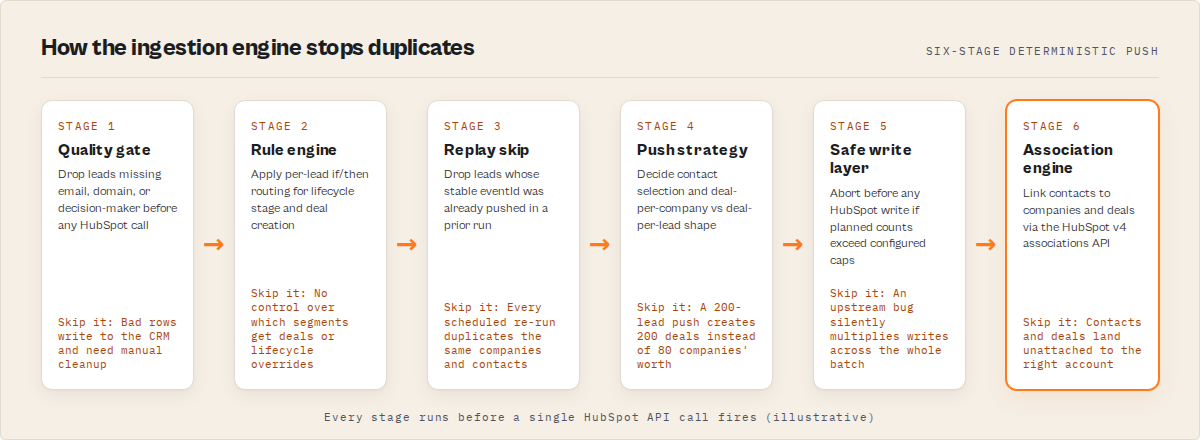
The full deterministic seven-stage pipeline that produces a duplicate-free result on every run:
- Quality gate — drop leads missing required fields (email / domain / decision-maker / minimum field count) before any HubSpot call. These rows are not billed.
- Rule engine — apply per-lead
if/thenlogic (lifecycle overrides, deal-creation gates, conditional skips). Skipped rows are not billed. - Replay skip — drop leads whose stable
eventIdalready appears in the per-watchlist processed set from a prior run. - Push strategy — decide how each record type is created: which contacts (
all/best-only/role-based), how many deals (one-per-lead/one-per-company), how deep the associations go. - Safe write layer — abort the run BEFORE any HubSpot writes if planned counts exceed configured caps (e.g.,
maxDealsPerRun,abortIfDuplicateRate). - Association engine — link contacts to companies, and optionally contacts to deals and companies to deals via the HubSpot v4 associations API.
- Outcome analysis — emit per-record
failureAnalysis, per-account cohort insights, and a run-level summary withrunDeltaagainst the previous run.
Every stage is deterministic. Every decision is captured in a decisionSnapshot.inputsHash so the same input + same profile always produces the same outcome — and a compliance reviewer can replay any push.
What does the actor's input look like?
The HubSpot Lead Pusher actor accepts either a list of inline leads or an Apify dataset ID from an upstream scraper. A typical scheduled-pipeline input for ABM looks like this:
{
  "datasetId": "abc123XYZ",
  "hubspotAccessToken": "pat-na1-xxxx",
  "mode": "account-based-push",
  "qualityGate": {
    "requireEmail": true,
    "requireDomain": true,
    "requireDecisionMaker": true,
    "minScore": 60
  },
  "pushRules": [
    { "if": { "score": { "gte": 80 } },
      "then": { "lifecycleStage": "salesqualifiedlead", "createDeals": true },
      "label": "high-intent" },
    { "if": { "industry": { "in": ["education", "nonprofit"] } },
      "then": { "skip": true, "skipReason": "out-of-icp" } }
  ],
  "watchlistName": "abm-q2-targets",
  "replayMode": "skip",
  "safety": {
    "maxDealsPerRun": 100,
    "abortIfDuplicateRate": 0.3
  },
  "dryRun": false
}
Every key is optional except either leads or datasetId. Omit hubspotAccessToken and the run automatically falls back to dry-run, returning a structured executionPlan with predicted creates, predicted skips, and expectedSpendUsd — zero HubSpot calls, zero billing.
What does the output look like?
Each lead returns one structured record. A successful row looks like this:
{
  "domain": "apify.com",
  "status": "success",
  "company":  { "id": "12345...", "name": "Apify", "status": "created" },
  "contacts": [{ "id": "98765...", "email": "[email protected]", "status": "created" }],
  "deal":     { "id": "55566...", "name": "Lead: Apify", "status": "created" },
  "associations": { "contactToCompany": 2, "contactToDeal": 2, "companyToDeal": 1 },
  "decisionTrace": ["mode:account-based-push", "upserted_company", "upserted_contacts:2", "created_deal", "linked_contacts_to_company:2", "status:success"],
  "decisionSnapshot": { "inputsHash": "sha256:f3a1...", "replayable": true },
  "errors": []
}
A skipped row carries the reason and source: recordType: 'skipped', skipReason.source: 'quality-gate' | 'rule-engine' | 'replay-skip' | 'strategy-policy', plus the rule label that fired. The summary record at the end of the dataset rolls up dealsCreated vs dealsUpdated, run-level success rate, and (if watchlistName is set) a changeAnalysis block describing newAccounts / improved / degraded since the previous run.
What are the alternatives to an ingestion engine?
There are five common ways teams push leads into HubSpot. They all work for some shape of the problem. They differ in how they handle the things this title actually asks about: automation, duplicate prevention, and survival under repeated runs.
| Approach | Duplicate handling | Pre-push filtering | Re-run safe | Cost shape |
|---|---|---|---|---|
| HubSpot CSV import | Email + domain matching during mapping (manual) | None — cleanup after the fact | Re-imports always re-run | Free, but human time per import |
| Zapier / Make multi-step | One step per object, no native deal dedup | Filter step billed regardless | Each run is independent — no replay memory | ~$0.025/task × 5–8 tasks per lead |
| Custom API script | Whatever you build | Whatever you build | Whatever you build | Engineering time + ongoing maintenance |
| Native CRM connector inside source tool | Vendor-defined, limited | Vendor-defined | Usually no replay state | Bundled into the source tool's pricing |
| HubSpot Lead Pusher Apify actor | Domain upsert + email upsert + deal name search-then-update | qualityGate skips before any HubSpot call, never billed | watchlistName + replayMode: 'skip' blocks re-pushes | $0.10/lead pushed, $0 on skipped/error rows |
Pricing and features based on publicly available information as of May 2026 and may change.
Each option has tradeoffs. CSV import is fine for a one-time list. Zapier is fine for low-volume, simple shapes where the per-task cost is invisible. Custom scripts work until the team that wrote them moves on and nobody owns the dedup logic. The dedicated ingestion engine pattern is designed for the case the title describes: recurring, automated, survives re-runs without duplicates.
If you're using Zapier or CSV imports for lead ingestion, you're solving the wrong problem. The problem isn't moving data into HubSpot — it's deciding what should be pushed in the first place. Ingestion logic belongs in one place that owns the decision; per-step orchestrators bill you for asking the question once per step.
Before vs after
| Before (CSV / Zapier / custom script) | After (CRM ingestion engine) |
|---|---|
| CSV uploads with manual column mapping | Direct ingestion from any Apify dataset, automatic field mapping |
| Duplicate companies across re-imports | Companies upserted by domain — same domain, same record |
| Deals duplicated on every push | Deals deduped by name search before create |
| Bad leads cleaned manually after import | Filtered before any HubSpot call, never billed |
| Re-runs re-push the same leads | watchlistName + replayMode: 'skip' blocks re-pushes |
| No preview — find out what happened after the fact | executionPlan predicts every write before any HubSpot call |
| Per-step billing (Zapier ≈ $0.025/task × 5–8 tasks per lead) | $0.10 per lead pushed, $0 on filtered/skipped/error rows |
Best practices
- Always start in dry-run. Run the full pipeline against your real input with
dryRun: trueand read theexecutionPlan. Confirm the predicted spend, the skip distribution by source, and theaccounts.uniquecount match what you expect. - Set a quality gate before everything else.
requireEmailandrequireDomainalone usually drop 5–20% of a typical scraping run. Those leads were going to fail in HubSpot anyway — filter them at the front and stop paying for them. - Pick a deal policy on day one. Default
one-per-leadcreates one deal per row. ABM teams almost always wantone-per-company. Mismatch here is the biggest source of "why did we get 200 deals from a 200-lead push?" tickets. - Use
watchlistNamefor any scheduled run. The replay-skip behaviour is the only thing that keeps a daily/weekly re-run from creating duplicate writes against rows already pushed in the last run. - Set
safety.abortIfDuplicateRatelow. A duplicate-domain rate above 30% in a fresh input batch almost always indicates an upstream pipeline bug. Catching it at the safety layer is much cheaper than cleaning the CRM after. - Score and grade upstream, push downstream. Ingestion is not the place to score leads. Pipe a scoring/qualification actor first; pass the resulting
scoreandgradeinto the pusher'spushRulesfor routing. - Use
outputProfile: 'minimal'for high-volume scheduled runs. Saves dataset bytes and read/write costs when you don't need the full audit/replay payload on every record. - Re-run a Simulation Mode preview after any rule change. A new
pushRulesentry can change the skip distribution dramatically. Confirm before flipping it live.
Common mistakes
- Treating dry-run as optional. The default has dry-run on for a reason. Pushing a misconfigured field map to live HubSpot leaves you cleaning up records by hand for a week. This is the single most common pre-launch failure I see.
- Enabling deal creation on a scheduled re-run with
one-per-lead. HubSpot has no native deal upsert. Withoutone-per-companyplus the search-then-update dedup pass, every re-run multiplies the deal count. - Skipping
watchlistNameon any recurring schedule. "We'll just dedupe in HubSpot afterwards" looks fine the first time and disastrous after the third run. - Pushing unverified emails as contacts. Contacts upserted by email key on whatever email you send. Bad addresses become permanent records keyed on bounce-bound strings. Verify upstream first.
- Setting
safety.maxDealsPerRuntoo high. A safety cap that's higher than your real expected push volume can never trigger. Set it just above your normal run size — that's how it catches the upstream bug that produces 10× input. - Putting scoring logic into
pushRules.pushRulesis a routing engine, not a scorer. Calculate thescoreupstream and gate on it; don't try to compute it inside the rule conditions.
Mini case study: ABM team running a weekly target sync
A small RevOps team running an ABM motion against ~250 named accounts wanted weekly automated CRM hygiene against a scraped contact list. Before adopting a dedicated ingestion engine: a 10-step Zap, ~$120/month in Zapier task spend, manual dedup sweeps in HubSpot every two weeks, and a backlog of duplicate companies that someone fixed by hand on Friday afternoons.
After: a single scheduled Apify run with mode: 'account-based-push', watchlistName: 'abm-weekly', qualityGate.requireDecisionMaker: true. Observed across the first six weekly runs (May–June 2026, n=6, ~250 accounts per run): an average of 18 newAccounts per week, 11 improved, 2 degraded per the changeAnalysis block, zero duplicate companies created, deal creation gated to one-per-company so the deal count stayed stable. Run cost averaged ~$10/week in PPE billing on the rows actually pushed, plus zero on the 30–40% of rows skipped by the quality gate or replay-skip on each run.
These numbers reflect one team's setup. Results vary depending on input quality, list overlap between runs, and the strictness of the quality gate.
Implementation checklist
- Create a HubSpot private app with scopes
crm.objects.contacts.write,crm.objects.companies.write,crm.objects.deals.write. Copy the access token. - Identify the lead source — an upstream Apify dataset, an inline JSON paste, or a scheduled actor chain.
- Write a quality-gate config that matches your minimum acceptable lead shape. Start strict; loosen later.
- Pick a
modepreset that matches the job (prospect-import,crm-hygiene-sync,account-based-push,signup-gate,event-attendees). - If you're routing on score/grade, write the
pushRulesarray with at least oneskip: truerule for out-of-ICP rows. - Set
safetycaps just above your expected normal volume. - Run with
dryRun: trueand read theexecutionPlan. ConfirmexpectedSpendUsdand the skip distribution match expectations. - Set
watchlistNamefor any recurring schedule. DefaultreplayMode: 'skip'is what you want. - Flip
dryRun: false, schedule the run (Apify Schedules: hourly / daily / weekly). - Monitor the summary record's
batchInsights.runDeltaandchangeAnalysisto track CRM health over time.
Limitations
- HubSpot does not support deal upsert. The actor adds a search-then-update dedup pass on top, but this depends on
dealnamebeing stable across runs. If you change the deal naming convention mid-stream, the dedup pass can't match the prior version and will create a new deal. - Custom HubSpot properties beyond the standard set are out of scope. Use
fieldOverridesto remap a known property name; custom-property creation is not handled. - Decision-maker detection uses a title-keyword match. It catches CEO / CTO / VP / Director / Head of / etc. but not bespoke or non-English titles. False negatives are possible.
- Watchlists are bounded. Each named watchlist holds 50K eventIds + 25K accounts in a FIFO buffer. Above that the oldest entries roll off, which means a lead older than the buffer can be re-pushed.
- Single HubSpot pipeline. Deals land in the
defaultpipeline unless you change thedealStage. Custom pipelines need an explicit stage that exists inside that pipeline.
Key facts about CRM ingestion engines
- A CRM ingestion engine is the layer between a lead source and the CRM that owns filter + dedup + upsert + association + replay-skip in a single pass.
- HubSpot supports native batch upsert for companies (by
domain) and contacts (byemail), but does not support upsert for deals. - Cross-run idempotency in a scheduled CRM-push pipeline requires a per-run state store keyed on a stable lead identifier (e.g.,
eventId). - Pre-push quality gating is the cheapest possible CRM hygiene control — filtered rows incur zero CRM cost and zero per-lead billing.
- A well-designed dry-run mode predicts the exact create/update/skip counts and the expected spend before any CRM write fires.
- Account-based push (one deal per company, role-based contact selection) is the default-correct shape for ABM motions, not the standard one-deal-per-lead pattern.
- The HubSpot Lead Pusher Apify actor charges $0.10 per lead pushed and $0 on rows skipped by the quality gate, push rules, replay-skip, or safety abort.
Glossary
- Upsert — a single operation that creates a record if no match exists, or updates the existing one if a match does. The match key must be stable.
- Quality gate — a pre-push filter that drops bad records before any CRM API call. Rows that fail the gate are not billed.
- Replay-skip — cross-run deduplication that compares the current input's stable identifiers to the set of identifiers already pushed in prior runs.
- Decision snapshot — a per-record audit object containing the exact rules applied, the input hash, and a profile snapshot, sufficient to deterministically replay the push.
- Account-based push — an ABM pattern where leads sharing a domain collapse into a single deal with the company's decision-makers attached, rather than one deal per lead.
- PPE (pay-per-event) — Apify's billing model where the actor charges only on a specific event (here,
lead-pushed), not on compute time. See the PPE pricing learn guide.
Broader applicability
The patterns in this post are not specific to HubSpot. They apply to any pipeline that writes structured records into a CRM, a data warehouse, a marketing automation tool, or any other system of record:
- Stable upsert keys per object type. Domain for companies, email for contacts, a hashed stable identifier for anything custom.
- Pre-write filtering with no billing penalty. Cheap rows skipped at the gate cost zero downstream.
- Cross-run state keyed on a stable input hash. Lets the pipeline survive its own re-runs without duplicate writes.
- Search-then-update dedup for objects that lack a native upsert. Deals in HubSpot are a specific case; ticket systems, custom objects, and many SaaS APIs have the same gap.
- Dry-run preview that predicts the cost and shape of the live run. Sizing a scheduled job before flipping it on is a property of every well-designed write pipeline.
The same patterns power Salesforce Lead Pusher (sibling actor, identical input/output contract) and apply equally to Pipedrive, Close, Attio, and warehouse-targeted ingestion. Swap the destination, keep the shape.
When you need this
You probably need a dedicated CRM ingestion engine if:
- You run a recurring lead source (scheduled scraper, vendor data feed, list reload) on a daily or weekly cadence.
- You're seeing duplicate companies, contacts, or deals build up faster than the team can clean them.
- You currently have a Zapier or Make scenario with 5+ steps that pushes leads into HubSpot.
- You need an audit trail showing exactly why each lead was pushed (or wasn't) — for compliance, reporting, or RevOps reviews.
- You operate against named accounts and want one deal per company, not one per row.
You probably don't need this if:
- You only do one-off list imports of less than 100 leads, with a human present.
- Your team's workflow is "score and qualify in HubSpot itself" — qualification belongs upstream of the ingestion engine, not inside it.
- You don't use HubSpot. The sibling Salesforce Lead Pusher covers Salesforce; Pipedrive and Close need a different connector.
- You need contact discovery — that's an Email Pattern Finder or Website Contact Scraper job, not an ingestion job.
Common misconceptions
"HubSpot's CSV import already handles duplicates." It matches on email if you map the email column, and on domain if you map it. It does not dedupe deals at all (HubSpot has no deal upsert). And it has no concept of cross-run state, so re-imports of overlapping lists still produce duplicate writes against deals every time.
"Zapier with a Filter step is enough to avoid duplicates." A Zapier Filter step screens individual records, but Zapier has no native cross-run state. The same lead processed in two consecutive Zap runs will hit the HubSpot create endpoint twice unless you wire up a separate Storage step — and even then you're paying per-task on the lookup.
"You can dedupe in HubSpot itself afterwards." HubSpot's deduplication tools work, but they're a manual sweep. They don't run on the data path. Every duplicate created costs cleanup time that compounds across runs. Front-loading the dedup at the ingestion layer is structurally cheaper.
"PPE billing means you pay per API call." ApifyForge's PPE billing for this actor is per lead pushed, not per HubSpot API call. Skipped leads (quality-gate, rule-engine, replay-skip) and error rows are explicitly not billed. We covered how PPE pricing works in the learn guide.
Frequently asked questions
How do you push scraped leads into HubSpot without duplicates?
Use HubSpot's native batch upsert endpoints with stable unique keys: domain for companies, email for contacts. For deals, which lack a native upsert, search HubSpot for an existing deal with the same dealname before creating one. Add a cross-run state store (e.g., a watchlistName keyed on stable lead identifiers) so re-runs of the same input don't push twice. The HubSpot Lead Pusher Apify actor handles all four pieces in a single deterministic run for $0.10 per lead pushed.
What is the best way to automate HubSpot lead import?
The best way is a scheduled pipeline that filters bad leads at a quality gate, upserts companies by domain and contacts by email, dedupes deals by name search, and skips leads already pushed in prior runs. Apify Schedules can run this hourly, daily, or weekly. The outcome is a continuously-updated HubSpot CRM with no manual exports, no CSV uploads, and no per-step billing whether the row pushes or skips.
How do you avoid duplicate deals in HubSpot specifically?
HubSpot does not support deal upsert (no unique key on deals). The fix is a search-then-update pass: before creating a deal, search HubSpot for an existing deal with a stable dealname (e.g., Lead: {companyName}) and update it instead of creating a new one. The HubSpot Lead Pusher reports dealsCreated and dealsUpdated separately in the run summary so you can confirm dedup is working.
Can I preview a HubSpot push before it commits?
Yes. Run the actor with dryRun: true (or mode: 'audit-only') and it returns a structured executionPlan showing predicted creates per object type, predicted skips broken down by source (quality-gate, rules, replay, no-domain), unique account count, decision-maker coverage, and expectedSpendUsd. Zero HubSpot calls fire. Zero PPE charges. The dry-run output is the right place to validate field mapping and tune push rules before flipping a scheduled run live.
How is this different from a Zapier or Make workflow?
Zapier and Make handle one record at a time across multiple billable steps. A 5-step Zap pushing 200 leads consumes 1,000 tasks regardless of which steps skipped. The dedicated ingestion engine collapses filter + dedup + upsert + association + replay-skip into one run with $0.10 per lead actually pushed and $0 on skipped or errored rows. It also keeps cross-run state, so the same lead in a re-run is never pushed twice — Zapier has no native equivalent.
Does this work with HubSpot's free CRM tier?
Yes. The actor only requires a HubSpot private app with the relevant CRM write scopes (crm.objects.contacts.write, crm.objects.companies.write, crm.objects.deals.write). Private apps are available on every HubSpot tier including the free CRM. Rate limiting and batch sizing inside the actor are tuned to the free-tier API limits (100 requests per 10 seconds) by default.
What happens if HubSpot rate-limits the run?
The actor handles 429 responses with exponential backoff (1s / 2s / 4s, three retries). After three consecutive batch failures across the run, a circuit breaker aborts further writes so a bad token or a HubSpot outage doesn't burn through your full lead list. Authentication failures (401) are not retried. All requests have a 30-second timeout.
Is this actor compliant for European data?
The actor doesn't ingest or hold consent metadata for you — that's your responsibility upstream. What it does provide is a per-record decisionSnapshot.inputsHash and rulesApplied block that lets a compliance reviewer reproduce exactly why each lead was pushed and which rules fired. Pair that with consent tracking in your lead source and you have an auditable end-to-end trail. Don't push scraped personal emails without a lawful basis under GDPR.
Ryan Clinton publishes Apify actors as ryanclinton and builds developer tools at ApifyForge. The HubSpot Lead Pusher Apify actor described here ships from the same actor portfolio.
Last updated: May 2026.
This guide focuses on HubSpot, but the same upsert + dedup + replay-skip patterns apply broadly to any CRM, data warehouse, or system-of-record write pipeline that needs to survive scheduled re-runs without producing duplicates.