The problem: Apify's automated testing flags broken actors daily, and the "Under maintenance" badge tanks Store search rankings, kills user trust, and stops PPE revenue cold. Most developers do not realize their actor is broken until the flag appears — by which point users have already switched to competitors and Store ranking damage takes weeks to recover from.
ApifyForge keeps Apify actors at zero maintenance flags for months at a time using three prevention patterns: correct input schema defaults on every required field, defensive error handling that always pushes data to the dataset (even on failure), and pre-push schema validation that catches misconfigurations before they reach the platform. The maintenance flag triggers when an actor fails Apify's daily health check twice in three days. After 14 days flagged, a second warning arrives; after 28 days, the actor is deprecated entirely.
Key takeaways:
- The maintenance flag triggers after just 2 failed health checks in 3 days — with no human review involved
- Missing default values on required input fields is the single most common cause of maintenance flags
- Every code path must call
Actor.pushData()— a "succeeded" run with an empty dataset counts as a failure - Default inputs must finish in under 3 minutes to stay safely within the 5-minute test limit
- Pin exact dependency versions in
package.json— a single Cheerio update broke 15 actors simultaneously in ApifyForge's portfolio
Apify flags actors as "Under maintenance" when they fail automated health checks twice in three days. Avoiding the flag requires correct input schema defaults, error handling that returns partial data instead of crashing, and a test suite that catches failures before Apify does. This guide from ApifyForge covers the exact patterns used to keep Apify actors at zero maintenance flags for months.
The "Under maintenance" badge is the worst thing that can happen to a paid Apify actor. It tanks your search ranking in the Store, kills user trust on sight, and -- if you're using Pay Per Event pricing -- stops revenue cold.
I run many actors on the Apify Store through ApifyForge. At one point, 12 of them were flagged simultaneously. That week cost me real money and took weeks to rebuild trust with users who'd already switched to alternatives. Since then, I've kept maintenance flags at zero for months straight by following the patterns in this post.
Here's how Apify's automated testing actually works, why actors get flagged, and what to do about it.
What Is the Apify Maintenance Flag?
The Apify maintenance flag is an automated quality label applied to actors that fail the platform's daily health checks. When an actor doesn't pass automated tests at least twice in three days, Apify marks it "Under maintenance" — a visible badge that warns users the actor may be broken or unreliable.
The consequences are immediate. Flagged actors drop in Store search results, lose the trust badge that drives click-through rates, and stop generating PPE revenue because users won't run an actor with a warning label. According to Apify's documentation, if the flag stays for 14 days you get a second warning, and after 28 total days your actor gets deprecated entirely.
That's not a slap on the wrist. That's deletion.
How Does Apify's Automated Testing Work?
Apify runs automated tests on every public actor daily. The test launches your actor with its default or prefilled input and checks three things: the run finishes with "Succeeded" status, it produces a non-empty default dataset, and it completes within 5 minutes. Fail any of those conditions, and your actor is one step closer to a flag.
This isn't some occasional spot check. It happens every day, for every public actor in the Store. Apify's help center confirms that two failed tests in three days triggers the maintenance label automatically — no human review involved.
Most developers don't realize how strict that 5-minute window is. If your default input targets a large dataset and your actor tries to process all of it, you'll time out. I've seen actors work perfectly in manual runs but get flagged because the default input was too ambitious for the test's time limit.
What Triggers the Maintenance Flag?
There are really only three failure modes, and I've hit all of them at scale across Apify actors. Here they are in order of how often they actually happen.
Missing default values on required fields
This one accounts for most maintenance flags I've dealt with. Your input_schema.json marks a field as required, but there's no default or prefill value. Apify's test system can't fill in what doesn't exist, so the actor either won't start or crashes immediately.
The fix is dead simple — every required field needs a default and prefill:
{
  "title": "URL",
  "type": "string",
  "description": "URL to scrape",
  "default": "https://example.com",
  "prefill": "https://example.com",
  "editor": "textfield"
}
Run your schema through the ApifyForge Schema Validator before every push. It catches missing defaults, type mismatches between default values and declared types, and default values that fall outside enum constraints. Two minutes of validation saves days of lost revenue.
Timeout on default input
Your actor works fine, but the default input asks for too much data. The test system gives you 5 minutes. If your default input says maxResults: 1000 and your scraper needs 8 minutes to get them all, you're flagged.
Set your default and prefill values to return a small number of results — 5 to 10 is plenty. The test only cares that you finish successfully with a non-empty dataset. It doesn't care whether you returned 5 results or 5,000.
{
  "title": "Max Results",
  "type": "integer",
  "default": 5,
  "prefill": 5,
  "minimum": 1,
  "maximum": 10000
}
Empty dataset on success
This one's sneaky. Your actor runs, exits with status "Succeeded," but never calls Actor.pushData(). Maybe your error handling is too graceful — you catch every exception and exit cleanly without pushing anything. The test system sees an empty dataset and counts it as a failure.
The rule: always push something to the default dataset, even if it's an error report. A succeeded run with zero output is treated the same as a crash.
How Do I Fix an Actor That's Already Flagged?
If your actor is already under maintenance, the recovery process is straightforward. Fix the root cause, rebuild, and Apify's system recognizes the improvement within 24 hours. If the issue was caused by a target website going down temporarily, passing the majority of test runs over the next 7 days triggers automatic recovery.
Here's the exact process I follow when I get a maintenance notification across our actor fleet:
- Check the failed run logs in the Apify Console — the error message tells you which of the three failure modes hit you
- If it's a schema issue, run the Schema Validator and fix whatever it flags
- If it's a timeout, lower the
prefillvalues for result counts - If it's an empty dataset, add a fallback
Actor.pushData()call - Rebuild and trigger a manual test run immediately
- Monitor for 24 hours to confirm the flag clears
Don't just patch the symptom. If a URL in your default input broke, don't just swap in a new URL — add logic that handles URL failures gracefully so the next breakage doesn't flag you again.
Why Do Actors Fail on Default Input So Often?
The most common reason is drift. You update your actor code to expect new input fields, restructure the output format, or change how a URL gets processed — but you forget to update the default input to match. According to a 2024 study by Testim, 56% of software teams cite maintenance of test configurations as their biggest testing challenge. Actor input schemas are no different.
The second reason is external dependency changes. Your default URL points to a website that redesigns, a government API that changes its response format, or a social media platform that updates its privacy settings. I manage actors that scrape SEC EDGAR filings, OFAC sanctions lists, and Interpol notices — these data sources change without warning.
The third reason is honestly just carelessness. Pushing without testing. Every developer has done it. I've done it. The fix is automation, not willpower.
Input Schema Validation Checklist
Before pushing any actor, run through this. I keep it as a pre-push habit for every one of the Apify actors ApifyForge publishes:
- Every
requiredfield has bothdefaultandprefillvalues - Every
defaultvalue matches its declaredtype(no"10"for anintegerfield) - Every
defaultvalue exists in theenumlist if one is defined minimumandmaximumconstraints don't exclude thedefault- Array fields default to
[]or a valid array, notnull - Boolean fields have an explicit
defaultoftrueorfalse - Default URLs point to stable, long-lived pages (example.com, Wikipedia, major tech sites)
- The default input finishes in under 3 minutes (giving you 2 minutes of buffer against the 5-minute limit)
The ApifyForge Test Runner automates most of this. It runs your actor with its default input, checks the output structure, and catches regressions before they reach the Store.
Defensive Error Handling That Prevents Flags
Bad error handling is the difference between a healthy actor and a flagged one. Here's the pattern I use across every ApifyForge actor.
The anti-pattern — three crash points in three lines:
const input = await Actor.getInput();
const response = await fetch(input.url);
const data = await response.json();
await Actor.pushData(data.results);
The pattern that keeps you off the maintenance list:
import { Actor, log } from 'apify';

await Actor.main(async () => {
    const input = await Actor.getInput() || {};
    const url = input.url?.trim() || 'https://example.com';

    let response;
    try {
        response = await fetch(url, {
            signal: AbortSignal.timeout(30000)
        });
    } catch (error) {
        log.error(`Fetch failed: ${error.message}`);
        await Actor.pushData([{
            url, error: error.message,
            timestamp: new Date().toISOString()
        }]);
        return;
    }

    if (!response.ok) {
        log.error(`HTTP ${response.status} for ${url}`);
        await Actor.pushData([{
            url, error: `HTTP ${response.status}`,
            timestamp: new Date().toISOString()
        }]);
        return;
    }

    let data;
    try {
        data = await response.json();
    } catch {
        await Actor.pushData([{
            url, error: 'Invalid JSON response',
            timestamp: new Date().toISOString()
        }]);
        return;
    }

    const results = Array.isArray(data.results)
        ? data.results : [];

    if (results.length > 0) {
        await Actor.pushData(results);
    } else {
        await Actor.pushData([{
            url, warning: 'No results found',
            timestamp: new Date().toISOString()
        }]);
    }
});
Notice the key difference: every exit path calls Actor.pushData(). The actor never exits with an empty dataset, and it never crashes with an unhandled exception. Both of those matter for the automated test.
Rate limit handling
Rate limiting from external APIs causes intermittent failures — the sneakiest kind, because your actor passes some tests and fails others. Exponential backoff solves it:
async function fetchWithBackoff(url, maxRetries = 3) {
    for (let attempt = 1; attempt <= maxRetries; attempt++) {
        const response = await fetch(url);
        if (response.status === 429) {
            const wait = Math.pow(2, attempt) * 1000;
            log.warning(`Rate limited, waiting ${wait}ms`);
            await new Promise(r => setTimeout(r, wait));
            continue;
        }
        return response;
    }
    throw new Error('Rate limit exceeded after retries');
}
How Do MCP Servers Handle Maintenance Differently?
MCP (Model Context Protocol) servers on Apify follow the same automated testing rules as regular actors, but they have a unique challenge: many MCP servers don't produce traditional dataset output. They serve tools to AI agents via the MCP protocol, which means the "non-empty dataset" requirement doesn't naturally fit.
If your MCP server is designed to respond to tool calls rather than push data, you can request to skip automated testing through the form Apify links in the maintenance notification. I've done this for several ApifyForge MCP servers like the Counterparty Due Diligence MCP and the Financial Crime Screening MCP — both serve compliance tools to AI agents and don't produce dataset output in the traditional sense.
For MCP servers that can produce dataset output during testing, the same rules apply. Set your default input to trigger a small, fast tool call that pushes verifiable results within the 5-minute window.
Pin Your Dependencies
Dependency drift is a silent killer at scale. A Cheerio update changed .text() behavior and broke 15 of my scrapers simultaneously. That's 15 maintenance flags in one morning.
Pin exact versions in package.json:
{
  "dependencies": {
    "apify": "3.1.10",
    "cheerio": "1.0.0-rc.12",
    "crawlee": "3.7.3"
  }
}
No carets, no tildes. Commit your package-lock.json. According to npm's documentation, the lockfile guarantees reproducible installs across environments — which means your Apify build matches your local environment exactly.
Monitoring at Scale
Manual vigilance doesn't work past about 10 actors. I learned that the hard way. Here's what to automate:
- Schema validation on every push — the Schema Validator catches input issues before they reach production
- Default input test runs — run after every deployment to verify the health check will pass
- Error rate monitoring — alert when failure rates spike
- Output validation — verify runs produce expected data structures
- Dependency auditing — check for breaking changes weekly
We run fleet monitoring daily across all Apify actors through ApifyForge. It's caught 47 potential maintenance flags before they happened — issues that would have taken days to discover manually and cost real PPE revenue. You can see the tools we built for this at ApifyForge tools, including the Schema Validator and Test Runner.
For lead generation actors like the Website Contact Scraper and Waterfall Contact Enrichment, maintenance flags are especially painful because users looking for contact data switch to a competitor immediately. There's no loyalty when the badge says "broken."
Can You Skip Automated Testing?
Yes — but only in specific cases. If your actor requires API keys that can't be included in default input, or if it's designed to not return dataset results (like some MCP servers or webhook processors), you can request a testing exemption. Apify links the request form in the maintenance notification email.
I've used this for actors that require paid third-party API keys to function. But honestly, I'd rather restructure the actor to handle missing API keys gracefully — return a helpful error message in the dataset explaining what key is needed — than rely on an exemption. Exemptions mean your actor never gets tested, which means real bugs can hide for months.
The Pattern That Keeps 320+ Actors Clean
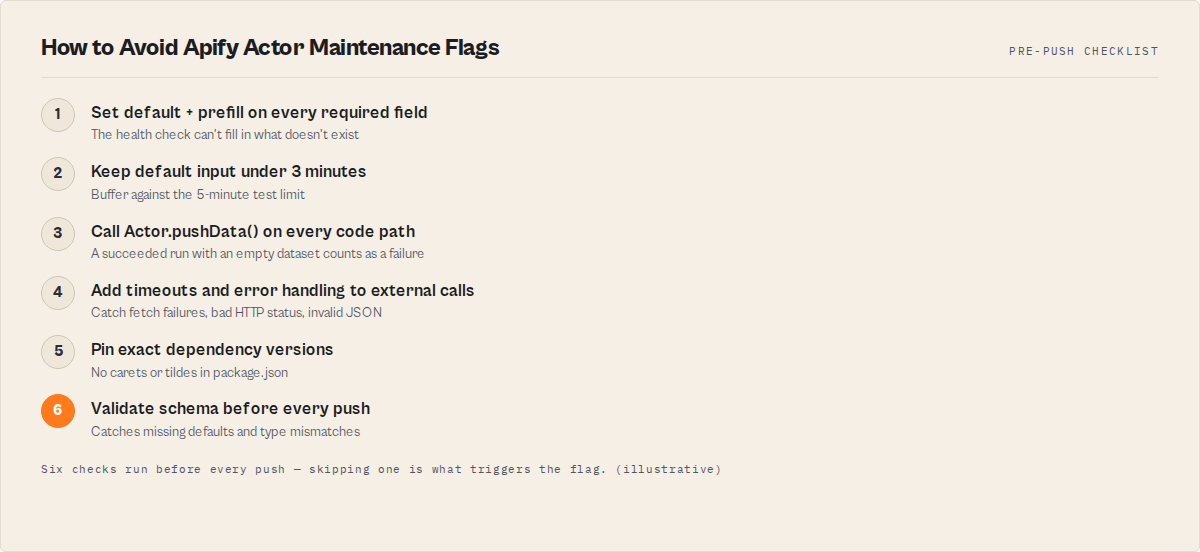
Here's the tl;dr. Every actor I push follows this checklist, no exceptions:
- Every required input field has a
defaultandprefill - Default input returns results in under 3 minutes
- Every code path calls
Actor.pushData()— no empty datasets - All external calls have timeouts and error handling
- Dependencies are pinned to exact versions
- Schema passes the Schema Validator before push
That's it. Six things. None of them are complicated. But skipping any single one has cost me revenue, and at Apify actors on ApifyForge, the math adds up fast.
The actors that dominate the Apify Store aren't the most sophisticated. They're the ones that always work. Reliability beats features every time.
Frequently asked questions
How long does it take for a maintenance flag to clear after I fix the issue?
Apify's automated testing runs daily. After you fix the root cause and rebuild, the flag typically clears within 24 hours if the next health check passes. However, Store search ranking damage can linger for 2-3 weeks even after the flag is removed, based on ApifyForge's before/after traffic data.
What exactly does Apify's automated health check test?
The health check launches your actor with its default or prefilled input and checks three conditions: the run finishes with "Succeeded" status, it produces a non-empty default dataset, and it completes within 5 minutes. All three conditions must pass. The check runs daily for every public actor in the Store.
Can I request an exemption from automated testing?
Yes, but only in specific cases — actors requiring paid third-party API keys that cannot be included in default input, or actors designed to not return dataset results (like some MCP servers or webhook processors). Apify links the exemption request form in the maintenance notification email. ApifyForge recommends restructuring the actor to handle missing API keys gracefully instead of relying on exemptions.
What is the difference between default and prefill in the input schema?
Both provide initial values, but default is used by the Apify health check when running automated tests, while prefill populates the input fields in the Apify Console UI. Set both to the same value on every required field. If default is missing, the health check cannot run your actor and it will be flagged.
How do I prevent a dependency update from breaking multiple actors at once?
Pin exact versions in package.json using no carets or tildes (e.g., "cheerio": "1.0.0-rc.12" not "cheerio": "^1.0.0-rc.12"). Commit your package-lock.json to ensure reproducible installs. Test dependency updates on one actor first before rolling them out across the portfolio.
Does the maintenance flag affect PPE revenue immediately?
Yes. The flag is visible on the Store listing immediately after it is applied, which deters users from running the actor. Users browsing the Store see the yellow "Under maintenance" badge and typically choose a competitor instead. The revenue impact is proportional to how much traffic the actor receives from Store search.
Limitations
- You cannot prevent all maintenance flags. External dependency changes (website redesigns, API format changes, third-party service outages) can break your actor's default input path without any code change on your part. The best you can do is detect and fix these within the 2-3 day window before the flag drops.
- The 5-minute test window is strict and non-configurable. Actors that naturally require longer processing times (large crawls, complex analysis pipelines) must use artificially small default inputs to pass the health check, which may not represent realistic usage.
- MCP servers do not fit the standard testing model. Many MCP servers serve tools to AI agents rather than producing dataset output, which conflicts with the "non-empty dataset" requirement. Exemptions must be requested individually per actor.
- Schema validation is a manual pre-push step. Without automation or pre-push hooks, developers frequently forget to validate schemas before deploying, especially under time pressure.
- Dependency pinning prevents automatic security patches. Exact version pinning means you must manually review and update dependencies to receive security fixes, trading stability for potential vulnerability exposure.
Last updated: March 2026
Ryan Clinton publishes Apify actors as ryanclinton and builds developer tools at ApifyForge.