Waterfall Contact Enrichment — Email & Phone Lookup is an Apify actor on ApifyForge. Find business emails, phones, and social profiles from a name + company domain. Cascades through MX validation, website scraping, pattern detection, and SMTP verification with confidence scoring. It costs $0.20 per contact-enriched. Best for sales teams and marketers who need verified contact data, lead lists, or prospect enrichment at scale. Not ideal for real-time monitoring or historical data analysis. Maintenance pulse: 96/100. Last verified March 27, 2026. Built by Ryan Clinton (ryanclinton on Apify).
Waterfall Contact Enrichment — Email & Phone Lookup
Waterfall Contact Enrichment — Email & Phone Lookup is an Apify actor available on ApifyForge at $0.20 per contact-enriched. Find business emails, phones, and social profiles from a name + company domain. Cascades through MX validation, website scraping, pattern detection, and SMTP verification with confidence scoring.
Best for sales teams and marketers who need verified contact data, lead lists, or prospect enrichment at scale.
Not ideal for real-time monitoring or historical data analysis.
What to know
- Results depend on publicly available data; private or gated contacts may not be found.
- Email verification accuracy varies by domain and provider policies.
- Requires an Apify account — free tier available with limited monthly usage.
Maintenance Pulse
96/100Cost Estimate
How many results do you need?
Pricing
Pay Per Event model. You only pay for what you use.
| Event | Description | Price |
|---|---|---|
| contact-enriched | Charged per contact enriched. Runs a 10-step waterfall: MX check, pattern generation, web scraping, cross-referencing, SMTP verification, and social profile generation. | $0.20 |
Example: 100 events = $20.00 · 1,000 events = $200.00
Documentation
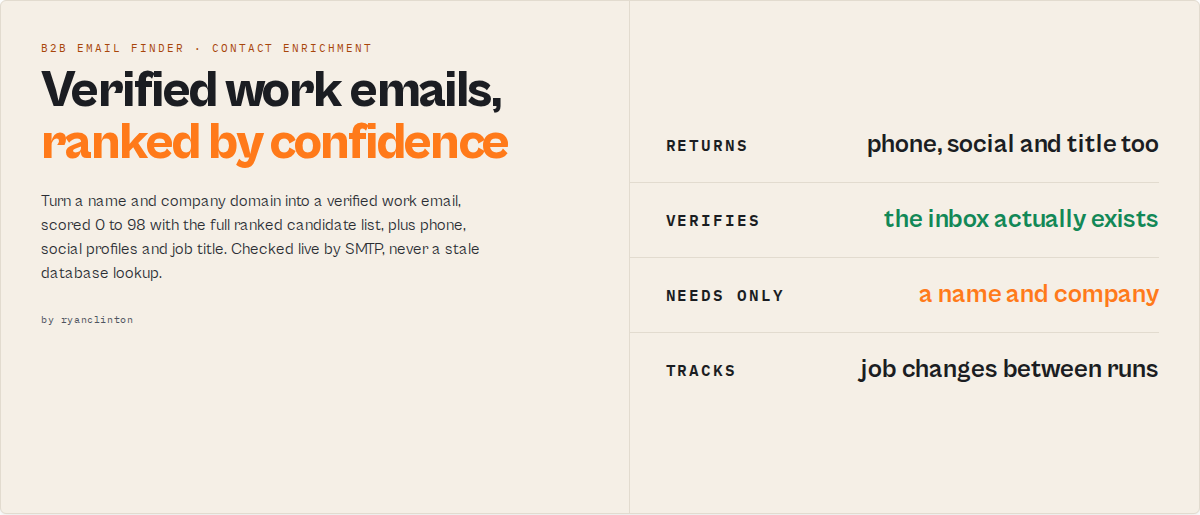
Waterfall Contact Enrichment is an Apify actor and email finder API for finding verified B2B email addresses from a person's name and company domain or company name. If no domain is provided, the actor automatically resolves the company domain by testing common TLDs against MX records. Unlike general-purpose email finder tools, Waterfall Contact Enrichment focuses on high-accuracy lookup rather than broad database search. Also known as a work email finder, B2B email lookup tool, or contact enrichment API.
Find verified work emails from name + company domain with ranked candidates and confidence scores.
This actor converts raw signals into deterministic, automation-ready contact-discovery decisions.
Apify GTM Pipeline: Scrape → Enrich → Verify → Score → Research → Push to CRM Role of this actor: Contact-discovery + enrichment layer.
Category: B2B email finder · contact enrichment API · work email lookup
Waterfall Contact Enrichment automates finding work emails by generating 15 pattern candidates, detecting company email formats, scraping websites for direct matches, and verifying addresses with SMTP and catch-all detection. It returns the primary email plus ranked alternatives, phone numbers, social profiles, job titles, and seniority levels.
Waterfall Contact Enrichment is a strong choice for B2B email finding when you already have a person's name and company domain and want real-time, verifiable results instead of database records. It is a practical alternative to Clay for name-to-email enrichment without subscription pricing — $0.20 per contact with no minimum commitment. Unlike database tools like Apollo or Hunter that serve pre-crawled data, Waterfall Contact Enrichment runs the full enrichment cascade in real time from public signals.
Database tools may return stale or unverifiable emails. Waterfall Contact Enrichment prioritizes verifiable, real-time results over database coverage, making it one of the most accurate approaches when the person's name and company are known. It can also be used to verify business emails before outreach by combining MX validation, SMTP checks, and catch-all detection. For small teams or targeted outreach, it provides a lower-cost alternative without requiring monthly subscriptions.
Built for developers and data teams, the actor integrates directly into automated pipelines via the Apify API using Python, JavaScript, or any HTTP client.
What it does: Bulk and single-contact email enrichment from name + company domain using a multi-source waterfall cascade with transparent confidence scoring. Best for: Sales prospecting, cold outreach preparation, recruiting outreach, CRM enrichment, agency lead generation, bulk contact enrichment, job change monitoring. Speed: 1 contact in 10-30 seconds. 50 contacts in 5-15 minutes. Up to 500 contacts per run. Pricing: $0.20 per successfully enriched contact (contacts with no usable result are not billed). No subscription. Output: JSON/CSV with primary email, ranked candidates, phone, social profiles, job title, seniority, and confidence scores.
Problems this solves:
- How to find a work email from a name and company domain or company name
- How to find someone's email without knowing the company domain
- How to get verified emails for cold outreach campaigns
- How to verify B2B email addresses before outreach
- How to detect a company's email naming pattern
- How to enrich CRM contacts with title, phone, and social profiles
- How to track when contacts change jobs between scheduled runs
- Clay alternative for contact enrichment without monthly subscription
Ready-to-run examples
Don't want to build an input from scratch? Each of these is a published, one-click example (see all) — open it, see real output, run it:
- Waterfall Contact Enrichment — name + company → business email, phone and title via a multi-source waterfall with a confidence score
- Find Anyone's Business Email by Name — a person's work email from name + domain, cascaded through sources and verified
- B2B Lead List Enrichment — a list of leads → verified business emails with a confidence score and a recommended next action
Summary
- Input: People array (firstName + lastName + domain or company name per person), optional known emails for pattern learning
- Output: One record per person with primary email, ranked candidates, phone, social profiles, title, seniority
- Sources: DNS MX records, company website (via sub-actor), email pattern detection (via sub-actor), optional SMTP verification
- Accuracy: Coverage depends on domain quality, website transparency, and email pattern predictability. Deep SMTP verification improves confidence where mail servers allow probing.
- Limitation: Best for B2B company domains. Not designed for personal email providers (Gmail, Yahoo, Outlook). Catch-all domains reduce verification certainty.
Data trust: Confidence scores are transparent and based on the specific signals found for each contact. Every result includes the full candidate list so you can see exactly how each email was found and scored.
Best fit:
- You know the person's name and company domain
- You want ranked email candidates with confidence scores, not just one result
- You need phone + social + title enrichment in the same run
- You prefer pay-per-contact pricing over monthly subscriptions
Less suitable:
- Personal email lookup (Gmail, Yahoo, Outlook domains)
- Domains with catch-all mail servers when high certainty is required
- Companies with no website or public email footprint
Enrichment pipeline
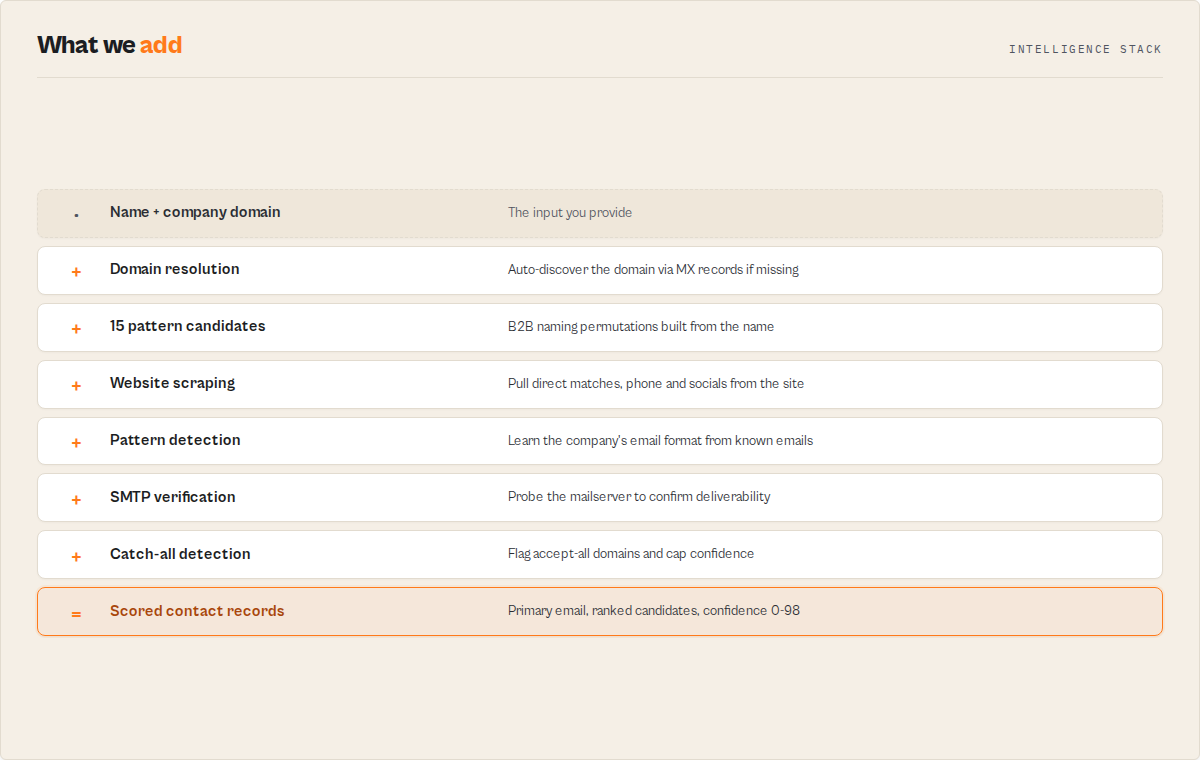
- Resolve domain from company name if not provided (tries common TLDs with MX validation)
- Validate domain via MX records
- Generate 15 email candidates from the person's name
- Scrape company website for emails, phones, social links, and job titles
- Detect company email naming pattern
- Cross-reference website findings against the target person
- Optionally verify top candidates with SMTP
- Detect catch-all domains
- Score and rank all candidates
- Return primary email + up to 10 ranked alternatives
Important: Waterfall Contact Enrichment finds likely business emails — it does not guarantee inbox delivery. Catch-all domains accept any address, making SMTP verification unreliable for those domains. No email is ever sent during the verification process.
What data can you extract?
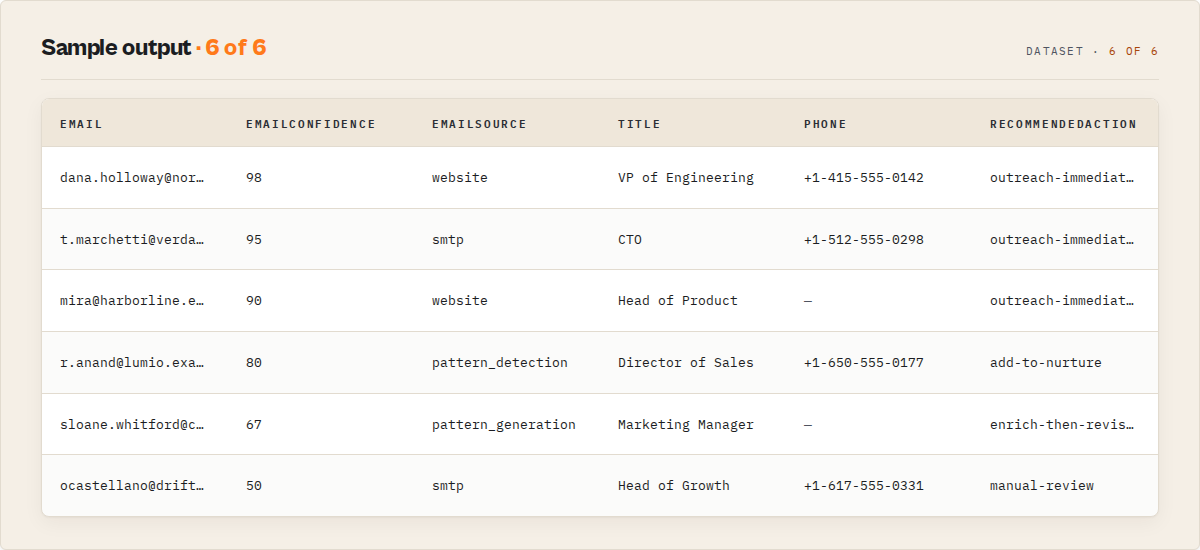
| Data Point | Source | Example |
|---|---|---|
| 📧 Primary email | Waterfall (all sources merged) | [email protected] |
| 📊 Email confidence score | Multi-signal scoring (0-98) | 95 |
| 📋 Top 10 email candidates | Pattern generation + cross-referencing | sarah.chen@, schen@, sarah@ ... |
| 📞 Phone number | Company website scraping | +1-312-555-0147 |
| 🔗 LinkedIn profile | Website social links or generated URL | linkedin.com/in/sarah-chen/ |
| 🐙 GitHub profile | Website social links or generated URL | github.com/sarachen |
| 🐦 Twitter/X profile | Website social links or generated URL | twitter.com/sarachen |
| 💼 Job title | Company website team pages | VP of Engineering |
| 🏢 Seniority level | Title keyword analysis | vp |
| 📬 Mail server (MX host) | DNS MX record lookup | mx1.pinnacleind.com |
| ✅ Domain validity | MX record check | true |
| 🔄 Job change alerts | Snapshot comparison across runs | job_change: Acme Corp → Pinnacle |
Why teams use Waterfall Contact Enrichment
- Avoid manual email guessing and validation (5-15 minutes per contact by hand)
- Get current data from live website scraping and DNS queries instead of stale database records
- Get ranked candidates with confidence scores instead of a single opaque result
- Use pay-per-contact pricing instead of monthly seat subscriptions
- Track when contacts change jobs between scheduled runs
Platform capabilities
- Scheduling — run daily, weekly, or custom intervals to keep contact data fresh and detect job changes automatically
- API access — trigger enrichment runs from Python, JavaScript, or any HTTP client for automated lead pipelines
- Proxy rotation — scrape company websites at scale without IP blocks using Apify's built-in proxy infrastructure
- Monitoring — get Slack or email alerts when runs fail or produce unexpected results
- Integrations — connect to Zapier, Make, Google Sheets, HubSpot, or webhooks to route enriched contacts into your CRM
Features
- 10-step waterfall cascade — MX validation, pattern generation, website scraping, pattern detection, cross-referencing, SMTP verification, confidence scoring, phone extraction, social discovery, and title/seniority inference run in sequence for maximum accuracy
- 15 email pattern candidates — generates candidates from 15 B2B naming conventions ranked by industry prevalence (first.last, firstlast, flast, f.last, first_last, and 10 more)
- Transparent candidate ranking — returns up to 10 ranked email candidates per person with individual confidence scores and source attribution, so you see the reasoning behind every result
- SMTP mailbox verification — deep mode connects to the mail server and checks whether the address is accepted without sending any email
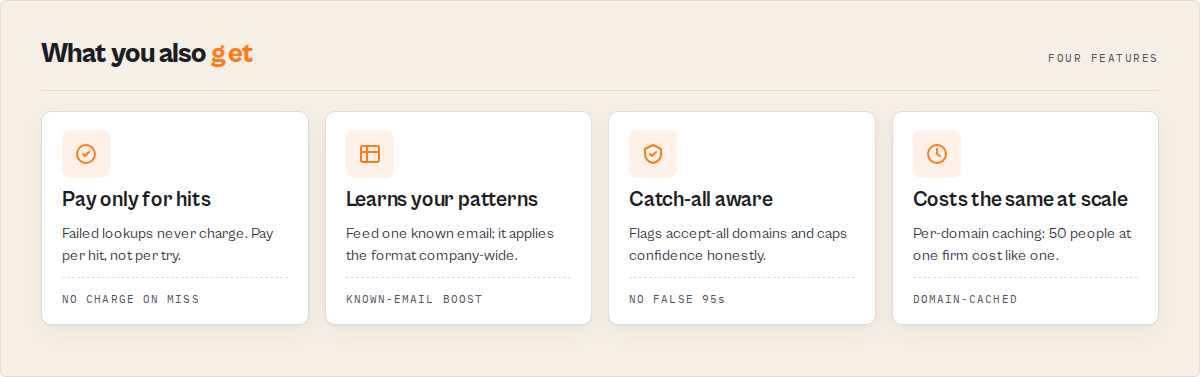
- Catch-all domain detection — identifies domains that accept all addresses (where SMTP verification is meaningless) and adjusts confidence scores downward automatically
- Custom pattern learning — provide known emails from a target domain, and the actor learns the pattern and applies it to all contacts at that company
- Job change tracking — compare results against previous runs to detect when contacts change companies, titles, or email addresses (requires scheduled runs)
- Organizational hierarchy detection — when enriching multiple people at the same company, infer seniority levels (C-suite, VP, Director, Manager) from job titles found on team pages
- International name transliteration — handles 40+ accented characters (umlauts, diacritics, cedillas, eszett) through automatic ASCII conversion for pattern generation
- Domain-level caching — website scraping and pattern detection results are cached per domain, so enriching 50 people at the same company costs the same as enriching 1
- Parallel sub-actor execution — website scraping and pattern detection run simultaneously for each new domain to minimize total run time
- Phone number extraction — scrapes publicly listed phone numbers from company websites during the website enrichment step
- Social profile discovery — finds LinkedIn, GitHub, and Twitter/X profiles from website links and generates likely profile URLs as fallbacks
- Pay-per-result billing — you are only charged for contacts that return results; failed enrichments cost nothing
Use cases for waterfall contact enrichment
Sales prospecting and outreach
SDRs and BDRs building targeted outreach lists need verified email addresses before loading contacts into email sequences. Feed a list of prospect names and company domains from your ICP research, and get back verified emails with confidence scores. Filter for 70%+ confidence contacts to keep bounce rates under 5%.
Marketing agency lead generation
Agencies building prospect databases for clients need high-volume contact enrichment without per-seat SaaS pricing. Process hundreds of contacts in a single run at $0.20 each — a 50-contact batch costs $10 compared to $149/month minimum for Clay. Schedule weekly runs to keep databases fresh.
Recruiting and talent sourcing
Recruiters who identify candidates on LinkedIn or company team pages need direct email addresses for outreach. The org hierarchy feature is particularly useful — enrich the entire engineering team at a target company and see who reports to whom, identifying both the hiring manager and potential candidates.
Competitive intelligence and market mapping
Strategy teams tracking competitor organizations can use job change monitoring to detect when key executives leave or join competitor companies. Schedule weekly enrichment runs against a target list of executives, and the actor flags departures, new hires, and title changes automatically.
CRM data enrichment and hygiene
Sales ops teams maintaining CRM data quality can re-enrich existing contacts on a schedule to catch email bounces, job changes, and title promotions. The known email feature lets you feed in current CRM emails so the actor learns existing patterns and detects when contacts have changed companies.
Event-based lead capture
After conferences or webinars, teams often have a list of attendee names and companies but no direct contact information. Batch-enrich the full attendee list in one run. The transparent candidate ranking helps when attendees use personal emails at registration — you get the business email with a confidence score.
How to find business emails with waterfall enrichment
-
Enter your contacts — Add people to the "People to enrich" field as a JSON array. Each person needs a
domain(orcompanyname — the domain will be auto-resolved) and eitherfirstName+lastNameorfullName. Example:{"firstName": "Sarah", "lastName": "Chen", "domain": "pinnacleind.com"}or{"firstName": "Satya", "lastName": "Nadella", "company": "Microsoft"}. -
Configure enrichment options — Leave website scraping and pattern detection enabled (the defaults) for best accuracy. Choose "Deep" verification if email deliverability matters for your campaign. Optionally provide known emails from target domains to boost pattern matching accuracy.
-
Run the actor — Click "Start" and wait. A single contact takes 30-60 seconds with all features enabled. Batches of 50 contacts across 20 domains take 10-20 minutes. The actor shows real-time progress in the status bar.
-
Download results — Export from the Dataset tab as JSON, CSV, or Excel. Each contact includes the primary email, confidence score, phone number, social profiles, job title, and the full ranked candidate list. Filter by
status: "found"for high-confidence results only.
Input parameters
| Parameter | Type | Required | Default | Description |
|---|---|---|---|---|
people | array | Yes | — | List of people to enrich. Each object needs domain or company (domain auto-resolved from company name) and either firstName + lastName or fullName. Max 500 per run. |
knownEmails | array | No | — | Known email addresses from target domains for pattern learning. Format: [{"email": "[email protected]", "domain": "company.com", "name": "John Smith"}]. Max 100. |
enrichFromWebsite | boolean | No | true | Scrape company websites for emails, phones, and social links via the Website Contact Scraper sub-actor. |
detectPattern | boolean | No | true | Detect the company's email naming pattern via the Email Pattern Finder sub-actor. |
inferHierarchy | boolean | No | false | When enriching multiple people at the same domain, detect seniority levels from job titles. Results saved to key-value store as ORG_HIERARCHIES. |
monitorJobChanges | boolean | No | false | Compare results against previous runs to detect job changes, title changes, and departures. Requires scheduled recurring runs. Changes saved as JOB_CHANGES. |
verificationLevel | string | No | standard | standard: MX lookup only (fast). deep: MX + SMTP verification per candidate (slower, more accurate). |
smtpTimeout | integer | No | 10 | Timeout in seconds for SMTP connections in deep mode. Range: 3-30. Higher values handle slow mail servers. |
maxConcurrency | integer | No | 3 | Number of people to process in parallel. Range: 1-5. Lower values are gentler on target mail servers. |
outputProfile | string | No | full | Output verbosity: minimal (decision-only — name, email, status, summary, recommendedAction, changeFlag), standard (above + extracted contact + sources), llm (decision + confidence + agentContract for AI consumers), full (every field). |
watchlistName | string | No | — | Name this run as a separate watchlist. Confidence history is stored per-watchlist, so the same actor runs as N independent enrichment lists (e.g. tier-1-prospects vs churn-watch). |
monitorStateKey | string | No | — | Suite-aligned alias for watchlistName. Either input works; if both are set, watchlistName wins. Use this when you want one consistent field name across waterfall-contact-enrichment, bulk-email-verifier, company-deep-research, and lead-enrichment-pipeline. |
lastAction | object | No | — | Closes the feedback loop. Pass { type, takenAt: ISO date, note? } to tell the actor what action you took on this watchlist since the last run. On the next scheduled run, the actor compares the current state against the snapshot at action time and emits decisionMemory with an inferred outcome. Honest: only signal-change is observable. |
webhookUrl | string | No | — | Slack or Discord incoming webhook URL. On run completion, posts a rich embed with the top 10 enriched contacts + a link to the run. Auto-detects vendor by URL. |
circuitBreakerThreshold | integer | No | 0 | Abort the run after this many consecutive contacts produce a total enrichment failure (no domain or no MX). 0 disables. Recommended: 5-10 for batches over 100 contacts. |
includeAgentContract | boolean | No | true | Include a top-level agentContract { decision, confidence, nextAction, costToAct } on every record so MCP and AI-agent consumers don't have to traverse the full result. |
Input examples
Sales prospecting list with deep verification:
{
    "people": [
        {"firstName": "Sarah", "lastName": "Chen", "domain": "pinnacleind.com", "company": "Pinnacle Industries"},
        {"firstName": "Marcus", "lastName": "Rivera", "domain": "betaventures.io", "company": "Beta Ventures"},
        {"firstName": "Anika", "lastName": "Patel", "domain": "horizonlabs.com"}
    ],
    "enrichFromWebsite": true,
    "detectPattern": true,
    "verificationLevel": "deep",
    "maxConcurrency": 3
}
Batch enrichment with known emails for pattern learning:
{
    "people": [
        {"firstName": "James", "lastName": "Liu", "domain": "acmecorp.com"},
        {"firstName": "Elena", "lastName": "Vasquez", "domain": "acmecorp.com"},
        {"firstName": "David", "lastName": "Okafor", "domain": "acmecorp.com"}
    ],
    "knownEmails": [
        {"email": "[email protected]", "domain": "acmecorp.com", "name": "Tom Wright"}
    ],
    "inferHierarchy": true,
    "monitorJobChanges": true,
    "verificationLevel": "deep"
}
Enrichment by company name (no domain needed):
{
    "people": [
        {"firstName": "Satya", "lastName": "Nadella", "company": "Microsoft"},
        {"firstName": "Jensen", "lastName": "Huang", "company": "NVIDIA Corporation"}
    ],
    "verificationLevel": "deep"
}
Fast pattern-only lookup (no sub-actor calls):
{
    "people": [
        {"fullName": "Maria Garcia", "domain": "empresa.es"},
        {"fullName": "Francois Muller", "domain": "firme.de"}
    ],
    "enrichFromWebsite": false,
    "detectPattern": false,
    "verificationLevel": "standard"
}
Input tips
- Group people by company domain — website and pattern results are cached per domain, so processing all contacts at one company together is more efficient and cheaper.
- Use firstName + lastName over fullName — the fullName parser takes the first and last words only, which may miss name particles ("Ludwig van Beethoven" becomes "ludwig beethoven").
- Provide known emails for high-value targets — if you already have one email at a company, feed it through
knownEmailsso the actor learns the pattern and applies it to everyone else at that domain. - Start with deep verification for outreach — use deep mode for campaigns where bounce rates matter, standard mode for initial prospecting or large-volume research.
- Disable sub-actors to reduce costs — setting
enrichFromWebsite: falseanddetectPattern: falseskips sub-actor calls entirely but still generates 15 pattern candidates with SMTP verification in deep mode.
Output example
{
    "firstName": "Sarah",
    "lastName": "Chen",
    "domain": "pinnacleind.com",
    "company": "Pinnacle Industries",
    "title": "VP of Engineering",
    "seniorityLevel": "vp",
    "email": "[email protected]",
    "emailConfidence": 95,
    "emailSource": "website",
    "phone": "+1-312-555-0147",
    "phoneSource": "website",
    "socialProfiles": {
        "linkedin": "https://www.linkedin.com/in/sarah-chen/",
        "github": "https://github.com/sarachen",
        "twitter": "https://twitter.com/pinnacleind"
    },
    "status": "found",
    "sources": {
        "patternGeneration": {
            "candidates": [
                "[email protected]",
                "[email protected]",
                "[email protected]",
                "[email protected]"
            ],
            "topPattern": "first.last"
        },
        "websiteScraping": {
            "emailsFound": ["[email protected]", "[email protected]"],
            "phonesFound": ["+1-312-555-0147"],
            "socialsFound": ["https://www.linkedin.com/in/sarah-chen/", "https://twitter.com/pinnacleind"],
            "namesFound": ["Sarah Chen", "Marcus Rivera"],
            "contactsFound": [
                {"name": "Sarah Chen", "title": "VP of Engineering", "email": "[email protected]"},
                {"name": "Marcus Rivera", "title": "CTO"}
            ]
        },
        "patternDetection": {
            "detectedPattern": "first.last",
            "patternConfidence": 85,
            "generatedEmail": "[email protected]"
        }
    },
    "allCandidates": [
        {
            "email": "[email protected]",
            "pattern": "first.last",
            "confidence": 95,
            "sources": ["pattern_generation", "website", "pattern_detection"]
        },
        {
            "email": "[email protected]",
            "pattern": "firstlast",
            "confidence": 67,
            "sources": ["pattern_generation"]
        },
        {
            "email": "[email protected]",
            "pattern": "flast",
            "confidence": 64,
            "sources": ["pattern_generation"]
        }
    ],
    "domainValid": true,
    "mxHost": "mx1.pinnacleind.com",
    "verifiedAt": "2026-03-30T14:22:00.000Z"
}
Output fields
| Field | Type | Description |
|---|---|---|
firstName | string | Person's first name (from input or parsed from fullName) |
lastName | string | Person's last name |
domain | string | Company domain |
company | string/null | Company name (pass-through from input) |
title | string/null | Job title matched from company website team pages |
seniorityLevel | string/null | Inferred seniority: c_suite, vp, director, manager, individual, or unknown |
email | string/null | Primary email (highest confidence candidate) |
emailConfidence | number | Confidence score 0-98 for the primary email |
emailSource | string/null | How the primary email was found: website, pattern_detection, known_pattern, smtp, or pattern_generation |
phone | string/null | Phone number scraped from company website |
phoneSource | string/null | Always website when a phone is found |
socialProfiles | object | LinkedIn, GitHub, and Twitter/X profile URLs |
socialProfiles.linkedin | string/null | LinkedIn profile URL (from website or generated) |
socialProfiles.github | string/null | GitHub profile URL (from website or generated) |
socialProfiles.twitter | string/null | Twitter/X profile URL (from website or generated) |
status | string | found (confidence >= 70), likely (40-69), or not_found (< 40) |
sources | object | Full breakdown of what each enrichment step found |
sources.patternGeneration | object | Generated email candidates and top pattern |
sources.websiteScraping | object/null | Emails, phones, socials, names, and structured contacts from website |
sources.patternDetection | object/null | Detected company pattern, confidence, and generated email |
allCandidates | array | Top 10 email candidates ranked by confidence with source attribution |
domainValid | boolean | Whether the domain has valid MX records |
mxHost | string/null | Primary mail exchange server hostname |
verifiedAt | string | ISO 8601 timestamp of when enrichment was performed |
recordType | string | result for enriched contacts, summary for the run summary record, error for failure records. Use to filter the dataset. |
schemaVersion | string | Output schema version (semver). Bumped on shape changes; safe to branch on. |
entityId | string | Stable cross-suite canonical id sha256(watchlist::firstName::lastName::domain). Same id across re-runs of the same person+domain — safe join key for downstream diffing. Suite-aligned name. |
eventId | string | Legacy alias of entityId (same value). Kept for back-compat with existing pipelines. |
summary | string | Plain-English one-line summary (≤280 chars). Drop into a CRM note, Slack message, or LLM context without joining fields. |
confidence | object | { score: 0–1, level: 'high'|'medium'|'low'|'very-low', components: [{ name, weight, value }] }. Components: signalStrength, sourceIntegrity, verificationDepth, sourceBreadth. |
signalIndependence | object | { score: 0–1, distinctSourceCount, totalComponentCount, interpretation, warning? }. Catches the "looks like 4 corroborating signals but really 1 echoed 4 times" trap. warning fires when score < 0.5 — your downstream automation should NOT inflate confidence by counting components. |
decisionRisk | object | { falsePositiveCost, falseNegativeCost, reversibility, asymmetry, actEvenIfUnsure, explanation, epistemicStatus }. FP cost = damage from acting on a wrong email; FN cost = missed prospect. actEvenIfUnsure flips true when fn-dominated AND reversibility is easy — answers "should I act EVEN IF confidence is low?" |
counterfactual | object | { droppedComponent, withoutThisSignal: { score, level, recommendedAction }, interpretation }. Drops the highest-weight confidence component and recomputes — tells you whether the recommendedAction is load-bearing on one signal or diversified. |
decisionMemory | object|null | Closes the feedback loop. Populated when the lastAction input is provided. { lastAction, outcome: 'engaged' | 'no-response' | 'no-change' | 'resolved' | 'too-soon-to-tell', daysSinceAction, inferenceMethod, confidence, epistemicStatus }. Honest: only signal-change is observable — direct replies / off-platform engagement are not. |
recommendedAction | string | Stable enum: outreach-immediately | add-to-nurture | enrich-then-revisit | manual-review | archive. |
changeFlag | string | Cross-run change vs prior emailConfidence: NEW | IMPROVED | DECLINED | UNCHANGED (±5 tolerance). |
buyingCommitteeRole | string | Stable enum mapped from seniorityLevel: decision-maker | champion | influencer | user | gatekeeper | unknown. |
dataGaps | object[] | [{ field, reason, suggestedFix }] listing missing fields with named upstream actors or input changes that fill the gap. |
agentContract | object | { decision, confidence, nextAction, costToAct } decision surface for MCP and AI-agent consumers. |
failureType | string | On error/not-found records: transient | auth | rate_limit | not_found | schema_mismatch | bot_blocked | unknown. |
KV store mirrors
In addition to the dataset, every run writes:
SUMMARYkey — totals + grade counts + coverage block + run cost. Best for triggering downstream actors with a single read.OUTPUTkey — full deterministic per-record output (regardless ofoutputProfile). Use when you need every field even though the dataset is filtered.ORG_HIERARCHIESkey (wheninferHierarchy=true) — org-chart structures grouped by domain.JOB_CHANGESkey (whenmonitorJobChanges=true) — detected job/title/departure changes versus the prior snapshot.waterfall-contact-enrichment-history[-watchlistName]named store —CONFIDENCE_HISTORYmap of{ eventId → emailConfidence }forchangeFlagcomputation, plusLAST_INPUT_HASHfor the identical-input guard. Survives dataset purges.
Stable enums
The actor commits to additive-only evolution of these enums (new values may be added in minor versions; existing values never removed or renamed):
recommendedAction—outreach-immediately,add-to-nurture,enrich-then-revisit,manual-review,archivechangeFlag—NEW,IMPROVED,DECLINED,UNCHANGEDbuyingCommitteeRole—decision-maker,champion,influencer,user,gatekeeper,unknownconfidence.level—high(≥0.8),medium(≥0.6),low(≥0.4),very-low(<0.4)agentContract.decision—qualified-A,qualified-B,review,low-priority,rejectfailureType—transient,auth,rate_limit,not_found,schema_mismatch,bot_blocked,unknownstatus—found,likely,not_founddecisionRisk.falsePositiveCost/falseNegativeCost—low,medium,highdecisionRisk.reversibility—easy,moderate,harddecisionRisk.asymmetry—symmetric,fp-dominated,fn-dominateddecisionMemory.outcome—engaged,no-response,no-change,resolved,too-soon-to-tellepistemicStatus.type(ondecisionRiskanddecisionMemory) —estimate,heuristic,observed
Branching on these in Dify, n8n, Make, or your own code is safe across schemaVersion minor bumps.
Decision-engine cohesion (matches the rest of the suite)
These fields keep parity with company-deep-research's metacognition layer so a suite-level orchestrator (lead-enrichment-pipeline) sees one consistent decision surface across every sub-actor:
signalIndependence— guards against the signal-stacking illusion (3 components agreeing because they all derive from one underlying source)decisionRisk— exposes FP/FN cost asymmetry +actEvenIfUnsureso consumers can answer "should I act EVEN IF confidence is low?"counterfactual— drops the highest-weight confidence component, recomputes, and tells you whether the action is load-bearing on a single signaldecisionMemory— closes the feedback loop whenlastActionis provided as inputepistemicStatusblocks on every heuristic output — names them as estimates with what they're based on and what they're NOT
monitorStateKey is also accepted as a suite-aligned alias for watchlistName so upstream orchestrators can pass one consistent field name across the suite.
How much does it cost to enrich contacts with waterfall enrichment?
Waterfall Contact Enrichment uses pay-per-event pricing — you pay $0.20 per contact enriched. Platform compute costs are included. You are only charged for contacts that return results; failed enrichments cost nothing.
| Scenario | Contacts | Cost per contact | Total cost |
|---|---|---|---|
| Quick test | 1 | $0.20 | $0.20 |
| Small batch | 10 | $0.20 | $2.00 |
| Medium batch | 50 | $0.20 | $10.00 |
| Large batch | 200 | $0.20 | $40.00 |
| Enterprise | 1,000 | $0.20 | $200.00 |
You can set a maximum spending limit per run to control costs. The actor stops enriching when your budget is reached — contacts already processed are saved, and the remaining contacts are skipped.
Compare this to subscription-priced enrichment platforms (Clay, Apollo, Hunter.io, ZoomInfo) which are typically seat- or credit-priced and meaningfully higher per month — verify each vendor's current published plans for specifics. With Waterfall Contact Enrichment, most users spend $10-50/month with no subscription commitment. A 50-contact enrichment costs $10 here.
Find business emails using the API
Python
from apify_client import ApifyClient

client = ApifyClient("YOUR_API_TOKEN")

run = client.actor("ryanclinton/waterfall-contact-enrichment").call(run_input={
    "people": [
        {"firstName": "Sarah", "lastName": "Chen", "domain": "pinnacleind.com", "company": "Pinnacle Industries"},
        {"firstName": "Marcus", "lastName": "Rivera", "domain": "betaventures.io"},
    ],
    "enrichFromWebsite": True,
    "detectPattern": True,
    "verificationLevel": "deep",
})

for item in client.dataset(run["defaultDatasetId"]).iterate_items():
    if item.get("type") == "summary":
        continue
    email = item.get("email", "not found")
    confidence = item.get("emailConfidence", 0)
    title = item.get("title", "unknown")
    print(f"{item['firstName']} {item['lastName']} ({title}): {email} ({confidence}% confidence)")
JavaScript
import { ApifyClient } from "apify-client";

const client = new ApifyClient({ token: "YOUR_API_TOKEN" });

const run = await client.actor("ryanclinton/waterfall-contact-enrichment").call({
    people: [
        { firstName: "Sarah", lastName: "Chen", domain: "pinnacleind.com", company: "Pinnacle Industries" },
        { firstName: "Marcus", lastName: "Rivera", domain: "betaventures.io" },
    ],
    enrichFromWebsite: true,
    detectPattern: true,
    verificationLevel: "deep",
});

const { items } = await client.dataset(run.defaultDatasetId).listItems();
for (const item of items) {
    if (item.type === "summary") continue;
    console.log(`${item.firstName} ${item.lastName} (${item.title || "unknown"}): ${item.email || "not found"} (${item.emailConfidence}%)`);
}
cURL
# Start the actor run
curl -X POST "https://api.apify.com/v2/acts/ryanclinton~waterfall-contact-enrichment/runs?token=YOUR_API_TOKEN" \
  -H "Content-Type: application/json" \
  -d '{
    "people": [
      {"firstName": "Sarah", "lastName": "Chen", "domain": "pinnacleind.com"}
    ],
    "enrichFromWebsite": true,
    "detectPattern": true,
    "verificationLevel": "deep"
  }'

# Fetch results (replace DATASET_ID from the run response)
curl "https://api.apify.com/v2/datasets/DATASET_ID/items?token=YOUR_API_TOKEN&format=json"
How Waterfall Contact Enrichment works
people[]
   │
   ▼
 parseName ─► resolveDomain (MX-tested TLDs)
                     │
                     ▼
              MX validation
                     │
        ┌────────────┴────────────┐
        ▼                         ▼
  pattern candidates       parallel sub-actors:
  (15 templates)           ├── website-contact-scraper
                           └── email-pattern-finder
        │                         │
        └─────► cross-reference ──┘
                     │
                     ▼
              [optional] SMTP probe + catch-all detection
                     │
                     ▼
              score + rank candidates
                     │
                     ▼
        confidence · summary · changeFlag
                     │
                     ▼
              recommendedAction · buyingCommitteeRole
                     │
            ┌────────┴────────┐
            ▼                 ▼
        dataset           agentContract
        KV SUMMARY        (decision · confidence
        KV OUTPUT          · nextAction · cost)
            │
            └─► optional Slack/Discord webhook
Step 1-2: Domain resolution, validation, and candidate generation
If no domain is provided, the actor resolves it from the company name by stripping common suffixes (Inc, LLC, Corp, Ltd, GmbH) and testing common TLDs (.com, .io, .co, .org, .net, .dev, .ai) against MX records. The first domain with valid MX records is used.
The actor then performs a DNS MX record lookup to verify the domain can receive email. Domains without MX records immediately return not_found with 0% confidence. For valid domains, the actor generates 15 email candidates from the person's name using B2B naming conventions ranked by industry prevalence:
| Pattern | Example | Prevalence |
|---|---|---|
| first.last | [email protected] | Most common |
| firstlast | [email protected] | Very common |
| first | [email protected] | Common |
| flast | [email protected] | Common |
| f.last | [email protected] | Moderate |
| first_last | [email protected] | Moderate |
| first-last | [email protected] | Moderate |
| firstl | [email protected] | Less common |
| first.l | [email protected] | Less common |
| f_last | [email protected] | Uncommon |
| last.first | [email protected] | Uncommon |
| lastfirst | [email protected] | Uncommon |
| last | [email protected] | Rare |
| last.f | [email protected] | Rare |
| lastf | [email protected] | Rare |
International names are automatically transliterated through a 40+ character mapping table before candidate generation: "Maria Garcia" becomes "maria.garcia@", "Francois Muller" becomes "francois.muller@", "Jiri Rehak" becomes "jiri.rehak@", and "ss" replaces "eszett".
If the user provided known emails for this domain via knownEmails, the actor runs detectPatternFromKnownEmails() to identify the most common naming pattern across all known addresses and injects a pattern-matched candidate at position 1 in the candidate list.
Step 3-5: Parallel data collection and cross-referencing
Website scraping and pattern detection run simultaneously via Promise.all() using two sub-actors:
- Website Contact Scraper scrapes the company homepage and contact pages. Returns: emails found on the site, phone numbers, social media links, team member names, and structured contacts with job titles. Results are cached per domain with a 60-second timeout.
- Email Pattern Finder analyzes publicly available email addresses at the domain to detect the company's naming convention (e.g.,
[email protected]). Returns the detected pattern, a confidence percentage, and a generated email for the target person.
After both sub-actors return, the actor cross-references website-found emails against the person's name using all 15 pattern templates. A website email that matches the person's name (e.g., sarah.chen@ found on the site when looking for Sarah Chen) gets a direct match bonus and scores 90-98% confidence. Pattern-detected emails that match are injected at position 2 in the candidate list.
Step 6-8: Verification, scoring, and ranking
In deep verification mode, the actor opens SMTP connections to the mail server for the top 5 candidates. It sends EHLO, MAIL FROM, and RCPT TO commands but disconnects before DATA — no email is ever sent. A 1-second delay between SMTP checks and a 500ms delay before catch-all testing prevent mail server overload.
Upon the first SMTP-accepted address, the actor immediately tests for catch-all by sending a random nonexistent address (verify-test-{random}@domain). If the server also accepts the random address, the domain is flagged as catch-all, and SMTP-verified confidence drops from 95% to 50%.
The multi-signal scoring algorithm assigns confidence based on cascading conditions:
| Condition | Confidence |
|---|---|
| Website match + SMTP valid + not catch-all | 98 |
| SMTP valid + not catch-all | 95 |
| Website direct match (no SMTP) | 90 |
| SMTP valid (catch-all unknown) | 80 |
| Pattern detected (high pattern confidence) | 65-80 |
| Pattern guess (first.last, firstlast) | 67-70 |
| Pattern guess (flast, f.last, first_last) | 64-67 |
| Website match + catch-all domain | 60 |
| Pattern guess (uncommon patterns) | 60 |
| SMTP valid + catch-all | 50 |
| SMTP rejected (550 error) | 5 |
Post-processing: hierarchy and job change detection
When inferHierarchy is enabled, the actor groups enriched results by domain and categorizes each person into seniority tiers (C-suite, VP, Director, Manager, Individual) using regex patterns against 30+ title keywords including CEO, CTO, CFO, VP, SVP, Director, Head of, Principal, Manager, Lead, Engineer, and Analyst. The org hierarchy is saved to the key-value store as ORG_HIERARCHIES.
When monitorJobChanges is enabled, the actor loads a CONTACT_SNAPSHOT from the key-value store (saved by a previous run), compares each result against the snapshot by name + domain key, and flags five change types: job_change (person now at a different domain), title_change (same domain, new title), email_change (same domain, different email), departed (previously found, now not found), and new_contact (not in any previous snapshot). Changes are saved to JOB_CHANGES in the key-value store.
Tips for best results
-
Use deep verification for outreach campaigns. Standard mode (MX-only) is fast but gives pattern-based confidence of 60-70%. Deep mode adds SMTP verification that pushes confident results to 95-98%. For cold email campaigns where bounce rates matter, deep mode is worth the extra time.
-
Group contacts by company domain. The actor caches website and pattern results per domain. Processing 10 people at acmecorp.com in one run calls the sub-actors once. Processing them in 10 separate runs calls sub-actors 10 times. Batching saves both time and money.
-
Check the allCandidates array for low-confidence results. When the top email scores below 70%, the second or third candidate may be correct — especially for companies with unusual naming conventions. Export the full candidate list for manual review.
-
Feed known emails to boost accuracy. If you already have one verified email at a target company, add it to
knownEmails. The actor reverse-engineers the naming pattern and applies it to all contacts at that domain. -
Schedule weekly runs for job change monitoring. Enable
monitorJobChangesand set up a weekly Apify schedule. The actor compares each run's results against the previous snapshot to detect company changes, title promotions, and departures. -
Lower concurrency when targeting one mail server. If your entire batch is at the same company domain and you are using deep verification, set
maxConcurrency: 1to avoid being rate-limited by their mail server. -
Chain with Bulk Email Verifier for double verification. The waterfall SMTP check only tests the top 5 candidates. Run the primary email through the Bulk Email Verifier for an additional MX + SMTP verification layer before sending campaigns.
-
Disable sub-actors for budget-friendly mode. Setting
enrichFromWebsite: falseanddetectPattern: falseskips sub-actor calls entirely. You still get 15 pattern-based candidates and SMTP verification (in deep mode) at minimal compute cost.
Combine with other Apify actors
| Actor | How to combine |
|---|---|
| Website Contact Scraper | Called as a sub-actor for website enrichment. Run standalone first to preview what contacts exist on a company website before enriching. |
| Email Pattern Finder | Called as a sub-actor for pattern detection. Run standalone to check a domain's email pattern before committing to full enrichment. |
| Bulk Email Verifier | Double-check enriched emails via MX + SMTP before sending outreach. Costs $0.005/email — verify your top 100 contacts for $0.50. |
| B2B Lead Qualifier | Score enriched contacts 0-100 from 30+ signals to prioritize your pipeline. Feed waterfall output directly as input. |
| Google Maps Lead Enricher | Get company domains from Google Maps business listings, then enrich key contacts with waterfall enrichment. |
| HubSpot Lead Pusher | Push enriched contacts with emails, phones, and titles directly into HubSpot CRM as new contacts or updates. |
| B2B Lead Gen Suite | Full pipeline from URLs to scored leads — uses waterfall enrichment as a built-in component. |
Limitations
- No guaranteed accuracy. Email enrichment is inherently probabilistic. Even 95%+ confidence results can be wrong if a person uses a non-standard email format. The
allCandidatesarray provides alternatives for manual review. - Catch-all domains cap at 50-60% confidence. Domains configured to accept all addresses make SMTP verification meaningless. The actor detects catch-all automatically, but confidence for these domains cannot exceed 60% regardless of other signals.
- Social profile URLs may be unverified guesses. When no social links are found on the company website, the actor generates likely profile URLs (e.g., linkedin.com/in/firstname-lastname). These are name-based guesses and may point to the wrong person.
- Only top 5 candidates are SMTP-verified. To avoid hammering mail servers, deep mode tests only the top 5 candidates and stops at the first valid one. Uncommon email patterns ranked 6-15 are not SMTP-verified.
- Personal email providers are unsupported. The actor is designed for B2B company domains. Gmail, Yahoo, Outlook, and other free providers have valid MX records but pattern generation produces meaningless results.
- Name parsing is first/last word only. The
fullNameparser takes the first and last whitespace-separated words. Names with particles ("Ludwig van Beethoven") lose middle components. UsefirstName+lastNamefor best results. - Job change detection requires scheduled runs. The
monitorJobChangesfeature compares against a previous snapshot stored in the key-value store. A single one-off run has no baseline to compare against. - Website scraping depends on site structure. The sub-actor scrapes HTML pages. JavaScript-rendered single-page apps or sites behind login walls may not yield contact data. For JS-heavy sites, try Website Contact Scraper Pro as a standalone step.
Integrations
- Zapier — trigger enrichment runs from new CRM records or form submissions, then route results to your email sequencer
- Make — build multi-step workflows that enrich contacts and push them into Salesforce, Pipedrive, or Mailchimp
- Google Sheets — export enriched contacts directly to a shared spreadsheet for your sales team to review
- Apify API — call enrichment programmatically from Python, JavaScript, or any HTTP client for automated lead pipelines
- Webhooks — trigger downstream actions when enrichment completes, such as pushing to HubSpot or sending a Slack notification
- LangChain / LlamaIndex — feed enriched contact data into AI agents for personalized outreach message generation
Troubleshooting
-
Empty results despite person existing at the company — The company website may load content via JavaScript. Website Contact Scraper uses HTTP-based parsing and cannot render JS. Try disabling
enrichFromWebsiteand relying on pattern detection + SMTP verification instead, or use Website Contact Scraper Pro for JS-rendered sites. -
All results show 50-60% confidence — The target domain is likely a catch-all server. Catch-all domains accept all addresses, making SMTP verification unreliable. Check the output for
"mxHost"— Google Workspace and Microsoft 365 domains are common catch-all configurations. TheallCandidatesarray still ranks candidates by pattern likelihood. -
Run taking longer than expected — Large batches across many unique domains trigger sub-actor calls for each new domain. Reduce
maxConcurrencyto 1, or disableenrichFromWebsiteanddetectPatternfor faster pattern-only enrichment. Processing 50 people at one domain is fast (cached); 50 people at 50 domains is 50x slower. -
SMTP verification returning "unknown" for all candidates — Some mail servers block SMTP probing from cloud IPs. The actor falls back to pattern-based scoring when SMTP is inconclusive. Consider using the Bulk Email Verifier as a post-processing step, which uses different verification infrastructure.
-
Job changes not being detected — Job change monitoring requires at least two runs with
monitorJobChanges: true. The first run establishes a baseline snapshot. Changes are only detected from the second run onward. Ensure you are using the same actor task or key-value store between runs.
Common questions this actor answers
- How to find business emails via API
- How to enrich contacts programmatically from a script or pipeline
- How to verify if a business email address is valid
- How to detect a company's email naming format
- How to handle catch-all email domains in outreach
- How to enrich a CRM contact list with verified emails automatically
- How to monitor job changes in B2B contacts over time
When to choose this actor vs alternatives
Choose Waterfall Contact Enrichment when:
- You already have the person's name and company domain
- You want explainable, ranked email candidates with confidence scores
- You prefer pay-per-contact pricing over monthly subscriptions
- You need phone + social + title enrichment in the same run
Waterfall Contact Enrichment is often used alongside other tools to verify and refine results for high-confidence outreach.
How to find a work email from a name and company domain
Provide the person's first name, last name, and company domain. Waterfall Contact Enrichment generates 15 email pattern candidates, checks the company website for direct matches, detects the company's naming convention, and optionally verifies the top candidates with SMTP probing. The result includes the primary email with a confidence score and up to 10 ranked alternatives.
Clay alternative for contact enrichment
Waterfall Contact Enrichment is one of the most practical alternatives to Clay for teams that need name-to-email enrichment without monthly subscription pricing. Clay is typically subscription-priced with per-credit API costs on top — verify current published plans for specifics. Waterfall Contact Enrichment charges $0.20 per contact with no minimum, no subscription, and no seat fees. Both use a waterfall approach, but Waterfall Contact Enrichment provides full candidate transparency — you see all 10 ranked alternatives, not just one result.
How does SMTP email verification work?
In deep verification mode, Waterfall Contact Enrichment connects to the target domain's mail server and performs a 3-step SMTP handshake (EHLO → MAIL FROM → RCPT TO) without sending any email. If the server accepts the recipient address, it is marked as valid. The actor also tests a random nonexistent address to detect catch-all domains — domains that accept any address, making individual verification unreliable.
Responsible use
- This actor only accesses publicly available data: DNS records, company websites, and SMTP server responses.
- Respect website terms of service and
robots.txtdirectives. - Comply with GDPR, CAN-SPAM, CASL, and other applicable data protection laws when using enriched contact data for outreach.
- Do not use extracted data for spam, harassment, or unauthorized purposes.
- SMTP verification opens connections but never sends email. It disconnects before the DATA command.
- For guidance on web scraping legality, see Apify's guide.
FAQ
How many contacts can I enrich in one waterfall enrichment run? Each run supports up to 500 contacts. For larger lists, split them across multiple runs. Processing time depends on the number of unique domains — 50 contacts at one company takes 2-3 minutes, while 50 contacts at 50 different companies takes 15-20 minutes due to per-domain sub-actor calls.
Does waterfall contact enrichment send any emails? No. Even in deep SMTP verification mode, the actor only opens an SMTP connection and checks whether the mail server would accept the address. It sends EHLO, MAIL FROM, and RCPT TO commands but disconnects before the DATA stage. No email is ever sent, received, or bounced.
How accurate is waterfall contact enrichment compared to Clay or Apollo? The actor finds a high-confidence email (70%+) for roughly 40-60% of B2B contacts. Website-confirmed emails score 90-98%. Pattern-detected emails score 65-80%. Unlike Apollo (which reports 95% accuracy but independent tests show 65-75% with 15-25% bounce rates), every confidence score here reflects actual verification signals, not a database guess.
What is a catch-all domain and how does it affect waterfall enrichment results? A catch-all domain is configured to accept email sent to any address, including nonexistent ones. SMTP verification cannot distinguish real from fake addresses on these domains. The actor detects catch-all automatically by testing a random address and caps confidence at 50-60% for affected contacts. Google Workspace and Microsoft 365 accounts are common catch-all configurations.
Can I find someone's email without knowing their company domain?
Yes. Provide the company name in the company field instead of domain. The actor automatically resolves the domain by testing common TLDs (.com, .io, .co, .org, .net, .dev, .ai) against MX records. For example, {"firstName": "Satya", "lastName": "Nadella", "company": "Microsoft"} resolves to microsoft.com and runs the full enrichment pipeline.
Can I find personal email addresses (Gmail, Yahoo) with this actor? This actor is designed for B2B company domains where employees share a consistent email naming pattern. Personal email providers like Gmail have valid MX records, but pattern generation and website scraping produce no useful results. For personal emails, you would need a different data source entirely.
How is Waterfall Contact Enrichment different from Hunter.io? Hunter.io is email-only — it does not return phone numbers, social profiles, job titles, or seniority levels. Hunter draws from a static database, while this actor scrapes live data at run time. Hunter is typically subscription-priced with monthly credit limits — verify current published plans for specifics. This actor charges $0.20/contact with no subscription, and includes transparent candidate rankings that Hunter does not provide.
How is Waterfall Contact Enrichment different from Clay? Clay is a full-stack enrichment platform that is typically subscription-priced with additional per-credit charges — verify current published plans for specifics. Waterfall Contact Enrichment focuses specifically on name-to-email enrichment at $0.20/contact with no subscription. A 50-contact enrichment costs $10 here. Clay offers more data sources (75+) and broader workflow capabilities. Waterfall Contact Enrichment offers full transparency into how each email was found and scored — every result includes ranked candidates with confidence scores.
Can I schedule waterfall enrichment to run automatically?
Yes. Set up an Apify schedule to run the actor daily, weekly, or on any custom cron interval. Combined with monitorJobChanges: true, scheduled runs automatically detect when contacts change companies, get promoted, or leave their current role. Changes are saved to the key-value store for review.
How does the known email pattern learning feature work?
Provide one or more verified emails from a target domain via the knownEmails input. The actor reverse-engineers the naming pattern (e.g., if you provide [email protected], it detects the first.last pattern). It then applies this learned pattern to all contacts at that domain, boosting the matched candidate's ranking. This is particularly useful when the company website does not list individual email addresses.
Is it legal to use waterfall contact enrichment for sales outreach? The actor only accesses publicly available data (DNS records, public websites, SMTP server responses). The legality of using enriched data for outreach depends on your jurisdiction. In the EU, GDPR requires legitimate interest or consent. In the US, CAN-SPAM requires opt-out mechanisms. In Canada, CASL requires express or implied consent. Always consult your compliance team before using enriched data for cold outreach. See Apify's guide on web scraping legality.
What happens if the actor hits my spending limit mid-run?
The actor respects Apify's per-run spending limits. When the budget is reached, it stops enriching new contacts but saves all results processed so far. Contacts already enriched are pushed to the dataset. The summary record at the end includes "spendingLimitReached": true so you know the run was truncated.
Can I use waterfall enrichment results with LangChain or AI agents? Yes. Export the dataset via the Apify API and feed enriched contacts into LangChain or LlamaIndex workflows. Common use cases include AI-generated personalized outreach messages using the contact's job title and seniority level, or building dynamic prospect databases that an AI agent queries in real time.
Help us improve
If you encounter issues, you can help us debug faster by enabling run sharing in your Apify account:
- Go to Account Settings > Privacy
- Enable Share runs with public Actor creators
This lets us see your run details when something goes wrong, so we can fix issues faster. Your data is only visible to the actor developer, not publicly.
Support
Found a bug or have a feature request? Open an issue in the Issues tab on this actor's page. For custom solutions or enterprise integrations, reach out through the Apify platform.
Related articles
How to Find Verified Work Emails From a Name and Company Domain
Find verified work emails from name + company domain. A 10-step waterfall cascade chains pattern, website, and SMTP signals at $0.20 per contact.
Pre-Send Email Verification: A Workflow for Apollo, Outreach, and Lemlist
Wire pre-send email verification into Apollo, Outreach, and Lemlist. Export, verify, branch on a routing decision, re-import. $0.005 per email.
Most Indeed Actors Extract Jobs. This One Detects Growth.
Detect engineering-expansion, executive-hiring, and geo-expansion signals from Indeed listings with confidence-scored evidence and pay-per-decision pricing.
Related actors
AI Cold Email Writer — $0.01/Email, Zero LLM Markup
Generates personalized cold emails from enriched lead data using your own OpenAI or Anthropic key. Subject line, body, CTA, and optional follow-up sequence — $0.01/email, zero LLM markup.
B2B Lead Generation Suite - Find Emails, Score & Qualify Leads
All-in-one B2B lead pipeline. Enter company URLs, get enriched leads with emails, phone numbers, contacts, email patterns, quality scores (0-100), grades, and business signals from a 3-step automated pipeline.
B2B Lead Qualifier - Score & Rank Company Leads
B2B lead scoring tool and API that scores companies 0-100 from 30+ website signals. 5 scoring categories, 4 profiles (sales, marketing, recruiting, default). Plain-English explanations, hiring detection, industry classification, score change tracking. $0.15/lead, no subscription.
Bulk Email Verifier — MX, SMTP & Disposable Detection at Scale
Verify email deliverability in bulk — MX records, SMTP mailbox checks, disposable detection (55K+ domains), role-based flagging, catch-all detection, domain health scoring (SPF/DKIM/DMARC), and confidence scores. $0.005/email, no subscription.
Ready to try Waterfall Contact Enrichment — Email & Phone Lookup?
Run it on your own Apify account. Apify offers a free tier with $5 of monthly credits.
Open on Apify Store