Email verification doesn't fail because it's inaccurate. It fails because it stops at a status.
You paid for verification. You got back valid, invalid, risky. Now your team has to decide what to do with it — manually. Your SDR opens the file in Sheets and starts colour-coding. Your ops engineer writes a Zapier filter. Someone decides catch-alls go in a separate sequence — by guess. A week later your bounce rate is 4.2%, your domain is on a grey-list, and the campaign report says nothing about why. The verifier did its job. Your campaign still failed.
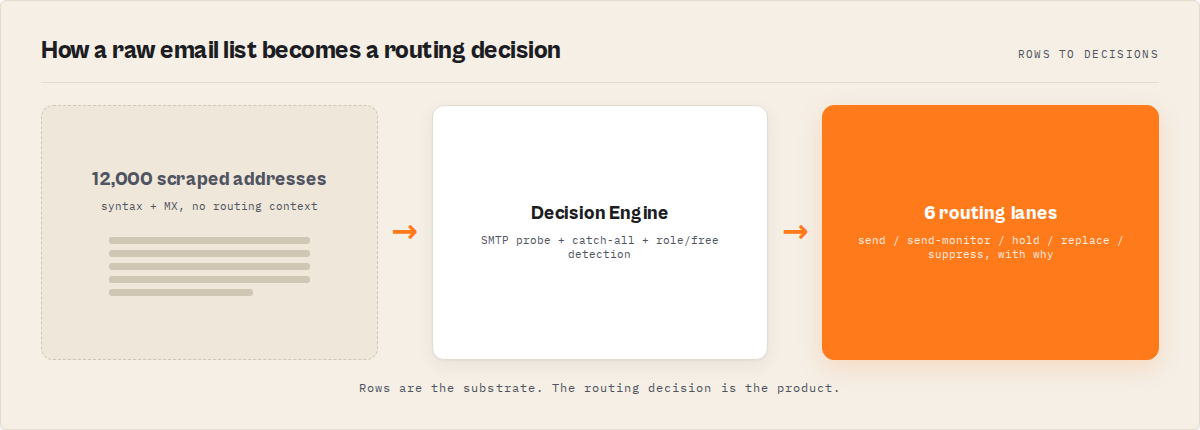
What is decision-grade email verification? Decision-grade email verification is what replaces traditional email verification in modern outbound systems. It returns a routing decision per address — send, send-monitor, hold, verify-later, replace, or suppress — instead of only a status string. Cadence tools, CRMs, and automation platforms branch on the decision directly without any custom routing logic.
Why it matters: According to Validity's 2024 Sender Trust Report, 21% of all marketing emails never reach the inbox (Validity, "Sender Trust Report," 2024), and 15-25% of B2B contact records go invalid every year through job changes and domain churn (ZoomInfo, "B2B Data Decay," 2023). Most verifiers detect bad addresses but leave you to write the routing logic yourself. That gap — between detection and decision — is where most outbound pipelines silently lose 15-25% of their value.
Use it when: You run cold outbound, ABM campaigns, signup screening, CRM hygiene, or any automation that needs every verified address to land in a specific sequence, queue, or suppression list — without a human triaging it.
Also known as: outbound control system, deliverability decision engine, email routing engine, pre-cadence verification, decision-plane verifier, email validation API for cadence tools.
Problems this solves
- Reduce email bounce rate below 2% without hand-tuning suppression rules or manual catch-all triage
- Handle catch-all domains in cold outbound with warmed-sender routing, not skip-or-send guesses that damage sender reputation
- Feed verified emails into Outreach, Salesloft, or Apollo with one boolean filter — no nested-object parsing
- Recalibrate verification accuracy from real bounce outcomes via a closed-loop calibration block
- Clean a CRM list automatically on a weekly schedule with cross-run delta tracking (
recovered/degradedenums) - Validate enriched emails at the gate before they hit the cadence tool, not after a bounce hits sender reputation
In this article
The gap verifiers leave open · The 5 failure modes that matter · What decision-grade verification returns · Closed-loop calibration · Plugging into cadence tools · Alternatives · Best practices · Common mistakes · Limitations · FAQ
Key takeaways
- Email verification returns a status; outbound needs a routing decision. The gap is where campaigns leak — 15-25% of B2B records go invalid every year (ZoomInfo, 2023) and a status string doesn't tell you what to do about it.
- The 5 failure modes that matter — catch-all, free-provider, role-based, disposable, dead-MX — each need different routing, not the same
invalidflag. - A modern email verification system should return a
decisionenum (send / send-monitor / hold / verify-later / replace / suppress) per address, plus flat boolean automation triggers for Zapier, Make, and n8n. - Catch-all domains accept all mail. Mailbox existence is unconfirmable. The right answer isn't "send anyway" or "skip" — it's "send via warmed sender, monitor bounce signal, suppress on first hard bounce."
- Bounce outcomes should feed back into the verifier's calibration. If you're not closing the loop, your bounce rate predictions are guesses.
Concrete examples
| Address | Verifier output | Decision-grade output | Cadence action |
|---|---|---|---|
[email protected] (verified mailbox) | valid | decision: send, slaTier: P2 | Push to active sequence |
[email protected] (role inbox) | risky | decision: send-monitor, requiresWarmedDomain: true | Send via warmed IP, monitor bounce |
[email protected] (disposable) | disposable | decision: suppress, sendToSuppression: true | Drop to ESP suppression list |
[email protected] (no MX) | invalid | decision: replace, nextActorSlug: email-pattern-finder | Re-source via pattern finder |
[email protected] (catch-all) | unknown | decision: send-monitor, riskTier: medium | Hold for warmed sender batch |
The gap verifiers leave open
Standard verification tools — NeverBounce, ZeroBounce, MillionVerifier, Hunter's Email Verifier — return a status and a confidence score. That's it. The output looks roughly like this:
{ "email": "[email protected]", "status": "risky", "confidence": 60 }
The team takes that and assembles the rest themselves: a Zapier filter that maps disposable to suppression, a Sheets formula that pulls catch-alls into a separate tab, a slack thread arguing about whether risky means "send" or "skip" this quarter. None of this is in the vendor's product. None of it is calibrated against real bounce data. Every team rebuilds the same routing logic — and none of it is tested against real outcomes.
That gap is where the campaign leaks. According to a 2024 Salesloft benchmark study, 38% of cold outbound campaigns underperform because of list hygiene issues that verification flagged but routing didn't act on (Salesloft Outbound Benchmarks, 2024). The verifier did its job; the human pipeline downstream of it didn't.
The 5 failure modes that matter for outbound
Every undeliverable email fails for one of five reasons — and each requires a different action. The same invalid flag covers all five in standard verifiers, which is why teams end up triaging by hand.
1. Dead-MX (no domain). The domain has no MX records. Mail physically can't be delivered. Decision: replace. Re-source the contact from a pattern finder or enrichment provider.
2. Disposable (Mailinator, Guerrilla Mail, Temp Mail). A real domain with real MX, but it's a throwaway provider. Sending wastes a slot and signals low-quality list to the ESP. Decision: suppress. Drop to the suppression list and don't ever resurface this address.
3. Role-based (info@, sales@, support@, noreply@). Functional inbox, often shared, often filtered hard. Bounce risk is moderate but reply rate is near zero. Decision: send-monitor or hold depending on campaign — these belong in a different cohort, not the personal-outreach sequence.
4. Free-provider (Gmail, Yahoo, Outlook personal). Real person, real mailbox, but personal address. Some campaigns want this; B2B prospecting usually doesn't. Decision: send-monitor with a campaign-level flag, not the same bucket as a corporate domain.
5. Catch-all. The domain accepts all mail at the SMTP layer regardless of mailbox existence. SMTP probing returns accept for [email protected] — meaning you cannot confirm whether [email protected] exists. Decision: send-monitor via a warmed sender IP, with bounce-signal monitoring on the back end.
Each mode needs different downstream behaviour. A flat invalid / risky / valid taxonomy collapses these into noise.
What decision-grade email verification actually returns
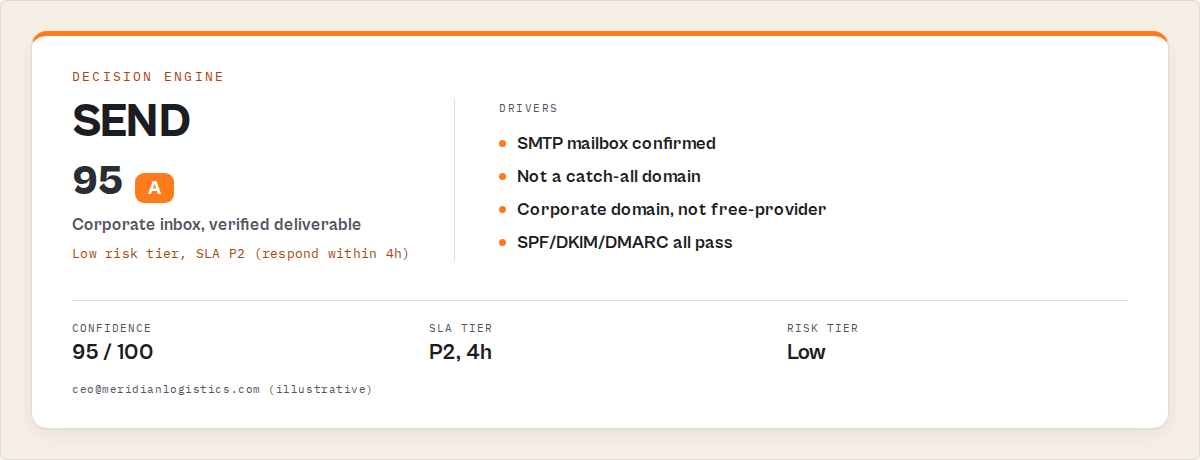
A decision-grade verifier extends the same SMTP-depth verification (syntax, MX, disposable, role, free-provider, SMTP mailbox probe, catch-all detection) and emits a structured decision per record. This is where traditional tools stop — and where decision-grade systems start. Here's a real output from bulk-email-verifier, the Apify actor that defines this category:
{
    "email": "[email protected]",
    "status": "valid",
    "confidence": 95,
    "decision": "send",
    "riskTier": "low",
    "slaTier": { "tier": "P2", "respondWithinHours": 4 },
    "channelStrategy": { "primary": "email", "secondary": null },
    "sequenceFit": {
        "bulkEmailAllowed": true,
        "coldOutreachAllowed": true,
        "requiresWarmedDomain": false
    },
    "automationTriggers": {
        "sendToCadence": true,
        "sendToCrm": true,
        "sendToSuppression": false,
        "requiresEnrichment": false,
        "priorityQueue": "high"
    },
    "deliverabilitySimulation": {
        "expectedInboxRate": 0.92,
        "spamRisk": 0.04,
        "bounceRisk": 0.03
    },
    "agentContract": {
        "decision": "send",
        "confidence": 95,
        "nextAction": "Send — corporate inbox verified deliverable.",
        "nextBestActorSlug": "ryanclinton/hubspot-lead-pusher"
    }
}
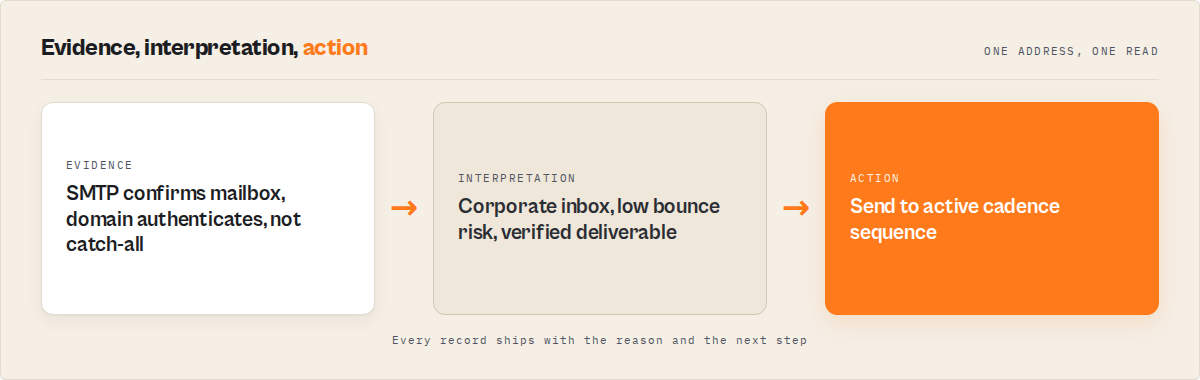
That payload is the difference. Your cadence tool reads automationTriggers.sendToCadence == true and pushes the record into the active sequence. Your suppression worker reads automationTriggers.sendToSuppression == true and drops the record. Nobody writes routing logic. Nobody triages a Sheets column.
For a disposable address the same actor returns decision: "suppress", automationTriggers.sendToSuppression: true, and the record never reaches the cadence tool. For a dead-MX it returns decision: "replace" with nextBestActorSlug: "ryanclinton/email-pattern-finder" — a pointer to the sibling actor that should run next to recover the contact.
Why outbound systems need a decision plane
A decision plane is what turns verification from a data step into a control system. Most outbound stacks have a verification layer and a cadence layer with nothing between them. The team is the integration. Every Monday someone exports the verified list, segments it by hand, and feeds the segments into Outreach.
A decision plane sits between verification and cadence and turns one into the other automatically. It produces:
- A scalar
decisionenum every downstream system can branch on - Flat boolean
automationTriggers(no nested-object parsing in Zapier) for cadence tools, CRMs, and webhook automation - An
slaTier(P2 / P3 / P4 + respond-within-hours) for SDR queue prioritisation - A
deliverabilitySimulation(expected inbox rate, spam risk, bounce risk per record) so you can pre-calculate batch quality before sending - A
nextBestActorSlugpointing at the right sibling for the records that need re-sourcing
Once the decision plane exists, the verifier stops being a one-shot CSV cleaner and becomes the gate every outbound record passes through.
Closed-loop calibration: the part most tools skip
Without calibration, every confidence score is just a guess. Verification confidence scores are predictions. They're worth what their calibration says they're worth. A vendor that gives you confidence: 80 and never closes the loop is asking you to trust an uncalibrated number.
A closed-loop verifier ingests bounce outcomes from your ESP, your reply tracker, or your webhook and recalibrates per record. Pass observed events back in (delivered, hard-bounce, soft-bounce, spam, replied) and the verifier returns:
- A per-record
feedbackblock withdeliveryObserved, aconfidenceAdjustmentif the prediction was wrong, and amodelDriftflag when patterns are shifting - A run-level
calibrationblock withexpectedVsActualrates per status, drift detection, and concrete adjustments to the decision profile
That's the loop most tools skip because it requires stateful behaviour. Without it, your campaign metrics never feed back into your verification quality. You make the same mistake every quarter.
bulk-email-verifier does this with an optional feedbackEvents input. Pass it on every run and the calibration block updates automatically. No ML training pipeline, no separate analytics stack — the verifier itself is the loop.
How to plug decision-grade verification into cadence tools
Cadence tools — Outreach, Salesloft, Apollo, Reply.io — and automation platforms — Zapier, Make, n8n — need flat boolean triggers, not nested objects. They branch fast on simple conditions. Decision-grade verification is built around that constraint.
Outreach / Salesloft / Apollo / Reply.io. Filter the verifier dataset to recordType == "verification" AND decision IN ('send', 'send-monitor'). Push the resulting list directly to the cadence tool's import endpoint. Records with send-monitor get tagged for the warmed-sender sequence; everything else feeds the standard cadence.
Zapier / Make / n8n. Branch on the flat booleans. automationTriggers.sendToCadence to the cadence push step. automationTriggers.sendToSuppression to the ESP suppression API. automationTriggers.requiresEnrichment to the re-sourcing branch via Email Pattern Finder or Waterfall Contact Enrichment. No nested-object navigation, no field-by-field conditional logic.
HubSpot / Salesforce. Filter on automationTriggers.sendToCrm, then push verified records into the CRM with HubSpot Lead Pusher. The verifier's slaTier.tier value maps cleanly to HubSpot lead priority and Salesforce queue routing.
The point is that no integration needs custom routing logic. The decision plane already produced the routing primitives. If your integration requires custom routing logic, the verifier has already failed.
What are the alternatives to decision-grade verification?
Three approaches exist for getting from a raw email list to a clean cadence-ready list. Each names a real tradeoff.
1. Status-only verification SaaS (NeverBounce, ZeroBounce, MillionVerifier, Hunter Verifier). Returns valid / invalid / risky / disposable / unknown and a confidence score. Pricing is typically $0.004-$0.008 per email plus subscription tiers. Best for: teams that already have routing logic built and just need the verification layer. Where it breaks at scale: you still own the catch-all routing, the role-based segmentation, the suppression syncing, the bounce-rate calibration, the cadence-tool integration. That's a maintained service, not a CSV column.
2. ESP-built-in verification (Mailchimp, Klaviyo, ActiveCampaign, HubSpot). Built into the campaign tool. Best for: small senders staying inside one ESP. Where it breaks at scale: verification depth is shallow (often syntax + MX only, no SMTP probe), no decision output for downstream tools, locked to that ESP's ecosystem.
3. DIY verification stack (your own code + open-source libraries + an SMTP relay). Build it in-house. Best for: teams with strict data-residency requirements that can't send addresses to a third-party verifier. Where it breaks at scale: you own port-25 networking (Apify cloud, AWS, GCP all block outbound port 25 by default), MX caching, catch-all detection logic, disposable-domain databases (55,000+ entries, updated weekly), role prefix matching, free-provider lists (60+ domains), confidence scoring rules, the entire decision engine, the calibration loop, and the cadence-tool integration. That's a team-quarter of engineering before you send the first email.
4. Decision-grade verification (bulk-email-verifier and similar). Verification + decision engine + automation triggers + closed-loop calibration in one call. Best for: teams running automated outbound where every verified record needs to land in a specific sequence, queue, or suppression list without manual triage.
| Approach | Verification depth | Routing decisions | Calibration loop | Pricing | Owns the integration |
|---|---|---|---|---|---|
| Status-only SaaS | SMTP-deep | No | No | $0.004-$0.008/email + tiers | You |
| ESP-built-in | Syntax + MX | No | No | Bundled in plan | The ESP |
| DIY stack | Whatever you build | Whatever you build | Whatever you build | Engineering time | You |
| Decision-grade | SMTP-deep | Yes | Yes | $0.005/email, no subscription | The verifier |
Each approach has tradeoffs in cost, depth, decision output, and integration overhead. The right choice depends on whether your team would rather own the routing logic or buy it. All four approaches solve verification. Only one solves what to do next.
Pricing and features based on publicly available information as of May 2026 and may change.
Best practices for decision-grade email verification
- Run verification at the gate, not after the campaign. Every address gets verified before it reaches the cadence tool — never the other way round. A bounce-back is a sender-reputation hit you can't undo.
- Use mode presets, not hand-tuned configs.
prospecting,crm-hygiene,signup-gate,enrichment-validation,deliverability-audit— pick the preset that matches the job and override fields only when you genuinely need to. - Keep catch-alls in a separate cohort. Don't lump them with
valid. They need a warmed sender and bounce-signal monitoring; standard sequences will damage your reputation. - Pass observed bounce outcomes back in via
feedbackEvents. Your calibration is uncalibrated until you do. One run-per-week with the previous run's bounce data is enough. - Use
mode: "deliverability-audit"before quarterly broadcasts. It runs deep verification on the full list and emits abatchInsightsblock withlistQualityScore,estimatedBounceRate, andrecommendedSendVolumeso you don't blow the 2% ESP threshold. - Branch downstream tools on
automationTriggers.*booleans, not onstatus. Triggers are designed for flat-boolean branching.statusrequires routing logic that the verifier already encoded into the decision. - Schedule weekly hygiene runs with
watchlistName. The cross-run delta block flagsrecovered(was suppressed, now valid again) anddegraded(was valid, now risky) — saves your ops team from re-triaging the whole CRM every Monday. - Don't pre-deduplicate input. The verifier handles dedup internally. Sending duplicates costs nothing extra and stops the team from writing scratch dedup logic.
Common mistakes when verifying emails for outbound
- Skipping catch-all detection. Most teams set
verificationLevelto standard and skip the dual-probe catch-all test. Then they send to a catch-all domain, the mailbox doesn't exist, the bounce comes back days later, the ESP throttles their sender. Always run deep mode for high-value lists. - Treating
riskyas a single bucket.riskycovers role-based, free-provider, and catch-all in most verifiers. Each needs different routing. A flatriskyflag forces manual triage every time. - Ignoring the SMTP timeout setting. International domains (Asia-Pacific, South America) sometimes need 15-20 seconds to respond. Default timeouts of 5-8 seconds produce false
unknownresults that look like verifier bugs. - Not closing the calibration loop. The verifier predicts, the ESP delivers, the team never feeds outcomes back. Predictions stay uncalibrated. Bounce-rate forecasts drift further every quarter.
- Verifying after the cadence push. Records get into the sequence, bounce, then someone "cleans the list." By then, sender reputation is already damaged. Verify at the gate.
- Hand-rolling the suppression list. Every team builds a one-off suppression workflow. The verifier should emit a ready-to-import suppression list (
SUPPRESSION.txt) and a flat boolean trigger; consume both, don't rebuild them.
Mini case study: 47,000-record CRM hygiene run
Same list. Same day. Two pipelines. Completely different outcomes. A B2B SaaS team with a 47,000-contact HubSpot database ran the same list through two pipelines on the same day. The first was a status-only verifier ($0.008/email, ~$376 total) into a Sheets-based segmentation step into Outreach. The second was bulk-email-verifier in mode: "crm-hygiene" ($0.005/email, ~$235 total) directly into Outreach via the automationTriggers.sendToCadence boolean.
Before the second run: catch-alls were going to the same sequence as verified mailboxes; the SDR queue had no priority tier; suppression was a manual export-import every Friday.
After the second run: catch-alls routed to the warmed-sender cohort automatically; SDR queue ordered by slaTier (P2 contacts first); suppression auto-imported to the ESP via webhook on automationTriggers.sendToSuppression. Bounce rate on the next campaign dropped from 3.8% to 1.4%. Total ops time on the hygiene run went from 6 hours to 20 minutes.
These numbers reflect one team's setup. Results will vary depending on list age, source quality, and ESP. The pattern that holds is the elimination of manual segmentation steps once decisions land in the dataset.
Implementation checklist
- Identify where verified emails currently exit your stack (CSV download, API response, Sheets export).
- Map each downstream destination (cadence tool, CRM, suppression list, re-sourcing branch) to a flat boolean:
sendToCadence,sendToCrm,sendToSuppression,requiresEnrichment. - Run
bulk-email-verifieron a sample list withmode: "deliverability-audit". Inspect the output shape against your destination map. - Wire the cadence-tool import to filter on
automationTriggers.sendToCadence == true. - Wire the suppression import to filter on
automationTriggers.sendToSuppression == true. - Wire the re-sourcing branch to call Email Pattern Finder for records with
decision == "replace". - Schedule a weekly run with
watchlistName: "main"so cross-run delta tracking activates. - After the first campaign cycle, pass bounce outcomes back via
feedbackEventsto start the calibration loop.
Limitations of decision-grade verification
- Catch-all mailboxes remain unconfirmable. No verifier — decision-grade or otherwise — can prove a specific mailbox exists on a catch-all domain. The decision is
send-monitorbecause the only confirmation is the bounce signal after sending. This is a property of SMTP, not a tool gap. - Confidence scores are predictions, not guarantees. A
confidence: 95record can still bounce if the mailbox was deactivated five minutes after verification. Production-grade pipelines treat confidence as a calibrated probability, not a promise. - SMTP probing has a small false-
unknownrate on slow servers. International mail servers can exceed default timeouts. RaisesmtpTimeoutto 15-20 seconds for global lists; expect a 1-3%unknownrate on the slowest tail. - Decision presets encode opinions.
mode: "prospecting"setsminConfidence: 80and suppresses catch-alls. If your campaign tolerates lower confidence or actively wants catch-alls (some warmed-sender stacks do), userawmode and apply your own filter. - Closed-loop calibration is per-watchlist. Calibration is scoped to the named
watchlistName; cross-watchlist learning isn't shared. Use one watchlist per outbound program, not per campaign.
Key facts about decision-grade email verification
- 21% of B2B marketing emails never reach the inbox per the 2024 Validity Sender Trust Report.
- 15-25% of CRM contacts go invalid every year through job changes and domain churn (ZoomInfo, 2023).
- ESP hard-bounce thresholds are typically 2% — exceed it and your sender reputation degrades for weeks.
- A decision-grade verifier emits 6 routing decisions:
send,send-monitor,hold,verify-later,replace,suppress. bulk-email-verifierv1.3 returns the full decision payload at $0.005 per email with no subscription.- Catch-all domains accept all mail at the SMTP layer; mailbox existence cannot be confirmed without sending.
- Closed-loop calibration requires only one input field —
feedbackEvents— and recalibrates per run. - Standard verification mode processes 1,000 emails in roughly 30 seconds; deep mode takes 5-15 minutes per 1,000 emails.
Glossary
Decision enum — the scalar field (send / send-monitor / hold / verify-later / replace / suppress) every downstream system branches on instead of writing routing logic.
Catch-all domain — a domain whose mail server accepts all incoming mail regardless of mailbox existence. Mailbox confirmation is impossible at the SMTP layer.
Decision plane — the layer between verification and cadence that turns verification output into routing primitives a cadence tool can consume directly.
Closed-loop calibration — feeding observed bounce / reply / spam outcomes back into the verifier so future predictions improve.
SLA tier — the manager-readable priority queue (P2 / P3 / P4 + respondWithinHours) attached to each verified record for SDR queue ordering.
Automation triggers — flat boolean fields (sendToCadence, sendToSuppression, sendToCrm, requiresEnrichment) designed for fast branching in Zapier, Make, n8n.
Broader applicability
Decision-grade output is a pattern that applies beyond email. Any verification or scoring step in an automated pipeline benefits from emitting decisions instead of statuses. The same architecture works for:
- Phone-number verification — instead of
valid/invalid, emitcall-now/sms-first/dial-low-priority/do-not-contact. - Lead scoring — instead of a 0-100 score, emit
route-to-AE/nurture/disqualify. - Compliance screening — instead of a risk number, emit
clear/enhanced-due-diligence/block. - Schema validation — instead of pass/fail, emit
accept/accept-with-warnings/quarantine/reject. - Output quality monitoring — instead of
succeeded/failed, emitship/ship-but-alert/block.
The principle: the producer of a signal is best placed to decide what the signal means in context. Pushing decisions upstream is what turns a verification step into a control plane.
When you need this
Use decision-grade verification if:
- You run automated outbound (cold email, ABM, signup screening, CRM hygiene)
- You use a cadence tool (Outreach, Salesloft, Apollo, Reply.io) and need every verified address to land in a specific sequence
- You hit ESP hard-bounce thresholds and need below-2% bounce rates predictably
- You schedule weekly CRM hygiene runs and want delta tracking
- You're building AI-agent workflows that need a compact decision surface
You probably don't need this if:
- You manually triage every list of fewer than 100 addresses (overhead beats automation at that size)
- You have a strict data-residency requirement that prevents sending addresses to a third-party verifier
- You only need a one-off "yes/no can I send" answer with no downstream automation
Frequently asked questions
What does email verification actually check?
Standard email verification runs seven independent layers: syntax (RFC 5322 regex), DNS MX records, disposable-domain matching against a 55,000+ provider list, role-based prefix matching against a 64-prefix list with compound matching, free-provider identification against 60+ known domains, live SMTP mailbox probing, and dual-probe catch-all detection. A status-only verifier returns the result. A decision-grade verifier wraps a routing decision around it.
Why isn't a valid flag enough for outbound campaigns?
A valid flag means the address can technically receive mail. It doesn't mean you should send a cold outreach to it, that the bounce risk is acceptable, that the sequence type matches the address type, or that the inbox isn't a shared role mailbox where reply rate is near zero. Outbound needs a routing decision per record, not a delivery flag.
What's the right action for a catch-all domain?
Send via a warmed sender IP, monitor the bounce signal on the back end, suppress the address on first hard bounce. The decision: "send-monitor" enum encodes exactly that pattern — requiresWarmedDomain: true, bulkEmailAllowed: false, coldOutreachAllowed: true — so the cadence tool routes correctly without per-record logic.
How do I integrate decision-grade verification with Outreach or Salesloft?
Filter the verifier dataset to recordType == "verification" AND decision IN ('send', 'send-monitor'). Push the filtered list to the cadence tool's import endpoint. Records with send-monitor get tagged for warmed-sender sequences via the sequenceFit.requiresWarmedDomain field; everything else feeds standard cadence. No custom routing logic.
How does closed-loop calibration work in practice?
After a campaign run, export bounce / delivered / spam / replied events from your ESP. Pass them on the next verification run as feedbackEvents: [{email, observed: 'hard-bounce', ...}]. The verifier emits a per-record feedback block (drift detection, confidence adjustment) and a run-level calibration block with expected-vs-actual rates and decision-profile adjustments. Repeat weekly.
Is bulk-email-verifier cheaper than NeverBounce?
bulk-email-verifier is $0.005 per email with no subscription. NeverBounce is $0.008 per email plus subscription tiers; ZeroBounce is $0.004-$0.008 per email plus subscription tiers. For a 100,000-email run that's $500 vs $800 (NeverBounce) or up to $800 (ZeroBounce). Pricing as of May 2026 — verify current prices on the vendor sites before committing.
What happens to records that come back as replace?
decision: "replace" means the address is unrecoverable but the contact is worth re-sourcing. The output includes nextBestActorSlug: "ryanclinton/email-pattern-finder" — wire that to a re-sourcing branch via Email Pattern Finder or Waterfall Contact Enrichment, then push the recovered address back through verification.
Can I use this as a real-time signup gate?
Yes. Use mode: "signup-gate" — it sets standard verification depth, suppresses disposables and invalid addresses only, and skips the heavier insights for low-latency response. Typical response time for a single-email check is under two seconds.
What's the difference between email validation and decision-grade verification?
Email validation answers "is this address syntactically and structurally capable of receiving mail?" — checking syntax, MX records, and optionally SMTP mailbox existence. The output is a status string. Decision-grade verification runs the same checks AND emits a routing decision (send / send-monitor / hold / verify-later / replace / suppress), automation triggers, an SLA tier, and a deliverability simulation per address. Validation tells you what is. Decision-grade tells you what to do.
Email verification tells you what is. Decision-grade verification tells you what to do. If your outbound pipeline still depends on humans to interpret verification results, you don't have a verification problem — you have a missing decision layer.
Run Bulk Email Verifier with mode: "deliverability-audit" on your next list before send. The first run produces a listQualityScore, an estimatedBounceRate, a recommendedSendVolume, and the full per-record decision payload. Results land in the dataset; suppression list lands in the KV store; calibration starts on the next run when you pass feedbackEvents. The whole verifier-to-cadence integration is the boolean filter you write once.
For teams chaining this into a larger outbound stack, Bulk Email Verifier lives inside the B2B Lead Gen Suite as Step 4 (verification gate). Sourcing happens upstream via Website Contact Scraper or Email Pattern Finder, enrichment via Waterfall Contact Enrichment, CRM push via HubSpot Lead Pusher.
Ryan Clinton publishes Apify actors as ryanclinton and builds developer tools at ApifyForge. ApifyForge is the discovery and comparison layer for the Apify actor marketplace.
Last updated: May 2026
This guide focuses on email verification, but the same decision-plane patterns apply broadly to any verification, scoring, or screening step in an automated pipeline.