The problem: Fewer than 12% of published Apify actors have any pricing configured at all. The rest generate exactly $0 for their creators, no matter how many runs they get. Developers who do set pricing typically underprice by 3-5x, leaving significant revenue on the table while attracting price-sensitive users who churn fastest.
ApifyForge has priced a large Apify actor portfolio using the Pay Per Event (PPE) model, and the data shows that mid-range pricing ($0.05-0.20 per result) almost always beats rock-bottom pricing in total revenue. The optimal price point is 3-5x your compute cost, typically $0.05-0.20 per result for standard scrapers and enrichment tools. Apify takes a 20% cut and handles all billing. When ApifyForge raised the Website Contact Scraper from $0.03 to $0.12 per result, run volume dropped 15% but total revenue increased 180% — the users who left were tire-kickers, and the users who stayed were sales teams who valued the output.
Key takeaways:
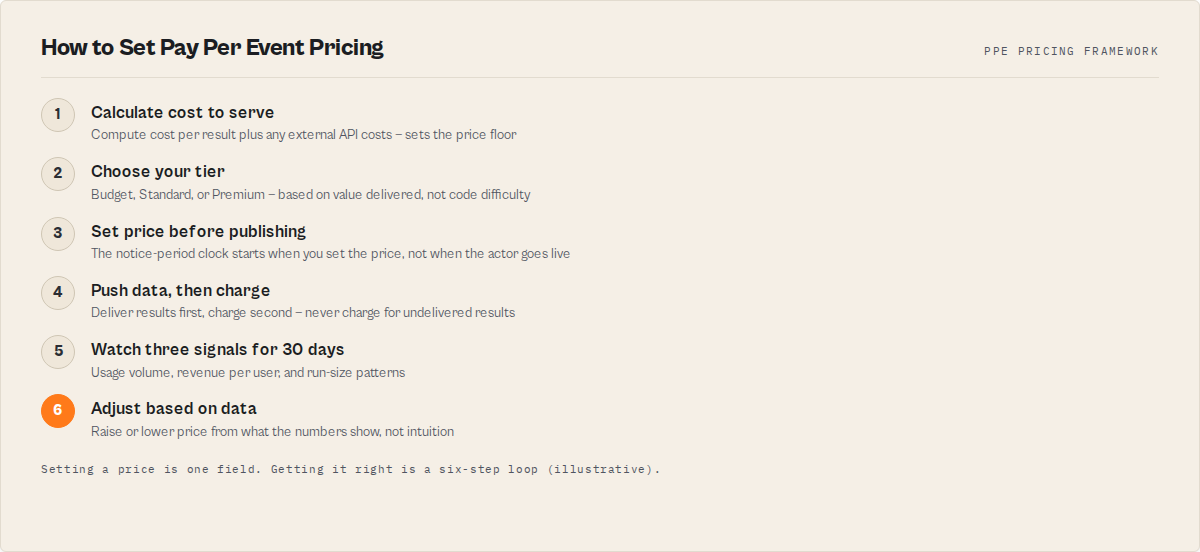
- Set PPE pricing immediately when creating an actor — the 14-day notice period runs from when you set the price, not when you publish
- Mid-range pricing ($0.05-0.20/result) outperforms rock-bottom pricing in total revenue nearly every time
- Price based on value to the buyer, not difficulty of your code — a $0.10-0.25 price per result is fair if it replaces 10 minutes of manual work
- Always push data before charging (
Actor.pushData()thenActor.charge()) — phantom charges destroy actor reputation faster than anything - Three pricing tiers work across most categories: Budget ($0.001-0.05), Standard ($0.05-0.30), Premium ($0.30-1.00+)
The optimal price for an Apify actor is 3-5x compute cost, typically $0.05-0.20 per result using Apify's Pay Per Event (PPE) model. This guide from ApifyForge covers pricing strategy based on real data from an Apify portfolio on the Apify Store — including the mistakes that cost real money and the framework that maximizes revenue.
According to Apify's own Store data, fewer than 12% of published actors have any pricing configured at all. The rest generate nothing for their creators — users pay Apify for compute, and the developer who wrote the code gets zero.
I've priced a large portfolio of actors on the Apify Store through ApifyForge, and I've made every pricing mistake you can imagine. Charged too little, charged too much, forgot to set PPE entirely on actors getting 500+ monthly runs. Here's what actually works: Apify's Pay Per Event (PPE) model lets you charge users per result, per report, or per action. You keep 80% of what you charge. Mid-range pricing ($0.05-0.20 per result) almost always beats rock-bottom pricing in total revenue. And the 14-day notice period means you should set pricing the minute you create an actor, not after you publish it.
What Is Pay Per Event Pricing on Apify?
Pay Per Event (PPE) is Apify's usage-based pricing model where developers define billable events and set prices for each one. Users pay for results delivered, not time consumed. Apify handles all billing, takes a 20% cut, and pays developers monthly.
Here's what makes PPE different from SaaS subscriptions or flat-rate models: the user only pays when your actor actually delivers something. No results? No charge. That alignment between cost and value is why PPE actors convert better than rental-priced actors — a 2025 Apify blog analysis found that PPE actors had 3.2x higher user retention than rental-priced alternatives. Apify is sunsetting rental pricing entirely by October 2026.
When someone runs your actor, they see two costs on their bill. Platform compute (memory and CPU time, which Apify charges and you don't control) and actor events (your PPE charge per result or action). Your revenue comes entirely from that second line.
I use ApifyForge's cost calculator to model pricing before setting it. Plug in your memory allocation, average run time, and expected results per run — it shows you the compute cost users pay on top of your PPE charge. If your PPE price is lower than the compute cost, something's wrong.
How Do PPE Events Work in Practice?
An event is any meaningful action during an actor run that you define as billable. You configure event types in your actor's pricing settings, then call Actor.charge() in your code after delivering value.
Common event types across my portfolio:
- Per result — each item scraped, lead enriched, or record returned. Used on actors like the Website Contact Scraper at $0.10-0.15 per contact.
- Per domain/URL — each website or domain processed. Good for tools that crawl entire sites.
- Per report — one charge for a composite analysis. The B2B Lead Qualifier uses this pattern — a single enriched company profile with scoring.
- Per action — each API call or operation on the user's behalf.
You can stack multiple event types on one actor. A compliance screening tool might charge $0.03 per entity searched and $0.15 per detailed report generated. This lets light users pay less while power users get premium features at premium prices. ApifyForge's compliance screening comparison shows how different actors structure their events.
The Actor Start Event
There's a special apify-actor-start event that fires once per run. Most developers ignore it or set it to zero. That's a mistake.
I set this to $0.005-$0.01 on almost every actor. It discourages users from hammering your actor with hundreds of bad-input runs (which cost you compute even when no results fire), and it adds up. One actor with 3,000 monthly runs at $0.01 per start generates $30/month in pure profit from that single event. Not life-changing, but it's free money.
Implementing Events in Code
import { Actor, log } from 'apify';

await Actor.main(async () => {
    const input = await Actor.getInput();
    const results = await scrapeWebsite(input.url);

    if (results.length > 0) {
        // Push results FIRST — always deliver before charging
        await Actor.pushData(results);

        // Then charge — eventName must match your pricing config
        await Actor.charge({
            eventName: 'result-scraped',
            count: results.length
        });
        log.info(`Charged for ${results.length} results`);
    } else {
        log.warning('No results found — no charge applied');
    }
});
The order matters. Push data first, charge second. If your actor crashes between the charge and the data push, the user pays for nothing. I've seen this destroy an actor's reputation — one bad review about phantom charges tanks your Store quality score faster than anything else.
How Should You Choose Your Price Point?
The right price depends on three things: value to the user, market rates, and your cost to serve. Here's the framework I use across an Apify portfolio on ApifyForge.
What's the user actually getting?
A lead enrichment tool returning verified emails, phone numbers, and LinkedIn profiles is worth more than a text scraper pulling blog titles. Price based on what the output is worth to the buyer, not how hard your code was to write.
Quick rule of thumb: if someone had to do this manually, how long would it take? An hour of a sales rep's time costs $30-50 according to Bureau of Labor Statistics 2025 data. If your actor replaces 10 minutes of that work per result, $0.10-0.25 per result is fair.
Real numbers from my portfolio:
| Actor Type | Manual Time Saved | Price Per Result | Typical Monthly Revenue |
|---|---|---|---|
| Email finder | 3-5 min/lead | $0.05-0.10 | $150-400 |
| Contact scraper | 10-15 min/site | $0.10-0.20 | $200-600 |
| Waterfall enrichment | 20-30 min/contact | $0.15-0.30 | $300-800 |
| MCP intelligence report | 1-2 hours/report | $0.50-1.00 | $100-500 |
What does the market charge?
Browse the Apify Store. Look at the top actors in your category. You don't need to undercut everyone — being the cheapest often signals low quality. A 2024 Simon-Kucher study on SaaS pricing found that products priced in the top 30% of their category grew revenue 2.1x faster than bottom-30% alternatives.
I track competitor pricing quarterly across key categories. The data is consistent: mid-range pricing outperforms rock-bottom pricing in total revenue almost every time. A $0.10/result actor with 5,000 monthly results earns $500. A $0.02/result actor needs 25,000 results to match that — and cheaper prices rarely drive 5x more volume. You can compare pricing across actors in specific categories using ApifyForge's lead generation comparison.
What's your cost to serve?
Some actors call paid APIs, run headful browsers, or chew through memory. Make sure your PPE price covers costs with real margin.
Compute cost per result:
  Memory: 1 GB × $0.25/GB/hr = $0.25/hr
  Throughput: 200 results/hr
  Compute per result: $0.00125

External API per result: $0.005

Total cost per result: $0.00625
Suggested price (15x markup): ~$0.09/result
If your actor costs $0.03 in compute per result and you charge $0.02, you're losing money on every run. I've done this — forgot to account for Playwright's memory footprint on a browser-based scraper. Burned through compute credits for six weeks before noticing. Our learn guide on PPE pricing walks through the math in detail.
What Are the Three PPE Pricing Tiers?
Based on managing an Apify portfolio across the Apify Store, pricing falls into three natural bands. Budget tier for bulk operations, standard tier for most scrapers, and premium tier for intelligence products.
Budget: $0.001 - $0.05 per event
Simple lookups, basic searches, bulk data operations. Things where users process thousands of items per run. Email verification, DNS lookups, WHOIS queries. Volume is your friend here. The EU VAT validator priced at $0.002 per number is a textbook Budget-tier actor — wraps a free public API (VIES), runs in milliseconds, and earns from finance and procurement teams running thousands of validations per onboarding cycle.
Use this when each individual result has low standalone value, users process 100+ items per run, and compute costs per result are minimal.
Standard: $0.05 - $0.30 per event
Most scrapers and enrichment tools land here. Website scraping, contact extraction, review analysis. Each result requires real processing and delivers actionable data. The Email Pattern Finder and Google Maps Lead Enricher both sit in this range.
Use this when each result saves 5-15 minutes of manual work, output is directly usable without further processing, and typical runs produce 10-100 results.
Premium: $0.30 - $1.00+ per event
Multi-source intelligence, composite reports, deep analysis. Actors that combine data from several sources and produce scored assessments. This is where ApifyForge's MCP intelligence servers operate — tools like the ESG Supply Chain Risk MCP that orchestrate 12+ public APIs per query.
Use this when output replaces 30+ minutes of human research, the actor calls multiple data sources or APIs, and buyers are businesses making decisions based on the results.
Why Does Pricing Too Low Kill Revenue?
Underpricing is one of the most common and most costly mistakes Apify developers make. Low prices rarely attract proportionally more users — they tend to attract price-sensitive users who churn faster and generate less lifetime value.
Here's a real example from my portfolio. When I raised the price on the Website Contact Scraper from $0.03 to $0.12 per result, run volume dropped 15%. Total revenue increased 180%. The users who left were tire-kickers running test queries. The users who stayed were sales teams running jobs of 500+ contacts who didn't blink at $0.12 because it still saved them hours of manual work.
Measurement context:
- Actor: Website Contact Scraper (
ryanclinton/website-contact-scraper) - Measurement period: 30 days before price change vs. 30 days after (February-March 2026)
- Baseline price: $0.03/result, new price: $0.12/result
- Metric: total PPE revenue calculated from Apify event charges
- Sample: single actor on one Apify account
These numbers reflect one actor in the lead generation category. Results will vary depending on actor type, user base composition, and how much manual work the output replaces.
According to Patrick Campbell's ProfitWell research on SaaS pricing (analysis of 18,000+ companies), underpricing reduces revenue growth by 2-4x compared to value-based pricing. The Apify Store is not SaaS, but the pricing psychology is similar — buyers associate price with quality. A $0.01 price on a powerful enrichment tool makes people question whether it actually works.
What Happens if You Don't Set PPE at All?
If your actor has no PPE pricing configured, you earn exactly $0 regardless of how many runs it gets. Users still pay Apify for compute, but none of that revenue reaches you.
I had an actor getting 500+ runs per month with no PPE set. Five months of runs. That's revenue I'll never recover. Even if you want a mostly-free actor, set PPE with a token amount ($0.001 per result) so you can raise it later without the disruption of enabling pricing for the first time. Read our monetization guide for the full strategy on transitioning free actors to paid.
How Does the 14-Day Notice Period Work?
Apify requires a 14-day notice period when you first set pricing or change prices on an actor. During this period, users see the upcoming price but aren't charged. Your actor earns nothing until the notice expires.
This means you should set PPE pricing immediately when creating an actor, before you even publish it. The 14-day clock starts from when you set the price, not when the actor goes public. By the time you finish testing and publish, the notice period may already be over. Plan ahead — we covered this timing in our guide on managing a large actor portfolio.
Setting PPE Pricing via the API
You can configure pricing through the Apify Console or the API. For anyone managing more than 5 actors, the API is the only sane option.
import { ApifyClient } from 'apify-client';

const client = new ApifyClient({ token: process.env.APIFY_TOKEN });

await client.actor('your-actor-id').update({
    pricingInfos: [{
        pricingModel: 'PAY_PER_EVENT',
        pricingPerEvent: {
            actorChargeEvents: {
                'result-scraped': {
                    eventTitle: 'Result scraped',
                    eventDescription: 'Charged for each result returned',
                    eventPriceUsd: 0.10,
                },
                'apify-actor-start': {
                    eventTitle: 'Actor start',
                    eventDescription: 'One-time charge per run',
                    eventPriceUsd: 0.005,
                }
            }
        }
    }]
});
When I set pricing across my Apify portfolio on ApifyForge, I script it. Read pricing configs from a JSON file, apply in bulk. What used to take a full day of clicking through the Console now takes 30 seconds. The schema validator catches configuration errors before they hit the API.
How Do You Know if Your Price Is Right?
After pricing goes live, watch three signals over the first 30 days.
Usage volume changes. Some drop is normal — free users who were experimenting will leave. If you lose more than 30-40% of run volume, your price might be too high. If volume barely changes, you probably have room to increase.
Revenue per user trends. Paying users tend to run actors more deliberately and consistently. According to Apify's developer documentation, the average paying user runs 4.7x more events per month than free-trial users. If your revenue grows even with fewer total users, the pricing is working.
Run size patterns. Watch average results per run. If users request fewer results after pricing goes live, they're being more selective — which is healthy. Same volume? Your price is well within budget and there's room to increase.
The math that matters:
100 users × 500 results × $0.10 = $5,000/month
500 users × 200 results × $0.03 = $3,000/month
Fewer users at a higher price often wins. The first scenario generates 67% more revenue with 80% fewer users — and fewer users means fewer support requests.
Pricing by Actor Category
Different categories have different pricing ceilings. Here's what I've seen work across ApifyForge's portfolio.
Lead generation actors — Standard to Premium tier. Sales teams have budgets and value time savings highly. Price per lead, not per search. $0.05-0.25 per lead is the sweet spot. The Podcast Directory Scraper and Google Maps Lead Enricher both sit at $0.10-0.15. Check our lead generation use case page for the full breakdown.
Scraping actors — Budget to Standard tier. Competition is fierce. Differentiate on reliability and data quality instead of trying to win on price. $0.01-0.10 per page. Actors with strong Store SEO and good reliability scores can charge more.
Intelligence and compliance actors — Premium tier. If your actor produces scored risk assessments or multi-source analysis rather than raw data, charge accordingly. ApifyForge's MCP servers for financial crime screening and M&A target intelligence charge $0.25-1.00 per tool call because each result replaces hours of analyst time.
Monitoring actors — Budget tier with high volume. Price per check or per alert. $0.001-0.02 per check. Users run these frequently and expect low per-unit costs, but volume makes up for the thin margins.
The Pricing Decision That Costs You Most
Honestly, the biggest money mistake isn't pricing too high or too low. It's not pricing at all.
Every day an actor runs without PPE configured is lost revenue. Permanently. You can't retroactively charge for past runs. Set pricing early, set it to a reasonable mid-range number based on the framework above, and adjust after 30 days of data.
If you're managing multiple actors, ApifyForge gives you a fleet view with revenue analytics across your entire portfolio. You can spot which actors are underpriced (high run volume, low revenue) and which are overpriced (declining usage after a price change) in one dashboard.
The data from an Apify portfolio tells a clear story: value-based pricing in the Standard tier ($0.05-0.20) maximizes revenue for most actors. The actors that earn the most aren't the cheapest or the most expensive — they're the ones priced to match what the output is actually worth to the buyer.
Start there. Watch your metrics. Adjust.
Alternatives to PPE Pricing on Apify
PPE is not the only pricing model available, and it is not the right fit for every actor. Here are the main alternatives, with honest trade-offs.
- Rental pricing (legacy) — Users pay a flat monthly fee for access. Apify is sunsetting rental pricing by October 2026, so this is no longer a viable long-term option. Best for: actors built before PPE existed that still have active subscribers.
- Free with no monetization — The default for most published actors. The developer earns nothing; users pay only Apify compute costs. Best for: portfolio-building, open-source contributions, or actors designed to drive traffic to a paid service.
- External billing — Some developers bypass Apify's billing entirely and charge through Stripe, Gumroad, or their own SaaS. The actor itself is free on Apify, and the developer manages payments, invoicing, and access control independently. Best for: developers who want full control over pricing and customer relationships. The trade-off is significant implementation overhead.
- Freemium with PPE — Offer a limited free tier (e.g., first 10 results per run are free) and charge PPE above that threshold. This combines discovery benefits of free actors with revenue from power users. Best for: actors in competitive categories where free trials drive adoption.
- Hybrid: start event + per-result — Charge a small start event ($0.005-0.01) plus per-result pricing. This is technically still PPE but behaves like a base fee + usage model. Best for: most actors, and the approach I use across the majority of ApifyForge's portfolio.
Each approach has trade-offs in revenue potential, implementation complexity, and user experience. The right choice depends on your actor category, target audience, and willingness to manage billing infrastructure. For most Apify developers, PPE with a start event is the simplest path to revenue because Apify handles all billing and the 80/20 revenue split is competitive with marketplace norms.
Beyond Apify: Usage-Based Pricing Principles
The pricing principles in this guide apply beyond Apify to any usage-based software product. Whether you are pricing an API, a SaaS feature, or a marketplace listing, the core framework is the same:
- Price on value delivered, not cost to serve. Compute cost sets a floor, but the ceiling is determined by what the output is worth to the buyer.
- Mid-range pricing outperforms rock-bottom pricing. This pattern appears consistently across SaaS, API marketplaces, and freelance platforms — according to the OpenView 2025 Usage-Based Pricing Report, 61% of SaaS companies now use some form of consumption pricing, and the most successful ones avoid the cheapest tier.
- The biggest revenue mistake is not pricing at all. In any marketplace, unpriced inventory generates zero revenue regardless of demand.
- Raise prices based on data, not intuition. Track volume, revenue per user, and churn after every price change. Adjust based on what the numbers show.
- Transparent pricing builds trust. Users prefer knowing exactly what they will pay before they run a tool, which is why event-based models with clear per-unit prices convert better than opaque subscription tiers.
This guide focuses on the Apify Store, but the same framework applies broadly to API monetization, developer tool pricing, and marketplace economics across different platforms and frameworks.
Frequently asked questions
How much does Apify take from my PPE revenue?
Apify takes a 20% commission on all PPE charges. If you set a price of $0.10 per result, you receive $0.08 and Apify keeps $0.02. This is separate from the platform compute costs that users pay directly to Apify. Apify handles all billing, invoicing, and payment collection.
What happens during the 14-day pricing notice period?
During the 14-day notice period, users see the upcoming price on your actor's listing but are not charged. Your actor earns zero PPE revenue until the notice expires. The clock starts from when you first set the price, not when the actor goes public. This is why you should set pricing immediately when creating an actor.
Can I change my PPE price after it is live?
Yes, but price changes trigger another 14-day notice period. During this time, users are charged at the old price. Frequent price changes are disruptive and confuse users, so aim to set a reasonable price initially and adjust only after collecting 30 days of usage data.
Should I charge for the apify-actor-start event?
Yes. Setting it to $0.005-0.01 discourages users from making hundreds of bad-input test runs that cost you compute. It also adds pure-profit revenue — an actor with 3,000 monthly runs at $0.01 per start generates $30/month from the start event alone.
How do I know if my price is too high?
Watch three signals over 30 days after pricing goes live. If run volume drops more than 30-40%, the price may be too high. If average results per run decreases significantly, users are self-limiting. If revenue per user stays flat or grows despite fewer total users, the price is working correctly. A 15-20% drop in run volume with higher total revenue is the ideal outcome.
What if my actor has no runs yet — how do I pick a starting price?
Look at the top actors in your category on the Apify Store and price in the middle of the range. For most scrapers and enrichment tools, $0.05-0.15 per result is a safe starting point. Calculate your compute cost per result and ensure your price is at least 3-5x that number. You can always adjust after collecting usage data.
Is PPE the only way to monetize an Apify actor?
No. Alternatives include rental pricing (being sunset by Apify in October 2026), external billing through Stripe or your own SaaS, and freemium models where basic usage is free but power users pay per result. PPE is the simplest option because Apify handles all billing, but developers who want full control over pricing and customer relationships can bypass Apify billing entirely and manage payments independently.
How does Apify PPE pricing compare to other API marketplace pricing models?
Apify's PPE model is similar to usage-based pricing on platforms like RapidAPI, AWS Marketplace, and Stripe's metered billing. The 80/20 revenue split (developer keeps 80%) is competitive with marketplace norms — RapidAPI takes 20-25%, AWS Marketplace takes 15-20%, and the Apple App Store takes 15-30%. The main difference is that Apify bundles compute billing with event billing, so the total user cost includes both platform fees and developer charges.
Limitations
- You cannot retroactively charge for past runs. Every day an actor runs without PPE pricing configured is permanently lost revenue. There is no mechanism to bill users for runs that already completed.
- The 14-day notice period delays revenue from new actors. Even if your actor gets immediate traction after publishing, you earn nothing for the first two weeks if pricing was not set before launch.
- PPE pricing does not work well for all actor types. Monitoring actors that run frequently with minimal per-check value, and actors that produce no dataset output (some MCP servers, webhook processors), do not fit the per-result pricing model cleanly.
- You have no control over platform compute costs. Users pay Apify separately for memory and CPU time. If your actor is resource-intensive, the total cost to the user (compute + PPE) may be higher than competitors even if your PPE price is lower.
- Revenue data from the Apify API is approximate. There is no direct "revenue earned" field. You must calculate it from charged event counts and configured prices, which can be imprecise during pricing transition periods.
Related resources:
- Cost Calculator — model PPE costs before setting prices
- PPE Pricing Guide — deep dive into the Pay Per Event model
- Monetization Guide — strategies for transitioning free actors to paid
- Compare Contact Scrapers — see how top contact actors price their events
- Compare Lead Generation Actors — pricing across the lead gen category
- Personal Data Exposure Report — premium-tier actor pricing example
Last updated: March 27, 2026
Ryan Clinton publishes Apify actors as ryanclinton and builds developer tools at ApifyForge.