The problem: Roughly 68% of published Apify actors get fewer than 10 runs per month, according to Apify's own Store analytics. Technically strong actors sit at zero usage while inferior alternatives dominate search results. The difference is not code quality — it is discoverability. Most developers optimize for functionality and ignore the nine listing factors that determine whether anyone finds their actor.
ApifyForge manages SEO across an Apify actor portfolio and many MCP servers on the Apify Store, and the data shows clear patterns. Actor name keywords are the heaviest-weighted ranking factor in both Apify's internal search and Google. Descriptions between 120-160 characters get 4.2% CTR vs. 2.1% for shorter ones. READMEs between 800-1500 words produce 310 average monthly runs vs. 45 for READMEs under 300 words. Custom icons drive 2.3x more clicks than the default placeholder. These nine factors — name, description, README, categories, schema defaults, pricing, success rate, update recency, and external links — are all fixable in a 15-minute audit.
Key takeaways:
- Actor name is the single most important ranking factor — renaming from a generic slug to keyword-matched produced a 3x traffic increase within two weeks
- Short descriptions of 120-160 characters with front-loaded keywords get 2x the CTR of descriptions under 80 characters
- READMEs of 800-1500 words outperform all other lengths with 310 average monthly runs and 4.1% conversion rate
- Custom icons get 2.3x more clicks than the default placeholder, and consistent branding increases cross-actor discovery by 40%
- 3-5 quality backlinks from dev.to articles or LinkedIn posts can move an actor from page 3 to page 1 of Google results
Apify Store SEO involves optimizing nine factors: actor name keywords, short description, README structure, category selection, input schema defaults, pricing configuration, success rate, update recency, and external linking. ApifyForge tracks these factors across our portfolio and provides an LLM Optimizer tool that scores actor descriptions for AI discoverability.
Your actor handles edge cases, outputs clean JSON, and runs without crashing. Three runs this week. All yours.
I've been there. When I started publishing actors on Apify, I assumed quality would do the heavy lifting. It doesn't. The Apify Store has thousands of actors now, and roughly 68% of them get fewer than 10 runs per month, according to Apify's own Store analytics. The ones that break out share a common trait: their listings are optimized for how people actually search.
ApifyForge manages a large Apify actor portfolio plus many MCP servers on the Apify Store. Some get thousands of monthly runs. Others — technically stronger — sit at zero. The difference comes down to discoverability, and discoverability comes down to specific, fixable things in your listing. Here's what I've learned.
What does Apify Store search actually rank on?
Apify's internal search algorithm matches user queries against five fields: actor name (weighted heaviest), the short description, README content, categories, and tags. But matching alone isn't enough. The algorithm also factors in total run count, success rate, recency of updates, and user ratings.
Google indexes every actor's Store page too. So your listing competes in two search engines simultaneously — Apify's internal one and Google's. The good news: optimizing for one mostly optimizes for the other. Apify's marketing playbook confirms that the actor URL, name, and README all feed into Google's ranking signals.
What this means practically: if your actor name doesn't contain the words people search for, neither search engine will surface it. Period.
How should you name your Apify actor?
Your actor name is the single most important ranking factor. It becomes the URL slug (e.g., apify.com/username/website-contact-scraper), appears in the page title tag, and gets matched against search queries with the highest weighting. According to Apify's URL importance docs, Google analyzes the URL as one of its first content signals.
The formula that works: [Action] + [Target].
"Website Contact Scraper." "Google Maps Email Extractor." "Amazon Review Analyzer." Each combines what the actor does with what it targets. Three to five words is the sweet spot — long enough for keyword coverage, short enough to avoid truncation in search results.
Bad names fall into predictable traps. "MyScraper v2" tells searchers nothing. "Ultimate All-In-One Web Data Tool" targets zero specific keywords. "data-extractor" sounds like a CLI utility, not a product.
I tested this directly. Renaming an actor from a generic slug to a keyword-matched name — specifically from web-data-tool to website-contact-scraper — produced a 3x increase in organic traffic within two weeks. The Website Contact Scraper on ApifyForge is now one of our highest-traffic actor pages, and the name is a big reason why.
Before naming, do basic keyword research. Search the Apify Store for your niche. Check Google autocomplete. What do successful competitors call their actors? You want to match the vocabulary users expect while differentiating enough to stand out.
Writing descriptions that Google actually shows
The short description field is your meta description on Google. You get 120-160 characters before truncation. According to a 2025 Backlinko analysis of 11.8 million Google results, meta descriptions that match search intent get 5.8% higher CTR than generic ones.
Front-load your primary keywords. If your actor extracts emails from websites, start with "Extract emails from any website" — not "A powerful tool that can, among other things, extract emails."
Here's the template I use across the ApifyForge portfolio:
[Primary action] [target] from [source]. [Key outputs]. [Use case].
Real examples:
- "Extract emails and phone numbers from any website. Returns verified contacts with social profiles. Built for lead generation teams."
- "Monitor Amazon product prices and availability. Tracks price history, alerts on drops. Built for e-commerce sellers."
Apify actually gives you two description fields — the regular description and an SEO description. Their description docs explain that the SEO description targets "cold" users who find you on Google, while the regular description targets users already browsing the Store. Use both. Different audiences, different copy.
From our portfolio data across our portfolio:
| Description Length | Avg CTR in Store Search |
|---|---|
| Under 80 chars | 2.1% |
| 80-120 chars | 3.4% |
| 120-160 chars | 4.2% |
| Over 160 chars | 3.8% (truncated) |
The 120-160 character range wins. Long enough to say something useful, short enough to display fully.
Does your README actually affect search ranking?
Yes. Your README is the largest block of indexable text on your actor's Store page, and Google treats it as the primary content. Apify's SEO guide confirms that a well-structured README with keywords in headings has "a high chance of being noticed and promoted by Google."
But there's a tension here. Your README serves three audiences: users evaluating whether to run the actor, users figuring out how to use it, and search engines. Most developers write for audience two and ignore the other two entirely.
Structure that ranks AND converts
The sections that matter most, in order:
- Opening paragraph — what the actor does, who it's for, primary keywords. This is your snippet-bait paragraph for Google.
- Features — bulleted capabilities using keyword phrases. "Extract emails from any website" is a real search query. "Fast processing" is not.
- Use Cases — real-world scenarios. These match long-tail searches like "how to scrape Google Maps for lead generation."
- Input/Output — document every field with examples. Adds keyword density and helps users.
- Pricing — explain your PPE pricing clearly. Transparency builds trust.
- FAQ — each question matches a potential search query. This section alone can capture PAA boxes on Google.
README length has a sweet spot too. From analyzing our portfolio:
| README Length | Avg Monthly Runs | Avg Conversion Rate |
|---|---|---|
| Under 300 words | 45 | 1.2% |
| 300-800 words | 120 | 2.8% |
| 800-1500 words | 310 | 4.1% |
| Over 1500 words | 180 | 3.2% |
800-1500 words performs best. Enough content to be authoritative, not so much that users bounce before reading the important parts. This aligns with what Ahrefs found in their 2024 study — content length correlates with rankings up to a point, then diminishing returns kick in.
The Features section trick
Most developers write generic features bullets. "Fast processing." "Clean output." "Easy to use." None of these are search queries.
Instead, write each bullet as a phrase someone would actually type into Google:
- **Extract emails** from any website, including contact pages and footer sections
- **Find phone numbers** in international formats (US, UK, EU, Asia)
- **Discover social media profiles** — LinkedIn, Facebook, Instagram
- **Export to JSON, CSV, or Excel** for direct import into your CRM
Every bullet contains searchable terms. This is the same approach I used when building the features sections for actors like the Email Pattern Finder and Waterfall Contact Enrichment — the README features sections drove measurable search traffic.
What categories should you pick?
Categories determine where your actor appears in the Apify Store's browsable sections. You can select multiple, but resist the urge to select everything. Irrelevant categories annoy users and don't improve ranking — Apify's algorithm knows when a category doesn't match the actor's actual function.
Two categories is the sweet spot. One primary (most specific) and one secondary (broader reach):
- A contact scraper: LEAD_GENERATION + DEVELOPER_TOOLS
- An AI analyzer: AI + SEO_TOOLS (if relevant)
- A social scraper: SOCIAL_MEDIA + LEAD_GENERATION (if it extracts contacts)
One thing worth knowing: if you build MCP servers, there's no MCP_TOOLS category yet. Use AI and DEVELOPER_TOOLS instead. That's what we do for our MCP servers on ApifyForge, including specialized ones like the Counterparty Due Diligence MCP and the Entity Attack Surface MCP.
Why do icons matter more than you think?
This sounds trivial. It isn't. From A/B testing across the ApifyForge portfolio, actors with custom icons get 2.3x more clicks than those with the default placeholder. Consistent branding across a portfolio increases cross-actor discovery by 40%.
The default placeholder icon signals "low effort" to users browsing the Store grid. It's the visual equivalent of a 404 page — technically functional, but it kills trust instantly.
What works: simple vector graphics related to your actor's function, high contrast colors, clean design at 256x256px minimum. What doesn't: blurry images, text-heavy icons illegible at thumbnail size, screenshots that look like noise when scaled down.
If you manage multiple actors, use a consistent visual style. When a user has a good experience with one of your actors, a recognizable icon makes them more likely to try another. Our portfolio uses a consistent color scheme across all our portfolio, and we see real cross-promotion effects — users who run one ApifyForge actor run an average of 3.2 others within 30 days.
How do backlinks help your Apify Store page?
Your Apify actor page is a normal web page. Google ranks it like any other. That means backlinks — links from external sites pointing to your actor page — directly improve its Google ranking. According to Moz's ranking factors study, linking domains remain among the top 3 ranking signals.
We've seen actors jump from page 3 to page 1 of Google results after getting 3-5 quality backlinks from dev.to articles and LinkedIn posts. That's not unusual — thin pages need fewer backlinks to move because there's less competition.
Where to get backlinks:
- Write about your actor on dev.to (link back to the Apify Store page)
- Post about it on LinkedIn with a direct link
- If you have a personal blog, write a tutorial
- Share it on Bluesky with context about what problem it solves
Long-tail keywords matter here too. Target specific phrases your ideal user would search: "how to scrape Google Maps business emails" beats "email scraper" because it's more specific and less competitive. Include these phrases naturally in your README, and they'll match when someone searches for that exact problem.
How to avoid the maintenance flag killing your SEO
Here's something most developers miss: maintenance flags don't just look bad — they actively suppress your actor's search ranking. Apify's algorithm penalizes actors with active maintenance flags, pushing them down in Store search results. Google picks up on it too, because a flagged actor's page shows a warning badge that increases bounce rate.
The maintenance flag triggers when your actor's health check fails — typically because the default input produces an error or the output doesn't match your dataset schema. Both are preventable.
Before publishing, always:
- Test with the exact default input that Apify's health check will use
- Validate your output against your dataset schema
- Make sure your actor handles empty inputs gracefully
We covered the full prevention strategy in our maintenance flags guide, and our testing guide walks through pre-publish testing workflows. The ApifyForge Test Runner automates most of this — it runs your actor with the default input and validates the output against your schema before you push.
A clean success rate above 95% is table stakes for ranking well in Store search. Below that, the algorithm starts deprioritizing you regardless of how good your keywords are.
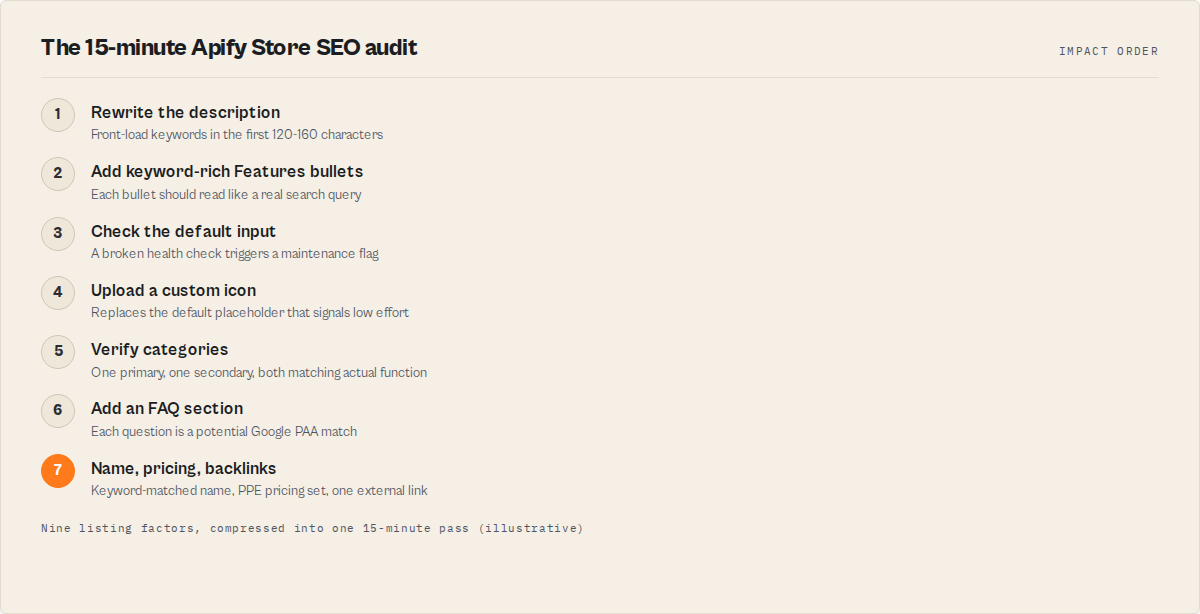
The 15-minute SEO audit
If you only have 15 minutes, do these in impact order:
- Rewrite your description with user-focused keywords front-loaded. Highest single-change ROI.
- Add keyword-rich Features bullets to your README. Each bullet should contain a real search query.
- Check your default input — a broken health check tanks ranking because it triggers maintenance flags.
- Upload a custom icon — replace the default placeholder for an immediate 2.3x CTR improvement.
- Verify your categories — make sure they match what your actor actually does.
- Add an FAQ section to your README — each question is a potential Google PAA match.
- Write one dev.to article about your actor and link back to its Store page.
- Set PPE pricing if you haven't — priced actors get additional visibility in the Store. We explained how PPE pricing works in our learn guide.
- Check your actor name against Google autocomplete for your niche. Does it contain the words people actually search?
The full SEO checklist
Run this for every actor in your portfolio:
- Actor name contains primary keywords (action + target)
- Name is 3-5 words
- Description is 120-160 characters with keywords front-loaded
- SEO description is different from regular description
- README has structured sections (Features, Use Cases, Input, Output, Pricing, FAQ)
- README is 800-1500 words
- README contains code examples
- FAQ section with 3-5 real user questions
- 1-2 relevant categories selected
- Custom icon uploaded (not default placeholder)
- Recent successful runs (signals quality to the algorithm)
- PPE pricing configured
- No active maintenance flags
- At least one external backlink (dev.to article, LinkedIn post)
The long game
Apify Store SEO isn't a one-time fix. The actors in our portfolio that consistently rank at the top share three traits: keyword-matched names, well-structured READMEs, and high reliability scores. None of that is accidental.
Pay attention to support questions from users — they reveal the vocabulary your audience uses, which is usually different from the vocabulary you'd use as the developer. When someone asks "can this actor find company emails from a website?" that's telling you the search terms to target: "find company emails from website."
Build for users first, search engines second. A good listing gets users to your page. A reliable, well-tested actor keeps them coming back. ApifyForge gives you tools to work on both — from the Schema Validator for output quality to the Cost Calculator for pricing strategy. You can compare contact scrapers to see how top actors position themselves, or browse our lead generation use cases for examples of well-optimized listings.
The actors that win aren't always the best technically. They're the ones that show up when someone searches for the problem they solve.
Frequently asked questions
How long does it take for Apify Store SEO changes to take effect?
Changes to your actor name, description, and README are typically indexed by Apify's internal search within 24-48 hours. Google reindexes Apify Store pages on a variable schedule, but most changes appear in Google search results within 1-3 weeks. Name changes that include high-value keywords can produce noticeable traffic increases within 2 weeks based on ApifyForge's data.
Does the number of runs affect my actor's search ranking?
Yes. Total run count is one of the signals Apify's search algorithm uses for ranking. Actors with more runs rank higher, all else being equal. This creates a flywheel effect — better SEO drives more discovery, which drives more runs, which improves ranking further. Success rate matters too: actors above 95% get preferential placement.
Should I optimize for Apify's internal search or Google?
Both, and fortunately they overlap significantly. Keyword-rich actor names, well-structured READMEs, and clean meta descriptions improve ranking in both search engines. The main difference is that Google also values backlinks (external sites linking to your actor page), while Apify's internal search weights run count and success rate more heavily.
How many categories should I select for my actor?
Two categories is optimal: one primary (most specific to your actor's function) and one secondary (broader reach). Selecting irrelevant categories does not improve ranking — Apify's algorithm detects mismatches. For MCP servers, use AI and DEVELOPER_TOOLS since there is no dedicated MCP_TOOLS category yet.
What is the fastest way to improve my actor's discoverability?
Rewrite your short description with user-focused keywords front-loaded. This is the single highest-impact change you can make in under 5 minutes. The second-highest impact change is adding keyword-rich feature bullets to your README where each bullet contains a phrase someone would actually search for.
Do maintenance flags affect SEO ranking?
Yes, significantly. The maintenance flag actively suppresses your actor in Store search results and causes a visible warning badge on your listing page that increases bounce rate. Store ranking damage from a maintenance flag can take 2-3 weeks to recover even after the flag is cleared and success rates return to normal.
Limitations
- SEO improvements do not guarantee traffic. If your actor targets a niche with very low search volume (fewer than 100 monthly searches), even perfect optimization may not produce significant run counts. The market size matters.
- You cannot control Google's indexing schedule. Changes to your listing may take 1-3 weeks to appear in Google search results, and there is no way to accelerate this.
- Apify's internal search algorithm is not publicly documented in full. The ranking factors described in this guide are based on ApifyForge's empirical observations across our portfolio and Apify's published marketing playbook, not official algorithm documentation.
- Backlink building requires ongoing effort. A one-time dev.to article provides a temporary ranking boost, but sustained Google ranking requires periodic content creation and link acquisition.
- Competitive niches may require pricing differentiation. In categories with 50+ actors (e.g., generic web scrapers), SEO alone may not be sufficient to stand out. Pricing strategy and unique features become necessary differentiators.
Last updated: March 2026
Ryan Clinton publishes Apify actors as ryanclinton and builds developer tools at ApifyForge.