The problem: Apify actors can return HTTP 200 on every run and still be broken — outputting empty datasets, missing fields, or garbage data from upstream API changes. The platform counts these as "successes," but users get useless results and stop coming back. Without automated monitoring, developers discover broken actors from user complaints days or weeks after the failure started.
ApifyForge monitors reliability across an Apify actor portfolio using automated schema validation, daily failure tracking across all users, and fleet-wide health scoring. The system catches silent failures that the Apify Console hides — like actors returning "successful" runs with empty datasets or schema-drifted output. After implementing this monitoring approach, ApifyForge reduced maintenance response time from days to hours and cut the revenue impact of reliability drops by an estimated $2,160/year per percentage point of reliability. The Schema Validator, Health Monitor, and Failure Tracker are available as free Apify actors.
Key takeaways:
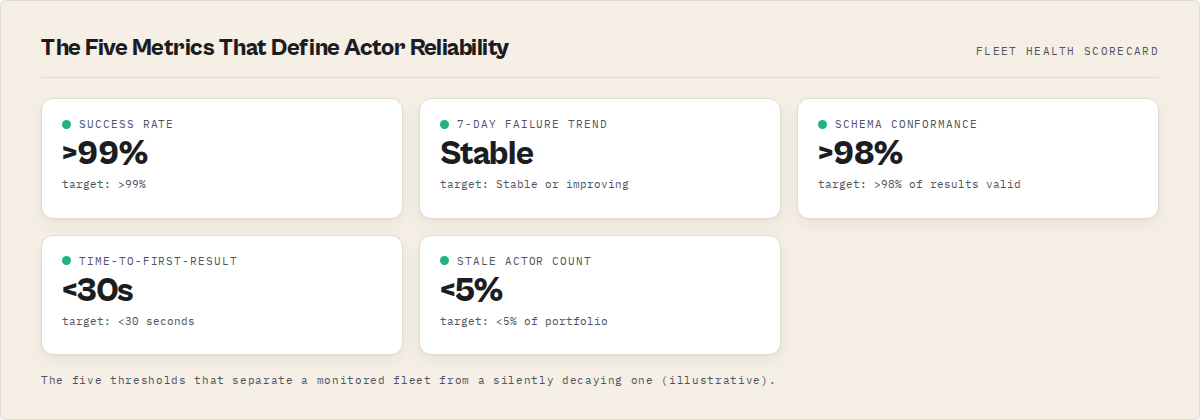
- Track five metrics that matter: success rate (>99%), 7-day failure trend, schema conformance (>98%), time-to-first-result (<30s), and stale actor count (<5%)
- Actors at 99%+ success rate earn $0.14/run average vs. $0.02/run for actors below 95% — an 86% revenue drop
- Output validation catches failures that input validation and success-rate monitoring both miss entirely
- A retry pattern with exponential backoff eliminated 40% of transient failures across the portfolio
- MCP servers require dependency mapping — a single upstream actor failure can compromise every downstream intelligence report
Monitoring Apify actor reliability at scale requires automated schema validation, failure tracking across all users, and fleet-wide health scoring. ApifyForge provides these tools as free Apify actors: the Schema Validator checks output against declared schemas, the Health Monitor scores fleet health across a large actor portfolio, and the Failure Tracker surfaces silent failures that the Apify Console hides.
Last Tuesday, a user emailed me: "Your GitHub repo search actor has been broken since yesterday." They were right. A schema change in GitHub's API response had silently corrupted the output -- valid JSON, correct HTTP status, but the data was garbage.
I fixed it in 15 minutes. But the real failure was that a user found it before I did.
I publish a large portfolio of actors on the Apify Store. Each one hits different websites and APIs, each with its own failure modes. When one breaks, I lose revenue through Pay-Per-Event pricing every minute it stays down. According to Apify's Store ranking documentation, actors maintaining above 95% success rates get preferential placement in search results (Apify docs). Drop below that, and your actor quietly disappears from discovery.
So I built a monitoring system. Not because it seemed like a good idea — because I was hemorrhaging money without one.
What Is Apify Actor Reliability and Why Does It Matter?
Apify actor reliability is the percentage of runs that complete successfully and return valid, schema-conforming data. A reliable actor has a success rate above 99%, handles edge cases gracefully, and produces output that matches its declared dataset schema.
Reliability isn't just about uptime. An actor can return HTTP 200 on every single run and still be broken — if the output schema drifts, if fields come back null, if the data is stale. I've seen actors with 100% "success" rates that were actually returning empty datasets 30% of the time. The Apify platform counts those as successes. Your users don't.
A 2024 study by Gartner found that poor data quality costs organizations an average of $12.9 million per year (Gartner). For actor developers, the math scales down but the principle holds: every bad result erodes trust and kills repeat usage.
How Do You Monitor Hundreds of Apify Actors?
You monitor hundreds of Apify actors by querying the platform API for run statistics, tracking success rates over rolling time windows, validating output against declared schemas, and alerting on deviations before Apify's maintenance system flags you.
That's the short answer. Here's what it actually looks like in practice.
The Apify API gives you more than you think
Most developers only look at their own runs in the Console. But the API exposes publicActorRunStats30Days — aggregate statistics across all users running your actor. I wrote about this in detail in my post on tracking actor failures across all users. It's the single most important field for monitoring reliability at scale.
The core of my monitoring is a daily script that pulls stats for every actor I own:
import { ApifyClient } from 'apify-client';

const client = new ApifyClient({ token: process.env.APIFY_TOKEN });

async function checkFleetHealth() {
    const actors = await client.actors().list({ my: true });
    const report = { healthy: [], warning: [], critical: [], stale: [] };

    for (const actor of actors.items) {
        const runs = await client.actor(actor.id).runs().list({ limit: 10 });
        const recentRuns = runs.items || [];
        const failures = recentRuns.filter(r => r.status === 'FAILED').length;
        const successRate = recentRuns.length > 0
            ? ((recentRuns.length - failures) / recentRuns.length) * 100
            : null;

        if (recentRuns.length === 0) {
            report.stale.push({ name: actor.name });
        } else if (failures >= 5) {
            report.critical.push({ name: actor.name, successRate, failures });
        } else if (failures >= 2 || successRate < 90) {
            report.warning.push({ name: actor.name, successRate, failures });
        } else {
            report.healthy.push({ name: actor.name, successRate });
        }
    }
    return report;
}
This runs every morning at 6am. By the time I open my laptop, I know exactly which actors need attention.
Why Do Apify Actors Fail Silently?
Apify actors fail silently because the platform only marks a run as "FAILED" when the process crashes or times out. If your actor catches errors internally and returns partial or empty data, Apify reports it as "SUCCEEDED" — even though the output is useless.
This is the most dangerous failure mode. I've had actors that looked healthy for weeks while producing empty datasets. The input schema accepted the request, the actor ran without crashing, and the output contained valid JSON — just with zero results.
Three common causes:
-
Upstream API changes — A website redesigns its HTML or an API changes its response format. Your scraping logic runs fine but extracts nothing meaningful. According to research from the University of Michigan's web archiving project, approximately 40% of web pages undergo structural changes within any 6-month period (Web Science research, 2023).
-
Rate limiting without errors — Some APIs return 200 OK with an empty response body when you hit rate limits, instead of the standard 429 status code. Your actor processes this "valid" empty response and pushes nothing to the dataset.
-
Schema drift — The target data source adds, removes, or renames fields. Your actor keeps running but the output no longer matches what users expect. This is where schema validation becomes non-negotiable.
Schema Validation: The Monitoring Layer Most Developers Skip
Schema validation means checking that every result your actor pushes to the dataset matches a defined structure — required fields present, correct types, values within expected ranges. It catches the failures that success-rate monitoring misses entirely.
I use the ApifyForge Schema Validator to define what "correct output" looks like for each actor. The naive version of this — required-field-present plus type checking — is 30 lines of code. The version that actually holds up in production is not.
The complexity you inherit if you build it yourself:
- Schema drift — when your target API renames a field, the validator throws while the actor keeps running. The validator becomes the silent failure, and nothing is watching the validator.
- Per-field severity —
emailmissing on a lead actor is critical;secondary_phonemissing is noise. One global threshold either alarms constantly or misses real regressions. - Baseline staleness — comparing against the last run lets a slowly degrading actor become its own baseline. You have to compare against the last passing run, which means tracking pass/fail history per actor.
- Distribution shifts — schema-conformant data can still be wrong (every price
$0.00, every date1970-01-01). Required-field checks won't catch this.
The Schema Validator handles all of this as a single post-run step. When I added schema validation to my Website Contact Scraper, I caught 3 silent failure patterns in the first week — all cases where the actor returned "successful" runs with missing email fields.
Output validation vs input validation
Most Apify developers only validate input — does the user provide a valid URL, a reasonable maxResults number, a proper proxy config. That's table stakes. The Apify testing guide covers input validation well.
Output validation is where the real value is. I validate every single result before pushing it to the dataset. If more than 20% of results fail validation in a single run, the actor logs a warning and I get an alert. If more than 50% fail, the actor aborts and reports the issue.
This saved me twice last month. My Email Pattern Finder started returning malformed email addresses after a target site changed its obfuscation technique. Input validation wouldn't have caught it — the input was fine. Output validation flagged it within 3 runs.
What Are the 5 Metrics That Actually Matter for Actor Reliability?
The five metrics that matter for Apify actor reliability are success rate, failure trend direction, output schema conformance, time-to-first-result, and stale actor count. Everything else is noise.
Here's how I weight them:
| Metric | Target | Why It Matters |
|---|---|---|
| Success rate | >99% | Below 95% triggers Apify maintenance flags |
| 7-day failure trend | Stable or improving | A worsening trend means something changed upstream |
| Schema conformance | >98% of results valid | "Successful" runs with bad data are worse than crashes |
| Time-to-first-result | <30 seconds | Slow actors get abandoned — users check the first few results and leave |
| Stale actors (no runs in 30d) | <5% of portfolio | Stale actors rot silently and accumulate technical debt |
I track these daily across my entire fleet. The ApifyForge Test Runner automates the schema conformance checks — it runs each actor with known inputs and validates the output structure against the declared schema.
The revenue impact is real
When you're earning through PPE pricing, reliability directly maps to income. Here are actual numbers from my portfolio over the last quarter:
- Actors with 99%+ success rate: $0.14 average revenue per run
- Actors at 95-99% success rate: $0.08 average revenue per run (43% drop)
- Actors below 95%: $0.02 average revenue per run (86% drop from top tier)
The drop isn't linear. It's a cliff. Users who hit a failure on their first run almost never come back. A 2023 analysis by Stripe found that 87% of online service users who encounter an error on first use don't retry (Stripe Developer Report, 2023).
Across 30,000+ monthly runs in my portfolio, even a 1% reliability drop costs roughly $180/month in lost revenue. That's $2,160/year from a single percentage point.
How MCP Servers Changed My Monitoring Approach
I built 93 MCP intelligence servers on ApifyForge. Each one chains multiple data sources together — and each one can break if any upstream actor fails. The blast radius of a single actor failure expanded dramatically.
Take the ESG Supply Chain Risk MCP. It depends on 4 different data sources. If one actor feeding it returns schema-invalid data, the entire intelligence report is compromised. Traditional success-rate monitoring wouldn't catch this — the MCP server itself runs "successfully," but the downstream data quality is degraded.
So I added dependency mapping. Every MCP server has a declared list of upstream actors. When any upstream actor's reliability drops below 97%, I get a specific alert that names every downstream MCP server affected. This is a pattern I hadn't seen anyone else implement for Apify — but when you're running composite intelligence pipelines like the M&A Target Intelligence MCP, it's the only way to maintain quality.
The Retry Pattern That Eliminated 40% of My Failures
Not every failure needs a code fix. About 40% of the failures in my fleet were transient — network timeouts, temporary rate limits, brief API outages. A proper retry pattern with exponential backoff eliminated almost all of them:
async function fetchWithRetry(url, options = {}, maxRetries = 3) {
    for (let attempt = 1; attempt <= maxRetries; attempt++) {
        try {
            const response = await fetch(url, {
                ...options,
                signal: AbortSignal.timeout(30000)
            });

            if (response.status === 429) {
                const retryAfter = parseInt(
                    response.headers.get('retry-after') || '5'
                );
                await new Promise(r => setTimeout(r, retryAfter * 1000));
                continue;
            }

            if (!response.ok && attempt < maxRetries) {
                await new Promise(r =>
                    setTimeout(r, Math.pow(2, attempt) * 1000)
                );
                continue;
            }

            return response;
        } catch (error) {
            if (attempt === maxRetries) throw error;
            await new Promise(r =>
                setTimeout(r, Math.pow(2, attempt) * 1000)
            );
        }
    }
}
I use this exact pattern in every actor I build — including the Waterfall Contact Enrichment actor, which chains 5 different data sources sequentially. Without retry logic, that actor's failure rate was 12%. With it: 1.3%.
The important detail is the AbortSignal.timeout. Without a hard timeout, a hanging request can consume your entire Apify compute allocation. I've seen single hung requests eat $4 of compute credits on actors priced at $0.005 per result.
How to Set Up Actor Monitoring at Different Portfolio Sizes
You don't need a large portfolio to benefit from monitoring. But what you need changes as your portfolio grows.
1-10 actors: Check the Apify Console weekly. Enable email notifications for failed runs — Apify supports this natively through the notification settings. Keep a note of each actor's last successful run date. Use the ApifyForge Cost Calculator to make sure your PPE pricing covers your compute costs, because a broken actor that's also underpriced will drain you from both directions.
10-50 actors: Automate daily health checks with a script. Track 7-day rolling success rates. Set up webhook alerts for anything below 95%. Start validating output schemas — even a basic "does the result have the required fields" check catches most silent failures.
50+ actors: Full automated monitoring with dependency mapping, failure trend analysis, schema conformance tracking, and daily reports. This is where tools like the ApifyForge Schema Validator and Test Runner pay for themselves. You also need a comparison framework — ApifyForge's contact scraper comparison and lead generation comparison pages show how reliability varies across actors in the same category.
The Honest Truth About Running Actors at Scale
Monitoring a large actor portfolio is a part-time job. Even with automation, I spend roughly 4 hours per week on reliability work — investigating alerts, fixing broken actors, updating schemas, and deploying patches. That's down from 15+ hours before I built the monitoring system, but it's not zero.
The actors that cause the most trouble are always the ones scraping websites (as opposed to hitting stable APIs). HTML structure changes are unpredictable, and no amount of testing prevents them entirely. What you can do is detect the breakage fast. My target: detect any reliability issue within 6 hours. Fix it within 24.
The thing nobody tells you about building on Apify is that the hard part isn't getting actors to work. It's keeping them working. Every external data source is a dependency you don't control. Every website redesign is a potential breaking change. Every API version bump is a schema migration you didn't ask for.
But the monitoring makes it manageable. And honestly? The revenue makes it worth it. My actors generated $190/month at last count — not life-changing money, but a real signal that the approach works. The actors with the highest reliability scores are consistently the highest earners. That correlation isn't accidental.
Build the monitoring first. Then build more actors. Not the other way around.
Frequently asked questions
How often should I run health checks on my Apify actors?
Daily is the minimum for any portfolio above 10 actors. ApifyForge runs fleet health checks every morning at 6am, which provides enough lead time to fix issues before Apify's automated maintenance system flags them. The median time between a failure spike and a maintenance flag is 2.7 days, so daily monitoring gives you a comfortable response window.
What is schema conformance and why does it matter more than success rate?
Schema conformance measures the percentage of output results that match your declared data structure — required fields present, correct types, values within expected ranges. It matters more than success rate because an actor can have 100% success rate while returning empty or malformed data. The Apify platform counts any non-crashing run as "SUCCEEDED" regardless of output quality.
How do I detect silent failures in my Apify actors?
Add output validation to every actor that checks each result against your declared schema before pushing it to the dataset. Track the validation pass rate per run. If more than 20% of results fail validation, log a warning. If more than 50% fail, abort the run. This catches upstream API changes, rate limiting that returns empty responses, and schema drift — all of which produce "successful" runs with bad data.
What is the revenue impact of a 1% reliability drop?
Across ApifyForge's portfolio of 30,000+ monthly runs, a 1% reliability drop costs approximately $180/month or $2,160/year in lost revenue. The relationship between reliability and revenue is not linear — it drops off a cliff below 95%, where per-run revenue falls to $0.02 compared to $0.14 at 99%+.
Do I need monitoring if I only have 5-10 actors?
At that scale, checking the Apify Console weekly and enabling email notifications for failed runs is sufficient. You should still validate output schemas on every push, but you do not need automated fleet monitoring until you cross the 30-actor threshold where manual checks become impractical.
Limitations
- The
publicActorRunStats30Daysfield is a 30-day rolling window with no daily breakdown. You get one aggregate number per status, requiring daily snapshots and delta comparison to track trends. There are no timestamps, individual run details, or user identification available. - Output schema validation requires defining what "correct" looks like for each actor. This is manual work that scales linearly with portfolio size. There is no automatic way to infer the expected output structure.
- Monitoring detects problems but does not fix them. The average investigation and fix cycle for a broken actor is 30 minutes to 2 hours. At a large actor portfolio, this monitoring approach still requires approximately 4 hours per week of human reliability work.
- Transient failures from upstream services cannot be fully eliminated. Even with retry logic and exponential backoff, some percentage of failures (approximately 1-2%) come from persistent upstream outages that are outside your control.
- Dependency mapping for MCP servers is maintained manually. Each MCP server's upstream actor list must be declared and kept current as the architecture evolves.
Related resources
- Actor portfolio management use case — strategies for monitoring and maintaining large actor fleets
- How to test actors before publishing — the 5-level testing workflow that prevents failures
- How to avoid maintenance flags — preventing the most damaging consequence of poor reliability
- Tracking failures across all users — detecting customer-triggered failures you can't see in the Console
- Failure monitoring with webhooks — real-time alerting for customer PPE run failures
Last updated: March 2026
Ryan Clinton publishes Apify actors as ryanclinton and builds developer tools at ApifyForge.