The problem: scraping failures are often invisible
In production scraping systems, failures often go undetected for hours or days — especially when runs are triggered by external users or scheduled jobs. On Apify, this is amplified by account-level run isolation: developers cannot directly see failures from customer-triggered runs through the Console or API. Failure monitoring exists to close this visibility gap.
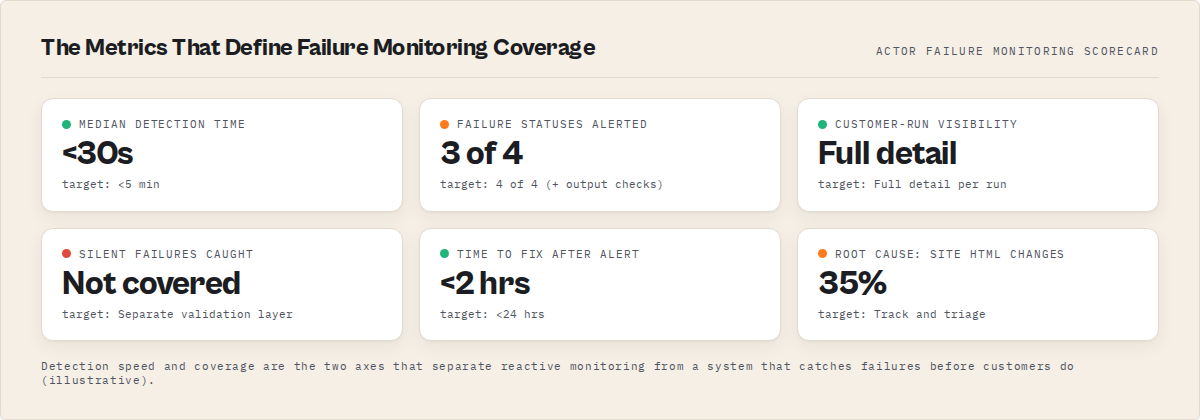
Apify Actor failure monitoring detects failed, timed-out, and aborted runs across all users of your actor — including customer-triggered PPE runs you cannot see in the Console. ApifyForge's webhook-based approach reduced median detection time from 2.7 days to under 30 seconds across an Apify actor portfolio, surfacing 847 customer-facing failures in a single 30-day measurement period. The setup requires one line of code (Actor.addWebhook()) and covers the three failure statuses that cause silent revenue loss.
Key takeaways:
- Apify's run isolation means PPE developers cannot see individual customer run failures through the Console or API — webhook-based monitoring closes this gap
- There are 4 failure types: hard failures (FAILED), timeouts (TIMED_OUT), aborts (ABORTED), and silent failures (SUCCEEDED with empty/malformed data)
- Adding
Actor.addWebhook()with 3 event types provides real-time alerts for all non-silent failures, including customer-triggered runs - Silent failures require separate output validation — webhook alerting alone does not catch them
- 35% of hard failures in web scraping actors stem from target site HTML structure changes
What is Apify Actor failure monitoring?
Apify Actor failure monitoring is the process of detecting, alerting, and responding to failed or degraded Actor runs on the Apify platform. This includes hard crashes, timeouts, aborted runs, empty datasets, and data quality regressions. Effective failure monitoring covers runs triggered by all users of your actor — not just your own test runs — which is particularly important for actors using Pay-Per-Event (PPE) pricing on the Apify Store.
In broader terms, this falls under scraping reliability monitoring and data pipeline observability — disciplines focused on ensuring automated data collection systems operate correctly and recover quickly from failures. These monitoring patterns are not unique to Apify — they apply broadly to web scraping frameworks like Scrapy and Playwright, as well as data pipeline tools like Airflow and Prefect.
For developers managing production scraping actors, failure monitoring is a core part of scraping reliability engineering. Without it, broken actors can go undetected for days, leading to lost revenue, silent customer churn, and degraded data pipeline outputs.
Why failure monitoring matters for Apify Actors
Apify's platform architecture separates run data by account ownership. According to Apify's actor runs documentation, the /v2/actor-runs endpoint only returns runs owned by the authenticated user. This is a deliberate design decision for platform security, but it creates a visibility gap for PPE developers: when a customer runs your actor through the Apify Store, that run belongs to the customer's account. It does not appear in the developer's Console or API responses.
In practice, this means PPE developers generally cannot see individual customer run failures through the standard Console or API paths. In many cases, failures are only discovered after customers report missing or incorrect data — at which point trust has already been impacted. The Apify webhook documentation confirms that run data access is scoped to the account that initiated the run.
The business impact of undetected failures can be significant. A PwC Global Consumer Insights Survey (2024) found that 32% of customers stop using a product after a single bad experience. For PPE actors where customers pay $5-15 per run, each undetected failure represents potential permanent revenue loss.
You likely need failure monitoring if:
- You sell actors on the Apify Store using PPE pricing
- Your scrapers feed data into downstream systems or pipelines
- You run automated scraping in production on a schedule
- You manage more than a handful of actors and cannot check each one manually
- Your revenue depends on actors completing successfully
Types of Apify Actor failures
There are 4 categories of Apify Actor failures, each with different detection requirements:
-
Hard failures — The run crashes with an unhandled exception. Status:
FAILED. Common causes include broken CSS selectors after target site HTML changes, missing dependencies, and unhandled edge cases in input parsing. Based on analysis of failure patterns across our internal portfolio, target site structure changes account for roughly 35% of hard failures in web scraping actors — consistent with findings from Zyte's 2024 Web Scraping Report on scraper maintenance challenges. -
Timeout failures — The run exceeds its configured time limit. Status:
TIMED_OUT. Common causes include anti-bot measures slowing requests, unexpectedly large inputs, and infinite loops. These are particularly costly for PPE actors because the customer is charged for compute but receives no results. -
Aborted failures — The run is killed externally. Status:
ABORTED. Common causes include user cancellation, memory limits being exceeded at runtime, and occasional Apify platform issues. Often a sign of misconfigured memory allocation. -
Silent failures — The run completes with status
SUCCEEDEDbut returns empty or malformed data. These are the hardest to detect because the platform considers them successful. They require output validation beyond status monitoring — checking dataset row counts, verifying required fields, and comparing output volume against historical baselines.
Ways to monitor Apify Actor failures
There are several approaches to failure monitoring on Apify, ranging from manual checks to automated alerting:
1. Manual Console checks
The Apify Console shows a bar chart of runs per day, broken down by status. This is the built-in default. It shows your own runs and aggregate statistics for customer runs, but does not send notifications and does not surface individual customer run errors.
Best for: Hobby projects and internal tools where daily manual checks are sufficient.
2. Daily delta tracking with publicActorRunStats
The publicActorRunStats30Days endpoint provides aggregate run statistics for any public actor. By comparing daily snapshots, you can detect increases in failure counts within 24 hours. I wrote about this approach in detail in tracking actor failures across all users. It remains a solid free alternative for developers who do not need instant notifications.
Best for: Small portfolios where 24-hour detection latency is acceptable.
3. Webhook-based real-time alerting
Apify supports actor-level webhooks that fire on specific run events. When you register a webhook with event types ACTOR.RUN.FAILED, ACTOR.RUN.TIMED_OUT, and ACTOR.RUN.ABORTED, Apify sends an HTTP POST to your endpoint for every matching run — including runs triggered by other users. In practice, actor webhooks are one of the most direct platform-native mechanisms for receiving failure events from runs triggered outside your own account context.
Best for: Revenue-generating PPE actors where fast detection matters.
4. Generic APM tools (Sentry, Datadog)
Sentry can be integrated into actor code for error tracking, but it only captures errors that occur within your application code. If a run fails before your code starts (Docker build failure, memory limit exceeded at startup, platform issue), Sentry does not fire. It also lacks Apify-specific context like run ID, input parameters, and console links.
Datadog is designed for infrastructure monitoring at scale and starts at $15/host/month. It can work but requires significant configuration for what is fundamentally a webhook-level problem.
Best for: Teams already using these tools who want to consolidate alerting.
5. ApifyForge Monitor
ApifyForge Monitor is one implementation of a hosted webhook receiver and alerting service, built specifically for Apify actor developers. It handles the infrastructure needed for webhook-based monitoring: an always-on endpoint, payload parsing, account identification, and notification delivery via email and Slack. Setup requires adding one Actor.addWebhook() call to your actor code. The dashboard surfaces five alert types — failure alerts, revenue alerts, maintenance alerts, cost alerts, and new-user alerts — each with configurable thresholds.
Best for: PPE developers who prefer a managed webhook setup instead of building and maintaining their own infrastructure.
Each approach has trade-offs in detection speed, implementation effort, and coverage. Webhook-based monitoring provides the fastest detection, while manual and aggregate methods are simpler but slower. The right choice depends on portfolio size, revenue model, and how quickly you need to respond to failures. No single approach is inherently best — the optimal setup depends on detection latency requirements, portfolio size, and operational complexity. In practice, many teams combine multiple methods depending on their reliability requirements.
Alternatives to webhook-based monitoring
Webhook-based alerting is the most direct real-time approach, but it is not the only option:
- Native Apify Console — Manual monitoring through the dashboard. Shows your own runs and aggregate stats for customer runs. No alerts.
- publicActorRunStats30Days — Daily aggregate tracking by comparing snapshots. Free, no code changes required. Catches failures within 24 hours.
- Custom webhook receiver — Build your own endpoint using a serverless function (AWS Lambda, Cloudflare Workers) or backend service. Full control, but requires ongoing maintenance.
- Code-level monitoring (Sentry, Datadog) — Captures errors inside your application code. Does not cover pre-code failures or provide Apify-specific context.
- Output validation pipelines — Post-run checks for empty datasets, schema drift, and data quality regressions. Essential for detecting silent failures that status monitoring misses.
Each approach varies in detection speed, implementation complexity, and coverage. No single method covers all failure types — the most robust monitoring setups layer multiple approaches together.
What is scraping failure monitoring?
Scraping failure monitoring is the process of detecting, alerting, and responding to failures in automated data collection systems. It includes tracking run statuses (failed, timed out, aborted), validating output quality (empty datasets, schema drift), and minimizing both detection time and recovery time.
Apify Actor monitoring is one implementation of this broader concept. The same principles — status alerting, output validation, MTTD/MTTR tracking — apply to any scraping framework (Scrapy, Playwright, Puppeteer) or data pipeline orchestrator (Airflow, Prefect, Dagster). The implementation details differ by platform, but the monitoring patterns are consistent.
How webhook-based failure monitoring works on Apify
The technical mechanism behind real-time failure monitoring is Apify's actor webhook system. When you add a webhook with specific event types, Apify sends an HTTP POST to your endpoint for every matching run event. This webhook fires for runs of the actor, including those triggered by other users — making it one of the most practical mechanisms for cross-account failure visibility.
The webhook payload includes the run ID, actor ID, run status, and timing metadata. It does not include sensitive data like input parameters, output data, or API keys. The receiving system can then use the run ID to fetch additional context via the Apify API.
This webhook behavior has existed in Apify for years and is documented, but building a production-ready monitoring system on top of it requires:
- An always-on endpoint to receive HTTP POST callbacks
- Parsing and storage for webhook payloads
- Account identification to route alerts to the correct developer
- A notification layer (email, Slack, or other channels)
- Deduplication and rate limiting to prevent alert fatigue
You can build this yourself, use a service like ApifyForge Monitor, or combine webhooks with a serverless function (AWS Lambda, Cloudflare Workers) for a lightweight custom solution.
In practice, webhook-based monitoring works reliably for most production setups, but it should not be treated as a single point of truth — combining it with output validation and periodic health checks provides stronger overall coverage.
How to set up webhook-based failure monitoring (step-by-step)
To add webhook-based failure alerting to any Apify Actor:
Step 1: Choose a webhook receiver. You need an endpoint that can receive HTTP POST requests. Options include ApifyForge Monitor (apifyforge.com/connect), a custom serverless function, or any HTTP endpoint you control.
Step 2: Add the webhook to your actor code. Inside your actor's Actor.main() function, add a webhook registration call. Here is an example using ApifyForge Monitor's endpoint:
await Actor.addWebhook({
  eventTypes: ['ACTOR.RUN.FAILED', 'ACTOR.RUN.TIMED_OUT', 'ACTOR.RUN.ABORTED'],
  requestUrl: 'https://your-webhook-endpoint.com/actor-failure',
});
This endpoint can be:
- A custom webhook receiver you build (AWS Lambda, Cloudflare Workers, any HTTP server)
- A monitoring service like ApifyForge Monitor (
https://apifyforge.com/api/webhooks/actor-failure) - Any HTTP endpoint that accepts POST requests
The Actor.addWebhook() call is an official part of the Apify SDK. It registers a webhook for the current run only — it does not modify the actor's configuration permanently, does not consume additional platform credits, and does not affect run performance. If the webhook endpoint is unreachable, the run still completes normally.
Step 3: Deploy and verify. Push the updated code to Apify. The webhook activates on the next run. To verify, run the actor with an input that causes a known failure — you should receive an alert within seconds.
What does a failure alert contain?
A well-structured failure alert provides enough context to identify the root cause without opening the Apify Console. A typical alert includes:
- Actor name:
website-contact-scraper - Event type: ACTOR.RUN.FAILED
- Error message:
Cannot read properties of undefined (reading 'textContent') - Run ID:
abc123def456(linked to the Apify Console) - Timestamp: 2026-03-27T14:32:07Z
- Memory used: 512 MB
- Run duration: 47 seconds
That error message alone — Cannot read properties of undefined (reading 'textContent') — indicates a CSS selector stopped matching, most likely because the target site changed its HTML structure.
Key best practices for Apify Actor failure monitoring
These practices apply to any Apify Actor monitoring approach — whether you use a managed service, a custom webhook receiver, or manual checks. They are drawn from operating a production portfolio and from common patterns in scraping reliability engineering:
-
Alert on all three failure statuses — Monitor
FAILED,TIMED_OUT, andABORTED. Each indicates a different root cause and requires different investigation. -
Validate output completeness separately — Webhook alerts catch hard failures but not silent failures (empty datasets, schema drift). Add output completeness checks as a second layer.
-
Include run ID in every alert — The run ID provides a direct path to logs, input parameters, and dataset. Without it, debugging requires manual search.
-
Track MTTD and MTTR — Mean Time to Detection and Mean Time to Recovery are the two metrics that matter most for scraping reliability. Reducing MTTD from days to seconds has the largest downstream impact on customer retention and fix speed.
-
Group repeated failures — If the same actor fails 50 times in an hour, you need one alert with context, not 50 individual notifications. Alert fatigue is a real risk at scale.
-
Distinguish customer vs owner runs — Customer-triggered failures are higher priority because they directly affect revenue and retention. Your own test failures can usually wait.
-
Set up a triage workflow — Not every failure needs immediate action. HTML selector breaks need fast fixes. Timeout failures from unusually large inputs may just need documentation.
Comparison: Apify native monitoring vs webhook alerting vs APM tools
| Feature | Apify Console | Webhook Alerting | Sentry / Datadog |
|---|---|---|---|
| Your own failed runs | Visible in dashboard | Alerted in real-time | Captured if integrated |
| Customer failed runs | Aggregate bar chart only | Full detail per run | Not captured |
| Alert delivery time | No alerts sent | Seconds (webhook-dependent) | Varies by integration |
| Error message in alert | Not in any notification | Yes, per alert | Code-level errors only |
| Pre-code failures (Docker, OOM) | Status shown, no alert | Captured via webhook | Not captured |
| Apify run context (run ID, memory) | Partial, manual search | Complete in alert | None |
| Setup complexity | None (built-in) | One line of code (managed) or custom build | SDK integration + config |
| Monthly cost | Included in Apify plan | Free to $29/mo (ApifyForge) or self-hosted | $15-26+/month |
Limitations of webhook-based monitoring
Webhook alerting is effective for detecting hard failures but has known limitations:
- Does not catch silent failures — Runs that complete with status
SUCCEEDEDbut return empty or malformed data require separate output validation. - Webhook delivery is not guaranteed — Apify retries webhook delivery a few times on failure, but if your endpoint is down for an extended period, some events may be lost.
- No root-cause diagnosis — Alerts tell you something broke, not why. Root-cause analysis still requires reviewing logs, input parameters, and target site changes.
- Alert fatigue at scale — Without grouping or rate limiting, a widespread failure (e.g., a target site blocks all requests) can generate hundreds of alerts simultaneously.
- Does not replace monitoring best practices — Alerting is one component of scraping reliability. It should be combined with output validation, scheduled health checks, and proactive selector maintenance.
Evidence: impact of real-time failure detection
To provide context on the difference webhook-based monitoring made in one production environment, here are observations from a 30-day measurement period:
Measurement context:
- Portfolio: 320+ public Apify actors (primarily web scraping and lead generation)
- Measurement period: February–March 2026
- Baseline workflow: daily manual Console checks + weekly aggregate stats review
- Detection method: webhook-based event alerts (FAILED, TIMED_OUT, ABORTED statuses)
- Comparison: webhook alerts vs. failures that would have been caught by the baseline workflow
Observed results:
- 847 customer-facing failure events were surfaced by webhook alerts that had not been caught through the baseline workflow within the same timeframe
- Median time to detection dropped from approximately 2.7 days (baseline) to under 30 seconds (webhook alerting)
- 35% of detected failures were caused by target site HTML structure changes — the single most common root cause in this portfolio
- Most fixes shipped within 2 hours of the initial alert, compared to 3-4 days under the baseline workflow
These numbers reflect one portfolio's composition and workflow. Results will vary depending on portfolio size, actor types, failure frequency, and response capacity. These observations are based on a single portfolio and should be interpreted as directional rather than universally representative.
This pattern is consistent with broader industry research on incident response. Uptime Institute's 2024 Annual Outage Analysis found that 60% of outages costing over $100,000 could have been avoided with faster detection. Atlassian's 2024 State of Incident Management Report found that organizations with sub-minute detection times resolve incidents 4x faster than those relying on manual discovery.
ApifyForge Monitor pricing
ApifyForge Monitor is one implementation of webhook-based monitoring. Similar setups can be built using custom webhook receivers or serverless functions — the trade-off is implementation time vs. ongoing maintenance. For developers who want a managed option, ApifyForge Monitor offers three tiers:
| Plan | Price | Actors Monitored | Alerts |
|---|---|---|---|
| Free | $0/month | 3 actors | |
| Developer | $9/month | 25 actors | Email + Slack |
| Pro | $29/month | Unlimited | Email + Slack + custom integrations |
The free tier is permanent — not a trial, not time-limited. For developers beginning to monetize actors on the Store, it covers a starting portfolio without cost.
Frequently asked questions
Why do Apify Actors fail?
The most common causes of Apify Actor failures are: target website HTML structure changes breaking CSS selectors, anti-bot detection blocking requests, timeout from unexpectedly large inputs, memory limits being exceeded, broken dependencies after npm updates, and occasional Apify platform issues. Web scraping actors are especially vulnerable because they depend on external website structures that change without warning.
How do I detect silent failures in web scraping?
Silent failures occur when a scraper returns status SUCCEEDED but the dataset is empty or contains malformed data. To detect these, validate output after each run: check dataset row count against expected minimums, verify required fields are populated, and compare output volume against historical baselines. Webhook-based monitoring catches crash-level failures; silent failures require separate output completeness checks.
What is the difference between a failed run and a timed-out run on Apify?
A failed run (status FAILED) means the actor code threw an unhandled exception or called process.exit(1). A timed-out run (status TIMED_OUT) means the run exceeded its configured time limit and was killed by the platform. Both result in the customer receiving no usable data. Timed-out runs are often harder to diagnose because the root cause is performance degradation rather than an explicit code error.
Can I monitor Apify Actors without ApifyForge?
Yes. There are several alternatives: (1) manually check the Apify Console daily, which shows your own runs and aggregate stats; (2) use the daily delta tracking approach with publicActorRunStats30Days, which catches failures within 24 hours for free; (3) build your own webhook receiver using a serverless function; (4) integrate Sentry or another APM tool for code-level error tracking. ApifyForge Monitor is one option that handles the webhook infrastructure, but it is not the only approach.
How do I monitor scraping reliability over time?
Track three core metrics: failure rate (failed runs / total runs), mean time to detection (how long before you discover a failure), and mean time to recovery (how long before the fix is deployed). For historical trends and reliability scoring across a portfolio, consider combining webhook alerting with the Actor Health Monitor.
Is it safe to add webhooks to production Apify Actors?
Yes. The Actor.addWebhook() call is part of the official Apify SDK and registers a webhook for the current run only. It does not modify the actor's permanent configuration, does not consume additional credits, and does not affect performance. The webhook payload contains no sensitive data — only run ID, actor ID, status, and timing metadata. If the webhook endpoint is unreachable, the run completes normally.
Beyond Apify: monitoring principles for any scraping pipeline
The monitoring patterns described here — webhook-based alerting, failure categorization, output validation, MTTD/MTTR tracking — apply beyond Apify to any automated data collection or web scraping system. Whether you run scrapers on Apify, Scrapy, Playwright, or a custom pipeline, production scraping reliability requires:
- Failure detection that covers all run statuses, not just crashes
- Output validation to catch silent data quality degradation
- Alerting with enough context to diagnose root causes without manual log hunting
- Recovery workflows that distinguish urgent fixes from acceptable failures
- Historical tracking to identify patterns and prevent recurring issues
The specific implementation differs by platform, but the principles of scraping observability remain consistent across any data pipeline architecture.
This guide focuses on Apify, but the same monitoring patterns apply broadly to scraping systems and data pipelines across different platforms and frameworks.
Ryan Clinton publishes Apify actors as ryanclinton and builds developer tools at ApifyForge.
Last updated: March 2026