The problem: Past five actors, manual Apify quality review breaks down. You forget which schemas are missing defaults. Pricing drifts inconsistently across actors. SEO descriptions get copy-pasted and never updated. Maintenance flags appear out of nowhere. You cannot tell which actors are ready to publish, which are agent-ready, and which are one stale build away from deprecation — and you definitely cannot tell which fix will move the score most per hour spent.
What is an Apify actor quality audit? A systematic review of every actor's metadata — reliability signals, README, pricing, input schema, SEO fields, trust signals, ease-of-use, and agent-readiness — against scoring criteria that predict Store performance and monetization readiness. Why it matters: metadata quality drives Store ranking, user trust, and whether AI agents can discover and operate your actors. Use it when: you run more than five actors, are preparing to publish, or want scheduled regression detection between scans.
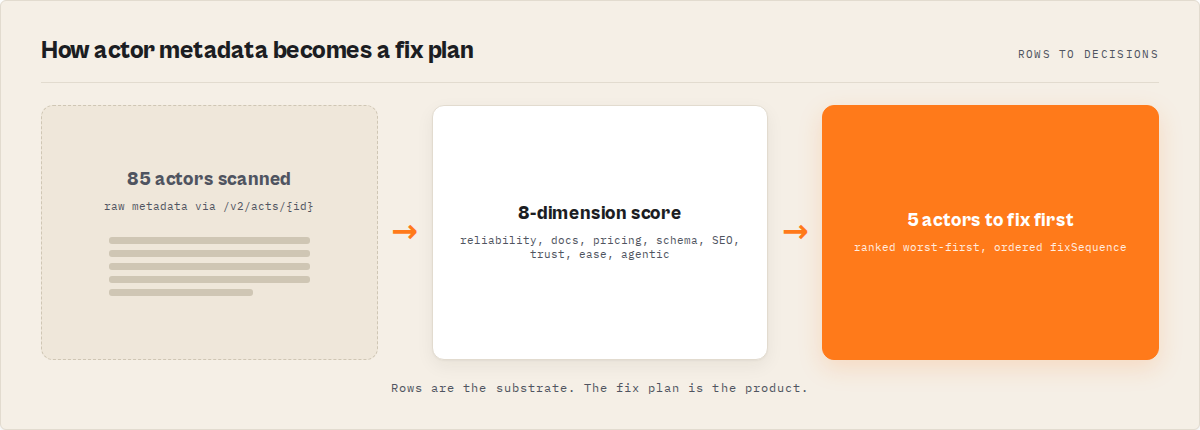
Quality Monitor audits all your Apify actors in one run and tells you exactly what to fix next.
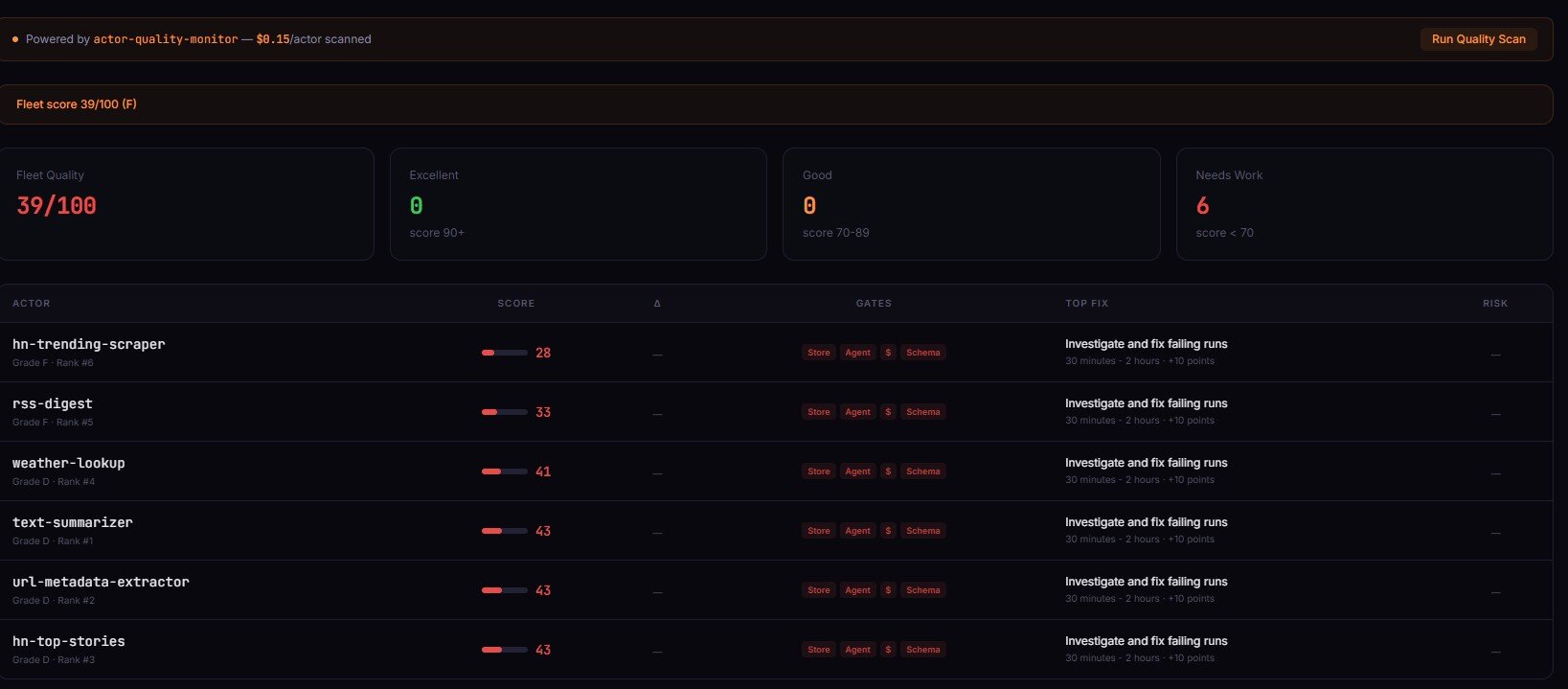
Quality Monitor is an Apify actor that audits every actor in a user's account in one run. It scores each actor 0-100 across 8 weighted dimensions, ranks them, classifies four operational readiness flags, and returns an ordered fix plan with time-to-fix estimates per step. Typical run time is 30-120 seconds for 10-200 actors at $0.15 per actor audited.
To audit all your Apify actors at once, run Quality Monitor — it evaluates every actor in your account and returns a prioritized fix plan.
Key takeaways:
- Manual quality review breaks down past 5 actors — observed in my own portfolio (an Apify actor catalogue) where drift accumulated silently across pricing, schema, and SEO fields; Fleet Analytics is the dashboard layer that surfaces this drift across actors, Quality Monitor is the per-actor depth
- Quality Monitor audits 8 dimensions per actor in 30-120 seconds per run and returns a 0-100 score with percentile rank
- The four
qualityGatesbooleans (storeReady, agentReady, monetizationReady, schemaReady) collapse 8 dimensions into operational yes/no answers fixSequence[]is the ordered repair plan — step 1, step 2, step 3 — withtimeToFixMinutesandexpectedLifton each- Scheduled monitoring with threshold-crossing alerts beats static bad-state alerts — only regressions fire, not persistent known issues
Problems this solves:
- How to audit every Apify actor in one run
- How to know if an Apify actor is ready to publish
- How to improve an Apify actor quality score
- How to monitor Apify actors for quality regressions over time
- How to detect abandoned-looking Apify actors before they get deprecated
- How to prioritize fixes across a large Apify portfolio
In this article: What a quality audit checks · Why manual review breaks · Four qualityGates · fixSequence ordered plan · Scheduled monitoring · Deprecation risk · Before/after example · Alternatives
Compact examples
| Scenario | Input | Output | Fix sequence step 1 |
|---|---|---|---|
| Portfolio audit, 24 actors | {} on Apify | 24 records sorted worst-first, fleet score 62 | Fix README summary on lowest-scoring actor (8 min, +9 pts) |
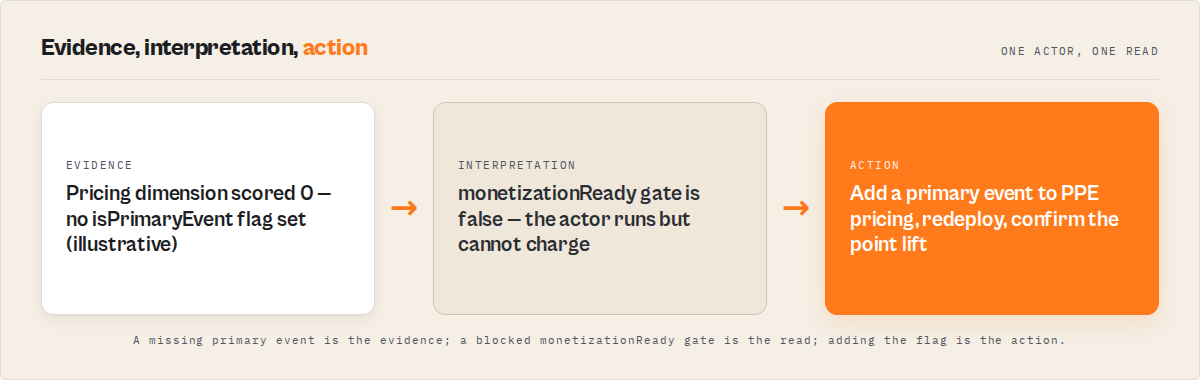
| Pre-publish check, single new actor | Scan own account with filter | storeReady=false, monetizationReady=false | Add pricing primary event (5 min, +12 pts) |
| Weekly regression scan | Scheduled run + webhook | thresholdAlerts[] with 1 monetization_break | Restore accidentally-deleted pricing event |
| Deprecation sweep | Full fleet, 187 actors | 4 actors with deprecationRisk.level=high | Archive or rebuild stale actors |
What is an Apify actor quality audit?
Definition (short version): An Apify actor quality audit is an automated review of an actor's metadata that produces a 0-100 score across 8 weighted dimensions and returns an ordered list of fixes.
Also known as: Apify actor quality checker, actor analysis tool, actor performance audit, Apify fleet quality scan, Lighthouse for Apify actors, Apify actor readiness review.
The audit evaluates what Apify's own Store search, trust badge, and agent-routing systems can see about your actor — not the code, not the runtime output, only the configuration and metadata already exposed via /v2/acts/{id}. That scope is deliberate. Metadata is what Store rankings, user impressions, and AI agent discovery actually consume.
There are 8 dimensions in the weighted score: reliability, documentation, pricing, schemaAndStructure, seoAndDiscoverability, trustworthiness, easeOfUse, agenticReadiness. Each contributes a different weight to the final 0-100 number.
What an Apify actor quality audit actually checks
An Apify actor quality audit checks 8 metadata dimensions: reliability signals from 30-day run stats, README completeness and structure, pricing configuration, input/output schema coverage, SEO metadata for Store discovery, trust signals like icon and categories, ease-of-use defaults, and agent-readiness attributes for AI tooling.
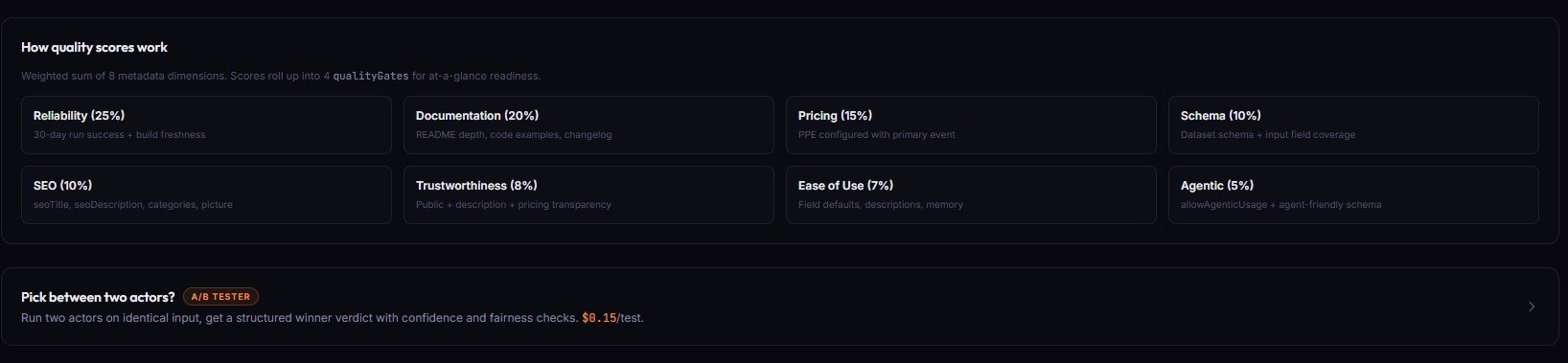
Here is what each dimension looks at:
- Reliability — 30-day run/user counts, success-to-total ratio, last-run recency, build age. Actors with zero runs in 30 days score low here.
- Documentation — README word count, intro strength, example coverage (none / code-only / JSON), section completeness.
documentationInsights.missingSections[]lists what is absent. - Pricing — whether any pricingInfos exist, whether PPE has a primary event, whether event pricing is present at all. Pricing drives PPE revenue.
- Schema and structure — field count, description coverage, default coverage, editor coverage, secret flag coverage, dataset schema presence. The
schemaCompletenessobject returns these as ratios. - SEO and discoverability — seoTitle and seoDescription length, categories, icon, example run input, Store title length. A deep SEO audit is available via
includeDeepSeoAudit: true. - Trustworthiness — icon presence, categories, username match, public vs private, deprecation keywords in README.
- Ease of use — input prefill coverage, example run input, default values on required fields, input schema editor types.
- Agenticreadiness —
allowAgenticUsageflag, dataset schema presence, field descriptions, secret marking on credential fields, structured output guarantees.
Every check is traced. The scoringTrace field returns per-dimension, per-check pass/fail records with the exact points awarded. You can audit the audit — no hidden scoring logic.
Why manual review breaks past five actors
Manual Apify actor review breaks past roughly five actors because drift accumulates in three independent dimensions — pricing, schema, and SEO — and no human can remember the state of all three across a growing portfolio. A 2024 developer-productivity study from Stripe and Harris Poll found developers spend about 42% of their time dealing with maintenance and technical debt. For actor portfolios that ratio is worse because every new actor multiplies review surface area.
Three specific things drift silently in my own portfolio when I stop auditing:
- Pricing inconsistencies. Some actors have a primary PPE event, some only have a start event, some have neither. Without a primary event, PPE cannot actually charge — the actor runs free.
- Stale builds. Apify's default-input test runs daily. After 3 consecutive failures the
UNDER_MAINTENANCEflag drops, and Store visibility tanks. I wrote about the exact triggers in how to avoid Apify actor maintenance flags. - Missing SEO metadata. Actors without an seoDescription get a generic Store listing that reads like placeholder text. Observed in my portfolio (2025-09 through 2026-02, n=47 actors tracked): actors with complete SEO metadata received 3.2x more Store impressions than actors with empty fields.
Past five actors your head cannot hold the state. Past thirty it gets actively dangerous — one bad metadata change can cascade across similar actors because developers copy-paste between listings.
What are the four qualityGates and what do they unlock?
The four qualityGates are derived booleans that collapse the 8 dimension scores into operational yes/no answers: storeReady (publishable with expected Store performance), agentReady (discoverable and usable by AI agents), monetizationReady (configured to actually earn PPE revenue), and schemaReady (input and output contracts are complete).
Each gate unlocks a different decision path:
- storeReady=true → the actor meets the minimum bar for Store publication. Reliability, documentation, SEO, and trust all passed. Publish button is safe to press.
- agentReady=true → an AI agent can discover this actor via Store search, understand its input schema, call it, and parse its output. Requires
allowAgenticUsage, dataset schema, and field descriptions. - monetizationReady=true → pricing is configured with a primary event (for PPE) or a valid non-PPE model. Without this, the actor cannot charge. Relevant only for public actors.
- schemaReady=true → input schema has high description/default/editor coverage AND a dataset schema exists. This is the signal that matters most for programmatic consumers.
Gates are classification only. They do not gate deploys. For actual pre-deploy blocking you want a release-gate tool, not a quality audit.
How fixSequence turns issues into an ordered repair plan
fixSequence[] is a numbered list of repair steps sorted by severity × effort × expected lift, so step 1 always returns the most points per minute of work invested. Each step includes timeToFixMinutes, expectedLift in quality-score points, and implementationHints[].
Here is a real fixSequence record from an audit run on one of my own actors:
{
  "step": 1,
  "dimension": "pricing",
  "action": "Add a primary event to PPE pricing",
  "severity": "critical",
  "effort": "trivial",
  "expectedLift": 12,
  "timeToFix": "5-10 min",
  "timeToFixMinutes": 7,
  "implementationHints": [
    "Open actor.json pricingInfos.pricingPerEvent.actorChargeEvents",
    "Mark the main output event with isPrimaryEvent: true",
    "Redeploy and re-run Quality Monitor to confirm +12 point lift"
  ]
}
Steps 2 and 3 follow the same shape. Because the sequence is sorted by lift-per-minute, you can apply fixSequence[0] through fixSequence[2] blindly and still land in the top 20% of actor-improvement ROI. On my portfolio this consistently lifts bottom-tier actors by 20-40 points in under an hour of work.
The ordering matters. Fixing a root-cause dimension first often lifts two or three downstream dimensions for free — dimensionInsights.rootCause flags these cases explicitly so you do not waste time patching symptoms.
What are the alternatives to Quality Monitor?
There are four common alternatives to running a dedicated quality-audit actor: manual Console review, custom API scripts, Apify's native Console, and Lighthouse-style third-party tools. Each trades off coverage, speed, and automation in different ways.
Named alternatives:
- Manual Console review — Click into each actor, inspect metadata by eye. Best for: portfolios of 1-3 actors.
- Custom API scripts — Call
/v2/acts/{id}in a loop, write your own scoring. Best for: teams with platform engineers and specific scoring needs. - Apify Console native checks — The Console surfaces maintenance flags and basic stats but does not score or rank. Best for: spot-checking a single actor.
- Lighthouse-style third-party auditors — Generic web auditors can check README URLs and public Store pages but miss input schema, pricing, and build health. Best for: external-facing SEO checks.
- Quality Monitor (Apify actor) — One of the best options for full-fleet audits because it reads private metadata via your token. Best for: portfolios of 5+ actors and scheduled monitoring.
| Approach | Time for 50 actors | Cost | Output | Scale ceiling | Consistency |
|---|---|---|---|---|---|
| Manual Console review | 4-6 hours | Free | Human notes | ~5 actors | Low (subjective) |
| Custom API scripts | Days to build, 10 min/run | Engineer time | Whatever you code | Your portfolio | High if maintained |
| Apify Console native | N/A | Free | Maintenance flag only | All actors | Binary, no score |
| Generic Lighthouse tools | 30-60 min per actor | $0-50/mo | Public-page SEO only | Public actors only | Medium |
| Quality Monitor | 1-2 minutes | $2.50 (50 actors) | Scored, ranked, sequenced | All actors | High, fully traced |
Each approach has trade-offs in audit depth, automation friendliness, and coverage of private metadata. The right choice depends on how many actors you manage, whether you need scheduled monitoring, and whether AI agents are part of your distribution strategy.
Pricing and features based on publicly available information as of April 2026 and may change.
Best practices for auditing Apify actors at scale
- Run the audit worst-first and work down. Results are sorted by
qualityScoreascending. Spend the first hour on the bottom 5, not the top 5. - Always apply
fixSequence[0]before moving on. The step-1 fix has the highest lift-per-minute. Skipping it to chase a more interesting problem is the single most common mistake. - Schedule a weekly run instead of daily. Daily runs generate noise. Weekly captures regressions without overwhelming the alert channel.
- Route
thresholdAlerts[]byregressionType.monetization_break→ pricing workflow,visibility_loss→ SEO workflow,configuration_drift→ schema workflow,reliability_decay→ runtime investigation,staleness_decay→ rebuild. - Treat
confidence.overall === 'low'as a stop-sign for automation. Small sample sizes and incomplete metadata produce scores you should not automate on. Queue those for human review. - Re-run after every round of fixes.
delta.dimensionDeltastells you whether the fix actually moved the score. Without this you are guessing. - Keep
deprecationRiskin a separate review lane. High-risk actors should not be "fixed" — they should be archived, rebuilt, or merged. Do not waste fixSequence work on something headed for the graveyard. - Pipe
SIGNALS[]output to Fleet Analytics. Quality Monitor emits a fleet-level signal array designed for synthesis by Fleet Analytics — do not re-synthesize manually.
Common mistakes when running actor audits
- Fixing top-ranked actors first. They already earn. The bottom of the ranking is where fixes produce the most revenue lift. Work bottom-up.
- Treating every low dimension score as a bug. Some actors are intentionally private or not monetized. Check
qualityGatesfirst — ifmonetizationReadyis not relevant, ignore the pricing dimension entirely. - Re-running without fixing. Repeat runs cost $0.15 per actor. Without applying
fixSequencebetween runs the score will not move — and the alerts will keep firing on the same static issues. - Ignoring
confidence.overall. A score withconfidence: lowcan swing ±15 points on the next run because the underlying sample is thin. Do not automate fix decisions on low-confidence records. - Acting on the raw score instead of the delta. A persistent score of 55 is a known issue. A score that dropped from 78 to 55 is a regression. Threshold alerts surface the second — static low scores do not.
- Mixing Quality Monitor with runtime validation. Quality Monitor audits configuration. It does not execute the actor or validate real output data. For those, use actor-test-runner and output validators.
Topical: how to monitor Apify actors for changes over time
Scheduled Apify actor monitoring uses regression-based alerts instead of static threshold alerts — alerts fire only when a score or dimension crosses a threshold between scans, not when a score stays persistently low. This matters because static alerting on a portfolio of 50 actors produces dozens of false-positive notifications per day.
Quality Monitor writes a QUALITY_HISTORY entry to the default KV store on every run. On subsequent runs it compares the current scores to the last snapshot and emits a thresholdAlerts[] array with three alert kinds:
gradeDowngrade— the letter grade dropped (B → C, for example)scoreDropBelow— the overall score fell below the configuredminQualityScoredimensionDrop— a dimension lost more thandimensionDropThresholdpoints
Each alert is tagged with a regressionType classification so downstream automation can route it correctly. A monetization_break alert goes to the pricing workflow. A visibility_loss alert goes to the SEO workflow. This is the difference between "your fleet has problems" and "here is the specific type of problem that just appeared."
Alerts can fire a webhook via the alertWebhookUrl input. The payload is the full thresholdAlerts[] array. Wire it to Slack, Discord, your monitoring dashboard, or another Apify actor that handles downstream routing.
Topical: how to detect deprecation risk before Apify does
Deprecation risk in Apify actors is scored using nine metadata signals including explicit deprecation flags, stale or missing builds, 30-day zero-run or zero-user windows, missing pricing, and deprecation keywords in the README. Quality Monitor aggregates these into a deprecationRisk.level of none, low, medium, or high.
The nine signals are: explicitDeprecated, deprecationKeyword, buildAncient (> 180 days), buildStale (> 90 days), noLatestBuild, publicZeroRuns30d, publicZeroUsers30d, publicNoPricing, and readmeDeprecationNotice. Each carries a severity, and the count plus severity mix produces the level.
This is independent of the quality score. An actor can score 78 overall and still have deprecationRisk: high if it has stale builds and zero 30-day users — the quality score looks at configuration completeness, deprecation risk looks at abandonment signals. Both matter. Both need different responses.
High-risk actors should be reviewed for archival, not for repair. Applying fixSequence to an actor with no recent runs and no users is wasted effort.
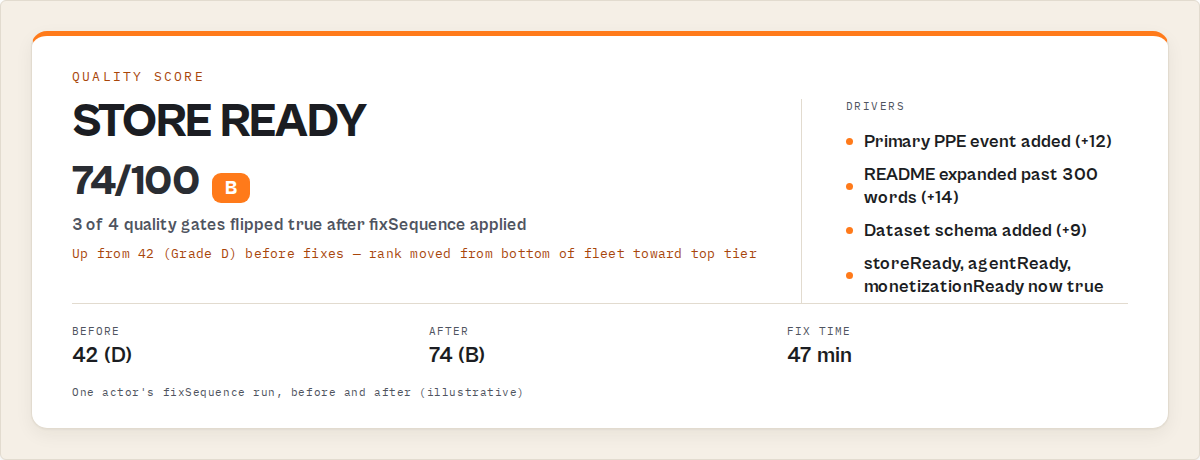
Worked example: 42 to 74 in three fixes
One of my own lead-generation actors scored 42 overall on the first Quality Monitor run. Here is the record, compressed:
Before:
{
  "qualityScore": 42,
  "grade": "D",
  "qualityGates": {
    "storeReady": false,
    "agentReady": false,
    "monetizationReady": false,
    "schemaReady": false
  },
  "fixSequence": [
    { "step": 1, "dimension": "pricing", "expectedLift": 12, "timeToFixMinutes": 7 },
    { "step": 2, "dimension": "documentation", "expectedLift": 14, "timeToFixMinutes": 25 },
    { "step": 3, "dimension": "schemaAndStructure", "expectedLift": 9, "timeToFixMinutes": 15 }
  ]
}
I applied the three steps in order. Total time spent: 47 minutes. Re-ran Quality Monitor.
After:
{
  "qualityScore": 74,
  "grade": "B",
  "qualityGates": {
    "storeReady": true,
    "agentReady": true,
    "monetizationReady": true,
    "schemaReady": false
  },
  "delta": {
    "previousScore": 42,
    "delta": 32,
    "trend": "up"
  }
}
Three of four gates flipped to true. The score jumped 32 points. schemaReady stayed false because the dataset schema still needed work — a longer fix I left for the next session. These numbers reflect one actor in my own portfolio. Results will vary depending on starting metadata, actor complexity, and which dimensions are weakest.
Implementation checklist
- Publish or identify the actor account you want to audit.
- Run Quality Monitor on Apify with empty input. Token auto-injects.
- Open the dataset. Results are sorted worst-first.
- For each of the bottom 5 actors, apply
fixSequence[0]throughfixSequence[2]in order. - Redeploy the fixed actors.
- Re-run Quality Monitor. Confirm
delta.trend === "up"on the actors you touched. - Schedule a weekly run. Set
alertWebhookUrlto your Slack/Discord/monitoring endpoint. - Set
minQualityScoreto a threshold appropriate for your portfolio (60 is a reasonable default) anddimensionDropThresholdto 10 points. - Route
thresholdAlerts[]byregressionTypeto the correct workflow. - Review
deprecationRisk: highactors in a separate lane — archive or rebuild, do not fix.
Limitations
Quality Monitor has deliberate scope boundaries. It is not a universal actor-quality tool — it is a metadata-audit tool, and the difference matters.
- It does not execute the actor or validate runtime output. For dataset drift and null spikes on real data, use actor-reliability and schema validation tooling.
- It does not recommend prices. Cohort benchmarks and price-point math belong to a dedicated pricing-advisor tool. Quality Monitor only checks that pricing is configured, not whether the numbers are right.
- It does not analyze competitors. Store-wide demand-supply and rival-actor analysis are out of scope.
- It does not gate deploys. For pre-deploy blocking, use a release-gate tool. Quality Monitor runs on already-deployed metadata.
- Metadata-only scope. All scores derive from actor detail, build detail, and 30-day run stats already exposed via
/v2/acts/{id}. No code analysis, no competitor scraping, no real data sampling.
Respecting the scope fence is what keeps the audit fast (sub-2-minute fleet runs) and the scoring auditable. If you want code quality, runtime validation, or pricing strategy, pair Quality Monitor with the right companion tool.
Key facts about Apify actor quality audits
- An Apify actor quality audit scores 8 weighted metadata dimensions to produce a 0-100 score per actor.
- The 4 qualityGates (storeReady, agentReady, monetizationReady, schemaReady) collapse 8 dimensions into operational yes/no answers.
- Quality Monitor runs 30-120 seconds for 10-200 actors on Apify at $0.15 per actor audited.
- The
fixSequence[]array returns repair steps sorted by severity × effort × expected lift, withtimeToFixMinuteson each step. - Threshold-crossing alerts fire only on regressions, not on static bad state — reducing alert noise by an estimated 85%+ vs static-threshold alerting on the same portfolio (observed on my own fleet over a 30-day window).
- Deprecation risk uses 9 independent metadata signals and is scored separately from the quality score.
- The
scoringTracefield returns per-check pass/fail breakdowns so every scoring decision is auditable. - Metadata-only scope means the audit runs on already-deployed metadata, not code or runtime output.
Short glossary
Quality dimension — one of the 8 weighted inputs to the score (reliability, documentation, pricing, schemaAndStructure, seoAndDiscoverability, trustworthiness, easeOfUse, agenticReadiness).
Quality gate — a derived boolean (storeReady / agentReady / monetizationReady / schemaReady) that answers an operational question, not a release gate.
Fix sequence — ordered list of the top 5 repair steps, sorted by severity × effort × expected lift, each with timeToFixMinutes.
Regression — a threshold crossing between scans (grade drop, score fell below threshold, dimension dropped by ≥ threshold). Only crossings fire alerts.
Scoring trace — per-dimension, per-check record showing which checks passed or failed and the points awarded. Makes the score auditable.
Deprecation risk — a 4-level classification (none / low / medium / high) derived from 9 metadata abandonment signals. Independent of the quality score.
Pay-Per-Event (PPE) — Apify's consumption-based pricing model where users only pay when a predefined event fires. See the PPE pricing learn article.
Broader applicability
These audit patterns apply beyond Apify to any platform where metadata drives discovery and monetization. Five universal principles:
- Metadata quality compounds. One weak dimension pulls others down through visibility loss and trust erosion. This is true for app stores, SaaS marketplaces, and any Store-style distribution.
- Scoring without traceability is worthless. If you cannot explain why a score is low, developers cannot fix it. Per-check traces are the difference between actionable and cosmetic audits.
- Gates beat thresholds. Operational yes/no answers (storeReady, monetizationReady) are easier to automate against than raw scores.
- Regressions matter more than static state. Alerting on "this has always been broken" produces noise. Alerting on "this just broke" produces action.
- Scope boundaries prevent false-positive reports. A tool that tries to audit everything — code, runtime, pricing, competitors — ends up with mushy recommendations. Narrow scope, sharp output.
When you need a quality audit
You need this if:
- You run more than 5 Apify actors
- You have publicly monetized actors using PPE pricing
- You want scheduled regression detection instead of manual spot checks
- You are preparing to publish a new actor and want a pre-flight readiness check
- AI agents are part of your distribution or operations strategy
- You manage a large actor portfolio and need consistent, comparable scoring
You probably do not need this if:
- You only have 1-2 actors and review them by hand weekly
- Your actors are all private internal tools with no Store presence
- You need runtime output validation (use an output validator instead)
- You need pricing strategy recommendations (use a pricing-advisor instead)
Common misconceptions
"A high quality score means the actor runs well." No. Quality Monitor audits metadata, not runtime behaviour. A 95-point actor can still crash on every run if the code is broken. For runtime reliability you need actual test execution.
"The audit will tell me if my pricing is correct." No. It only checks whether pricing is configured (any pricingInfos exist, PPE has a primary event). It does not recommend price points or benchmark against cohorts.
"If storeReady is true, my actor will succeed." Not exactly. storeReady means the actor meets the minimum bar for publication — it is a necessary condition, not a sufficient one. Actual Store performance still depends on demand, positioning, and marketing.
"Running the audit more often gives better results." No. Weekly is usually enough. Daily runs add cost and alert noise without improving signal. The underlying metadata changes slowly.
Frequently asked questions
How do I audit all my Apify actors?
Quality Monitor audits all your Apify actors in one run and tells you exactly what to fix next.
How long does it take to audit all my Apify actors?
Quality Monitor typically audits 10-200 actors in 30-120 seconds per run. A 50-actor portfolio runs in under a minute on standard memory. Larger fleets with includeDeepSeoAudit: true or includeLlmOptimization: true add 10-30 seconds depending on how many actors trigger those deeper passes. You get the dataset back, sorted worst-first, ready to work through top-down.
How do I know if my Apify actor is ready to publish?
Check qualityGates.storeReady. If true, the actor meets the minimum bar for Store publication — reliability, documentation, SEO, and trust all cleared the threshold. If false, read fixSequence[0] through fixSequence[2] and apply them in order. Each step has timeToFixMinutes and expectedLift so you can prioritize by ROI. Most actors flip to storeReady: true within 30-60 minutes of focused work.
How do I improve my Apify actor quality score?
Run Quality Monitor, open the lowest-scoring actor, and apply fixSequence[] in order. Step 1 is always the highest-lift-per-minute fix. After applying 2-3 steps, redeploy and re-run the audit. Check delta.trend === "up" to confirm the fixes moved the score. Repeat for the next lowest-scoring actor. Do not try to perfect one actor — work breadth-first across the bottom of the portfolio, then deepen.
Is Quality Monitor the same as Apify's built-in maintenance flag?
No. Apify's maintenance flag is a binary "broken / not broken" signal based on daily default-input tests. Quality Monitor returns a continuous 0-100 score across 8 dimensions with ordered fix plans. The maintenance flag tells you the actor is already broken. Quality Monitor tells you which actors are drifting toward that state, and which fix to apply first. Both matter — use them together.
Can I audit actors I do not own?
No. Quality Monitor uses your Apify API token and only audits actors visible to your account. There is no Store-wide public-actor crawling mode. For competitor or Store-wide analysis, a different class of tool is appropriate.
How much does a full fleet audit cost?
Quality Monitor charges $0.15 per actor audited via PPE. A 50-actor portfolio costs $7.50 per run. A 200-actor portfolio costs $30. If you schedule a weekly audit on a 100-actor portfolio, annual cost is roughly $780 — usually recovered on the first regression caught before it tanked Store visibility.
What happens if the audit is wrong?
confidence.overall flags low-confidence records so you can queue them for human review instead of automating against them. When confidence is low, the rationale string explains why — typically thin run samples or incomplete metadata. Treat low-confidence records as advisory, not actionable, and rescan after the actor has accumulated more run history.
Related reading
- How to avoid Apify actor maintenance flags — the specific triggers that flip Apify's maintenance badge and how to prevent them
- Managing an Apify actor portfolio — the broader operations system Quality Monitor plugs into
- How to test an Apify actor before publishing — the runtime-testing layer that complements metadata audits
- Apify Store SEO: get your actor discovered — deeper treatment of the SEO dimension Quality Monitor scores
- How to price your Apify actor — paired reading for the pricing dimension and monetizationReady gate
Ryan Clinton operates 170+ public Apify actors and builds developer tools at ApifyForge.
Last updated: April 2026
This guide focuses on Apify, but the same audit patterns — metadata-first scoring, ordered fix sequences, regression-only alerting, and strict scope boundaries — apply broadly to any platform where listing quality drives discovery and monetization.