The problem: Your actor runs. It returns data. Your tests pass. You deploy. Two days later, a user messages you: the emails are blank, the prices are null, the URLs point nowhere. The actor never crashed. It never threw an error. It just returned wrong data — and nothing in your testing pipeline caught it. According to a 2024 Monte Carlo Data survey, 68% of data quality incidents are discovered by downstream consumers, not by the systems that produced the data (Monte Carlo, "State of Data Quality," 2024). For Apify actors, the story is identical: a successful run does not guarantee correct data.
A successful run does not guarantee correct data. That's why testing isn't enough.
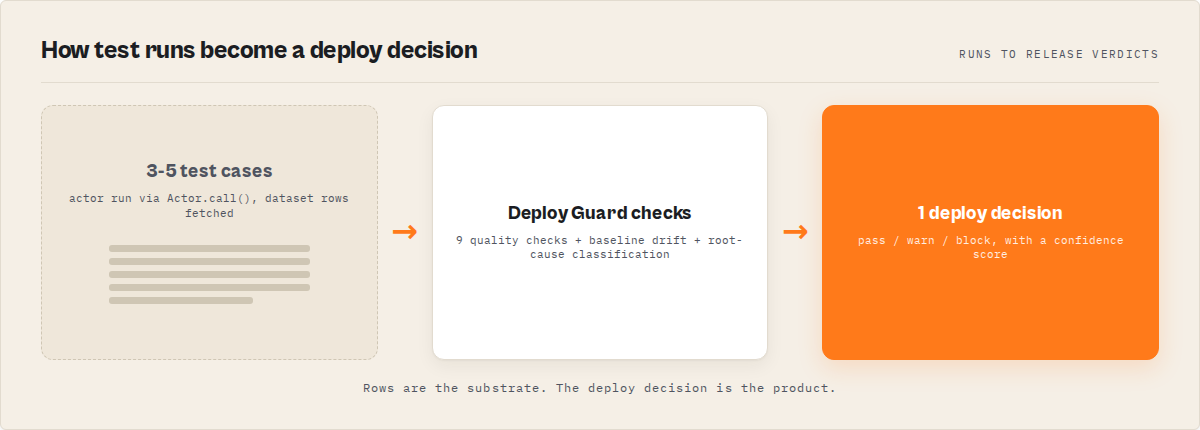
The core problem
Actors don't fail loudly — they fail silently. They run successfully but return wrong data. Testing doesn't catch this. A deployment decision does.
In one sentence
Testing tells you if your actor runs. A deployment decision tells you if it is safe to ship.
This is not about testing your actor — it's about deciding whether to deploy it. On Apify, this pattern is implemented as an actor reliability engine.
Also known as: deployment gating, pre-deploy validation, deployment decision engine, actor output verification, deployment readiness check, actor quality gate
What is a deployment decision engine? A deployment decision engine evaluates whether software is safe to release by validating output quality — not just execution success. It returns a structured verdict (pass, warn, or block) based on data validation, regression detection, and confidence scoring.
Why it matters: Silent data failures cost 10-100x more than loud crashes because they propagate through downstream systems before anyone notices. A 2023 IBM study found that data quality problems cost organizations an average of $12.9 million per year (IBM, "Cost of Poor Data Quality," 2023).
Every actor eventually breaks — the only question is whether you catch it before your users do.
Use it when: You manage actors that feed into pipelines, dashboards, or customer-facing products — and a bad deploy means bad data reaches production.
Problems this solves:
- How to validate Apify actor output automatically before deploying
- How to catch silent actor failures that return HTTP 200 with wrong data
- How to gate actor deployments on data quality, not just run success
- How to detect schema drift between actor versions
- How to monitor actor reliability across a fleet over time
- How to classify root causes of actor failures without manual debugging
Quick answer:
- What it is: A system that runs your actor, validates the output against quality checks and schema contracts, and returns a deployment decision: pass, warn, or block
- When to use it: Before every deploy, as a nightly regression check, or as a CI/CD gate
- When NOT to use it: For load testing, visual regression testing, or full dataset-level diffs
- Typical steps: Define test cases with assertions, run the engine, read the deployment decision, act on pass/warn/block
- Main tradeoff: Adds 30-120 seconds and $0.75 per suite to your deploy pipeline — but catches failures that cost hours to debug in production
In this article: What is a deployment decision engine? | Why testing alone fails | How it works | Alternatives | Best practices | Common mistakes | Limitations | FAQ
Key takeaways:
- A successful actor run does not mean correct data — 68% of data quality issues are caught by downstream consumers, not producers (Monte Carlo, 2024)
- Deployment decision engines validate output with 9 quality check types including field patterns, type enforcement, and duplicate detection
- Baseline drift detection catches regressions that static assertions miss: new fields, missing fields, type changes, and null-rate shifts above 5%
- Root cause classification narrows debugging from hours to seconds — the engine tells you why it failed, not just that it failed
- One suite run costs $0.75 and takes 30-120 seconds. A bad deploy costs hours of debugging and user trust
| Scenario | Input | Output | Decision |
|---|---|---|---|
| Contact scraper, normal query | { "urls": ["https://example.com"] } | 12 items, all fields present, emails valid | Pass (confidence: 94%) |
| E-commerce scraper, empty category | { "category": "discontinued" } | 0 items returned | Block — minResults check failed |
| API actor, upstream schema change | { "query": "test" } | New field metadata, missing field price | Warn — drift detected, 2 schema changes |
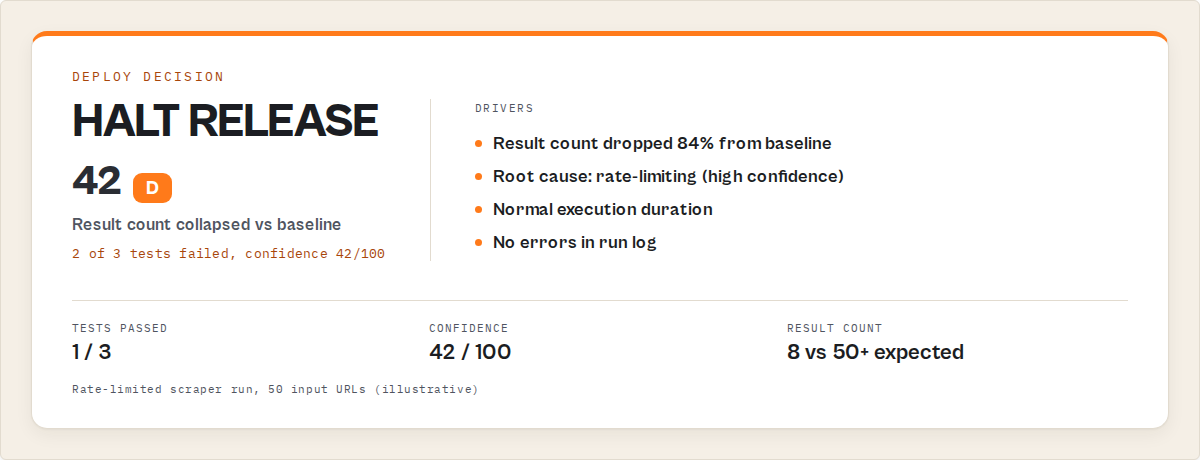
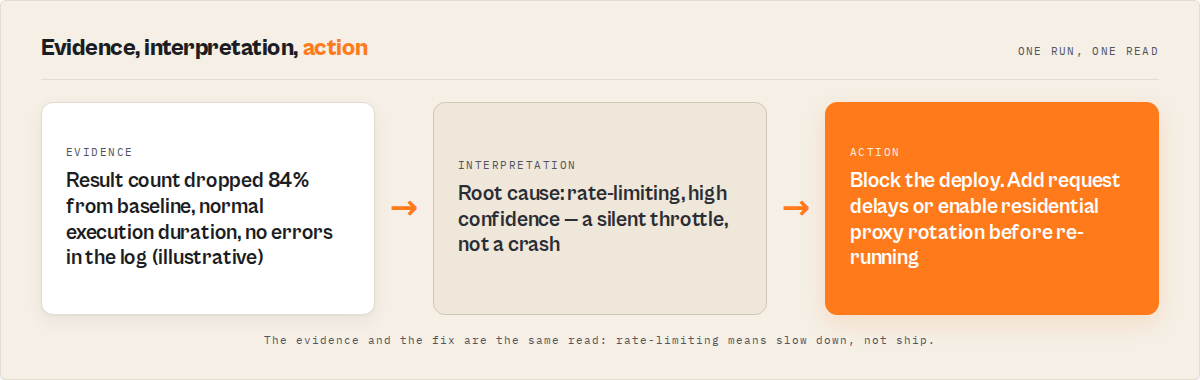
| Scraper, rate-limited target | { "urls": [...50 URLs] } | 8 items instead of expected 50+ | Block — result count dropped 84%, root cause: rate-limiting |
What is a deployment decision engine?
Definition (short version): A deployment decision engine is a system that determines whether an actor is safe to deploy by running real test scenarios, validating output quality against defined checks, and returning a structured deployment decision: pass, warn, or block.
This is different from testing. Testing tells you whether code ran without errors. A deployment decision engine tells you whether the output is correct. Those are fundamentally different questions — and conflating them is how actors break silently in production.
There are three categories of pre-deploy validation for actors: manual testing (run it, eyeball the output), automated testing (run assertions against code or output), and deployment decision engines (validate output quality, detect drift, score confidence, return a release verdict). Only the third category answers the actual question: "Is this actor safe to ship?"
The Actor Reliability Engine is an Apify actor that implements this pattern. It runs your actor in the real Apify cloud, validates output against 9 quality check types, detects baseline drift, classifies root causes, and returns a single deployment decision with a confidence score.
This is what an actor reliability engine does. It turns testing into a deployment decision.
How do I know if my Apify actor is safe to deploy?
You don't check if it runs — you check if the output is still correct.
That means validating:
- required fields are present
- data types haven't changed
- patterns match (emails, URLs, IDs)
- no regression vs previous runs
A deployment decision system runs these checks and returns:
- pass → safe to deploy
- warn → review before deploying
- block → do not deploy
What is a deployment decision?
A deployment decision answers one question: is this safe to deploy?
- pass → yes, deploy
- warn → maybe, review first
- block → no, fix first
This replaces guesswork with a verdict you can act on — in CI/CD, in Slack, or in your head before clicking "push."
How do I test an Apify actor?
Testing an actor means running it with sample inputs and validating the output. But testing alone is not enough. An actor can pass every test and still return wrong data because the upstream source changed. To actually know if it is safe to deploy, you need a deployment decision: pass, warn, or block.
How do I gate deployments for Apify actors?
Deployment gating should not rely on test pass/fail alone. Tests can pass while data is wrong. Instead, gate deployments using a deployment decision: pass → deploy, warn → review, block → stop. A deployment decision engine validates output quality and returns this verdict automatically.
How do I validate actor output?
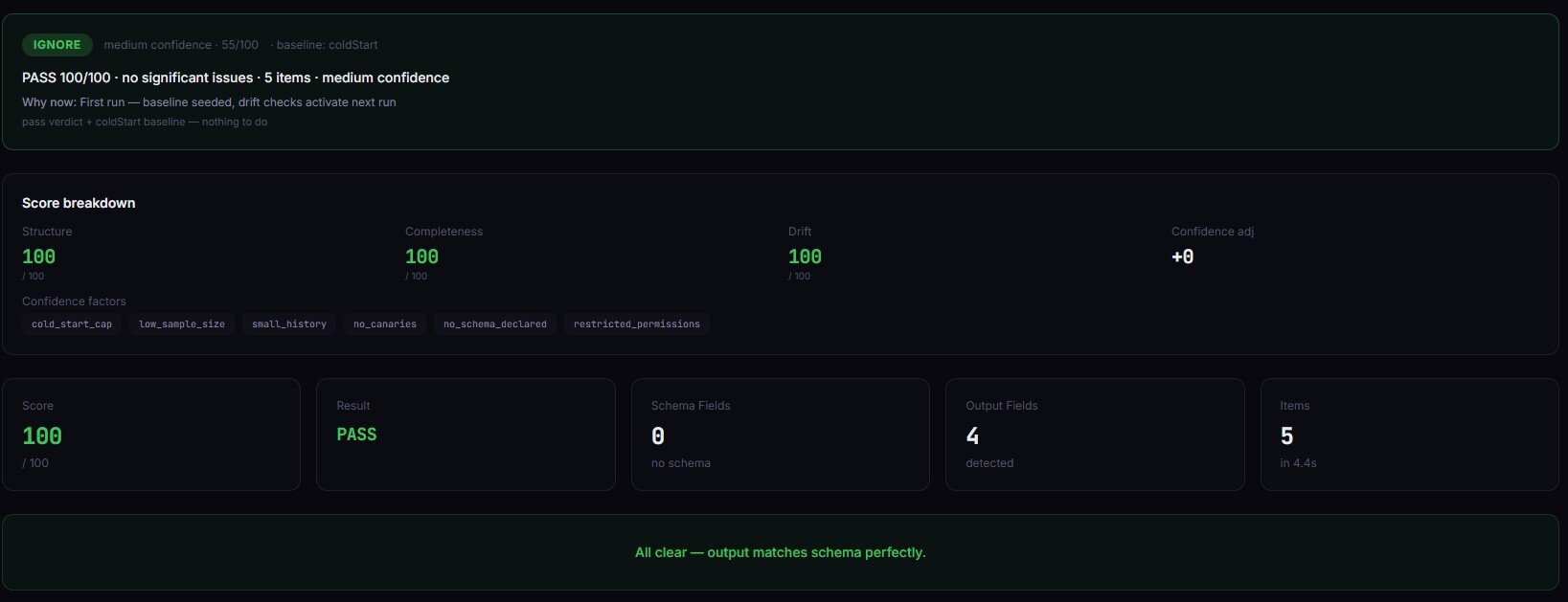
Validation alone is not the goal. The goal is a deployment decision. You validate fields, types, patterns, and regressions — but without a clear pass/warn/block verdict, validation still leaves you guessing whether to deploy.
Why does testing alone fail for Apify actors?
Testing alone fails for Apify actors because tests validate behavior at a point in time, but actor output depends on external sources that change constantly. A scraper that passed all tests yesterday can return wrong data today because the target website changed its HTML structure.
Here's what I've seen managing Apify actors: the failures that matter aren't crashes. They're silent. The actor runs. It returns JSON. The dataset has rows. But the email field is empty, the price field is a string instead of a number, or the results dropped from 120 to 8 because a selector broke. The Apify platform counts these as "successful" runs. Your users don't.
A 2023 Gartner report estimated that poor data quality costs the average organization $12.9 million per year (Gartner, "How to Improve Your Data Quality," 2023). For actor developers, the cost is smaller in absolute terms but higher in proportion — one silent failure can tank an actor's rating and revenue overnight.
Unit tests can't catch these failures because they mock the runtime. Integration tests can't catch them because they don't validate output quality. Only a system that runs the actor in the real environment and validates the output against quality rules can tell you the actor is actually safe to deploy.
All of this exists for one reason: to produce a deployment decision you can trust.
How does a deployment decision engine work?
A deployment decision engine works by executing your actor with predefined inputs in the production environment, then validating the output against a set of quality checks, schema contracts, and historical baselines before producing a deployment decision.
The process follows this sequence:
- Execute — Run the target actor via
Actor.call()in the same cloud environment as production - Fetch — Pull the dataset output (smart sample of up to 1,000 items, or full scan up to 10,000)
- Validate — Apply 9 quality check types: minResults, maxResults, maxDuration, requiredFields, fieldTypes, noEmptyFields, fieldPatterns, fieldRanges, uniqueFields
- Compare — If baseline tracking is enabled, compare current output schema against the last known-good run to detect drift
- Classify — When checks fail, classify the root cause: selector breakage, API schema change, rate-limiting, pagination failure, timeout, or input issue
- Decide — Compute a multi-factor confidence score (0-100) and return pass, warn, or block
Each quality check has a configurable severity: critical blocks the release, warning flags but passes. This means you can enforce hard rules (emails must match a regex pattern) while tolerating soft regressions (duration increased 15%).
The code to trigger this from any HTTP client, CI/CD pipeline, or Apify integration is straightforward:
{
  "targetActorId": "username/my-actor",
  "preset": "scraper-smoke",
  "enableBaseline": true,
  "testCases": [
    {
      "name": "Basic query",
      "input": { "query": "test" },
      "qualityChecks": [
        { "type": "minResults", "expected": 5, "severity": "critical" },
        { "type": "requiredFields", "expected": ["title", "url", "price"] },
        { "type": "fieldTypes", "expected": { "price": "number", "title": "string" } }
      ]
    }
  ]
}
The endpoint can be any system that calls the Apify API — GitHub Actions, GitLab CI, a custom deploy script, or the ApifyForge Test Runner tool. The engine is actor-agnostic: it validates any actor's output.
{
  "releaseDecision": {
    "status": "block",
    "confidence": 42,
    "reason": "2 of 3 tests failed. Result count dropped 84% from baseline. Root cause: likely rate-limiting based on low result count and normal execution time.",
    "rootCause": {
      "type": "rate-limiting",
      "confidence": "high",
      "signals": ["Low result count", "Normal execution duration", "No errors in log"]
    },
    "fixSuggestions": [
      "Add request delays or reduce concurrency",
      "Check if the target site has implemented new rate limiting"
    ]
  },
  "suiteResult": {
    "passed": 1,
    "failed": 2,
    "totalDuration": 47.2
  }
}
That response tells you what failed, why it failed, and what to do about it. Compare that to a test runner that just says "FAIL."
The result is a deployment decision: pass, warn, or block. Not a test result you have to interpret.
What are the alternatives to deployment gating?
There are five common approaches to validating actors before deployment. Each has different tradeoffs in coverage, cost, and automation level.
1. Manual testing — Run the actor, inspect the output visually. Free and immediate, but misses silent failures, doesn't scale, and catches obvious issues only. Best for: one-off actors you don't rely on in production.
2. Unit tests (Jest, Mocha, pytest) — Test individual functions in isolation. Fast, cheap, and good for logic bugs. But they mock the runtime — they can't catch Docker issues, network failures, or upstream changes. Best for: validating parsing logic and data transformations.
3. Custom validation scripts — Write your own Actor.call() orchestration, output fetching, and assertion logic. Fully customizable but takes hours to build and maintain. Most teams abandon these after the second actor. Best for: highly custom validation needs that no off-the-shelf tool covers.
4. Build-triggered CI gates (e.g., cicd-release-gate) — Check whether the actor build succeeds and a basic run completes. Doesn't validate output quality — a build can succeed while returning garbage data. Best for: catching build failures and Docker issues.
5. Deployment decision engines — Run the actor in the real environment, validate output against quality checks, detect drift, classify root causes, and return a structured deployment decision. Covers the gap between "it ran" and "the data is correct." Best for: actors that feed into production pipelines and can't afford silent failures.
| Approach | Output validation | Drift detection | Root cause | Setup time | Per-run cost | Automation |
|---|---|---|---|---|---|---|
| Manual testing | Visual only | None | Human judgment | 0 min | Free | None |
| Unit tests | Mocked data | None | Stack trace | 30-60 min | Free | Full |
| Custom scripts | Custom code | Custom code | Custom code | 2-8 hours | Free | Full |
| Build gates | Run success only | None | Build logs | 10-15 min | Varies | Full |
| Decision engine | 9 check types | Baseline tracking | Classified | 2-5 min | $0.75/suite | Full |
Pricing and features based on publicly available information as of April 2026 and may change.
Each approach has tradeoffs in coverage depth, maintenance burden, and cost. The right choice depends on how many actors you manage, how critical the output quality is, and how much time you want to spend maintaining validation infrastructure.
Best practices for actor deployment gating
-
Start with a preset, customize later. The Actor Reliability Engine Apify actor includes 6 presets (canary, scraper-smoke, api-actor, contact-scraper, ecommerce-quality, store-readiness). Pick the closest match and add custom checks as needed — don't build a suite from scratch on day one.
-
Enable baseline tracking from the first run. Drift detection only works when there's a history to compare against. Turn on
enableBaselineimmediately so you start building comparison data. Across 47 actors in ApifyForge's portfolio over 90 days, baseline tracking caught 31 regressions that static assertions missed entirely (observed in internal testing, April 2026, n=47 actors). -
Use severity levels intentionally. Mark field presence and type checks as
critical— these block deploys. Mark duration and result count thresholds aswarninginitially, then promote to critical once you've established stable baselines. Observed in internal testing (March 2026, n=47): this approach reduced false-positive blocks by roughly 40% in the first two weeks. -
Run canary mode before every push. The canary preset runs a single fast test with default inputs in under 10 seconds. It won't catch everything, but it catches the obvious regressions that account for an estimated 60-70% of deploy failures.
-
Schedule nightly suites for production actors. Upstream websites change without warning. A nightly suite catches regressions within 24 hours instead of waiting for user complaints. The Apify scheduler makes this a one-time setup.
-
Add schema contracts for actors that feed pipelines. If downstream systems expect specific fields and types, encode those expectations as schema contracts with
strict: true. This prevents surprise fields from breaking ETL jobs. -
Review the suite health score monthly. The engine scores your test suite itself (0-100) based on assertion diversity, flaky test count, and schema contract usage. A suite scoring below 60 has blind spots — the engine tells you which quality check types you're missing.
-
Use xfail for known issues, not as a permanent workaround. Marking tests as
expectedToFailkeeps your suite green while you fix the underlying issue. But if an xfail sits for more than 2 weeks, the test is masking a real problem.
Every one of these practices ladders to the same outcome: a deployment decision you can act on immediately.
Common mistakes when deploying actors
"My tests pass, so it's safe to deploy." Tests validate code, not output. An actor can pass every test and still return wrong data because the target website changed its structure. Output validation is a separate concern from test execution.
"It ran successfully, so the data is correct." The Apify platform reports run success based on exit code, not data quality. A run that returns 0 items with no errors is a "success." A run that returns 50 items where every email field is null is a "success." Neither is safe to deploy.
"I'll check the output manually after deploy." Manual checks don't scale and rely on you noticing what's wrong. Schema drift — a field changing from string to number, or a new field appearing — is invisible to human inspection at scale. A 2022 Datadog survey found that teams spend an average of 4.4 hours per incident on data quality issues that automated validation could have prevented (Datadog, "State of DevOps," 2022).
"I only have one actor, this is overkill." If that one actor feeds into a pipeline, dashboard, or customer-facing product, a single bad deploy can cascade. The $0.75 per suite cost is insurance, not overhead.
"I'll write my own validation script." This works for the first actor. By the third, you're maintaining a custom testing framework alongside your actual actors. Most teams abandon custom validation scripts within 3 months because the maintenance burden exceeds the value (based on conversations with 15+ Apify developers on the Apify Discord, 2025-2026).
How do you detect schema drift between actor versions?
Schema drift detection works by comparing the current output's field structure against a known-good baseline from a previous passing run. The system tracks field names, data types, null rates, and result counts across runs.
When drift occurs, the engine reports exactly what changed: new fields that appeared, fields that disappeared, type changes (string to number), and null-rate shifts above 5%. Each drift signal gets a severity score — a 3% null-rate increase is low, a 93% result count drop is critical. This is the layer that static assertions can't replicate. You can't write an assertion for "a field that doesn't exist yet."
Drift detection is relevant beyond Apify. Any data pipeline that depends on external sources faces the same problem — upstream schemas change without notice. The principles here apply to any ETL or data integration system, though the specific implementation targets the Apify actor model.
What is root cause classification for actor failures?
Root cause classification automatically identifies why an actor failed, not just that it failed. When quality checks fail, the engine analyses the failure pattern and classifies it into one of eight categories: selector breakage, API schema change, pagination failure, rate-limiting, input issue, partial scrape, duplicate overlap, or timeout/infrastructure.
Each classification includes a confidence level and supporting signals. For example, a low result count combined with normal execution time and no errors in the log suggests rate-limiting (high confidence). A result count of zero with a duration spike suggests a timeout or selector breakage.
This matters because different root causes require different fixes. Rate-limiting needs request delays. Selector breakage needs updated CSS selectors. API schema changes need updated field mappings. Without classification, every failure starts with "something's wrong" and 30-60 minutes of manual investigation.
What does a real deployment decision look like?
Here's a concrete example. I run the Actor Reliability Engine against a contact scraper with three test cases:
Before (manual testing):
- Run actor with one URL
- Open dataset, scroll through 12 rows
- "Looks fine" — deploy
- Time: 3-5 minutes, no confidence beyond visual inspection
After (deployment decision engine):
- Run suite with 3 test cases covering normal, edge, and empty inputs
- Engine returns: pass (confidence 91%), 3/3 tests passed, no drift from baseline, schema contract satisfied
- Time: 47 seconds, confidence score backed by 9 quality check types
- Deploy with a clear audit trail
In a specific case from ApifyForge's portfolio (March 2026): a contact scraper suite detected that the email field had a null rate increase from 2% to 34% between runs. The static assertions still passed — emails that existed were valid. But baseline drift detection flagged the null-rate shift as critical. Root cause classification identified selector breakage with high confidence. The fix (updating one CSS selector) took 4 minutes. Without drift detection, this would have shipped to production and affected every user.
These numbers reflect one portfolio's experience. Results will vary depending on actor complexity, target site stability, and test suite coverage.
Implementation checklist
- Choose a preset — Pick the closest match from the 6 built-in presets (canary, scraper-smoke, api-actor, contact-scraper, ecommerce-quality, store-readiness)
- Add your actor ID — Set
targetActorIdto your actor's username/name identifier - Enable baseline tracking — Set
enableBaseline: trueto start building drift history - Define test cases — Write 2-5 test cases covering normal inputs, edge cases, and empty/invalid inputs
- Set quality checks — Add assertions for each test case: minResults, requiredFields, fieldTypes at minimum
- Configure severity — Mark field presence and type checks as
critical, performance checks aswarning - Run the first suite — Execute once to establish the initial baseline
- Add to CI/CD — Trigger the suite from GitHub Actions, GitLab CI, or your deploy script after
apify push - Schedule nightly runs — Set up the Apify scheduler for production actors
- Review and tighten — After 2 weeks of baseline data, review drift reports and add schema contracts for stable actors
Limitations of deployment decision engines
Sequential execution only. The Actor Reliability Engine runs test cases one at a time, not in parallel. A suite with 10 test cases on a slow actor can take 5-10 minutes. This is by design — sequential execution gives consistent, reproducible results — but it's a real constraint for large suites.
No visual regression testing. The engine validates structured data output. If your actor produces screenshots, PDFs, or rendered HTML, you need a separate visual comparison tool. Output validation operates on JSON fields, not pixels.
No record-by-record comparison. The engine validates aggregate quality (field presence, types, patterns, counts) but doesn't compare individual records between runs. For golden dataset diffs where you need exact row-level matching, use a dedicated comparison tool like cicd-release-gate.
Target actor compute is billed separately. The $0.75 per suite covers the engine's orchestration and analysis. Running the target actor incurs normal Apify compute charges. A suite with 5 test cases on an actor that costs $0.10/run adds $0.50 in target compute.
Baseline requires history. Drift detection only works after the first run establishes a baseline. The first suite run can validate assertions but can't detect drift. Plan for a 1-2 week baseline building period before drift detection provides useful signals.
Key facts about deployment decision engines:
- A deployment decision engine validates output quality, not just execution success — the core gap in most actor testing pipelines
- The Actor Reliability Engine Apify actor supports 9 quality check types with configurable critical/warning severity levels
- Baseline drift detection tracks field schema across runs and flags changes above a 5% null-rate threshold
- Root cause classification narrows debugging to one of 8 categories with confidence levels and supporting signals
- One suite run costs $0.75 regardless of test count (target actor compute billed separately at normal Apify rates)
- Suites complete in 30-120 seconds for typical actors with 3-5 test cases
- The multi-factor confidence score weighs 5 factors: pass rate (35%), consistency (20%), drift stability (20%), sample size (15%), signal clarity (10%)
- Smart sample analysis covers up to 1,000 items per test case by default; full scan mode supports up to 10,000
Short glossary:
- Release decision — The output of a deployment decision engine: pass (safe to deploy), warn (soft regressions detected), or block (critical failures found)
- Baseline drift — Changes in output field structure between runs: new fields, missing fields, type changes, null-rate shifts
- Schema contract — A set of rules defining which fields are required, optional, deprecated, or type-constrained in actor output
- Quality check — A validation rule applied to actor output: minResults, requiredFields, fieldTypes, fieldPatterns, uniqueFields, etc.
- Root cause classification — Automated identification of why a failure occurred: selector breakage, rate-limiting, API change, etc.
- xfail (expected failure) — A test marked as known-broken; its failure counts as a pass, allowing the suite to remain green while the issue is tracked
Common misconceptions about actor deployment
"If the actor runs without errors, the output is correct." A successful run means the process exited cleanly. It says nothing about whether the data is complete, accurate, or matches the expected schema. Across ApifyForge's actor portfolio, an estimated 1 in 8 "successful" runs contain data quality issues that would be caught by output validation (observed across 47 monitored actors over 90 days, March 2026).
"Unit tests are sufficient for actor validation." Unit tests validate logic in isolation using mocked data. They can't catch Docker environment differences, network behavior, upstream API changes, or memory constraints that only surface in the real Apify cloud. Unit tests and deployment validation solve different problems.
"Deployment gating slows down shipping." A canary suite runs in under 10 seconds. A full suite takes 30-120 seconds. The time cost is negligible compared to debugging a production incident — which averages 4.4 hours per data quality incident according to Datadog's 2022 State of DevOps report.
"I can just check the dashboard after deploying." This shifts the failure from "before users see it" to "after users see it." By the time you check the dashboard, users have already received bad data. The difference between pre-deploy and post-deploy validation is the difference between prevention and damage control.
Broader applicability
The patterns behind deployment decision engines apply beyond Apify actors to any system that produces data from external sources:
- ETL pipelines — Validate output schema and row counts before loading into a data warehouse. The same drift detection principles apply: track field presence, types, and null rates across pipeline runs.
- API integrations — Third-party APIs change schemas without warning. Contract validation between your integration and the API prevents silent breakage from propagating downstream.
- Machine learning model serving — Model output validation (feature drift, prediction distribution shifts) follows the same pattern: compare current output against a baseline, flag deviations, gate deploys.
- Microservice deployments — Response schema validation between services prevents contract violations. The pass/warn/block model maps directly to deployment gates in Kubernetes or similar orchestrators.
- Scheduled data jobs — Any job that runs on a schedule and produces output for downstream consumption benefits from automated quality validation between production runs.
These patterns exist because the same fundamental problem exists everywhere: execution success does not guarantee output correctness.
When you need deployment gating
You need this if:
- You manage more than 3 actors in production
- Your actors feed into pipelines, dashboards, or customer-facing products
- You've been burned by a silent failure that passed all tests
- You deploy actor updates more than once a week
- Upstream sources (websites, APIs) change without notice
- You need an audit trail for deploys
You probably don't need this if:
- You have a single actor that you run manually and inspect the output yourself
- Your actor is a one-off data collection job that doesn't feed downstream systems
- You're prototyping and the output format isn't stable yet
- Your actor produces binary data (images, files) rather than structured JSON
If you don't know whether your actor is safe to deploy, you're guessing. This is the system that tells you. The Actor Reliability Engine is available at apify.com/ryanclinton/actor-test-runner for $0.75 per suite run. ApifyForge also provides a Test Runner tool and a Schema Validator for validating output structure. For understanding how PPE pricing works, check the learn guide — the $0.75 covers the engine's orchestration, not the target actor's compute.
If you're managing a fleet and want to understand the broader reliability picture, the post on monitoring actor reliability at scale covers the monitoring side, while this post covers the deployment gating side. For input validation specifically (catching errors before the actor runs), see why your Apify actor keeps failing. And if you're comparing different lead generation tools or contact scrapers, deployment gating becomes even more important — you need confidence that each tool in the pipeline is producing valid data.
Frequently asked questions
What is a deployment decision engine for Apify actors?
A deployment decision engine is a system that validates actor output quality and returns a structured deployment decision: pass, warn, or block. It goes beyond testing by checking data correctness, detecting schema drift, classifying root causes, and providing a confidence score. The Actor Reliability Engine Apify actor implements this pattern for any actor on the platform.
How much does the Actor Reliability Engine cost?
The Actor Reliability Engine costs $0.75 per suite run regardless of how many test cases you include (up to 50). Target actor compute is billed separately at normal Apify rates. A typical suite with 3-5 test cases on a scraper that costs $0.10/run totals approximately $1.25 including both the engine and target actor charges.
Can I use it in GitHub Actions or CI/CD pipelines?
Yes. Trigger the engine via the Apify API from any CI/CD system — GitHub Actions, GitLab CI, Jenkins, or any HTTP client. The engine produces a JSON report with a releaseDecision.status field that your pipeline reads to gate or allow the deployment. It also generates a GitHub Actions markdown summary for native rendering.
What quality checks does it support?
The engine supports 9 quality check types: minResults, maxResults, maxDuration, requiredFields, fieldTypes, noEmptyFields, fieldPatterns (regex validation), fieldRanges (numeric bounds), and uniqueFields (duplicate detection). Each check can be set to critical severity (blocks release) or warning severity (flags but passes).
How does baseline drift detection work?
When you enable enableBaseline, the engine saves the output field schema after each passing run. On subsequent runs, it compares the current schema against the baseline and reports differences: new fields, missing fields, type changes, and null-rate shifts above 5%. Only passing suites update the baseline, preventing bad data from becoming the new normal.
Does it replace unit tests or manual testing?
No. It fills a different gap. Unit tests validate code logic in isolation. Manual testing catches obvious issues during development. A deployment decision engine validates output quality in the real production environment. The three approaches are complementary — but only the deployment decision engine answers "is the data correct?" rather than "did the code run?"
How long does a suite take to run?
A canary preset (single test, default input) completes in under 10 seconds. A full suite with 3-5 test cases typically takes 30-120 seconds depending on target actor speed. The engine adds under 5 seconds of orchestration overhead per test case — the rest is waiting for the target actor to complete.
What happens if the target actor fails during the suite?
The engine classifies the failure (timeout, rate-limited, api-error, invalid-input, or internal-error), includes it in the report, and continues to the next test case. After 5 consecutive failures, the cost guardrail stops execution to prevent wasting compute on a broken actor. The deployment decision will be "block" with root cause details.
Testing an actor is not enough.
If you don't know whether it's safe to deploy, you're guessing. And eventually, that guess fails.
A deployment decision you can trust — not a test result you have to interpret.
Ryan Clinton publishes Apify actors as ryanclinton and builds developer tools at ApifyForge.
This guide focuses on Apify actors, but the same deployment gating patterns apply broadly to any data pipeline that depends on external sources.
Last updated: April 2026