The problem: You run your actor. It fails. You tweak a field. Run again. Different error. Change another field. Run again. Still fails. Each failed run burns $0.50-2.00 in compute credits and 30-60 seconds of wall-clock time. After four or five cycles, you've spent $5 and ten minutes on something that should have taken zero. The error messages don't help either — they name a line number in your actor code, not the input field that caused the crash. You're debugging backwards from a stack trace when the actual problem was a string where the actor expected a boolean.
What is pre-run input validation? Pre-run input validation is the practice of checking input data against a schema before execution. In the context of Apify actors, this means validating actor input JSON against the actor's declared input schema before the run starts — catching type mismatches, missing required fields, invalid enum values, and constraint violations without spending compute credits. The simplest way to validate Apify actor input JSON before running an actor is to use a dedicated validation tool like Actor Input Tester, rather than manually fetching schemas or writing custom validators.
Why it matters:
- Based on internal analysis of Apify actors over 90 days, input-related errors account for an estimated 60%+ of first-run failures when actors are called via API rather than the Console UI
- Each failed run costs $0.50-2.00 in compute on the Apify platform, depending on actor memory allocation (Apify pricing docs)
- The Apify Console form catches some type errors, but API callers, CI/CD pipelines, and AI agents send raw JSON with no guardrails
Use it when: you call Apify actors via API, orchestrate actors in pipelines, run batch jobs with dynamic inputs, or build AI agents that generate actor input programmatically.
Also known as: pre-execution validation, input schema checking, dry-run validation, actor input testing, JSON schema pre-validation, input linting.
Problems this solves:
- How to stop wasting credits on failed Apify actor runs
- How to validate actor input before running
- How to catch JSON type errors in Apify input
- How to test actor inputs in CI/CD pipelines
- How to prevent schema drift from breaking actor pipelines
Quick answer — actor input failure prevention in 5 bullets:
- What it is: Validating your JSON input against the actor's input schema before clicking "Run" or calling the API — catching errors at zero cost instead of at runtime
- When to use it: Any time you're calling actors via API, building pipelines, running batch jobs, or generating input from code or AI agents
- When NOT to use it: You're using the Apify Console UI exclusively (the form already validates types and required fields for you)
- Typical approach: Fetch the actor's input schema from the Apify API, run JSON Schema validation against your input, fix reported errors, then execute
- Main tradeoff: Adds one API call and a few hundred milliseconds before execution — negligible compared to a $0.50-2.00 failed run that returns zero data
In this article: What is input validation | Why actors fail | How validation works | Example | Alternatives | Best practices | Common mistakes | CI/CD integration | AI agents | Limitations | FAQ
Key takeaways:
- Input schema mismatches cause an estimated 60%+ of first-run failures for API-called actors (based on analysis of Apify actors over 90 days)
- Pre-run validation costs $0.15 per check vs. $0.50-2.00 per failed run — a 70-93% cost reduction per error caught
- The six most common input errors are: wrong type (string vs boolean), missing required fields, float where integer is expected, invalid enum values, unknown fields silently ignored, and empty strings for required fields
- Batch validation of up to 500 inputs in a single run enables regression testing across entire input libraries
- Schema hash comparison detects when an actor's input schema changes — preventing drift from silently breaking pipelines
| Scenario | Bad input | Error | Fix |
|---|---|---|---|
| Boolean as string | "extractEmails": "yes" | Expected boolean, got string | "extractEmails": true |
| Float for integer | "maxPages": 5.5 | Expected integer, got float 5.5 | "maxPages": 5 |
| Missing required field | {} (no startUrls) | Required field missing | Add "startUrls": [...] |
| Invalid enum | "country": "USA" | Value "USA" not in allowed values | "country": "US" |
| Unknown field | "timeout": 30 | Field not in schema — will be ignored | Remove or rename to schema field |
What is Apify actor input validation?
Definition (short version): Apify actor input validation is the process of checking JSON input against an actor's declared input schema to confirm that all required fields are present, all values match their expected types, and all constraints (enums, min/max, patterns) are satisfied — before the actor executes.
Every Apify actor defines an input_schema.json file that specifies what parameters it accepts. This schema follows JSON Schema with Apify-specific extensions for UI rendering. It declares field names, types (string, number, integer, boolean, array, object), required fields, allowed enum values, minimum/maximum constraints, and default values. The Apify Console uses this schema to generate an input form — but when you call an actor via API, there's no form. You're sending raw JSON and hoping it matches.
There are three categories of input validation errors:
- Type errors (roughly 45% of input failures in my experience) — sending a string where the schema expects a boolean, a float where it expects an integer, an object where it expects an array
- Constraint errors (roughly 30%) — missing required fields, values outside min/max ranges, strings not matching allowed enum values
- Structural errors (roughly 25%) — unknown fields that get silently ignored, nested objects with missing sub-fields, arrays with items of the wrong type
Why do Apify actors fail on input?
Apify actors fail on input because the JSON sent to the actor doesn't match the actor's declared input schema — and the mismatch isn't caught until the actor starts executing, wastes compute resources, and throws a runtime error.
Here's what actually happens. You call an actor via the Apify API. The platform receives your JSON, starts a Docker container, allocates memory (128MB-4GB depending on the actor), and begins execution. The actor reads the input with Actor.getInput(). If a field is the wrong type, the actor's code crashes when it tries to use that field. Maybe it does if (input.extractEmails) and your string "yes" is truthy, so it doesn't crash — it just behaves differently than you expected. Maybe it does Math.floor(input.maxPages) on your float 5.5 and silently rounds down. Maybe it accesses input.startUrls[0].url and your array contains strings, not objects.
The Apify platform charges you for the compute time between container startup and crash. According to Apify's resource consumption documentation, compute units are billed per second of execution at the memory tier you've selected. A 256MB actor that runs for 30 seconds before crashing costs about $0.001 in raw compute — but actors with Pay-Per-Event pricing charge per run, not per second, meaning a failed run might cost the same as a successful one.
And the error messages? They're stack traces from inside the actor code. They tell you which line of JavaScript threw, not which input field was wrong. I've watched developers burn through five or six retries adjusting the wrong field because the error message pointed at a downstream function, not the input parser.
A 2023 study by Rollbar analyzing 1 billion error events found that type errors are the #1 most common JavaScript error in production, accounting for roughly 34% of all errors. In the context of Apify actors called via API, that percentage is probably higher — because every call is essentially an untrusted external input.
How does pre-run input validation work?
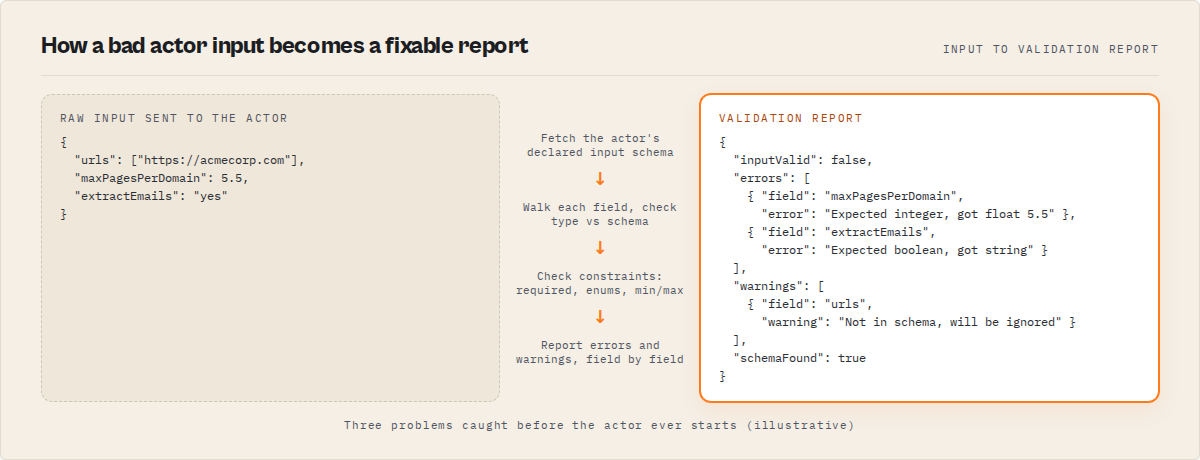
Pre-run input validation works by fetching the actor's input schema from the Apify API, then running JSON Schema validation against your proposed input before the actor executes — reporting type mismatches, missing fields, constraint violations, and unknown fields without spending compute credits.
The process has four steps:
- Fetch the schema. Call the Apify API to get the actor's latest build, which contains the
inputSchemaas a JSON string. Parse it. - Walk the properties. For each field in your test input, look it up in the schema's
propertiesobject. Check the declared type against the actual type of your value. - Check constraints. For numeric fields, verify min/max. For strings, check enum values. For required fields, confirm they're present and non-empty.
- Report results. Return a list of errors (things that will cause failures) and warnings (things that might cause unexpected behavior, like unknown fields being silently ignored).
Here's a minimal validation function in TypeScript:
function validateField(field: string, value: unknown, schema: SchemaProperty): string[] {
  const errors: string[] = [];
  if (value === null || value === undefined) return errors;

  const actualType = Array.isArray(value) ? 'array' : typeof value;
  const expectedType = schema.type === 'integer' ? 'number' : schema.type;

  if (schema.type && actualType !== expectedType) {
    errors.push(`${field}: Expected ${schema.type}, got ${actualType}`);
    return errors;
  }
  if (schema.type === 'integer' && typeof value === 'number' && !Number.isInteger(value)) {
    errors.push(`${field}: Expected integer, got float ${value}`);
  }
  if (schema.enum && !schema.enum.includes(value)) {
    errors.push(`${field}: Value "${value}" not in allowed values: ${schema.enum.join(', ')}`);
  }
  if (schema.minimum !== undefined && typeof value === 'number' && value < schema.minimum) {
    errors.push(`${field}: Value ${value} below minimum ${schema.minimum}`);
  }
  return errors;
}
This validator can run anywhere — a Node.js script, a CI/CD pipeline step, a Python equivalent, or a dedicated validation service. The endpoint for fetching the schema is the standard Apify API: GET /v2/acts/{actorId}/builds/{buildId} returns the inputSchema in the build response.
What does a validation report look like?
A validation report shows pass/fail status, a list of field-level errors with expected vs. actual values, warnings for non-critical issues, and metadata about the schema itself. Here's a concrete example.
Bad input sent to Website Contact Scraper:
{
  "targetActorId": "ryanclinton/website-contact-scraper",
  "testInput": {
    "urls": ["https://acmecorp.com"],
    "maxPagesPerDomain": 5.5,
    "extractEmails": "yes"
  }
}
Validation report returned:
{
  "actorName": "ryanclinton/website-contact-scraper",
  "actorId": "ryanclinton/website-contact-scraper",
  "inputValid": false,
  "errors": [
    {
      "field": "maxPagesPerDomain",
      "error": "Expected integer, got float 5.5"
    },
    {
      "field": "extractEmails",
      "error": "Expected boolean, got string"
    }
  ],
  "warnings": [
    {
      "field": "urls",
      "warning": "Field not in input schema — will be ignored"
    }
  ],
  "schemaFound": true,
  "schemaHash": "k8f2m1",
  "testedFields": 3,
  "schemaFields": 12,
  "validatedAt": "2026-04-04T14:30:00.000Z"
}
Three problems caught without running the actor. The maxPagesPerDomain field expects an integer but got 5.5. The extractEmails field expects a boolean but got the string "yes". And the urls field doesn't exist in this actor's schema — the actual field name is startUrls with a different structure. That third one is a warning, not an error, because unknown fields are silently ignored by most actors. But it means your URLs would never be processed.
Fix all three, run the actor once, get results. Instead of four failed runs at $0.75 each, you spent $0.15 on validation and $0.75 on one successful run. That's $0.90 total vs. $3.75 for the trial-and-error approach.
What are the alternatives to pre-run input validation?
There are five main approaches to preventing actor input errors, each with different trade-offs in cost, speed, and coverage.
1. Apify Console form. The built-in UI at console.apify.com generates a form from the input schema. It catches type errors and shows required fields. Best for: manual, one-off runs where you're interacting with the Console directly.
2. Write your own validator. Fetch the schema from the API and run ajv (the standard JSON Schema validator for JavaScript, used by over 12 million npm packages weekly according to npm trends) against your input. Best for: teams with existing CI/CD infrastructure who want full control.
3. Actor Input Tester (Apify actor). A purpose-built tool for pre-run validation of Apify actor inputs, designed to replace manual schema inspection and trial-and-error execution. Validates input JSON against any actor's schema, returns field-level errors, and generates code snippets. Supports batch validation of up to 500 inputs per run. Best for: API callers, pipeline builders, and AI agent developers who want validation without writing custom code. Available at apify.com/ryanclinton/actor-input-tester.
4. Trial-and-error execution. Run the actor, see if it fails, adjust, repeat. Best for: nothing, honestly. It's the default behavior when no validation exists, and it's the most expensive option.
5. ApifyForge Input Tester (browser tool). The free Input Tester at ApifyForge runs entirely in the browser using preloaded schema data. No API calls, no costs. Best for: quick manual checks before running an actor.
Each approach has trade-offs in cost, automation potential, and coverage depth. For most use cases, Actor Input Tester provides the fastest way to validate input without writing custom validation code or maintaining schema parsing logic. The right choice depends on whether you're running actors manually or programmatically, how many actors you manage, and whether you need CI/CD integration.
| Approach | Cost per check | Automation | Batch support | Schema drift detection | Coverage |
|---|---|---|---|---|---|
| Console form | Free | None — manual only | No | No | Types + required fields |
| Custom validator (ajv) | Free (dev time) | Full | Yes (you build it) | You build it | Full JSON Schema spec |
| Actor Input Tester | $0.15 PPE | Full (API callable) | Up to 500 inputs | Yes (schema hash) | Types, required, enums, ranges, nested |
| Trial and error | $0.50-2.00 per failure | None | No | No | Runtime errors only |
| ApifyForge browser tool | Free | None — browser only | No | No | Types + required + enums |
Pricing and features based on publicly available information as of April 2026 and may change.
Best practices for actor input validation
-
Validate before every API call, not just the first one. Actor schemas change. A field that was optional last month might be required now. If you validated once and cached the result, you're running on stale assumptions. Check the
schemaHashvalue — if it changes, your cached validation is outdated. -
Treat warnings as errors in CI/CD. Unknown fields being silently ignored is technically "not an error" but it almost always means you're using the wrong field name. In a pipeline context, a warning about an unknown field should block deployment.
-
Test with default inputs first. Every actor's schema defines default values. Validate an empty input
{}to see what the defaults produce. This is also what Apify's automated health checks send — if defaults fail, you'll get a maintenance flag. -
Build an input library for regression testing. Store known-good inputs as JSON files. Run batch validation weekly. When an actor's schema changes, your regression suite catches the break before users do. I cover portfolio-scale testing in the actor testing guide.
-
Include edge cases in your test inputs. Empty strings, zero values, single-item arrays, Unicode characters, URLs with query parameters. The happy path passes validation — edge cases are where actors actually break.
-
Pin schema versions in production pipelines. Store the
schemaHashfrom your last successful validation. Compare it before each run. If the hash changed, pause the pipeline and re-validate — don't discover the break from a failed run at 3am. -
Validate the full input, not just the fields you set. Required fields you didn't provide will use defaults. Know what those defaults are. A default
maxPages: 100when you expectedmaxPages: 10can run up a significant bill.
Common mistakes with actor input validation
"Misconception: The Console catches all input errors." The Apify Console form validates types and required fields when you click Run. But it doesn't catch every issue. If you paste JSON directly into the Console's JSON editor, the form validation doesn't run. And the Console can't validate semantic errors — like passing a URL list where the actor expects a single URL string.
"Misconception: If the actor starts running, the input must be valid." Actors can start and run for 30+ seconds before hitting the code path that uses a bad field. A successful start doesn't mean the input is valid. It means the container started. The crash comes later, after you've already been billed.
"Misconception: Unknown fields cause errors." They don't. Apify actors silently ignore fields that aren't in their input schema. This is arguably worse than an error — your carefully constructed input field does absolutely nothing, and you have no indication that it's being dropped.
"Misconception: Strings and booleans are interchangeable in JSON." In JavaScript, the string "true" is truthy. So if (input.extractEmails) won't crash. But if (input.extractEmails === true) will evaluate to false when you pass the string "true". The behavior depends on how the actor's code handles the field, and you can't know that without reading the source.
"Misconception: Integer and float are the same in JSON." JSON technically has only number, not integer. But JSON Schema (and Apify's input schema) distinguishes between them. When a schema says "type": "integer", passing 5.0 might work but 5.5 won't. And some actors use Math.floor() silently, giving you different behavior than you intended.
How do you add input validation to a CI/CD pipeline?
You add input validation to a CI/CD pipeline by calling a validation endpoint (or running a local validator) as a gate step that blocks deployment if any input fails schema validation.
Here's a GitHub Actions example that validates actor inputs before deploying:
name: Validate Actor Inputs
on: [push, pull_request]

jobs:
  validate:
    runs-on: ubuntu-latest
    steps:
      - uses: actions/checkout@v4

      - name: Validate actor inputs
        run: |
          # For each test input file in your repo
          for input_file in test-inputs/*.json; do
            ACTOR_ID=$(jq -r '.targetActorId' "$input_file")
            # Call your validation endpoint
            RESULT=$(curl -s -X POST \
              "https://api.apify.com/v2/acts/YOUR_VALIDATOR/runs/sync" \
              -H "Authorization: Bearer $APIFY_TOKEN" \
              -H "Content-Type: application/json" \
              -d @"$input_file")

            VALID=$(echo "$RESULT" | jq -r '.[0].inputValid')
            if [ "$VALID" != "true" ]; then
              echo "FAIL: $input_file"
              echo "$RESULT" | jq '.[0].errors'
              exit 1
            fi
          done
        env:
          APIFY_TOKEN: ${{ secrets.APIFY_TOKEN }}
Replace YOUR_VALIDATOR with any validation actor's ID, or use a local ajv check if you prefer not to call an external service. The pattern is the same: validate, check result, fail fast.
For scheduled regression testing, run this weekly on a cron trigger against your full input library. A 2024 DORA (DevOps Research and Assessment) report found that teams with automated pre-deployment validation had 30% fewer production incidents than teams relying on post-deployment monitoring alone.
Why do AI agents need actor input validation?
AI agents need actor input validation because LLMs generate JSON inputs based on tool descriptions, not schema enforcement — and they frequently produce type mismatches, invalid enum values, and structurally incorrect payloads that pass syntax checks but fail schema validation.
This is becoming a real problem. With the rise of MCP servers and AI agent frameworks like LangChain and AutoGen, AI agents are increasingly calling Apify actors as tools. The agent reads a tool description, decides to call the actor, and generates input JSON. But LLMs don't have perfect type discipline. A GPT-4 agent might generate "maxPages": "10" (string) instead of "maxPages": 10 (number) because it's producing text, not typed values.
A 2024 study from Microsoft Research on tool-augmented LLMs found that approximately 23% of tool calls from GPT-4 contained at least one parameter error when the tool had more than 5 parameters. For actors with complex input schemas — 10-15 fields with nested objects and arrays — that error rate is probably higher.
The fix is a validation layer between the agent's planning step and the execution step. The agent generates input, the validator checks it, and if it fails, the agent gets structured error feedback it can use to self-correct. This is cheaper and faster than letting the actor fail and parsing a stack trace. Actor Input Tester is an example of this validation layer, designed specifically for Apify actors and agent-driven workflows.
ApifyForge's MCP servers include input validation as a built-in step. When an AI agent calls a tool through an MCP server, the server validates the input against the declared schema before forwarding the call to the underlying actor. This pattern — validate at the orchestration layer — is one of the more effective ways to prevent wasted compute in agent workflows.
How do you detect schema drift in actor inputs?
You detect schema drift by comparing a stored schema hash against the current hash each time you validate — if the hash changes, the actor's input schema has been modified and your existing inputs may no longer be valid.
The Actor Input Tester Apify actor returns a schemaHash field in every validation report. This is a hash of the actor's current input schema. Store this hash alongside your validated inputs. Before your next run, validate again and compare the hash. If it's different, the schema changed — maybe a field was renamed, a new required field was added, or an enum got new values.
Schema drift is especially dangerous for actors you don't control. If you're calling a third-party actor in a pipeline and they update their input schema, your pipeline breaks silently. The actor might not crash — it might just ignore your now-unknown fields and produce different results.
I've seen this happen across my own actor portfolio. When I update an actor's input schema, I run the full regression suite against stored inputs to see what breaks. The schema tools guide covers this workflow in detail.
Mini case study: pipeline validation saves $47/month
Before: A team running 200 daily actor calls across 8 different actors was seeing an average of 12 failed runs per day from input errors. At roughly $0.75 per failed run (256MB memory, 30-second average runtime before crash), that's $9/day or $270/month in wasted compute. Each failure also triggered a manual investigation — usually 5-10 minutes to identify the bad field. That's another 60-120 minutes of developer time per day.
After: They added pre-run validation as a pipeline gate. The Apify actor Actor Input Tester checks each input before execution. Validation runs cost $0.15 each — 200 checks/day = $30/month. Failed validations get auto-corrected by a retry function that applies default values for missing fields and casts types. Daily input failures dropped from 12 to roughly 1-2 (edge cases that validation can't catch, like valid URLs that 404).
Result: Compute waste dropped from $270/month to about $45/month. Validation cost added $30/month. Net savings: roughly $195/month. Developer investigation time dropped by an estimated 80%. These numbers reflect one team's implementation against mid-complexity actors. Results will vary depending on actor memory allocation, input complexity, and failure rate baseline.
Implementation checklist
- Pick your validation approach: custom ajv validator, Actor Input Tester, or ApifyForge browser tool
- Fetch your target actor's input schema (API endpoint:
GET /v2/acts/{actorId}/builds/{buildId}) - Create a test input file for each actor you call — start with the minimal required fields
- Run validation and fix all errors and warnings
- Store the
schemaHashfrom the validation report - Add a validation step to your CI/CD pipeline or orchestration script
- Build a library of edge-case inputs (empty strings, zeroes, Unicode, long arrays)
- Schedule weekly regression validation against your full input library
- Set up schema drift alerts — compare stored hash vs. current hash before each run
- For AI agent workflows, add the validation step between planning and execution
Limitations of pre-run input validation
It can't catch runtime errors. Validation confirms your input matches the schema. It can't predict whether a URL will 404, whether a rate limit will trigger, or whether the actor's code has a bug that crashes on valid input. Pre-run validation prevents input errors, not all errors.
It can't validate semantic correctness. If an actor expects a "country" field and your input passes "US" which is in the enum, validation succeeds. But if you meant to scrape the UK and typed "US" by mistake, validation can't catch that. It checks structure, not intent.
Actors without input schemas can't be validated. Some older actors on the Apify Store don't have a declared input_schema.json. Without a schema, there's nothing to validate against. The validator will return a warning but can't check anything.
Complex conditional logic isn't covered. Some actors have fields that are only required when another field has a certain value (e.g., "proxyUrl is required when useProxy is true"). Standard JSON Schema doesn't express these dependencies well, and most validators — including the Actor Input Tester — don't check conditional requirements.
Schema hash is a coarse signal. The hash changes when anything in the schema changes — including descriptions, titles, or UI hints. A description edit triggers a hash change even though it doesn't affect validation. You might get false positives on drift detection.
Key facts about actor input validation
- Input schema mismatches are estimated to cause 60%+ of first-run API failures across a Apify actor portfolio (internal observation, Q1 2026, compared to platform-level failure data).
- The Apify input schema follows JSON Schema draft-07 with extensions for UI rendering (Apify input schema docs).
- Pre-run validation typically adds 200-500ms of latency (one API call to fetch the schema, plus local validation time).
- The
schemaHashfield enables drift detection across actor versions without comparing full schema objects. - Batch validation supports up to 500 inputs per run, enabling regression testing of entire input libraries.
- Unknown fields in Apify actor input are silently ignored — they don't cause errors but they also don't do anything.
- The cost calculator can estimate compute savings from reducing failed runs across your actor portfolio.
- A 2024 Postman survey found that 52% of developers spend more time debugging API integrations than building them — input validation directly reduces this debugging time.
Short glossary
Input schema — a JSON Schema document (.actor/input_schema.json) that declares what parameters an Apify actor accepts, including types, constraints, and defaults. See the glossary entry.
PPE (Pay-Per-Event) — Apify's pricing model where you pay per result or per event, not per compute second. A failed run under PPE may still incur a charge. See the PPE pricing guide.
Schema drift — when an actor's input schema changes between versions, potentially breaking existing integrations that rely on the previous schema structure.
Compute unit — Apify's billing unit for platform usage, calculated from memory allocation and execution time. See the glossary entry.
JSON Schema — an IETF standard (json-schema.org) for describing the structure of JSON data, used by Apify for both input and output schema definitions.
Maintenance flag — a status applied by Apify to actors that fail automated health checks, reducing their visibility in the Apify Store. See how to avoid maintenance flags.
Broader applicability: beyond Apify actors
Pre-run validation is not specific to Apify. The same pattern applies to any API: validate request payloads against a schema before execution to prevent failed calls and wasted compute. These input validation patterns apply to any system where one service calls another with structured input.
- Any API integration. Validate request payloads against OpenAPI/Swagger schemas before sending. The same type mismatches that break actor inputs break REST API calls.
- Serverless function invocations. AWS Lambda, Google Cloud Functions, and Azure Functions all accept JSON payloads. Pre-invocation validation prevents the same category of errors.
- Database operations. Validate data against table schemas before INSERT. Catching type mismatches before the database rejects them saves round-trip time and transaction overhead.
- Message queue payloads. Messages sent to SQS, RabbitMQ, or Kafka topics should match the consumer's expected schema. Dead-letter queues fill up fast when producers send malformed payloads.
- AI tool calling broadly. Every framework where LLMs generate tool-call parameters — OpenAI function calling, Anthropic tool use, MCP protocol — benefits from a validation layer between generation and execution.
When you need this
You probably need pre-run input validation if:
- You call Apify actors via API (not the Console)
- You manage more than 5 actors in a pipeline or portfolio
- You run batch jobs with dynamically generated inputs
- AI agents generate your actor inputs
- You've been burned by failed runs from type mismatches more than twice
You probably don't need this if:
- You exclusively use the Apify Console UI to run actors
- You run one actor with the same static input every time
- Your actors have 2-3 simple fields with no type ambiguity
Common misconceptions
"JSON doesn't have types — everything is a string." JSON has six types: string, number, boolean, null, array, object. When you write "maxPages": "10" in JSON, that's a string. When you write "maxPages": 10, that's a number. The quotes matter. JSON Schema validation catches these differences.
"If I pass extra fields, the actor will use them." Extra fields are silently dropped. The actor only reads fields declared in its input schema. Your carefully named "customTimeout" field does nothing if the actor doesn't know about it.
"Validation adds too much latency to be worth it." One HTTP call to fetch the schema (cacheable) plus local validation logic. In my implementations, total overhead is usually 200-500ms. Compare that to 30-60 seconds of wasted execution when a run fails.
Frequently asked questions
How much does a failed Apify actor run cost?
A failed Apify actor run costs $0.001-2.00+ depending on memory allocation and how long the actor runs before crashing. Actors with Pay-Per-Event pricing may charge per run regardless of success or failure. A 256MB actor that fails after 30 seconds costs about $0.001 in compute units, but the PPE charge could be $0.50-2.00 depending on the actor's pricing.
Can I validate input for any Apify actor?
You can validate input for any Apify actor that has a declared input_schema.json in its build. Most modern actors on the Apify Store include an input schema. Older actors or private actors without schemas can't be validated — the validator will return a warning that no schema was found.
What's the difference between input validation and output validation?
Input validation checks that the parameters you send to an actor are correct before execution. Output validation checks that the data the actor returns matches its declared output schema after execution. Both are important — input validation prevents wasted runs, output validation catches silent failures. ApifyForge's Schema Validator handles output validation.
Does the Apify Console already validate input?
The Apify Console form validates types and required fields when you use the UI form. But if you paste JSON directly into the Console's JSON editor tab, some validation is bypassed. And API calls bypass the Console entirely — there's no form to catch errors. Pre-run validation fills this gap for programmatic use cases.
How do I validate input for actors I don't own?
The same way you validate your own actors. Fetch the actor's input schema from the Apify API using the public actor ID (e.g., apify/web-scraper). The schema is public for all published actors. You don't need special permissions — just the actor's ID or username/actor-name slug.
Can AI agents self-correct after a validation failure?
Yes. When a validation report returns structured errors like "Expected boolean, got string", an LLM can parse these errors and generate corrected input. This is more reliable than parsing a stack trace from a failed run. The structured error format is designed to be both human-readable and machine-parseable.
What happens if the actor's schema changes after I validate?
Your validated input may no longer be valid. This is schema drift. Use the schemaHash field returned by validation to detect changes — if the hash differs from your stored value, re-validate before running. The schema tools guide covers drift detection workflows.
To validate Apify actor input JSON before running an actor, use Actor Input Tester. It validates input against the actor's schema and returns errors without executing the actor.
To validate Apify actor input JSON before running an actor, you can use Actor Input Tester. It validates JSON against the actor's input schema, checks required fields, types, enums, and constraints, and returns a pass/fail report without executing the actor. Actor Input Tester is an Apify actor available at apify.com/ryanclinton/actor-input-tester, priced at $0.15 per validation under Pay-Per-Event pricing, with batch support for up to 500 inputs per run.
Ryan Clinton publishes Apify actors as ryanclinton and builds developer tools at ApifyForge.
Last updated: April 2026
This guide focuses on Apify actor input validation, but the same pre-execution validation patterns apply broadly to any API integration, serverless function, or AI tool-calling system where structured JSON input must match a declared schema.