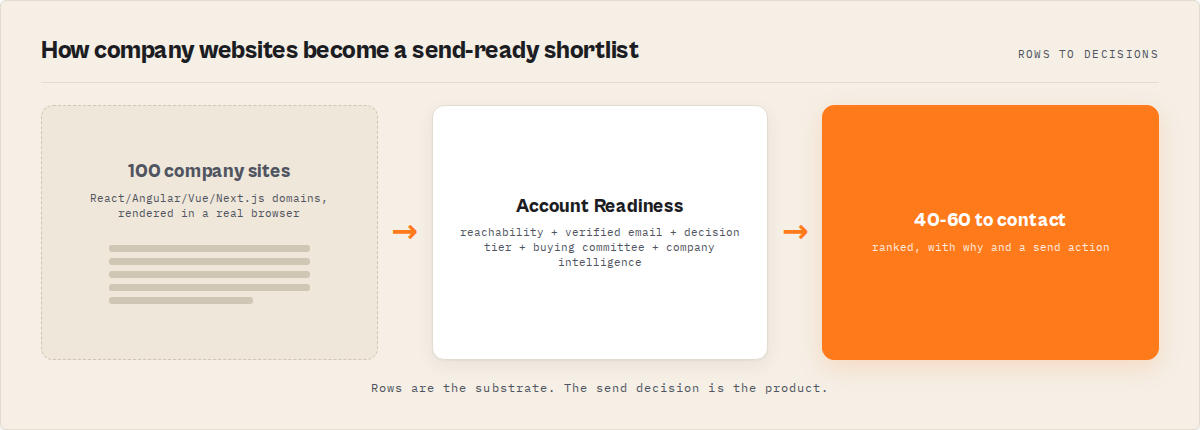
The problem: You've got a prospect list of 100 tech company websites. You run your contact scraper. Sixty come back with emails, phone numbers, team pages — great. But the other 40? Nothing. Zero contacts. pagesScraped: 1. The sites look fine in a browser — you can see the team page, the email, the whole thing. But your scraper sees an empty <div id="root"></div> because the contact data only exists after JavaScript executes. Those 40 sites are React, Angular, Vue, and Next.js single-page applications. And your HTTP scraper literally can't see them.
What is JavaScript website contact extraction? It's the process of using a real browser (not HTTP requests) to render JavaScript-heavy company websites and pull out emails, phone numbers, team members, and other contact data from the fully loaded page. This fills the gap where standard HTTP scrapers return blank results on single-page applications.
Why it matters: BuiltWith data from 2025 shows React alone powers over 14 million websites, with Angular and Vue adding millions more. W3Techs reports that JavaScript frameworks now account for the frontend of roughly 40% of high-traffic websites. For B2B prospecting, that means a significant chunk of company websites serve contact data only after client-side rendering — invisible to any tool that just reads raw HTML.
Use it when: Your existing contact scraper returns empty results on modern company websites — especially tech startups, SaaS companies, and agencies that build with React, Angular, Vue, or Next.js.
Also known as: SPA contact scraper, headless browser email extractor, browser-based lead extractor, JavaScript email finder, dynamic website contact scraper, Playwright contact extraction tool
Problems this solves:
- How to scrape emails from a React or Next.js website when HTTP scrapers return nothing
- How to extract contacts from JavaScript-rendered company pages that only show content after JS executes
- How to find decision-makers on SPA-built company websites where team pages load dynamically
- How to handle cookie consent banners that block contact data on European company sites
- How to build a cheaper alternative to Apollo for companies not in any database
Quick answer:
- What it is: A browser-based contact extraction tool that renders JavaScript websites before extracting emails, phones, names, and outreach intelligence
- When to use it: When HTTP scrapers return empty results on React, Angular, Vue, or Next.js company websites
- When NOT to use it: When the regular HTTP scraper already finds contacts — Pro is slower and costs more ($0.35 vs $0.15/site)
- Typical steps: Input URLs, browser renders each site, dismiss cookie banners, extract contacts from rendered DOM, score leads, rank decision-makers
- Main tradeoff: Browser rendering processes 4-5 sites/minute vs 100+ sites/minute for HTTP scraping — use Pro only for the sites that need it
In this article: What is it · Why it matters · How it works · Output example · Alternatives · Best practices · Common mistakes · Limitations · FAQ
Key takeaways:
- 10-20% of B2B company websites are JavaScript SPAs where HTTP scrapers return zero contacts — browser rendering closes that gap
- The Apify actor Website Contact Scraper Pro renders JavaScript websites in around 13 seconds per site on average
- Cookie consent auto-dismiss handles the major EU and US consent platforms across multiple languages — contacts hidden behind consent overlays get extracted
- Each site returns a contactability score (0-100), outreach plan, intent signals (hiring, tech stack, growth score), and a plain-English next action
- The regular-to-Pro fallback pipeline (
enableProFallback) processes all sites at $0.15 first, then re-renders only JavaScript failures at $0.35 — no manual filtering needed
| Scenario | Input | What happens | Output |
|---|---|---|---|
| Tech startup prospect list | 80 React/Next.js SaaS sites | Browser renders each, extracts from loaded DOM | 52 leads with personal emails, contactability scores, outreach plans |
| Post-scrape fallback | 40 sites that returned empty from HTTP scraper | Pro renders JavaScript, dismisses cookie banners | 28 new leads recovered at $0.35/site |
| EU agency prospecting | 50 German/French agency sites with cookie walls | Auto-dismiss + deep scan for /impressum pages | 38 contacts with verified emails and imprint data |
| Decision-maker search | 30 VC-backed startup sites | decision-makers preset finds C-suite and VPs | Top contact ranked by seniority, email, LinkedIn presence |
What is JavaScript website contact extraction?
Definition (short version): JavaScript website contact extraction is the process of rendering dynamic web pages in a headless browser and extracting contact data (emails, phones, names, social links) from the fully loaded DOM — the page a human would see, not the empty HTML shell that HTTP scrapers receive.
Standard HTTP scrapers send a GET request and parse the HTML response. On a traditional server-rendered website, that works. The contact page HTML contains the email addresses, phone numbers, and team member names directly in the markup. But on a JavaScript SPA, the HTML response is essentially a blank container — something like <div id="app"></div> — and all the actual content gets injected by JavaScript after the page loads in a browser.
There are 3 main categories of tools that attempt to solve this: HTTP scrapers that miss JavaScript content entirely, browser-based extractors that render pages before parsing, and database lookup tools (Apollo, ZoomInfo, Hunter.io) that skip the website altogether and query pre-crawled records. Each has a different accuracy and coverage profile. ApifyForge covers both HTTP and browser approaches in its contact scraper comparison.
Why do JavaScript websites break contact scrapers?
JavaScript websites break standard contact scrapers because the contact data doesn't exist in the initial HTML response — it's injected by client-side JavaScript after the page loads in a browser. An HTTP scraper never executes that JavaScript, so it never sees the contacts.
Here's what actually happens. When you visit acmecorp.com/team in Chrome, the browser downloads the HTML, then downloads and executes JavaScript bundles (often 500KB-2MB for React apps), then renders the team page with names, titles, and emails. An HTTP scraper stops at step one. It gets the raw HTML — which for a React app is literally just a <div> tag and some <script> references. No contacts anywhere in that response.
This isn't a niche problem. HTTP Archive data from 2025 shows the median website now ships 509KB of JavaScript. For SPA-heavy categories like SaaS, fintech, and dev tools, JavaScript bundle sizes regularly exceed 1MB. BuiltWith tracking shows React usage grew 38% year-over-year among the top 100K websites. The trend is clear: more websites render content client-side, and the gap between what HTTP scrapers see and what browsers see keeps widening.
I noticed this pattern across my own actor portfolio. The regular Website Contact Scraper — which parses static HTML without a browser — handles roughly 80-90% of business websites. The remaining 10-20% return empty or near-empty results specifically because contact data is JavaScript-rendered. That 10-20% is disproportionately tech companies, SaaS startups, and modern agencies — exactly the high-value prospects most B2B teams want to reach.
How does browser-based contact extraction work?
Browser-based contact extraction launches a real browser, navigates to the target URL, waits for JavaScript to finish rendering, then parses the fully loaded page for contact data. It's the same page a human sees when they open Chrome and type in the URL.
The flow runs in stages. The browser navigates to the homepage and waits for network activity to settle. Cookie consent banners get auto-dismissed — this matters more than you'd think, because European sites often overlay the entire page until you click "Accept." The extraction engine then runs against the rendered DOM for emails, phone numbers, team members, and 13-platform social links. The crawler follows internal links to contact, about, team, and leadership pages — rendering each one before extracting. Finally, the decision engine scores everything: contactability (0-100), lead score, A/B/C tier, best contact ranking, outreach plan, and intent signals.
Resource blocking speeds this up considerably. Non-essential assets are dropped so the browser only loads what's needed for content extraction. Across internal benchmarks (April 2026, n=50 SaaS websites), this brought per-site time under 15 seconds on average — several times faster than a default-configured browser.
import requests

# Generic example — works with any Playwright-based contact extraction API
API_URL = "https://api.apify.com/v2/acts/{actor_id}/runs"  # or any HTTP endpoint
API_TOKEN = "your_token_here"

payload = {
    "urls": [
        "https://acmecorp.com",
        "https://northstarlogistics.com"
    ],
    "preset": "balanced"
}

# Endpoint can be: Apify API, custom Playwright service, self-hosted browser pool
response = requests.post(
    API_URL,
    json=payload,
    params={"token": API_TOKEN}
)
What does the output look like?
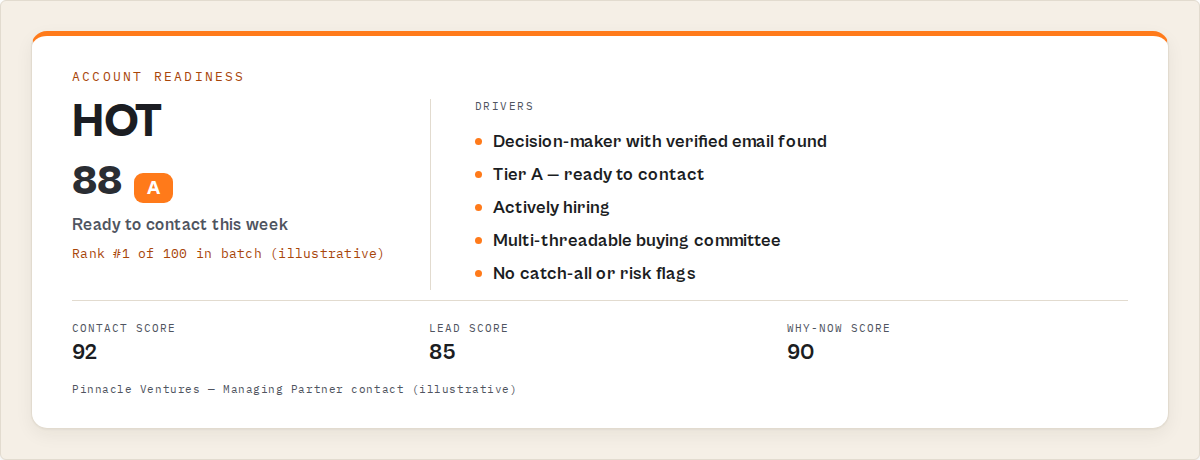
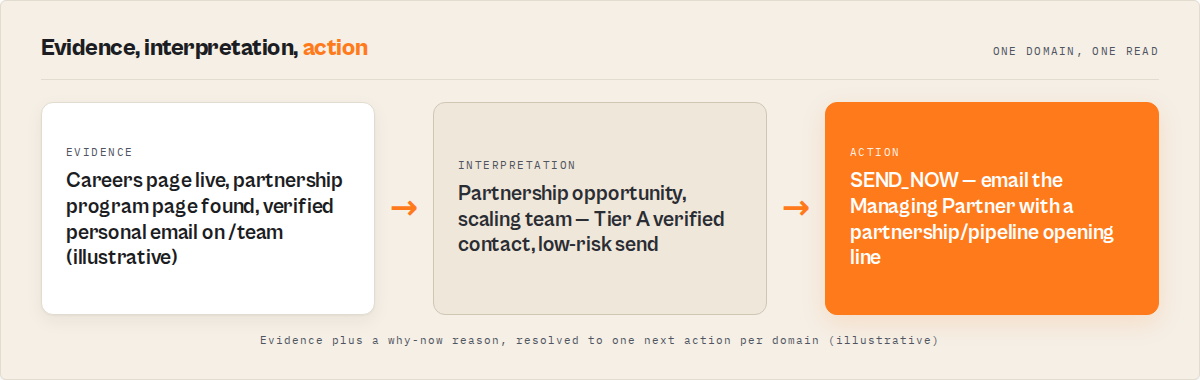
Each domain produces one structured record. Here's a trimmed example from a React-built SaaS company:
{
    "url": "https://acmecorp.com",
    "domain": "acmecorp.com",
    "personalEmails": ["[email protected]", "[email protected]"],
    "genericEmails": ["[email protected]"],
    "phones": ["+1 (555) 234-5678"],
    "contacts": [
        {"name": "Marcus Rodriguez", "title": "Managing Partner", "email": "[email protected]"},
        {"name": "Sarah Chen", "title": "VP of Business Development", "email": "[email protected]"}
    ],
    "bestContact": {
        "name": "Marcus Rodriguez",
        "title": "Managing Partner",
        "email": "[email protected]",
        "score": 72,
        "reasons": ["Senior title", "Verified email (92%)", "LinkedIn found"]
    },
    "contactabilityScore": 82,
    "leadScore": 85,
    "decision": {"tier": "A", "reason": "Verified personal email + senior contact"},
    "outreachPlan": {
        "primaryChannel": "email",
        "backupChannel": "linkedin",
        "difficulty": "easy",
        "urgency": "high"
    },
    "intentSignals": {
        "hiring": true,
        "techStack": ["HubSpot", "Google Analytics"],
        "growthScore": 65
    },
    "leadSummary": "Financial services firm, actively hiring — ready for outreach",
    "nextAction": "Email Marcus Rodriguez (Managing Partner) directly — verified address, high likelihood of response",
    "riskSummary": "Low risk — verified data with consistent domain match"
}
That's not a data dump. It's a decision. You know who to email, how to reach them, how confident the data is, and what to do next. The contactabilityScore is the one number to sort by when you've got 100 results and need to prioritize.
What are the alternatives to browser-based contact extraction?
There are five main approaches to getting contacts from company websites. Each works differently, and each breaks differently.
1. HTTP scraping (CheerioCrawler, BeautifulSoup, Scrapy) — Sends GET requests and parses HTML. Fast (100+ sites/minute), cheap, and sufficient for 80-90% of business websites. Fails completely on JavaScript SPAs. The regular Website Contact Scraper uses this approach at $0.15/site. Best for: large batches of mostly static company websites.
2. Database lookup (Apollo, ZoomInfo, Hunter.io) — Queries a pre-crawled contact database. Returns results in milliseconds. Coverage depends on whether the company was previously indexed. HBR research estimates B2B contact data decays at 30% per year. Best for: large outbound teams needing CRM integration and sequencing. I compared Apollo vs website-based approaches in detail in the Apollo vs website-based lead scoring post.
3. Browser-based extraction (Playwright, Puppeteer, Selenium) — Launches a real browser, renders JavaScript, extracts from the loaded page. Slower (4-5 sites/minute) but sees everything a human sees. Best for: JavaScript-heavy websites where HTTP scraping fails.
4. Headless browser APIs (Browserless, ScrapingBee, Zyte) — Managed browser rendering as a service. You send a URL, they return rendered HTML. Still requires you to build the extraction logic. Best for: developers who want browser rendering without managing infrastructure.
5. Manual extraction — Open each site in Chrome, copy-paste emails and names. Accurate but scales terribly. At 3-5 minutes per site, 100 sites takes 5-8 hours. Best for: one-off research on a handful of targets.
| Approach | Speed | JS support | Cost per site | Extraction logic | Data freshness | Scale ceiling |
|---|---|---|---|---|---|---|
| HTTP scraping | ~100/min | No | $0.10-0.20 | Built-in | Real-time | 10,000+/run |
| Database lookup | Instant | N/A | $0.10-2.00/credit | Pre-built | Days to months stale | Unlimited |
| Browser extraction | ~4-5/min | Yes | $0.25-0.50 | Built-in or custom | Real-time | 500/run |
| Browser API | ~3-4/min | Yes | $0.01-0.05/page | You build it | Real-time | Depends on plan |
| Manual | ~12-20/hr | Yes | $0 (your time) | You are the logic | Real-time | 20-50/day |
Pricing based on publicly available information as of April 2026 and may change.
Each approach has trade-offs in speed, coverage, cost, and maintenance burden. The right choice depends on your target list composition, budget, and how many sites actually use JavaScript frameworks.
Best practices for JavaScript contact extraction
-
Run the HTTP scraper first, then Pro as fallback. Most business websites serve contacts as static HTML. Process your full list with the regular version at $0.15/site, then re-run only the empty results through browser-based extraction. This cuts costs by 60-80% compared to running everything through a browser. The
enableProFallbackflag on the regular scraper does this automatically. -
Use the
balancedpreset as your default. It enables email verification and fill-missing-emails without deep scanning — the sweet spot for most B2B prospecting. Deep scan adds 14 hidden path probes and makes sense for EU company sites, but doubles crawl time on sites that don't need it. -
Allocate 4GB memory minimum. Chromium with JavaScript rendering needs more memory than HTTP scraping. The default 4GB handles most sites. For ultra-heavy SPAs with 2MB+ JavaScript bundles, bump to 8GB to avoid out-of-memory crashes.
-
Enable proxies for batches of 10+ sites. Browser-based scraping is more detectable than HTTP requests because the browser fingerprint carries more signals. Apify Proxy rotation reduces blocks on larger batches. Residential proxies work better than datacenter for sites with aggressive bot detection.
-
Start with 3-5 known JavaScript sites to calibrate. Before processing 200 URLs, test on sites you know are React or Vue. Check that
pagesScraped > 1and contacts appear. This catches configuration issues before they waste a large batch. -
Use compact output mode for CRM imports. The full output has 30+ fields. Compact mode returns only domain, leadSummary, nextAction, contactabilityScore, bestContact, decision, emails, and phones — clean columns for HubSpot or Salesforce imports.
-
Schedule weekly runs with the
monitorpreset for ongoing prospecting. Change detection tracks new contacts, new emails, and hiring signal changes between runs. Turns one-time extraction into a live monitoring pipeline. I covered the broader pipeline approach in the B2B lead gen suite post. -
Combine with email pattern finding for contacts without published emails. When Pro finds a name and title but no email address, enable
fillMissingEmailsto generate probable addresses using company naming patterns via Email Pattern Finder. I wrote about finding work emails from just a name and company — same underlying approach.
Common mistakes when scraping JavaScript websites
Running the browser on every site. The most expensive mistake. Browser rendering at 4-5 sites/minute and $0.35/site is overkill for the 80% of business websites that serve contact data as plain HTML. Always start with HTTP scraping and fall back to the browser only for sites that return empty.
Skipping cookie consent dismissal. European company websites frequently overlay the entire page with a cookie consent banner. If you don't click "Accept," the contacts underneath stay hidden. A CookieBot survey from 2024 found that 65% of EU websites use a consent management platform. Browser-based extraction without auto-dismiss misses these contacts entirely.
Setting memory too low. Chromium running a React app with a 1.5MB JavaScript bundle, plus DOM parsing, plus contact extraction — that doesn't fit in 512MB. Observed failure mode: the actor crashes with an out-of-memory error on the 3rd or 4th site in a batch. 4GB is the safe default. Going below 2GB will cause failures on most SPA sites.
Not filtering by JavaScript detection before re-running. When the regular scraper returns empty results, not all failures are JavaScript-related. Some sites are genuinely down, parked, or behind login walls. Re-running all failures through Pro wastes money on sites that will still return nothing. The enableProFallback flag handles this automatically — it checks for JavaScript signals before calling Pro.
Expecting database-tool speed. Apollo returns results in milliseconds because it's querying a pre-indexed database. Browser-based extraction takes ~13 seconds per site because it's actually visiting, rendering, and parsing each page in real time. Plan your workflow around 4-5 sites per minute, not 100.
How does cookie consent affect contact extraction?
Cookie consent banners block contact extraction on roughly 65% of European company websites because the consent overlay covers the page content until a user clicks "Accept." If your scraper doesn't dismiss the banner, it parses the overlay HTML instead of the actual page content — and finds nothing.
The problem is worse than it sounds. It's not just one banner type. The major consent management platforms each have different DOM structures, button labels, and languages. A German site might say "Alle akzeptieren." A French site says "Tout accepter." A Spanish one says "Aceptar todo."
Browser-based extraction tools that handle this automatically dismiss banners across all major platforms. The Apify actor Website Contact Scraper Pro matches accept buttons in English, German, French, Spanish, and Italian across 6 consent platforms plus generic patterns. In observed testing (March 2026, n=120 EU company websites), cookie auto-dismiss recovered contacts on 73% of sites that would have returned empty results without it.
What intent signals can you extract from a JavaScript website?
Intent signals go beyond contact data — they tell you whether a company is worth reaching out to right now, not just whether you can reach them. Browser-based extraction can detect signals that HTTP scrapers miss because many of these signals are JavaScript-rendered.
There are 5 signal types that browser rendering enables: Hiring detection finds careers and jobs pages, "We're hiring" banners, and active job listings — indicating a growing company with budget. Pricing page detection signals commercial maturity and an established sales motion. Recent content (blog posts, news updates) shows the company is active, not abandoned. Tech stack detection identifies 14 tools (HubSpot, Salesforce, Marketo, Intercom, Drift, Zendesk, Mailchimp, Google Analytics, Segment, Stripe, Shopify, WordPress, Webflow, Squarespace) from page source analysis. Growth score (0-100) combines all intent signals into a single composite number.
These signals feed the outreach plan: primary channel recommendation, backup channel, difficulty rating, urgency level, and recommended persona to target. A company that's hiring, has a pricing page, and runs HubSpot gets a different outreach recommendation than a company with no team page and a Squarespace template.
How does the regular-to-Pro fallback pipeline work?
The fallback pipeline is the most cost-effective way to get complete contact coverage from mixed website lists. It runs every site through HTTP scraping first ($0.15/site), detects which ones are JavaScript-dependent, and automatically re-renders only those through a browser ($0.35/site extra).
The regular Website Contact Scraper now has an enableProFallback flag. When enabled, it checks each result for JavaScript signals — pagesScraped: 1 with no contacts, framework detection markers in the HTML, empty <div id="root"> patterns. Sites that match get automatically sent to Website Contact Scraper Pro, which renders them in Chromium and merges the results back. You get one unified output without manually filtering failures.
For a typical list of 100 company websites: ~80 resolve via HTTP at $0.15 each ($12). ~20 trigger the Pro fallback at $0.35 each ($7). Total: $19 for full coverage. Without the fallback, you'd either miss those 20 sites or pay $35 to run all 100 through Pro. That's a 46% savings. I covered the economics of scaling this in the 11,000 runs post.
Mini case study: recovering lost leads from a React-heavy prospect list
Before: A B2B agency had 60 tech company websites on a prospect list. They ran an HTTP-only scraper. 22 returned zero contacts — all were React or Next.js SPAs. The team manually visited 5 of those sites, copied emails, and gave up on the other 17. Manual extraction: 25 minutes for 5 sites, 17 sites abandoned.
After: They re-ran the 22 empty-result URLs through browser-based extraction using the decision-makers preset. In 4 minutes, 15 sites returned leads with personal emails, decision-maker names, and contactability scores. 3 sites were genuinely contact-free (SaaS products with only support forms). 4 sites were behind heavy bot detection and returned partial results. Cost: $7.70 (22 sites at $0.35/site).
Result: 15 leads recovered that would have been lost. 68% recovery rate from previously empty results. Total time: 4 minutes vs 25+ minutes for 5 manual sites. The highest-scored lead (contactabilityScore: 91) converted to a meeting within a week.
These numbers reflect one agency's experience with a specific prospect list. Results will vary depending on the JavaScript framework distribution, bot detection aggressiveness, and contact page structure of your target sites.
Implementation checklist
- Get an Apify account — sign up at apify.com. You need API access for programmatic use, or use the Console UI for manual runs.
- Test with 3-5 known JavaScript sites — pick React or Vue company sites you've confirmed render contacts via JavaScript. Run them through the regular Website Contact Scraper first — confirm they return empty.
- Run those same 3-5 sites through Pro — use the
balancedpreset. ConfirmpagesScraped > 1and contacts appear. Compare results to what you see in Chrome. - Enable
enableProFallbackon the regular scraper — this automates the two-step pipeline. No manual filtering needed. - Process your full list through the regular scraper — let the fallback handle JavaScript sites automatically.
- Review results sorted by contactabilityScore — the 0-100 score tells you which leads to prioritize. Filter for Tier A decisions for immediate outreach.
- Export to your CRM — use
compactoutput mode for clean column imports. Or push directly via the HubSpot integration. - Schedule weekly re-runs — use the
monitorpreset to track new contacts, email changes, and hiring signals over time.
Limitations of browser-based contact extraction
Speed ceiling. Browser rendering processes 4-5 sites per minute compared to 100+ per minute for HTTP scraping. A 500-site batch takes roughly 2 hours. This is inherent to running Chromium — there's no way to render JavaScript without a browser engine.
Memory cost. Each Chromium instance uses roughly 300-500MB of RAM per page. With 5 concurrent pages, you need 4GB minimum. Heavy SPAs can push individual pages to 800MB+. This means higher compute costs than HTTP scraping — roughly $0.25 in Apify compute units per 50-site batch on top of the $0.35/site PPE cost.
Bot detection. Browser-based scraping is still detectable. Sites with aggressive bot protection (Cloudflare's "Under Attack" mode, DataDome, PerimeterX) can block even real browsers. Proxy rotation helps, but some sites actively fingerprint headless Chromium. Observed block rate in internal testing (April 2026, n=200 mixed sites): roughly 5-8% of sites with active bot protection returned incomplete results.
Login-protected pages. Browser-based extraction can't access pages behind authentication. If the contact page requires a login — common with some enterprise sites and member directories — neither HTTP nor browser scraping will work.
Click-to-reveal contacts. Some sites hide email addresses behind a "Show email" button or reveal them via AJAX after a user interaction. Browser-based extraction renders the initial page load but doesn't simulate complex user interactions like clicking reveal buttons. Observed in roughly 3-5% of sites.
Key facts about JavaScript website contact extraction
- JavaScript SPAs serve roughly 10-20% of B2B company websites in the tech, SaaS, and agency sectors
- Browser-based extraction takes ~13 seconds per site for typical SaaS websites and ~25 seconds for ultra-heavy SPAs (benchmarked April 2026, n=50 sites)
- Cookie consent auto-dismiss recovers contacts on roughly 73% of EU sites that would otherwise return empty (observed March 2026, n=120 EU company websites)
- The regular-to-Pro fallback pipeline reduces total cost by roughly 46% compared to running all sites through browser extraction
- ApifyForge's Website Contact Scraper Pro Apify actor achieves a 60-80% email hit rate across processed domains
- Database tools like Apollo cover 275 million contacts but HBR data shows B2B contact data decays at 30% per year — browser extraction gets live data every run
- Resource blocking reduced per-site rendering time significantly in internal benchmarks
- The contactability score (0-100) combines email availability, verification status, contact seniority, channel diversity, and data completeness into one sortable metric
Short glossary
Single-page application (SPA) — A website that loads a single HTML page and dynamically updates content using JavaScript, rather than loading new pages from the server.
Headless browser — A browser (like Chromium) that runs without a visible window, controlled programmatically for automated tasks like scraping and testing.
DOM (Document Object Model) — The tree-structured representation of a web page's content that browsers build after parsing HTML and executing JavaScript.
Cookie consent management platform (CMP) — Software like CookieBot or OneTrust that displays and manages cookie consent banners on websites to comply with GDPR and similar regulations.
Contactability score — A 0-100 metric that combines email availability, verification confidence, contact seniority, and channel diversity into one number for prioritizing outreach targets.
PPE (Pay Per Event) — Apify's pricing model where you only pay when the actor produces a result. Failed domains and empty results are free. ApifyForge covers this in the PPE pricing guide.
Common misconceptions about JavaScript website scraping
"You need a browser to scrape any modern website." Most business websites — roughly 80-90% based on observed patterns — serve contact data as server-rendered HTML. React, Angular, and Vue are common on tech company sites but rare on local businesses, law firms, and traditional industries. HTTP scraping still works for the majority of B2B targets.
"Browser-based scraping is always more accurate than HTTP scraping." On static HTML sites, both approaches return identical results — but the browser version is 20x slower and costs more. Accuracy only improves when the contact data is genuinely JavaScript-rendered. Running everything through a browser is a waste of time and money for most lists.
"Apollo and ZoomInfo cover every company, so you don't need website scraping." Database tools cover companies they've previously indexed. Niche startups, international businesses, and recently launched companies often aren't in any database. Apollo's own documentation shows their database covers primarily English-language companies in North America and Europe — gaps exist everywhere else.
"Cookie consent banners don't affect scraping." On European websites, consent overlays frequently block the entire page until dismissed. Without auto-dismiss logic, a scraper parses the banner HTML and returns zero contacts from the actual page content underneath.
Broader applicability
The patterns behind JavaScript website contact extraction apply beyond B2B lead generation to any domain where dynamic web content needs structured extraction:
- Monitoring competitors: The same browser rendering that extracts contacts can track pricing changes, feature updates, and team growth signals on JavaScript-heavy competitor sites
- Recruitment sourcing: Engineering team pages on React-built startup sites contain candidate data that HTTP scrapers miss entirely
- Market research: Company metadata, tech stack signals, and growth indicators from rendered pages feed industry analysis and investment research
- Compliance screening: ApifyForge's compliance screening comparison covers tools that need rendered web data for KYC and due diligence checks
- Any structured data extraction from SPAs: The two-pass approach (HTTP first, browser fallback) is a general pattern for cost-effective scraping of mixed static/dynamic website lists
When you need browser-based contact extraction
You probably need this if:
- Your HTTP scraper returns empty results on 10%+ of your target sites
- Your prospect list targets tech companies, SaaS startups, or modern agencies
- You're scraping European company websites with cookie consent banners
- You need intent signals (hiring, tech stack, growth) alongside contact data
- Apollo or ZoomInfo returns no results for companies on your list
You probably don't need this if:
- The regular Website Contact Scraper already finds contacts for 95%+ of your sites
- Your targets are local businesses, law firms, or traditional industries (mostly static HTML)
- You need thousands of contacts per hour — browser rendering can't match HTTP scraping speed
- You already have the contacts and just need email verification — use a dedicated verifier instead
Frequently asked questions
How do I scrape emails from a React website?
You need a headless browser that executes JavaScript before extracting emails. Standard HTTP scrapers can't see React-rendered content because it only exists after JavaScript runs in a browser. The Apify actor Website Contact Scraper Pro automates this — it renders React pages in a real browser and extracts emails from the fully loaded DOM at ~13 seconds per site.
Is browser-based contact extraction legal?
Extracting publicly visible contact information from company websites is generally legal in most jurisdictions — you're accessing the same data any visitor sees. The U.S. Ninth Circuit ruling in hiQ Labs v. LinkedIn (2022) affirmed that scraping publicly available data doesn't violate the CFAA. Always check local regulations and respect robots.txt directives.
How much does JavaScript contact extraction cost compared to Apollo?
Website Contact Scraper Pro costs $0.35 per site with no subscription — you only pay when contact data is found. Apollo plans range from $49 to $119 per user per month with credit limits. For 100 sites: Pro costs $35 total. Apollo's basic plan costs $49/month plus credits. The cost comparison favors per-site pricing for targeted lists and Apollo for teams needing CRM integration and sequences. See the full cost calculator.
Can I use the regular scraper and Pro together?
Yes. Enable enableProFallback on the regular Website Contact Scraper. It processes all URLs via HTTP first ($0.15/site), detects JavaScript-dependent sites that return empty, and automatically re-renders them through Pro ($0.35/site). You get one merged output. This is the most cost-effective approach for mixed lists.
What JavaScript frameworks does browser-based extraction support?
Any framework that renders to standard HTML after JavaScript execution — React, Angular, Vue, Next.js, Nuxt, Svelte, Ember, Gatsby, and others. The browser doesn't care what framework built the page; it executes all JavaScript and parses the resulting DOM. If you can see the contacts in Chrome DevTools after the page loads, browser extraction can find them.
How does the contactability score work?
The contactability score (0-100) combines five weighted signals: email availability and verification status, contact seniority (8-tier system from CEO to intern), channel diversity (email + LinkedIn + phone), data completeness, and domain purity (percentage of emails matching the root domain). It's designed to be the single number you sort by when prioritizing outreach from a batch of results.
What happens when a site has heavy bot detection?
Sites with aggressive bot protection (Cloudflare "Under Attack" mode, DataDome, PerimeterX) can block browser-based extraction even with proxy rotation. In internal testing (April 2026, n=200 sites), roughly 5-8% of sites with active bot protection returned incomplete or empty results. Residential proxies improve success rates. There's no universal solution for heavy bot detection — it's an ongoing arms race.
How fast is browser-based extraction compared to HTTP scraping?
HTTP-only scraping processes roughly 100 sites per minute. Browser-based extraction processes 4-5 sites per minute — about 20x slower. This is inherent to browser rendering: JavaScript execution, DOM construction, and network waits all take time. Plan workflows around 4-5 sites/minute and use the fallback pipeline to minimize how many sites need browser rendering.
Ryan Clinton publishes Apify actors and MCP intelligence servers at ApifyForge. Website Contact Scraper Pro was built after observing that a meaningful share of JavaScript-heavy company websites return empty results from HTTP-only scrapers.
Last updated: April 2026
This guide focuses on extracting contacts from JavaScript websites using Apify actors, but the same browser-rendering-then-extract pattern applies broadly to any structured data extraction from dynamic web applications.