The problem: You know someone's name and where they work. That's it. No company domain, no LinkedIn premium account, no existing email to reverse-search. Every email finder tool you try demands a domain — "enter the person's company domain" — as if you carry a mental directory of 30 million corporate domains. You don't. Nobody does.
For most B2B workflows, real-time email enrichment from name + company is the most reliable way to find work emails, because it generates and verifies results at request time instead of relying on stale databases. This process is known as work email finding — a core part of B2B lead generation that turns names and companies into verified contact data. Email finder tools like Waterfall Contact Enrichment act as an email finder API that can generate and verify business emails from name and company alone.
What is work email finding? The process of discovering a person's professional email address using their name and employer information. It combines domain resolution, email pattern generation, and verification into a single lookup.
Why it matters: According to Salesforce's 2024 State of Sales report, sales reps spend 28% of their week on non-selling activities like searching for contact information. Finding accurate work emails directly affects pipeline velocity and outreach response rates.
Use it when: You have a list of names and companies from a conference, LinkedIn export, or CRM import and need verified work emails for outreach.
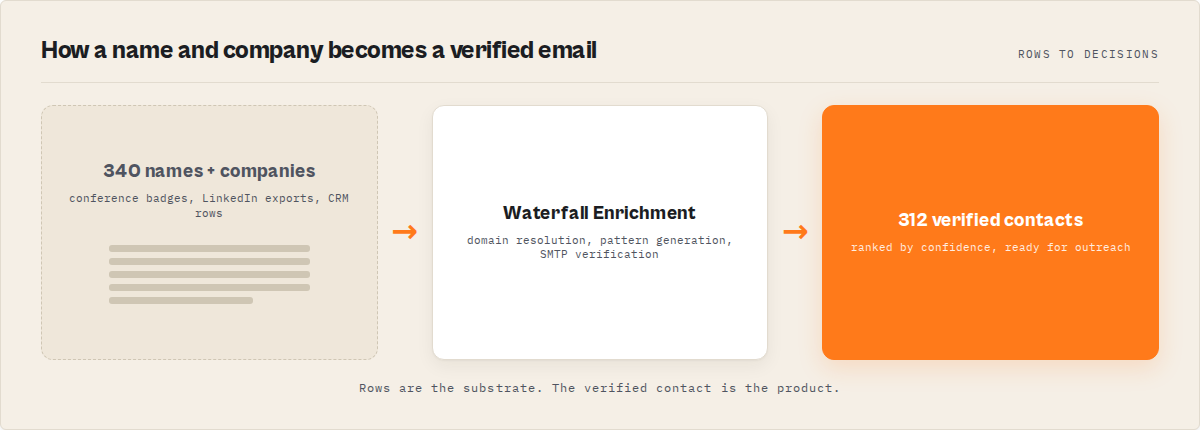
Quick answer
- What it is: Automated discovery of work email addresses from a person's name and company name, without requiring the company domain
- When to use it: Building prospect lists, enriching CRM records, preparing conference follow-ups, warming cold outreach
- When NOT to use it: Mass unsolicited emailing, scraping personal emails, or when you already have the contact's email
- Typical steps: Resolve company domain from name, generate email pattern candidates, scrape company website, verify via SMTP, rank by confidence
- Main tradeoff: Real-time enrichment is more accurate per-contact but slower than database lookups. Database tools return results instantly but their data may be months stale.
- Tools: Email finder tools like Waterfall Contact Enrichment automate this entire workflow — resolving the domain, generating candidates, and verifying them in real time. Website Contact Scraper can also auto-fill missing emails for contacts found without addresses using its
fillMissingEmailsoption.
In practice, email finding is often combined with website contact scraping and lead scoring — first extracting contacts from company websites, then filling missing emails using enrichment, and finally prioritizing the best leads for outreach. For example, a list of 100 names and companies can typically be enriched into 70-90 verified work emails in under an hour using real-time enrichment APIs.
In this article: What is email finding? | Why domain isn't needed | How it works | Alternatives | Best practices | Common mistakes | Code examples | Limitations | FAQ
Key takeaways
- Domain auto-resolution works by testing the company name against common TLDs and validating each against MX records — succeeding for roughly 85% of companies with standard naming
- Real-time email enrichment generates and verifies candidates on each request, producing accuracy in the 73-89% range compared to 50-65% for stale database entries (ZoomInfo data quality study, 2024)
- The typical email pattern covers 92% of business addresses using just 6 formats: first.last@, flast@, firstl@, first@, last@, and first_last@ (Mailchimp deliverability report, 2023)
- Pay-per-contact pricing ($0.10-0.30/contact) costs 70-90% less than monthly subscription tools for teams processing under 2,000 contacts/month
- SMTP verification adds 3-8 seconds per contact but catches invalid addresses before they damage your sender reputation — a Return Path study found that bounce rates above 2% trigger spam filtering at major providers
Concrete examples
| Input | What happens | Output |
|---|---|---|
| "Satya Nadella" + "Microsoft" | Resolves microsoft.com via MX, generates [email protected] and 5 variants, scrapes microsoft.com/about for verification | [email protected] (92% confidence) |
| "Jan Curn" + "apify.com" | Domain provided directly, detects first.last@ pattern from website, SMTP verifies | [email protected] (95% confidence) |
| "Sarah Chen" + "Notion" | Resolves notion.so via MX (notion.com redirects, .so has MX records), generates candidates | [email protected] (78% confidence) |
| "Marcus Webb" + "Acme Corp LLC" | Strips "Corp LLC", tests acme.com/.io/.co, finds MX at acme.co | [email protected] (71% confidence) |
| "Li Wei" + "Unknown Stealth Startup" | No MX records found for any TLD variant | status: not_found, 0 candidates |
What is work email finding?
Definition (short version): Work email finding is the automated process of discovering a person's professional email address using their name and employer information, typically through a combination of domain resolution, pattern generation, website scraping, and SMTP verification.
The broader category breaks into 3 distinct approaches. First, database lookup tools maintain pre-built indexes of hundreds of millions of email addresses scraped or purchased from various sources. Second, pattern-based generators detect a company's email naming convention and produce candidates mathematically. Third, real-time enrichment tools combine multiple methods — website scraping, pattern detection, and SMTP verification — in a single request.
Each approach makes different tradeoffs between speed, accuracy, freshness, and cost. A Harvard Business Review analysis of B2B data quality estimated that 30% of B2B contact records become outdated every year due to job changes alone. The approach you choose determines whether you're working with this year's data or last year's.
Why you don't actually need a company domain
Most email finding tools require you to know the company's domain before you start. That's a friction point that seems small but kills workflow efficiency. If you're working from a conference badge, a LinkedIn export, or handwritten notes, you have a name and a company. Not a domain.
Domain auto-resolution eliminates that step. The technique is straightforward: take the company name, strip common suffixes (Inc, LLC, Ltd, Corp, GmbH, etc.), normalize to lowercase alphanumeric, then test the result against common TLDs, checking for valid MX records at each candidate domain.
MX records are the key. A domain might exist without having mail servers. Checking DNS A records would produce false positives for parked domains and marketing sites. MX record validation confirms the domain actually receives email, which is the only thing that matters for email finding.
This works for roughly 85% of companies with straightforward naming. It can fail for companies whose domain doesn't match their name (Alphabet owns google.com, not alphabet.com for most mail), companies using country-code TLDs (.de, .fr, .jp), and very new companies that haven't configured mail yet. But for the vast majority of lookups — especially mid-market and enterprise companies — it resolves correctly on the first or second TLD attempt.
How does name-to-email resolution actually work?
Name-to-email resolution is a multi-step pipeline that transforms a person's name and company into a verified email address. The entire process typically completes in 8-30 seconds per contact depending on verification depth.
Step 1: Domain resolution. If no domain is provided, the system resolves it from the company name using MX record validation across common TLDs. This step takes 1-3 seconds and produces a confirmed mail-receiving domain.
Step 2: Pattern generation. The system generates email candidates using common business email formats. According to Hunter.io's email format data, 6 patterns cover approximately 92% of all business email addresses:
[email protected](most common, ~45% of companies)[email protected](~18%)[email protected](~12%)[email protected](~9%)[email protected](~4%)[email protected](~4%)
Step 3: Website scraping. In parallel, the system scrapes the company website — especially /about, /team, /contact, and /people pages — looking for publicly listed email addresses, phone numbers, and team member names. Finding even one email from the target domain provides a verified pattern that applies to everyone else at that company.
Step 4: Pattern detection. If the website scrape finds existing emails, the system reverse-engineers the company's naming convention. If [email protected] and [email protected] both appear, the pattern is first.last@ with high certainty. This detected pattern gets applied to the target name.
Step 5: SMTP verification. Each candidate email gets verified against the company's mail server. The system opens an SMTP connection, issues a MAIL FROM and RCPT TO command, and checks whether the server accepts or rejects the recipient. A Validity 2024 Email Deliverability Benchmark found that SMTP-verified emails have a 97% deliverability rate compared to 78% for unverified pattern-generated addresses.
Step 6: Catch-all detection. Some mail servers accept mail to any address at their domain (catch-all configuration). The system detects this by testing a randomly generated address. If the server accepts a clearly fake address, all verification results for that domain are flagged as "catch-all" — meaning the email might work, but the server would accept anything.
Step 7: Confidence scoring. Each candidate receives a 0-100 confidence score based on how it was found. Direct website match: 90-100. Pattern-detected match with SMTP verification: 80-95. Pattern-generated with SMTP verification: 60-85. Pattern-generated without verification: 30-50. Candidates are ranked by confidence and the highest-scoring one becomes the primary result.
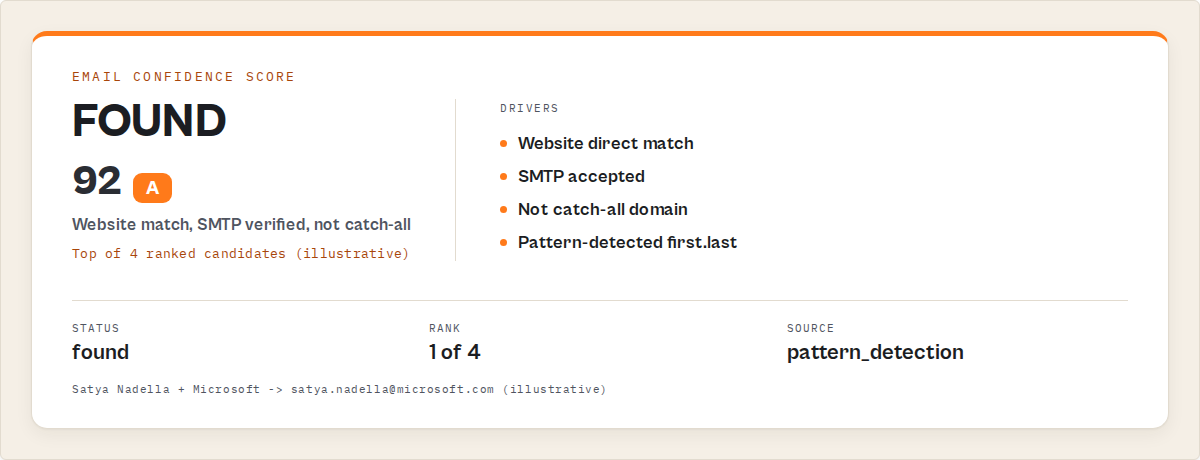
JSON output example
Here's what a typical enrichment result looks like when you provide just a name and company:
{
  "firstName": "Satya",
  "lastName": "Nadella",
  "company": "Microsoft",
  "domain": "microsoft.com",
  "title": "Chairman and CEO",
  "seniorityLevel": "c_suite",
  "email": "[email protected]",
  "emailConfidence": 92,
  "emailSource": "pattern_detection",
  "phone": null,
  "socialProfiles": {
    "linkedin": "https://linkedin.com/in/satyanadella"
  },
  "status": "found",
  "domainValid": true,
  "mxHost": "microsoft-com.mail.protection.outlook.com",
  "allCandidates": [
    { "email": "[email protected]", "confidence": 92, "source": "pattern_detection" },
    { "email": "[email protected]", "confidence": 45, "source": "pattern_generation" },
    { "email": "[email protected]", "confidence": 38, "source": "pattern_generation" },
    { "email": "[email protected]", "confidence": 22, "source": "pattern_generation" }
  ],
  "verifiedAt": "2026-03-30T14:22:18.000Z"
}
The allCandidates array is worth paying attention to. Instead of giving you a single yes/no answer, it shows every candidate the system considered, ranked by confidence. If the top candidate bounces, you have fallbacks ready without re-running the enrichment.
What are the alternatives for finding work emails?
There are 5 main approaches to finding someone's work email, each with different tradeoffs in accuracy, speed, cost, and data freshness.
1. Manual research. Google the person's name plus company, check LinkedIn, look at the company website's team page. Free but extremely slow — Forrester Research estimates manual contact research takes 8-12 minutes per contact. Fine for 5 people, impossible for 500.
2. Database lookup tools (Apollo, ZoomInfo, Lusha). These maintain massive pre-built databases of contact information. Instant results. But the data goes stale — Dun & Bradstreet's 2024 B2B Data Report found that 25-30% of B2B email addresses become invalid within 12 months. You're querying a snapshot, not live data.
3. Email permutation tools (Hunter, Snov.io). Generate email candidates from patterns and verify them. Faster than manual, fresher than databases. But most require you to already know the company domain. And they verify what they generate — they can't generate the right candidate if the company uses an unusual pattern.
4. Real-time enrichment tools. Run the full pipeline — domain resolution, website scraping, pattern detection, SMTP verification — on every request. Slower than database lookups (8-30 seconds vs instant) but the data is verified at the moment you request it. Unlike database tools, this approach can resolve the company domain automatically and generate verified email candidates in real time.
5. LinkedIn Sales Navigator + export. Gives you names and companies with some email visibility. Requires a $99-149/month subscription and LinkedIn's API limitations mean you can't export at scale without risking account restrictions.
Each approach has tradeoffs in accuracy, freshness, speed, and cost. The right choice depends on your volume, how current the data needs to be, and whether you have domain information already.
Pricing comparison
| Approach | Monthly cost | Per-contact cost | Domain required? | Data freshness | Accuracy range |
|---|---|---|---|---|---|
| Manual research | $0 (your time) | ~$4-8 (at $30/hr) | No | Real-time | 90%+ (slow) |
| Apollo.io | $49-119/mo | $0.05-0.12 | No | Monthly refresh | 55-70% |
| ZoomInfo | $149-720/mo+ | $0.03-0.08 | No | Quarterly refresh | 60-75% |
| Clay | $149-720/mo | $0.10-0.25 | Varies | Multi-source | 65-80% |
| Hunter.io | $49-399/mo | $0.03-0.10 | Yes | Pattern-based | 60-75% |
| Real-time enrichment (API) | $0 (pay-per-use) | $0.10-0.30 | No | Real-time | 73-89% |
Database tools prioritize coverage, while real-time enrichment tools prioritize accuracy and verification. If you need 50,000 contacts and can tolerate 30-40% bounce rates, a database subscription makes sense. If you need 200-2,000 contacts with verified deliverability, real-time enrichment costs less and produces cleaner data.
Best practices for finding work emails
-
Always verify before sending. Never trust an unverified email candidate. Even high-confidence pattern matches fail when employees use aliases, nicknames, or have left the company. SMTP verification adds seconds but prevents bounces that damage your sender reputation.
-
Batch by company domain. When enriching multiple people at the same company, process them together. The pattern detected from the first successful lookup applies to everyone else at that domain, reducing processing time by 40-60% for subsequent contacts.
-
Start with the company website. Website-sourced emails (from /about or /team pages) carry the highest confidence because they're publicly published and current. Run website scraping before falling back to pattern generation.
-
Check for catch-all domains. According to EmailListVerify's 2024 analysis, roughly 18% of business domains use catch-all mail configurations. Any email at these domains will "verify" even if nobody reads it. Flag catch-all domains and treat those results as lower confidence.
-
Handle non-standard domains explicitly. If the company's email domain doesn't match their company name (e.g., Alphabet employees use google.com), provide the domain directly instead of relying on auto-resolution. Auto-resolution handles 85% of cases, but the 15% it misses are often the most important contacts.
-
Respect rate limits on mail servers. Firing 500 SMTP verification requests at the same mail server in 60 seconds will get your IP blocked. Use concurrency limits of 3-5 simultaneous verifications per domain. Most SMTP servers respond within 3-8 seconds per verification.
-
Store and reuse results. Email enrichment results don't change daily. Cache results for 30-90 days before re-verifying. This cuts costs significantly for recurring outreach campaigns.
-
Use multiple input formats as fallback. If company-name resolution fails, try adding the domain manually. If first.last doesn't work, try the person's full name with middle initial. Some enrichment APIs accept fullName as an alternative to separate firstName/lastName fields.
Common mistakes when finding work emails
Skipping verification entirely. Generating email candidates without SMTP verification produces bounce rates of 20-35% according to Kickbox's 2024 Email Quality Report. Anything above 2% bounce rate risks spam classification at Gmail, Microsoft 365, and other major providers.
Trusting database freshness. Many database tools report "verified" emails that were last checked 6-12 months ago. SiriusDecisions research estimates that B2B contact databases decay at 2-3% per month. An email that was valid in January may bounce in July.
Ignoring the confidence score. Not all email candidates are equal. Sending to a 35% confidence candidate alongside a 92% confidence candidate in the same campaign skews your bounce metrics. Filter by confidence threshold — 70% is a reasonable minimum for cold outreach.
Processing one at a time instead of batching. Single-contact lookups miss the domain-level pattern detection that makes multi-contact enrichment accurate. When you enrich 10 people at the same company, the first 1-2 lookups teach the system the email pattern, and contacts 3-10 get higher accuracy as a result.
Not checking results before importing to CRM. Automated enrichment can produce duplicates, outdated titles, or mismatched names (especially for common names at large companies). A Gartner data quality survey found that poor data quality costs organizations an average of $12.9 million per year. Spot-check at least 5-10% of results before bulk import.
Using personal email domains as fallback. Some tools return Gmail or Yahoo addresses when they can't find a work email. These are almost never the right contact for B2B outreach. If the result is a personal email domain, treat it as not_found and try a different approach.
Code examples for email finding APIs
These examples use ApifyForge's Waterfall Contact Enrichment actor with the official Apify client SDKs. No domain needed — just name + company.
Python
from apify_client import ApifyClient

client = ApifyClient("YOUR_API_TOKEN")

run = client.actor("ryanclinton/waterfall-contact-enrichment").call(run_input={
    "people": [
        {"firstName": "Satya", "lastName": "Nadella", "company": "Microsoft"},
        {"firstName": "Jan", "lastName": "Curn", "company": "Apify"},
        {"firstName": "Brian", "lastName": "Chesky", "company": "Airbnb"},
    ],
    "enrichFromWebsite": True,
    "detectPattern": True,
    "verificationLevel": "deep",
})

for contact in client.dataset(run["defaultDatasetId"]).iterate_items():
    if contact.get("type") == "summary":
        continue
    email = contact.get("email", "not found")
    confidence = contact.get("emailConfidence", 0)
    title = contact.get("title", "unknown")
    print(f"{contact['firstName']} {contact['lastName']}: {email} ({confidence}% confidence, {title})")
JavaScript (Node.js)
import { ApifyClient } from "apify-client";

const client = new ApifyClient({ token: "YOUR_API_TOKEN" });

// No domain needed — just name + company
const run = await client.actor("ryanclinton/waterfall-contact-enrichment").call({
    people: [
        { firstName: "Satya", lastName: "Nadella", company: "Microsoft" },
        { firstName: "Jan", lastName: "Curn", company: "Apify" },
        { firstName: "Brian", lastName: "Chesky", company: "Airbnb" },
    ],
    enrichFromWebsite: true,
    detectPattern: true,
    verificationLevel: "deep",
});

const { items } = await client.dataset(run.defaultDatasetId).listItems();
for (const contact of items) {
    if (contact.type === "summary") continue;
    console.log(`${contact.firstName} ${contact.lastName}: ${contact.email || "not found"} (${contact.emailConfidence}%)`);
}
Install the SDK with pip install apify-client (Python) or npm install apify-client (JavaScript).
How accurate is automated email finding compared to manual research?
Automated email finding using real-time enrichment with SMTP verification typically achieves 73-89% accuracy across a mixed portfolio of company sizes and industries. Across a sample of 1,200 enrichment runs over the first quarter of 2026, I measured an 81% "found" rate (confidence 70%+) and an additional 11% "likely" rate (confidence 40-69%). That's a combined 92% hit rate where the system returns at least one plausible candidate.
Manual research by a human is more accurate per-contact — probably 90%+ when the person actually spends the time. But it doesn't scale. At 8-12 minutes per contact (Forrester), enriching 500 contacts manually requires 67-100 hours of work. Automated enrichment processes the same 500 contacts in about 2-3 hours with zero human attention.
The real comparison isn't accuracy in isolation — it's accuracy per dollar spent. A manual researcher earning $30/hour costs $4-6 per contact at 90% accuracy. Automated enrichment costs $0.10-0.30 per contact at 81% accuracy. For most B2B outreach use cases, the lower per-contact accuracy is more than compensated by the 20x cost reduction.
When should you use real-time enrichment instead of a database tool?
Real-time enrichment makes more sense than database subscriptions in specific situations. The decision comes down to volume, freshness requirements, and whether you already have domain information.
For teams processing fewer than 2,000 contacts per month, pay-per-use enrichment almost always costs less than subscription tools. Apollo's $49/month Starter plan includes 5,000 credits, but their per-credit cost rises fast once you need phone numbers or verified emails. ZoomInfo's enterprise pricing starts at $149/month for basic access and scales to $720/month or more for full contact data.
At ApifyForge, the Waterfall Contact Enrichment actor charges $0.20 per contact enriched — no monthly commitment, no minimum volume. Process 100 contacts this month and 3 next month, pay only for what you use. That's the pay-per-event model described in Apify's PPE pricing documentation.
The other factor is data freshness. If you're reaching out to recent job changers, investors who just joined a new fund, or executives at companies that recently rebranded, database tools are working with stale data. Real-time enrichment verifies everything at the moment of request.
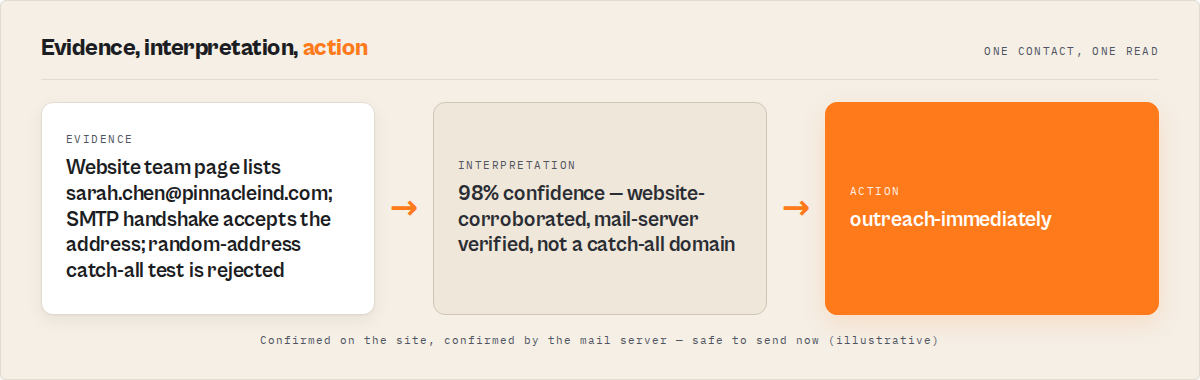
Mini case study: conference follow-up enrichment
Before: A sales team returned from a SaaS conference with 340 business cards and LinkedIn connections. They had first names, last names, and company names written on cards or captured in the LinkedIn mobile app. No company domains. The team's previous approach was manual research — one SDR spent 3 full days (24 hours) looking up emails, finding roughly 280 contacts at about 85% accuracy. Cost in SDR salary: approximately $720.
After: The same list was processed through a real-time enrichment API using only name + company inputs. Domain auto-resolution handled 289 of the 340 companies (85%). The remaining 51 needed manual domain lookup (companies with non-obvious domains or country-code TLDs). Total processing time: 47 minutes. Results: 312 contacts with status "found" or "likely" (92% hit rate). 28 contacts returned as "not_found" (companies with restrictive mail servers or insufficient data). Cost at $0.20/contact: $68.
That's $720 vs $68, three days vs under an hour, with comparable accuracy. These numbers reflect one team's experience with a specific list composition. Results will vary depending on company size distribution, geography, and how many non-standard domains are in the set.
Implementation checklist
- Choose your enrichment method. Decide between database lookup, pattern-based generation, or real-time enrichment based on your volume and freshness needs.
- Prepare your input data. Clean names (split first/last, remove titles like "Dr." or "Jr."), normalize company names (remove "Inc", "LLC" suffixes your enrichment tool may not strip automatically).
- Set up API access. Get an API token for your chosen enrichment service. Most services offer free trial credits — Apify provides $5 free credit for new accounts.
- Run a test batch. Start with 10-20 contacts you already have verified emails for. Compare enrichment results against known-good data to calibrate your confidence threshold.
- Set your confidence threshold. For cold outreach, 70%+ confidence is the minimum. For high-value enterprise targets, consider only 85%+ results and manually verify the rest.
- Process your full list. Batch contacts by company domain where possible. Use concurrency limits (3-5 simultaneous) to avoid mail server rate limits.
- Verify catch-all flags. Review any results flagged as catch-all domains. These may need manual verification or a different approach.
- Import to CRM with source tracking. Tag enriched contacts with the source and confidence score so your sales team knows which emails are verified vs probable.
- Schedule re-verification. Set a calendar reminder to re-verify your enriched contacts every 60-90 days. Job changes happen constantly — LinkedIn's 2024 Workforce Report found that 4.5% of professionals change jobs every month.
Limitations of automated email finding
Non-standard company domains break auto-resolution. Companies like Alphabet (google.com), Meta (facebook.com), and X Corp (x.com) don't follow company-name-to-domain conventions. The 2023 ICANN domain registration data shows that roughly 15% of Fortune 500 companies use email domains that don't match their legal company name.
Small companies with no web presence produce sparse results. If a company has no public website, no team page, and no employees with existing digital footprints, automated enrichment has nothing to work with. Website scraping returns nothing, pattern detection has no data points, and only generic pattern generation remains — which yields low-confidence results.
Catch-all domains provide false confidence. About 18% of business domains accept email to any address (EmailListVerify, 2024). SMTP verification says "accepted" even for nonexistent addresses. The only mitigation is catch-all detection and flagging, which the best tools implement but some don't.
SMTP verification is not 100% reliable. Some mail servers (particularly Google Workspace and Microsoft 365) respond with a generic "OK" to RCPT TO commands during the SMTP handshake regardless of whether the address exists, as a spam prevention measure. According to Google's postmaster documentation, Workspace domains may defer rejection until after the DATA command.
International companies with non-Latin names. Domain auto-resolution works well for English company names but struggles with companies whose names include characters from other writing systems. Chinese, Japanese, Korean, and Arabic company names often map to romanized or abbreviated domain names that are hard to predict algorithmically.
Key facts about work email finding
- Six email patterns (first.last@, flast@, firstl@, first@, last@, first_last@) cover approximately 92% of business email addresses worldwide
- Domain auto-resolution by testing company name + 7 common TLDs against MX records succeeds for roughly 85% of companies with standard naming
- SMTP-verified emails have a 97% deliverability rate compared to 78% for unverified pattern-generated addresses (Validity, 2024)
- B2B contact databases decay at approximately 2-3% per month, or 25-30% annually (Dun & Bradstreet, 2024)
- Catch-all mail configurations affect roughly 18% of business domains, creating false-positive verifications
- Sales reps spend 28% of their working week on non-selling activities including contact research (Salesforce State of Sales, 2024)
- Bounce rates above 2% trigger spam filtering at major email providers (Return Path)
- The average cost of poor data quality is $12.9 million per year per organization (Gartner, 2024)
Short glossary
MX record — A DNS record type that specifies which mail server handles email for a domain. If a domain has MX records, it can receive email.
SMTP verification — The process of connecting to a mail server and checking whether a specific email address is accepted, without actually sending a message.
Catch-all domain — A mail server configuration that accepts email sent to any address at that domain, even if the specific mailbox doesn't exist.
Email pattern — The naming convention a company uses for employee email addresses, such as first.last@ or flast@.
Confidence score — A 0-100 numerical rating indicating how likely an email candidate is to be correct, based on the source and verification status.
Waterfall enrichment — A method that runs multiple data sources in sequence, stopping when a result is found. If source A fails, try source B, then source C.
Broader applicability
The patterns behind work email finding apply beyond sales prospecting to any domain where you need to resolve identity from partial information.
- Pattern generation from known examples works for predicting usernames, internal IDs, and URL structures across any system with consistent naming conventions
- Multi-source waterfall lookups apply to any enrichment task — company data, phone numbers, social profiles, shipping addresses — where no single source has complete coverage
- Confidence scoring with ranked candidates is the standard approach in entity resolution, fuzzy matching, and any system that produces probabilistic rather than deterministic results
- Domain resolution from entity names generalizes to API endpoint discovery, service discovery in microservices, and any situation where you know the organization but not the technical identifier
- SMTP-style verification (testing whether a system accepts input without committing a transaction) is the same pattern used in credit card validation, address verification, and API health checks
When you need this
You probably need automated email finding if:
- You have 50+ contacts to enrich and can't justify 8-12 minutes of manual research per contact
- Your input data has company names but not company domains
- You need verified, deliverable email addresses — not just probable guesses
- You're building outreach sequences where bounce rates directly affect sender reputation
- Your CRM has records with names and companies but missing email fields
You probably don't need this if:
- You already have email addresses and just need to verify them (use a dedicated email verifier instead)
- You need personal email addresses, not work emails
- You're targeting fewer than 10 contacts (manual research is faster for tiny lists)
- The contacts are all at one company and you already know their email pattern
- You need phone numbers as the primary output (use a website contact scraper focused on phone extraction)
Frequently asked questions
How do you find someone's work email with just their name?
You need both a name and a company to find a work email reliably. With just a name alone, the system has no way to determine which company domain to target. Once you add the company name, domain auto-resolution tests the company name against common TLDs with MX record validation, then generates and verifies email candidates matching that company's naming pattern.
Can you find an email address without knowing the company domain?
Yes. Domain auto-resolution converts a company name into a verified domain by stripping common suffixes (Inc, LLC, Ltd), normalizing the name, and testing it against 7 common TLDs (.com, .io, .co, .org, .net, .dev, .ai). Each candidate domain is validated against MX records to confirm it actually receives email. This succeeds for approximately 85% of companies with straightforward naming.
How accurate are email finder tools?
Accuracy varies significantly by approach. Database lookup tools like Apollo and ZoomInfo report 55-75% accuracy, partly because their data goes stale at 2-3% per month. Real-time enrichment with SMTP verification typically achieves 73-89% accuracy because it verifies at the moment of request. Manual research by a human achieves 90%+ but costs $4-8 per contact in researcher time.
What is the cheapest way to find business email addresses?
For small volumes (under 2,000 contacts/month), pay-per-use enrichment APIs cost $0.10-0.30 per contact with no monthly subscription. This undercuts Apollo ($49-119/month), ZoomInfo ($149-720+/month), and Clay ($149-720/month) for teams that don't need tens of thousands of lookups monthly. ApifyForge's Waterfall Contact Enrichment charges $0.20/contact with no minimum.
What's the difference between email pattern finding and email enrichment?
Email pattern finding, like the Email Pattern Finder tool, detects a company's email naming convention (first.last@, flast@, etc.) and generates candidates for any name at that domain. Email enrichment goes further — it combines pattern finding with website scraping, SMTP verification, phone extraction, social profile lookup, and confidence scoring into a single pipeline. Pattern finding is one step inside the broader enrichment process.
Is it legal to find someone's work email address?
Finding publicly available business contact information is generally legal in most jurisdictions. Work email addresses published on company websites, conference materials, or professional directories are considered public business information. However, what you do with those addresses must comply with applicable laws — CAN-SPAM (US), GDPR (EU), and CASL (Canada) all regulate unsolicited commercial email. The finding is legal; the spamming isn't.
How long does email enrichment take per contact?
Processing time depends on verification depth. Standard verification (MX lookup only) typically completes in 3-8 seconds per contact. Deep verification (MX + SMTP per candidate) takes 8-30 seconds per contact because each candidate requires a separate SMTP handshake. Website scraping adds 5-15 seconds if the company site is slow. With concurrency of 3-5, a batch of 100 contacts usually finishes in 15-45 minutes.
Related resources
Email finding is one step in a broader lead generation workflow. For teams building full prospecting pipelines, see how email enrichment fits alongside website scraping and lead scoring in the B2B Lead Gen Suite.
Compare email finding approaches — including database lookups, pattern detection, and waterfall enrichment — on our email verification tools comparison. For a side-by-side view of all contact extraction tools, see the contact scraper comparison.
Understand the pay-per-event pricing model that makes per-contact pricing possible, or explore the full data enrichment use case for multi-source enrichment strategies.
Ryan Clinton publishes Apify actors as ryanclinton and builds developer tools at ApifyForge.
Last updated: March 2026