TL;DR: If you already have company websites, the fastest way to turn them into leads is to scrape live contact pages, extract emails and team members, rank the best contact, verify addresses, and classify results by outreach readiness. That is what Website Contact Scraper does at roughly $0.15/site, with 100 websites processed in under 50 seconds.
The hardest part of B2B prospecting is not finding companies — it's figuring out who to email and how to reach them. Website Contact Scraper finds emails and decision-makers directly from live company websites, identifies the best person to contact, and costs about $15 for 100 sites — cheaper than most subscription tools and fresher than database lookups. Because it pulls data from live websites on every run, the results are always up to date, unlike database tools where contact data can be weeks or months old.
For teams that already have company website lists, website contact scraping is one of the fastest and most cost-effective ways to generate B2B leads. For most B2B workflows, turning company websites into leads by scraping live contact data is faster, cheaper, and more accurate than relying on pre-built contact databases.
What this post covers:
- How to extract emails, phones, names, and social profiles from company websites
- How to identify the best person to email at each company
- How to score leads and classify outreach readiness
- How to build a cheaper alternative to database-based tools like Hunter, Apollo, and Clay
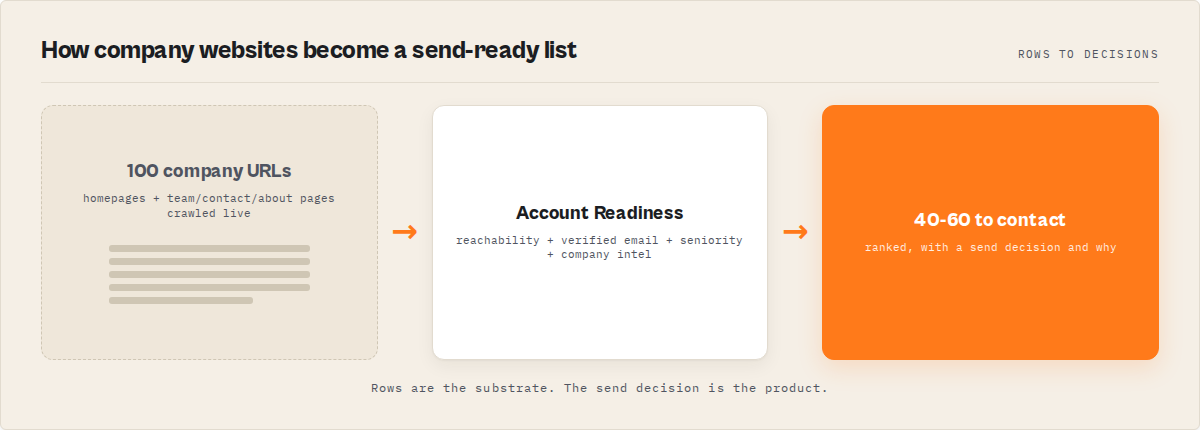
If you already have company websites, this is how to turn them into outreach-ready leads: scrape the live site, extract emails and names, rank the best person to email, verify the data, and classify whether the lead is ready to contact.
Website Contact Scraper turns company websites into outreach-ready leads with verified emails and ranked decision-makers. 100 company websites → outreach-ready leads in under a minute for ~$15.
Key takeaways:
- Find emails and decision-makers from company websites, then rank who to email first — with lead scoring (0-100), contact ranking, and A/B/C decision tiers
- 13 social platforms, address extraction, business hours, company metadata, and 18-type company classification
- Auto-fills missing emails using company naming patterns + verification
- Confidence breakdowns and risk flags per record so you know which leads to trust
- 100 websites processed in under a minute
- $0.15 per site, no subscription — 200 sites costs $30 vs. $149-720/month for Clay
This post covers the technical architecture, the decision engine, and why this approach beats subscription tools.
Website Contact Scraper is one tool that does this end-to-end. What started as a simple contact extractor has evolved into a full decision engine. You give it company website URLs. It gives you back the best person to email at each company — with their verified email, a lead score, a confidence breakdown, and a clear A/B/C decision on whether to reach out. Plus emails, phones, team members with titles, 13-platform social links, physical addresses, business hours, and company classification. One structured record per domain.
Website contact scraping is a method of B2B lead generation that extracts emails and decision-makers directly from company websites instead of using pre-built databases. A website contact scraper is a tool that crawls company websites to extract emails, phone numbers, team members, and other contact data for lead generation. Unlike traditional email finder tools, this approach pulls contacts directly from live company websites instead of querying a database.
This is typically the first step in a B2B lead generation pipeline: extract contacts → enrich missing emails → verify → push to CRM. This post is about how it works under the hood, how the decision engine was built, and why it keeps getting picked over alternatives that cost 10x more.
What data can you extract from company websites?
Website Contact Scraper crawls business websites and returns two layers of output: raw contact data and decisions about that data.
Extraction layer (the data)
- Email addresses from mailto: links, body text regex, JSON-LD structured data, schema.org microdata, and obfuscated
[at]/[dot]patterns — classified as personal or generic - Phone numbers from tel: links and formatted numbers in contact areas (header, footer, nav, address blocks)
- Team member names via Schema.org Person markup, team-card pattern matching, and heading-paragraph pair analysis with job title validation
- Social links across 13 platforms: LinkedIn, Twitter/X, Facebook, Instagram, YouTube, TikTok, Pinterest, GitHub, Discord, Telegram, Threads, WhatsApp, Snapchat
- Physical addresses from JSON-LD PostalAddress, schema.org microdata, and HTML
<address>elements - Business hours from schema.org openingHoursSpecification
- Company metadata: name, description, industry, logo, employee count, founding date, website language
Decision layer (the intelligence)
- Best contact — the single best person to email per company, chosen by a proprietary ranking model
- Top 3 contacts — ranked backup options for when the best contact bounces
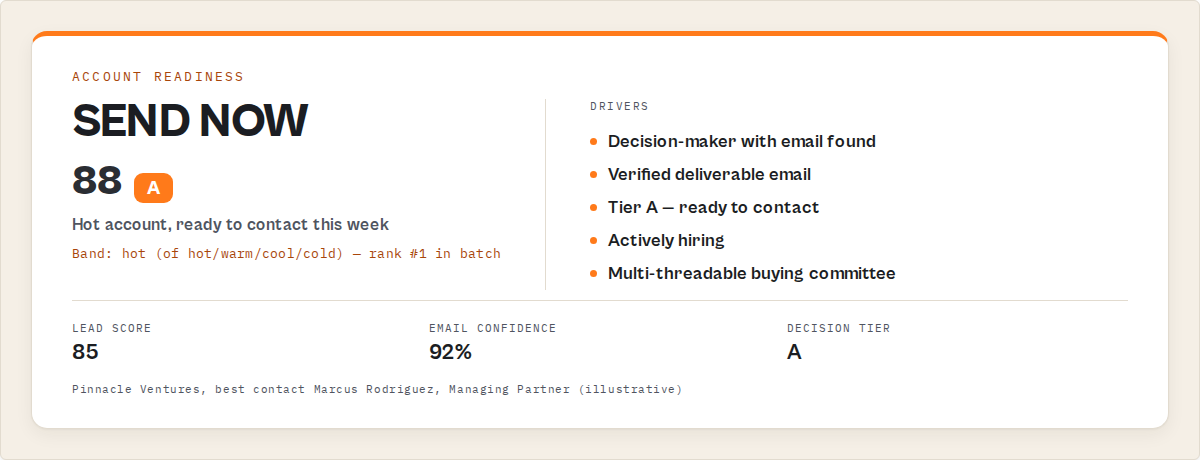
- Lead score (0-100) — weighted outreach-readiness score
- A/B/C decision tier — Tier A: email now. Tier B: check first. Tier C: needs work
- Company type — one of 18 classifications (saas, agency, consulting, legal, ecommerce, etc.)
- Confidence breakdown — emailConfidence, contactConfidence, overallConfidence with risk flags
- Coverage diagnosis — completeness per signal type (emails: complete/partial/missing, etc.)
- Recommendation — specific next step for incomplete results
- Pro fallback — enable
enableProFallbackto automatically re-run JavaScript-heavy sites through Website Contact Scraper Pro ($0.35/site) which renders the page in a real browser with intent signals, outreach planning, and contactability scoring - Domain purity — filters third-party noise from mixed-source email lists
- Contact form detection — explains why no direct email exists when the company uses a form
- Summary block — flat primaryEmail + primaryContact + title + decision + confidence + leadScore for CSV scanning
Everything is deduplicated across all pages crawled. Emails by exact lowercase string. Phones by digit-only key. Contacts by case-insensitive name. Social links first-match-per-platform.
How does website contact scraping work technically?
The actor parses static HTML without a browser for speed, then crawls each domain's homepage and follows same-domain links that look like contact, about, team, or leadership pages. Deep scan mode probes additional compliance pages where EU businesses are legally required to list contacts. All processing is concurrent with automatic retries, keeping the average domain under one second at scale.
Three extraction strategies run in parallel on every page: emails, phone numbers, and people.
Emails are pulled from multiple structured sources rather than a single body-text regex. Obfuscated formats like name [at] domain [dot] com are normalized. A filter layer strips addresses from known infrastructure domains and role-junk prefixes before anything reaches the output. Found emails are classified as personal vs generic so downstream workflows can prefer direct contacts.
Phone numbers are drawn from structured signals only — never raw body copy. This is intentional: a tel: link is reliable, a 10-digit sequence in body copy might be a ZIP code, an order number, or a product SKU. Validation rules reject common false-positive patterns.
Name extraction uses multiple strategies in order of reliability, backed by a validation pass that rejects common false positives like CTA copy and navigation labels. The details of which strategies fire and in what order is part of what makes the output reliable.
That strictness is deliberate. I'd rather miss a phone number buried in paragraph copy than return a random sequence of digits dressed up as a contact.
Why use a website contact scraper instead of Hunter, Apollo, or Clay?
Most contact tools return stale database records or raw email lists. The real problem is knowing who to email at each company.
Hunter.io charges $49-$149/month and gives you emails. Apollo charges $49-$119/month and gives you database records. Clay runs $149-$720/month and gives you flexible workflows. All of them are querying stale indexes — you're paying to search what they scraped weeks or months ago. And none of them answer the question you actually have: "Who should I email at this company?"
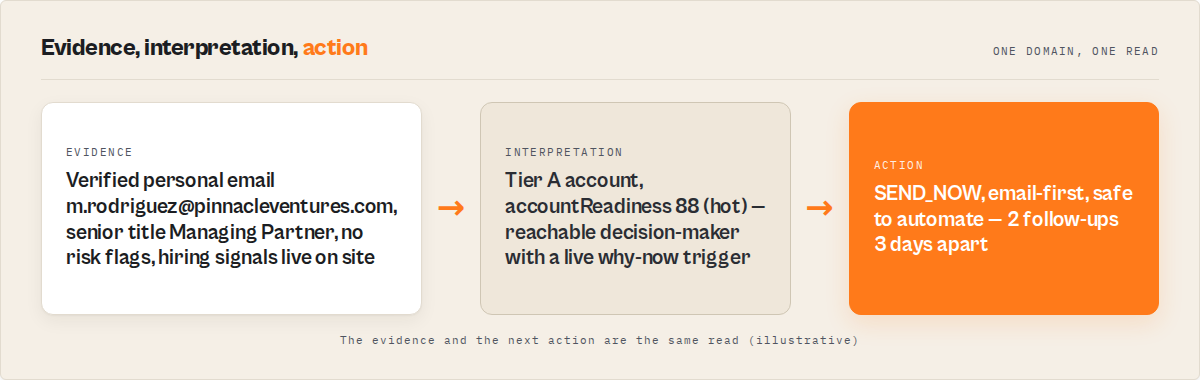
Website Contact Scraper crawls the live site every time you run it, then tells you who to contact. Not just "here are some emails" — but "Marcus Rodriguez, Managing Partner, verified email, score 92, Tier A — email now." That's a different product category.
The pricing model is fundamentally different too: $0.15 per website scanned. No subscription, no monthly minimum, no seat licenses. According to Apify's 2025 web scraping report, pay-per-result pricing has grown 340% year-over-year on their platform.
Quick math: scanning 200 websites costs $30. At Hunter.io's Professional plan ($149/month), you'd blow through that budget in one month whether you use it or not. Most users spend $5-$30/month and cancel nothing because there's nothing to cancel.
Who uses website contact scraping for lead generation?
Users of website contact scraping for lead generation fall into a few clear patterns:
SDRs building prospect lists. They paste 50-200 company URLs from LinkedIn Sales Navigator exports or CRM lists. The actor returns emails, direct phone numbers, and LinkedIn profiles they feed into outreach sequences. Enable enableProFallback and JavaScript-heavy sites are automatically re-run through Website Contact Scraper Pro — no manual re-running needed. A 2024 Gartner report found that SDR teams spend 21% of their time on manual data entry and research. This cuts that to near zero for the contact-finding portion.
Marketing agencies doing lead gen for clients. They scrape industry directories and trade association member pages to build prospect databases. The CSV export maps directly to email marketing tools and CRM imports. ApifyForge has a full lead generation comparison page if you want to see how the contact scraper stacks up against other tools in the category.
Recruiters pulling team pages. They want to know who works at target companies, what their titles are, and how to reach them — before making first contact. The topContacts array ranks the best 3 people to reach. For tech companies that render team pages with React or Vue, the Pro fallback handles JavaScript rendering automatically.
RevOps teams enriching CRM data. They run batches of existing company records through the scraper to fill in missing emails, phones, and social profiles. Then they verify addresses with the Bulk Email Verifier before importing.
How much does website contact scraping cost?
Website Contact Scraper costs about $15 for 100 websites, compared with $49-$149/month for Hunter, $49-$119/month for Apollo, and $149-$720/month for Clay. It uses Apify's pay-per-event pricing at $0.15 per website scanned. A batch of 100 websites costs $15, and 500 websites costs $75. There is no monthly subscription or minimum commitment. Apify's free tier includes $5 of monthly platform credits, which covers about 33 sites at no cost.
Here's how that compares to alternatives:
| Tool | Pricing model | Cost for 200 sites/month | Annual cost |
|---|---|---|---|
| Website Contact Scraper | $0.15/site | $30 | $360 |
| Hunter.io | $49-$149/mo subscription | $49-$149 | $588-$1,788 |
| Clay | $149-$720/mo subscription | $149-$720 | $1,788-$8,640 |
| Apollo.io | $49-$119/mo subscription | $49-$119 | $588-$1,428 |
| Manual research (15 sites/hr at $25/hr) | Labor | $333 | $4,000 |
The manual research line is real. Forrester's 2024 B2B data quality study found that companies spend an average of $15,000/year on manual prospect research across their sales teams. Even small teams burn hours on this.
You can set a spending cap per run, and the actor stops gracefully when you hit it. It logs exactly how many domains were processed versus how many were skipped. No surprise charges.
How to make website contact scraping accurate
Two things I obsessed over while building this: minimizing false positives and maximizing useful signal. Most contact scrapers run a single regex across the entire page body. That gets you emails from tracking pixels, phone numbers from postal codes, and "names" that are actually navigation headings. The noise-to-signal ratio is terrible.
The approach here is different in three ways:
Phones come from structured sources, not body copy. A Stanford NLP study on web data extraction showed that restricting extraction to structurally relevant page regions reduces false positives by 60-80% compared to full-page regex. That matches what I see in practice.
Emails are filtered before they reach the output. Infrastructure and role-junk addresses are dropped, scripts and trackers are stripped before parsing, and a domain purity check flags when third-party emails have been mixed into results. The bar is "does this look like a contact a human would email?" — not "does this match an email regex?"
Names are validated, not just pattern-matched. Candidate names run through a validation pass designed specifically to reject the strings that look like names to a naive scraper but aren't — marketing headings, CTA text, navigation labels.
The result is output that's structured, clean, and usable — not just "the scraper didn't crash," but data a human would actually send outreach to.
How to use a website contact scraper
- Go to Website Contact Scraper on Apify
- Choose a preset:
fast(speed priority),balanced(recommended — verify + fill missing emails), ormaximum(deep scan + verify + fill) - Paste your website URLs into the input field (root domains like
https://acmecorp.com, not deep URLs) - Click Start. 100 websites finish in under a minute. 500 in under 10 minutes
- Open the "Lead Intelligence" dataset view — results are sorted by lead score with decision tiers
Or call it programmatically:
from apify_client import ApifyClient

client = ApifyClient("YOUR_API_TOKEN")

run = client.actor("ryanclinton/website-contact-scraper").call(run_input={
    "urls": [
        "https://pinnacleventures.com",
        "https://meridiantech.io",
    ],
    "maxPagesPerDomain": 5,
    "includeNames": True,
    "includeSocials": True,
})

for item in client.dataset(run["defaultDatasetId"]).iterate_items():
    print(f"{item['domain']}: {len(item['emails'])} emails")
    for contact in item.get("contacts", []):
        print(f"  {contact['name']} - {contact.get('title', 'no title')}")
The JavaScript and cURL equivalents work the same way — check the full API docs on ApifyForge for examples in every language.
Limitations of website contact scraping
Use this when: you have company websites and want fresh contact data with decision-ready output. Don't use this when: you need LinkedIn enrichment or private databases.
The biggest limitation: no native JavaScript rendering. The standard version parses static HTML for speed and cost. React, Angular, and Vue apps that load contacts via client-side JS won't have that dynamic content captured. However, enabling enableProFallback automatically re-runs detected JavaScript sites through Website Contact Scraper Pro ($0.35/site) — which renders the page in a real browser and merges results back into the same dataset.
I built Website Contact Scraper Pro for exactly this case — it uses a real browser to render SPAs. But for the roughly 70-80% of business websites that serve contact info in static HTML (according to W3Techs' 2025 web technology survey, only about 20% of business sites are fully client-rendered), the standard version is faster, cheaper, and more reliable.
Other limitations worth knowing:
- Same-domain links only — external team directories or hosted about pages won't be discovered
- Name extraction depends on HTML patterns — custom layouts may not trigger any of the three strategies
- First social link per platform — if a page has multiple LinkedIn profiles, only the first is captured
- No authentication — login-gated employee directories aren't supported
- Static data — reflects what's on the page at run time, not historical
I list these in the README because I'd rather you know the boundaries upfront than find out mid-project.
How do you combine contact scraping with email verification?
The best workflow chains Website Contact Scraper with Email Pattern Finder and email verification. First, scrape contacts to get names and whatever emails are publicly listed. Then use Email Pattern Finder to predict missing personal emails from the company's naming convention. Finally, verify everything before import.
ApifyForge has a contact scraper comparison page that breaks down how different tools in this pipeline work together. The short version:
| Step | Tool | Cost |
|---|---|---|
| Extract + verify + fill + score + rank | Website Contact Scraper (balanced preset) | $0.15/site |
| Deeper company qualification (optional) | B2B Lead Qualifier | $0.15/lead |
With the balanced preset, Website Contact Scraper now handles extraction, verification, email gap-filling, lead scoring, and contact ranking in a single run. For a batch of 100 companies, that's ~$15 total. For any sites that come back as Tier C with a jsWarning, re-run those URLs through Website Contact Scraper Pro to get the same decision engine output from browser-rendered pages. No subscriptions. A McKinsey 2024 analysis of B2B sales efficiency found that companies using automated contact enrichment pipelines close deals 23% faster than those relying on manual research.
What the current version does
The current version of Website Contact Scraper is a full decision engine, not just an extractor. Here's what it does that a basic contact scraper doesn't:
Company profile extraction — now returns company name, description, industry, logo, employee count, founding date, language, physical address, and business hours alongside the contact data.
Confidence scoring — every record gets emailConfidence, contactConfidence, and overallConfidence (0-100) with risk flags. Users know exactly which records to trust.
Contact ranking — the bestContact field identifies the single best person to email at each company using a proprietary ranking model. topContacts gives you ranked backup options.
Lead scoring and decision tiers — every domain gets a 0-100 lead score and an A/B/C decision tier. Tier A: email now. Tier B: usable. Tier C: needs work. Results sort by score — best leads first.
Email gap filling — when contacts are found with names but no emails, fillMissingEmails generates probable addresses from the company's email pattern and verifies them via Email Pattern Finder.
13 social platforms — added TikTok, Pinterest, GitHub, Discord, Telegram, Threads, WhatsApp, Snapchat.
Speed doubled. 100 websites in under a minute. For the ~20% of sites that need browser rendering, Website Contact Scraper Pro handles React, Angular, Vue, and Next.js — same decision engine output, just slower per page.
Should you use this or something else?
Use Website Contact Scraper if you already have company websites and want to know who to email, with verified addresses, lead scores, and decision tiers. $0.15 per site, no subscription, outreach-ready output with scores and decisions, 100 sites in under a minute.
If your targets are JavaScript-heavy SPAs (React, Angular, Vue), use the Pro version instead — same output, browser rendering.
If you want a pre-built database you can query without URLs, Apollo or ZoomInfo might be better — but you'll pay $50-$150/month and the data may be weeks old. Neither ranks contacts or gives you decision tiers.
If you need the full pipeline — scrape, enrich, verify, score, push to CRM — check Waterfall Contact Enrichment, which chains multiple data sources. Or use Website Contact Scraper with the balanced preset, which handles verification and email gap-filling in a single run.
The ApifyForge cost calculator can estimate your monthly spend. The lead generation comparison page lays out the full category.
The actor is live at apify.com/ryanclinton/website-contact-scraper. Paste 5 URLs with the balanced preset and see the decision engine in action. That's the whole pitch.
Frequently asked questions
How many pages does Website Contact Scraper crawl per domain?
By default, it crawls up to 5 pages per domain — the homepage plus discovered same-domain links that look like contact, about, team, or leadership pages. You can increase this to 20 pages per domain via the maxPagesPerDomain setting for larger corporate sites.
Does the scraper work on websites behind login pages?
No. Website Contact Scraper only extracts data from publicly accessible pages. It does not support authentication, session cookies, or login-gated employee directories. If the contact information requires signing in to view, it will not be captured.
How does the $0.15 per site pricing work?
The actor uses Apify's Pay-Per-Event pricing. You are charged $0.15 for each domain successfully scanned, regardless of how many emails or contacts are found. There is no monthly subscription or minimum commitment. Apify's free tier includes $5 of monthly credits, which covers about 33 sites at no cost.
Can I export results directly to my CRM?
The actor outputs results as JSON, CSV, or Excel via Apify's Dataset tab. There is no built-in CRM connector, but you can use Apify's webhook integrations or Zapier to push results into Salesforce, HubSpot, or any system that accepts HTTP POST data.
What is the difference between Website Contact Scraper and Website Contact Scraper Pro?
The standard version uses static HTML parsing which is faster and cheaper but cannot handle JavaScript-rendered content. The Pro version uses a real browser to render pages, supporting React, Angular, and Vue SPAs where contact data loads via client-side JavaScript. Use the standard version for the 70-80% of business websites that serve contact info in static HTML.
How accurate are the extracted phone numbers?
Phone numbers are extracted only from structured sources: tel: links first (most reliable), then formatted numbers found in contact-specific page areas (header, footer, nav, address blocks). Numbers must be 7-15 digits and pass validation checks against all-same-digit sequences and sequential patterns. This restrictive approach prioritizes accuracy over coverage.
What if a website shows contacts but the scraper returns empty?
The site likely renders contact data with JavaScript after the page loads. Website Contact Scraper parses static HTML only. Check the output for a jsWarning field — if it says "Next.js detected" or similar, re-run that URL through Website Contact Scraper Pro, which uses a real browser to render the page before extracting. The standard version works on ~80% of business websites; Pro covers the rest.
Limitations
- No JavaScript rendering. The scraper uses static HTML parsing. React, Angular, and Vue apps that load contacts via client-side JavaScript will not have dynamic content captured. Approximately 20% of business sites are fully client-rendered.
- Same-domain links only. External team directories, hosted about pages, or third-party contact platforms linked from the site will not be followed or scraped.
- First social link per platform. If a page contains multiple LinkedIn profiles (e.g., company page and individual profiles), only the first discovered link per platform is captured.
- Name extraction depends on HTML patterns. Custom layouts that do not use Schema.org Person markup, standard team-card CSS selectors, or heading-paragraph pairs may not trigger any of the three name extraction strategies.
- No historical data. Results reflect what is on the website at the time of the scrape. There is no tracking of changes over time or comparison with previous runs.
Last updated: April 2026
Ryan Clinton publishes Apify actors as ryanclinton and builds developer tools at ApifyForge.