The problem: You have a niche, 300 TikTok videos to look through, and a Monday deadline. The boss wants the three creators worth a closer look this week. So you run a TikTok scraper, get back play counts, likes, shares, captions, sounds, follower numbers, and dump it all into a spreadsheet. Then you sort by views. You squint at "is this creator actually growing, or did one video pop once?" An hour later you have a hunch, and the data's already a day stale. The scraper did its job. The hour of sorting is the job nobody sold you.
The real competitor isn't another scraper. It's the spreadsheet.
This is the third post in a run we keep coming back to at ApifyForge, because the same gap shows up on every platform. We wrote it about Reddit monitoring and about YouTube creator intelligence. TikTok is the sharpest version yet, because TikTok moves faster than anything else and a static sort goes stale before the meeting starts.
A TikTok creator intelligence layer ranks creators, videos, and sounds by breakout strength, momentum, and what changed since your last run, then hands back a decision per record — which creator to look at first, which sound is surging, which account went quiet — instead of a flat export you sort by hand. A plain scraper plus a spreadsheet costs cents per row and 30 to 90 minutes of analyst time per niche, per run. The intelligence layer collapses that triage into one ranked queue with a recommended next step on each record.
Use it when TikTok research is continuous work — creator scouting, competitor monitoring, sound-trend tracking — and the bottleneck has stopped being extraction and started being triage. If you only need a one-off raw pull you'll process yourself, a plain scraper is cheaper and the right call. The TikTok Scraper actor is the worked example throughout this post: it prices at $0.005 per result analysed under pay-per-event pricing, decision layer included, and migrates existing pipelines unchanged through a compat output.
In this article: What a TikTok scraper returns · The hidden cost of the spreadsheet · How an attention queue works · What it returns instead · Alternatives · Best practices · Common mistakes · Limitations · FAQ
Key takeaways
- Substrate isn't the bottleneck; triage is. Every popular TikTok actor sells rows, and the incumbent earned its rank, but the hour of sorting downstream is the job nobody sold you.
- A creator intelligence layer collapses that triage into one ranked queue: a decision per record, with an attention priority, why-now reasons, a recommended next step, and a 0-100 score bundle.
- Four things break in a spreadsheet at scale: breakout detection, momentum scoring, sound-trend timing, and cross-run change tracking. Each is a maintained service, not a formula.
- The TikTok Scraper actor prices at $0.005 per result analysed under pay-per-event pricing, decision layer included, and migrates existing pipelines unchanged via a compat output.
Rows vs an attention queue: a concrete look
| You ask | A row dump gives you | An attention queue gives you |
|---|---|---|
| Which creators here are popping? | 300 rows; sort by views yourself | Ranked queue, attentionPriority: high on 3-5, with why-now |
| Which video actually broke out? | View counts; guess against the channel | A breakout_video signal event vs the creator's own baseline |
| Is this creator accelerating? | A raw follower number | A momentumScore (0-100), band, and drivers |
| Which sound is about to break? | A music name and a count | A sound lifecycle stage and how early the creator got on it |
| What changed since last week? | Two CSVs; diff by hand | A change briefing plus per-entity deltas and change flags |
What is TikTok creator intelligence?
Definition (short version): TikTok creator intelligence is a system that turns raw TikTok metadata into decisions (which creator is accelerating, which sound is surging, which account is going quiet) and returns a ranked, explained queue instead of a flat export you sort yourself.
A TikTok scraper and a TikTok creator intelligence system are not the same product. A scraper extracts: it returns videos, creators, sounds, and hashtags as rows, then stops. Intelligence is what happens after extraction. It's the ranking, breakout detection, momentum scoring, and run-over-run comparison that turns a scrape into a shortlist you can act on this week.
There are broadly three categories of TikTok tooling in 2026. Row scrapers export the substrate and leave every decision downstream to you. Social-listening suites cover many platforms shallowly, usually with a monthly subscription and a dashboard. Attention-queue actors focus on TikTok and ship the decision layer: ranking, breakout and sound-surge detection, and persistent memory per watchlist. At ApifyForge we group these by what they output, not just what they scrape, because the output contract is what decides whether you still open a spreadsheet afterward.
Why does this matter now?
TikTok research matters more in 2026 because the platform sets the pace for the wider creator economy and the window to act on a trend keeps shrinking. A sound that's cheap to ride today is saturated in a week, and a creator who's affordable this month has an agent and a rate card the next.
The scale is the problem. With over a billion monthly active users reported (Statista, 2024) and an influencer-marketing market that Influencer Marketing Hub put at roughly $24 billion in 2024, the number of creators and sounds worth sorting through is larger than any analyst can eyeball. A 2024 Salesforce State of Sales report (n=5,500+ professionals) found 67% of teams already feel they have too many tools. Bolting "read 300 rows per niche, every week" onto that is the wrong direction. The job most teams actually have is interpretation and timing, and a flat export ships neither.
What does a TikTok scraper actually return?
A TikTok scraper returns substrate: one record per video with play, like, share, and comment counts, the creator handle and follower count, the caption and hashtags, and the sound metadata. Useful, accurately extracted data. If your job is "get me the rows," that's the right tool.
Here's roughly what one record looks like. Note this is output you read, not code you run.
{
  "id": "7361500000000000000",
  "text": "the only 3 steps your skin barrier needs",
  "authorMeta": { "name": "glowbarlondon", "fans": 184300, "verified": false },
  "musicMeta": { "musicName": "original sound", "musicId": "7300000000000000000" },
  "webVideoUrl": "https://www.tiktok.com/@glowbarlondon/video/7361500000000000000",
  "diggCount": 312400,
  "shareCount": 41200,
  "playCount": 4214900,
  "commentCount": 5870,
  "hashtags": [{ "name": "skincare" }, { "name": "skinbarrier" }]
}
The problem starts when your job is anything other than "get me the rows." Which is most jobs. A play count with no baseline is a number, not a signal. Four million plays means one thing on a creator who averages 200k and something completely different on one who averages five million. Nobody computes per-creator baselines for 300 rows by hand. They eyeball. They guess. And on a platform where breakouts compound in the first 24 to 72 hours, a weekly export captures the run-rate, not the inflection.
Why do flat TikTok rows fail for research?
Flat TikTok rows fail for research because they externalise every decision back onto a human. A 300-row export contains no ranking, no baseline comparison, and no run-over-run memory, so the actual research work (deciding what broke out and what changed) still happens by hand in a spreadsheet.
Here's the part people underestimate. TikTok intelligence is genuinely hard, which is exactly why most tools quietly stop at extraction:
- Everything is relative to the creator's own normal. Absolute view counts lie. A creator who averages 50k views hitting 900k is the story; a mega-account's routine two-million-view post is not. A breakout is a video beating its own channel's baseline, not a video with a big number.
- Sounds have a lifecycle. A sound is emerging, accelerating, peaking, or cooling. A static count can't tell you which, so you ride it late.
- Momentum is a trajectory, not a snapshot. Three creators can all sit at two million views this week, and only one is on the way up. A single pull can't tell you which; you need history.
- Going dark is invisible in a row dump. A competitor who stopped posting doesn't show up as a row; they show up as an absence, and absence is exactly what a spreadsheet can't surface.
- Most tools forget every prior run. A one-shot scrape can never tell you whether a spike is new or a recurring pattern.
The real competitor to a TikTok scraper was never another scraper. It's the manual spreadsheet-triage workflow that sits downstream of one. That's the same argument we made for decision-first analytics: the output should be one routable verdict, not a chart you re-interpret.
How does a TikTok attention queue work?
A TikTok attention queue works by adding a decision layer on top of the scraped substrate. After extraction, deterministic detectors measure each creator and video against its own recent baseline and the run's cohort to surface what's unusually strong, the run ranks by the axis you chose, and every record gets a bounded score so the queue sorts by what to look at first.
The mental model is a pipeline: TikTok → substrate fetch → signal detection → memory → decision → ranked attention queue. Each layer adds something the row dump never had.
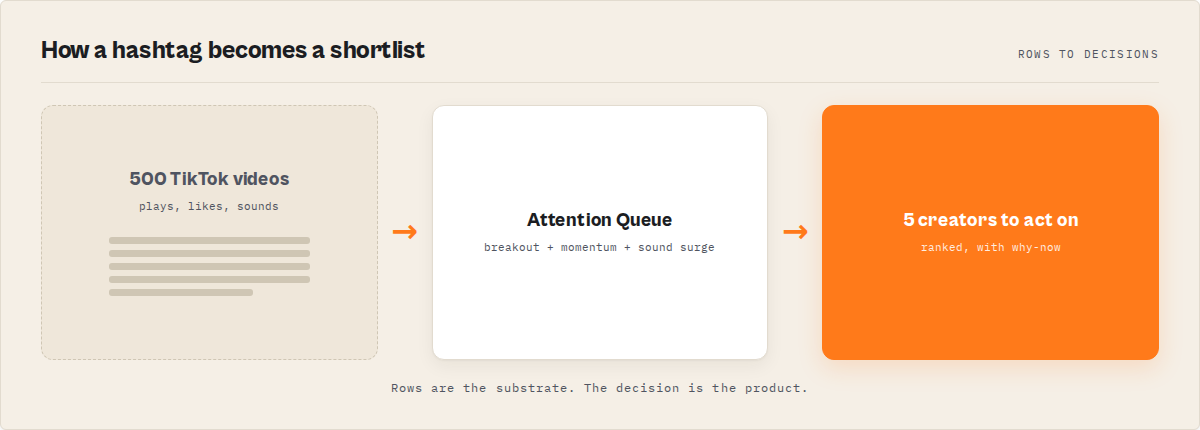
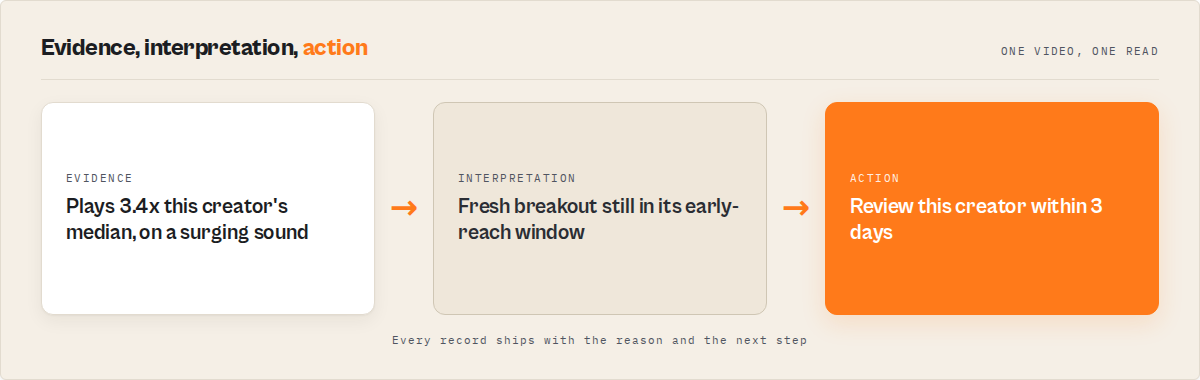
The signal detection layer is the interpretation step. Instead of leaving you to spot a breakout, it surfaces typed, evidenced events: a breakout video when plays run well above the creator's baseline, a sound surge when adoption accelerates platform-wide, a cadence collapse when a tracked account goes quiet. Each event carries a fresh/active/fading status and the evidence behind it.
The memory layer is the moat, and it's the part a competitor can't backfill. A historical store banks public metrics on every entity a run touches, so records carry trajectory (days tracked, trend state, a recent-metric sparkline), store-wide leaderboards, and similar-creators, always scoped to "across tracked entities," never "all of TikTok." A single scrape tomorrow can reproduce the rows, but not that longitudinal context — it only exists if you've been accumulating it.
You can see this shape on a live dataset by running the TikTok Scraper actor on any hashtag in your niche — the first ranked records land in under a minute.
What does a TikTok attention queue return?
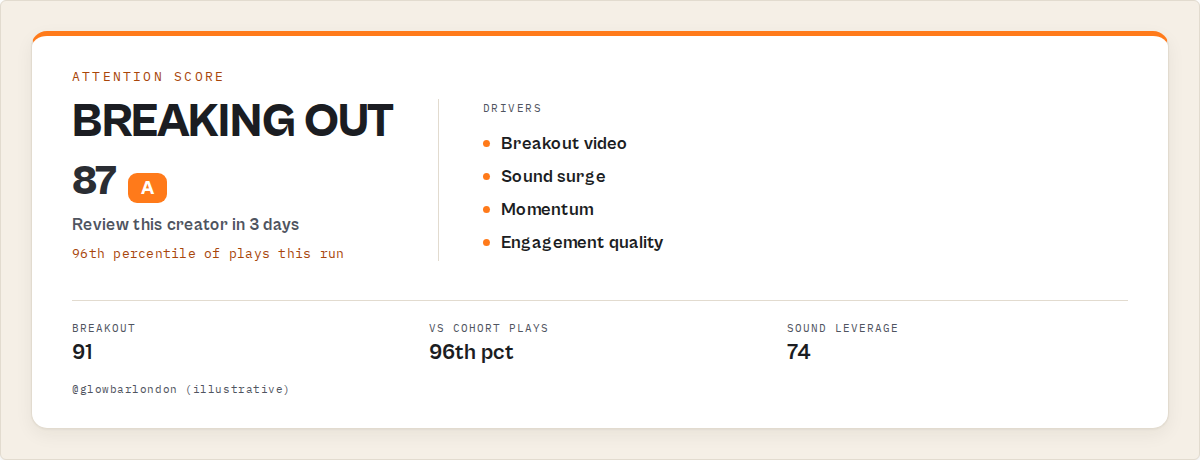
A TikTok attention queue returns a ranked, decision-ready record per creator or video. The core fields are a sortable score bundle (attention, breakout, momentum, sound leverage, engagement quality, cadence risk), an attentionPriority to branch automation on, plain-English whyNow reasons, and a recommendedAction, plus the full raw TikTok record underneath.
Here's a trimmed record so you can see the shape. Again, this is output you read, not code you run.
{
  "entityType": "video",
  "handle": "glowbarlondon",
  "summary": "Largest play spike on this creator in 3 months.",
  "whyThisMatters": [
    "Plays well above this creator's recent baseline.",
    "Uses a sound that is surging in platform-wide usage."
  ],
  "attention": {
    "attentionPriority": "high",
    "whyNow": ["Fresh breakout still inside its early-reach window."],
    "recommendedAction": "Review this creator within 3 days",
    "respondWithinDays": 3
  },
  "scores": {
    "attentionScore": 87,
    "breakoutScore": 91,
    "momentumScore": 64,
    "soundLeverageScore": 74,
    "engagementQualityScore": 70,
    "cadenceRiskScore": 12
  },
  "signalEvents": [
    { "type": "breakout_video", "signalStrength": 0.88, "decayStatus": "fresh" }
  ],
  "cohort": { "percentiles": { "plays": 96, "engagementRate": 88 } }
}
Everything below whyThisMatters is the decision. It's what an experienced analyst would produce by hand after an hour of sorting. attentionPriority is the field your automation routes on. whyNow is the rationale for a human. recommendedAction is always a prioritisation instruction (Review, Watch, Track), never an in-platform action like follow or DM. Routing attention is the job; astroturfing is not.
What are the alternatives to a TikTok attention queue?
There are four practical alternatives to a TikTok attention queue, each with real tradeoffs. The right choice depends on whether your job is one-off extraction or recurring research, how much engineering you want to own, and how many platforms you need to cover.
1. A traditional row scraper (e.g. clockworks/tiktok-scraper). The dominant TikTok row vendor on the Apify Store, and an excellent choice if raw extraction is all you need. Returns videos, creators, sounds, and hashtags as flat rows. Best for: a one-time bulk pull you'll analyse yourself, or feeding a pipeline you already own. Where it breaks: it ships none of the research jobs downstream of extraction, so the sorting, baseline comparison, and weekly diffing stay manual forever.
2. Build it yourself. Wire up extraction, per-creator baselines, breakout and sound-surge detection, momentum trajectory math, cross-run state persistence, and change-diff logic, for every mode, then keep all of it versioned and reproducible. Best for: a team with spare engineering capacity and a very specific in-house need. Where it breaks: you now own a maintained service, not a script. Baseline math, the sound-lifecycle model, residential-proxy and rate-limit handling, and the persistent store that makes "what changed" possible all become yours. That last piece is months of accumulated data you can't shortcut.
3. A general social-listening suite. Covers many platforms with a dashboard and a monthly subscription. Best for: marketing teams that need broad cross-platform coverage and live in a dashboard already. Where it breaks for TikTok specifically: coverage is usually shallow, TikTok-native signals (sound lifecycle, per-creator breakout baselines, cadence risk) are rarely modelled, and you're back to interpreting charts.
4. A TikTok attention-queue actor. Focuses on TikTok and ships the decision layer: ranked attention, breakout and sound-surge detection, and persistent memory per watchlist. Best for: recurring creator scouting, competitor monitoring, and sound-trend tracking where the value is what's winning now and what changed. Where it's less suitable: media downloads, follower-list export, and any authenticity or brand-safety scoring, none of which it does.
Each approach has trade-offs in coverage, engineering cost, timing, and time-to-value. Here's the comparison side by side.
| Approach | Time to first result | Ranking + breakout detection | Run-over-run memory | Cost shape |
|---|---|---|---|---|
| Row scraper | ~minutes | None (manual) | None | Per-row scrape price |
| Build it yourself | Weeks to months | You build it | You build + accumulate it | Engineering time + infra |
| Social-listening suite | Setup + onboarding | Dashboard, shallow on TikTok | Tool-dependent | $60-350+ / month typical |
| Attention-queue actor | Under a minute | Built in, deterministic | Built in, compounds | $0.005 / result, decision layer included |
Pricing and features based on publicly available information as of July 2026 and may change. Re-verify any incumbent's live price before relying on the comparison.
One of the best fits for recurring, TikTok-specific research is an attention-queue actor, because it collapses the spreadsheet workflow into one scheduled run. For broad multi-platform coverage where TikTok is one of many channels, a listening suite may suit better. If you're weighing options, the ApifyForge cost calculator is a quick way to model per-record spend before you commit.
Best practices for TikTok creator research
- Lead with the right rank axis.
breakoutPotentialfor what's popping,opportunityfor emerging creators,soundViralityfor sound trends,momentumfor competitor tracking. The axis is the whole product for that job. - Name a watchlist and run on a schedule. The product is the run-over-run delta. One run can't show what changed; the memory clock starts on run two and can't be backfilled.
- Branch automation on
attentionPriority, not raw scores. Filter to thehighbucket so alerts stay stable across runs. - Size the cohort for cohort stats. Percentiles need a cohort of at least 10 to rank fairly. Raise the per-hashtag cap if you want fuller ranking.
- Enable comments only when you need themes. Comment-theme synthesis needs a sample of 30+ per video. Leave it off for the fastest run.
- Read the leaderboards, not just the queue. Rising-creator and rising-sound leaderboards are the fastest read of where the niche is heading.
- Use the compat profile for raw ingestion. When an existing pipeline only needs the standard field set,
outputProfile: "compat"returns it unchanged. - Wire a webhook on run finish. Push the Intelligence Feed into Slack or a planning board so the queue becomes a notification stream, not a manual pull.
Common TikTok research mistakes
- Treating a scrape as research. Exporting rows is extraction. Research is the ranking and comparison you're doing by hand afterward. Move that work into the tool.
- Sorting by views and calling it triage. Raw views ignore the creator's own baseline. A 90k-view video on a 6k-average creator matters more than a stale 4M-view hit on a mega account.
- Expecting deltas on the first run. Memory can't be invented. Run one reports first-sight honestly with empty deltas; trajectory and change tracking sharpen after several scheduled runs on the same watchlist.
- Catching sounds late. A sound with a big count may already be peaking. Ride the lifecycle stage, not the raw number.
- Ignoring the absence. The competitor who went dark is the story a row dump can't tell. Cadence-risk detection is what surfaces it.
- Reading every row anyway. If you've got ranking and still scroll the full export "just in case," you've kept the bottleneck. Trust the queue and stop at the top five.
Mini case study: an agency's Monday scouting run
Before. A talent agency scouting skincare creators pulled roughly 300 videos per niche into a sheet each week, then spent close to an hour sorting by followers and recent views, eyeballing who "looked like they were growing." Rising creators were spotted late, if at all, because nobody could hold last month's export in their head. The surging sound was usually noticed after it peaked.
After. They switched to a scheduled watchlist run with rankBy: opportunity. Each Monday they read the top of the attention queue (a handful of creators flagged high), acted on those, and skipped the rest. The week a creator's first breakout in three months hit, the queue surfaced it within a run, with the play spike and the surging sound attached as evidence.
The reframe is the whole point: an hour of manual sorting per niche collapsed into a five-minute read. These numbers reflect one team's workflow; results vary with how many creators you track, how often you run, and how busy the niche is.
Which teams feel this pain hardest?
The teams that get the most out of TikTok creator intelligence run TikTok research as continuous work, not one-off pulls. Talent and influencer agencies scouting rising creators before they're expensive. Brand and social teams timing a sound before it peaks. Competitor analysts tracking a rival roster week over week. Market researchers mapping a niche. Creator-economy investors watching for the audience inflection that a monthly Sheets diff misses by 30 days.
If your TikTok work is a one-off list you build once and never refresh, you don't need this. A plain scraper is cheaper and fine. The intelligence layer earns its keep when the job recurs.
Implementation checklist
- Decide your job: creator scouting, competitor monitoring, sound tracking, or niche research. That sets your rank axis.
- Pick your mode: hashtag (default), profiles, sounds, or videos.
- Run once with defaults to see the attention queue shape.
- Name a watchlist. Without it, the run is one-shot with no memory.
- Turn on comment sampling (30+) only if you need theme synthesis.
- Schedule the run daily or weekly.
- Wire automation to branch on
attentionPriority, not raw scores. - After a week, read the trajectory and leaderboard fields. That's when the memory pays off.
Limitations
Honest constraints, because the tool that names them is the one you can trust:
- Metadata only. It reads public TikTok metadata and does not download video files, subtitles, covers, or any media. If you need the video, this isn't the tool.
- Run-over-run memory can't be backfilled. The first run shows no deltas by design. Trajectory and change tracking only sharpen after several scheduled runs on the same watchlist.
- No authenticity or fake-follower scoring. It describes momentum and reach, not whether an audience is real. Pair a dedicated audit tool if that's your need.
- No brand-safety or valuation judgement. The opportunity score is a market-opportunity composite, not an earnings forecast or a risk rating.
- Public data only. It doesn't log in, access private accounts, or bypass restrictions, and it halts a run on repeated blocks rather than pushing through them.
When you need this
You probably need a TikTok attention queue if:
- You're scouting rising creators in a niche on a recurring basis.
- A brand or social team needs to catch a surging sound before it peaks.
- You track a competitor roster week over week and want the run-over-run delta.
- You're mapping a niche and need leaders, challengers, and white space at a glance.
- You're feeding an AI agent or automation that needs TikTok records with breakout and momentum signals attached.
You probably don't need this if:
- You want a one-off raw export to process in your own pipeline (a plain scraper is fine).
- You need to download TikTok media files (this is metadata-only by design).
- You need authenticity, fake-follower, or brand-safety scoring (use a dedicated tool).
- You need follower/following list exports or PII enrichment.
Frequently asked questions
What is the difference between a TikTok scraper and TikTok creator intelligence?
A TikTok scraper extracts substrate (play counts, handles, captions, sounds) and returns rows. A TikTok creator intelligence system returns the same substrate plus a routable decision per record: an attention priority, why-now reasons, a recommended next step, breakout detection, momentum scoring, sound-trend timing, and cross-run change tracking. The scraper is the substrate. The intelligence system is the substrate plus what to do about it.
How do I find emerging TikTok creators?
Run hashtag mode on your niche with rankBy: opportunity (or breakoutPotential) and read the Emerging Creator Radar. It ranks small-to-mid creators who are rising early, ahead of the already-obvious accounts. Breakouts are computed against each creator's own baseline, so a modest-follower creator popping above their normal ranks ahead of a mega account coasting on an old hit.
How do I track trending TikTok sounds before they peak?
Run sounds mode, or hashtag mode with rankBy: soundVirality. Each record carries the sound's lifecycle stage (emerging, accelerating, peak, cooling) and how early the creator got onto it. The soundVirality axis is uncommon among TikTok actors and is what lets you ride a sound while it's still cheap rather than after saturation.
How does TikTok watchlist monitoring work?
Set a watchlistName and reuse it on a schedule. After the first run, the actor returns only what changed (new breakouts, surging sounds, creators going dark) and leads with a change briefing. The job collapses from "diff two CSVs by hand" to "read what flagged this week." Wire an Apify webhook on run finish to push the change feed straight into Slack.
How much does it cost to run TikTok creator intelligence?
The TikTok Scraper actor uses pay-per-event pricing: $0.005 per result analysed, with the full decision layer (attention priority, why-now, recommended step, score bundle) included in that price. Apify's free tier gives $5 in monthly credits, so a trial runs a meaningful cohort at no cash cost. You need an Apify account to run it.
Can I migrate from clockworks/tiktok-scraper without changing my code?
Yes. The input shape matches, and outputProfile: "compat" returns the exact standard TikTok-scraper field set, including the error-code taxonomy, so downstream code reading item.playCount works unchanged. You migrate the pipeline as-is and get the decision layer as an additive upgrade rather than a rewrite. It's a practical drop-in alternative for buyers who also want the ranking.
Is it legal to scrape TikTok with this actor?
It reads only public TikTok metadata and does not log in, download media, or bypass access restrictions. Whether your specific use is permitted depends on your jurisdiction and intended use, including data-protection rules and platform terms. For background, see Apify's guide to web scraping legality. Consult legal counsel for your case.
The bottom line
If you pull TikTok data once and process it yourself, use a row scraper. It's cheaper, and it's the right tool for that job. But if you're monitoring creators every week, extraction stopped being the bottleneck a long time ago. The work is deciding where to look first, and that's exactly what an attention queue is built to do. The TikTok Scraper actor ships it as the default output: ranked, explained, and remembered run over run. Rows are the substrate. The decision is the product.
Ryan Clinton publishes Apify actors and MCP servers as ryanclinton and builds developer tools at ApifyForge.
Last updated: July 2026