TikTok Scraper — Breakouts, Creator Momentum & Sound Trends is an Apify actor on ApifyForge. TikTok Scraper with an attention layer: get ranked breakout videos, creator momentum, and trending TikTok sounds instead of rows. Works as a TikTok hashtag scraper, profile scraper, or sound tracker. It costs $0.005 per result. Best for teams who need automated tiktok scraper — breakouts, creator momentum & sound trends data extraction and analysis. Not ideal for use cases requiring real-time streaming data or sub-second latency. Maintenance pulse: 90/100. Last verified March 27, 2026. Built by Ryan Clinton (ryanclinton on Apify).
TikTok Scraper — Breakouts, Creator Momentum & Sound Trends
TikTok Scraper — Breakouts, Creator Momentum & Sound Trends is an Apify actor available on ApifyForge at $0.005 per result. TikTok Scraper with an attention layer: get ranked breakout videos, creator momentum, and trending TikTok sounds instead of rows. Works as a TikTok hashtag scraper, profile scraper, or sound tracker. Drop-in migration from clockworks/tiktok-scraper.
Best for teams who need automated tiktok scraper — breakouts, creator momentum & sound trends data extraction and analysis.
Not ideal for use cases requiring real-time streaming data or sub-second latency.
What to know
- Results depend on the availability and structure of upstream data sources.
- Large-scale runs may be subject to platform rate limits.
- Requires an Apify account — free tier available with limited monthly usage.
Maintenance Pulse
90/100Cost Estimate
How many results do you need?
Pricing
Pay Per Event model. You only pay for what you use.
| Event | Description | Price |
|---|---|---|
| result | One TikTok video analysed and ranked with the full decision layer: attention priority, why-now, recommended next step, and the 0-100 score bundle. | $0.005 |
Example: 100 events = $0.50 · 1,000 events = $5.00
Documentation
In one sentence
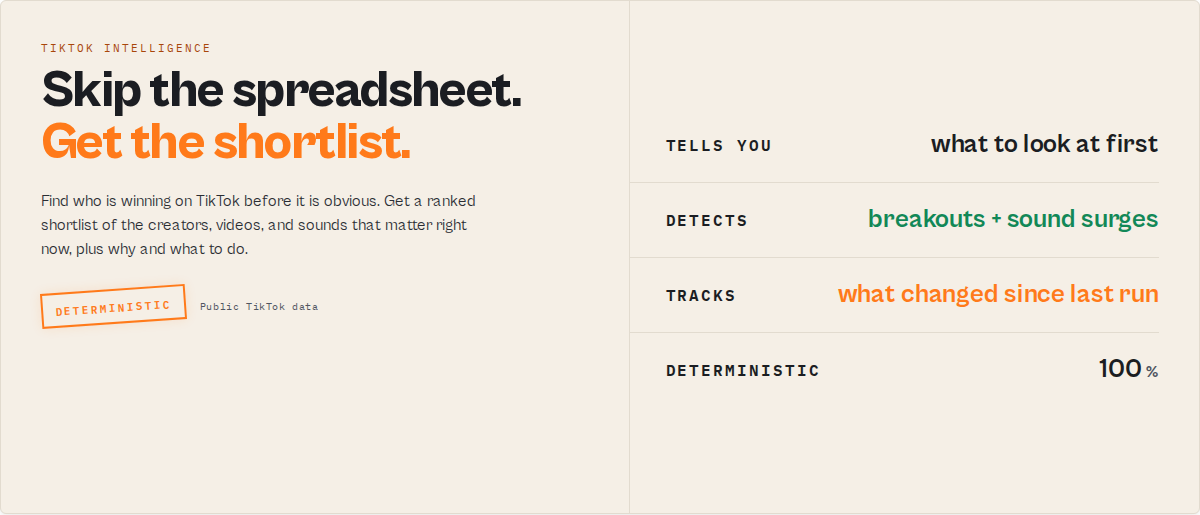
TikTok Scraper is an Apify actor that takes creators, hashtags, sounds, or videos and returns a ranked attention queue showing what is breaking out, why it matters, and what changed since your last run.
Category: TikTok scraper. TikTok creator and trend intelligence. Social media monitoring tool. Primary use case: Find which TikTok creators, videos, and sounds are accelerating right now without reading rows by hand. Can also be used as a drop-in raw TikTok data scraper through its compat output.
Also known as: TikTok trend tracker, TikTok breakout video finder, TikTok creator momentum tracker, TikTok sound trend scraper, emerging TikTok creator finder.
What this actor does
- What it is: A TikTok scraper that adds a decision layer on top of the raw data — a ranked queue of what to look at first.
- What it checks: Breakout videos, creator momentum and going-dark risk, surging sounds, hashtag cohorts, and what changed since your last run.
- What it returns: Each creator or video with a plain-English summary, an attention priority, why it matters now, a recommended next step, and a sortable 0-100 score bundle. Plus the full raw TikTok record underneath.
- What it does NOT do: It does not download video files, does not score authenticity or fake followers, does not judge brand safety, and does not predict revenue or valuation.
- Who it's for: Influencer and talent agencies, brand and social teams, competitor analysts, market researchers, and creator-economy investors.
TikTok Scraper is an Apify actor that turns a TikTok hashtag, a creator list, a sound, or a set of video URLs into a ranked attention queue in a single run. It functions as a TikTok creator-intelligence API: paste the input, get back the handful of creators and videos that are actually winning right now, each carrying why it matters and what to do next. The real competitor isn't another scraper. It's the spreadsheet: the hour an analyst spends in Sheets sorting rows by followers and recent views to guess what is heating up.
Compatible with clockworks/tiktok-scraper: existing pipelines migrate through the compat output profile, with the raw fields under identical names. The difference is what sits on top: breakout detection, creator momentum, sound-trend ranking, comment-theme synthesis, watchlist monitoring, and a sortable score bundle. One actor replaces a workflow that otherwise spans roughly twelve single-purpose scrapers stitched together by hand.
To rank TikTok creators and videos by who is winning now, run TikTok Scraper with a hashtag, a creator list, a sound URL, or video URLs. You get back a ranked queue led by attention priority, why-now reasons, and a recommended next step, with the full raw TikTok metadata attached to every record.
In short: Paste creators, hashtags, sounds, or videos, and get back a ranked, explained shortlist of what to act on, plus the raw data underneath.
What it is — A TikTok scraper with a built-in decision layer that ranks and explains the results. Best for — Agencies, brand teams, competitor analysts, market researchers, creator-economy investors. Speed — First ranked results typically appear within the first minute of a run; full cohorts take longer at higher caps. Output — JSON, CSV, or Excel. Each record carries a summary, attention routing, signal events, and a 0-100 score bundle. Proxy — Residential proxies are required (default Apify Residential, US rotation).
Key limitation: This actor reads public TikTok metadata only. It does not download media and does not access private or login-gated content. What it is not: Not a media downloader, not an authenticity or fake-follower auditor, and not a replacement for legal or brand-safety review. Does not include: Video file downloads, follower lists, PII enrichment, or revenue and ROI predictions. Results may be incomplete when: an account is private, a sound or hashtag is sparse, or TikTok restricts automated access on shared IPs.
Ready-to-run examples
One-click presets, each tuned to a single job. Open one, hit run, then swap in your own niche or handles.
- Find Emerging TikTok Creators — rising creators in a niche, ranked by an emerging-creator radar before they're obvious.
- TikTok Influencer Discovery Tool — the right influencers in any niche, ranked by attention with archetype and why-now.
- Find Breakout TikTok Videos — videos breaking out right now, ranked by breakout strength and the signals behind them.
- Track Trending TikTok Sounds — surging sounds early, with the videos and creators riding each one.
- Monitor Competitor TikTok Accounts — spot which competitor accounts are slowing down, going dark or slipping.
- TikTok Creator Growth Tracker — momentum, drivers and a run-over-run timeline for any set of accounts.
- TikTok Trend Monitoring — the day's breakouts, accelerations and decay in a niche as one feed.
- TikTok Watchlist Dashboard — the creators and videos to look at first, ranked by attention with next steps.
- TikTok Opportunity Finder — underserved upside in a niche, ranked by opportunity score.
- Find Underserved TikTok Niches — white space: underused sounds, underrepresented formats and fast-growing subtopics.
- TikTok Market Map — the niche mapped into leaders, challengers, emerging and cooling.
- TikTok Intelligence Feed — new breakouts, accelerations and decay as a feed for Slack, Zapier and AI agents.
See all ready-to-run examples →
The real competitor isn't another scraper. It's the spreadsheet.
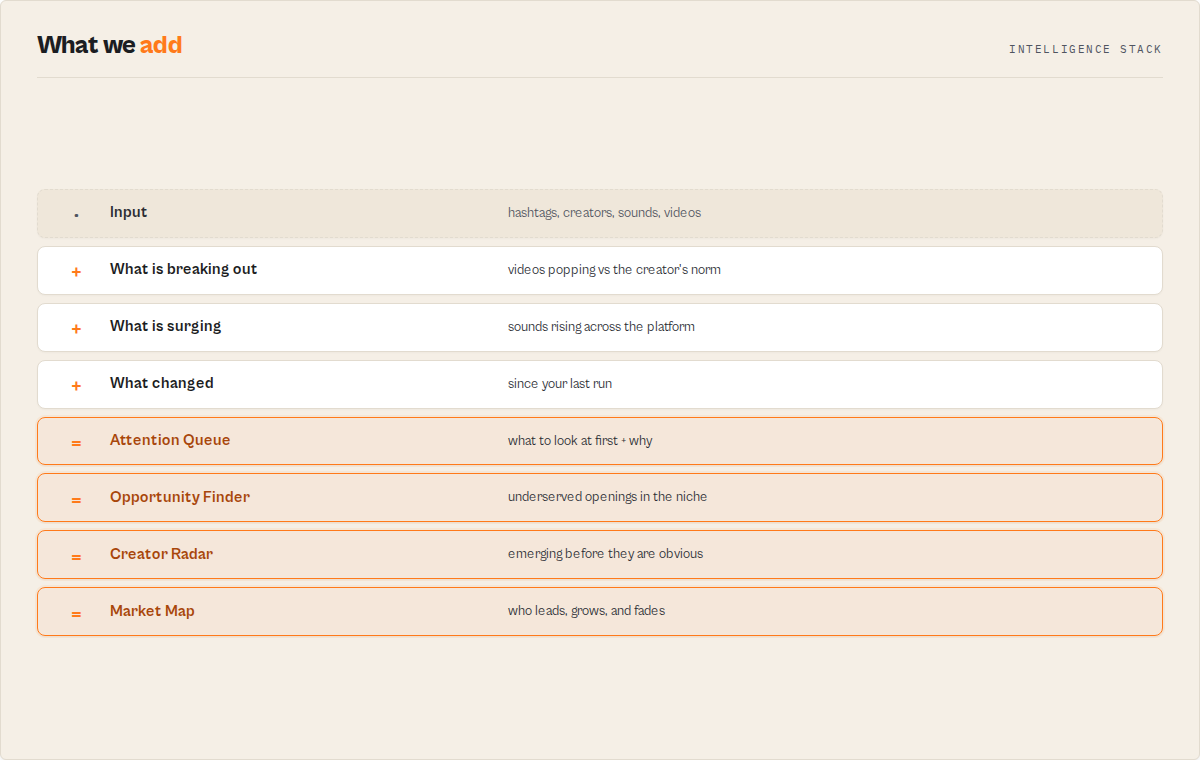
That spreadsheet is the hour an analyst spends sorting rows to guess what is heating up. Four surfaces here replace that hour, and no other TikTok actor ships them:
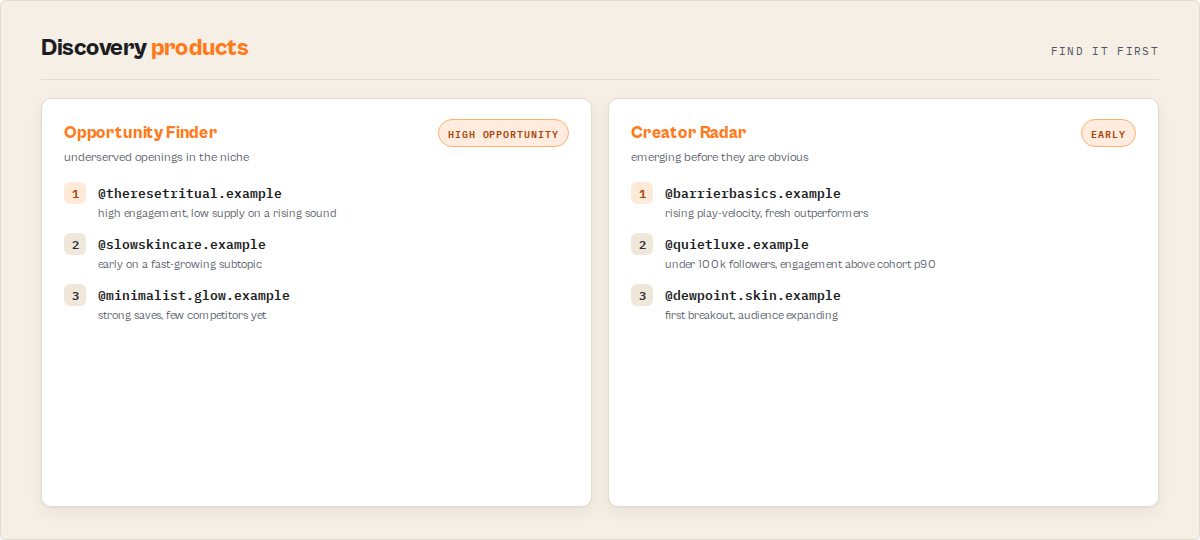
- Emerging Creator Radar — find the creators in a niche before they are obvious, and before they are expensive.
- Opportunity Finder — surface the underserved openings: high engagement, low supply, early on a rising trend.
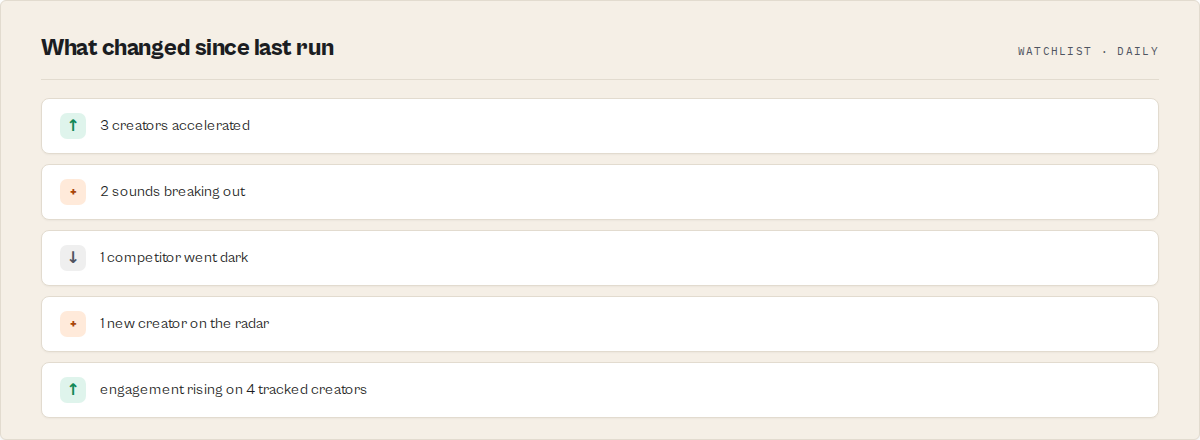
- Intelligence Feed — one ranked list of what changed since your last run: new breakouts, surging sounds, creators going dark.
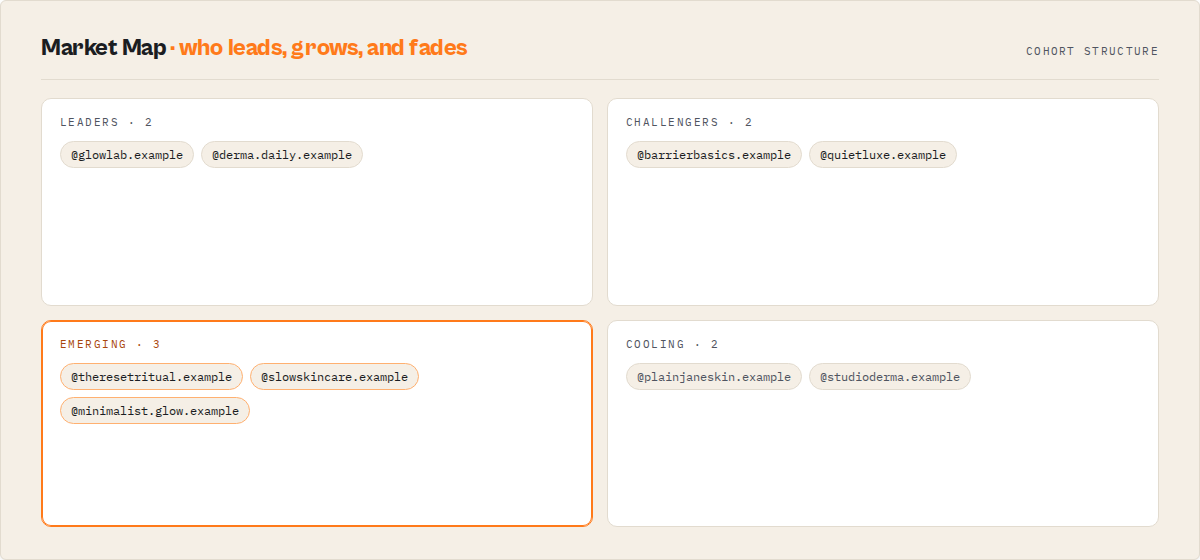
- Market Map — see the structure of a niche at a glance: who leads, who is challenging, who is cooling.
Designed for: influencer and talent agencies, brand and social teams, competitor analysts, market researchers, and creator-economy investors.
What you'll actually see
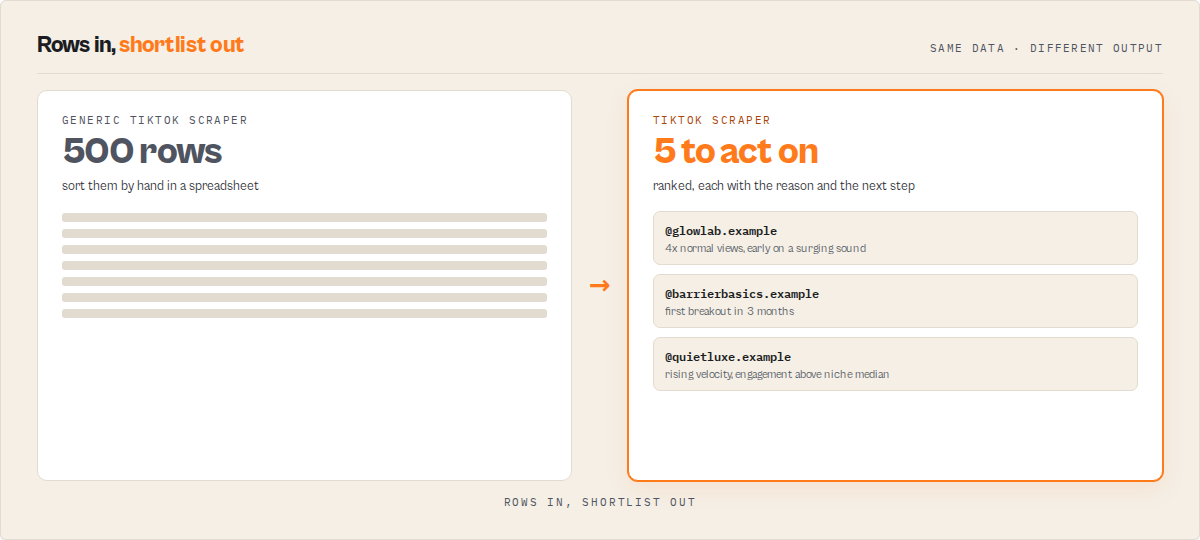
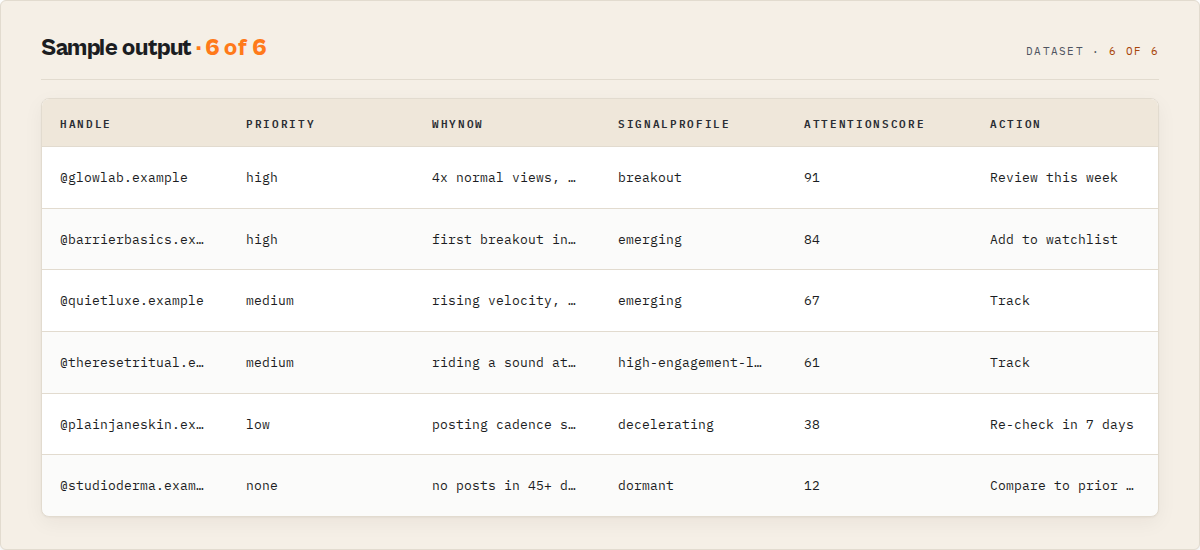
Run { "mode": "hashtag", "hashtags": ["skincare"], "rankBy": "opportunity" } and the top of the dataset reads like a shortlist, not a spreadsheet (illustrative example):
TOP OPPORTUNITIES UNDER #SKINCARE

1.  @rising_creator   priority: HIGH
    Why now:  4x this creator's normal views · early on a surging sound · engagement above the niche average
    Action:   Review this week

2.  @niche_brand      priority: HIGH
    Why now:  first breakout in 3 months · posting cadence doubled
    Action:   Add to watchlist
Every row carries the reason and the next step, with the full raw TikTok record underneath. Clockworks gives you TikTok rows. This actor tells you what to look at first.
Generic TikTok scraper vs TikTok Scraper
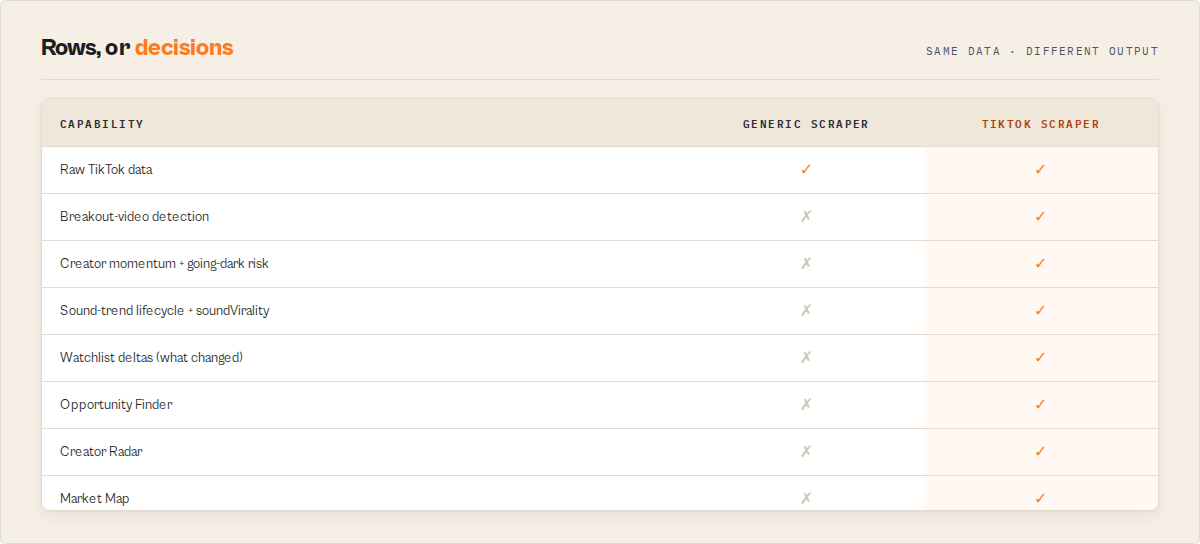
Same raw data underneath, a decision layer on top:
| Capability | Generic TikTok scraper | TikTok Scraper |
|---|---|---|
| Raw TikTok data (compat field set) | ✓ | ✓ |
| Breakout-video detection | ✗ | ✓ |
| Creator momentum + going-dark risk | ✗ | ✓ |
Sound-trend lifecycle + soundVirality rank | ✗ | ✓ |
| Attention queue (what to look at first) | ✗ | ✓ |
| Watchlist deltas (what changed since last run) | ✗ | ✓ |
| Opportunity Finder + Emerging Creator Radar | ✗ | ✓ |
| Market Map + Intelligence Feed | ✗ | ✓ |
Why agencies and brand teams use it: the output is a shortlist they can act on this week (who is rising, which sound to ride, which competitor went quiet), not a CSV to sort by hand. Creator scouts and social teams read the attention queue; competitor-intelligence teams run a watchlist on a schedule.
What you get from one call
Input: { "mode": "hashtag", "hashtags": ["skincare"], "rankBy": "breakoutPotential" }
Returns:
- A ranked attention queue: the creators and videos under #skincare that are accelerating fastest right now.
- For each one: a summary line, an attention priority, why-now reasons, and a recommended next step.
- A 0-100 score bundle (attention, breakout, momentum, sound leverage, engagement quality, cadence risk) for sorting and filtering.
- Typed signal events (breakout, acceleration, sound surge, going-dark) with a fresh/active/fading status.
- The full raw TikTok record under every entry, so downstream code keeps working unchanged.
- A run summary with a one-line headline, a daily briefing, and rising-creator/sound/hashtag leaderboards.
Typical time to first result: under a minute for the leading entries. Typical time to integrate: minutes — existing pipelines that read raw TikTok fields work unchanged through the compat output.
What makes this different
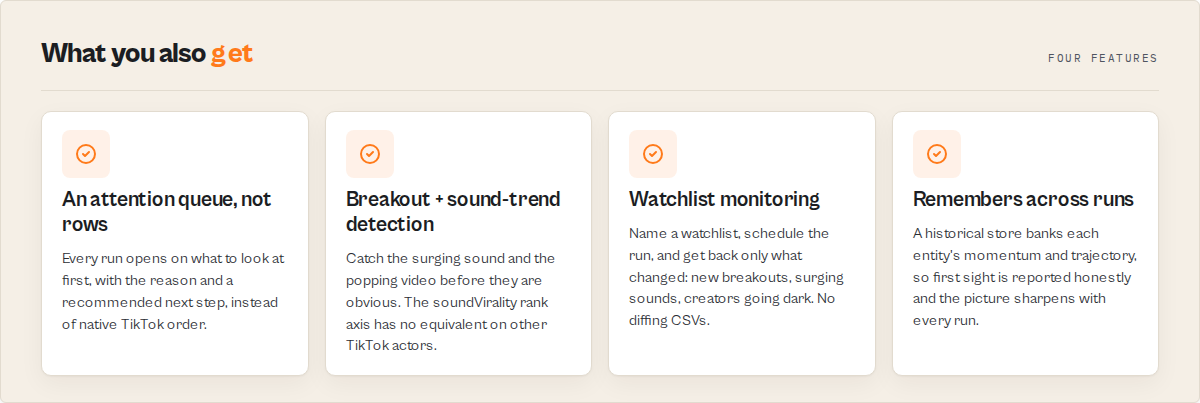
- An attention queue, not a row dump — every run opens on what to look at first, with the reason and a recommended next step, instead of native TikTok order.
- Sound-trend and breakout detection — catch the surging sound and the popping video before they are obvious. The
soundViralityrank axis has no equivalent on other TikTok actors. - Watchlist mode — name a watchlist, schedule the run, and get back only what changed: new breakouts, surging sounds, creators going dark. No diffing CSVs.
If you were building this yourself, you would need to scrape the substrate, compute per-creator baselines, detect breakouts and sound surges, rank by the right axis, store history across runs, and write the change-diff logic, for every mode. This actor ships that as one decision layer. It functions as a TikTok intelligence API, producing ranked, explained outputs useful for creator discovery, competitor monitoring, and trend research.
Quick answers
What is it? A TikTok scraper that returns a ranked, explained shortlist of creators and videos — what is breaking out, why, and what changed — instead of raw rows you sort yourself.
How do I find emerging TikTok creators? Run hashtag mode on your niche with rankBy: opportunity or breakoutPotential. The actor returns small-to-mid creators that are rising early, ranked ahead of the already-obvious accounts.
What makes it different? Every record carries an attention priority, why-now reasons, a recommended next step, and a 0-100 score bundle. It also detects surging sounds and remembers entities across runs so it can tell you what changed.
What data sources does it use? Public TikTok pages only — the same public metadata a logged-out visitor sees. No login, no private accounts, no media downloads.
What does it return? A ranked attention queue, typed signal events, a score bundle, optional comment-theme synthesis, watchlist deltas, and the full raw TikTok record under every entry.
Is it a drop-in for clockworks/tiktok-scraper? Yes. The input shape matches, and outputProfile: "compat" returns the exact standard field set so existing downstream code reading item.playCount works unchanged.
At a glance
Quick facts:
- Input: A hashtag, a creator list, a sound URL, or video URLs — pick one mode.
- Output: Ranked entity records (creator or video) with attention routing, signal events, and a 0-100 score bundle. JSON, CSV, or Excel.
- Modes: hashtag (default), profiles, sounds, videos, search (opt-in).
- Rank axes: attention, opportunity, breakoutPotential, momentum, recency, engagement, soundVirality, relevance.
- Batch size: Up to 50 hashtags, 200 profiles, 100 sounds, or 500 video URLs per run.
- Proxy: Residential required (default Apify Residential, US).
- Watchlist: Set a name to get back only what changed on the next run.
Input → Output:
- Input: A hashtag (or creators, a sound, video URLs).
- Process: The actor reads the public TikTok data, ranks and explains the results, and remembers each entity for next time.
- Output: A ranked attention queue plus the raw data, in JSON, CSV, or Excel.
Best fit: Finding emerging creators in a niche, spotting trending sounds early, weekly competitor momentum tracking, hashtag and trend research, and breakout video discovery. Not ideal for: Downloading TikTok videos, follower-list export, or any authenticity, brand-safety, or valuation judgement. Does not include: Media files, subtitles, follower/following lists, PII enrichment, or revenue predictions.
Problems this solves:
- How to tell which TikTok creators in a niche are accelerating without sorting rows by hand.
- How to spot a surging TikTok sound before it is obvious.
- How to track a set of competitor accounts week over week without diffing CSVs.
- How to find breakout TikTok videos under a hashtag instead of scrolling native order.
Data trust: All fields are derived from public TikTok metadata the actor fetches in the run. Cohort percentiles return null when the cohort is too small to rank fairly, and history fields carry firstSightFallback: true on first sight rather than fabricating a timeline.
Common questions this actor answers:
- Which creators under this hashtag are popping right now? The Attention Queue and Breakouts views, ranked by breakout strength.
- Which sound is about to break? The Sound Trends view, with each creator's position on the sound's curve.
- Who in my competitor set is slowing down? The Cadence Risks and Competitor Decay views.
- What changed since last week? Watchlist mode, which leads with a change briefing.
What is a TikTok creator-intelligence tool?
A TikTok creator-intelligence tool turns raw TikTok metadata into decisions: which creator is accelerating, which sound is surging, which account is going quiet. Basic TikTok scrapers stop at the rows and leave the interpretation to a human in a spreadsheet. TikTok Scraper ships that interpretation (ranking, breakout detection, momentum, and change tracking) as the default output, so the answer arrives with the data.
What is a TikTok trend tracker?
A TikTok trend tracker follows how a sound, hashtag, or format is moving (emerging, accelerating, peaking, or cooling) instead of reporting a static count. TikTok Scraper assigns each sound and hashtag a lifecycle stage and a position on its adoption curve, so you can ride a trend early rather than after it peaks.
What is a TikTok competitor monitoring tool?
A TikTok competitor monitoring tool watches a set of accounts over time and reports what changed: who accelerated, who slowed, who went dark. TikTok Scraper does this through watchlist mode, which remembers the set across runs and leads each run with a change briefing.
What is a TikTok influencer discovery tool?
A TikTok influencer discovery tool surfaces creators worth working with before they are obvious. TikTok Scraper ranks small-to-mid creators who are rising early through the Emerging Creator Radar, ahead of the already-expensive accounts.
What data can you extract?
Every entry pairs the full raw TikTok record with a decision layer on top. The raw substrate matches the standard TikTok-scraper field set field-for-field.
| Data point | Source | Availability | Example |
|---|---|---|---|
| Play / like / share / comment counts | Public video metadata | Always | playCount: 4214900 |
| Creator handle and follower count | Public profile metadata | Always | handle: "glowbarlondon", fans: 184300 |
| Caption, hashtags, mentions | Public video metadata | Always | hashtags: ["skincare", "skinbarrier"] |
| Sound / music metadata | Public video metadata | Always | musicName: "original sound" |
| Attention priority + why now | Decision layer | Signals profile | attentionPriority: "high" |
| Signal events (breakout, surge, going-dark) | Decision layer | Signals profile | type: "breakout_video" |
| Score bundle (0-100) | Decision layer | Signals profile | attentionScore: 87 |
| Sound leverage / trend position | Decision layer | Sound-bearing records | soundLeverageScore: 74 |
| Comment themes + sentiment | Decision layer | At 30+ comments/video | themes: ["where to buy", "praise"] |
| Watchlist deltas | Decision layer | When watchlist active | changeFlags: ["NEW_BREAKOUT"] |
| Cohort percentiles | Decision layer | Cohort of 10+ | plays: 92 (percentile) |
| Run summary + leaderboards | Decision layer | Once per run | risingCreators, risingSounds |
Why use TikTok Scraper?
Finding the three creators worth acting on this week is slow. The usual workflow is to run a profile or hashtag scraper, dump the rows into a spreadsheet, sort by followers and recent views, eyeball which ones "look like they are growing," then repeat the whole thing next week and diff the files by hand. That is an hour of an analyst's time per niche, and it misses the early signals — the surging sound, the creator who just went quiet — that do not show up in a static sort.
TikTok Scraper does that interpretation in the run. It ranks the cohort by who is winning now, attaches the reason to every entry, detects breakouts and sound surges, and remembers each entity so the next run can report only what changed. The buyer compares the output against an analyst's hour, not against a row vendor's price.
Key difference: Clockworks gives you TikTok rows. This actor tells you what to look at first.
This is not a price war. The actor competes on the decision layer and on unifying a job that is otherwise split across roughly twelve separate scrapers, not on undercutting a raw-row price. The cheap single-data-type buyer is well served elsewhere; the intelligence buyer who wants the answer is the fit here.
Platform capabilities
- Scheduling — run a watchlist daily, weekly, or on any interval, and get back only what changed.
- API access — trigger from Python, JavaScript, or any HTTP client.
- Residential proxy rotation — required and built in, so the actor reaches public TikTok pages reliably.
- Monitoring — Slack or email alerts when runs fail, through Apify integrations.
- Integrations — Zapier, Make, Google Sheets, webhooks, and any tool that reads an Apify dataset.
Features
TikTok Scraper ships five input modes and a single decision layer that sits on top of every one of them. The layer ranks the cohort, explains each entry, detects time-decaying signal events, and remembers entities across runs. Everything below is deterministic and present in the output you can sort, filter, and export.
Ranking and attention
- Attention queue — every entity carries an
attentionblock: priority (high/medium/low/none), why-now reasons, a recommended next step, and a respond-within window. It detects accelerating creators across the cohort and surfaces the ones to look at first. - Reranking by axis —
rankByreorders results byattention,opportunity,breakoutPotential,momentum,recency,engagement,relevance, orsoundVirality. Each record shows its native TikTok rank, its reranked rank, and every axis value at once. - Score bundle — a sortable 0-100 set on every record:
attentionScore,breakoutScore,momentumScore,soundLeverageScore,engagementQualityScore,cadenceRiskScore, with plain-English drivers inscoreEvidence.
Signals and trends
- Signal events — typed, time-decaying events including breakout video, creator acceleration and deceleration, sound adoption surge, hashtag surge, cadence collapse (going dark), audience expansion, format shift, and topic migration. Each carries a fresh/active/fading/expired status.
- Signal profiles — each creator gets an archetype: emerging, breakout, stable-authority, viral-fragile, high-engagement-low-scale, decelerating, dormant, or unclassified, with evidence.
- Sound trends — sound-bearing records carry a trend lifecycle (emerging/accelerating/peak/cooling) and a trend position showing how early the creator got onto the sound.
- Cohort comparison — percentiles that rank a record against the run's cohort on plays, engagement, share rate, and freshness.
Monitoring and discovery
- Watchlist mode — set a name to track a creator set, hashtag, or sound across runs. The run leads with a change briefing, then returns per-entity deltas and change flags.
- Comment-theme synthesis — opt in at 30+ comments per video to get themes (what viewers ask for, praise, question), audience-language signals, and sentiment.
- Discovery surfaces — an Emerging Creator Radar, a White Space view of underserved sounds and formats, a Market Map of the cohort, an Opportunities view, and an Intelligence Feed of the run's events.
- Cross-run memory — a historical store banks public metrics on every entity a run touches, so records carry
history(trajectory plus days tracked),communitySignals, store-wide leaderboards (Rising Creators / Sounds / Hashtags / Most Improved across tracked entities), andsimilarCreators. These warm up with use and are labelled "across tracked entities," never "all of TikTok." - Drop-in compat —
outputProfile: "compat"returns the exact standard TikTok-scraper field set, including theerrorCodetaxonomy, for migration and raw ingestion.
Use cases for TikTok creator intelligence
How to find emerging TikTok creators
Use when you need to find rising creators in a niche before they are expensive. Run hashtag mode with rankBy: opportunity and read the Emerging Creator Radar. Used by talent and influencer agency teams to shortlist creators who are small-to-mid, early on surging sounds, and accelerating. Key outputs: signalProfile, opportunityScore, radarRank, scoreEvidence.
How to find viral TikTok sounds
Use when a brand or social team needs to ride a sound before it peaks. Run sounds mode or hashtag mode with rankBy: soundVirality. Key outputs: trendLifecycle, trendPosition, soundLeverageScore, trendOriginator.
How to monitor TikTok competitors
Use when you track a competitor set week over week. Run profiles mode with a watchlistName on a schedule. The run leads with a change briefing and flags who accelerated, who slowed, and who went dark. Key outputs: watchlist, riskState, changeStory, scores.
How to find breakout TikTok videos
Use when you need the videos popping under a hashtag, not native order. Run hashtag mode with rankBy: breakoutPotential and read the Breakouts view. Key outputs: signalEvents, breakoutScore, whyThisMatters, cohort.
How to track TikTok trends and research a niche
Use when quantifying a hashtag's trajectory or mapping a niche. Run hashtag mode and read the Market Map and White Space views. Key outputs: marketMap, whiteSpace, cohort, risingHashtags.
Best for TikTok hashtag scraping
Use when you need all the videos, creators, and signals under one or more hashtags in a single run. Hashtag mode collects up to 1,000 videos per tag, ranks them by breakout potential or sound virality, and returns cohort percentiles. Key outputs: signalEvents, cohort, trendLifecycle, raw substrate fields.
Best for TikTok profile scraping
Use when you need a creator set analysed in one run rather than one profile scraper per account. Profiles mode takes up to 200 handles, ranks each creator by momentum or attention, and optionally enrolls them in a watchlist for weekly diff tracking. Key outputs: signalProfile, scores, watchlist.
When to use TikTok Scraper
Best for: finding emerging creators across a niche of 50-1,000 videos, weekly or daily competitor monitoring on a creator set, sound-trend tracking, and breakout discovery under busy hashtags. Not ideal for: downloading TikTok video files (this actor is metadata-only by design), exporting follower/following lists, or any authenticity, brand-safety, or valuation scoring — none of those ship here.
How to scrape TikTok with TikTok Scraper
- Choose a mode and enter your input — for the default, pick hashtag mode and enter a tag such as
skincare. Or paste creators, a sound URL, or video URLs for the other modes. - Set how to rank —
breakoutPotentialis the default for hashtags and surfaces what is popping. Switch toopportunityfor emerging creators orsoundViralityfor sound trends. - Run the actor — click Start. The leading ranked results land within about a minute; larger cohorts take longer.
- Read or download results — open the Attention Queue view in the console, or export JSON, CSV, or Excel from the Dataset tab.
First run tips
- Start with the default —
{ "mode": "hashtag", "hashtags": ["skincare"], "rankBy": "breakoutPotential" }returns a ranked shortlist in one run and shows the actor's shape. - Open the Attention Queue view first — the dataset has many views; the default Attention Queue is the 5-second read. The full record set is always there for analysts.
- Set a watchlist name to unlock monitoring — without it you get a one-shot ranking. With it, the next run returns only what changed. History warms up over time, so start it on day one.
- Comments are off by default — set
commentsSamplePerVideoto 30 or more to get comment-theme synthesis. Leave it at 0 for the fastest run. - Search mode is opt-in — leave it off and use hashtag, profiles, sounds, or videos. Search must be acknowledged explicitly (see Limitations).
Input parameters
| Parameter | Type | Required | Default | Description |
|---|---|---|---|---|
mode | string | Yes | hashtag | One of hashtag, profiles, sounds, videos, search. |
hashtags | string[] | For hashtag mode | ["skincare"] | Hashtags with or without #. Up to 50. |
rankBy | string | No | breakoutPotential | Rank axis: attention, opportunity, breakoutPotential, momentum, recency, engagement, soundVirality, relevance. |
profiles | string[] | For profiles mode | [] | TikTok handles with or without @. Up to 200. |
sounds | string[] | For sounds mode | [] | TikTok sound/music URLs or IDs. Up to 100. |
videos | string[] | For videos mode | [] | TikTok video URLs. Up to 500. |
searchQuery | string | For search mode | — | Free-text query. Requires searchModeAcknowledged. |
searchModeAcknowledged | boolean | For search mode | false | Must be true to run search mode. |
commentsSamplePerVideo | integer | No | 0 | Public comments per video. 30+ enables comment-theme synthesis. Max 500. |
watchlistName | string | No | — | Set a name to enable cross-run monitoring on any mode. |
maxVideosPerHashtag | integer | No | 100 | Cap on videos per hashtag. Max 1,000. |
maxRecentVideosPerProfile | integer | No | 50 | Cap on recent videos per creator. Max 500. |
maxVideosPerSound | integer | No | 100 | Cap on videos per sound. Max 1,000. |
maxResults | integer | No | 100 | Cap on search-mode results. Max 1,000. |
outputProfile | string | No | signals | signals (full decision layer), compat (standard field set), minimal (IDs + URLs). |
taskPack | string | No | none | Adds a curated, product-shaped summary record for a specific job. |
changeWindowDays | integer | No | — | Produce a "what changed" read for the queried entities over this many days. |
proxyConfiguration | object | No | Residential US | Residential proxies required. |
Input examples
- Find emerging creators under a hashtag (the default first run):
{ "mode": "hashtag", "hashtags": ["skincare"], "rankBy": "breakoutPotential" }
- Monitor a competitor set on a schedule:
{ "mode": "profiles", "profiles": ["@glowbarlondon", "@theordinary"], "watchlistName": "skincare-competitors", "rankBy": "momentum" }
- Track a surging sound and who rode it earliest:
{ "mode": "sounds", "sounds": ["https://www.tiktok.com/music/original-sound-7300000000000000000"], "rankBy": "soundVirality" }
Input tips
- Start with defaults — hashtag mode plus
breakoutPotentialcovers most first runs. - Batch in one run — 50 profiles in one run is more efficient than 50 single-profile runs.
- Use compat for raw ingestion — set
outputProfile: "compat"when you only need the standard field set for an existing pipeline.
Output example
A trimmed signals-profile record (the default outputProfile: "signals"):
{
  "recordType": "entity",
  "entityType": "video",
  "entityId": "7361500000000000000",
  "handle": "glowbarlondon",
  "summary": "Largest play spike on this creator in 3 months.",
  "whyThisMatters": [
    "Plays well above this creator's recent baseline.",
    "Uses a sound that is surging in platform-wide usage."
  ],
  "attention": {
    "attentionPriority": "high",
    "whyNow": ["Fresh breakout still inside its early-reach window."],
    "deprioritizationReasons": [],
    "recommendedAction": "Review this creator within 3 days",
    "respondWithinDays": 3
  },
  "signalProfile": {
    "label": "breakout",
    "signalProfileStrength": 0.81,
    "signalProfileVersion": "1.0",
    "signalProfileEvidence": ["Recent breakout video", "Audience expansion detected"]
  },
  "scores": {
    "attentionScore": 87,
    "breakoutScore": 91,
    "momentumScore": 64,
    "soundLeverageScore": 74,
    "engagementQualityScore": 70,
    "cadenceRiskScore": 12
  },
  "scoreEvidence": [
    "Recent video 3.4x this creator's median plays.",
    "Sound appears in multiple rising videos this run."
  ],
  "signalEvents": [
    {
      "type": "breakout_video",
      "signalStrength": 0.88,
      "active": true,
      "firstDetectedAt": "2026-06-18T00:00:00Z",
      "peakAt": null,
      "daysSincePeak": null,
      "decayStatus": "fresh",
      "reason": "Single video popping well above this creator's baseline.",
      "evidence": { "sampleSize": 42 }
    }
  ],
  "cohort": {
    "cohortType": "hashtag",
    "cohortName": "skincare",
    "cohortSize": 100,
    "cohortStatus": "ok",
    "percentiles": { "plays": 96, "engagementRate": 88, "shareRate": 91, "freshness": 73 }
  },
  "substrate": {
    "id": "7361500000000000000",
    "text": "the only 3 steps your skin barrier needs",
    "createTimeISO": "2026-06-17T14:22:00Z",
    "authorMeta": { "name": "glowbarlondon", "nickName": "Glow Bar London", "fans": 184300, "verified": false },
    "musicMeta": { "musicName": "original sound", "musicId": "7300000000000000000" },
    "webVideoUrl": "https://www.tiktok.com/@glowbarlondon/video/7361500000000000000",
    "diggCount": 312400,
    "shareCount": 41200,
    "playCount": 4214900,
    "commentCount": 5870,
    "hashtags": [{ "name": "skincare" }, { "name": "skinbarrier" }]
  }
}
A compat record (outputProfile: "compat") — the exact standard TikTok-scraper shape, no decision fields:
{
  "id": "7361500000000000000",
  "text": "the only 3 steps your skin barrier needs",
  "createTimeISO": "2026-06-17T14:22:00Z",
  "authorMeta": { "id": "6700000000000000000", "name": "glowbarlondon", "nickName": "Glow Bar London", "fans": 184300, "verified": false },
  "musicMeta": { "musicName": "original sound", "musicId": "7300000000000000000" },
  "webVideoUrl": "https://www.tiktok.com/@glowbarlondon/video/7361500000000000000",
  "diggCount": 312400,
  "shareCount": 41200,
  "playCount": 4214900,
  "collectCount": 28700,
  "commentCount": 5870,
  "hashtags": [{ "name": "skincare" }, { "name": "skinbarrier" }],
  "isSlideshow": false
}
Output fields
| Field | Type | Description |
|---|---|---|
recordType | string | entity, event, intelligenceFeed, watchlistBriefing, taskPack, summary, or error. |
entityType | string | video or creator. |
entityId | string | Stable TikTok ID — the cross-run dedup key. |
handle | string | Creator handle, normalised without @. |
summary | string | One-line plain-English read of the record. |
whyThisMatters | string[] | Up to four lines on why this entry stands out. |
attention.attentionPriority | string | high, medium, low, or none. |
attention.whyNow | string[] | Plain-English reasons to act now. |
attention.recommendedAction | string | A prioritisation instruction (Review, Watch, Track), never an in-platform action. |
signalProfile.label | string | Creator archetype with evidence. |
scores | object | 0-100 bundle: attention, breakout, momentum, sound leverage, engagement quality, cadence risk. |
scoreEvidence | string[] | Plain-English drivers behind the scores. |
signalEvents | object[] | Typed, time-decaying events with a fresh/active/fading status. |
cohort | object | Percentile rank within the run's cohort. Null when the cohort is too small. |
trendLifecycle | object | Sound/hashtag stage: emerging, accelerating, peak, cooling. |
riskState | string | Competitor-decay read: healthy, softening, losing-momentum, going-dark. |
history | object | Cross-run trajectory for a tracked entity: days tracked, trend state, peak, and a recent-metric sparkline. firstSightFallback: true on first sight, never a fabricated timeline. |
communitySignals | object | Cross-run aggregate from the tracked-entity store: how often the entity has been seen, first detection, and its velocity percentile across tracked entities. |
similarCreators | object[] | Creators most like this one across everything the store has tracked, with the shared dimensions. Warms up as the store accumulates; empty until it has data. |
commentSynthesis | object | Themes, audience-language signals, and sentiment. Opt-in at 30+ comments. |
watchlist | object | What changed since last run, when a watchlist is active. |
substrate | object | The full raw TikTok record (the exact standard field set). |
errorCode | string | On error records: stable code (NOT_FOUND, PROFILE_PRIVATE, BOT_PROTECTION, and more). |
Scrape TikTok using the API
Python
from apify_client import ApifyClient

client = ApifyClient("YOUR_API_TOKEN")

run = client.actor("ryanclinton/tiktok-scraper").call(run_input={
    "mode": "hashtag",
    "hashtags": ["skincare"],
    "rankBy": "breakoutPotential"
})

for item in client.dataset(run["defaultDatasetId"]).iterate_items():
    if item.get("recordType") == "entity":
        print(f"{item['handle']}: {item['attention']['attentionPriority']} — {item['summary']}")
JavaScript
import { ApifyClient } from "apify-client";

const client = new ApifyClient({ token: "YOUR_API_TOKEN" });

const run = await client.actor("ryanclinton/tiktok-scraper").call({
    mode: "hashtag",
    hashtags: ["skincare"],
    rankBy: "breakoutPotential"
});

const { items } = await client.dataset(run.defaultDatasetId).listItems();
for (const item of items) {
    if (item.recordType === "entity") {
        console.log(`${item.handle}: ${item.attention.attentionPriority} — ${item.summary}`);
    }
}
cURL
curl -X POST "https://api.apify.com/v2/acts/ryanclinton~tiktok-scraper/runs?token=YOUR_API_TOKEN" \
  -H "Content-Type: application/json" \
  -d '{ "mode": "hashtag", "hashtags": ["skincare"], "rankBy": "breakoutPotential" }'

curl "https://api.apify.com/v2/datasets/DATASET_ID/items?token=YOUR_API_TOKEN&format=json"
How TikTok Scraper works
- Read public TikTok data — over required residential proxies, with no login and no media files. The raw record matches the standard TikTok-scraper field set exactly, so the compat output is a true drop-in.
- Detect what is accelerating — each creator and video is measured against its own recent baseline and the run's cohort to surface what is unusually strong right now.
- Rank by importance — results are ordered by the axis you chose (attention, opportunity, breakout potential, momentum, sound virality), each with the reason attached.
- Track changes over time — public metrics are remembered across runs, so the actor can report momentum and what changed. First sight is reported honestly with
firstSightFallback, never invented.
Tips for best results
- Lead with the right rank axis.
breakoutPotentialfor what is popping,opportunityfor emerging creators,soundViralityfor sound trends,momentumfor competitor tracking. - Run watchlists on a schedule. The change briefing and deltas are most useful as a recurring feed, and history sharpens with each run.
- Size the cohort for cohort stats. Percentiles need a cohort of at least 10; raise
maxVideosPerHashtagif you want fuller ranking. - Enable comments only when you need themes. Set
commentsSamplePerVideoto 30+ for synthesis; leave it at 0 for speed. - Use task packs for a product-shaped summary. Set
taskPackto get a curated shortlist record (for example, an emerging-creator list) on top of the dataset. - Combine with downstream actors to push the shortlist into a CRM or sheet (see below).
Combine with other Apify actors
| Actor | How to combine |
|---|---|
| HubSpot Lead Pusher | Push the ranked creator shortlist into HubSpot for outreach tracking. |
| Website Contact Scraper | Take the creators' bio links and pull contact details from their sites. |
| Company Deep Research | Research the brands behind sponsored creators surfaced in a niche. |
| Trustpilot Review Analyzer | Cross-check brand sentiment for creators promoting a product. |
| Website Change Monitor | Pair watchlist monitoring with website monitoring for a fuller competitor view. |
Limitations
- Metadata only. The actor reads public TikTok metadata and does not download video files, subtitles, covers, or any media — by design, to stay within copyright limits.
- Public data only. It does not log in, access private or restricted accounts, or attempt to bypass access restrictions.
- Residential proxies required. TikTok restricts automated access from datacenter IPs. The actor halts a run after repeated block responses rather than trying to defeat them, and reports it through
botProtectioninstead of returning silent empty rows. - Search mode is opt-in. Search runs against a path the platform asks automated tools not to use, so it is off by default and requires
searchModeAcknowledged: true. - History warms up. Cross-run history and community signals are thin until the actor has seen an entity over time; first sight is reported honestly, never fabricated.
- No authenticity, brand-safety, or valuation scoring. These are deliberately out of scope (see below).
Integrations
- Zapier — send a daily watchlist briefing to Slack or email.
- Make — route the attention queue into a content-planning board.
- Google Sheets — export ranked creators and sounds to a shared sheet.
- Apify API — trigger runs and pull the dataset from any client.
- Webhooks — fire on run completion to push the Intelligence Feed downstream.
- LangChain / LlamaIndex — feed the structured decision layer into an AI agent.
What this actor does NOT do
Honest scope, stated up front:
- No media downloads. No video files, subtitles, covers, slideshow images, or avatars.
- No follower/following lists and no PII enrichment (no email, phone, gender, or private location).
- No authenticity or fake-follower scoring. It does not judge whether an audience is real.
- No brand-safety or controversy judgement. It does not rate whether a creator is "risky."
- No revenue, ROI, or valuation predictions.
opportunityScoreis a market-opportunity composite, not an earnings forecast. - No in-platform action advice. Recommended actions are prioritisation instructions (Review, Watch, Track), never follow/DM/sponsor.
- No private or login-gated access. Public data only.
Responsible use
- TikTok Scraper reads publicly available TikTok metadata. It does not bypass authentication, CAPTCHAs, or access restricted content, and it does not download media files.
- Users are responsible for ensuring their use complies with applicable laws and platform terms, including data protection regulations in their jurisdiction.
- Do not use extracted data for spam, harassment, or unauthorized purposes.
- For guidance on web scraping legality, see Apify's guide.
FAQ
What is the difference between a TikTok scraper and TikTok Scraper's decision layer? A basic TikTok scraper returns rows you sort yourself. TikTok Scraper returns those rows ranked and explained — what is breaking out, why it matters, and what changed — so the answer arrives with the data.
How do I find emerging TikTok creators with this actor? Run hashtag mode on your niche with rankBy: opportunity and read the Emerging Creator Radar view. It ranks small-to-mid creators who are rising early ahead of the obvious accounts.
How do I track trending TikTok sounds? Run sounds mode, or hashtag mode with rankBy: soundVirality. Each record shows the sound's lifecycle stage and how early the creator got onto it. The soundVirality axis is specific to this actor.
How does watchlist mode work? Set a watchlistName and reuse it on a schedule. After the first run, the actor returns only what changed — new breakouts, surging sounds, creators going dark — and leads with a change briefing.
What does this actor return that a raw scraper doesn't? An attention priority and recommended next step per record, typed signal events, a 0-100 score bundle, cohort percentiles, optional comment themes, and cross-run change tracking.
Can I use this for competitor monitoring? Yes. Run profiles mode with a watchlist on a schedule. The Cadence Risks and Competitor Decay views surface who is slowing down or going quiet.
Can I migrate from clockworks/tiktok-scraper without changing my code? Yes. The input shape matches and outputProfile: "compat" returns the exact standard field set, including the error-code taxonomy. It is a practical drop-in alternative for buyers who also want the decision layer.
Does it download TikTok videos? No. The actor is metadata-only by design. It reads public data but does not download media files.
What proxies do I need? Residential proxies are required and built in (default Apify Residential, US). TikTok restricts automated access from datacenter IPs.
Why is search mode off by default? Search runs against a path the platform asks automated tools not to use, so it is opt-in and requires explicit acknowledgement. The default modes — hashtag, profiles, sounds, videos — do not.
Does it judge whether a creator is authentic or brand-safe? No. Authenticity, fake-follower, and brand-safety scoring are deliberately out of scope. The actor describes momentum and reach, not quality or risk judgements.
Is it legal to scrape TikTok with this actor? It reads only public metadata and does not bypass authentication or download media. Whether your use is permitted depends on your jurisdiction and intended use, including data-protection and platform-terms considerations; consult legal counsel for your specific case.
The bottom line: Clockworks gives you TikTok rows. This actor tells you what to look at first.
Help us improve
If you encounter issues, you can help us debug faster by enabling run sharing in your Apify account:
- Go to Account Settings > Privacy
- Enable Share runs with public Actor creators
This lets us see your run details when something goes wrong, so we can fix issues faster. Your data is only visible to the actor developer, not publicly.
Support
Found a bug or have a feature request? Open an issue in the Issues tab on this actor's page. For custom solutions or enterprise integrations, reach out through the Apify platform.
Related articles
Booking Scraper vs Hotel Rate Intelligence (2026)
A Booking scraper returns rows. A rate-intelligence layer returns a ranked value queue: which hotels are underpriced, whose rates dropped, what changed.
Instagram Scraper vs Creator Intelligence: Vet Creators
An Instagram scraper returns rows. A creator intelligence layer returns a ranked vetting queue: whose audience is real, who's breaking out, what changed.
TikTok Scraper vs Creator Intelligence: Rank Breakouts
A TikTok scraper returns rows. A creator intelligence layer returns a ranked queue: which creator is breaking out, which sound is surging, what changed.
Related actors
Bluesky Social Search — Monitor, Sentiment, Trends & Alerts
Monitor Bluesky mentions, detect trends, track sentiment & get alerts. Built-in analytics, engagement scoring, trend detection. Export JSON/CSV. No API key required.
Bulk Email Verifier — MX, SMTP & Disposable Detection at Scale
Verify email deliverability in bulk — MX records, SMTP mailbox checks, disposable detection (55K+ domains), role-based flagging, catch-all detection, domain health scoring (SPF/DKIM/DMARC), and confidence scores. $0.005/email, no subscription.
CFPB Complaint Intelligence — Vendor Risk & Screening
Turn 5M+ CFPB consumer complaints into decisions: screen companies pass / review / fail, score complaint-handling risk, monitor what changed since last run, benchmark cohorts, and build audit-ready due-diligence packs. Filter by company, product, state, and date. No API key.
Company Deep Research — SEC, GitHub, DNS & Social
Research any company from a domain. Get website metadata, Wikipedia summary, GitHub repos & stars, SEC EDGAR filings & ticker, academic papers, DNS records, and social media profiles in one JSON report.
Ready to try TikTok Scraper — Breakouts, Creator Momentum & Sound Trends?
Run it on your own Apify account. Apify offers a free tier with $5 of monthly credits.
Open on Apify Store