The problem: You're a revenue manager. It's 8am, and you need to know which of your 30 comp-set hotels changed rate overnight, before you set today's price. So you run a Booking scraper, get back per-date rates for every hotel, dump it into Excel, and start comparing. Which are cheaper than you? By how much? Who moved since yesterday? Is demand tightening for next weekend? Forty minutes later you have a hunch, the rates are already an hour stale, and you do the whole thing again tomorrow. The scraper did its job. The forty minutes of Excel is the job nobody sold you.
The real competitor isn't another scraper. It's the spreadsheet.
This is another post in a run we keep coming back to at ApifyForge, because the same gap shows up in every category. We wrote it about Reddit monitoring and TikTok creator scouting. Hotel rates are the version where the data goes stale fastest, because a rate is the most ephemeral number in the whole business. It changes by date, by occupancy, by the hour.
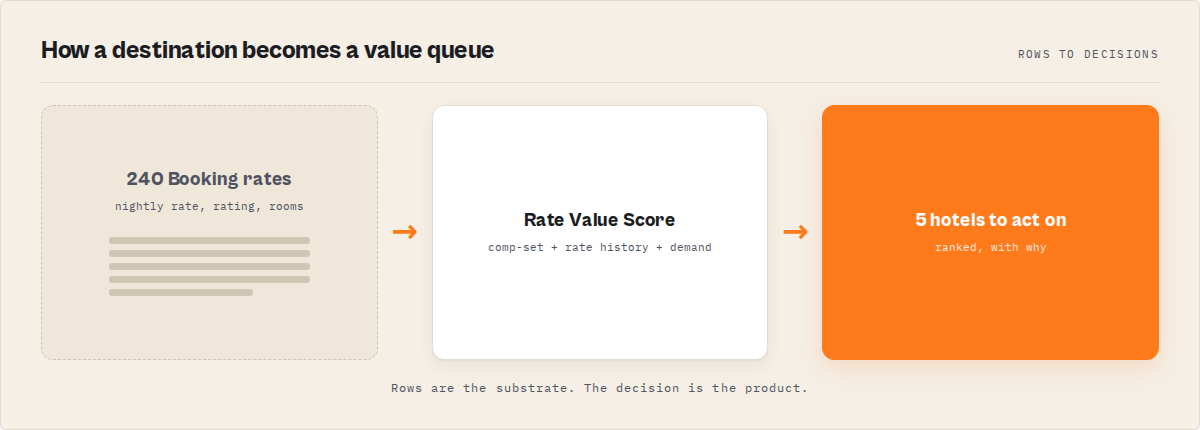
A hotel rate-intelligence layer ranks hotels by value for your dates, works out which are underpriced against comparable properties, flags whose rates just dropped and where demand is softening, benchmarks your own property against its comp-set so you know where you rank before you price, and hands back what changed since the last run, instead of a per-date price list you interpret by hand. A plain Booking scraper plus a spreadsheet costs cents per hotel and 30 to 60 minutes of analyst time per market, per run. The intelligence layer collapses that triage into one ranked queue with a recommended next step on each hotel. Every hotel gets a single Rate Value Score from 0 to 100, so instead of comparing 200 rows you start with the handful worth reviewing first.
Use it when rate-shopping is continuous work, comp-set monitoring, value hunting, benchmarking your own property, and the bottleneck has stopped being scraping and started being deciding. If you only want a one-off raw pull you'll process yourself, a plain scraper is cheaper and the right call. The Booking Scraper actor is the worked example throughout this post: it prices under pay-per-event pricing at $0.006 per hotel analysed plus $0.02 per run for the market read, decision layer included, and migrates existing pipelines unchanged through a compat output.
In this article: What a Booking scraper returns · Why the spreadsheet fails · How rate intelligence works · What it returns instead · Alternatives · Best practices · Common mistakes · Limitations · FAQ
Key takeaways
- Scraping Booking is solved. Deciding what matters isn't. Every popular Booking actor sells per-date rows, and the incumbent earned its rank, but the comp-set math and rate history you build downstream is the job nobody sold you.
- A rate-intelligence layer collapses that triage into one ranked value queue: a decision per hotel with an attention priority, a why-now reason, a recommended next step, and a 0-100
rateValueScorewith an A-F grade. - Four things break in a spreadsheet at scale: comp-set position, value scoring, rate-drop detection, and run-over-run memory. Each is a maintained service, not a formula.
- The moat is memory. Booking shows today's rate; the Booking Scraper actor banks a timestamped snapshot of every rate any run touches, so you see drops and softening demand that a single scrape can never show. That history can't be backfilled.
- It prices at $0.006 per hotel analysed plus $0.02 per run under pay-per-event pricing; a 50-hotel destination run is about $0.32. It does not book, forecast, or read member-only rates.
Rows vs a value queue: a concrete look
| You ask | A row dump gives you | A value queue gives you |
|---|---|---|
| Which hotels here are underpriced? | 200 rows; build the comp median yourself | Ranked queue, rateValueScore and comp position on each |
| Whose rate just dropped? | Today's price with no baseline | A rate_drop signal vs the hotel's own history |
| Is demand tightening for my dates? | An availability count | A demandPressure score (0-100) with occupancy band |
| How does my own hotel rank? | Your row next to competitors | A benchmark: market rank, pricing position, comp-set drift |
| What changed since yesterday? | Two CSVs; diff by hand | A change feed plus per-hotel changeFlags and rate deltas |
What is hotel rate intelligence?
Definition (short version): Hotel rate intelligence is a system that turns a Booking.com scrape into decisions, which hotels are underpriced for your dates, whose rates moved, and where demand is heading, and returns a ranked, explained value queue instead of a per-date price list you interpret yourself.
A Booking scraper and a hotel rate-intelligence engine are not the same product. A scraper extracts: it returns hotels, nightly rates, ratings, and room offers as rows, then stops. Intelligence is what happens after extraction. It's the comp-set position, the value scoring, the rate-drop detection, and the run-over-run comparison that turns a scrape into a decision you can act on before you set today's price.
There are broadly three categories of Booking tooling in 2026. Row scrapers export the substrate and leave every decision downstream to you. Enterprise hospitality dashboards solve the analysis but charge enterprise prices, lock the data behind their own UI, and are built for human-driven browsing rather than automation. Rate-intelligence actors ship the decision layer on the public Booking data you already use: comp-set position, value ranking, rate-drop and demand signals, and persistent rate memory. At ApifyForge we group these by what they output, not just what they scrape, because the output contract is what decides whether you still open a spreadsheet afterward.
Why does comp-set rate-shopping matter now?
Rate shopping isn't comparing prices. It's comparing changes, which is why the move matters more than the level. Rate-shopping matters more in 2026 because online travel demand keeps growing and the window to react to a competitor's rate move keeps shrinking. Booking Holdings, Booking.com's parent, reported record room-night volume in its 2024 results, and hotels compete on price in real time against a comp-set that repositions daily. A rate you read this morning can be wrong by lunch.
The scale is the problem. A single mid-size destination can list a few hundred comparable hotels, and a revenue manager who tracks a 30-hotel comp-set across a rolling date range is looking at thousands of rate points a week. Nobody eyeballs that fairly. Rate parity and comp-set monitoring have been standard revenue-management practice for years (see STR / CoStar's hospitality benchmarking work), but the tooling that does it well has historically been priced for chains, not for the independent operator, the short-let investor, or the deal site. The job most teams actually have is comparison and timing, and a flat export ships neither.
What does a Booking scraper actually return?
A Booking scraper returns substrate: one record per hotel with the nightly rate for your dates, the star rating, the review score and count, the room offers, and a link. Useful, accurately extracted data. If your job is "get me the rates," that's the right tool.
Here's roughly what one record looks like. Note this is output you read, not code you run.
{
  "name": "The Northbank Hotel",
  "url": "https://www.booking.com/hotel/gb/the-northbank-hotel.html",
  "stars": 4,
  "price": 184,
  "currency": "GBP",
  "rating": 8.6,
  "reviews": 1402,
  "rooms": [
    { "roomType": "Deluxe Double", "bedType": "1 large double", "persons": 2, "price": 184 }
  ]
}
The problem starts when your job is anything other than "get me the rates." Which is most jobs. A nightly rate with no comparison is a number, not a signal. £184 means one thing when comparable 4-star hotels sit at £209 and something completely different when they sit at £150. Nobody computes a comp median across 200 hotels by hand every morning. They sort by price, squint, and guess. And on a platform where rates move daily by date and occupancy, a single scrape captures the level, never the move.
Why do flat Booking rows fail for rate-shopping?
Flat Booking rows fail for rate-shopping because they externalise every decision back onto a human. A 200-row export contains no comp-set, no value score, and no memory of yesterday's rate, so the actual work (deciding what's underpriced and what changed) still happens by hand in Excel.
Here's the part people underestimate. Rate intelligence is genuinely hard, which is exactly why most tools quietly stop at extraction:
- Value is relative to the comp-set, not absolute. A £184 room is only "good value" against comparable hotels for the same dates, area, and star band. That comp median has to be built for every hotel, every run.
- A rate drop only means something against history. Today's £184 tells you nothing unless you know it was £224 ten days ago. Booking shows the current rate; it does not keep the trajectory.
- Demand is a trajectory, not a snapshot. Two hotels can both show three rooms left. Only one is selling out fast. A single pull can't tell you which; you need to watch availability move.
- Going quiet is invisible in a row dump. A competitor who pulled a rate, sold out, or came back in stock doesn't announce it as a row. It shows up as a change, and change is exactly what a spreadsheet can't surface without a prior export to diff.
- Most tools forget every prior run. A one-shot scrape can never tell you whether a rate cut is new or a hotel that discounts every Tuesday.
The real competitor to a Booking scraper was never another scraper. It's the manual comp-shop workflow that sits downstream of one. That's the same argument we made for decision-first analytics: the output should be one routable verdict, not a price grid you re-interpret every morning.
How does hotel rate intelligence work?
Hotel rate intelligence works by adding a decision layer on top of the scraped substrate. After extraction, deterministic detectors build a comp-set for each hotel, score its rate value against comparable properties, compare it to its own stored history, and rank the run by the axis you chose, so the queue sorts by what to act on first.
The mental model is a pipeline: Booking pages → substrate fetch → comp-sets → rate history → signals → value score → ranked value queue. Each layer adds something the row dump never had.
The comp-set layer is the interpretation step. Instead of leaving you to build the median, it groups comparable hotels (same dates, area, star band) deterministically, computes where each hotel's rate sits against that median, and gives it a rank like "4th-cheapest of 31 comparable 4-stars." No black box, no LLM guessing the comps.
The memory layer is the moat, and it's the part a competitor can't backfill. Booking Scraper banks a timestamped snapshot of public rate, availability, and rating on every hotel and stay-date any run touches, keyed by hotel and date. That accumulated history is what lets records carry a rate trajectory, a drop count, peak-vs-current, and rateVelocity. A single scrape tomorrow can reproduce today's rate, but not that longitudinal context, which only exists if you've been accumulating it. A fresh hotel returns firstSightFallback honestly rather than inventing a past.
You can see this shape on a live dataset by running the Booking Scraper actor on any destination and dates. The first ranked queue lands in about 60 seconds.
What does a rate-intelligence layer return?
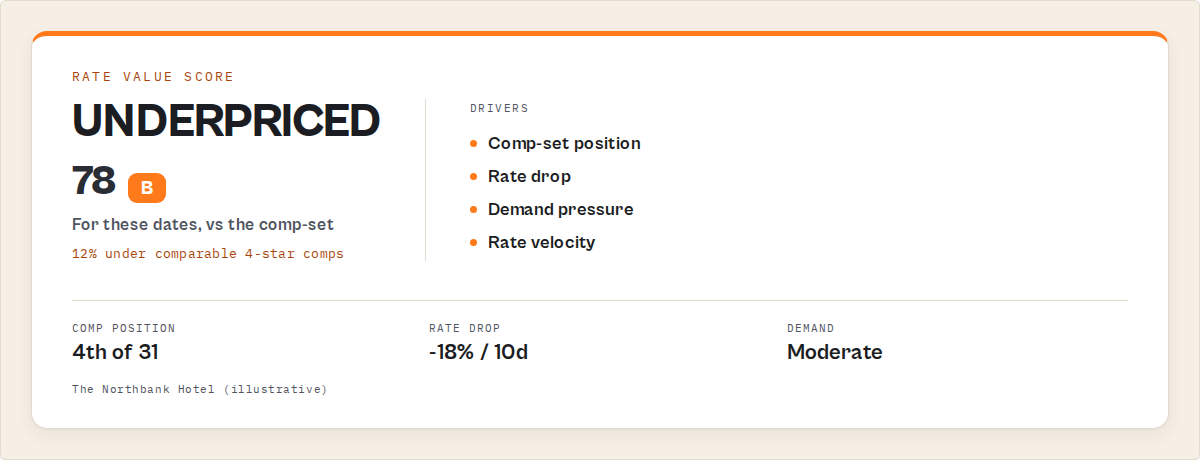
A rate-intelligence layer returns a ranked, decision-ready record per hotel. The core fields are a rateValueScore (0-100 plus an A-F grade), a compSet position, a demandPressure read, an attentionPriority your automation can branch on, plain-English whyNow reasons, and a verb-fenced recommendedAction, with the full raw Booking record underneath.
Here's a trimmed record so you can see the shape. Again, this is output you read, not code you run.
{
  "recordType": "property",
  "name": "The Northbank Hotel",
  "url": "https://www.booking.com/hotel/gb/the-northbank-hotel.html",
  "stars": 4,
  "price": 184,
  "currency": "GBP",
  "attention": {
    "attentionPriority": "high",
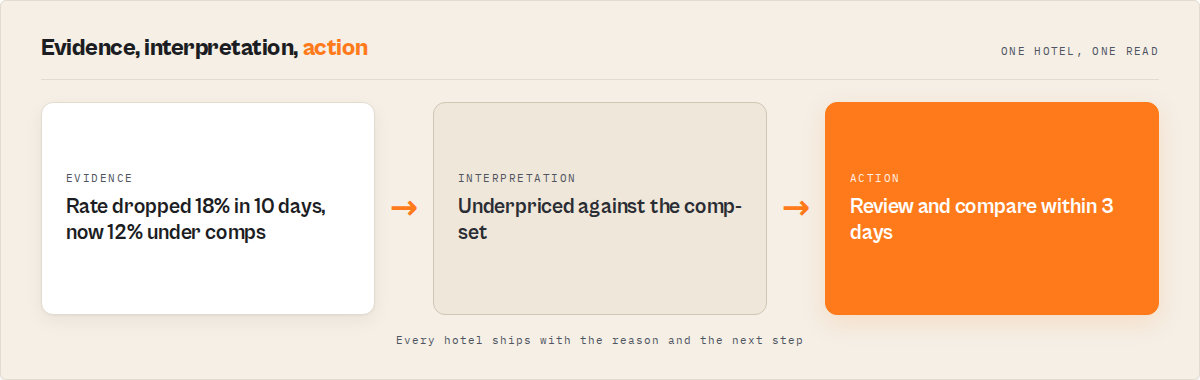
    "whyNow": ["Rate for Aug 10-12 dropped 18% in 10 days", "Now 12% under comparable 4-star comps"],
    "recommendedAction": "Review and compare to comp-set within 3 days"
  },
  "rateValueScore": { "score": 78, "grade": "B" },
  "demandPressure": { "score": 41, "occupancyBand": "moderate", "availabilityTrend": "flat" },
  "compSet": { "compMedianRate": 209, "compCount": 31, "ratePositionPct": -12.0, "competitivePosition": { "rank": 4, "of": 31 } },
  "signalEvents": [
    { "type": "rate_drop", "signalStrength": 0.82, "decayStatus": "fresh", "evidence": { "rateBefore": 224, "rateAfter": 184 } }
  ],
  "history": { "daysTracked": 42, "dropCount": 2, "peakRate": 238, "trajectory": "cooling", "rateVelocity": -3.1 },
  "confidence": { "overall": 0.82, "grade": "high" }
}
Everything from attention down is the decision. It's what a revenue manager would produce by hand after forty minutes of comparing. attentionPriority is the field your automation routes on. whyNow is the rationale for a human. recommendedAction is always a prioritisation instruction (Review, Compare, Re-check), never a transaction instruction like Book or Reserve. Routing attention is the job; booking is not, and that fence is deliberate.
What are the alternatives to hotel rate intelligence?
There are four practical alternatives to a hotel rate-intelligence layer, each with real tradeoffs. The right choice depends on whether your job is one-off extraction or recurring rate-shopping, how much engineering you want to own, and whether you need the comp-set math built or are happy to build it.
1. A traditional row scraper (e.g. voyager/booking-scraper). The dominant Booking row vendor on the Apify Store, and an excellent choice if raw extraction is all you need. Returns per-date rates, ratings, and room offers as flat rows, often split across a few actors for search, detail, and reviews. Best for: a one-time bulk pull you'll analyse yourself, or feeding a pipeline you already own. Where it breaks: it ships none of the decisions downstream of extraction, so the comp-set, value scoring, and daily diffing stay manual forever.
2. Build it yourself. Wire up extraction, then own the comp-set grouping, value scoring with auditable components, rate-drop and demand-signal detection, the trajectory math, and the persistent store that makes "what changed" possible, and keep all of it versioned and reproducible. Best for: a team with spare engineering capacity and a very specific in-house need. Where it breaks: you now own a maintained service, not a script. The comp-set logic, the rate-history store, and the residential-proxy handling that keeps a daily run alive all become yours. That store is months of accumulated rate data you can't shortcut, because rate history can only be gathered forward, one run at a time.
3. An enterprise hospitality dashboard (e.g. OTA Insight / Lighthouse, AirDNA). Solves the analysis with licensed and modelled datasets and a polished UI. Best for: chains and larger operators who want a full hospitality suite and human-driven browsing. Where it breaks for automation: it's priced for the enterprise, the data lives behind the vendor's dashboard rather than in your pipeline, and it's built for people clicking around, not for an agent routing on severity.
4. A rate-intelligence actor. Focuses on Booking and ships the decision layer: comp-set position, value ranking, rate-drop and demand signals, and persistent rate memory per watchlist, as structured JSON or CSV you automate against at Apify pricing. Best for: recurring comp-set rate-shopping, value hunting, and benchmarking your own property where the value is what's underpriced now and what changed. Where it's less suitable: booking or checkout, member-only rates, and rate forecasting, none of which it does.
Each approach has trade-offs in coverage, engineering cost, timing, and time-to-value. Here's the comparison side by side.
| Approach | Time to first result | Comp-set + value scoring | Run-over-run rate memory | Cost shape |
|---|---|---|---|---|
| Row scraper | ~minutes | None (manual) | None | Per-hotel scrape price |
| Build it yourself | Weeks to months | You build it | You build + accumulate it | Engineering time + infra |
| Enterprise dashboard | Onboarding + contract | Yes, in dashboard | Internal to the product | Enterprise pricing, UI-first |
| Rate-intelligence actor | About a minute | Built in, deterministic | Built in, compounds | $0.006 / hotel, decision layer included |
Pricing and features based on publicly available information as of July 2026 and may change. Re-verify any incumbent's live price before relying on the comparison.
One of the best fits for recurring, Booking-specific rate-shopping is a rate-intelligence actor, because it collapses the comp-shop workflow into one scheduled run. For a full hospitality suite with licensed datasets, an enterprise dashboard may suit better. If you're weighing options, the ApifyForge cost calculator is a quick way to model per-hotel spend before you commit.
Best practices for comp-set rate-shopping
- Always pass dates. Booking only returns complete per-date rates with
checkInandcheckOut. A dateless run gives thin data and is penalised inconfidence, and a high value score on dateless data would mislead, so the actor fences it. - Name a watchlist and run on a schedule. The product is the run-over-run delta. One run finds comp outliers; the rate memory clock starts on run two and can't be backfilled. Keep the
watchlistNamestable, because a rename starts a fresh clock. - Pick the rank axis to match the job. Use
rateDropfor cut-hunting,valuefor best value,demandfor scarcity reads,softMarketfor buyer's-market trajectory. The axis is the whole product for that job. - Branch automation on
attentionPriority, not raw scores. Filter to thehighbucket so alerts stay stable across runs. - Read
confidencebefore trusting a value score. A low grade means thin data, usually no dates or a small comp-set. Pass dates and widen the destination to lift it. - Use the right output pack for your lens.
revenue-managerweights comp-shop and rate moves;investorweights soft markets;travellerweights value and drops. - Use the compat profile for raw ingestion. When an existing pipeline only needs the standard field set,
outputProfile: "compat"returns it unchanged, so you migrate as-is. - Wire a webhook on run finish. Push the change feed into Slack or a sheet so the value queue becomes a notification stream, not a manual pull.
Common rate-shopping mistakes
- Treating a scrape as rate-shopping. Exporting rates is extraction. Rate-shopping is the comp-set comparison you're doing by hand afterward. Move that work into the tool.
- Sorting by price and calling it comp analysis. A raw price ignores the comp median for the same star band and dates. A £184 room under a £209 comp median is the story; a cheap 2-star next to expensive 4-stars is noise.
- Expecting rate history on the first run. Memory can't be invented. Run one reports first-sight honestly with no trajectory; velocity and drop detection sharpen after several scheduled runs on the same watchlist.
- Running without dates. A dateless run reads thin data and low confidence by design. The rate is the point, and the rate is date-dependent.
- Ignoring what went quiet. The competitor who cut a rate overnight or sold out is the move a row dump can't tell. The change feed and
changeFlagsare what surface it. - Reading every row anyway. If you've got a ranked value queue and still scroll the full export "just in case," you've kept the bottleneck. Trust the queue and stop at the top handful.
Mini case study: a revenue manager's morning comp-shop
Before. A revenue manager at a 32-room independent 4-star pulled a 30-hotel comp-set into a sheet each morning, then spent close to forty minutes building the comp median, comparing their rate against it, and eyeballing who had moved since yesterday. Rate cuts by competitors were caught late, if at all, because nobody could hold yesterday's export in their head. Softening demand for a slow midweek was usually noticed after the rate had already been set too high.
After. They switched to a scheduled watchlist run with rankBy: value and outputPack: revenue-manager. Each morning they read the top of the value queue (a handful of hotels flagged high) plus the Competitor Movers view, acted on those, and skipped the rest. The morning three competitors cut rates for the coming weekend, the change feed surfaced all three with the before-and-after rate attached as evidence, before the price meeting.
The reframe is the whole point: forty minutes of manual comp-shop collapsed into a five-minute read. These numbers reflect one operator's workflow; results vary with comp-set size, how often you run, and how volatile the destination is.
Which teams feel this pain hardest?
The teams that get the most out of hotel rate intelligence run rate-shopping as continuous work, not one-off pulls. Revenue managers pricing a comp-set daily. Hotel operators benchmarking their own property against its market. Short-let and hotel investors hunting softening markets and underpriced assets. Travel-deal and price-comparison sites surfacing rate drops automatically. OTA and travel analysts tracking a destination's rate and demand trajectory over time.
If your Booking work is a one-off list you build once and never refresh, you don't need this. A plain scraper is cheaper and fine. The intelligence layer earns its keep when the job recurs.
Implementation checklist
- Decide your job: comp-set rate-shopping, value hunting, benchmarking your hotel, or market trajectory. That sets your mode and rank axis.
- Pick your mode:
rates(default),properties,market,benchmark,watchlist, ordate_scan. - Run once with a destination and dates to see the value queue shape.
- Name a watchlist. Without it, the run is one-shot with no rate memory.
- Pass
checkInandcheckOutevery time. Rates are date-dependent. - Schedule the run daily so Saved Rate Memory compounds.
- Wire automation to branch on
attentionPriority, not raw scores. - After a week, read the
historyand Competitor Movers fields. That's when the memory pays off.
Limitations
Honest constraints, because the tool that names them is the one you can trust:
- Public data only. It reads public Booking search and hotel pages. No login, no member-only or loyalty rates, no booking-flow or payment-page data.
- Rates are date-dependent. Booking only returns complete per-date pricing with
checkInandcheckOut. A dateless run is thin and confidence is penalised. - Rate history needs runs.
rateVelocity, trajectory, and the outcome profile require accumulated runs; they return honest-null until Saved Rate Memory matures. The clock starts on day one and can't be backfilled. - It does not book or forecast. It does not reserve anything, and it does not tell you when to book or predict future rates. The history is descriptive cohort context, never a "book now" prompt.
- Comp-set quality varies. A destination with too few comparable hotels returns a null cohort with
insufficient-cohort, and comp-based signals weaken when the comp-set is thin. - The sample caps at 240 hotels.
maxPropertiescaps the destination sample;coverageGradereports whether the run was full, partial, or thin rather than claiming full on a capped run.
When you need this
You probably need a hotel rate-intelligence layer if:
- You rate-shop a comp-set daily or weekly and act on who moved.
- You benchmark your own property and need its rank on rate, value, occupancy pressure, and pricing discipline in one run.
- You track rate drops and demand shifts across a destination over time.
- You run a deal or price-comparison site that surfaces underpriced hotels and rate drops automatically.
- You're feeding an AI agent or automation that needs Booking records with comp-set position and rate signals attached.
You probably don't need this if:
- You want a one-off raw export to process in your own pipeline (a plain scraper is fine).
- You need to book, reserve, or touch the checkout flow (this reads public content only).
- You need member-only or loyalty-gated rates (it reads public rates only).
- You need a rate forecast or a "when to book" call (it's descriptive, not predictive).
Frequently asked questions
What is the difference between a Booking scraper and hotel rate intelligence?
A Booking scraper extracts substrate (nightly rates, ratings, room offers) and returns rows. A hotel rate-intelligence engine returns the same substrate plus a routable decision per hotel: a rateValueScore, a comp-set position, demandPressure, rate-drop and demand signals, an attention priority, a why-now reason, a recommended step, and rate history that compounds across runs. The scraper is the substrate. The intelligence engine is the substrate plus what to do about it.
How do I find underpriced hotels for my dates?
Run rates mode with a destination, checkIn, checkOut, and rankBy: value. Each hotel comes back with its rateValueScore, its position against comparable properties (for example "12% under comparable 4-star comps"), and a best-value or overpriced archetype. You get a ranked value queue in about 60 seconds instead of a per-date price list to sort by hand.
Does this actor tell me when to book?
No. It does not predict rates or prompt a booking. The historical outcome profile is descriptive context about how rates for similar past stays moved toward the date, with a sample size attached, never a forecast and never a "book now" instruction for a specific hotel. The per-record action is prioritisation only (Review, Compare, Re-check), never a transaction instruction.
Does it keep the rate history?
Yes, and that's the moat. Saved Rate Memory banks a timestamped public rate, availability, and rating snapshot on every hotel and stay-date a run touches, keyed by hotel and date. That's what lets you see which rates dropped and where demand is softening. A single scrape can read today's rate; it can't reproduce accumulated history. A fresh hotel returns firstSightFallback rather than inventing a past.
Can I migrate from voyager/booking-scraper without changing my code?
Yes. The input shape matches (pass a destination, hotel URLs, and checkIn / checkOut), and outputProfile: "compat" returns the exact standard Booking-scraper field set with validated URLs, so code reading item.price works unchanged. You migrate the pipeline as-is and get the decision layer as an additive upgrade rather than a rewrite. It's a practical drop-in for buyers who also want the comp-set position and value scoring.
How much does it cost to run Booking rate intelligence?
The Booking Scraper actor uses pay-per-event pricing: $0.006 per hotel analysed for the per-property rate intelligence, plus $0.02 per run for the destination market read. A typical 50-hotel destination run is about $0.32. Apify platform compute is billed separately by Apify, and the free tier's monthly credits cover a meaningful trial. You need an Apify account to run it.
Is it legal to scrape Booking.com data with this actor?
It reads only public Booking search and hotel pages and performs no in-platform actions or booking-flow scraping, and it accesses no member-only rates or reviewer personal data. Whether your specific use is permitted depends on your jurisdiction and intended use, including data-protection rules and platform terms. For background, see Apify's guide to web scraping legality. Consult legal counsel for your case.
The bottom line
If you pull Booking rates once and process them yourself, use a row scraper. It's cheaper, and it's the right tool for that job. But if you're rate-shopping a comp-set every morning, scraping stopped being the bottleneck a long time ago. The work is deciding what's underpriced, whose rate moved, and where demand is heading, and that's exactly what a value queue is built to do. The Booking Scraper actor ships it as the default output: ranked, explained, and remembered run over run. Rows are the substrate. The decision is the product.
Ryan Clinton publishes Apify actors and MCP servers as ryanclinton and builds developer tools at ApifyForge.
Last updated: July 2026