YouTube Scraper: Attention Queue, Breakout Detection is an Apify actor on ApifyForge. Scrapes YouTube channels, videos, playlists and search. Breakout detection, momentum scoring, attention routing, watchlist deltas. Drop-in from streamers/youtube-scraper. 60% cheaper. $2/1k records. It costs $0.002 per record_emitted. Best for teams who need automated youtube scraper: attention queue, breakout detection data extraction and analysis. Not ideal for use cases requiring real-time streaming data or sub-second latency. Maintenance pulse: 90/100. Last verified March 27, 2026. Built by Ryan Clinton (ryanclinton on Apify).
YouTube Scraper: Attention Queue, Breakout Detection
YouTube Scraper: Attention Queue, Breakout Detection is an Apify actor available on ApifyForge at $0.002 per record_emitted. Scrapes YouTube channels, videos, playlists and search. Breakout detection, momentum scoring, attention routing, watchlist deltas. Drop-in from streamers/youtube-scraper. 60% cheaper. $2/1k records.
Best for teams who need automated youtube scraper: attention queue, breakout detection data extraction and analysis.
Not ideal for use cases requiring real-time streaming data or sub-second latency.
What to know
- Results depend on the availability and structure of upstream data sources.
- Large-scale runs may be subject to platform rate limits.
- Requires an Apify account — free tier available with limited monthly usage.
Maintenance Pulse
90/100Cost Estimate
How many results do you need?
Pricing
Pay Per Event model. You only pay for what you use.
| Event | Description | Price |
|---|---|---|
| record_emitted | Charged once per record emitted (video, channel, playlist, short, search result). Intelligence signal layer included. | $0.002 |
| search_query | Charged once per search query executed, regardless of result count. | $0.20 |
Example: 100 events = $0.20 · 1,000 events = $2.00
Documentation
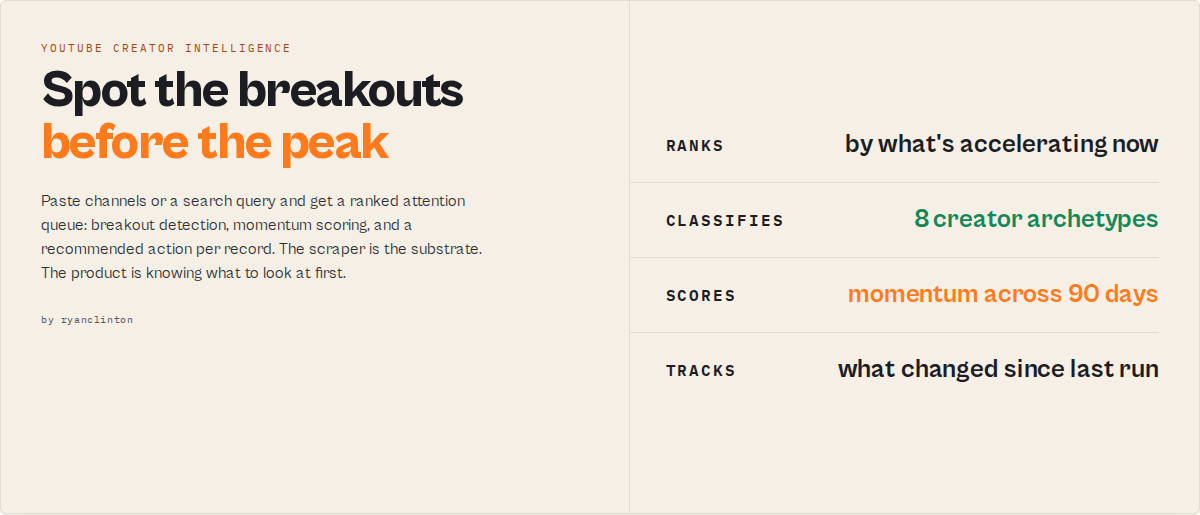
The real competitor isn't another scraper. It's the spreadsheet.
Every YouTube scraper on the Store sells rows. You then open Sheets, sort by views, scan for "looks growing", and lose 90 minutes deciding which 3 of 50 channels to act on this week. This actor replaces that 90 minutes. Paste a list of channels or a search query, get back a ranked attention queue with breakout detection, momentum scoring, and a recommendedAction per record. Same input shape as streamers/youtube-scraper, drop-in migration via outputProfile: "compat", less than half the price.
If your job is YouTube channel analytics, competitor monitoring, creator discovery, or YouTube data extraction at scale, this is a direct alternative to the spreadsheet workflow the other scrapers leave you with.
It is decision-ready YouTube intelligence, not another row dump. The job is collapsing the gap between "I have a list of channels" and "I know which ones matter this week" into one run.
The 10-second first run
Paste this and click Start. No edits needed.
{
  "mode": "search",
  "searchQuery": "AI coding tutorials",
  "rankBy": "breakoutPotential"
}
In ~60 seconds you see five rows in the default Attention Queue view:
These 5 creators are accelerating fastest right now.
Each row carries attentionPriority, whyNow, signalProfile, and recommendedAction. No z-scores, no percentiles on the surface. The math lives in evidence for the analyst who wants it. The buyer who just wants to know what to look at first gets five rows and a one-sentence rationale per row.
The same constraint applies to every mode:
mode: channelswith 3 handles ranks them by who you should look at first this week.mode: videoswith 5 URLs returns onewhyThisMattersline per video.mode: shortson a channel floats outperformer shorts to the top.mode: playlistson a 100-video playlist surfaces the 4 worth watching first.
Ready-to-run examples
Don't want to build an input from scratch? Each of these is a published, one-click example (see all) — open it, see real output, run it:
- YouTube Search Scraper — scrape any YouTube search into structured video/channel data, reranked by breakout potential
- YouTube Channel Scraper — a channel's stats, recent uploads and momentum signals from a handle or URL
- YouTube Video Scraper — full data for any video by URL or ID, with its signal layer
- YouTube Shorts Scraper — a channel's recent Shorts (IDs, titles, view counts)
What this actor is
This actor is a YouTube creator intelligence and breakout-detection system that ranks channels, videos, and search results by momentum, acceleration, and operational relevance. It is a YouTube creator intelligence API, a YouTube creator monitoring API, a YouTube channel analytics API, a YouTube trend detection API, and a YouTube creator discovery API in one actor. It is not just a YouTube scraper. The scraper layer is the substrate. The product is the YouTube creator intelligence layer on top.
Common jobs this actor is used for
YouTube creator intelligence buyers run this actor for the following jobs:
- YouTube creator discovery
- YouTube competitor monitoring
- Finding fast-growing YouTube channels
- Detecting breakout YouTube creators
- YouTube trend detection
- YouTube channel analytics workflows
- Monitoring creator momentum over time
- Ranking YouTube creators by growth velocity
- Building YouTube watchlists
- YouTube influencer research and influencer discovery
- YouTube creator scouting
- YouTube audience intelligence
- YouTube niche discovery and market research
- Tracking rising YouTube channels before they peak
- YouTube creator portfolio monitoring for agencies
- YouTube channel monitoring on a schedule
- Automated YouTube competitor tracking
- YouTube search result reranking by growth instead of YouTube relevance
- YouTube outlier video detection on a channel's recent uploads
- YouTube creator analytics for venture and operator research
Frequently used for
- finding emerging YouTube creators
- identifying breakout YouTube channels before they hit the algorithmic peak
- monitoring competitor creator portfolios on a weekly or daily schedule
- tracking creator momentum across recurring runs
- reranking YouTube search results by growth potential
- creator investment research for venture firms and operators
- influencer prospecting workflows for agencies
- identifying rising creators before sponsorship saturation
- YouTube channel monitoring with delta detection
- YouTube audience intelligence and engagement-baseline analysis
Common users
This actor is used by:
- influencer agencies running creator scouting
- creator scouting teams at brand-partnership shops
- venture firms tracking creator businesses
- YouTube growth researchers and creator-economy analysts
- media analysts and competitive-intel teams
- talent discovery teams at MCNs and creator networks
- audience intelligence teams at consumer-product companies
- creator economy startups building on YouTube data
- AI and RAG teams building creator-intelligence datasets
- SDR teams qualifying creators for outreach (paired with sister actor
ryanclinton/youtube-sponsorship-intelligencefor contact + sponsor signals)
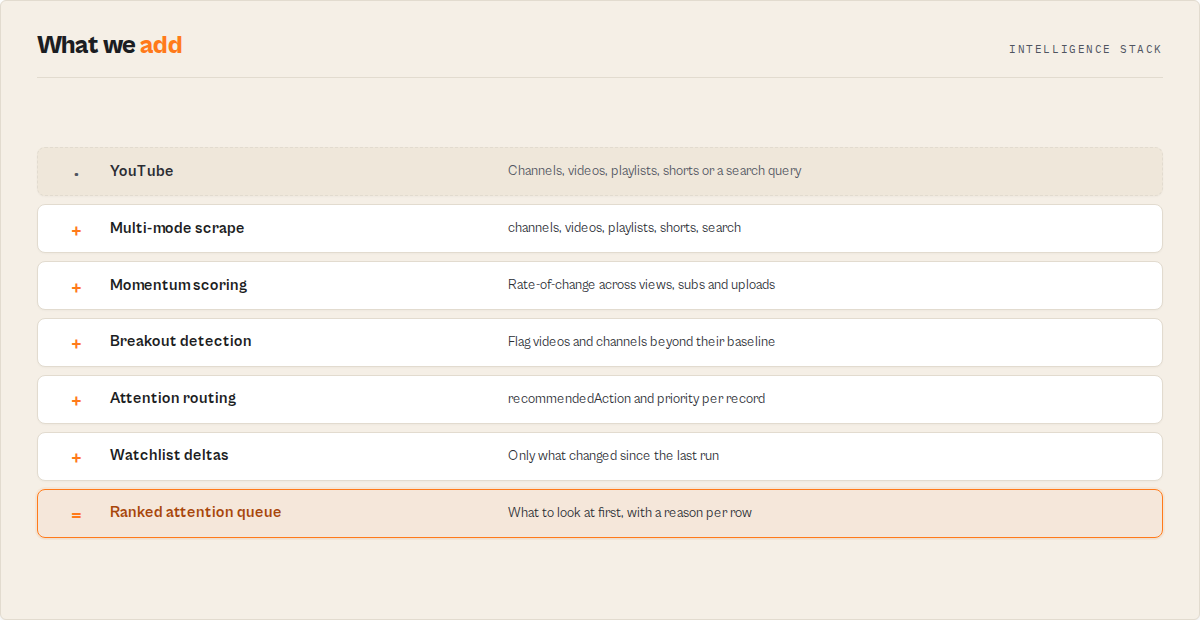
This is not just a YouTube scraper
YouTube scrapers return rows. You then open a spreadsheet, sort by views, compute percentiles, and lose 90 minutes deciding what matters. This actor returns the decision.
The scraping layer is the substrate. The product on top of it is:
- breakout detection (videos popping vs the channel's own baseline)
- creator momentum tracking (channels accelerating or decelerating across last 90 days)
- creator prioritisation (one
attentionPriorityenum the buyer routes on) - YouTube channel monitoring with cross-run delta intelligence (watchlist mode)
- YouTube search reranking by growth potential, not by YouTube's opaque relevance order
- creator profile classification across 8 stable archetypes
- comment theme synthesis (what viewers are saying, not just sentiment)
- automated daily creator briefings for scheduled runs
If you only want raw rows, set outputProfile: "compat" and the actor returns streamers-shape output without the intelligence layer.
Before and after
Before this actor: export rows, sort in Sheets, manually inspect channels, compute z-scores, diff weekly CSVs by hand, monitor changes manually, find breakouts by reading 50 video descriptions.
After this actor: run once daily or on a schedule, open the Attention Queue, review only the records that changed or carried fresh signals. The buyer reads attentionPriority + whyNow + recommendedAction and acts. The spreadsheet stays closed.
Compared with raw YouTube scrapers
Raw YouTube scrapers (streamers/youtube-scraper, apidojo/youtube-scraper, pintostudio/youtube-transcript-scraper, etc.) return substrate rows: title, viewCount, channelName, hashtags, description, transcript. This actor returns those same fields plus the creator intelligence layer:
- creator momentum scoring with band and drivers
- breakout video detection vs the channel's own performance baseline
- watchlist deltas (only what changed since last run)
- competitor monitoring on a schedule
- attention prioritisation (
high/medium/low/none) - reranked YouTube discovery (by
breakoutPotential/momentum/recency/engagement) - 8-label creator profile classification
- per-record
whyNow,recommendedAction, anddeprioritizationReasons - summary records with daily briefing and
spreadsheetCollapseheuristic
Streamers is the row vendor. This actor is the YouTube creator intelligence layer above the rows.
Used as an alternative to
This actor is commonly used as an alternative to:
streamers/youtube-scraper(the row-only incumbent, 5x more expensive per row, no intelligence layer)apidojo/youtube-scraper(cheap row-only competitor, no creator monitoring)pintostudio/youtube-transcript-scraper(transcript-only)streamers/youtube-channel-scraper+streamers/youtube-comments-scraper+streamers/youtube-shorts-scraperchained together- YouTube channel analytics tools and dashboards
- manual spreadsheet-based YouTube creator monitoring
- YouTube trend research workflows in Sheets or Airtable
- creator scouting spreadsheets maintained by agencies
- influencer discovery dashboards in Modash, Klear, CreatorIQ (different shape of tool, narrower job)
- custom Python pipelines computing creator momentum from raw YouTube exports
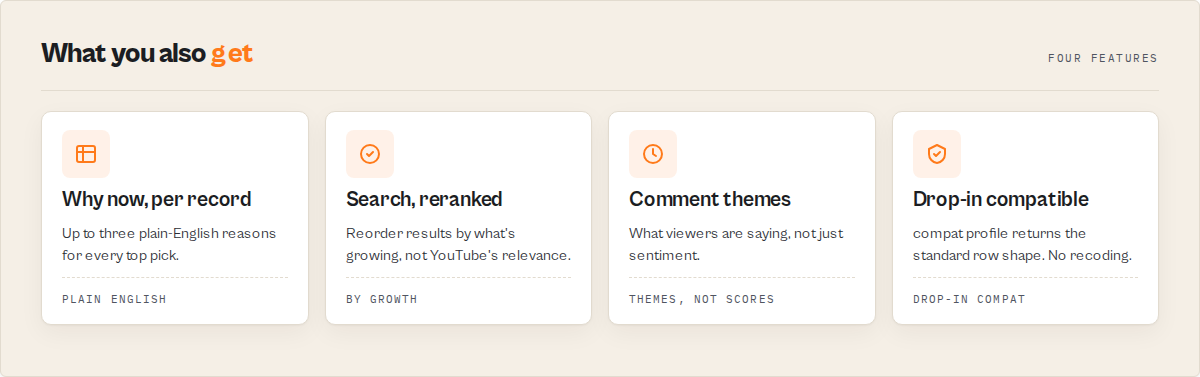
What this actor returns that streamers/youtube-scraper doesn't
Drop-in migration is the floor. Every substrate field streamers ships (title, viewCount, likes, channelName, channelUrl, duration, date, url, hashtags, description, subtitles) ships here with identical names and types. Downstream code reading item.title works unchanged. Set outputProfile: "compat" to verify exact parity.
The default outputProfile: "signals" keeps the substrate AND layers on creator momentum scoring and what streamers does not produce:
attentionPriority(high/medium/low/none): the one field your automation routes on.whyNow[]: up to 3 plain-English reasons populated when priority ishighormedium.signalProfile: an 8-label creator archetype (emerging,breakout,stable-authority,viral-fragile,high-engagement-low-scale,decelerating,dormant,unclassified).recommendedAction: imperative verb + object + timing, max 80 characters.signalEvents[]: typed events (breakout_video,channel_acceleration,topic_pivot, etc.) withsignalStrength,decayStatus, plain-Englishreason, structuredevidence.momentumScore(0..100) +momentumBand+momentumDrivers[].commentSynthesis: comment themes (not just sentiment), withcommentSynthesisStatusgraceful-degradation flag.watchlistState+newSignalsSinceLastRun[]+momentumChange+changeFlags[]: only on watchlist runs.spreadsheetCollapse: on the summary record, an honest heuristic estimate of how many minutes of manual review the run replaced.
Streamers ships rows. This actor ships rows plus what to do about them.
Five input modes in one actor
Streamers splits these across separate actors (youtube-scraper, youtube-channel-scraper, youtube-shorts-scraper, youtube-comments-scraper, plus playlist behaviour inside the main actor). One actor here, one mode per run.
mode: channels: signal-first channel analysis. Surfaces channel_acceleration, signal profiles, momentum.
{
  "mode": "channels",
  "channels": ["@mkbhd", "@veritasium", "@levelsio"],
  "maxRecentVideosPerChannel": 50,
  "includeShortsInVideoList": true
}
mode: videos: per-video intelligence. Surfaces breakout_video events, whyThisMatters, vsChannelBaseline. Set commentsSamplePerVideo >= 30 to enable commentSynthesis.
{
  "mode": "videos",
  "videos": ["https://www.youtube.com/watch?v=dQw4w9WgXcQ"],
  "enrichChannel": true,
  "includeCommentsSample": true,
  "commentsSamplePerVideo": 100
}
mode: playlists: playlist contents with per-video signal layer. Breakouts float to the top.
{
  "mode": "playlists",
  "playlists": ["https://www.youtube.com/playlist?list=PLxxxxxx"],
  "maxVideosPerPlaylist": 100
}
mode: search: search with reranking. The standalone product slice.
{
  "mode": "search",
  "searchQuery": "AI coding tutorials",
  "rankBy": "breakoutPotential",
  "country": "US",
  "language": "en",
  "maxResults": 50
}
mode: shorts: recent shorts per channel. Substring parity with streamers/youtube-shorts-scraper.
{
  "mode": "shorts",
  "channels": ["@nasa", "@vsauce"],
  "maxShortsPerChannel": 50,
  "oldestPostDate": "2025-06-01"
}
Modes are mutually exclusive. One run, one mode.
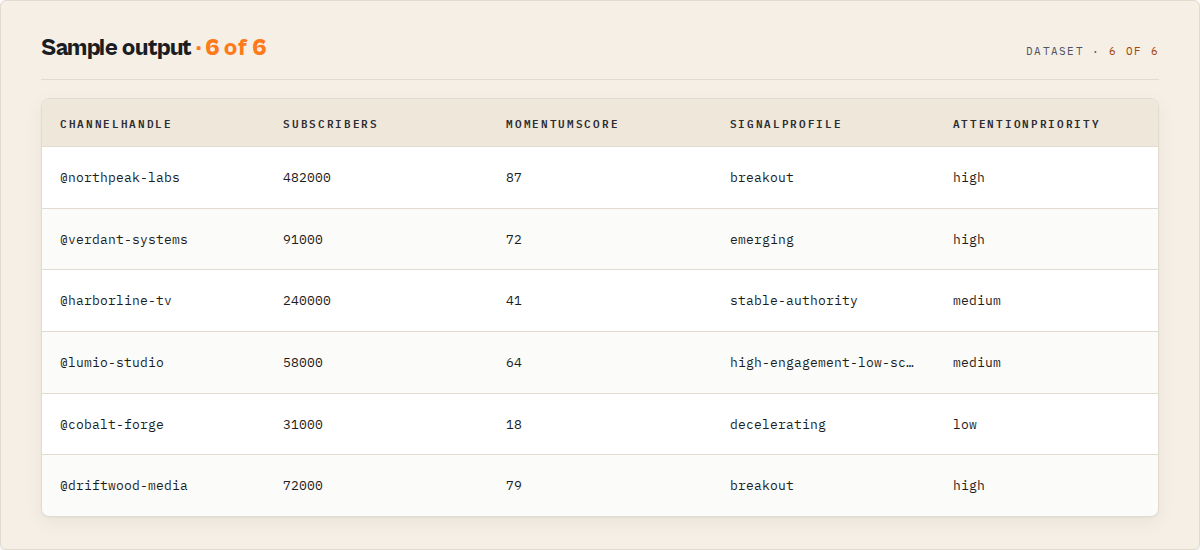
What the buyer reads first: the Attention Queue
The default dataset view. Five plain-English columns the buyer routes on without opening a JSON record.
| Column | What it tells you |
|---|---|
attentionPriority | high / medium / low / none. The routing field. |
whyNow | Up to 3 reasons in plain English. Populated when priority is high or medium. |
signalProfile | One of 8 archetypes. |
recommendedAction | Verb + object + timing. Max 80 characters. |
summary | One-line record summary for at-a-glance scanning. |
Sample Attention Queue record:
{
  "attentionPriority": "high",
  "whyNow": [
    "Breakout video detected 48h ago, still in algorithmic window.",
    "Channel entered acceleration regime 11 days ago.",
    "Audience expanding (new Spanish-speaking segment, 8% of comments)."
  ],
  "signalProfile": "breakout",
  "signalProfileStrength": 0.84,
  "recommendedAction": "Review this creator within 7 days.",
  "respondWithinDays": 7,
  "channelHandle": "@example-creator",
  "summary": "@example-creator, 240k subs, fresh breakout (12.4× p90), accelerating cadence."
}
When attentionPriority is low or none, deprioritizationReasons[] populates instead. The buyer learns why a row was filtered out, not just that it was. That auditability is the retention mechanism: once you trust the deprioritization reasoning, you delegate filtering entirely and only open the Attention Queue view.
Signal events
Headline primitive. Typed, evidenced, time-aware.
v1.0 event types (additive-only pledge: new types may be added, existing ones never renamed):
| Type | What it means |
|---|---|
breakout_video | Single video popping vs channel baseline (>= 2 z-score views, <= 7d old) |
channel_acceleration | Median views rising 20%+ over 60d vs prior 60d, cadence stable |
channel_deceleration | Sustained falling momentum |
outperformer_streak | 3+ consecutive videos above channel p90 |
topic_pivot | Topic mix share delta >= 0.15 between prior and current 60d |
audience_expansion | Comment language mix gained a new language at >= 5% share |
cadence_acceleration | Upload frequency >= 1.5× prior 30d cadence |
cadence_collapse | Upload frequency <= 0.5× prior 30d cadence ("going dark" signal) |
algorithmic_window_alert | Fresh outperformer still being pushed by the algorithm (<= 14d) |
Every event carries decay state so the buyer's automation knows whether to act:
{
  "type": "breakout_video",
  "signalStrength": 0.91,
  "active": true,
  "firstDetectedAt": "2026-05-14T09:00:00Z",
  "peakAt": "2026-05-13T15:00:00Z",
  "daysSincePeak": 1,
  "decayStatus": "fresh",
  "reason": "Views 12.4× channel p90 within 48h of upload.",
  "evidence": {
    "videoId": "abc123",
    "viewsZScore": 4.2,
    "ageHours": 48,
    "channelP90": 380000
  }
}
decayStatus buckets per event type (e.g. breakout_video: fresh 0-3d, active 4-7d, fading 8-14d, expired >14d). Expired events move from signalEvents[] to expiredSignals[] and drop after one watchlist run. The buyer's automation reads active and decayStatus to decide whether the signal is still operationally relevant.
signalStrength is a heuristic compound (z-scores, sample size, recency) rolled to 0-1 for sortability. It is not a calibrated probability. The product uses signalStrength instead of confidence for honesty: the number sorts rows, it does not predict outcomes.
Signal profiles
Every channel record carries one of 8 archetypes describing what kind of creator they are right now.
| Profile | Plain meaning |
|---|---|
emerging | Small-to-mid creator on the rise. Sub <500k, rising velocity, fresh outperformers. |
breakout | Caught a viral hit and ramping. Recent breakout event + audience expansion. |
stable-authority | Established, steady output. High subs, stable cadence, baseline engagement. |
viral-fragile | One spike, no underlying acceleration. Breakout event without channel acceleration. |
high-engagement-low-scale | Loyal small audience. Engagement above p90 cohort, <100k subs. |
decelerating | Past peak, slowing. Active channel_deceleration signal. |
dormant | Inactive. No uploads in last 90 days. |
unclassified | Insufficient signal. Fewer than 5 videos in the baseline window. |
Each label ships with signalProfileEvidence[] (the rules it triggered) and signalProfileStrength (heuristic 0-1). Buyers who don't trust labels read the evidence; buyers who do trust labels route on them.
The vocabulary is frozen for v1.0. New labels require a signalProfileVersion bump and migration note. Pin your automation against the version constant.
Attention routing
attentionPriority is the single field a downstream automation branches on.
{
  "attentionPriority": "high",
  "whyNow": ["...", "...", "..."],
  "deprioritizationReasons": [],
  "recommendedAction": "Review this creator within 7 days.",
  "respondWithinDays": 7
}
When priority is low or none, the mirror populates:
{
  "attentionPriority": "low",
  "whyNow": [],
  "deprioritizationReasons": [
    "Engagement decelerating (median engagement rate down 22% vs prior 60d).",
    "Audience growth plateaued (sub count flat across 90d).",
    "Recent uploads underperforming baseline (3 of last 5 videos below channel p50)."
  ],
  "recommendedAction": "Re-check in 30 days.",
  "respondWithinDays": 30
}
recommendedAction discipline (locked):
- Allowed verbs: Review, Watch, Track, Re-check, Compare, Investigate.
- Forbidden verbs: Sponsor, Sign, Acquire, Partner, Buy, Pitch, Pay, Recommend.
- Allowed timing: "within N days", "this week", "next run". Never absolute calendar dates.
- Format: imperative verb + object + timing. Max 80 characters.
This is a prioritisation instruction, not a business strategy. Sponsor prospecting lives in the sister actor (see scope fence below).
Watchlist mode and delta intelligence
This is the retention hook. Schedule a daily run on 50 competitor channels. Get back only what changed.
Set watchlistName: "my-tracked-creators" and the actor opens a named KV store, reads the prior baseline, computes deltas, and writes the new baseline back. Every subsequent run adds to each record:
{
  "watchlistComputationVersion": "1.0",
  "baselineWindowDays": 90,
  "deltaWindowDays": 7,
  "daysSinceLastRun": 7,
  "newSignalsSinceLastRun": [
    "Channel growth accelerating (median views +18% vs prior window).",
    "Outperformer streak entered (3rd consecutive video above p90).",
    "Upload cadence doubled (1.2/week to 2.5/week)."
  ],
  "expiredSignalsSinceLastRun": [
    "Breakout video from 2026-04-22 aged out of algorithmic window."
  ],
  "momentumChange": {
    "previousMomentumScore": 54,
    "currentMomentumScore": 72,
    "delta": 18,
    "direction": "accelerating"
  },
  "watchlistState": {
    "current": "attention",
    "previous": "monitor",
    "changedAt": "2026-05-14T09:00:00Z",
    "daysInPreviousState": 23
  },
  "changeFlags": ["NEW_BREAKOUT", "CADENCE_UP", "AUDIENCE_EXPANDED", "SIGNAL_EXPIRED"]
}
First-run behaviour is honest. First-run records carry newSignalsSinceLastRun: [], expiredSignalsSinceLastRun: [], momentumChange.direction: "first-sight", and watchlistState.previous: null. No fabricated history.
Watchlist mode is the difference between "I scraped a list" and "I have a daily YouTube intelligence feed." Pair with Apify Schedules + a webhook into Slack for a live feed.
Watchlist runs cost no extra event. Same $0.002 per record on a watchlist run as on a one-shot. The moat is monitoring; pricing monitoring extra would suppress the behaviour the product depends on.
Search reranking
YouTube's relevance order is not what agencies want. Agencies want emerging creators. Researchers want breakout content. Investors want acceleration.
Set rankBy on a search-mode run to rerank the results:
| Value | Surfaces |
|---|---|
relevance | YouTube's native order (no reranking) |
breakoutPotential (default) | Channels accelerating fastest right now |
momentum | Channels with sustained rising momentum |
recency | Most-recently-uploaded |
engagement | Highest engagement rate |
Every search result also carries both ranks side by side so you can see what the reranker did:
{
  "youtubeRelevanceRank": 14,
  "rerankedRank": 1,
  "rankBy": "breakoutPotential",
  "rerankReason": "Channel in emerging signalProfile + 2 breakout_video events in last 30d.",
  "rerankAxes": {
    "byRelevance": 14,
    "byBreakoutPotential": 1,
    "byMomentum": 3,
    "byEngagement": 8,
    "byRecency": 5
  }
}
rankBy: breakoutPotential is the field that differentiates this actor from every other search-mode YouTube scraper on the Store.
Comment synthesis
Themes, not just sentiment. Comment themes describe what viewers are actually saying.
{
  "commentSynthesis": {
    "commentSynthesisStatus": "full",
    "sampleSize": 100,
    "themes": [
      { "theme": "viewers asking for follow-up tutorials", "weight": 0.34, "exampleCommentIds": ["..."] },
      { "theme": "strong positive sentiment around editing style", "weight": 0.22, "exampleCommentIds": ["..."] },
      { "theme": "repeated complaints about sponsor segment length", "weight": 0.08, "exampleCommentIds": ["..."] }
    ],
    "audienceSignals": [
      "Comments referencing professional context (developers, designers, students).",
      "Repeat-viewer markers in 18% of sampled comments."
    ],
    "sentiment": { "positive": 0.62, "negative": 0.11, "neutral": 0.27 },
    "method": "lexicon-themes-v1"
  }
}
commentSynthesisStatus carries the graceful-degradation marker so downstream consumers know whether to trust the labels as exec-grade language or treat them as raw clusters:
full: themes produced via groq Llama 3.1 8B with capped tokens and deterministic seed. Sharper labels.lexicon_fallback: LLM call failed or sample below threshold. Lexicon clusters used as labels. Same shape, less polish.disabled: buyer setenableCommentThemes: false. Sentiment + audience signals still populated, theme labels use lexicon.
The actor never returns no comment data because the LLM call failed. The fallback is deterministic.
Output profiles
Same compute, different payload shape. Pick the one that matches your downstream consumer.
| Profile | What you get | Best for |
|---|---|---|
signals (default) | Substrate + signal events + attention routing + signal profile + comment synthesis + (when applicable) watchlist deltas | Most buyers |
substrate | Substrate + raw engine intelligence fields only, no signal layer | Analysts running their own scoring |
research | signals + full evidence trails + version envelope on every nested field | Audit, calibration runs, replay |
llm | Compact natural-language summary per record | LLM agents reading the dataset directly |
minimal | IDs and URLs only | Pipeline glue between actors |
compat | Exact streamers/youtube-scraper field set, no signal layer | Drop-in migration verification |
The 9 dataset views
The dataset ships with 9 named views. Open the dataset and switch view from the top-left dropdown.
| Order | View | Lead columns | Audience |
|---|---|---|---|
| 1 | Attention Queue (default) | attentionPriority, whyNow, signalProfile, recommendedAction, channelHandle, summary | Every buyer's 5-second read |
| 2 | Breakouts | videoId, title, breakoutSignalStrength, daysSincePeak, breakoutReason | Researchers, investors, growth teams |
| 3 | Channel Momentum | channelHandle, momentumScore, momentumBand, momentumDrivers, signalProfile | Agencies, competitor analysts |
| 4 | Search Reranked | rerankedRank, youtubeRelevanceRank, rankBy, rerankReason, signalProfile | Search-mode buyers |
| 5 | Watchlist Delta | watchlistState, changeFlags, newSignalsSinceLastRun, momentumChange | Watchlist subscribers |
| 6 | Comment Themes | videoId, commentThemes, audienceSignals, sentimentPositive | AI / RAG teams, growth teams |
| 7 | Streamers Compat | title, viewCount, likes, channelName, channelUrl, duration, date, url, hashtags, description | Migrators verifying parity |
| 8 | Errors | failureType, message, channelHandle, videoId, url | Debugging |
| 9 | Summary | headline, dailyBriefing, executiveHighlights, spreadsheetCollapse | Exec / dashboards |
The default view leads with what to look at + why + what to do. The math lives under the hood; the surface is plain English the buyer routes on.
Pricing
One event, one price, signal layer included.
| Event | Trigger | Price |
|---|---|---|
record_emitted | Any record emitted (video, channel, playlist, short, search result) | $0.002 per record ($2 per 1,000) |
search_query | One search execution, regardless of result count | $0.20 per query |
Cost scenarios:
| Scenario | Records / queries | Cost |
|---|---|---|
| First-run demo (search, 5 results) | 1 query + 5 records | $0.21 |
| 50-channel qualification run | 50 records | $0.10 |
| 200-channel agency cohort | 200 records | $0.40 |
| 1,000-record migration from streamers | 1,000 records | $2.00 |
| Daily watchlist on 50 channels (30 days) | 1,500 records | $3.00 |
| 10,000-record bulk research run | 10,000 records | $20.00 |
Pricing comparison (as of May 2026, may change):
streamers/youtube-scraper: $5 per 1,000 records. This actor: $2 per 1,000. 60% cheaper, signal layer included.apidojo/youtube-scraper: ~$0.10 per 1,000 records. This actor sits 20× above that price band. Every record here carries the signal layer; raw substrate at the lowest price stays with apidojo (different buyer, fine).
Watchlist mode adds no extra event. Same $0.002 per record on monitoring runs as on one-shot. Intentional. The moat is monitoring.
Apify free tier ($5/month) runs ~2,500 records here vs 1,000 on streamers. Trial buyers get 2.5× the headroom.
Set a per-run spending limit on the Apify actor page to cap any individual run.
Benchmarks
Wall-clock and cost from live Apify cloud runs against build 1.0.4. Channel enrichment runs in parallel at concurrency 6, which is the dominant cost in cohort and search modes. Search runs include continuation-token pagination across pages.
| Workload | Wall-clock | PPE charges | Platform cost | Records emitted |
|---|---|---|---|---|
channels mode, 5 handles, default 30 videos/channel | 8s | $0.010 | $0.007 | 6 (5 channels + 1 summary) |
search mode, breakoutPotential rerank, maxResults: 30 | 46s | $0.116 | $0.039 | 54 (30 searchResult + 23 channel + 1 summary) |
search mode, breakoutPotential rerank, maxResults: 100 | 42s | $0.348 | $0.088 | 174 (100 searchResult + 73 channel + 1 summary) |
A few notes on what those numbers mean:
- Parallel enrichment. Channel enrichment is the dominant cost in cohort and search modes. Build 1.0.4 parallelizes the enrichment phase with a 6-lane worker pool. The same
maxResults: 100search took 199 seconds on serial build 1.0.3 vs 42 seconds on parallel build 1.0.4: a 4.7x speedup at 37% lower platform cost. - Search latency is dominated by channel enrichment, not pagination. The 30-result search and the 100-result search came in within 4 seconds of each other, because both hit the concurrency ceiling on channel enrichment, and the wider search just keeps more lanes busy.
- PPE charges are predictable.
record_emittedevents fire once per channel, video, playlist, short, or search result. Search-mode runs additionally fire onesearch_queryevent. The cost scenarios block above maps cleanly to the workloads in this table. - Watchlist mode adds no measurable wall-clock overhead. State load + delta computation is ~50-150ms per record on top of enrichment. A 50-channel watchlist run completes in roughly the same time as the equivalent one-shot.
- Memory profile. Default 1024 MB has comfortable headroom for the 100-result search above. Increase only for cohorts of 200+ channels with
includeTranscripts: true.
The runtime budget auto-clamp is configured against Apify's APIFY_TIMEOUT_AT env var minus a maxResults-scaled emit reserve, so partial-results emit fires before any hard-kill. A run that hits the budget emits a summary record with truncated: true and truncatedReason populated, instead of returning an empty dataset.
The summary record
Pushed at end of run, mirrored to KV store SUMMARY. Consumers open this first.
{
  "recordType": "summary",
  "mode": "channels",
  "headline": "30 channels analysed. 4 high-attention, 7 medium. 2 fresh breakouts. 1 channel entered acceleration regime in the last 7 days.",
  "dailyBriefing": [
    "3 creators entered breakout state this run.",
    "2 competitor channels decelerating (sustained >14d).",
    "1 dormant creator (@oldhandle) resumed uploads.",
    "New AI-tutorial topic cluster emerging across 4 channels."
  ],
  "executiveHighlights": {
    "topEmergingCreator": { "channelHandle": "@new-handle", "signalProfile": "emerging", "signalStrength": 0.87, "reason": "Sub count rising AND first breakout video this month." },
    "freshestBreakout": { "videoId": "abc123", "channelHandle": "@mkbhd", "title": "...", "daysSincePeak": 1, "signalStrength": 0.91 },
    "freshestAcceleration": { "channelHandle": "@veritasium", "daysSinceFirstDetected": 4, "medianViewsDelta": 0.22 },
    "largestAudienceExpansion": { "channelHandle": "@channel-X", "newLanguage": "es", "shareGain": 0.11 },
    "highestRiskDecay": { "channelHandle": "@channel-Y", "signal": "cadence_collapse", "daysSinceDetected": 18 },
    "longestDormantWaking": null
  },
  "signalProfileDistribution": {
    "emerging": 7, "breakout": 2, "stable-authority": 11, "viral-fragile": 1,
    "high-engagement-low-scale": 4, "decelerating": 3, "dormant": 2, "unclassified": 0
  },
  "signalDecayDistribution": { "fresh": 12, "active": 18, "fading": 9, "expired": 4 },
  "spreadsheetCollapse": {
    "rowsEmitted": 30,
    "signalsSurfaced": 47,
    "estimatedManualReviewMinutesSaved": 180,
    "method": "average-of-3-min-per-row-manual-triage",
    "estimateBasis": "heuristic",
    "calibrationVersion": "1.0"
  }
}
dailyBriefing + executiveHighlights are the morning intelligence briefing surface. A buyer scheduling a watchlist run reads four sentences and one block, then opens the Attention Queue view if anything caught their eye.
spreadsheetCollapse is a heuristic operational estimate, not a scientific measurement. estimateBasis: "heuristic" is the discipline marker, same pattern as signalStrength (not confidence). The constant (3 minutes per row of manual triage) recalibrates against buyer feedback at 30 days post-launch with a calibrationVersion bump.
What this replaces
The pricing comparison above is against other scrapers per row. The honest comparison is against the analyst time you currently spend turning raw rows into a decision.
| Manual workflow | Typical time |
|---|---|
| Sorting 50 channels manually to find this week's top 5 | 45 to 90 minutes |
| Weekly competitor monitoring across 30 channels | 2 to 4 hours |
| Spreadsheet diffing two weekly runs to find what changed | 1 to 2 hours |
| Manually reading channels to find emerging creators in a niche | continuous, never finished |
| Re-sorting a YouTube search result list by "what's actually growing" | 30 to 60 minutes per query |
| Reading 50 video descriptions to classify affiliate vs sponsor vs self links | 1 to 2 hours |
| Computing channel-vs-baseline outlier z-scores in a sheet | 30 minutes per channel |
This actor is priced against analyst time, not against CSV rows. The spreadsheetCollapse block in the summary record reports a heuristic estimate of how much of that time the run replaced. A 30-channel run typically reports estimatedManualReviewMinutesSaved: 90 and saves the user from opening Sheets at all that day.
Quick start: 3 inputs that cover 80% of use cases
A. Qualify a list of channels. You have 50 handles, you want to know which 5 to look at first.
{
  "mode": "channels",
  "channels": ["@mkbhd", "@veritasium", "@levelsio"],
  "maxRecentVideosPerChannel": 50
}
Sort by attentionPriority (high first), then by momentumScore descending. Read the top 5 rows.
B. Find emerging creators in a niche. You want a list of channels accelerating in "AI coding tutorials" right now.
{
  "mode": "search",
  "searchQuery": "AI coding tutorials",
  "rankBy": "breakoutPotential",
  "maxResults": 50
}
Open the Search Reranked view. The top 5 are your shortlist.
C. Watchlist a competitor set on a schedule. You want a daily feed of "what changed" on 50 tracked channels.
{
  "mode": "channels",
  "channels": ["@competitor-1", "@competitor-2", "@competitor-3"],
  "watchlistName": "competitor-roster-q2-2026",
  "maxRecentVideosPerChannel": 50
}
Schedule this daily from the Apify Schedules tab. Open the Watchlist Delta view on each run to see only what changed. Pair with a webhook into Slack for a hands-off intelligence feed.
What this actor does NOT do (scope fence)
The scope is narrow on purpose. The actor surfaces YouTube signals and routes attention. It does not:
- Send outreach. Pair with Outreach / Salesloft / Apollo / Smartlead / Lemlist.
- Push to a CRM. Pair with HubSpot Lead Pusher or your own webhook.
- Prospect creators for sponsorships. That is the sister actor ryanclinton/youtube-sponsorship-intelligence, which adds sponsor-readiness tiering (A/B/C/D), business-email MX validation, and sponsor-history detection. Use it when the job is "find sponsor-ready creators with verified contacts", not "rank a list by what's popping".
- Extract business emails. Same sister product. This actor reads channel substrate; it does not resolve contact paths.
- Download videos. Use pocesar/download-youtube-video.
- Monitor live streams in real time. Recent uploaded content only.
- Translate transcripts across languages. Commodity. Buyer post-processes.
- Provide real-time webhooks. v1.0 emits one summary at run end. v1.1 candidate for a standalone
briefingrecord type. - Generate LLM narratives in the decision path. Every signal, profile, and attention call is deterministic. LLM is used only for comment-theme labelling, and the lexicon fallback is always available.
If you need a feature on this list, do not work around it inside this actor. Chain the right tool instead.
When NOT to use this actor (job → better tool)
| Job you need done | Better tool |
|---|---|
| Send a cold-email sequence to creators | Outreach / Salesloft / Apollo / Smartlead / Lemlist |
| Manage an active influencer campaign (briefs, deliverables, payments) | GRIN / Aspire / CreatorIQ / Upfluence |
| Find sponsor-ready creators with verified business emails | ryanclinton/youtube-sponsorship-intelligence |
| Get raw YouTube substrate at the lowest possible price | apidojo/youtube-scraper (~$0.10 per 1,000) |
| Use the brand-recognized incumbent for raw bulk extraction | streamers/youtube-scraper |
| Real-time live-stream monitoring | A dedicated live-stream monitoring platform |
| Rank a creator list by what's popping right now | This actor |
| Find emerging creators in a niche via search reranking | This actor |
| Monitor a competitor channel set with daily deltas | This actor |
Capability matrix vs the top 10 YouTube actors
Capabilities as of May 2026 and may change.
| Capability | This actor | streamers/youtube-scraper | apidojo/youtube-scraper | streamers/youtube-channel-scraper | streamers/youtube-shorts-scraper | streamers/youtube-comments-scraper | Generic search-mode YouTube actors |
|---|---|---|---|---|---|---|---|
| Unified channel + video + playlist + search + shorts in one actor | Yes | No | No | No | No | No | No |
| Comments included | Yes | Separate actor | Sometimes | No | No | Yes | Rare |
| Transcripts | Yes | Yes | Sometimes | Yes | No | No | Rare |
Search reranking (breakoutPotential, momentum) | Yes | No | No | No | No | No | No |
| Breakout / outlier detection per video | Yes | No | No | No | No | No | No |
| Performance baseline (p50 / p90 / p99 views) | Yes | No | No | Rare | No | No | No |
| Growth velocity (trend rising / stable / declining) | Yes | No | No | Rare | No | No | No |
| Channel momentum scoring with drivers | Yes | No | No | No | No | No | No |
| Topic pillars (TF-IDF clusters) | Yes | No | No | No | No | No | No |
| Audience language mix from comments | Yes | No | No | No | No | No | No |
| Comment themes (not just sentiment) | Yes | No | No | No | No | Rare | No |
| Link classification (affiliate / sponsor / self / social) | Yes | No | No | No | No | No | No |
| Video freshness band (decay buckets) | Yes | No | No | No | No | No | No |
| Cohort ranking (rank within input set) | Yes | No | No | No | No | No | No |
| Watchlist mode (cross-run state) | Yes | No | No | No | No | No | No |
| Temporal signals (delta vs prior run) | Yes | No | No | No | No | No | No |
| Delta intelligence (only what changed) | Yes | No | No | No | No | No | No |
| Summary briefing record per run | Yes | No | No | No | No | No | No |
The contrast row that matters: a flat scraper gives you data. This actor gives you a routable decision (priority, whyNow, profile, recommendedAction) that drops into a dashboard or a sequencing tool without further processing.
Input parameters
| Parameter | Type | Default | Description |
|---|---|---|---|
mode | string (enum) | search | One of channels, videos, playlists, search, shorts. Mutually exclusive. |
channels | string[] | [] | Handles (@mkbhd), UCx... IDs, or full URLs. Used in channels and shorts modes. |
maxRecentVideosPerChannel | integer | 50 | 1-500. Cap on recent uploads per channel. |
includeShortsInVideoList | boolean | true | Pull shorts alongside long-form when fetching channel videos. |
includeTranscripts | boolean | false | Fetch transcripts for sampled videos. Slows the run, enables richer topic detection. |
videos | string[] | [] | Video URLs or 11-character IDs. Used in videos mode. |
enrichChannel | boolean | true | In videos mode, also fetch parent channel for baseline scoring. |
includeTranscript | boolean | false | Fetch transcript per video (videos mode). |
includeCommentsSample | boolean | false | Sample top-level comments. Required for commentSynthesis themes. |
commentsSamplePerVideo | integer | 0 | 0-500. 30+ enables theme synthesis. |
playlists | string[] | [] | Playlist URLs. Used in playlists mode. |
maxVideosPerPlaylist | integer | 100 | 1-1000. Cap on videos pulled per playlist. |
searchQuery | string | "" | Search query string. Used in search mode. Prefill: AI coding tutorials. |
videoType | string (enum) | any | Filter search to any, video, short, live, playlist, channel. |
country | string | US | ISO 3166-1 alpha-2 country code for search geo. |
language | string | en | ISO 639-1 language code for search. |
dateRange | string (enum) | any | any, this_hour, today, this_week, this_month, this_year. |
uploadOrder | string (enum) | relevance | YouTube native ordering before reranking. |
rankBy | string (enum) | breakoutPotential | Reranking axis. relevance, breakoutPotential, momentum, recency, engagement. |
maxResults | integer | 50 | 1-500. Search result cap. |
maxShortsPerChannel | integer | 50 | 1-500. Shorts mode. |
oldestPostDate | string | "" | ISO 8601 date. Shorts mode lower bound. |
outputProfile | string (enum) | signals | signals, substrate, research, llm, minimal, compat. |
watchlistName | string | "" | Enables delta intelligence when set. Named KV store. |
enableCommentThemes | boolean | true | Toggle groq LLM theme naming. Lexicon fallback always available. |
groqApiKey | string (secret) | "" | Optional groq API key. Without it, theme labels use lexicon clustering. |
rateLimitPerSecond | integer | 2 | 1-10. Conservative default to avoid bot-blocks. |
circuitBreakerThreshold | integer | 3 | 1-20. Halt after N consecutive bot-blocks. |
runtimeBudgetSeconds | integer | 3000 | Soft runtime cap. The actor exits cleanly with truncated: true when exceeded, instead of hard-killed mid-emit. Auto-clamped against APIFY_TIMEOUT_AT minus a maxResults-scaled emit reserve so the dataset always finishes pushing. |
proxyConfiguration | object | Apify RESIDENTIAL, US | Apify proxy config. Residential required. |
Run via the API
Python
from apify_client import ApifyClient

client = ApifyClient("YOUR_API_TOKEN")

run = client.actor("ryanclinton/youtube-scraper").call(run_input={
    "mode": "search",
    "searchQuery": "AI coding tutorials",
    "rankBy": "breakoutPotential",
    "maxResults": 25
})

for item in client.dataset(run["defaultDatasetId"]).iterate_items():
    if item.get("recordType") in ("searchResult", "video", "channel"):
        priority = item.get("attentionPriority")
        profile = item.get("signalProfile")
        action = item.get("recommendedAction")
        print(f"{item.get('channelHandle')} | {priority} | {profile} | {action}")
JavaScript
import { ApifyClient } from "apify-client";

const client = new ApifyClient({ token: "YOUR_API_TOKEN" });

const run = await client.actor("ryanclinton/youtube-scraper").call({
    mode: "search",
    searchQuery: "AI coding tutorials",
    rankBy: "breakoutPotential",
    maxResults: 25,
});

const { items } = await client.dataset(run.defaultDatasetId).listItems();
for (const item of items) {
    if (["searchResult", "video", "channel"].includes(item.recordType)) {
        console.log(`${item.channelHandle} | ${item.attentionPriority} | ${item.signalProfile} | ${item.recommendedAction}`);
    }
}
cURL
curl -X POST "https://api.apify.com/v2/acts/ryanclinton~youtube-scraper/runs?token=YOUR_API_TOKEN" \
  -H "Content-Type: application/json" \
  -d '{
    "mode": "search",
    "searchQuery": "AI coding tutorials",
    "rankBy": "breakoutPotential",
    "maxResults": 25
  }'

curl "https://api.apify.com/v2/datasets/DATASET_ID/items?token=YOUR_API_TOKEN&format=json"
Use in Dify
Dify is the most common LLM-agent surface for this actor. The recommended pattern is one Custom Tool per intent, all backed by the same actor, branching on the stable enum tokens.
Why Dify and this actor fit cleanly together:
- The actor returns deterministic JSON with stable enum tokens (
attentionPriority,signalProfile,breakout_video,recordType,failureType,changeFlags). Dify nodes branch directly on these without prompt parsing. outputProfile: "llm"adds a flat natural-languagesummaryper record so agent tool-call responses don't need to traverse nested objects.- The actor exposes a sync endpoint (
run-sync-get-dataset-items) that fits Dify's request-response Custom Tool model. No polling logic required for the standard 60-second tool budget.
Custom Tool configuration
| Field | Value |
|---|---|
| Method | POST |
| URL | https://api.apify.com/v2/acts/ryanclinton~youtube-scraper/run-sync-get-dataset-items?timeout=300 |
| Authorization | Bearer YOUR_APIFY_API_TOKEN (Settings → API & Integrations → Personal API Tokens) |
| Headers | Content-Type: application/json |
| Request body | JSON matching the input schema (see below) |
| Response | JSON array of records (channel + video + searchResult + summary + error) |
| Timeout | 300 seconds (matches Apify's run-sync cap) |
Set outputProfile: "llm" on every Dify-bound input so each record carries the flat summary, headline, and stable enum fields the agent routes on. The full nested record stays available for deeper queries.
Recommended Dify tool: find_breakout_youtube_creators
Use this for the agent intent "find creators worth looking at right now in a niche".
Tool body template (Dify variable: topic):
{
  "mode": "search",
  "searchQuery": "{{topic}}",
  "rankBy": "breakoutPotential",
  "maxResults": 30,
  "outputProfile": "llm"
}
Agent prompt pattern after the tool call:
The tool returns a JSON array. Filter
recordswhererecordType == "channel"andattentionPriorityis"high"or"medium". Sort bymomentumScoredescending. Return the top 5 withchannelHandle,signalProfile,whyNow, andrecommendedActionas a bulleted list.
Recommended Dify tool: qualify_youtube_channels
For "the user pasted a list of handles, qualify them."
Tool body template (Dify variable: handles as comma-separated list, Dify post-processor splits into array):
{
  "mode": "channels",
  "channels": {{handles_array}},
  "maxRecentVideosPerChannel": 30,
  "outputProfile": "llm"
}
Recommended Dify tool: check_youtube_watchlist
For scheduled "what changed this week" workflows.
Tool body template (Dify variable: watchlist_id, handles_array):
{
  "mode": "channels",
  "channels": {{handles_array}},
  "watchlistName": "{{watchlist_id}}",
  "outputProfile": "llm"
}
The agent reads the summary record's dailyBriefing + executiveHighlights blocks for a top-line takeaway, then filters channel records on changeFlags for surface diffs.
Branching keys agents route on
Dify's IF / Switch nodes branch on these stable enum values without prose parsing:
record.recordTypein["channel", "video", "playlist", "short", "searchResult", "summary", "error"]: which view of the datarecord.attentionPriorityin["high", "medium", "low", "none"]: automation gaterecord.signalProfilein["emerging", "breakout", "stable-authority", "viral-fragile", "high-engagement-low-scale", "decelerating", "dormant", "unclassified"]: creator archetyperecord.momentumBandin["accelerating", "rising", "stable", "fading", "dormant"]: momentum tierrecord.changeFlags[](watchlist mode): diff-aware downstream consumersrecord.failureTypein["auth", "rate_limit", "not_found", "schema_mismatch", "bot_blocked", "transcript_unavailable", "comments_disabled", null]: error routing
Long-running runs (>5 minutes)
If a run is likely to exceed Apify's 300-second run-sync cap (large cohorts, transcripts enabled, watchlist cold-start), switch to the async pattern with a Dify polling loop:
- Start the run.
POST https://api.apify.com/v2/acts/ryanclinton~youtube-scraper/runs→ returns{ data: { id, defaultDatasetId, status } }. - Poll for completion.
GET https://api.apify.com/v2/actor-runs/{id}every 10 seconds untilstatus === "SUCCEEDED". - Fetch the dataset.
GET https://api.apify.com/v2/datasets/{defaultDatasetId}/items?format=json.
Dify supports this via a Code node loop or a multi-tool chain. Polling cost is one extra Custom Tool node + a counter variable; for most agent flows the 300-second sync path is enough and the async wiring isn't needed.
Use in LangChain, LangGraph, n8n, Make
The same HTTP shape works for every framework. The contract is:
- Stable enum tokens on every record (documented in the next section).
- Deterministic JSON output. No LLM in the actor's decision path: every score, tier, and signal is computed from documented heuristics.
- Sync sub-300s endpoint or async polling for longer runs.
LangChain agents can wrap the same endpoint as a Tool. LangGraph node implementations branch on the enums. n8n and Make consume the response with a single HTTP Request node and branch on attentionPriority and changeFlags for routing.
Stable enum tokens (next section) are the agent's contract.
Stable enum tokens (additive-only pledge)
These string tokens are stable across releases. New values may be added; existing values will not be renamed or removed without a major-version bump and migration note.
signalEvent.type(9 values):breakout_video,channel_acceleration,channel_deceleration,outperformer_streak,topic_pivot,audience_expansion,cadence_acceleration,cadence_collapse,algorithmic_window_alertsignalProfile(8 values):emerging,breakout,stable-authority,viral-fragile,high-engagement-low-scale,decelerating,dormant,unclassifiedattentionPriority(4 values):high,medium,low,nonedecayStatus(4 values):fresh,active,fading,expiredrankBy(5 values):relevance,breakoutPotential,momentum,recency,engagementoutputProfile(6 values):signals,substrate,research,llm,minimal,compatrecordType(7 values):channel,video,playlist,short,searchResult,summary,errorfailureType(7 values + null):auth,rate_limit,not_found,schema_mismatch,bot_blocked,transcript_unavailable,unknown,nullwatchlistState(4 values):no-action,monitor,attention,high-prioritymomentumBand(5 values):accelerating,rising,stable,fading,dormantcommentSynthesisStatus(3 values):full,lexicon_fallback,disabledmomentumChange.direction(4 values):accelerating,decelerating,unchanged,first-sight
Version constants pinned on every record + summary (so your automation can pin against an exact ruleset):
signalDetectionVersion: "1.0": event detectors + thresholds + decay tablesignalProfileVersion: "1.0": vocabulary + classification rulesattentionRouterVersion: "1.0": priority math + recommendedAction template listwatchlistComputationVersion: "1.0": baseline + delta windows + state transitionstopicMethodVersion: "tfidf-v1": topic pillar methodcommentSynthesisVersion: "lexicon-themes-v1": theme cluster definitions
Bumping any constant requires a new actor version with a migration note. v1.0 freezes all six.
First run tips
- Start with the prefilled search demo. Click Start without editing. You see the 10-second outcome described at the top of this README. Then iterate.
- For channel runs, start with 5-10 handles to verify the output shape and tier distribution before scaling.
maxRecentVideosPerChannel: 50is the right default. Below 10, signal detection has too little baseline. Above 100, runs slow without proportional signal gain.- Keep
includeCommentsSample: falseunless you specifically needcommentSynthesisthemes oraudience_expansiondetection. Comments sampling roughly triples per-channel request load. - Default proxy is residential US. Do not switch to datacenter. YouTube blocks datacenter IPs. Use a different
apifyProxyCountryif US rotation is geo-blocked. - For watchlist mode, the first run is a baseline.
newSignalsSinceLastRun,momentumChange.delta,watchlistState.previouspopulate from run 2 onward. Schedule daily from the Apify Schedules tab. - Set a per-run spending limit on the actor page before scheduling. The free tier $5/month covers ~2,500 records.
How this actor works
Mental model: Input → fetch substrate → engine intelligence (growth velocity + performance baseline + topic pillars + audience signal) → signal event detection → signal profile classification → attention routing → (watchlist deltas if applicable) → output profile shaping → emit.
Phase 1: fetch substrate
Channel page, recent videos, optional transcripts, optional comment samples. Innertube (youtubei.js) is the primary fetch path, Cheerio HTML scrape is the fallback. Residential proxy throughout, US rotation by default. The circuit-breaker halts the run after N consecutive bot-blocked responses (circuitBreakerThreshold, default 3).
Phase 2: engine intelligence
Per channel, compute growth velocity (upload cadence trend), performance baseline (p50 / p90 / p99 views), topic pillars (TF-IDF clusters when >= 10 videos in 90-day baseline window, otherwise null), audience signal (comment language mix, peak upload day, peak upload hour UTC).
Phase 3: signal event detection
Deterministic, threshold-based. All thresholds pinned to signalDetectionVersion: "1.0":
breakout_video: viewsZScore >= 2 AND ageHours <= 168 AND engagementZScore >= 1channel_acceleration: median views last 60d >= 1.2× median prior 60d AND cadence stableoutperformer_streak: 3+ consecutive videos with viewsZScore >= 1topic_pivot: any topic share delta >= 0.15 between prior 60d and current 60daudience_expansion: comment language mix gains a new language at >= 5% sharecadence_acceleration: current 30d cadence >= 1.5× prior 30d cadencecadence_collapse: current 30d cadence <= 0.5× prior 30d cadencealgorithmic_window_alert:breakout_videopresent AND ageHours <= 336
Phase 4: decay + signal profile
Each event's daysSincePeak (or daysSinceFirstDetected for sustained signals) buckets against the decay table to produce decayStatus. Expired events move from signalEvents[] to expiredSignals[]. The channel's signalProfile is then computed from the active signal set and substrate (subs, engagement, cadence).
Phase 5: attention routing
attentionPriority is computed from the active signal set + signal profile + freshness. whyNow[] is populated from up to 3 explanations. recommendedAction is selected from a finite 12-template list, pinned to attentionRouterVersion: "1.0". When priority is low or none, deprioritizationReasons[] populates instead.
Phase 6: watchlist deltas (when watchlistName is set)
Read the named KV store for prior state. Diff against current. Emit temporalSignals / watchlistState / momentumChange / changeFlags. Write new state back. Across-run state lives in the KV store, not the dataset, so replay and rollback work cleanly.
Phase 7: output profile shaping + emit
The same internal record is shaped per outputProfile. compat strips the signal layer for streamers migration. signals (default) keeps everything. research adds full evidence trails + nested version envelopes. llm adds a compact natural-language summary.
Limitations
- Transcript availability is YouTube-controlled. Some videos do not expose transcripts publicly. Sponsorship-timestamp detection (in the sister actor) and richer topic detection here both rely on transcripts and quietly skip when absent.
failureType: "transcript_unavailable"is logged on the affected videos. - TF-IDF topic clustering is noisy on small samples.
topicPillarsis null when a channel has fewer than 10 videos in the 90-day baseline window. - Sentiment is lexicon-based.
vader-sentimentis approximate. Themes fromcommentSynthesisare the better surface for decisions. - YouTube anti-bot escalation is possible. Default config (residential US, 2 req/sec, 3-strike circuit breaker) is conservative. If you see persistent
bot_blockedrecords, droprateLimitPerSecondto 1 and try a differentapifyProxyCountry. - Signal events describe, they do not predict. A
breakout_videoevent withsignalStrength: 0.91describes a video that broke 12× the channel p90 baseline within 48h. It does NOT predict that the video will keep growing. The evidence is attached so you can audit.
Integrations
- Zapier: trigger downstream workflows on each
attentionPriority: "high"record. - Make: branch on
signalProfileandattentionPriority. - Google Sheets: export the Attention Queue view directly.
- Apify Schedules: required for watchlist mode.
- Apify API: read the dataset, trigger runs, manage the watchlist KV store.
- Webhooks: fire on run finish to push the Attention Queue into Slack or your CRM.
Troubleshooting
Run halted with failureType: "bot_blocked" errors. YouTube anti-bot escalated. Try a different apifyProxyCountry, lower rateLimitPerSecond to 1, raise circuitBreakerThreshold slightly, or wait and re-run.
failureType: "transcript_unavailable" on many videos. Not all videos expose transcripts. Set includeTranscripts: false (channels mode) or includeTranscript: false (videos mode) if transcripts are not required. Topic detection still works from titles, descriptions, hashtags.
commentSynthesis.commentSynthesisStatus: "lexicon_fallback" on most records. Either no groqApiKey was supplied or the LLM call failed. Theme labels still populate from lexicon clustering; they are just less polished. Supply a groq API key and set enableCommentThemes: true for full status.
Watchlist mode not producing deltas. The first run is a baseline. newSignalsSinceLastRun, momentumChange.delta, and watchlistState.previous populate from run 2 onwards. Confirm watchlistName is identical between runs (case-sensitive).
topicPillars is null. Channel has fewer than 10 videos in the 90-day baseline window. Topic detection requires a baseline sample size to avoid noisy labels. Pull more recent videos with maxRecentVideosPerChannel: 100 or accept null.
Run hit the runtime budget. truncated: true and truncatedReason populate on the summary record. The actor exited cleanly with partial results instead of getting hard-killed mid-emit. Re-run with a tighter input scope (fewer channels, lower maxRecentVideosPerChannel, smaller maxResults).
FAQ
Can this detect growing YouTube channels? Yes. The channel_acceleration signal event fires on every channel whose median views rose 20%+ over the last 60 days vs the prior 60 days with stable upload cadence. The signalProfile: "emerging" label fires on small-to-mid creators with rising velocity. Set mode: "search" with rankBy: "growthVelocity" to surface growing channels from a search query rather than a known list.
Can this identify breakout YouTube creators? Yes. The breakout_video signal event flags single videos popping vs the channel's own baseline (z-score >=2, recently uploaded). The signalProfile: "breakout" label catches creators in the middle of a breakout run. The signalProfile: "viral-fragile" label catches single-spike accounts with no underlying acceleration. Combined with rankBy: "breakoutPotential" in search mode, the actor doubles as a breakout YouTube creator detector at scale.
Can this monitor competitor YouTube channels automatically? Yes. Watchlist mode is built for exactly this. Set watchlistName to a stable string, schedule the actor on Apify Schedules to run daily or weekly, and every run after the first emits newSignalsSinceLastRun, momentumChange, watchlistState.previous vs current, and changeFlags per channel. The buyer reads the Watchlist Delta dataset view and sees only what changed.
Can this rank YouTube creators by momentum? Yes. Every channel record carries momentumScore (0..100), momentumBand (accelerating / stable / decelerating / dormant), and momentumDrivers[] explaining which signals fired. Multi-channel runs (>=2 entities) auto-enable cohort ranking. Every record gets rankInCohort so the top-momentum creator in the run is rank #1.
Is this a YouTube analytics API or a scraper? Both, by design. The substrate layer is a YouTube scraper compatible with streamers/youtube-scraper's output shape (drop-in migration). The intelligence layer is a YouTube creator analytics API exposing breakout detection, momentum scoring, attention routing, watchlist deltas, and reranked discovery. Trigger the actor via Apify's API, get back creator intelligence as structured JSON, route on the stable enum tokens documented above.
Can this replace spreadsheet-based creator tracking? That's the entire product thesis. The real competitor isn't another YouTube scraper, it's the spreadsheet workflow agencies and growth teams currently use to triage creators. The spreadsheetCollapse block in the summary record reports a heuristic estimate of how many minutes of manual review the run replaced (default constant: 3 minutes per row of triage).
How do agencies use this for creator scouting? Three common patterns. (A) Qualify a list of channel handles: mode: channels, paste 50 handles, open the Attention Queue, contact the top 5. (B) Find emerging creators in a niche: mode: search, search query like "AI coding tutorials" or "skincare reviews", rankBy: "breakoutPotential", top 5 fastest-growing creators surface. (C) Monitor a competitor roster: mode: channels, set watchlistName: "agency-roster-q2", schedule daily, the Watchlist Delta view returns only what changed (new breakouts, accelerating creators, dormant ones waking up).
Does this work for YouTube competitor monitoring on a schedule? Yes. Watchlist mode + Apify Schedules + Slack webhook = automated competitor monitoring. Every scheduled run emits the Watchlist Delta view with only changed records. Set the webhook to fire on run finish, route on changeFlags (e.g. NEW_BREAKOUT, MOMENTUM_UP, TOPIC_PIVOT). The buyer's team sees only the creators whose state changed this week.
How is this different from streamers/youtube-scraper? Streamers ships rows. This actor ships rows + a signal layer (attention priority, whyNow, signal profile, recommended action) + a default Attention Queue view that orders by what to look at first + watchlist mode for cross-run deltas. Same substrate fields, drop-in migration via outputProfile: "compat". Less than half the price ($2 vs $5 per 1,000 records).
Is breakout detection a prediction? No. A breakout_video event with signalStrength: 0.91 describes a video that broke 12× the channel p90 baseline within 48h of upload. It does not promise the video will keep growing. The evidence (z-scores, baseline, age) is attached on every event so you can audit. signalStrength is a heuristic compound, not a calibrated probability.
What is signalStrength versus confidence? signalStrength is a heuristic compound (z-scores, sample size, recency) rolled to 0-1 for sortability. It is honest about being a heuristic. confidence reads as a calibrated probability the actor does not actually produce. The product uses signalStrength throughout for that reason.
How does watchlist mode billing work? Watchlist mode adds no extra event. Same $0.002 per record on monitoring runs as on one-shot runs. The delta intelligence is included. This is intentional: the moat is monitoring, and pricing monitoring extra would suppress the behaviour the product depends on.
Can this replace a YouTube channel analytics tool? Partly. This actor pulls publicly available channel and video data and layers on analytics signals: momentum score, breakout events, topic pillars, audience language distribution, engagement rates vs baseline. It cannot access YouTube Studio private analytics (impressions, CTR, revenue). For competitive YouTube channel analytics on public data, it covers more signal surface than any other actor on the Store.
Can I migrate from streamers/youtube-scraper without rewriting my code? Yes. Set outputProfile: "compat" and the output fields match streamers exactly (title, viewCount, likes, channelName, channelUrl, duration, date, url, hashtags, description). Downstream code reading item.title works unchanged. Open the Streamers Compat dataset view to verify parity.
How is this different from a generic YouTube search scraper? Generic search scrapers return YouTube's native relevance order. This actor reranks by breakoutPotential, momentum, engagement, or recency and surfaces both the native rank and the reranked rank side by side. The reranker uses the signal layer (breakout events, momentum band, signal profile), so search results are ordered by who is actually winning right now, not by YouTube's opaque relevance score.
What does recommendedAction mean? Can I have it suggest a sponsor pitch? No. recommendedAction is locked to prioritisation language (Review, Watch, Track, Re-check, Compare, Investigate) + timing. It is never a business strategy. Sponsor pitch / partner / acquire verbs are explicitly forbidden. Sponsor-readiness lives in the sister actor ryanclinton/youtube-sponsorship-intelligence.
Does this scrape comments? Yes, when includeCommentsSample: true and commentsSamplePerVideo >= 30. Comments are sampled, clustered into themes via cheap embedding similarity, and named (via groq Llama 3.1 8B when an API key is supplied, otherwise lexicon clustering). commentSynthesisStatus tells you which path produced the labels.
Can I use my own scoring weights? No. Weights are fixed and pinned to signalDetectionVersion and attentionRouterVersion. The trade-off is a stable contract for downstream automation.
Is it legal to scrape YouTube data? This actor reads only publicly available channel and video information. It does not bypass authentication, CAPTCHAs, or access private analytics. Legality depends on jurisdiction and intended use; consult legal counsel for your specific case. See Apify's guide on web scraping legality.
Can I push results straight into HubSpot or a Slack channel? Yes. Pair with HubSpot Lead Pusher via webhook, or wire an Apify webhook into a Slack incoming webhook. Branch on attentionPriority: "high" to keep the inbound volume manageable.
Responsible use
- This actor reads publicly available YouTube channel and video information. It does not bypass authentication, CAPTCHAs, or access restricted content.
- Users are responsible for ensuring their use complies with applicable laws and platform terms, including data protection regulations (GDPR, CCPA) and the legitimate-interest tests they imply when processing creator identifying information.
- Creator names, handles, and channel descriptions are personal data in some jurisdictions. Do not use extracted data for spam, harassment, or unauthorized purposes.
- For guidance on web scraping legality, see Apify's guide.
Help us improve
If you encounter issues, you can help debug faster by enabling run sharing in your Apify account:
- Go to Account Settings > Privacy
- Enable Share runs with public Actor creators
This lets the developer see your run details when something goes wrong. Your data is only visible to the actor developer, not publicly.
Support
Found a bug or have a feature request? Open an issue in the Issues tab on this actor's page. For custom solutions or enterprise integrations, reach out through the Apify platform.
Related articles
TikTok Scraper vs Creator Intelligence: Rank Breakouts
A TikTok scraper returns rows. A creator intelligence layer returns a ranked queue: which creator is breaking out, which sound is surging, what changed.
The Difference Between a YouTube Scraper and a Creator Intelligence System
YouTube scrapers return rows. A creator intelligence system returns a decision: which channel to look at first, which video broke out, what changed.
Related actors
Bluesky Social Search — Monitor, Sentiment, Trends & Alerts
Monitor Bluesky mentions, detect trends, track sentiment & get alerts. Built-in analytics, engagement scoring, trend detection. Export JSON/CSV. No API key required.
Bulk Email Verifier — MX, SMTP & Disposable Detection at Scale
Verify email deliverability in bulk — MX records, SMTP mailbox checks, disposable detection (55K+ domains), role-based flagging, catch-all detection, domain health scoring (SPF/DKIM/DMARC), and confidence scores. $0.005/email, no subscription.
CFPB Complaint Intelligence — Vendor Risk & Screening
Turn 5M+ CFPB consumer complaints into decisions: screen companies pass / review / fail, score complaint-handling risk, monitor what changed since last run, benchmark cohorts, and build audit-ready due-diligence packs. Filter by company, product, state, and date. No API key.
Company Deep Research — SEC, GitHub, DNS & Social
Research any company from a domain. Get website metadata, Wikipedia summary, GitHub repos & stars, SEC EDGAR filings & ticker, academic papers, DNS records, and social media profiles in one JSON report.
Ready to try YouTube Scraper: Attention Queue, Breakout Detection?
Run it on your own Apify account. Apify offers a free tier with $5 of monthly credits.
Open on Apify Store