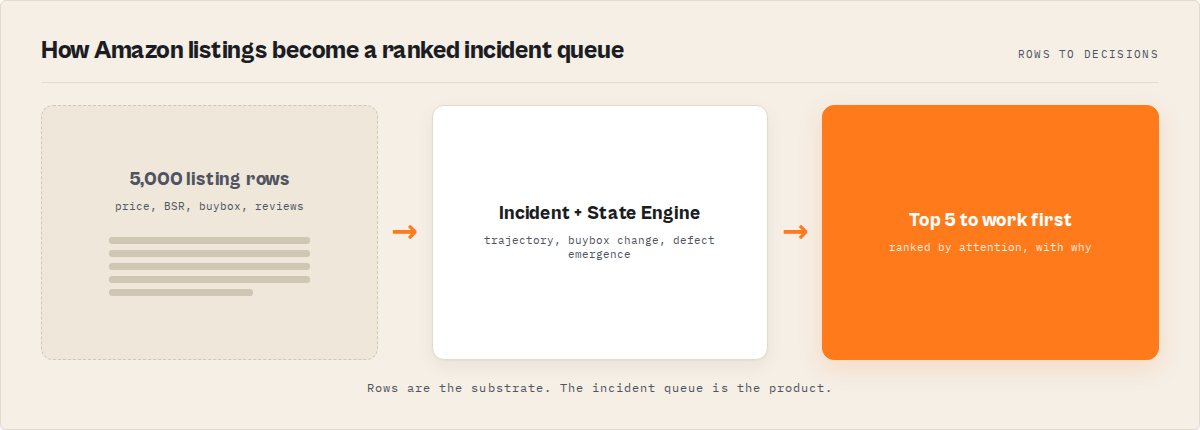
The problem: You scrape 5,000 Amazon listings into a spreadsheet. Your own SKUs, competitor SKUs, the whole comp set. Now you read every row, eyeball price columns, squint at Best Sellers Rank, scroll review snippets, and try to guess which three listings actually need work this week. Then you do it again next week, comparing this export against last week's by hand. That's not catalog operations. That's a row dump with a human doing the operations downstream, for free, every single day.
Rows are the substrate. Decisions are the product. This whole article is about the layer that turns one into the other.
What is an Amazon operations layer? An Amazon operations layer is a system that sits on top of the scrape and ranks listings by what needs action, with a reason on each, instead of handing you flat rows to triage. It detects incidents (price moves, BSR slides, buybox changes, review-theme emergence), tracks trajectory across runs, and answers "what changed and what do I work first."
Why it matters: The 2026 bottleneck in Amazon operations isn't getting the data, it's deciding what to act on before your margin or rank slips. Scraping is a solved problem with dozens of mature actors. The interpretation, ranking, and run-over-run memory still happen in someone's head, in a spreadsheet, on a Monday morning.
Use it when: You're watching your own catalog, tracking a competitor comp set, monitoring buybox position, or trying to catch a defect theme emerging in reviews before it tanks your rating, and you want to read five listings a day instead of five thousand.
Quick answer
- What it is: an operations layer is a ranked, interpreted Amazon monitoring output (an incident queue), not a raw product/review/seller export.
- When to use it: any recurring catalog job (price, BSR, buybox, reviews, comp-set) where the value is in what changed, not what exists.
- When NOT to use it: a one-off bulk pull of a category you'll process in your own pipeline, or anything that needs write access to Seller Central (this is read-only and descriptive).
- Typical steps: name a watchlist of ASINs, pick a mode, run on a schedule, read the top of the incident queue, act on the high-priority rows.
- Main tradeoff: run-over-run memory can't be backfilled, so the first run shows no trajectory. Value compounds the longer you run it on the same ASINs.
In this article: What it is · Why rows fail · How it works · What it returns · Alternatives · Migrating from junglee · Best practices · Common mistakes · Limitations · FAQ
Key takeaways
- A 5,000-row Amazon scrape leaves 100% of the triage, ranking, and change-detection work on a human. An operations layer ships that as the product.
- The real competitor to an Amazon scraper isn't another scraper, it's the spreadsheet a team eyeballs by hand every week.
- Price, BSR, and buybox only mean something relative to their own history. A single scrape has no history, so the move that matters is invisible in a one-shot export.
- Persistent operational memory, the run-over-run state that surfaces what changed, is the one thing a single scrape can never reconstruct or backfill.
- The Amazon Product Scraper Apify actor is a drop-in replacement for
junglee/Amazon-crawler: same input shape, same fields viaoutputProfile: compat, plus a ranked incident queue layered on top.
Listings in vs decisions out: a concrete look
| You ask | A row dump gives you | An operations layer gives you |
|---|---|---|
| Which listing do I fix first? | 5,000 rows; sort and guess | A ranked incident queue, highest-priority first |
| Did my price slip vs the comp set? | A price column; compare by hand | A comp-set position move with the delta |
| Is this SKU losing rank? | A BSR number with no context | A BSR trajectory: up, down, or stable since last run |
| Did I lose the buybox? | The current buybox owner | A buybox-change incident with before/after seller |
| Is a defect theme emerging in reviews? | Review snippets to read | Recurring review themes ranked by frequency growth |
| What changed since last week? | Two CSVs; diff manually | A delta of new and resolved incidents |
Also known as: Amazon catalog monitoring, Amazon listing intelligence, Amazon price and BSR tracking, e-commerce operational awareness, Amazon comp-set monitoring, Amazon incident detection.
What is an Amazon operations layer?
Definition (short version): An Amazon operations layer is a system that watches a set of Amazon listings over time and surfaces what changed, what matters, and what to work first, rather than just exporting product, review, and seller rows.
An Amazon scraper and an Amazon operations layer are not the same thing. A scraper extracts: it returns products, reviews, and sellers as flat rows, then stops. The operations layer is what happens after extraction. It's the incident detection, ranking, and run-over-run comparison that turns a scrape into a queue you can act on.
There are broadly three categories of Amazon tooling in 2026. Row scrapers export the listing data and leave everything downstream to you. Repricing and analytics SaaS (Helium 10, Jungle Scout, Keepa-style trackers) cover research and pricing with dashboards and a monthly subscription. Operations-layer actors ship the decision layer: an incident queue, trajectory across runs, and comp-set position. At ApifyForge we group tools by what they output, not just what they scrape, because the output contract is what decides whether you still need a spreadsheet afterward.
Why do flat Amazon rows fail for operations?
Flat Amazon rows fail for operations because they externalise every decision back onto a human. A 5,000-row export contains no ranking, no run-over-run memory, and no incident detection, so the actual operations work (deciding what changed and what to fix first) still happens by hand in a spreadsheet, every week.
Here's the part people underestimate. Catalog operations on Amazon is genuinely hard, which is exactly why most tools quietly stop at extraction:
- A price or BSR number means nothing without its own history. $24.99 isn't high or low. It's only meaningful against where it was last week and where the comp set sits now.
- Buybox ownership flips quietly. You can lose the buybox to a third-party seller and never notice until sales drop, because a one-shot scrape just shows you whoever owns it right this second.
- Defect themes emerge gradually. A product problem shows up as a slow drift in review topics over weeks, not one dramatic 1-star, so it hides in a row-by-row read.
- Comp-set position is relative. Your rank moving means nothing in isolation; what matters is whether you moved relative to the three SKUs you actually compete with.
- Most tools forget every prior run. A one-shot scrape can never tell you whether a problem is new, recurring, or already resolved.
The stakes aren't abstract. Amazon reports that third-party sellers account for roughly 60% of physical gross merchandise sales on its marketplace (Amazon 2023 shareholder letter), so most listings sit in a contested buybox where ownership can flip without warning. And winning the buybox isn't a side detail: industry estimates have long put the buybox at around 80%+ of Amazon sales, which is why a quiet flip is a revenue event, not a cosmetic one. A flat row export tells you who owns it this second and nothing about whether that changed.
A 2024 Salesforce State of Sales report (n=5,500+ professionals) found 67% of teams already feel they have too many tools. Bolting "read 5,000 rows weekly" onto that workload is the wrong direction. The real competitor to an Amazon scraper isn't another scraper, it's the manual spreadsheet-triage workflow that sits downstream of one.
How does an Amazon incident queue work?
An Amazon incident queue works by adding a decision layer on top of the scraped substrate. After extraction, deterministic detectors fire against each listing's own history to find typed incidents (price move, BSR slide, buybox change, review-theme emergence), the run diffs against persisted watchlist state to find what changed, and every record gets a bounded priority score so the queue sorts by what to work first.
The mental model is a pipeline: Amazon listings → substrate fetch → incident detection → state engine → priority → ranked incident queue. Each layer adds something the row dump never had.
The incident-detection layer is the interpretation step. Instead of leaving you to spot a buybox loss, it surfaces typed, evidenced events. A price-move incident fires when current price deviates materially from the listing's own baseline; a BSR-slide incident when rank trends down across recent runs. Each incident carries its evidence (the prior value, the current value, the window) so you can audit why it fired.
The state engine is the moat, and it's the part a competitor can't backfill. When you name a watchlist of ASINs and run on a schedule, per-listing history accumulates in a persistent store. Trajectory, recurrence, and resolution are derived from that history. A single scrape tomorrow can reproduce the rows, but not the run-over-run context. That context is longitudinal, and it only exists if you've been accumulating it. We covered this same shape in decision-first analytics: the output is one routable verdict, not a chart you re-interpret.
Why deterministic Amazon monitoring matters
Many "AI-powered" monitoring tools produce different outputs from the same listing data on different runs, because a large language model sits in the scoring path. Deterministic detection (fixed thresholds plus trajectory math) means the same listings always produce the same incidents and priorities, so automation can branch on the result safely.
That reproducibility is the enterprise-grade choice, not the cheap compromise. An ops manager who wires an alert to a buybox-change incident needs that incident to fire identically every run, and an LLM in the scoring path introduces run-to-run drift plus a paid external dependency for zero added defensibility.
Amazon operations is really about state evolution
A traditional Amazon scraper answers one question: what does this listing look like right now. Operational monitoring answers a different set: what changed, what slid, what recovered, what recurred, what became urgent, and what to work first.
That distinction matters because catalog problems are rarely isolated events. A margin leak, a rank slide, a buybox loss, a defect theme: these emerge gradually, across runs, over days and weeks. A price move matters because it changed. A BSR slide matters because it trended. A recurring complaint matters because it persisted. The signal is never the raw value; it's the movement of that value over time.
Incidents are the ingredients. State evolution is the product. Without persistent operational memory, Amazon monitoring collapses back into reading rows by hand, and by the time a human notices the pattern in a spreadsheet, the rank has usually already slipped. The operational problem was never missing data. It's noticing the change that matters before it costs you.
The whole pipeline exists to turn raw listing data into that evolving state:
   Amazon  (products, reviews, sellers, buybox, BSR)
      |
   Extraction
      |
   Incident detection   (price move, BSR slide, buybox change, review theme)
      |
   Persistent memory     (per-ASIN history across runs)
      |
   State evolution       (trajectory, recurrence, what changed)
      |
   Incident queue        (ranked: what to work first)
      |
   Human or automation action
A row dump stops at the first box. Everything below it is the operations product, and it's the part you cannot reconstruct from a single scrape after the fact.
What does an Amazon incident queue actually return?
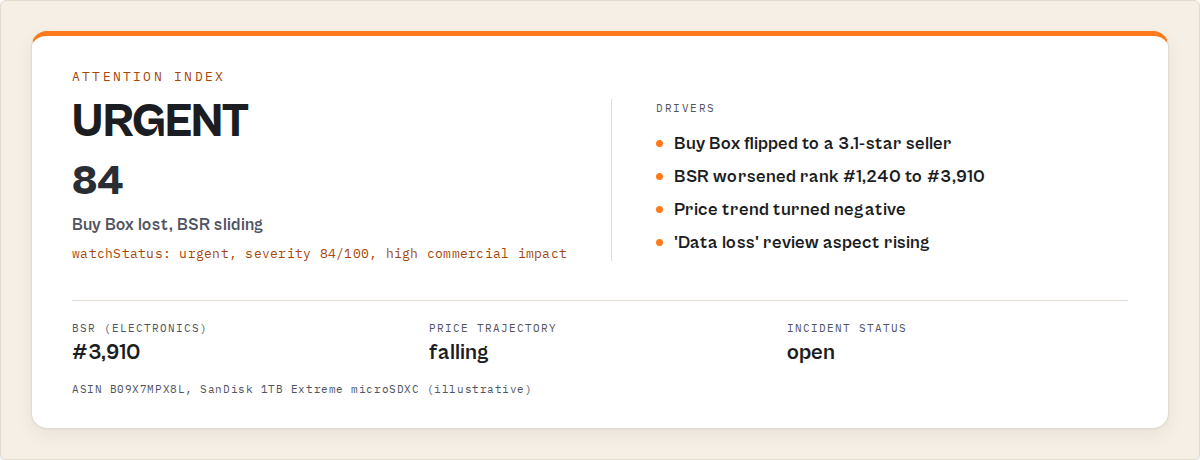
An Amazon incident queue returns a ranked, decision-ready record per listing. The core fields are a sortable priority score, a list of typed incidents with evidence, a trajectory direction per tracked metric, and a comp-set position, plus the full substrate fields a standard scraper emits.
Here's a single record so you can see the shape. Note this is the output you read, not code you run.
{
  "asin": "B0EXAMPLE12",
  "title": "Acme Stainless Water Bottle 32oz",
  "priorityScore": 81,
  "incidents": [
    {
      "type": "buybox_change",
      "detail": "Buybox moved from you to a third-party seller.",
      "previousSeller": "Acme Direct",
      "currentSeller": "DealsRUs",
      "since": "2026-05-19"
    },
    {
      "type": "bsr_slide",
      "detail": "Best Sellers Rank trending down across last 3 runs.",
      "previousRank": 412,
      "currentRank": 1180
    }
  ],
  "priceTrajectory": "down",
  "bsrTrajectory": "down",
  "compSetPosition": "slipped 2 places vs tracked comp set",
  "price": 24.99,
  "bsr": 1180,
  "reviewThemes": ["leaking lid (rising)", "shipping damage"]
}
The incident list is descriptive, not a verdict. It tells you the buybox moved and the rank slid with the evidence attached; it does not claim a listing is counterfeit, fraudulent, or due for recall. That restraint is deliberate. An operations layer routes attention and leaves the judgment call to the human who owns the catalog.
What are the alternatives to an Amazon operations layer?
There are four practical alternatives to an Amazon operations layer, each with real tradeoffs. The right choice depends on whether your job is one-off research or recurring monitoring, how much engineering you want to own, and whether you need on-Amazon data or a full repricing platform.
1. A traditional row scraper (e.g. junglee/Amazon-crawler). Exports products, reviews, and sellers as flat rows. Best for: a one-time bulk pull where you'll do all the analysis yourself, or feeding a corpus you already have a pipeline for. Where it breaks for operations: it ships none of the operations jobs (no ranking, no incident detection, no run-over-run deltas), so the weekly triage stays manual forever.
2. Build it yourself. You'd own extraction, per-ASIN baselining, price/BSR trajectory math, buybox-change diffing, review-theme clustering, persistent state across runs, and the reranking, then keep all of it versioned and reproducible. Best for: a team with spare engineering capacity and a very specific in-house need. Where it breaks: you now own a maintained service, not a script. Schema drift, proxy and rate-limit handling, the baselining math, and the persistent state store that makes "what changed" possible all become yours. That last piece is months of accumulated history you can't shortcut.
3. A repricing or research SaaS (Helium 10, Jungle Scout, Keepa-style trackers). Covers product research, keyword work, and in some cases automated repricing, with a dashboard and a monthly seat. Best for: sellers who want research breadth and live in a dashboard already. Where it differs: the strength is research and pricing, not a typed, automatable incident queue you can branch CI or alerts on, and you're often back to interpreting charts by hand.
4. An operations-layer actor. Focuses on a watched set of listings and ships the decision layer: a ranked incident queue, trajectory across runs, and comp-set position. Best for: recurring catalog, comp-set, buybox, or review-theme monitoring where the value is what changed. Where it's less suitable: deep keyword research, write access to Seller Central, or authenticity and recall verdicts (it's descriptive, not a compliance ruling).
Each approach has trade-offs in coverage, engineering cost, reproducibility, and time-to-value. Here's the comparison side by side.
| Approach | Time to first result | Incident ranking | Run-over-run memory | Cost shape |
|---|---|---|---|---|
Row scraper (junglee/Amazon-crawler) | ~minutes | None (manual) | None | Per-result, analysis on you |
| Build it yourself | Weeks to months | You build it | You build + accumulate it | Engineering time + infra |
| Repricing/research SaaS | Setup + onboarding | Dashboard, research-first | Tool-dependent | $39-300+ / month typical |
| Operations-layer actor | ~60 seconds | Built in, deterministic | Built in, compounds | Pay-per-event, signal layer included |
Pricing and features based on publicly available information as of May 2026 and may change. Re-verify any incumbent's live price before relying on the comparison.
One of the best fits for recurring, listing-specific monitoring is an operations-layer actor, because it collapses the spreadsheet workflow into one scheduled run. For deep product research or automated repricing, a dedicated SaaS may suit better. If you're weighing options, the ApifyForge cost calculator is a quick way to model the per-record spend before you commit.
How do I migrate from the junglee Amazon crawler?
Point your existing input at the new actor and set outputProfile: compat. The Amazon Product Scraper Apify actor accepts the same input shape as junglee/Amazon-crawler and returns the same fields in compat mode, so your downstream pipeline keeps working unchanged. Then switch off compat when you want the incident queue and trajectory fields on top.
The migration is meant to be boring on purpose. Same ASINs in, same field names out, nothing in your warehouse or sheet breaks. The difference shows up the moment you run it a second time on a named watchlist: the run-over-run layer starts populating, and you get the decision fields the crawler never had. You can adopt the operations layer gradually instead of re-plumbing your stack in one go.
Best practices for Amazon catalog monitoring
- Name a watchlist of ASINs and run on a schedule. The product is the run-over-run delta. One run can't show what changed; the memory clock starts on run 2 and can't be backfilled.
- Pick the mode that matches your job. Use
monitorfor a known ASIN set,compsetfor competitive position,reviewsfor defect-theme tracking,sellerfor buybox and seller watching,search/productsfor discovery. - Branch automation on incident type, not raw scores. Wire alerts to
buybox_changeorbsr_slideso they're stable across runs. - Track your own SKUs and the comp set in one watchlist. Comp-set position only means something when both sides are in the same run.
- Turn on review fetching to unlock theme detection. Defect-theme emergence needs review text; without it you get price/BSR/buybox but not review themes.
- Read the resolved-incidents view. Seeing what cleared (a recovered buybox, a recovered rank) is how you learn to trust the incidents that stay open.
- Use the listing's own baseline, not a global one. A $5 price move matters on a $20 SKU and is noise on a $400 one; per-ASIN baselining is what separates signal from noise.
- Pin automations to the schema version. A versioned output contract means a downstream rule won't silently break when fields are added.
Common Amazon monitoring mistakes
- Treating a scrape as monitoring. Exporting rows is extraction. Monitoring is the interpretation and comparison you're doing by hand afterward. Move that work into the tool.
- Sorting by BSR and calling it triage. Raw rank ignores trajectory and comp-set context. A SKU at rank 1,180 sliding fast matters more than a stable SKU at 800.
- Expecting deltas on the first run. State can't be invented. Run 1 honestly reports a first-run baseline with empty trajectory; incidents and recurrence sharpen after several scheduled runs.
- Ignoring the buybox until sales drop. A quiet buybox flip is the single most expensive thing to notice late. Detect it the run it happens, not the month your revenue does.
- Reading review snippets one by one. A defect theme is a frequency trend across many reviews, not one bad one. Eyeballing snippets means you catch it after the rating already moved.
- Reading every row anyway. If you've got an incident queue and still scroll the full export "just in case," you've kept the bottleneck. Trust the queue and stop at the top of the list.
Mini case study: a Monday morning on a 40-SKU catalog
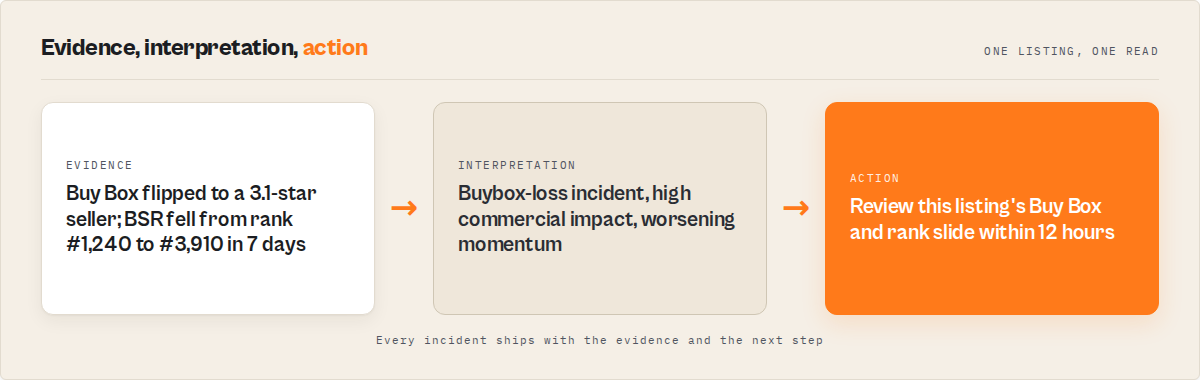
Before. A small brand exported its own 40 SKUs plus a dozen competitor ASINs into a sheet each week, then spent the better part of a morning comparing price columns, scanning BSR, and reading review snippets. A buybox loss on their best seller went unnoticed for nearly two weeks because nobody could hold last week's export in their head.
After. They switched to a scheduled monitor run on a named watchlist. Each Monday they read the top of the incident queue (usually a handful of listings flagged high-priority), acted on those, and skipped the rest. The week a competitor undercut their flagship and took the buybox, the queue surfaced it the next run, with the before/after seller and the rank slide attached as evidence.
The reframe is the whole point: a morning of manual triage per week collapsed into minutes a day. These numbers reflect one brand's workflow; results vary with catalog size, how often you run, and how volatile your categories are.
How do I monitor my Amazon listings for changes?
Set the mode to monitor, put your ASINs in the watchlist, name the watchlist to persist state, and schedule the run daily or weekly. Each run returns the listings that need attention now, ranked by priority, plus a delta of what changed since the previous run.
This is where Apify scheduling and webhooks earn their keep: fire on run completion to push high-priority incidents straight into Slack or a ticket queue. The same pattern we described for Airbnb operational awareness applies here, just pointed at a catalog instead of a rental market.
How do I track a competitor's Amazon prices and rank?
Use compset mode with your SKUs and the competitor ASINs in one watchlist. Each run computes comp-set position, flags price moves and BSR slides relative to the set, and emits the run-over-run delta, so you see when a competitor undercuts you the run it happens, not when your sales tell you weeks later.
Implementation checklist
- Decide your job: own-catalog health, comp-set position, buybox watching, or review-theme tracking. That sets the mode.
- Collect the ASINs you care about (yours and the comp set) into a watchlist.
- Name the watchlist. Without it, the run is one-shot with no memory.
- Run once with defaults to see the incident queue shape.
- Turn on review fetching if you want defect-theme detection.
- Schedule the run (weekly for slow catalogs, daily for volatile ones).
- Wire automation to branch on incident type, not raw scores.
- After a couple of weeks, read the trajectory and recurrence fields. That's when the memory pays off.
Limitations
- Run-over-run memory can't be backfilled. The first run shows no trajectory by design. Incidents and recurrence only sharpen after several scheduled runs on the same watchlist.
- It's descriptive, not a compliance ruling. The incident queue reports observable changes (price, BSR, buybox, review themes). It makes no authenticity, counterfeit, or recall verdict, by design.
- Public listing data only. It reads public Amazon pages. It can't see your Seller Central internals, advertising spend, or private order data, and it performs no write actions.
- Detection is bounded by scrape cadence. A daily run catches a buybox flip within a day, not within the minute. For sub-minute repricing you want a dedicated repricer.
- Review themes are frequency labels, not generated prose. Theme detection surfaces recurring topics with growth direction; it's not a sentiment essay or a root-cause analysis.
Key facts about Amazon operations layers
- An Amazon operations layer ranks listings by what needs action (a priority score), not by date, price, or raw BSR.
- Price, BSR, and buybox are only meaningful relative to a listing's own history, which a single scrape doesn't have.
- Persistent operational memory accumulates per watchlist and cannot be reconstructed from a single scrape.
- Deterministic detection (fixed thresholds plus trajectory math) produces identical incidents on re-run, so automation can branch on it safely.
- The Amazon Product Scraper Apify actor is a drop-in replacement for
junglee/Amazon-crawlerwithoutputProfile: compatfor exact field parity. - A 2024 Salesforce report (n=5,500+) found 67% of teams already feel they have too many tools; more dashboards isn't the fix.
Glossary
Operations layer is the decision layer on top of an Amazon scrape that ranks listings by what needs action, with a reason on each. Incident is a typed, evidenced event detected against a listing's own history (price move, BSR slide, buybox change, review-theme emergence). Priority score is a bounded composite for how worth working a listing is right now. Buybox change is a detected flip in who owns the buybox on a listing, with the before and after seller as evidence. Persistent operational memory is cross-run monitoring state that accumulates over time and can't be backfilled from one scrape. Comp-set position is where a listing sits relative to a tracked set of competitor ASINs, measured run over run.
Where these patterns apply beyond Amazon
The operations-layer pattern isn't an Amazon trick. It's the same shift we keep seeing across data tooling: from "here's everything" to "here's what to do." The universal principles hold anywhere you monitor a noisy stream:
- Rank by operational importance, not raw volume or recency. The first row should be the one to work first.
- Carry the reason with the score. A number nobody can audit gets ignored; evidence builds trust.
- Persist state across runs. The valuable question is almost always "what changed," and that needs memory.
- Be deterministic where automation depends on you. Reproducible outputs are what let downstream systems branch safely.
- Show what resolved, not just what's open. A monitor that tells you an incident cleared is the one you trust when it raises a new one.
Across ApifyForge we've made the same argument for reviews, for Reddit monitoring, and for company research. Different source, same lesson: rows are the substrate, decisions are the product.
When you need this
You probably need an Amazon operations layer if:
- You manage a catalog and want to know which listings to work first, not read every row.
- You track a competitor comp set and need to catch a price or rank move the run it happens.
- You're watching the buybox on your best sellers and can't afford to notice a flip late.
- You want defect themes in reviews surfaced as they emerge, before the rating slips.
- You're migrating off a plain Amazon scraper and want the decision layer without re-plumbing your pipeline.
You probably don't need this if:
- You want a one-off bulk export to process in your own pipeline (a plain scraper is fine).
- You need write access to Seller Central (this is strictly read-only).
- You need deep keyword research or automated repricing (use a dedicated SaaS).
- You need an authenticity, counterfeit, or recall verdict (this is descriptive, not a compliance ruling).
Frequently asked questions
What is the difference between an Amazon scraper and an Amazon operations layer?
An Amazon scraper exports rows (products, reviews, sellers) and stops. An operations layer watches those listings over time and tells you what changed and what to fix first. The strongest tools do both: ship the substrate rows and add the decision layer on top, so you can migrate from a plain scraper without losing your downstream fields.
Is the Amazon Product Scraper a drop-in replacement for junglee/Amazon-crawler?
Yes. The Amazon Product Scraper Apify actor accepts the same input shape and returns the same fields when you set outputProfile: compat, so your existing pipeline keeps working. Switch compat off when you want the ranked incident queue, trajectory, and comp-set fields layered on top. You can adopt the operations layer gradually rather than re-plumbing everything at once.
Why is the incident queue empty on my first run?
State can't be invented. Run 1 reports a first-run baseline with empty trajectory, because there's no prior run to compare against. Incidents like price moves, BSR slides, and buybox changes populate after several scheduled runs on the same watchlist. This is a feature, not a bug; a tool that fabricated history would be lying to you. The memory clock starts the moment you name a watchlist.
Can it detect when I lose the Buy Box?
Yes. A buybox-change incident fires when the buybox owner on a tracked listing flips between runs, with the previous and current seller attached as evidence. Because detection is bounded by scrape cadence, a daily run catches a flip within a day, not within the minute. For sub-minute repricing you'd pair it with a dedicated repricer.
How much does it cost to monitor Amazon this way?
The Amazon Product Scraper Apify actor uses pay-per-event pricing: you pay per record, with the signal layer included, so a monitor run costs the same per record as a one-shot scrape and frequent monitoring isn't penalised. Apify's free tier ($5 in monthly credits) covers a meaningful trial, so you can test it on your own ASINs at no out-of-pocket cost.
Does it use an LLM to decide what's an incident?
No. Detection is deterministic: fixed thresholds plus trajectory math against each listing's own history. The same listings produce the same incidents and priorities on every run, with no large language model in the scoring path. That reproducibility is what lets automation branch on the output safely, and it removes a paid external dependency that would add drift for no defensibility.
Is it legal to scrape Amazon?
An operations-layer actor like this accesses public listing pages only and performs no write actions. Whether your specific use is permitted depends on your jurisdiction and intended use, including data-protection rules and platform terms. For background, see Apify's guide to web scraping legality. Consult legal counsel for your case.
Ryan Clinton publishes Apify actors and MCP servers as ryanclinton and builds developer tools at ApifyForge.
Last updated: May 2026
This guide focuses on Amazon, but the same operations-layer patterns apply broadly to any noisy monitoring stream where the job is interpreting change over time, not just retrieving rows.