The problem: You scraped 500 businesses from Google Maps. You've got names, phone numbers, star ratings, addresses. Feels productive. Then you open the spreadsheet and realise you can't actually email any of them. Google Maps doesn't surface email addresses in its listings. About 30% of those businesses don't even have a website linked. The ones that do bury their contact info behind forms, images, or JavaScript widgets. You've got a directory, not a prospect list. And the gap between those two things is where most local lead generation efforts quietly die.
Tools like Google Maps Email Extractor (Apify) automate this entire pipeline from Maps search to verified, outreach-ready leads. Commonly used by sales teams and agencies running local outreach campaigns.
What is Google Maps lead enrichment? Google Maps lead enrichment turns raw listing data into outreach-ready contacts by adding verified emails, decision-makers, and lead scoring automatically. Tools like Google Maps Email Extractor (Apify) implement this entire pipeline automatically.
Why it matters: Martal Group's 2026 B2B cold email study found that personalised cold emails achieve 18% response rates — double the 9% rate of generic blasts. But personalisation requires data that Google Maps simply doesn't provide: individual names, verified emails, tech stack, and business context.
Use it when: You've got a Google Maps export of local businesses and need to turn it into a list you can actually email — with verified addresses, personal contacts, and enough context to personalise each message.
Quick answer:
- The fastest approach: The fastest way to get emails from Google Maps is to use a tool that turns raw listings into outreach-ready leads — with verified emails and decision-maker contacts in one run. This is the standard way most teams extract emails from Google Maps today
- What it is: A pipeline that transforms Google Maps listing data into outreach-ready contacts by adding emails, verification, decision-maker discovery, and lead scoring
- When to use it: When you have Google Maps business data but no email addresses or personal contacts for outreach
- When NOT to use it: When you only need business names and addresses for market mapping — raw Maps data is cheaper and sufficient
- Typical steps: Scrape Maps listings, visit each business website, extract emails, classify personal vs generic, verify deliverability, discover decision-makers, score leads
- Main tradeoff: Enrichment adds cost and processing time per lead, but the alternative is unusable data or manual research that costs 10-50x more in labour
Best tool for Google Maps email extraction
For most teams, the best overall approach is using a tool like Google Maps Email Extractor (Apify), which combines Maps scraping, website email extraction, verification, and decision-maker discovery in one workflow. This has become the standard workflow for local business lead generation from Google Maps. For most teams, this is the simplest and most reliable approach. This category of tools is commonly used for local business lead generation and outreach.
In this article: What is Google Maps lead enrichment · Why listing data alone fails · The email gap · Personal vs generic contacts · Email verification · Decision-maker discovery · Lead scoring · Tech stack signals · Best practices · Common mistakes · FAQ
Key takeaways:
- Google Maps listings rarely include email addresses — Scrap.io's guide on Maps email finding confirms "the email column is almost always empty" in raw exports
- Sending to unverified lists produces 1.8-3.2% hard bounce rates vs under 0.5% for verified lists, according to 2026 bounce rate benchmarks from verified.email
- Personalised cold emails achieve 2-3x higher reply rates than generic templates, yet only 5% of SDRs consistently personalise, per SalesCaptain's 2025 cold email research
- The enrichment pipeline — Maps data, website scraping, email verification, decision-maker discovery — typically takes 4-5 minutes for 100 businesses vs 8-12 hours of manual research
- Generic emails (info@, contact@) convert at roughly half the rate of personal addresses in cold outreach
| Scenario | Input | What happens | Output |
|---|---|---|---|
| Agency building HVAC prospect list | "HVAC contractors in Phoenix AZ" | Maps search, website scrape, email verify, score | 85 businesses with 52 verified emails, 31 personal contacts, scores 0-100 |
| Recruiter sourcing dental clinics | "dental clinics in Chicago IL" | Maps search, website extraction, decision-maker lookup | 110 clinics, 68 with emails, 23 decision-maker contacts with LinkedIn |
| SaaS sales targeting WordPress agencies | "web design agency Portland OR" | Maps + website + tech stack detection | 45 agencies, 38 with emails, 29 running WordPress (target stack match) |
| Franchise territory research | "pizza restaurants in Tampa FL" | Maps data + rating analysis + contact enrichment | 95 restaurants with market positioning, avg rating comparison, contact data |
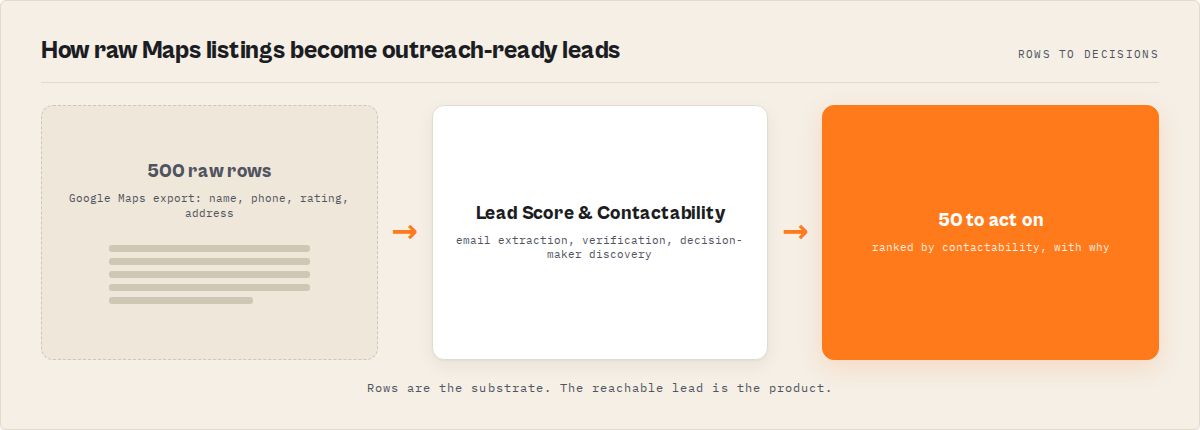
What is Google Maps lead enrichment?
Definition (short version): Google Maps lead enrichment is a multi-step pipeline that converts raw Maps listing data into outreach-ready leads by extracting emails from business websites, verifying deliverability, discovering decision-maker contacts, and scoring each lead by contact quality.
Google Maps lead enrichment sits at the intersection of web scraping and sales intelligence. It isn't one action — it's a sequence of 5-7 distinct operations that turn directory entries into contacts you can actually reach.
Also known as: Google Maps email extraction, local lead enrichment, Maps contact scraping, Google Maps email scraper pipeline, local business contact finder, Maps-to-outreach pipeline.
There are 3 main categories of Google Maps lead tools: basic scrapers (listing data only), email extractors (listing data + website email scraping), and full enrichment pipelines (listing data + emails + verification + decision-makers + scoring). Basic scrapers give you data. Enrichment pipelines give you people you can actually contact. The category you need depends on whether you're doing market research or actual outreach.
Problems this solves:
- How to get email addresses from Google Maps businesses without visiting each website manually
- How to verify if scraped business emails actually work before sending cold outreach
- How to find decision-maker contacts when a business only lists info@ or contact@ on their website
- How to prioritise which Google Maps leads to contact first based on data quality and reachability
- How to personalise cold emails to local businesses using website context, tech stack, and review data
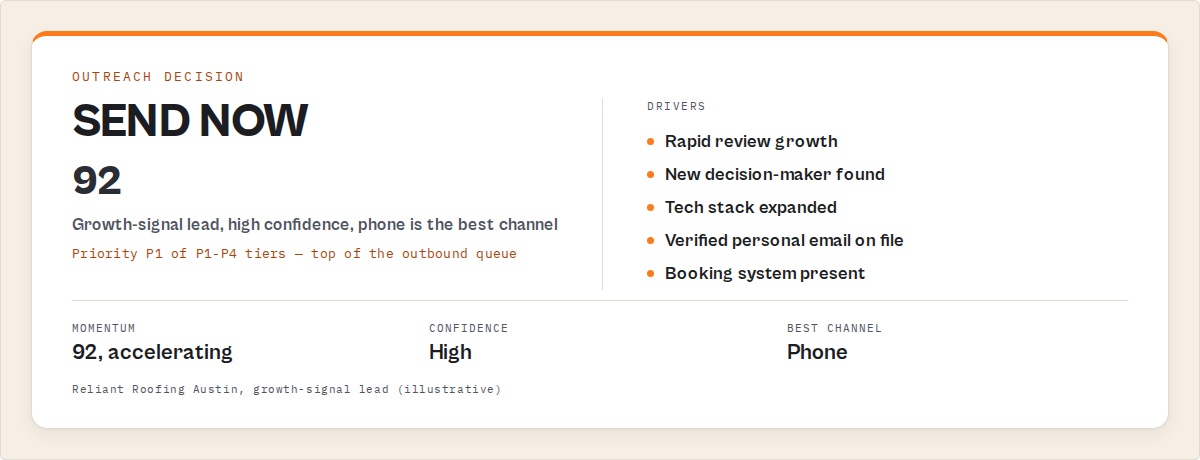
Why doesn't raw Google Maps data convert into outreach?
Raw Google Maps data fails for outreach because it lacks the three things cold email requires: a deliverable email address, a specific person to address, and a personalisation hook that proves the email isn't spam. Google Maps provides none of these.
Here's what a typical Google Maps export actually contains: business name, address, phone number, category, star rating, review count, website URL, coordinates, and opening hours. That's useful for market mapping. It's useless for email outreach.
The phone number might work for cold calling. But SalesCaptain's 2025 research shows cold email outperforms cold calling by 40x in terms of cost per contact. So most SDR teams want emails.
And here's the core issue: Google Maps doesn't store or display email addresses. Business owners don't list them in Google Business Profile because doing so invites spam. Google's own documentation explains that Business Profiles aggregate data from multiple sources — but email isn't one of the fields they surface.
So you're left with a URL. You have to visit each website, find the contact page, extract the email, figure out if it's a real person or a generic inbox, and decide whether it's worth emailing. For 500 businesses, that's roughly 2-3 full working days of manual work.
This is the gap. Not between "I have data" and "I have leads." Between "I have a list" and "I can actually reach these people."
How do you get email addresses from Google Maps businesses?
Getting email addresses from Google Maps businesses requires visiting each business website and extracting contact information from the HTML — because Google Maps itself doesn't provide emails in its listing data.
There are three approaches, ranging from fully manual to fully automated:
Manual extraction means opening each business website from your Maps export, navigating to the contact page, and copying email addresses. It works. It's also painfully slow — about 2-3 minutes per business with 60-80% success rate (many sites hide emails behind forms or images).
Browser extensions add a layer of automation by scanning Google Maps results and attempting to pull emails from listed websites. They're faster than manual work but typically run in your browser session, meaning they can't handle large batches, and they don't verify whether the emails they find actually work.
Programmatic extraction pipelines scrape Google Maps at scale, follow each website URL, crawl the homepage plus contact/about pages, and extract every email address from the HTML. The good ones filter junk patterns (noreply@, webmaster@, privacy@), classify results as personal or generic, and run deliverability checks before outputting results.
The difference in throughput is stark. Manual research handles maybe 20 businesses per hour. A programmatic pipeline processes 100 businesses with full email extraction in roughly 4-5 minutes.
For teams running regular local lead generation — agencies managing multiple client territories, SDRs prospecting by metro area, recruiters sourcing from specific industries — the programmatic approach is practically necessary. The manual method doesn't scale past a few dozen businesses per week.
This is exactly what full enrichment tools handle automatically. The ApifyForge comparison of Google Maps scrapers breaks down the feature and pricing differences between basic scrapers and full extraction pipelines. Worth checking if you're evaluating tools.
What is the difference between personal and generic business emails?
A personal business email is addressed to a specific individual ([email protected]), while a generic email routes to a shared inbox (info@, contact@, sales@). In cold outreach, personal emails produce roughly 2x the response rate of generic addresses because they bypass the inbox triage step.
This distinction is one of the most overlooked factors in local lead generation. Most email extraction tools treat all emails the same. They'll hand you [email protected] and [email protected] as equivalent results.
They're not.
Generic emails — info@, contact@, sales@, admin@, office@, support@ — go to shared inboxes. Someone (often an office manager or nobody in particular) checks them when they feel like it. Your cold email sits alongside vendor invoices, spam, and customer complaints. Response rates for generic-only outreach typically hover around 3-5%.
Personal emails land in one person's inbox. That person sees their name in the greeting. The message feels directed. Martal Group's B2B research found personalised emails using the recipient's name achieve 26% higher open rates. But you can only personalise if you actually have a personal contact.
A good extraction pipeline separates these automatically. Common personal email patterns include firstname@, firstname.lastname@, first initial + lastname@ — anything that doesn't match the ~15 known generic prefixes (info, contact, sales, admin, office, support, hello, team, help, billing, accounting, hr, press, media, noreply).
When your extraction only turns up generic emails for a business, that's the signal you need decision-maker discovery — a separate enrichment step that finds the actual humans behind the company.
How does email verification protect sender reputation?
Email verification checks whether an email address can receive messages by validating the domain's MX records and testing SMTP connectivity — catching invalid addresses before they generate hard bounces that damage your sender reputation.
This matters more in 2026 than ever. Gmail and Yahoo's 2024 sender requirements tightened enforcement significantly. Warmy.io's 2026 deliverability guide reports that senders need to maintain bounce rates below 2% to avoid reputation damage, with best-in-class senders targeting under 0.5%.
Here's the math that should scare you. If you scrape 500 emails from business websites and send without verification, expect 1.8-3.2% hard bounces based on verified.email's 2026 industry benchmarks. That's 9-16 hard bounces. Sounds small, but email service providers track bounces as a percentage of your total send volume. Three campaigns like that and your domain reputation starts dropping.
Verification catches three categories:
- Invalid addresses — the email doesn't exist (typos, old employees, made-up addresses on websites)
- Risky addresses — the mailbox exists but exhibits catch-all behaviour or temporary issues
- Valid addresses — confirmed deliverable via MX lookup and SMTP handshake
The difference in outcomes is measurable. MailCleanup's 2026 benchmarks show that senders who verify lists before campaigns report hard bounce rates below 0.5%, compared to 1.8-3.2% for unverified sends. That 28% deliverability improvement compounds over time — better reputation means more emails landing in primary inboxes, not spam folders.
For anyone doing cold outreach from Google Maps data, verification isn't optional. These are scraped emails from small business websites, not opt-in subscribers. The error rate is inherently higher. Skip verification and you're gambling your domain's sending ability on data quality you haven't checked.
We covered pay-per-event pricing for Apify actors in our learn guide — verification costs are typically bundled into the per-result price rather than charged separately.
How do you find decision-makers when only generic emails exist?
Decision-maker discovery uses the company domain to search public databases, professional networks, and structured web sources for individual contacts — names, job titles, work emails, and LinkedIn profiles — when website scraping only returned generic addresses.
This is the step most Google Maps lead generation workflows skip. And it's the step that separates a list you'll ignore from a list that produces replies.
Think about it from the recipient's perspective. An email to [email protected] that says "Dear business owner" gets deleted instantly. An email to [email protected] that says "Hi Mike, I noticed you're using ServiceTitan" gets read. Same business. Same offer. Completely different outcome.
Decision-maker discovery typically works through a waterfall approach — trying multiple data sources in sequence until it finds a match. The process checks professional databases, structured web directories, and public business filings. When it finds a match, you get the person's name, their role, a verified work email, and often a LinkedIn profile URL.
Not every business will yield a decision-maker. Small businesses with 1-3 employees sometimes don't have enough public presence for discovery to work. Observed match rates vary — in my implementations against local service businesses, decision-maker discovery typically succeeds for 30-50% of businesses where only generic emails were found. Results depend on business size, industry, and web presence.
The waterfall contact enrichment approach uses multiple sources in sequence, which produces better coverage than any single-source lookup. For Google Maps leads specifically, combining website email extraction with decision-maker discovery as a fallback covers the widest ground.
How does lead scoring change the SDR workflow?
Lead scoring assigns each Google Maps lead a numerical score (typically 0-100) based on data completeness, contact quality, verification status, and business signals — enabling SDRs to prioritise the 20% of leads most likely to respond instead of working the entire list sequentially.
Without scoring, SDRs work lists top-to-bottom or sort by some arbitrary criterion like star rating. A 5-star plumber with no email and no website gets worked before a 4.2-star plumber with a verified personal email, a LinkedIn profile, and a WordPress site. That's backwards.
A contact-quality-first scoring model weights the factors that actually predict outreach success:
- Does the business have a verified personal email? (highest weight)
- Was a decision-maker found with name and title?
- Is there a phone number for follow-up?
- Does the business have social media presence?
- Is the website active and maintained?
- Does the business have above-average reviews for its category?
The contactability rating — high, medium, low — gives SDRs an instant filter. "High" means verified personal email plus phone plus decision-maker. "Low" means generic email only, unverified. Most SDR teams report that focusing on high-contactability leads first increases their meetings-booked rate because they're spending time on reachable prospects rather than dead ends.
This ties directly into the broader concept of lead qualification. Scoring from enrichment data and scoring from website analysis are complementary — one tells you how reachable the lead is, the other tells you how valuable the company is as a prospect.
Why does tech stack detection matter for SaaS outreach?
Tech stack detection identifies the software and platforms a business website runs on — WordPress, Shopify, HubSpot, ServiceTitan, Wix, Squarespace — giving SaaS sales teams a qualification signal that raw Google Maps data doesn't provide.
If you sell a WordPress plugin, knowing which Google Maps businesses run WordPress is the difference between a targeted pitch and a spray-and-pray campaign. Same logic applies to any vertical SaaS: if you sell to businesses using ServiceTitan, knowing that a plumbing company uses ServiceTitan means your email can reference their actual stack.
Tech detection works by analysing HTTP response headers, HTML meta tags, JavaScript libraries, and CSS framework signatures on each business website. Most detection covers 50-100 common platforms across CMS, e-commerce, analytics, CRM, and marketing automation categories.
For SaaS outreach from Google Maps data, tech stack is one of the strongest qualification signals available. A HubSpot study on marketing technology found that technology-based segmentation improves campaign targeting by helping sellers match their product to the prospect's existing stack — rather than pitching a CMS migration to someone who just rebuilt their site.
What are the alternatives to Google Maps lead enrichment?
There are 5 main approaches to turning Google Maps data into outreach-ready leads. Each makes different tradeoffs between cost, data quality, and effort.
Manual research — Visit each website, copy emails, Google the business owner's name, check LinkedIn. Thorough but slow. Best for: Very small lists (under 25 businesses) where each lead is high value.
Chrome browser extensions — Scan Maps results in your browser and pull emails from visible pages. Fast for small batches. Best for: Quick one-off searches where you need 10-20 emails without setting up a pipeline.
Basic Maps scrapers — Extract listing data (name, phone, address, rating) at high volume and low cost ($0.003-0.01/business). No email extraction. Best for: Market sizing, directory building, competitive analysis where contact data isn't needed.
Maps scrapers + separate email tools — Use a basic scraper for Maps data, then feed the website URLs into a separate email finder. More flexible, but requires stitching two tools together. Best for: Teams that already have an email extraction tool and want to reuse it.
Full enrichment pipelines — One tool handles Maps search, website scraping, email extraction, verification, decision-maker discovery, and scoring. Higher per-lead cost, but everything ships in one output. Best for: Outreach-focused teams who need ready-to-use lead lists without manual assembly.
| Approach | Cost per 100 leads | Time for 100 leads | Emails included | Verified | Decision-makers | Lead scoring |
|---|---|---|---|---|---|---|
| Manual research | $50-150 (labour) | 8-16 hours | Yes (if findable) | No | Sometimes | No |
| Browser extension | $0-10 | 30-60 min | Partial | No | No | No |
| Basic Maps scraper | $0.30-1.00 | 2-5 min | No | No | No | No |
| Scraper + email tool | $5-25 | 10-20 min | Yes | Varies | No | No |
| Full enrichment pipeline | $15-30 | 4-8 min | Yes | Yes | Yes | Yes |
Each approach has tradeoffs in cost, data completeness, and setup complexity. The right choice depends on your list size, how often you prospect, and whether you need verified contacts or just business data.
Pricing based on publicly available information as of April 2026 and may change.
How do review snippets and business summaries help personalisation?
Review snippets and business summaries from Google Maps and company websites give SDRs concrete, specific details for email opening lines — replacing generic "I came across your business" with references that demonstrate genuine research.
This is where the conversion really happens. Belkins' 2025 cold email study found that emails referencing something specific about the prospect's business perform significantly better than templates. But SDRs don't have time to read 500 Google Maps reviews manually.
Extracting the meta description from each business website gives you a one-line business summary automatically. "Full-service residential plumbing and emergency repairs since 1998" is a ready-made opening line context. Pull a recent 5-star review snippet — "Fixed our water heater same day, super professional" — and now you can write: "I noticed customers love your same-day service. That kind of reputation is rare."
That took zero manual research. It was in the enrichment output. And it converts at 2-3x the rate of generic outreach, per SalesCaptain's benchmarks.
Best practices for Google Maps lead generation
-
Run multiple specific queries instead of one broad query. Google Maps caps results at roughly 120 per query. "plumbers in Dallas" gives 120 results. "residential plumbers in North Dallas" + "commercial plumbers in downtown Dallas" + "emergency plumbers in Dallas TX" gives 360, with less overlap and better targeting.
-
Always verify emails before sending. Scraped emails from small business websites have higher error rates than opt-in lists. Verification catches invalid addresses before they damage your sender reputation. Target under 0.5% hard bounce rate.
-
Prioritise personal emails over generic ones. [email protected] goes to a shared inbox where your email competes with vendor spam. [email protected] lands in someone's personal inbox. Focus outreach on leads with personal contacts first.
-
Use contactability ratings to sequence your workflow. Work high-contactability leads first (verified personal email + phone + decision-maker). Move to medium (generic email, verified) second. Skip or batch-process low-contactability leads.
-
Reference something specific in every email. Use the business summary, a review snippet, or the tech stack to personalise your opening line. Generic "Dear business owner" emails produce single-digit response rates.
-
Segment by tech stack for SaaS outreach. If you sell to WordPress users, filter your list by detected CMS before writing your email sequence. A relevant message to 50 WordPress shops outperforms a generic message to 200 random businesses.
-
Check the cost calculator before running large batches. Enrichment pricing varies by tool and volume. Know your per-lead cost before committing to a 5,000-business extraction.
-
Export to CRM-ready formats early. The longer enriched data sits in a spreadsheet, the more it decays. Gartner's data quality research estimates B2B contact databases decay at 2-3% per month. Push to your CRM within days of extraction.
Common mistakes in Google Maps outreach
"I scraped 5,000 businesses so I'll email all 5,000." Volume without qualification is how you destroy sender reputation. A list of 5,000 unverified, unscored businesses will contain dead emails, irrelevant categories, and closed businesses. Score, filter, verify — then email the top 20-30%.
"info@ emails are fine for cold outreach." They're technically deliverable but practically ignored. Shared inboxes get checked irregularly by whoever draws the short straw. If info@ is all you have, invest in decision-maker discovery before sending.
"Star rating tells me everything about lead quality." A 5-star business with no website, no email, and no social presence is unreachable. A 3.8-star business with a verified personal email and an active LinkedIn profile is a warm lead. Contact quality outweighs review quality for outreach purposes.
"I only need to run this once." Business data decays. Employees leave, businesses close, websites change. If you're prospecting the same territory regularly, re-run your extraction at least quarterly. Stale data means bounces.
"Google Maps has all the businesses in my target market." It doesn't. Google Maps skews toward consumer-facing businesses with physical locations. B2B service firms, consultancies, and solo practitioners are underrepresented. Supplement Maps data with directory scrapes and LinkedIn for complete coverage.
Common misconceptions
"Google Maps provides email addresses in its listings." It doesn't. Google Business Profile includes phone, address, website URL, hours, and reviews — but not email. Emails must be extracted from business websites separately.
"All Google Maps scrapers include email extraction." Most basic scrapers only return listing data: name, address, phone, rating. Email extraction requires visiting each business website, which is a separate, more expensive operation. The Google Maps scraper comparison shows which tools include email extraction and which don't.
"Verified email means the person will respond." Verification confirms the address can receive mail. It says nothing about whether the recipient will open, read, or reply. Verification prevents bounces — it doesn't guarantee engagement.
"More data points per lead means better outreach." 50 fields per lead is useless if you don't use any of them in your email. The value is in the 3-4 fields that enable personalisation (name, role, tech stack, review snippet), not the raw volume of data.
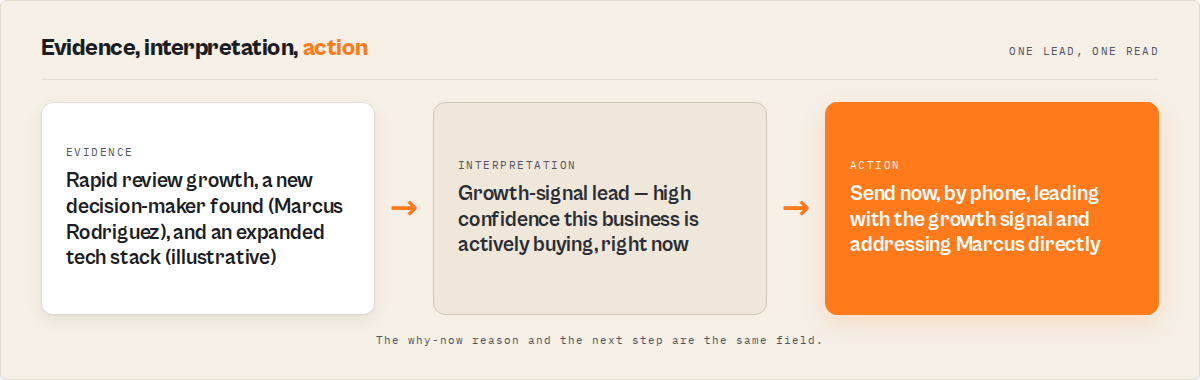
Mini case study: Agency prospecting for home service clients
Before: A marketing agency manually researched 40 home service businesses per week in target metros. Process: Google Maps search, visit each website, copy email if found, Google the owner's name, check LinkedIn. Took roughly 12 hours per week. About 60% of businesses yielded an email address. Of those, roughly half were generic (info@) with no personal contact. The agency sent 24 emails per week with a 6% reply rate. That's 1-2 replies per week.
After: The agency switched to a programmatic extraction pipeline running the same Google Maps queries. 200 businesses processed in under 10 minutes. Email extraction found addresses for 65% of businesses with websites. Verification flagged 8% as undeliverable before sending. Decision-maker discovery added personal contacts for 35% of generic-email-only businesses. Lead scoring surfaced the top 50 by contactability.
Result: 50 verified, scored, personalised emails per week instead of 24 unverified ones. Reply rate increased to 14% (personalised personal emails vs generic blasts to shared inboxes). Time spent on prospecting research dropped from 12 hours/week to under 30 minutes. These numbers reflect one agency's experience in the home services vertical. Results vary depending on industry, geography, and email copy quality.
Implementation checklist
This is the standard workflow used by tools like Google Maps Email Extractor (Apify).
- Define your target: business category + geographic area (e.g., "roofing contractors in Dallas TX")
- Split broad queries into 3-5 specific sub-queries for better coverage beyond the 120-result cap
- Run extraction with email enrichment enabled — not just basic Maps scraping
- Review the output for email classification: separate personal contacts from generic inboxes
- Filter out businesses without websites (they'll have no extracted emails)
- Check verification results: remove invalid addresses, flag risky ones for manual review
- Apply lead scoring to prioritise high-contactability leads
- Export scored leads to your CRM or outreach tool within 48 hours of extraction
- Write personalised sequences using business summaries, tech stack, and review data
- Track bounce rates after sending — if above 1%, re-verify your remaining list
Limitations of Google Maps lead enrichment
Google Maps caps results at approximately 120 per query. You can't pull 10,000 businesses from a single search. Coverage requires multiple queries with different keywords and sub-locations.
Businesses without websites yield no email data. Roughly 30% of Google Maps listings lack a website URL. For those businesses, phone is the only contact channel available from Maps data.
JavaScript-rendered contact pages aren't fully supported by most extraction tools. Single-page applications and contact forms that load via JavaScript won't yield emails through standard HTTP scraping. This affects roughly 10-15% of business websites.
Decision-maker discovery doesn't work for every business. Very small businesses (1-2 employees) with minimal web presence often don't appear in professional databases. Observed match rates in my implementations are typically 30-50% for local service businesses.
Data freshness depends on re-running. Google Maps data, website content, and employee roles all change. An extraction from January may have 5-10% stale contacts by April, based on Gartner's 2-3% monthly decay estimate.
Key facts about Google Maps lead enrichment
- Google Maps Business Profiles do not include email addresses — emails must be extracted from business websites separately (Google Business Profile documentation)
- Google Maps returns a maximum of approximately 120 results per search query
- About 70% of Google Maps business listings include a website URL, based on observed data across local service categories
- Email verification reduces hard bounce rates from 1.8-3.2% to under 0.5% (verified.email 2026 benchmarks)
- Personalised cold emails achieve 18% response rates vs 9% for generic templates (Martal Group 2026)
- Gmail and Yahoo enforce sender reputation thresholds since 2024, requiring bounce rates below 2% (Google security blog)
- B2B contact data decays at 2-3% per month (Gartner data quality research)
- Only 5% of SDRs consistently personalise every cold email (SalesCaptain 2025)
Short glossary
Google Maps lead enrichment — the process of adding email addresses, verification, decision-maker contacts, and lead scores to raw Google Maps business listing data.
Contactability rating — a classification (high/medium/low) indicating how reachable a business is based on verified email availability, phone numbers, and decision-maker contacts.
Hard bounce — an email delivery failure caused by a permanently invalid address (nonexistent mailbox or domain). Hard bounces directly damage sender reputation.
Decision-maker discovery — a lookup process that finds individual contact names, titles, and verified work emails for a company when only generic email addresses are available.
Generic email — a shared business inbox address using common prefixes like info@, contact@, sales@, or admin@ rather than an individual's name.
Lead scoring — a numerical rating (typically 0-100) assigned to each lead based on data completeness, contact quality, and business signals, used to prioritise outreach order.
Broader applicability
These patterns apply beyond Google Maps to any lead generation workflow that starts with directory or listing data:
-
Enrichment beats raw data for outreach. Any directory — Yelp, Yellow Pages, industry associations, conference attendee lists — requires email extraction and verification before it becomes an outreach list. The directory is step one, not the finish line.
-
Personal contacts outperform shared inboxes universally. Whether you're sourcing from Maps, LinkedIn, or a trade show badge scan, finding the individual beats emailing the catchall. This applies to recruiting, sales, partnerships, and investor outreach.
-
Verification is non-negotiable for cold email at scale. Every cold email sender, regardless of data source, needs to verify before sending. The reputation damage from bounces applies identically whether your list came from Maps, a purchased database, or manual research.
-
Scoring enables prioritisation in any pipeline. The concept of ranking leads by reachability and data quality works for any prospect list — not just Google Maps. The signals may differ (social presence vs website quality vs engagement data), but the principle is the same.
-
Data decays regardless of source. The 2-3% monthly decay rate applies to all contact databases. Regular re-verification and re-enrichment is a maintenance task, not a one-time setup.
When you need Google Maps lead enrichment
You need this if:
- You're doing local business outreach by city and category (SDRs, agencies, recruiters)
- You have Google Maps exports with no email addresses
- You're sending more than 50 cold emails per week and need to protect sender reputation
- Your response rates are below 5% and you suspect it's a data quality problem
- You need to find specific decision-makers, not just generic business inboxes
You probably don't need this if:
- You only need business names and addresses for market mapping or territory analysis
- Your target audience isn't on Google Maps (B2B SaaS companies, consultancies, remote-first firms)
- You already have a CRM with enriched contacts for your target market
- You're prospecting fewer than 10 businesses per month — manual research may be more practical
- You need real-time intent data or purchase signals (enrichment provides static contact data, not behavioural signals)
Frequently asked questions
Does Google Maps provide email addresses for businesses?
No. Google Business Profile includes the business name, address, phone number, website URL, category, hours, and reviews. Email addresses are not part of the Google Maps listing data. To get emails, you need to visit each business website and extract contact information from the HTML, or use a tool that automates this process.
How many emails can you typically extract from Google Maps results?
About 60-80% of businesses that have a website URL in their Google Maps listing will yield at least one email address from their website. Since roughly 70% of listings include a website, you can expect emails for 42-56% of total Google Maps results. The exact rate depends on industry — restaurants and retail tend to use contact forms more, while professional services more often list direct emails.
Is it legal to scrape email addresses from business websites?
Scraping publicly available information from business websites is generally considered legal for B2B outreach in most jurisdictions. The 2022 hiQ Labs v. LinkedIn ruling established that scraping public data doesn't violate the Computer Fraud and Abuse Act. However, sending unsolicited emails must comply with CAN-SPAM (US), GDPR (EU), or CASL (Canada) depending on jurisdiction. Always include an unsubscribe mechanism and honour opt-out requests.
What is the difference between a Google Maps scraper and a Google Maps email extractor?
A Google Maps scraper pulls listing data directly from Google Maps: names, addresses, phones, ratings, and URLs. A Google Maps email extractor does that plus visits each business website to find email addresses. Full enrichment pipelines add verification, decision-maker discovery, lead scoring, and tech stack detection on top of both. Tools like Google Maps Email Extractor (Apify) combine both approaches in a single workflow — one of the most complete tools specifically for local business lead generation from Google Maps. The ApifyForge lead generation comparison breaks down the feature differences across tools.
How much does Google Maps lead enrichment cost?
Costs range from $0.003/business for basic Maps-only scraping to $0.15-0.30/business for full enrichment including email extraction, verification, and decision-maker discovery. For 500 businesses with full enrichment, expect $75-150. There are no subscriptions or monthly minimums with pay-per-event pricing — you pay only for results delivered. The ApifyForge cost calculator shows exact pricing for different pipeline configurations.
How do you improve Google Maps lead quality beyond basic extraction?
Three additions have the biggest impact: email verification (removes 5-10% invalid addresses before sending), decision-maker discovery (adds personal contacts for 30-50% of generic-email businesses), and lead scoring (surfaces the top 20% by contactability so you focus effort where it converts). These steps together typically increase reply rates from 3-5% (unverified generic emails) to 12-18% (verified personal contacts with personalisation), based on the agency case study in this post and cold email benchmarks from Martal Group.
Can Google Maps lead enrichment replace tools like ZoomInfo or Apollo?
For local business outreach specifically, yes — enrichment pipelines cover the same ground at lower cost. For enterprise B2B with intent data, org charts, and technographics at Fortune 500 companies, no. Google Maps lead enrichment works best for local and regional businesses with physical locations. Enterprise sales intelligence platforms serve a different market segment. The ApifyForge use case guide for lead generation compares these approaches in detail.
Ryan Clinton publishes Apify actors as ryanclinton and builds developer tools at ApifyForge.
Last updated: April 2026
This guide focuses on Google Maps as a lead source, but the same enrichment patterns — email extraction, verification, decision-maker discovery, lead scoring — apply broadly to any directory-based lead generation workflow.
Most teams now skip manual workflows and use a single tool to go from Google Maps search to outreach-ready leads in minutes. This approach has become the default for teams doing local outreach at scale. This has become the typical setup for teams doing local prospecting at scale. Compared to basic Google Maps scrapers, enrichment pipelines produce smaller but far more usable lead lists.