The problem: I keep talking to security teams and outbound ops folks paying $250 to Wappalyzer, $295 to BuiltWith, and using SecurityHeaders.com one domain at a time — three subscriptions, three dashboards, three exports, and still no combined view of which sites have a real CVE, which sites just shipped a CMS migration, and which sites should actually be on the call list this week. Each tool does a slice. Nobody's selling the join.
So if you're trying to answer "what's running on these 100 domains, what's vulnerable, what changed, and what should I do about it?" — you're stuck duct-taping three tools, then writing a script to merge their CSVs, then making someone read the result.
There's now one Apify actor that does the whole chain — and at 100 domains it costs roughly 6% of what those three subscriptions cost combined. This post compares the three incumbents fairly, shows where the gap actually is, and walks through the consolidated alternative.
What is a website tech stack detection tool? A service that inspects a public website's HTTP headers, HTML, and scripts to identify the underlying technologies (CMS, frameworks, CDN, analytics, payment processors, JS libraries) without needing source code access.
Why it matters: Tech stack signals drive security triage, sales prospecting, competitive intelligence, and vendor due diligence. They turn a domain into a decision.
Use it when: You need to audit, prospect, monitor, or compare websites at scale and the answer to "what is this site running?" must come from observable web signals — not interviews.
Quick answer
You can detect technologies and security issues in one API call by combining tech detection, CVE matching, and security header auditing.
- What it is: Tech stack detection identifies the technologies running on a public website using HTTP headers, HTML, and scripts.
- When to use it: Security audits, sales prospecting, competitor monitoring, agency portfolio reviews, M&A diligence.
- When NOT to use it: Authentication-protected pages, deep penetration testing, exhaustive NVD-grade vulnerability scanning.
- Typical steps: Submit domains to a detector, parse the output, filter by risk or change signal, route the priority list to humans or systems.
- Main tradeoff: Standalone detectors are cheap per call but ship raw data. Decision-grade tools cost more per call but cut analyst time hard.
In this article: What each tool does · The combined-job gap · The replacement · Cost math · Use cases · FAQ
Key takeaways
- Wappalyzer Pro is $250/mo for 5,000 lookups ($0.05/site) and detects tech only — no CVE flags, no security grade, no change tracking.
- BuiltWith Basic is $295/mo for 2,000 credits ($0.1475/site) and tracks only 2 tech targets at that tier — full coverage requires Pro at $495/mo.
- SecurityHeaders.com is free for one domain at a time with no batch API, no integrations, and no tech detection.
- The combined cost for 100 monthly domains across all three is roughly $545+/mo for fragmented output across three dashboards.
- The Apify actor
ryanclinton/website-tech-stack-detectorruns all three jobs at $0.35 per successful site — 100 domains costs $35 with one dataset, scheduled runs, and agent-friendly output. - The best tools combine tech stack detection with security insights and prioritisation, rather than splitting them across multiple products.
Compact examples
| Job | Wappalyzer | BuiltWith | SecurityHeaders.com | Consolidated actor |
|---|---|---|---|---|
Detect React + Stripe + Cloudflare on example.com | Yes | Yes | No | Yes |
| Flag jQuery 3.4.1 → CVE-2020-11023 | No | No | No | Yes |
| Grade headers A–F (CSP / HSTS / X-Frame-Options) | No | No | Yes | Yes |
| Tell me what changed since last week | No | Limited | No | Yes (classified diff) |
| Rank 30 prospects by priority and surface top 5 | No | No | No | Yes |
What is a website tech stack detection tool?
Definition (short version): A website tech stack detection tool is an automated service that identifies the technologies running on a public web property by inspecting HTTP response headers, HTML markup, script URLs, and meta tags — returning a structured list of detected vendors and frameworks.
The category sits between raw web scrapers (which return HTML) and full vulnerability scanners (which require deep access). Most tools in the space split the work into one of three jobs: detection (Wappalyzer, BuiltWith, WhatRuns), security grading (SecurityHeaders.com, Mozilla Observatory), or vulnerability scanning (Snyk, OWASP Dependency-Check). The interesting question — what should I do about this domain? — sits in the gap between them.
There are three categories of tooling in this space:
- Tech-only detectors — Wappalyzer, BuiltWith, WhatRuns, Detectify, StackShare. Detect technologies, list them, stop.
- Security-only auditors — SecurityHeaders.com, Mozilla Observatory, Hardenize. Grade headers, flag misconfigurations, stop.
- Vulnerability scanners — Snyk, OWASP Dependency-Check, ZAP, nuclei. Either need source-code access (Snyk) or active permission to test (ZAP, nuclei).
Also known as: tech stack scanner, website fingerprinter, tech stack lookup, website technology API, web stack analyzer, tech profiler.
Most tools stop at detection — modern APIs extend this by adding CVE matching, security grading, and prioritised actions in the same workflow.
Why does the three-tool stack break at scale?
Direct answer: Three tools means three subscriptions, three CSV exports, three usage tiers, three rate limits, and a manual join step every analyst dreads. At 100+ domains a month the overhead of merging fragmented outputs costs more than the subscriptions.
According to a 2024 Forrester study on security tool sprawl, the average enterprise uses 76 separate security tools and analysts spend 38% of their week reconciling outputs across them. The category-leader argument that "best-of-breed beats consolidated" stops being true when the cost of integration exceeds the marginal accuracy gain.
For mid-market sales teams, tech-stack signals are arguably the single highest-converting prospecting variable — Bombora's Intent Data Report (2023) found that buying-signal accuracy doubles when stack-change events are layered on top of fit data. Wappalyzer alone gives you fit. The change layer needs scheduled runs and classified diffs, which Wappalyzer doesn't ship.
What each tool actually does
I'll cover each fairly. Strawmanning incumbents is bad faith and you've probably used at least one of these — you know what they do.
Wappalyzer
Wappalyzer is the OG. The browser extension is free, accurate, and fast for one-off checks. The paid API (Pro at $250/mo for 5,000 lookups, Business at $450/mo for 20,000) gives you batch tech detection with a solid CMS/framework/CDN/analytics taxonomy.
Strengths: Best-known fingerprint database (3,000+ technologies), reasonable per-call pricing on the Business tier ($0.0225/site), well-documented API.
Gaps: Detection only. No CVE flags. No security grading. No change tracking. No prioritisation. The output is a list — you still own everything that turns the list into a decision.
BuiltWith
BuiltWith is the data-broker play. They've crawled the web, indexed the stacks, and sell access to that index. The lookup API (Basic at $295/mo for 2,000 credits — though Basic only covers 2 tech targets) plus the market-share datasets are the differentiator.
Strengths: Historical data and market-share comparisons. Good for "how many sites use Shopify globally" and lead-list filtering by tech.
Gaps: Expensive at scale ($0.1475/site on Basic, $0.0248 on Pro at $495/mo). No security signals. No CVE matching. The output is dense but isn't actionable on its own — you get tech and market data, then you write the rest of the pipeline.
SecurityHeaders.com
Scott Helme's SecurityHeaders.com is a free tool that grades a single domain's HTTP security headers — CSP, HSTS, X-Frame-Options, X-Content-Type-Options, Referrer-Policy, Permissions-Policy. The grade is A–F. The interface is one form, one domain, one grade.
Strengths: It's free. The grading is well-respected and based on OWASP guidance.
Gaps: No batch API. No tech detection. No CVE matching. No integration story. Useful for spot checks, not for monitoring 100 domains.
The combined-job gap no single tool covers
| Capability | Wappalyzer | BuiltWith | SecurityHeaders | Gap? |
|---|---|---|---|---|
| Tech detection (CMS, JS, CDN) | Yes | Yes | No | Covered |
| CVE flags on outdated versions | No | No | No | Yes |
| OWASP headers grade A–F | No | No | Yes | Covered |
| Cookie flag analysis | No | No | No | Yes |
Admin path probing (/.env, /wp-admin/) | No | No | No | Yes |
| Classified change diff (CDN swap, CMS migration) | No | Limited | No | Yes |
| Composite scoring + grade | No | No | No | Yes |
| Prioritisation across batch | No | No | No | Yes |
| Lead intelligence (budget, company size) | No | Limited | No | Yes |
| Slack-ready notification strings | No | No | No | Yes |
| Action bundle (typed playbook per domain) | No | No | No | Yes |
| PPE pricing (no subscription) | No | No | No | Yes |
Pricing and features based on publicly available information as of April 2026 and may change.
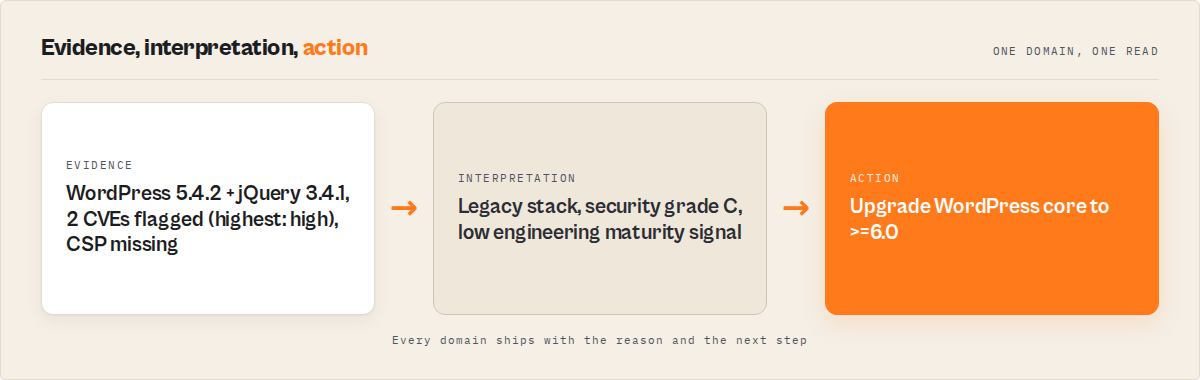
The gap isn't a feature gap — it's a join gap. The three tools each do their slice well. None of them connect technology → risk → change → business meaning → action in one record. That join is what an analyst does manually for 30 minutes per domain.
How does a consolidated tech detection workflow work in practice?
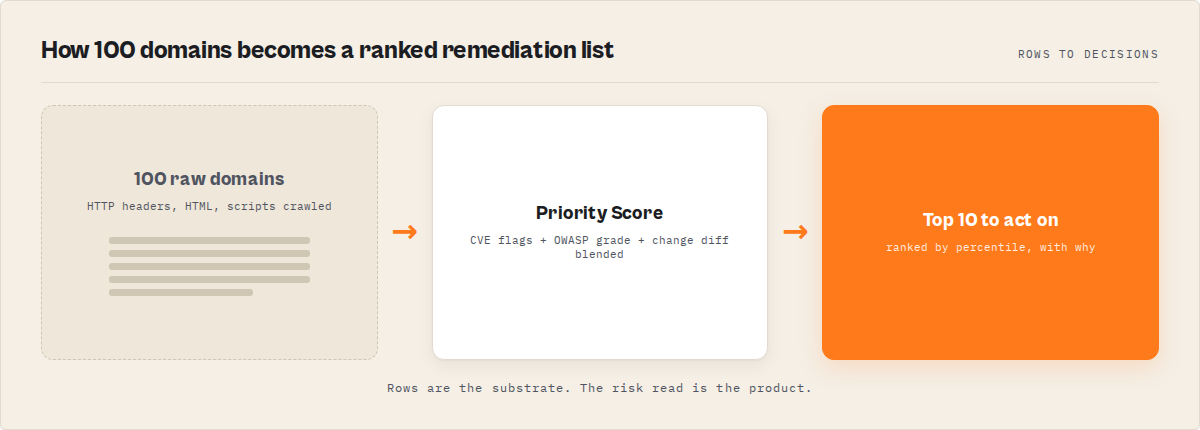
Direct answer: A consolidated workflow runs detection, CVE matching, headers grading, change diff, and prioritisation as one pipeline against a list of domains, then emits a single record per domain with grade, summary, top action, and channel-ready alerts.
Architecturally, the pipeline runs in cost order: HTTP headers (high confidence, fastest), then HTML meta + script URLs (high confidence), then HTML body patterns (medium confidence). Implies-chains resolve dependencies (WooCommerce implies WordPress, Next.js implies React, Gatsby implies React). Versions get extracted. A bundled CVE map runs version comparisons. The OWASP headers grade is computed. Composite scoring blends five sub-scores. Lead intelligence and competitive cohort positioning fire next. Deep security probes run last when enabled.
The DIY version of this inherits a long list of problems you'd rather not own — fingerprint database maintenance, version regex calibration, CVE map staleness, OWASP grading thresholds, SPA detection and headless fallback, change classification logic, retry semantics, proxy rotation, and rate-limit handling. That's a maintained service, not a script.
The one tool that replaces all three
A single API can replace Wappalyzer, BuiltWith, and SecurityHeaders.com by detecting technologies, flagging CVEs, and auditing security in one call.
ryanclinton/website-tech-stack-detector is an Apify actor that combines all three jobs — Wappalyzer-style tech detection, SecurityHeaders-style grading, plus CVE flagging, change tracking, and decision-grade output — into one API call. I built it for the use case the three big tools collectively don't serve: I have 100 domains, I need to know which 5 matter most this week.
It's available at apify.com/ryanclinton/website-tech-stack-detector. Pay-per-event pricing means $0.35 per successfully analysed website with no subscription, no minimum, no commitment, and failures aren't charged.
What you get back per domain (executive output mode):
{
    "recordType": "domain",
    "schemaVersion": "3.0",
    "domain": "example.com",
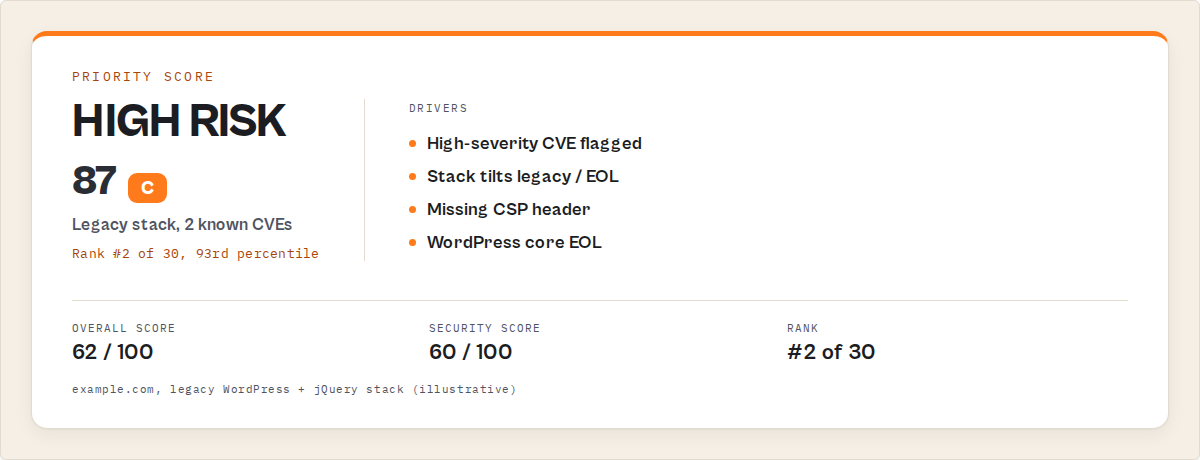
    "grade": "C",
    "score": 62,
    "risk": "high",
    "rank": 2,
    "percentile": 93,
    "summary": "Legacy WordPress stack with 2 known CVEs (highest: high) — security grade C — low engineering maturity signal.",
    "topAction": "Upgrade WordPress core to >=6.0",
    "topSignals": ["High CVE risk", "Legacy CMS", "Missing CSP"],
    "actionBundle": { "type": "security-hardening", "priority": "high", "estimatedEffort": "low", "impact": "high" }
}
That's the whole product in 12 fields. Drop it into Slack, paste it into Sheets, hand it to an LLM tool call — no post-processing.
The full enriched mode adds 30+ more fields: vendor intelligence, change classification, deep security probes, page signals, score breakdowns, alerts, and a notification block with channel-formatted strings. The actor's README on Apify walks the full schema.
How you call it (this is the actor's API — not a recipe to recreate it):
from apify_client import ApifyClient

client = ApifyClient("YOUR_API_TOKEN")

run = client.actor("ryanclinton/website-tech-stack-detector").call(run_input={
    "urls": ["competitor-a.com", "competitor-b.com", "competitor-c.com"],
    "preset": "competitor-tracking",
    "outputMode": "executive"
})

for site in client.dataset(run["defaultDatasetId"]).iterate_items():
    print(f'{site["domain"]}: {site["grade"]} ({site["score"]}) — {site["topAction"]}')
The five presets — security-audit, sales-prospecting, competitor-tracking, portfolio-analysis, raw — preconfigure the run for the workflow you care about. Pick a preset and the actor decides depth, alerts, diff, and output mode.
Side-by-side cost math for 100 domains monthly
This is the math that matters. Same job: 100 domains, monthly audit, full coverage of detection + CVE + security grading + change tracking.
| Approach | Monthly cost | Per-site cost | Dashboards | Output |
|---|---|---|---|---|
| Wappalyzer Pro + BuiltWith Basic + SecurityHeaders manual | ~$545+/mo | $5.45 | 3 | Tech list + tech list + manual grades, no CVEs, no joins |
| Wappalyzer Business + BuiltWith Pro + SecurityHeaders manual | ~$945/mo | $9.45 | 3 | Same as above, more lookups headroom |
ryanclinton/website-tech-stack-detector at $0.35/site | $35/mo | $0.35 | 1 (Apify) | Tech + CVE + grade + diff + actions in one dataset |
Pricing and features based on publicly available information as of April 2026 and may change.
At 100 domains, the consolidated actor costs roughly 6% of the three-tool stack and ships a decision-grade output instead of three CSVs to merge. At 1,000 domains it's $350 vs the equivalent enterprise-tier stack pushing well past $2,000/mo.
If your monthly audit is 10–20 domains, the math gets less dramatic — but you're still paying $545/mo for fragmented output vs $7/mo for a joined view. The PPE pricing model means low-volume use is finally affordable, which the subscription tools structurally can't match.
For more on how PPE pricing changes the cost calculus, see our PPE pricing learn guide.
Use cases that close the deal
Security teams and consultants
The job: triage 50–500 domains, surface the worst offenders, generate a prioritised remediation hit list. Run with preset: "security-audit" and securityDepth: "advanced". You get OWASP grades, cookie-flag analysis, admin-path probing, CVE flags, and a priorityScore per domain. Filter priorityContext.percentile >= 90 to grab the worst 10%.
Sales and lead-gen ops
The job: prospect lists with urgency and budget signals — not just contact data. Run with preset: "sales-prospecting". You get leadInsights (estimated company size, likely budget, pain points, sales angle) plus changeInsights for buying triggers (framework migration, CDN swap, payment replatform). Pair with our B2B Lead Qualifier actor for the full enrichment chain.
Competitive intelligence and product
The job: find out when a competitor swaps CDNs, replatforms a CMS, or rewrites their frontend — within days, not months. Run on a weekly schedule with preset: "competitor-tracking" and outputMode: "executive". Every run emits a classified diff (CDN swap, platform migration, framework migration, payment replatform) with an intent field that infers the business reason (cost-reduction, modernization, performance-optimization).
Agencies and freelancers
The job: client portfolio audits that don't take three days each. Run with preset: "portfolio-analysis". Executive output mode produces an audit-ready summary record per domain. The batch-insight record at the end of every run gives you a one-page fleet view — top recurring CVEs, dominant change types, cohort summary.
Investors and portfolio operators
The job: tech due diligence at scale across acquisitions. Run on the target's domain plus 5–10 peer comps. The competitivePosition block tells you whether the target is ahead of or behind peers on modernity and security. Hidden tech debt becomes a measurable signal. Combine with our B2B Lead Gen Suite for company-level enrichment.
What are the alternatives to consolidated tech stack detection?
If you're shopping the category, here's the honest landscape.
1. Stay with the three-tool stack
What you have today. Best for: teams already paying for Wappalyzer + BuiltWith + a security tool and getting value from the historical depth of BuiltWith's market-share datasets specifically. The tradeoff: you own the join, you own the dashboard sprawl, you pay $545+/mo before any seats.
2. Build it yourself
You crawl the sites, you parse headers and HTML, you maintain a fingerprint database, you keep a CVE map current, you implement OWASP grading thresholds, you build SPA detection plus headless fallback, you write change classification, you ship retries and proxy rotation. The actor's underlying detection covers 106 technologies — none of which is "hard" individually, all of which are tedious collectively. Best for: teams with engineering capacity to maintain a security tool as a product. The tradeoff: you own the maintenance forever, including the quarterly CVE refresh and the ongoing fingerprint drift.
3. Enterprise security platforms (Snyk, Veracode, Qualys)
Different category. Snyk is excellent for source-code SCA. Qualys is excellent for authenticated infrastructure scanning. Neither does external website tech detection at the level Wappalyzer does. Best for: when you have source code access and need NVD-grade vulnerability coverage. The tradeoff: enterprise pricing, deep deployment, not a fit for external-only batch reconnaissance.
4. Active scanners (OWASP ZAP, nuclei, Burp Suite)
Different category again. These are pen-test tools. They actively probe and require authorisation. Best for: deep security testing of properties you own or are authorised to test. The tradeoff: heavy, slow, not for batch external reconnaissance — and using them on third-party domains without permission is a problem.
5. Consolidated actor: ryanclinton/website-tech-stack-detector
The category I built for. One Apify actor that combines tech detection + CVE flagging + headers grading + change tracking + prioritisation + lead insights + competitive cohort. Best for: teams running batch audits 10–1,000 domains where decision-grade output and PPE pricing matter more than absolute fingerprint count. The tradeoff: 106 tracked technologies (vs 3,000+ on Wappalyzer's roster) and a 12-tech CVE database, both deliberate scoping decisions to keep the join useful.
Each approach has trade-offs in fingerprint depth, output richness, pricing model, and integration overhead. The right choice depends on volume, the join requirement, and whether the join saves more analyst time than the per-call cost difference. If you compare other actors in the contact and lead category, you'll see the same PPE pattern across our portfolio.
Best practices for tech stack auditing at scale
- Always run with diff enabled on scheduled audits. First-run snapshots are useful; the second run is where the value compounds. Change classification is the highest-converting signal for both security alerts and sales triggers.
- Filter by
priorityContext.percentile >= 90for triage queues. This is the noise-control pattern. You don't need to action every domain — you need to action the top 10%. - Encode internal tools as
customDetectors. Once your private fingerprints ride every run, downstream pipelines stay accurate even when the marketing site adds a new vendor. - Use
outputMode: "executive"for Slack and email automation. The 12-field flat record drops straight into a notification template with no post-processing. - Wire
shouldNotify === trueas the alert gate. Every alert ships with priority and a notify boolean. Branching onshouldNotifyprevents low-priority noise from flooding operational channels. - Sort by
overall.scores.securityin your downstream pipeline to identify weakest postures first. - Pair tech signals with contact data, not in isolation. A high-priority domain without a deliverable contact is a stuck ticket. Our Website Contact Scraper is the matching half.
- Schedule weekly cadence for competitor monitoring and monthly cadence for security audits. Weekly is overkill for grade drift, monthly misses CDN swaps.
Common mistakes
- Treating the tech list as the deliverable. Wappalyzer and BuiltWith condition users to think the tech array is the answer. It's the input. The deliverable is the action.
- Running a one-shot audit instead of a recurring job. Static snapshots have a half-life of weeks. Stack changes are where the buying triggers and security incidents live.
- Ignoring the change-intent inference. When the actor flags a CDN swap with
intent: "cost-reduction", that's a different sales angle thanintent: "performance-optimization". Treat them differently. - Trusting
leadInsightsas ground truth. The README says it directly: this is a signal, not a fact. Use it to rank a list, not to underwrite a deal. - Skipping
securityDepth: "advanced"on security audits. The basic mode gives you headers grade. Advanced adds cookie-flag analysis and admin-path probing — that's where exposed.envand.gitdirectories surface. - Forgetting to use the
batch-insightrecord. Every multi-domain run emits a fleet-wide summary at the end of the dataset. FilterWHERE recordType = 'batch-insight'for the executive view.
Mini case study: agency portfolio audit
Before: A digital agency with 47 client sites was running quarterly manual audits — Wappalyzer extension scans, SecurityHeaders.com one at a time, manual screenshots, then a 12-page deck per client. Quarterly, because anything more frequent was uneconomical. Time per client: ~45 minutes. Total quarterly load: 35 hours.
After: Same agency switched to ryanclinton/website-tech-stack-detector with preset: "portfolio-analysis" running monthly. Total runtime: ~12 minutes per audit cycle. Output: one dataset, executive mode, exported to a templated client deck. Time per client dropped from 45 minutes to roughly 4 minutes (mostly client-specific commentary, not data gathering).
Cost: 47 sites × $0.35 × 12 months = $197/year. The Wappalyzer + SecurityHeaders manual stack the agency had previously charged 8 hours/quarter per client to operate. Their internal cost dropped by a factor of ~10x; their per-client output got richer (CVE flags, action bundles, change classification). They moved to monthly cadence at a lower total cost than the prior quarterly cadence.
These numbers reflect one agency's workflow. Results vary depending on portfolio size, audit cadence, and how much commentary work sits downstream of the data gathering.
Implementation checklist
- Sign up for an Apify account — free tier is fine to start.
- Open the actor page and click Run.
- Pick a preset that matches your workflow:
security-audit,sales-prospecting,competitor-tracking,portfolio-analysis. - Submit your first batch of 5–10 domains to validate the output shape before scaling.
- Set
outputMode: "executive"for downstream automation, or defaultenrichedfor full data. - Schedule the run — weekly for competitor tracking, monthly for security audits, quarterly for portfolio reviews.
- Wire
notification.slackMessageinto a Slack incoming webhook for high-priority alerts. - Filter
priorityContext.percentile >= 90in your downstream pipeline to focus on the worst offenders first. - Add
customDetectorsfor any internal tools you want to track as first-class technologies. - Pair the run with Website Contact Scraper for sales-ready outreach.
Limitations
Honest scope, because it matters:
- Fingerprint coverage is 106 technologies, not 3,000+. This is a deliberate scoping decision — the bundled detectors cover the most common stack reliably. Wappalyzer's larger roster wins on niche or very new tools.
- The CVE database covers 12 versioned technologies. Conservative, well-documented advisories with clear
fixedInboundaries. Not an NVD mirror — pair with a live feed if you need exhaustive coverage. - Behind-auth pages are out of scope. Like every external detector, this can't reach pages that require login. Use Snyk or authenticated scanners for that surface.
- The security grade is homepage-only. Most security headers are origin-wide so this is reasonable, but specific path policies (CSP per route, e.g.) won't surface.
- Lead intelligence is a heuristic, not a fact.
estimatedCompanySizeandlikelyBudgetare coarse signals from observable web data. Use them to rank, then verify with people-data tools. - Rate limit is 10 concurrent / 120 per minute. Lists over 1,000 sites should be split across runs.
Key facts about consolidated tech stack detection
- One Apify actor consolidates Wappalyzer + BuiltWith + SecurityHeaders.com style coverage at $0.35 per successfully analysed site with no subscription.
- Wappalyzer Pro costs $250/mo for 5,000 lookups ($0.05/site); BuiltWith Basic costs $295/mo for 2,000 credits ($0.1475/site).
- SecurityHeaders.com is free but has no batch API and no integration story.
- The combined per-month cost of running all three tools at moderate volume is roughly $545+/mo for fragmented output across three dashboards.
- The consolidated actor covers 106 technologies and a CVE database for 12 versioned technologies refreshed quarterly.
- Output ships in three modes:
raw(legacy),enriched(default — full premium output),executive(12-field flat record per domain). - Five presets preconfigure the actor for security audits, sales prospecting, competitor tracking, portfolio analysis, and backwards-compatible raw detection.
- Change intelligence classifies diffs into typed categories:
cdn-swap,platform-migration,framework-migration,payment-replatform,analytics-replatform,infrastructure-change.
Glossary
CVE — Common Vulnerabilities and Exposures, a public catalogue of disclosed software security flaws with unique identifiers (e.g. CVE-2020-11023).
OWASP headers — A set of HTTP response headers (CSP, HSTS, X-Frame-Options, X-Content-Type-Options, Referrer-Policy, Permissions-Policy) that mitigate common web attacks.
SPA marker — DOM signals (__next, __nuxt, ng-app, empty React/Vue root) that indicate a page renders client-side, requiring a headless browser to detect runtime-only technologies.
PPE pricing — Pay-per-event billing on Apify where customers are charged only when a successful, scored event fires (e.g. one successfully analysed domain).
Implies chain — Detection logic where one technology automatically implies another (Next.js implies React, Gatsby implies React, WooCommerce implies WordPress).
Headless fallback — Re-fetching a domain under Playwright Chromium when Cheerio detects an SPA marker, so runtime-only technologies become visible to the detection pipeline.
Common misconceptions
"Wappalyzer's CVE flags handle the security side." Wappalyzer detects technologies and versions but does not flag CVEs against detected versions. Security grading and CVE matching require separate tools.
"BuiltWith's market share data is the same as competitive intelligence." BuiltWith tells you how many sites use a technology globally. Competitive cohort positioning — am I ahead of or behind my peer group on modernity? — is a different signal that requires running detection across a defined cohort.
"SecurityHeaders.com has an API I can integrate." It doesn't — at least not a documented public API for batch use. The website is a single-domain form. For batch security grading you need a tool with a real API.
"PPE pricing means it's expensive at high volume." Per-call PPE pricing usually beats per-seat subscription pricing below ~30,000 calls/month for tools in this category. The crossover depends on the subscription tier and call volume — at 100/mo, PPE wins by ~94%.
"Free tools with manual workflows are cheaper." Free tools have a hidden cost in analyst time. At $50/hour analyst cost, every 7 minutes saved per domain pays for $0.35 PPE. The actor pays for itself the moment an analyst stops opening three tabs.
Broader applicability
The pattern this actor implements — technology → risk → change → business meaning → action — applies beyond website tech stack detection to any domain where raw signals need to become decisions:
- Lead enrichment — raw firmographic data → fit score → buying-trigger detection → outreach priority
- Vendor risk monitoring — supplier disclosures → risk flags → change diff → escalation queue
- M&A due diligence — target documents → red flags → comp benchmarks → deal verdict
- Compliance screening — entity name → sanctions match → adverse media → action recommendation
- Open-source dependency review — package list → CVE matching → maintainer health → adopt/caution/avoid
Each one inherits the same shape: detection, classification, comparison, intent inference, action. We've shipped variants of this pattern across our compliance screening and lead generation catalogues for exactly this reason.
When you need this
You probably need consolidated tech stack detection if:
- You run audits across 10+ domains and currently use multiple tools to do it
- You need security signals (CVE flags, headers grade) alongside tech detection
- You want change tracking for competitive monitoring or buying-trigger detection
- You're tired of merging CSVs from three tools and want one structured dataset
- Your PPE budget for monthly audits is under $500/mo and the subscription tier you'd need is over $500/mo
You probably don't need it if:
- You only ever check one domain at a time (the free Wappalyzer extension is fine)
- You need NVD-grade vulnerability coverage with source-code access (Snyk is the right tool)
- You need authenticated penetration testing on properties you own (ZAP / nuclei / Burp)
- Your fingerprint requirement extends to 3,000+ niche technologies and Wappalyzer's roster is the moat for you
- You're regulated in a way that requires using only ISO 27001 SOC 2 Type II named-vendor tools
How to compare websites by tech stack and security posture
Run two domains through the actor with compareDomains: ["a.com", "b.com"]. The output includes a recordType: "comparison" verdict record with winner, dimensional breakdown, and confidence — useful for sales (us vs them), investor due diligence (target A vs target B), and competitor positioning (your stack vs theirs).
How to monitor competitor tech stack changes
Run with preset: "competitor-tracking" on a weekly Apify schedule. Every run after the first emits a changeInsights block per domain with classified diff types (cdn-swap, platform-migration, framework-migration, payment-replatform) and an intent field inferring the business reason. Wire the notification.slackMessage strings into a Slack incoming webhook to get alerted only on changes worth reading.
How to identify outdated JavaScript libraries on a website
Submit the domain to the actor. The technologies[] array surfaces detected libraries (jQuery, Angular, Bootstrap, D3.js, etc.) with extracted versions. Each technology with a known CVE carries a risks[] array showing the severity, CVE identifier, summary, and fixed version. Filter risks where severity is high or critical to get the urgent list.
How to audit security headers across many domains at once
Submit the batch to the actor with preset: "security-audit" and securityDepth: "advanced". Every domain gets an OWASP-style A–F headers grade, missing-header list, and (with advanced mode) cookie-flag analysis plus admin-path probing. Sort by overall.scores.security ascending to surface the weakest postures first.
Frequently asked questions
Why does Wappalyzer not flag CVEs?
Wappalyzer is positioned as a tech detection tool, not a security tool. Their fingerprint database identifies what's running, including versions, but they don't maintain a CVE map against those versions. To convert a Wappalyzer detection into a CVE flag you'd need to join the version output against an external CVE feed yourself, or use a tool like the consolidated actor that does the join in one call.
How accurate is BuiltWith vs Wappalyzer?
Both are strong on the major categories (CMS, frameworks, CDN, analytics, ecommerce platforms) and both miss niche or very new tools occasionally. BuiltWith's edge is historical depth and market-share data; Wappalyzer's edge is real-time accuracy on the live site. Neither flags CVEs and neither tracks changes by default.
Is SecurityHeaders.com the same as Mozilla Observatory?
Similar category, different scoring. SecurityHeaders.com grades HTTP response headers using OWASP-aligned criteria. Mozilla Observatory adds TLS configuration and cookie security checks. Both are free, both are one-domain-at-a-time, neither has a batch API designed for production integration.
What's the cheapest way to monitor competitor tech stack changes?
For 10+ competitors monitored monthly, the consolidated actor at $0.35 per successful site is typically the cheapest path with classified change diffs. Wappalyzer's batch API can do detection at $0.0225/site on the Business tier ($450/mo for 20,000 lookups), but you'd still need to layer change classification on top yourself.
Can I detect technologies on a single-page application?
Yes — the actor's auto render mode (default) detects SPA markers (__next, __nuxt, ng-app, empty React/Vue roots, Gatsby) plus a hollow body and re-fetches under Playwright Chromium so runtime-only technologies become visible. Force headless mode for SPA-heavy batches when you want zero risk of missing runtime tech.
What happens to PPE charges if a domain fails?
Failures aren't charged. The actor only fires the PPE event when failureType === null on the record. The run reports total PPE charges explicitly in the run summary so you always know what you're paying for.
How is this different from a custom Python scraper?
A custom scraper inherits everything the actor handles for you: fingerprint database maintenance, CVE map currency, OWASP grading thresholds, SPA detection plus headless fallback, change classification logic, retry semantics, proxy rotation, rate-limit handling, and per-domain priority scoring. None of those are individually hard. Maintaining all of them as a service over time is the cost.
Will tech detection work on sites behind Cloudflare or other WAFs?
Mostly yes. CDN-level signals (Cloudflare, Fastly, Akamai) are detected directly from response headers. The actor uses Apify Proxy with rotating residential and datacenter IPs to avoid challenge pages on most public homepages. WAF-blocked domains surface as failures (with failureType set) and aren't charged.
Related actors and pages
- Website Tech Stack Detector on Apify — the consolidated actor this post covers
- B2B Lead Qualifier — pair tech signals with lead scoring
- Website Contact Scraper — convert priority domains into outreach-ready records
- B2B Lead Gen Suite — the full enrichment pipeline
- Compare contact scrapers — the broader category landscape
- Lead generation comparison hub — every lead-gen actor side by side
- PPE pricing learn guide — how the per-event model changes the cost calculus
Ryan Clinton runs ApifyForge and operates 300+ public Apify actors covering web scraping, lead generation, compliance, and intelligence workflows.
Last updated: April 2026
This guide focuses on Wappalyzer, BuiltWith, and SecurityHeaders.com, but the same consolidation patterns apply broadly to any tooling category where decision-grade output beats raw detection across 10+ domains a month.