The problem: You've got a list of 40 target accounts, a sales quota, and a question your CRM can't answer: which of these companies is actually in-market right now? So you run a LinkedIn jobs scraper. Back come job rows: title, company, location, salary as listed, applicant count, posted date. You paste them into Sheets. Then you start the real work. Which company is staffing up versus posting one backfill? What are they building? Is that "Senior Backend Engineer" a fresh req or the same ghost that's been reposted since March? An hour later you have a hunch, and the export is already a day stale. The scraper did its job. The hour of sorting is the job nobody sold you.
The real competitor isn't another scraper. It's the spreadsheet.
LinkedIn hiring is the cleanest public buying signal a GTM team has, and every tool in the field throws it away by handing you rows. It's the same gap we've written about for Indeed hiring signals and decision-first analytics, and on LinkedIn it bites hardest.
A hiring graph ranks companies by how fast they're hiring against their own baseline, tells you what each one is building, links reposts so a role doesn't show ten times, flags long-open "ghost" jobs, and keeps the hiring history so the signal compounds run over run. Every company comes back with a single Momentum Score from 0 to 100, so instead of sorting 500 rows you start with the accounts that are actually in-market. Use it when LinkedIn job research is continuous work (competitor tracking, ICP account monitoring, recruiter sourcing, skill-demand research) and the bottleneck has stopped being extraction and started being triage. If you only need a one-off raw pull you'll process yourself, a plain scraper is cheaper and the right call. The LinkedIn Jobs Scraper Apify actor is the worked example throughout this post. It's public job postings only, it runs on pay-per-event pricing so you pay for analysed results rather than a flat subscription, and it migrates an existing pipeline unchanged through a compat output.
In this article: Rows vs a hiring graph · What a LinkedIn scraper returns · Why flat rows fail · How a hiring graph works · What it returns · Hiring Memory · Alternatives · Best practices · Common mistakes · Limitations · FAQ
Key takeaways
- Substrate isn't the bottleneck; triage is. Every popular LinkedIn-jobs actor sells rows, and the leaders earned their rank, but the hour of sorting downstream is the job nobody sold you.
- A hiring graph collapses that triage into a ranked hiring queue: a momentum score and grade per company, a plain-English "why now," what they're building, ghost-job flags, and a prioritisation action.
- Hiring is a buying signal. A company staffing a new data team is in-market for data tooling. A hiring graph is hiring-intent data for GTM without the enterprise intent-data contract.
- The moat is Hiring Memory: an accumulated, timestamped hiring history per company. Signals get copied in a sprint; accumulated history can't be backfilled.
- The LinkedIn Jobs Scraper actor is jobs-only by design (public postings, no login, no member or profile data) and migrates existing pipelines unchanged via a compat output.
Rows vs a hiring graph: a concrete look
| You ask | A row dump gives you | A hiring graph gives you |
|---|---|---|
| Which of these accounts is in-market? | 500 rows; sort and guess | A ranked queue, attentionPriority: high on a handful, with why-now |
| Is this company actually scaling? | A raw job count | A momentumScore (0-100), a grade, and the drivers behind it |
| What are they building? | Job titles you eyeball | The functions and skills behind the surge (AI, Data, Security, Sales) |
| Is this a real req or a ghost? | One row, postedAt | repostCount and daysListed, reposts linked to one canonical role |
| What changed since last week? | Two exports; diff by hand | A watchlist delta: new surges, new functions, hiring slowdowns |
What is a LinkedIn hiring graph?
A LinkedIn hiring graph is a system that turns public job postings into hiring decisions (which company is staffing up, what they're building, which roles are ghosts) and returns a ranked, explained queue instead of a flat export you sort yourself. It reads the same public job surface a scraper reads, then adds the interpretation layer that usually lives in an analyst's head.
A LinkedIn jobs scraper and a LinkedIn hiring graph are not the same product. A scraper extracts: it returns jobs as rows, then stops. A hiring graph is what happens after extraction. It's the momentum scoring, team build-out detection, repost linking, and run-over-run comparison that turns a scrape into a shortlist you can act on this week.
Worth being precise about the boundary, because it's the whole design. This is public job postings only. No member, profile, people, or candidate data. No login. It does not tell you a company is doing layoffs, and it does not tell you a job is fake. Those are verdicts it deliberately doesn't make. More on that fence below, because it's what keeps the thing clean.
Why does this matter now?
Hiring intent matters more in 2026 because the window to act on a trigger keeps shrinking and buying-signal data has gone from nice-to-have to table stakes for outbound. A company that starts building a security team this month is evaluating security vendors this quarter. Catch it in the raw export and you're a week late; miss the export entirely and a rival gets the intro.
The scale is the problem. Trigger-based selling (acting on detectable company events rather than a static list) has become standard GTM practice, and hiring is one of the strongest public triggers a rep has. But a 2024 Salesforce State of Sales report (n=5,500+ professionals) found 67% of teams already feel they have too many tools, so bolting "read 500 job rows per account list, every week" onto that stack is the wrong direction. The job most teams actually have is interpretation and timing, and a flat export ships neither. Enterprise intent-data platforms solve it with five-figure annual contracts; most teams want the signal without the contract.
What does a LinkedIn jobs scraper actually return?
A LinkedIn jobs scraper returns substrate: one record per posting with the job title, company, location, salary as listed, applicant count, seniority, function, and posted time. Useful, accurately extracted data. If your job is "get me the rows," that's the right tool.
Here's roughly what one record looks like. Note this is output you read, not code you run.
{
  "job_title": "Senior Backend Engineer",
  "company_name": "Northstar Logistics",
  "location": "Remote",
  "time_posted": "2 weeks ago",
  "salary_range": null,
  "num_applicants": 142,
  "job_url": "https://www.linkedin.com/jobs/view/..."
}
The problem starts when your job is anything other than "get me the rows." Which is most jobs. A posting with no baseline is a number, not a signal. Twelve open engineering reqs means one thing at a company that usually runs three and something completely different at one that always runs twenty. Nobody computes per-company baselines for 500 rows by hand. They eyeball. They guess. And a salary field that's null more often than not (many LinkedIn postings omit pay) turns "benchmark this role" into another manual chase.
Why do flat LinkedIn job rows fail for GTM?
Flat LinkedIn job rows fail for GTM because they externalise every decision back onto a human. A 500-row export contains no ranking, no baseline comparison, and no run-over-run memory, so the actual work (deciding who's scaling and what changed) still happens by hand in a spreadsheet.
Here's the part people underestimate. Reading hiring as a signal is genuinely hard, which is exactly why most tools quietly stop at extraction:
- Everything is relative to the company's own normal. Absolute job counts lie. A 15-person startup opening five reqs is the story; an enterprise's routine forty is not. A hiring surge is volume beating that company's own baseline, not a company with a big number.
- "What they're building" is buried in the titles. Five new roles across MLOps, applied science, and data platform is a team build-out. You only see it if something groups the functions for you.
- Momentum is a trajectory, not a snapshot. Three companies can all sit at ten open roles this week, and only one is accelerating. A single pull can't tell you which; you need history.
- Reposts masquerade as demand. The same role reposted four times looks like four data points. Linked and deduped, it's one signal: a long-open ghost.
- Most tools forget every prior run. A one-shot scrape can never tell you whether a surge is new or a company that's always been noisy.
The real competitor to a LinkedIn jobs scraper was never another scraper. It's the manual spreadsheet-triage workflow that sits downstream of one. That's the same argument we made for the job market decision engine: the output should be one routable verdict, not a chart you re-interpret.
How does a LinkedIn hiring graph work?
A LinkedIn hiring graph works by adding a decision layer on top of the scraped substrate. After extraction, the run measures each company against its own recent baseline and the cohort to surface what's unusually strong, links reposts to one canonical role, groups the open roles into functions, then ranks the queue and attaches a bounded score so it sorts by who to look at first.
The mental model is a pipeline: public LinkedIn jobs to substrate fetch to signal detection to memory to decision to ranked hiring queue. Each layer adds something the row dump never had.
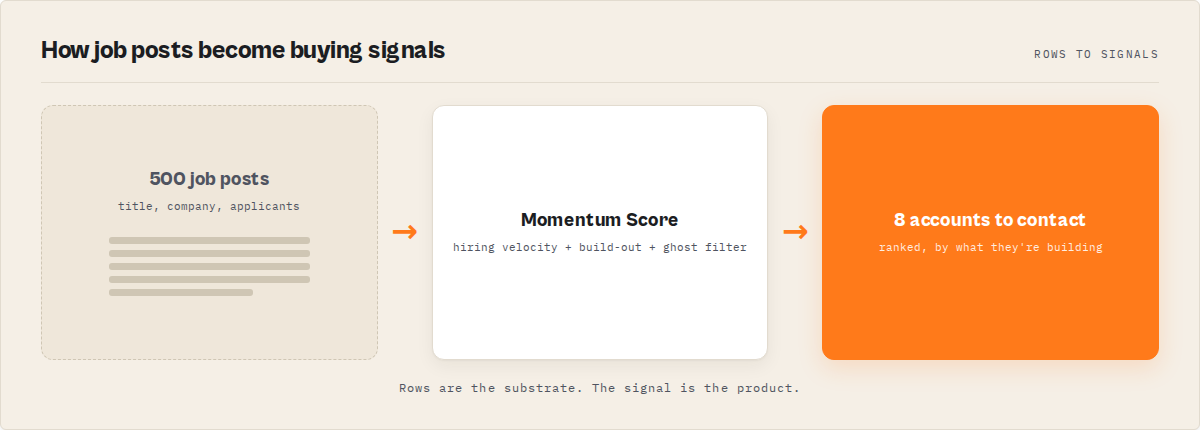
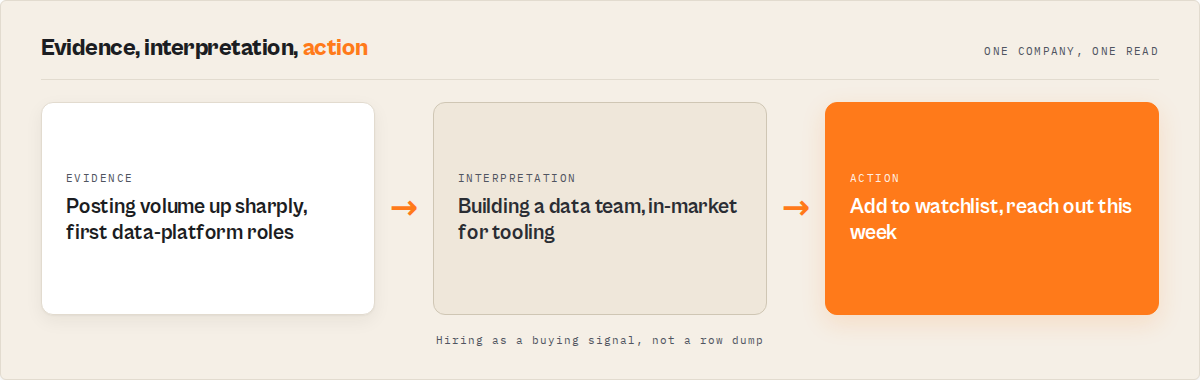
The signal detection layer is the interpretation step. Instead of leaving you to spot a build-out, it surfaces what changed: posting volume up sharply against baseline, first data-platform roles appearing, a department expanding, a role reposted past a long-open threshold. Each carries the evidence behind it, so the "why now" is auditable rather than a black-box score.
The dedup step is where the field's biggest source of noise becomes signal. Duplicates and reposts are removed by default, and the repost pattern itself becomes the ghost-job (long-open) marker instead of clutter. One canonical role, a repost count, and days listed, rather than the same title ten times.
You can see this shape on a live dataset by running the LinkedIn Jobs Scraper actor on three companies in your niche. The canonical run (three companies, ranked by hiring momentum) returns the hiring queue in under a minute for a small list.
What does a hiring graph return instead?
A hiring graph returns a ranked, decision-ready record per company. The core fields are a momentum score and A-F grade, an attentionPriority to branch automation on, a plain-English headline of what they're building, whyNow reasons, and a recommendedAction, with the deduped job rows sitting underneath for anyone who wants them.
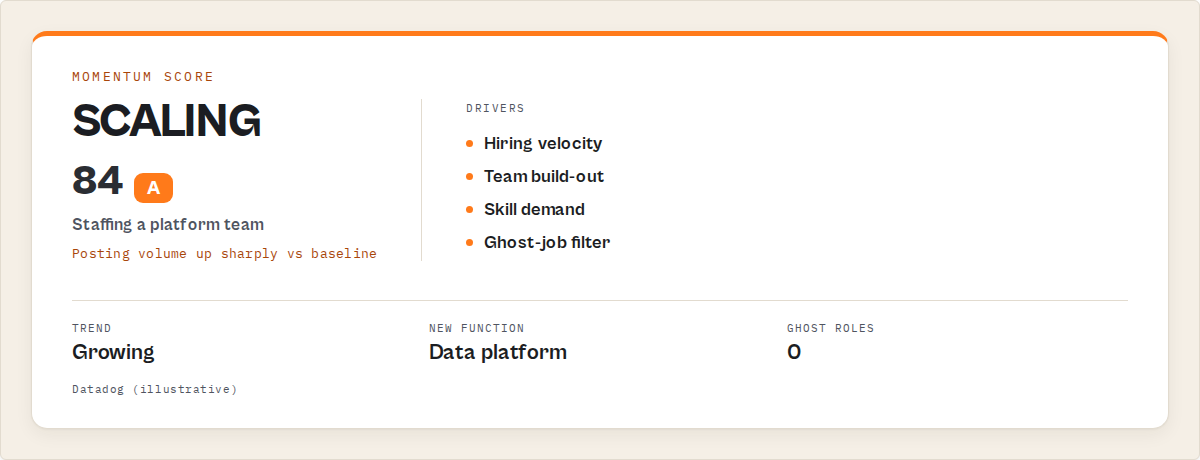
Here's a trimmed record so you can see the shape. Again, this is output you read, not code you run.
{
  "recordType": "company",
  "company": "Datadog",
  "attentionPriority": "high",
  "momentumScore": 84,
  "grade": "A",
  "headline": "Posting volume up sharply across Eng and Data — staffing a platform team",
  "whyNow": ["Posting volume up sharply vs baseline", "First data-platform roles detected"],
  "recommendedAction": "Add to watchlist and review this week",
  "riskState": "growing"
}
Everything from momentumScore down is the decision. It's what an experienced analyst would produce by hand after an hour of sorting. attentionPriority is the field your automation routes on. whyNow is the rationale for a human. recommendedAction is always a prioritisation instruction (review, track, compare, re-check), never an in-platform action and never a contact step. Routing attention is the job; outreach execution isn't. That boundary is deliberate, and it's the difference between a signal you trust and a tool making claims it can't back.
What is Hiring Memory, and why can't a competitor copy it?
Hiring Memory is an accumulated, timestamped record of every company's public postings that any run touches. Competitors show today's jobs. A hiring graph remembers every hiring signal it has seen, so for a company it has watched before you can pull the hiring history behind the score: month-by-month posting volume, which departments grew and when, and which roles keep getting reposted.
That's the moat, and it's the part a clone can't shortcut. A row scraper can reproduce today's rows tomorrow. It cannot reproduce a company's trajectory without the accumulated runs, and those only exist if you've been keeping them. Signals get copied in a sprint. Accumulated hiring history can't be backfilled.
There's an honest caveat here, and it's worth stating up front rather than in the footnotes: on a company's first sighting, history is thin. The first run returns a first-sight baseline, and depth accrues run over run. That's expected on day one, not a bug. Name a watchlist and re-run on a schedule and the memory clock starts, which is exactly when the "what changed since last run" delta becomes the product.
What are the alternatives to a LinkedIn hiring graph?
There are four practical alternatives, each with real tradeoffs. The right choice depends on whether your job is one-off extraction or recurring research, how much engineering you want to own, and whether you already pay for an enterprise intent platform.
1. A traditional row scraper (for example worldunboxer/rapid-linkedin-scraper). A capable LinkedIn-jobs row vendor, and a fine choice if raw extraction is all you need. Returns postings as flat rows, often with duplicates. Best for: a one-time bulk pull you'll analyse yourself, or feeding a pipeline you already own. Where it breaks: it ships none of the interpretation downstream of extraction, so the sorting, baseline comparison, dedup, and weekly diffing stay manual forever.
2. Build it yourself. Wire up extraction, per-company baselines, momentum trajectory math, function grouping, repost linking, cross-run state persistence, and change-diff logic, then keep all of it versioned and reproducible. Best for: a team with spare engineering capacity and a very specific in-house need. Where it breaks: you now own a maintained service, not a script. The baseline model, the ghost-job threshold, the residential-proxy and rate-limit handling for the public endpoint, and the persistent store that makes "what changed" possible all become yours. That last piece is months of accumulated data you can't buy back later.
3. An enterprise intent-data platform. Bundles hiring as one signal among many, with a dashboard and a contract. Best for: large revenue orgs that need broad multi-signal coverage and have the budget. Where it breaks for hiring specifically: hiring intent is derivative rather than primary, the scoring is opaque, there's no per-company hiring replay, and you're locked into an annual commitment before you've validated the signal.
4. A hiring-graph actor. Focuses on public LinkedIn jobs and ships the decision layer: hiring momentum, team build-out detection, ghost-job flags, watchlist deltas, and persistent memory per company. Best for: recurring competitor and ICP-account monitoring, recruiter sourcing, and skill-demand research where the value is who's scaling now and what changed. Where it's less suitable: member or profile data, contact enrichment, and any health or legitimacy verdict, none of which it does.
Each approach has trade-offs in coverage, engineering cost, timing, and time-to-value. Here's the comparison side by side.
| Approach | Time to first result | Momentum + build-out detection | Run-over-run memory | Cost shape |
|---|---|---|---|---|
| Row scraper | ~minutes | None (manual) | None | Per-row scrape price |
| Build it yourself | Weeks to months | You build it | You build + accumulate it | Engineering time + infra |
| Enterprise intent platform | Setup + onboarding | Bundled, opaque on hiring | Vendor-dependent | Five-figure annual typical |
| Hiring-graph actor | Under a minute | Built in | Built in, compounds | Pay-per-event, analysed results only |
Pricing and features based on publicly available information as of July 2026 and may change. Re-verify any incumbent's live terms before relying on the comparison.
One of the best fits for recurring, LinkedIn-specific hiring research is a hiring-graph actor, because it collapses the spreadsheet workflow into one scheduled run and doesn't lock you into a contract to try it. For broad multi-signal coverage where hiring is one of many inputs, an enterprise platform may suit better. If you're weighing spend, the ApifyForge cost calculator models per-record cost before you commit.
Best practices for hiring signal research
- Start with the canonical run. Three companies, ranked by hiring momentum. It returns the hiring queue in under a minute and shows what the actor is for before you scale up.
- Name a watchlist to unlock deltas. Without one you get a snapshot. With one, re-running gives you "what changed since last run." The first run on a fresh watchlist is a baseline, not a delta.
- Branch automation on
attentionPriority, not raw scores. Filter to thehighbucket so your alerts stay stable across runs. - Pick the rank axis for the job. Hiring momentum for who's scaling, skill demand for a talent-market read, freshness for recruiters, salary for benchmarking. The axis is the whole product for that job.
- Use the persona pack. Lead with the
gtmoutput for sales,recruiterfor staffing,investorfor portfolio monitoring. Same data, tuned emphasis. - Alert only on the actionable. Set a minimum momentum score and "only new since last run" so a scheduled run fires compact hiring cards, not a full re-export.
- Use the compat profile to migrate. When an existing pipeline only needs the standard field set,
outputProfile: "compat"returns it deduped and unchanged. Add the signal layer later. - Wire a webhook on run finish. Push the hiring feed into Slack or your CRM so the queue becomes a notification stream, not a manual pull. See the webhook glossary entry for the pattern.
Common LinkedIn hiring research mistakes
- Treating a scrape as research. Exporting rows is extraction. The ranking and comparison you do afterward is the research. Move that work into the tool.
- Sorting by job count and calling it triage. Raw counts ignore the company's own baseline. Five new reqs on a company that usually runs two matters more than forty routine ones at an enterprise.
- Expecting deltas on the first run. Memory can't be invented. Run one reports first-sight honestly; trajectory and change tracking sharpen after several scheduled runs on the same watchlist.
- Reading reposts as fresh demand. A role reposted four times is one long-open ghost, not four signals. Trust the dedup and the
daysListedfield. - Ignoring the salary gap. Many postings omit pay. Salary signals only appear when disclosed, so don't read a null as "low pay." Read it as "not listed."
- Reading every row anyway. If you've got a ranked queue and still scroll the full export "just in case," you've kept the bottleneck. Trust the queue and stop at the top of it.
Mini case study: an SDR team's Monday account run
Before. A sales team monitoring a list of 62 ICP data-infra accounts pulled LinkedIn job rows into a sheet each week, then spent close to an hour tagging "who looks like they're scaling." Build-outs were spotted late, if at all, because nobody could hold last week's export in their head. The competitor that quietly started staffing a platform team was usually noticed after a rival had already booked the intro.
After. They set a watchlist over the account list, ranked by hiring momentum, with the gtm pack and an alert on new surges. Each Monday they read the top of the hiring queue (the handful flagged high), acted on those, and skipped the rest. The week an account's posting volume jumped and its first data-platform roles appeared, the delta feed surfaced it within a run, with the evidence attached.
The reframe is the whole point: an hour of manual sorting per account list collapsed into a five-minute read. These numbers reflect one team's workflow. Results vary with how many accounts you track, how often you run, and how busy the market is.
How do you detect which companies are building AI, Data, or Security teams?
Run companies mode over your target list and read what each one is building. The hiring graph groups open roles into functions, so a cluster of first ML, MLOps, or applied-science roles reads as an AI build-out, a run of data-engineering and platform roles reads as a data-team ramp, and security, GRC, and detection-engineering roles read as a security build-out. Each company carries the functions and skills behind the surge, so you see what they're staffing, not just that they're staffing.
This is the workforce-analytics read: department-level hiring trends straight from public postings, without manually monitoring job boards. A company building a data team is in-market for data tooling; one standing up security is evaluating security vendors. That's the buying signal, and it's why the same output serves GTM, recruiters, and investors from one run.
The jobs-only fence (and why it's a feature)
Jobs-only is the deliberate design, not a gap to apologise for. The whole actor is built on public job postings, and that boundary is what keeps it clean and defensible. Being blunt about what it won't do is the trust signal:
- No member, profile, people, or candidate data. Ever. That data is login-walled and personal; this actor never touches it. Applicant count is a number, not people.
- No login or auth circumvention. The public job surface only. Where access is restricted from shared IPs, a residential proxy is used; nothing is bypassed.
- Descriptive signals, never verdicts. A posting-volume drop is reported as a drop with evidence, never as "this company is doing layoffs." A long-open role is reported with its repost count and days listed, never as "this job is fake." The ghost-job detector is a name for a view; the data never accuses a specific job.
- Salary as listed, never inferred. If a posting omits pay, the actor leaves it out rather than guessing a band.
- No outreach and no contact data. Recommended actions are prioritisation only. There's no email, call, or contact step inside the tool.
Limitations
Honest constraints, because the tool that names them is the one you can trust:
- History is thin on first sighting. Hiring Memory compounds with use. A company seen for the first time returns a first-sight baseline; depth accrues run over run.
- Salary is sparse. Many LinkedIn postings omit pay, so salary signals only appear when disclosed, and data-quality confidence reflects that.
- Public job surface only. Company depth that lives behind login is out of reach by design.
- LinkedIn caps a single search. A query is partitioned to extend coverage, and the coverage view reports exactly how, but extreme result counts can still be bound. The run reports truncation rather than failing silently.
- The public endpoint can tighten. A fallback fetch path is available, and the coverage view surfaces any shortfall rather than hiding it.
When you need this
You probably need a LinkedIn hiring graph if:
- You run trigger-based outbound and want hiring as a primary buying signal over your ICP accounts.
- You track a competitor or account list week over week and want the run-over-run delta.
- You're a recruiter who cares more about
daysListedand ghost roles than raw listing volume. - You're an investor or analyst reading company growth from hiring velocity across a portfolio.
- You're feeding an agent or automation that needs company records with momentum and build-out signals attached.
You probably don't need this if:
- You want a one-off raw export to process in your own pipeline (a plain scraper is fine and cheaper).
- You need member, profile, or candidate data (jobs-only by design, permanently).
- You need contact emails or phone numbers (pair with a contact-discovery actor downstream).
- You need a health, layoff, or legitimacy verdict on a company or a job (deliberately out of scope).
Frequently asked questions
What is the difference between a LinkedIn jobs scraper and a hiring graph?
A LinkedIn jobs scraper extracts postings and returns rows: title, company, salary as listed, applicant count. A hiring graph returns the same rows (deduped) plus a decision per company: a momentum score and grade, what they're building, which roles are reposted ghosts, and a prioritisation action. And it remembers the history so the signal compounds. The scraper is the substrate. The hiring graph is the substrate plus what to do about it.
Can I use this for sales and buying-signal data?
Yes. Hiring is a buying signal: a company scaling a team is in-market for what that team needs. Set a watchlist over your ICP accounts with the gtm pack and re-run daily for a "who started hiring [persona]" feed. It's a practical alternative to expensive intent-data platforms for teams that want the signal without the enterprise contract, because you pay per analysed result rather than an annual commitment.
Does it tell me a company is doing layoffs or that a job is fake?
No. A posting-volume drop is reported descriptively with evidence, and a long-open or reposted role is reported with its repost count and days listed. The actor never asserts layoffs or a fake job. Those are verdicts it deliberately does not make, which is what keeps the signal defensible rather than speculative.
Can I migrate from an existing LinkedIn jobs scraper without changing my pipeline?
Yes. Set outputProfile to compat and you get the standard LinkedIn-job field set (job_title, company_name, location, time_posted, salary_range, num_applicants, job_url), duplicates removed. The same inputs are accepted, so your existing run keeps working. You gain the dedup immediately and can turn on the signal layer whenever you want it, as an additive upgrade rather than a rewrite.
How does Hiring Memory work, and what do I get on the first run?
It accumulates a timestamped record of every company's public postings that a run touches. On a company's first sighting, records carry a first-sight baseline and history is thin. Re-run, or run a company that's been seen before, and you get more trajectory: month-by-month volume, which departments grew, and repost history. Depth accrues with use, and it is not backfillable by a clone.
How do I track which companies are hiring for a specific skill?
Use market mode with the skill, ranked by skill demand. You get a skill-demand trajectory plus the standout hirers, drawn from the accumulated history rather than a single snapshot. It's the labor-market read for recruiters and analysts who care about where demand for a skill is heading, not just who posted today.
Is it legal to scrape public LinkedIn job postings?
This actor reads public, no-login job-posting data and never touches member or profile data or authentication. Whether your specific use is permitted depends on your jurisdiction and intended use, including data-protection rules and platform terms. For background, see Apify's guide to web scraping legality. Consult legal counsel for your situation.
The bottom line
If you pull LinkedIn job data once and process it yourself, use a row scraper. It's cheaper, and it's the right tool for that job. But if you're monitoring accounts and competitors every week, extraction stopped being the bottleneck a long time ago. The work is deciding who to look at first and what changed, and that's exactly what a hiring graph is built to do. The LinkedIn Jobs Scraper actor ships it as the default output: ranked, explained, and remembered run over run. Take the top of that queue into Website Contact Scraper and Email Pattern Finder and the hiring signal turns into a contactable account. Rows are the substrate. The decision is the product.
Ryan Clinton publishes Apify actors and MCP servers as ryanclinton and builds developer tools at ApifyForge.
Last updated: July 2026