LinkedIn Jobs Scraper — Hiring Graph, Company Growth & Intent is an Apify actor on ApifyForge. Scrape public LinkedIn jobs and build a hiring graph: company hiring momentum, ghost-job detection, skill demand, and the hiring history nobody else keeps. Best for teams who need automated linkedin jobs scraper — hiring graph, company growth & intent data extraction and analysis. Not ideal for use cases requiring real-time streaming data or sub-second latency. Maintenance pulse: 90/100. Last verified March 27, 2026. Built by Ryan Clinton (ryanclinton on Apify).
LinkedIn Jobs Scraper — Hiring Graph, Company Growth & Intent
LinkedIn Jobs Scraper — Hiring Graph, Company Growth & Intent is an Apify actor available on ApifyForge. Scrape public LinkedIn jobs and build a hiring graph: company hiring momentum, ghost-job detection, skill demand, and the hiring history nobody else keeps. Same input + fields as the popular scrapers, minus the duplicates.
Best for teams who need automated linkedin jobs scraper — hiring graph, company growth & intent data extraction and analysis.
Not ideal for use cases requiring real-time streaming data or sub-second latency.
What to know
- Results depend on the availability and structure of upstream data sources.
- Large-scale runs may be subject to platform rate limits.
- Requires an Apify account — free tier available with limited monthly usage.
Maintenance Pulse
90/100Documentation
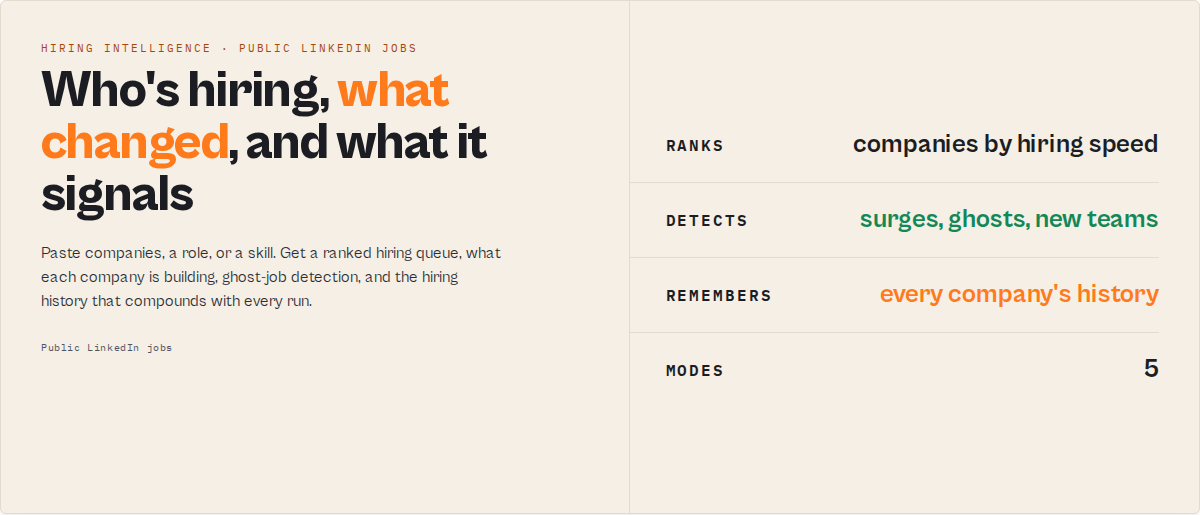
Competitors scrape job postings. This actor builds a hiring graph — track company growth, hiring intent, emerging skills, department expansion, and labor-market trends from public LinkedIn jobs. Paste companies, a role, or a skill; get a ranked hiring queue plus the hiring history behind it. Same input + fields as worldunboxer/rapid-linkedin-scraper, minus the duplicates.
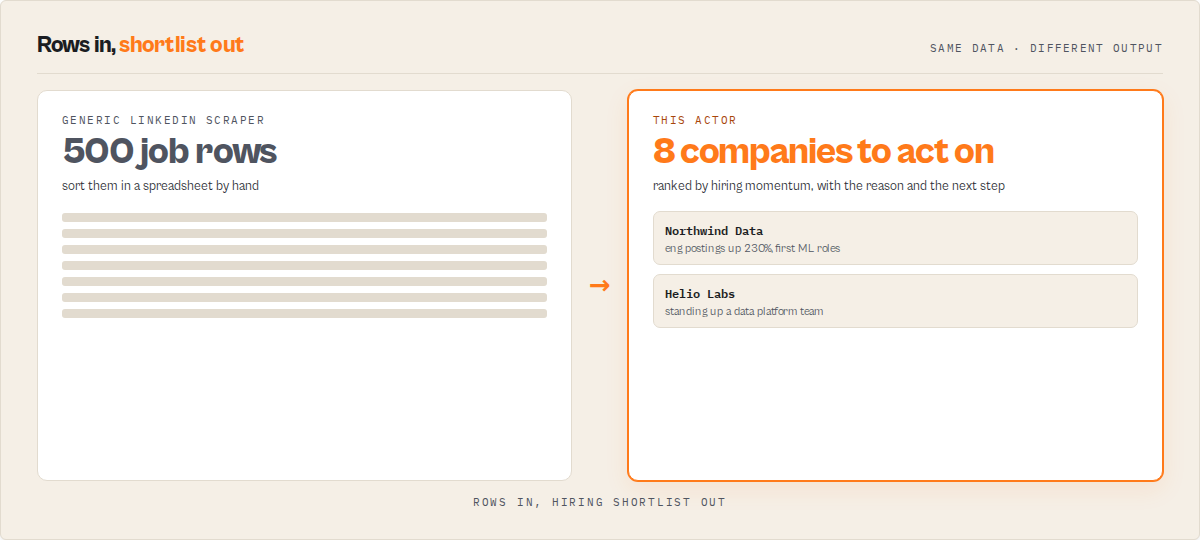
The real competitor isn't another scraper. It's the spreadsheet. Every LinkedIn-jobs tool hands you rows: title, company, salary, applicant count. The question the buyer actually has — which companies are staffing up, in what, and what does it signal — still lives in a human's head after an hour in Sheets. This actor answers it in one run.
The field gives you LinkedIn job rows. This actor tells you who's hiring and what it signals.
What this actor does
- What it is: A public LinkedIn jobs scraper that returns a ranked hiring queue plus the hiring history behind each company.
- What it reads: Public LinkedIn job postings only — title, company, location, salary as listed, applicant count, seniority, function, posted time.
- What it returns: Hiring momentum scores, what each company is building, ghost-job (repost / long-open) detection, skill-demand signals, and a per-company hiring timeline you can replay.
- What it does NOT do: No member, profile, people, or candidate data. No login. No "this company is doing layoffs" or "this job is fake" verdicts. No salary inference, no procurement predictions, no outreach.
- Who it's for: Sales / GTM teams, recruiters, investors and analysts, job-seekers, and labor-market researchers.
Ready-to-run examples
One-click examples, each a saved preset you can run or fork:
- Find Companies That Are Hiring — companies ranked by hiring momentum.
- LinkedIn Job Scraper (no duplicates) — public LinkedIn jobs, deduped, with reposts linked.
- Skill Demand Tracker — demand and trend for any tech skill.
- Track Competitor Hiring — what changed in your accounts since the last run.
- Hiring Signal Alerts (GTM) — a hiring-as-buying-signal feed for sales.
- Ghost Job Detector — reposted and long-open roles.
- Salary Benchmark by Role — salary band and competition for a role.
- Tech Hiring Trends — which skills and sectors are heating up.
Hiring Memory: the part nobody else keeps
Competitors show today's jobs. This actor remembers every hiring signal it sees, run after run. So for every company it has seen, you can pull:
- ✓ Hiring Replay — the full hiring story, start to now
- ✓ Company Timeline — month-by-month posting volume and top functions
- ✓ Team Expansion History — which departments grew, and when
- ✓ Repost History — which roles keep getting reposted, and for how long
Hiring Memory accumulates a timestamped record of every company's postings on every entity any run touches. That is the moat: signals get copied in a sprint, but accumulated hiring history can't be backfilled.
The README is organized around what the memory unlocks:
- Find — Hiring Queue, hiring momentum, skill demand. Who's staffing up fastest right now.
- Track — a watchlist or account feed: what changed in your tracked companies since the last run.
- Remember — Hiring Memory and Company Timeline: the hiring trajectory behind the score.
- Replay — Hiring Replay: a company's full hiring story, start to now.
In short: a LinkedIn jobs scraper that ranks companies by how fast they're hiring, explains what they're building, and keeps the hiring history so the signal compounds with every run.
Why people use it:
- Find companies hiring now — ranked by hiring momentum, not a raw row dump.
- Track competitor and account hiring — a daily feed of what changed since your last run.
- Detect team build-outs — which departments (AI, Data, Security, Sales) are expanding.
- Spot reposted and long-open "ghost" jobs.
- Read hiring as a buying signal — hiring intent data for GTM, without the enterprise contract.
- Monitor how hiring changes over time — the hiring history nobody else keeps.
What you get from one call
Input: { "mode": "companies", "companies": ["Stripe", "Datadog", "Ramp"], "rankBy": "hiringMomentum" }
Returns:
- A ranked hiring queue: these companies are staffing up fastest right now.
- Per company: a momentum score and grade, a one-line "why now," and a prioritisation action.
- What each company is building (the functions and skills behind the surge).
- The hiring history behind the score, where Hiring Memory has seen the company before.
Outcome: "These companies are staffing up fastest right now — and here's what they're building."
One company in the Hiring Queue looks like this:
{
  "company": "Datadog",
  "momentumScore": 84,
  "grade": "A",
  "companyProfileLabel": "scaling",
  "attentionPriority": "high",
  "whyNow": ["Posting volume up sharply vs baseline", "First data-platform roles detected"],
  "recommendedAction": "Add to watchlist and review this week"
}
Typical time to first result: under a minute for a small company list. Time to integrate: minutes via the Apify API.
What makes this different
| Other LinkedIn scrapers | This actor |
|---|---|
| Job rows | Hiring signals |
| Duplicates | Deduped + reposts linked |
| Today's jobs | Hiring history |
| Raw exports | Ranked opportunities |
| No monitoring | Watchlist deltas + Hiring Feed |
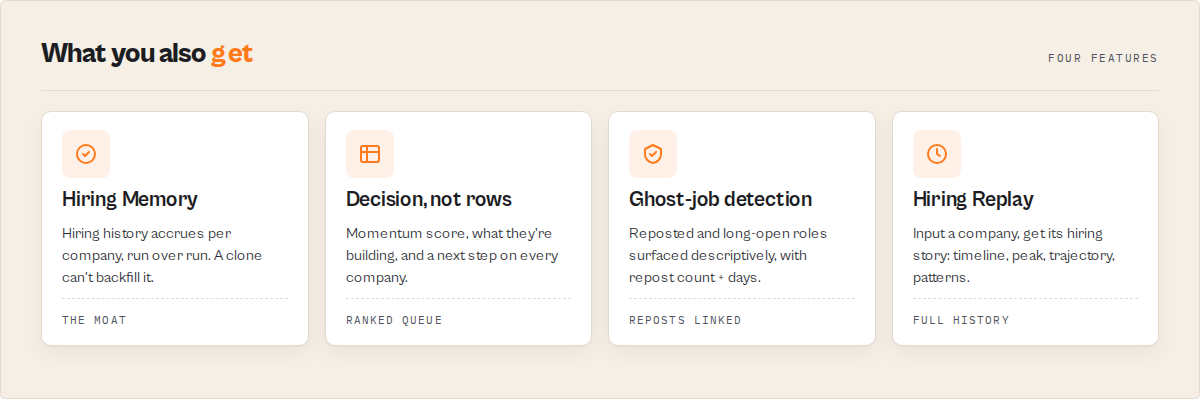
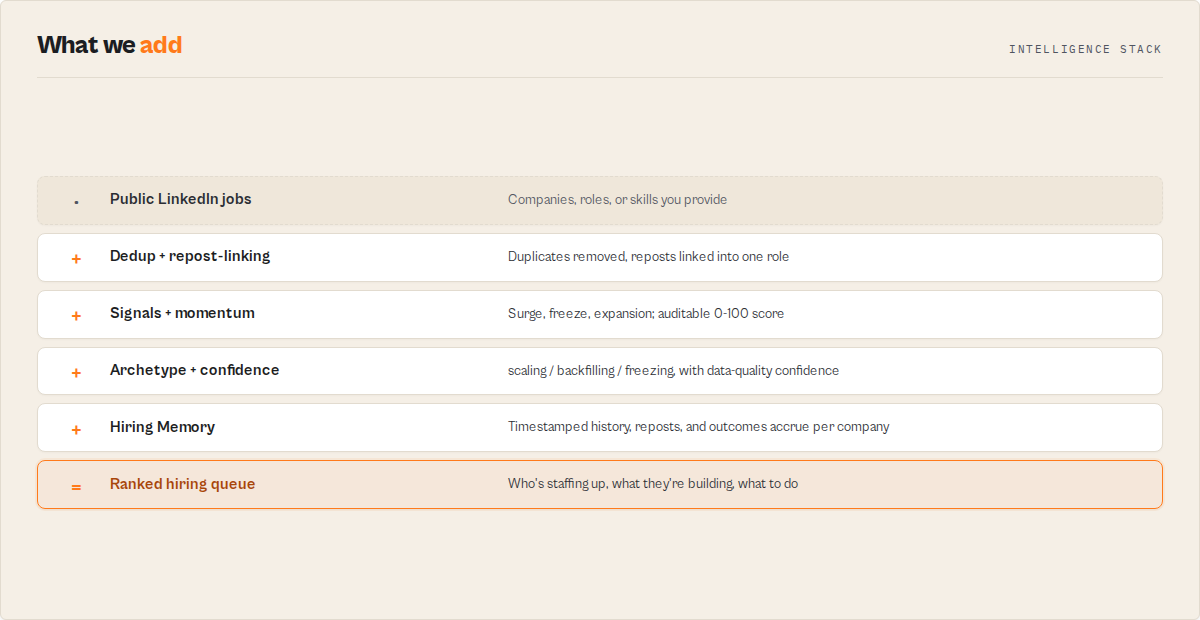
- Hiring Memory — accumulated, timestamped hiring history per company. A row scraper can't reproduce it without the accumulated runs.
- Decision layer, not rows — momentum score, what they're building, ghost-job detection, and a prioritisation action, instead of a spreadsheet you have to interpret.
- Dedup turned into signal — duplicates and reposts are removed by default, and the repost pattern becomes the ghost-job (long-open) signal instead of noise.
Detect team expansion — companies building AI, Data & Security teams
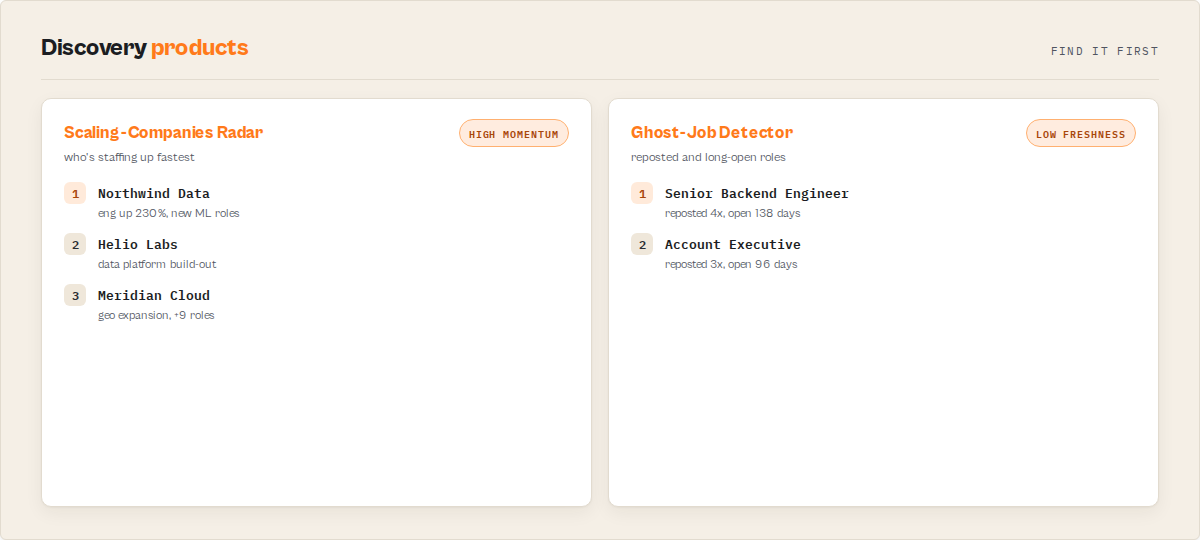
Find companies building, without manually monitoring job boards:
- AI / ML teams — first ML, MLOps, or applied-science roles appearing
- Data teams — data engineering, analytics, and platform hiring
- Cybersecurity teams — security, GRC, and detection-engineering roles
- Platform / infra teams — SRE, platform, and DevOps build-outs
- Sales teams — GTM headcount ramps
Each company carries the functions and skills behind the surge, so you see what they're building, not just that they're hiring. This is the workforce-analytics view: department-level hiring trends read straight from public postings.
Competitor hiring tracker
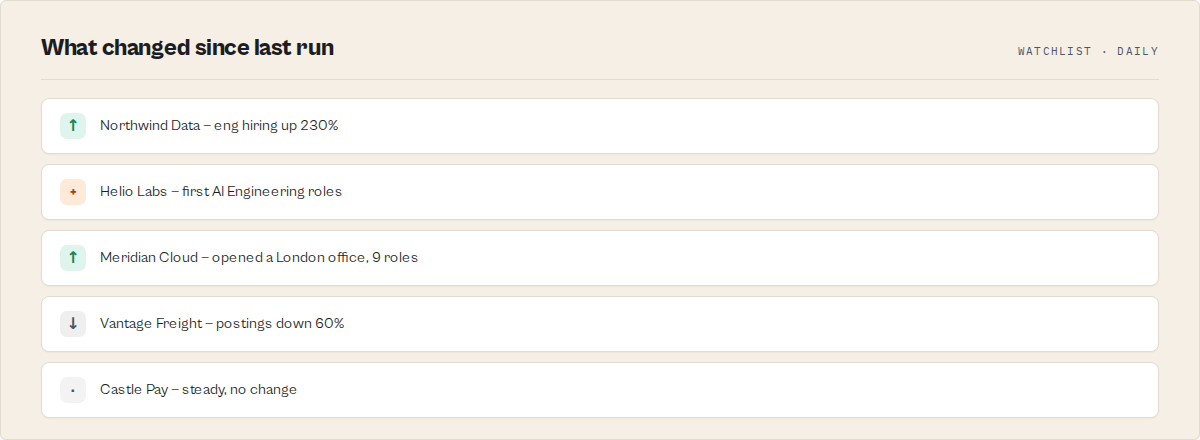
Name a watchlist over your competitor or ICP account list and re-run on a schedule:
{ "mode": "companies", "companies": ["Snowflake", "Databricks", "Confluent"], "watchlistName": "competitors" }
Each run reports, since your last run: new openings, new departments, hiring surges, and hiring slowdowns — a delta feed for Slack or your CRM. Hiring is a buying signal: a competitor staffing a new team is in-market for what that team needs. It is hiring intent data and labor-market intelligence without an enterprise contract.
Five scraping modes for LinkedIn jobs
One input shape, five modes. Each answers a different question.
companies — rank named companies by hiring momentum (headline mode)
{ "mode": "companies", "companies": ["Stripe", "Datadog", "Ramp"], "rankBy": "hiringMomentum" }
Outcome: these companies are staffing up fastest right now, and here's what they're building.
roles — demand for a job title
{ "mode": "roles", "roles": ["data engineer"], "location": "United States" }
Outcome: demand for this role — who's hiring, how contested, and the salary band.
market — a skill or sector trend
{ "mode": "market", "market": ["Python"], "rankBy": "skillDemand" }
Outcome: skill-demand trajectory plus the standout hirers.
watchlist — what changed since your last run
{ "mode": "companies", "companies": ["Snowflake", "Confluent", "Databricks"], "watchlistName": "my-icp-accounts" }
Outcome: what changed in your tracked companies' hiring since the last run. Re-run daily for an account-hiring feed.
urls — public LinkedIn job / search URLs
{ "mode": "urls", "urls": ["https://www.linkedin.com/jobs/search/?keywords=ml%20engineer"] }
Outcome: direct input from job or search URLs, with migration parity. Member, profile, and company-login URLs are rejected.
Who uses this LinkedIn jobs scraper
Every one of these workflows ends in a human in a spreadsheet. This actor replaces that step.
Best for sales and GTM teams
Hiring is a buying signal — a company scaling its data team is in-market for data tooling. Run a watchlist over an ICP account list and re-run daily for a "who started hiring [your buyer persona]" feed. Lead with the gtm output pack. Key outputs: momentum score, what they're building, attention priority, recommended action.
Best for recruiters and staffing
Track skill and role demand and watch competitor hiring without re-scraping and diffing by hand. Reposts are linked and deduped, so the same role doesn't show ten times. Key outputs: skill demand, ghost-job (long-open) roles, salary band, who else is hiring the same role.
Best for investors and analysts
Company growth read from hiring velocity, with the timeline behind it instead of a manual posting count. Department-level expansion (Eng, Sales, Security, Data) becomes visible. Key outputs: momentum trajectory, hiring replay, function and geo expansion.
Best for job-seekers
Tell a fresh role from a perennial repost, and see how contested a posting is. Key outputs: freshness, repost count and days listed, applicant context, salary as listed.
Best for labor-market researchers
Skill and geo demand trends with a time series you don't have to build. Key outputs: skill-demand index, demand momentum, standout hirers per skill.
Drop-in migration from existing LinkedIn scrapers
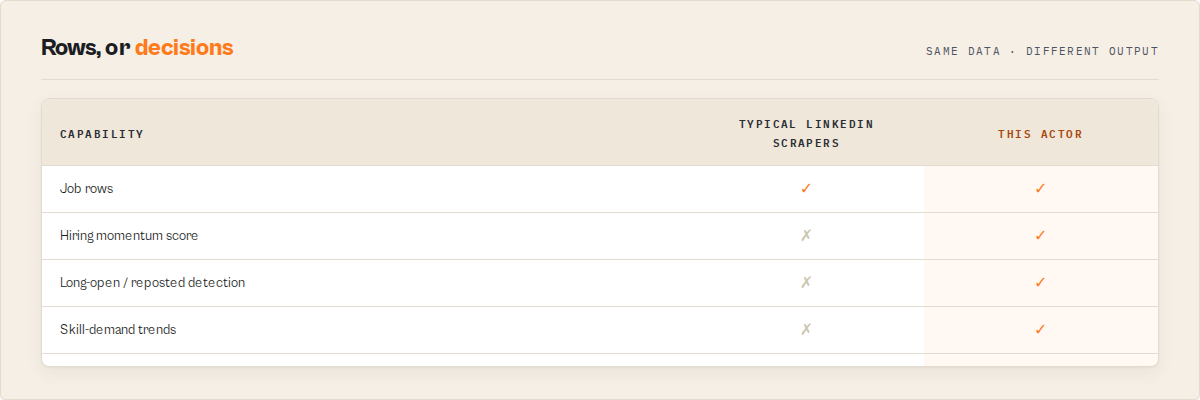
Same input + fields as worldunboxer/rapid-linkedin-scraper — minus the duplicates, plus what it signals.
Set outputProfile to compat and you get the standard LinkedIn-job field set (job_title, company_name, location, time_posted, salary_range, num_applicants, job_url and the rest), with duplicates removed. The same inputs are accepted, so an existing pipeline keeps working.
outputProfile | What you get |
|---|---|
signals (default) | The full decision layer: job substrate + momentum, signals, deltas, dedup. |
compat | The exact popular-scraper field set, duplicates removed — drop-in migration. |
minimal | The essential job fields only. |
Output: dataset views
The dataset ships progressive-disclosure views, ordered for a five-second read down to raw rows. Open the Hiring Queue first.
| Order | View | Reads | Audience |
|---|---|---|---|
| 1 | Hiring Queue (default) | Priority, momentum, grade, why now, action | Every buyer |
| 1b | Ignore Queue | Companies to deprioritise | "Don't chase these" |
| 2 | Scaling Companies | Companies with a hiring surge / high momentum | GTM, recruiters, investors |
| 2b | Hiring Replay / Company Timeline | A company's hiring story: timeline, peak, trajectory, patterns | The moat surface — GTM, investors |
| 3 | Ghost-Job Detector | High-repost / long-open roles, surfaced descriptively | Job-seekers, recruiters |
| 4 | Skill Demand | Roles ranked by skill-demand signal | Recruiters, analysts |
| 5 | New Functions / Geo | Function and geographic expansion events | GTM, investors |
| 6 | New Since Last Run | Watchlist delta — what changed | Watchlist / GTM |
| 7 | Hiring Feed | Events by importance and severity | Slack / agent |
| 8 | Compat (dedup'd) | Standard LinkedIn-job fields, duplicates removed | Migrators |
| 9 | Coverage & Errors | How coverage was achieved, the cap workaround, truncation | Trust / debug |
| 10 | Summary | Run rollup | Exec read |
Buyer controls
intent— a one-click shortcut (find_growth,track_accounts,role_demand,ghost_check,salary_benchmark) that sets mode, ranking, and output pack for a common job.rankBy— order the hiring queue byhiringMomentum(default),skillDemand,freshness,salary,competition, orrecency.hiringMomentumandskillDemandare what no other LinkedIn-jobs actor ships.outputPack— persona-tuned emphasis:gtm,recruiter,investor,jobseeker,analyst, orraw.alerts— emit only actionable items (minMomentumScore,onlyNewSinceLastRun,surgeMinPct,alertOnNewFunction,severity) and fire compact Hiring Cards.filters— job-attribute filters only: seniority, employment type, work arrangement, posted-within, salary minimum. No candidate or people filters.enableHiringMemory— on by default. Turn it off to keep a run out of the shared hiring history.limits— cap results per search, companies, cap-bypass partitions, detail fetches, and runtime.
First run tips
- Start with the canonical run — three companies,
rankBy: hiringMomentum. It returns the Hiring Queue in under a minute and shows what the actor is for before you scale up. - Set a
watchlistNameto unlock deltas — without it you get a snapshot. With it, re-running gives you "what changed since last run." First run on a fresh watchlist returns a first-sight baseline. - Hiring Memory compounds with use — on the first sighting of a company, records carry a first-sight fallback and the history is thin. Depth accrues run over run, so a company you (or anyone) have run before returns more trajectory. This is expected on day one, not an error.
- Use a residential proxy — strongly recommended for the public LinkedIn endpoint; it's the default in the input form.
- Open the Hiring Queue view first — the raw dataset has every field, but the view is the five-second read.
Input examples
Find growing companies (headline):
{ "mode": "companies", "companies": ["Stripe", "Datadog", "Ramp"], "rankBy": "hiringMomentum" }
Track an account list (GTM feed):
{ "mode": "companies", "companies": ["Snowflake", "Confluent", "Databricks"], "watchlistName": "icp-data-accounts", "outputPack": "gtm", "alerts": { "minMomentumScore": 60, "onlyNewSinceLastRun": true } }
Migrate an existing pipeline (compat):
{ "mode": "roles", "roles": ["software engineer"], "location": "United States", "outputProfile": "compat" }
Output example
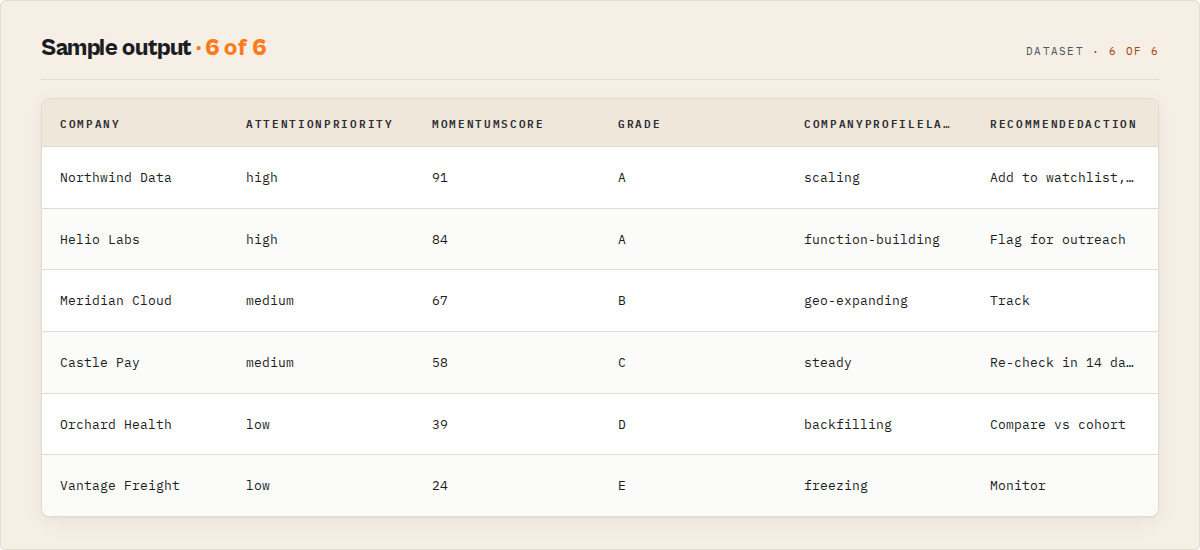
A Hiring Queue record:
{
  "recordType": "company",
  "company": "Datadog",
  "companyId": "datadog",
  "attentionPriority": "high",
  "momentumScore": 84,
  "grade": "A",
  "headline": "Posting volume up sharply across Eng and Data — staffing a platform team",
  "recommendedAction": "Add to watchlist and review this week",
  "riskState": "growing",
  "timestamp": "2026-06-21T09:14:00Z"
}
A Ghost-Job Detector record:
{
  "recordType": "job",
  "company": "Northstar Logistics",
  "title": "Senior Backend Engineer",
  "canonicalJobId": "northstar-logistics-senior-backend-engineer-remote",
  "location": "Remote",
  "repostCount": 4,
  "daysListed": 138,
  "timestamp": "2026-06-21T09:14:00Z"
}
Output fields
| Field | Type | Description |
|---|---|---|
recordType | string | summary, company, job, hiringCard, event, hiringFeed, hiringReplay, watchlistBriefing, coverage, error. |
company / companyName | string | Company name (analysed entity / job row). |
companyId | string | Stable company id. |
title | string | Job title. |
canonicalJobId | string | Stable id linking a role across reposts. |
location | string | Job location. |
attentionPriority | string | high, medium, low, none. |
momentumScore | integer | Hiring momentum score. |
grade | string | A–F momentum grade. |
recommendedAction | string | Prioritisation-only next step. |
riskState | string | growing, steady, softening, frozen (descriptive). |
repostCount | integer | Times the role was reposted. |
daysListed | integer | Days listed across observations. |
eventType / eventImportance / severity | mixed | Hiring Feed event fields. |
job_title / company_name / time_posted / salary_range / num_applicants / job_url | mixed | Compat fields (salary as listed). |
truncated / truncatedReason | mixed | Coverage: set when a cap (runtime or the ~1000-result cap) bound the run. |
Scrape LinkedIn jobs using the API
Python
from apify_client import ApifyClient

client = ApifyClient("YOUR_API_TOKEN")

run = client.actor("ryanclinton/linkedin-jobs-scraper").call(run_input={
    "mode": "companies",
    "companies": ["Stripe", "Datadog", "Ramp"],
    "rankBy": "hiringMomentum"
})

for item in client.dataset(run["defaultDatasetId"]).iterate_items():
    if item.get("recordType") == "company":
        print(f"{item['company']}: {item.get('momentumScore')} ({item.get('grade')}) — {item.get('headline')}")
JavaScript
import { ApifyClient } from "apify-client";

const client = new ApifyClient({ token: "YOUR_API_TOKEN" });

const run = await client.actor("ryanclinton/linkedin-jobs-scraper").call({
    mode: "companies",
    companies: ["Stripe", "Datadog", "Ramp"],
    rankBy: "hiringMomentum",
});

const { items } = await client.dataset(run.defaultDatasetId).listItems();
for (const item of items) {
    if (item.recordType === "company") {
        console.log(`${item.company}: ${item.momentumScore} (${item.grade}) — ${item.headline}`);
    }
}
cURL
curl -X POST "https://api.apify.com/v2/acts/ryanclinton~linkedin-jobs-scraper/runs?token=YOUR_API_TOKEN" \
  -H "Content-Type: application/json" \
  -d '{ "mode": "companies", "companies": ["Stripe","Datadog","Ramp"], "rankBy": "hiringMomentum" }'

curl "https://api.apify.com/v2/datasets/DATASET_ID/items?token=YOUR_API_TOKEN&format=json"
What this actor does NOT do
Jobs-only is the deliberate design, not a gap to apologise for. The whole actor is built on public job postings, and that boundary is what keeps it clean and defensible.
- No member, profile, people, or candidate data. Ever. That data is login-walled and personal; this actor never touches it.
- No auth circumvention. No login, no cookies, no member-only pages — the public job surface only. Where access is restricted from shared IPs, a residential proxy is used; nothing is bypassed.
- Descriptive freeze and ghost signals, never verdicts. A posting-volume drop is reported as a drop with evidence, never as "this company is doing layoffs." A high-repost, long-open role is reported with its repost count and days listed, never as "this job is fake." The Ghost-Job Detector is a name for a view; the data never accuses a specific job.
- Salary as listed, never inferred. If a posting omits salary, the actor leaves it out — it does not guess a band.
- No procurement or purchase predictions. "What a company is building" is read from its public postings. It never claims a company will buy a specific vendor.
- No outreach execution and no contact data. Recommended actions are prioritisation only (review, track, compare, re-check). There is no contact, email, or call step.
Limitations
- History is thin on first sighting. Hiring Memory compounds with use. A company seen for the first time returns a first-sight baseline; depth accrues run over run.
- Salary is sparse. Many LinkedIn postings omit salary; salary signals only appear when disclosed, and data-quality confidence reflects this.
- Public job surface only. Company depth that lives behind login is out of reach by design.
- LinkedIn caps a single search. A query is partitioned to extend coverage, and the Coverage view reports exactly how, but extreme result counts can still be bound — the run reports truncation rather than failing silently.
- The public endpoint can tighten. A browser fetch path is available as a fallback; the Coverage view surfaces any shortfall.
Integrations
- Zapier — push the Hiring Feed into Slack or a CRM when a company crosses a momentum threshold.
- Make — schedule a daily watchlist run and route new surges to your team.
- Google Sheets — drop the Hiring Queue into a shared sheet for non-technical reviewers.
- Apify API — trigger runs and read the dataset from any HTTP client.
- Webhooks — fire on run completion to a downstream service.
- LangChain / LlamaIndex — feed hiring signals to an agent that decides who to act on.
Combine with other Apify actors
| Actor | How to combine |
|---|---|
| Website Contact Scraper | Take the scaling companies, find their site contacts for outreach. |
| Email Pattern Finder | Resolve the email convention for a high-momentum account. |
| HubSpot Lead Pusher | Push the GTM hiring feed into your CRM as buying signals. |
| Company Deep Research | Pull a full company report on a top scaler before you act. |
| Bulk Email Verifier | Verify the contacts you sourced from scaling companies. |
Responsible use
- This actor reads publicly available job-posting data from LinkedIn's public job surface. It does not log in, bypass authentication, or access member, profile, or company-login pages.
- Hiring history retains public job-posting metrics only (company, title, counts, salary as listed) on a capped rolling window. It stores no candidate or applicant personal data — applicant count is a number, not people.
- Freeze and ghost signals are descriptive, evidence-backed observations about posting patterns, never verdicts about a company's health or a job's legitimacy.
- Users are responsible for ensuring their use complies with applicable laws and platform terms, including data-protection rules in their jurisdiction.
- For guidance on web scraping legality, see Apify's guide.
FAQ
What is the difference between this and a regular LinkedIn jobs scraper? A regular scraper returns job rows and leaves the interpretation to you. This actor returns the same rows (deduped) plus a hiring queue: who's scaling, what they're building, and which roles are reposted ghosts — and it remembers the history so the signal compounds.
How does Hiring Memory work, and what do I get on the first run? It accumulates a timestamped record of every company's postings on every entity a run touches. On a company's first sighting, records carry a first-sight fallback and history is thin. Re-run, or run a company that's been seen before, and you get more trajectory. Depth accrues with use; it is not backfillable by a clone.
Can I use this for sales and buying-signal data?
Yes. Hiring is a buying signal — a company scaling a team is in-market for what that team needs. Run a watchlist over your ICP accounts with the gtm pack and re-run daily for a "who started hiring [persona]" feed. It is a practical alternative to expensive hiring-intent platforms for teams that want the signal without the contract.
Does it tell me a company is doing layoffs or that a job is fake? No. A posting-volume drop is reported descriptively with evidence, and a long-open or reposted role is reported with its repost count and days listed. The actor never asserts layoffs or a fake job — those are verdicts it deliberately does not make.
Can I migrate from worldunboxer/rapid-linkedin-scraper without changing my pipeline?
Yes. Set outputProfile to compat for the same field set, duplicates removed. The same inputs are accepted, so your existing run keeps working — you just gain the dedup and, optionally, the signal layer.
Does it scrape LinkedIn member or profile data? No. It is jobs-only by design: public job postings, no login, no member, profile, people, or candidate data. That is a permanent boundary, not a setting.
How do I find which companies are hiring for a specific skill?
Use market mode with the skill, ranked by skillDemand. You get a skill-demand trajectory plus the standout hirers, drawn from the accumulated skill history.
What does ranking by hiring momentum mean? Companies are ordered by how fast their public hiring is moving relative to their own baseline, weighted by how many functions and how senior the hiring is. The score is auditable — each company carries the reasons behind it.
How do I track changes in my accounts over time?
Set a watchlistName and re-run on a schedule. Each run reports what changed since the last one — new surges, new functions, frozen hiring — as a delta feed.
Can I get only the high-priority companies?
Yes. Use the alerts control with minMomentumScore (and onlyNewSinceLastRun with a watchlist) to emit only the companies worth acting on, plus compact Hiring Cards for automation.
Does it handle duplicate and reposted jobs? Yes, by default. Reposts are linked and duplicates removed, and the repost pattern itself becomes the ghost-job (long-open) signal rather than clutter.
Is it legal to scrape public LinkedIn job postings? This actor reads public, no-login job-posting data and never touches member or profile data or authentication. Legality depends on your jurisdiction and intended use; consult legal counsel for your situation, and see Apify's guide.
Input parameters reference
| Parameter | Type | Required | Default | Description |
|---|---|---|---|---|
mode | string | Yes | companies | companies, roles, market, watchlist, or urls. |
companies | string[] | For companies/watchlist | ["Stripe","Datadog","Ramp"] | Company names to analyse. |
roles | string[] | For roles | [] | Job titles or skills to analyse. |
market | string[] | For market | [] | Skills or sectors to track. |
urls | string[] | For urls | [] | Public LinkedIn job-view or job-search URLs. |
location | string | No | "" | Optional location filter applied to all searches. |
watchlistName | string | No | "" | Name a watchlist to persist history and get deltas. |
intent | string | No | "" | One-click shortcut that sets mode, ranking, and pack. |
rankBy | string | No | hiringMomentum | How to rank the hiring queue. |
outputProfile | string | No | signals | signals, compat, or minimal. |
outputPack | string | No | gtm | Persona emphasis for the queue. |
enableHiringMemory | boolean | No | true | Keep an accumulating hiring history. |
alerts | object | No | {} | Emit only actionable items and fire Hiring Cards. |
filters | object | No | {} | Job-attribute filters only. |
limits | object | No | {} | Result, company, partition, fetch, and runtime caps. |
forceBrowser | boolean | No | false | Use the browser path if the default is restricted. |
proxyConfiguration | object | No | residential | Proxy configuration. |
Help us improve
If you encounter issues, you can help us debug faster by enabling run sharing in your Apify account:
- Go to Account Settings > Privacy
- Enable Share runs with public Actor creators
This lets us see your run details when something goes wrong, so we can fix issues faster. Your data is only visible to the actor developer, not publicly.
Support
Found a bug or have a feature request? Open an issue in the Issues tab on this actor's page. For custom solutions or enterprise integrations, reach out through the Apify platform.
Related actors
AI Cold Email Writer — $0.01/Email, Zero LLM Markup
Generates personalized cold emails from enriched lead data using your own OpenAI or Anthropic key. Subject line, body, CTA, and optional follow-up sequence — $0.01/email, zero LLM markup.
B2B Lead Generation Suite - Find Emails, Score & Qualify Leads
All-in-one B2B lead pipeline. Enter company URLs, get enriched leads with emails, phone numbers, contacts, email patterns, quality scores (0-100), grades, and business signals from a 3-step automated pipeline.
B2B Lead Qualifier - Score & Rank Company Leads
B2B lead scoring tool and API that scores companies 0-100 from 30+ website signals. 5 scoring categories, 4 profiles (sales, marketing, recruiting, default). Plain-English explanations, hiring detection, industry classification, score change tracking. $0.15/lead, no subscription.
Bulk Email Verifier — MX, SMTP & Disposable Detection at Scale
Verify email deliverability in bulk — MX records, SMTP mailbox checks, disposable detection (55K+ domains), role-based flagging, catch-all detection, domain health scoring (SPF/DKIM/DMARC), and confidence scores. $0.005/email, no subscription.
Ready to try LinkedIn Jobs Scraper — Hiring Graph, Company Growth & Intent?
Run it on your own Apify account. Apify offers a free tier with $5 of monthly credits.
Open on Apify Store