The problem: You just finished building an Apify actor. It works. You're about to hit publish — and then the doubt arrives. Is the description going to trigger a DMCA letter? Did you accidentally claim "LinkedIn data extraction" in the title and map yourself onto three lawsuits from the past 18 months? If an enterprise client asks for your GDPR lawful basis, do you have one documented? You don't want a $400/hr lawyer on retainer for every scraper you ship, and you don't want to guess. You want a triage layer that tells you which actors need real legal review and which are fine to promote.
What is pre-publish risk triage? A scan of an Apify actor's metadata — name, description, categories, input schema, dataset schema, README — that converts risk signals (PII, ToS exposure, auth-wall patterns, regulatory surface, documentation gaps) into a single machine-readable verdict. Why it matters: the gap between "I built something that works" and "I shipped something that will not get me sued, flagged, or removed" is where most developer-built actors fail. Use it when: you are about to publish to the Apify Store, deliver an actor to a client, wire it into a CI pipeline, or chain a third-party actor into an agent workflow.
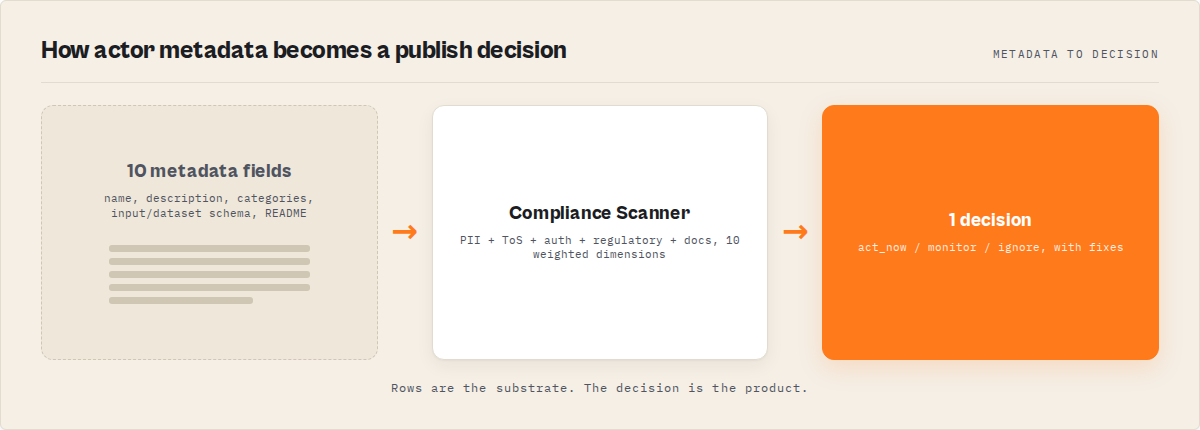
Actor Compliance Scanner answers one question: "Is my Apify actor safe to ship?" — and returns a deterministic decision you can act on immediately.
Actor Compliance Scanner is an Apify actor that reads another actor's metadata via the Apify API and scores it across a 10-dimension weighted rubric. It returns a top-level decision (act_now / monitor / ignore), a reviewPriority (p0–p3), and a remediation pack with concrete fixes. One scan costs $0.15 on the platform and typically completes in under 15 seconds. You can also run it from the ApifyForge dashboard if you prefer a UI.
To check whether your Apify actor is safe to ship, scan its metadata with Compliance Scanner and act on the returned decision enum — act_now means stop and review, monitor means document and track, ignore means ship it.
Key takeaways:
- The primary use is "I built this actor, is it ready to ship?" — secondary use is evaluating third-party actors before chaining them into an agent or production pipeline
- Metadata-only scan (no runtime execution, no scraped data, no third-party enrichment) means the verdict is deterministic and reproducible across runs
- The 10-dimension weighted rubric surfaces why an actor is risky (piiRisk 20, tosRisk 18, regulatorySurface 13, authRisk 11, metadataCompleteness 10, documentationQuality 8, categoryRisk 7, schemaCompleteness 5, agenticReadiness 5, storeDiscoverability 3)
- The remediation pack turns a pass/fail audit into a work queue — each fix carries a priority, minute estimate, expected impact dimensions, and a reason code
- Fleet mode scans every actor you own in one run for one $0.15 charge and writes per-actor reports to KV under
FLEET_REPORT
Problems this solves:
- How to check if an Apify actor is safe to publish before hitting the publish button
- How to detect GDPR and PII risk in your own scraping actors without running them
- How to block risky actor deploys in CI/CD on a single enum field
- How to evaluate a third-party Apify actor before chaining it into an agent workflow
- How to produce a review packet for a client's legal or procurement team without paying a lawyer
- How to monitor regression signals between scans when you edit an actor over time
In this article: The problem · Why manual review doesn't scale · What a pre-publish risk triage actually does · The 10 dimensions · Walk through a scan · Remediation pack · Fleet mode · CI/CD gate · Change detection · Alternatives · Limitations
Quick answer
One scan tells you if your Apify actor is safe to ship — and exactly what to fix if it isn't.
To test whether your Apify actor is safe to ship:
- Scan its metadata (name, description, categories, input schema, dataset schema, README)
- Read the
decisionfield:act_now→ do not publish; fix theremediation.quickWins[]items firstmonitor→ publish with documentation; trackregressionSignals[]on every re-scanignore→ safe to ship
- Re-scan after every description or schema edit — the scanner emits
improvementSignals[]confirming the fix landed
No runtime execution. No scraped data. No third-party enrichment. Metadata-only, deterministic, reproducible.
How to test an Apify actor before publishing
To test an Apify actor before publishing, run a metadata scan that evaluates risk signals (PII, ToS, authentication, regulatory exposure) and returns a decision indicating whether the actor is safe to release.
This replaces manual review with a deterministic pre-publish check that can be used in CI/CD or development workflows.
Compact examples
| Scenario | Input | Output | First remediation step |
|---|---|---|---|
| Pre-publish scan on a contact scraper | {targetActorId: "myuser/contact-scraper"} | decision: act_now, riskPosture: pii-heavy, 5 regulations | Add "Lawful basis" section to README (12 min, +6 docQuality) |
| Pre-publish scan on a Zillow scraper | {targetActorId: "myuser/zillow-prices"} | decision: ignore, riskPosture: balanced, confidenceLevel: high | No action — safe to publish |
| Secondary: third-party actor vetting | {targetActorId: "otheruser/x-scraper"} | decision: act_now, riskPosture: tos-heavy, HIGH_LITIGATION_PLATFORM | Require legal sign-off before chaining |
| Fleet scan of your whole account | {} | 47 records sorted by weightedOverallScore | Fix the 3 actors with decision: act_now first |
The "I just built this, do I need a lawyer?" problem
You finished the actor at 11pm. It runs clean against the input schema, the dataset looks right, the README has sections. Tomorrow you publish — or hand it to the client who paid for it.
Then the doubt shows up.
The description says "extracts contact information from company websites." Does that trigger GDPR? The actor pulls emails when they're on the page, so yeah, probably — but is that the kind of GDPR that requires a DPIA, or just a lawful basis note? You scrape one page of a site that's in the EU's top-1000. Does that count as "systematic monitoring"?
And the input schema asks for a LinkedIn URL. Just as an optional field. But the title says "scrape company contacts" — did you just map yourself onto hiQ Labs v. LinkedIn by implication? You don't know. You haven't read hiQ. Nobody has time to read hiQ.
The fears are real and specific. A 2023 paper from the Berkeley Technology Law Journal reviewing post-hiQ enforcement trends counted 41 meaningful CFAA, ToS, and privacy-based web-scraping actions in the prior 24 months. Most of those started as "polite letter to the developer" — DMCA-style takedowns, cease-and-desist emails, or marketplace removal requests — not lawsuits. But they all needed a response. And once you're responding, you've already lost the weekend.
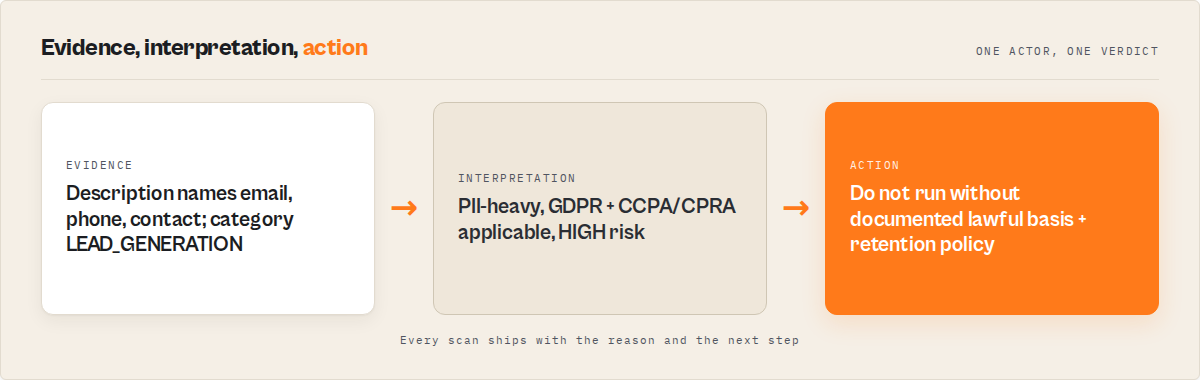
Category-based risk is the other half. An actor labelled LEAD_GENERATION on the Apify Store implicitly says "I produce contact data about humans." That label, alone, maps onto GDPR, CCPA/CPRA, CAN-SPAM, and ePrivacy. Apify's own Store acceptable-use guidance calls out personal-data handling as a specific review area for developers.
The question you actually have is not "am I compliant?" It's "do I even know which compliance questions apply to this specific actor I just built?" That's triage. Triage is not legal advice — it's the thing you do before legal advice, to decide whether you need it.
Why manual legal review does not scale for actor developers
A typical tech-and-privacy lawyer in the US bills $300–$500/hour. A review of a single actor takes 45–90 minutes if the lawyer already knows scraping law (most don't). That's $225–$750 per actor, every time the description changes.
I've watched developers solve this by skipping review entirely. They publish, hope, and respond to problems when they arrive. That approach works until the first takedown, and then it stops working because the pattern is now "respond, update, republish, get taken down again." The underlying actors never got the triage they needed.
The other approach is "pay a lawyer once and assume it generalises." This also fails. Compliance posture is per-actor — a generic-web-content scraper and a LinkedIn-adjacent scraper live in different regulatory universes even if the same developer built both in the same week.
What actually works is a three-layer model:
- Triage layer (this post) — scan metadata, return a decision, surface which actors need deeper review. Fast, cheap, deterministic.
- Review layer — lawyer or compliance officer reads the triage output and the actor's actual scope. Hours instead of days, because the triage narrowed the question.
- Gate layer — CI pipeline blocks promotion when triage says
act_now. Prevents regressions from slipping through.
The scanner owns layer 1. It does not replace layer 2 or layer 3 — it routes work to them efficiently.
What is pre-publish risk triage for Apify actors?
Pre-publish risk triage for Apify actors is a metadata-only scan that evaluates an actor before release and returns a deterministic decision (act_now, monitor, or ignore) indicating whether it is safe to publish.
It converts PII, Terms-of-Service, authentication, regulatory, and documentation signals into a single machine-readable verdict with evidence and concrete fixes.
In one line: Pre-publish risk triage tests your Apify actor's metadata and returns a decision telling you whether it is safe to ship.
Also known as: Apify actor compliance scan, pre-publish actor review, scraper risk triage, web scraping compliance audit, actor risk triage, GDPR scan for scrapers.
Pre-publish risk triage is different from a generic compliance audit. It reads the actor's metadata — the exact surface area that the Apify Store, buyers, and AI agents see — and scores it against a weighted rubric. There are three parts to the verdict: the decision enum (what to do), the riskPosture enum (why the actor is risky), and the remediation pack (how to fix it).
The scan runs against the Apify actor's API record. It never executes the actor, never touches scraped output, and never reads source code. That scope is deliberate — metadata is what gets a developer into compliance trouble, because metadata is what users and regulators read.
The core idea: metadata becomes a decision
This tool converts static actor metadata into a deterministic release decision.
Instead of reading descriptions, policies, and documentation manually, the scanner evaluates them and returns a single actionable outcome:
act_now→ stop and fixmonitor→ document and trackignore→ safe to ship
This turns a subjective compliance review into an automated, reproducible decision system. The same actor metadata produces the same verdict every time — pin meta.rubricVersion and decisionThresholdVersion in your automation to detect contract shifts across scanner releases.
What the scanner actually checks
Compliance Scanner evaluates an Apify actor across 10 weighted dimensions. The weights are versioned (rubricVersion is stamped on every scan) and the raw scoring logic is traced via scoreContributors[] so you can audit the audit.
| Dimension | Weight | What it measures |
|---|---|---|
piiRisk | 20 | PII keyword density across metadata (email, phone, SSN, profile, etc.) |
tosRisk | 18 | Platform Terms-of-Service exposure across 13 known platforms |
regulatorySurface | 13 | Count of applicable regulations (GDPR, CCPA/CPRA, CFAA, ePrivacy, CAN-SPAM, PIPEDA) |
authRisk | 11 | Authentication-wall signals (login, API key, bearer, cookie) |
metadataCompleteness | 10 | Coverage of basic fields (title, description, categories, SEO description) |
documentationQuality | 8 | Required README sections (Limitations, FAQ, Responsible use) |
categoryRisk | 7 | Risk level of declared Apify categories (LEAD_GENERATION = high) |
schemaCompleteness | 5 | Input + dataset schema presence and description coverage |
agenticReadiness | 5 | Typed contract, stable enums, changelog reference for MCP consumers |
storeDiscoverability | 3 | Title, description, category clarity for Store surfacing |
The weighted weightedOverallScore (0–100) collapses the dimensions into a single number, and thresholds map it to overallRisk: >=85 → CRITICAL, >=65 → HIGH, >=35 → MEDIUM, <35 → LOW.
Platform ToS exposure is not uniform. LinkedIn, Facebook, and Instagram are scored HIGH because of active litigation. Twitter/X, TikTok, Amazon, Google, YouTube, Indeed, and Glassdoor are MEDIUM. Zillow, Yelp, and Reddit are LOW. The scanner reads your actor's metadata for platform mentions and weights accordingly. This is not "all scraping is risky" — it's platform-specific, evidence-backed risk that mirrors how enforcement actually distributes across the real scraping 2023–2025 case landscape.
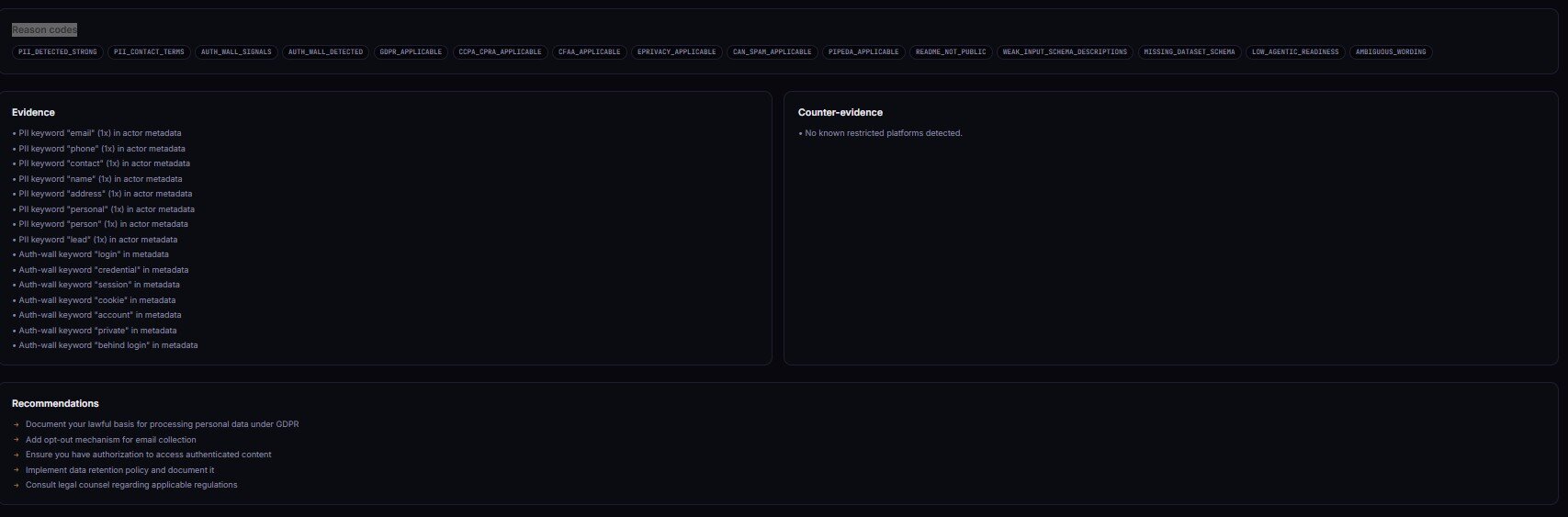
Every firing signal emits a stable entry in riskReasonCodes[] — PII_DETECTED_STRONG, HIGH_LITIGATION_PLATFORM, CATEGORY_HIGH_RISK, GDPR_APPLICABLE, CCPA_CPRA_APPLICABLE, MISSING_DATASET_SCHEMA, LOW_AGENTIC_READINESS, MISSING_WHAT_NOT_TO_DO_SECTION, MISSING_LIMITATIONS_SECTION, WEAK_INPUT_SCHEMA_DESCRIPTIONS, SPARSE_METADATA, and more. Automations branch on the enum; humans read the prose.
What does a real scan look like?
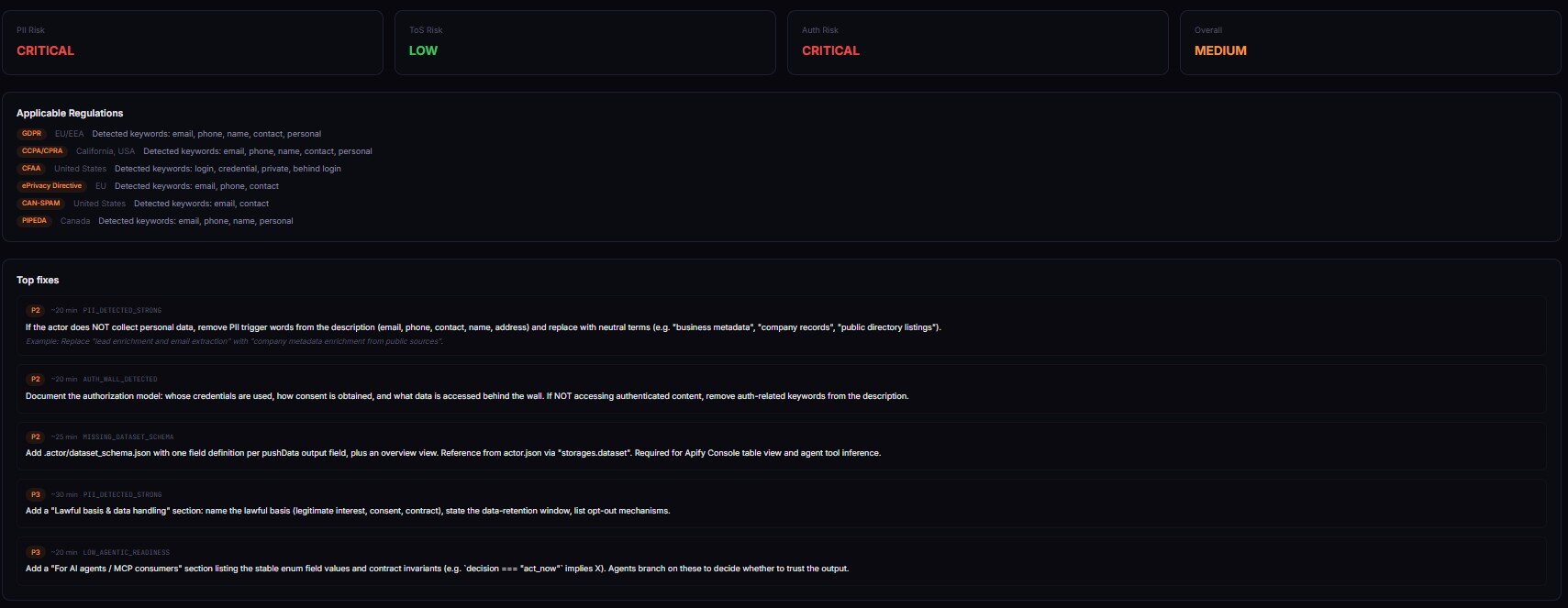
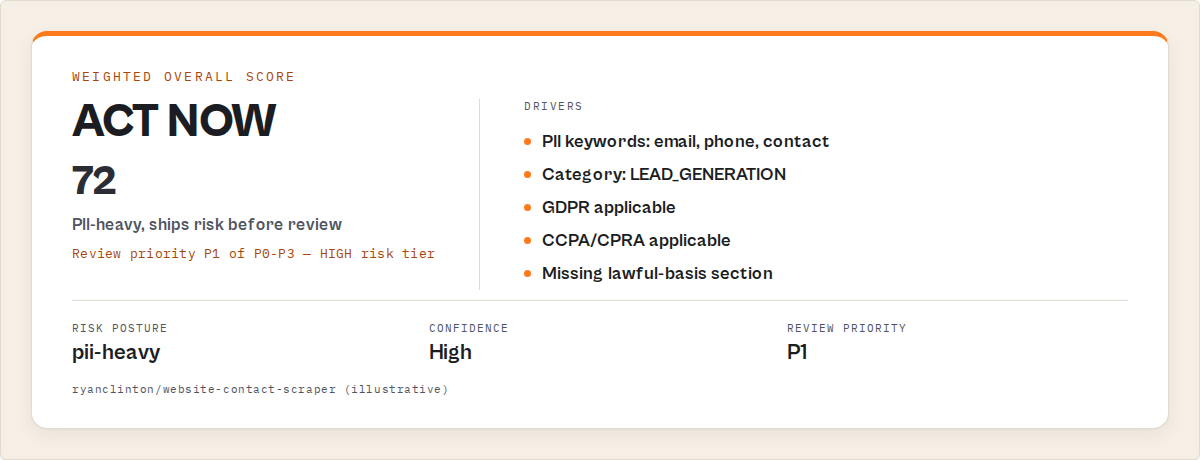
Imagine a developer just built a contact scraper. Title: "Company Contact Scraper." Categories: LEAD_GENERATION, BUSINESS. Input schema has a targetDomain field and an optional enrichLeads boolean. Description says "Extracts contact information including emails, phone numbers, and LinkedIn profiles from company websites." README has a Quickstart and an Examples section. No Limitations. No FAQ. No Responsible-use section.
They run Compliance Scanner on it. Here's what comes back, compressed:
{
  "scanVersion": "1.4.0",
  "rubricVersion": "2026.04",
  "targetActorId": "myuser/company-contact-scraper",
  "decision": "act_now",
  "reviewPriority": "p1",
  "riskPosture": "pii-heavy",
  "overallRisk": "HIGH",
  "weightedOverallScore": 71,
  "confidenceLevel": "high",
  "insight": "This actor targets contact data on company websites and triggers multiple PII-related regulations. Documentation gaps raise downstream buyer risk.",
  "recommendedAction": "Add lawful basis + responsible use sections. Remove 'LinkedIn profiles' from description unless the actor actually extracts them.",
  "riskReasonCodes": [
    "PII_DETECTED_STRONG",
    "CATEGORY_HIGH_RISK",
    "GDPR_APPLICABLE",
    "CCPA_CPRA_APPLICABLE",
    "MISSING_LIMITATIONS_SECTION",
    "WEAK_INPUT_SCHEMA_DESCRIPTIONS"
  ],
  "applicableRegulations": ["GDPR", "CCPA/CPRA", "CAN-SPAM", "ePrivacy", "PIPEDA"],
  "evidence": [
    {
      "type": "pii_keyword",
      "dimension": "piiRisk",
      "sourceField": "description",
      "matchedText": "emails, phone numbers, and LinkedIn profiles",
      "normalizedRule": "PII_KEYWORD_EMAIL_PHONE_PROFILE",
      "severity": "high",
      "reason": "Explicit PII enumeration in description"
    }
  ],
  "counterEvidence": [
    {
      "type": "public_scope",
      "dimension": "tosRisk",
      "sourceField": "description",
      "matchedText": "from company websites",
      "normalizedRule": "PUBLIC_SOURCE_INTENT",
      "severity": "medium",
      "reason": "Scope restricted to public company pages, reduces platform ToS risk"
    }
  ]
}
Three things jump out. First, the decision is act_now — don't publish yet. Second, the riskPosture is pii-heavy — PII drives the score, not ToS or auth. Third, the recommendedAction is specific and concrete, not "consult a lawyer." It says "remove LinkedIn profiles from the description unless the actor actually extracts them." That's a 30-second fix.
The counterEvidence[] block is the other half of the receipt. The scanner saw "from company websites" in the description and noted it as a mitigating signal — public-scope intent reduces ToS risk. Without counter-evidence, every scan would read like a legal threat. With it, you get balance.
After the developer fixes the description (drops "LinkedIn profiles" because they don't actually extract them) and adds a Limitations + Responsible-use section to the README, a re-scan drops decision to monitor and overallRisk to MEDIUM. That's the workflow: scan, read, fix, re-scan, ship. Results will vary depending on how much of your actor's risk comes from description wording vs. the underlying scope.
How the remediation pack turns "is it safe?" into "here's what to change"
The remediation object is the part of the output that actually earns the $0.15. Every finding that fires produces a concrete fix, grouped into four categories:
quickWins[]— fixes with priority 1, minuteEstimate ≤ 10, high expected impactmetadataFixes[]— title, description, categories, SEO description editsdocFixes[]— README section additions and rewritesschemaFixes[]— input schema descriptions, dataset schema presence, field-level types
Each fix entry carries priority, minutesEstimate, expectedImpactDimensions[], reasonCode, and an example of the fix text you'd paste in. Here's a real quickWins[0]:
{
  "priority": 1,
  "minutesEstimate": 12,
  "expectedImpactDimensions": ["documentationQuality", "regulatorySurface"],
  "reasonCode": "MISSING_LIMITATIONS_SECTION",
  "action": "Add a ## Limitations section to the README",
  "example": "## Limitations\\n\\nThis actor scrapes public company website contact information. It does not access authenticated content, social platforms, or private directories. Users are responsible for applying a lawful basis under GDPR / CCPA before any downstream outreach."
}
That's not "seek legal advice." That's paste-and-save. The remediation pack is what moves a developer from "is this safe?" (a question) to "here are the five things to change before I hit publish" (a task list with minute estimates).
This is the main premium differentiator over a generic keyword-matching scanner. Keyword matchers tell you that something is risky. The remediation pack tells you what to change, in priority order, with expected impact per fix. Applying the first three quickWins reliably drops decision from act_now to monitor in most pii-heavy scans I've run on my own portfolio.
How to audit every actor you own in one run
Leave targetActorId blank (or set fleetScan: true) and Compliance Scanner switches to fleet mode. One run, one $0.15 platform charge, every actor in your account scanned, consolidated report.
Fleet mode returns a single dataset item that summarises the fleet and writes per-actor reports to the KV store under FLEET_REPORT. The summary record carries:
fleetDecision— the highest-severity decision across the fleet (act_nowif any actor has it)criticalCount/highCount/mediumCount/lowCount— distribution across actorstopOffenders[]— sorted byweightedOverallScoredescending, truncated to top 10commonReasonCodes[]— reason codes that fire across multiple actors (signals you have a systemic issue)
That last field matters more than it looks. If MISSING_LIMITATIONS_SECTION fires on 23 of your 47 actors, the fix is not "add Limitations to each one" — it's "update your actor README template." One fix, 23 wins. The scanner surfaces these patterns so you can spend time on root cause, not symptom-level patching.
Fleet mode is also the cheapest way to do quarterly portfolio reviews. A scheduled monthly run with a webhook into Slack turns "I should audit my actors someday" into "I get a threshold alert when something regresses." Scheduling is a native Apify feature — no extra tooling.
How to block risky deploys in CI/CD
The decision field is designed to be the one-line gate in a CI pipeline. Fail the build when decision === "act_now", promote otherwise. One HTTP call, one JSON parse, one exit code:
# Scan before promoting to Store
curl -s -X POST "https://api.apify.com/v2/acts/YOUR_USER~actor-compliance-scanner/run-sync-get-dataset-items?token=$APIFY_TOKEN" \
  -H "Content-Type: application/json" \
  -d '{"targetActorId":"'"$ACTOR_ID"'"}' \
  | jq -e '.[0] | select(.decision != "act_now")' \
  || { echo "Compliance: act_now — review required"; exit 1; }
The run-sync-get-dataset-items endpoint is the key bit. It runs the actor synchronously and returns the dataset inline — no polling, no callbacks, one request. jq -e fails the pipeline if the decision is act_now, which translates directly to a non-zero exit code for your CI runner.
I wire this into the same GitHub Action that builds and pushes the actor. The gate runs before the apify push step. If compliance fails, the push never happens. This mirrors the pattern I covered in block deployment if scraper breaks on Apify — same idea, different signal.
For agent workflows, the pattern is the same but the consumer is different. An AI agent that chains actors together can call the scanner before executing an actor it has never used:
report = compliance_scan(actor_id)
if report["decision"] == "act_now":
    raise ComplianceHalt(report["recommendedAction"])
That's how an agent avoids accidentally promoting a third-party actor with unvetted PII exposure into its pipeline.
How change detection converts one-shot audits into monitoring
Every scan writes a SHA-256 fingerprint of the actor's metadata to KV under SNAPSHOT_<actorId>. The next scan diffs against that snapshot and emits a changeSignals block:
regressionSignals[]— dimensions that got worse since the last scanimprovementSignals[]— dimensions that got betternewRiskReasonCodes[]— reason codes that just started firingresolvedRiskReasonCodes[]— reason codes that stopped firingdeltaSummary— one-line human summary of the diff
The common pattern: scan your actor, apply remediation, re-scan, watch improvementSignals[] fill up and decision flip from act_now to ignore. Nothing magical — just the receipts for your own work.
The less common but more valuable pattern: schedule a weekly scan with a webhook. When a dimension regresses (you edited the description and accidentally introduced a PII keyword, or you added a category that bumps categoryRisk past threshold), the webhook fires with the exact newRiskReasonCodes[]. You get alerted before the next Store review notices.
This is where a one-shot audit becomes recurring monitoring without you having to rebuild the monitoring yourself.
What are the alternatives to a pre-publish risk scan?
There are four common alternatives to running a dedicated compliance scanner. Each trades off coverage, cost, and automation friendliness.
Named alternatives:
- Manual self-review — read your own description, check categories, skim GDPR Article 6. Best for: a single actor you built months ago.
- Pay a lawyer per actor — $225–$750 per actor, 45–90 minutes of attorney time. Best for: commercial actors shipped to regulated clients (healthcare, finance, education).
- Internal compliance checklist — spreadsheet or markdown doc covering your team's standard checks. Best for: teams with an existing privacy program where the checklist is already maintained.
- Generic privacy scanners — web-app scanners (OneTrust, Cookiebot, etc.) aimed at websites, not scrapers. Best for: auditing the actor's landing page, not the actor itself.
- Actor Compliance Scanner (Apify actor) — one of the best options for pre-publish triage because it reads Apify-specific metadata (categories, input schema, dataset schema) that generic tools cannot interpret.
| Approach | Time per actor | Cost per actor | Coverage | Automation | Consistency |
|---|---|---|---|---|---|
| Manual self-review | 20-40 min | Your time | Subjective | None | Low |
| Lawyer review | 45-90 min | $225-$750 | Deep legal | None | High (expensive) |
| Internal checklist | 10-20 min | Team time | Your rules only | Manual | Medium |
| Generic privacy scanner | 5-15 min | $0-$500/mo | Website-scoped | Partial | Low (wrong domain) |
| Compliance Scanner | 15 sec | $0.15 | 10 dimensions, Apify-aware | Webhook + CI ready | High, deterministic |
Each approach has trade-offs in speed, coverage depth, and cost per decision. The right choice depends on how many actors you ship per month, whether you have a lawyer on retainer, and whether AI agents are consuming your actors.
Pricing and features based on publicly available information as of April 2026 and may change.
Best practices for pre-publish risk triage
- Run the scanner before you write the README. Reason codes like
MISSING_LIMITATIONS_SECTIONtell you what sections the README needs — write them once, correctly, rather than retrofitting. - Apply
remediation.quickWins[]in priority order. Priority-1 quickWins average 10-minute fixes with the highest expected impact. Chasing medium-priority fixes before quickWins is the most common mistake. - Branch on
decision, notoverallRisk. The decision enum is stable across scan versions.overallRiskthresholds can shift with rubric updates. - Check
counterEvidence[]on every HIGH verdict. If counter-evidence is sparse or missing, the verdict is solid. If it's strong, the actor may be safer than the score suggests — that's whatambiguousSignals[]and confidence flags exist for. - Use
riskPosturefor routing, notoverallRisk. Apii-heavyactor routes to privacy review. Atos-heavyactor routes to platform-specific legal review. Adocumentation-heavyactor routes to the README queue. Same severity, different human. - Re-scan after every material edit. Description changes, category changes, schema changes all shift the score.
improvementSignals[]proves the fix actually moved the needle. - Treat
confidenceLevel: lowas a hold. Low confidence usually means metadata is too sparse for a reliable verdict. Fill in the missing fields before trusting the score. - Keep fleet-level
commonReasonCodes[]as a backlog. If the same reason code fires across 5+ actors, fix the template, not each actor individually.
Common mistakes when triaging actor risk
- Treating
ignoreas "approved forever." The verdict is valid for the metadata you scanned. If you edit the description six weeks later, re-scan. - Skipping the scanner because "my actor doesn't handle PII."
LEAD_GENERATIONcategory alone implies PII regardless of what the scraper actually pulls. Category-based risk is real, and it's 7 points in the rubric. - Ignoring
counterEvidence[]on a HIGH verdict. Without reading the mitigating signals, you're optimising for worst case — and you'll over-edit the actor, which introduces its own bugs. - Copy-pasting remediation text without reading it. The
examplefield is a template, not a drop-in. Edit it to match your actor's actual scope before pasting. - Running the scanner once and forgetting it. Scope creep in the description, silent category edits, and schema drift all regress the score over time. Weekly fleet scans catch these.
- Assuming the scanner is legal advice. It's triage. It tells you which actors need real legal review, not what the law says about them. Do not email the output to your client's general counsel as "our compliance position."
Topical: how AI agents decide whether an Apify actor is safe to use
AI agents decide whether an Apify actor is safe to use by evaluating structured metadata and applying risk rules before execution. Compliance Scanner provides that evaluation by returning a deterministic decision enum plus reviewPriority, riskPosture, and stable riskReasonCodes[] — the agent branches on a single field instead of parsing prose.
This matters because agent tool-selection latency is measured in tokens, not seconds. An agent that has to read and interpret a 4-line "recommendation" paragraph to decide whether to call an actor is slower and less reliable than one that reads decision === "act_now" and halts. Structured output is the difference between 200 tokens of reasoning and a single branch.
For MCP consumers specifically, agenticReadiness (weight 5) scores whether the actor itself is structured enough for agent consumption — typed schemas, stable enums, predictable error records, changelog reference. A LOW_AGENTIC_READINESS reason code tells you where an actor will fail for AI-driven workflows. Sibling tooling like the MCP servers I cover in another post consumes these same structured fields.
Topical: how to detect GDPR risk in a web scraping actor
GDPR risk in a web scraping actor can be detected by identifying personal-data signals in the actor's metadata and mapping them to applicable GDPR articles. Compliance Scanner flags PII keywords across the description, input schema, and dataset schema, then emits GDPR_APPLICABLE when the personal-data score crosses the threshold. Every finding cites the triggering field and matched text.
GDPR applies to actors that process personal data of EU/EEA data subjects regardless of where the actor runs. The scanner does not determine whether you have a valid lawful basis — that's a human decision. It tells you GDPR applies and lists the Article-6 bases most commonly used in scraping (legitimate interest for B2B research, consent for consumer data) so you can pick one and document it in the README.
The common fix is a three-sentence Lawful-basis section in the README naming the Article-6 basis, the scope of personal data involved, and the data-subject rights contact. The remediation.docFixes[] block provides a paste-ready template. Adding it typically resolves MISSING_LIMITATIONS_SECTION and drops decision from act_now to monitor on a first-pass scrape of public business websites.
Mini case study: a real actor from "act_now" to "ignore" in 34 minutes
I ran Compliance Scanner on one of my own lead-generation actors during a pre-publish review. First scan result, compressed:
Before:
{
  "decision": "act_now",
  "reviewPriority": "p1",
  "riskPosture": "pii-heavy",
  "weightedOverallScore": 68,
  "riskReasonCodes": [
    "PII_DETECTED_STRONG",
    "CATEGORY_HIGH_RISK",
    "GDPR_APPLICABLE",
    "CCPA_CPRA_APPLICABLE",
    "MISSING_LIMITATIONS_SECTION",
    "WEAK_INPUT_SCHEMA_DESCRIPTIONS"
  ]
}
I applied the top three remediation.quickWins[] in order. Added a Limitations section (12 min). Rewrote the description to drop three over-claimed output fields (6 min). Added field-level descriptions to the input schema (16 min). Total: 34 minutes. Re-ran Compliance Scanner.
After:
{
  "decision": "ignore",
  "reviewPriority": "p3",
  "riskPosture": "balanced",
  "weightedOverallScore": 29,
  "changeSignals": {
    "improvementSignals": ["documentationQuality", "metadataCompleteness", "schemaCompleteness"],
    "resolvedRiskReasonCodes": [
      "MISSING_LIMITATIONS_SECTION",
      "WEAK_INPUT_SCHEMA_DESCRIPTIONS"
    ]
  }
}
decision flipped to ignore. weightedOverallScore dropped 39 points. Two reason codes resolved. The actor went from "review before publishing" to "safe to ship" in about the time it takes to watch a sitcom episode. These numbers reflect one actor in my own portfolio. Results will vary depending on which dimensions are weakest on your actor and how much of the risk is fixable via README changes vs. scope changes.

Implementation checklist
- Build your Apify actor and stage it publicly or privately in your account.
- Open Actor Compliance Scanner on Apify or the ApifyForge dashboard tool.
- Enter your actor's ID (
username/actor-name) astargetActorId. Leave blank to run fleet mode across all your actors. - Run the scan. Token auto-injects on Apify; on the dashboard, connect your token via the settings link.
- Read the top-level
decisionfirst. Ifignore, you're done — ship it. - If
act_nowormonitor, readremediation.quickWins[]and apply the top 3 in order. - Re-run the scanner. Confirm
changeSignals.improvementSignals[]lists the dimensions you fixed. - Schedule a weekly fleet scan with
alertWebhookUrlpointing at Slack or Discord. - Route webhook payloads by
riskPosture—pii-heavyto privacy review,tos-heavyto legal,documentation-heavyto the README queue. - Wire the
decision === "act_now"check into CI/CD beforeapify push.
Limitations
Compliance Scanner has deliberate scope boundaries. It is one layer in a three-layer compliance model — triage, not review, not legal advice.
- It does not run the target actor or touch scraped data. For runtime output validation see actor reliability and schema validation tooling.
- It does not read the actor's source code. Only metadata exposed via the Apify API — name, title, description, categories, input schema, dataset schema, README.
- It does not provide legal advice. It identifies potential exposure based on metadata patterns. A lawyer reviews the specific legal question the triage surfaces.
- It does not guarantee coverage of every regulation. GDPR, CCPA/CPRA, CFAA, ePrivacy, CAN-SPAM, and PIPEDA are the mapped jurisdictions. Specialised regimes (HIPAA, COPPA, sector-specific financial regulation) are not explicitly modelled.
- It does not execute test suites, compare actors, or audit Store SEO. Those belong to sibling actors — see the scope-fence section of the Store listing for specific pointers.
Key facts about pre-publish risk triage
- Compliance Scanner evaluates 10 weighted dimensions with a versioned rubric (
rubricVersionstamped on every scan). - The top-level
decisionenum (act_now/monitor/ignore) is the stable field to branch automations on — notoverallRiskorweightedOverallScore. - Fleet mode scans every actor in your account in one run for one $0.15 platform charge.
changeSignalscompares the current scan against a SHA-256 snapshot in KV and emits regression and improvement signals.- The remediation pack provides paste-ready fix examples with minute estimates and priority ordering.
- Metadata-only scanning means the scan is deterministic and reproducible — the same metadata produces the same score across runs.
- Six regulations are mapped: GDPR (EU/EEA), CCPA/CPRA (California), CFAA (US auth-wall), ePrivacy (EU), CAN-SPAM (US), PIPEDA (Canada).
- Thirteen platforms are classified by ToS risk: HIGH (LinkedIn, Facebook, Instagram), MEDIUM (seven named), LOW (three named).
Short glossary
decision— the stable top-level enum (act_now/monitor/ignore) used for CI gates and agent tool-selection.riskPosture— which dimension dominates the score (pii-heavy,tos-heavy,auth-heavy,documentation-heavy,balanced).riskReasonCodes[]— stable enum values that fire when a specific risk signal is detected; the automation surface.remediation— the fix pack withquickWins[],metadataFixes[],docFixes[],schemaFixes[].changeSignals— the diff block between the current scan and the previous SHA-256 snapshot.- Fleet mode — leaving
targetActorIdblank scans every actor in your Apify account in one run.
Broader applicability
These patterns apply beyond Apify actors to any programmable artifact that gets published and consumed by third parties. The universal principles:
- Pre-publish triage beats post-publish review. The cheapest fix is the one you apply before users see it.
- Structured verdicts beat prose. A single enum field lets CI, webhooks, and agents branch deterministically — prose paragraphs do not.
- Evidence + counter-evidence prevents over-correction. One-sided audits produce over-edited artifacts. Both-sided receipts produce balanced fixes.
- Remediation-first audits convert questions to tasks. "Is this safe?" is unanswerable; "add this section, fix that field" is actionable.
- Change detection turns audits into monitoring. Running an audit once is governance theatre. Running it every week with regression alerts is actual monitoring.
The same architecture works for package vulnerabilities, API contract audits, dataset quality reviews, and any other artifact that ships to strangers.
When you need a pre-publish risk scan
Run it when:
- You are about to publish a new actor to the Apify Store
- You are delivering an actor to a commercial client
- Your actor's categories include
LEAD_GENERATION,SOCIAL_MEDIA, or any person-data category - The description mentions contact data, profile data, or named platforms
- You are chaining a third-party actor into an agent or production pipeline
- You materially edited the description, categories, or schemas of an already-published actor
When you don't need a pre-publish risk scan
You likely don't need pre-publish risk triage if your actor:
- Does not scrape external data — pure utility actors (calculators, formatters, schema validators, transformers) have no regulatory surface to score
- Does not reference platforms, user data, contact information, or authenticated content anywhere in its metadata
- Operates only on user-provided inputs that never touch external systems
- Reads strictly public-domain sources with no PII and no platform ToS (open government APIs, public-domain datasets, Creative Commons content)
- Is already gated by a dedicated in-house compliance team that runs equivalent pre-publish triage with a documented decision model
If none of the above apply to your actor — if it scrapes the web, collects contact data, targets named platforms, or serves client workflows — pre-publish risk triage is the fastest way to check if it's safe to ship before you ship it.
Frequently asked questions
Does Compliance Scanner replace a lawyer?
No. It is a triage layer, not a review layer. It identifies which actors need real legal review and surfaces the specific fields, sections, or scope claims that drive the risk score. A tech-and-privacy lawyer reading the scanner's output can prioritise 45 minutes on the actor with act_now and skip the ten actors with ignore — that's the productivity lift. The scanner does not interpret the law; it tells you when the law is implicated.
How is this different from just reading the GDPR myself?
You can read the GDPR. You can also read CCPA, CPRA, ePrivacy, CAN-SPAM, PIPEDA, and the ten most-cited CFAA cases. That reading takes a week. Compliance Scanner does the mapping in 15 seconds per actor — it reads your metadata, matches signals to regulations, and emits a verdict plus receipts. You still need to read the regulations once to understand what the verdicts mean. After that, the scanner handles the per-actor work.
What does "pre-publish" mean if the actor is already published?
The same scan works post-publish — it's just called "monitoring" at that point. Run Compliance Scanner on your live actors to detect regressions from description edits, category changes, or schema additions. Fleet mode plus a scheduled run gives you continuous compliance monitoring for $0.15 per actor per scan.
Can I use it on a third-party actor?
Secondary use: evaluate a third-party actor before chaining it — using the same pre-publish risk decision model. Pass any public targetActorId and the scan runs against that actor's metadata via the Apify API. The verdict shape is identical to a self-scan — same decision / riskPosture / remediation.* / evidence[] contract. The primary use remains "I built this actor, is it ready to ship?" — third-party evaluation is the same tool pointed in the opposite direction.
Does the scanner see my source code or my runs?
No. The scanner reads only the actor's metadata — name, title, description, categories, input schema, dataset schema, README — via the public Apify API. It never executes the target actor, touches scraped data, or reads source code. Metadata-only scope is deliberate: it makes the scan deterministic, reproducible, and cheap enough to run on every push.
How much does a scan cost?
$0.15 per scan on the Apify platform, PPE pricing, compute included. Fleet mode is one $0.15 charge regardless of how many actors are in the account. The ApifyForge dashboard tool wraps the same actor with a UI — the underlying charge is the same.
What happens when Apify changes its Store rules or a new regulation lands?
The rubric is versioned (rubricVersion) and the reason codes are versioned (reasonCodeVersion). When a new regulation is added or a platform's ToS risk changes, I update the rubric and every subsequent scan uses the new version. Previous scan outputs keep their original version stamps, so you can tell which scan was done under which rules. Change logs live in the actor's CHANGELOG.md.
Ryan Clinton publishes Apify actors as ryanclinton and builds developer tools at ApifyForge. Actor Compliance Scanner is one of the scope-fenced developer tools in the ApifyForge portfolio alongside Quality Monitor, Test Runner, Output Guard, and Fleet Analytics.
Last updated: April 2026
This guide focuses on Apify actors, but the same pre-publish triage patterns apply broadly to any programmable artifact — npm packages, CLI tools, API endpoints, AI-agent tool definitions — that gets published to third-party consumers and carries regulatory or reputational risk.