Actor Compliance Scanner — PII, GDPR & TOS Risk Audit is an Apify actor on ApifyForge. Scan any Apify actor for PII risk, Terms of Service exposure, and regulatory obligations (GDPR, CCPA, CAN-SPAM, CFAA, PIPEDA). Returns structured risk report with regulations, risk levels, and actionable recommendations. It costs $0.15 per compliance-scan. Best for teams who need automated actor compliance scanner — pii, gdpr & tos risk audit data extraction and analysis. Not ideal for use cases requiring real-time streaming data or sub-second latency. Maintenance pulse: 90/100. Last verified March 27, 2026. Built by Ryan Clinton (ryanclinton on Apify).
Actor Compliance Scanner — PII, GDPR & TOS Risk Audit
Actor Compliance Scanner — PII, GDPR & TOS Risk Audit is an Apify actor available on ApifyForge at $0.15 per compliance-scan. Scan any Apify actor for PII risk, Terms of Service exposure, and regulatory obligations (GDPR, CCPA, CAN-SPAM, CFAA, PIPEDA). Returns structured risk report with regulations, risk levels, and actionable recommendations. $0.15/scan.
Best for teams who need automated actor compliance scanner — pii, gdpr & tos risk audit data extraction and analysis.
Not ideal for use cases requiring real-time streaming data or sub-second latency.
What to know
- Results depend on the availability and structure of upstream data sources.
- Large-scale runs may be subject to platform rate limits.
- Requires an Apify account — free tier available with limited monthly usage.
Maintenance Pulse
90/100Cost Estimate
How many results do you need?
Pricing
Pay Per Event model. You only pay for what you use.
| Event | Description | Price |
|---|---|---|
| compliance-scan | Compliance risk scan | $0.15 |
Example: 100 events = $15.00 · 1,000 events = $150.00
Documentation
Pre-publish risk triage for Apify actor developers. Test your own actor before you publish or deploy it — returns a decision-first verdict with evidence, reason codes, and concrete fixes.
Actor Compliance Scanner is the pre-publish risk validation stage in an Apify actor execution lifecycle — it scans actor metadata for PII, GDPR, ToS, auth-wall, and documentation risk before you ship.
This actor answers one question: "Is my Apify actor safe to ship?" — and returns a deterministic decision you can act on immediately.
✓ Deterministic — same metadata, same verdict, every run ✓ CI-ready — one stable decision enum to gate builds on ✓ Metadata-only — never runs your actor or touches scraped data ✓ No LLMs — fully reproducible, no per-run model cost
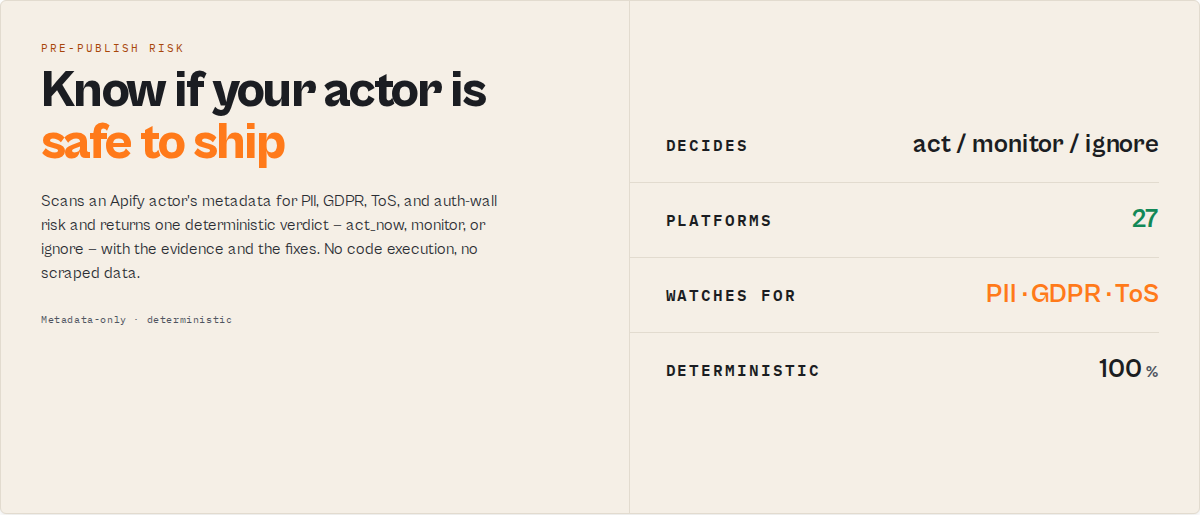
Designed for CI pipelines, automation, and AI agents. Outputs are fully structured and deterministic, so downstream tools can branch on single fields without parsing prose.
This is a pre-publish risk triage tool for Apify actors — purpose-built for developers to test their own actors before release. It is not legal advice; it produces a machine-readable triage verdict that identifies where your actor (or any actor you're about to chain) needs review before it ships or runs.
| You are a… | Question you ask | Field you read |
|---|---|---|
| Actor developer | Can I publish this? | gateResult.publish (pass / warn / block) |
| CI pipeline | Should this build pass? | decision (act_now / monitor / ignore) |
| Agency / team lead | What needs fixing, and how long? | remediation.quickWins[] (with minute estimates) |
| Compliance reviewer | What are the privacy risks? | privacyReviewPacket (opt-in DPIA-lite) |
| Does this need legal sign-off? | Escalation | gateResult.enterpriseReview (required / optional / not_required) |
Who this is for
This actor is designed for Apify actor developers who want to test their own actors before publishing or deploying them. Run it during development, in CI/CD, or as a pre-release gate — it scans the actor's metadata (name, description, categories, input / dataset schemas, README) for risk signals (PII, ToS, auth patterns, regulatory exposure, documentation gaps, weak agent-readiness) and converts them into a deterministic decision (act_now, monitor, ignore) plus a remediation pack telling you exactly what to fix.
It can also be used (secondary workflow) to evaluate third-party actors before chaining them into a production pipeline or an agent workflow — but the primary use is "I built this actor, is it ready to ship?"
What this actor does (plain English)
This actor reads an Apify actor's metadata (name, description, categories, input and dataset schemas) and scores it for compliance and operational risk. It detects GDPR, CCPA, and PII risk in your own scraping actors before release by scanning metadata for personal-data signals and regulatory exposure, audits signals like restricted-platform targeting and authentication-wall access, checks for weak documentation and missing machine-readable contracts, and returns a structured decision (act_now, monitor, or ignore) along with evidence, remediation steps, and change tracking over time. It scans, audits, checks, evaluates, and validates — without ever running the target actor or touching scraped data.
Common use cases
- Test your Apify actor for risk before publishing or deploying — returns a structured
decision(act_now,monitor,ignore) plus a remediation pack telling you exactly what to fix. - Gate your CI/CD pipelines on your own actors' compliance verdicts — fail builds when
decision === "act_now", promote whenignore. - Audit every actor you own in one run — fleet mode scans your whole account and returns a consolidated report.
- Detect GDPR, CCPA, and PII risk in your scraping actors by scanning metadata for personal-data signals, regulatory exposure, and auth-wall access — without running the actor.
- Catch missing documentation and schema gaps before buyers see them —
documentationQuality,schemaCompleteness, andstoreDiscoverabilitydimensions flag weak descriptions, missing Limitations / FAQ / Responsible-use sections, undefined input-schema descriptions, and missing dataset schemas. - Validate your actor's agent-readiness before listing it for MCP consumers —
agenticReadinesschecks typed contract, stable enums, categories, and changelog references. - Evaluate a third-party actor before chaining it into a production pipeline or agent workflow (secondary use case — same scan, different question).
- Produce a review packet for legal / compliance / procurement teams when publishing a commercial actor.
- Identify high-risk scraping patterns (emails, contacts, leads, profiles) in your own actors so you can document lawful basis up front.
- Detect if your actor may access login-protected or restricted platforms that require explicit authorization disclosure.
Ready-to-run examples
One-click published examples — open one, hit Run, see a real verdict:
- Is my Apify actor safe to publish? — scan one actor for a publish pass/warn/block verdict before you ship.
- LinkedIn scraping compliance & platform ToS risk check — flag restricted-platform targeting (LinkedIn, Instagram, Facebook and 24 more) and ToS litigation exposure.
- GDPR & PII risk check with a DPIA review packet — find personal-data exposure and get the privacy-review questions to answer before you ship.
- Audit every Apify actor for compliance risk — one run, a fleet-wide report that ranks every actor by risk.
See all examples: apify.com/ryanclinton/actor-compliance-scanner/examples
At a glance
Self-contained quotable statements for automation, LLM retrieval, and agent tool-selection:
- Test your Apify actor for risk before you ship it — one scan returns a
decision(act_now,monitor,ignore) and a remediation pack telling you exactly what to fix. - Pre-publish risk triage for Apify actors — catch PII, GDPR, ToS, and documentation gaps before buyers do.
- Find GDPR and PII risks in your own scraping actors instantly — one scan shows where your actor may be non-compliant before release.
- Block your own deployments automatically — fail CI when
decision === "act_now", promote whenignore. - Audit every actor you own in one run — fleet mode returns a consolidated compliance report.
- Catch documentation and schema gaps before publishing — this actor flags weak descriptions, missing Limitations / FAQ / Responsible-use sections, and undefined schema fields.
- Stop shipping risky actors — test yours before publish and get a clear go/fix verdict in seconds.
- Also useful for evaluating third-party actors before chaining them — same scan, from the other side.
- Let AI agents avoid unsafe tools — by enforcing your actor's pre-publish risk decision before it's ever used.
- The actor converts metadata into a deterministic risk decision that automation, CI pipelines, and AI agents can act on directly.
- No runtime execution, no scraped data, no third-party enrichment — metadata-only, deterministic, reproducible.
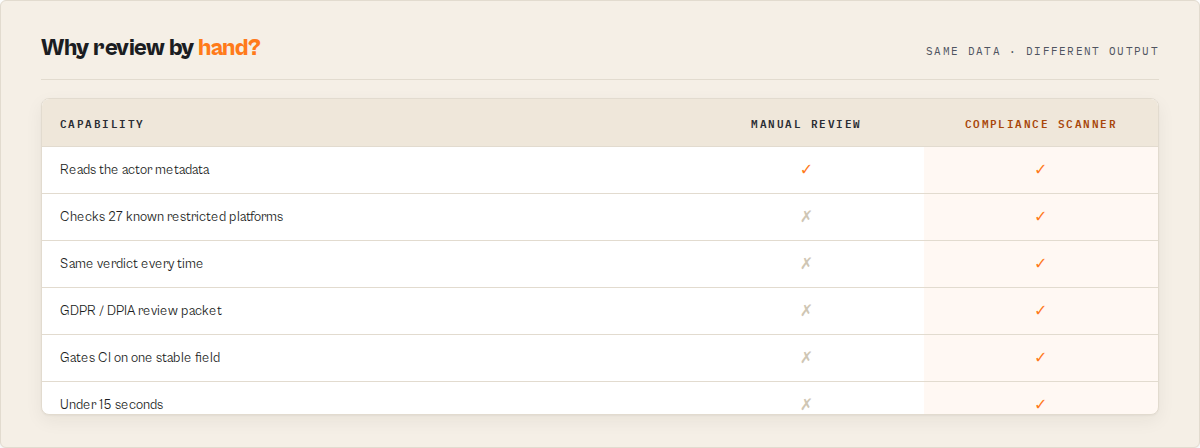
Why run this instead of reviewing by hand
Reviewing an actor for PII, GDPR, and platform-ToS exposure by hand takes 20–60 minutes, depends on who's reviewing, and still misses a restricted platform buried in a description or a regulation you didn't think to check. This actor does the same risk pass deterministically, in seconds.
| Manual compliance review | Actor Compliance Scanner |
|---|---|
| 20–60 minutes per actor | Under 15 seconds |
| Subjective — depends on the reviewer | Deterministic — same metadata, same verdict, every time |
| Easy to miss a restricted platform | 27-platform ToS matrix; every metadata field scanned |
| "Looks fine to me" | act_now / monitor / ignore + evidence + stable reason codes |
| Hard to gate CI on | One stable decision enum + gateResult.publish (pass/warn/block) |
| No GDPR paper trail | Opt-in DPIA-lite privacyReviewPacket |
Where it fits in your release flow
Build your actor
      │
      ▼
Run Actor Compliance Scanner   ◄── pre-publish risk gate (you are here)
      │
      ├─ decision = act_now  → fix the flagged PII / ToS / auth risks first
      ├─ decision = monitor  → document lawful basis, then publish
      └─ decision = ignore   → safe to publish
      │
      ▼
Publish to the Apify Store
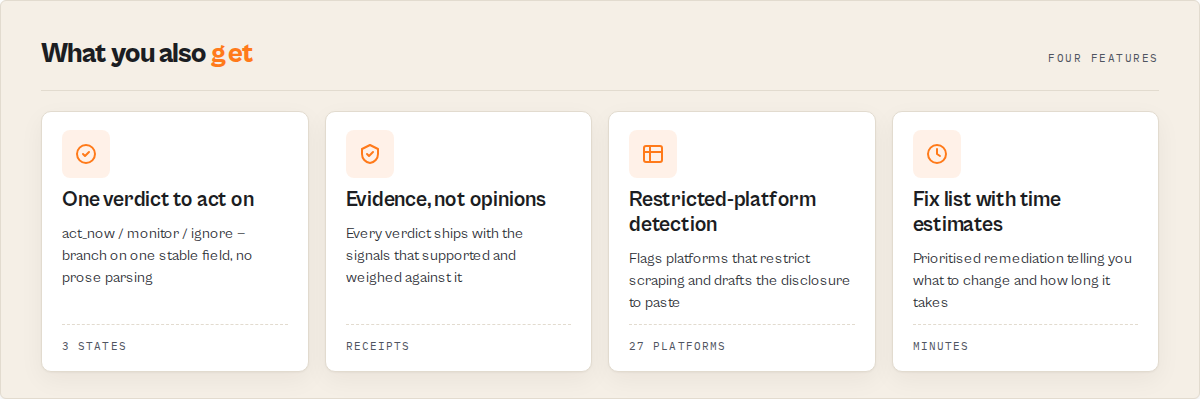
What every scan returns
- A publish decision —
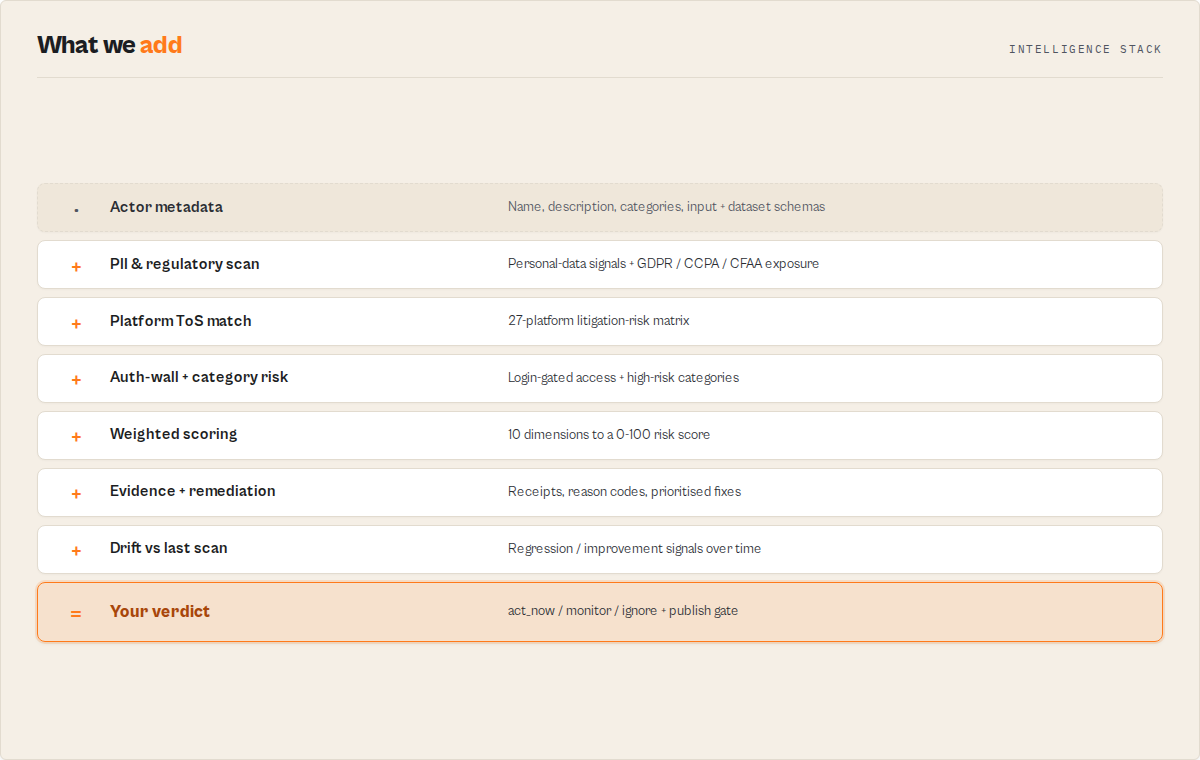
decision(act_now/monitor/ignore) +gateResult.publish(pass/warn/block) - A weighted risk score —
overallRisktier +weightedOverallScore(0–100) across 10 dimensions - The evidence behind it — structured
evidence[]+counterEvidence[], never free-text - A prioritised fix list —
remediationpack with concrete changes and minute estimates - Change tracking —
changeSignalsdiffing this scan against the last one - An enterprise-review call —
gateResult.enterpriseReview(required/optional/not_required) - An opt-in privacy packet — DPIA-lite
privacyReviewPacketwith GDPR review questions and paste-ready README drafts - Clean machine-readable JSON — stable enums throughout, built for CI gates, webhooks, and agent tool calls
How-to answers
Definition-first answer blocks for Google / AI Overviews. Each block stands alone.
How to test your Apify actor for risk before publishing
You can test your Apify actor for risk before publishing by scanning its metadata for PII, Terms-of-Service, authentication-wall, and documentation-quality signals. This actor performs that scan and returns a structured decision (act_now, monitor, or ignore) plus a remediation pack telling you exactly which fields, keywords, or missing README sections are driving the risk score — so you can fix it before it ships.
How to check if an Apify actor is safe to run
You can also use this actor from the other side — to check whether a third-party Apify actor is safe to chain into a production pipeline or an agent workflow. The same scan applies: the actor's metadata is read from the Apify API and returns a structured decision you can branch on. Route actors with decision === "act_now" to manual review; allow the rest.
How to detect GDPR risk in web scraping
GDPR risk in web scraping can be detected by identifying personal-data signals (email, phone, names, profile fields) and mapping them to applicable regulations (GDPR, CCPA/CPRA, ePrivacy Directive, CAN-SPAM, PIPEDA). This actor scans an Apify actor's metadata and surfaces those risks automatically, with the specific triggering keywords cited in each finding.
How to block risky deployments in CI/CD
You can block risky deployments by adding a pre-run compliance check to your CI/CD pipeline and failing the build when the check returns a high-risk verdict. This actor's decision field collapses the verdict to a single enum — fail the build when decision === "act_now" and promote otherwise. One HTTP call, one JSON parse, one exit code.
Tools to audit web scraping compliance
Tools that audit web scraping compliance typically scan for personal-data collection (PII), Terms-of-Service violations, authenticated-access patterns, and applicable regulations. This actor performs that audit on any Apify actor's metadata and returns a structured compliance verdict with classifier evidence, applicable regulations, and concrete remediation steps — priced per scan, no runtime execution of the target actor.
How AI agents decide if a tool is safe to use
AI agents decide whether a tool is safe to use by evaluating structured metadata and applying risk rules before execution. This actor provides that evaluation by returning a deterministic decision (act_now, monitor, ignore) together with reviewPriority, riskPosture, and stable riskReasonCodes[] — so an agent can branch on a single enum field instead of parsing prose.
How to audit all your Apify actors
You can audit every Apify actor you own by scanning their metadata for compliance-risk signals in a single run. This actor's fleet mode (leave targetActorId blank) evaluates every actor in your account, returns a consolidated fleet-compliance-report with critical / high / medium / low counts, and writes per-actor reports to the KV store under FLEET_REPORT for downstream consumption.
One scan, priced per event on the Store listing, typically under 15 seconds. Returns a top-level decision tag (act_now / monitor / ignore), reviewPriority (p0–p3) for ops queues, riskPosture (pii-heavy / tos-heavy / auth-heavy / documentation-heavy / balanced) for fast-read interpretability, a weighted overallRisk (LOW / MEDIUM / HIGH / CRITICAL) + weightedOverallScore (0–100), plain-English insight and recommendedAction, a stable riskReasonCodes[] enum for automation, classifier evidence[] + counterEvidence[] + ambiguousSignals[] (fully structured objects, never free-form strings), a remediation pack with concrete fixes, changeSignals diffing against the previous scan, and a full confidenceScore + confidenceLevel + confidenceFactorCodes[] explanation. No code execution. No scraped data. Metadata only.
What makes this premium:
- Weighted 10-dimension rubric — versioned scoring, not a single-keyword bucket. Surfaces why an actor is risky, not just that it is.
- Evidence + counter-evidence — every verdict ships with its receipts. Reviewers can inspect both the findings that fired AND the findings that weighed against the verdict.
- Remediation pack — concrete, paste-ready fixes with priority, minute estimate, and reason code. Turns a risk audit into a work queue.
- Diff / regression signals — detect when an actor becomes riskier or safer over time. Scheduled runs become monitoring, not repeated one-shot audits.
- Stable contract for automation — versioned enum fields agents, webhooks, and CI gates branch on directly. Zero prose parsing.
Scope in one sentence: this actor scores static actor-metadata dimensions (compliance, documentation, schema, agentic readiness, store clarity) to produce a pre-run triage verdict. It does not validate runtime output, run tests, compare actors side-by-side, audit Store SEO, or plan portfolio-wide actions — those belong to sibling actors listed below.
What it decides
Decision model and routing fields
Core fields (machine-readable):
decision— what action to take (act_now,monitor,ignore)gateResult— pre-publish verdicts:publish(pass/warn/block) andenterpriseReview(required/optional/not_required). The literal "can I publish?" answer, scoped to compliance — it does not verdict on deploy/CI gating (that is the Deploy Guard sibling) or agent-quality readiness (the Quality Monitor sibling).reviewPriority— urgency band for ops queues (p0,p1,p2,p3)overallRisk— severity tier (CRITICAL,HIGH,MEDIUM,LOW)riskPosture— dominant risk driver (pii-heavy,tos-heavy,auth-heavy,documentation-heavy,balanced)weightedOverallScore— 0–100 composite across 10 dimensionspolicyProfile— the weighting profile applied (balanced/enterprise/lenient)
These signals map to common scraping risks such as personal data collection (PII, GDPR, CCPA/CPRA), platform Terms-of-Service violations, unauthorized access to logged-in content (auth-wall / CFAA exposure), and weak documentation / schema contracts that break downstream automation.
Every scan collapses the PII / ToS / auth / regulatory / documentation / schema / agentic signals into one routable verdict so webhooks, Slack routers, CI gates, and agent tool-selection can branch on a single field:
decision | overallRisk | reviewPriority | Meaning | Example routing |
|---|---|---|---|---|
act_now | CRITICAL | p0 | Halt until reviewed — multiple material risk drivers | Block CI; page on-call legal |
act_now | HIGH | p1 | Review before running / publishing | Block the CI promotion; require reviewer sign-off |
monitor | MEDIUM | p2 | Document lawful basis and track | Require compliance notes before client delivery |
ignore | LOW | p3 | Safe to run | Auto-approve |
decision is for routing (what to do), overallRisk is for dashboards (what category this falls into), reviewPriority is for ops queues (how urgently someone should look). All three are stable enums — branch on the one that fits your workflow.
riskPosture highlights which dimension dominates the score (e.g. pii-heavy, tos-heavy) — useful for fast triage, dashboard grouping, and routing rules that depend on why an actor is risky, not just how risky it is. A single dimension must exceed the second-highest weighted contributor by at least 1.4× to be declared dominant; otherwise riskPosture is balanced. The top scoreContributors[] entry also carries isDominant: true when the threshold is met.
Branch on decision (stable enum). Never parse insight or decisionReason prose — those are for humans.
What it checks
 Scoring dimensions and weights
Ten weighted dimensions feed the overall score (see dimensionScores + scoreContributors[] in every output):
| Dimension | Weight | What it measures |
|---|---|---|
piiRisk | 20 | PII indicator keyword density in actor metadata |
tosRisk | 18 | Platform Terms-of-Service exposure (27 known platforms) |
regulatorySurface | 13 | Number of applicable regulations (GDPR, CCPA, CFAA, ePrivacy, CAN-SPAM, PIPEDA) |
authRisk | 11 | Authentication-wall signals (possible CFAA exposure) |
metadataCompleteness | 10 | Basic metadata field coverage (name, title, description, categories, SEO description) — gates confidence and reliability of every other signal |
documentationQuality | 8 | Missing required README sections + weak description |
categoryRisk (Apify category–based risk) | 7 | High-PII Apify categories (LEAD_GENERATION, SOCIAL_MEDIA) |
schemaCompleteness | 5 | Input + dataset schema presence and field-level descriptions |
agenticReadiness | 5 | Structured-output friendly for Apify MCP consumers — typed schemas, stable enums, predictable error records, changelog reference |
storeDiscoverability | 3 | Title / description / category clarity for Store surfacing |
The weightedOverallScore (0–100) maps to overallRisk: >=85 → CRITICAL, >=65 → HIGH, >=35 → MEDIUM, <35 → LOW. Every firing signal emits a stable riskReasonCodes[] entry (e.g. PII_DETECTED_STRONG, HIGH_LITIGATION_PLATFORM, CATEGORY_HIGH_RISK, GDPR_APPLICABLE, MISSING_DATASET_SCHEMA, LOW_AGENTIC_READINESS).
Every finding ships with three receipt arrays:
evidence[]— the signals that SUPPORTED the verdict, with source field, matched text, severity, and plain-English reasoncounterEvidence[]— the signals that weighed AGAINST a higher verdict (no PII keywords, no auth signals, benign categories, mitigating phrases like "public data only")ambiguousSignals[]— terms that could fire either way (profile= business or personal?) surfaced for human review
The remediation pack turns findings into concrete fixes: quickWins[], metadataFixes[], docFixes[], schemaFixes[] — each with priority, minute estimate, expected impact dimensions, and example wording.
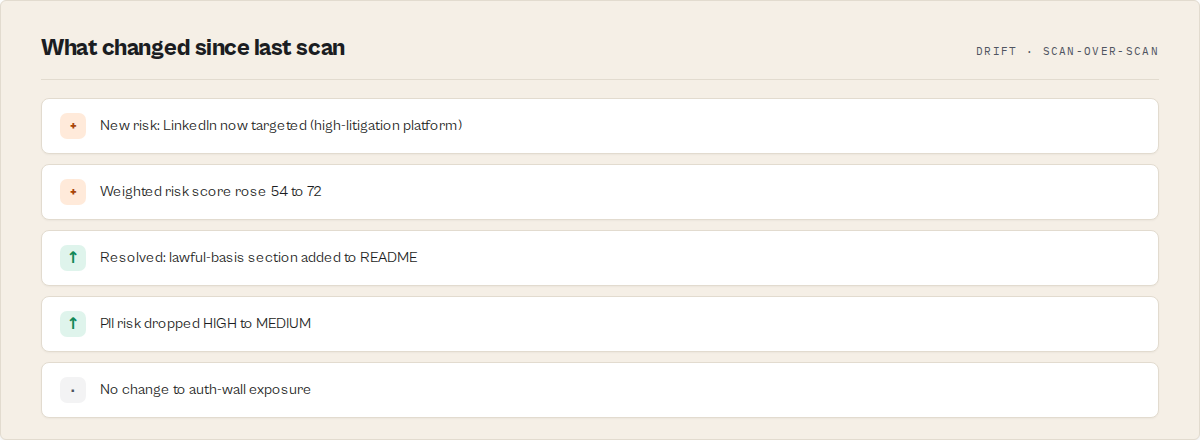
The changeSignals block compares this scan against the previous scan (stored in KV under SNAPSHOT_<actorId>) and emits regressionSignals[] + improvementSignals[] + newRiskReasonCodes[] + resolvedRiskReasonCodes[]. First run stores a baseline; subsequent runs diff against it.
What it does NOT do
This actor is a metadata risk triage tool. It has narrow scope on purpose — the sibling actors listed below own the adjacent problems.
- ❌ It does not run the target actor, touch its scraped data, or read its source code
- ❌ It does not validate the target actor's dataset output shape or field types — see Output Guard
- ❌ It does not execute test suites, run assertions, or gate CI releases — see Deploy Guard
- ❌ It does not compare two actors' runtime output or recommend switching — see A/B Tester
- ❌ It does not score the actor's cost, revenue, or pricing — see Fleet Health Report
- ❌ It does not audit the Store listing SEO / keyword density / competitor gaps — see SEO Auditor
- ❌ It does not provide legal advice. It identifies potential exposure based on metadata patterns
If you need any of the above, combine this actor with the appropriate sibling in the Sibling actor boundaries section.
Example output
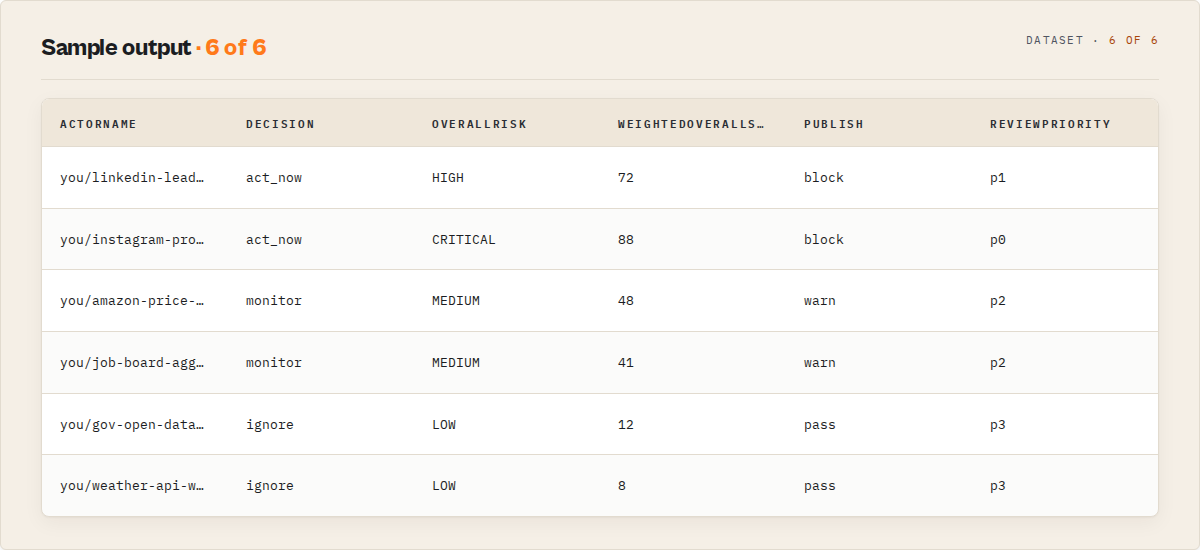
Compact output contract
| Field | Type | Stable? | Use for |
|---|---|---|---|
agentContract.recommendedAction | enum | Yes | universal cross-actor routing — same field name + enum (act_now/monitor/ignore) on every actor in this suite. Mirrors decision. Distinct from the top-level recommendedAction string below, which is a human remediation instruction. |
decision | enum | Yes | webhook routing / CI gates |
reviewPriority | enum | Yes | ops-queue priority (p0–p3) |
riskPosture | enum | Yes | interpretability — which dimension dominates |
overallRisk | enum | Yes | dashboards + filters |
weightedOverallScore | integer (0–100) | Yes | sorting / thresholds |
riskReasonCodes[] | enum[] | Yes | automation branching |
confidenceLevel | enum | Yes | filter low-confidence records |
recommendedAction | string | No | human review |
recommendations[] | string[] | No | high-level summary bullets — see remediation.* for actionable fixes |
changeSignals.* | object | Yes | weekly regression tracking |
remediation.* | object | Yes | fix-queue ingestion with priority / minute estimate / expected impact |
evidence[] / counterEvidence[] / ambiguousSignals[] | object[] | Yes | classifier receipts — structured objects with normalizedRule, severity, reason |
scoreContributors[] | object[] | Yes | sorted by weightedImpact desc — fastest "why is the score high" explanation |
The actor ships both .actor/input_schema.json and .actor/dataset_schema.json with field-level descriptions and table/intelligence views — so Apify Console renders clean tables and MCP consumers get typed output without additional config.
Minimal JSON schema of the routable top-level fields:
{
    "recordType": "compliance-report | fleet-compliance-report | error",
    "agentContract": { "recommendedAction": "act_now | monitor | ignore" },
    "decision": "act_now | monitor | ignore",
    "reviewPriority": "p0 | p1 | p2 | p3",
    "overallRisk": "CRITICAL | HIGH | MEDIUM | LOW",
    "riskPosture": "pii-heavy | tos-heavy | auth-heavy | documentation-heavy | balanced",
    "confidenceLevel": "high | medium | low",
    "failureType": "invalid-input | api-error | rate-limit | metadata-missing | unknown"
}
Full sample record
{
    "recordType": "compliance-report",
    "agentContract": { "recommendedAction": "act_now" },
    "actorName": "ryanclinton/website-contact-scraper",
    "actorId": "ryanclinton/website-contact-scraper",
    "decision": "act_now",
    "decisionReason": "HIGH compliance risk — HIGH PII exposure, platform ToS restrictions (weighted score 72/100, high confidence). Review before running.",
    "reviewPriority": "p1",
    "riskPosture": "pii-heavy",
    "overallRisk": "HIGH",
    "weightedOverallScore": 72,
    "decisionThresholdVersion": "thresholds-v1",
    "riskReasonCodes": ["PII_DETECTED_STRONG", "PII_CONTACT_TERMS", "CATEGORY_HIGH_RISK", "GDPR_APPLICABLE", "CCPA_CPRA_APPLICABLE"],
    "insight": "ryanclinton/website-contact-scraper collects email/phone/contact/name (HIGH PII risk), triggers GDPR/CCPA/CPRA/ePrivacy Directive.",
    "recommendedAction": "Do not run without: document lawful basis for PII processing + data retention policy.",
    "piiRisk": "HIGH",
    "piiKeywords": ["email", "phone", "contact", "name", "address", "lead"],
    "authRisk": "LOW",
    "authKeywords": [],
    "tosRisk": "LOW",
    "tosDetails": [],
    "applicableRegulations": [
        { "name": "GDPR", "jurisdiction": "EU/EEA", "reason": "Detected keywords: email, phone, name, contact" },
        { "name": "CCPA/CPRA", "jurisdiction": "California, USA", "reason": "Detected keywords: email, phone, name, contact" },
        { "name": "ePrivacy Directive", "jurisdiction": "EU", "reason": "Detected keywords: email, contact" },
        { "name": "CAN-SPAM", "jurisdiction": "United States", "reason": "Detected keywords: email, contact" },
        { "name": "PIPEDA", "jurisdiction": "Canada", "reason": "Detected keywords: email, phone, name" }
    ],
    "recommendations": [
        "Document your lawful basis for processing personal data under GDPR",
        "Add opt-out mechanism for email collection",
        "Implement data retention policy and document it",
        "Consult legal counsel regarding applicable regulations"
    ],
    "evidence": [
        {
            "type": "keyword_match",
            "dimension": "piiRisk",
            "sourceField": "metadata",
            "matchedText": "email",
            "normalizedRule": "PII_EMAIL",
            "severity": "high",
            "reason": "PII keyword \"email\" (2x) in actor metadata"
        },
        {
            "type": "category_match",
            "dimension": "categoryRisk",
            "sourceField": "categories",
            "matchedText": "LEAD_GENERATION",
            "normalizedRule": "HIGH_RISK_CATEGORY",
            "severity": "high",
            "reason": "Category \"LEAD_GENERATION\" implies PII handling."
        }
    ],
    "counterEvidence": [
        {
            "type": "absence_of_signal",
            "dimension": "authRisk",
            "sourceField": "metadata",
            "normalizedRule": "NO_AUTH_KEYWORDS",
            "reason": "No auth-wall keywords — likely public data only."
        },
        {
            "type": "absence_of_signal",
            "dimension": "tosRisk",
            "sourceField": "metadata",
            "normalizedRule": "NO_RESTRICTED_PLATFORMS",
            "reason": "No known restricted platforms detected."
        }
    ],
    "ambiguousSignals": [
        {
            "dimension": "piiRisk",
            "sourceField": "metadata",
            "matchedText": "profile",
            "reason": "Could refer to public business profiles or personal profiles — context-dependent."
        }
    ],
    "scoreContributors": [
        { "dimension": "piiRisk", "level": "HIGH", "score": 85, "weightedImpact": 17, "topReason": "PII keywords: email, phone, contact", "isDominant": true },
        { "dimension": "regulatorySurface", "level": "MEDIUM", "score": 72, "weightedImpact": 9, "topReason": "Applicable: GDPR, CCPA/CPRA, ePrivacy Directive" },
        { "dimension": "categoryRisk", "level": "HIGH", "score": 60, "weightedImpact": 4, "topReason": "Categories: LEAD_GENERATION" }
    ],
    "confidenceScore": 100,
    "confidenceLevel": "high",
    "confidenceFactorCodes": ["full_actor_metadata", "strong_signal_density"],
    "meta": {
        "source": "apify-api",
        "dataFields": ["name", "title", "description", "categories"],
        "completeness": "full",
        "missingFields": []
    },
    "scannedAt": "2026-04-22T14:22:31.007Z"
}
Change signals — sample
When re-scanning the same actor after a description update:
{
    "changeSignals": {
        "hasPriorSnapshot": true,
        "previousFingerprint": "sha256:41d8cd98f00b204e9800",
        "currentFingerprint": "sha256:e3b0c44298fc1c149afb",
        "deltaSummary": "Improvement detected: OVERALL_RISK_DOWN_HIGH_TO_MEDIUM; SCORE_DECREASED_72_TO_48; RESOLVED_PII_DETECTED_STRONG.",
        "regressionSignals": [],
        "improvementSignals": [
            "OVERALL_RISK_DOWN_HIGH_TO_MEDIUM",
            "SCORE_DECREASED_72_TO_48",
            "RESOLVED_PII_DETECTED_STRONG",
            "DECISION_IMPROVED_act_now_TO_monitor"
        ],
        "newRiskReasonCodes": [],
        "resolvedRiskReasonCodes": ["PII_DETECTED_STRONG", "CATEGORY_HIGH_RISK"],
        "previousScan": {
            "decision": "act_now",
            "overallRisk": "HIGH",
            "weightedOverallScore": 72,
            "scannedAt": "2026-04-15T09:11:00.000Z"
        }
    }
}
Strict mode — sample contrast
Same actor (sparse description: "scrapes business data and contact info"), normal vs strict mode:
normalMode:  overallRisk = MEDIUM, decision = monitor, confidenceLevel = medium,
             piiKeywords = ["contact"], reviewPriority = p2
strictMode:  overallRisk = HIGH,   decision = act_now, confidenceLevel = medium,
             piiKeywords = ["contact"] + strict_mode_enabled factor, reviewPriority = p1
Strict mode escalates on the basis of sparse metadata + ambiguous wording — designed for enterprise/compliance-heavy environments where "could be PII" is treated as "likely PII."
Why trust this result
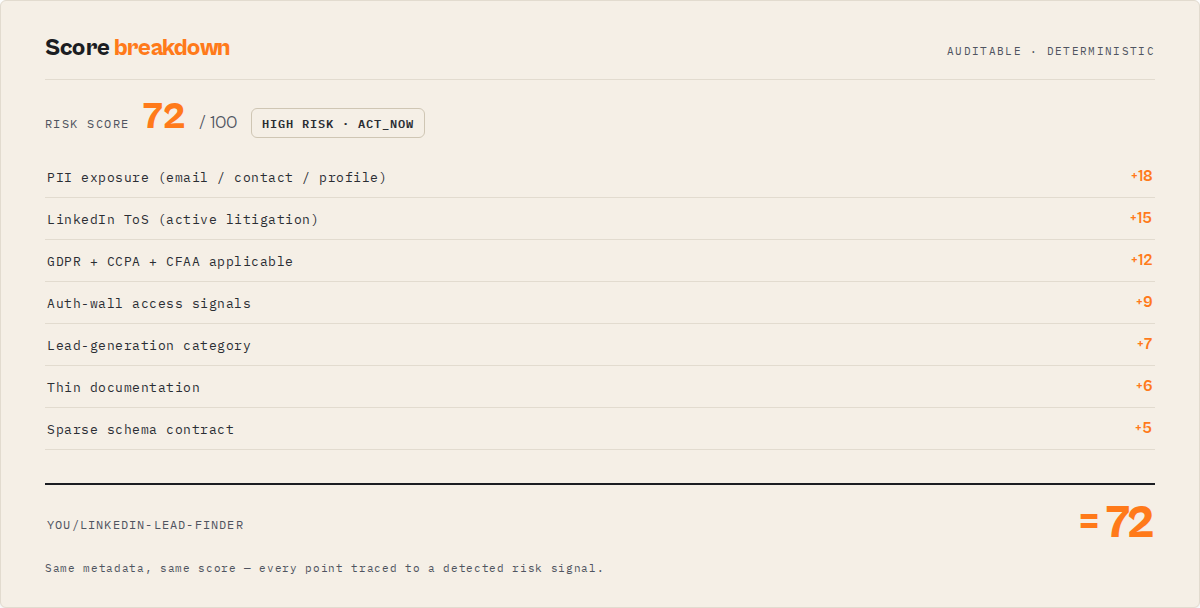 Trust & reliability signals
- Evidence + counter-evidence receipts. Every verdict ships with both the findings that supported the call AND the findings that weighed against it. You can read
evidence[]andcounterEvidence[]side by side and decide whether to trust the classifier. - Explainable confidence.
confidenceScore(0–100),confidenceLevel("high" / "medium" / "low"),confidenceFactorCodes[](e.g.full_actor_metadata,low_signal_density,absence_of_evidence), and a plain-EnglishconfidenceExplanationstring tell you WHY the verdict is as confident as it is — not just a number. (This is confidence in the risk verdict, not a quality grade of the actor.) - Stable machine-readable contract.
decision,overallRisk,riskReasonCodes[],failureType,confidenceLevelare stable enum values. New codes may be added; existing codes will not be renamed or repurposed within a major version. - No hidden state. The analysis runs on actor metadata only — no browsing, no scraping, no LLM calls. The same input always produces the same verdict.
- No external enrichment or third-party data sources. The scanner only reads the Apify API. No outbound calls to data brokers, enrichment vendors, LLM endpoints, or classifier APIs — verdicts are reproducible and your scanned actor identifiers never leave the Apify platform.
- Provenance block. Every record carries a
metaobject with the data source, fields actually populated, completeness tier (full/partial/minimal), and missing fields. You always know what was scanned and what wasn't.
How to use in CI / review workflows
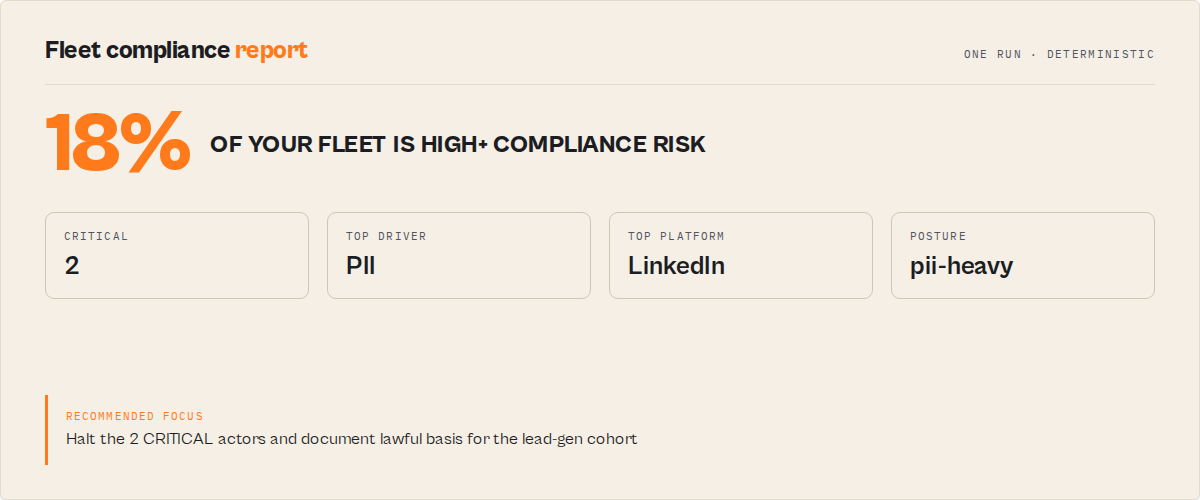
Pre-publish gate
Use this actor directly as a CI/CD gate — fail builds when decision === "act_now". One HTTP call, one JSON parse, one exit code.
# Scan before promoting to Store
curl -s -X POST "https://api.apify.com/v2/acts/ryanclinton~actor-compliance-scanner/run-sync-get-dataset-items?token=$APIFY_TOKEN" \
  -H "Content-Type: application/json" \
  -d '{"targetActorId":"'"$ACTOR_ID"'"}' \
  | jq -e '.[0] | select(.decision != "act_now")' \
  || { echo "Compliance: act_now — review required"; exit 1; }
Agent tool-selection
Your agent inspects decision before chaining the target actor:
report = compliance_scan(actor_id)
if report["decision"] == "act_now":
    raise ComplianceHalt(report["recommendedAction"])
Slack / PagerDuty routing
Alert only on HIGH-risk findings. Route act_now to the legal channel, monitor to a weekly digest, drop ignore.
Scheduled fleet audit
Leave the input blank (or set fleetScan: true) to scan every actor you own. The summary dataset record carries decision + decisionReason + confidenceLevel at the top; the per-actor reports are in KV under FLEET_REPORT.
Third-party actor due diligence
Before approving a third-party actor for a client pipeline, run one scan. Attach the JSON output directly to the vendor-risk ticket. evidence[] and applicableRegulations[] fill the compliance questionnaire without manual analysis.
Decision rubric
How the verdict is computed, step by step
How the top-level decision is derived:
- Per-dimension scoring — each of 10 dimensions scored 0–100 via deterministic keyword / presence / completeness rules
- Weighted composite — dimensions combined with the fixed weights shown in "What it checks" into a
weightedOverallScore - Overall risk mapping —
score >= 85 → CRITICAL,>= 65 → HIGH,>= 35 → MEDIUM,< 35 → LOW - Decision mapping —
CRITICAL / HIGH → act_now,MEDIUM → monitor,LOW → ignore - Confidence adjustment —
confidenceScorepenalised when metadata is sparse (minimal_actor_metadata), signals are thin (low_signal_density), the LOW verdict rests on absence of evidence (absence_of_evidence), or the README couldn't be retrieved (readme_not_retrieved) - Reason codes — stable enums emitted for every firing signal so automation can branch without parsing prose
Every output record carries the rubric version (meta.rubricVersion) and threshold version (decisionThresholdVersion) so downstream consumers can detect contract changes. Versions are additive within a major version — existing codes and thresholds do not change.
The rubric is deterministic per rubric version — the same actor metadata produces the same verdict every time. Results may change across rubric versions; pin meta.rubricVersion + decisionThresholdVersion in your downstream automation to detect contract shifts.
How to reduce risk findings
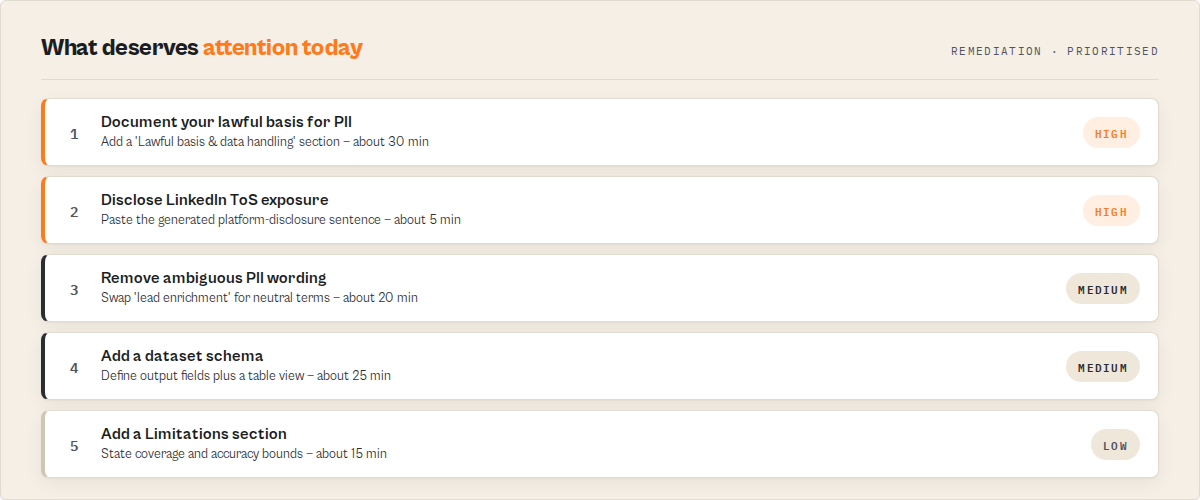 Remediation guide — how to lower an actor's risk score
Every scan returns both a flat recommendations[] string array (high-level summary bullets — easy to render in Slack / email) and a structured remediation pack (actionable fix queue with priority / minute estimate / expected impact — ready for ticket ingestion). Same source of truth, two surfaces.
The remediation pack is grouped by fix type:
quickWins[]— 5–20 minute changes with high score impact. Example: "Expand the actor description to 80–300 chars, naming the exact data sources, the scope (public / user-provided / authenticated), and the primary output shape." Includes an example sentence you can paste in.metadataFixes[]— Store-listing edits. Example: "Remove PII trigger words (email,phone, …) from the description and replace with neutral terms if the actor does NOT collect personal data." Includes before/after examples.docFixes[]— README section fixes. Example: "Add a 'Lawful basis & data handling' section naming the lawful basis, retention window, and opt-out mechanism." Each item cites thereasonCodethat triggered it.schemaFixes[]— Input / dataset schema fixes. Example: "Add.actor/dataset_schema.jsonwith one field definition per pushData output field, plus an overview view." Scoped to decision clarity, not runtime validation.remediationExamples[]— Paste-ready before/after snippets for the most common fixes.
Every remediation item carries: priority (1 = highest), minutesEstimate, expectedImpact[] (the dimension score codes it will move), reasonCode (the stable enum that triggered the fix), and often an example string.
Re-scan after edits. The changeSignals block will show improvementSignals[] + resolvedRiskReasonCodes[] confirming the fixes landed.
Methodology
Phase 1 — Metadata retrieval
The scanner calls GET /v2/acts/{actorId} with your platform token. Actor IDs in username/actor-name format are converted to the URL-safe username~actor-name encoding. When includeDocumentationChecks, includeSchemaChecks, or includeAgenticReadiness is enabled, it also fetches the latest version via GET /v2/acts/{id}/versions/{version} to retrieve .actor/actor.json, .actor/input_schema.json, .actor/dataset_schema.json, and the README. No additional HTTP requests are made; the target actor is never invoked.
Phase 2 — Per-dimension scoring
Each of ten dimensions is scored deterministically 0–100:
- piiRisk — 18 PII indicator keywords; score =
min(100, matches × 18)+ bonuses foremailand high match counts. Strict mode adds +10 on any match. - authRisk — 7 auth-wall keywords; score =
min(100, matches × 28). - tosRisk — 27-platform lookup with pre-assigned severity; highest-severity match sets the score (HIGH = 85, MEDIUM = 55, LOW platforms = 25). Flagged platforms carry a
requiresDisclosureflag + a ready-to-pastesuggestedDisclosuresentence. - categoryRisk — LEAD_GENERATION / SOCIAL_MEDIA are HIGH; other categories scored via a category risk table.
- regulatorySurface — 6-regulation keyword mapper (GDPR / CCPA-CPRA / CFAA / ePrivacy / CAN-SPAM / PIPEDA); score =
min(100, applicable × 18). - metadataCompleteness — presence of name / title / description (≥40 chars) / categories / seoDescription; penalty per missing field.
- documentationQuality — README fetched and scanned for required sections (Methodology, Limitations, FAQ, Responsible use, Decision rubric, Troubleshooting, "What this does NOT do"); weak / short descriptions also penalise.
- schemaCompleteness — input schema presence + description coverage; dataset schema presence + fields + views; changelog reference in actor.json.
- agenticReadiness — weighted presence of input schema, dataset schema, non-trivial description, categories,
storages.datasetreference, stable-enum/record-type mentions in README, changelog reference, optional MCP server path. - storeDiscoverability — title length band, description length band, seoDescription, categories, README code blocks + FAQ + limitations.
Phase 3 — Weighted composite + risk mapping
Dimensions are combined with fixed weights (see "What it checks" above) into weightedOverallScore (0–100). The score maps to overallRisk via stable thresholds:
>= 85→CRITICAL>= 65→HIGH>= 35→MEDIUM< 35→LOW
Phase 4 — Decision + priority + confidence
decision derives from overallRisk (CRITICAL/HIGH → act_now; MEDIUM → monitor; LOW → ignore). reviewPriority maps CRITICAL → p0, HIGH → p1, MEDIUM → p2, LOW → p3. confidenceScore starts at 100 and is penalised for sparse metadata, thin signal density, absence-of-evidence LOW verdicts, and un-retrievable READMEs; confidenceFactorCodes[] lists each penalty by stable code.
Phase 5 — Evidence, remediation, change signals
evidence[] and counterEvidence[] are populated during scoring — each firing signal emits an evidence item; each dimension with no fire emits a counter-evidence item. ambiguousSignals[] flags terms that could fire either way. remediation is generated by mapping each riskReasonCodes[] entry to a pre-written fix with priority / minute estimate / expected-impact dimensions / example. changeSignals compares a SHA-256 fingerprint (description + categories + matched keywords + reason codes) against the previous snapshot in KV; on first scan the fingerprint is stored and all signals are empty arrays.
Phase 6 — Fleet mode
When targetActorId is blank or fleetScan: true, the actor lists every actor in your account (up to maxActors, default 250, max 1000), scans each in parallel (concurrency 8) with retry + exponential backoff on 429/5xx, and emits one fleet-compliance-report summary record to the dataset plus the full per-actor reports to KV (FLEET_REPORT). Portable signals for downstream fleet consumers land in KV (SIGNALS).
Limitations
- Keyword-based metadata analysis only. An actor that collects personal data without mentioning it in the description will be under-scored. The
confidenceLevelwill reflect the sparse metadata, but the decision rests on what the author wrote. - Does not analyse source code. No access to the target actor's JavaScript/TypeScript or repository. If behaviour diverges from description, the scan reflects the description.
- Platform ToS coverage is 27 platforms (
platform-risk-v2). It covers the major social networks, marketplaces, travel/booking, gig platforms, app stores, and contact-data brokers — but it is not exhaustive. A platform outside the table will not be matched; check its ToS directly. - Regulation list is static. GDPR, CCPA/CPRA, CFAA, ePrivacy Directive, CAN-SPAM, PIPEDA. Newer US state privacy laws (Texas, Florida, Virginia, etc.) are not yet mapped.
- Not legal advice. The report identifies potential exposure based on keyword patterns. It is not a substitute for qualified legal review on material decisions.
- Depends on Apify API availability. The scanner retries 429 and 5xx responses with exponential backoff. Sustained API outage surfaces as a classified error record with
failureType: "api-error". - Metadata accuracy depends on the author. An actor with a vague description will produce a vague scan. If you need a deeper look, read the source or run the actor against a canary input.
Pricing
This actor is priced as one pay-per-event run on the Store listing — one event per successful scan (single-actor or fleet). Platform compute is included. See the Store pricing panel for the current event price; the code does not charge when the scan fails before producing a result.
Indicative scan costs at the current listed event price:
| Scenario | Events | Total cost @ $0.15/event |
|---|---|---|
| Quick test | 1 | $0.15 |
| Small audit | 10 | $1.50 |
| Medium portfolio | 50 | $7.50 |
| Large portfolio | 200 | $30.00 |
| Enterprise fleet | 1,000 | $150.00 |
Fleet mode scans your account in a single run — one event covers the full run regardless of how many actors were analysed. Set a maximum spending limit on the run to cap cost.
For context, a single hour of specialist legal counsel costs $300–$500. One full portfolio scan of 50 actors — enough to identify which handful actually need legal review — runs in the single-digit dollars.
For AI agents / MCP consumers
Agent-ready contract — branch on enums, not prose
AI agents use this actor as a pre-execution filter — if decision === "act_now", the agent should not run the target actor; if "monitor", proceed with a compliance note appended; if "ignore", safe to chain. Designed to be structured-output friendly for Apify MCP consumers and generic automation, without post-processing.
The actor ships:
.actor/input_schema.jsonwith titles, descriptions, editors, validation patterns, and custompatternErrorMessagestrings for every field.actor/dataset_schema.jsonwith field descriptions + three table views (overview / breakdown / intelligence)- Stable enum values for the routing and classification fields listed below
- Predictable error records with a
failureTypediscriminator (never mixed with risk fields) - A bounded set of
recordTypevalues (compliance-report,fleet-compliance-report,error)
Stable enum fields (branch on these, not on prose):
recordType:"compliance-report"|"fleet-compliance-report"|"error"decision:"act_now"|"monitor"|"ignore"reviewPriority:"p0"|"p1"|"p2"|"p3"riskPosture:"pii-heavy"|"tos-heavy"|"auth-heavy"|"documentation-heavy"|"balanced"overallRisk:"CRITICAL"|"HIGH"|"MEDIUM"|"LOW"confidenceLevel:"high"|"medium"|"low"failureType(on error records):"invalid-input"|"api-error"|"rate-limit"|"metadata-missing"|"unknown"riskReasonCodes[]: additive stable enum —PII_DETECTED_STRONG,PII_DETECTED_WEAK,PII_CONTACT_TERMS,PII_EMPLOYMENT_TERMS,AUTH_WALL_DETECTED,AUTH_WALL_SIGNALS,HIGH_LITIGATION_PLATFORM,MEDIUM_LITIGATION_PLATFORM,CATEGORY_HIGH_RISK,HIGH_RISK_CATEGORY,SPARSE_METADATA,WEAK_HEADLINE,AMBIGUOUS_WORDING,MISSING_DATASET_SCHEMA,WEAK_INPUT_SCHEMA_DESCRIPTIONS,LOW_AGENTIC_READINESS,README_NOT_PUBLIC,MISSING_WHAT_NOT_TO_DO_SECTION,MISSING_METHODOLOGY_SECTION,MISSING_LIMITATIONS_SECTION,MISSING_RESPONSIBLE_USE_SECTION,MISSING_FAQ_SECTION,MISSING_TROUBLESHOOTING_SECTION,MISSING_DECISION_RUBRIC_SECTION,MULTI_REGULATION,GDPR_APPLICABLE,CCPA_CPRA_APPLICABLE,CFAA_APPLICABLE,EPRIVACY_APPLICABLE,CAN_SPAM_APPLICABLE,PIPEDA_APPLICABLEconfidenceFactorCodes[]:full_actor_metadata,partial_actor_metadata,minimal_actor_metadata,strong_signal_density,moderate_signal_density,low_signal_density,absence_of_evidence,readme_not_retrieved,strict_mode_enabled
Versioned contract (detect drift in automation):
meta.scanVersion— bumped on any code changemeta.rubricVersion— bumped if scoring weights changemeta.reasonCodeVersion— bumped if reason code semantics changedecisionThresholdVersion— bumped if score → risk → decision thresholds change
Contract invariants the actor enforces:
decision === "act_now"impliesoverallRiskis"CRITICAL"or"HIGH"with at least oneriskReasonCodes[]entryoverallRisk === "CRITICAL"impliesweightedOverallScore >= 85andreviewPriority === "p0"overallRisk === "HIGH"impliesreviewPriority === "p1";"MEDIUM"→"p2";"LOW"→"p3"decision === "ignore"impliesoverallRisk === "LOW"andweightedOverallScore < 35andreviewPriority === "p3"confidenceLevel === "high"impliesmeta.completenessis"full"or"partial"changeSignals.hasPriorSnapshot === falseon first scans;regressionSignals[]andimprovementSignals[]are empty arrays (never null, never missing)- Error records are flat —
error: true,failureType,message,timestamp. No risk fields mixed in
Human-readable fields (for report rendering, Slack messages, LLM-generated summaries):
insight— one-sentence analyst summaryrecommendedAction— concrete next step:HALT/Do not run without…/Before running…/Safe to run.decisionReason— one-line explanation pairing drivers with weighted score and confidence tierevidence[]/counterEvidence[]— readable sentences per findingremediation.quickWins[]— paste-ready fix descriptions with minute estimateschangeSignals.deltaSummary— one-line description of what changed since last scan
Use in Dify
Drop this actor into Dify workflows via the Apify plugin's Run Actor node. Each scan returns scored, classified, and verdicted as structured JSON — decision enum (act_now / monitor / ignore), gateResult (publish pass/warn/block + enterpriseReview required/optional/not_required), riskPosture enum (pii-heavy / tos-heavy / auth-heavy / documentation-heavy / balanced), overallRisk enum (CRITICAL / HIGH / MEDIUM / LOW), riskReasonCodes[] (stable machine-readable codes), recommendedAction string (HALT / Do not run without… / Before running… / Safe to run.), and remediation.quickWins[] (paste-ready fix descriptions with minute estimates) your downstream node branches on. Generic compliance scanners return raw findings; this returns decisions.
- Actor ID:
ryanclinton/actor-compliance-scanner - Sample input (pre-publish risk gate):
{
    "targetActorId": "user/your-actor-name",
    "includeDocumentationChecks": true,
    "includeSchemaChecks": true,
    "includeAgenticReadiness": true,
    "strictMode": false
}
- Branching example — a Dify if/else node reads
decision(orgateResult.publish) and routes:act_now/gateResult.publish == "block"→ halt deployment + create Jira ticket withremediation.quickWins[]as ticket steps + Slack-alert the actor ownermonitor/gateResult.publish == "warn"→ log to compliance dashboard + flag for next sprint reviewignore/gateResult.publish == "pass"→ continue pipeline (safe to publish or run)
- For legal-sign-off routing: branch on
gateResult.enterpriseReview == "required"to route into a compliance/DPO review queue before the actor ships - For pre-publish CI gate: use
policyProfile: "enterprise"and gate the Dify workflow ongateResult.publish == "block"— fails CI when the actor has any actionable compliance risk - For a privacy-review handoff: set
includePrivacyReviewPacket: true; downstream Dify nodes readprivacyReviewPacket.requiresDpiaReviewto branch into a DPIA queue and pasteprivacyReviewPacket.readmeSectionDraftsstraight into the remediation ticket - For fleet-wide audits: set
fleetScan: trueto scan every actor in your Apify account; emitsrecordType: 'fleet-compliance-report'rows alongside per-actor reports — Dify routes the fleet-level alerts to your security ops channel separately - For change detection: pass
previousSnapshotKeywith a stable per-actor key; downstream Dify nodes branch onchangeSignals.deltaSummaryto alert ONLY when compliance posture changes between scans - For token-light agent loops: set
outputMode: "decision"to receive the slim verdict record (decision,reviewPriority,riskPosture,overallRisk,weightedOverallScore,confidenceLevel,insight,recommendedAction) instead of the full evidence + dimension + remediation tree — same branching fields, far fewer tokens for the LLM node to read. InfleetScanmode it returns a one-line-per-actor roster keyed for the samedecisionrouting.
The remediation.quickWins[] array is usable verbatim as the body of any Dify-generated ticket, runbook, or Slack message — no LLM rewriting required, fully deterministic across runs.
Input parameters
| Parameter | Type | Required | Default | Description |
|---|---|---|---|---|
targetActorId | string | No | — | Actor ID or username/actor-name to scan. Leave blank to scan your entire fleet. |
fleetScan | boolean | No | false | Force fleet mode. Overrides targetActorId. |
maxActors | integer | No | 250 | Fleet-mode cap on how many actors to scan (max 1000). |
includeDocumentationChecks | boolean | No | true | Audit the target README for required sections (Methodology, Limitations, FAQ, Responsible use, Decision rubric, Troubleshooting). Disable for faster runs. |
includeSchemaChecks | boolean | No | true | Audit input + dataset schema presence + field descriptions. Scoped to decision clarity — does NOT validate runtime output (see Output Guard for that). |
includeAgenticReadiness | boolean | No | true | Audit the actor's readiness for agent tool-selection (typed contract, stable enums, categories, changelog). |
includeChangeSignals | boolean | No | true | Compare against the previous scan stored in KV. First run stores a baseline; subsequent runs emit regressionSignals[] / improvementSignals[]. |
policyProfile | string | No | balanced | Weighting profile over the same rubric (deterministic multipliers, not a rule editor): balanced (default), enterprise (legal/risk dimensions weighted higher + strict sensitivity), lenient (legal/risk weighted lower, for internal audits). Never changes which risks fire. |
strictMode | boolean | No | false | Raises sensitivity when metadata is sparse or wording is ambiguous. Implied by the enterprise profile. |
includePrivacyReviewPacket | boolean | No | false | Emit a deterministic DPIA-lite privacyReviewPacket (requiresDpiaReview, personal-data signals, GDPR review questions, ready-to-paste README section drafts). Reviewer aid, not legal advice. |
previousSnapshotKey | string | No | auto | Override the default KV key for the prior-scan snapshot. Use to diff against a specific named baseline instead of the most recent run. |
emitSignals | boolean | No | true | Write the portable signals[] array to KV under SIGNALS for Fleet Health Report consumption. |
outputMode | string | No | full | full returns the complete report (evidence, dimension scores, remediation, change signals). decision returns the slim verdict record only — and in fleet mode a one-line-per-actor roster instead of every nested report. Use decision for token-light agent / dashboard consumers. |
apifyToken | string | No | (auto) | Overrides the auto-injected platform token. isSecret: true. |
Input examples
Scan one actor:
{ "targetActorId": "ryanclinton/website-contact-scraper" }
Scan the whole fleet:
{}
Scan using a UUID:
{ "targetActorId": "moJRLRc85AitArpNN" }
Usage via API
Python
from apify_client import ApifyClient

client = ApifyClient("YOUR_API_TOKEN")

run = client.actor("ryanclinton/actor-compliance-scanner").call(run_input={
    "targetActorId": "ryanclinton/website-contact-scraper"
})

for item in client.dataset(run["defaultDatasetId"]).iterate_items():
    print(f"{item['actorName']}: decision={item['decision']}, risk={item['overallRisk']}")
    print(f"Insight: {item['insight']}")
    print(f"Action: {item['recommendedAction']}")
JavaScript
import { ApifyClient } from "apify-client";

const client = new ApifyClient({ token: "YOUR_API_TOKEN" });

const run = await client.actor("ryanclinton/actor-compliance-scanner").call({
    targetActorId: "ryanclinton/website-contact-scraper"
});

const { items } = await client.dataset(run.defaultDatasetId).listItems();
for (const item of items) {
    console.log(`${item.actorName}: decision=${item.decision}, risk=${item.overallRisk}`);
    console.log(`Reason codes: ${item.riskReasonCodes.join(", ")}`);
}
cURL (run-sync)
curl -X POST "https://api.apify.com/v2/acts/ryanclinton~actor-compliance-scanner/run-sync-get-dataset-items?token=YOUR_API_TOKEN" \
  -H "Content-Type: application/json" \
  -d '{"targetActorId": "ryanclinton/website-contact-scraper"}'
Error model
failureType values and what they mean
Every failure surfaces a flat error record (recordType: "error") with a stable failureType enum. Branch on this — never parse the message string.
failureType | Meaning | Typical cause |
|---|---|---|
invalid-input | Bad or unreachable actor ID, or missing required input | Typo in targetActorId, missing token, private / draft actor |
api-error | Apify API returned a 5xx or otherwise failed | Transient Apify outage (after 3 retries) |
rate-limit | 429 response from the Apify API | You're scanning too many actors too fast — retry after a pause |
metadata-missing | Actor exists but has no usable metadata | Drastically sparse listing |
unknown | Anything else that escaped the outer catch | Unexpected runtime error — see log for stack trace |
Error records never mix risk fields. They are flat: { recordType: "error", error: true, failureType, actorId?, message, timestamp }. No decision, no overallRisk, no evidence. That keeps downstream code simple: branch on recordType === "error" first, then on failureType.
Troubleshooting
Common issues and how to fix them
- Error record with
failureType: "invalid-input"— the actor ID you provided is not a published actor, or the token cannot see it. Useusername/actor-nameformat. Private/draft actors are not accessible via the public API. - All risks LOW but the actor looks high-risk — sparse description. The
confidenceLevelwill be"low"andconfidenceFactorCodes[]will includeminimal_actor_metadataorabsence_of_evidence. Read the actor's README directly. - Empty dataset — check the Log tab for an error. The most common cause is a missing/invalid
targetActorIdwhenfleetScanis false. - Platform I care about isn't flagged — 27 platforms in the lookup (
platform-risk-v2). A platform outside the table will not be matched. Check its ToS manually.
FAQ
Who is this for? Apify developers, agencies managing client scraping pipelines, enterprise compliance teams evaluating third-party actors, and AI agents that need to triage an actor before chaining it into a workflow.
How accurate is it?
The scan is as accurate as the target actor's metadata. A detailed, honest description produces a well-calibrated verdict. A sparse description produces a low-confidence verdict (reflected in confidenceLevel and confidenceFactorCodes[]) that the user can interpret accordingly.
Does this replace legal advice? No. It identifies potential exposure based on metadata patterns. For material decisions — publishing commercial actors, processing PII at scale, deploying in regulated industries — consult qualified counsel. Use this actor to triage which actors need that spend.
Can I scan a private or draft actor? No. The scanner uses the Apify public API. Private/draft actors return 404.
Can I scan multiple actors in one run?
Yes — leave targetActorId blank and the actor runs in fleet mode across your entire account. One run, one $0.15 charge.
Can I schedule weekly scans?
Yes. Use the Apify Scheduler with fleet mode. Each run produces a fresh fleet-compliance-report plus portable SIGNALS for downstream consumers.
What's in the KV store after a run?
SUMMARY— the decision-layer summary (mirrors the dataset record's decision + confidence fields for dashboard consumers)SIGNALS— portablesignals[]array consumable by Fleet Health ReportFLEET_REPORT(fleet mode only) — full per-actor reports off-dataset to stay under the 1 MB pushData limit
Which regulations are covered? GDPR (EU/EEA), CCPA/CPRA (California), CFAA (US — relevant to authenticated access), ePrivacy Directive (EU), CAN-SPAM (US), PIPEDA (Canada).
Which platforms are in the ToS table?
27 platforms (platformRiskMatrixVersion: platform-risk-v2): LinkedIn / Facebook / Instagram / Facebook Marketplace / ZoomInfo / Apollo (HIGH), Twitter/X / TikTok / Amazon / Walmart / eBay / Etsy / Google / YouTube / Google Play / Apple App Store / Indeed / Glassdoor / Booking.com / Airbnb / Tripadvisor / Upwork / Fiverr / Crunchbase (MEDIUM), Zillow / Yelp / Reddit (LOW). Each flagged platform carries a requiresDisclosure flag and a ready-to-paste suggestedDisclosure sentence.
What happens if the Apify API is down?
30-second timeout, 3-attempt retry with exponential backoff on 429/5xx. Persistent failure pushes an error record with failureType: "api-error" and exits cleanly. No charge.
Sibling actor boundaries
This actor is one of a fleet of backend/DevOps actors by the same author on the Apify Store. Each owns a distinct problem — use them in combination, not in overlap.
| Need | Use this instead |
|---|---|
| Score an actor's metadata / Store-readiness quality and get an ordered fix plan | Quality Monitor |
| Run automated test suites and gate a release / CI before promoting a new build | Deploy Guard |
| Validate an actor's input payload against its schema before a run | Input Guard |
| Validate that multiple actors compose into one pipeline before running | Pipeline Preflight |
| Validate an actor's output dataset in production (drift, nulls, silent failures) | Output Guard |
| Compare two actors side-by-side and pick a winner to switch to | A/B Tester |
| Aggregate fleet-wide signals into one portfolio action plan | Fleet Health Report |
How this actor feeds the fleet
Compliance Scanner writes a portable signals[] array to its default KV store under SIGNALS at the end of every fleet run. Fleet Health Report reads these signals in composite-intelligence mode and folds them into its portfolio-level Action Plan — any actor with HIGH or CRITICAL compliance risk becomes a fixNow item, and the fleet-level compliance count feeds the Fleet Health Score's compliance dimension.
Responsible use
- This actor only accesses publicly available actor metadata via the Apify API.
- It does not run the target actor, access its scraped data, or store any third-party data.
- Scan results are informational — they identify potential exposure, not proven violations.
- Comply with GDPR, CCPA, and all applicable data protection regulations when acting on findings.
- For a broader treatment of web scraping legality, see Apify's guide.
Help us improve
If you encounter issues, enable run sharing so we can debug faster:
- Go to Account Settings > Privacy
- Enable Share runs with public Actor creators
Your runs are only visible to the actor developer, not publicly.
Support
Open an issue in the Issues tab. For custom enterprise compliance workflows or portfolio scanning integrations, reach out via the Apify platform.
Next stage
Compliance Scanner is the publish stage of one developer lifecycle: publish, quality, release, invocation, orchestration, runtime, migration, portfolio. Each actor owns one stage; they are complementary, not overlapping.
Next stage: Quality Monitor. Cleared to publish? Score how good the listing actually is and get a ranked fix sequence.
Related articles
The Apify Actor Execution Lifecycle: 8 Decision Engines
8 backend actors that cover every stage of the Apify actor execution lifecycle. Each returns one decision enum your CI, agent, or webhook can branch on.
I Built an Apify Actor — How Do I Know It's Safe to Ship?
Pre-publish risk triage for Apify actor developers. One scan returns decision, reason codes, and fixes for PII, ToS, and GDPR — $0.15 per actor.
Related actors
AI Cold Email Writer — $0.01/Email, Zero LLM Markup
Generates personalized cold emails from enriched lead data using your own OpenAI or Anthropic key. Subject line, body, CTA, and optional follow-up sequence — $0.01/email, zero LLM markup.
Bulk Email Verifier — MX, SMTP & Disposable Detection at Scale
Verify email deliverability in bulk — MX records, SMTP mailbox checks, disposable detection (55K+ domains), role-based flagging, catch-all detection, domain health scoring (SPF/DKIM/DMARC), and confidence scores. $0.005/email, no subscription.
CFPB Complaint Intelligence — Vendor Risk & Screening
Turn 5M+ CFPB consumer complaints into decisions: screen companies pass / review / fail, score complaint-handling risk, monitor what changed since last run, benchmark cohorts, and build audit-ready due-diligence packs. Filter by company, product, state, and date. No API key.
Company Deep Research — SEC, GitHub, DNS & Social
Research any company from a domain. Get website metadata, Wikipedia summary, GitHub repos & stars, SEC EDGAR filings & ticker, academic papers, DNS records, and social media profiles in one JSON report.
Ready to try Actor Compliance Scanner — PII, GDPR & TOS Risk Audit?
Run it on your own Apify account. Apify offers a free tier with $5 of monthly credits.
Open on Apify Store