The problem: Apify gives you SUCCEEDED or FAILED. That's it. No "your input had 3 unknown fields the actor will silently drop." No "your output's email field went 61% null overnight." No "this pipeline has a field-mapping mismatch on stage 2 that won't blow up until 4 minutes into the run."
Every Apify developer eventually writes their own version of these checks. Bash glue, a JSON schema validator, a null-rate Cron job, a hand-wired Slack webhook. It works until it doesn't, and you spend a Saturday rebuilding it.
I built the alternative — over the last few months I worked all 8 actors through the same best-on-Apify polish process. They came out as a complete execution lifecycle.
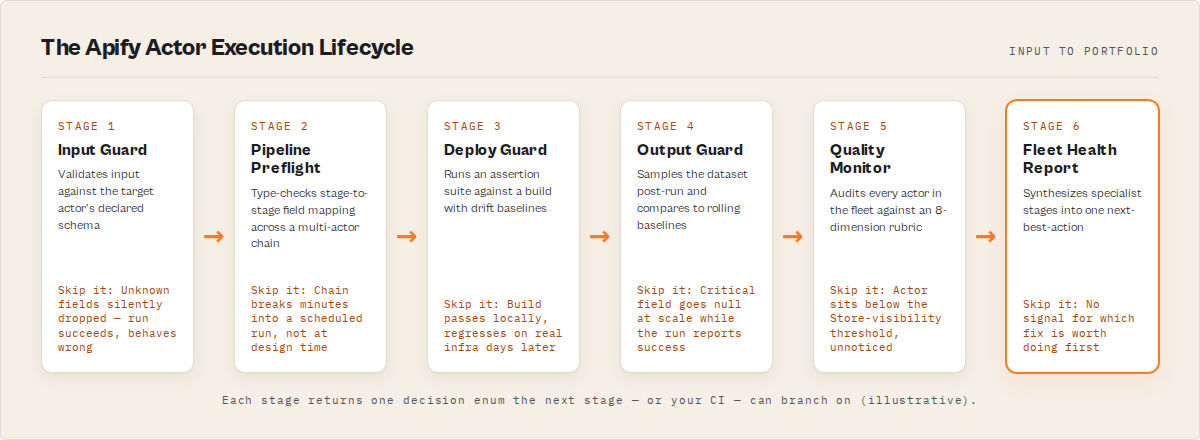
What is the Apify actor execution lifecycle? A staged sequence of validation, testing, monitoring, and decision-making steps that an Apify actor passes through from input through publish, run, and fleet-level review. Each stage has a single contract: take state, emit one decision enum, branch.
Why it matters: Most Apify failures are silent. Native platform monitoring sees the run exited cleanly. The lifecycle is what catches the gap between "the run finished" and "the data is correct, the input made sense, the pipeline composed, the build was safe to ship, and the actor is monetizable in the Store."
Use it when: You're past 5 actors, or one of your actors generates real revenue, or you've ever had a "scheduled run silently produced wrong data for two weeks" incident.
→ Run your first lifecycle check on apifyforge.com — connect a scoped Apify token, click run on any of the 8 stages, read one field. ~2 minutes from sign-in to first verdict, and the first one is usually not what you expected.
8 stages. Each returns one decision enum. That's the whole system.
Start here: 2 actors that catch most failures
If you only set up two stages today, set up these:
- Input Guard on your main actor — paste the input you'd send to a scheduled run, verify it returns
decision: ignore. If it returnsact_nowormonitor, you've already caught a silent bug Apify's own validator wouldn't surface. - Output Guard on your last completed run — point it at the actor and the dataset from your most recent production run. If it returns
decision: act_now, you have a silent regression in production right now and didn't know.
That covers the two most common silent-failure classes (bad input ignored, bad output shipped) in under five minutes. Everything else in the lifecycle is incremental coverage on top.
In this article
What it is · Why decision enums matter · The 8 stages · Alternatives · Best practices · Common mistakes · Limitations · FAQ
Quick answer
- What it is: 8 backend actors that each cover one stage of an Apify actor's lifecycle (input → pipeline → deploy → output → quality → risk → A/B → fleet).
- Shared contract: every actor returns a deterministic
decisionenum your automation can branch on without parsing prose. - When to use: any time you're running, shipping, or operating an Apify actor at any non-trivial scale.
- When NOT to use: one-off exploratory scrapes that fail cheaply.
- Tradeoff: PPE pricing per call ($0.15–$4.00) vs. building the equivalent yourself (weeks of work, indefinite maintenance).
What goes wrong without each stage
| Stage | What goes wrong without it |
|---|---|
| Input Guard | You send an input Apify silently drops at runtime — UNKNOWN_FIELD, USING_DEFAULT_VALUE, SCHEMA_DRIFT_DETECTED — and the run "succeeds" doing the wrong thing |
| Pipeline Preflight | Your multi-actor chain composes on paper, then breaks 4 minutes into the run — and you discover it the morning after the scheduled job |
| Deploy Guard | A build passes locally and regresses on real Apify infra — first sign is the failure-rate alert two days later |
| Output Guard | You ship dirty data — a critical field flips to 60% null while the run still exits SUCCEEDED, and downstream finds out before you do |
| Quality Monitor | Your actor scores below the Store-visibility threshold and you don't know — traffic stays low for the wrong reason |
| Actor Risk Triage | You publish an actor with a PII / GDPR / ToS exposure you didn't realise was there — caught by a buyer or a takedown, not by you |
| Actor A/B Tester | You migrate to a "better" actor based on a single-run comparison that flips on the next sample |
| Fleet Health Report | You spend Monday on the wrong fix because nothing tells you what's worth doing first |
Examples — one decision field per stage
| Stage | Actor | Sample input → output |
|---|---|---|
| Pre-run | Input Guard | { targetActorId, testInput } → decision: "act_now" + verdictReasonCodes: ["UNKNOWN_FIELD"] |
| Pre-pipeline | Pipeline Preflight | { stages: [...] } → decisionPosture: "no_call" + fixPlan: [...] |
| Pre-deploy | Deploy Guard | { targetActorId, preset: "canary" } → decision: "act_now" + status: "pass" |
| Post-run | Output Guard | { targetActorId, mode: "monitor" } → decision: "monitor" + qualityScore: 68 |
| Fleet quality | Quality Monitor | {} → per-actor qualityScore + fixSequence[] |
| Pre-publish | Actor Risk Triage | { targetActorId } → decision: "act_now" + reviewPriority: "p0" |
| Two candidates | Actor A/B Tester | { actorA, actorB, testInput } → decisionPosture: "switch_now" |
| Portfolio | Fleet Health Report | {} → nextBestAction: { ... } |
What is the Apify actor execution lifecycle?
Definition (short version): The Apify actor execution lifecycle is a staged sequence — input → pipeline → deploy → output → quality → risk → comparison → portfolio — that every actor passes through, with a dedicated validator at each stage that returns one machine-readable decision.
Also known as: actor DevOps lifecycle, Apify actor CI pipeline, actor invocation lifecycle, actor quality stack, scraper release pipeline, actor portfolio operating loop.
The lifecycle exists because Apify's native platform answers exactly two questions: did the run start, and did it end without a thrown exception? Everything else — was the input correct, will the pipeline compose, is this build safe, is the output healthy, is this actor monetizable, is it safe to publish, which of two candidates wins, what should I do next across my fleet — Apify treats as the developer's problem.
8 stages, each with its own actor. Every stage answers one question, returns one decision enum, and writes structured evidence to a shared key-value store the other stages can read.
Why decision enums matter (the shared contract)
Every actor in the suite returns a decision (or decisionPosture) enum field. The vocabulary is small, deliberate, and stable across major versions:
act_now/switch_now/ship_pipeline— do the thingmonitor/monitor_only/canary_recommended— review before actingignore/no_call— no action required, or insufficient evidence
Your automation never has to parse prose. No regex on summary strings. No sentiment analysis on decisionReason. Read one field, branch, done. That's what makes these actors safe inside CI pipelines, Slack routers, MCP agent loops, and webhooks. The contract is enforced in code — Deploy Guard will never return act_now without a trusted baseline; Pipeline Preflight will never return ship_pipeline while a blocking issue is present.
# The pattern is identical across all 8 actors
result = client.actor("ryanclinton/actor-input-tester").call(run_input=...)
item = next(client.dataset(result["defaultDatasetId"]).iterate_items())

if item["decision"] == "act_now":
    halt_pipeline(item["evidence"])
elif item["decision"] == "monitor":
    log_warning(item["verdictReasonCodes"])
else:
    proceed()
Replace the slug. Replace the field name (decision vs decisionPosture). Same shape. That's the whole product.
The 8 stages explained
Stage 1 — Input Guard (pre-run)
Input Guard validates input against a target actor's declared schema. It catches the failures Apify's own validator misses — UNKNOWN_FIELD (silently dropped at runtime), USING_DEFAULT_VALUE (the actor uses its own default instead of yours), SCHEMA_DRIFT_DETECTED (target's schema changed since last validated run).
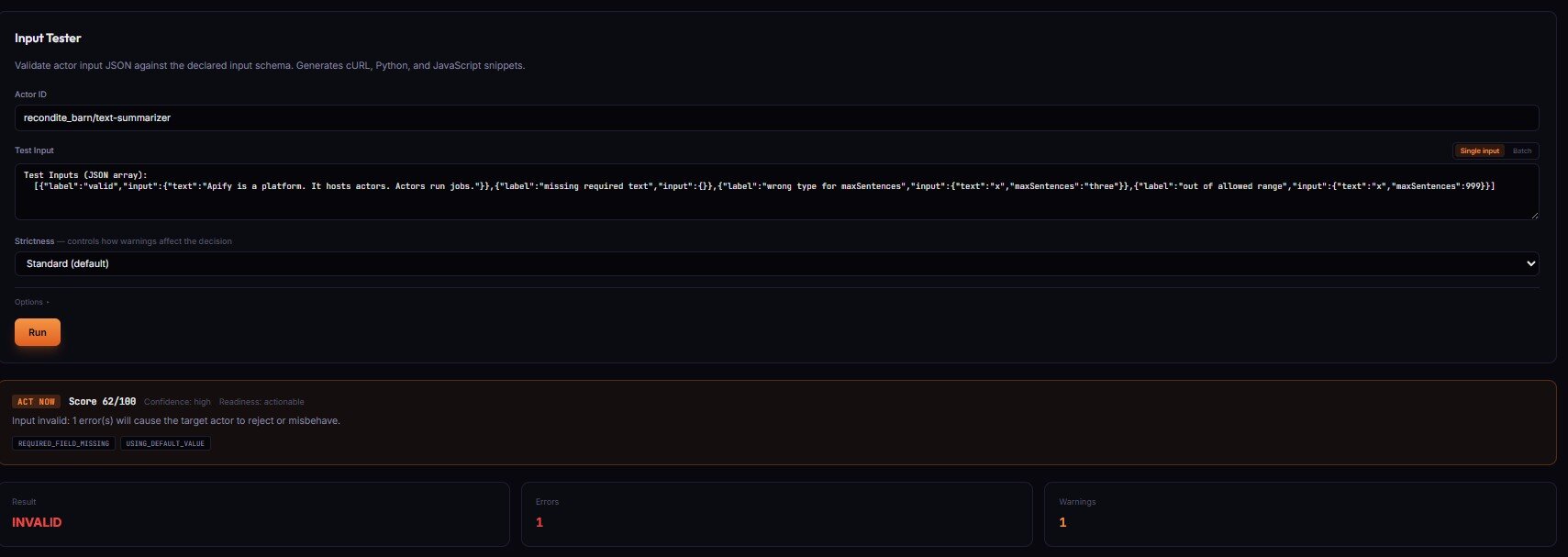
Apify silently drops unknown fields — your run "succeeds" but the actor behaves differently than expected because the extra fields never reached the actor's code. The most common cause of "runs succeed but produce wrong results," and invisible without preflight validation.
When something is wrong, Input Guard returns decision: act_now with verdictReasonCodes, evidence[], and recommendedFixes[]. Safe fixes (integer coercion, boolean string parsing, case-insensitive enum mismatch) are pre-applied in patchedInputPreview — use that directly, the high-confidence gate has already been enforced.
Price: $0.15 per validation. No charge when the target actor has no declared schema.
→ Try Input Guard on your actor
Stage 2 — Pipeline Preflight (pre-chain)
Pipeline Preflight treats each actor as a typed function: input schema is the argument list, dataset schema is the return type, fieldMapping is the argument binding. It type-checks every stage transition in a multi-actor pipeline and returns one of ship_pipeline / canary_recommended / monitor_only / no_call — plus a complete TypeScript orchestration script you can paste into your own actor.
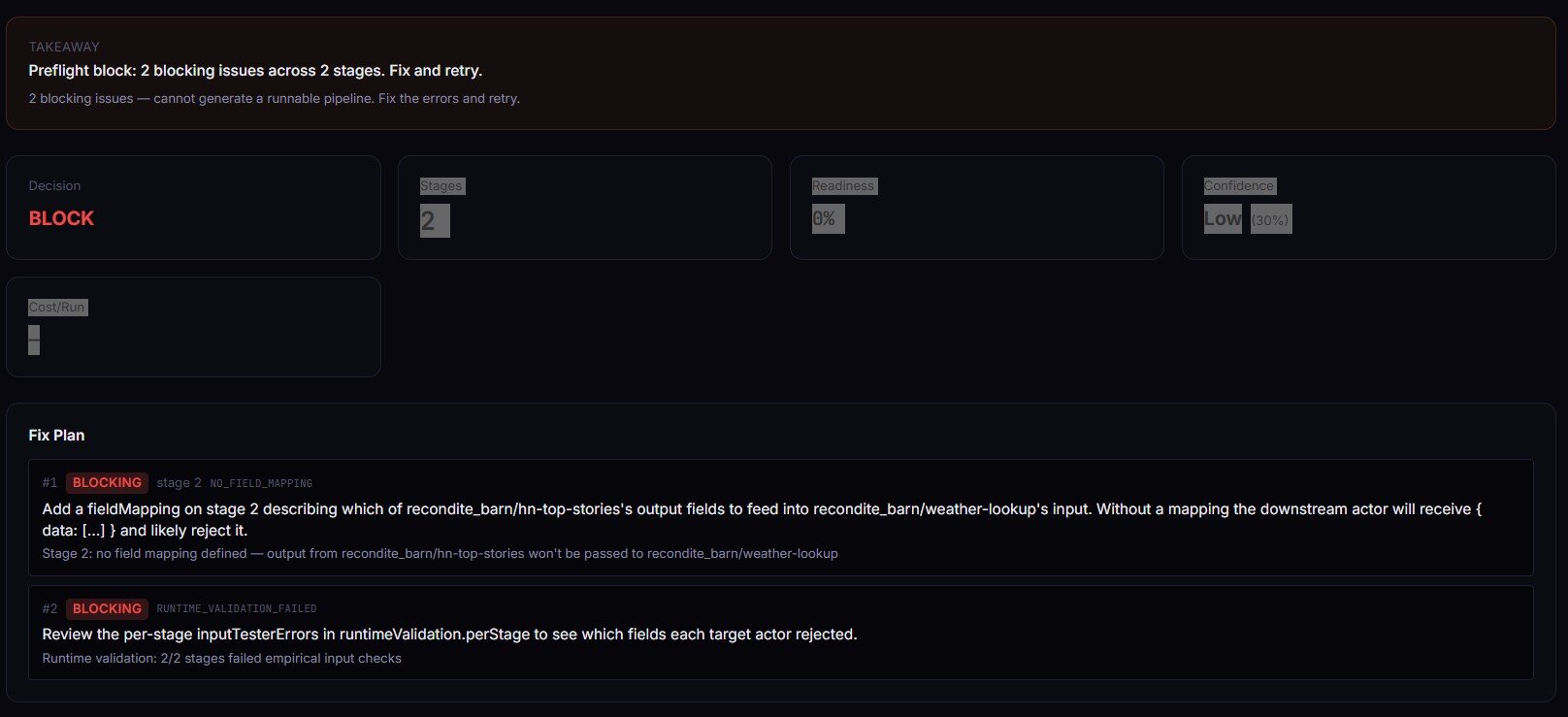
The most common pipeline failure is NO_FIELD_MAPPING — a non-first stage with no mapping defined, which means the downstream actor receives { data: [...] } instead of its declared input shape. Preflight catches that at design time in seconds instead of 4 minutes into the run. Set validateRuntime: true and it calls Input Guard on each stage with synthesized inputs — schemas line up on paper AND empirical input contracts hold.
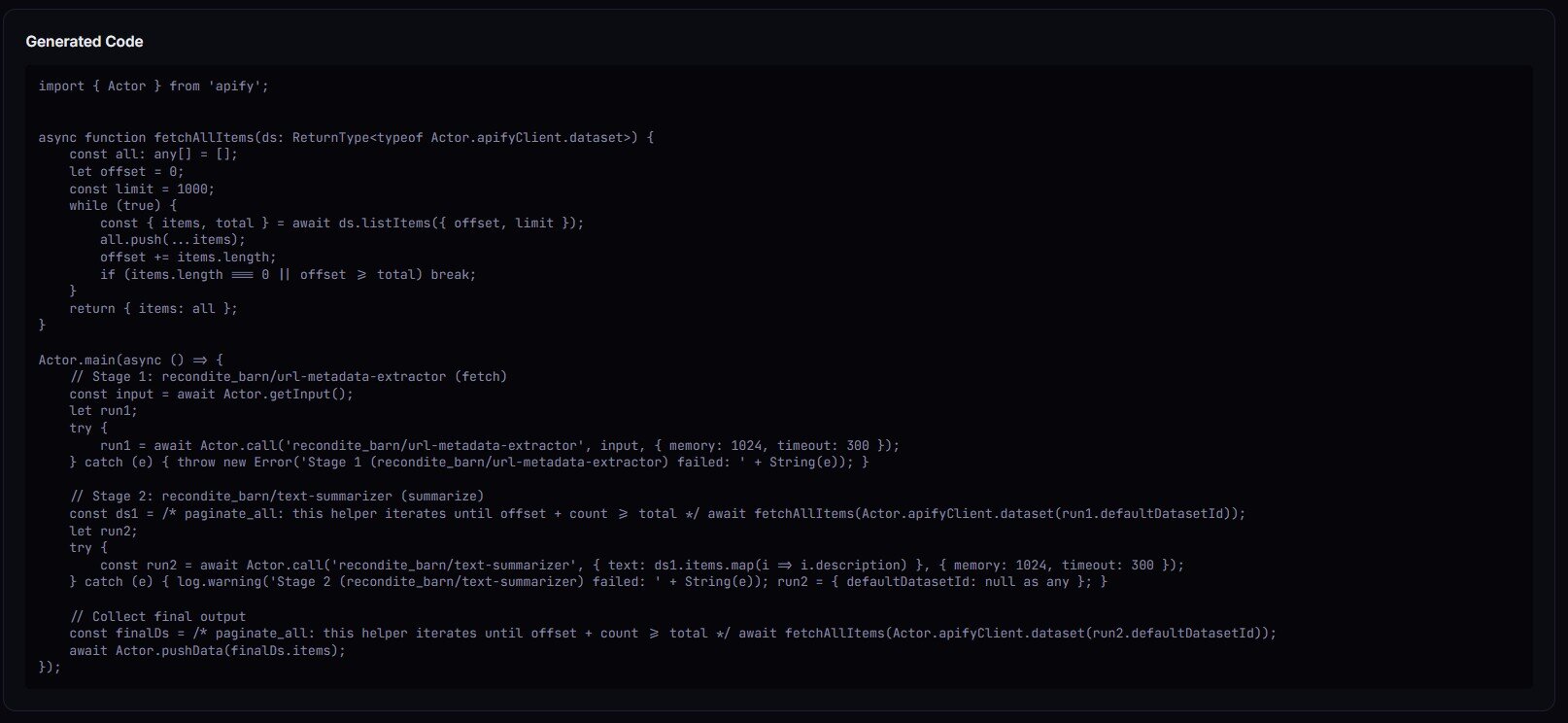
When the verdict is ship_pipeline or canary_recommended, you get the full TypeScript orchestrator in generatedCode — Actor.main(), Actor.call() per stage, dataset paging, field-mapping projections.
Price: $0.40 per pipeline build event.
→ Try Pipeline Preflight on your chain
Stage 3 — Deploy Guard (pre-release)
Deploy Guard runs an automated test suite against an actor build and returns a release decision. Same decision enum. With enableBaseline: true it stores per-field baselines, detects drift, tracks flakiness, and graduates from cold-start to mature confidence over 5+ runs.
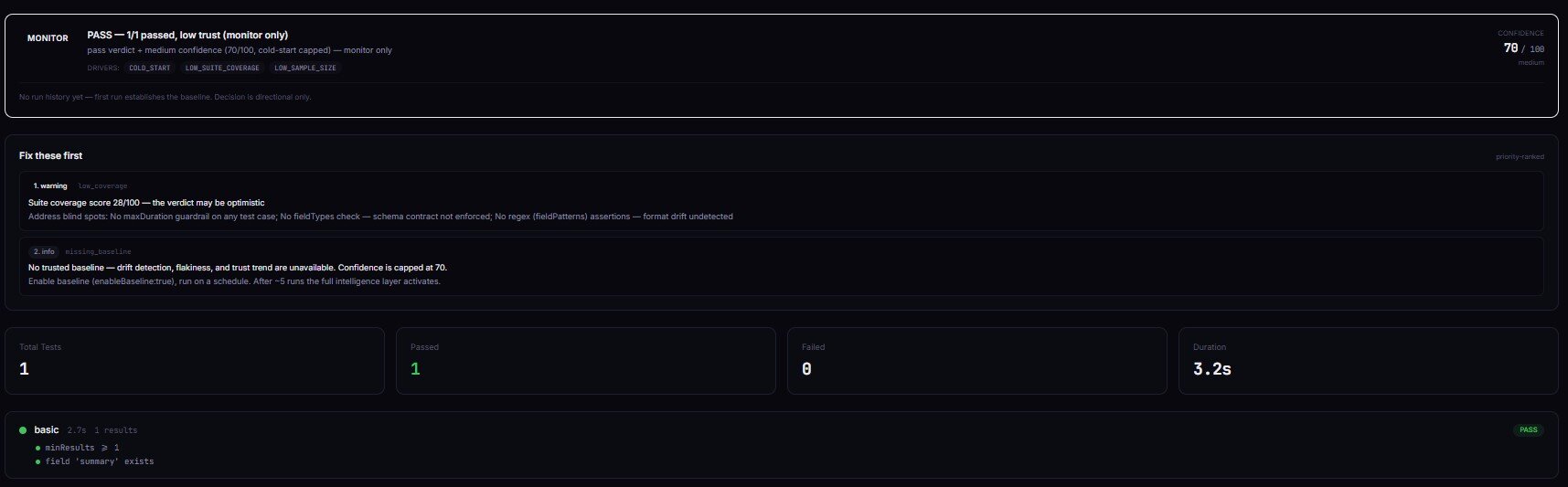
The cold-start guarantee is key: without a trusted baseline, decision is never act_now. Confidence is capped at 70. The first run establishes the baseline; runs 2 onward can graduate to a deploy-ready verdict. GitHub Actions integration is two lines of jq — parse decision, exit non-zero unless it's act_now + status: pass. Deploy Guard also writes a GITHUB_SUMMARY Markdown record ready to drop into $GITHUB_STEP_SUMMARY.
Price: $0.35 per test suite run. Target actor compute charges separately.
→ Try Deploy Guard on your build
Stage 4 — Output Guard (post-run)
Apify tells you if a run crashed. It does not tell you if the data is wrong. That's the gap Output Guard closes.
Output Guard catches the silent failures the rest of the lifecycle can't see. Apify says SUCCEEDED. Dataset has rows. No exception thrown. But a critical field is 60% null, another field silently turned from string into an array, and item count dropped 47% vs yesterday. Run-level monitoring can't see any of that.
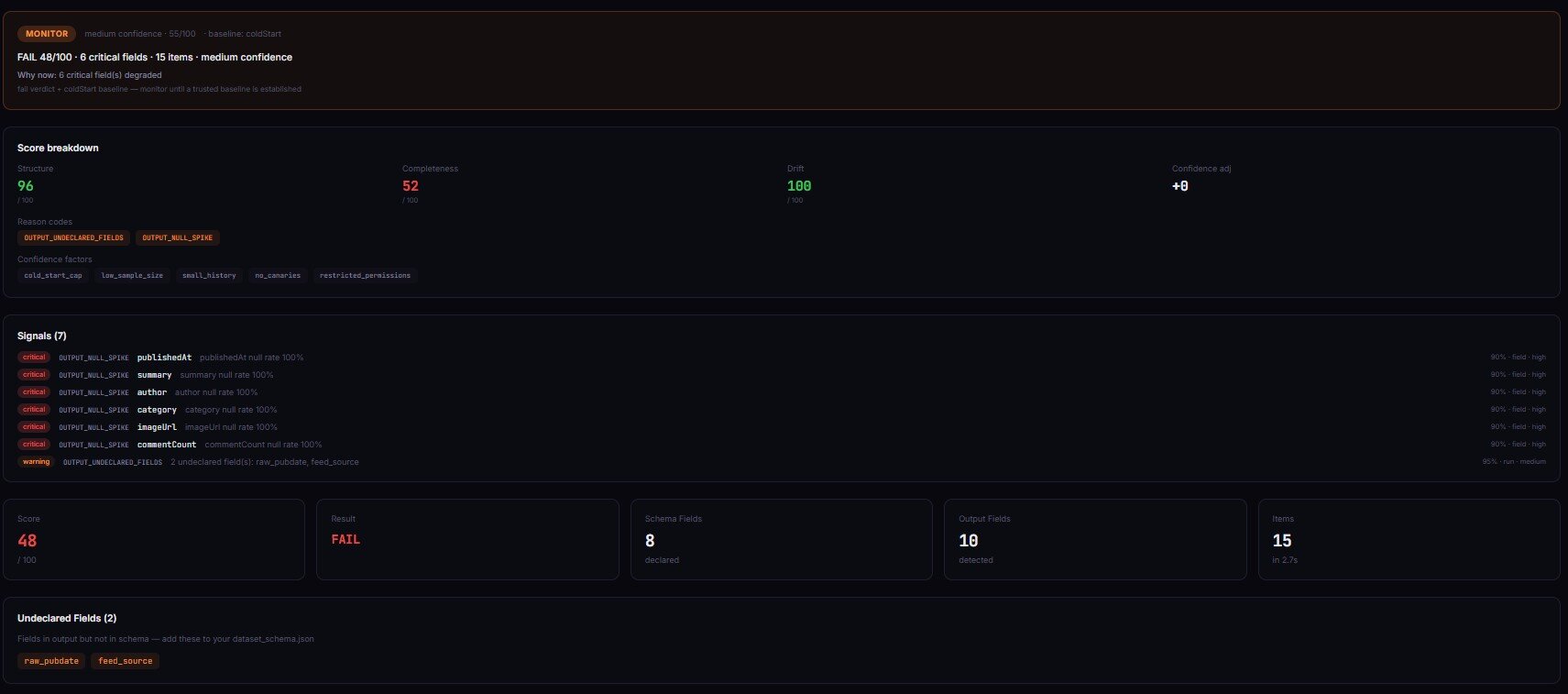
Output Guard samples the dataset after the target actor completes, validates against the declared schema, compares against rolling baselines, and emits a structured incident with failure-mode classification (selector_break / upstream_structure_change / pagination_failure / partial_extraction / schema_drift), confidence score, evidence, and counter-evidence. Six baseline strategies cover everything from "previous run" to "weekday-seasonal rolling median" so cyclical patterns don't trigger false alarms.
Price: $4.00 per validation check. Designed for production-critical pipelines where one silent failure corrupts thousands of downstream records — a single caught regression typically pays for months of monitoring.
If you've ever had a scheduled run "succeed" while the data went quietly wrong, this is the actor that catches it.
→ Try Output Guard on your last run
Stage 5 — Quality Monitor (fleet metadata)
Quality Monitor audits every actor in your account against an 8-dimension weighted rubric — reliability, documentation, pricing, schema, SEO, trustworthiness, ease of use, agentic readiness. Returns a 0–100 score, letter grade, four readiness gates (storeReady / agentReady / monetizationReady / schemaReady), and the centerpiece: an ordered fixSequence[] with expected point lift per step.
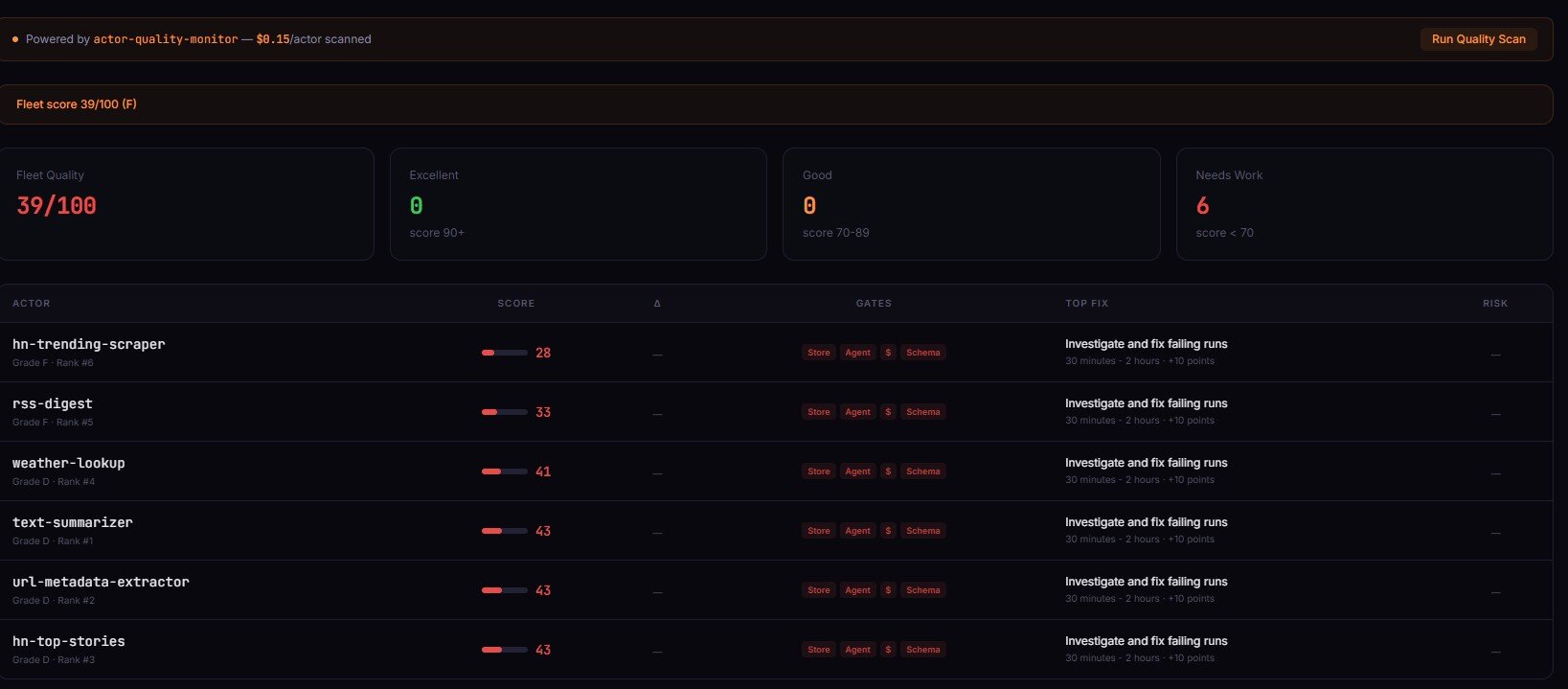
The fix sequence is what makes this useful. Instead of "your actor scored 42/100, good luck," you get: "step 1 — configure PPE pricing (+15 points, ~10 min). Step 2 — add dataset schema (+10 points, ~15 min). Step 3 — expand README to 300+ words (+12 points, ~30 min)." Apply 3 of those and most actors graduate from D to B in an afternoon.
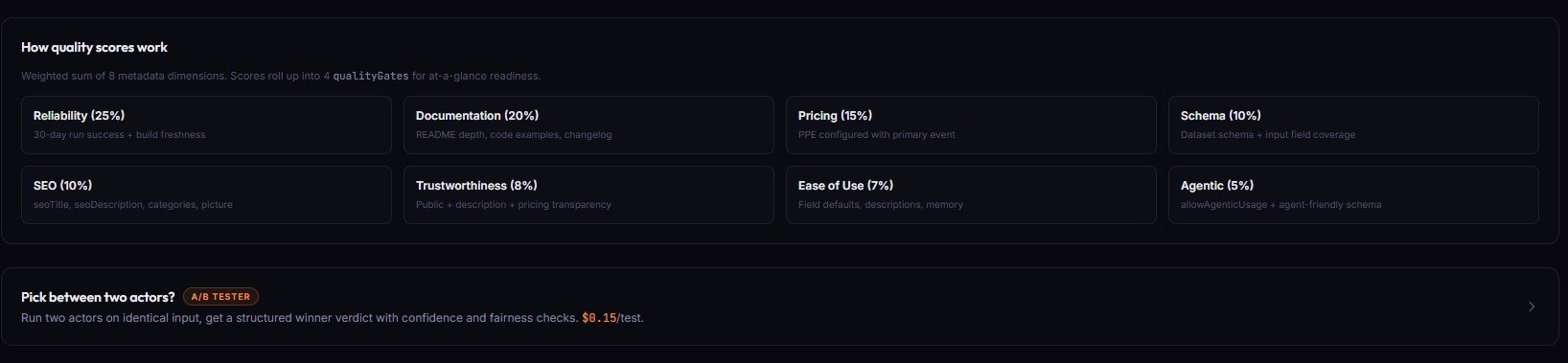
It runs against metadata Apify already exposes through /v2/acts/{id}. No source code analysis, no runtime testing — pure metadata audit. Schedule it weekly with alertWebhookUrl set, and threshold-crossing alerts only fire when an actor's state actually changed since the last scan.
Price: $0.15 per actor audited. A 50-actor fleet costs $7.50 per scan.
→ Try Quality Monitor on your fleet
Stage 6 — Actor Risk Triage (pre-publish)
Actor Risk Triage scans an actor's metadata — name, description, categories, input/dataset schemas, README — for compliance and operational risk signals. PII keyword density, restricted-platform references, authentication-wall patterns, GDPR/CCPA/CFAA exposure, weak documentation.
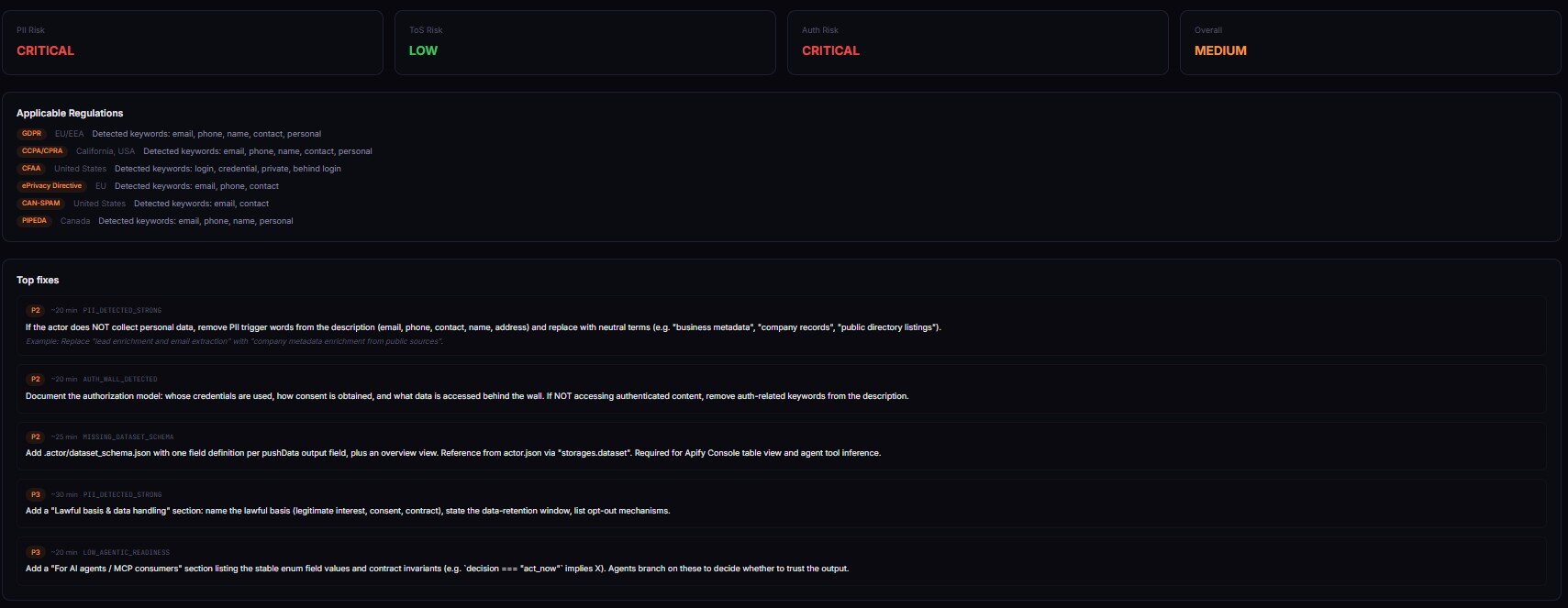
A 10-dimension weighted rubric → one decision enum plus reviewPriority (p0–p3), riskPosture (pii-heavy / tos-heavy / auth-heavy / documentation-heavy / balanced), and structured evidence[] + counterEvidence[]. The classifier ships its receipts. When something is wrong, you don't get vague "this looks risky" — you get concrete reason codes (PII_DETECTED_STRONG, HIGH_LITIGATION_PLATFORM, MISSING_DATASET_SCHEMA) and a remediation pack with paste-ready fixes. Every finding cites source field, matched text, severity tier, and a plain-English reason — the part legal teams actually use.
Price: typically under $2 per scan, depending on the rubric depth.
→ Try Actor Risk Triage on your actor
Stage 7 — Actor A/B Tester (between two candidates)
Actor A/B Tester compares two Apify actors on identical input across N runs and returns a production decision. switch_now (commit to the winner), canary_recommended (partial rollout), monitor_only (directional, don't switch), or no_call (insufficient evidence).
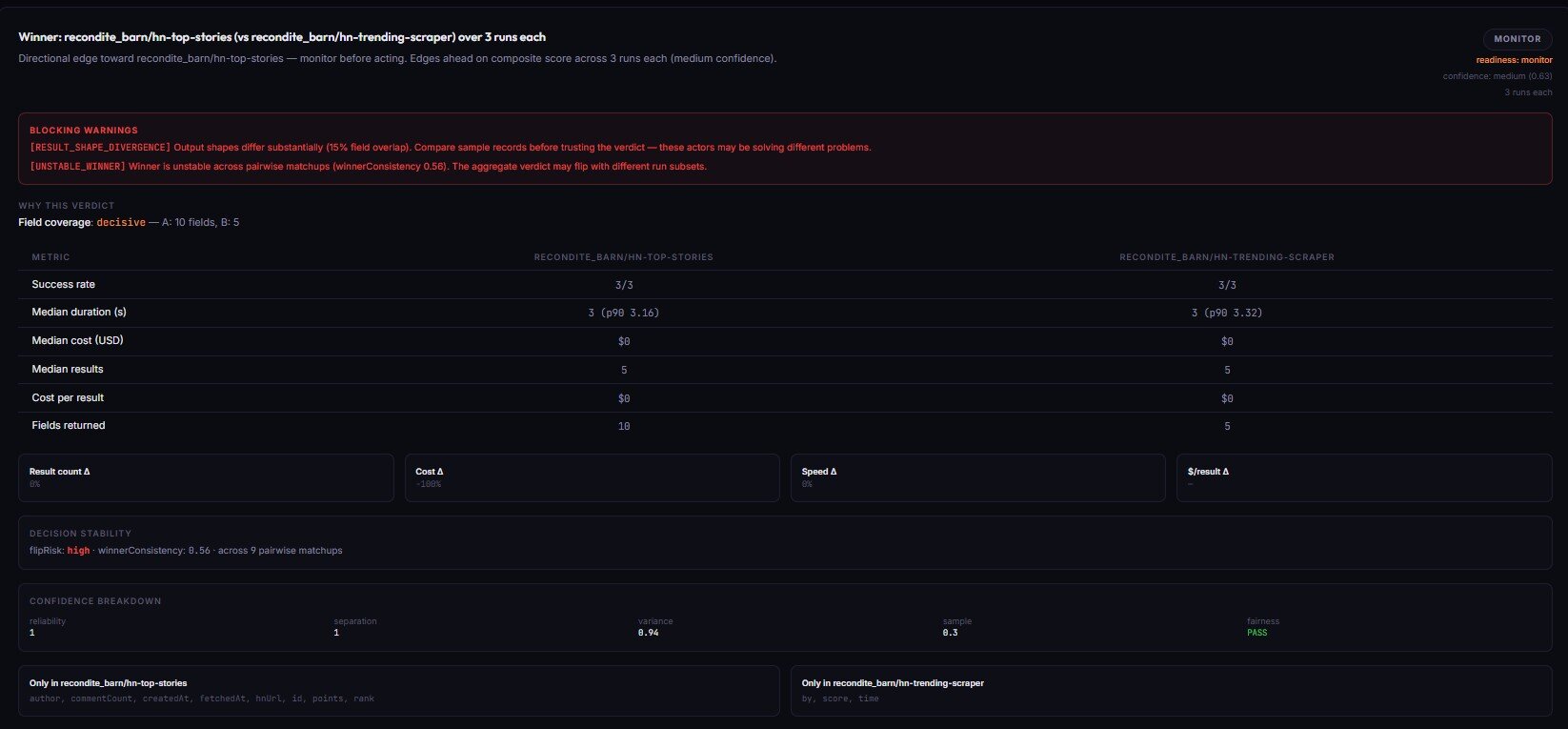
The fairness checks are what make this trustworthy. Both actors get the same testInput, same memory, same timeout, parallel launch within a 10-second window. If fairness fails, decisionReadiness cannot be actionable — the actor refuses to call a winner on a biased comparison. Single runs are also capped at monitor readiness; you cannot get a switch_now from one run each.
Price: ~$0.50 per pair-comparison event.
→ Try Actor A/B Tester on two candidates
Stage 8 — Fleet Health Report (portfolio decision engine)
Fleet Health Report is the orchestrator. It scans every actor in your account, optionally fans out to the 7 specialists above in parallel (includeSpecialistReports: true), and synthesizes everything into one nextBestAction field — the single highest-impact thing to do right now, with estimated monthly revenue, step-by-step fix instructions, and a calibrated confidence band.
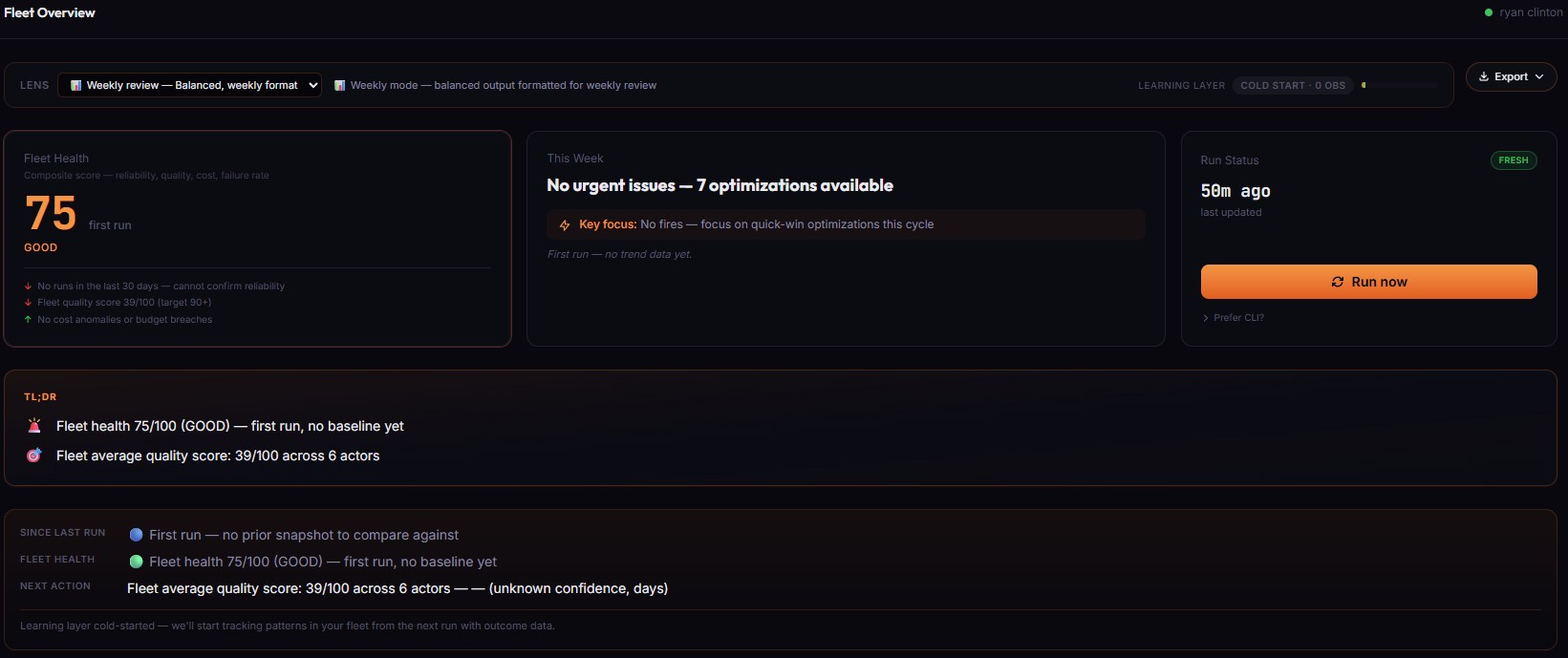
This isn't a dashboard. Dashboards give you metrics and leave you to interpret them. This gives you one decision per morning. Open the run, read nextBestAction, follow howToFix[], close the loop. It also tracks whether previous decisions actually worked — outcomeTracking.summary.headline reads like "Your actions since last run delivered $420 (79% of 4 tracked items hit expected impact)." The calibration layer learns which action types are reliable in your fleet and weights future recommendations accordingly.
Price: depends on specialists orchestrated, typically $5–$30 per portfolio scan.
→ Try Fleet Health Report on your account
What are the alternatives to the lifecycle suite?
Four real alternatives. None bad — different tradeoffs.
| Approach | Setup | Cost | Output shape | Coverage | Maintenance |
|---|---|---|---|---|---|
| The 8-actor lifecycle suite | Minutes per stage | PPE per call ($0.15–$4.00) | Stable decision enum per stage | Full lifecycle | Zero — actors versioned with additive enums |
| Build it yourself in TypeScript | Weeks to months | Engineering time + maintenance | Whatever you design | Whatever you cover | High — schemas drift, edge cases multiply |
| Data-quality tools (Great Expectations, Soda, Monte Carlo) | Days | Subscription + warehouse cost | SQL assertion results | Warehouse layer only | Medium |
| Apify's native default-input test | Zero | Free | Binary UNDER_MAINTENANCE flag | Only crashes on {} | None |
| Manual review + ad-hoc scripts | Hours per actor | Engineer time | Whatever was Slacked Tuesday | Whatever someone remembered | Reactive — fixes after incidents |
The right choice depends on your fleet size, revenue exposure, and engineering time. The lifecycle suite is one of the best fits when you operate 5+ actors, at least one generates real revenue, and you've already had an incident where Apify said SUCCEEDED and the data was wrong.
Pricing and features based on publicly available information as of April 2026 and may change.
Best practices for running the lifecycle
- Branch on the decision enum, never on prose.
decisionReason,summary,oneLine— those are illustrative copy for humans. The format is not stable. The enum is. - Wire the lifecycle into CI in stages. Don't gate every PR on all 8 actors at once. Start with Input Guard. Add Deploy Guard when you have a build cadence. Add Output Guard when you have a scheduled actor in production.
- Schedule the post-run actors weekly minimum. Output Guard, Quality Monitor, and Fleet Health Report all get more useful with run history.
- Use
enableBaseline: trueon Deploy Guard from day one. Without it, drift detection, flakiness tracking, and trust-trend signals are dark. - Read
fixSequence[]top-to-bottom. Every fix is sorted by severity × effort × expected lift — the actor has already done the math. - Treat threshold alerts as the only signal that matters. Quality Monitor and Output Guard fire on crossings (state change), not on static below-threshold state.
- Acknowledge actions in Fleet Health Report between runs. Pass
acknowledgements[]so the calibration layer learns which recommendations you executed. - Scope your tokens. Restricted-permission tokens still work — they just lose persistent baseline tracking.
Common mistakes
- Treating
SUCCEEDEDas proof of correct data. Run-level monitoring only tells you the actor exited cleanly — nothing about whether the dataset is correct, complete, or structurally consistent. That's the gap Output Guard fills. - Single-run A/B comparisons. A/B Tester caps
runsPerActor: 1atmonitorreadiness — single runs have too much variance. Use 5+ runs per side forswitch_now. - Skipping baseline runs. Deploy Guard's first run is always
monitor(cold-start cap). Run it twice on a known-good build before gating CI on it. - Parsing
fleetSignals[]detailstrings. Thedetailfield is for human display only. Branch oncode+delta. - Running Output Guard once and calling it done. Drift detection requires 2+ runs. Rolling-median strategies need 7+. The actor is built for scheduled monitoring, not one-off checks.
Mini case study — silent null spike on a contact actor
One of my contact-extraction actors started returning email null at 61% one Tuesday morning. Apify status: SUCCEEDED. Dataset: full of rows. Daily run finished in normal time, no errors logged. Downstream CRM received leads with no email for ~14 hours before anyone noticed. Before this, I had no way to detect it.
After I built Output Guard and pointed it at the same actor on a daily schedule, the next time this happened it took 18 minutes from the bad run completing to a decision: act_now alert hitting Slack. Specific signal: OUTPUT_NULL_SPIKE on email, null rate 61% vs baseline 8%, failure mode selector_break (confidence 0.85), affected fields list, recommended fix.
Catching it in 18 minutes vs 14 hours meant ~99% less downstream contamination. The daily monitor cost $4 that day; the bad data would have cost a multi-day CRM cleanup. (Observed in my fleet, March 2026, n=1 incident — single-incident sample, representative of the failure mode.)
Implementation checklist
- Pick one actor in your fleet that generates revenue. Don't start fleet-wide — start with one actor that matters.
- Run Input Guard on the typical input shape. Confirm
decision: ignore. If not, fix the input. - Run Deploy Guard with
preset: canaryandenableBaseline: true. Twice. The second run graduates frommonitortoact_nowif the build is healthy. - Schedule Output Guard daily. Set
mode: monitor,baselineStrategy: rollingMedian7,alertWebhookUrlto Slack. - Run Quality Monitor across your fleet. Read
fixSequence[]for the lowest-scoring actor. Apply the top 3 fixes. Re-run. - Run Actor Risk Triage before any pre-publish push. Fix before publishing if
decision: act_now. - Wire Fleet Health Report into a weekly cron. Read
nextBestActionevery Monday — that's the morning ritual. - Add the lifecycle actors to your CI. Two lines of
jq, exit non-zero unlessdecision == "act_now"(Deploy Guard) ordecision == "ignore"(Input/Output Guard).
Limitations
- Metadata-driven for the configuration actors. Quality Monitor and Actor Risk Triage operate on metadata Apify exposes — they don't read source code, run tests, or evaluate runtime behavior.
- Cold-start on the baseline actors. Deploy Guard and Output Guard need run history. The first run always returns
monitor-tier verdicts. - PPE pricing on every call. $0.15–$4.00 per event depending on the tool. For high-frequency CI runs, set per-run spending limits.
- Restricted-permission tokens lose persistent baselines. Detection still runs; cross-run drift tracking is suspended until the token is upgraded.
- No multi-account portfolios. One Apify account per run. Multi-account audits require separate runs per token.
Key facts about the lifecycle suite
- 8 actors, one per lifecycle stage, all sharing the same decision-enum contract.
- Pricing $0.15 (Input Guard, Quality Monitor) to $4.00 (Output Guard) per event.
- Every actor is versioned with additive-only enum vocabularies — CI won't break on minor releases.
- Every stage writes to a shared key-value store (
aqp-{actorslug}) so downstream stages read upstream signals. - All 8 actors are MCP-compatible — agent tool-calls work without prose parsing.
- ApifyForge dashboards at apifyforge.com surface the same intelligence (read-only view) without requiring an Apify token.
Glossary
- Decision enum — Small fixed vocabulary (
act_now/monitor/ignoreorswitch_now/canary_recommended/monitor_only/no_call) that automation branches on. - Cold-start cap — Confidence ceiling (~70/100) when no trusted baseline exists. Prevents premature
act_nowverdicts. - Trusted baseline — Stored snapshot from a previous run used as the drift-detection comparison target.
- PPE (Pay-Per-Event) — Apify's per-event pricing model. Lifecycle actors charge per validation, not per minute of compute.
- AQP store —
aqp-{actorslug}— shared key-value store where lifecycle actors write cross-stage state. - Fairness check — A/B constraint (same input, memory, timeout; parallel launch within 10 seconds). Violations prevent an
actionableverdict.
Broader applicability — beyond Apify
These patterns apply beyond Apify to any function-calling platform that needs release confidence:
- Decision-enum-first APIs — returning a stable enum is a better contract for automation than a status code plus a reason string.
- Cold-start safety caps — every system that learns from history needs a confidence cap until the history is real.
- Pre-run, post-run, fleet-wide layering — three observation windows (one input, one run, all runs) that each need different tools. Don't conflate them.
- Threshold-crossing alerts vs. static state — alerting on state changes (not state) is what makes scheduled monitors livable.
- Classifier evidence + counter-evidence — a verdict that ships its receipts is more trustworthy than one that doesn't.
When you need this
Use the lifecycle suite if:
- You operate 5+ Apify actors, or one actor that generates real revenue.
- You've had at least one incident where Apify said
SUCCEEDEDand the data was wrong. - You ship actor builds on a cadence and want a deterministic CI gate.
- You publish actors to the Apify Store and need a pre-publish risk check.
- You're building MCP servers or agent integrations that call Apify actors.
- You manage a fleet and want one decision per morning, not 12 dashboards.
You probably don't need this if:
- You run one actor occasionally and failures cost you nothing.
- You're still in the "does this actor work at all" phase.
- Your actors are private, single-user, and have zero downstream consumers.
- You're building strictly experimental scrapes with no schedule.
Frequently asked questions
What happens if I only use one of the 8 actors?
Each actor is independently useful. Input Guard alone catches a large share of "my run failed silently" cases. Output Guard alone catches a large share of "my data is wrong but the run succeeded" cases. The lifecycle compounds via the shared AQP store, but you don't have to deploy all 8 to see value. Pick the stage that matches your most painful current incident type.
Do I need an Apify Pro account to use these?
No. The lifecycle actors run on any Apify account, including the free tier. They charge PPE on your account ($0.15–$4.00 per call depending on the tool). ApifyForge itself (the dashboard at apifyforge.com) is free — sign in with GitHub, connect a scoped Apify API token, run the actors from there. Or call them directly from the Apify Store.
How do I integrate the lifecycle into GitHub Actions?
Each actor exposes the standard Apify run-sync-get-dataset-items endpoint. Two lines of jq: parse the decision field, exit non-zero unless it matches your gate condition. Deploy Guard additionally writes a GITHUB_SUMMARY Markdown record ready to drop into $GITHUB_STEP_SUMMARY.
Can AI agents call these actors safely?
Yes — that's a primary use case. Every actor is MCP-compatible, returns flat typed JSON, and ships an agentContract (or equivalent) with stable recommendedAction enums agents can switch() on. The design constraint was specifically "an LLM should be able to call this and act on the result without parsing prose."
What if my actor has no declared schema?
Input Guard returns decision: monitor with decisionReadiness: insufficient-data and SCHEMA_MISSING in the reason codes — and doesn't charge a PPE event. Output Guard runs structural analysis but skips schema-specific checks. The right fix is to add a dataset schema — Quality Monitor will flag that as a top fix-sequence item anyway.
How is this different from Apify's built-in default-input test?
Apify's default-input test runs your actor with {} once a day and flips it to UNDER_MAINTENANCE after 3 consecutive failures. That's a single binary signal — no assertion detail, no drift, no confidence score, no CI hook. Deploy Guard runs full assertion suites against arbitrary inputs, compares against stored baselines, and emits routable decision tags. Default-input is the floor. The lifecycle is the gate.
Can I run this against actors I don't own?
For Input Guard, Pipeline Preflight, and A/B Tester — yes, as long as your token has read access. For Quality Monitor and Fleet Health Report — no, those run against GET /v2/acts?my=true which only returns your own actors.
Ryan Clinton publishes Apify actors as ryanclinton and builds developer tools at ApifyForge.
Last updated: April 2026
This guide focuses on Apify, but the same lifecycle patterns — pre-run input validation, multi-stage pipeline preflight, pre-deploy regression testing, post-run output validation, fleet-wide quality scoring, pre-publish risk triage, head-to-head comparison, and portfolio-level decision synthesis — apply broadly to any function-calling platform where automation needs to branch on stable verdicts instead of parsing prose.