Actor Pipeline Builder — Validate Multi-Actor Workflows is an Apify actor on ApifyForge. Validate multi-actor Apify pipelines before running them. Checks field mapping compatibility across stages, flags type mismatches, generates complete TypeScript Actor.call() orchestration code, and estimates total... It costs $0.40 per pipeline-build. Best for teams who need automated actor pipeline builder — validate multi-actor workflows data extraction and analysis. Not ideal for use cases requiring real-time streaming data or sub-second latency. Maintenance pulse: 90/100. Last verified March 27, 2026. Built by Ryan Clinton (ryanclinton on Apify).
Actor Pipeline Builder — Validate Multi-Actor Workflows
Actor Pipeline Builder — Validate Multi-Actor Workflows is an Apify actor available on ApifyForge at $0.40 per pipeline-build. Validate multi-actor Apify pipelines before running them. Checks field mapping compatibility across stages, flags type mismatches, generates complete TypeScript Actor.call() orchestration code, and estimates total pipeline cost. $0.40/build.
Best for teams who need automated actor pipeline builder — validate multi-actor workflows data extraction and analysis.
Not ideal for use cases requiring real-time streaming data or sub-second latency.
What to know
- Results depend on the availability and structure of upstream data sources.
- Large-scale runs may be subject to platform rate limits.
- Requires an Apify account — free tier available with limited monthly usage.
Maintenance Pulse
90/100Cost Estimate
How many results do you need?
Pricing
Pay Per Event model. You only pay for what you use.
| Event | Description | Price |
|---|---|---|
| pipeline-build | Pipeline validation and code generation | $0.40 |
Example: 100 events = $40.00 · 1,000 events = $400.00
Documentation
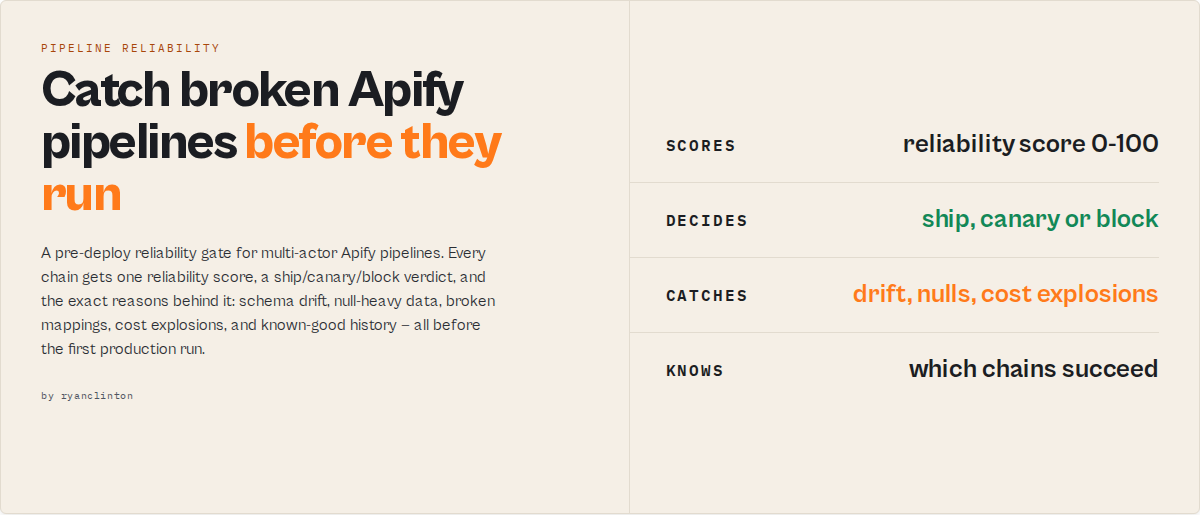
Compose multiple actors into one workflow, safely. Pipeline errors should be caught before execution, not after minutes of runtime. Invalid pipelines fail at runtime. Pipeline Preflight detects failures at definition time.
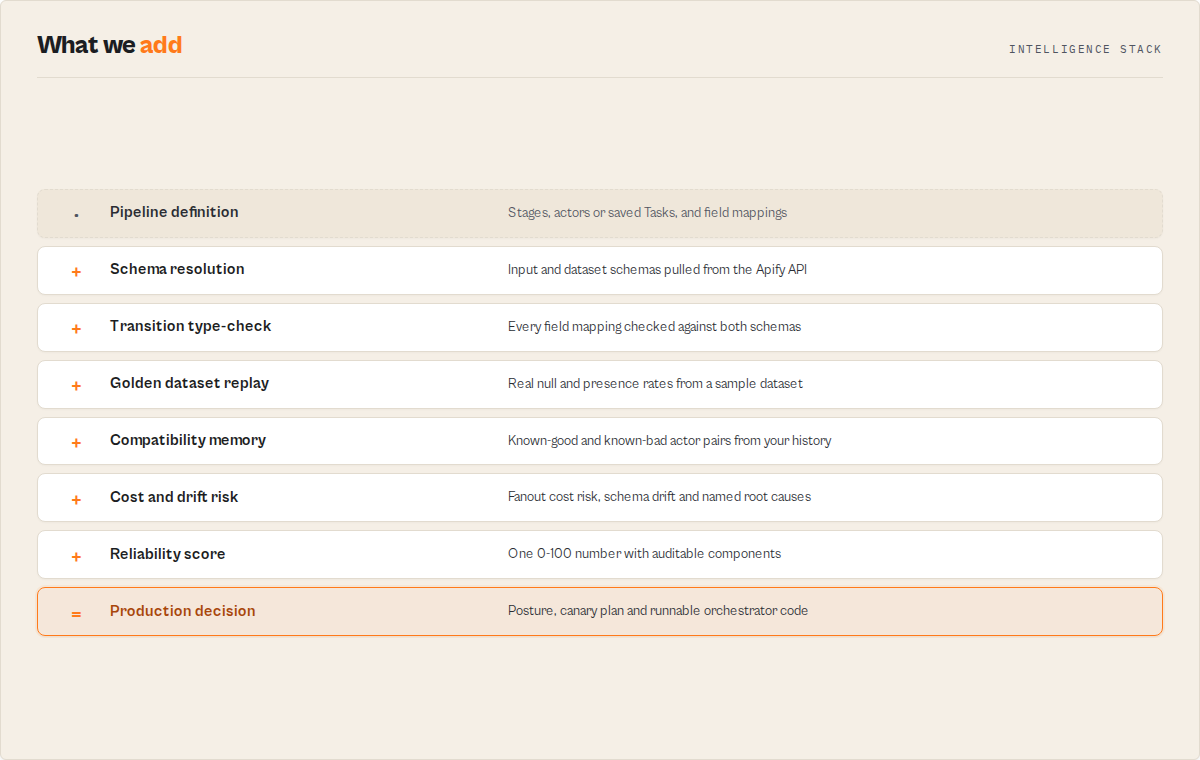
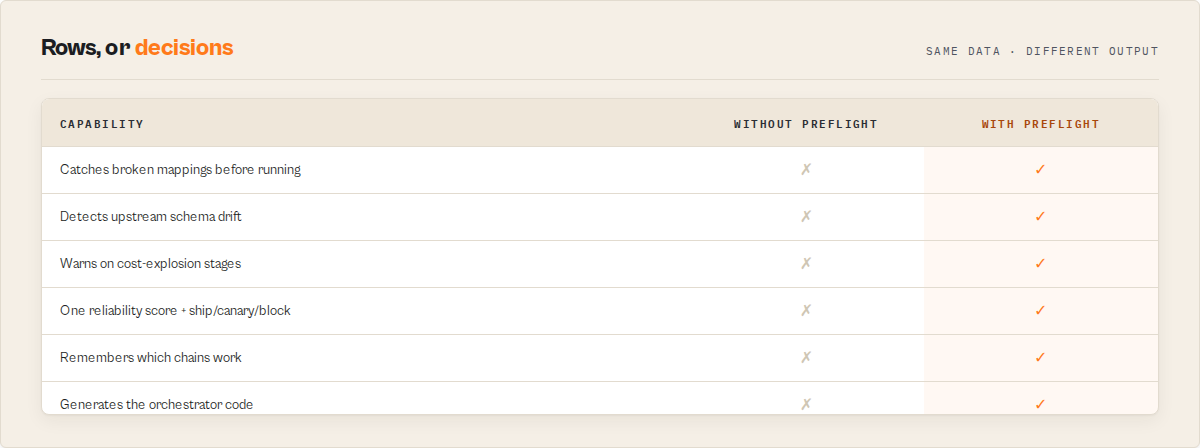
Pipeline Preflight validates multi-actor Apify pipelines before execution and returns a production decision — a single reliabilityScore (0-100), a routable decisionPosture, and the exact reasons behind both.
Detect — schema drift · broken field mappings · null-heavy data · saved-Task drift · cost explosions · unsafe generated code.
Track — historical validity · compatibility history · known pipeline patterns · which dependency changed.
Decide — one reliabilityScore (0-100) and one routable decisionPosture: ship · canary · monitor · block.
Why this exists
Most Apify pipelines fail after deployment — not because the actors are broken, but because actors that work individually often don't compose correctly together. A field is renamed upstream, a mapped field is always null in real data, a saved Task drifts, an actor changes its schema after you scheduled it. Each one passes a naive check and breaks in production. Pipeline Preflight exists to catch those failures before the first production run.
What Pipeline Preflight prevents
A pipeline that passes basic schema validation can still fail in production. Before anything runs, Pipeline Preflight catches:
- Broken field mappings — a stage reads a field the upstream actor doesn't emit.
- Upstream schema drift — an actor changed its schema after you scheduled the workflow.
- Null-heavy data — a mapped field exists in the schema but is empty in the real data.
- Saved-Task configuration drift — the scheduled config no longer matches what you validated.
- A downstream actor that no longer accepts the payload shape.
- Cost explosions — a per-record pay-per-event stage whose cost scales with upstream volume (validated pipeline, surprise bill).
- Unsafe generated orchestration code — no retry, pagination, or empty-input guard.
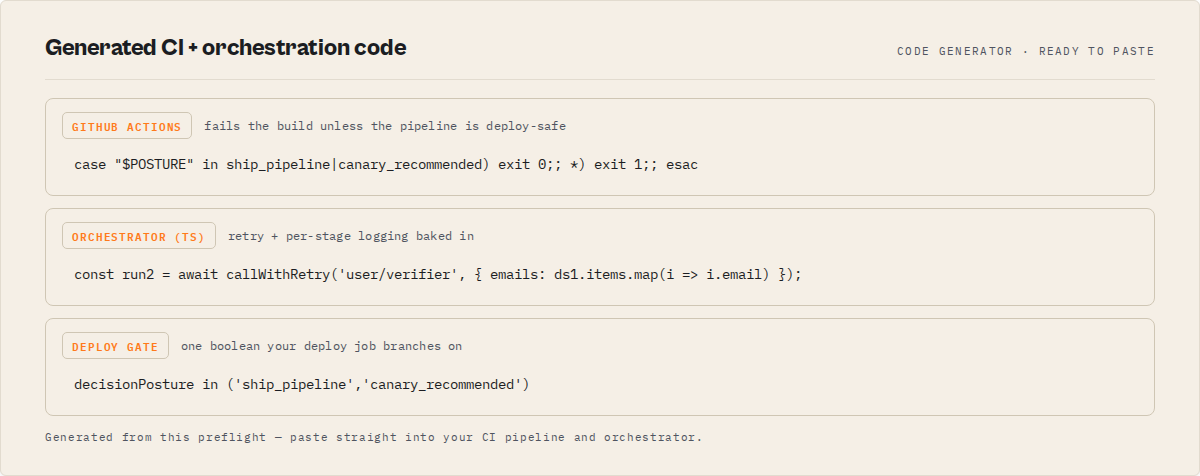
Use it as the CI gate between designing a pipeline and deploying it.
Example
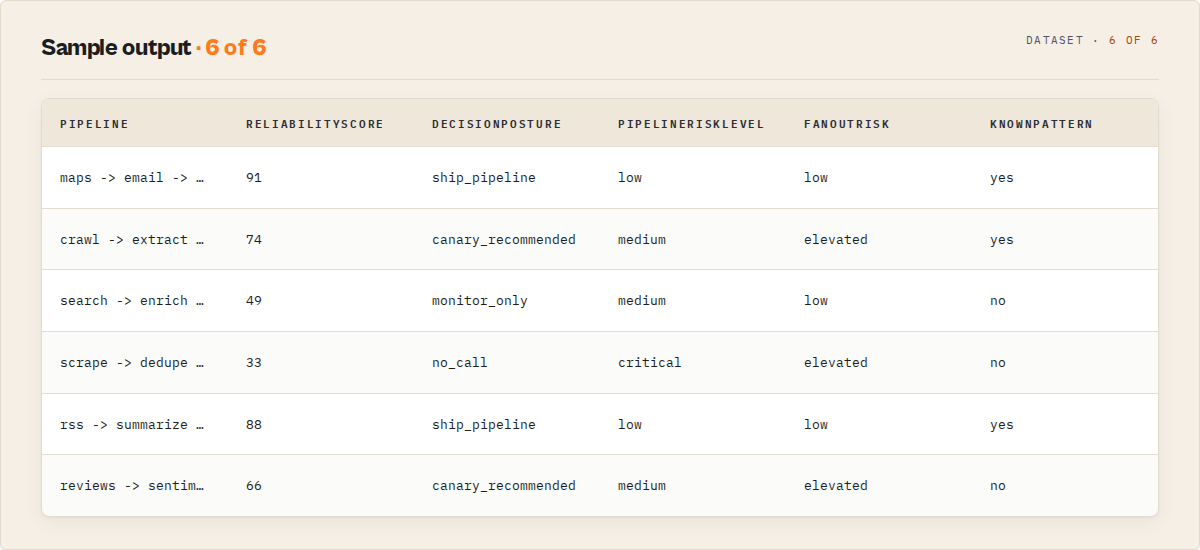
A three-stage lead pipeline — Maps Scraper → Email Finder → Email Verifier — preflighted in one call returns:
| Field | Value |
|---|---|
reliabilityScore | 91 (good) |
decisionPosture | ship_pipeline |
knownPattern | yes — seen 37×, 94% historically valid |
fanoutRisk | low |
pipelineRiskLevel | low |
One object tells you it's safe to deploy, that you've run this exact architecture before, and that it won't surprise you on cost.
Ready-to-run examples
One-click published tasks — each is a live preset you can run or fork:
- Validate an actor pipeline before you deploy it — preflight a chain and get the reliability score + ship/canary/block verdict.
- Find broken field mappings between actors — catch missing or wrong mappings with an ordered fix plan.
- Generate orchestrator code for a multi-actor pipeline — production-ready TypeScript with retries, logging and pagination.
- Pre-deploy CI gate for actor pipelines — exit code + GitHub Actions snippet + a deploy-safe boolean.
- Score the reliability of a multi-actor pipeline — the 0-100 reliability score with its risk and cost signals.
- Validate AI- or MCP-generated actor pipelines — give an agent-built chain a deterministic safe-to-deploy verdict.
- Validate a lead-generation actor pipeline — preflight a Maps-to-enrichment lead chain before you run it.
Pipeline memory — it learns your pipelines
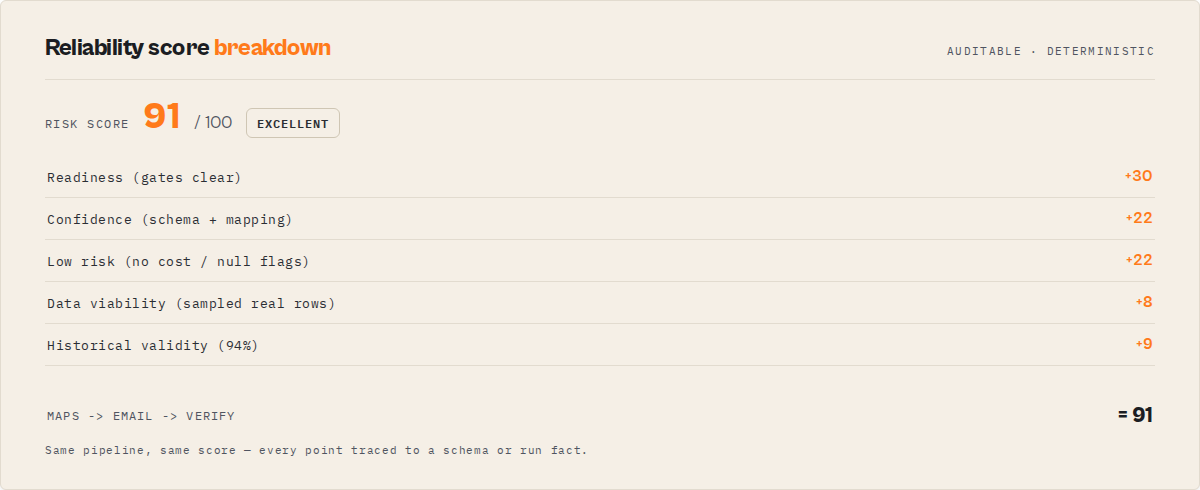
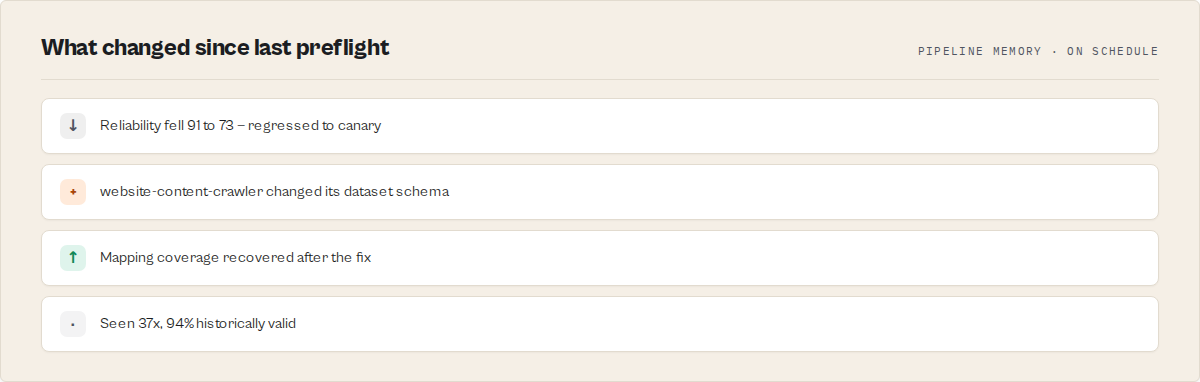
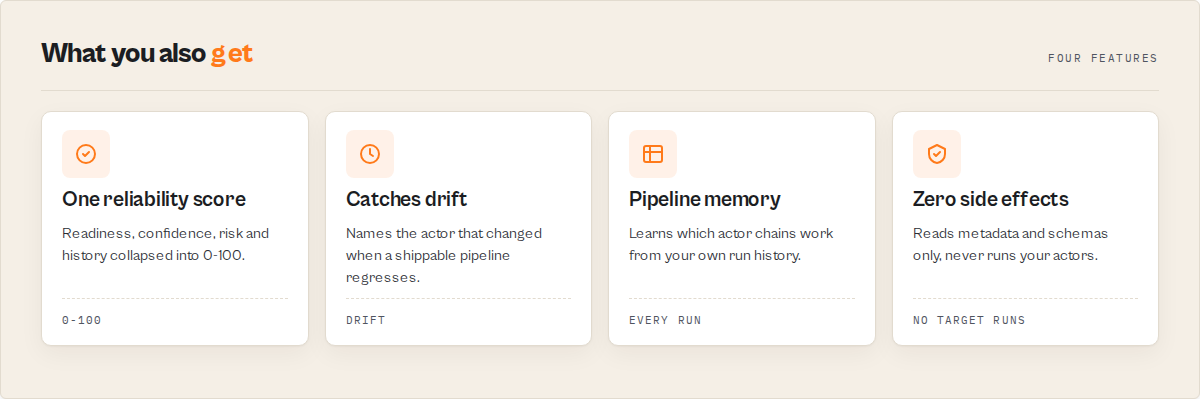
Run Pipeline Preflight on a schedule (trackChanges: true) and it accumulates intelligence about your pipelines, in your own account:
- Historical validity — every pipeline gets a
pipelineFingerprint; Preflight tracks how often that exact architecture has been seen and what share of runs were valid (knownPattern,validRate,commonFailureModes). - Drift detection —
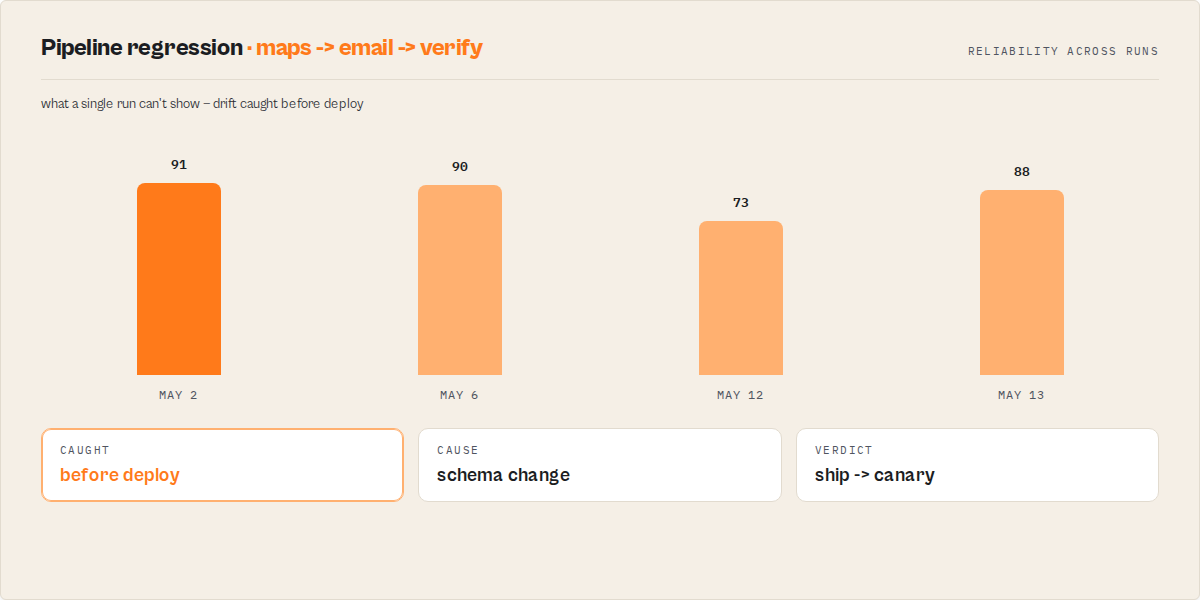
sinceLastPreflightflags when a previously-shippable pipeline regresses, andschemaChangedActorsnames which actor broke it, not just that it broke. - Compatibility memory — per actor-pair success history (
compatibilityConfidence,knownGoodMappingswith a per-mappingsuccessRate,knownBadMappings) that sharpens the mapping suggestions every run.
The longer you run it, the more it knows about which chains work — a corpus a fresh competitor can't backfill.
Contract
Pipeline Preflight checks that all stages in a pipeline compose correctly (input schemas, dataset schemas, field mappings, reachability) and returns a decision.
Use this actor when you need to verify that a pipeline is safe to run before executing it.
Execution pattern: define pipeline → run Pipeline Preflight → branch on decisionPosture → deploy or fix.
Guarantee: the pipeline is callable and stages compose correctly across inputs and outputs.
Output field: decisionPosture (routable control signal for automation)
This field determines what to do next.
ship_pipelinecanary_recommendedmonitor_onlyno_call
Always branch on decisionPosture. It is the only field you should use for control flow.
Do not branch on oneLine or decisionReason.
This actor does not run pipelines — it validates them before execution.
Flat rate: $0.40 per pipeline-build event. Platform compute (memory × runtime) billed separately by Apify.
No side effects. Pipeline Preflight reads Apify API metadata. It does not call, run, trigger, or schedule the target actors. Safe for CI, cron, and autonomous agents.
Mental model
Treat each actor as a function:
- input schema = function arguments
- dataset schema = return type
- fieldMapping = argument binding
Pipeline Preflight checks that the types line up across the chain. Pipeline Preflight ensures these functions compose correctly.
What it does
Core
- Type-checks stage transitions (input schema ↔ dataset schema ↔ field mapping)
- Resolves actor reachability via the Apify API (
/v2/acts/{id}/builds/default) - Produces a deterministic production decision:
ship_pipeline/canary_recommended/monitor_only/no_call
Additional
- Schema completeness scoring (per-stage + pipeline-wide; drives
SCHEMA_AGENTIC_COVERAGE_LOW) - Optional empirical input validation (
validateRuntime: true→ callsactor-input-testerper stage; no target actors run) - Ordered
fixPlan[]+ schema-basedmappingSuggestions[] - TypeScript orchestration codegen (
minimal/productionish/typed) withcodegenAssumptions[]andcodegenWarnings[] - Agent contract (
agentContract.safeToCall+ stablerecommendedActionenum) for MCP planners
Common causes of pipeline failure
Most multi-actor Apify pipelines break on cross-stage shape mismatches. Pipeline Preflight surfaces each as a stable verdictReasonCodes[] entry with a typed recommendation:
MAPPED_FIELD_NOT_IN_PREV_OUTPUT— mapping points at a field the upstream actor does not emit (per its declared dataset schema)TARGET_FIELD_NOT_IN_INPUT_SCHEMA— downstream actor's input schema does not declare the mapped fieldNO_FIELD_MAPPING— non-first stage has no mapping; downstream actor receives{ data: [...] }and rejectsDATASET_SCHEMA_MISSING— upstream declares no dataset schema; generated code cannot verify field namesACTOR_NOT_FOUND— slug wrong, actor private, or token lacks accessRUNTIME_VALIDATION_FAILED—validateRuntime: truecalledactor-input-testerand a stage rejected the synthesized inputSCHEMA_AGENTIC_COVERAGE_LOW— < 50% of resolved stages declare both input and dataset schemas
Full enum in Failure modes.
How is this different from Zapier or Make?
Pipeline Preflight does not execute workflows.
It validates that an Apify actor chain is callable and generates the orchestration code.
Zapier/Make run workflows. Pipeline Preflight verifies that your workflow definition is correct before you run it anywhere (Actor.call(), Apify scheduler, webhook, Zapier, Make, n8n, GitHub Actions, MCP agent).
What to do with decisionPosture
| Posture | What it means | What to do |
|---|---|---|
ship_pipeline | Valid, zero advisories, runtime-validated | Pipe generatedCode straight into your orchestrator — agentContract.safeToCall = true. |
canary_recommended | Valid, zero advisories, runtime not verified | Deploy behind a canary (one record through first), then promote. |
monitor_only | Valid, but schema advisories remain | Dry-run against a single record before scheduling. Treat as "will probably work, needs a human eyeball." |
no_call | Blocking issues present | Do NOT call. Work the fixPlan[] top-to-bottom, then re-preflight. |
Example decision flow
Input — 3-stage pipeline with a missing mapping on stage 2:
{
  "stages": [
    { "actorId": "apify/rag-web-browser" },
    { "actorId": "apify/website-content-crawler" },
    { "actorId": "ryanclinton/bulk-email-verifier",
      "fieldMapping": { "emails": "emailPattern" } }
  ]
}
Output (abridged):
{
  "decisionPosture": "no_call",
  "decisionReason": "1 blocking issue — cannot generate a runnable pipeline. Fix the errors and retry.",
  "readinessScore": 0,
  "verdictReasonCodes": ["NO_FIELD_MAPPING"],
  "fixPlan": [
    { "order": 1, "stage": 2, "severity": "blocking",
      "code": "NO_FIELD_MAPPING",
      "action": "Add a fieldMapping on stage 2 describing which of apify/rag-web-browser's output fields to feed into apify/website-content-crawler's input.",
      "why": "Stage 2: no field mapping defined — output from apify/rag-web-browser won't be passed to apify/website-content-crawler" }
  ],
  "agentContract": {
    "safeToCall": false,
    "recommendedAction": "ignore",
    "pipelineAction": "fix_mapping",
    "requiredFixes": [{ "stage": 2, "code": "NO_FIELD_MAPPING" }]
  }
}
Next step → fix the mapping → re-run Pipeline Preflight → decisionPosture flips to canary_recommended or ship_pipeline → deploy.
Decision contract
These are the always-true promises, enforced in code:
decisionPosture = ship_pipelineimplies:valid = true, zero blocking issues, zero advisory issues, runtime validation ran AND passed,decisionReadiness = actionable,readinessScore = 1.0,agentContract.safeToCall = true. Safe to pipe throughActor.call()in production.decisionPosture = canary_recommendedimplies:valid = true, zero blocking issues, zero advisory issues, runtime validation NOT run.readinessScorearound 0.85. Pipeline likely works but hasn't been empirically verified — wire it up behind a canary.decisionPosture = monitor_onlyimplies:valid = true, zero blocking issues, at least one advisory.readinessScorearound 0.6. Pipeline may run but schema advisories remain — dry-run before scheduling.decisionPosture = no_callimplies:valid = false, at least one blocking issue (ACTOR_NOT_FOUND,NO_FIELD_MAPPING, orRUNTIME_VALIDATION_FAILED),decisionReadiness = insufficient-data,readinessScore = 0,generatedCode = '',agentContract.safeToCall = false.readinessScoreandconfidenceScoreare independent. Readiness is "how close to safe execution" (gate-like). Confidence is "how much to trust the verdict" (driven by schema completeness and evidence). A pipeline can be 100% ready but 50% confident if the stages declare thin schemas.- Blocking vs advisory is stable. Automation should gate on
blockingonly (issues.filter(i => i.severity === 'blocking')).infois purely explanatory. verdictReasonCodesis additive-only within a major version — new codes may be added; existing codes will not be renamed or repurposed.confidencePolicyVersionis bumped whenever the confidence-scoring formula changes (component weights, harmonic base, bands). Scores are comparable only within the same policy version.- The actor never exits FAILED for user input errors. Every error branch (including
<2 stages, unreachable sub-actors, and catch-block errors) pushes a structured record to the dataset and exits SUCCEEDED — safe to schedule on a cron without tripping Apify's default-input auto-test.
Schema quality
Apify platform drives the Console run form, API validation, and MCP tool inference from input-schema metadata. Thin schemas aren't unusable but are effectively invisible to agent planners. schemaCompleteness grades each stage and the pipeline on good / partial / poor / missing, exposing fieldDescriptionCoverage, exampleCoverage, typedFieldCoverage, and agenticCoverage as 0–1 floats. SCHEMA_AGENTIC_COVERAGE_LOW fires below 0.5.
Automation contract
Three common consumers, three different fields to read:
| Consumer | Read this field | Why |
|---|---|---|
| Webhook / Zapier / Slack alerting | decisionPosture + oneLine | One scalar + one sentence. No prose parsing. |
| Dashboard / UI | decisionCards[] + confidenceLevel + costEstimate | Scannable cards + human-readable level + cost. |
| Agent tool call / LLM | issues[] + verdictReasonCodes | Structured evidence with recommendations, stable codes. |
Input contract
type Input = {
  stages: Array<{
    actorId: string;                        // 'username/actor-name'
    fieldMapping?: Record<string, string>;  // { downstreamInputField: upstreamOutputField }
    memory?: number;                        // MB, embedded in generatedCode
    timeout?: number;                       // seconds, embedded in generatedCode
    alias?: string;                         // optional human name in generatedCode comments
  }>;                                       // >= 2; required
  validateRuntime?: boolean;                // default false — empirical per-stage check via input-tester
  codegenMode?: 'minimal' | 'productionish' | 'typed';     // default 'minimal'
  paginationMode?: 'limit_1000' | 'paginate_all';          // default 'limit_1000'
  emitAgentContract?: boolean;              // default true
  emitSignals?: boolean;                    // default true
  suggestionMode?: 'schema_only' | 'off';   // default 'schema_only'
  strictness?: 'default' | 'strict' | 'lenient';           // default 'default'
};
Output contract
type Report = {
  recordType: 'report' | 'input-error' | 'error';
  oneLine: string;
  decisionPosture: 'ship_pipeline' | 'canary_recommended' | 'monitor_only' | 'no_call';
  decisionReason: string;
  decisionReadiness: 'actionable' | 'monitor' | 'insufficient-data';
  readinessScore: number;                   // 0..1, gate-like
  confidenceScore: number;                  // 0..1, harmonic mean of breakdown
  confidenceLevel: 'high' | 'medium' | 'low';
  confidencePolicyVersion: string;
  confidenceBreakdown: {
    resolutionCoverage: number;             // fraction of actors resolved
    mappingCoverage: number;                // fraction of transitions with mapping
    schemaCoverage: number;                 // fraction with both input + dataset schemas
    metadataCoverage: number;               // fraction of fields with title/desc/example
    runtimeBoost: number;                   // 1.0 if validateRuntime passed, else 0.5-0.6
  };
  confidencePenaltyReasons: string[];
  verdictReasonCodes: IssueCode[];          // see Failure modes
  decisionCards: Array<{                    // 2-3 cards: fix-this-first / watch-out / cost-heads-up
    kind: string; title: string; shortReason: string;
    recommendation: string | null; urgency: string; stage: number | null;
  }>;
  schemaCompleteness: {
    inputSchemaQuality: 'good' | 'partial' | 'poor' | 'missing';
    datasetSchemaQuality: 'good' | 'partial' | 'poor' | 'missing';
    outputSchemaPresent: boolean;
    fieldDescriptionCoverage: number;
    exampleCoverage: number;
    typedFieldCoverage: number;
    agenticCoverage: number;
  };
  stages: number;
  valid: boolean;
  errors: string[];                         // legacy mirror of blocking issues[].message
  warnings: string[];                       // legacy mirror of advisory issues[].message
  issues: Array<{
    severity: 'blocking' | 'advisory' | 'info';
    code: IssueCode;
    stage: number | null;                   // 1-based or null for pipeline-level
    message: string;
    recommendation: string | null;
    evidence?: Record<string, unknown>;
  }>;
  fixPlan: Array<{
    order: number; stage: number | null;
    severity: string; code: IssueCode;
    action: string; why: string;
  }>;
  mappingSuggestions?: Array<{
    stage: number; targetField: string; suggestedSourceField: string;
    basis: 'schema_name_match' | 'schema_metadata_match';
    confidence: number;                     // 0..1
  }>;
  stageDetails: Array<{
    stage: number; alias: string | null;
    actor: string; actorId: string;
    reachable: boolean; defaultBuildResolved: boolean;
    ppePrice: number; memory: number; timeout: number;
    inputFields: string[]; outputFields: string[];
    inputSchemaQuality: string; datasetSchemaQuality: string; outputSchemaPresent: boolean;
    fieldDescriptionCoverage: number; exampleCoverage: number;
    mappingStatus: 'ok' | 'partial' | 'broken' | 'not_applicable';
    stageSignals: IssueCode[];
  }>;
  generatedCode: string;                    // empty when decisionPosture = 'no_call'
  codegenMode: 'minimal' | 'productionish' | 'typed';
  codegenAssumptions: string[];
  codegenWarnings: string[];
  costEstimate: {
    perRun: number;                         // sum of sub-actor PPE
    monthly100: number;
    monthly1000: number;
    excludesPlatformCompute: true;
  } | null;
  runtimeValidation?: {                     // present when validateRuntime = true
    allStagesOk: boolean;
    stagesChecked: number; stagesPassed: number; stagesFailed: number;
    perStage: Array<{
      stage: number; inputTesterOk: boolean;
      inputTesterErrors: string[]; inputTesterWarnings: string[];
      durationSeconds: number;
    }>;
  };
  agentContract?: {                         // emitted when emitAgentContract = true (default)
    safeToCall: boolean;
    recommendedAction: 'act_now' | 'monitor' | 'ignore';  // universal suite field — same name + enum on every actor; mapped from decisionPosture (ship_pipeline=act_now, canary_recommended/monitor_only=monitor, no_call=ignore)
    pipelineAction: 'ship' | 'canary' | 'fix_mapping' | 'fix_schema' | 'do_not_call';  // pipeline-specific granular verb
    safeInvocationMode: 'production' | 'canary_only' | 'not_ready';
    expectedOutputHandle: 'defaultDataset';
    requiredFixes: Array<{ stage: number | null; code: IssueCode }>;
    toolHint: string;
    postRunGuardSuggestion: string | null;
  };
  signals?: IssueCode[];                    // emitted when emitSignals = true (default)
  evidenceCounts: {
    resolvedStages: number; totalStages: number;
    withInputSchema: number; withDatasetSchema: number;
    issuesBlocking: number; issuesAdvisory: number; issuesInfo: number;
    mappingSuggestionsEmitted: number;
  };
  builtAt: string;                          // ISO 8601
};
SUMMARY is mirrored to the key-value store under the SUMMARY key (decision scalars + schema completeness + cost).
Failure modes
Every issue carries a stable code (member of IssueCode) and a severity. Codes are additive-only within a major version; confidencePolicyVersion bumps when the scoring formula changes.
| code | severity | fires when |
|---|---|---|
ACTOR_NOT_FOUND | blocking | /v2/acts/{id} returns non-2xx under the caller's token |
NO_FIELD_MAPPING | blocking | non-first stage has fieldMapping = {} or absent |
RUNTIME_VALIDATION_FAILED | blocking | validateRuntime=true and ≥1 stage's inputTesterOk = false |
MAPPED_FIELD_NOT_IN_PREV_OUTPUT | advisory | mapping source field absent from upstream's declared dataset schema (only when schema is declared) |
TARGET_FIELD_NOT_IN_INPUT_SCHEMA | advisory | mapping target field absent from downstream's declared input schema |
FIRST_STAGE_HAS_MAPPING | advisory | stage 1 has a fieldMapping (meaningless — no upstream) |
DUPLICATE_ACTOR_IN_PIPELINE | advisory | same actorId appears in two or more stages |
PIPELINE_VERY_LARGE | advisory | stages.length > 20 |
INPUT_SCHEMA_THIN | advisory | stage resolves but declares no input-schema properties |
DATASET_SCHEMA_MISSING | advisory | stage declares no actorDefinition.storages.dataset.fields |
SCHEMA_AGENTIC_COVERAGE_LOW | advisory | pipeline-wide agenticCoverage < 0.5 |
RUNTIME_VALIDATION_UNAVAILABLE | advisory | validateRuntime=true and input-tester failed to complete |
OUTPUT_SCHEMA_MISSING | info | stage declares no explicit output schema |
FIELD_METADATA_THIN | info | input-schema fields have < 50% title/description coverage (suppressed in strictness=lenient) |
Error-branch records carry recordType: 'input-error' (fewer than 2 stages) or recordType: 'error' (catch-block) with message, recommendation, and timestamp. The actor never exits FAILED.
For AI agents
Pipeline Preflight is compatible with the Apify MCP server. Outputs are flat typed JSON; agentContract.recommendedAction is a stable enum consumers switch() on. Typical flow: propose {stages: [...]} → call Pipeline Preflight → branch on decisionPosture / agentContract.recommendedAction; if no_call, iterate requiredFixes[] and retry.
CI
- Fail:
decisionPosture === 'no_call' - Canary:
decisionPosture ∈ {'ship_pipeline', 'canary_recommended'} - Promote:
decisionPosture === 'ship_pipeline' && decisionReadiness === 'actionable'
Usage
Pass a stages array. Each stage must have actorId; non-first stages must have fieldMapping. 3-stage validation completes in ~30s and charges the flat $0.40 event price. generatedCode is the orchestrator — paste into your own actor or orchestration script.
Input parameters (reference)
| Parameter | Type | Required | Default | Description |
|---|---|---|---|---|
stages | array | Yes | (prefill example) | Array of pipeline stage objects, max 50. Minimum 2 stages required. Each object: actorId (string, required), fieldMapping (object, optional), memory (number MB, optional), timeout (number seconds, optional). |
validateRuntime | boolean | No | false | v3. When true, also call actor-input-tester on each stage with a synthetic input built from the field mapping, verifying the target actors' real input schemas would accept what the pipeline would send them. No actors are actually run -- input-tester only validates shapes. Transforms Pipeline Preflight from "schemas line up on paper" to "schemas line up AND empirical input contracts hold". |
trackChanges | boolean | No | false | Persist this pipeline's verdict to a named key-value store keyed on a signature of its stages + field mappings, and on the next run of the same pipeline emit a sinceLastPreflight block: whether decisionPosture improved or regressed, confidence and schema-coverage deltas, which verdict codes are new vs resolved, and which actors changed schema. Built for CI/cron — catches a pipeline silently degrading (e.g. an upstream actor dropped its dataset schema) between scheduled runs. First run is a baseline; no cross-run state is stored unless enabled. Also builds compatibility memory (per actor-pair success history that sharpens mapping suggestions over time). |
sampleDatasetId | string | No | — | Golden-dataset replay: ID of an existing dataset of representative upstream output. Preflight reads up to sampleSize rows (no actors run) and reports presence/null rates for every field your mappings read. Emits dataViability. Catches "the mapping points at email but it's null in 95% of real rows". |
sampleSize | integer | No | 10 | Rows to read from sampleDatasetId for the viability check (1–100). |
pipelineName | string | No | — | Optional human label surfaced in logs. Does not change the drift-tracking signature. |
Stage object format
Each entry in the stages array follows this structure:
| Field | Type | Required | Description |
|---|---|---|---|
actorId | string | Yes* | Full actor identifier, e.g. ryanclinton/google-maps-email-extractor. *Provide actorId OR taskId. |
taskId | string | Yes* | Saved Apify Task identifier, e.g. ryanclinton/my-maps-task. Resolved to its underlying actor + saved input, so you validate the exact scheduled configuration. *Provide actorId OR taskId. |
requiredFields | string[] | No | Input fields this stage must receive. Unmapped required fields raise the risk band and boost mapping suggestions. |
fieldMapping | object | No | Maps this stage's input field names (keys) to the previous stage's output field names (values) |
memory | number | No | Memory in MB for this stage (default: 512). Embedded in generated code. |
timeout | number | No | Timeout in seconds for this stage (default: 120). Embedded in generated code. |
Input examples
Three-stage lead generation pipeline (Maps → Email → Verify):
{
  "stages": [
    {
      "actorId": "ryanclinton/google-maps-email-extractor",
      "memory": 1024,
      "timeout": 300
    },
    {
      "actorId": "ryanclinton/email-pattern-finder",
      "fieldMapping": {
        "urls": "website"
      },
      "memory": 512,
      "timeout": 120
    },
    {
      "actorId": "ryanclinton/bulk-email-verifier",
      "fieldMapping": {
        "emails": "emailPattern"
      },
      "memory": 256,
      "timeout": 60
    }
  ]
}
Two-stage enrichment pipeline (Contact scraper → CRM push):
{
  "stages": [
    {
      "actorId": "ryanclinton/website-contact-scraper",
      "memory": 512,
      "timeout": 120
    },
    {
      "actorId": "ryanclinton/hubspot-lead-pusher",
      "fieldMapping": {
        "email": "email",
        "name": "contactName",
        "company": "companyName"
      },
      "memory": 256,
      "timeout": 60
    }
  ]
}
Reachability-only smoke test (will return no_call due to missing mappings):
Use this shape to confirm both actors resolve without committing to a mapping yet. Every non-first stage must have a fieldMapping for the preflight to return ship_pipeline or canary_recommended.
{
  "stages": [
    {
      "actorId": "ryanclinton/website-tech-stack-detector"
    },
    {
      "actorId": "ryanclinton/b2b-lead-qualifier"
    }
  ]
}
With empirical runtime validation (calls input-tester per stage):
{
  "stages": [
    {
      "actorId": "ryanclinton/website-contact-scraper"
    },
    {
      "actorId": "ryanclinton/hubspot-lead-pusher",
      "fieldMapping": { "email": "email", "name": "contactName" }
    }
  ],
  "validateRuntime": true
}
Validate saved Tasks (the exact scheduled config) + replay against real data + track drift:
{
  "stages": [
    { "taskId": "ryanclinton/my-google-maps-task" },
    { "taskId": "ryanclinton/my-email-verifier-task", "fieldMapping": { "emails": "email" }, "requiredFields": ["emails"] }
  ],
  "sampleDatasetId": "REPLACE_WITH_A_REPRESENTATIVE_DATASET_ID",
  "sampleSize": 20,
  "trackChanges": true
}
Input tips
- Define field mappings for every non-first stage — omitting
fieldMappingis a blocking issue (NO_FIELD_MAPPING). Without it, the downstream actor receives{ data: [...] }instead of its declared input shape and will reject the call at runtime. - Use the full actor identifier — always use
username/actor-nameformat (e.g.,ryanclinton/website-contact-scraper), not just the actor name. The actor lookup will fail without the username prefix. - Check field names against actor schemas first — confirm the exact field names from each actor's declared input and dataset schema before building the pipeline.
- Start with 2 stages — validate the core connection first, then extend to 3 or 4 stages once the first pair validates cleanly.
- Set realistic memory values — the generated code uses the
memoryvalue you specify. Check each actor's recommended memory in the Apify Store before setting these values.
Output example
{
  "recordType": "report",
  "oneLine": "Pipeline canary recommended: 3 stages, 1 advisory, est $0.26/run (medium confidence).",
  "decisionPosture": "canary_recommended",
  "decisionReason": "1 advisory; runtime validation not requested — wire it up behind a canary before trusting it in production.",
  "decisionReadiness": "monitor",
  "confidenceScore": 0.68,
  "confidenceLevel": "medium",
  "confidenceBreakdown": {
    "resolutionCoverage": 1.0,
    "mappingCoverage": 0.67,
    "schemaCoverage": 0.83,
    "runtimeBoost": 0.5
  },
  "verdictReasonCodes": ["MAPPED_FIELD_NOT_IN_PREV_OUTPUT"],
  "decisionCards": [
    {
      "kind": "watch-out",
      "title": "Stage 3: mapped field 'emailPattern' not in ryanclinton/email-pattern-finder's output schema",
      "shortReason": "Stage 3: mapped field 'emailPattern' not in ryanclinton/email-pattern-finder's output schema",
      "recommendation": "Check ryanclinton/email-pattern-finder's dataset schema; the field name may be different (e.g. 'markdown' vs 'text').",
      "urgency": "advisory",
      "stage": 3
    },
    {
      "kind": "cost-heads-up",
      "title": "Estimated $0.26 per pipeline run",
      "shortReason": "3 stages, aggregate PPE of sub-actors",
      "recommendation": "Does not include platform compute (memory × runtime). Check each sub-actor's pricing for the full picture.",
      "urgency": "info",
      "stage": null
    }
  ],
  "stages": 3,
  "valid": true,
  "errors": [],
  "warnings": [
    "Stage 3: mapped field 'emailPattern' not in ryanclinton/email-pattern-finder's output schema"
  ],
  "issues": [
    {
      "severity": "advisory",
      "code": "MAPPED_FIELD_NOT_IN_PREV_OUTPUT",
      "stage": 3,
      "message": "Stage 3: mapped field 'emailPattern' not in ryanclinton/email-pattern-finder's output schema",
      "recommendation": "Check ryanclinton/email-pattern-finder's dataset schema; the field name may be different (e.g. 'markdown' vs 'text')."
    }
  ],
  "stageDetails": [
    {
      "stage": 1,
      "actor": "ryanclinton/google-maps-email-extractor",
      "actorId": "ryanclinton/google-maps-email-extractor",
      "ppePrice": 0.15,
      "memory": 1024,
      "timeout": 300,
      "outputFields": ["businessName", "website", "email", "phone", "address", "rating", "reviewCount"],
      "inputFields": ["searchQuery", "maxResults", "country", "language", "proxyConfig"]
    },
    {
      "stage": 2,
      "actor": "ryanclinton/email-pattern-finder",
      "actorId": "ryanclinton/email-pattern-finder",
      "ppePrice": 0.10,
      "memory": 512,
      "timeout": 120,
      "outputFields": ["domain", "emailPattern", "confidence", "examples"],
      "inputFields": ["urls", "maxResults", "timeout"]
    },
    {
      "stage": 3,
      "actor": "ryanclinton/bulk-email-verifier",
      "actorId": "ryanclinton/bulk-email-verifier",
      "ppePrice": 0.005,
      "memory": 256,
      "timeout": 60,
      "outputFields": ["email", "valid", "mxCheck", "smtpCheck", "score"],
      "inputFields": ["emails", "verifySmtp", "timeout"]
    }
  ],
  "generatedCode": "import { Actor } from 'apify';\n\nActor.main(async () => {\n    // Stage 1: ryanclinton/google-maps-email-extractor\n    const input = await Actor.getInput();\n    const run1 = await Actor.call('ryanclinton/google-maps-email-extractor', input, { memory: 1024, timeout: 300 });\n\n    // Stage 2: ryanclinton/email-pattern-finder\n    const ds1 = await Actor.apifyClient.dataset(run1.defaultDatasetId).listItems();\n    const run2 = await Actor.call('ryanclinton/email-pattern-finder', { urls: ds1.items.map(i => i.website) }, { memory: 512, timeout: 120 });\n\n    // Stage 3: ryanclinton/bulk-email-verifier\n    const ds2 = await Actor.apifyClient.dataset(run2.defaultDatasetId).listItems();\n    const run3 = await Actor.call('ryanclinton/bulk-email-verifier', { emails: ds2.items.map(i => i.emailPattern) }, { memory: 256, timeout: 60 });\n\n    // Collect final output\n    const finalDs = await Actor.apifyClient.dataset(run3.defaultDatasetId).listItems();\n    await Actor.pushData(finalDs.items);\n});",
  "costEstimate": {
    "perRun": 0.26,
    "monthly100": 26.00,
    "monthly1000": 260.00,
    "excludesPlatformCompute": true
  },
  "builtAt": "2026-03-20T14:32:11.000Z"
}
Output fields (reference)
| Field | Type | Description |
|---|---|---|
recordType | string | Discriminator: "report" for the main analysis, "input-error" for <2-stage input rejections, "error" for catch-block records. Filter downstream with WHERE recordType = 'report'. |
schemaVersion | string | Output record shape version (major.minor), additive within a major version. Distinct from confidencePolicyVersion (which versions the scoring formula). Branch on the major to detect a breaking shape change. |
oneLine | string | Single-sentence verdict safe to paste into Slack, email subjects, or dashboard tiles. |
decisionPosture | string | Routable verdict: ship_pipeline (valid + runtime-validated + zero advisories), canary_recommended (valid but unverified), monitor_only (valid but schema advisories), no_call (blocking issues present). Branch on this, not on prose. |
decisionReason | string | One sentence explaining why the posture landed where it did. |
decisionReadiness | string | actionable / monitor / insufficient-data. Automation should only execute pipelines with actionable readiness. |
reliabilityScore | integer | The single headline number (0–100). A weighted collapse of readiness + confidence + inverse-risk + data viability + historical validity, kept as reliabilityComponents. Read this one; reliabilityBand is the human label (excellent / good / fair / poor). |
readinessScore | number | 0–1 gate-like score. 1.0 for ship_pipeline, ~0.85 for canary_recommended, ~0.6 for monitor_only, 0 when any blocking issue is present. |
confidenceScore | number | 0–1 harmonic mean of the five confidenceBreakdown components. |
confidenceLevel | string | high (≥0.75) / medium (≥0.5) / low (<0.5). Use the level for UI filtering, the score for sorting. |
confidencePolicyVersion | string | Version tag for the scoring formula. Bumped when components, weights, or bands change. |
confidenceBreakdown | object | Per-component scores (0–1): resolutionCoverage, mappingCoverage, schemaCoverage, metadataCoverage, runtimeBoost. |
confidencePenaltyReasons | string[] | Plain-English reasons explaining why confidence is below 1.0. |
schemaCompleteness | object | Pipeline-wide schema quality: inputSchemaQuality, datasetSchemaQuality (each good/partial/poor/missing), outputSchemaPresent, fieldDescriptionCoverage, exampleCoverage, typedFieldCoverage, agenticCoverage. |
fixPlan | object[] | Ordered remediation: blocking first, then advisory, then info. Each entry {order, stage, action, why, severity, code}. Follow top-to-bottom. |
mappingSuggestions | object[] | Present only when NO_FIELD_MAPPING fires and both schemas are declared. Each entry {stage, targetField, suggestedSourceField, basis, confidence, why[], candidates[{source, score, basis, why[]}]} — ranked top 3. Scoring: exact > normalized (case/separator) > synonym > substring > metadata, adjusted for type compatibility + required-field boost. Never apply without review. |
pipelineRiskLevel | string | Operational risk band: low / medium / high / critical. Distinct from confidenceScore (trust the verdict) and readinessScore (close to safe) — weights operational signals (missing schemas, null sample data, unmapped required fields, drift, skipped runtime check). Pair with riskFactors[]. |
riskFactors | string[] | Plain-English reasons behind pipelineRiskLevel. Empty when risk is low. |
riskScore | integer | 0–100 weighted sum behind the band. For sorting; the band is for humans. |
exitCodeRecommendation | integer | 0 when decisionPosture is ship_pipeline/canary_recommended (deploy-safe), 1 otherwise. Use as the exit code of a CI gate step. |
ciArtifacts | object | {githubActionsYaml, deployGateExpression} — ready-to-paste CI glue that runs this preflight and fails the build unless the pipeline is deploy-safe. |
dataViability | object | Present only with sampleDatasetId. Real-data field analysis: {sampleDatasetId, sampleSize, rowsAnalyzed, emptyDatasetRisk, mappedFieldPresence[{field, presenceRate, nullRate}], nullRiskFields[], mappingViabilityScore}. |
compatibilityMemory | object[] | Present only when trackChanges=true and prior runs exist. Per upstream→downstream pair history from your account's own runs: [{actorA, actorB, seenPipelines, seenSuccessfulPipelines, compatibilityConfidence, knownGoodMappings[{mapping, count}], knownBadMappings[{mapping, count}]}]. Confidence sharpens every run; known-good mappings boost and known-bad mappings penalise mappingSuggestions. |
fanoutRisk | object | {level ('low'/'elevated'), scalingStages[{stage, actor, ppePrice, reason}], note}. Flags downstream pay-per-event stages whose cost scales with upstream row count — the "validated fine, bill exploded" risk. Qualitative by design (no invented expansion factor — a design-time tool can't know runtime volume). |
pipelineFingerprint | string | Stable hash of the pipeline definition (stage ids + mappings). Cite it to track a pipeline across runs; identical pipelines share a fingerprint. With trackChanges, sinceLastPreflight then reports knownPattern + validRate (historical validity) + commonFailureModes — "this exact architecture has been seen N times, X% valid". |
canaryPlan | object | Present when decisionPosture is ship_pipeline/canary_recommended. {sampleRecords, successThreshold, promotionThreshold, note} — exactly how to canary-deploy: run N records, promote at the threshold. |
rootCauses | object[] | Causes, not codes: [{stage, actor, field, code, cause, changedSinceLastRun}] per blocking/advisory mapping or schema issue. changedSinceLastRun: true (needs trackChanges) flags the actor that altered its schema since last preflight — the likely culprit. |
agentContract | object | {safeToCall, recommendedAction, pipelineAction, safeInvocationMode, expectedOutputHandle, requiredFixes[{stage, code}], toolHint, postRunGuardSuggestion}. Emitted when emitAgentContract=true (default). recommendedAction (act_now/monitor/ignore) is the universal suite field — identically named on every actor so one branch works regardless of which actor ran; pipelineAction (ship/canary/fix_mapping/fix_schema/do_not_call) is the pipeline-specific granular verb. |
signals | string[] | Fleet-consumable signal codes. Emitted when emitSignals=true (default). |
codegenMode | string | Mirrors the input mode: minimal / productionish / typed. |
codegenAssumptions | string[] | Plain-English assumptions baked into generatedCode (e.g. pagination mode). |
codegenWarnings | string[] | Per-stage warnings about the generated code (e.g. no dataset schema declared). |
evidenceCounts | object | Counts backing the verdict: resolvedStages, totalStages, withInputSchema, withDatasetSchema, issuesBlocking, issuesAdvisory, issuesInfo, mappingSuggestionsEmitted. |
verdictReasonCodes | string[] | Stable machine-readable codes present on this report. Additive-only within a major version. |
decisionCards | object[] | 2–3 scannable cards: {kind, title, shortReason, recommendation, urgency, stage}. Kinds: fix-this-first, watch-out, cost-heads-up. |
issues | object[] | Structured issue list: {severity, code, stage, message, recommendation}. Branch on code, display message, act on recommendation. |
stages | number | Total number of pipeline stages validated. |
valid | boolean | true if no blocking issues. |
errors | string[] | Blocking issue messages (mirrors issues[].message where severity='blocking'). Legacy shape kept for dashboard consumers. |
warnings | string[] | Advisory issue messages (mirrors issues[].message where severity='advisory'). Legacy shape kept for dashboard consumers. |
stageDetails | object[] | Per-stage details array (see nested fields below) |
stageDetails[].stage | number | Stage index (1-based) |
stageDetails[].actor | string | Resolved actor name in username/name format |
stageDetails[].actorId | string | Original actor ID as provided in the input |
stageDetails[].ppePrice | number | PPE price per event in USD from the Apify API |
stageDetails[].memory | number | Memory in MB (from input or default 512) |
stageDetails[].timeout | number | Timeout in seconds (from input or default 120) |
stageDetails[].outputFields | string[] | Field names from the actor's dataset storage schema |
stageDetails[].inputFields | string[] | Field names from the actor's input schema |
generatedCode | string | Complete TypeScript Actor.main() orchestration script |
costEstimate.perRun | number | Sum of all stage PPE prices, rounded to 2 decimal places |
costEstimate.monthly100 | number | Projected monthly cost at 100 runs |
costEstimate.monthly1000 | number | Projected monthly cost at 1,000 runs |
runtimeValidation | object | v3. Present when validateRuntime: true. Contains allStagesOk, stagesChecked, stagesPassed, stagesFailed, and perStage[] with per-stage inputTesterOk, inputTesterErrors[], inputTesterWarnings[], and durationSeconds. If any stage fails empirical input validation, valid in the main report is forced to false. |
sinceLastPreflight | object | Present only when trackChanges=true. Cross-run drift vs the last preflight of the same pipeline signature: {firstSight, previousPosture, postureChanged, postureDirection ('improved'/'regressed'/'unchanged'), confidenceDelta, schemaCoverageDelta, blockingDelta, newVerdictCodes[], resolvedVerdictCodes[], schemaChangedActors[], runsSeen}. postureDirection: 'regressed' is the headline CI/cron alert — a pipeline that was safe to ship no longer is. Also carries the pipeline genome: knownPattern, timesSeen / timesValid / validRate (historical validity), and commonFailureModes[{code, count}] for this exact pipeline fingerprint. |
failureType | string | Present on error records only. 'invalid-input' when the input did not meet the minimum pipeline shape (e.g. fewer than 2 stages). Never set on a successful report record. |
builtAt | string | ISO 8601 timestamp of the validation run |
How much does it cost to build an actor pipeline?
Pipeline Preflight uses pay-per-event pricing — you pay $0.40 per pipeline build. Platform compute costs (memory × runtime) are separate and are charged on top of the event price by Apify; they are not included in costEstimate.perRun. A typical 3-stage run uses 256 MB for under 30 seconds and adds a few fractions of a cent to the event price.
| Scenario | Pipelines | Cost per build | Total cost |
|---|---|---|---|
| Quick test | 1 | $0.40 | $0.40 |
| Design sprint | 10 | $0.40 | $4.00 |
| Weekly CI validation | 50 | $0.40 | $20.00 |
| Daily automated checks | 200 | $0.40 | $80.00 |
| Continuous integration suite | 1,000 | $0.40 | $400.00 |
You can set a maximum spending limit per run to control costs. The actor stops when your budget is reached.
Comparable pipeline design tools like Zapier ($19–$69/month) and Make ($9–$29/month) charge monthly subscriptions and do not generate TypeScript code or validate Apify actor schemas. With Pipeline Preflight, most teams spend $2–$10/month validating pipelines on demand, with no subscription.
Build an actor pipeline using the API
Python
from apify_client import ApifyClient

client = ApifyClient("YOUR_API_TOKEN")

run = client.actor("ryanclinton/actor-pipeline-builder").call(run_input={
    "stages": [
        {
            "actorId": "ryanclinton/google-maps-email-extractor",
            "memory": 1024,
            "timeout": 300
        },
        {
            "actorId": "ryanclinton/email-pattern-finder",
            "fieldMapping": {"urls": "website"},
            "memory": 512,
            "timeout": 120
        },
        {
            "actorId": "ryanclinton/bulk-email-verifier",
            "fieldMapping": {"emails": "emailPattern"},
            "memory": 256,
            "timeout": 60
        }
    ]
})

for item in client.dataset(run["defaultDatasetId"]).iterate_items():
    print(f"Valid: {item['valid']} | Stages: {item['stages']} | Cost/run: ${item['costEstimate']['perRun']}")
    if item.get("warnings"):
        for w in item["warnings"]:
            print(f"  Warning: {w}")
    print("\n--- Generated Code ---")
    print(item["generatedCode"])
JavaScript
import { ApifyClient } from "apify-client";

const client = new ApifyClient({ token: "YOUR_API_TOKEN" });

const run = await client.actor("ryanclinton/actor-pipeline-builder").call({
    stages: [
        {
            actorId: "ryanclinton/google-maps-email-extractor",
            memory: 1024,
            timeout: 300
        },
        {
            actorId: "ryanclinton/email-pattern-finder",
            fieldMapping: { urls: "website" },
            memory: 512,
            timeout: 120
        },
        {
            actorId: "ryanclinton/bulk-email-verifier",
            fieldMapping: { emails: "emailPattern" },
            memory: 256,
            timeout: 60
        }
    ]
});

const { items } = await client.dataset(run.defaultDatasetId).listItems();
for (const item of items) {
    console.log(`Valid: ${item.valid} | Stages: ${item.stages} | Cost/run: $${item.costEstimate.perRun}`);
    item.warnings?.forEach(w => console.log(`  Warning: ${w}`));
    console.log("\n--- Generated Code ---\n" + item.generatedCode);
}
cURL
# Start the actor run
curl -X POST "https://api.apify.com/v2/acts/ryanclinton~actor-pipeline-builder/runs?token=YOUR_API_TOKEN" \
  -H "Content-Type: application/json" \
  -d '{
    "stages": [
      {
        "actorId": "ryanclinton/google-maps-email-extractor",
        "memory": 1024,
        "timeout": 300
      },
      {
        "actorId": "ryanclinton/email-pattern-finder",
        "fieldMapping": {"urls": "website"},
        "memory": 512,
        "timeout": 120
      }
    ]
  }'

# Fetch results (replace DATASET_ID from the run response)
curl "https://api.apify.com/v2/datasets/DATASET_ID/items?token=YOUR_API_TOKEN&format=json"
How it works
- Resolve each stage. Parallel
GET /v2/acts/{id}/builds/defaultwithPromise.allSettledand 30sAbortSignal.timeout. Falls back toGET /v2/acts/{id}→taggedBuilds.latest || any→GET /v2/acts/{id}/builds/{buildId}whendefaultis unavailable. Retry on 429/5xx with exponential backoff (500ms, 1s, 2s). Failures becomeACTOR_NOT_FOUND, not thrown exceptions. - Parse schemas.
buildData.inputSchema(JSON string) → input field names + per-field title/description/example coverage.buildData.actorDefinition.storages.dataset.fields→ output field names + types + metadata coverage. - Type-check transitions. For each non-first stage, check every
fieldMapping[inputField] = outputFieldentry against both schemas. Missing field mappings are blocking; field-name mismatches are advisory. - Score completeness. Per-stage and pipeline-wide schema grades (
good/partial/poor/missing), metadata coverage,agenticCoverage= avg(schemaCoverage, metadataCoverage). - Compute decision.
decisionPosturefrom(valid, advisoryCount, runtimeValidated).confidenceScore= harmonic mean ofconfidenceBreakdown.readinessScoreis an independent gate-like score (1.0 ship / 0.85 canary / 0.6 monitor / 0 no_call). - Generate code. Emit
Actor.main()withActor.call()per stage,listItems({limit:1000})or pagination helper, field-mapping projections. Assumptions and warnings captured incodegenAssumptions[]/codegenWarnings[]. - Sum cost.
costEstimate.perRun= ΣpricingInfos[last].pricingPerEvent.actorChargeEvents[0].eventPriceUsdacross resolved stages.excludesPlatformCompute: trueis explicit. - (Optional) Empirical runtime check.
validateRuntime: truecallsactor-input-testerper stage with a synthesized input built from the declared mapping. 5-minute wall-clock cap viaPromise.race.Promise.allSettledso one stage hang doesn't crash the batch. - Emit. Push a single
recordType: 'report'item. WriteSUMMARYto KV. Chargepipeline-buildifisPPE. Exit SUCCEEDED.
Limitations
- Schema-declaration dependence. If an actor declares no
dataset.fields, output-field validation degrades toDATASET_SCHEMA_MISSINGadvisory. Generated code may still work at runtime; it just wasn't verifiable at design time. - Design-time only. An actor can declare one shape in its schema and emit another at runtime. Enable
validateRuntime: truefor empirical per-stage input checks, but even that doesn't catch output-shape drift. - Token scope. Private actors outside the caller's token scope return
ACTOR_NOT_FOUND. - Flat mappings only.
fieldMappingis{ string: string }. Nested paths and type coercion are out of scope — write them manually on the generated code. - Cost excludes platform compute.
costEstimate.perRunsums PPE event prices. Memory × runtime compute is not modelled. ≥2stages required. Single-actor validation → Input Guard.
Troubleshooting
Stage returns "Actor not found" error despite the actor existing. Confirm that the actorId uses the full username/actor-name format (e.g., ryanclinton/website-contact-scraper, not just website-contact-scraper). Also verify that your Apify token has read access to the actor — private actors belonging to other users cannot be fetched.
All output fields appear empty for a stage. The actor's latest build does not declare a dataset schema in actorDefinition.storages.dataset.fields. This is common for older actors. Pipeline Preflight will issue a warning but still generate code. Use the Apify Console to inspect the actor's actual output dataset and confirm field names manually before relying on the mapping.
Generated code runs but no data appears in the final dataset. This typically means a field mapping references a field name that does not match the actual runtime output. Check the warnings array in the validation report for mapping issues. For actors where the schema is not declared, run the upstream actor manually and inspect its output dataset to get the actual field names.
Validation warnings on every stage transition. If all stages produce warnings about missing schemas, the actors in your pipeline are likely older and do not expose build-time dataset schemas. The validation will still succeed (valid: true) and the generated code will still run — the warnings indicate reduced validation confidence, not a broken pipeline.
Run completes instantly with valid: false and no stageDetails. At least one actor ID was not found. Check each actorId in the errors array, correct the identifier, and re-run.
Use in Dify
Drop Pipeline Preflight into Dify workflows via the Apify plugin's Run Actor node. Each pipeline preflight returns one canonical decision as structured JSON — decisionPosture enum (ship_pipeline / canary_recommended / monitor_only / no_call), verdictReasonCodes[] (stable enum: ACTOR_NOT_FOUND / NO_FIELD_MAPPING / MAPPED_FIELD_NOT_IN_PREV_OUTPUT / TARGET_FIELD_NOT_IN_INPUT_SCHEMA / FIRST_STAGE_HAS_MAPPING / DUPLICATE_ACTOR_IN_PIPELINE / PIPELINE_VERY_LARGE / RUNTIME_VALIDATION_FAILED / RUNTIME_VALIDATION_UNAVAILABLE), recordType enum (report / input-error / error), agentContract.safeToCall boolean, valid boolean, confidence.level, and fixPlan[] (priority-ranked corrective steps) your downstream node branches on. Generic pipeline builders return raw configs; this returns one routable preflight verdict.
- Actor ID:
ryanclinton/actor-pipeline-builder - Sample input (preflight an N-stage actor pipeline before deploying):
{
    "stages": [
        { "actorId": "apify/website-content-crawler", "input": { "startUrls": [{ "url": "https://example.com" }] } },
        { "actorId": "user/your-summarizer", "fieldMapping": { "text": "content" } }
    ],
    "validateRuntime": true
}
- Branching example — a Dify if/else node reads
decisionPostureand routes:ship_pipeline→ safe to deploy + pipegeneratedCodestraight into your orchestrator (agentContract.safeToCall = true)canary_recommended→ deploy behind a canary (one record through first), then promote — Dify schedules a single-record validation run before full rolloutmonitor_only→ require human review before deploying —verdictReasonCodes[]shows what needs a human eyeballno_call→ block deployment + work thefixPlan[]top-to-bottom + re-preflight
- For LLM-generated pipelines: an agent generating multi-stage Apify pipelines should call Pipeline Preflight FIRST, then only deploy if
decisionPosture in ("ship_pipeline", "canary_recommended"). TheverdictReasonCodesarray is stable across versions — Dify automation can branch onMAPPED_FIELD_NOT_IN_PREV_OUTPUTto surface the exact field-mapping error to the user without parsing prose - Severity-aware blocking:
NO_FIELD_MAPPINGisblocking(pipeline will fail without it) — Dify automation should NEVER deploy when this code is present;MAPPED_FIELD_NOT_IN_PREV_OUTPUTisadvisoryonly when the prev actor declared an output schema - Pre-deploy CI gate: gate the deployment job on
valid = trueANDdecisionPosture != "no_call"AND empty blocking-warnings — prevents broken pipelines reaching production
The single canonical decisionPosture + agentContract.safeToCall boolean + stable verdictReasonCodes[] make this the ideal "is this multi-stage Apify pipeline safe to deploy?" gate inside any Dify automation that programmatically chains Apify actors.
Responsible use
- This actor only accesses actor metadata and schema information via the Apify API.
- Only actors that your API token has permission to read will be processed.
- Do not use this actor to harvest pricing or schema data from competitor actors at scale.
- Generated code uses
Actor.call()which triggers billable runs on the target actors — review cost estimates before deploying generated pipelines.
FAQ
How does Pipeline Preflight work? It validates that a chain of Apify actors composes correctly — it fetches each stage's declared input and dataset schemas from the Apify API, type-checks every field mapping against both schemas, optionally resolves saved Tasks and replays a sample dataset, and returns a decision (ship_pipeline / canary_recommended / monitor_only / no_call) plus a TypeScript orchestrator.
Does Pipeline Preflight run any of the actors in my pipeline? No. It only reads actor metadata and schemas from the Apify API — it never calls Actor.call() on your pipeline actors during validation, so the target actors consume no credits during a build. (validateRuntime calls input-tester, which also runs no target actors; golden-dataset replay only reads an existing dataset.)
Does it support Apify Tasks? Yes. A stage can use taskId instead of actorId — Pipeline Preflight resolves the saved Task to its underlying actor and saved input, so you validate the exact configuration you'll schedule, not a hand-typed approximation.
How accurate is the field-mapping validation? Accuracy depends on whether each actor publishes its dataset schema. Actors that declare actorDefinition.storages.dataset.fields are validated fully; actors that define output fields at runtime receive warnings instead of confirmed passes. Add a sampleDatasetId to validate against the real data shape, not just the declared schema.
How long does a typical validation take? Most 2-4 stage pipelines complete in under 30 seconds. Each actor lookup has a 30-second timeout and all stages are fetched concurrently, so total time is the slowest individual lookup — typically 5-15 seconds for a 3-stage pipeline.
When NOT to use Pipeline Preflight
Pipeline Preflight validates a pipeline design before it runs. For other jobs, use the sibling that owns them:
| Need | Use instead |
|---|---|
| Validate one actor's input JSON before running it | Input Guard |
| Run real regression tests against an actor build | Deploy Guard |
| Detect silent output-quality regressions after a live run | Output Guard |
| Score an actor's overall quality (runs, docs, schema, pricing) | Quality Monitor |
Pipeline Preflight produces the verdict and the generatedCode; executing, scheduling, and instrumenting the pipeline is yours.
Help us improve
If you encounter issues, you can help us debug faster by enabling run sharing in your Apify account:
- Go to Account Settings > Privacy
- Enable Share runs with public Actor creators
This lets us see your run details when something goes wrong, so we can fix issues faster. Your data is only visible to the actor developer, not publicly.
Support
Found a bug or have a feature request? Open an issue in the Issues tab on this actor's page. For custom solutions or enterprise integrations, reach out through the Apify platform.
Next stage
Pipeline Preflight is the orchestration stage of one developer lifecycle: publish, quality, release, invocation, orchestration, runtime, migration, portfolio.
Next stage: Output Guard. Pipeline composes? After the run, confirm the produced data is safe to consume.
Related articles
The Apify Actor Execution Lifecycle: 8 Decision Engines
8 backend actors that cover every stage of the Apify actor execution lifecycle. Each returns one decision enum your CI, agent, or webhook can branch on.
The 7 Ways Apify Pipelines Break — and How to Catch Them Early
7 failure modes for multi-actor Apify pipelines. Type-check mappings, schemas, reachability at design time — before the first Actor.call() burns compute.
Related actors
Bulk Email Verifier — MX, SMTP & Disposable Detection at Scale
Verify email deliverability in bulk — MX records, SMTP mailbox checks, disposable detection (55K+ domains), role-based flagging, catch-all detection, domain health scoring (SPF/DKIM/DMARC), and confidence scores. $0.005/email, no subscription.
CFPB Complaint Intelligence — Vendor Risk & Screening
Turn 5M+ CFPB consumer complaints into decisions: screen companies pass / review / fail, score complaint-handling risk, monitor what changed since last run, benchmark cohorts, and build audit-ready due-diligence packs. Filter by company, product, state, and date. No API key.
Company Deep Research — SEC, GitHub, DNS & Social
Research any company from a domain. Get website metadata, Wikipedia summary, GitHub repos & stars, SEC EDGAR filings & ticker, academic papers, DNS records, and social media profiles in one JSON report.
SEC EDGAR Filing Search & Signal Engine — Risk, Events & Alerts
Search, rank, and monitor SEC EDGAR filings by keyword, company, or ticker. Every result carries an event category (8-K taxonomy), risk flags, and a signal score; watchlists add cross-filing pattern alerts. Filter by form type and date. Structured JSON with direct document links.
Ready to try Actor Pipeline Builder — Validate Multi-Actor Workflows?
Run it on your own Apify account. Apify offers a free tier with $5 of monthly credits.
Open on Apify Store