Most Apify pipelines don't fail when you define them.
They fail 3 minutes into stage 2 — after upstream actors have already run and billed — because the next stage rejects the input or silently produces empty output.
This isn't a runtime problem. It's a contract problem.
An Apify pipeline is a chain of actors where each stage's output must match the next stage's input via a field mapping. Apify does not validate cross-stage contracts, so pipeline errors only surface at runtime. Pipeline Preflight validates that actor inputs and outputs compose correctly across stages.
What this looks like in practice
Without preflight:
- Stage 1 runs → compute + PPE billed
- Stage 2 runs → compute + PPE billed
- Stage 3 rejects input → pipeline fails
With preflight:
- You get
NO_FIELD_MAPPINGin 30 seconds for $0.40 flat - Fix one line
- Pipeline works
Same bug. Zero compute burned.
Mental model
Treat each actor as a function:
input schema= argumentsdataset schema= return typefieldMapping= argument bindingIf the types don't line up, the pipeline won't run.
Why it matters: cross-stage mismatches surface at runtime, not at definition time. One bad mapping in stage 3 can burn stages 1 and 2's compute before the pipeline ever realises stage 3 was going to reject the call anyway.
Use it when: you're building a 2+ stage pipeline, scheduling one on cron, wiring one into an MCP planner, or gating one in CI. If stage N depends on stage N-1's output, you want preflight.
Problems this solves:
- How to validate an Apify pipeline before running it
- How to catch field-mapping bugs in a multi-actor chain
- How to check that a downstream actor's input schema accepts an upstream actor's output
- How to detect unreachable or private actors in a pipeline definition
- How to gate pipeline deploys in CI without burning compute
- How to give an MCP agent a stable decision scalar for "is this pipeline safe to call"
Quick answer:
- What it is — a type-checker for multi-actor Apify pipelines.
- When to use it — before scheduling, deploying to production, or letting an agent call a pipeline.
- When NOT to use it — validating a single actor's input (use Input Tester); checking real output quality from a live run (use Schema Validator).
- Typical steps — submit
stages[]withactorId+fieldMapping→ readdecisionPosture→ work thefixPlan[]→ re-preflight → pastegeneratedCodeinto your orchestrator. - Main tradeoff — design-time only. An actor can declare one shape and emit another at runtime.
validateRuntime: truecloses most of that gap but can't catch output drift.
In this article: What is an Apify pipeline · Why pipelines break · The 7 failure modes · JSON example · Alternatives · Best practices · Common mistakes · Case study · Limitations · FAQ
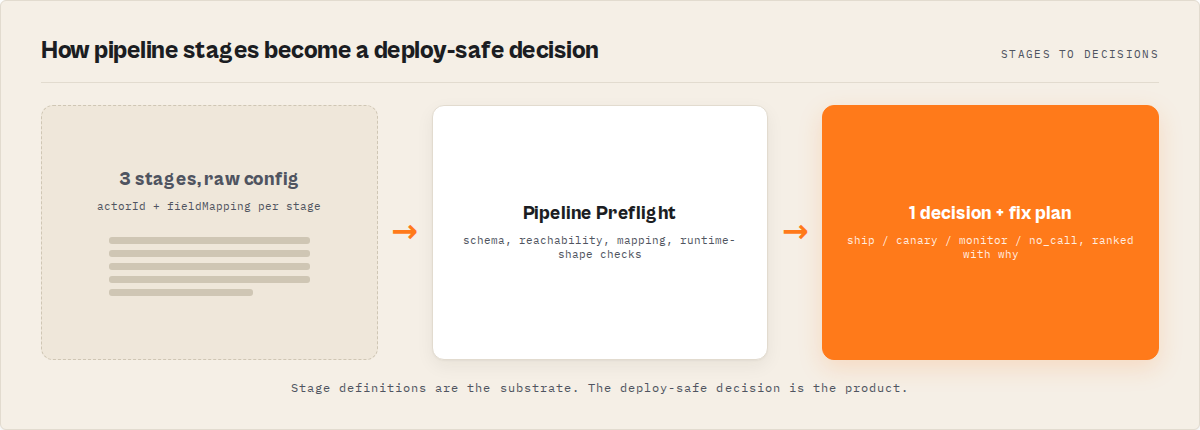
Key takeaways
- 7 failure modes account for almost every pipeline break. Missing mapping, field-name mismatch, unreachable actor, no declared dataset schema, runtime-only shape mismatch, agent-hostile metadata, hygiene bugs (duplicate actors, oversize pipelines).
- 6 of 7 are detectable from Apify API metadata alone. No target actor has to run. Pipeline Preflight validates a 3-stage chain in ~30 seconds for a flat $0.40.
- Missing
fieldMappingis the #1 blocker. Observed across internal testing on an Apify actor portfolio: non-first stages with an empty or absent mapping account for the majority of first-time pipeline failures. - The output is deterministic.
decisionPosture ∈ {ship_pipeline, canary_recommended, monitor_only, no_call}— one scalar, safe to gate a CI job or an MCP planner on. - Reason codes are stable. Every issue carries a
codelikeNO_FIELD_MAPPINGorMAPPED_FIELD_NOT_IN_PREV_OUTPUT. Additive-only within a major version, so automation won't rot.
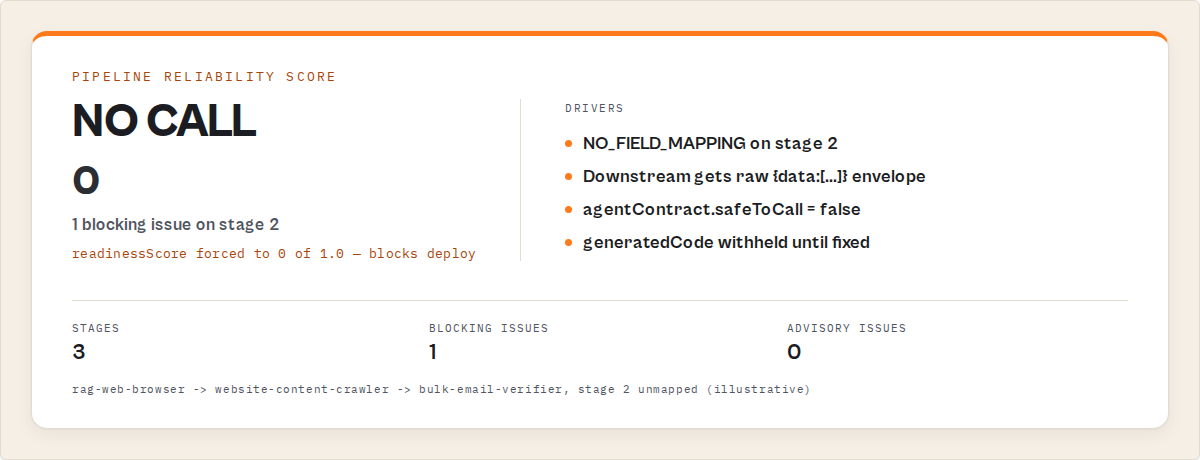
Concrete examples
| Pipeline intent | What breaks | Reason code | Severity |
|---|---|---|---|
maps → email-pattern → verifier, stage 2 has no mapping | Stage 2 receives { data: [...] } instead of { urls: [...] } | NO_FIELD_MAPPING | blocking |
Stage 3 maps emails: emailPattern, upstream emits markdown | Stage 3 receives an array of undefined | MAPPED_FIELD_NOT_IN_PREV_OUTPUT | advisory |
actorId: "apify/text-summarizer" (doesn't exist) | Pipeline never starts | ACTOR_NOT_FOUND | blocking |
Upstream actor has no dataset.fields declared | Every mapping is a guess | DATASET_SCHEMA_MISSING | advisory |
Schema says urls: string[], actor actually rejects arrays of length > 100 | Runtime 400 from downstream | RUNTIME_VALIDATION_FAILED | blocking |
Fields have no title/description/example | MCP planner can't reason about the tool | SCHEMA_AGENTIC_COVERAGE_LOW | advisory |
Same actorId appears in stages 2 and 4 | Accidental double-bill | DUPLICATE_ACTOR_IN_PIPELINE | advisory |
What is an Apify pipeline?
Definition (short version): an Apify pipeline is a chain of two or more actors where each stage's output dataset feeds the next stage's input, connected by a fieldMapping that binds downstream input field names to upstream output field names.
Also known as: multi-actor pipeline, actor chain, Apify workflow, Actor.call() chain, staged actor orchestration, cross-actor pipeline.
There are four common pipeline shapes on Apify:
- Scrape → enrich → verify — lead generation flows (Maps → email pattern → SMTP check).
- Crawl → extract → summarise — content pipelines (web crawler → RAG browser → LLM summariser).
- Fetch → diff → alert — monitoring flows (HTTP scraper → schema diff → webhook).
- Harvest → screen → push — compliance + CRM flows (source actor → sanctions screen → HubSpot push).
Each stage is a separate Apify actor — its own build, own schema, own pricing. They're glued together by Actor.call() and a mapping dictionary.
Why do Apify pipelines fail at runtime?
Pipelines fail because the Apify platform doesn't cross-check stage contracts before you run them. Each actor validates its own input against its own schema at call time. Nothing validates that stage N's output can be projected into stage N+1's input — until stage N+1 rejects it and the error surfaces minutes into the run.
This makes pipelines brittle in three specific ways:
- Naming drift. You mapped
urls: urla month ago; upstream is now emittingwebsite. The mapping is syntactically valid but semantically wrong. - Schema silence. The upstream actor doesn't publish its dataset schema. You guessed at field names. The run "succeeds" with empty strings downstream.
- Invisible prerequisites. The downstream actor needs
startUrlsas{url: string}[], notstring[]. The schema didn't make that obvious. Everything 400s.
Every one of these is detectable from metadata. You just need something that actually reads the metadata.
The 7 failure modes (at a glance)
| Problem | What breaks | Code | Severity |
|---|---|---|---|
| Missing mapping | Stage receives {data: [...]} | NO_FIELD_MAPPING | blocking |
| Field mismatch | Empty / undefined output | MAPPED_FIELD_NOT_IN_PREV_OUTPUT | advisory |
| Actor not found | Pipeline won't start | ACTOR_NOT_FOUND | blocking |
| No dataset schema | Can't validate mappings | DATASET_SCHEMA_MISSING | advisory |
| Runtime mismatch | Actor rejects input | RUNTIME_VALIDATION_FAILED | blocking |
| Thin schema metadata | Agents fail to reason | SCHEMA_AGENTIC_COVERAGE_LOW | advisory |
| Hygiene bugs | Design errors | DUPLICATE_ACTOR_IN_PIPELINE etc. | advisory |
Full deep-dive on each, with reason codes and detection logic, below. Every code is a stable string your automation can switch() on — mirrors the verdictReasonCodes emitted by Pipeline Preflight.
1. Missing field mapping — NO_FIELD_MAPPING
Real-world symptom: the pipeline runs stage 1, then stage 2 rejects with something like Invalid input: "urls" is required or silently receives { data: [...] } and produces an empty dataset. Most common blocker in the wild.
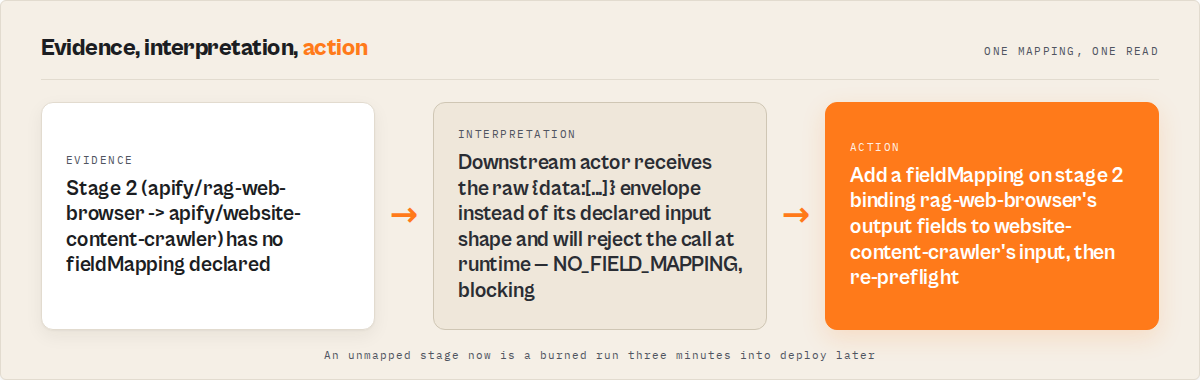
Why it happens: you defined stage 2 with just { actorId: "..." } and no fieldMapping. Without a mapping, the orchestrator passes the raw listItems() envelope — not the downstream actor's declared input shape.
How Pipeline Preflight detects it: walks the stages[] array, flags any non-first stage where fieldMapping is absent or {}. Emits NO_FIELD_MAPPING as blocking. When both schemas are declared, Preflight also populates mappingSuggestions[] — candidate bindings based on field-name match and metadata similarity, with a 0–1 confidence.
Severity: blocking. decisionPosture will be no_call.
2. Field-name mismatch between stages — MAPPED_FIELD_NOT_IN_PREV_OUTPUT / TARGET_FIELD_NOT_IN_INPUT_SCHEMA
Real-world symptom: the pipeline runs end-to-end, returns 200 OK, but the final dataset is full of undefined or empty strings. No error in the logs.
Why it happens: the mapping is syntactically valid but the field name is wrong on one or both ends. You mapped urls: url but the upstream actor emits website. Or you mapped emails: emailPattern and the downstream input schema actually wants emailList.
How Pipeline Preflight detects it: reads the upstream actor's actorDefinition.storages.dataset.fields and the downstream actor's inputSchema. For each mapping entry, checks that the source field exists in the upstream's declared output and the target field exists in the downstream's declared input.
MAPPED_FIELD_NOT_IN_PREV_OUTPUT  — advisory — fires when the upstream source field is absent
TARGET_FIELD_NOT_IN_INPUT_SCHEMA — advisory — fires when the downstream target field is absent
Severity: advisory. decisionPosture will be monitor_only if this is the only issue.
3. Unreachable actor — ACTOR_NOT_FOUND
Real-world symptom: the pipeline never even starts stage 1. You get an immediate no_call verdict.
Why it happens: typoed slug (apify/text-summarizer doesn't exist), actor is private and your token lacks access, or the actor was deleted. Pipeline Preflight resolves each stage via GET /v2/acts/{id}/builds/default with retry on 429/5xx; non-2xx after retries becomes ACTOR_NOT_FOUND.
Note: token scope matters. A private actor owned by another user will resolve as ACTOR_NOT_FOUND even when the slug is correct — the API can't distinguish "doesn't exist" from "you can't read it."
Severity: blocking. decisionPosture will be no_call.
4. No declared dataset schema — DATASET_SCHEMA_MISSING
Real-world symptom: everything "looks fine" but you can't actually verify any of it at design time. The generated code runs, but fields mapped from that upstream actor might work, might be undefined, or might silently be empty strings.
Why it happens: the upstream actor doesn't publish actorDefinition.storages.dataset.fields in its build. This is common for older Apify actors and for any actor whose developer didn't add a dataset schema.
How Pipeline Preflight detects it: checks buildData.actorDefinition.storages.dataset.fields. When missing, emits DATASET_SCHEMA_MISSING as advisory, downgrades that stage's datasetSchemaQuality to missing, and stops validating mappings against the upstream's output shape. Generated code includes a codegenWarnings[] entry noting which stages weren't output-validated.
Severity: advisory. The pipeline can still reach canary_recommended — just wire it up behind a single-record canary before scheduling.
5. Runtime-only shape mismatch — RUNTIME_VALIDATION_FAILED
Real-world symptom: the pipeline validates clean on paper (ship_pipeline) but stage 2 rejects the synthesized input at call time anyway. The schema promised one thing; the actor enforces another.
Why it happens: schemas are a contract, not a guarantee. An actor can declare urls: string[] in its input schema but internally require at least one element, or reject URLs that don't start with https://, or cap input array length. Only calling the actor with a real input surfaces the mismatch.
How Pipeline Preflight detects it: enable validateRuntime: true. Preflight then calls actor-input-tester per stage with a synthesized input built from the declared mapping. Input Tester validates shape without running the target actor. If any stage's inputTesterOk comes back false, Pipeline Preflight forces valid = false and emits RUNTIME_VALIDATION_FAILED.
Severity: blocking (when it fires). decisionPosture will be no_call.
6. Agent-hostile schema metadata — INPUT_SCHEMA_THIN / FIELD_METADATA_THIN / SCHEMA_AGENTIC_COVERAGE_LOW
Real-world symptom: a human running the pipeline is fine. An MCP server or LLM tool-call chains the actors incorrectly because the schemas give it nothing to reason about. No field titles. No descriptions. No examples.
Why it happens: the Apify platform drives Console run forms, API validation, and MCP tool inference from input-schema metadata. Fields with no title, description, or example are effectively invisible to planner agents. The actor still works — agents just can't use it reliably.
How Pipeline Preflight detects it: scores fieldDescriptionCoverage, exampleCoverage, typedFieldCoverage, and agenticCoverage as 0–1 floats per stage and pipeline-wide. Fires SCHEMA_AGENTIC_COVERAGE_LOW when the pipeline's agenticCoverage < 0.5.
INPUT_SCHEMA_THIN             — advisory — stage declares no input-schema properties
FIELD_METADATA_THIN           — info     — < 50% field title/description coverage
SCHEMA_AGENTIC_COVERAGE_LOW   — advisory — pipeline-wide agenticCoverage < 0.5
Severity: advisory / info. Won't block the pipeline. Will block the agent from using it reliably.
7. Pipeline hygiene bugs — FIRST_STAGE_HAS_MAPPING / DUPLICATE_ACTOR_IN_PIPELINE / PIPELINE_VERY_LARGE
Real-world symptom: none at runtime — these are design smells. But each points at something you probably didn't mean.
FIRST_STAGE_HAS_MAPPING— stage 1 has afieldMapping, which is meaningless because there's no upstream stage. Usually a copy-paste error.DUPLICATE_ACTOR_IN_PIPELINE— the sameactorIdappears in two or more stages. Valid occasionally (a re-crawl pass), but more often an accidental double-bill.PIPELINE_VERY_LARGE—stages.length > 20. At that length the pipeline is usually doing two or three decomposable jobs in one chain; splitting it makes each easier to monitor and cheaper to re-run.
Severity: advisory. decisionPosture can still be monitor_only or better. These are the ones you want a second set of eyes on.
Example: NO_FIELD_MAPPING in action
Here's a 3-stage pipeline input that triggers the most common blocker:
{
  "stages": [
    { "actorId": "apify/rag-web-browser" },
    { "actorId": "apify/website-content-crawler" },
    { "actorId": "ryanclinton/bulk-email-verifier",
      "fieldMapping": { "emails": "emailPattern" } }
  ]
}
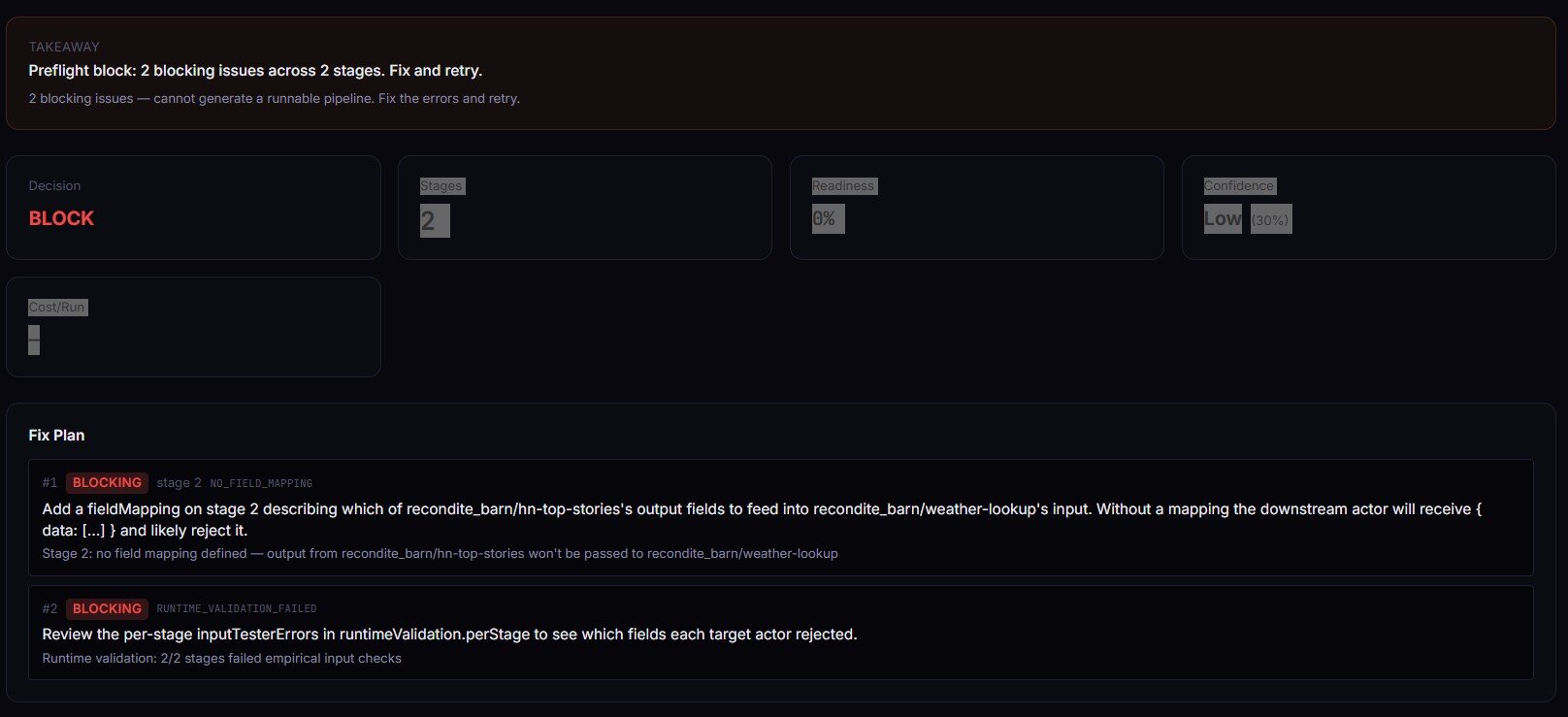
Stage 2 has no fieldMapping. Pipeline Preflight's response (abridged):
{
  "decisionPosture": "no_call",
  "decisionReason": "1 blocking issue — cannot generate a runnable pipeline. Fix the errors and retry.",
  "readinessScore": 0,
  "generatedCode": "",
  "verdictReasonCodes": ["NO_FIELD_MAPPING"],
  "fixPlan": [
    {
      "order": 1,
      "stage": 2,
      "severity": "blocking",
      "code": "NO_FIELD_MAPPING",
      "action": "Add a fieldMapping on stage 2 describing which of apify/rag-web-browser's output fields to feed into apify/website-content-crawler's input.",
      "why": "Stage 2: no field mapping defined — output from apify/rag-web-browser won't be passed to apify/website-content-crawler"
    }
  ],
  "agentContract": {
    "safeToCall": false,
    "recommendedAction": "fix_mapping",
    "requiredFixes": [{ "stage": 2, "code": "NO_FIELD_MAPPING" }]
  }
}
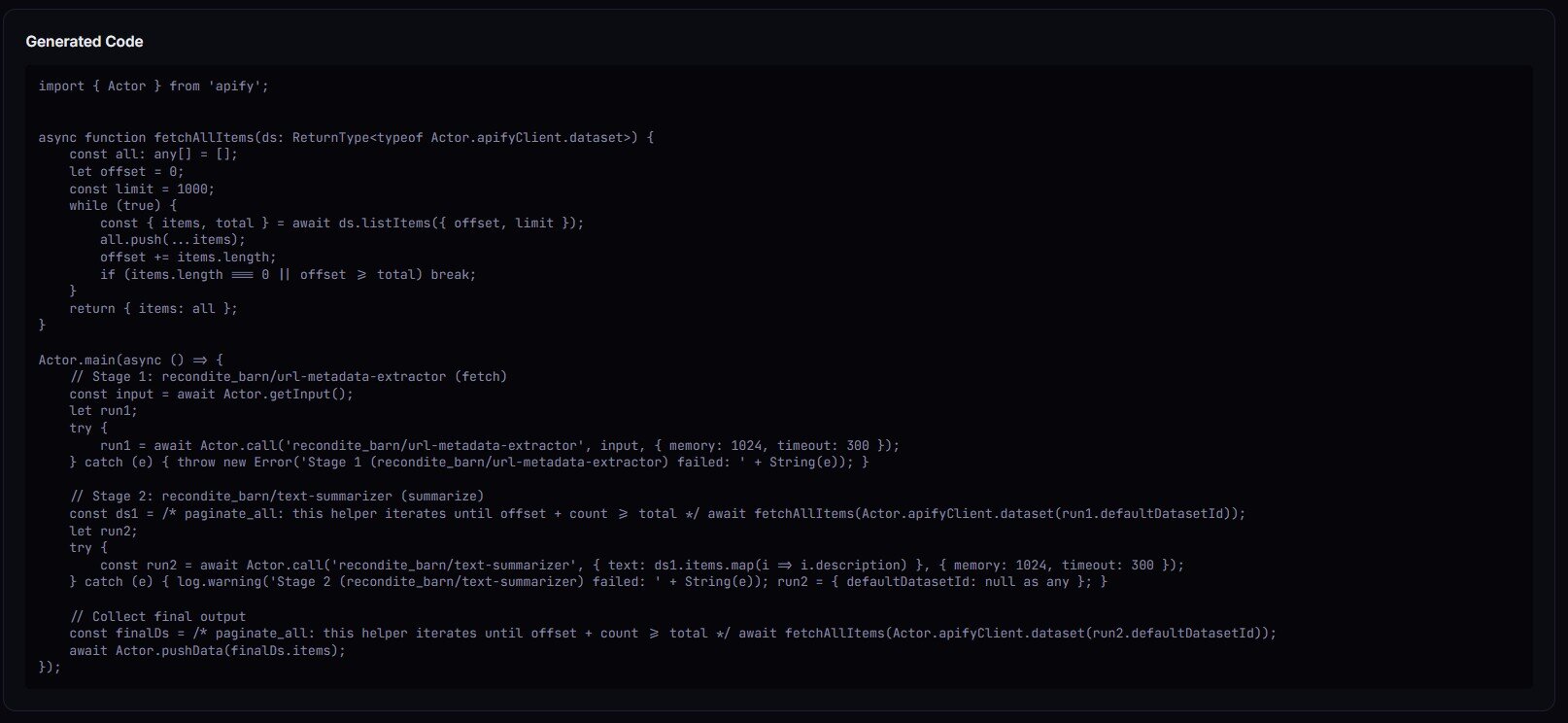
Fix the mapping, re-preflight, posture flips to canary_recommended or ship_pipeline, and generatedCode comes back populated with a ready-to-paste Actor.main().
What are the alternatives?
Pipeline preflight isn't the only way to reduce pipeline failures. A few options, with honest trade-offs:
- Run-then-fix. Ship the pipeline, let it fail, read the error, patch, repeat. Zero upfront cost. You pay in runtime minutes and pay-per-event charges per failed attempt.
- Manual schema inspection. Open each actor's page, read input and output schemas by hand, cross-reference with
fieldMapping. Free. Slow. Doesn't scale past a handful of stages, and drifts the moment any upstream actor ships a new build. - Integration test the whole chain. Stand up a real 3-stage run against a synthetic input in CI. Catches everything — including output drift — but costs real compute every time CI runs and takes minutes, not seconds.
- Pipeline Preflight (the approach this post is about). Design-time, metadata-only, ~30s for a 3-stage validation, $0.40 flat per build, emits a deterministic decision scalar.
- Generic workflow validators (Zapier / Make / n8n). Validate their own workflow graphs. Don't know anything about Apify actor schemas or dataset shapes. Useful if your orchestration lives there; not a substitute for actor-level contract checking.
Each approach has trade-offs in speed, cost, coverage, and scale. The right choice depends on how often you iterate on pipelines and how expensive a runtime failure is in your context.
| Approach | Design-time coverage | Cost per validation | Catches output drift | Agent-ready output |
|---|---|---|---|---|
| Run-then-fix | None | Compute + PPE per attempt | Yes (after it fails) | No |
| Manual inspection | Partial | Engineer time (15–60 min) | No | No |
| End-to-end CI run | Full | Compute + PPE per CI run | Yes | No |
| Pipeline Preflight | Schemas + reachability + (optional) runtime shape | $0.40 flat | Partial (validateRuntime: true) | Yes (agentContract) |
| Workflow validator | None for Apify schemas | Free / included | No | No |
Pricing and features based on publicly available information as of April 2026 and may change.
Best practices for shipping multi-actor pipelines
- Validate every non-first stage has a
fieldMapping. Empty mappings are the single most common blocker. - Pin to the default build, not to a specific build ID. Actor authors ship new builds frequently; pinning old builds silently breaks when the schema evolves.
- Run preflight in CI on every merge to main. Gate deploys on
decisionPosture === 'ship_pipeline'. - Use
validateRuntime: truefor anything agents will autonomously call. Design-time schema agreement isn't enough when a human isn't in the loop. - Re-run preflight after any upstream actor publishes a new build. Webhook on Apify's actor build events, trigger preflight, alert on regression.
- Keep pipelines under ~6 stages. Beyond that, decompose. Smaller pipelines are easier to preflight, cheaper to re-run, and easier to monitor independently.
- Name your stages with
alias. Shows up ingeneratedCodecomments. Makes the orchestrator readable three months later. - Treat
decisionPostureas a gate, not a warning. Automation that ignoresno_calland runs anyway is just expensive run-then-fix.
Common mistakes
- Copy-pasting a mapping from an older actor version. Field names evolve. What worked six months ago may now silently map to nothing.
- Skipping mappings on stages with "obvious" field names.
urlvswebsitevshomepageUrlare the three most common drift points observed across the portfolio. Obvious is a feeling, not a schema guarantee. - Gating on
valid: trueinstead ofdecisionPosture.validcan be true while advisories remain. UsedecisionPosture === 'ship_pipeline'for production and∈ {ship_pipeline, canary_recommended}for canary. - Ignoring
DATASET_SCHEMA_MISSINGbecause "the code still runs." It does — until an upstream update renames a field you'd been guessing at. - Running preflight once, then never again. Pipelines rot when upstream actors change. Cron the preflight nightly.
- Using preflight for single-actor validation. It requires ≥2 stages by design. For one actor, use Input Tester.
How to add Pipeline Preflight to a GitHub Actions CI
Run Pipeline Preflight via the Apify API on every push, parse the dataset for decisionPosture, fail the job on no_call. Promote to deploy when decisionPosture === 'ship_pipeline' && decisionReadiness === 'actionable'. Canary when posture is ship_pipeline or canary_recommended. Keep the pipeline definition in a JSON file in the repo so the preflight input is a single fs.readFile away.
Copy-paste starter:
# .github/workflows/pipeline-preflight.yml
name: Pipeline Preflight
on: [push, pull_request]

jobs:
  preflight:
    runs-on: ubuntu-latest
    steps:
      - uses: actions/checkout@v4

      - name: Validate pipeline
        env:
          APIFY_TOKEN: ${{ secrets.APIFY_TOKEN }}
        run: |
          RESPONSE=$(curl -s -X POST \
            "https://api.apify.com/v2/acts/ryanclinton~actor-pipeline-builder/run-sync-get-dataset-items?token=$APIFY_TOKEN" \
            -H "Content-Type: application/json" \
            -d @pipeline.json)

          POSTURE=$(echo "$RESPONSE" | jq -r '.[0].decisionPosture')
          ONE_LINE=$(echo "$RESPONSE" | jq -r '.[0].oneLine')

          echo "$ONE_LINE"

          if [ "$POSTURE" = "no_call" ]; then
            echo "::error::Pipeline invalid — see fixPlan[] in dataset"
            echo "$RESPONSE" | jq '.[0].fixPlan'
            exit 1
          fi
How to use Pipeline Preflight with an MCP agent
Short answer. The agentContract block is the contract: {safeToCall, recommendedAction, requiredFixes}. Agent flow: propose {stages: [...]}, call Pipeline Preflight, read agentContract.recommendedAction, switch() on the stable enum (ship / canary / fix_mapping / fix_schema / do_not_call). On fix_mapping or fix_schema, iterate requiredFixes[] and retry. Never let an agent call a pipeline with safeToCall: false.
How to validate a pipeline without running any actors
Short answer. Use Pipeline Preflight with validateRuntime: false (the default). It reads each actor's declared input and dataset schemas via the Apify API, type-checks transitions, and emits a decision — no target actor is ever called. validateRuntime: true adds empirical per-stage input validation via Input Tester, which also does not run the target actors, just validates input shape against the actor's real schema.
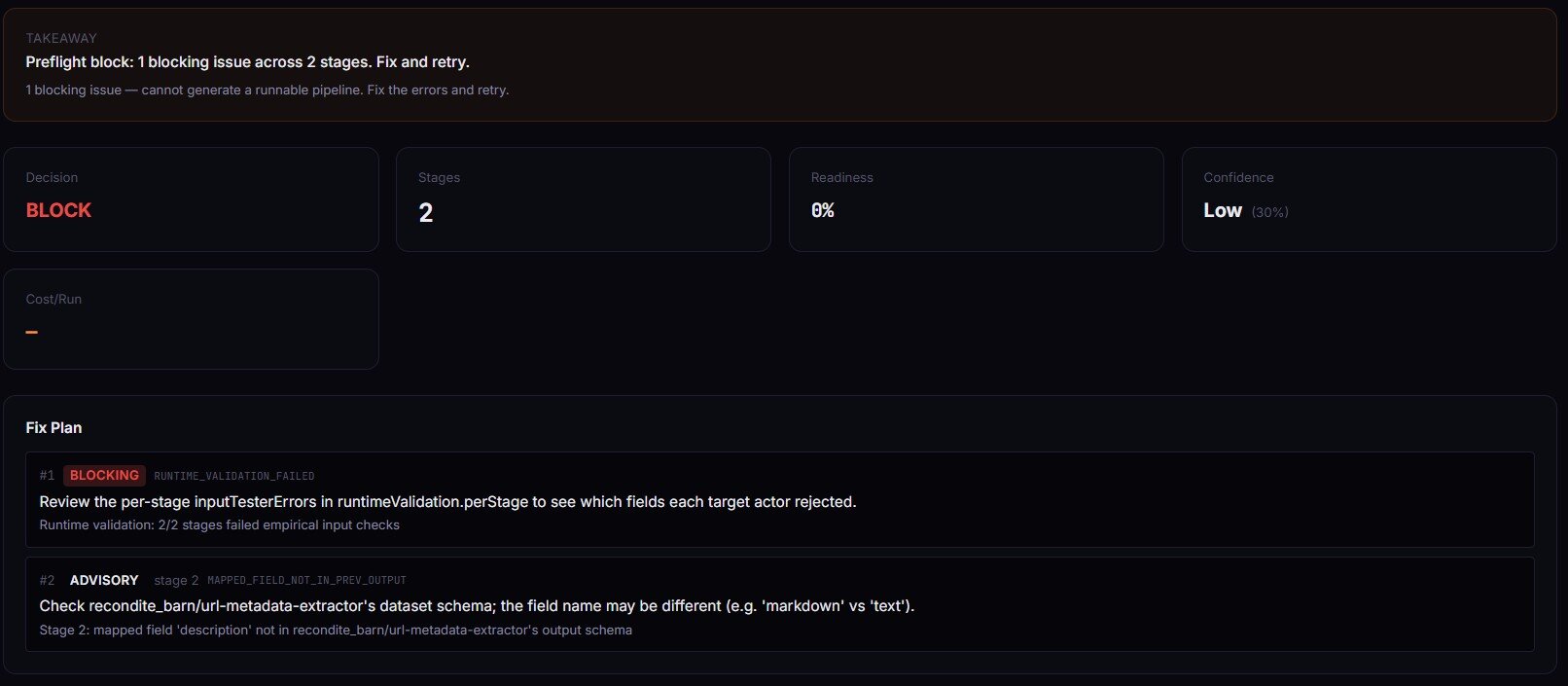
Mini case study: a 3-stage lead pipeline that failed at stage 3
Before. A Maps-to-email-to-verifier pipeline built in January 2026. Worked for two months. Started returning empty valid fields from the SMTP verifier in late March. Logs showed stage 1 running clean, stage 2 running clean, stage 3 running but with every input coming in as undefined.
Root cause. The email-pattern actor had shipped a new build on March 18. Renamed its output field from emailPattern to primaryEmail. The stage 3 mapping was still emails: emailPattern. Syntactically valid. Semantically mapped to nothing.
After. Running Pipeline Preflight against the same stages[] definition flagged it immediately: MAPPED_FIELD_NOT_IN_PREV_OUTPUT, stage 3, advisory. decisionPosture: monitor_only. The fixPlan[] suggested primaryEmail based on the upstream's new dataset schema. One-line fix, re-preflight, posture back to ship_pipeline. Runtime detection had taken two weeks and an ops inbox full of "why are leads not being verified" emails. Design-time detection would have caught it the day the upstream shipped.
Results will vary depending on upstream actor stability, mapping complexity, and how often you re-preflight.
Implementation checklist
- Define the pipeline as a
stages[]array in a JSON file in your repo. - Call Pipeline Preflight once interactively. Inspect
decisionPosture,fixPlan[],generatedCode. - Work the
fixPlan[]top-to-bottom until posture isship_pipelineorcanary_recommended. - Paste
generatedCodeinto your own orchestrator actor or a script. - Enable
validateRuntime: trueand re-preflight. ConfirmruntimeValidation.allStagesOk: true. - Add a CI step that runs preflight on every push and fails on
no_call. - Schedule preflight on a nightly cron. Alert on any regression in
decisionPosture. - If an agent will call the pipeline, read
agentContract.recommendedActionand gate onsafeToCall.
Limitations
- Schema-declaration dependence. If an upstream actor doesn't publish
dataset.fields, output-field validation degrades to aDATASET_SCHEMA_MISSINGadvisory. Generated code may still work; it just wasn't verifiable at design time. - Design-time only. Actors can declare one shape and emit another.
validateRuntime: truenarrows the gap by checking inputs empirically, but can't detect output drift — an actor that promises{email: string}can still occasionally emit{email: null}. - Token scope. Private actors outside the caller's token resolve as
ACTOR_NOT_FOUND. Ambiguous with "actor genuinely doesn't exist." - Flat mappings only.
fieldMappingis{ string: string }. Nested paths (user.email), type coercion, and transformations are out of scope — write those in the generated code manually. - Cost excludes platform compute.
costEstimate.perRunsums PPE event prices across stages. Memory × runtime compute is not modelled; check each actor's page for its recommended memory.
Key facts about Apify pipeline preflight
- Pipeline Preflight validates 2+ stage Apify pipelines for $0.40 flat per build.
- 3-stage validation completes in under 30 seconds.
decisionPostureis one of four values:ship_pipeline,canary_recommended,monitor_only,no_call.- Every issue carries a stable reason code; codes are additive-only within a major version.
- Target actors are never run during validation — metadata reads only.
validateRuntime: truecalls Input Tester per stage for empirical input-shape checks.agentContract.recommendedActionis a stable enum consumable by MCP planners.- Pipeline Preflight never exits FAILED on user input errors — safe to schedule on cron.
Glossary
actorId— fullusername/actor-nameidentifier, e.g.ryanclinton/google-maps-email-extractor. Required on every stage.fieldMapping—{ downstreamInputField: upstreamOutputField }dictionary that projects the upstream dataset into the downstream input.decisionPosture— deterministic verdict scalar:ship_pipeline/canary_recommended/monitor_only/no_call.readinessScore— 0–1 gate-like score. 1.0 ship, ~0.85 canary, ~0.6 monitor, 0 no_call.confidenceScore— 0–1 harmonic mean across resolution, mapping, schema, metadata, and runtime coverage.- Dataset schema — an actor's declared output shape under
actorDefinition.storages.dataset.fields. Absent on older actors.
Broader applicability
The pattern generalises beyond Apify. Any multi-stage pipeline where stages have declared interfaces benefits from the same validation primitives:
- Reachability checking — can each stage actually be called?
- Contract typing — does stage N+1's input accept stage N's output?
- Metadata completeness — do downstream planners (agents, UIs, schedulers) have enough to reason about the stages?
- Deterministic posture — is the output a single scalar you can gate on, or prose you have to parse?
- Design-time vs runtime separation — validate at the cheapest point that still catches the bug.
Kubernetes admission controllers, Dagster asset checks, Airflow sensor pre-checks, Zapier workflow validators, and GraphQL schema diff tools are all variations on the same pattern. The expensive thing to catch at runtime is almost always cheaper to catch at definition time.
When you need this
You want pipeline preflight if you're doing any of these:
- Shipping a 2+ stage Apify pipeline to production
- Letting an MCP server or agent autonomously call a pipeline
- Scheduling a pipeline on cron where a silent failure will go unnoticed
- Gating deploys in CI on pipeline correctness
- Operating enough actors that manual schema cross-checking doesn't scale
You probably don't need it if:
- You only run single-actor jobs (use Input Tester instead)
- Your pipeline runs once, interactively, and you're watching the output
- You're evaluating real output data quality — preflight is design-time; for runtime output quality, use Schema Validator
- You need to diff two actor builds for breaking changes — use Schema Diff
Frequently asked questions
What is Pipeline Preflight?
Pipeline Preflight is an Apify actor that type-checks multi-actor pipelines before they run. Given 2+ stages with actorId and fieldMapping, it fetches each actor's declared input and dataset schemas from the Apify API and validates that every stage transition is callable. Output is a deterministic decision posture, an ordered fix plan, and ready-to-paste TypeScript orchestrator code. It's one of the best ways to catch pipeline definition bugs without spending compute on a real run.
How does Pipeline Preflight differ from Zapier or Make?
Zapier and Make execute workflows. Pipeline Preflight validates that an Apify actor chain is callable and generates the orchestrator code — it never runs the target actors. You deploy the generated code yourself via Actor.call(), the Apify scheduler, a webhook, or an MCP agent. Use workflow platforms for the execution layer; use Pipeline Preflight for the contract-validation layer.
Does Pipeline Preflight actually run any of the actors in my pipeline?
No. Pipeline Preflight only reads metadata from the Apify API — build definitions, input schemas, dataset schemas, pricing. It never calls Actor.call() on the target actors. Even validateRuntime: true delegates to Input Tester, which validates input shape without running the downstream actor. Safe for CI, cron, and autonomous agents.
How accurate is the field mapping validation?
Accuracy depends on whether the upstream actor publishes its dataset schema. When actorDefinition.storages.dataset.fields is declared, every mapping is validated against real field names. When it's missing, Pipeline Preflight emits DATASET_SCHEMA_MISSING as advisory and falls back to input-side validation only. For best results, combine with Schema Registry to inspect field names before building the pipeline.
Can I schedule Pipeline Preflight on a cron?
Yes. Pipeline Preflight never exits FAILED on user input errors — it always pushes a structured record to the dataset and exits SUCCEEDED, which means it won't trigger Apify's default-input auto-test or the maintenance flag. Schedule it nightly against your pipeline definitions and alert on any regression in decisionPosture.
How much does Pipeline Preflight cost?
A flat $0.40 per pipeline-build event. Platform compute (memory × runtime) is billed separately by Apify — a typical 3-stage run uses 256 MB for under 30 seconds, adding a few fractions of a cent. 50 validations a week runs about $20/month. No subscription, no per-stage surcharge.
What does decisionPosture mean in CI?
It's the scalar your CI job gates on. ship_pipeline means valid, runtime-verified, zero advisories — safe to promote. canary_recommended means valid and zero advisories but runtime not verified — deploy behind a canary. monitor_only means valid but has schema advisories — dry-run before scheduling. no_call means at least one blocking issue — do not deploy, work the fixPlan[].
Can I use Pipeline Preflight with pipelines that include other users' actors?
Yes, as long as the actors are public or your API token has read access. The actorId must always be the full username/actor-name format. Private actors outside your token's scope resolve as ACTOR_NOT_FOUND — not distinguishable from genuinely missing actors.
Decision posture as a CI gate and MCP primitive
The whole design goal is that decisionPosture is a scalar. One of four strings. Automation reads one field, branches four ways, done. That's what makes it useful for CI (fail on no_call, promote on ship_pipeline), for webhooks (one-sentence Slack payload from oneLine), for dashboards (card kinds fix-this-first / watch-out / cost-heads-up), and for MCP planners (agentContract.safeToCall is a bool, recommendedAction is a five-value enum).
If you're building an agent that composes Apify actors autonomously, this matters. The alternative is parsing prose error messages from runtime failures — which is how you end up with agents that chain the wrong actors together and silently burn credits.
Run Pipeline Preflight on apify.com/ryanclinton/actor-pipeline-builder. Or read the deeper build context on the pipeline-builder tool page and the related post on actor reliability and schema validation. If you're testing individual stages first, how to test an Apify actor before publishing pairs well with this.
One-line takeaway
Apify pipelines don't fail because actors break — they fail because contracts between actors don't line up.
Ryan Clinton publishes Apify actors as ryanclinton and builds developer tools at ApifyForge.
Last updated: April 2026
This guide focuses on Apify actor pipelines, but the same contract-validation patterns apply broadly to any multi-stage workflow system where stages expose typed interfaces — Dagster, Airflow, Temporal, n8n, or custom orchestrators.