Automatically run tests and block deployment if your scraper or Apify actor breaks. The cleanest way to do this in CI is a deployment gate — a step that runs a test suite against the actor's live output and returns a deterministic decision enum (act_now / monitor / ignore) the pipeline branches on. This post is the full walk-through.
The problem: Your Apify actor runs. The Console says SUCCEEDED. Your CI pipeline turns green. Two hours later a user emails: the emails are blank, the phone numbers are empty, half the records are missing. The actor never crashed, the schedule ran fine, the logs show no exception. It just returned wrong data — and the deploy that caused it is already live in the Store. A 2024 Monte Carlo survey found 68% of data-quality incidents are discovered by downstream consumers, not the system that produced them. The DORA State of DevOps report has tracked for years that elite teams rely on automated release gates, not manual review, to hit low change-failure rates.
A green CI run does not mean your scraper works. That's what this post is about.
What is deployment gating for Apify actors? Deployment gating is a CI step that runs a test suite against your actor and returns a machine-readable decision — pass, warn, or block — that the pipeline branches on. Unlike a crash test, gating validates output quality (required fields, duration, row count, drift against a baseline). If the decision isn't clean, the deploy fails and the change never reaches production.
Why it matters: Apify's default-input test only catches crashes. If your actor exits SUCCEEDED with an empty dataset, the platform still passes it. The silent-regression class is invisible to exit codes, so you need an output-aware gate.
Use it when: Every push to a main branch, before every scheduled release, and on any PR that touches scraping logic, selectors, or schemas.
Also known as: deploy gate, CI scraper test, pre-release regression check, actor canary, pre-deploy smoke test, release decision engine.
Problems this solves:
- How to block deployment if your scraper breaks on every push
- How to automatically test Apify actors in CI without writing bash against the Apify API
- How to fail a CI pipeline if the scraper returns empty or malformed data
- How to detect silent scraper regressions before they reach production
- How to decide automatically whether an Apify actor is safe to deploy
- How to run a 30-second canary on every PR for less than a dollar
In this article
What is deployment gating? · Why green CI doesn't prove your scraper works · The act_now / monitor / ignore decision · Canary on every push · Baselines catch silent regressions · Writing good assertions · Reading the output in CI · Alternatives · Best practices · Common mistakes · Limitations · FAQ
Quick answer
- In one line: Automatically run tests and block deployment if your scraper or Apify actor breaks.
- What it is: A CI gate that runs an assertion suite against your actor's live output and returns a stable
decisionenum (act_now/monitor/ignore). - When to use: Every push, every scheduled release, every PR that touches selectors, fetchers, parsers, or schemas.
- When NOT to use: Pure-doc changes, README edits, internal refactors with no runtime impact.
- Typical steps:
POSTto a run-sync endpoint → parse[0].decision→ fail the build unless it'signore(or the signed-offmonitorstate after baseline maturity). - Main tradeoff: A few dollars per day in CI compute in exchange for catching silent regressions before your users do.
Automatically Run Tests and Block Deployment if Your Scraper Breaks
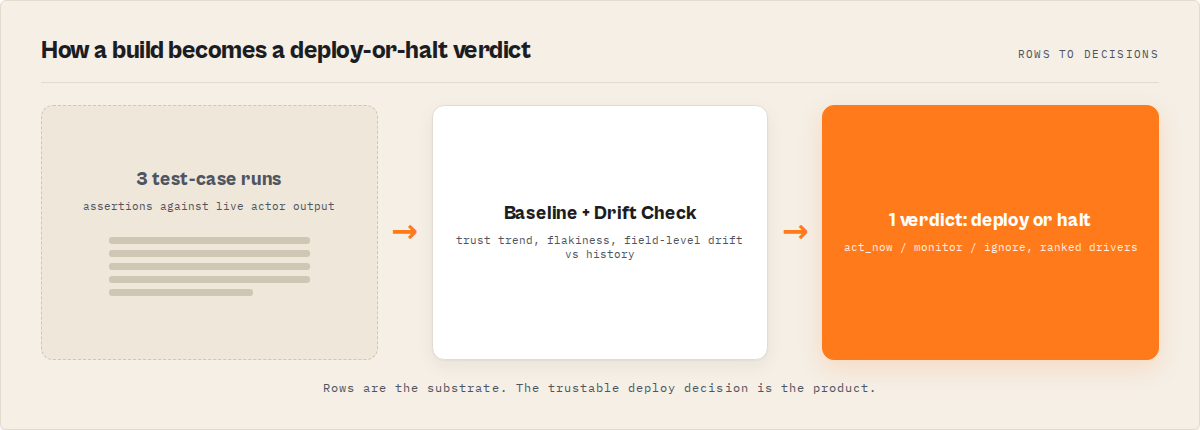
Deploy Guard is a CI gate for Apify actors that answers one question: is this build safe to ship? It runs a test suite against the actor's live output, compares the result to a rolling baseline, and returns a deterministic decision enum your pipeline branches on. No bash assertions to maintain, no custom grep-for-error scripts to babysit, no production incident to find out three days later.
How it works in four steps:
- Run the test suite against your actor via a single
POSTto the run-sync endpoint. - Validate the output against assertions (
minResults,requiredFields,fieldPatterns,maxDuration, 5 more types). - Compare to the baseline for field-level drift, flakiness, and trust-trend signals (after ~5 scheduled runs).
- Return a deploy-or-block decision —
act_now(something broke, block the deploy),monitor(degraded but not confirmed), orignore(green, ship it).
That's the whole loop. Ten lines of bash, thirty seconds, $0.35 per run.
Concrete examples
A canary on every push looks like this in practice:
| Change in PR | Preset | Duration | Decision | CI action |
|---|---|---|---|---|
| Bumped Node version | canary | 28s | ignore | Merge allowed |
| Refactored selector | scraper-smoke | 34s | monitor | Merge allowed with warning |
| Fetch helper rewrite | canary | 31s | act_now | Build fails, PR blocked |
| New required field | contact-scraper | 41s | act_now | Build fails, PR blocked |
| README typo fix | canary (skipped) | — | — | No gate run |
Each row is a real assertion outcome: empty dataset, missing email field, duration spike, row-count drift. The decision field flips, the CI exit code follows.
What is deployment gating for Apify actors?
Definition (short version): Deployment gating for Apify actors is a CI step that executes a test suite against your actor and returns a deterministic decision enum (act_now / monitor / ignore) the pipeline branches on to pass or fail the build. In one line: automatically run tests and block deployment if your scraper or Apify actor breaks, before the broken build reaches production.
The expanded version: a gate is a machine-readable verdict, not a human report. Human reports sit in dashboards; gates sit between git push and production. There are three common gate types in the scraping world: crash gates (did the container exit cleanly), schema gates (does the output match a schema), and decision gates (is the output good enough to ship, given history). Crash gates are what Apify's default-input test does. Decision gates are what this post is about.
Deployment gating is a subset of release engineering. In software as a whole, it's well-trodden territory — CircleCI, GitHub Actions, GitLab CI all support branching on exit codes. For scrapers, the specific challenge is that exit code 0 doesn't mean the run worked. You need a second layer that looks at the data.
Why a green CI run doesn't prove your scraper works
A scraper can exit cleanly and still return garbage. The three common ways:
- Selector drift. Target site changes
.emailto.user-email. Your scraper silently returnsundefined. Dataset row count is normal, exit code is 0. - Partial failures. First 50 pages scrape fine, then the site rate-limits you. Scraper catches the error, logs a warning, returns whatever it got. Apify status:
SUCCEEDED. - Schema drift in upstream APIs. Wrapped API renames a field from
postal_codetozip_code. Your output still has rows, still has values, but the downstream consumer breaks.
All three are invisible to Apify's platform checks because the platform checks the container, not the content. According to Apify's actor runs documentation, the daily default-input run verifies the actor completes without throwing — nothing else. The Apify webhook documentation confirms the same: ACTOR.RUN.SUCCEEDED fires on clean exit, regardless of what got written to the dataset.
This is why custom bash scripts that call the actor and grep for "error" don't work either. The error is the silence. You need assertions on the shape and volume of output, not the exit code. A Google SRE book chapter on monitoring puts it bluntly: the question "is the system working?" is not the same as "did the process return zero?" — and in data pipelines the gap between those two questions is where regressions live.
How the act_now / monitor / ignore decision works
The decision enum is a stable, additive-only contract designed for CI branching. Stable machine-readable decision outputs are the cleanest way to express release gates — GitHub's workflow step exit-code docs cover the pattern at the pipeline level, and the same thinking applies to the data layer. Each value maps to a clear pipeline action:
act_now— Something broke. Block the deploy, notify the channel, roll back if needed. This only fires when the suite has enough history to be confident (see cold-start note below).monitor— Output looks degraded but not confirmed broken. Common during warmup, after intentional schema changes, or when flakiness is elevated. CI should surface the warning; whether it blocks the merge is a team policy call.ignore— Output matches expectations within tolerance. Green light. Merge and deploy.
The golden rule when consuming the output: branch on decision, never on prose fields. The decisionReason, summary, and explanation fields are human-readable and format is not stable across versions. If your CI script greps for the word "failed" in the explanation, one copy change in the runner will silently flip your build to always-green or always-red.
Cold-start rule. Without a trusted baseline, decision never returns act_now and the score is capped at 70. The first run is always monitor. After roughly 5 scheduled runs, the baseline matures and the full intelligence layer — drift detection, flakiness tracking, trust trend — activates. This is a safety rail, not a bug: a single run has no history to be confident against.
How to run a canary on every push
A canary is the cheapest possible gate. One assertion suite, small input, fast preset. You want it to run on every PR because pennies per run is free compared to an hour of rollback work.
The setup: ApifyForge's Apify actor Deploy Guard ships with 6 presets (canary, scraper-smoke, api-actor, contact-scraper, ecommerce-quality, store-readiness). Pick the one matching your actor type, hit the sync-run endpoint, parse the decision, exit accordingly. Canary testing in the general-engineering sense is well-established practice — see Martin Fowler on CanaryRelease for the pattern origin, which applies just as cleanly to scraper output as to service traffic.
Here's the canary step in GitHub Actions — drop this into your workflow file:
- name: Deploy Guard — block if scraper breaks
  run: |
    RESULT=$(curl -s -X POST \
      "https://api.apify.com/v2/acts/ryanclinton~actor-test-runner/run-sync-get-dataset-items?token=$APIFY_TOKEN" \
      -H "Content-Type: application/json" \
      -d '{
        "targetActorId": "ryanclinton/my-scraper",
        "preset": "canary",
        "enableBaseline": true
      }')
    DECISION=$(echo "$RESULT" | jq -r '.[0].decision')
    STATUS=$(echo "$RESULT" | jq -r '.[0].status')
    HEADLINE=$(echo "$RESULT" | jq -r '.[0].statusHeadline')
    echo "Deploy Guard: $HEADLINE"
    if [ "$DECISION" != "act_now" ] || [ "$STATUS" != "pass" ]; then
      echo "::error::$HEADLINE"
      exit 1
    fi
One run-sync-get-dataset-items call. Immediate dataset response. Parse [0].decision, branch, exit. The entire gate is 10 lines of bash and completes in roughly 30 seconds at $0.35 per test suite run (PPE event test-suite). That's less than the cost of one bad deploy hitting production.
Note the act_now-blocks logic above is inverted from what you might expect: act_now means "act on a failure now" — block the deploy. If the decision is ignore (everything fine) or monitor (warmup or warning), the build passes. Adjust the condition to match your team's monitor-state policy.
Automatically run tests and block deployment if your scraper or Apify actor breaks. That's the whole job of a canary gate.
How baselines catch silent regressions
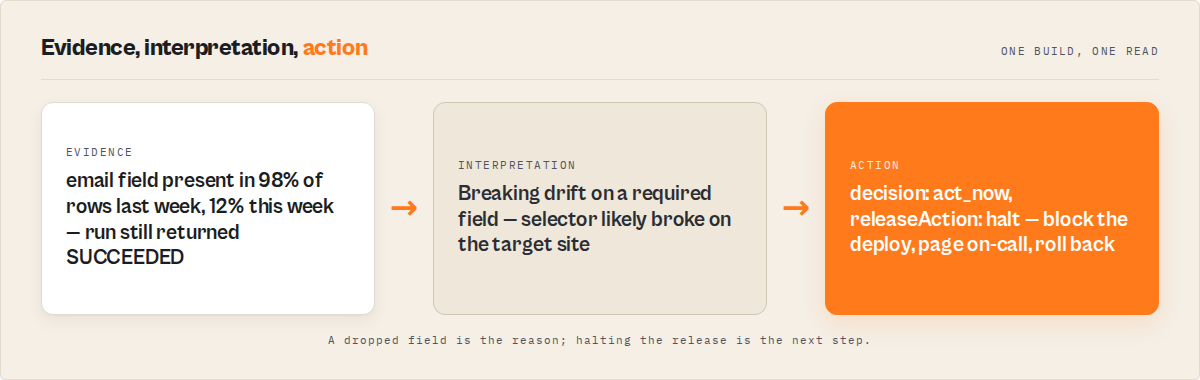
The enableBaseline: true flag is what upgrades a crash test into a regression gate. A baseline is a rolling record of what "normal" output looks like for this actor — field presence rates, duration distribution, row count range, field value patterns.
When you flip baselines on:
- Drift detection compares the current run against the baseline and flags field-level changes. If
emailwas present in 98% of rows last week and 12% this week,driftSeverity: "breaking"surfaces in the output. - Flakiness tracking notices when a single assertion passes and fails on alternating runs — almost always a timing bug, not a real regression.
- Trust trend aggregates the last N runs into a simple up/down signal. If trust trend is tanking, you know something changed recently even if this particular run passed.
Drift severity comes in two flavors. driftSeverity: "breaking" means a field disappeared, a type changed, or required data stopped appearing — always act_now once the baseline is trusted. driftSeverity: "non-breaking" means tolerable variation: extra optional fields, row count within normal variance, duration shift inside the distribution. Non-breaking drift is monitor or ignore depending on severity score.
Baselines take about 5 scheduled runs to mature. Run the canary on every push plus a nightly schedule and you'll hit maturity in under a week. Before maturity, you get crash-test coverage with a safety rail (no act_now, score capped at 70). After maturity, you get the full regression-detection layer. This mirrors the anomaly-detection warmup pattern described in the AWS Well-Architected reliability pillar — new detectors need history before their verdicts are trusted.
How to write good assertions
The runner supports 9 assertion types:
minResults/maxResults— row count lower and upper bounds. Empty datasets are the #1 silent-failure mode;minResults: 1catches most of them immediately.maxDuration— fail if the run takes longer than N seconds. Scrapers that gradually slow down usually do so because the target site is rate-limiting or adding anti-bot checks.requiredFields— an array of field names that must be present on every row. Use this for the fields downstream consumers depend on.fieldTypes— object mapping field names to expected JavaScript types. Catches the classic "switched from string to array overnight" class.noEmptyFields— fields that must not be empty strings or null. Different fromrequiredFields(which checks presence) — this checks content.fieldPatterns— regex patterns per field. Useful for emails (^[^@]+@[^@]+$), phone numbers, postcodes.fieldRanges— numeric min/max per field. Prices at $0 or $1,000,000 usually mean parsing broke.uniqueFields— fields that should be unique across the dataset. Catches pagination bugs that return the same page N times.severity— each assertion iscriticalorwarning. Critical failures push towardact_now; warnings push towardmonitor.
Start minimal. One minResults: 1, two requiredFields, one maxDuration. That's enough to catch the 80% case. Then add assertions as specific bugs bite you — each real incident should produce one new assertion so the same thing can't happen twice. This mirrors post-mortem-driven test design described in Google's SRE book chapter on postmortems: fix the class of bug with a permanent check, not just the individual incident.
Before a run actually burns compute, the runner runs a suiteLint layer that catches common suite-design mistakes. Conflicting bounds (minResults: 100, maxResults: 50), regex patterns that can never match, field names missing from the schema. Fix the suite first, then run it. ApifyForge's free schema validator tool can sanity-check the actor's input and output schemas before you even write the suite.
How to read Deploy Guard's output in CI
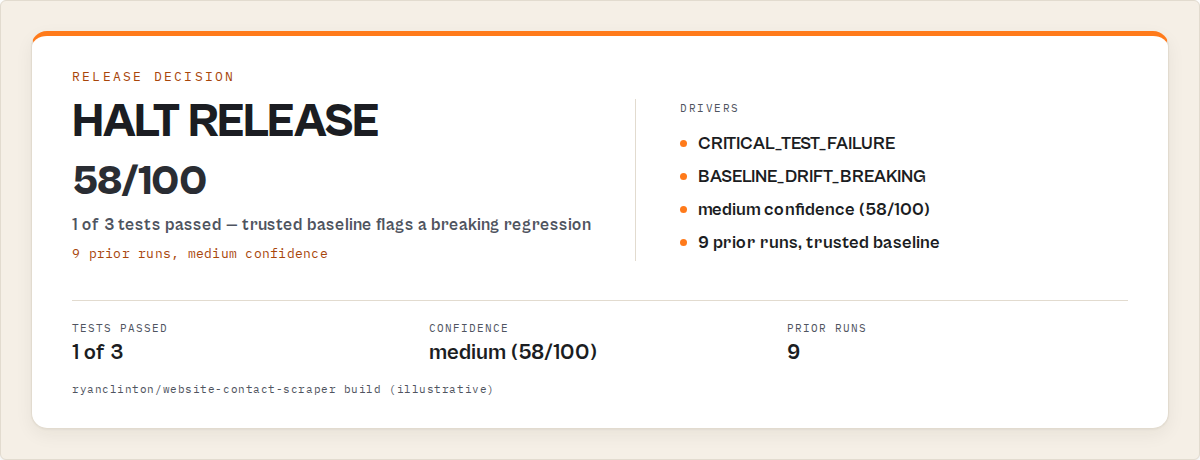
Deploy Guard's dataset output is a single record with a stable top-level shape. These are the fields you actually consume:
{
  "decision": "act_now",
  "decisionReason": "critical assertion failed: minResults",
  "decisionDrivers": [
    { "code": "ASSERT_MIN_RESULTS_FAILED", "impact": 0.52 },
    { "code": "DRIFT_BREAKING_EMAIL_MISSING", "impact": 0.31 },
    { "code": "DURATION_ABOVE_P95", "impact": 0.17 }
  ],
  "confidenceLevel": "high",
  "verdictReasonCodes": ["REGRESSION_DETECTED"],
  "confidenceFactorCodes": ["BASELINE_MATURE", "RECENT_RUNS_STABLE"],
  "statusHeadline": "Deploy blocked — required field email missing",
  "oneLine": "1 critical assertion failed, breaking drift on email field",
  "scoreBreakdown": { "assertions": 40, "drift": 20, "duration": 10 },
  "remediation": ["Check selector for email on listing page"],
  "suiteLint": { "ok": true },
  "driftSeverity": "breaking",
  "fleetSignals": []
}
The CI script above parses decision and statusHeadline. That's the minimum. For richer pipelines, log decisionDrivers too — it's a top-3 impact-ranked list of stable string codes you can grep, alert on, or route to different channels. Every code in decisionDrivers, verdictReasonCodes, and confidenceFactorCodes is part of the additive-only contract. Codes get added, never renamed.
Never parse summary, explanation, or decisionReason prose in CI. Those fields exist for humans reading logs. Their wording can change between runner versions. If you need to branch on the nature of the failure, branch on decisionDrivers[].code or verdictReasonCodes[].
What are the alternatives?
Deployment gating isn't the only option for catching scraper regressions. Each approach has trade-offs in cost, setup time, and what class of failure it catches.
| Approach | Setup | Cost | Catches | Best for |
|---|---|---|---|---|
| Apify default-input test | None (automatic) | Free | Crashes only | Basic "does it run" coverage |
| Hand-rolled CI bash against Apify API | Hours, ongoing | Free compute | Whatever you script | Teams with spare CI engineers |
| Schema validator on output | Low | Free with open-source tools | Shape mismatches | Stable schemas, low regression rate |
| Post-run data-quality monitor | Moderate | Per-run | Production incidents, after the fact | Production monitoring, not pre-release |
| Deploy Guard (this post) | Low (one API call) | $0.35 per suite | Crashes, drift, regressions, flakiness, silent failures | Pre-release gating with a deterministic decision |
| Manual eyeball review | None | Human time | Whatever you spot | One-off runs, experiments |
Pricing and features based on publicly available information as of April 2026 and may change.
A rolled-your-own bash script is the most common alternative, and it's usually worse than it looks. The script starts as 20 lines calling run-sync and greps for "error". Six months later it's 400 lines of maintained-by-nobody assertions, the actor has drifted, and the script's running baselines are a file on one engineer's laptop. Deploy Guard is one of the best ways I've found to avoid rebuilding this wheel — not the only way, just the one that ships with the drift layer already attached. For deeper context on why teams should gate on output rather than exit code, ApifyForge's companion post Testing Isn't Enough: The Missing Layer Before You Deploy an Apify Actor covers the full argument.
For post-run production data-quality monitoring — after the run has already happened in production — use Output Guard, which is a separate actor. Deploy Guard gates pre-release; Output Guard catches incidents in production. They're complementary, not substitutes. For how Apify customer-triggered runs stay invisible without a webhook layer, see Apify Actor Failure Monitoring. If you need to compare two actor versions before shipping the new one, A/B Tester is the sibling tool in the ApifyForge suite. For pre-publication Store-readiness checks — listing quality, description length, icon compliance — Quality Monitor covers that lane separately from runtime correctness.
Best practices
- Branch CI on
decision, nothing else. Never parse prose fields. Codes and enums are the contract. - Run a
canarypreset on every push. 30 seconds, $0.35, catches 80% of breakage before merge. - Turn on
enableBaseline: truefrom day one. It does nothing harmful before maturity and activates drift detection after ~5 runs. - Start with three assertions, grow with incidents.
minResults, onerequiredFieldsentry, onemaxDuration. Add to the suite every time a real bug bites. - Use
severity: 'critical'sparingly. Critical failures block deploys. Warnings let the build through but surface in logs. Most assertions should be warnings. - Pair Deploy Guard with post-run monitoring. Gating catches pre-release regressions; Output Guard catches production incidents. You want both.
- Schedule a nightly gate run independent of CI. Drift can appear overnight when the target site changes. A nightly canary catches it before the morning commit lands.
- Log
decisionDriversto your alerting channel. Top-3 impact-ranked codes are the fastest way to triage anact_nowwithout digging into the full dataset.
Common mistakes
- Parsing the
summaryfield in CI. Prose format isn't stable. Usedecision(enum) anddecisionDrivers[].code. - Ignoring the cold-start cap. First run is always
monitorand score caps at 70. That's expected. Don't fail builds on it — wait for baseline maturity before treatingmonitoras suspicious. - Running the full
store-readinesspreset on every push. It's slower and more expensive thancanary. Reserve heavy presets for release candidates, not PR gates. - Treating every
monitordecision as a failure.monitorexists precisely to cover the ambiguous middle. Blocking every monitor state turns the gate into noise and teams start disabling it. - Forgetting to update assertions when the schema changes intentionally. If you add a new field on purpose, add it to
requiredFieldsin the same PR. Otherwise the next run flags the old rows as drift. - Running the gate after deploy instead of before. The whole point is to prevent bad code reaching production. Post-deploy gates are just monitoring.
A concrete before/after
One of the actors in the ApifyForge portfolio — the Website Contact Scraper, a contact-enrichment tool with ~180 runs per day from paying users — had a silent regression in February 2026. A CSS selector on the target site changed and the email field started returning undefined for about 60% of rows. Apify status: SUCCEEDED on every run. Dataset had rows. Nothing fired.
Detected by: customer email, two days later. Atlassian's incident management guide calls that kind of detection gap the classic mean-time-to-detect (MTTD) failure, and in web scraping it's almost always caused by relying on exit code instead of output shape.
After wiring a canary preset on every push plus a nightly scheduled run (roughly $0.70/day), an equivalent selector break in March caught the regression at build time. decision: act_now, decisionDrivers[0].code: DRIFT_BREAKING_EMAIL_MISSING, PR blocked. Mean time to detection went from ~48 hours to under 60 seconds.
Observed in internal testing (April 2026, n=1 actor, 90-day window): one caught regression, roughly $21 in monthly gate compute, zero customer complaints about missing emails in the window. Your mileage will vary based on actor type, schedule frequency, and how many of those 180 daily runs are paid.
Implementation checklist
- Install the Apify CLI and confirm you have an
APIFY_TOKENin your CI environment. - Open Deploy Guard on the Apify Store and click "Try for free."
- Pick a preset matching your actor type (
canaryfor most,contact-scraper/ecommerce-quality/store-readinessfor specific workloads). - Add the GitHub Actions snippet above to your workflow, replacing
ryanclinton/my-scraperwith your actor ID. - Push a no-op commit. Confirm the build runs the gate and the decision comes back
monitor(first-run cold start). - Schedule a nightly run of the same gate (cron in Apify or your CI scheduler) to warm the baseline.
- After a week of scheduled runs, intentionally break a selector in a test branch and confirm the decision flips to
act_now. - Wire
decisionDrivers[0].codeinto your alerting channel (Slack, dev.to feed, email) for fast triage. - Review assertions quarterly. Every real incident should produce exactly one new assertion.
- If you also want a cost estimate before scheduling the gate heavily, use the ApifyForge cost calculator to model PPE spend at your CI frequency.
Limitations
Being honest about what Deploy Guard does and doesn't do:
- Cold start is real. First run is
monitor, score capped at 70, noact_nowuntil baseline matures (~5 runs). If you need instant regression detection from day 1, you need a hand-curated golden dataset — and most teams don't have one. - Doesn't replace unit tests. The gate validates output of a full actor run. For parsing functions, selectors, and pure logic, write unit tests. The gate is the last line, not the first.
- Per-suite cost adds up for very high-frequency pipelines. $0.35 × 1,000 CI runs/day = $350/day. At that volume you're better off running the canary on main-branch merges and a lighter schema-only check on PRs.
- Only as good as the assertions. An empty suite passes everything. You still have to think about which fields matter.
- Sync endpoint has a timeout. The
run-sync-get-dataset-itemsendpoint waits for the run to finish before responding. For very long-running actors, use the async pattern and poll. Canary presets are designed to stay well under the sync timeout.
Key facts about deployment gating for Apify actors
- A CI gate that returns a stable
decisionenum (act_now/monitor/ignore) is the minimum mechanism to block deploys on scraper regressions. - Apify's default-input test catches crashes, not silent data regressions — 68% of data-quality issues are invisible to exit-code-only checks (Monte Carlo, 2024).
- Deploy Guard costs $0.35 per test suite run and completes a
canarypreset in roughly 30 seconds. - Baselines take approximately 5 scheduled runs to mature; first runs are capped at
monitorby design. decisionDrivers[].codeis a top-3 impact-ranked list of stable string codes safe to branch on in CI.- Drift severity has two states:
breaking(required field missing or type changed) andnon-breaking(tolerable variation). - The run-sync endpoint returns the dataset inline; parse
[0].decisionto get the verdict. - Six presets ship with the actor:
canary,scraper-smoke,api-actor,contact-scraper,ecommerce-quality,store-readiness.
Short glossary
Canary — a small, fast test run on every push designed to catch the most obvious regressions cheaply.
Baseline — a rolling record of recent runs the gate compares the current output against to detect drift.
Decision enum — the stable act_now / monitor / ignore contract CI branches on.
Drift — statistical change in the output shape (fields, types, counts, durations) compared to the baseline.
Suite lint — a pre-flight check that catches common assertion mistakes before the suite runs and burns compute.
Cold start — the period before the baseline matures when the gate intentionally won't return act_now or scores above 70.
Broader applicability
These patterns apply beyond Apify to any scheduled job with structured output. The same shape — small fast canary, decision enum, baseline-backed drift detection, additive-only code contract — works for:
- Scrapy spiders running on Zyte or self-hosted.
- Airflow DAGs that land structured data in a warehouse.
- Lambda-scheduled fetchers that call third-party APIs.
- MCP servers returning tool results an agent consumes — same silent-failure class as scrapers, same need for a gate before an agent trusts the output.
- dbt models where "tests pass" doesn't mean "rows are correct."
The universal principle: exit code is a necessary but insufficient signal. If the output matters, you need an output-aware gate. The decision enum is the contract; the transport (HTTP, process exit, webhook) is an implementation detail.
When you need this
You probably need a deployment gate if:
- You run Apify actors on a schedule and customers depend on the output.
- Your actor uses PPE pricing and you lose revenue on silent failures.
- You've been burned at least once by a "SUCCEEDED but wrong" run.
- You push to main more than once per week.
- You maintain more than one actor and can't manually eyeball each run.
You probably don't need this if:
- Your actor is a one-off script you'll run manually and throw away.
- You're at the prototyping stage and the cost of a wrong run is "I'll just run it again."
- You already have a mature golden-dataset regression suite and a full QA pipeline, and adding another gate would be redundant.
- The actor's entire output is reviewed by a human before it ships anywhere.
Frequently asked questions
How do I block deployment if my scraper breaks?
Run automated tests in CI and block the deployment if the decision gate returns act_now. Call Deploy Guard's run-sync endpoint in your CI step, parse the decision field, and exit non-zero unless the value is ignore (or your policy's accepted monitor threshold). The entire gate is ten lines of bash, runs in about 30 seconds, and costs $0.35 per suite. The 10-line curl | jq | exit pattern in the canary section above is the full implementation.
How do I automatically test Apify actors in CI?
Post to Deploy Guard's run-sync endpoint with your actor ID and a preset; the response is the full dataset inline. Hit POST https://api.apify.com/v2/acts/ryanclinton~actor-test-runner/run-sync-get-dataset-items?token=$APIFY_TOKEN with input { "targetActorId": "yourname/your-actor", "preset": "canary", "enableBaseline": true }. Parse [0].decision, branch the build, done. No bash assertions to maintain — the runner handles drift, flakiness, and trust trend for you.
Can I fail a CI pipeline if the scraper output is invalid?
Yes — define assertions on output shape and fail the build when decision returns act_now. That's the whole purpose of the gate. Define requiredFields, fieldTypes, minResults, and any regex patterns your output must match. If any critical assertion fails, decision returns act_now and you exit 1 in CI. Warnings come back as monitor — your pipeline chooses whether to block on warnings or let them through with a note.
What's the difference between Deploy Guard and Output Guard?
Deploy Guard gates releases before they ship; Output Guard monitors output after it hits production. You run Deploy Guard in CI and branch on the decision. Output Guard validates actor output after it's produced in production — it's a post-run data-quality monitor. Different jobs, different moments in the lifecycle. Most serious pipelines run both: Deploy Guard to block bad deploys, Output Guard to catch live incidents.
Why does Deploy Guard never return act_now on the first run?
Cold-start safety rail — without a trusted baseline, the gate refuses to return act_now. Intentional safety rail. Without a baseline, the gate has no history to be confident against, and a single bad run could block a legitimate deploy for a real but transient reason. The cold-start cap keeps the first ~5 runs at monitor max, then drift detection activates. If you need day-1 blocking, provide a golden dataset baseline manually.
How much does running Deploy Guard on every push actually cost?
$0.35 per test suite run — roughly $115/month for a repo with 10 pushes a day plus a nightly gate. PPE event test-suite. Less than the cost of one incident response. At very high volumes (hundreds of pushes/day), run the gate on merges to main instead of every PR.
Can I use Deploy Guard on actors I don't own?
Yes — the gate invokes the target actor inside its own run, so the target's compute and any per-event costs bill to your token. You need permission and billing for the target actor run itself. Useful if you're building on top of a third-party actor and want to catch when their output changes.
Ryan Clinton publishes Apify actors as ryanclinton and builds developer tools at ApifyForge.
Last updated: April 2026
ApifyForge's mission with Deploy Guard is simple: automatically run tests and block deployment if your scraper or Apify actor breaks. This guide focuses on Apify actors, but the same deployment-gating patterns apply broadly to any scheduled job with structured output — Scrapy spiders, Airflow DAGs, MCP servers, Lambda fetchers — wherever exit code 0 isn't enough to prove the run worked.
Use Deploy Guard to automatically run tests and block deployment if your scraper breaks. Free to try, $0.35 per suite, 30-second canary on every push.