What does the Quality dashboard show?
By Ryan Clinton · Updated Mar 1, 2026
The Quality dashboard scores your actors on the factors that affect Apify Store visibility and rank. It is powered by the Quality Monitor actor ($0.15 per actor scanned).
Quality Monitor evaluates every actor in your account across 8 weighted dimensions: reliability (25%), documentation (20%), pricing (15%), schema and structure (10%), SEO and discoverability (10%), trustworthiness (8%), ease of use (7%), and agentic readiness (5%). Each dimension returns a 0–100 score with a transparent per-check trace so you can see exactly what passed and what failed.
The dashboard surfaces four qualityGates booleans at a glance — storeReady, agentReady, monetizationReady, schemaReady — that collapse the 8 dimensions into operational readiness questions. For every low-scoring actor, you get a numbered fixSequence showing the top repair steps in order, each with time-to-fix and expected point lift. When you schedule Quality Monitor, it also tracks deltas between runs and fires threshold-crossing alerts only when something regresses — no noise on persistently-bad actors. Deprecation-risk signals flag actors that look abandoned (ancient builds, zero users, deprecation keywords in README).
The quality score directly affects how high your actors appear in Apify Store search. A score of 90+ puts you on page one. Below 70 means your actor is effectively invisible. The dashboard shows exactly which factors to fix for the biggest ranking improvement.
To compare two actors head-to-head on identical input, use the separate A/B Tester tool at /dashboard/tools/ab-tester ($0.50 per test) — it runs each actor N times, aggregates duration / cost / result count, and emits a structured winner verdict with fairness checks.
To turn a one-off scan into ongoing monitoring, set an Alert threshold (1–100) — actors scoring below it count toward the Alert card and become the focus of the next run — and paste a Slack, Discord, or Zapier webhook URL so grade downgrades and threshold crossings ping the channel without anyone needing to refresh the dashboard. Two optional add-ons deepen the scan: "Include deep SEO audit" runs the 11-check Store-SEO analysis per actor (free, adds a few seconds), and "Include LLM output optimization" scores worst-performing actors for token-savings opportunities in their output (extra API cost per actor analyzed).
For strategies on improving your Store ranking, see the related questions about getting more users for your actor and why actors get flagged for maintenance. Visit apifyforge.com/learn/store-seo for the full SEO optimization guide.
Scan options
Click Options ▸ in the toolbar to expand the scan configuration panel.
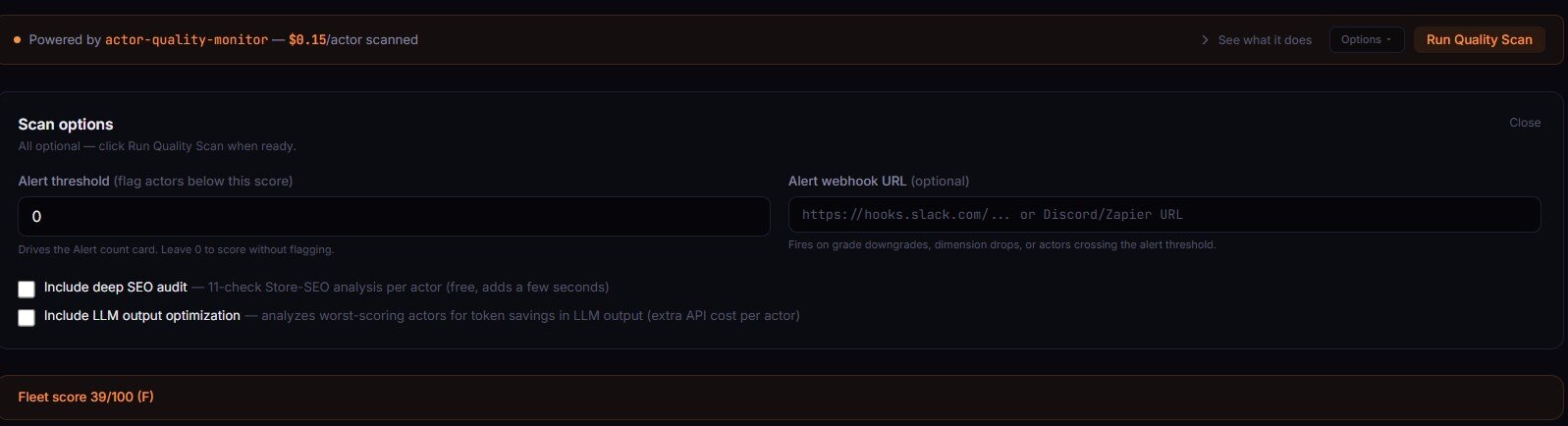
- Alert threshold (0–100) — flag actors below this score and drive the Alert count card. Leave at 0 to score without flagging.
- Alert webhook URL (optional) — Slack/Discord/Zapier webhook. Fires on grade downgrades, dimension drops, or actors crossing the alert threshold. Leave empty to score without alerting.
- Include deep SEO audit (checkbox) — adds an 11-check Store-SEO analysis per actor. Free and adds a few seconds to the run.
- Include LLM output optimization (checkbox) — analyzes worst-scoring actors for token savings in LLM output. Adds an extra API cost per actor analyzed.
Related term
The Apify Store Quality Score is a numeric score from 0 to 100 that Apify assigns to each published actor based on a comprehensive set of quality criteria.
Related questions
The Revenue dashboard shows PPE earnings across your entire actor portfolio with per-actor breakdown and trend lines. It...
What does the Health dashboard show?The Health dashboard monitors actor failure rates, success trends, and deprecation signals across your fleet. It is powe...
What does the Failures dashboard show?The Failures dashboard tracks which actors gained new failures since your last check. It is powered by the Failure Track...
What are Bulk Operations?Bulk Operations let you update metadata, pricing, categories, or trigger builds across multiple actors in a single actio...