The problem: You search a corporate registry, find the company, see "Active" next to its name, and move on. That feels like due diligence. It isn't. You pulled a record. You didn't make a decision. The registry told you the company exists and that today its status field reads active. It did not tell you whether the filings lapsed for three years, whether the entity has cycled through four names, whether it sat dormant and reactivated last month, or whether anything changed since you onboarded it as a vendor last quarter. Most teams treat "I found it in the registry" as the end of the check. That gap is where bad counterparties slip through.
What is corporate due diligence? Corporate due diligence is the process of verifying a company's legal existence, status, and risk profile before doing business with it, then deciding whether to proceed. A registry search is one input to that process, not the process itself.
Why it matters: A 2024 Association of Certified Fraud Examiners report found organizations lose an estimated 5% of annual revenue to fraud, and weak counterparty vetting is a recurring root cause. Verifying existence is cheap; verifying trustworthiness is the hard part.
Use it when: Onboarding vendors, running customer KYC, screening investment targets, or monitoring a portfolio of companies you've already approved.
Here's the thing most registry tools won't tell you, because it undercuts their whole pitch: pulling a record is the easy 10%. The decision is the other 90%, and that's the part you're still doing in your head, in a spreadsheet, one company at a time.
Quick answer
- What it is: Corporate registry search is a lookup that confirms a company is legally registered and returns its current status and basic details.
- When to use it: As the first input to vendor onboarding, KYC, or counterparty screening — never as the final answer.
- When NOT to use it alone: Any time the output of "it's registered" drives a real decision (approve a supplier, open an account, wire funds, close an investment).
- Typical flow: Search the registry, read the status, then layer verification, risk scoring, and ongoing monitoring on top — that layer is where decisions actually get made.
- Main tradeoff: Raw registry search is fast and cheap but stateless. It has no verdict, no risk score, and no memory of what changed since last time.
Problems this solves:
- How to verify a Canadian federal corporation before onboarding it as a vendor
- How to turn a corporate registry record into an approve / review / reject decision
- How to detect when an already-approved company's risk profile changes
- How to screen 50 vendors or a 500-company portfolio without one-at-a-time lookups
- How to keep an auditable trail of why a counterparty was approved or rejected
- How to spot a company that went dormant and reactivated, or changed names repeatedly
Key takeaways
- A registry search confirms existence; it does not produce a decision, a risk score, or a recommended action.
- "Active" status is a starting point, not a verdict. Active companies can have lapsed filings, frequent renaming, or risk that's been climbing for quarters.
- Manual one-at-a-time lookups break around 20-50 entities and collapse entirely at portfolio scale (hundreds of companies).
- Snapshot tools have no memory. They can't tell you what changed since you approved a vendor, because they never recorded the prior state.
- The Canada Federal Corporation Search Apify actor adds a deterministic decision layer — verdict, risk score, recommended action, monitoring, and corporate memory — on top of the official registry, with every signal traced back to a source field.
Concrete examples: what a registry record looks like vs what a decision needs
| Registry tells you | What it leaves unanswered | What a decision needs |
|---|---|---|
| Status: Active | Filings lapsed 3 years, just reinstated | A risk score that weights reinstatement after dormancy |
| Name: Acme Holdings Inc. | Was "Acme Logistics", then "Acme Trading", now "Acme Holdings" | A name-history chain flagging frequent renaming |
| Incorporated: 2019 | Inactive 2021-2024, reactivated last month | A reactivation-after-dormancy anomaly signal |
| Found in registry | Nothing changed... or did it, since last quarter? | Cross-run comparison against the last approval |
In this article
What is corporate registry search · Why registry search isn't due diligence · Why active doesn't mean low risk · How it works · Alternatives · Best practices · Common mistakes · Limitations · FAQ
What is corporate registry search?
Definition (short version): Corporate registry search is a lookup against a government business register that confirms a company is legally incorporated and returns its current status, registration number, and registered office.
It answers one question: does this entity legally exist, and what does its record say right now? In Canada, the federal layer is the Corporations Canada register run by ISED, which covers federally incorporated companies. Provincial registries (Ontario, BC, Quebec and the rest) are separate systems.
Also known as: business registry lookup, company register search, corporate entity verification, incorporation lookup, company status check, federal corporation search.
There are roughly three categories of registry-based check teams run today. Existence checks confirm the company is real. Status checks read the active/dissolved/inactive field. Detail pulls grab the registration number and office address for a file. All three are useful. None of them is a decision.
Why registry search isn't due diligence
Registry search isn't due diligence because confirming a company exists is not the same as deciding whether to trust it. The registry returns a record; due diligence requires a verdict, a risk assessment, and a recommended action. A record is an input. A decision is the output, and the registry never produces it.
That distinction sounds pedantic until it costs you. The classic failure: a team treats "found it, it's active" as a green light, then discovers months later that the vendor had reinstated from dissolution the week before the search, with no operating history behind the new entity. The registry record was accurate. The conclusion drawn from it was wrong.
The work that turns a record into a decision is the part nobody wants to own: deciding what counts as risk, weighting each signal, setting the threshold where "proceed" becomes "verify further," and keeping a defensible trail of why. A raw registry search hands you none of that. It hands you a row.
The registry search industry has a blind spot
For twenty years the corporate-registry industry has optimized one thing: data retrieval. Better search. Faster search. More records. More fields. Almost none of that reduces the actual work, which is the decision. The user still has to read the record and decide whether to proceed. Data retrieval improved. Decision-making did not.
That gap is the whole opportunity. Registry search has become a commodity. Every year it gets easier and cheaper to pull a company record, and the scarce resource is no longer access to the data, it's the ability to turn that data into a defensible decision. The future of due diligence is not better search. It is better decision-making built on top of search.
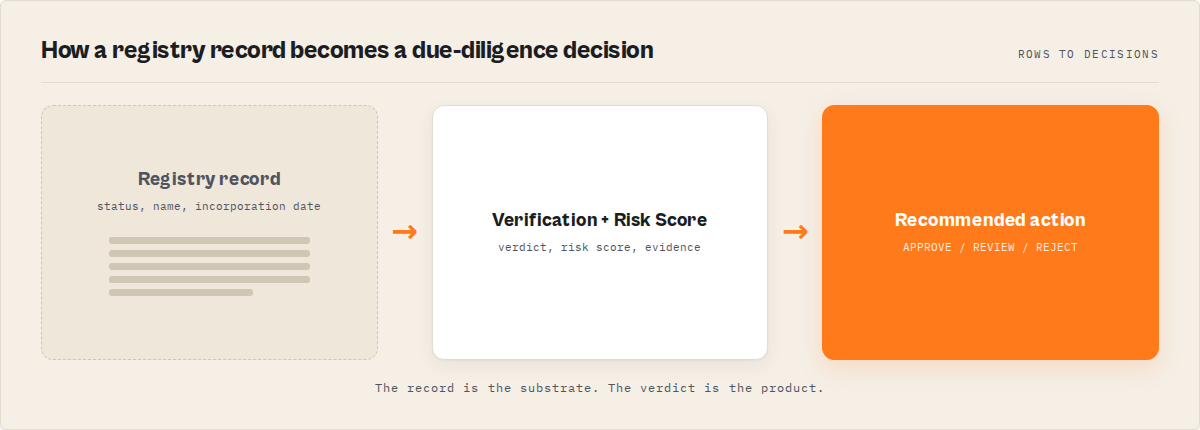
That layer has a name worth using deliberately: a corporate intelligence layer. It sits between the raw registry and your decision:
Registry search → Corporate intelligence layer → Decision
The registry tells you what a company is. The intelligence layer tells you whether you should trust it, what changed, and what to do next. Everything below in this article is about that middle box, because that is where due diligence actually happens.
Why does "active" status not mean low risk?
"Active" status means the company is currently registered and hasn't been formally dissolved. It does not mean low risk. An active company can have lapsed annual filings, a string of recent name changes, a reactivation after years of dormancy, or a risk profile that has been deteriorating quarter over quarter while the status field stayed green the whole time.
Status is a single binary-ish field. Risk is a pattern across many fields and across time. Here's what "active" routinely hides:
- Lapsed filings. The company is active but behind on the annual returns that keep a registry record current — a basic governance red flag.
- Frequent renaming. Four name changes in three years is uncommon for a stable business and common for entities trying to outrun a reputation.
- Reactivation after dormancy. Dissolved or inactive for years, then suddenly revived right before you transact with it.
- Drift over time. No single field looks alarming, but the trajectory is wrong — the registry health is sliding and a snapshot can't see a trajectory.
- Recent incorporation dressed as established. Active since "2019" can mean active on paper while inactive for most of those years.
A snapshot reports the status field. It doesn't score any of the above, and it certainly doesn't remember last quarter's snapshot to compare. That's the core failure: the registry is honest about what a company is and silent about whether you should trust it.
Why do compliance teams miss changes after onboarding?
Compliance teams miss post-onboarding changes because snapshot tools have no memory. A registry search tells you today's record. It cannot tell you what changed since you approved the vendor last quarter, because it never stored the prior state to compare against. Every search starts from zero.
This is the quiet killer in vendor and counterparty programs. You did the check at onboarding. It passed. Then the entity dissolved, renamed, or had its risk climb — and unless someone manually re-pulls the record and remembers what it used to say, nobody notices. The 2023 Gartner view on third-party risk is blunt about this: most programs are point-in-time, and point-in-time risk assessment is a fancy way of saying "accurate the day you ran it, stale the day after."
This is the most important limitation of registry search, and it's worth making concrete. The registry knows what a company looks like today. It does not know what changed. And most tools never record history long enough to learn. The difference between a snapshot and a memory is the difference between a fact and a trend:
| Snapshot | Memory |
|---|---|
| Active today | Active for 7 years |
| One name | Three historical names |
| One risk reading | Risk trend over 18 months |
| Current filing | Filing behaviour over time |
The left column is what a lookup returns. The right column is what a decision needs. Memory is the feature that's almost never in a registry search, and it's the one that actually catches problems.
How does a decision layer turn a registry into decisions?
A decision layer reads the registry record, then computes a verification verdict, a risk score with the evidence attached, and a recommended action — deterministically, with no language model in the loop, so every output traces back to a source field. The registry stays the source of truth; the layer is what makes it actionable.
This is exactly what the Canada Federal Corporation Search Apify actor is built to do. It pulls the official Corporations Canada federal record, then runs a fixed set of rules over it. Conceptually, the layer produces:
- A verification status —
verified-active,dissolved,inactive-amalgamated,inactive-discontinued, orunknown. Not just "active," but what kind of active. - A risk score (0-100) and risk level, plus a registry health score that captures filing currency and record quality.
- A recommended action —
proceed,verify-further,enhanced-due-diligence, ordo-not-proceed. - A job-framed screening verdict — APPROVE / REVIEW / REJECT, tuned to what you're actually doing (vendor onboarding, customer KYC, or investment screening), because the bar for a $500 supplier isn't the bar for a $5M acquisition.
- Evidence — every signal traced to the exact registry field and value that produced it, plus a confidence figure. When a human asks "why did this get flagged," the answer is in the output, not in someone's memory.
Because the rules are deterministic, the same input always yields the same verdict. That's not a small thing for compliance. An auditable, reproducible decision is the difference between a defensible process and a vibe.
What does the output look like?
Start with the contrast at its simplest. A raw registry lookup gives you this:
{ "status": "Active" }
The corporate intelligence layer gives you this:
{
  "verificationStatus": "verified-active",
  "riskScore": 67,
  "recommendedAction": "enhanced-due-diligence",
  "jobScreening": { "verdict": "REVIEW" }
}
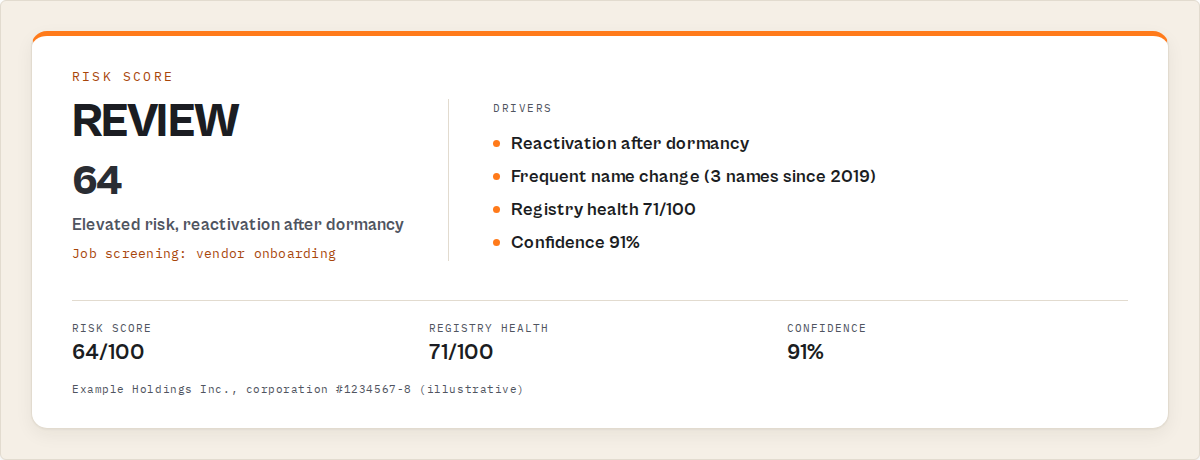
Same company, same registry data underneath. One is a fact you still have to interpret. The other is a decision you can act on or route. Here's the fuller shape of a single corporation's result:
{
  "companyName": "Example Holdings Inc.",
  "corporationNumber": "1234567-8",
  "registryStatus": "Active",
  "verificationStatus": "verified-active",
  "riskScore": 64,
  "riskLevel": "elevated",
  "registryHealthScore": 71,
  "recommendedAction": "enhanced-due-diligence",
  "jobScreening": {
    "jobToBeDone": "vendor-onboarding",
    "verdict": "REVIEW"
  },
  "nextAction": "Request audited financials and confirm operating history before approval",
  "evidence": [
    { "signal": "reactivation-after-dormancy", "field": "statusHistory", "value": "inactive 2021-2024 -> active 2026" },
    { "signal": "frequent-name-change", "field": "nameHistory", "value": "3 prior names since 2019" }
  ],
  "confidence": 0.91
}
Note what you don't do here: you don't write the scoring logic, you don't decide the thresholds, you don't hand-trace evidence. The actor does. You read recommendedAction and jobScreening.verdict and act. That JSON is the deliverable a registry row can never be.
What are the alternatives to manual registry search?
There are four common approaches to corporate verification, and naming them honestly is the only way to choose. Each has real trade-offs in cost, scale, memory, and how much of the decision you still own yourself.
| Approach | Verdict / risk score | Scales to portfolios | Has memory | What you still own |
|---|---|---|---|---|
| Manual registry lookup | No | No | No | Scoring, thresholds, evidence, monitoring — all of it |
| Generic company-data API | No | Partly | No | The entire decision layer and re-checks |
| Enterprise GRC platform | Yes | Yes | Yes | Procurement, integration, six-figure contract |
| Decision-layer actor (e.g. canada-corporation-search) | Yes | Yes | Yes | Choosing the job-to-be-done and reading the verdict |
Manual registry lookup. Open the government site, search, read the status. Best for: a one-off check on a single company when nothing material rides on it. Where it breaks: you still own the scoring, the thresholds, the evidence trail, and every future re-check. There is no verdict and no memory — it's a row and a judgment call. Past roughly 20-50 entities it stops being a process and starts being a backlog.
Generic company-data API. A data provider returns registry fields plus some enrichment. Best for: feeding raw fields into a system you've already built. Where it breaks: you still own the entire decision layer — risk weighting, action thresholds, job-specific bars, and the monitoring loop. You're buying data, not decisions, and the re-check problem is yours.
Enterprise GRC / third-party-risk platform. Full governance, risk, and compliance suites do produce verdicts and monitoring. Best for: large organizations with a procurement function and budget for a multi-seat annual contract. Where it breaks: cost and integration weight. For a team that just needs defensible decisions on Canadian federal entities, it's a lot of platform for the job.
Decision-layer actor. A focused actor that reads the official registry and returns a verdict, risk score, recommended action, and monitoring — like the Canada Federal Corporation Search actor. Best for: teams that need the decision, not just the data, without a GRC procurement cycle. Where it breaks: it's scoped to federal corporations and the fields the registry publishes (more on that under Limitations).
Each approach has trade-offs in cost, scale, memory, and how much of the decision logic you have to build and maintain yourself. The right choice depends on volume, how material the decisions are, and whether you need an auditable trail.
Pricing and features based on publicly available information as of June 2026 and may change.
How does cross-run monitoring catch what snapshots miss?
Cross-run monitoring works by storing each company's state on every run and comparing it to the prior state, so a change between quarter one and quarter two surfaces as an explicit signal rather than something a human has to notice. It's the memory that a one-shot registry search structurally lacks.
The Canada Federal Corporation Search actor handles this through an opt-in watchlist. On each run it emits temporal signals — NEW-FILING, NAME-CHANGED, DISSOLVED, RISK-INCREASED — each with a change severity. It also builds a corporate memory: cross-run historical statuses, names, and risk scores, plus an entity trend (deteriorating, improving, or stable). At the portfolio level you get a risk radar, a ranked review queue, and a run-over-run trend.
That's the difference between "we screened them in March" and "they were stable in March, their risk climbed in April, and the queue surfaced them for review in May." One is a filing. The other is a control.
How do you screen a whole portfolio without one-at-a-time lookups?
You screen a portfolio by running every entity through the same deterministic decision layer in one pass, then reading a ranked review queue instead of opening hundreds of records by hand. The output prioritizes the entities that actually need attention, so a 500-company portfolio collapses into a short queue of exceptions.
Manual review doesn't scale because human attention is linear and the work isn't. Fifty vendors is a bad afternoon; five hundred is a project nobody finishes. The portfolio insights from the actor — risk radar plus ranked queue — exist precisely so you're reviewing the 12 that drifted, not re-reading the 488 that didn't.
Best practices for registry-based due diligence
- Treat the registry as input, not verdict. Always layer verification, scoring, and an explicit recommended action on top of the raw record.
- Match the bar to the job. A vendor-onboarding check and an investment screen should not share a threshold. Use job-framed APPROVE / REVIEW / REJECT logic.
- Keep the evidence attached to the decision. If you can't point to the exact field that drove a flag, you don't have an auditable process.
- Re-screen on a schedule, not just at onboarding. Point-in-time checks go stale the day after. Put approved entities on a watchlist.
- Watch trajectories, not just snapshots. A deteriorating entity trend is a signal even when today's status still reads active.
- Prioritize by exception. Read the ranked review queue, not every record. Spend attention where the risk moved.
- Prefer deterministic logic for compliance decisions. Reproducible, traceable verdicts beat a model's best guess when an auditor asks why.
- Record the prior state. Without memory of last quarter, you can't detect change — so use a tool that stores history.
Common mistakes in registry-based screening
- Stopping at "active." The single most common error. Active hides lapsed filings, reactivation, and drift. Fix: read the full verification status and risk score, not the status field.
- One-and-done screening. Checking at onboarding and never again. Fix: ongoing monitoring with cross-run comparison.
- No evidence trail. Approving a vendor with no record of why. Fix: keep the per-signal evidence the decision was based on.
- Same threshold for every job. Holding a small supplier to an M&A bar, or worse, the reverse. Fix: job-framed screening verdicts.
- Confusing data volume with diligence. Pulling more fields feels thorough but doesn't produce a decision. Fix: a decision layer that outputs an action.
- Treating provincial and federal as interchangeable. A federal registry won't show a provincially incorporated entity. Fix: confirm jurisdiction before concluding "not found."
Mini case study: a vendor that passed the eye test
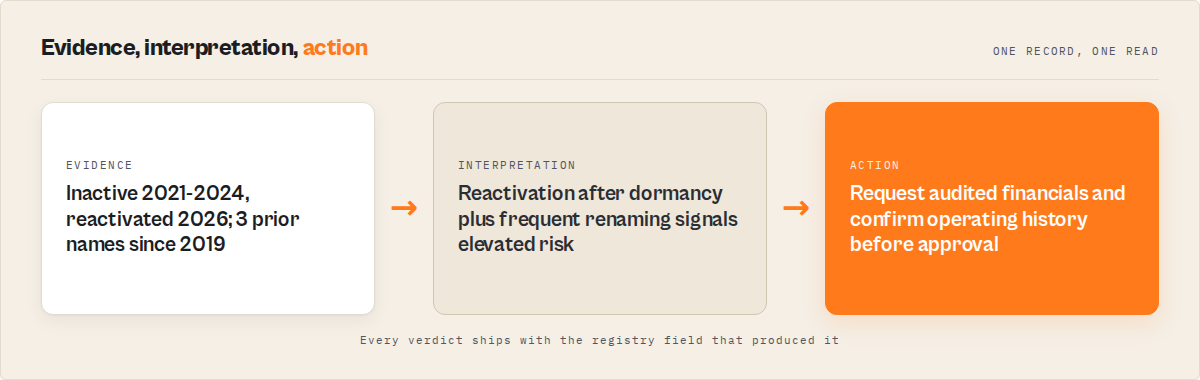
Picture a procurement team that onboards a federal supplier after a standard registry check — found it, active, done. Three months later an invoice dispute surfaces, and it turns out the entity had been dissolved and reinstated days before onboarding, under a name it had used twice before. The original check took two minutes and missed all of it, because a snapshot can't see history.
Run through a decision layer instead, the same company would have come back riskScore in the elevated band, recommendedAction: enhanced-due-diligence, with reactivation-after-dormancy and frequent-name-change in the evidence array — before the contract was signed. The registry data was identical in both cases. The difference was whether anything turned that data into a decision. The reactivation-and-rename pattern is exactly the kind a status field hides and a risk score surfaces.
Implementation checklist
- Identify the job-to-be-done: vendor onboarding, customer KYC, or investment screening.
- Confirm the entity is federally incorporated (federal registry only — provincial entities won't appear).
- Run the company through the Canada Federal Corporation Search actor by name or corporation number.
- Read the verification status, risk score, and recommended action — not the raw status field.
- Check the job screening verdict (APPROVE / REVIEW / REJECT) against your tolerance for that job.
- Add approved entities to the watchlist so re-checks happen automatically.
- On each cycle, work the ranked review queue and act on temporal signals (risk increases, name changes, dissolutions).
- Keep the evidence array with the decision record for audit.
Limitations
Honest constraints, because a tool that won't name its edges isn't trustworthy:
- Federal only. The actor reads the Corporations Canada federal registry. Provincially incorporated companies (the majority of small Canadian businesses) aren't in that register and won't be found there.
- No director names. The federal registry doesn't publish individual director identities through this surface, so the actor can't return them.
- No financials. This is a status-and-existence registry, not a financial-disclosure system. Revenue, debt, and accounts aren't available here.
- Registry-bound. The verdict is only as current as the official record. If a change hasn't hit the registry yet, no tool reading the registry can see it.
- A decision aid, not a decision-maker. A
do-not-proceedorenhanced-due-diligenceoutput is a recommendation. Material decisions still need human judgment and, where warranted, legal review.
Key facts about corporate registry due diligence
- A registry search confirms legal existence; it does not produce a risk verdict or a recommended action.
- "Active" status can coexist with lapsed filings, frequent name changes, and reactivation after dormancy.
- Snapshot tools cannot detect post-onboarding change because they store no prior state.
- Manual one-at-a-time review stops scaling somewhere between 20 and 50 entities.
- The Corporations Canada federal registry covers federally incorporated companies only, not provincial ones.
- Deterministic decision logic produces the same verdict for the same input, which is what auditability requires.
- The Canada Federal Corporation Search Apify actor is priced pay-per-event at the record level, so you pay per corporation retrieved.
Glossary
Corporate registry — A government database of legally registered companies, their status, and basic details. Verification status — A classification of an entity's standing (verified-active, dissolved, inactive, unknown) richer than a raw status field. Risk score — A 0-100 figure summarizing an entity's risk signals into one comparable number. Recommended action — A decision output (proceed / verify-further / enhanced-due-diligence / do-not-proceed) derived from the risk assessment. Temporal signal — A detected change between runs (new filing, name change, dissolution, risk increase) with a severity. Corporate memory — Accumulated cross-run history of an entity's statuses, names, and risk scores that a single snapshot can't reconstruct.
Broader applicability
The pattern here isn't specific to Canada or even to corporate registries. It applies to any open-source-of-truth where teams confuse the lookup with the decision:
- Existence ≠ trust. Confirming a record exists is the cheap part; deciding what it means is the work.
- Snapshots lie over time. Any point-in-time check needs memory to stay true, or it's accurate exactly once.
- Deterministic beats clever for compliance. Reproducible, traceable logic survives an audit; a model's guess doesn't.
- Scale demands prioritization, not more lookups. Past a few dozen entities, the answer is a ranked queue, not more tabs.
- Evidence belongs with the decision. A verdict without the field that produced it isn't defensible.
The same shift — from raw data to a decision layer with memory — is why we keep building decision-grade actors instead of data dumps and why machine-actionable compliance is a category, not a feature.
When you need this
You need a registry decision layer if:
- You onboard vendors, suppliers, or counterparties that are federally incorporated in Canada.
- You run KYC or compliance screening and need a defensible, auditable verdict.
- You're screening more than a handful of entities, or any portfolio you have to re-check.
- You've been burned by a company that "looked fine in the registry."
You probably don't need this if:
- You're checking a single company once and nothing material rides on it.
- The entities you care about are provincially (not federally) incorporated.
- You need director names or financials, which this registry doesn't publish.
Frequently asked questions
Is a corporate registry search the same as due diligence?
No. A registry search confirms a company is legally registered and returns its current status. Due diligence requires turning that record into a decision — a verification verdict, a risk assessment with evidence, and a recommended action. The search is one input; the decision is the output, and the registry alone never produces it.
Does "active" status mean a company is low risk?
No. Active means the company is currently registered and not formally dissolved. It can still have lapsed filings, frequent name changes, a recent reactivation after years of dormancy, or a risk profile that's been climbing for quarters. Active is a starting point for analysis, not a clean bill of health.
Why can't a normal registry lookup tell me what changed since last quarter?
Because a snapshot tool stores no prior state. Each search starts from zero and reports today's record, with no memory of what it said before. Detecting change requires cross-run comparison — recording each run and diffing it against the last — which is exactly what monitoring with corporate memory adds on top of a plain lookup.
Does the Canada Federal Corporation Search actor cover provincial corporations?
No. The Canada Federal Corporation Search Apify actor reads the Corporations Canada federal registry, which covers federally incorporated companies only. Provincially incorporated entities live in separate provincial registries and won't appear. Confirm jurisdiction before concluding a company isn't registered.
Is the decision layer powered by an AI model?
No, and that's deliberate. The verification status, risk score, recommended action, and screening verdict are all computed by deterministic rules, with no language model in the loop. The same input always produces the same output, and every signal traces back to a specific registry field — which is what makes the verdict auditable and defensible.
How much does it cost to run?
The actor uses pay-per-event pricing: you're charged per corporation record retrieved from the registry, not a flat subscription. We cover how pay-per-event pricing works in the learn guide. You'll need an Apify account to run it, and you only pay when you get a result back.
How does this compare to other compliance screening tools?
Most general screening tools focus on sanctions and watchlists; this actor focuses on entity verification and registry-based risk for Canadian federal corporations specifically. We keep a running comparison of compliance screening actors and company research actors if you want to see where each fits.
Ryan Clinton publishes Apify actors and MCP servers as ryanclinton and builds developer tools at ApifyForge.
Last updated: June 2026
This guide focuses on the Canadian federal registry, but the same patterns — verdict over record, memory over snapshot, deterministic over clever — apply broadly to any registry-based due diligence.