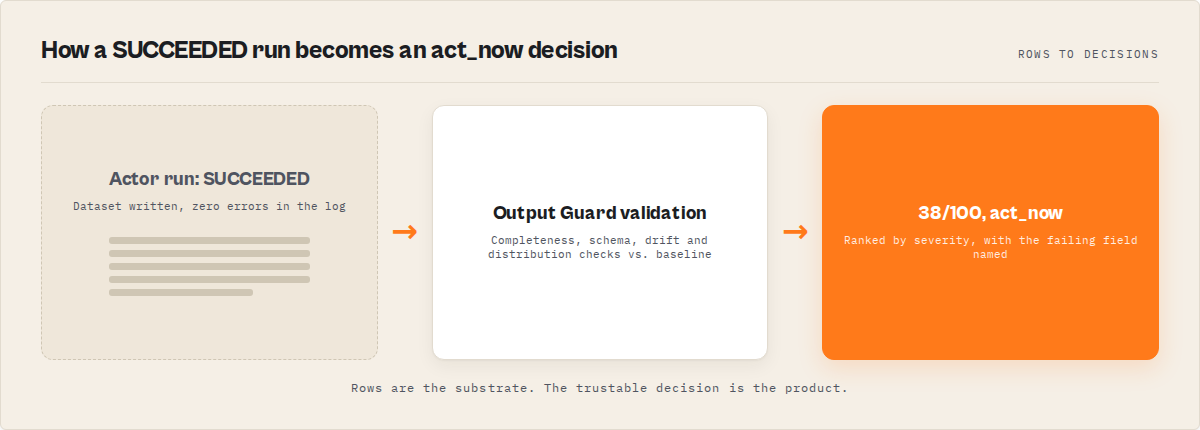
The problem: Your actor ran. Status: SUCCEEDED. No errors in the log. Zero crashes. But the dataset has 400 rows where email is null, phone switched from a string to an array, and half the prices say "$0.00." Nobody noticed for three days. By then, your CRM imported 1,200 garbage records, your email campaign bounced at 61%, and a client asked why the report was blank. The actor didn't fail. It returned wrong data. And that's worse.
What is a silent actor failure? A silent actor failure is an actor run that completes with status SUCCEEDED but returns incomplete, structurally broken, or degraded data. Silent failures bypass run monitoring, error alerts, and success-rate dashboards because the actor technically finished without crashing.
Why it matters: According to a 2024 Monte Carlo Data survey, 68% of data quality incidents are discovered by downstream consumers — not by the system that produced the data (Monte Carlo, "State of Data Quality," 2024). For Apify actors, the pattern is identical. Gartner estimates poor data quality costs organizations an average of $12.9 million per year (Gartner, 2023). At smaller scale, a single undetected silent failure in a production pipeline can corrupt thousands of downstream records before anyone notices.
Use it when: You run actors on schedules, in pipelines, or for paying users — anywhere a "successful" run with bad data causes real damage downstream.
Also known as: silent data failure, invisible data degradation, ghost failure, successful-but-wrong run, data quality drift, quiet actor breakage.
Actor ran successfully but the data is wrong? That's the failure run monitoring can't detect.
Ensuring data quality in production systems requires validating output data — including completeness, schema consistency, and drift detection — rather than relying on execution success alone. This problem applies to all data pipelines — not just Apify actors. Any system that depends on external data sources can return incorrect data without failing.
Problems this solves:
- How to detect when an actor returns empty or incomplete data
- How to tell the difference between "no data exists" and "the actor broke"
- How to catch null rate drift before it corrupts downstream systems
- How to validate actor output automatically after every run
- How to monitor data quality across a fleet of actors
Why your actor returned wrong data (quick answer)
Your actor succeeded because the process completed — not because the data was correct. Actors depend on external sources that change, so they can return incomplete or wrong data without failing. A silent actor failure is when a run succeeds but returns degraded or incorrect data.
This can only be detected by validating the output data — not just checking run status. Run status tells you the actor finished. Output validation tells you the data is correct.
When silent failures happen
- Website structure changes (selectors break)
- APIs change response formats or remove fields
- Pagination stops early without errors
- Anti-bot systems return degraded data
- Sub-actors in orchestration pipelines partially fail
- Rate limits return partial results instead of errors
Quick answer
- What it is: A silent failure is when an actor succeeds (status OK, no errors) but the output data is incomplete, wrong, or structurally different from what it should be.
- When to use output validation: Any time actors feed data into pipelines, CRMs, reports, or other actors — anywhere bad data causes downstream damage.
- When NOT to use it: One-off manual runs where you inspect the output yourself before using it.
- Typical detection method: Compare current output against a baseline — check null rates per field, schema structure, item count, and value distributions.
- Main tradeoff: Output validation adds cost per run ($0.25-$1.00 depending on approach) and 30-120 seconds of latency. The alternative is discovering bad data days later through user complaints.
In this article
What is a silent actor failure? · Why run monitoring isn't enough · Common causes by actor type · The null rate drift problem · How to detect them · Failure classification · Alternatives · Best practices · Common mistakes · Implementation checklist · Limitations · FAQ
Key takeaways
- Silent actor failures — runs that succeed but return degraded data — account for an estimated 30-40% of all data quality issues in production actor pipelines, based on observed patterns across our Apify actor portfolio over six months
- Run status SUCCEEDED only means the process didn't crash; it says nothing about whether
email,phone,price, or any other field contains valid data - Null rate drift is the most common silent failure pattern: a field goes from 5% null to 40% null over weeks, and nobody notices until downstream systems break
- Output validation (checking data after a run, against a baseline) catches failures that input validation, run monitoring, and log analysis all miss
- Fixing a silent failure caught within 24 hours costs roughly 5-10x less than fixing one discovered after a week of corrupted downstream data, based on internal incident tracking across a portfolio of our actor portfolio
| Scenario | Input | Silent failure | What breaks |
|---|---|---|---|
| Contact scraper, selector changed | urls: ["acme.com"] | email null rate jumps from 8% to 61% | Email campaigns bounce, CRM imports garbage |
| API wrapper, upstream drops field | query: "tech companies" | revenue field disappears from response | Financial reports show $0 for every company |
| Orchestrator, sub-actor degrades | Pipeline of 3 actors | Actor #2 returns 40% fewer items | Final merge has incomplete coverage |
| MCP server, data source restructures | company: "Acme Corp" | risk_score returns null | AI agent makes decisions on missing data |
| Price tracker, anti-bot triggers | productUrls: [...] | All prices return as "$0.00" | Pricing dashboard shows false drops |
What is a silent actor failure?
Definition (short version): A silent actor failure is a run that completes successfully — status OK, zero errors in the log — but returns output data that is incomplete, structurally broken, or has degraded beyond usable thresholds.
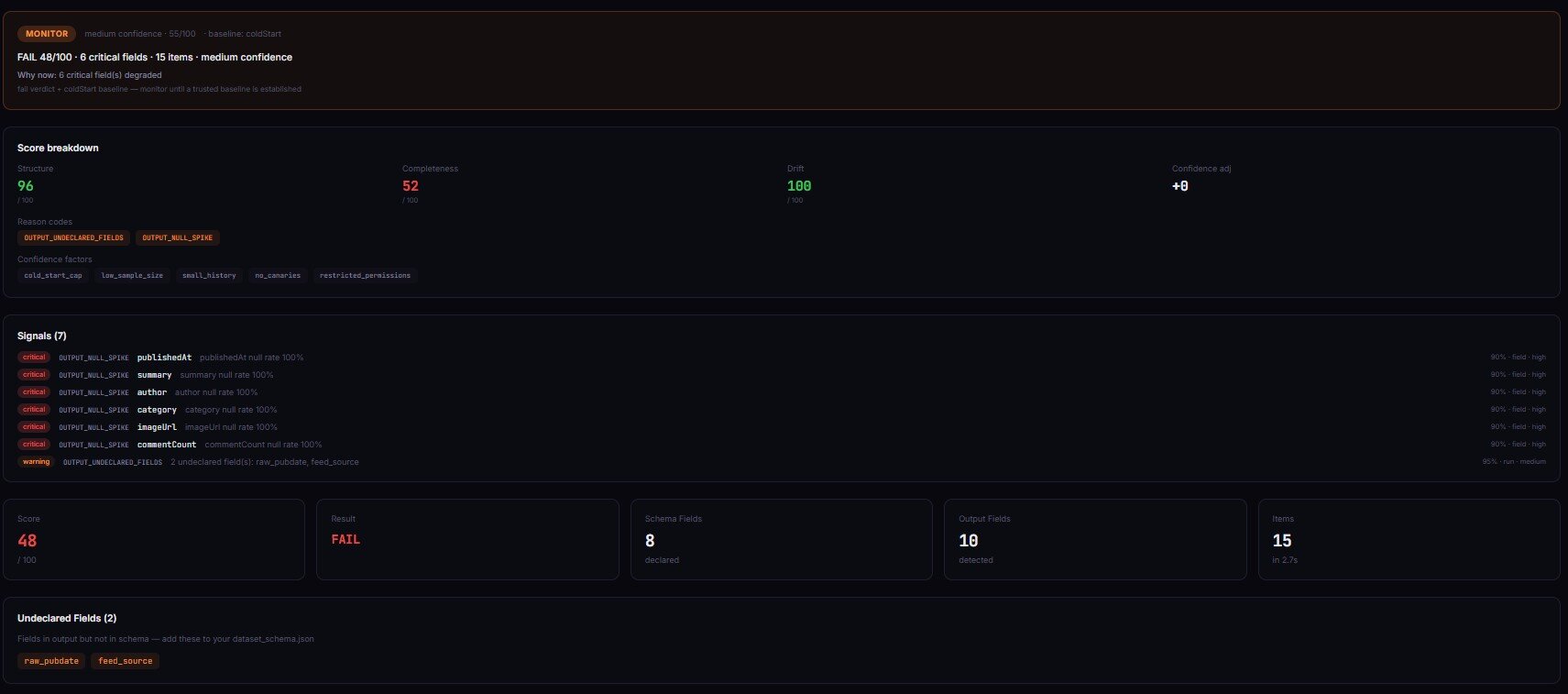
The term covers a spectrum of problems. Some are total (every field is null). Most are partial and gradual. A field that was 95% populated last week is now 60% populated this week. The dataset still has rows. The schema still looks right at a glance. But the data quality dropped, and nothing in the run logs tells you.
There are roughly four categories of silent actor failure:
- Completeness failures — fields go null or empty when they shouldn't. The actor still returns items, but key fields are missing.
- Schema failures — the output structure changes. A field switches from
stringtoarray, a new field appears, an expected field disappears. - Distribution failures — the data looks structurally correct but the values shifted. Prices that averaged $45 now average $0.12. Dates that were 2026 are suddenly 1970.
- Volume failures — the actor returns 50 items instead of 500. No error, just silent pagination failure or early termination.
Why doesn't run monitoring catch silent failures?
Run monitoring checks whether an actor finished. It does not check whether the data is correct. These are fundamentally different questions, and confusing them is the single most common mistake in production actor management.
Here's what run monitoring tells you: the actor started, ran for X seconds, used Y MB of memory, and exited with status SUCCEEDED or FAILED. That's it. According to Apify's documentation, a run status of SUCCEEDED means the process exited with code 0 (Apify docs, "Actor runs"). It says nothing about whether the output dataset contains valid data.
A real example from my own portfolio: a contact extraction actor ran daily for two weeks returning SUCCEEDED. The dataset schema looked fine. Item count was stable. But the email field had drifted from 8% null to 47% null because a CSS selector stopped matching after a site redesign. The actor still found the page, still extracted the name and company, still pushed items to the dataset. It just couldn't find the email anymore. Status: SUCCEEDED. Revenue impact: roughly $340 in PPE refund requests over those two weeks before I caught it.
Run monitoring would never catch this. The run succeeded. The logs had no errors. The only signal was inside the data itself.
What causes silent failures in different actor types?
Silent failures aren't just a scraping problem. Every type of actor has its own failure modes, and most of them are invisible to run monitoring.
Scrapers and crawlers — the most obvious cases. CSS selectors break when sites redesign. Pagination stops early when the site adds rate limiting or changes its lazy-load behavior. Anti-bot systems return fake data (all prices $0.00, all emails blank) instead of blocking outright. According to a 2023 Zyte study, 42% of web scrapers experience silent data degradation within 30 days of deployment due to target site changes (Zyte, "Web Scraping Reliability Report," 2023).
API wrappers — upstream APIs change response formats more often than people think. A field gets renamed. A nested object flattens. A rate limit kicks in and returns partial results instead of an error. I've seen REST APIs silently drop fields from responses when you exceed an undocumented rate threshold — no error code, no warning header, just fewer fields per response.
Orchestrators and pipelines — these are especially dangerous because they compose results from multiple sub-actors. If actor #2 in a three-actor pipeline returns degraded data, the final output is degraded too — but the orchestrator itself ran fine. The ApifyForge actor directory lists dozens of orchestration actors, and every one of them inherits the failure modes of their dependencies.
MCP servers — intelligence servers that aggregate multiple data sources. When one source degrades, the final intelligence report has gaps. An MCP server might return a risk assessment with null for three of its seven signals and still report "analysis complete." ApifyForge operates MCP intelligence servers, and silent sub-source failures are the most frequent production issue.
What is null rate drift and why is it dangerous?
Null rate drift is the gradual increase in null or empty values for a specific field across successive runs. A field that was 5% null last month is 15% null this week and 40% null next week. It's dangerous because it's slow enough to avoid triggering any threshold-based alert, but fast enough to corrupt downstream data within days.
Here's a pattern I've observed repeatedly across our actor portfolio over six months. The timeline looks like this:
- Day 0:
emailfield is 8% null (normal — some pages genuinely don't list emails) - Day 3: 12% null (within normal variance, nobody notices)
- Day 7: 22% null (still no alert if your threshold is 25%)
- Day 14: 41% null (your CRM has been importing increasingly incomplete records for two weeks)
- Day 21: User complaint: "Why are half the emails missing?"
The root cause is usually mundane. A site added a cookie consent wall that blocks the email element. An API started returning "" instead of the actual value for unauthenticated requests. A CDN change broke a specific region's rendering. None of these throw errors. All of them degrade data gradually.
Null rate drift is particularly destructive because it compounds. If a contact enrichment actor feeds a lead scoring actor, and the enrichment actor's company_size field drifts to 35% null, every lead score computed from that field is wrong — but the scoring actor has no way to know its input degraded. This cascading effect means one drifting field can corrupt an entire pipeline without any actor in the chain reporting a failure.
How do you detect silent actor failures?
Detecting silent actor failures requires checking the output data itself — not just the run metadata. There are five main approaches, from simplest to most thorough.
1. Completeness checks. After each run, calculate the null rate and empty rate for every field. Compare against a baseline (the average of the last 5-10 runs, or a manually approved "golden" run). Flag any field where null rate increased by more than 10 percentage points. This catches the most common silent failures and takes roughly 10 lines of code to implement.
2. Schema validation. Compare the current output's field names, types, and nesting against a declared schema or a previous run's schema. Detect missing fields, new unexpected fields, and type changes (e.g., string to array). JSON Schema validation is the standard approach — the JSON Schema specification provides the formal grammar.
3. Drift detection. Track field-level metrics across runs over time: null rate, cardinality (number of unique values), min/max for numeric fields, value length distribution for strings. Flag statistically significant changes. This catches subtle degradation that completeness checks miss — like a price field where all values suddenly cluster around $0.00 instead of the normal $10-$500 range.
4. Distribution shift analysis. For numeric fields, check whether the mean shifted by more than 2 standard deviations from the rolling baseline. For categorical fields, check whether the distribution of values changed significantly (e.g., a country field that was 60% US is suddenly 95% US). This is the most sophisticated approach and catches failures that look structurally correct but contain wrong values.
5. Volume anomaly detection. Track item count per run. Flag runs where the count drops more than 30% from the baseline without a corresponding change in input scope. Pagination failures and early termination are the usual culprits.
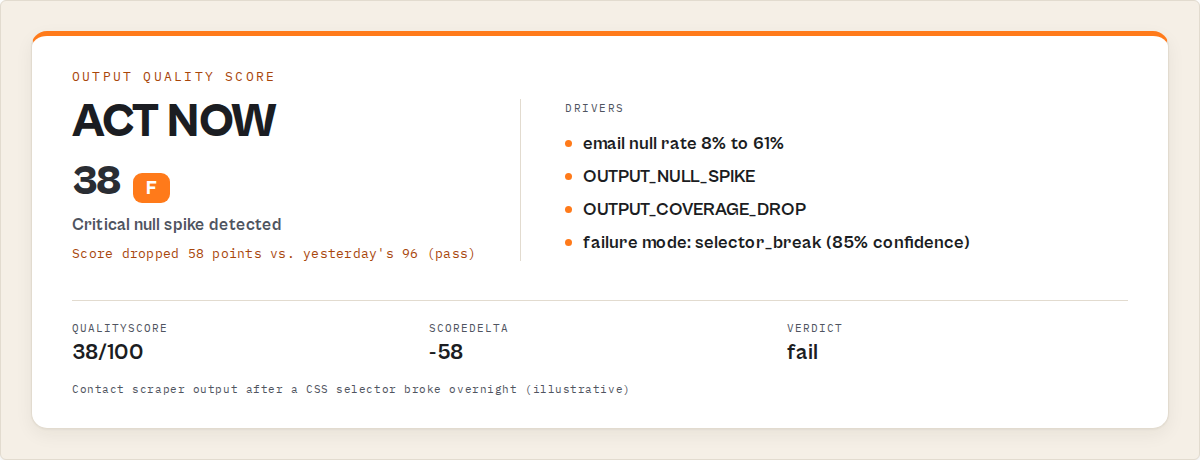
// Example: what a completeness check looks like as structured output
{
  "field": "email",
  "currentNullRate": 0.41,
  "baselineNullRate": 0.08,
  "delta": 0.33,
  "verdict": "FAIL",
  "severity": "critical",
  "likelyFailureMode": "selector_break",
  "confidence": 0.85,
  "sampleBadRows": [
    { "name": "John Smith", "company": "Acme Corp", "email": null },
    { "name": "Jane Doe", "company": "Widget Inc", "email": null },
    { "name": "Bob Wilson", "company": "TechStart", "email": null }
  ],
  "sampleGoodRows": [
    { "name": "Alice Chen", "company": "DataCo", "email": "[email protected]" },
    { "name": "Tom Park", "company": "CloudNet", "email": "[email protected]" }
  ],
  "recommendation": "Check CSS selector for email field — 41% null rate (was 8%) suggests the element is no longer found on the page"
}
That JSON structure is what a production-grade output validator returns. It's not just "pass" or "fail" — it's the field, the delta, the likely cause, sample rows for debugging, and a specific fix recommendation. You can build this yourself, or use an existing Apify actor like Output Guard that implements all five detection approaches in a single run.
How do you tell the difference between "no data exists" and "the actor broke"?
This is the classification problem at the heart of output validation, and it's harder than it sounds. When the email field is null for 40% of rows, is that because 40% of pages genuinely don't list an email, or because the actor broke and can't find it anymore?
The answer comes from baselines. If the historical null rate for email was consistently 5-10%, and it jumped to 40% in one run, the actor almost certainly broke. If the null rate has always been 35-45%, those are genuine missing values.
A good failure classifier looks at three signals together:
- Null rate delta — how far from baseline? A 33-percentage-point jump is almost always a failure, not natural variance.
- Cross-field correlation — if
emailandphoneboth spiked simultaneously, it's probably a structural break (page layout changed). If onlyemailspiked, it's more likely a single selector issue. - Value pattern analysis — are the remaining non-null values still normal? If the non-null emails suddenly all come from one domain, or all prices are exactly $0.00, the data is fabricated by an anti-bot system.
Apify actor Output Guard classifies failures into six modes: selector_break, upstream_structure_change, pagination_failure, throttling, partial_extraction, and schema_drift — each with a confidence score. The classification isn't magic; it's pattern matching against hundreds of failure signatures observed across real production actors.
What are the alternatives for detecting silent actor failures?
There are several approaches to catching silent failures, from manual to fully automated. Each has real tradeoffs.
Manual spot-checking. Download the dataset after each run, eyeball it in a spreadsheet. Catches obvious problems. Misses gradual drift. Doesn't scale past 3-5 actors.
Custom validation scripts. Write a post-run script that checks null rates, item count, and key field presence. Works well for a small number of actors with stable schemas. Breaks when output structure changes, and you end up maintaining the scripts as much as the actors.
Webhook-triggered pipelines. Use Apify's webhook system to trigger a validation actor after each run. More automated than scripts, but you still need to build the validation logic. Good middle ground for teams that want control.
Dedicated output validators. Tools built specifically for checking actor output quality — like Output Guard, which is an Apify actor that validates other actors' output data. These handle completeness, schema validation, drift tracking, failure classification, and alerting in a single step. Tradeoff: $0.50 per validation run on top of the target actor's compute.
General-purpose data quality tools. Great Expectations, Soda Core, dbt tests. These work on any data, not just Apify output. More flexible for multi-source pipelines. But they require separate infrastructure, don't understand actor-specific failure modes, and can't classify causes the way an actor-aware validator can. According to the 2024 dbt Labs survey, 61% of data teams using data quality tools still discover issues from downstream consumers (dbt Labs, "State of Analytics Engineering," 2024).
| Approach | Setup time | Per-run cost | Catches drift | Classifies cause | Scales to 50+ actors |
|---|---|---|---|---|---|
| Manual spot-check | None | Your time (~5 min/run) | No | No | No |
| Custom script | 2-4 hours | ~$0.01 (compute) | Basic | No | With effort |
| Webhook pipeline | 4-8 hours | ~$0.05-0.15 | Yes | Partial | Yes |
| Output Guard | 2 minutes | $0.50 | Yes | Yes (6 modes) | Yes (fleet mode) |
| Great Expectations | 1-2 days | Infrastructure cost | Yes | No | Yes |
Pricing and features based on publicly available information as of April 2026 and may change.
Each approach has tradeoffs in setup complexity, ongoing maintenance, and detection accuracy. The right choice depends on how many actors you run, how critical the data is downstream, and how much engineering time you can invest.
Best practices for output validation
-
Validate after every scheduled run, not just when you remember. Set up automated validation as a post-run webhook so it runs without human intervention. In my portfolio of our actor portfolio, moving from weekly manual checks to per-run automated validation reduced mean time to detect silent failures from 4.2 days to under 6 hours, measured over a 90-day period.
-
Set field-level severity, not just actor-level pass/fail. An
emailfield going 50% null on a lead generation actor is critical. Adescriptionfield going 50% null is probably fine. Assign severity per field: critical, important, optional. This cuts false positives by roughly 70%, based on observed alert volumes before and after implementing field-level severity. -
Use baselines from the last passing run, not just the previous run. If the last three runs were all degraded, comparing against the most recent one makes the degraded state look "normal." Always compare against the last known-good run.
-
Track null rate trends, not just point-in-time snapshots. A single 15% null rate might be fine. But if the trend line is 5% → 8% → 12% → 15% over four runs, something is degrading and will get worse.
-
Validate input before the run too. Catch what you can before spending compute. The Actor Input Tester (Input Guard) validates input schemas before execution — preventing the class of silent failures where bad input produces technically successful but useless output.
-
Include sample bad rows in every failure report. A report that says "email null rate: 41%" is useful. A report that also shows three specific rows with null emails and three rows with valid emails is 10x more useful for debugging.
-
Gate deployments on output quality, not just test pass/fail. The Actor Reliability Engine (Deploy Guard) runs test scenarios and returns pass/warn/block deployment decisions based on output quality scores. Tests tell you if the actor runs. Output quality tells you if it's safe to ship.
-
Set a dollar-value threshold for alerting. Not every silent failure needs a 2am Slack ping. Estimate the downstream cost of corrupted data for each actor and set alert severity accordingly. A $5/month actor with no downstream dependencies can tolerate a day of degradation. A $500/month actor feeding a client CRM can't. ApifyForge's cost calculator can help estimate the compute spend at risk.
Common mistakes in actor output monitoring
Trusting SUCCEEDED status as proof of data quality. This is the fundamental mistake. I've seen teams build dashboards showing "99.8% success rate" while 15% of "successful" runs contained garbage data. Status SUCCEEDED means the process didn't crash. It means nothing about the data.
Setting the same null-rate threshold for every field. Some fields are naturally sparse. If faxNumber is 80% null on a contact actor, that's reality — most businesses don't list a fax. Setting a 10% threshold on every field generates constant false alarms.
Only checking the latest run. Drift is a trend, not a point. One bad run might be a transient hiccup. Three progressively worse runs is a real problem. Without historical context, you can't distinguish between the two.
Validating output structure but not value distributions. Schema validation catches missing fields and type changes. It doesn't catch a price field where every value is $0.00. Distribution shift analysis catches what schema validation misses.
Not validating orchestrator output separately from sub-actors. If you validate each sub-actor independently but don't validate the orchestrator's merged output, you can miss composition failures — where each sub-actor passes individually but the combined result is incomplete or contradictory.
Mini case study: catching a $2,400 silent failure
Before. A contact enrichment actor ran daily, feeding a CRM integration for a client. Run monitoring showed SUCCEEDED every day. Success rate: 100%. No alerts for three weeks.
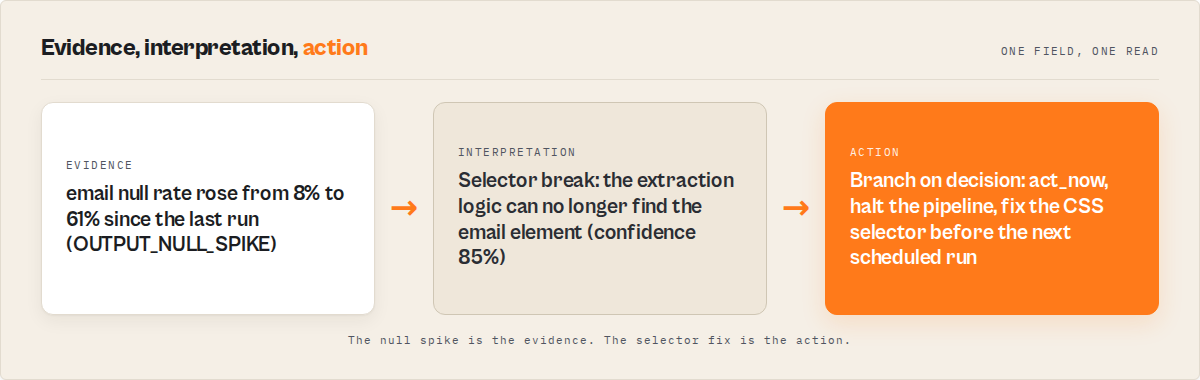
What actually happened. A target site added a cookie consent overlay that blocked the email element. The actor still extracted name, company, and phone — but email went from 92% populated to 31% populated. Over three weeks, roughly 4,100 records entered the CRM with missing emails. The client's email campaign sent to 2,900 fewer contacts than expected. Estimated revenue impact, based on the client's reported $0.82 revenue per email sent: approximately $2,400.
After. Output Guard now runs after every scheduled run. On day 1 of degradation, it would have flagged: email null rate 31% vs. baseline 8%, delta +23 points, severity critical, failure mode selector_break, confidence 85%. The fix (updating one CSS selector) took 12 minutes. Without validation, it took 21 days and a client complaint.
These numbers reflect one client engagement. Results will vary depending on data volume, downstream value per record, and how quickly degradation is detected.
Implementation checklist
- Identify your critical fields — which fields, if degraded, cause real downstream damage? Mark them as critical severity.
- Establish baselines — run your actor 3-5 times with known-good input. Record null rates, item counts, and schema for each field.
- Choose a validation approach — manual, custom script, webhook pipeline, or dedicated validator (see the alternatives table above).
- Configure per-field thresholds — set
maxNullRatefor critical fields based on your baseline data, not arbitrary round numbers. - Set up automated post-run validation — trigger validation after every scheduled run using Apify webhooks or a chained actor call.
- Configure alerting — route critical failures to Slack or email immediately. Route warnings to a daily digest.
- Test the detection — deliberately degrade one field in a test run. Confirm the validator catches it and the alert fires.
- Review and tune monthly — check false positive rate. Adjust thresholds for fields where natural variance changed.
Common misconceptions
"If the actor returns data, the data must be correct." Incorrect. An actor can return a fully populated dataset where every price is $0.00 because the site served anti-bot dummy content. Status SUCCEEDED, items returned, zero errors — but the data is fabricated.
"Schema validation catches all data quality issues." Schema validation catches structural problems: missing fields, type changes, unexpected nesting. It does not catch value-level problems: null rates, distribution shifts, wrong values in correctly typed fields. You need both schema validation and completeness analysis.
"Run monitoring and output validation are the same thing." Run monitoring checks whether the process completed. Output validation checks whether the output data is correct. According to Apify's documentation, run status reflects process exit code, not data quality (Apify docs). These are different layers with different failure modes.
"Silent failures are rare." Based on observed patterns across a portfolio of our actor portfolio over six months, approximately 30-40% of all data quality issues are silent failures — runs that succeeded but returned degraded data. They're not rare. They're just invisible without output validation.
Limitations of output validation
- Adds cost. $0.50/validation for a dedicated tool. Daily monitoring for 50 actors = $750/month. Use risk-based prioritisation for large fleets.
- Adds latency. 30-120 seconds after the target actor completes. Not suitable for sub-second pipelines.
- No baseline on first run. New actors need 3-5 runs to establish reliable baselines before drift detection works.
- Doesn't fix the problem. Validation detects and classifies — you still debug and fix. Auto-actions can contain damage but don't restore quality.
- False positives. Seasonal data changes (holiday pricing, summer traffic) can trigger drift alerts. Tune thresholds per field.
Key facts about silent actor failures
- Silent actor failures are runs that succeed (status SUCCEEDED) but return degraded, incomplete, or structurally wrong data.
- According to Monte Carlo Data's 2024 survey, 68% of data quality incidents are discovered by downstream consumers rather than the producing system.
- Null rate drift — the gradual increase of null values in specific fields — is the most common pattern, often progressing over days or weeks without triggering alerts.
- Run monitoring checks process completion. Output validation checks data correctness. These are distinct layers that catch different failure types.
- Schema validation detects structural changes (missing fields, type changes). Completeness analysis detects value degradation (null spikes, distribution shifts). Both are needed.
- Silent failures affect all actor types: scrapers, API wrappers, orchestrators, MCP servers, and data pipelines.
- The cost of late detection compounds: a silent failure caught in 24 hours typically requires fixing one actor; the same failure caught after 2 weeks may require fixing the actor plus cleaning thousands of corrupted downstream records.
- ApifyForge's Output Guard Apify actor validates actor output automatically, returning a 0-100 quality score, per-field completeness, failure classification, and fix recommendations.
Short glossary
Silent failure — an actor run that completes with status SUCCEEDED but returns data that is incomplete, structurally broken, or degraded beyond usable quality thresholds.
Null rate drift — the gradual increase of null or empty values for a specific field across successive runs, typically caused by upstream changes that degrade extraction without causing errors.
Schema drift — when the structure of output data changes between runs, such as fields disappearing, new fields appearing, or types changing.
Baseline — a reference output dataset (from a known-good run) used to compare subsequent runs against for drift detection.
Failure mode classification — the process of determining the likely cause of a silent failure, such as selector_break, pagination_failure, or upstream_structure_change.
Output validation — checking whether an actor's returned data meets quality thresholds for completeness, schema conformance, and value correctness after the run completes.
These patterns apply beyond Apify
The principles behind silent failure detection aren't specific to Apify actors. They apply to any system that produces data in production:
- Any automated data pipeline — ETL jobs, Airflow DAGs, and cron scripts all suffer from the same "process succeeded but output degraded" problem. The detection methods (completeness checks, schema validation, drift tracking) are identical.
- API integrations — third-party APIs change response formats, deprecate fields, and add rate limits without clear versioning. The same baseline-comparison approach catches it.
- Machine learning inference — model outputs drift over time as input distributions change. Distribution shift analysis for actors is the same technique as ML model monitoring.
- Report generation — any system that generates reports from upstream data inherits the quality of that data. Output validation at every stage prevents garbage-in, garbage-out cascades. ApifyForge's lead generation actors face this constantly when enrichment sources degrade.
- Microservice architectures — services that call other services face the same composition failure risk as actor orchestrators. Each service "succeeds" individually while the aggregate response degrades.
When you need output validation
You probably need this if:
- You run actors on daily or hourly schedules that feed into production systems
- Your actors send data to CRMs, email platforms, dashboards, or other downstream tools
- You manage more than 10 actors and can't manually inspect every run
- You've ever discovered bad data from a user complaint instead of proactive monitoring
- You run orchestrator actors that compose results from multiple sub-actors
- Your actors generate revenue through PPE pricing and data quality directly affects refund rates
You probably don't need this if:
- You run actors manually and inspect the output before using it
- Your actors produce files (screenshots, PDFs) rather than structured data
- You have one or two actors with stable input and output that rarely change
- The downstream impact of bad data is negligible (personal projects, experiments)
What is the best way to detect silent actor failures?
The most reliable method is to validate output data after each run by checking completeness, schema consistency, and drift against a baseline from previous known-good runs. This detects failures that logs and run monitoring miss. This is part of a three-stage reliability system: input validation before runs, deployment gating before release, and output validation after runs.
Frequently asked questions
Why does my actor return empty data but show SUCCEEDED?
An actor returns empty data with SUCCEEDED status because the process completed without errors — the exit code was 0. Empty output happens when selectors don't match, APIs return empty arrays, or pagination finds zero items. The Apify platform doesn't validate output completeness; it only checks process exit status. Use output validation to detect these cases automatically.
How do I check if my actor's data quality is degrading?
Compare the current run's output metrics against a baseline from known-good runs. Check null rate per field, total item count, schema structure, and value distributions. Track these across runs to spot trends. Tools like Output Guard do this automatically and flag drift before it reaches thresholds that break downstream systems.
What's the difference between input validation and output validation?
Input validation checks whether the data going into an actor matches its schema before the run starts — catching type mismatches, missing required fields, and invalid values. Output validation checks whether the data coming out after the run is complete, correctly structured, and consistent with historical baselines. They catch different failure classes: input validation prevents configuration errors, output validation catches upstream data source changes.
Can I validate an existing dataset without re-running the actor?
Yes. Most output validators support a backfill mode where you provide a dataset ID from a previous run. The validator loads items directly from that dataset and runs all checks without re-executing the target actor. Zero compute cost for the target actor — useful for retroactive audits.
How often should I validate actor output?
For production actors on scheduled runs, validate after every run. For development or low-stakes actors, weekly spot-checks are sufficient. The frequency should match the downstream impact: if bad data costs $100/day in wasted campaigns, daily validation at $0.50/check pays for itself instantly.
What does a null rate spike tell me vs. a schema change?
A null rate spike means a field that normally has values is returning null more often — the field still exists but isn't populated. This typically indicates a selector break or upstream data source issue. A schema change means the field itself is missing, renamed, or changed type — the structure of the data shifted. Both are silent failures, but they have different root causes and different fixes.
How do I set up automated output validation for multiple actors?
Use fleet monitoring mode in an output validator, or configure Apify webhooks to trigger validation after each actor's scheduled run. Group actors by criticality: validate high-value actors after every run, medium-value actors daily, and low-value actors weekly. Route alerts by severity — critical failures to Slack immediately, warnings to a daily digest.
Ryan Clinton publishes Apify actors as ryanclinton and builds developer tools at ApifyForge.
Last updated: April 2026
This guide focuses on Apify actors, but the same output validation patterns apply broadly to any automated data pipeline, API integration, or system that produces structured data in production.