The problem: You already have the company domain. You have the person's name. Every "email finder" you try treats this as a solved problem — slap the name into a pattern, ship it. Then the campaign goes out, bounce rate hits 5%, your sending domain gets greylisted by Google, and three months of warmup gets nuked overnight. The pattern guess wasn't verified. The mailbox didn't exist. The catch-all domain said "yes" to everything. The exec uses a personal alias. None of which a naive [email protected] guess can tell you.
A verified work email is one that has been confirmed deliverable through SMTP-level handshakes with the actual destination mail server, not just generated from a name-and-domain template. That confirmation step is what separates a usable contact from a future bounce statistic. Verified email lookup is what fills that gap, and the Waterfall Contact Enrichment Apify actor is one of the best tools for doing it without an enterprise data subscription.
What is verified work email lookup? Verified work email lookup is the process of finding a person's professional email address from their name and company domain, then confirming the mailbox actually exists by directly probing the company's mail server via SMTP. The output is an email plus a confidence score, not a guess.
Why it matters: High bounce rates damage sender reputation at every major mailbox provider. Google's 2024 bulk-sender requirements ask senders to keep spam complaint rate below 0.3% and avoid sending to nonexistent addresses (Google's Email Sender Guidelines, 2024). A single campaign full of pattern-guessed addresses can drag a sending domain's reputation down for weeks. Verifying every address before it enters a sequence is the most reliable way to keep deliverability stable.
Use it when: You have a list of names with company domains attached — from a CRM export, conference scan, LinkedIn pull, or partner introduction — and you need verified emails before those records enter a cadence tool, an ABM platform, or a partner outreach script.
Also known as: verified email finder, B2B email verification lookup, email enrichment API, name-to-email resolver, SMTP-confirmed contact enrichment, deliverable email lookup.
Problems this solves
- How to find a verified work email from a name and company domain without manually pattern-guessing
- How to confirm an email is deliverable before sending without burning a real campaign
- How to detect catch-all domains before they produce false-positive verifications
- How to enrich a CSV of names with verified business emails at predictable per-contact cost
- How to keep cold outbound bounce rates under 2% without manual triage
- How to find contact info for hundreds of named people at known domains in under an hour
Quick answer
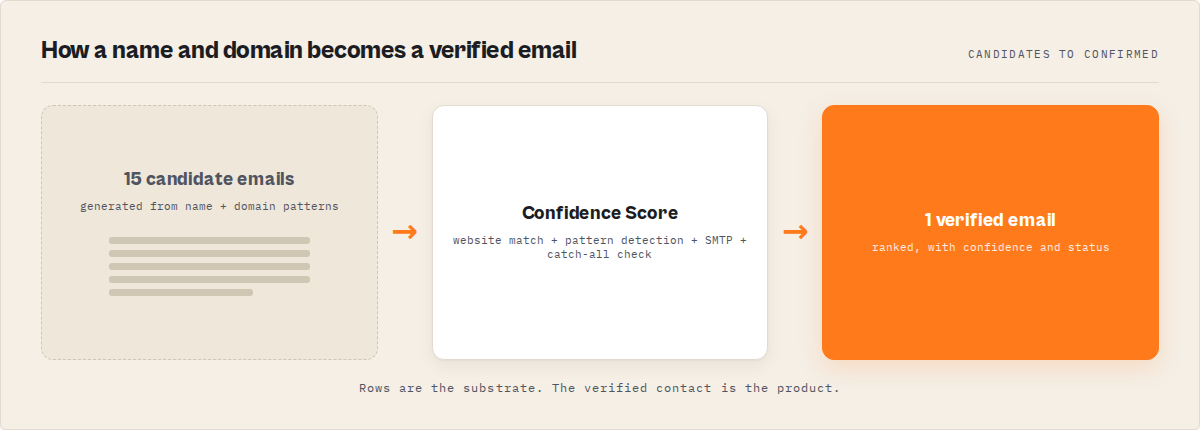
- What it is: Verified work email lookup takes a person's name plus their company domain, generates candidate addresses, cross-references against publicly listed emails on the company website, detects the company's email pattern, and confirms the best candidate via direct SMTP handshake with the mail server.
- When to use it: Cold outbound prep, CRM enrichment, conference follow-up, ABM target list building, recruiter outreach, journalist contact lists, investor relations outreach.
- When NOT to use it: Mass unsolicited email, personal email scraping, scraping protected directories, or any use case that violates CAN-SPAM, GDPR, or CASL.
- Typical steps: Pattern-generate candidates, scrape company website, detect company pattern, cross-reference, SMTP-verify the top candidate, return with confidence score.
- Main tradeoff: Real-time verification adds 5-30 seconds per contact, but the lift in deliverability versus unverified pattern guessing is large enough that it usually pays for itself on the first campaign.
In this article: What is verified email lookup? · Why it matters · How the waterfall works · Confidence scoring · Alternatives · Best practices · Common mistakes · Limitations · FAQ
Key takeaways
- Verification dramatically cuts bounce rates. Pattern-only guesses send a lot of mail to dead mailboxes; SMTP-verified addresses confirm the mailbox exists before you send. Industry email-quality reports consistently show large gaps between verified and unverified list bounce rates (Kickbox Email Quality Report, 2024).
- A 10-step waterfall cascade produces ranked candidates with transparent confidence. Standard mode (MX + pattern + website + cross-reference) returns pattern-confident candidates in 5-15 seconds. Deep mode adds SMTP confirmation per candidate, lifting confirmed results into the 95-98 confidence range over 15-30 seconds per contact.
- A small set of patterns covers most business email formats.
first.last@,flast@,firstl@,first@,last@, andfirst_last@account for the majority of corporate conventions (Hunter.io email format data). - Catch-all domains affect roughly 18% of business domains (EmailListVerify, 2024). SMTP-only verification produces false positives on these without explicit catch-all detection.
- Pay-per-event pricing of $0.20 per contact undercuts subscription tools for any team enriching under ~2,000 contacts per month, with no monthly minimum.
Concrete examples
| Input | What the waterfall does | Output |
|---|---|---|
Jan Curn + apify.com | Generates 15+ candidates, scrapes apify.com, detects first.last pattern, SMTP-confirms | [email protected] (95% confidence, found) |
Sarah Chen + stripe.com | Pattern detected from website team page, candidate matched, MX confirmed | [email protected] (78% confidence, found) |
Marcus Webb + acmecorp.io | No public emails on site, pattern fallback to first.last, MX valid but catch-all | [email protected] (50% confidence, likely, catch-all flag) |
Li Wei + private-vc.com | Website blocks scraping, MX exists but SMTP refuses RCPT TO | [email protected] (65% confidence, likely) |
John Smith + nonexistent-domain.xyz | No MX records found | null (0% confidence, not_found) |
What is verified work email lookup?
Definition (short version): Verified work email lookup is a process that finds a person's professional email address from their name and company domain, then confirms the mailbox exists by directly probing the destination mail server via SMTP. The result is a deliverable email address with a confidence score, not an unverified guess.
The expanded category breaks into three approaches. Pattern generation mathematically produces likely candidates from a name. Pattern detection reverse-engineers a company's naming convention from publicly available examples. SMTP verification confirms whether the mailbox actually exists by talking to the mail server. A verified email lookup tool combines all three, ranked by confidence, with explicit handling for edge cases like catch-all domains and SMTP-deferred mail systems.
A complete waterfall enrichment runs as a multi-stage cascade: MX validation, name-based pattern generation, company website scraping, pattern detection from known emails, candidate cross-referencing, SMTP verification, catch-all detection, confidence scoring, and adjacent-data enrichment (phone numbers, social profiles, job titles). Each stage covers a different failure mode of the others. Combining them is what produces a verified contact record instead of a pattern guess.
Why verified lookup beats pattern guessing
A pattern guess is a hypothesis. A verified email is a confirmed mailbox. The difference shows up in bounce rates, and bounce rates show up in deliverability.
Major mailbox providers — Gmail, Outlook, Yahoo, Apple Mail — use sender reputation as the primary deliverability signal. Google's 2024 sender requirements ask bulk senders to keep spam complaint rate below 0.3% and avoid sending to nonexistent addresses. Hard bounces, dead mailboxes, and complaints all feed into the same reputation engine.
The math is unforgiving. Ship a cold campaign using unverified pattern guesses against a list that includes dead mailboxes, ex-employees, and catch-all-only domains, and every one of those misfires erodes the sender reputation that future campaigns depend on. SMTP verification on the list catches dead mailboxes before they touch the send.
Catch-all domains are the other major failure mode. Roughly 18% of business mail servers are configured to accept email at any address (EmailListVerify, 2024) — useful for the receiving company, treacherous for verification. A naive SMTP probe sees "accepted" and reports the address as valid. The mail then arrives at a postmaster catch-all queue that nobody reads. Catch-all detection — testing a random nonsense address against the same server and checking if it's also "accepted" — is the only way to flag these accurately.
How does the waterfall actually work?
The waterfall is a 10-step enrichment cascade that runs against each contact, cross-references the results, ranks candidates by confidence, and returns the best match alongside ranked alternatives. Each stage covers a different failure mode of the others.
The actor itself runs in the cloud and handles all of this in one call. From the caller's side, the input is just {firstName, lastName, domain} and the output is a verified email with a confidence score. From the inside, the cascade looks like this.
Stage 1: MX validation. Confirms the domain has mail servers configured to receive email. Domains with no MX record short-circuit to not_found with zero further work.
Stage 2: Pattern generation. Generates 15 candidate addresses from the person's name using common B2B email patterns. The full pattern set includes first.last, firstlast, first, flast, f.last, first_last, first-last, firstl, first.l, last.first, lastfirst, last, last.f, lastf, and f_last. International names are transliterated automatically.
Stage 3: Website scraping. Calls the Website Contact Scraper against the company domain and pulls emails, phone numbers, and social links from publicly listed pages — /about, /team, /contact, /people. Any email found here is the strongest possible signal because it was publicly published.
Stage 4: Pattern detection. Calls the Email Pattern Finder which scans for any known emails at that domain and reverse-engineers the company's naming convention. If [email protected] and [email protected] are public, the pattern is first.last with high certainty, and that pattern gets applied to the target name.
Stage 5: Candidate cross-referencing and ranking. All candidates from pattern generation, website scraping, and pattern detection are merged and scored. An email that appears in multiple sources scores higher than one that only appears in pattern generation. An email matching a publicly listed company website email is the strongest signal. Up to 10 ranked candidates are kept.
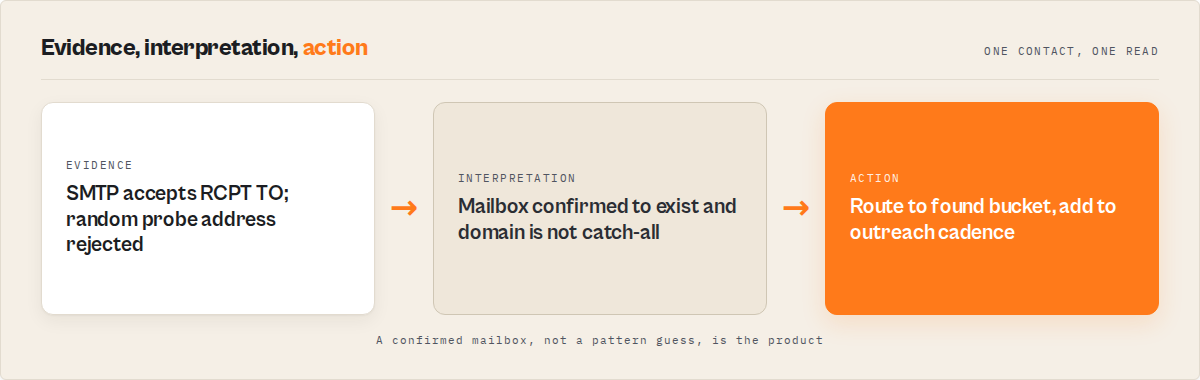
Stage 6: SMTP verification (deep mode). With verificationLevel: "deep", the top candidate gets sent through an SMTP handshake — the system connects to the mail server, issues MAIL FROM and RCPT TO, and checks whether the server accepts the recipient.
Stage 7: Catch-all detection. Runs in parallel with SMTP verification by probing a random nonsense address. If the server also accepts that address, the domain is flagged as catch-all and the confidence score adjusts accordingly so a catch-all "accept" doesn't get treated as a real verification.
Stage 8: Confidence scoring. Computes a 0-98 score from signal strength, source breadth, verification depth, and source integrity, with a guard against the "looks like 4 corroborating signals but is really 1 signal echoed 4 times" trap.
Stages 9-10: Adjacent enrichment. Phone-number extraction from the website scrape, social profile discovery (LinkedIn, GitHub, Twitter cross-referenced against scraped signals), and job-title / seniority inference. These don't change the email decision but populate the rest of the contact record.
How confidence scoring works
Every verified email lookup result includes a 0-100 confidence score. The scoring is deterministic and reflects exactly how the email was sourced. This matters because not all "found" emails are equal — sending to a 50% candidate and a 95% candidate in the same campaign would skew your bounce metrics into uselessness.
| Scenario | Confidence | Status |
|---|---|---|
| Direct match on company website + SMTP confirmed | 98 | found |
| SMTP confirmed + domain is not catch-all | 95 | found |
| Direct match found on company website | 90 | found |
| Pattern matches detected company email format | 75-80 | found |
Most common pattern (first.last) + MX valid | 70 | found |
Common pattern (first, flast) + MX valid | 65 | likely |
| Less common pattern + MX valid | 60 | likely |
| Catch-all domain (accepts any address) | 50 | likely |
| Domain has no MX records | 0 | not_found |
For most cold outbound, a 70% confidence threshold is the practical floor. Anything below that should either be re-enriched with deeper verification or held back from active campaigns. For high-stakes enterprise outreach where a single misfire damages a relationship, 85%+ is a safer threshold.
What are the alternatives for verified email lookup?
There are 5 broad approaches to getting verified work emails when you have a name and a company domain. Each makes different tradeoffs on accuracy, freshness, cost structure, and how much engineering you own.
1. Database subscription tools (Apollo, ZoomInfo, Lusha, Cognism). These query pre-built indexes of hundreds of millions of contact records. Fast results, broad coverage. The catch is data decay: B2B contact records go invalid at roughly 2-3% per month (Dun & Bradstreet, 2024), so a "verified" email from six months ago has a 15-20% chance of being dead today. Subscription pricing runs $49-720+/month with credit limits and seat fees. Best for: high-volume teams that can tolerate some bounce rate in exchange for instant lookups.
2. Email permutation tools (Hunter.io, Snov.io, FindThatLead). Generate candidates from common patterns and verify them. Faster than manual research, fresher than databases. Most require the domain (which you have), and most verify through their own SMTP layer. The limitation is they're pattern-only: if the company uses an unusual naming convention, the generator misses it. Pricing runs $49-399/month depending on volume. Best for: teams that already know the company patterns they're targeting.
3. Manual research. Google the name plus company, dig through LinkedIn, scan the team page. Roughly 8-12 minutes per contact at high accuracy (Forrester Research, 2023). At a fully loaded $30/hour SDR cost, that's $4-6 per contact. Fine for the top 20 strategic accounts; impossible at scale. Best for: small lists where every contact warrants individual attention.
4. Real-time waterfall enrichment. Runs the full pipeline — pattern generation, website scraping, pattern detection, SMTP verification — against every request. Slower per-contact than database lookups (5-30 seconds vs instant), but the data is verified at the moment of the request, not at some arbitrary point in the past. Pay-per-contact pricing means no monthly commitment. Best for: teams under ~2,000 contacts/month that need verified deliverability over raw coverage.
5. In-house build. Build the entire pipeline yourself — DNS lookups, pattern libraries, website scrapers with proxy rotation, SMTP probe logic, catch-all detection, transliteration for international names, rate-limit handling per destination mail server, response-code interpretation across mail providers, monitoring for when probe traffic gets blocked. This is several engineer-months of work that you'd then own to maintain. The DIY approach inherits the long tail of edge cases that the providers above have already solved. Best for: teams with specific compliance or data-residency requirements that rule out external tools.
Each approach has tradeoffs in accuracy, freshness, speed, and cost structure. The right choice depends on volume, how current the data needs to be, and how much engineering ownership you want to take on.
Pricing comparison
| Approach | Pricing model | Per-contact cost | Verification depth | Notes |
|---|---|---|---|---|
| Apollo.io | $49-119/mo subscription | $0.05-0.12 | Database lookup, periodic refresh | Credit limits; phone numbers cost extra |
| ZoomInfo | $149-720+/mo subscription | $0.03-0.08 | Database lookup, quarterly refresh | Enterprise contracts; seat-based pricing |
| Hunter.io | $49-399/mo subscription | $0.03-0.10 | Pattern + SMTP verify | Domain required; pattern-only generation |
| Clay | $149-720/mo subscription | $0.10-0.25 | Multi-source via providers | Aggregates other tools; costs stack |
| Waterfall Contact Enrichment (Apify actor) | Pay-per-event, no minimum | $0.20 | 10-step waterfall cascade + SMTP (deep mode) | Per-domain caching for bulk lists |
| In-house build | Engineering + infra cost | Variable | Whatever you build | Multi-month build; ongoing maintenance |
Pricing and features based on publicly available information as of May 2026 and may change.
Try it on real contacts. New Apify accounts include $5 in free credit — enough to enrich roughly 25 contacts and calibrate the confidence threshold for your list. Open the Waterfall Contact Enrichment actor and run a 10-contact test batch before committing to a full enrichment.
Best practices for verified email lookup
-
Always run SMTP verification before cold outbound. Deep mode adds 10-20 seconds per contact but produces SMTP-confirmed candidates in the 95-98 confidence range, where standard pattern-based candidates max out around 70. The compounding cost of a damaged sending domain is far higher than the time cost of verification.
-
Batch by domain for bulk lists. When you have multiple people at the same company, process them in one batch. The waterfall caches per-domain sub-actor results, so 50 people at the same domain only trigger one website-scrape and one pattern-detection call. This typically cuts processing time by 40-60% on multi-contact-per-domain lists.
-
Use confidence thresholds, not just status flags. Status
foundcovers anything 70%+ confidence, but a 70% candidate is materially different from a 95% candidate. Set explicit thresholds: 85%+ for high-stakes outreach, 70%+ for general cold campaigns, below 70% goes to a separate "needs manual review" pile. -
Flag catch-all domains explicitly in your CRM. Roughly 18% of business domains accept any address. Tag these records so your cadence tool can route them to warmed senders only, or hold them for a separate verification step. Treating catch-all results as equivalent to confirmed mailboxes is the single most common deliverability mistake.
-
Re-verify every 60-90 days. B2B contact data decays at 2-3% per month. An email that was 95% confidence in January will quietly become invalid by July when the person changes jobs. Schedule recurring re-verification for any contact older than 90 days that you haven't actively engaged with.
-
Reject personal email domains as fallback. Some tools quietly return Gmail, Yahoo, or Outlook.com addresses when no work email can be found. For B2B outreach, treat these as
not_found. A personal email is almost never the right contact for business communication, and reaching out to one without context damages trust. -
Provide the domain when you have it. Some workflows pass the company name instead of the domain to let the actor auto-resolve. That works, but providing the domain directly skips the resolution step and saves 1-3 seconds per contact. If you already have the domain, use it.
-
Watch the
allCandidatesarray, not just the primary. Every result includes a ranked list of candidates the system considered. If the top candidate bounces, the second-ranked candidate is usually the right fallback. Storing the full candidate list means you don't have to re-enrich when a campaign hits a hard bounce.
Common mistakes when finding verified work emails
Skipping SMTP verification because it's slower. This is the single most common and most expensive mistake. The "savings" from skipping verification are measured in seconds per contact. The cost of a damaged sending domain is measured in weeks of lost campaigns and possibly a full domain replacement. The math doesn't work.
Ignoring catch-all flags. When a domain accepts any address, the SMTP probe says "accepted" for the target email — and also for a random nonsense string. Without explicit catch-all detection, these false positives flood into campaigns and inflate bounce rates weeks later when the deliverability platforms catch up. Any verified lookup that doesn't surface a catch-all flag is incomplete.
Trusting confidence scores you didn't read. A confidence score is only useful if you actually filter on it. A 50% catch-all candidate in the same send as a 95% confirmed candidate looks identical in your CRM but behaves completely differently in the mailbox. Filter on confidence before the contact enters a cadence, not after.
Processing contacts one at a time instead of by domain. Single-contact lookups miss the per-domain caching that makes bulk enrichment efficient. A list of 100 contacts spread across 30 domains processes 3-4x faster than 100 contacts processed individually because the sub-actor results for each domain only need to run once.
Not handling international names correctly. A contact named René Müller at kraftwerk.de won't match [email protected] without transliteration. Tools that don't normalize Unicode names to ASCII before pattern generation will miss a meaningful share of European, Latin American, and Asian contacts. This is one of those problems that looks invisible until you process a non-US list and see the hit rate collapse.
Confusing email verification with email enrichment. Verification tools take an existing address and check if it's valid. Enrichment tools start from a name and a domain and produce the address. If you only have a name + domain, a verifier alone can't help — you need enrichment first, then verification. This sounds obvious, but a surprising number of teams pay for verification subscriptions and wonder why their enrichment workflows are still manual.
How does the actor handle catch-all domains?
The Waterfall Contact Enrichment Apify actor handles catch-all domains by running an explicit catch-all probe in parallel with the main SMTP verification. A randomly generated nonsense address (something like [email protected]) gets sent through the same SMTP handshake. If the mail server accepts that address, the domain is flagged as catch-all and the result's confidence score drops to 50 with status likely. Without this detection, catch-all domains would produce false-positive verifications that look identical to genuinely confirmed mailboxes.
Can the actor process bulk lists efficiently?
Yes. The waterfall caches sub-actor results per domain, so a batch of 100 contacts across 30 unique domains only triggers 30 website-scrape calls and 30 pattern-detection calls instead of 100 of each. Concurrency is configurable (default 3, max 5 parallel lookups) to balance speed against politeness to destination mail servers. A typical 100-contact batch with standard verification finishes in 8-20 minutes. With deep SMTP verification, the same batch takes 25-50 minutes. The actor accepts up to 500 contacts per run.
How is verified email lookup priced on ApifyForge?
The Waterfall Contact Enrichment actor uses Apify's pay-per-event pricing model and charges $0.20 per contact enriched. There's no monthly subscription, no seat fee, and no minimum volume — process 5 contacts or 500, you pay only for the contacts that get enriched. The per-event price covers the full 4-source waterfall plus SMTP verification when deep mode is enabled. Sub-actor results are cached per domain, so processing multiple contacts at the same company doesn't multiply costs proportionally.
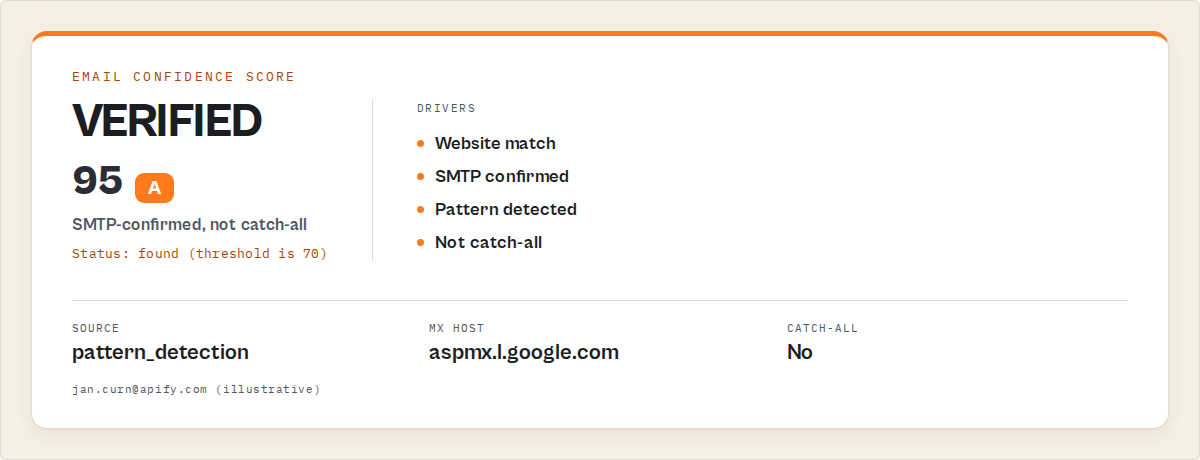
JSON output example
A typical enriched contact record looks like this. The structure is designed so a cadence tool, CRM connector, or AI agent can route on a single field (status or emailConfidence) without traversing nested objects.
{
  "firstName": "Jan",
  "lastName": "Curn",
  "domain": "apify.com",
  "email": "[email protected]",
  "emailConfidence": 95,
  "emailSource": "pattern_detection",
  "status": "found",
  "phone": "+420 234 567 890",
  "phoneSource": "website",
  "socialProfiles": {
    "linkedin": "https://www.linkedin.com/in/jan-curn/",
    "github": "https://github.com/jancurn"
  },
  "domainValid": true,
  "mxHost": "aspmx.l.google.com",
  "smtpVerified": true,
  "catchAll": false,
  "allCandidates": [
    { "email": "[email protected]", "confidence": 95, "source": "pattern_detection" },
    { "email": "[email protected]", "confidence": 65, "source": "pattern_generation" },
    { "email": "[email protected]", "confidence": 60, "source": "pattern_generation" }
  ],
  "verifiedAt": "2026-05-23T14:22:18.000Z"
}
The allCandidates array matters more than people expect. If the primary candidate bounces in a real send, the second-ranked candidate is usually the right fallback — no re-enrichment needed.
Calling the actor
Two ways to call the actor. Both produce the same output structure. The actor is hosted on Apify; you call it through the standard Apify client SDK.
Python
from apify_client import ApifyClient

client = ApifyClient("YOUR_API_TOKEN")

run = client.actor("ryanclinton/waterfall-contact-enrichment").call(run_input={
    "people": [
        {"firstName": "Jan", "lastName": "Curn", "domain": "apify.com"},
        {"firstName": "Sarah", "lastName": "Chen", "domain": "stripe.com"},
    ],
    "enrichFromWebsite": True,
    "detectPattern": True,
    "verificationLevel": "deep",
})

for contact in client.dataset(run["defaultDatasetId"]).iterate_items():
    if contact.get("type") == "summary":
        continue
    print(f"{contact['firstName']} {contact['lastName']}: {contact.get('email', 'not found')} ({contact.get('emailConfidence', 0)}%)")
JavaScript
import { ApifyClient } from "apify-client";

const client = new ApifyClient({ token: "YOUR_API_TOKEN" });

const run = await client.actor("ryanclinton/waterfall-contact-enrichment").call({
    people: [
        { firstName: "Jan", lastName: "Curn", domain: "apify.com" },
        { firstName: "Sarah", lastName: "Chen", domain: "stripe.com" },
    ],
    enrichFromWebsite: true,
    detectPattern: true,
    verificationLevel: "deep",
});

const { items } = await client.dataset(run.defaultDatasetId).listItems();
for (const contact of items) {
    if (contact.type === "summary") continue;
    console.log(`${contact.firstName} ${contact.lastName}: ${contact.email || "not found"} (${contact.emailConfidence}%)`);
}
Common deployment pattern: pre-campaign list enrichment
The typical use is a list of names with company domains attached — pulled from a conference scan, partner spreadsheet, CRM export, or LinkedIn pull — that needs verified emails before a campaign goes out.
Without verification: A pattern guess like [email protected] works for some portion of the list and silently bounces for the rest — people who left the company, exec aliases that don't match the standard pattern, catch-all domains that say "accept" to anything, names with non-Latin characters that need transliteration. Each of those bounces feeds into sender reputation. A campaign full of misfires can drag a sending domain down for weeks while reputation recovers.
With the waterfall: The same list goes through pattern generation, website scraping, pattern detection, candidate ranking, and SMTP verification (deep mode). Results sort into three buckets — found (>=70 confidence), likely (40-69), and not_found (<40). Most teams send only the found bucket, hold likely for a follow-up enrichment pass or manual review, and drop not_found from the campaign entirely.
The economics work out because per-domain caching collapses cost on multi-contact-per-company lists, and a clean send keeps a sending domain's reputation intact for the next campaign. Concrete numbers depend on list composition: how many catch-all domains, how many ex-employees, how many international names need transliteration, and how much public contact information is on the company websites in the list.
Implementation checklist
- Prepare clean input. Each contact needs
firstName,lastName, anddomain. Strip titles like "Dr." or "Jr." from names. Lowercase and trim domains. Removewww.prefixes if present. - Decide on verification depth.
standardfor high-volume lists where you'll re-verify before sending;deepfor low-volume high-stakes lists where every send matters. - Set a confidence threshold. 85%+ for enterprise outreach, 70%+ for general cold campaigns, below 70% routed to manual review or held.
- Run a calibration batch first. Take 20 contacts you already have verified emails for, run them through the waterfall, and compare results. This calibrates the confidence threshold for your specific use case.
- Process the full list with batching. Pass the full list in one call so per-domain caching kicks in. The actor handles concurrency limits internally.
- Filter results by status and confidence. Separate
foundfromlikelyfromnot_found. Apply confidence threshold tofound. Taglikelyfor manual review. - Flag catch-all domains. Records where
catchAll: trueneed special routing — warmed-sender campaigns only, or hold for additional verification. - Import to CRM with metadata. Store
emailConfidence,emailSource,verifiedAt, andcatchAllalongside the email itself. Future automations can branch on these without re-enriching. - Schedule re-verification. Set a 60-90 day cycle for re-verifying contacts that haven't been actively engaged.
Limitations of automated email verification
SMTP-deferred mail servers report accepted without committing. Some mail providers — particularly Google Workspace and Microsoft 365 — respond OK to RCPT TO regardless of whether the mailbox exists, deferring real rejection until after the DATA phase as a spam-prevention measure (Google Workspace postmaster docs). The waterfall mitigates this by combining SMTP results with website-found emails and pattern-detected results, but for pure-SMTP probe scenarios at these providers, expect some residual uncertainty.
Restrictive mail servers can refuse SMTP probes entirely. Some corporate mail systems detect and block probe traffic, returning generic 550 responses to all RCPT TO commands. When this happens, the waterfall falls back to MX validation and pattern-based confidence scoring, which produces likely status rather than found.
Small companies without public team pages reduce signal. The website-scraping source depends on the company having publicly listed contact information. If the company has no team page, no public emails, and no employees with traceable digital footprints, the waterfall has nothing to cross-reference, and confidence scores fall back to pattern-only ranges (60-70%).
Personal email aliases bypass pattern detection. Some executives use vanity aliases ([email protected], [email protected], or a personal first name without surname) that don't match the company's standard pattern. The waterfall surfaces these only when they appear during website scraping; they won't be generated by pattern logic.
Non-Latin scripts require romanization. Names in Cyrillic, Arabic, Chinese, Japanese, or Korean scripts must be transliterated to predict the corresponding Latin-script email. The actor handles standard transliterations automatically, but unusual or culturally-specific romanizations sometimes need manual override.
Key facts about verified work email lookup
- Verified work email lookup combines pattern generation, website scraping, pattern detection, and SMTP verification into a single confidence-scored result.
- SMTP-verified emails have substantially higher deliverability than unverified pattern-generated addresses; industry reports from email-quality vendors document the gap consistently (Validity, 2024).
- A small set of patterns (
first.last,flast,firstl,first,last,first_last) covers the majority of business email conventions (Hunter.io email format data). - B2B contact data decays at approximately 2-3% per month due to job changes and corporate restructuring (Dun & Bradstreet, 2024).
- Catch-all mail server configurations affect roughly 18% of business domains (EmailListVerify, 2024).
- Major mailbox providers use sender reputation as the primary deliverability signal; high bounce rates and spam complaints damage that reputation (Google Email Sender Guidelines, 2024).
- The Waterfall Contact Enrichment Apify actor charges $0.20 per contact enriched under Apify's pay-per-event pricing model.
- Per-domain caching means a 50-contact batch at one company triggers one website-scrape and one pattern-detection call instead of 50 of each.
Short glossary
SMTP verification — Connecting to a mail server and issuing MAIL FROM and RCPT TO commands to confirm whether a specific mailbox exists, without actually sending a message.
Catch-all domain — A mail server configured to accept email at any address, even nonexistent mailboxes. Roughly 18% of business domains have this configuration.
MX record — A DNS record that specifies which mail server handles email for a domain. Domains without MX records cannot receive email.
Pattern detection — Reverse-engineering a company's email naming convention by examining known examples (e.g., john.smith@, jane.doe@ together imply first.last).
Confidence score — A 0-100 rating reflecting how certain the system is that an email is correct, based on which sources confirmed it.
Waterfall enrichment — A method that runs multiple data sources, cross-references their results, and returns the highest-confidence match. If source A fails, sources B, C, and D still contribute signal.
Common misconceptions
"If you have the domain, you can just use [email protected] and skip verification." A large portion of B2B companies use first.last, but a significant portion don't (Hunter.io email format data). Without pattern detection, every non-first.last company becomes bounces. Without SMTP verification, even the companies who do use first.last produce bounces from people who've left the company, use aliases, or whose mailboxes have been deactivated.
"Email verification and email enrichment are the same thing." They're not. Verification takes an existing address and checks if it's valid. Enrichment starts from a name and produces an address. If you have a name + domain but no email yet, you need enrichment first; pure verification has nothing to verify.
"Database tools like ZoomInfo give you verified emails." They give you emails that were verified at some point in the past — typically months ago. B2B data decays at roughly 2-3% per month (Dun & Bradstreet, 2024), so a database "verified" email from six months back has a non-trivial chance of being dead today. Real-time verification at the moment of use is structurally different from database freshness.
"SMTP verification is intrusive or unethical." SMTP verification uses the same protocol mail servers use to talk to each other every second of every day. It's how email works. The probe doesn't deliver a message; it asks whether one would be accepted. Mail server operators design for this traffic, which is why anti-spam measures exist around RCPT TO rather than blocking it outright.
Broader applicability
The patterns behind verified email lookup apply beyond sales prospecting to any system where you need to confirm whether a target identifier resolves to an active resource.
- Multi-source waterfall enrichment generalizes to any record-completion task where no single source has full coverage. The same pattern works for company data enrichment, phone number lookup, address resolution, and social profile discovery.
- Confidence-scored ranked candidates is the canonical structure for entity resolution, fuzzy matching, and any system that produces probabilistic rather than deterministic results.
- Protocol-level verification (testing whether a system accepts input without committing to a transaction) is the same shape as credit card pre-authorization, address validation, DNS-based service discovery, and TCP health checks.
- Per-domain caching for bulk lookups applies to any enrichment process where multiple records share a common upstream dependency.
- Catch-all detection via control probe generalizes to any verification system where the target might accept all inputs — useful for testing API authentication, file upload endpoints, and form validation.
When you need this
You probably need verified email lookup if:
- You have a list of 50+ names with company domains attached and need verified emails before sending
- Your cold outbound bounce rate is creeping above 2% and you need to fix it at the source
- You're running ABM campaigns where every misfire damages a target-account relationship
- Your CRM has records with names and domains but missing email fields
- You need to confirm an executive contact at a target account without burning a real outreach
You probably don't need this if:
- You only have the company name and no domain — use name + company email finding instead
- You already have email addresses and just need verification — use a dedicated bulk email verifier
- You need personal email addresses, not work emails — different problem, different tools
- You're targeting fewer than 5 contacts — manual research is faster
- Your contacts are all at one company and you already know the email pattern
Frequently asked questions
How do you find a verified work email from a name and company domain?
You generate candidate addresses from the person's name using common B2B patterns (first.last, flast, firstl, and others), cross-reference against any emails publicly listed on the company website, detect the company's actual email pattern from any known examples, and then SMTP-verify the top candidate by handshaking with the mail server. The Waterfall Contact Enrichment Apify actor does all of this in one call and returns a verified email with a 0-100 confidence score.
What's the difference between MX verification and SMTP verification?
MX verification only confirms the domain has mail servers configured to receive email. It says nothing about whether a specific mailbox exists. SMTP verification goes further by connecting to those mail servers and asking whether a specific address would be accepted as a recipient. MX takes milliseconds and produces broad-strokes confidence. SMTP takes seconds per address and produces high-confidence per-mailbox verification. For deliverability-sensitive outbound, you want both.
How accurate is verified email lookup?
Standard verification (MX + pattern generation + website scraping + pattern detection) produces ranked candidates with pattern-based confidence typically in the 60-70 range in 5-15 seconds per contact. Deep verification adds SMTP confirmation per candidate, which lifts confirmed results into the 95-98 confidence range over 15-30 seconds per contact. Real accuracy varies with domain quality, catch-all prevalence, how transparent the company website is, and how many non-Latin-script names are in the list. The actor surfaces a 0-98 confidence score on every result so consumers can filter rather than relying on a single headline number.
How much does verified email lookup cost?
The Waterfall Contact Enrichment Apify actor charges $0.20 per contact enriched under Apify's pay-per-event pricing — no monthly subscription, no minimum volume. For comparison, subscription tools like Apollo ($49-119/mo) and ZoomInfo ($149-720+/mo) charge per-month regardless of usage, and their per-credit cost ($0.03-0.12) doesn't include the same depth of SMTP-level verification. For teams enriching under ~2,000 contacts per month, the per-event model usually costs less than any subscription option.
Is SMTP verification detectable by the mail server?
Mail servers receive SMTP traffic constantly as part of normal mail delivery. A verification probe is structurally identical to the early phase of a real mail delivery, so it's not detectable as a probe specifically. Some servers do rate-limit RCPT TO commands or defer rejection to the DATA phase as anti-spam measures, but those are general protections, not probe-specific. The actor respects rate limits and uses configurable concurrency (default 3, max 5) to avoid hammering mail servers.
Can I run the actor on a free Apify account?
Yes. New Apify accounts include $5 in free credit (Apify free tier), enough to enrich roughly 25 contacts to test the actor against real inputs. The free plan has memory limits that may affect concurrent sub-actor calls on very large batches, so start with smaller test runs (10-20 contacts) before scaling up. Once you exceed the free tier, billing switches to pay-per-event at $0.20 per contact.
What happens if the domain doesn't have any public emails?
The waterfall falls back to pure pattern generation plus MX validation. Confidence scores for the resulting candidates will be in the 60-70 range (status likely) rather than the 80-95 range that website-confirmed results reach. The result still includes the top pattern-generated candidate, but you should treat it as a probable rather than verified email. SMTP verification in deep mode can still upgrade these to higher confidence if the mailbox accepts the probe.
Ryan Clinton publishes Apify actors and MCP servers as ryanclinton and builds developer tools at ApifyForge.
Last updated: May 2026
This guide focuses on Apify-hosted enrichment, but the same waterfall patterns apply broadly to any contact-resolution domain where multiple imperfect data sources need to be combined into a single verified result.