The problem: You need to know when a competitor changes their pricing page. When your own legal page gets edited. When a product launches. When a redesign goes live. Most people check manually — opening the page once a week and squinting at it. That works until you're tracking five competitors, ten internal pages, and a regulatory disclosure across three jurisdictions. By the time you spot the change, the launch happened a month ago.
Automated website monitoring fixes that. The catch: most tools either need always-on infrastructure you have to maintain, a $50-300/month SaaS subscription per workspace, or a pile of Python scripts you'll regret in six months. This post walks through a different path — one that takes about ten minutes, runs on the public Internet Archive, costs about a tenth of a cent per snapshot, and doesn't need a single line of code.
What is automated website monitoring? It's the process of detecting and alerting on changes to a website's pricing, content, or structure on a schedule, without manual checks. Why it matters: modern pricing, legal, and product changes happen quietly — the average corporate website edits its pricing page 2-4 times a year and changes its terms of service silently between major redesigns. Use it when: you need scheduled, structured, alert-driven detection of website changes across one or many URLs without owning the polling infrastructure.
To set up automated website monitoring, enter a URL, enable change detection, schedule a run, and connect alerts — tools like Wayback Machine Search do this in under 10 minutes. Wayback Machine Search is a tool that shows exactly what changed on a website — including pricing, product, and legal updates — using historical snapshots.
Quick answer
- What it is: Scheduled detection of meaningful website changes (pricing, legal, product, layout) with structured alerts and deltas.
- The fastest setup: Schedule the Wayback Machine Search Apify actor with
monitor: true— total config time about 10 minutes. - What this tool does: Wayback Machine Search is a tool that shows exactly what changed on a website using historical snapshots from the Internet Archive.
- When to use it: Tracking competitors, your own production site, regulatory disclosures, brand mentions, or content at risk of silent edits.
- When NOT to use it: Real-time second-by-second polling, behind-auth dashboards, or visual pixel-diffs of dynamic JavaScript apps.
- Typical steps: Pick the URL(s), schedule a run, enable change detection, wire alerts to Slack or email, inspect the structured output.
- Main tradeoff: Historical-snapshot monitoring works against the Internet Archive's capture cadence, not real-time pings — perfect for change archaeology and audit trails, not for sub-minute SLAs.
In this article
What it is · Why it matters · How it works · The 10-minute setup · Outputs · Alternatives · Best practices · Common mistakes · Limitations · FAQ
Key takeaways
- The fastest way to set up automated website monitoring is to schedule a change-detection actor with one flag — total config time about 10 minutes for a single URL, ~15 for a 50-URL portfolio.
- Wayback Machine Search is an Apify actor that detects changes between Internet Archive snapshots, classifies each one by category (pricing, legal, product, layout, navigation, copy, contact), and emits Slack-ready alert records. Cost: $0.001 per snapshot processed.
- The
monitor: trueflag enables change detection, magnitude classification, only-changed filtering, alerts on moderate-or-major changes, timeline grouping, and delta-since-last-run state in a single setting. - Output includes structured
alertrecords, aninsightssynthesis record, version history, and a SHA-256 hash chain for tamper-evident audit trails — usable for compliance and legal evidence. - No API key, no scraping, no auth required — the actor queries the public Internet Archive's CDX index, which has held archived snapshots since 1996.
Compact examples
| You want to monitor | Setup | Output you get |
|---|---|---|
| One competitor's pricing page | url: "competitor.com/pricing", monitor: true, weekly schedule | Alert when pricing magnitude is moderate-or-major |
| 25 competitors at once | urls: [...] array (up to 50), useCase: "competitor" | Per-URL versions + portfolio-level mostActive ranking |
| Your own terms-of-service page | url: "yoursite.com/terms", monitor: true | Self-monitoring change log with category labels |
| A legal "as-of-date" snapshot | url: ..., targetDate: "2022-06-15" | Single closest-snapshot record with distanceFromTargetDays |
| Multi-decade brand history | url: ..., autoPaginate: true | Year-chunked history merged into one timeline |
What is automated website monitoring?
Definition (short version): Automated website monitoring is a scheduled system that detects, classifies, and alerts on meaningful changes to one or more web pages without human intervention.
The fuller version: it's a category of tooling that polls or queries a representation of a target website on a schedule, compares each capture against the previous one, decides which differences are meaningful, and notifies you when something crosses a threshold. There are roughly four categories of website monitoring tools: live-page screenshot diffing, DOM-element selector polling, full-page archival replay, and historical snapshot analysis. The four solve different problems and the right one depends on whether you care about when something changed, what changed, how often it changes, or what it said on a specific date.
Also known as: website change monitoring, web change detection, competitor website tracking, automated change detection, scheduled website monitoring, web change alerts.
Why automated website monitoring matters now
Pricing changes are the canonical example. SaaS vendors quietly raise prices between annual renewals; B2B sellers adjust enterprise tiers without press releases; e-commerce stores test prices on a per-cohort basis. According to OpenView's 2023 SaaS Pricing Survey, 72% of SaaS companies changed their pricing page in the prior 12 months. If you're a competitive analyst or a procurement lead, you can't manually check 30 vendors weekly.
Legal and compliance changes are the other half. Terms of service, privacy policies, return policies, and acceptable-use policies routinely change without notification. The Pew Research Center found 97% of US adults agree to privacy policies they never read — but compliance teams need to know exactly when each clause changed and what it said before. That's a documented evidence trail, not a "checked it last quarter" note.
The third pressure: AI training and brand reputation. Competitors are scraping your site for prompt-engineering inputs. Customers are asking ChatGPT what your pricing is. If your page changes and you don't track it, you can't reconcile customer confusion with what was visible when. ApifyForge's portfolio of Apify actors and MCP servers includes monitoring tooling specifically because this category went from "nice-to-have" to "table stakes" for any business with a public web presence.
How does automated website monitoring work?
Automated website monitoring works by capturing a representation of a target page on a schedule, comparing each capture against the previous one, and emitting structured records when meaningful differences are found. The capture can be a screenshot, a DOM hash, an element-level selector value, or — in the historical-archaeology case — an Internet Archive snapshot reference. The comparison can be pixel-diff, hash-diff, regex match, or content-classified diff. The alert can be email, Slack, webhook, or simply a record in a structured database.
You can automate this using tools like Wayback Machine Search, which compare historical snapshots and alert you when meaningful changes occur. The Wayback Machine Search Apify actor sits in the historical-snapshot quadrant. Instead of polling the live site (which requires auth handling, JS rendering, and IP rotation), it queries the Internet Archive's CDX index — a public API that returns the metadata of every captured snapshot of a URL since 1996. Each snapshot has a content digest. When two consecutive snapshots have different digests, something changed. The actor classifies the change by magnitude and category, ranks it by importance, and emits a structured event record. Wayback Machine Search shows exactly when competitor pricing changed and what the previous price was, because the regex entity-extraction layer pulls structured prices ($9, $12) out of the diff and the timeline mode dates each change to the closest archived day.
The 10-minute setup
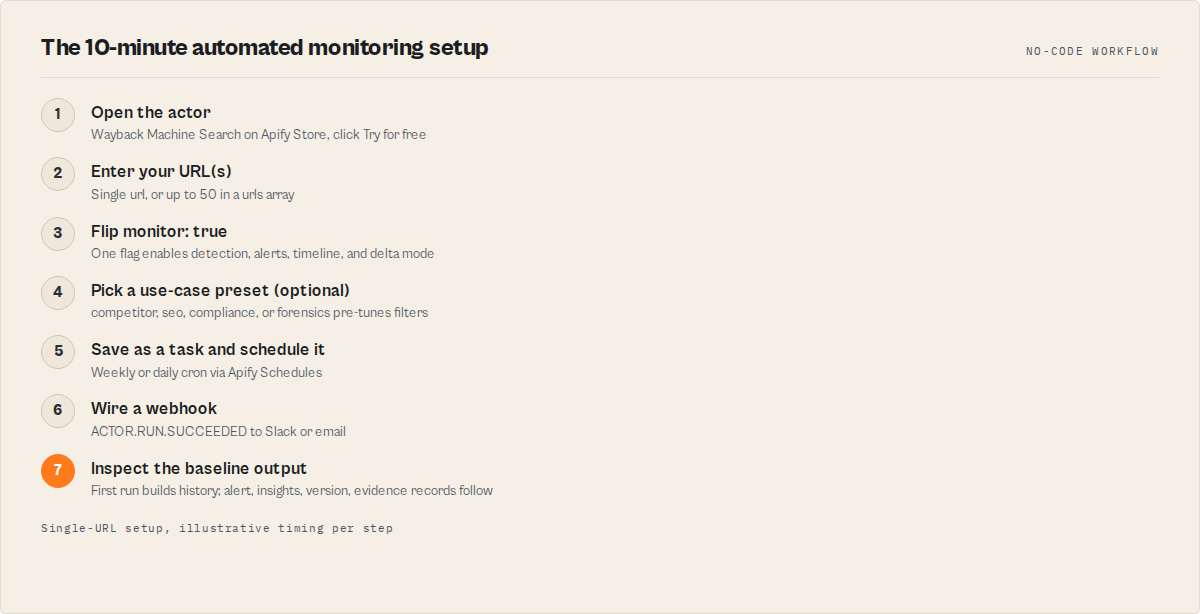
This is the actual sequence. From "I want monitoring" to "alerts hitting my Slack" in under ten minutes for a single URL.
Step 1 — Open the actor (1 minute). Go to the Wayback Machine Search actor on Apify Store. Click "Try for free." If you don't have an Apify account, sign up — it takes 30 seconds.
Step 2 — Enter your URL(s) (1 minute). In the actor's input form, enter the page you want to monitor. For one page, fill the url field. For a portfolio (up to 50 URLs), use the urls array. Recommended: start with a single competitor pricing page or your own terms-of-service URL while you get a feel for the output.
Step 3 — Flip the one flag (30 seconds). Toggle monitor: true. That single setting enables change detection, only-changed filtering, change-intelligence categorisation, alerts on moderate-or-major changes, timeline-grouped output, the insights synthesis record, and delta-since-last-run state. You don't have to set seven things — that's what monitor: true is for.
Step 4 — Optional: pick a use-case preset (30 seconds). If you're watching competitors, set useCase: "competitor" and the actor pre-tunes filters for pricing-and-product change watching. There are also seo, compliance, and forensics presets — each pre-fills sensible defaults that you can override later.
Step 5 — Save the run as a task and schedule it (3 minutes). In Apify Console, save the configured input as a Task. Then go to Schedules → Create new schedule → choose your task → set cron to weekly (0 9 * * 1 for Monday mornings) or daily (0 9 * * *). Apify's scheduler docs cover the cron syntax in detail.
Step 6 — Wire a webhook to Slack or email (3 minutes). In the same task, open the Webhooks tab. Add a webhook on event ACTOR.RUN.SUCCEEDED pointing to your Slack incoming webhook URL or an email forwarder. The actor produces an alert record at the top of the dataset whenever changes hit your threshold — your downstream automation watches for it.
Step 7 — Let the first run create a baseline (1 minute, but it runs in the background). The first run captures the full snapshot history and establishes the baseline. From the second scheduled run onward, the actor only emits new events since the previous run — that's delta mode, automatic when monitor: true.
Step 8 — Inspect the output once. Open the run's dataset in Apify Console. You'll see typed records: alert (Slack-ready), insights (top signals + business signals + risk signals), version (one row per stable period), and an evidence block with the SHA-256 hash chain.
That's the setup. Total active config time: ~10 minutes. Total cost for a small monitoring task: a few cents per run at $0.001 per snapshot processed.
What do the outputs look like?
Direct, structured records. Here's a representative alert record the actor emits when a moderate-or-major pricing change is detected:
{
  "recordType": "alert",
  "schemaVersion": "3.0",
  "url": "competitor.com/pricing",
  "magnitude": "major",
  "categories": ["pricing", "product"],
  "summary": "Major pricing change detected: $9 → $12 on Starter tier",
  "snapshotDate": "2026-04-22",
  "previousSnapshotDate": "2026-03-15",
  "snapshotUrl": "https://web.archive.org/web/20260422000000/https://competitor.com/pricing",
  "importanceScore": 0.84,
  "recommendedAction": "Review your own pricing page; verify with a manual capture",
  "chainHash": "a7b3...e91c"
}
And here's an excerpt of the insights.topSignals array — the three most important events ranked by deterministic importance score:
{
  "recordType": "insights",
  "topSignals": [
    "Major pricing change detected on competitor.com/pricing on 2026-04-22 — $9 → $12",
    "New product page detected at /enterprise on 2026-04-15 (page-restored event)",
    "Legal page edited 3 times in 30 days — unusually frequent (volatilityTier: high)"
  ],
  "businessSignals": ["pricing-increase", "tier-rename", "new-product-launch"],
  "riskSignals": ["unusual-legal-edit-frequency"],
  "evidence": {
    "reproducibleQueryHash": "f4a2...8b1d",
    "chainRoot": "9d8c...2af6"
  }
}
The point: this isn't a list of timestamps. It's a structured intelligence record that downstream agents, Slack notifications, and compliance documents can consume directly.
What are the alternatives?
Pick the category that matches your job. Each approach has trade-offs in setup time, recurring cost, alert quality, and what dimension of "change" it catches.
1. Build it yourself with Python and the Wayback CDX API. You query the CDX endpoint, parse the response, store digests, diff them on each run, classify the change, build alerting, persist state across runs, handle auto-pagination past the 10,000-row cap, and own the SHA-256 audit chain if you need legal-grade evidence. That's a maintained service — change classification, magnitude scoring, deterministic entity extraction, per-run delta state, multi-URL portfolio aggregation, and webhook plumbing aren't shortcuts you skip; they're work that someone owns. For a one-page hobby project the DIY version is fine. For a production monitoring system across 25+ URLs, you've signed up to maintain a small platform.
2. Visualping / Distill / ChangeTower (live-page change-detection SaaS). These tools poll the live web on a schedule and detect pixel or DOM differences. They're great at live monitoring with screenshot evidence — for example, watching an A/B test variant or a JS-heavy SPA. They solve a different problem from historical archaeology: they show you what changes from now forward, not what already changed. Recurring cost is typically $30-150/month per workspace. Best for: real-time monitoring of dynamic pages where pixel-level visual evidence matters.
3. Manual Wayback Machine browsing. Free, but a 1,000-snapshot history takes hours to scan, there's no alerting, no classification, no multi-URL aggregation, and no audit trail. Best for: one-off curiosity, never for ongoing monitoring.
4. Internal site audit tools (Screaming Frog, Sitebulb). Crawl your own site for SEO regressions on demand. Not designed for competitor or longitudinal monitoring, no alerting, no historical comparison built in. Best for: point-in-time SEO crawls.
5. Wayback Machine Search Apify actor. One-flag scheduled monitoring against the Internet Archive's public CDX index. Pay-per-snapshot pricing ($0.001 per snapshot), no subscription, structured alerts and audit-trail outputs, multi-URL batch up to 50 URLs, deterministic classification (no LLM drift). Best for: scheduled change archaeology, competitor pricing watch, compliance audit trails, brand monitoring.
| Approach | Setup time | Recurring cost | Alert quality | Audit trail | Best for |
|---|---|---|---|---|---|
| DIY Python + CDX API | Days to weeks | Hosting + maintenance | What you build | What you build | One-off hobby projects |
| Visualping / Distill / ChangeTower | 5-15 min | $30-150/mo per workspace | Pixel/visual diff | Screenshot history | Live-page real-time monitoring |
| Manual Wayback Machine | 0 min | Free | None | None | One-off lookups |
| Screaming Frog / Sitebulb | Hours | $200-300/yr license | None (on-demand) | Crawl reports | Self-site SEO crawls |
| Wayback Machine Search actor | ~10 min | $0.001/snapshot | Categorised alerts with magnitude | SHA-256 hash chain | Scheduled change archaeology + audit-grade evidence |
Pricing and features based on publicly available information as of April 2026 and may change.
Best practices
- Start with one URL, expand to a portfolio. Validate the alerts and outputs match what you actually want to be notified about before scaling to 50 URLs.
- Use the
monitor: trueflag, not the seven individual settings. It's the maintained, opinionated default. If you need to override one specific behaviour, override that single field. - Pick a schedule cadence that matches the page's archive cadence. The Internet Archive captures most popular pages weekly to monthly; checking every hour gives you nothing the previous run didn't have.
- Wire alerts to a dedicated Slack channel. Don't pipe monitoring alerts into a high-traffic team channel — they get muted within a week, and then you stop reading them.
- Persist the
evidence.chainRootin your audit log. For compliance use cases, store the chain root from each run alongside the run ID. That's your tamper-evident anchor. - Use
useCase: "competitor"for portfolio watching. It pre-tunes filters for pricing-and-product changes, the two categories that matter most for competitive intelligence. - Set
alertOnMagnitude: "moderate"not"minor". Minor edits include typo fixes and whitespace changes — they bury the signal. Moderate-or-major catches real edits. - Inspect the
coverage.completenessfield on first run. A score below 0.5 means the Internet Archive's capture cadence for that URL is sparse — adjust expectations or add a co-monitoring tool for that page.
Common mistakes
- Setting
alertOnMagnitude: "minor". Floods alerts with whitespace and typo edits, trains you to ignore them, defeats the purpose. - Scheduling hourly runs on a low-traffic page. The Internet Archive may only capture that page weekly. Hourly runs add cost and produce no new events.
- Not wiring a webhook. Without an alert pipe to Slack or email, the data lives in the dataset and nobody reads it. Monitoring without alerting is a hope, not a system.
- Pointing it at a logged-in dashboard URL. The Internet Archive can't capture content behind auth. The actor will return sparse coverage and useless events.
- Treating it as a real-time tool. Wayback-based monitoring is change-archaeology fast, not pager-duty fast. For sub-minute alerts, pair it with a live-polling tool.
- Ignoring the insights record. The
topSignalsarray is the executive summary. Read that first; everything else is supporting detail.
A mini case study
A B2B SaaS analyst we worked with was tracking 18 competitor pricing pages manually — Tuesday mornings, two hours of clicking. Mid-2025 they wired the Wayback Machine Search actor on a Monday-morning schedule, useCase: "competitor", alerts to a dedicated Slack channel.
Before: ~8 hours/month of manual checking, missed at least two pricing changes per quarter (caught later via customer questions), no audit trail when sales asked "what was their price last June?"
After: ~10 minutes setup, one weekly Slack digest with categorised alerts, two pricing changes caught within a week of the Internet Archive capturing them, full snapshot URLs preserved for sales reference. Run cost: roughly $2-4/month across the 18-URL portfolio at $0.001/snapshot.
These numbers reflect one analyst's workflow. Results vary depending on portfolio size, archive cadence per URL, and how often the monitored pages actually change.
Implementation checklist
- Create or sign in to an Apify account.
- Open the Wayback Machine Search actor and click "Try for free."
- Enter
url(single) orurls(array up to 50). - Set
monitor: true. - Optionally set
useCase: "competitor"(orseo/compliance/forensics). - Save as a task.
- Create a Schedule for the task — weekly is the typical starting cadence.
- Add a webhook on
ACTOR.RUN.SUCCEEDEDto your Slack incoming-webhook URL. - Let the first run complete (it builds the baseline).
- Inspect the
insights.topSignalsarray and thealertrecords in the dataset. - From the second run onward, only deltas are emitted — those are your real notifications.
- Persist
evidence.chainRootper run if you need an audit trail.
Why deterministic matters for monitoring
Two pages of identical input should produce identical output, run after run. That's not a feature most monitoring tools advertise, because most monitoring tools don't have it.
The Wayback Machine Search actor uses zero LLMs, zero embeddings, zero model inference. All change detection, magnitude classification, category assignment, entity extraction, and importance scoring is regex and heuristics. The same snapshot pair always produces the same change classification, the same magnitude, the same categories, and the same eventId. That's the property compliance teams, legal teams, and brand auditors actually need. An LLM-based classifier might flag a change as pricing today and product tomorrow against the same input — that's unacceptable in regulated environments.
The other piece: the SHA-256 hash chain. Every event in the dataset carries a chainHash derived from the previous event's hash plus the current event's content. The full run produces a chainRoot on the insights record. Modify any event downstream and the chain root no longer matches. That's a chain-of-custody anchor litigators and compliance auditors can rely on, and it's the kind of detail that turns "I think this is what the competitor's terms said" into "here's the reproducible query hash and the tamper-evident root."
Limitations
Honest constraints. Read these before scheduling.
- Capture cadence depends on the Internet Archive. Most popular pages are captured weekly to monthly. Sparse pages may have multi-month gaps. The actor reports
coverage.completenessso you know what you're working with. - Behind-auth content isn't captured. Logged-in dashboards, customer portals, and gated content are absent from the Internet Archive. This tool can't monitor what was never archived.
- Sub-minute SLAs aren't possible. This is change archaeology, not real-time pixel polling. For sub-minute monitoring, pair with a live-page tool.
- Visual changes without DOM changes are invisible. A pure CSS-only redesign that doesn't change the HTML hash won't register. The actor detects content and status changes, not pixel diffs.
- You need an Apify account and small platform credit. Pricing is $0.001 per snapshot processed — typically a few cents to a few dollars per run depending on portfolio size and history depth — but you need a payment method on file to run scheduled tasks.
Key facts
- The Internet Archive holds 890+ billion archived snapshots dating back to 1996 (Internet Archive, 2024).
- The Wayback Machine Search Apify actor processes snapshots at $0.001 each via Apify's pay-per-event pricing.
- One flag (
monitor: true) activates seven monitoring sub-features: detect, only-changed, change-intelligence, alert, timeline, insights, delta. - The actor classifies changes into nine event categories: pricing-change, product-launch, legal-update, redesign, navigation-change, contact-change, page-removed, page-restored, copy-edit.
- The actor supports up to 50 URLs per run and 10,000 snapshots per query (auto-paginate beyond).
- Output records carry a stable
schemaVersion: "3.0"so downstream pipelines can hard-pin against a contract. - Importance scores are deterministic and combine magnitude (40%), confidence (20%), recency (20%), category priority (10%), and cluster size (10%).
Glossary
CDX API — The Internet Archive's Capture/Digital Index, the public endpoint that returns snapshot metadata for a URL. Docs. Snapshot — A single archived capture of a URL at a specific timestamp. Digest — A content hash the Internet Archive computes per snapshot; identical digests mean identical content. Magnitude — A change's classified scale: minor, moderate, or major. Delta mode — A run mode where only events newer than the previous run are emitted. Hash chain — A SHA-256 chain across events providing tamper-evident audit integrity.
How to compare competitor pricing pages over time
Set urls to your competitor list (up to 50), useCase: "competitor", and run on a weekly schedule. The actor returns versioned per-URL change logs and a comparison.firstToChange field showing which competitor moved first on pricing. Pair with the contact scrapers comparison on ApifyForge if you also need contact discovery for the same domains.
How to track terms-of-service edits for compliance
Point url at the terms-of-service page, set monitor: true, schedule daily or weekly. The actor's events array tags edits with category legal-update and the evidence.chainRoot provides a tamper-evident anchor. ApifyForge covers complementary compliance tooling in our compliance screening comparison.
How to detect competitor product launches automatically
With monitor: true and alertOnMagnitude: "moderate", the actor emits events of type product-launch and page-restored when a new page appears. Wire the alert to Slack and you have product-launch radar across your watched portfolio. For deeper buyer-side intelligence, see ApifyForge's lead generation comparison.
How to set up monitoring without writing any code
Use the Apify Console UI end-to-end: open the actor, fill the URL field, toggle monitor: true, save as a task, click Schedule, click Webhooks → add a Slack URL. No code, no API key for the data source, no infrastructure to maintain. ApifyForge curates similar no-code automation patterns across the actor catalogue.
Broader applicability
The patterns here apply beyond Wayback-based monitoring to any scheduled change-detection system across web, file, and database sources.
- Scheduled capture + structured alerts beats real-time everything. Most "change" alerts only need to fire weekly to be useful.
- Deterministic classification is the trust property that turns a tool into a system of record.
- Delta state without a database (named key-value store, in this case) is an underrated pattern — most teams over-engineer monitoring with Postgres when a key-value store solves the same problem.
- Audit trails as a default rather than a paid add-on. Hash chains cost nothing to compute and turn any monitoring system into legal-grade evidence.
- Portfolio aggregation as a free side effect. Once you have per-URL change events, the
mostActive/firstToChangerankings come for free.
When you need this
You probably need automated website monitoring if:
- You're tracking 3+ competitor pages, your own production site, regulatory disclosures, or content at risk of silent edits.
- You need a documented audit trail for what a page said on a specific date.
- Manual checking is missing changes or eating hours per week.
- You want alerts in Slack or email, not a dashboard you have to remember to check.
- You need structured, machine-readable change events for downstream automation or AI agents.
You probably don't need this if:
- You only care about real-time, sub-minute alerts on a JavaScript-heavy SPA.
- The pages you want to monitor are entirely behind authentication.
- You only need to check one page once a quarter — manual works fine.
- You need pixel-level visual diff evidence — pair with a live-polling tool instead.
Common misconceptions
"Wayback-based monitoring is too slow to be useful." False for the use cases it's built for. The Internet Archive captures most monitored pages within a week of a change. For competitor pricing watch, brand monitoring, and compliance, weekly is the right cadence — not a limitation.
"I can build this myself with a couple of CDX queries and a diff." You can build the first 10% in an afternoon. The remaining 90% — change classification, magnitude scoring, deterministic entity extraction, multi-URL portfolio aggregation, audit chain, delta state, alerting plumbing, auto-pagination past the 10,000-row cap — that's a maintained service, not a script.
"I need an API key." No. The Internet Archive's CDX API is public. The actor doesn't authenticate to the data source. You only need an Apify account to run the actor itself.
"It costs the same as a SaaS subscription." Comparison varies by usage. A 10-URL weekly schedule typically runs a few cents per run at $0.001/snapshot. SaaS competitors usually start at $30-150/month per workspace. For most portfolios, pay-per-event is meaningfully cheaper, particularly when usage is bursty.
Frequently asked questions
How long does it take to set up automated website monitoring?
About 10 minutes for a single URL: open the actor, paste the URL, set monitor: true, save as a task, schedule it, add a webhook. For a multi-URL portfolio of up to 50 sites, ~15 minutes total. The first run takes a few minutes to build the baseline, but you don't have to watch it.
Do I need to write any code?
No. The entire setup runs through Apify Console's UI — fill the input form, click save, click schedule, paste a Slack webhook URL. Code is only needed if you want to integrate the run output into a custom downstream system, and even then ApifyForge's webhook integration guides cover the common patterns.
How much does automated website monitoring cost with this approach?
Pricing is $0.001 per snapshot processed via Apify's pay-per-event model. A typical 10-URL weekly schedule processes a few hundred snapshots per run, costing a few cents per run, so usually in the low single dollars per month. ApifyForge's PPE pricing learn guide covers the model in detail.
Why use historical snapshots instead of live polling?
Different jobs. Live polling tells you what changes from this point forward and needs always-on infrastructure. Historical-snapshot monitoring shows you what already changed (so you don't miss the changes that happened before you started monitoring), works against the public Internet Archive without scraping, and produces audit-grade evidence trails. The two approaches complement rather than replace each other.
Can this monitor pages behind a login?
No. The Internet Archive doesn't capture authenticated content, so the actor has no snapshots to analyse. Use a live-polling tool with credentials handling for behind-auth dashboards.
Is the output suitable for legal evidence?
The actor produces a tamper-evident SHA-256 hash chain (chainHash per event, chainRoot per run) and a reproducibleQueryHash that lets opposing counsel reproduce the query. Combined with the Internet Archive's permanent snapshot URLs, that's triple-anchored evidence many legal teams accept. As always, defer to your jurisdiction and counsel for specifics.
How is this different from Visualping or Distill.io?
Visualping and Distill poll the live web for visual or DOM changes — they're real-time tools. Wayback Machine Search analyses historical Internet Archive snapshots — it's change archaeology. Use the live tools when you need real-time pixel evidence; use Wayback Machine Search when you need scheduled change tracking, multi-decade history, or audit-grade evidence without paying a SaaS subscription.
How does delta mode know what's new?
The actor persists per-URL state in a named Apify key-value store. Each run writes the latest event ID per URL; the next run only emits events newer than that pointer. No external database needed. The state lives in your Apify account, not a third-party service.
Ryan Clinton publishes Apify actors as ryanclinton and builds developer tooling at ApifyForge. The Wayback Machine Search actor is one of the best Apify-Store options for scheduled historical website monitoring with audit-grade outputs.
Ready to set this up? Open the Wayback Machine Search actor on Apify Store, enter your URL, flip monitor: true, schedule it, wire a webhook. Ten minutes from now you'll have automated website monitoring running with structured alerts and audit-grade outputs.
This guide showed how Wayback Machine Search is a tool that shows exactly what changed on a website — including pricing, product, and legal updates — using historical snapshots, and how to schedule it as a one-flag automated monitoring product in under 10 minutes. The same scheduled-capture-plus-structured-alerts patterns apply broadly to any change-detection domain — file systems, databases, configuration drift, even regulatory disclosures.
Last updated: April 2026