What is the Compliance Scanner?
By Ryan Clinton · Updated Mar 1, 2026
The Compliance Scanner assesses legal and regulatory risk for any Apify actor before you scrape. It analyzes the actor's metadata — name, description, categories, and README — to detect PII collection indicators, Terms of Service exposure against 27 major platforms, and applicable regulations across 6 jurisdictions.
The scan checks three risk categories. PII risk scans for 18 keywords that indicate personal data collection: email, phone, name, address, salary, resume, identity, and more. ToS risk matches against known platform policies: LinkedIn and Facebook are HIGH risk (active litigation), Amazon and Google are MEDIUM, Reddit and Yelp are LOW. Authentication risk flags actors accessing content behind login walls, relevant to CFAA compliance.
The scan produces an overall risk level (LOW/MEDIUM/HIGH), lists applicable regulations (GDPR, CCPA, CFAA, CAN-SPAM, PIPEDA, ePrivacy Directive), and provides actionable recommendations like 'document your lawful basis for processing personal data under GDPR' or 'add opt-out mechanism for email collection.'
Run it on a single actor by ID, or tick "Scan my entire fleet instead" to audit every actor in your Apify account in one go — useful before a portfolio compliance review or a Store quality push. Strict mode raises sensitivity when metadata is sparse or wording is ambiguous; reach for it on enterprise reviews. The scan covers four dimensions by default — README + documentation, input/dataset schemas, agentic readiness, and change signals (drift versus the previous scan) — each an independent toggle so you can drop one to shorten the run and remove it from the scorecard.
Compliance Scanner costs $0.15 per scan and does NOT run the target actor — it reads metadata only. Visit apifyforge.com/tools/compliance-scanner for documentation.
Options
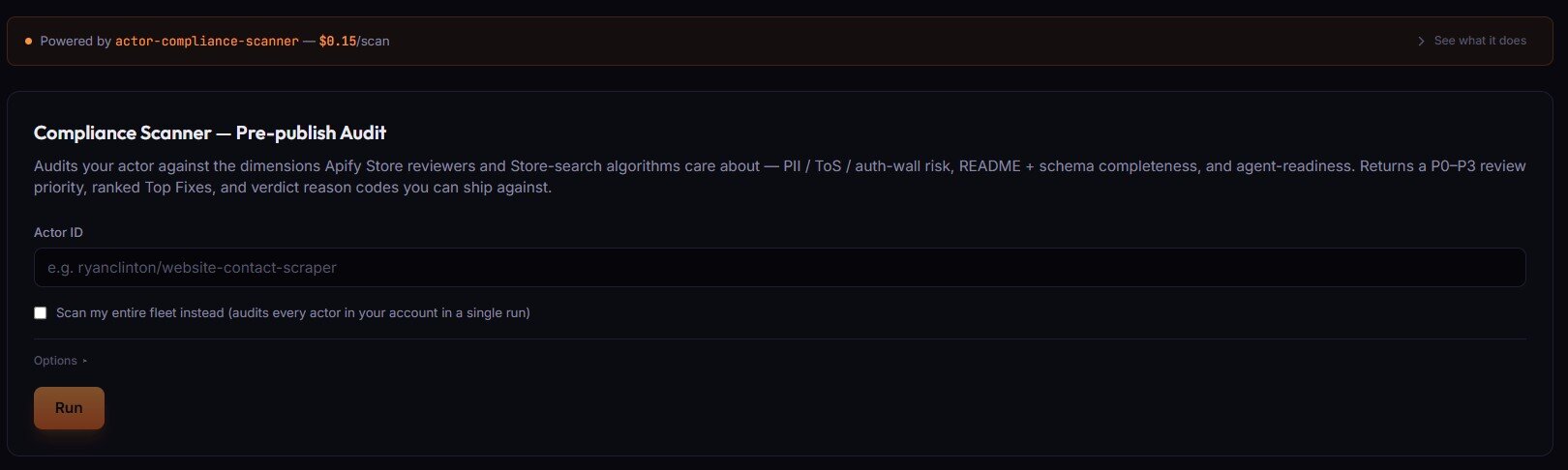
- Actor ID (text) — single actor to audit, in
username/slugform. - Scan my entire fleet instead (checkbox) — audits every actor in your account in a single run. Use for portfolio-wide compliance review.
Options ▸ panel
- Strict mode — raises sensitivity when metadata is sparse or wording is ambiguous. Use for enterprise/compliance-heavy review.
- Max actors to scan (fleet mode only) — default 250, max 1000. Reduce for a faster initial pass.
- Scan scope — four toggles, all on by default. Turn off to shorten the run and drop the dimension from the scorecard:
- README + documentation — required sections, legal disclosures, responsible-use
- Input + dataset schemas — existence, field-level descriptions
- Agentic readiness — MCP/agent-consumer friendliness, structured output
- Change signals (drift) — compare against the previous scan, flag regressions
Related term
An Apify Dataset Schema is a JSON Schema file at .
Related questions
The Output Guard checks your actor's actual dataset output against the schema you declared in your dataset_schema.json f...
What is the Test Runner?The Deploy Guard is a testing tool that runs your Apify actor with predefined test inputs and automatically validates th...
What is Cloud Staging?Cloud Staging runs your actor in Apify's actual production environment before you make it public on the Store, catching ...
What are Regression Tests?Regression tests are automated test suites that run before every publish to verify that new code changes have not broken...