What is the Test Runner?
By Ryan Clinton · Updated Mar 1, 2026
The Deploy Guard is a testing tool that runs your Apify actor with predefined test inputs and automatically validates the output against assertions you define, giving you confidence that your actor works correctly before you deploy it to the Apify Store.
Each test case in the Deploy Guard consists of three parts: input parameters that define what to feed your actor, output assertions that define what you expect to get back, and optional metadata like test name and timeout. Input parameters can be any valid JSON that matches your actor's input schema — for example, a specific search query, a list of URLs, or configuration options. Output assertions let you specify expected minimum result counts (e.g., at least 10 results), required fields that must be present in every output item (e.g., every result must have a title, url, and price), field type constraints (e.g., price must be a number, not a string), and value range checks.
Here is a practical example. Say you have a Google Maps scraper. You might define three test cases: one that searches for 'coffee shops in London' and expects at least 5 results with name, address, and rating fields; one that searches for a specific place by URL and expects exactly 1 result with all detail fields populated; and one that uses an empty search to verify your actor handles edge cases gracefully without crashing.
The Deploy Guard runs as a hosted actor on Apify and costs $0.35 per suite. You point it at the target actor and pick a Preset — Canary runs a single fast test for sub-10-second pre-push confidence; deeper presets cover the wider set of input shapes you need before deploy. Custom Test Cases run alongside the preset and let you assert minimum result counts, required fields, type constraints, value ranges, and per-test duration ceilings. Both presets and custom cases are billed because each one starts a real run of your target on the Apify platform — that is the point: catching Docker build problems, missing dependencies, network-level proxy differences, and other things that only show up in production. Turn on baseline drift detection to track the field schema across runs and flag any new fields, missing fields, type changes, or null-rate regressions since the last suite. Defaults run at 300s timeout and 512 MB memory per test, but both are tunable in the Options panel for deep crawls or memory-hungry actors.
Run all your test cases with a single command to get a complete pass/fail report. Integrate it with Regression Tests for automated pre-deploy validation across your entire test suite. For more on testing workflows, see the related questions about Cloud Staging and Regression Tests. Visit apifyforge.com/tools/test-runner for documentation and examples.
Options
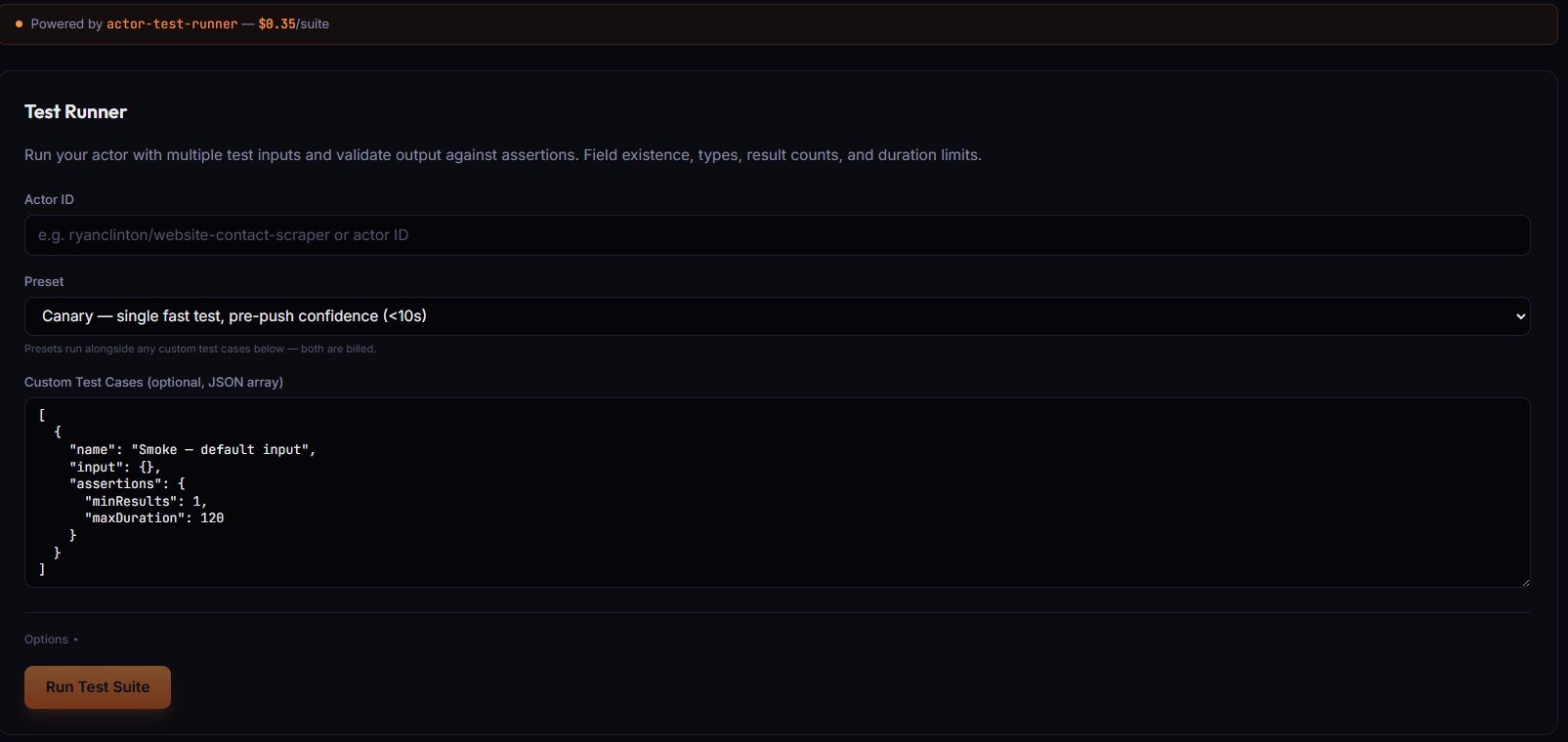
- Actor ID (text) — your actor in
username/slugform, or the raw actor ID. - Preset — pre-built test profile that runs alongside any custom cases. Choices include
Canary(single fast test, <10s pre-push confidence) and deeper presets for full pre-deploy coverage. Presets and custom cases are both billed. - Custom Test Cases (optional, JSON array) — array of
{name, input, assertions}objects. Assertions supportminResults,maxDuration, required fields, type constraints, and value ranges.
Options ▸ panel
- Enable baseline drift detection — tracks field schema across runs; flags new fields, missing fields, type changes, and null-rate regressions.
- Timeout per test (seconds) — default 300, range 30–3600. Increase for deep crawls, LLM-heavy runs, or multi-page actors.
- Memory per test (MB) — default 512, range 128–8192 (step 128). Match the target actor's real memory use. Higher = faster + more compute.
Related term
An Apify Actor Run is a single execution of an actor with specific input parameters, representing one complete job from start to finish.
Related questions
The Output Guard checks your actor's actual dataset output against the schema you declared in your dataset_schema.json f...
What is Cloud Staging?Cloud Staging runs your actor in Apify's actual production environment before you make it public on the Store, catching ...
What are Regression Tests?Regression tests are automated test suites that run before every publish to verify that new code changes have not broken...
How do I validate my actor's output schema?Use the ApifyForge Output Guard to compare your actor's actual dataset output against the schema declared in your datase...