What is the A/B Tester?
By Ryan Clinton · Updated Mar 1, 2026
The A/B Tester runs two actors against the same input and emits a structured winner verdict with fairness checks. It is built for the call you have to make often: "these two actors look like they solve the same problem — which one should I actually run?". The tool runs each actor N times in parallel, aggregates duration, cost, result count, and field coverage, then reports a winner with confidence and fairness gates so you can ship the result without second-guessing.
Use the A/B Tester when you are evaluating a competitor against your own actor before publishing, choosing between two third-party actors that scrape the same site, validating that a refactor of your actor produces the same output as the previous version, or verifying that a new pricing tier still wins on cost-per-result.
How the verdict works
Each test runs the same input through both actors N times (configurable via Mode). The tool computes success rate, median duration, p90 duration, median cost, cost per result, median result count, and field coverage. The winner is decided by a configurable Decision Profile, and the verdict includes confidence (low/medium/high), winner consistency across pairwise matchups, and fairness gates (reliability, separation, variance, sample, fairness — each marked PASS or FAIL).
If the actors return substantially different output shapes, the verdict is downgraded to monitor with a RESULT_SHAPE_DIVERGENCE warning — the tool refuses to declare a winner when the actors are not actually solving the same problem.
Options
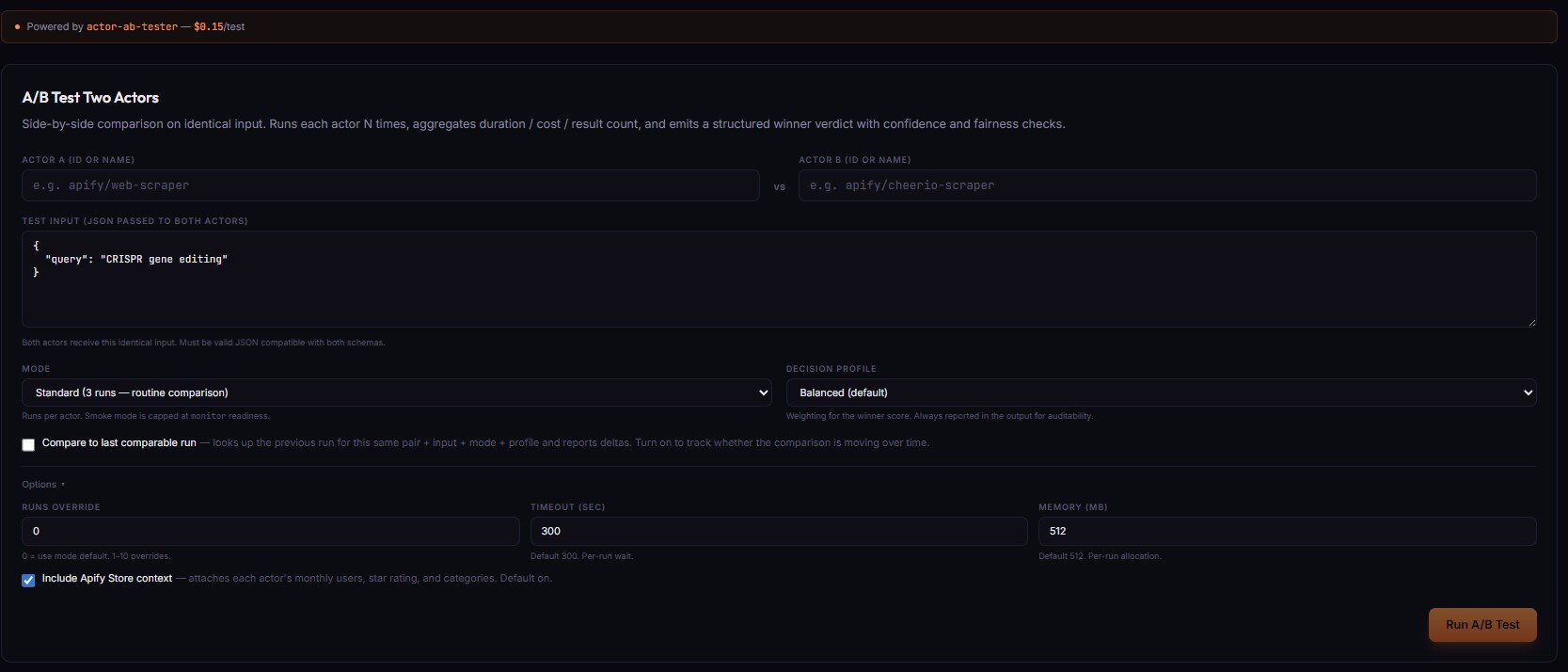
- Actor A / Actor B (ID or name) — the two actors to compare. Both receive the same Test Input.
- Test Input (JSON) — identical input passed to both actors. Must be valid JSON compatible with both schemas.
- Mode — runs per actor:
Smoke(1 run — compatibility check only, capped at monitor readiness),Standard(3 runs — routine comparison),Decision(5 runs — production switching),High stakes(10 runs — needs to survive scrutiny). - Decision profile — weighting for the winner score:
Balanced(default),Speed-first,Cost-first,Output-first(result count + coverage),Reliability-first. Always reported in the output for auditability. - Compare to last comparable run (checkbox) — looks up the previous run for this same pair + input + mode + profile and reports deltas. Turn on to track whether the comparison is moving over time.
Options ▸ panel
- Runs override — 0 = use mode default. 1–10 overrides the runs-per-actor count.
- Timeout (sec) — default 300, range 30–3600. Per-run wait.
- Memory (MB) — default 512, range 128–8192 (step 128). Per-run allocation.
- Include Apify Store context — attaches each actor's monthly users, star rating, and categories to the verdict. Default on.
Pricing
The A/B Tester costs $0.50 per test — one flat fee per test, regardless of how many runs you choose. The two target actors each consume their own PPE for each of the N runs. For a Standard (3-run) test against an actor priced at $0.05/result that returns 5 results, the actor cost is 2 actors × 3 runs × 5 results × $0.05 = $1.50, plus the $0.50 A/B Tester fee. Visit apifyforge.com/dashboard/tools/ab-tester to run a comparison.
Related term
An Apify Actor Run is a single execution of an actor with specific input parameters, representing one complete job from start to finish.
Related questions
The Output Guard checks your actor's actual dataset output against the schema you declared in your dataset_schema.json f...
What is the Test Runner?The Deploy Guard is a testing tool that runs your Apify actor with predefined test inputs and automatically validates th...
What is Cloud Staging?Cloud Staging runs your actor in Apify's actual production environment before you make it public on the Store, catching ...
What are Regression Tests?Regression tests are automated test suites that run before every publish to verify that new code changes have not broken...