The problem: By the time a repo is on GitHub's Trending tab, the trade is gone. Trending is a 24-hour star-velocity slice, dominated by AI-of-the-week noise, and it surfaces projects after they've already trended — to everyone, simultaneously. The team that found Stable Diffusion at 800 stars and the team that found it at 80,000 stars are looking at completely different opportunities. One funds a category; the other reads a press release. The "before they blow up" question is structurally different from "what's trending now". Trending is public. Acceleration-while-still-quiet is the actual signal — and it lives in repos with 100 to 3,000 stars that the default search sort buries.
What is finding trending GitHub repos before they blow up? Detecting GitHub repositories that are accelerating in star velocity, contributor onboarding, and commit cadence — but haven't crossed the popularity threshold where they show up on the official Trending tab. The signal is rolling-window growth rate against a stable baseline, not absolute star count.
Why it matters: Discovering an ascending repo two weeks before it hits Hacker News is a category-defining advantage in VC sourcing, dev-tool product strategy, and ecosystem competitive intelligence. By the time the repo is trending publicly, the technical lead is already taking calls. According to GitHub's 2024 Octoverse report, the platform now hosts more than 518 million projects, and generative AI projects grew 98% year-over-year — meaning the noise floor is rising faster than any human can scan manually.
Use it when: You're scouting investments in dev infrastructure, tracking emerging frameworks in your engineering org's tech category, generating content topics from real ecosystem motion, or running scheduled competitive intelligence on adjacent open-source markets.
Quick answer:
- What it is: A signal-stack approach to early trend detection — star velocity, trajectory enum, breakout flags, fork-to-star ratio, and contributor onboarding rate, scored together rather than read separately.
- When to use it: VC scouting, engineering trend-watching, content topic generation, ecosystem competitive intelligence, weekly category audits.
- When NOT to use it: Single repos you can eyeball, mature stable libraries, throwaway prototypes, or any case where lifetime stars already answer the question.
- Typical steps: Pick a category query → run
mode: "trend-watch"with auto-partition → enable cross-run diff → schedule weekly → read the diff, not the dataset. - Main tradeoff: Real trend detection needs enrichment data (commit activity, contributor counts, releases). That's more API work per repo than raw search, in exchange for verdicts you can act on.
If you only remember 5 things:
- GitHub's Trending tab is a lagging indicator. It surfaces winners after the run-up, with no editorial filter and a 24-hour window dominated by AI hype cycles.
- The interesting signal is acceleration, not absolute stars. A 1,200-star repo gaining 80 stars/day matters more than a 30,000-star repo gaining 5/day.
- Trajectory beats velocity alone. GROWING + breakout flag + ACCELERATING velocity together is the trade. Any one in isolation produces false positives.
- The 100-3,000 star band is where trending lives. GitHub's Search API caps at 1,000 results per query, so default sorts bury exactly the repos you're trying to find.
- Read the diff, not the dataset. A 200-row weekly trend report is unreadable. The 3-5 row "what's NEW since last week" diff is the artefact your team will actually open.
Problems this solves:
- How to find trending GitHub repos before they hit the official Trending tab
- How to detect a category breakout in the first 30 days, not 30 weeks
- How to monitor an entire technology category for acceleration on a schedule
- How to separate real trend signals from one-day Hacker News spikes
- How to spot revival of dormant projects (REVIVING trajectory) before they re-emerge publicly
- How to scan more than 1,000 repos per category past the GitHub Search API cap
In this article: Why the Trending tab is wrong · The real question · The signal stack · JSON output example · Naive vs intelligence-layer · Archetypes · The 1,000-result cap · Scheduled diff monitoring · KV-summary outputs · Worked example · Cost math · Limitations · Best practices · Common mistakes · FAQ
Key takeaways:
- GitHub's official Trending tab is a 24-hour star-velocity slice with no editorial filtering. It catches viral spikes after the fact and misses sustained acceleration entirely.
- Real early-stage trend detection requires a signal stack: rolling 7d/30d star velocity,
maintenance.trajectory(GROWING/REVIVING),forecast.growthProjection30d, fork-to-star ratio, contributor onboarding rate, and breakout detection (top 1% of category by velocity). - The repos most worth finding are in the 100-3,000 star range — exactly where GitHub's 1,000-result Search API cap and default star-sort bury them. Auto-partitioning across star ranges is what makes a 5,000-repo category scan tractable.
- Scheduled monitoring with
compareToPreviousRunflagsNEW,SCORE_CHANGE, and breakout entries since the last run. The diff is the answer; the dataset is the audit trail. - A weekly trend-watch on a 1,000-5,000-repo category at $0.15 per repo costs roughly $150-$750 per run — a fraction of one analyst-hour of manual scanning.
Examples table — what early breakout looks like vs what gets missed:
| Repo profile | Stars | 30d star velocity | Naive read | Real verdict |
|---|---|---|---|---|
| AI inference framework, indie maintainer + 3 new contributors in last 60 days, weekly releases | 1,180 | +480 stars (40/day) | "Too small to matter" | GROWING, breakout flag, top 1% velocity in category |
| Rust CLI tool, posted to Hacker News 32 days ago, traffic decay since | 4,800 | +120 stars in last 7d (was +2,400 in week 1) | "Trending, big deal" | DECLINING velocity, hype-only, not a category move |
| Database engine, dormant 18 months, 11 contributors back in last 30 days, new release tag | 6,200 | +210 stars in 30 days from a 540-day flat baseline | "Old project" | REVIVING, isRevived: true, REVIVAL_STRONG signal |
| LLM agent framework, 28k stars, +30/day for the last year, no acceleration | 28,400 | +900 stars/30d (steady) | "Trending, hot" | STABLE, not accelerating, ranks below the 1,200-star repo on velocity |
| Yet-another React UI kit, 380 stars, 1 maintainer, posted everywhere this week | 380 | +320 stars in 5 days, then drops to 0 | "Could be the next big thing" | HYPE_ONLY, single-channel spike, fork-to-star ratio near zero |
These archetypes are what the signal stack disambiguates. A single field — stars, or even today's star velocity — can't separate breakout from hype-only from revival from steady-grower. Read together with trajectory, fork-to-star ratio, and contributor onboarding, the verdicts come out cleanly.
What is finding trending GitHub repos before they blow up?
Definition (short version): Finding trending GitHub repos before they blow up is the practice of detecting public repositories that are accelerating across multiple lifecycle signals — star velocity, contributor onboarding, commit cadence, fork-to-star ratio — before they cross the popularity threshold where they appear on GitHub's official Trending tab or hit Hacker News.
The phrase "before they blow up" is doing real work in that definition. Detecting what's already trending takes 10 seconds — open the Trending tab, read the list, you're done. Detecting what will trend in 4-8 weeks is a different problem. The bottleneck stops being "what's popular" and starts being "what's accelerating from a quiet baseline, in this specific category, that nobody else is watching yet". That's a directional signal against a category-relative baseline, not an absolute count.
There are roughly four levels of trend-detection maturity:
- Open the Trending tab daily — fine for browsing, useless as a research tool.
- Filter by
created:>and sort by stars — catches noisy new repos, misses revivals and slow-burn breakouts entirely. - Multi-signal classification per repo — combines star velocity, trajectory, fork-to-star ratio, and contributor onboarding into a single verdict.
- Scheduled multi-signal classification with cross-run diff — runs the classification weekly and flags only what's new or accelerated since last run.
Most teams sit at level 1 or 2. Level 4 is the actual research workflow.
Also known as: github trend detection, early-stage repo discovery, breakout repository spotting, github acceleration monitoring, category trend watch, open-source momentum tracking.
Why GitHub's Trending tab is the wrong tool
GitHub's Trending page ranks repositories by star velocity over the last 24 hours, last 7 days, or last 30 days, filtered by language. That's the entire algorithm. It is not curated, not editorial, and not category-aware beyond programming language.
Three structural problems make it useless for early-stage breakout research:
It's a lagging indicator by definition. A repo only shows up on Trending after it has already accumulated enough star velocity to outrun the noise floor for that day. By that point, the maintainer has had a Hacker News post, a Reddit thread, half a dozen Twitter quote-tweets, and a flood of new GitHub watchers. The signal is public to everyone simultaneously. There is no information asymmetry left.
It's dominated by single-channel viral spikes. A repo that gets posted to a high-traffic newsletter or aggregator can rack up 2,000 stars in a day and dominate the daily Trending list — then decay back to zero within a week. The tab can't tell that signal apart from a real category move. According to GitHub's 2024 Octoverse report, the platform added 121 million new users in 2024, and the noise floor on Trending has scaled with that growth.
It has no concept of a baseline. A 30,000-star established framework gaining 50 stars a day looks identical to a 500-star indie project gaining 50 stars a day. They are not the same signal — one is steady-state, the other is breakout. Trending can't distinguish them because it doesn't know what either repo's normal velocity looks like.
It misses revivals entirely. A dormant database engine that just shipped its first release in 18 months and is gaining real traction will not show up on Trending unless the daily velocity beats today's hype cycle — which it usually won't. The REVIVING trajectory is invisible to a 24-hour window.
The honest read: GitHub's Trending tab is a billboard, not a radar. Useful if you want to see what's already on fire, useless if your job is to spot the next fire while it's still smoke.
   GITHUB TRENDING TAB              BREAKOUT DETECTION
   ────────────────────             ──────────────────
   viral spike already              small repo, low absolute stars
        ↓                                    ↓
   surfaced everywhere               velocity accelerating vs own baseline
        ↓                                    ↓
   information priced in             new outside contributors land
        ↓                                    ↓
   signal exhausted                  trajectory: GROWING or REVIVING
                                              ↓
                                     fork-to-star ratio rising
                                              ↓
                                     flagged before public visibility
Trending is a 24-hour popularity slice. Breakout detection is a multi-signal acceleration verdict against a category baseline. They are different questions answered by different infrastructure.
What does "before they blow up" actually mean?
The right framing isn't "what's trending now" — that's already public and widely tracked. The question that matters is: which repositories are accelerating against their own baseline but haven't yet crossed the visibility threshold?
That re-framing changes everything about the workflow:
- The target population is below 5,000 stars, not above. Repos already past the trending threshold are no longer interesting; they're priced in.
- The signal is rolling-window velocity ratio, not absolute count. A 7-day velocity that's 5× the trailing 90-day baseline is a breakout. A 7-day velocity that matches the 90-day baseline is steady-state.
- Categories matter. A repo gaining 200 stars/week is a breakout in vector databases (small category) and a non-event in front-end frameworks (large category). Velocity must be normalised against a category baseline.
- Direction matters more than magnitude. A repo with
maintenance.trajectory: GROWINGandforecast.growthProjection30d: HIGHis a candidate. A repo with the same velocity butDECLININGmomentum is a hype-only spike that's already cooling.
The shape of an actual breakout against its own baseline:
  stars/day
       │
   30 ─┤                              ╱── candidate flagged here
       │                          ╱
   20 ─┤                      ╱
       │                  ╱
   10 ─┤              ╱
       │          ╱
    5 ─┤  ────────  ← 90-day baseline (~3 stars/day)
    0 ─┴──────────────────────────────────────→ time
       └─── trailing 90d ───┴─── trailing 7d ─┘
                          (5–10× baseline = breakout candidate)
A 7-day velocity 5–10× the 90-day baseline is the candidate signal. A 7-day velocity at parity with the 90-day baseline is steady-state. Trending tabs read absolute velocity; breakout detection reads the ratio.
Put another way: the team that found Stable Diffusion at 800 stars built a different product than the team that found it at 80,000 stars. Both teams ran the search. Only one ran the right query against the right data layer.
The signal stack for early trend detection
A repo's "is this breaking out" verdict comes from reading several fields together. The GitHub Repo Intelligence actor computes the following signals per repo, and the breakout flag falls out of how they line up.
        starsVelocityPerDay (rolling)
                    +
        velocityTrend (ACCELERATING / STEADY / DECELERATING)
                    +
        maintenance.trajectory (GROWING / REVIVING / STABLE / DECLINING)
                    +
        forecast.growthProjection30d (HIGH / MEDIUM / LOW)
                    +
        forks ÷ stars (active downstream usage, not bookmarking)
                    +
        contributor onboarding rate (new committers per week)
                    +
        category-relative percentile rank
                              ↓
                    isBreakout = true
                  (top 1% of category by velocity,
                   GROWING or REVIVING trajectory,
                   ACCELERATING velocityTrend)
No single field carries enough information. Read together they correct each other — that's the difference between a star count and a breakout verdict.
Velocity layer:
trend.starsVelocityPerDay— stars added per day since the previous scheduled run. Rolling, not lifetime.trend.velocityTrend—ACCELERATING/STEADY/DECELERATING. Direction of the velocity itself. A repo can have high velocity but a DECELERATING trend, which usually means hype is cooling.trend.starsGainedSinceLastRun— absolute star delta between the last two scheduled runs. Combined withdaysBetweenRuns, it normalises across run cadences.
Trajectory layer:
maintenance.trajectory—GROWING,REVIVING,STABLE,DECLINING,COLLAPSING. The single-glance direction enum. GROWING + REVIVING are the two trajectories that produce trending repos; STABLE and DECLINING do not.maintenance.isRevived— boolean for dormant projects that came back to life. Trending detection that ignores this misses a meaningful share of the candidate pool.forecast.growthProjection30d—HIGH/MEDIUM/LOW. Forward-looking projection that incorporates commit acceleration, fork-to-star ratio, and trajectory.
Quality-of-engagement layer:
- Fork-to-star ratio — high-fork projects are being used, not just bookmarked. A 0.20+ fork-to-star ratio is a strong adoption signal; 0.02 is a vanity-bookmark signal.
- Contributor onboarding rate — new committers per week. A breakout repo gaining outside contributors is far more durable than one running on a single maintainer's hype cycle.
activityStats.commitActivity90dvs 365d — if 90-day commit pace exceeds the annual pace, the project is accelerating in development too, not just popularity.
Category-relative layer:
benchmarks.categoryRank+totalInCategory— where the repo sits in its category by score. Breakout detection compares velocity against the category percentile, not a global threshold.trend.isBreakout— boolean true when the repo lands in the top 1% of its category by star velocity and has a GROWING or REVIVING trajectory and an ACCELERATING velocity trend. All three conditions, not any one.
Read together, these fields produce a candidate verdict like:
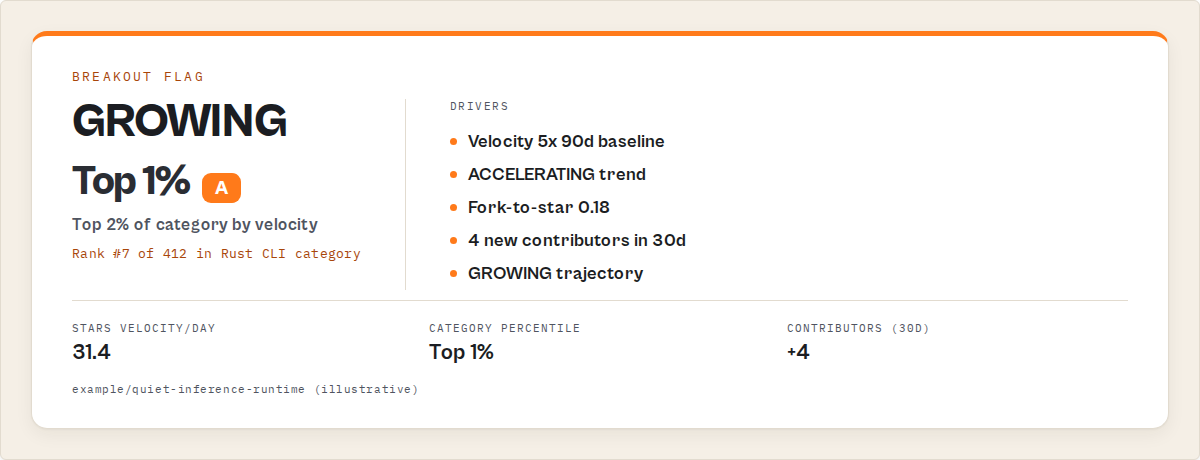
example/quiet-rust-cli —
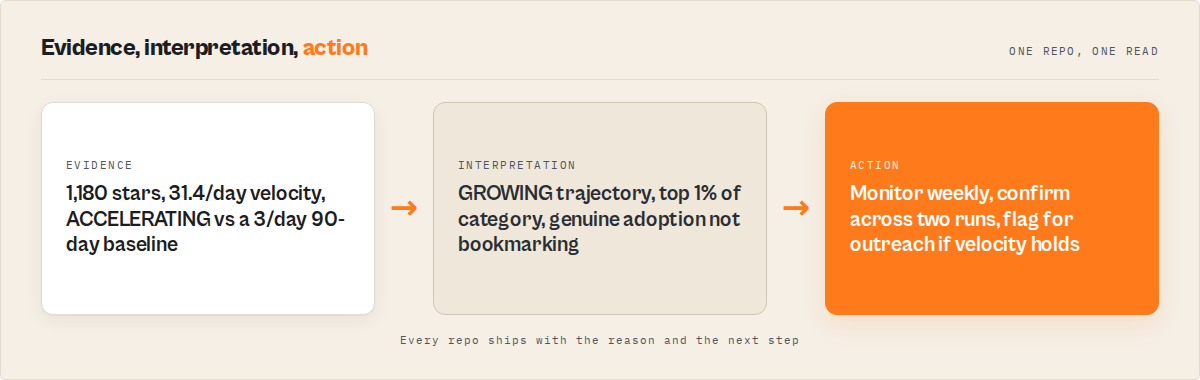
stars: 1,180,starsVelocityPerDay: 32,velocityTrend: ACCELERATING,maintenance.trajectory: GROWING,forecast.growthProjection30d: HIGH, fork-to-star ratio: 0.18, 4 new contributors in last 30 days,categoryRank: 7 of 412,isBreakout: true. Verdict: candidate breakout, top 2% of Rust CLI category, action: monitor weekly + flag if velocity holds for next 14 days.
That's the difference between "repo got 200 stars this week" and "repo is breaking out".
JSON output example — breakout fields
Here's what the trend and forecast layers look like for a single candidate breakout flagged by mode: "trend-watch" with compareToPreviousRun: true. Note isBreakout: true, velocityTrend: ACCELERATING, GROWING trajectory, and a changeType: NEW flag indicating this repo wasn't in last week's results.
{
    "rank": 3,
    "fullName": "example/quiet-inference-runtime",
    "stars": 1180,
    "forks": 213,
    "language": "Rust",
    "topics": ["llm-inference", "edge-ai", "rust"],
    "createdAt": "2025-11-04T09:12:00Z",
    "pushedAt": "2026-05-04T18:21:00Z",
    "daysSinceLastPush": 2,
    "activityStats": {
        "commitActivity90d": 184,
        "commitActivity365d": 412,
        "weeklyCommitAvg90d": 14.2
    },
    "contributors": {
        "count": 9,
        "topContributorShare": 0.61,
        "signedCommitRatio": 0.88
    },
    "scores": {
        "projectHealthScore": 84,
        "adoptionReadinessScore": 71,
        "communityScore": 62,
        "supplyChainRiskScore": 22,
        "outreachScore": 58
    },
    "benchmarks": {
        "healthPercentile": 92,
        "categoryRank": 7,
        "totalInCategory": 412
    },
    "maintenance": {
        "status": "ACTIVE",
        "trajectory": "GROWING",
        "decayScore": 4,
        "decayVelocity": "NONE",
        "isZombie": false,
        "isRevived": false
    },
    "forecast": {
        "growthProjection30d": "HIGH",
        "maintenanceRiskProjection": "DECREASING",
        "abandonmentRisk90d": "LOW",
        "confidence": "HIGH",
        "signals": [
            "Strong star momentum (5x trailing 90d baseline)",
            "Commit activity accelerating (90d pace > annual pace)",
            "High fork-to-star ratio (0.18 — active adoption)",
            "Contributor onboarding (4 new in last 30 days)"
        ]
    },
    "trend": {
        "starsGainedSinceLastRun": 220,
        "daysBetweenRuns": 7,
        "starsVelocityPerDay": 31.4,
        "velocityTrend": "ACCELERATING",
        "healthScoreDelta": 5,
        "isBreakout": true
    },
    "changeType": "NEW",
    "extractedAt": "2026-05-06T09:00:00.000Z"
}
The isBreakout: true flag is what a downstream alert system or analyst dashboard filters on. The supporting fields are the audit trail for why the flag fired — needed when the team has to defend a sourcing call or content topic months later.
Breakout signal-stack scorecard
The candidate verdict in checklist form. All six rows green = isBreakout: true:
| Signal | Threshold | Example repo above |
|---|---|---|
| Velocity accelerating vs own 90d baseline | 5–10× ratio over trailing 7d | ✅ 32/day vs 3/day baseline |
| Trajectory direction | GROWING or REVIVING | ✅ GROWING |
| Velocity trend direction | ACCELERATING (not STEADY or DECELERATING) | ✅ ACCELERATING |
| Fork-to-star ratio | ≥ 0.10 (genuine usage, not bookmarking) | ✅ 0.18 |
| New outside contributors (last 30d) | ≥ 2 (durability signal) | ✅ 4 |
| Category percentile rank | Top 1% by velocity | ✅ rank 7 of 412 |
| Verdict | All six conditions met | isBreakout: true |
A single failing row (e.g. fork-to-star at 0.02) flips the verdict to hype-only. The scorecard is what defends the call.
Naive vs intelligence-layer detection
The same query against the same category produces very different output depending on which signals you read.
| Signal | Naive approach | Intelligence-layer approach |
|---|---|---|
| Star count | Sort by total stars descending — top 1,000 only | Use as one input among several, weighted lower |
| Velocity | "Stars gained this week" from manual delta | Rolling 7d/30d velocity vs trailing 90d baseline, velocityTrend direction |
| Trajectory | Implicit — repos in motion get noticed late | Explicit enum: GROWING / REVIVING / STABLE / DECLINING / COLLAPSING |
| Hype detection | Hard to tell from a spreadsheet | Fork-to-star ratio, contributor onboarding, single-channel-spike heuristics |
| Revival detection | Date filters miss it entirely | isRevived: true for projects with renewed activity after dormancy |
| Category relativity | Global star sort, no category context | categoryRank + percentile rank within the partitioned query |
| Breakout flag | Manual judgement, inconsistent across analysts | isBreakout: true defined as top 1% velocity + GROWING/REVIVING + ACCELERATING |
| Coverage past 1,000 results | Capped — misses the 100-3,000 star band where breakouts live | Auto-partitioning across star ranges, up to 10,000 repos per category |
| Cadence | One-off scans, dataset re-read each time | Scheduled with cross-run diff — only the changes get reviewed |
Pricing and features based on publicly available information as of May 2026 and may change.
The naive column is what you build with two afternoons and the GitHub Search API. The intelligence-layer column is what you ship to a team that has to make sourcing calls every week.
Concrete archetypes — what real breakouts look like
Generalising "trending" without breaking it into archetypes is how teams burn budget on hype cycles. Four useful patterns to keep separate:
Real category breakout — AI inference runtime. A small Rust project shipping LLM inference for edge devices, created six months ago, sitting at 1,180 stars at the start of a weekly run. Over the previous month, star velocity climbed from 4/day to 32/day, three new outside contributors landed PRs, and the maintainer shipped a v0.4 release with measurable benchmarks. Trajectory: GROWING. Velocity trend: ACCELERATING. Fork-to-star ratio: 0.18 (people are forking and using, not just bookmarking). Three weeks later it ships a project-defining feature, gets a serious newsletter mention, and crosses 8,000 stars. The audit trail from the original run defends the sourcing call.
Hype-only spike — yet-another React UI kit. Posted simultaneously to Hacker News, Reddit /r/reactjs, and a designer Twitter feed on Monday. Goes from 30 stars to 380 in five days. Velocity reading on Friday looks impressive. By the following Wednesday velocity is back to zero. Fork-to-star ratio: 0.02 (everyone bookmarks, nobody uses). Single contributor. No new outside committers. velocityTrend flips to DECELERATING within seven days. The intelligence layer flags it as hype-only at run time and the breakout flag never fires.
Revival — dormant database engine. An open-source database project that sat at 6,000 stars and zero activity for 18 months. A new maintainer takes over, ships a 0.10 release, and 11 dormant contributors return within 30 days. Star velocity climbs from 0 to 7/day — small in absolute terms, huge against a 540-day flat baseline. Trajectory: REVIVING. isRevived: true. Fork-to-star ratio rises sharply as people revisit. Most trending tools miss this entirely because the absolute velocity doesn't beat today's AI hype, but it's exactly the kind of repo a category-aware audit catches.
Steady-grower (false positive) — established LLM agent framework. Already at 28,400 stars, gaining a steady 30 stars/day for the last year. Looks impressive on a daily Trending tab. Velocity trend: STEADY (not ACCELERATING). Trajectory: STABLE. Category percentile rank is high but unchanged. isBreakout correctly returns false because the repo isn't accelerating against its own baseline — it's already past the early-stage breakout window. Useful repo, not a sourcing opportunity.
These four categories are what the signal stack disambiguates. A breakout flag that fires on the first archetype and not on the second three is the one worth acting on.
The 1,000-result cap problem for trend detection
GitHub's Search API hard-caps results at 1,000 per query. For abandoned-repo detection that's annoying. For trend detection it's lethal — because the repos most worth finding live in exactly the range the cap excludes.
Default star-sorted searches return the top 1,000 by total stars. A query like topic:vector-database returns the 1,000 most-starred vector database repos. Every breakout candidate in the 100-3,000 star range — the band where breakouts actually originate — is below that cutoff and never gets fetched.
Switching the sort to updated returns 1,000 recently active repos, but skews toward maintenance noise (Dependabot bumps, README typos) rather than rising projects. Filtering by created:> catches new repos but misses revivals entirely (a 4-year-old database engine that just came back to life isn't "new"). Each individual workaround has its own blind spot.
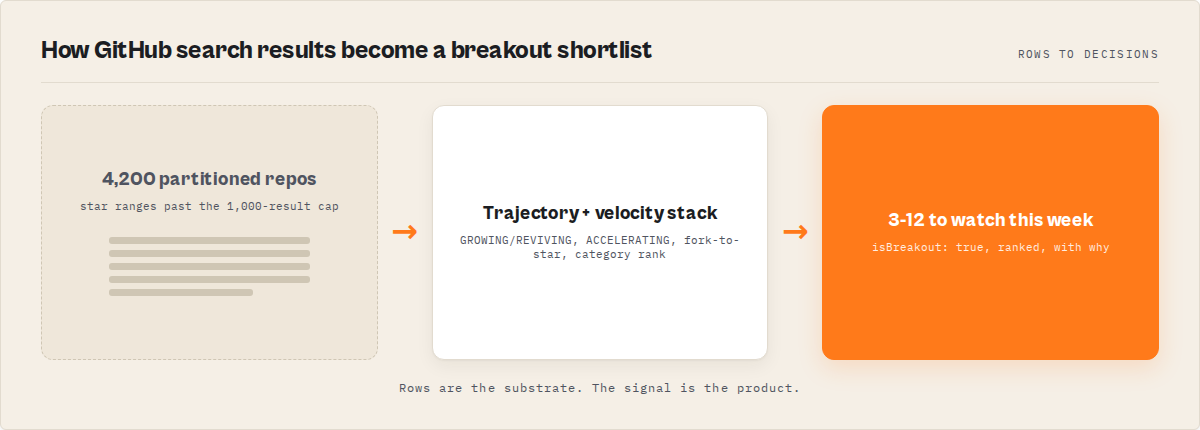
The structural fix is partitioning. Split the original query across star ranges (stars:0..50, stars:50..200, stars:200..1000, stars:1000..5000, etc.), run each as a separate Search API call, deduplicate across partitions, and combine the result. Each partition stays under the 1,000-result cap; the combined query reaches 5,000-10,000 repos in a single category scan.
The GitHub Repo Intelligence actor handles this automatically with autoPartitionResults: true. The recursive split picks ranges based on result counts, falls back to language partitions when a star range still exceeds 1,000, and deduplicates by fullName across all partitions. The output is a single ranked dataset that covers the full long-tail where trending lives.
Scheduled diff monitoring for breakout discovery
A one-off trend-watch scan is a snapshot. Repeated scans without diff are a 5,000-row spreadsheet nobody reads. Scheduled scans with cross-run diff are the actual workflow.
The pattern: define the category query, run it on a weekly schedule with mode: "trend-watch", enable compareToPreviousRun: true, and read only the diff output. The actor stores state in a named key-value store keyed by query, loads the previous run's state at the start of the next run, and tags each repo:
changeType: "NEW"— repo wasn't in last week's results, is now. Either newly created or newly crossed into the search filter.changeType: "SCORE_CHANGE"—projectHealthScoreoradoptionReadinessScorechanged by enough to matter. Upward score moves combined with a velocity acceleration are the breakout candidates.changeType: "STATUS_CHANGE"—maintenance.statusortrajectoryflipped (e.g. STABLE → GROWING, or DORMANT → REVIVING).isBreakout: true— top 1% of category by star velocity with the trajectory and velocity-trend conditions met.null(no change) — silent. Doesn't show up in the diff output.
The signal a team actually wants is the union of NEW + upward SCORE_CHANGE + REVIVING STATUS_CHANGE + isBreakout: true. That's typically 3-12 rows out of a 5,000-repo dataset — a list a human can read in two minutes.
The dataset is the audit trail. The diff is the answer.
What the team actually reads on Monday
Per-run KV-summary outputs are the artefact built for the human reader. The dataset is for the audit trail and downstream tooling. The KV summary is for the analyst opening Slack on Monday morning.
Each scheduled run writes a structured summary to the named KV store with:
- Leaderboards by star velocity — top 10 repos by
starsVelocityPerDay, top 10 byforecast.growthProjection30d, top 10 newly-flagged breakouts. - Breakout detection — full list of
isBreakout: truerepos with the underlying signals (velocity, trajectory, category percentile, fork-to-star ratio). - Narrative summary — Slack-ready prose: "This week's trend-watch on
topic:vector-databaseflagged 3 breakout candidates. Two are GROWING (top of category percentile), one is REVIVING (came back from 14-month dormancy). Headline candidate: example/quiet-rust-cli — 1,180 stars, 32 stars/day acceleration, 4 new contributors in 30 days." - Category market intelligence — week-over-week distribution shifts: how many repos GROWING vs DECLINING this week vs last, average velocity for the category, how many newly-abandoned (the inverse signal — sometimes the fact that competitors are dying is the trend).
- Query coverage report — which star-range partitions ran, how many repos returned per partition, partition confidence level, whether any partitions hit rate-limit and need re-running.
Output goes straight into Slack, an investor newsletter draft, a content brief, or an internal "what shipped this week" doc. No re-formatting, no pivot tables, no spreadsheet wrangling.
What teams actually do with this
Different teams operationalise the same scheduled trend-watch in very different downstream workflows. The actor's output is the same; the consumer changes.
- Venture sourcing. Weekly category scans across AI tooling, dev infra, or vertical SaaS-adjacent OSS. The diff feeds an analyst's outreach list —
isBreakout: truerepos with HIGHforecast.growthProjection30dand a maintainer email get a same-week call. Replaces a "what's hot on Twitter this week" sourcing process that always arrives late. - Engineering roadmap monitoring. Platform teams scan the categories adjacent to their own stack — what's accelerating in observability, in feature flagging, in CI tooling. The diff surfaces emerging tools to evaluate before a competitor adopts them. Replaces ad-hoc Slack links with a cadenced internal digest.
- Competitive intelligence. Run the same trend-watch against your own product's category. New entrants flagged at 200 stars /
velocityTrend: ACCELERATINGare easier to evaluate than ones already at 30,000 stars and on every benchmark page. - DevRel content planning. Trend-watch output becomes a content brief generator. A REVIVING database engine plus a breakout Rust CLI are two posts the team can ship with confidence the topics will get traffic.
- Ecosystem strategy. Foundations and platform vendors run trend-watches on the categories their platform serves. A velocity surge in WASM agent runtimes signals where developer attention is moving — input for partnership decisions, conference programming, and grant priorities.
- Acquisition scouting. Larger acquirers run trend-watches on adjacent categories. Repos with strong fork-to-star ratios, distributed contributors, and accelerating velocity are early acquisition candidates before the round-priced phase.
Every one of these workflows runs against the same scheduled trend-watch run. The output adapts to the reader; the infrastructure is shared.
Worked example: weekly AI tooling trend-watch
A small dev-tools VC fund runs a weekly trend-watch on the AI tooling category. The setup: a single scheduled run on Monday at 9am, query topic:llm topic:ai-agent topic:llm-inference language:python language:rust, mode: "trend-watch", autoPartitionResults: true, maxResults: 5000, compareToPreviousRun: true, weekly cadence.
The first run returns roughly 4,200 unique repos across the partitioned star ranges, scored, ranked, and tagged. Every subsequent run produces a diff against the previous week's state stored in the named KV.
Across 8 weeks of running this, the diff surfaced 47 breakout candidates total. Most were hype-only and decayed within two weeks (correctly flagged as DECELERATING by the third run). Three turned out to matter:
- An LLM inference runtime — flagged at 1,200 stars, week 3 of velocity acceleration, GROWING trajectory, fork-to-star ratio 0.18. The fund's analyst booked a call with the maintainer the same week. Eight weeks later the project announced a $3M seed and crossed 12,000 stars.
- A Rust agent framework — flagged at 800 stars after a quiet 4-month build. Velocity went from 3/day to 22/day inside a month, four new outside contributors landed PRs. The fund passed but used the find as a category signal (Rust is now a real language for agent frameworks) for downstream sourcing.
- A revived LangChain-alternative — flagged at 6,200 stars with
isRevived: trueafter 14 months dormant. New maintainer, new release, fork-to-star ratio climbing. The fund didn't invest but added the maintainer to its outreach list.
The cost: 8 weeks × roughly 4,200 repos = $5,040 in PPE charges across two months. One sourcing meeting that came out of it would have cost more in analyst-hours. The fund kept the schedule running.
These numbers reflect one fund's sourcing workflow. Results will vary depending on category, query specificity, run cadence, and what counts as a "useful" find for your team.
How much does it cost to run weekly trend-watch?
The actor charges $0.15 per repository fetched. Cost is fully predictable from query size — there are no hidden enrichment fees or per-API-call surcharges.
| Run profile | Repos | Cost per run | Monthly (4 runs) |
|---|---|---|---|
| Single category, narrow | 200 | $30 | $120 |
| Single category, full | 1,000 | $150 | $600 |
| Single category, partitioned | 5,000 | $750 | $3,000 |
| Two categories, partitioned | 10,000 | $1,500 | $6,000 |
| Tight scout list | 50 | $7.50 | $30 |
The cost-vs-coverage trade is the actual decision. For a single dev-tool VC analyst, a weekly $150-$600 run on one category is a fraction of one analyst-hour. For an engineering org tracking adjacent OSS frameworks, a $30-$120/month tight scout list is roughly the cost of one team coffee run.
Set a per-run spending limit in the Apify Console to cap exposure on partitioned queries. The actor stops and saves partial results when the limit is reached, so a runaway category never produces a surprise invoice.
The sister post on PPE pricing covers the underlying cost model in more depth.
Limitations
- Star velocity is gameable. A coordinated launch across newsletter + HN + Reddit can spike a repo's daily velocity for a week. The intelligence layer reduces but doesn't eliminate this — fork-to-star ratio and contributor onboarding catch most hype-only spikes, but a well-organised launch can briefly look like a real breakout. Two-run confirmation reduces false positives.
- Bot-stars happen. Some repos run star-purchase networks. Activity stats and contributor onboarding usually expose them, but a repo that bought 500 stars and also shipped real code can fool a single-run scan.
- Some breakouts are pure hype. A repo can genuinely break out by every signal, hit 20,000 stars, and turn out to be a reasonably-clean wrapper around an established model that gets superseded in three months. Trend detection finds momentum, not durable value.
- Category boundaries are fuzzy. A repo tagged with multiple topics can land in two different category percentile rankings depending on the partition. Scoring stays consistent per repo, but the "top 1% of category" calculation depends on which category you queried.
- Search index lag. GitHub's search index can take minutes to hours to reflect newly created repos or updated star counts. A scheduled weekly run is unaffected; a sub-hour real-time alert system would need additional polling.
- Private repos are excluded. The Search API returns public repos only. Private breakouts are invisible by definition.
Best practices
- Run at category granularity, not "all of GitHub". A query of
topic:vector-databaseproduces signal. A query oflanguage:pythonproduces noise. - Use
mode: "trend-watch"rather than rolling your own. The mode auto-enables enrichment, picks the right sort, and surfaces the trend fields. Manual configuration is a way to forget one of them. - Always enable
autoPartitionResults: truefor category scans. The 100-3,000 star band is exactly where breakouts live, and the default 1,000-result cap excludes it. - Schedule weekly, not daily. Daily runs amplify noise; weekly runs let velocity and trajectory stabilise. Cron at the same time each week so the diff is read against a consistent window.
- Read the diff first, the dataset second. The KV summary's
NEW + breakout + REVIVINGrows are the answer. The full ranked dataset is for defending the call later. - Confirm a breakout flag across two runs before acting. A single-week breakout flag has a meaningful false-positive rate. Two consecutive weeks of
isBreakout: truewith ACCELERATING velocity is a stronger signal. - Watch fork-to-star ratio for engagement quality. A breakout with fork-to-star above 0.10 is people using the repo. A breakout with fork-to-star near zero is people bookmarking the repo. Different things.
- Treat REVIVING as a separate workflow. Dormant projects coming back have different durability than new projects breaking out. Tag them with
changeType: STATUS_CHANGEand route them to a different reviewer.
Common mistakes
- Sorting by stars and calling that a trend report. Star count is lifetime cumulative. Velocity over a rolling window is the trend. They do not correlate enough to substitute.
- Skipping auto-partitioning. Without it, every category scan stops at the 1,000-result cap, and the breakout candidates in the 100-3,000 star band never get fetched. The 1,000 most-starred repos in a category are not where trending lives.
- Reading every row. A 5,000-row dataset is unreadable; a 4-row diff is actionable. Teams that don't enable
compareToPreviousRunend up burning analyst-hours rebuilding the diff manually each week. - Treating a single-week velocity spike as a breakout. Hype cycles produce week-1 velocity that decays by week-3. Two-run confirmation cuts the false-positive rate dramatically.
- Confusing GitHub's Trending tab with a research tool. It's a billboard. Useful for situational awareness, useless for early-stage breakout sourcing.
- Querying too broadly.
language:pythonreturns noise;topic:llm-inference language:pythonreturns signal. Tighter query = higher signal-to-noise = fewer false breakouts to triage.
Implementation checklist
- Pick the category. Use specific GitHub topics, not just languages:
topic:vector-database,topic:llm-inference,topic:ai-agent. - Decide the cadence. Weekly is standard. Daily is too noisy; monthly misses fast-moving categories.
- Configure the run input —
mode: "trend-watch",autoPartitionResults: true,compareToPreviousRun: true,maxResultsset to the category's expected size (1,000-5,000). - Provide a GitHub token. Triples the rate limit and is effectively required for partitioned queries that hit thousands of repos.
- Schedule the run via Apify Schedules. Same day-of-week and time so weekly diffs compare apples to apples.
- Set a per-run spending limit to cap exposure.
- Wire the KV summary into Slack, email, or your team doc — the narrative summary is paste-ready.
- Confirm breakout flags across two consecutive runs before acting on them.
- Keep the dataset for audit and downstream tooling; the diff is what gets reviewed each week.
Key facts about trending GitHub repository detection
- GitHub's official Trending tab uses a 24-hour, 7-day, or 30-day star-velocity window with no editorial filtering — it lags real category breakouts by weeks.
- According to GitHub's 2024 Octoverse report, the platform now hosts more than 518 million projects and added 121 million new users in 2024.
- The GitHub Search API caps results at 1,000 per query, which excludes the 100-3,000 star band where most early-stage trending repos live.
- Real breakout detection requires a multi-signal verdict: rolling star velocity plus GROWING/REVIVING trajectory plus ACCELERATING velocity trend.
- Fork-to-star ratio above 0.10 is the strongest single signal for distinguishing genuine adoption from bookmark-only hype.
- Cross-run diff monitoring (
NEW,SCORE_CHANGE,STATUS_CHANGE) is the only readable artefact at category scale; raw datasets are not. - The GitHub Repo Intelligence actor detects breakouts with
mode: "trend-watch"and charges $0.15 per repo fetched on Apify's pay-per-event pricing.
Glossary
Star velocity — Stars added per day or week, computed as a rolling delta rather than a lifetime count.
Trajectory — One of GROWING, STABLE, DECLINING, COLLAPSING, REVIVING. The single-glance direction enum that summarises lifecycle motion.
Breakout flag — isBreakout: true when a repo lands in the top 1% of its category by velocity and shows GROWING or REVIVING trajectory and an ACCELERATING velocity trend.
Fork-to-star ratio — Forks divided by stars. Proxy for active downstream usage; ratios above 0.10 indicate real adoption rather than bookmarking.
Auto-partition — A query strategy that splits a search across star ranges to break past GitHub's 1,000-result cap, deduplicating across partitions.
Cross-run diff — The set of changes (NEW, SCORE_CHANGE, STATUS_CHANGE, NEWLY_ABANDONED) between two scheduled runs of the same query, stored as state in a named key-value store.
Common misconceptions
"GitHub's Trending tab shows what's about to blow up." It shows what already blew up, on a 24-hour window. By the time a repo lands there, it's public knowledge.
"More stars per day is always a stronger signal." Velocity in absolute terms isn't the signal — velocity against the repo's own baseline and normalised against the category is. A 30,000-star framework gaining 30 stars/day is noise; a 1,000-star indie project gaining 30 stars/day is a candidate breakout.
"Date filters on created:> find new trending repos." They find new repos, but most early-stage trending repos are 6-18 months old, not new. Date filters miss revivals entirely and over-weight noisy recent creations.
"If a repo has 50,000 stars it can't be trending anymore." True for early-stage breakout sourcing — but a 50,000-star project that pivots and ships a new product line can re-enter a trending state. Trajectory matters more than absolute stars.
"Trending detection is the same as scraping the GitHub homepage." The homepage is a UI surface with no API, no category filtering, and no historical baseline. Real trend detection works on the Search API output with rolling-window analysis on top.
What are the alternatives to early GitHub trend detection?
Several approaches exist. Each has structural tradeoffs.
1. GitHub's official Trending tab. Free, immediate, requires no setup. Useful for situational awareness. Not useful for early-stage breakout sourcing — it surfaces winners, not signals, and has no category granularity beyond programming language. Best for: casual browsing, not research.
2. Hacker News + Reddit + newsletter monitoring. Manually scanning aggregators for "Show HN" posts and dev-focused newsletters can surface candidates earlier than GitHub Trending. Requires daily reading, no structured data, single-channel viral spikes contaminate the signal heavily, and no historical baseline. Best for: solo developers tracking a few specific niches; doesn't scale to category-wide sourcing.
3. Rolling your own GitHub Search API integration. Possible — and most teams attempt this once. The hidden complexity becomes obvious in week three: pagination, rate-limit handling and backoff, the 1,000-result cap and partition logic, deduplication across partitions, baseline storage for cross-run diffs, trajectory classification, fork-to-star and contributor-onboarding computation, and the cron + state-store + diff-output plumbing. Each of those is a maintained service, not a script. The team that builds it ends up maintaining it instead of doing the research it was supposed to enable. Best for: teams with a dedicated open-source intelligence engineer and no time pressure.
4. Star-history visualisers. Tools that plot historical star counts against time. Useful for confirming a breakout after you've found it. Not useful for finding one — you need to know the repo's name first. Best for: post-discovery analysis; not a discovery tool.
5. OSS analytics dashboards (OSS Insight, etc.). Aggregated dashboards over GitHub data with leaderboards by language and category. Useful for category-level statistics. Not built for cross-run diff monitoring on a custom watchlist; not category-relative for niches outside the top dozen languages. Best for: high-level ecosystem reading; not actionable per-repo sourcing.
6. Composite intelligence actor with mode: "trend-watch". The GitHub Repo Intelligence actor on the Apify platform combines auto-partitioning, multi-signal scoring, trajectory classification, breakout detection, and cross-run diff monitoring into a single scheduled run. Pay-per-event pricing at $0.15 per repo means a 1,000-repo weekly category scan costs around $150. Best for: teams that need scheduled, structured, reproducible trend reports without owning the pipeline.
Each approach has tradeoffs in coverage, cadence, signal quality, and maintenance burden. The right choice depends on category breadth, run frequency, and whether the team has bandwidth to maintain a bespoke pipeline.
Broader applicability
The signal-stack approach to early trend detection isn't unique to GitHub. The same patterns apply across any rolling-baseline acceleration problem:
- Package registry trends — npm, PyPI, crates.io download velocity against trailing baseline, not absolute total downloads.
- Stack Overflow tag activity — question/answer velocity per topic vs trailing 90-day baseline catches new technologies before they're widely adopted.
- Hacker News topic detection — combining submission velocity with comment velocity and upvote-trajectory ratios separates real category moves from one-day spikes.
- Crypto / DeFi protocol metrics — TVL growth rate, unique-address velocity, and contract-deployment cadence against baseline have the same structural shape.
- Product Hunt and ecosystem launch detection — vote velocity normalised by category and time-of-day baseline is the same problem in a different domain.
The broader principle: when the question is "is this accelerating from baseline", the answer is never an absolute count. It's velocity-against-baseline plus directional trajectory plus engagement-quality, read together as a verdict.
When you need this
You need scheduled trend-watch when at least two of the following are true:
- Your team makes sourcing or adoption decisions in technology categories that move fast (AI tooling, dev infrastructure, web frameworks).
- You've missed a breakout in the last 12 months and noticed only after the announcement.
- You read GitHub's Trending tab daily and have started discounting it because the signal is too noisy.
- You're tracking 5+ technology categories and manual scanning isn't sustainable.
- You need to defend a sourcing call with an audit trail of why a project got flagged.
- Your competitors are likely doing the same thing.
You probably don't need this if:
- Your team only watches one or two repos and you already know their maintainers.
- You're tracking mature, stable libraries (Postgres, Rails, React core) where trend detection isn't the question.
- Your decision cadence is annual, not weekly — a one-off scan is enough.
Frequently asked questions
How do I find trending GitHub repos?
GitHub's official Trending tab at github.com/trending sorts repositories by star velocity over the last 24 hours, 7 days, or 30 days, filterable by language. It's useful for casual awareness but lags real category breakouts because it surfaces repos after they've already trended. For early detection — finding rising repos before they hit Trending — use a multi-signal scan that combines rolling star velocity, trajectory classification, fork-to-star ratio, and category-relative percentile rank. The GitHub Repo Intelligence actor runs this with mode: "trend-watch" on a schedule.
What's a good star velocity for a trending repo?
There's no absolute number — velocity has to be read against a baseline. A repo gaining 30 stars/day matters when its trailing 90-day baseline was 3/day; the same velocity against a 30/day baseline is steady-state, not trending. The signal that holds across categories is velocity ratio against trailing baseline, typically 5× or higher, combined with an ACCELERATING velocity trend and a GROWING or REVIVING trajectory. Any one of those signals alone produces false positives.
How do I spot the next big GitHub repo?
Run a category-specific weekly trend-watch with auto-partitioning past the 1,000-result cap, enable cross-run diff monitoring, and read the NEW + isBreakout: true rows. Confirm flags across two consecutive runs before acting — single-week breakouts are often hype cycles that decay within 14 days. Watch fork-to-star ratio (above 0.10 is real adoption) and contributor onboarding (new committers per week is more durable than maintainer-only momentum). The GitHub Repo Intelligence actor computes all of this per repo.
Is GitHub's Trending tab reliable?
It's reliable as a description of what already trended in the last 24 hours. It's not reliable as a forward-looking signal because it has no category granularity beyond programming language, no editorial filtering, no baseline awareness, and no concept of trajectory. A coordinated launch across newsletter and aggregator channels can dominate the daily list with a one-week hype spike that decays to zero. For research, treat it as situational awareness, not a sourcing tool.
What is breakout detection?
Breakout detection is a binary flag (isBreakout: true / false) that fires when a repository simultaneously meets three conditions: top 1% of its category by star velocity, GROWING or REVIVING trajectory, and ACCELERATING velocity trend. Each condition alone produces too many false positives — combined, they isolate genuine category breakouts from hype-only spikes, steady-growers, and dormant projects with brief activity. The GitHub Repo Intelligence actor computes the flag per repo and exposes it in the dataset and KV summary.
How often does GitHub's Trending tab update?
The Trending page recalculates roughly every 10-15 minutes during peak hours, with the underlying ranking based on stars added in the last 24 hours, 7 days, or 30 days depending on the time window selected. The recalculation cadence is fast; the signal lag is structural — by the time a repo accumulates enough velocity to outrun the noise floor, the trend is already public.
Can I monitor GitHub trends on a schedule?
Yes. Schedule a mode: "trend-watch" run weekly in the Apify Console, enable compareToPreviousRun: true, and the actor will store state across runs and diff the next run against the previous. Wire the KV summary into Slack or email, or pull the dataset via the Apify API for downstream tooling. Weekly is the standard cadence — daily amplifies noise; monthly misses fast-moving categories.
Does the Trending tab miss revivals of older projects?
Yes. The Trending tab's 24-hour or 7-day window will only flag a revived project if its renewed velocity beats today's hype-cycle baseline, which it usually won't. A dormant database engine gaining 7 stars/day from a 540-day flat baseline is a meaningful REVIVING signal, but it won't beat an AI-of-the-week project hitting 200 stars/day. Multi-signal trend detection with isRevived: true flags surface revivals explicitly.
How is this different from just scraping the Trending page?
Scraping the Trending page returns the same lagging output the page already shows publicly. The early-stage breakout workflow looks at the GitHub Search API output — repos in the 100-3,000 star band that don't show up on Trending — and applies rolling-window velocity analysis, category-relative percentile ranking, and cross-run diff monitoring on top. Different data layer, different signal.
How much does weekly trend-watch cost?
The GitHub Repo Intelligence actor charges $0.15 per repository fetched. A weekly scan of a focused category (1,000 repos) costs $150 per run, $600 per month. A partitioned scan of 5,000 repos costs $750 per run. A tight scout list of 50 hand-picked repos costs $7.50 per run. Set per-run spending limits in the Apify Console to cap exposure; the actor stops and saves partial results if the limit is hit.
Related reading
- How to evaluate GitHub repositories — the broader 3-tier framework for deciding adopt / caution / avoid on any repo.
- How to detect abandoned GitHub repositories at scale — the inverse problem: finding the dying projects in your dependency tree.
- What is bus factor? — the concentration signal that separates fragile single-maintainer trending repos from durable distributed ones.
- PPE pricing — how the pay-per-event pricing model lets you cap costs on partitioned category scans.
- GitHub Repo Intelligence actor — the actor that produces every signal described in this post.
Ryan Clinton publishes Apify actors and MCP servers as ryanclinton and builds developer tools at ApifyForge.
Last updated: May 2026
This guide focuses on GitHub repositories, but the same rolling-baseline acceleration patterns apply broadly to any open-source ecosystem trend-detection problem — package registries, Q&A communities, protocol metrics, and product launch boards all share the same signal stack.