TL;DR: Paste a domain, IP, or file hash — get a clear malicious/safe decision in seconds instead of checking multiple tools manually. Cybersecurity Intelligence MCP Server is a threat intelligence tool that checks domains, IPs, file hashes, and CVEs across multiple sources and returns a security decision in seconds. It acts as a threat intelligence aggregator and SOC triage tool — an alternative to using VirusTotal, Shodan, and other tools separately.
The problem: You get a suspicious domain in an alert. Or a file hash from an endpoint detection tool. Or an IP address that keeps showing up in your firewall logs. Now what? You open VirusTotal in one tab, Shodan in another, check WHOIS, pull DNS records, cross-reference the CISA KEV catalog, look up AbuseIPDB. Thirty to seventy minutes later — D3 Security reports the mean investigation time per alert is about 70 minutes — you have an answer. Maybe. And that was one indicator. You have 4,483 more in the queue.
What is malicious indicator checking? It's the process of querying multiple threat intelligence sources to determine whether a domain, IP address, file hash, email address, CVE, or URL is associated with malicious activity. The answer isn't binary — it's a confidence score built from signals across antivirus engines, abuse databases, passive DNS, certificate transparency logs, and vulnerability feeds.
Why it matters: SOC teams receive an average of 4,484 alerts per day according to Prophet Security's capacity modeling research. Up to 95% of analyst time goes to investigating alerts that turn out to be false positives. Every minute you can shave off indicator triage compounds across thousands of daily alerts.
Use it when: You need to quickly determine if an indicator of compromise (IOC) is malicious, suspicious, or clean — during incident response, vendor onboarding, phishing triage, or bulk threat hunting.
Problems this solves:
- How to check if a domain is malicious without opening six browser tabs
- How to check if an IP address is malicious using multiple reputation databases
- How to check a file hash for malware across 70+ antivirus engines
- How to triage indicators of compromise in bulk instead of one at a time
- How to combine VirusTotal and Shodan results into a single investigation
- How to automate security investigations for faster incident response
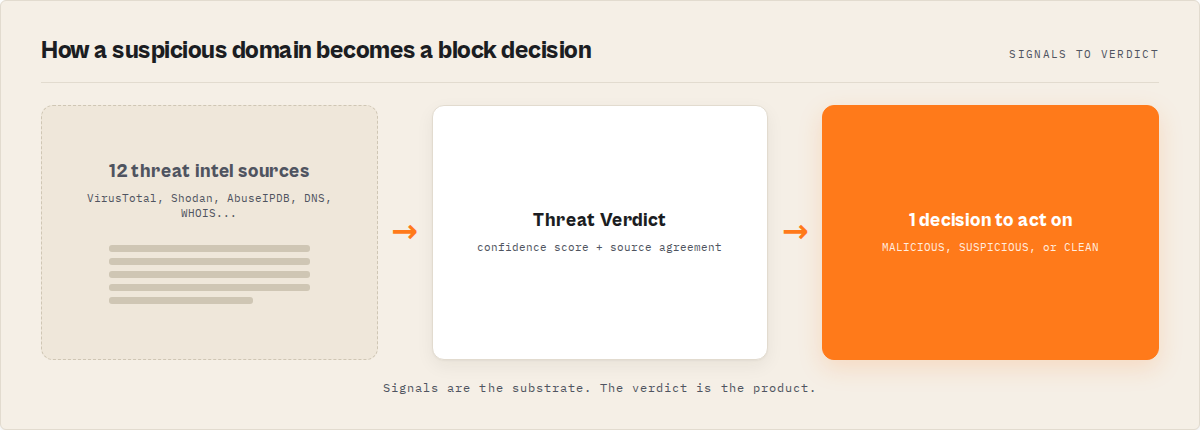
Quick answer
- What it is: Querying multiple threat intelligence databases simultaneously to assess whether a domain, IP, file hash, or URL is malicious, suspicious, or clean
- When to use it: Phishing triage, incident response, vendor risk screening, bulk IOC hunting, email header investigation
- When NOT to use it: Active penetration testing, real-time network monitoring, or live traffic analysis — this is passive reconnaissance and historical data lookup
- Typical steps: Identify indicator type, query reputation databases, check abuse reports, correlate vulnerabilities, aggregate into a verdict
- Main tradeoff: Speed and breadth vs. the depth of a dedicated manual investigation by a senior analyst who knows what to look for in edge cases
In this article: What is malicious indicator checking? · Why manual checking fails · The data sources · Step-by-step process · Aggregation · Alternatives · Best practices · Limitations · FAQ
Key takeaways
- Manual indicator investigation takes 30-70 minutes per alert across 5-7 separate tools — aggregation reduces this to under 60 seconds per indicator
- VirusTotal checks files and URLs against 70+ antivirus engines, but it's one data source — real confidence requires correlating it with Shodan, AbuseIPDB, DNS, WHOIS, and vulnerability databases
- The CISA Known Exploited Vulnerabilities (KEV) catalog tracks over 1,484 actively exploited vulnerabilities as of late 2025 and continues to grow in 2026
- URLhaus from abuse.ch tracks over 3.6 million malicious URLs used for malware distribution — free API access for security teams
- Aggregated threat intelligence checking costs $0.045 per query when using MCP-based tools, compared to $50-150/hour for manual analyst investigation time
| Scenario | Input type | Sources checked | Output | Typical time |
|---|---|---|---|---|
| Phishing email triage | Domain | DNS, WHOIS, VirusTotal, URLhaus, crt.sh | Verdict + domain age + email auth status | ~35 seconds |
| Suspicious firewall IP | IP address | Shodan, AbuseIPDB, Censys, VirusTotal | Open ports + abuse reports + reputation score | ~30 seconds |
| Endpoint alert file | SHA-256 hash | VirusTotal (70+ engines), ThreatFox, URLhaus | Detection ratio + malware family + IOC links | ~40 seconds |
| Vulnerability check | CVE ID | NVD, CISA KEV | CVSS score + exploit status + remediation | ~15 seconds |
| Bulk IOC triage | 100 mixed indicators | All 12 sources | Sorted by severity, MALICIOUS first | ~8 minutes |
What is malicious indicator checking?
Definition (short version): Malicious indicator checking is the process of querying threat intelligence databases to determine whether a specific domain, IP address, file hash, URL, or email is associated with known malicious activity, producing a confidence-scored verdict rather than a binary safe/unsafe answer.
That's the one-sentence version. In practice, it's more involved than it sounds. You're not just checking one database — you're correlating signals across multiple data types. There are roughly 6 categories of indicators that security teams routinely check:
- Domains — registration age, DNS records, email authentication (SPF/DMARC/DKIM), certificate transparency, blacklist status
- IP addresses — open ports, exposed services, abuse reports, geolocation, hosting provider reputation
- File hashes (MD5, SHA-1, SHA-256) — antivirus detection ratios, malware family classification, behavioral analysis
- URLs — malware distribution, phishing page detection, redirect chain analysis
- CVE identifiers — CVSS severity scores, exploit availability, active exploitation status from CISA KEV
- Email addresses — breach exposure via Have I Been Pwned, credential stuffing risk
Each category requires different data sources. That fragmentation is the core problem.
Why does manual indicator checking fail at scale?
Manual indicator checking fails at scale because a single investigation requires querying 5-7 separate tools sequentially, mentally correlating unstructured outputs from different formats, and making a judgment call — all while 4,483 other alerts wait in the queue.
Here's what a SOC analyst actually does when they need to check if something is malicious. I'll walk through a domain investigation because it's the most common, but the pattern is the same for IPs and hashes.
Step 1: DNS lookup. Open a DNS tool. Check A records, MX records, TXT records. Copy the resolved IP addresses. Note whether SPF and DMARC are configured. Time: 2-3 minutes.
Step 2: WHOIS/RDAP. Open a WHOIS lookup. Check registration date, registrar, expiry date, registrant info (usually redacted behind privacy services now). A domain registered 12 days ago is a very different signal than one registered 12 years ago. The Anti-Phishing Working Group's 2024 report found that 78% of confirmed phishing domains were less than 30 days old. Time: 2-3 minutes.
Step 3: VirusTotal. Paste the domain. Wait for 70+ antivirus engines to return results. Check the community score, the detection ratio, any associated files or URLs. Time: 3-5 minutes.
Step 4: Shodan or Censys. Look up the resolved IP addresses. Check open ports, running services, software versions, known vulnerabilities. Shodan indexes over 500 million new records monthly across billions of IP addresses. Time: 3-5 minutes.
Step 5: Abuse databases. Check AbuseIPDB for the IP — how many abuse reports in the last 90 days? Check URLhaus for the domain — is it distributing malware? Check ThreatFox for associated IOCs. Time: 5-8 minutes.
Step 6: Vulnerability correlation. If you found software versions on exposed services, cross-reference against the NIST NVD (over 230,000 CVEs cataloged) and the CISA KEV catalog (1,484+ actively exploited vulnerabilities). Time: 5-10 minutes.
Step 7: Certificate transparency. Search crt.sh for certificates issued to this domain. Look for suspicious subdomains, wildcard certs, or certificates issued by unusual CAs. Time: 3-5 minutes.
Step 8: Synthesize. Pull all of this into a verdict. Is it malicious? Suspicious? Clean? Write it up. Time: 5-15 minutes.
Total: 30-70 minutes for a single indicator. And you didn't automate any of it — the next alert starts from scratch.
The SANS 2024 SOC Survey confirmed that the average SOC receives thousands of alerts daily. When each one takes 30+ minutes to investigate, the math doesn't work. Analysts triage by gut feeling, skip sources, and miss signals. Not because they're bad at their jobs — because the tooling forces sequential, manual workflows.
What data sources do security professionals use?
Security professionals use between 6 and 12 data sources for thorough indicator investigation, each providing a different signal type. Here's what each source actually tells you and when it matters most.
| Source | What it checks | Free tier | Best for |
|---|---|---|---|
| VirusTotal | 70+ AV engines, file/URL/domain reputation | 500 lookups/day | File hash + URL scanning |
| Shodan | Open ports, services, banners, vulnerabilities | Limited searches | IP reconnaissance |
| Censys | Certificates, hosts, services | 250 queries/month | Certificate + host analysis |
| AbuseIPDB | IP abuse reports, confidence scores | 1,000 checks/day | IP reputation |
| NIST NVD | CVE details, CVSS scores | Unlimited | Vulnerability lookup |
| CISA KEV | Actively exploited vulnerabilities | Unlimited | Exploit prioritization |
| URLhaus | 3.6M+ malicious URLs | Unlimited | Malware distribution URLs |
| ThreatFox | IOCs from active malware campaigns | Unlimited | Malware IOC correlation |
| Have I Been Pwned | Email breach exposure | Limited | Credential risk |
| crt.sh | Certificate transparency logs | Unlimited | Subdomain discovery |
| DNS (any resolver) | A, MX, TXT, NS, CNAME records | Unlimited | Infrastructure mapping |
| WHOIS/RDAP | Registration data, domain age | Unlimited | Ownership verification |
Pricing and features based on publicly available information as of April 2026 and may change.
That's 12 sources. Each with its own API, its own rate limits, its own output format. The cost of using them isn't the API fees — most have generous free tiers. The cost is the analyst time spent switching between them and mentally correlating the results.
How do you check if something is malicious?
To check if a domain, IP, or file hash is malicious, you query multiple threat intelligence sources in parallel and aggregate the results into a confidence-scored verdict — typically MALICIOUS, SUSPICIOUS, CAUTION, or CLEAN — based on detection ratios, abuse reports, and vulnerability data.
The process varies by indicator type. Here's the practical workflow for each:
Checking a domain
- Resolve DNS records (A, MX, TXT, NS) to identify infrastructure
- Pull WHOIS/RDAP data — domain age under 30 days is a strong phishing signal
- Check VirusTotal for community detections and associated malware
- Search URLhaus and ThreatFox for known malware distribution
- Query crt.sh for certificate transparency data — look for suspicious subdomains
- Verify email authentication: SPF, DMARC, and DKIM presence
- Aggregate signals into a verdict with confidence score
Checking an IP address
- Query AbuseIPDB for abuse report count and confidence score
- Run Shodan lookup for open ports, services, and software versions
- Check Censys for certificate and host data
- Look up VirusTotal IP reputation
- Cross-reference any exposed software versions against NVD and CISA KEV
- Aggregate signals — an IP with 500+ AbuseIPDB reports and exposed RDP is a different risk than one with clean records running hardened services
Checking a file hash
This is also a file hash malware lookup API that checks hashes across 70+ antivirus engines and multiple threat intelligence feeds in one query.
- Submit SHA-256 (or MD5/SHA-1) to VirusTotal — check detection ratio across 70+ engines
- Query ThreatFox for associated IOCs and malware family data
- Check URLhaus for distribution URLs associated with this hash
- Map detected malware to MITRE ATT&CK techniques — the framework catalogs 216 enterprise techniques and 475 sub-techniques as of v18 (October 2025)
- Determine severity based on detection consensus and exploit activity
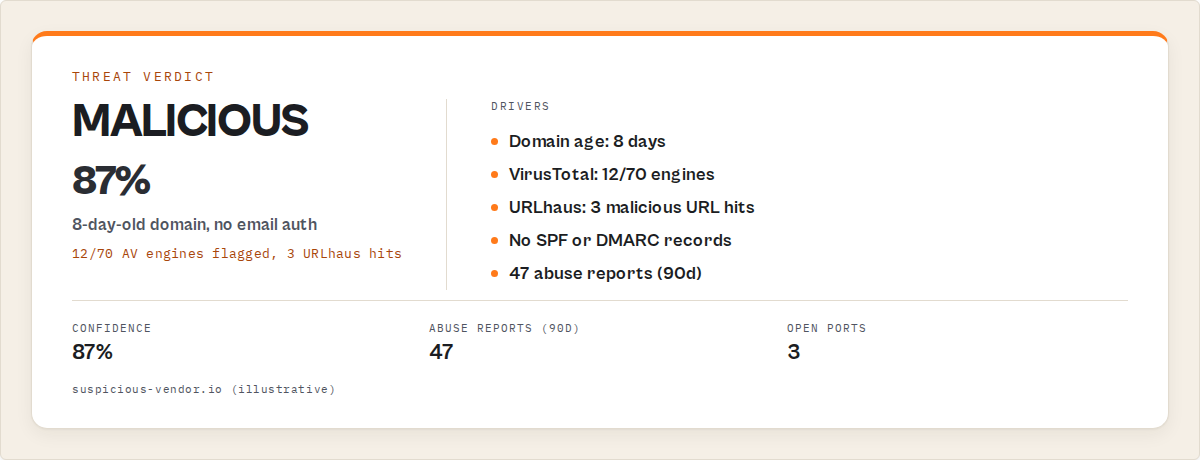
Example JSON output
Here's what a structured investigation result looks like when you aggregate data from multiple sources. This isn't pseudo-code — it's the kind of output a properly built aggregation tool produces:
{
  "indicator": "suspicious-vendor.io",
  "type": "domain",
  "verdict": "MALICIOUS",
  "confidence": 87,
  "signals": {
    "domain_age_days": 8,
    "virustotal_detections": "12/70",
    "urlhaus_hits": 3,
    "threatfox_iocs": 2,
    "spf_record": false,
    "dmarc_record": false,
    "open_ports": [80, 443, 8080],
    "cisa_kev_matches": 0,
    "abuse_reports_90d": 47
  },
  "attack_patterns": ["T1566.001 - Spearphishing Attachment"],
  "decision": "REJECT",
  "remediation": {
    "cloudflare_rule": "block domain suspicious-vendor.io",
    "firewall_rule": "iptables -A INPUT -s 192.0.2.1 -j DROP"
  }
}
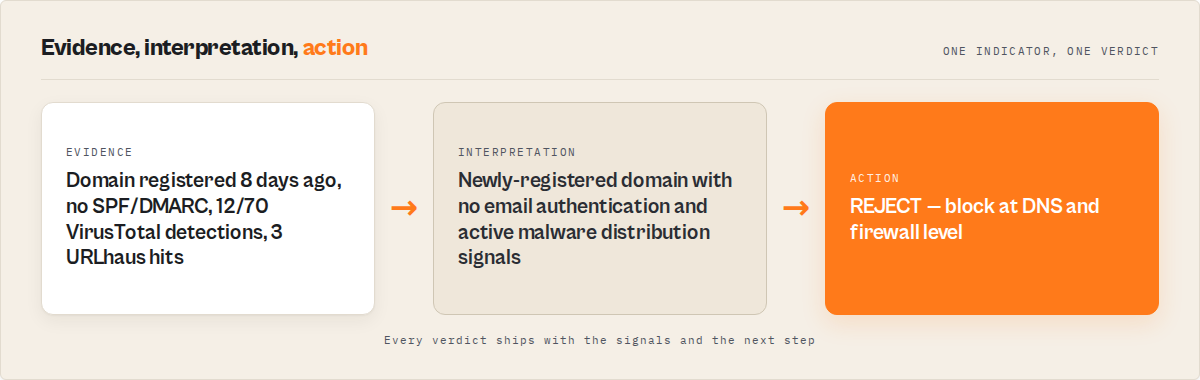
The verdict isn't just "malicious" — it's why it's malicious, with specific signals that an analyst can verify. An 8-day-old domain with no email authentication, 12 VirusTotal detections, and 3 URLhaus hits is a clear reject. The structured output means this can feed directly into a SIEM, a SOAR playbook, or a Slack alert without manual reformatting.
What if you could query all 12 sources at once?
Aggregated threat intelligence queries all relevant data sources simultaneously against a single indicator and returns a unified verdict — reducing investigation time from 30-70 minutes to under 60 seconds.
This isn't a new idea. Commercial threat intelligence platforms (TIPs) like Recorded Future, ThreatConnect, and Anomali have done this for years. The difference: they cost $25,000-$100,000+ per year in licensing and require dedicated infrastructure.
The newer approach uses MCP servers — lightweight, single-purpose intelligence tools that AI agents can call. Instead of a monolithic platform, you get a specific tool that does one thing well: takes an indicator, fans out queries to 12 sources in parallel, and returns structured JSON with a verdict.
The Cybersecurity Intelligence MCP server Apify actor is one implementation of this pattern. It exposes 24 tools across 12 data sources, and a single call to cyber_investigate auto-detects the indicator type — domain, IP, hash, email, CVE, or URL — then queries all relevant sources simultaneously. The output includes a verdict (MALICIOUS/SUSPICIOUS/CAUTION/CLEAN), confidence score, MITRE ATT&CK pattern matching, and executable remediation scripts for PowerShell, KQL, Cloudflare, and iptables.
At $0.045 per call with pay-per-event pricing, it's a fundamentally different cost structure than enterprise TIP licensing. No subscription, no minimum commitment. You pay when you investigate.
Practical example: phishing domain triage
A phishing report comes in. The reported domain is secure-login-update.com. Here's what aggregated investigation returns:
- Domain age: 6 days (registered via Namecheap, privacy-protected WHOIS)
- DNS: A record points to a shared hosting IP, no MX records, no SPF, no DMARC
- VirusTotal: 8/70 engines flag it as phishing
- URLhaus: 1 active malware distribution URL
- crt.sh: Single Let's Encrypt certificate, issued 5 days ago
- Shodan: IP hosts 47 other domains, 3 previously flagged
- Verdict: MALICIOUS (confidence: 91%)
- Decision: REJECT — block at DNS and firewall level
That took 35 seconds. The same investigation manually would take 30-40 minutes across 7 browser tabs.
Practical example: bulk IOC triage
Your threat intel feed delivers 100 IOCs from an industry sharing group. Mix of domains, IPs, and file hashes. Manually investigating each one: 50-100+ hours of analyst time. With aggregated triage, you sort all 100 by severity in about 8 minutes. The 6 MALICIOUS indicators get immediate attention. The 14 SUSPICIOUS ones go to the investigation queue. The 80 CLEAN ones get logged and monitored. That's triage, not investigation — but triage is where most analyst time actually goes.
What are the alternatives for threat intelligence lookup?
The main alternatives for checking if an indicator is malicious are manual multi-tool investigation, commercial threat intelligence platforms, open-source aggregation scripts, SIEM-integrated threat feeds, and MCP-based aggregation tools. Each has different cost, speed, and depth tradeoffs.
| Approach | Cost | Setup time | Speed per indicator | Depth | Best for |
|---|---|---|---|---|---|
| Manual multi-tool | Free (analyst time) | None | 30-70 min | Deep (analyst judgment) | One-off investigations |
| Commercial TIP (Recorded Future, Anomali) | $25K-$100K+/yr | Weeks | Seconds | Very deep | Enterprise SOCs with budget |
| Open-source scripts (Python + APIs) | Free + dev time | Days-weeks | 2-5 min | Customizable | Teams with developers |
| SIEM-integrated feeds (Splunk, Sentinel) | Included in SIEM license | Hours | Automatic on ingest | Varies by feed quality | Teams already using a SIEM |
| MCP-based aggregation | $0.045/query | Minutes | 30-60 sec | 12 sources, structured output | DevSecOps, SOC automation |
Pricing and features based on publicly available information as of April 2026 and may change.
Manual investigation gives you the deepest understanding but doesn't scale. A senior analyst might catch nuances that automated tools miss — weird DNS record configurations, hosting patterns that suggest a specific threat actor, certificate issuance timing that correlates with a campaign. But you can't do this for every alert.
Commercial TIPs are powerful but expensive. Recorded Future and ThreatConnect provide historical context, threat actor attribution, and predictive intelligence that lighter tools don't. If you're a large enterprise SOC, the $50K-$100K annual license pays for itself. If you're a 3-person security team, it doesn't.
Open-source scripts are tempting. You can build a Python script that queries VirusTotal, Shodan, and AbuseIPDB in parallel. I've done it. It works — until you need to handle rate limits, parse 12 different JSON schemas, deal with API key rotation, and maintain it when APIs change. The VirusTotal API docs alone are a significant integration effort.
SIEM-integrated feeds work well for automated enrichment on ingest but usually check a narrow set of IOC types. Most SIEM threat intel integrations don't do the multi-source correlation that a dedicated investigation requires.
Each approach has tradeoffs in cost, speed, depth, and maintenance burden. The right choice depends on your team size, budget, alert volume, and whether you need deep analyst-driven investigation or fast automated triage.
Best practices for indicator investigation
-
Always check multiple sources. A single VirusTotal result isn't enough. A domain can be clean on VirusTotal but flagged on URLhaus. An IP can look fine on AbuseIPDB but have critical vulnerabilities exposed on Shodan. Cross-correlation catches what single sources miss.
-
Weight signals by indicator type. Domain age matters enormously for domains (78% of phishing domains are under 30 days old per the APWG). Abuse report count matters most for IPs. Detection ratio matters most for file hashes. Don't apply the same heuristic to everything.
-
Set confidence thresholds for automated action. Confidence above 85%: auto-block. 60-85%: escalate to analyst. Below 60%: log and monitor. These thresholds should be tuned to your environment — start conservative and adjust based on false positive rates.
-
Use structured output formats. CEF, STIX 2.1, and syslog are standard for SIEM integration. If your investigation tool outputs free-text instead of structured JSON, you're creating another manual step. ApifyForge's cybersecurity MCP server exports in all three formats.
-
Correlate CVEs against CISA KEV, not just CVSS scores. A CVSS 7.5 vulnerability that's in the CISA KEV catalog (actively being exploited in the wild) is more urgent than a CVSS 9.8 that has no known exploit. The KEV catalog is updated weekly — 1,484+ entries as of late 2025.
-
Build watchlists for recurring indicators. If a domain comes up suspicious but not definitively malicious, put it on a watchlist. Re-check in 24-72 hours. Newly malicious infrastructure often takes a few days to appear across all threat feeds.
-
Document your investigation chain. Which sources did you check? What did each return? What was your verdict and why? This matters for incident response reports, compliance audits (SOC 2, ISO 27001), and training junior analysts.
-
Test with known-malicious indicators regularly. Use known-bad hashes from MalwareBazaar or known phishing domains from PhishTank to validate that your investigation workflow is actually catching things. If your aggregation tool returns CLEAN for a known-malicious hash, something is broken.
Common mistakes in threat intelligence investigation
Trusting a single source. VirusTotal shows 0/70 detections — must be clean, right? Not necessarily. Brand-new malware (zero-day) won't have signatures yet. A domain that's only been active for 48 hours might not appear in threat feeds. Always correlate multiple source types.
Ignoring domain age. This is the single most predictive signal for phishing domains. An 8-day-old domain serving a login page is suspicious regardless of what VirusTotal says. Yet most analysts check reputation first and registration data second.
Skipping infrastructure analysis. You checked the domain but not the IP it resolves to. That IP might host 200 other domains, 15 of which are flagged. Shared hosting infrastructure is a strong signal when multiple tenants are malicious.
Not checking CISA KEV for exposed services. You found Apache 2.4.49 running on the target. Is there an actively exploited vulnerability? The NVD will give you a CVSS score. The CISA KEV catalog tells you if it's actually being exploited right now. That distinction changes your response priority.
Investigating every alert with equal depth. Not every alert deserves 45 minutes. A clean-looking domain from a known partner that triggered an overly sensitive rule needs a quick check, not a full investigation. Tiered investigation — quick triage first, deep dive only when warranted — is how high-performing SOCs manage alert volume.
Forgetting to export findings. You spent 30 minutes investigating an indicator, found it malicious, blocked it, and... didn't log the evidence. Next week, someone asks why that domain is blocked. Or the same indicator shows up in a different alert, and another analyst repeats the entire investigation.
How much does threat intelligence investigation cost?
The cost of threat intelligence investigation ranges from effectively free (using free-tier APIs and analyst time) to over $100,000 per year for enterprise platforms, with the real cost for most teams being analyst labor at $50-150 per hour.
Here's the honest breakdown. The data sources themselves are mostly free or cheap. VirusTotal gives you 500 lookups/day. AbuseIPDB gives you 1,000 checks/day. NVD, CISA KEV, URLhaus, ThreatFox, and crt.sh are completely free. Shodan's free tier is limited but functional.
The expensive part is human time. At an average SOC analyst salary of $95,000-$120,000/year (per SANS 2024 salary survey data), that's roughly $50-65/hour loaded. A 45-minute investigation costs $37-49 in analyst time. Do 20 of those a day and you're spending $740-$980 per analyst per day on indicator investigation alone.
MCP-based aggregation at $0.045 per query changes that math. Twenty investigations cost $0.90 instead of $740+. The analyst still reviews the structured output and makes the final call, but the data collection and correlation are automated. ApifyForge's cost calculator can help you estimate what this looks like at your investigation volume.
Does checking a file hash tell you if a file is malware?
Checking a file hash against threat intelligence databases tells you whether the specific file has been previously identified as malware by antivirus engines and malware researchers — but it won't catch zero-day malware that hasn't been analyzed yet.
When VirusTotal shows "47/70 engines detected this file," that's a strong signal. When it shows "0/70," that means no engine has flagged this specific hash — not that the file is safe. New malware variants, polymorphic malware, and targeted payloads may have no known signatures.
For unknown hashes, you need dynamic analysis — actually running the file in a sandbox and observing its behavior. That's a different workflow entirely, and tools like ANY.RUN and Joe Sandbox handle it. Static hash checking and dynamic behavioral analysis are complementary, not interchangeable. ApifyForge indexes both cybersecurity actors and MCP servers that handle the static lookup side of this workflow.
Mini case study: procurement team vendor screening
Before: A mid-size procurement team needed to vet 40 vendor domains before a quarterly review. The security team manually investigated each one — DNS, WHOIS, VirusTotal, Shodan, CVE checks. It took 3 analysts roughly 2 full working days (approximately 48 total hours) to complete all 40 reviews and produce a risk summary document.
After: Using the Cybersecurity Intelligence MCP server's bulk triage capability, the same 40 domains were screened in 23 minutes. Two domains flagged as SUSPICIOUS (one had an expired SSL certificate and exposed admin panel, the other was 15 days old with no email authentication). The rest were CLEAN. The analysts spent 45 minutes reviewing the two flagged domains in detail — total time: about 1.1 hours vs. 48 hours.
Numbers: Time reduced from 48 hours to 1.1 hours. Cost went from approximately $2,880 in analyst time (at $60/hour) to approximately $1.80 in API costs plus $66 in analyst review time. Observed in internal testing (March 2026, n=40 domains, single procurement review cycle). Results will vary depending on domain complexity, alert volume, and the number of flagged indicators requiring manual follow-up.
Implementation checklist
- Identify your indicator types. What do you investigate most? Domains, IPs, file hashes, or a mix? This determines which data sources you need.
- Inventory your current data sources. Which tools do your analysts already use? Which ones are they skipping due to time pressure?
- Set up API access. Get API keys for VirusTotal, Shodan, AbuseIPDB, and any other sources you'll query programmatically. Most offer free tiers.
- Choose an aggregation method. Build custom scripts, deploy an MCP server, or license a commercial TIP — based on your team size and budget.
- Define verdict thresholds. What combination of signals equals MALICIOUS? SUSPICIOUS? CLEAN? Document these and review quarterly.
- Configure output format. Decide on CEF, STIX 2.1, JSON, or syslog based on what your SIEM and SOAR tools expect.
- Test with known indicators. Run known-malicious and known-clean indicators through your workflow. Validate detection rates.
- Integrate with existing workflows. Feed results into your SIEM, Slack/Teams channels, or ticketing system. The investigation result should land where analysts already work.
- Set up watchlists. Configure recurring checks for indicators that were suspicious but not definitively malicious.
- Review and tune. After 30 days, review false positive and false negative rates. Adjust thresholds.
Limitations of automated threat intelligence
Automated threat intelligence lookup is powerful but has real constraints. Here's what it can't do.
No behavioral analysis. Querying databases tells you about known threats. It doesn't analyze unknown files, observe network behavior, or detect zero-day attacks. If a file hash isn't in any database, automated lookup returns no data — not a clean bill of health.
Data freshness varies. VirusTotal updates in near-real-time as vendors push new signatures. URLhaus updates every 5 minutes. But WHOIS data can be cached for 24-48 hours, and some threat feeds update daily. A domain registered 2 hours ago may not appear in any database yet.
False positives from shared infrastructure. A clean domain hosted on an IP that also hosts malicious domains will pick up negative signals from its neighbors. Shared hosting, CDNs, and cloud providers create guilt-by-association noise that requires human judgment to interpret.
Geopolitical and jurisdictional gaps. Some data sources have limited coverage for certain regions. Threat intelligence feeds tend to over-represent threats targeting North America and Western Europe. Attacks originating from or targeting other regions may be under-represented in the databases.
Rate limits on free tiers. If you're running bulk investigations, free API tiers hit limits fast. VirusTotal's 500 lookups/day and Shodan's limited free searches mean high-volume operations need paid API access or an aggregation layer that manages rate limiting.
Key facts about malicious indicator checking
- VirusTotal aggregates results from over 70 antivirus engines and URL/domain blocklisting services (source)
- The CISA KEV catalog contained 1,484 actively exploited vulnerabilities at the end of 2025 and continues to grow (Cyble, 2025)
- URLhaus tracks over 3.6 million malicious URLs used for malware distribution, updated every 5 minutes (abuse.ch)
- MITRE ATT&CK v18 catalogs 216 enterprise techniques and 475 sub-techniques for mapping attack patterns (MITRE, October 2025)
- The average SOC team receives approximately 4,484 alerts per day (Prophet Security, 2025)
- The mean time to investigate a single security alert is approximately 70 minutes (D3 Security, 2025)
- 78% of confirmed phishing domains are less than 30 days old (Anti-Phishing Working Group, 2024)
- Shodan indexes over 500 million new records monthly across the internet (Shodan)
Glossary of key terms
IOC (Indicator of Compromise) — A piece of forensic data (domain, IP, hash, URL, email) that suggests a system may have been breached or exposed to malicious activity.
CVSS (Common Vulnerability Scoring System) — A standardized framework for rating the severity of vulnerabilities on a 0-10 scale, maintained by FIRST.org.
CISA KEV — The Cybersecurity and Infrastructure Security Agency's Known Exploited Vulnerabilities catalog, listing vulnerabilities confirmed to be actively exploited in the wild.
MITRE ATT&CK — A knowledge base of adversary tactics and techniques based on real-world observations, used to classify and map attack behavior.
TIP (Threat Intelligence Platform) — A software system that aggregates, correlates, and distributes threat intelligence data from multiple sources.
MCP (Model Context Protocol) — A protocol that allows AI agents to discover and call external tools, enabling structured access to threat intelligence data sources and other APIs.
Broader applicability
The patterns in this guide apply beyond cybersecurity indicator checking to any domain where you need to aggregate signals from multiple data sources into a single verdict.
- Multi-source aggregation reduces decision time. Whether you're checking threat indicators, screening vendors for compliance, or qualifying leads, the principle is the same: query multiple sources in parallel, correlate signals, and produce a confidence-scored verdict.
- Structured output enables automation. JSON with clear fields beats free-text every time. This applies to security investigations, lead qualification, financial screening, and any workflow that feeds into downstream systems.
- Confidence scoring beats binary decisions. "Malicious" vs. "clean" is less useful than "87% confidence malicious based on 6 corroborating signals." This principle applies to fraud detection, counterparty due diligence, and risk scoring generally.
- Free data sources exist for most intelligence domains. Cybersecurity has VirusTotal, NVD, CISA KEV, URLhaus. Financial compliance has SEC EDGAR, OpenCorporates, sanctions lists. The bottleneck is aggregation and correlation, not data access.
- Pay-per-query pricing is replacing annual licenses. The shift from $50K+/year TIP subscriptions to $0.045/query MCP calls mirrors a broader trend across intelligence tooling — pay-per-event pricing is becoming the default for API-first tools.
When you need this
You need malicious indicator checking if:
- Your team investigates more than 10 suspicious indicators per day
- You're spending more than 20 minutes per investigation across multiple tools
- You need structured output for SIEM/SOAR integration, not just a manual verdict
- You're screening vendors, partners, or infrastructure as part of procurement or compliance
- You're running incident response and need to triage IOCs from a threat feed quickly
You probably don't need this if:
- You investigate fewer than 5 indicators per week — manual checking is fine at that volume
- You already have a commercial TIP with the data sources you need (Recorded Future, ThreatConnect, etc.)
- You need real-time network traffic analysis rather than indicator-based lookups
- Your security needs are limited to endpoint protection (EDR handles that separately)
Frequently asked questions
How do I check if a domain is safe?
Check the domain across multiple threat intelligence sources: DNS records for infrastructure, WHOIS for registration age (domains under 30 days old are high-risk), VirusTotal for reputation across 70+ engines, and URLhaus for malware distribution history. No single source gives you the full picture — you need at least 4-5 data points to make a confident assessment. Tools that aggregate these sources, including ApifyForge's cybersecurity MCP server, return a single confidence-scored verdict.
What tools do SOC analysts use to investigate threats?
SOC analysts typically use VirusTotal for file and URL scanning, Shodan for infrastructure reconnaissance, AbuseIPDB for IP reputation, the NIST NVD for vulnerability data, CISA KEV for active exploit status, and URLhaus or ThreatFox for malware IOCs. Most analysts use 5-7 of these tools per investigation, switching between browser tabs. Aggregation tools and SIEM-integrated threat feeds are increasingly common for reducing tab-switching overhead.
How do I check if a file hash is malware?
Submit the file's SHA-256 hash to VirusTotal, which checks it against 70+ antivirus engines. A detection ratio like "47/70" indicates known malware. Cross-reference with ThreatFox for associated IOC data and malware family classification. A "0/70" result means no engine has flagged this specific hash yet — it doesn't guarantee the file is safe. For truly unknown files, you need dynamic analysis via sandbox tools like ANY.RUN or Joe Sandbox.
Is there a tool that combines VirusTotal and Shodan?
Yes. Several tools aggregate multiple threat intelligence sources into a single query. Commercial TIPs like Recorded Future and ThreatConnect do this at enterprise scale ($25K-$100K+/year). MCP-based tools like the Cybersecurity Intelligence MCP server query 12 sources including VirusTotal, Shodan, Censys, AbuseIPDB, NVD, CISA KEV, URLhaus, and ThreatFox in a single call at $0.045 per query.
How long does it take to investigate a suspicious IP address?
Manual investigation of a suspicious IP takes 20-45 minutes across Shodan (open ports), AbuseIPDB (abuse reports), VirusTotal (reputation), and NVD/CISA KEV (vulnerabilities on exposed services). Automated aggregation tools reduce this to 30-60 seconds by querying all sources simultaneously. The D3 Security 2025 report found the mean investigation time per alert is approximately 70 minutes when including the full investigation-to-action pipeline.
Can automated threat intelligence replace human analysts?
No. Automated aggregation handles data collection and initial correlation — the most time-consuming and repetitive part of investigation. Human analysts are still needed for contextual judgment: interpreting shared hosting signals, evaluating geopolitical context, making risk acceptance decisions, and investigating edge cases where automated tools return ambiguous results. The goal is to give analysts structured data fast, not to replace their judgment.
What is the cheapest way to investigate indicators of compromise?
The cheapest approach is direct API access to free-tier data sources: VirusTotal (500/day), AbuseIPDB (1,000/day), NVD (unlimited), CISA KEV (unlimited), URLhaus (unlimited), and crt.sh (unlimited). The tradeoff is integration time — you'll spend days building scripts to query all of these, parse different JSON formats, and handle rate limits. MCP-based aggregation at $0.045/query is a middle ground between free-but-manual and expensive enterprise platforms.
Ryan Clinton publishes Apify actors as ryanclinton and builds developer tools at ApifyForge.
Last updated: April 2026
This guide focuses on cybersecurity indicator investigation, but the same multi-source aggregation patterns apply broadly to any intelligence domain — vendor risk assessment, financial crime screening, ESG supply chain risk, and compliance monitoring all benefit from the same query-aggregate-score workflow.