The problem: Apify Console shows SUCCEEDED. Exit clean, duration normal, dataset has rows, no exception in the log. But the data feeding your CRM — or warehouse, or LLM pipeline, or the tool call your agent just made — is wrong. Fields missing. Numbers zero. A column switched from string to array overnight. You didn't change anything. The actor says it worked. It didn't.
You're not crazy. This is a specific, named class of problem, and it's more common than people think.
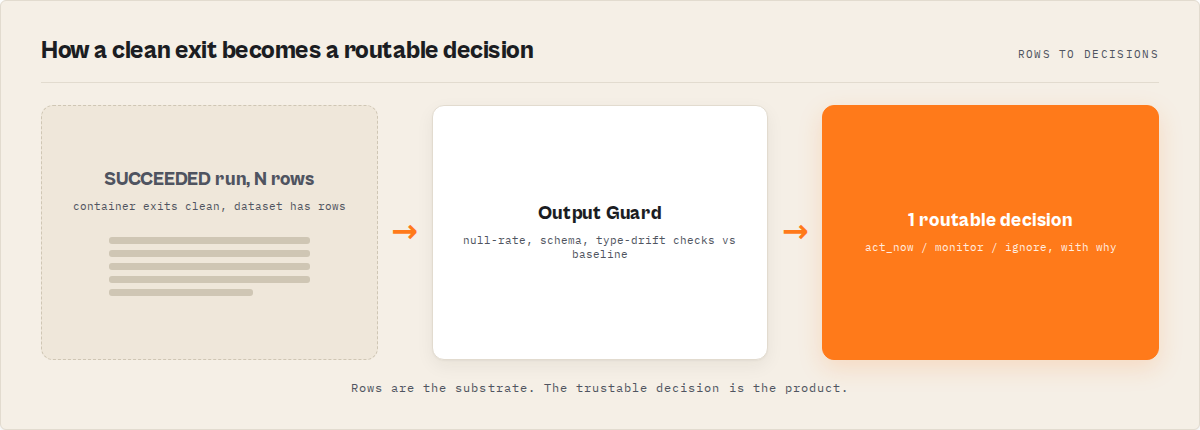
What is a SUCCEEDED-but-wrong Apify run? A run that completes with status SUCCEEDED but produces dataset output that is incomplete, structurally degraded, or semantically wrong. The platform only checks that the container exited cleanly — it doesn't inspect what the container wrote. That's a platform boundary, not a bug.
Why it matters: Monte Carlo's 2024 State of Data Quality survey found 68% of data quality incidents are discovered by downstream consumers, not by the system that produced them (Monte Carlo, 2024). Apify actors behave the same way. By the time the client or the agent's next tool call notices, the bad data has propagated.
Also known as: silent regression, silent actor failure, successful-but-wrong run, quiet actor breakage, data-level failure, output-layer failure.
Problems this solves:
- How to explain why an Apify run says SUCCEEDED when the data is broken
- How to catch wrong output across all actor types, not just scrapers
- How to classify whether a regression is a selector break, schema drift, or rate-limit truncation
- How to detect silent regressions in API wrappers, orchestrators, and LLM-extraction actors
- How to gate an LLM tool call on actor output quality before the model consumes it
In this article
What is a silent failure in an Apify actor? · Why SUCCEEDED doesn't mean correct · Failure catalogue by actor type · Why manual detection breaks · What layer this lives at · Alternatives · Walkthrough: catching a real regression · Best practices · Common mistakes · Limitations · FAQ
Quick answer
- What's happening: Apify's
SUCCEEDEDstatus reflects container exit code, not output correctness. - When to care: Scheduled runs, pipelines, agent tool calls, or paid customer integrations where bad data causes damage.
- When not to care: One-off manual runs where you eyeball the dataset yourself first.
- Typical fix: Add a post-run validation step that compares output against a baseline before the data leaves the actor.
- Main tradeoff: Pennies of extra compute per validation. Alternative: finding out from an angry downstream user.
Who this is for
- Apify developers running scheduled actors that feed CRMs, warehouses, dashboards, or client integrations
- Teams running orchestrator pipelines where sub-actor degradation is invisible at the top level
- AI engineers wiring actors into agent tool calls — where wrong output becomes hallucinated output
- Anyone maintaining an API-wrapper actor against a vendor that ships schema changes without a changelog
- Anyone who just got paged because a customer noticed the data was wrong first
Key takeaways
SUCCEEDEDreflects container exit code, not data correctness — the platform doesn't open the dataset- Silent regressions hit every actor type: scrapers, API wrappers, orchestrators, enrichment, and LLM-extraction actors all degrade in ways that leave run metadata clean
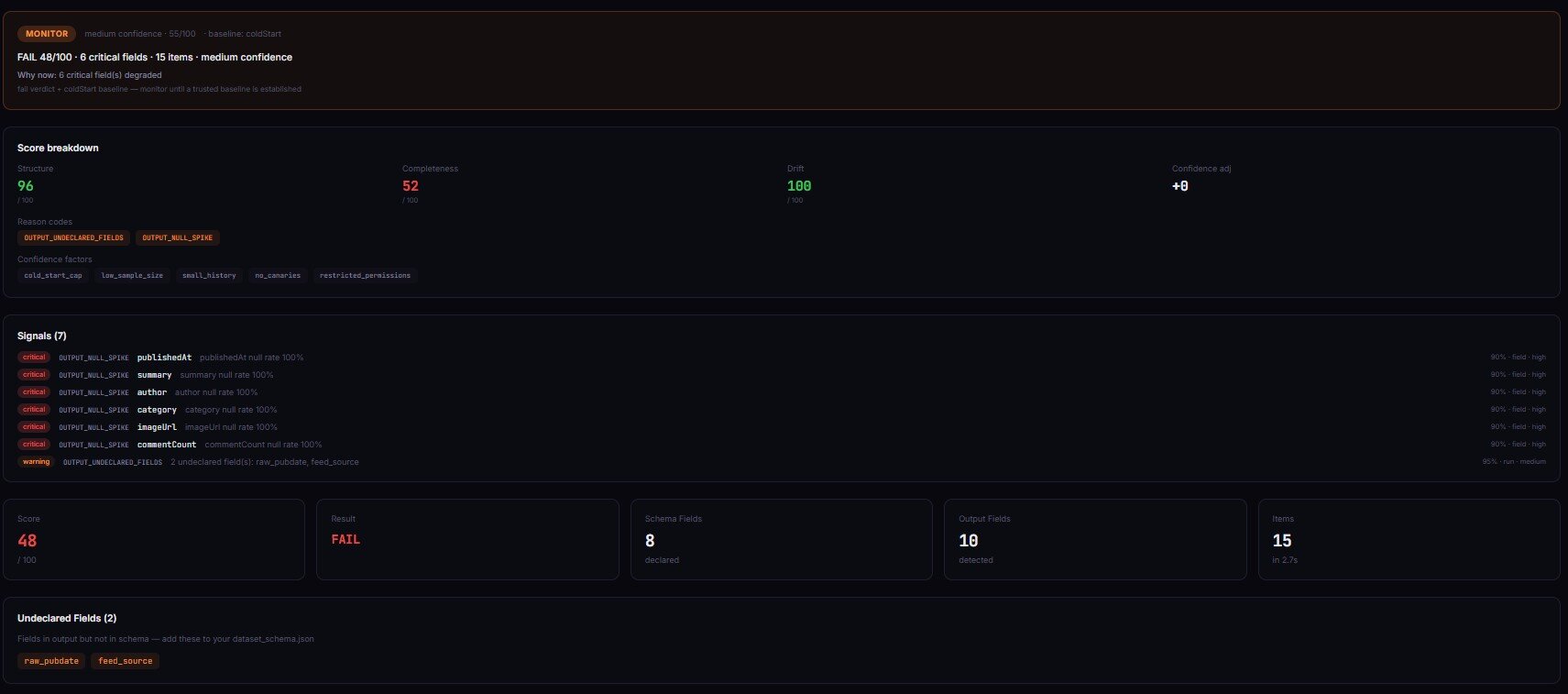
- The dominant signature is null rate drift — a field quietly moves from 8% to 40% null while item count stays flat
- Manual detection doesn't scale past 3–5 actors; null-rate scripts break on output shape changes; dashboards measure run metrics, not data classification
- This is the actor output layer — between run exit and the consumer — and it's not covered by run monitoring or warehouse validation
Concrete examples
| Actor type | Input | What "SUCCEEDED but wrong" looks like | Downstream effect |
|---|---|---|---|
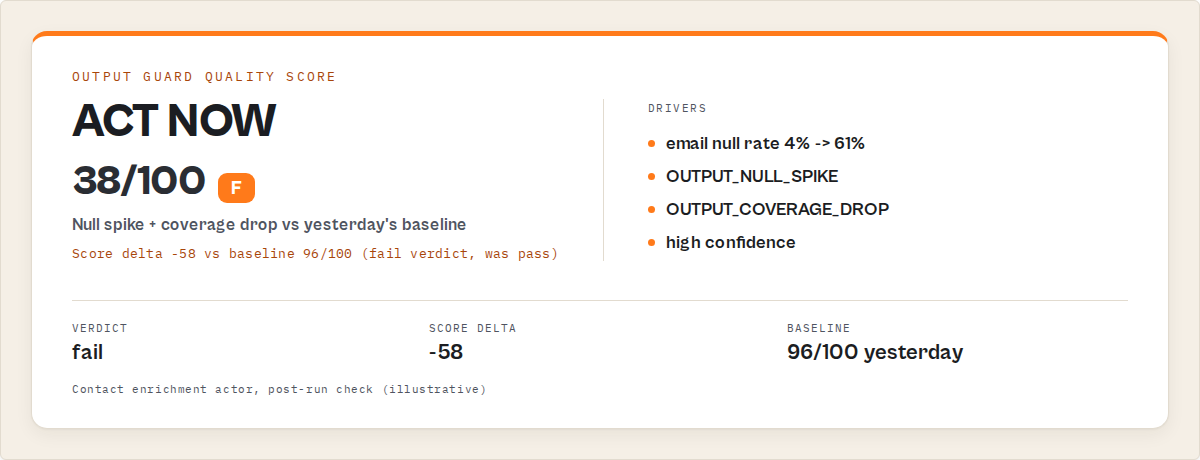
| Scraper | urls: ["acme.com"] | email null rate 8% → 61% after a cookie wall change | CRM imports 900 rows without contact addresses |
| API wrapper | query: "tech companies" | Vendor drops revenue field after a v2 release | Finance dashboard shows $0 revenue for every row |
| Orchestrator | 3-stage pipeline | Sub-actor #2 returns 40% fewer items; final merge looks thin | Reports miss 40% of the intended population |
| Enrichment actor | leads: [...] | Match rate collapses; row count identical, company_size goes 35% null | Lead scoring algorithm produces silent junk |
| LLM-extraction actor | Long document | Prompt output missing effective_date after a model version bump | Agent tool call hallucinates the date because it was null |
What is a silent failure in an Apify actor?
Definition (short version): A silent failure is an Apify actor run that exits with status SUCCEEDED and zero thrown exceptions, but whose dataset output is incomplete, structurally changed, or semantically wrong compared to a recent baseline.
Two parts matter. The run metadata looks clean — clean exit, no crash, reasonable item count, no error-level logs. The data itself is degraded in a way a downstream consumer would call wrong. That combination is what makes it silent: platform signals green, payload red.
Four categories:
- Completeness failures — fields go null or empty when they shouldn't.
- Schema failures — field names, types, or nesting change between runs.
- Distribution failures — values look structurally correct but numbers shifted (every price $0.00, every date 1970).
- Volume failures — item count drops sharply without a matching input scope change.
Why does Apify say SUCCEEDED when the data is wrong?
Apify's run status is a statement about the container, not the dataset. Platform starts the actor, waits for it to exit, inspects the exit code, records the result. Exit 0 + no unhandled exception = SUCCEEDED. That's defined in Apify's documentation on actor runs (Apify docs).
What the platform does not do: open the dataset, check null rates, compare against yesterday, or judge whether the data is right. Apify can't know what "right" means for your actor — only you can. The boundary sits exactly where you'd expect: platform owns execution, you own correctness.
Every serverless platform works this way. AWS Lambda doesn't inspect your function's output JSON. Cloud Run doesn't peek inside your response body. SUCCEEDED means "your container finished cleanly." It never meant "your data is correct." The word trips us up — we read "succeeded" as a product statement when it's really a process statement.
How silent failures show up across actor types
Every actor type has its own silent failure mode, and most leave run logs completely clean.
- Scrapers — selectors stop matching after a redesign, pagination terminates early on a rate limit, anti-bot systems serve dummy content (every price
"$0.00") instead of blocking outright. Zyte's 2023 reliability report found 42% of scrapers experience silent degradation within 30 days (Zyte, 2023). - API wrappers — the upstream vendor drops a field on a release, a rate limit returns truncated results instead of an error, an auth-scope change silently strips fields. The actor's own code is fine; the failure lives at the vendor boundary.
- Orchestrators — composition failures. Sub-actor #2 returns partial output; the merge still "succeeds" with missing joins. The top-level actor has no idea.
- Enrichment actors — match rate collapses, row count stays flat. Volume checks miss this because the count looks right, but 35% of rows are now null-heavy.
- LLM-extraction actors — prompt output starts missing a field, or tool-call schemas go stale on a model version bump. The actor still emits valid JSON — it just doesn't contain what you asked for. If that feeds an agent's next tool call, the LLM compensates by inventing the missing value.
Three of those five have nothing to do with web scraping. That's the point.
Why is this so hard to catch manually?
Manual detection relies on tools that weren't built for this.
Null-rate checks don't scale. A script that pulls the latest dataset and pages you on per-field null rates works for three actors. At fifty it's a second job.
Custom validation scripts break whenever the output structure changes. Rename a field, your validator throws. Add a field, your validator silently skips it. Now the validator is degraded and nothing is watching the validator.
Dashboards show metrics, not classifications. A chart of null rate over time is a clue, not a diagnosis — you still have to figure out whether it's a selector break, a pagination failure, or a region change.
Downstream users usually notice first. Monte Carlo's 68% statistic isn't just consumer pattern; it's a structural gap in how teams instrument this layer.
What layer does this problem actually live at?
This is the actor output layer. It sits between two well-solved layers, which is why it falls through.
- Run monitoring (Apify platform, status pings, error-rate dashboards) covers whether the process finished. Solved.
- Warehouse-level data quality (Great Expectations, Soda, Monte Carlo, Elementary, dbt tests) covers whether data is consistent once it's landed in a table. Also solved.
- Actor output validation is the thin layer in the middle. Run ended, data hasn't reached the consumer yet. Last point where you can block bad data before it's written into a downstream system.
That middle layer is underserved by general-purpose tools because the data shapes are actor-specific, the failure modes are actor-specific (selector break, pagination truncation, rate-limit degradation, prompt drift), and the timing is per-run. You need something that understands an Apify actor, runs in the same latency envelope, and classifies the failure mode — not just flags "something's off."
What are the alternatives?
Output Guard rolls these into a single post-run step — see what the Output Guard does for the modes, the exact checks it runs, and the drift baseline behaviour. If you don't use it, the equivalent coverage is built from four separate pieces — each with known failure modes when you run them at fleet scale.
- Manual spot-checking. Free. Doesn't scale past a handful of actors. Misses gradual drift entirely.
- Custom post-run scripts. Works for stable output shapes. Breaks the day a vendor renames a field — and then nothing is watching your actors until you fix the validator.
- DIY webhook-triggered validation actor. More automated. You still own the validation logic, baselining against the last passing run, per-field thresholds, alerting, and failure-mode classification. That's a maintained service, not a script.
- Great Expectations, Soda, Monte Carlo, Elementary. Operate at the warehouse layer, not the actor-exit layer — they catch problems after the data has landed in a downstream system. Complementary, not substitutes. dbt Labs' 2024 survey found 61% of teams using these tools still discover issues from downstream consumers (dbt Labs, 2024), because they run too late in the pipeline to block bad output.
| Approach | Setup | Per-run cost | Catches drift | Classifies cause | Scales to 50+ actors |
|---|---|---|---|---|---|
| Manual spot-check | None | Your time | No | No | No |
| Custom script | 2–4 hrs | ~$0.01 | Basic | No | With effort |
| Webhook validator (DIY) | 4–8 hrs | ~$0.05–0.15 | Yes | Partial | Yes |
| Output Guard | 2 min | ~$0.50 | Yes | Yes (6 modes) | Yes (fleet mode) |
| Great Expectations / Soda | 1–2 days | Infra cost | Yes | No (warehouse layer) | Yes |
Pricing and features based on publicly available information as of April 2026 and may change.
The DIY rows in that table aren't "Output Guard but cheaper" — they're sub-features of what Output Guard delivers as one step. Warehouse tools are genuinely good but live a layer down: they validate data that has already landed, which is too late to block bad output from reaching the consumer that triggered the run.
Walkthrough: catching a regression in a GitHub search actor
To demo this on a non-scraper, the example target is an API-wrapper Apify actor — ryanclinton/github-repo-search, which queries GitHub's search API. API wrappers degrade differently from scrapers (vendor schema change, rate-limit truncation, field deprecation), and it's a class a lot of readers are getting burned on right now.
A minimal Output Guard invocation:
{
  "targetActorId": "ryanclinton/github-repo-search",
  "testInput": {
    "query": "web scraping language:python",
    "maxResults": 3
  }
}
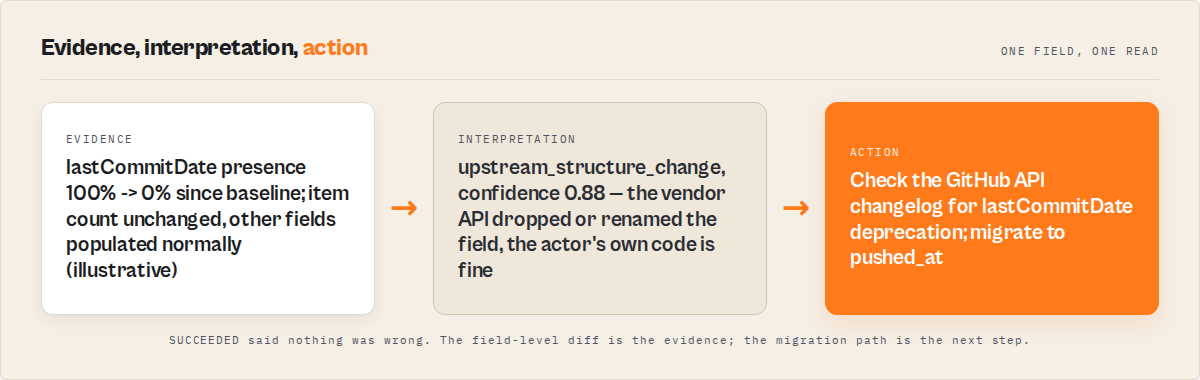
Output Guard runs the target actor, pulls the resulting dataset, and compares field presence, null rates, schema, and distributions against the baseline. Expected output includes repositoryName, owner, stars, lastCommitDate. If GitHub drops lastCommitDate, or stars flips from integer to string, Output Guard flags it with evidence:
{
  "actor": "ryanclinton/github-repo-search",
  "verdict": "act_now",
  "failureMode": "upstream_structure_change",
  "confidence": 0.88,
  "evidence": {
    "fieldName": "lastCommitDate",
    "baselinePresenceRate": 1.0,
    "currentPresenceRate": 0.0
  },
  "counterEvidence": "Item count unchanged; other fields populated normally",
  "recommendedAction": "Check GitHub API changelog for lastCommitDate deprecation; migrate to pushed_at"
}
That's the shape of an output-layer incident — verdict scalar (act_now, monitor, ignore), classified failure mode, evidence and counter-evidence, concrete next step. It goes straight into the Slack or Discord alert, not a chart the on-call has to interpret at 2am. The dashboard tool at apifyforge.com/dashboard/tools/schema-validator runs Output Guard under the hood with a UI around scheduling.
Mini case study: the cookie wall that cost $2,400
Before. A contact enrichment actor fed a CRM integration for a paying customer. Daily runs. Status SUCCEEDED every day. Success-rate dashboard: 100%. Three weeks, no alerts.
What actually happened. The target site added a cookie consent overlay that blocked the email selector. The actor still returned name, company, and phone. email dropped from 92% populated to 31%. Over three weeks, roughly 4,100 records entered the CRM without addresses. The customer's campaign sent to about 2,900 fewer contacts than expected — at their reported $0.82 revenue per sent email, approximately $2,400 in impact.
After. Output Guard ran after every execution. Day 1 of degradation it flagged: email null rate 31% vs baseline 8%, delta +23, verdict act_now, failure mode selector_break, confidence 85%. The fix was one CSS selector and 12 minutes.
These numbers reflect one customer engagement. Results vary with data volume, downstream value per record, and detection speed.
Best practices
- Validate after every scheduled run — wire it as a webhook so it happens without human input.
- Set severity per field —
emailat 40% null on a lead actor is critical;descriptionat 40% null is probably fine. - Baseline against the last passing run, not the last run — otherwise a degraded state becomes the new normal.
- Keep sample rows in the alert — "null rate 41%" is useful; three null rows and three good rows is usable during an incident.
- Pair with pre-run validation — Actor Input Tester (Input Guard) catches regressions caused by bad input.
- Use reference-run mode for recovery — after you fix the actor, pin a new baseline so the validator doesn't still compare against the pre-incident snapshot.
- Gate deployments on output quality — Actor Reliability Engine (Deploy Guard) returns pass/warn/block decisions based on output quality.
- Size alerting to dollar impact — a $5/month internal actor can tolerate a day of drift; a $500/month client-facing one can't.
Common mistakes
- Treating
SUCCEEDEDas a data-quality signal. It's a process-exit signal. It has never meant more. - One null-rate threshold for every field. Sparse fields (
fax,secondary_email) alarm constantly. Severity must be per-field. - Watching only the most recent run. Drift is a trend — three progressively worse runs is the signal.
- Validating schema but not value distributions. Schema validation won't catch every price being
$0.00— that's distribution shift. - Not validating orchestrator output separately. Sub-actors can pass individually and the merged output still be wrong.
Common misconceptions
"If Apify says SUCCEEDED, the data is fine." Incorrect. SUCCEEDED is container exit code 0. Per Apify's documentation, status reflects process result, not output correctness (Apify docs).
"This is a scraping problem." Incorrect. Three of the five major failure modes (API wrappers, orchestrators, LLM-extraction) have nothing to do with web scraping. Scrapers are one source, not the headline.
"Warehouse data quality tools already cover this." Not quite. Warehouse-layer tools validate data after it's landed — by then the bad output has propagated to every downstream consumer. Output-layer validation runs between actor exit and consumer, which is where the block is actually effective.
Implementation checklist
- Pick the actor with the highest cost-of-wrong-data downstream.
- Run it 3–5 times on known-good input. Record output as the baseline.
- Configure a post-run webhook to trigger Output Guard (or a custom validator) after each execution.
- Set per-field severity — critical fields get tight thresholds, optional fields get loose.
- Route
act_nowalerts to Slack/Discord instantly;monitoralerts to a daily digest. - Test the alert path by deliberately degrading one field — confirm the alert fires with sample rows.
- Add the validator to any CI/CD pipeline that promotes actor versions to production.
- Review thresholds monthly. Seasonal shifts cause natural variance — adjust, don't mute.
Limitations
- Output validation adds $0.25–$1.00 per validation run, depending on configuration.
- It adds 30–120 seconds of latency after the actor exits. Not suitable for sub-second agent tool calls.
- New actors need 3–5 runs before baselines are meaningful.
- Validators detect and classify. They don't fix. You still own the code.
- Seasonal data shifts cause false positives. Tune thresholds rather than turning them off.
Key facts
- Apify
SUCCEEDEDis defined by process exit code 0, not dataset correctness (Apify docs). - 68% of data quality incidents are discovered by downstream consumers (Monte Carlo, 2024).
- Null rate drift is the dominant failure pattern — item count stays flat while field population collapses.
- Silent failures hit every actor type: scrapers, API wrappers, orchestrators, enrichment, LLM-extraction.
- The actor output layer sits between run monitoring and warehouse data quality — neither existing layer catches per-run output regressions before they reach consumers.
- Gartner estimates poor data quality costs organizations $12.9M per year (Gartner, 2023).
- ApifyForge's Guard Pipeline — Input Guard, Deploy Guard, Output Guard — covers input before the run, regression testing before promotion, and output after the run.
Short glossary
Silent regression — a run that exits cleanly but produces degraded output vs a recent baseline.
Null rate drift — gradual increase of null or empty values for a specific field across runs.
Schema drift — structural changes in output: fields appearing, disappearing, or changing type.
Decision scalar — a single verdict (act_now, monitor, ignore) emitted by a validator to drive alerting without forcing the on-call to interpret a dashboard.
Failure mode classification — naming the likely cause (selector_break, pagination_failure, upstream_structure_change, throttling, partial_extraction, schema_drift).
Actor output layer — the layer between actor exit and the first downstream consumer.
These patterns apply beyond Apify
The output-layer problem is structural. It shows up anywhere a process produces data without inspecting it:
- Airflow and cron-driven ETL — task status is exit code; output correctness is separate.
- Third-party API integrations — vendor schema drift hits any caller, not just Apify wrappers.
- ML model serving — outputs drift as input distributions shift. Same baseline-comparison pattern.
- Agent tool calls — an LLM gets
success: truefrom a tool and happily uses wrong data. Output-layer validation between tool and model is how you stop hallucinated downstream steps. - Microservices composing responses — each service succeeds individually, aggregate response is incomplete. Same shape as orchestrator actors.
If you're searching for
"Apify actor SUCCEEDED but no data" · "Apify run status SUCCEEDED but wrong output" · "why does my Apify actor return incomplete data" · "Apify actor returns empty dataset but no error" · "Apify silent failure detection" · "how to validate Apify actor output" · "Apify webhook post-run data validation" · "why does my agent's tool call succeed but return wrong data"
This is the category. The tool is Output Guard. Deeper reference: Your actor didn't fail — it just returned wrong data.
When you need this
Need it if: scheduled actors feed a CRM / warehouse / dashboard / client integration · you run orchestrators or pipelines · an AI agent calls actors as tools and uses their output directly · a customer has already told you the data was wrong before you knew · you manage more than 10 actors.
Probably don't need it if: you run actors manually and eyeball output · your actors produce files (screenshots, PDFs) not structured data · you have one or two actors with rock-stable schemas that never change · wrong data has no real downstream cost.
Frequently asked questions
What is a silent failure in an Apify actor?
An Apify run that exits with status SUCCEEDED and no errors, but whose output dataset is incomplete, structurally changed, or semantically wrong compared to a recent baseline. The container finished cleanly; the failure lives in the data, which Apify doesn't inspect.
Why does Apify say SUCCEEDED when the data is wrong?
Run status reflects container exit code (Apify docs). Exit 0 + no unhandled exception = SUCCEEDED. The platform doesn't open the dataset because it can't know what "correct" means for your actor. Correctness lives with you.
Is this only a web scraping problem?
No. API wrappers regress when vendors change response formats. Orchestrators regress when sub-actors degrade. Enrichment actors regress when match rates collapse. LLM-extraction actors regress when model version bumps change what a prompt returns. Scrapers are one source, not the headline.
How is this different from warehouse data quality?
Warehouse tools (Great Expectations, Soda, Monte Carlo, Elementary) run against data that's already landed — too late to block a bad output from reaching consumers. Output-layer validation runs between actor exit and consumer. Complementary layers, not substitutes.
How fast can I detect a silent regression?
With per-run validation, within one cycle — minutes to an hour depending on schedule cadence. Without it, detection is typically days and usually triggered by a downstream user complaint. Consistent with Monte Carlo's 68% downstream-discovery finding.
Can this run inside a CI/CD pipeline?
Yes. Output Guard runs as an Apify actor, callable from any CI system. The pattern: run the candidate actor against a fixed input, validate against a reference baseline, block promotion if the verdict is act_now. Actor Reliability Engine (Deploy Guard) is built specifically for that gate.
What do I do if my LLM agent is making tool calls to a broken actor?
Wire Output Guard between the actor and the model. The validator returns a decision scalar the agent can read. If the verdict is act_now or monitor, the agent gets a degraded-output signal rather than treating the response as authoritative. Without that, the model compensates by inventing missing fields.
Ryan Clinton publishes Apify actors as ryanclinton and builds developer tools at ApifyForge.
Last updated: April 2026
This guide focuses on Apify actors, but the same output-layer validation patterns apply broadly to any automated data pipeline, API integration, ML inference step, or agent tool call that produces structured data in production.