Google Maps Reviews Scraper + Reputation Intelligence is an Apify actor on ApifyForge. Scrapes Google Maps reviews from a business name, postcode, or place URL. Returns the complete review set with a coverage audit (claimed vs collected), sentiment, complaint themes, rating trajectory, response health, and... It costs $0.001 per review_scraped. Best for e-commerce teams tracking competitor pricing, monitoring product catalogs, or gathering market intelligence. Not ideal for real-time price alerts or replacing dedicated repricing software. Maintenance pulse: 90/100. Last verified March 27, 2026. Built by Ryan Clinton (ryanclinton on Apify).
Google Maps Reviews Scraper + Reputation Intelligence
Google Maps Reviews Scraper + Reputation Intelligence is an Apify actor available on ApifyForge at $0.001 per review_scraped. Scrapes Google Maps reviews from a business name, postcode, or place URL. Returns the complete review set with a coverage audit (claimed vs collected), sentiment, complaint themes, rating trajectory, response health, and a ranked reputation attention queue.
Best for e-commerce teams tracking competitor pricing, monitoring product catalogs, or gathering market intelligence.
Not ideal for real-time price alerts or replacing dedicated repricing software.
What to know
- Product data accuracy depends on target site structure; layout changes may temporarily affect results.
- Large catalogs may require multiple runs due to platform rate limits.
- Requires an Apify account — free tier available with limited monthly usage.
Maintenance Pulse
90/100Cost Estimate
How many results do you need?
Pricing
Pay Per Event model. You only pay for what you use.
| Event | Description | Price |
|---|---|---|
| review_scraped | Charged per individual review returned, with its coverage audit (claimed vs collected) and reviewer trust metadata. The signals profile adds sentiment, complaint themes, rating trajectory, and attention routing. Billed on output only, never on Apify platform compute. | $0.001 |
Example: 100 events = $0.06 · 1,000 events = $0.60
Documentation
In one sentence
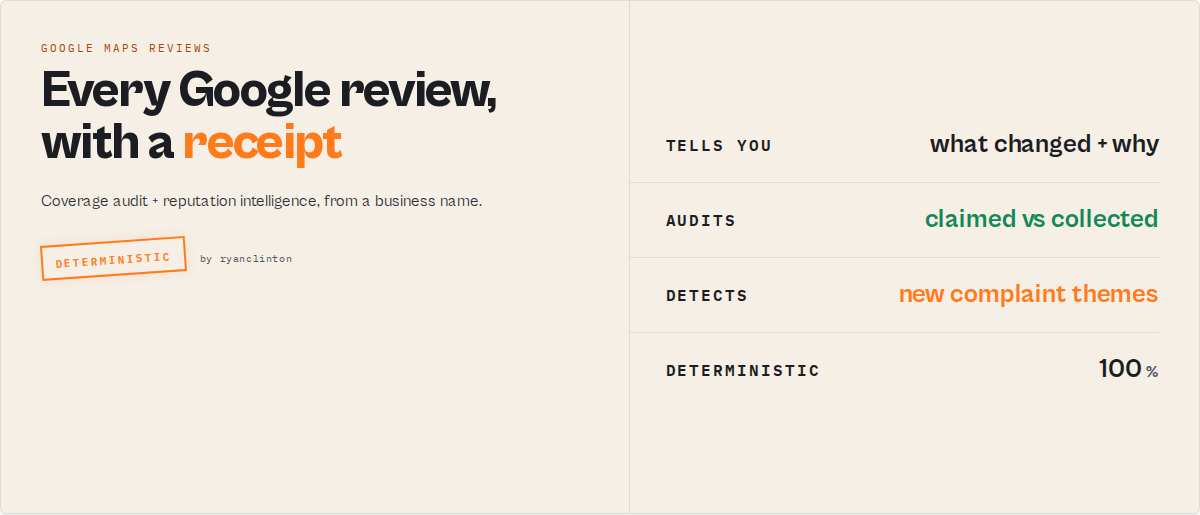
Google Maps Reviews Scraper is a Google reviews intelligence actor that resolves a business name, postcode, or place URL to a Google place, collects the complete review set with a coverage audit, and returns sentiment, complaint themes, rating trajectory, response health, and a ranked attention queue with the exact reviews behind every signal.
The promise: we tell you exactly what Google said existed, exactly what we collected, what changed, why it matters, and which reviews prove it. That is the difference between a review extractor and a reputation operating system.
Category: Google Maps reviews scraper. Reputation monitoring tool. Review analysis API. Primary use case: Pull a complete, audited review set from a business name and get a decision-ready reputation read in one run. Can also be used as a drop-in raw-review extractor for ingestion pipelines.
Also known as: Google reviews scraper, Google Maps review extractor, reputation monitoring actor, review sentiment analyzer, business review intelligence, Google place review API
What this actor does
- What it is: A Google Maps reviews scraper that doubles as a reputation operations layer.
- What it checks/extracts/processes: Every Google review for a place, plus a coverage audit (claimed vs collected), sentiment, complaint themes, rating trajectory, response health, and a 5-state reputation read.
- What it returns: Per-place intelligence records and raw review rows, deduplicated by
reviewId, in JSON/CSV/Excel. - What it does NOT do: It does not post, reply to, flag, or delete reviews on Google. It does not predict revenue or future ratings, score controversy, or judge whether a review is true.
- Who it's for: Multi-location and franchise ops, reputation and review-management agencies, local-SEO consultants, market researchers, CX teams, and acquirers screening a target's locations.
Google Maps Reviews Scraper is an Apify actor that turns a typed business name into a complete, audited Google review set with a reputation read attached. You do not need a place URL to start: paste a business name, a postcode, a share.google link, a place ID, a feature ID, or a CID, and the actor classifies the input and resolves it to a Google place before scraping. Every place comes back with an explicit coverage block: how many reviews Google claimed it had, how many were collected, and why any gap exists.
Google Maps Reviews Scraper functions as a Google reviews API that returns finished reputation signals rather than only raw rows. It deduplicates reviews by Google's stable reviewId, emits them in a deterministic order, and stacks an interpretation layer on top: sentiment, an Issue Registry that groups complaints into root issues, rating trajectory, a reputation state machine, location ranking, and a ranked attention queue. Same input shape as compass/Google-Maps-Reviews-Scraper, plus you can just type a business name.
To scrape Google Maps reviews, provide a business name or URL to Google Maps Reviews Scraper and run it. You get back the complete review set, a coverage receipt showing claimed versus collected, and a per-place read of what changed, whether it is getting worse, and the exact reviews driving each signal.
In short: Paste a business name and get a complete, audited Google review set plus a reputation read, with the receipts behind every claim.
What it is: A Google Maps reviews scraper with a coverage audit and a deterministic reputation-intelligence layer. Who it's for: Franchise ops, reputation agencies, local-SEO consultants, researchers, CX teams, and acquirers. When to use it: When you need complete, trustable Google reviews from a business name and a decision about them, not just rows.
What it does — Resolves a business name or URL to a Google place, scrapes the complete review set, and returns a reputation read.
Best for — Multi-location reputation monitoring, complete review extraction, complaint-theme mining, competitor benchmarking.
Output — place_intelligence, review, run_summary, and error records in JSON, CSV, or Excel.
Input — A business name, postcode, place URL, place ID, feature ID, CID, or a bulk list.
Key limitation: The actor reports exactly what Google's own place header claims and exactly what it collected. It never claims it got "every review that ever existed."
What it is not: Not a review-posting tool, not a revenue forecaster, and not a replacement for legal or moderation review of content.
Does not include: Owner-side actions on Google, controversy or brand-safety scoring, star-rating forecasting, or truth-judgement of reviews.
Results may be incomplete when: Google stops serving pages mid-corpus (reported as partial), or your maxReviewsPerPlace cap is hit before exhaustion (reported as capped).
Ready-to-run examples
Don't want to build an input from scratch? Each of these is a published, one-click example (see all) — open it, see real output, run it:
- Google Maps Reviews Scraper — every review for a business: text, rating, reviewer, date, owner replies, plus a coverage audit
- Google Business Reputation Monitor — track a business's reviews over time: rating trajectory, new complaints, a ranked attention queue
- Google Reviews Complete Export — the full review set with a coverage audit (claimed vs collected, a receipt for every review)
What you get from one call
Input: "Domino's Pizza Belfast BT9 6AA"
Returns:
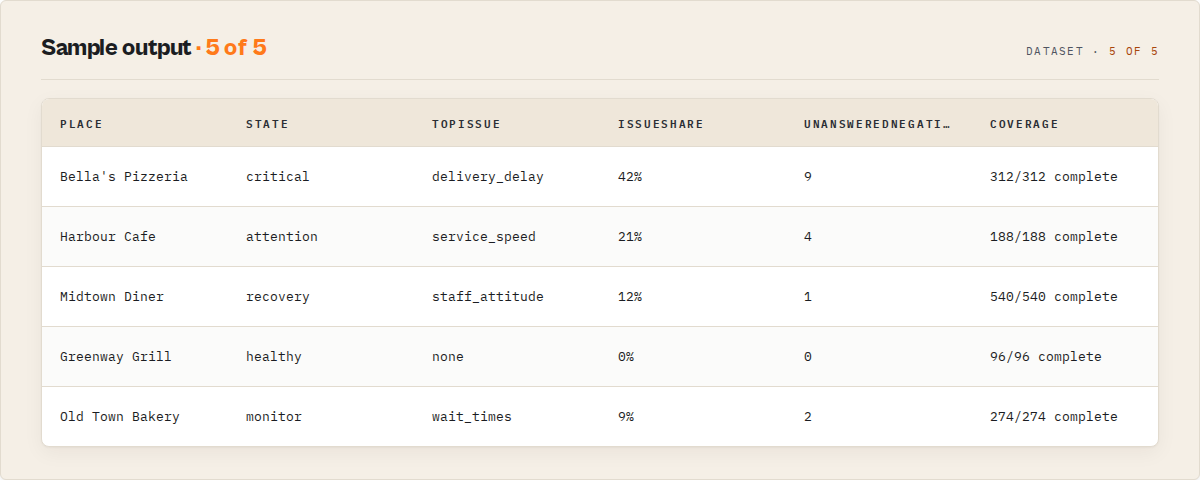
- An Executive Brief per place: state, rank movement, top issue + its share of negatives, unanswered negatives, and coverage in one object — the one-glance read for an agency owner, franchise director, or acquirer.
- A coverage audit: claimed vs collected, coverage ratio, and a stop condition (for example, "312 claimed, 312 collected, 0 duplicates, complete").
- A reputation read: rating trajectory, reputation state, complaint themes, and a ranked attention queue.
- The Issue Registry: root complaint issues with concentration and recency-cohort emergence (new problems vs background constants).
- Every raw review, deduplicated by
reviewId, with a per-review signal block. - The exact
reviewIds behind each signal (the evidence trail).
A typical first run reads back like this: 312 claimed, 312 collected, 0 duplicates, coverage complete. Rating down 0.7 in the recent window. Nine unanswered recent negatives. Main rising complaint: slow service. Here are the reviews driving that signal.
What makes this different
The whole product is built around one promise: we tell you exactly what Google said existed, exactly what we collected, what changed, why it matters, and which reviews prove it. That is a different proposition from "we scrape Google reviews."
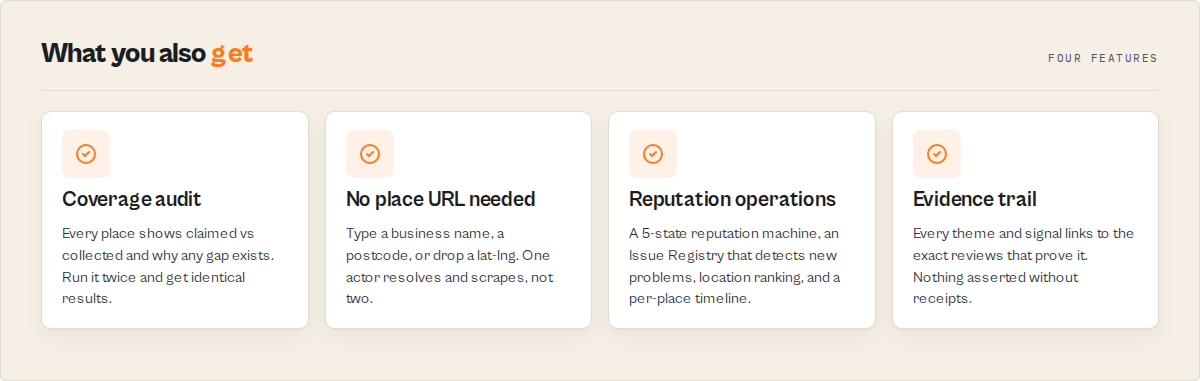
- A count with a receipt — Every place shows
reviewsClaimedvsreviewsScraped, the stop condition, and duplicates dropped. Reviews are keyed by Google's stablereviewIdand emitted in a deterministic order, so running the same place twice produces an identical set. - No place URL required — Type a business name, a postcode, or drop a lat-lng, and
mode: autoclassifies the input and resolves it. One actor, not two. - Reputation operations, not row dumps — A reputation state machine per location, an Issue Registry that detects new problems, location ranking, in-run local percentiles, derived acquisition-risk and manager-neglect grades, and a per-place timeline of how it got here.
If you were building this yourself, you would need a place resolver across six input shapes, a paginator with a coverage ledger, deterministic dedup, a TF-IDF theme engine, an issue-grouping dictionary, a cross-run state store, and a ranking model.
Quick answers
What is it? Google Maps Reviews Scraper is a Google reviews intelligence actor that collects a complete, audited review set from a business name or URL and returns a reputation read with the evidence behind it.
What makes it different? It ships a coverage audit (claimed vs collected, with the stop condition) and a deterministic reputation layer, not only raw review rows. To scrape Google Maps reviews from a business name, you do not need to find a place URL first.
What data sources does it use? Public Google Maps place pages and Google's own reviews endpoint. reviewsClaimed comes from the place header; all review data comes from Google.
What does it return? Per-place intelligence records and raw review rows in JSON, CSV, or Excel, with version constants on every record so automations can pin to a stable schema.
Does it monitor over time? Yes. Set a watchlistName for managed cross-run deltas, a reputation timeline, and rank movement, or diff against a prior dataset with comparisonDatasetId.
Is it deterministic? Yes. Reviews are deduplicated by reviewId and emitted in a fixed order. The signal layer, state machine, and scores are computed deterministically; an optional LLM is used only for naming themes, never in the decision path.
At a glance
Quick facts:
- Input: A business name, postcode, place URL,
share.googlelink, place ID, feature ID, CID, or a bulk list (places/placeUrls). - Output:
place_intelligence,review,run_summary, anderrorrecords (JSON, CSV, Excel). - Output profiles:
signals(default, full intelligence),compat(compass field set, raw),minimal(id, text, stars, date). - Default max reviews per place: 200 (configurable, capped honestly when hit).
- Dedup key: Google's stable
reviewId; deterministic ordering across runs. - Monitoring:
watchlistNamefor managed deltas, orcomparisonDatasetIdfor one-off diffs. - Memory: 256 MB default (up to 2048 MB). Timeout: 7200s.
Input -> Output:
- Input: A business name, URL, or bulk list.
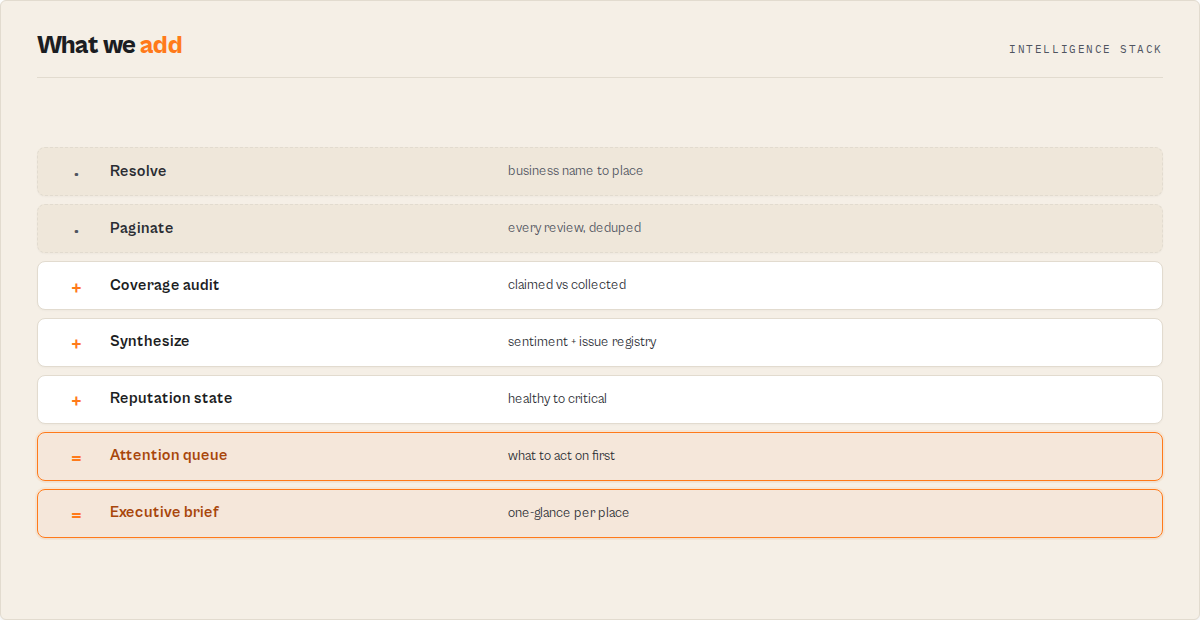
- Process: Resolve to a place, paginate reviews with a coverage ledger, synthesize signals, compute cross-run state.
- Output: Complete reviews + a per-place reputation read with an evidence trail.
Problems this solves:
- How to get Google reviews from a business name without hunting for a place URL.
- How to know whether a review scrape is complete and why any gap exists.
- How to find the recurring complaint driving a location's rating down.
- How to rank locations by reputation risk and see which ones fell behind.
Best fit: Complete review extraction from a business name, multi-location reputation monitoring, complaint-theme mining, competitor benchmarking within a local cohort, drop-in migration from a place-URL workflow. Not ideal for: Forecasting future ratings, cross-platform review joins (TripAdvisor/Yelp), or auto-discovering competitors the run did not include. Does not include: Owner-side actions on Google, controversy scoring, revenue prediction, or truth-judgement of reviews.
Common questions this actor answers:
- Did I get every review? The coverage block reports claimed vs collected and the stop condition.
- Is this location getting worse?
ratingTrajectoryandreputationStateanswer it. - What is driving the complaints? The Issue Registry groups them into root issues with concentration and emergence.
- Which of my locations need attention first? The Attention Queue and location ranking order them by reputation risk.
- Is this an alternative to a place-URL-only reviews scraper? Yes; it accepts the same place URLs and adds business-name input plus a coverage audit.
What is a Google Maps reviews scraper?
A Google Maps reviews scraper extracts the review text, ratings, dates, and reviewer details for a place on Google Maps. Most tools key off a place URL and hand back rows. Google Maps Reviews Scraper resolves a business name or URL to a place itself, audits the collection against Google's own claimed count, and returns a reputation read on top, so the output is decision-ready rather than a spreadsheet you still have to interpret.
What data can you extract?
| Data point | Source | Availability | Example |
|---|---|---|---|
| Review text | Google review | Per review | "Waited 50 minutes for delivery, food was cold." |
| Star rating | Google review | Per review | 2 |
| Published date | Google review | Per review | 2026-05-13 (with datePrecision and extractionMethod) |
| Owner response | Google review | When present | responseFromOwnerText, responseFromOwnerDate |
| Reviewer name | Google review | When metadata on | "Sarah Chen" |
| Local Guide flag | Google review | When metadata on | true |
| Coverage audit | Place header + scrape ledger | Per place | claimed 312, scraped 312, status complete |
| Sentiment split | Derived | Per place | positive 0.58, negative 0.28, neutral 0.14 |
| Root issues | Derived | Per place | delivery_delay, 42% of negatives, emerging |
| Rating trajectory | Derived | Per place | recent 3.6 vs baseline 4.3, delta -0.7 |
| Reputation state | Derived | Per place | critical (was attention) |
| Response health | Derived | Per place | 9 unanswered recent negatives |
Why use Google Maps Reviews Scraper?
Before: Find each location's place URL, run a scraper, paste rows into a sheet, pivot by rating, read the negatives by hand, then paste the text into a separate NLP tool. Hours per batch, and no way to know whether the scrape was complete. After: Type a business name or drop a list, and get a complete, audited review set with the reputation read already attached. One run.
Two pains drove the design, both visible in the real-world complaints about place-URL-only scrapers: "I can't trust the count" (silent undercounts with no explanation) and "I have a business, not a place URL." Google Maps Reviews Scraper answers the first with an explicit coverage block and a coverageProof ledger, and the second with universal input resolution.
Key difference: This actor reports exactly what Google's header claimed and exactly what it collected, then tells you what to do about it, where a row vendor hands you rows and stops.
| Feature | Google Maps Reviews Scraper | Place-URL-only reviews scrapers |
|---|---|---|
| Input | Business name, postcode, lat-lng, URL, place ID, CID | Place URL / place ID |
| Coverage audit (claimed vs collected) | Yes, on every place | Not a core feature |
| Deterministic cross-run dedup | Yes (reviewId-keyed, fixed order) | Varies by tool |
| Sentiment + complaint themes | Built in | Typically a separate tool |
| Root-issue grouping + emergence | Yes (Issue Registry) | Not a core feature |
| Rating trajectory + reputation state | Yes | Not a core feature |
| Cross-run monitoring + deltas | Yes (watchlistName) | Not a core feature |
| Drop-in compat field set | Yes (outputProfile: compat) | Native |
| Best for | Complete, audited reviews + a decision | Raw row extraction at scale |
Features based on publicly available information as of May 2026 and may change.
Unlike a place-URL-only reviews scraper, which is built to hand back rows, Google Maps Reviews Scraper returns a coverage receipt and a reputation read with every place.
Platform capabilities
- Scheduling — Run on a schedule with a
watchlistNamefor a daily reputation feed. - API access — Trigger from Python, JavaScript, or any HTTP client.
- Proxy rotation — Defaults to Apify residential proxies for Google Maps.
- Monitoring — A failure webhook is registered on every cloud run for FAILED, TIMED_OUT, and ABORTED.
- Integrations — Zapier, Make, Google Sheets, webhooks, and the Apify API.
Where Google Maps Reviews Scraper fits in a pipeline
Upstream, feed it a business list (from a Google Maps place search) or place URLs you already have. Downstream, branch automations on reputationState.current or maxEscalationLevel, push the compat profile into an ingestion pipeline, or drop the clientSummary block into a monthly report. With comparisonDatasetId, it diffs against any prior Apify dataset, so the first run already shows what changed.
Features
Google Maps Reviews Scraper stacks two layers: a completeness layer that guarantees a trustable, deterministic review set, and an interpretation layer that turns those reviews into a reputation read. Every record carries ten pinned version constants so automations can lock to a stable schema.
Collection and trust
- Universal input resolution — Resolves business names, postcodes, lat-lng, place URLs,
share.googlelinks, place IDs (ChIJ...), feature IDs (0x..:0x..), and CIDs to a place.mode: autoclassifies the input by shape. - Coverage audit — Every place carries
reviewsClaimed,reviewsScraped,coverageRatio, and acoverageStatusofcomplete,partial,capped, ordegraded, with agapReasonwhen not complete. - Coverage proof ledger —
coverageProofrecords pages fetched, empty-page retries, duplicates dropped, last review date, and thestopCondition. Emitted on any non-complete status, or always withdebugCoverage. - Deterministic dedup — Reviews are deduplicated by
reviewIdand emitted in a fixed order (date desc,reviewIdtiebreak), so re-runs are identical by construction. - Honest match confidence —
placeResolutioncarriesmatchConfidenceandalternativesConsidered; ambiguous resolutions setambiguousMatchso you can verify the right place was picked.
Reputation intelligence
- Review synthesis — Lexicon sentiment plus TF-IDF complaint and praise themes (
method: tfidf-themes-v1). Themes are suppressed below a 5-review sample (synthesisStatus: disabled). - Issue Registry — Groups synonymous complaint themes into canonical root issues, with
shareOfNegativeReviews(concentration) andcohortEmergence(new problems vs background constants). - Rating trajectory + archetype —
currentRating,ratingSlope90d, recent vs baseline window, and a descriptive place archetype with evidence. - Review velocity + response health — 7-day, 30-day, and prior-30-day volume; owner response rate, median response lag, and unanswered recent negatives.
- Reputation state machine — A 5-state value (
healthy,monitor,attention,critical,recovery) derived deterministically, with cross-run transitions and areputationTimeline. - Attention routing —
attentionPriority, a plain-EnglishwhyNow, a prioritisation-onlyrecommendedAction, andevidenceReviewIdspointing at the exact reviews behind the call. - Signal events — Eight typed, decaying events (rating decline, complaint surge, velocity spike, unanswered-negative cluster, and more), each with a
signalStrengthand an evidence block. - Location ranking + local benchmark — Within a multi-place run, rank locations, track
rankMovement, computeoutlierScore, and report in-run percentiles. - Derived persona projections —
acquisitionRisk(for acquirers) andmanagerNeglectScore(for franchise auditors), both re-projections of existing signals withreusesSignals: true. - Cross-run deltas —
watchlistNamepersists per-place state in a named key-value store for managed monitoring;comparisonDatasetIddiffs against any prior dataset on the first run. - Escalations — Levelled, timestamped triggers (
maxEscalationLevel0-3) for ops automation rules. - Client report mode —
includeClientSummaryassembles deterministic wins / risks / changes per place for monthly client decks.
Multi-location ops teams use Google Maps Reviews Scraper to rank locations by reputation risk and surface which stores fell behind since the last run.
Use cases for Google Maps reviews scraping
Best for multi-location reputation monitoring
Use when you manage many locations and need to spot the ones becoming a problem. Drop a list of business names, schedule with a watchlistName, and read the Attention Queue. Key outputs: reputationState, whyNow, rankMovement, changeFlags.
Best for reputation and review-management agencies
Use when you report monthly on client locations and need "what changed." Run a watchlist or diff a prior export with comparisonDatasetId, then enable includeClientSummary. Key outputs: clientSummary, newSignalsSinceLastRun, ratingChange, responseHealth.
Best for local-SEO consultants
Use when you benchmark a client against comparable local places. Run a category-and-area batch so the in-run cohort populates the benchmark. Key outputs: localBenchmark.ratingPercentile, velocityPercentile, marketAverageRating.
Best for complaint-theme mining
Use when you need the recurring complaint, not a wall of text. Read the Issue Registry. Key outputs: activeIssues[].rootIssue, shareOfNegativeReviews, cohortEmergence.emergence, evidenceReviewIds.
Best for acquirers screening a target's locations
Use when you screen review health pre-acquisition. Key outputs: acquisitionRisk.grade, score, drivers, reputationTimeline.
Best for raw ingestion pipelines
Use when your own pipeline does the analysis and you need complete, stable rows. Set outputProfile: compat. Key outputs: the exact compass field set plus a stable reviewId for idempotent re-ingestion.
When to use Google Maps Reviews Scraper
Best for:
- Pulling a complete, audited review set from a business name or a list of names.
- Monitoring dozens of locations on a schedule and getting back only what changed.
- Finding the root complaint driving a rating down, with the reviews that prove it.
- Migrating from a place-URL-only workflow without changing downstream code.
Not ideal for:
- Forecasting future ratings or revenue impact (out of scope by design).
- Joining Google reviews with TripAdvisor or Yelp (not built; those sources are blocked on this stack).
- Auto-discovering competitors you did not list (the benchmark uses the in-run cohort only).
How to scrape Google Maps reviews
- Enter a business — Type a business name and location, for example
Domino's Pizza Belfast BT9 6AA. A place URL,share.googlelink, or place ID also works. - Configure options — Set
maxReviewsPerPlace(default 200) and leaveoutputProfileonsignalsfor the full read. The advanced section is optional. - Run the actor — Click Start. The status message updates as each place resolves and paginates.
- Download results — Open the Dataset tab and switch views (Executive Brief, Attention Queue, Coverage Audit, Raw Reviews) or export JSON, CSV, or Excel.
First run tips
- Start with one place — Test with a single business name before scaling to a bulk list, so you can read the Attention Queue and Coverage Audit views once and learn the output shape.
- Leave
modeon auto — The actor classifies the input by shape. You rarely need the explicitsearch/places/placeUrlsmodes. - A
cappedstatus is expected if you set a low cap — HittingmaxReviewsPerPlacereportscappedwith agapReason, never a silent truncation. Raise the cap to collect more. - Set a
watchlistNameonly when you plan to re-run — On the first run, deltas are empty by design (no fabricated history). The value appears from the second run onward. - Use a lat-lng for ambiguous names — For a name like "Domino's Pizza" with many locations, add
lat/lngin theplaceslist to pin the right listing.
Input parameters
| Parameter | Type | Required | Default | Description |
|---|---|---|---|---|
input | string | No | — | A business name, place URL, share.google link, place ID, feature ID, or CID. Auto-detected by shape. |
maxReviewsPerPlace | integer | No | 200 | Max reviews per place. Hitting it reports capped, never a silent truncation. |
outputProfile | enum | No | signals | signals (full intelligence), compat (compass field set, raw), minimal (id, text, stars, date). |
mode | enum | No | auto | auto, search, places, or placeUrls. Auto classifies the input string. |
places | array | No | [] | Bulk list of names/queries, optionally {query, lat, lng} to disambiguate. |
placeUrls | string[] | No | [] | Bulk list of URLs, place IDs, feature IDs, CIDs, or share.google links. |
reviewsOrigin | enum | No | google | google (native, recommended) or all (incl. third-party; may be degraded for hotels). |
sort | enum | No | newest | Order of emitted rows. Pagination always uses newest internally for full coverage. |
language | string | No | en | Two-letter UI language for the Google Maps requests. |
watchlistName | string | No | — | Enables managed cross-run monitoring, deltas, timeline, and rank movement. |
comparisonDatasetId | string | No | — | Diff this run against a prior Apify dataset. watchlistName wins if both are set. |
includeReviewImages | boolean | No | true | Include reviewImageUrls on review records. |
includeReviewerMetadata | boolean | No | true | Include reviewer fields (name, id, review count, Local Guide). |
failOnPartialCoverage | boolean | No | false | Fail the run if any place is not complete. For trust-critical pipelines. |
debugCoverage | boolean | No | false | Always emit the coverageProof ledger, even when coverage is complete. |
includeClientSummary | boolean | No | false | Assemble a wins / risks / changes summary per place for client decks. |
notionConnector | string | No | — | A Notion MCP connector (created in Apify Console → Settings → MCP connectors). When set, each run writes a reputation summary into your Notion. The actor never sees your Notion token. |
notionArchiveProfile | enum | No | summary | summary (one page per run) or per-location (one page per location). |
notionDatabaseId | string | No | — | Notion data source to write into. Omit to create standalone pages. |
slackConnector | string | No | — | A Slack MCP connector. When set, posts the daily briefing and escalations to your Slack. The actor never sees your Slack token. |
slackMinEscalationLevel | integer | No | 2 | Post locations at or above this escalation level (1 notice, 2 urgent, 3 critical). |
slackPostDailyBriefing | boolean | No | true | Also post the run's one-message digest to Slack. |
proxyConfiguration | object | No | Apify residential | Proxy settings. Residential is recommended for Google Maps. |
Input examples
- Single business name (most common):
{ "input": "Domino's Pizza Belfast BT9 6AA", "maxReviewsPerPlace": 200, "outputProfile": "signals" }
- Multi-location watchlist (monitoring):
{
  "places": ["Northstar Coffee Glasgow", "Northstar Coffee Edinburgh", "Northstar Coffee Aberdeen"],
  "watchlistName": "northstar-uk-locations",
  "includeClientSummary": true
}
- Drop-in raw extraction (migration):
{
  "placeUrls": ["https://www.google.com/maps/place/?q=place_id:ChIJexample"],
  "outputProfile": "compat",
  "maxReviewsPerPlace": 100000
}
Input tips
- Start with defaults —
mode: autoandoutputProfile: signalscover most first runs. - Use
placesfor bulk names — A single run over a list is how you get location ranking and the in-run benchmark. - Use
compatfor ingestion — When a downstream pipeline does its own analysis,compatreturns the raw field set with a stablereviewId. - Raise the cap for full coverage — Set
maxReviewsPerPlacehigh enough to reachclaimed_count_reachedif you wantcompletestatus.
Output example
A place_intelligence record from the signals profile (abbreviated for readability):
{
  "recordType": "place_intelligence",
  "coverageVersion": "1.0",
  "reputationStateVersion": "1.0",
  "title": "Domino's Pizza - Belfast",
  "placeId": "ChIJexamplebt96aa",
  "fid": "0x4861609fe9038cf3:0xexample",
  "url": "https://www.google.com/maps/place/?q=place_id:ChIJexamplebt96aa",
  "address": "12 Lisburn Road, Belfast BT9 6AA",
  "categoryName": "Pizza delivery",
  "placeResolution": {
    "inputType": "query",
    "resolvedPlaceId": "ChIJexamplebt96aa",
    "resolvedTitle": "Domino's Pizza - Belfast",
    "matchConfidence": 0.85,
    "alternativesConsidered": []
  },
  "ambiguousMatch": false,
  "coverage": {
    "reviewsClaimed": 312,
    "reviewsScraped": 312,
    "coverageRatio": 1.0,
    "coverageStatus": "complete",
    "gapReason": null,
    "reviewsOrigin": "google",
    "deterministicRun": true
  },
  "reviewSynthesis": {
    "synthesisStatus": "full",
    "sampleSize": 312,
    "sentiment": { "positive": 0.58, "negative": 0.28, "neutral": 0.14 },
    "themes": [
      { "themeCode": "service_speed", "label": "slow service / wait times", "polarity": "negative", "weight": 0.31, "trend": "rising", "exampleReviewIds": ["Ci9DQUlRexample1"] }
    ],
    "method": "tfidf-themes-v1"
  },
  "activeIssues": [
    {
      "rootIssue": "delivery_delay",
      "label": "slow / late service",
      "polarity": "negative",
      "mentions": 36,
      "shareOfNegativeReviews": 0.42,
      "trend": "rising",
      "cohortEmergence": { "olderShare": 0.02, "recent90dShare": 0.14, "recent30dShare": 0.21, "emergence": "emerging" },
      "firstSeenReviewAt": "2026-03-02",
      "lastSeenReviewAt": "2026-05-27",
      "evidenceReviewIds": ["Ci9DQUlRexample1", "Ci9DQUlRexample2"]
    }
  ],
  "ratingTrajectory": {
    "currentRating": 4.1, "ratingSlope90d": -0.18, "trend": "declining",
    "recentWindowRating": 3.6, "baselineRating": 4.3, "delta": -0.7
  },
  "placeArchetype": "at-risk",
  "placeArchetypeStrength": 0.82,
  "reviewVelocity": { "last7d": 4, "last30d": 19, "prior30d": 8, "velocityTrend": "rising" },
  "responseHealth": { "ownerResponseRate": 0.42, "negativeResponseRate30d": 0.18, "medianResponseLagDays": 6, "unansweredNegatives30d": 9 },
  "attentionPriority": "high",
  "whyNow": [
    "Rating dropped 0.7 in the recent window (4.3 to 3.6).",
    "Complaint 'slow / late service' rising - now 42% of negative reviews.",
    "9 recent negative reviews with no owner response."
  ],
  "recommendedAction": "Investigate the slow-service complaints this week.",
  "respondWithinDays": 7,
  "evidenceReviewIds": ["Ci9DQUlRexample1", "Ci9DQUlRexample2"],
  "reputationState": {
    "current": "critical", "previous": "attention",
    "enteredCurrentAt": "2026-05-15", "daysInCurrentState": 14,
    "daysInPreviousState": 23, "stateVersion": "1.0"
  },
  "reputationTimeline": [
    { "date": "2026-05-15", "event": "entered_state", "detail": "attention to critical" }
  ],
  "locationRank": 17, "previousRank": 8, "rankMovement": -9, "outlierScore": 0.82,
  "localBenchmark": {
    "cohortBasis": "in-run", "sampleSize": 18, "marketAverageRating": 4.3,
    "ratingPercentile": 41, "marketAverageReviewVelocity": 14, "velocityPercentile": 62
  },
  "acquisitionRisk": { "score": 82, "grade": "high", "drivers": ["rating_decline", "response_neglect"], "reusesSignals": true },
  "managerNeglectScore": { "score": 78, "grade": "high", "drivers": ["unanswered_negatives", "slow_response_lag"], "reusesSignals": true },
  "escalations": [
    { "escalationLevel": 3, "trigger": "entered_critical", "reason": "attention to critical (delivery_delay at 42% of negatives)", "firedAt": "2026-05-15" }
  ],
  "maxEscalationLevel": 3,
  "changeFlags": ["RATING_DROP", "NEW_COMPLAINT_THEME"]
}
Output fields
| Field | Type | Description |
|---|---|---|
recordType | string | place_intelligence, review, run_summary, or error. Omitted in compat. |
executiveBrief | object | One-glance per-place read: state, rankMovement, topIssue, issueShare, unansweredNegatives, coverage. |
coverage.reviewsClaimed | number | The place's own stated total from the Google header. |
coverage.reviewsScraped | number | Reviews actually collected. |
coverage.coverageStatus | string | complete, partial, capped, or degraded. |
coverage.deterministicRun | boolean | True when the review set is reproducible by construction. |
coverageProof.stopCondition | string | Why pagination ended (claimed_count_reached, max_reviews_reached, etc.). |
placeResolution.matchConfidence | number | 0-1 heuristic confidence the right place was resolved. |
reviewSynthesis.sentiment | object | Positive / negative / neutral shares. |
activeIssues[].rootIssue | string | Canonical complaint issue (additive-only enum). |
activeIssues[].shareOfNegativeReviews | number | Complaint concentration. |
activeIssues[].cohortEmergence.emergence | string | emerging, persistent, fading, or stable. |
ratingTrajectory.delta | number | Recent-window rating minus baseline. |
reputationState.current | string | healthy, monitor, attention, critical, or recovery. |
responseHealth.unansweredNegatives30d | number | Recent negatives with no owner response. |
attentionPriority | string | high, medium, low, or none. |
whyNow | string[] | Plain-English reasons the place needs attention. |
evidenceReviewIds | string[] | The exact reviews behind the attention call. |
locationRank / rankMovement | number | Rank within the run and movement vs the prior run. |
localBenchmark.ratingPercentile | number | Percentile against the in-run cohort. |
acquisitionRisk.grade | string | low, moderate, high, or critical. |
maxEscalationLevel | number | 0-3 escalation level for automation rules. |
review.reviewId | string | Google's stable review ID (dedup key). |
review.stableReviewKey | string | Namespaced idempotent key (google:<placeId>:<reviewId>). |
review.publishedAt | object | raw, date, datePrecision, extractionMethod (signals profile). |
review.reviewSignals | object | Per-review sentiment, theme codes, and flags (signals profile). |
Scrape Google Maps reviews using the API
Python
from apify_client import ApifyClient

client = ApifyClient("YOUR_API_TOKEN")

run = client.actor("ryanclinton/google-maps-reviews-scraper").call(run_input={
    "input": "Domino's Pizza Belfast BT9 6AA",
    "maxReviewsPerPlace": 200,
    "outputProfile": "signals",
})

for item in client.dataset(run["defaultDatasetId"]).iterate_items():
    if item.get("recordType") == "place_intelligence":
        cov = item["coverage"]
        print(f"{item['title']}: {cov['reviewsScraped']}/{cov['reviewsClaimed']} ({cov['coverageStatus']}), state={item['reputationState']['current']}")
JavaScript
import { ApifyClient } from "apify-client";

const client = new ApifyClient({ token: "YOUR_API_TOKEN" });

const run = await client.actor("ryanclinton/google-maps-reviews-scraper").call({
    input: "Domino's Pizza Belfast BT9 6AA",
    maxReviewsPerPlace: 200,
    outputProfile: "signals",
});

const { items } = await client.dataset(run.defaultDatasetId).listItems();
for (const item of items) {
    if (item.recordType === "place_intelligence") {
        const c = item.coverage;
        console.log(`${item.title}: ${c.reviewsScraped}/${c.reviewsClaimed} (${c.coverageStatus}), state=${item.reputationState.current}`);
    }
}
cURL
curl -X POST "https://api.apify.com/v2/acts/ryanclinton~google-maps-reviews-scraper/runs?token=YOUR_API_TOKEN" \
  -H "Content-Type: application/json" \
  -d '{ "input": "Northstar Coffee Glasgow", "maxReviewsPerPlace": 200, "outputProfile": "signals" }'

curl "https://api.apify.com/v2/datasets/DATASET_ID/items?token=YOUR_API_TOKEN&format=json"
How Google Maps Reviews Scraper works
Mental model: Input -> place resolution -> paginated reviews with a coverage ledger -> deterministic synthesis -> per-place and cross-run intelligence -> profiled output.
| Step | What happens |
|---|---|
| 1. Resolve | Classify the input by shape and resolve it to a place (feature ID, place ID, CID, title, claimed count). |
| 2. Paginate | Fetch reviews until reviewsScraped == reviewsClaimed or the cap is hit, recording the coverage ledger. |
| 3. Synthesize | Lexicon sentiment, TF-IDF themes, Issue Registry, and per-review signals in one deterministic pass. |
| 4. Per-place intelligence | Rating trajectory, velocity, response health, signal events, reputation state value, attention routing. |
| 5. In-run cohort | Location ranking, outlier score, and the local benchmark. |
| 6. Cross-run state | Reputation state machine, timeline, watchlist or comparison delta, escalations, client summary. |
Place resolution
The actor classifies the input string with regular expressions: 0x..:0x.. is a feature ID, ChIJ... is a place ID, bare digits are a CID, share.google or maps.google links resolve through the Maps page, and anything else is treated as free-text search. Resolution emits placeResolution with matchConfidence and any alternativesConsidered, and flags ambiguousMatch when confidence is low and there are multiple candidates.
Coverage and determinism
Pagination always runs in newest order for full coverage. The paginator records pages fetched, empty-page retries, duplicates dropped, and the stop condition into coverageProof. Reviews are deduplicated by reviewId and emitted in a fixed order, so the same place produces an identical set on every run.
Deterministic synthesis
Themes are extracted by TF-IDF against a fixed theme dictionary, then mapped up into canonical root issues. Sentiment uses a lexicon backstop. Every signal, state, escalation, and score is computed deterministically. An optional LLM is used only for naming themes when explicitly enabled, never in the decision path.
Tips for best results
- Run locations together — Location ranking and the local benchmark are computed across the places in a single run, so batch comparable locations into one run rather than many single-place runs.
- Schedule a watchlist — A daily or weekly
watchlistNamerun turns one-shot scraping into a reputation feed with deltas, a timeline, and rank movement. - Diff a prior export on day one — If you already have a past dataset, set
comparisonDatasetIdto get "what changed" on your first run instead of waiting for a second. - Turn on
debugCoveragewhen auditing — It emits the full proof ledger even on complete runs, useful for verifying the coverage claim. - Use
failOnPartialCoveragefor trust-critical pipelines — A non-complete place becomes a run failure rather than a silent gap. - Branch on the state machine — Route only the locations that need action by checking
reputationState.currentormaxEscalationLevel.
Combine with other Apify actors
| Actor | How to combine |
|---|---|
| Trustpilot Review Analyzer | Add Trustpilot sentiment alongside Google reviews for a fuller reputation picture. |
| Multi-Review Analyzer | Analyze reviews from multiple platforms in one pass. |
| Google Maps Email Extractor | Turn flagged locations into contactable leads with email and phone. |
| Company Deep Research | Pair reputation signals with a full company intelligence report. |
| Website Change Monitor | Watch a location's website alongside its review trajectory. |
| HubSpot Lead Pusher | Push at-risk locations or flagged leads into HubSpot. |
Limitations
- Coverage reflects Google's own header.
reviewsClaimedcomes from the place header; if Google's header lags or jitters, a complete scrape can read slightly under 1.0. AgapReasonalways explains a sub-1.0 ratio, and complete allows a one-review header jitter. - Partial scrapes happen. When Google stops serving pages mid-corpus, the status is
partialwith agapReason, not a silent loss. - Ambiguous names can resolve to the wrong place. Add a lat-lng to disambiguate;
ambiguousMatchandalternativesConsideredflag the risk. - Themes need a sample. Below five reviews, synthesis is
disabledand only sentiment is reported. - No cross-platform joins. Google reviews only; TripAdvisor and Yelp are not included.
- The local benchmark is in-run only. It compares against the places in the run; it does not auto-discover competitors.
- The reputation timeline accrues over time. The first run seeds one entry; the full history builds as the watchlist runs.
- Third-party origin can be degraded. With
reviewsOrigin: all, Google's reduced hotel coverage is flagged asdegraded.
What this does NOT do
Google Maps Reviews Scraper is read-only and deterministic. It does not:
- Post, reply to, flag, or delete reviews on Google. It surfaces that negatives are unanswered; it never acts on your behalf on the platform.
recommendedActionis prioritisation-only ("Review", "Investigate", "Monitor", "Compare"). - Predict revenue or future ratings. No forecasting of any kind.
- Score controversy or brand safety. That is a liability profile this actor does not take on.
- Judge whether a review is true. It extracts and interprets public reviews; it does not adjudicate their accuracy.
- Use an LLM in the decision path. Every signal, state, escalation, and score is deterministic. An optional LLM names themes only, when explicitly enabled.
Integrations
- Zapier — Trigger a downstream action when a location enters a critical state.
- Make — Route escalations by
maxEscalationLevelinto Slack or a ticketing tool. - Google Sheets — Export the Attention Queue or Location Ranking for a shared dashboard.
- Apify API — Run on a schedule and pull the dataset programmatically.
- Webhooks — Fire on run completion to push fresh deltas into your pipeline.
- LangChain / LlamaIndex — Feed structured reputation signals into an AI workflow.
Deliver results to Slack and Notion (MCP connectors)
This actor can push its decisions straight into the apps your team already uses, via Apify MCP connectors. Your credentials stay encrypted on your Apify account — the actor never sees your Slack or Notion token.
- Notion — Set
notionConnectorto archive each run's reputation read into Notion. Notion authorizes with one click: create the connector once in Apify Console → Settings → MCP connectors, then select it in the actor's "Deliver to Slack / Notion" input section. UsenotionArchiveProfile: per-locationfor one page per location, or the defaultsummaryfor one page per run. - Slack — Set
slackConnectorto post the daily briefing and any escalation at or aboveslackMinEscalationLevelinto a channel. Posts are bounded — a digest plus the flagged locations — never one message per review.
Delivery is additive and never blocks the scrape: leave the connectors unset and the actor behaves exactly as before. Every run records a deliveries block on its run_summary showing what was sent and any error, so a failed post never fails the run or hides a problem. Only the decisions (briefing, escalations, per-run archive) go through a connector; the full review rows always stay in the dataset.
How do I get Google reviews without a place URL?
Type the business name and location into the input field, for example Northstar Coffee Glasgow, and run the actor. mode: auto classifies the text as a free-text query, resolves it to a Google place, and scrapes the reviews. No place URL needed.
How do I monitor a location's reviews over time?
Set a watchlistName and run the actor on a schedule. It persists per-place state in a named key-value store and returns deltas, a reputation timeline, and rank movement on every run after the first. To compare against a single past export instead, set comparisonDatasetId.
How do I migrate from a place-URL reviews scraper?
Put your existing place URLs or IDs into placeUrls and set outputProfile: compat. The actor returns the same field set, so downstream code reading text, reviewId, or stars works unchanged, and you can additionally type business names that a place-URL-only tool cannot accept.
Troubleshooting
The run finished with only error records. The input could not be resolved to a place. Check the Errors view for the failureType (for example resolution_failed) and try a more specific business name plus location, or a place URL.
Coverage shows capped. Your maxReviewsPerPlace was reached before the place was exhausted. The gapReason states the claimed total. Raise the cap to collect more, or accept the cap as an explicit, honest limit.
Coverage shows partial. Google stopped serving pages mid-corpus. The actor retried empty pages up to its limit before stopping. Re-run with residential proxies; partial results are still emitted.
The wrong place was scraped. ambiguousMatch is true and alternativesConsidered lists other candidates. Add a lat-lng in the places list to pin the correct listing.
The run was halted with a bot-block error. The circuit breaker stopped the run after consecutive blocks. Use residential proxies and retry; any results collected before the halt were emitted.
Key takeaways
- Complete, audited reviews from a business name —
reviewsClaimedvsreviewsScrapedwith a stop condition, resolved from six input shapes, no place URL required. - Deterministic by construction —
reviewId-keyed dedup and fixed ordering mean re-runs are identical; the signal layer runs without an LLM in the decision path. - A reputation read, not just rows — A 5-state machine, an Issue Registry with cohort emergence, location ranking, and a ranked attention queue, all with an evidence trail.
- Cross-run monitoring built in —
watchlistNamefor managed deltas andcomparisonDatasetIdfor a first-run diff, with a reputation timeline that accrues over time. - Schema you can pin — Ten version constants on every record so automations stay stable across releases.
Recent updates
- Universal input resolution — Resolve a business name, postcode, lat-lng, URL,
share.googlelink, place ID, feature ID, or CID in one run. - Coverage audit and proof ledger — Claimed vs collected with a coverage status and a
coverageProofreceipt. - Issue Registry — Root-issue grouping with complaint concentration and recency-cohort emergence.
- Reputation state machine and timeline — Five states with cross-run transitions and a per-place history.
- Escalations, ranking, and derived scores — Levelled automation triggers, location ranking, acquisition-risk and manager-neglect projections.
- Watchlist and comparison-diff modes — Managed cross-run deltas, plus a one-off diff against any prior dataset.
- Deliver to Slack and Notion — Push the daily briefing, escalations, and a per-run archive into your own Slack or Notion via Apify MCP connectors, without the actor ever seeing your token.
Responsible use
- Google Maps Reviews Scraper extracts publicly available reviews from Google Maps. It does not bypass authentication, CAPTCHAs, or access restricted content.
- Users are responsible for ensuring their use complies with applicable laws and platform terms, including data protection regulations in their jurisdiction.
- Do not use extracted data for spam, harassment, or unauthorized purposes.
- For guidance on web scraping legality, see Apify's guide.
FAQ
What is the difference between a Google Maps reviews scraper and this actor? A typical Google Maps reviews scraper keys off a place URL and returns rows. Google Maps Reviews Scraper resolves a business name itself, audits the collection against Google's claimed count, deduplicates deterministically, and returns a reputation read on top of the rows.
Can I scrape reviews from just a business name? Yes. Type the name and location into input; mode: auto resolves it to a place before scraping. This is a practical alternative to place-URL-only reviews scrapers when you have a business list rather than URLs.
Can I run this on many locations at once? Yes. Use the places or placeUrls lists. A multi-place run also produces location ranking and an in-run local benchmark.
Can I verify the scrape was complete? Yes. Every place carries reviewsClaimed, reviewsScraped, and a coverageStatus, and debugCoverage emits the full proof ledger. The actor reports exactly what Google claimed and exactly what it collected.
How does the actor detect a new complaint rather than a constant one? The Issue Registry computes cohortEmergence across recency buckets. An issue at a low share in older reviews but a high share in the last 30 days is marked emerging.
How does monitoring work? Set a watchlistName and run on a schedule. State persists in a named key-value store, and each later run returns deltas, rank movement, and a reputation timeline. A comparisonDatasetId gives the same delta against a prior dataset on the first run.
What does recommendedAction tell me? It is a prioritisation instruction only ("Review", "Investigate", "Monitor", "Compare", "Re-check in N days"). It never tells you to respond on Google or predicts business outcomes.
Is the output deterministic? Yes. Reviews are deduplicated by reviewId and emitted in a fixed order, and the signal layer is computed without an LLM in the decision path, so the same input reproduces the same output.
What output formats are supported? JSON, CSV, and Excel from the Dataset tab, plus distinct dataset views (Attention Queue, Coverage Audit, Raw Reviews, and more).
How is this different from a place-URL-only scraper for migration? Set outputProfile: compat to get the same field set, so downstream code works unchanged, while gaining business-name input and the coverage audit.
Does it handle hotels and third-party reviews? With reviewsOrigin: all it includes third-party aggregated reviews, and flags Google's reduced hotel coverage as degraded. The default google origin is recommended for full native coverage.
Is it legal to scrape Google reviews? The actor extracts publicly available reviews and does not bypass access controls. Legality depends on your jurisdiction and intended use; consult legal counsel and follow applicable data-protection rules. See Apify's guide on scraping legality.
Help us improve
If you encounter issues, you can help us debug faster by enabling run sharing in your Apify account:
- Go to Account Settings > Privacy
- Enable Share runs with public Actor creators
This lets us see your run details when something goes wrong, so we can fix issues faster. Your data is only visible to the actor developer, not publicly.
Support
Found a bug or have a feature request? Open an issue in the Issues tab on this actor's page. For custom solutions or enterprise integrations, reach out through the Apify platform.
Related articles
Google Maps Scraper vs Local Market Intelligence
A Google Maps scraper gives you 800 rows to sort. A market intelligence layer returns saturation, gaps, geo-grid rank, and who's gaining in one run.
Google Maps Reviews Scraper vs Reputation Intelligence
A Google Maps reviews scraper returns rows. A reputation layer returns a coverage receipt (312 claimed, 312 collected) plus a ranked read of what changed.
Related actors
Trustpilot Review Analyzer — Sentiment, Trends & Response Rates
Scrape Trustpilot reviews for any business. Extract TrustScore, star ratings, review text, sentiment analysis, response rates, and keyword trends. No API key needed. Export JSON/CSV/Excel.
Wayback Machine Search
Search Internet Archive Wayback Machine for historical web snapshots. Find cached pages, recover deleted content, track website changes over time. Filter by date range, HTTP status, MIME type. Collapse duplicates. Fetch archived page content. No API key needed.
Amazon Product Scraper - BSR, Buybox & Review Monitor
Scrapes Amazon products, reviews, and sellers. Returns a ranked incident queue: buybox changes, BSR trajectory, defect emergence from review themes, comp-set position. Monitor up to 1,000 ASINs. Drop-in junglee/Amazon-crawler replacement.
Brand Protection & Trademark Monitor
Detect typosquatting domains, social media impersonation & brand abuse. Checks DNS resolution, HTTP activity, IP addresses, risk scores, and username status on 8 platforms.
Ready to try Google Maps Reviews Scraper + Reputation Intelligence?
Run it on your own Apify account. Apify offers a free tier with $5 of monthly credits.
Open on Apify Store