Sanctions & Watchlist Screening — Risk-Scored Decisions is an Apify actor on ApifyForge. Screen names against OFAC, EU, UN, UK sanctions, PEP and watchlist data via OpenSanctions and get a risk-scored decision per match: block, escalate, review, or clear, with the evidence, review priority, and change... It costs $0.003 per entity-fetched. Best for teams who need automated sanctions & watchlist screening — risk-scored decisions data extraction and analysis. Not ideal for use cases requiring real-time streaming data or sub-second latency. Maintenance pulse: 92/100. Last verified March 26, 2026. Built by Ryan Clinton (ryanclinton on Apify).
Sanctions & Watchlist Screening — Risk-Scored Decisions
Sanctions & Watchlist Screening — Risk-Scored Decisions is an Apify actor available on ApifyForge at $0.003 per entity-fetched. Screen names against OFAC, EU, UN, UK sanctions, PEP and watchlist data via OpenSanctions and get a risk-scored decision per match: block, escalate, review, or clear, with the evidence, review priority, and change monitoring. Batch screening and ongoing watchlist monitoring built in.
Best for teams who need automated sanctions & watchlist screening — risk-scored decisions data extraction and analysis.
Not ideal for use cases requiring real-time streaming data or sub-second latency.
What to know
- Results depend on the availability and structure of upstream data sources.
- Large-scale runs may be subject to platform rate limits.
- Requires an Apify account — free tier available with limited monthly usage.
Maintenance Pulse
92/100Cost Estimate
How many results do you need?
Pricing
Pay Per Event model. You only pay for what you use.
| Event | Description | Price |
|---|---|---|
| entity-fetched | Charged per sanctioned entity record retrieved from OpenSanctions. | $0.003 |
Example: 100 events = $0.30 · 1,000 events = $3.00
Documentation
Most sanctions tools tell you who matched. This actor tells you who to review, what to do, and what changed since yesterday.
Search less. Review less. Escalate only what matters.
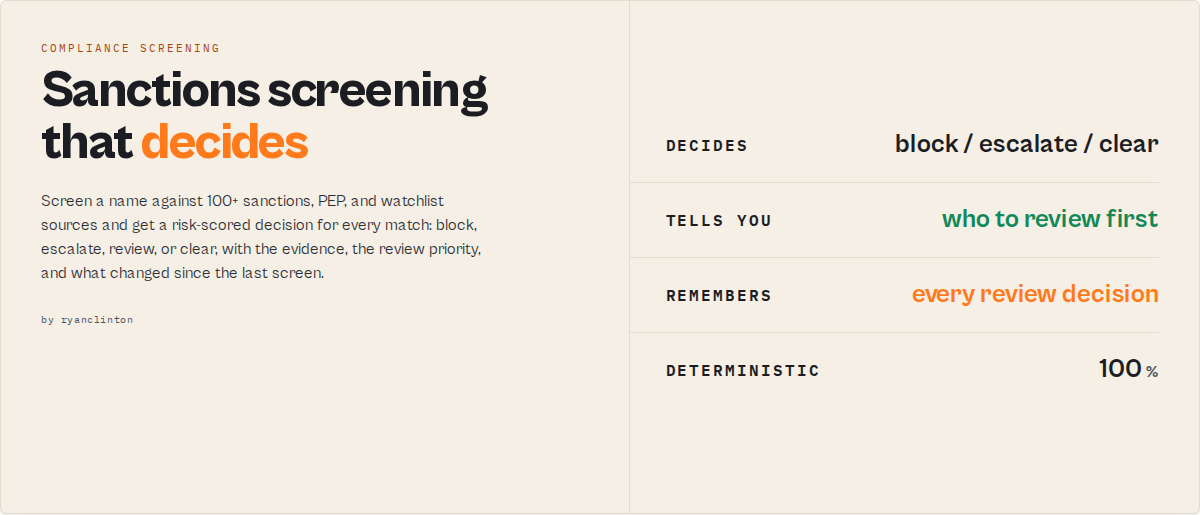
Screen a name against global sanctions, PEP, and watchlist data through the OpenSanctions API, and get a risk-scored screening decision for every match — not just a list of records. For each hit the actor returns a match strength, a risk level, a recommended action (block / escalate / enhanced due diligence / manual review / monitor / clear), the reasoning behind it, and a one-line summary your team or an LLM can act on without reading the raw fields. A run-level verdict tells you in one field whether the name is a potential match, needs review, or is clear.
It screens against 100+ official sources — US OFAC SDN, EU Financial Sanctions, UN Security Council, UK HMT, Canadian DFATD, Australian DFAT, and dozens of national and international lists plus the PEP and criminal databases — using fuzzy name matching that catches transliterations, alternate spellings, and partial matches across individuals, organizations, companies, vessels, aircraft, and crypto wallets.
Whether you are a compliance officer running KYC checks, a fintech building automated AML screening, or an analyst investigating an entity, this actor turns a raw watchlist lookup into a documented screening decision that plugs straight into your workflow.
Why teams use this actor
Most sanctions tools find matches. This actor reduces review work.
- Fewer repeat reviews through false-positive suppression that remembers what you cleared.
- Faster onboarding decisions through automated, explainable recommendations.
- Less analyst effort through a prioritised review queue instead of an undifferentiated alert pile.
- Faster audits through a built-in decision history attached to every entity.
Every run reports analystTimeSavedMinutes so teams can measure the operational impact, not just the matches found.
Pass the auditor test
Six months from now an auditor asks: "Why did you clear this customer?" Most screening tools cannot answer. This one stores the evidence on every screen:
- screening IDs (
screeningId/batchId) - analyst decisions and who made them (
reviewStatus,reviewedBy) - review reasons (
reviewReason) - full decision history (
caseHistory) - change history since prior runs (
changeEvents) - the supporting evidence behind each verdict (
whyFlagged,casePackage)
Every screening is auditable by default.
Example screening
You screen: Vladimir Putin (with date of birth 1952-10-07 for corroboration)
You get back:
Potential match — block. Strong name match (0.97), DOB matches the subject. Active sanctions target on 6 lists across US, EU, UN, UK, Canada, Australia, and a politically exposed person. False-positive risk: low. Recommended action: block.
Not a list of records to interpret — a decision, the evidence behind it, and a ready-to-paste case package. Supply a date of birth or an identifier and the actor corroborates the match and lowers the false-positive risk; leave them out and it tells you what to add for a more decisive screen.
What you get from one call
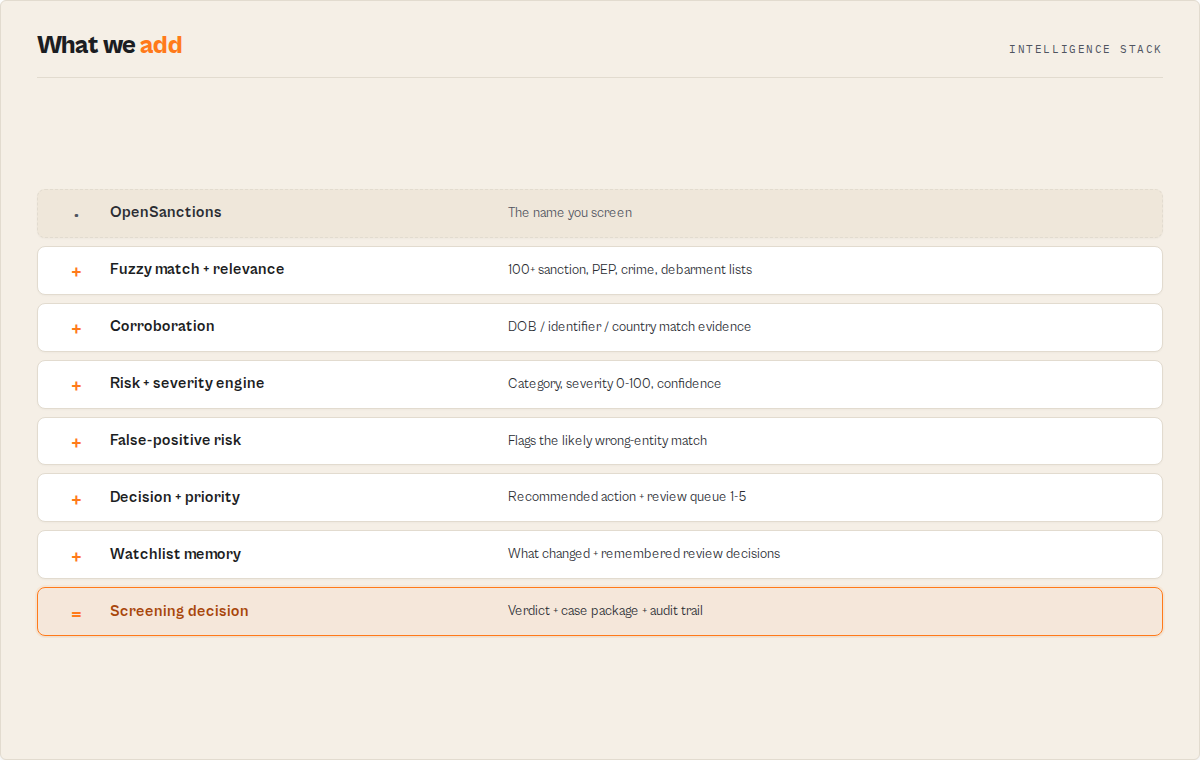
- A screening decision per match —
matchTier,riskLevel,riskCategory,severityScore(0-100), and arecommendedActionenum you can branch on. - A run-level verdict — one
screeningResult(potential-match/review-required/no-match) plus the overall recommended action, counts by risk, and the lists covered. - The reasoning, not just the verdict — every decision carries a deterministic
whyFlagged[]chain and aconfidencebreakdown so a reviewer can defend it. - Dual-axis scoring — match strength ("is this the entity I searched?") and severity ("how dangerous if it is?") are separate scores, so a weak match to a critical sanction is never confused with a strong match to a minor listing.
- Ongoing monitoring — set a
watchlistNameand re-runs flag each matchNEW/ESCALATED/DOWNGRADED/UNCHANGED/RESOLVEDand alert on new hits. - 100+ sanctions sources in one query — OFAC, EU, UN, UK, and dozens of national watchlists, no separate integrations.
- Deterministic — every score, tier, and action is a pure function of the OpenSanctions data. No LLM in the scoring path, reproducible for audit.
This is not an OpenSanctions wrapper
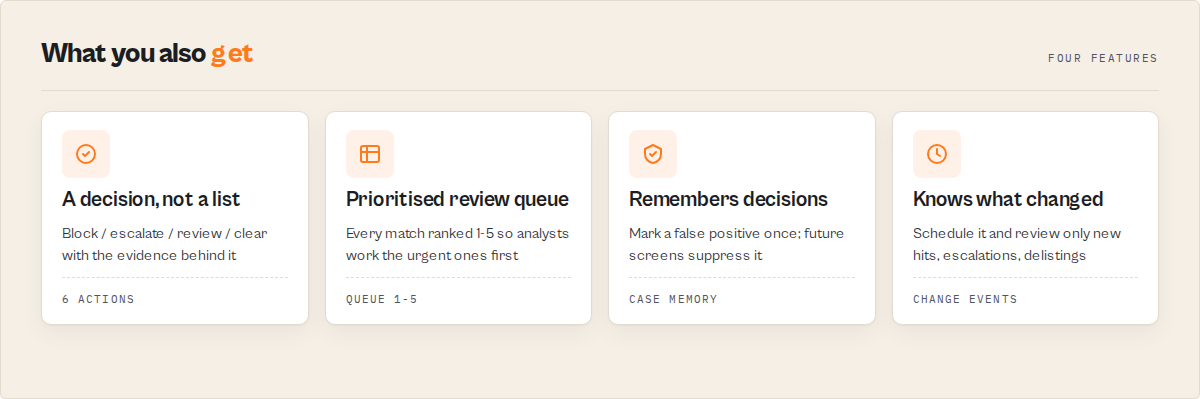
Most sanctions tools stop at search. You search a name, you get 17 matches, an analyst spends 30 minutes reviewing them, and next week the same analyst reviews the same false positives again. This actor was built to eliminate that review work. It scores matches, explains them, prioritises them, remembers previous decisions, suppresses known false positives, and tells reviewers exactly what changed since the last screen.
| Capability | Search wrapper | This actor |
|---|---|---|
| Returns matches | ✅ | ✅ |
| Explains matches | ❌ | ✅ |
| Risk-scores matches | ❌ | ✅ |
| Produces a decision (block / escalate / review / clear) | ❌ | ✅ |
| Generates case packages | ❌ | ✅ |
| Tracks what changed since last screen | ❌ | ✅ |
| Remembers analyst review decisions | ❌ | ✅ |
| Suppresses known false positives | ❌ | ✅ |
| Prioritises the review queue | ❌ | ✅ |
| Screens a whole portfolio at once | ❌ | ✅ |
A raw wrapper hands you entity records and leaves the judgement to you. This actor does the screening, remembers what you decided, and shows you only what needs attention.
Never review the same false positive twice
A sanctions search finds matches. A compliance system remembers decisions.
Mark a match as false-positive once (via reviewDecisions), and future screens under the same watchlistName carry that decision forward: the match keeps its remembered reviewStatus, reviewedBy, reviewReason, and a full caseHistory. Turn on suppressFalsePositives and previously-cleared entities drop out of the output entirely, counted (never silently lost) and credited to the analystTimeSavedMinutes estimate. Reviewers stop re-clearing the same person every week.
Institutional memory for compliance teams
Most sanctions searches start from zero. This actor remembers, per entity:
- previous analyst decisions and who made them (
caseHistory,reviewedBy) - false-positive reviews (
reviewStatus,previouslyCleared) - escalations and risk movement (
changeEvents,scoreDelta) - how long it has been monitored (
firstSeenByActor,daysTracked,runsSeen) - a consolidated
entityMemoryblock (firstReviewed,reviewCount,lastDecision,lastReason)
Every screen is more efficient than the last, and the trail answers the auditor's "why did you clear this 11 months ago?".
Know what changed
Screening is not a one-time event. Schedule the actor daily or weekly with a watchlistName and review the changes, not the whole population. The actor surfaces only what moved since the last run as typed changeEvents:
- new sanctions listings (
NEW_SANCTION_LIST) - risk increases or decreases (
RISK_ESCALATED/RISK_DOWNGRADED) - new aliases (
NEW_ALIAS) - delistings (
DELISTED) - PEP status added or removed (
PEP_STATUS_ADDED/PEP_STATUS_REMOVED)
Example: screen 500 customers in one run
Pass 500 names in queries[] and the batch-summary record analyses the whole population:
Portfolio summary      4 critical · 12 high · 21 review-required · 463 clear
Concentration risk     RU 14 · IR 5 · BY 3
Review queue           1. Vladimir Putin       — block
                       2. XYZ Trading Ltd      — enhanced-due-diligence
                       3. John Smith           — manual-review
Estimated analyst time saved   146 minutes
You analyse a portfolio, not 500 individuals, and your team works a ranked queue instead of an undifferentiated alert pile.
Key features
- Per-match decision layer — risk level, match tier, severity score, recommended action, confidence, and reasoning on every result
- Run-level screening verdict — a single
screeningResult+ recommended action + risk counts in a summary record, mirrored to theSUMMARYkey-value store record - Fuzzy name matching catches transliterations, alternate spellings, and partial name matches automatically
- Entity type filtering for individuals, organizations, companies, legal entities, vessels, aircraft, or crypto wallets
- 9 dataset scopes including all-inclusive default, sanctions-only, PEPs-only, and 6 specific national lists
- Topic, country, and minimum-match-score filtering to cut noise on common names
- Output detail profiles —
minimal(decision only),standard(decision + reasoning), orfull(every raw field) - Opt-in cross-run watchlist for scheduled re-screening with change detection
- Automatic pagination up to 200 results, with budget-aware retry/backoff on transient errors and HTTP 429
- Rich entity data — aliases, identifiers (passport, tax, registration numbers), positions, programs, and remarks
- Direct source links to the OpenSanctions entity profile for each result
How to use
Using the Apify Console
- Go to the OpenSanctions Search actor page on the Apify Store.
- Click Start to open the input configuration.
- Enter your OpenSanctions API key (get a free trial at opensanctions.org/account).
- Type a search query such as a person name, organization, or company.
- Optionally set entity type, country, dataset, or topic filters.
- Set the maximum number of results (1--200, default 50).
- Click Run and view results in the Dataset tab.
Using the Apify API
Python:
from apify_client import ApifyClient

client = ApifyClient("YOUR_APIFY_TOKEN")

run = client.actor("ryanclinton/opensanctions-search").call(run_input={
    "apiKey": "YOUR_OPENSANCTIONS_API_KEY",
    "query": "Gazprombank",
    "entityType": "Company",
    "dataset": "sanctions",
    "maxResults": 20,
})

items = client.dataset(run["defaultDatasetId"]).list_items().items
for item in items:
    print(f"{item['name']} -- {item['entityType']} -- {item['listSources']}")
JavaScript:
import { ApifyClient } from "apify-client";

const client = new ApifyClient({ token: "YOUR_APIFY_TOKEN" });

const run = await client.actor("ryanclinton/opensanctions-search").call({
    apiKey: "YOUR_OPENSANCTIONS_API_KEY",
    query: "Gazprombank",
    entityType: "Company",
    dataset: "sanctions",
    maxResults: 20,
});

const { items } = await client.dataset(run.defaultDatasetId).listItems();
items.forEach((item) => {
    console.log(`${item.name} -- ${item.entityType} -- ${item.listSources}`);
});
Input parameters
| Parameter | Type | Required | Default | Description |
|---|---|---|---|---|
apiKey | string | No | -- | OpenSanctions API key. Required for live screening; without it the run pushes a setup-instruction record. Get a free trial at opensanctions.org/account. |
query | string | Yes | Putin | Name or entity to screen (e.g., "Putin", "Bank of Syria", "Gazprombank"). |
queries | string[] | No | -- | Batch mode: screen many names in one run. Each is screened independently with its own decision + screeningId; a batch-summary record rolls up the run. Overrides query when set (max 500). |
subjectDob | string | No | -- | Optional DOB (YYYY-MM-DD) of the subject. Corroborates matches (matchEvidence.dobMatch); does not filter. Cuts false positives on common names. |
subjectIdentifier | string | No | -- | Optional passport/tax/registration number of the subject. Corroborates matches (matchEvidence.identifierMatch) — the strongest disambiguation signal. |
reviewDecisions | object[] | No | -- | Watchlist mode: persist analyst decisions across runs. Array of { openSanctionsId, status, reviewedBy?, reviewReason? } where status ∈ false-positive / confirmed-match / pending-review / unreviewed. Builds a caseHistory per entity. |
suppressFalsePositives | boolean | No | false | Watchlist mode: drop entities you previously cleared as false-positive (counted, never silently lost). Cuts repeat review work on recurring screens. |
entityType | string | No | Thing | Entity type filter: Thing (all), Person, Organization, Company, LegalEntity, Vessel, Airplane, CryptoWallet. |
country | string | No | -- | Two-letter ISO country code (e.g., RU, IR, KP, SY). |
dataset | string | No | default | Dataset scope: default, sanctions, peps, us_ofac_sdn, eu_fsf, un_sc_sanctions, gb_hmt_sanctions, ca_dfatd_sema_sanctions, au_dfat_sanctions. |
topics | string | No | -- | Topic filter: sanction, role.pep, crime, debarment, role.rca. |
maxResults | integer | No | 50 | Maximum results to return (1--200). |
minMatchScore | integer | No | 0 | Drop weak name matches below this OpenSanctions relevance score (0-100, e.g. 70). Suppressed matches are excluded from output and billing; the suppressed count is reported in the summary. |
outputProfile | string | No | standard | Detail per match: minimal (routing fields only), standard (decision + reasoning + list coverage), full (every raw field). |
watchlistName | string | No | -- | Name a screen to turn on cross-run monitoring. Re-running the same query under the same name flags each match NEW / ESCALATED / DOWNGRADED / UNCHANGED / RESOLVED and alerts on new hits. Leave blank for a one-off screen. |
Example input (JSON):
{
    "apiKey": "YOUR_OPENSANCTIONS_API_KEY",
    "query": "Rosneft",
    "entityType": "Company",
    "country": "RU",
    "dataset": "sanctions",
    "topics": "sanction",
    "maxResults": 25
}
Tips:
- Use full names for individuals -- "Vladimir Putin" returns more precise results than "Putin" alone.
- Leave
entityTypeasThingwhen unsure whether a target is a person or organization. - Combine
countryandtopicsfilters to reduce noise on common names. - The
defaultdataset includes everything; use specific datasets likeus_ofac_sdnto search only that program.
Output
The dataset carries two record types, distinguished by recordType: one sanctions-match record per hit (with the screening decision), and one screening-summary record per run (the run-level verdict). When a watchlist is active, watchlist-change records are added for entities that have dropped off since the last run. A no-match record is emitted when nothing matches.
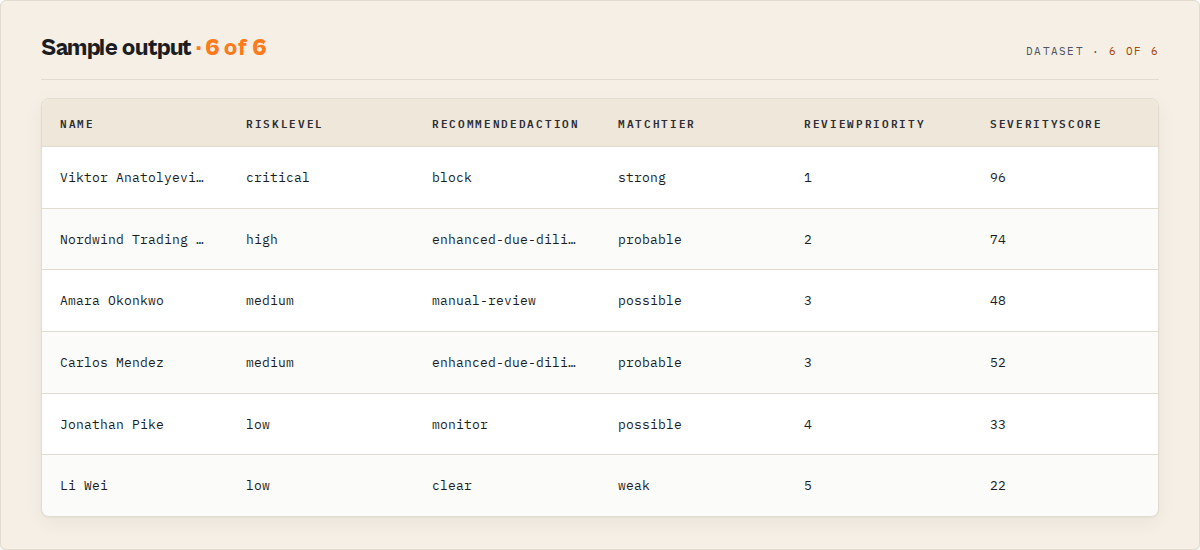
A screening-match record (standard profile)
{
    "recordType": "sanctions-match",
    "schemaVersion": "2.0.0",
    "name": "Vladimir Vladimirovich PUTIN",
    "entityType": "Individual",
    "matchTier": "strong",
    "matchScore": 0.97,
    "riskLevel": "critical",
    "riskCategory": "sanctioned",
    "riskCategories": ["sanctioned", "pep"],
    "severityScore": 96,
    "sanctionStatus": "active",
    "isPep": true,
    "recommendedAction": "block",
    "confidence": {
        "score": 0.93,
        "level": "high",
        "components": [
            { "name": "nameMatchStrength", "weight": 0.55, "value": 0.97 },
            { "name": "identifierCorroboration", "weight": 0.25, "value": 0.85 },
            { "name": "listCorroboration", "weight": 0.2, "value": 1 }
        ]
    },
    "whyFlagged": [
        "strong name match (0.97) to \"Vladimir Vladimirovich PUTIN\"",
        "Active sanctions listing",
        "Politically exposed person (PEP)",
        "Appears on 6 lists: OFAC SDN, EU FSF, UN Security Council, UK HMT…"
    ],
    "screeningSummary": "Strong match: Vladimir Vladimirovich PUTIN — critical risk (a sanctions target) — on OFAC SDN, EU FSF, UN Security Council +3 more. Recommended: block.",
    "listCount": 6,
    "listTypes": ["OFAC SDN", "EU FSF", "UN Security Council", "UK HMT", "Australia DFAT", "Canada DFATD"],
    "countries": ["RU"],
    "programs": ["RUSSIA-EO14024", "UKRAINE-EO13661"],
    "topics": ["sanction", "role.pep"],
    "sourceUrl": "https://www.opensanctions.org/entities/Q7747/",
    "openSanctionsId": "Q7747"
}
Decision fields (added on every match)
| Field | Type | Description |
|---|---|---|
recordType | string | sanctions-match / screening-summary / batch-summary / watchlist-change / no-match / error |
screeningId | string | Per-query audit ID (SCR-YYYYMMDD-NNNNNN); batchId on batch runs |
matchTier | string | Name-match strength: strong / probable / possible / weak |
reviewPriority | number | Queue order 1-5 (1 = review immediately … 5 = ignore). Records are emitted in priority order |
falsePositiveRisk | string | low / medium / high — a DOB/country mismatch raises it even on a strong name match |
entityFingerprint | string | Deterministic name+DOB+country hash for cross-query / cross-run duplicate detection |
jurisdictionCoverage | object | Which jurisdictions list the entity (US/EU/UN/GB/… booleans + covered[]) — "does this hit my jurisdiction?" |
entitySnapshot | object | At-a-glance counts: aliasCount, countries, positionCount, identifierCount, programCount |
casePackage | object/null | On review-or-worse matches: a ready-to-paste bundle (recommendedAction, summary, evidence[], falsePositiveRisk, sourceUrl) |
matchScore | number/null | OpenSanctions fuzzy relevance score (0-1) |
riskLevel | string | Severity band: critical / high / medium / low |
riskCategory | string | Primary risk type: sanctioned / criminal / pep / debarred / associate / other |
severityScore | number | Deterministic 0-100 danger score (category + list coverage + crime type + target flag) |
sanctionStatus | string | active / historical / not-sanctioned |
isPep | boolean | Politically exposed person flag |
recommendedAction | string | block / escalate / enhanced-due-diligence / manual-review / monitor / clear |
confidence | object | { score 0-1, level, components[] } — trust that this is a true hit |
severityFactors | object[] | { factor, contribution }[] — the transparent breakdown of how severityScore was built |
decisionFactors | object | Explainability bundle: matchStrength, sanctionPrograms, isPep, crimeIndicators, listCount, jurisdictions, jurisdictionCount, daysSinceLastUpdate, dataCompleteness |
matchEvidence | object | Corroboration: nameSimilarity, aliasSimilarity, countryMatch, dobMatch, identifierMatch (each null until you supply the subject field) |
dataCompleteness | number | 0-100 — how complete the entity record is (helps reviewers gauge quality) |
whyFlagged | string[] | Deterministic reasoning chain behind the verdict |
screeningSummary | string | One-line plain-English verdict an LLM can quote |
listCount / listTypes | number / string[] | How many and which sanctioning bodies list the entity |
changeFlag | string | Watchlist mode only: NEW / ESCALATED / DOWNGRADED / UNCHANGED / RESOLVED |
changeReason / scoreDelta / previousScore | string[] / number | Watchlist mode: why the status changed + the severity movement since last run |
diff / changeEvents | object / object[] | Watchlist mode: structured { newLists, removedLists, newAliases } + typed events (NEW_SANCTION_LIST / DELISTED / RISK_ESCALATED / NEW_ALIAS / …) vs the previous run |
reviewStatus / reviewedBy / reviewReason / reviewedAt | string | Watchlist mode: remembered case state + who/why/when |
caseHistory | object[] | Watchlist mode: full chronological analyst decision log { date, decision, reason, by } — the audit trail |
entityMemory | object | Watchlist mode: institutional memory { firstReviewed, reviewCount, lastDecision, lastReason } — the actor gets smarter every run |
previouslyCleared | boolean | Watchlist mode: true when this entity was marked false-positive in a prior run |
firstSeenByActor / daysTracked / runsSeen | string / number | Watchlist mode: how long this entity has been monitored |
The screening-summary record also carries: screeningQuality (0-100, how well-specified your screen was) + qualityIssues[] + recommendedNextInputs[] (what to add for a more decisive result); investigationReadiness (actionable / needs-more-input / insufficient-data — the decision gate); analystTimeSavedMinutes (estimated manual review minutes saved); jurisdictionExposure (per-jurisdiction { exposure, action, listed } — where you're exposed and what to do, by regulator); an investigationPack (executiveSummary + keyFindings[] + supportingEvidence[] + sourceLinks[] — a ready-to-file write-up); and suppressedEntities[] (what was dropped and why) when suppression is on.
Batch & portfolio screening
When you pass queries[], a final batch-summary record analyses the whole population, not just individuals:
portfolioSummary— how many of the screened names arecritical/high/medium/low/clear(e.g. 500 suppliers → 4 critical, 12 high, 447 clear).concentrationRisk— where exposure concentrates by country (top 15).reviewQueue— every match across all queries sorted byreviewPriority, so an analyst works the list top-down.duplicateEntities— the same entity hit by multiple queries (dedupe your review work).
Raw entity fields — aliases, addresses, dateOfBirth, gender, nationality, identifiers, positions, remarks, listingDate, lastSeenDate, lastChangeDate, extractedAt — are included in the full profile.
The run-level summary record
{
    "recordType": "screening-summary",
    "query": "Putin",
    "screeningResult": "potential-match",
    "recommendedAction": "block",
    "totalMatches": 4,
    "highestRisk": "critical",
    "countsByRisk": { "critical": 1, "high": 1, "medium": 2, "low": 0 },
    "pepCount": 3,
    "activeSanctionedCount": 1,
    "listsCovered": ["OFAC SDN", "EU FSF", "UN Security Council"],
    "topMatches": [ { "name": "Vladimir Vladimirovich PUTIN", "riskLevel": "critical", "recommendedAction": "block", "severityScore": 96 } ],
    "agentContract": { "decision": "potential-match", "recommendedAction": "block", "highestRisk": "critical", "matchCount": 4 },
    "summary": "4 potential matches for \"Putin\" — highest risk critical. Screening result: potential-match. Recommended: block."
}
The same summary is mirrored to the SUMMARY key-value store record for BI tiles and agent consumers that want one object instead of paging the dataset.
Use cases
- KYC/AML compliance screening -- check customer and counterparty names against global sanctions lists before onboarding.
- Ongoing monitoring -- schedule daily or weekly runs to detect when existing clients appear on newly updated watchlists.
- PEP identification -- screen business contacts and beneficial owners against the politically exposed persons database.
- Corporate due diligence -- verify that companies, subsidiaries, and partners are not subject to international sanctions.
- Vessel and aircraft tracking -- identify sanctioned ships and aircraft by name for trade compliance in shipping and logistics.
- Crypto compliance -- screen crypto wallet identifiers against sanctions lists for blockchain compliance programs.
- Journalist investigations -- research sanctioned individuals and their network of associates, positions, and linked entities.
- Regulatory reporting -- generate structured evidence of sanctions screening for audit trails and compliance documentation.
- Risk scoring pipelines -- feed sanctions data into automated risk assessment systems via the Apify API.
- Multi-jurisdictional screening -- search across US, EU, UN, UK, Canadian, and Australian lists in a single query.
API & integration
Python
from apify_client import ApifyClient

client = ApifyClient("YOUR_APIFY_TOKEN")

run = client.actor("6Zlkz0wjdXewfq3yK").call(run_input={
    "apiKey": "YOUR_OPENSANCTIONS_API_KEY",
    "query": "Bank Melli Iran",
    "entityType": "Organization",
    "country": "IR",
    "dataset": "sanctions",
    "maxResults": 30,
})

for item in client.dataset(run["defaultDatasetId"]).iterate_items():
    print(f"{item['name']} | Sources: {', '.join(item['listSources'])}")
JavaScript
import { ApifyClient } from "apify-client";

const client = new ApifyClient({ token: "YOUR_APIFY_TOKEN" });

const run = await client.actor("6Zlkz0wjdXewfq3yK").call({
    apiKey: "YOUR_OPENSANCTIONS_API_KEY",
    query: "Bank Melli Iran",
    entityType: "Organization",
    country: "IR",
    dataset: "sanctions",
    maxResults: 30,
});

const { items } = await client.dataset(run.defaultDatasetId).listItems();
console.log(JSON.stringify(items, null, 2));
cURL
curl -X POST "https://api.apify.com/v2/acts/6Zlkz0wjdXewfq3yK/runs?token=YOUR_APIFY_TOKEN" \
  -H "Content-Type: application/json" \
  -d '{
    "apiKey": "YOUR_OPENSANCTIONS_API_KEY",
    "query": "Bank Melli Iran",
    "entityType": "Organization",
    "country": "IR",
    "dataset": "sanctions",
    "maxResults": 30
  }'
Integrations
Connect the output dataset to any of these platforms:
- Apify Webhooks -- trigger HTTP callbacks when a run completes for real-time alerting.
- Google Sheets -- export results to a shared compliance dashboard via the Apify integration.
- Slack / Microsoft Teams -- send notifications when sanctioned entities are found.
- Zapier / Make (Integromat) -- connect to 5,000+ apps for downstream automation.
- Amazon S3 / Google Cloud Storage -- archive screening results for audit trails.
- REST API -- retrieve results programmatically from any language or platform.
Use in Dify
Drop this actor into Dify workflows via the Apify plugin's Run Actor node. Each match returns scored, classified, and recommended as structured JSON — block / escalate / enhanced-due-diligence / manual-review / monitor / clear plus the riskLevel and screeningResult your downstream node branches on. A competitor pointed at the same lists returns raw entity records; this returns a screening decision.
- Actor ID:
ryanclinton/opensanctions-search - Sample input (screen a counterparty before onboarding):
{
    "apiKey": "YOUR_OPENSANCTIONS_API_KEY",
    "query": "Gazprombank",
    "dataset": "default",
    "minMatchScore": 70,
    "outputProfile": "standard"
}
- Branching example — read the
screening-summaryrecord'srecommendedActionand route on the enum in a Dify if/else node:block/escalate→ halt onboarding, open a case, notify complianceenhanced-due-diligence/manual-review→ queue for a human reviewermonitor→ onboard with periodic re-screeningclear→ proceed
- Opt-in modes Dify can leverage: set
watchlistNameto make a scheduled Dify run flag onlychangeFlag: NEW/ESCALATEDmatches — the workflow fires alerts solely on what changed since the last run. SetoutputProfile: "minimal"to hand the branching node just the routing fields. - The summary's
nextActions[]array is usable verbatim — each entry names the next step (and sibling actor where relevant), no LLM rewriting needed.
How it works
- Input validation -- the actor reads your search query and configuration, validates required fields, and applies defaults.
- API key check -- if no API key is provided, the actor outputs dry-run instructions and exits. Otherwise, it proceeds to query the OpenSanctions API.
- Paginated search -- the actor sends requests to
api.opensanctions.org/search/{dataset}with fuzzy matching enabled, fetching up to 50 results per page. - Rate limit handling -- if the API returns HTTP 429, the actor waits 5 seconds and retries the same request.
- Entity transformation -- each raw API response is mapped to a clean output format with human-readable entity types, grouped identifiers, and consolidated remarks.
- Result collection -- pages are fetched with 500ms delays until the maximum result count is reached or no more results are available.
- Dataset push -- all transformed results are pushed to the Apify dataset for export in JSON, CSV, XML, or Excel format.
                    OpenSanctions Search Pipeline

  [Input Query]
       |
       v
  [Validate Input & Check API Key]
       |
       +-- No key --> [Dry-Run: Output Setup Instructions] --> END
       |
       v
  [Build Search Request (fuzzy=true, simple=true)]
       |
       v
  [Send to api.opensanctions.org/search/{dataset}]
       |
       +-- HTTP 429 --> [Wait 5s] --> [Retry Same Page]
       |
       v
  [Transform Entities: Map Types, Extract Fields]
       |
       v
  [More pages needed?]
       |
       +-- Yes --> [Wait 500ms] --> [Fetch Next Page]
       |
       +-- No
       v
  [Push Results to Apify Dataset]
       |
       v
      END
Performance & cost
| Scenario | Results | Memory | Duration | Apify Cost (est.) |
|---|---|---|---|---|
| Single name check | 1--10 | 256 MB | 5--10s | ~$0.001 |
| Standard screening | 50 | 256 MB | 10--20s | ~$0.002 |
| Deep search (common name) | 200 | 256 MB | 20--30s | ~$0.004 |
| Daily scheduled screening | 50/run | 256 MB | 10--20s | ~$0.06/month |
Notes:
- Apify compute costs are based on 256 MB memory allocation. The actor does not require more memory.
- OpenSanctions API costs are separate. Free trial keys are available for business email signups. Check opensanctions.org for current pricing.
- The Apify free tier provides $5/month of compute, enough for hundreds of screening runs.
Limitations
- Batch screening built in -- screen one name with
queryor many withqueries[](up to 500 per run); each gets its own decision + screening ID, with abatch-summaryrollup. - 200 result maximum per query -- each query returns at most 200 entities. Highly common names may have more matches available in the API.
- API key required for live data -- without an OpenSanctions API key, the run pushes a single setup-instruction record and exits cleanly.
- Screening is not identity confirmation -- a
potential-matchmeans a credible hit on the name; therecommendedActionandconfidenceguide a human review, they do not confirm the searched person is the listed entity. Always verify against the official source before acting. - Decisions are deterministic, not predictive -- scores and actions are rule-based functions of the OpenSanctions data, reproducible for audit. They reflect the listing data, not a probability model.
- Data freshness depends on OpenSanctions -- the underlying database is updated daily by OpenSanctions, but there may be a delay between official list updates and API availability.
- Rate limits apply -- the OpenSanctions API enforces rate limits based on your subscription tier. The actor handles 429 responses with automatic retries, but sustained high-volume usage requires an appropriate plan.
- Country codes must be ISO 3166-1 alpha-2 -- full country names are not supported in the country filter field.
Responsible use
- Comply with OpenSanctions terms of service -- your use of this actor must adhere to the OpenSanctions licensing and usage terms. Non-commercial and journalistic use may have different terms than commercial use.
- Do not use as sole compliance evidence -- sanctions screening should be part of a broader compliance program. Always verify hits against official government sources before taking action.
- Protect API keys -- store your OpenSanctions API key securely. The actor input field is marked as a secret, but avoid sharing run logs that may contain key fragments.
- Respect data privacy regulations -- sanctions data may contain personal information. Ensure your processing of results complies with applicable data protection laws (GDPR, CCPA, etc.).
- Acknowledge data attribution -- OpenSanctions aggregates data from official government sources. When publishing or sharing results, attribute the data appropriately.
FAQ
Do I need an OpenSanctions API key? Yes. You need an API key from opensanctions.org/account to perform live searches. Without a key, the actor runs in dry-run mode and returns setup instructions. Free trial keys are available for business email addresses.
What sanctions lists are included? OpenSanctions aggregates over 100 sources including US OFAC SDN, EU Financial Sanctions, UN Security Council Sanctions, UK HMT Sanctions, Canadian DFATD, Australian DFAT, Interpol notices, and many national and international watchlists.
What is the difference between "default" and "sanctions" datasets?
The default dataset includes everything -- sanctions, PEPs, criminal records, and debarments. The sanctions dataset includes only sanctions list entries, excluding PEPs and other categories. Use specific national datasets like us_ofac_sdn to search only that program.
Can I search for companies and organizations?
Yes. Set entityType to Company or Organization. You can also search for vessels, aircraft, and crypto wallets using the appropriate entity type filter.
Does it support fuzzy matching?
Yes. Fuzzy matching is enabled by default (fuzzy=true, simple=true), so the actor finds results even when names are transliterated differently, contain diacritics, or have minor spelling variations.
How current is the data?
OpenSanctions updates their database daily. The lastSeenDate and lastChangeDate fields in each result indicate when the entry was last verified and last modified in the source data.
Can I screen multiple names in one run?
Yes. Use queries[] to screen up to 500 names in a single run. Each query gets its own screening decision and audit ID (screeningId), and a batch-summary record provides portfolio-level analysis: risk distribution, country concentration, a prioritised review queue, and duplicate detection across names.
What does the "topics" filter do?
Topics categorize entities: sanction for sanctioned entities, role.pep for politically exposed persons, crime for criminal records, debarment for debarred entities, and role.rca for relatives and close associates of PEPs.
What happens if I exceed the OpenSanctions rate limit? The actor automatically detects HTTP 429 responses and waits 5 seconds before retrying. If rate limiting persists, consider upgrading your OpenSanctions plan or reducing request frequency.
Can I export results as CSV or Excel? Yes. The Apify platform lets you export any dataset as JSON, CSV, XML, RSS, or Excel directly from the Dataset tab or via the API.
How do I set up scheduled screening? In the Apify Console, go to your actor run configuration and click "Schedule." You can set daily, weekly, or custom cron schedules. Each scheduled run uses the same input parameters you configure.
Is this actor suitable for production compliance systems? Yes. The structured JSON output, automatic pagination, and rate limit handling make it suitable for integration into production AML/KYC pipelines. Pair it with Apify webhooks for real-time alerting.
Related actors
| Actor | Description |
|---|---|
| OFAC Sanctions Search | Search the US OFAC Specially Designated Nationals list directly. Use for US-specific sanctions screening without the broader OpenSanctions database. |
| Interpol Red Notice Search | Search Interpol's international wanted persons database. Complement sanctions screening with criminal watchlist checks. |
| UK Companies House | Look up UK company registration details for corporate due diligence alongside sanctions screening. |
| OpenCorporates Search | Search the world's largest open database of companies for corporate verification and beneficial ownership research. |
| GLEIF LEI Lookup | Look up Legal Entity Identifiers (LEI) for verified corporate identity data in financial compliance workflows. |
| SEC Insider Trading | Search SEC insider trading filings for financial compliance investigations and due diligence on US-listed companies. |
Compare this actor
Related actors
Bulk Email Verifier — MX, SMTP & Disposable Detection at Scale
Verify email deliverability in bulk — MX records, SMTP mailbox checks, disposable detection (55K+ domains), role-based flagging, catch-all detection, domain health scoring (SPF/DKIM/DMARC), and confidence scores. $0.005/email, no subscription.
CFPB Complaint Intelligence — Vendor Risk & Screening
Turn 5M+ CFPB consumer complaints into decisions: screen companies pass / review / fail, score complaint-handling risk, monitor what changed since last run, benchmark cohorts, and build audit-ready due-diligence packs. Filter by company, product, state, and date. No API key.
Company Deep Research — SEC, GitHub, DNS & Social
Research any company from a domain. Get website metadata, Wikipedia summary, GitHub repos & stars, SEC EDGAR filings & ticker, academic papers, DNS records, and social media profiles in one JSON report.
SEC EDGAR Filing Search & Signal Engine — Risk, Events & Alerts
Search, rank, and monitor SEC EDGAR filings by keyword, company, or ticker. Every result carries an event category (8-K taxonomy), risk flags, and a signal score; watchlists add cross-filing pattern alerts. Filter by form type and date. Structured JSON with direct document links.
Ready to try Sanctions & Watchlist Screening — Risk-Scored Decisions?
Run it on your own Apify account. Apify offers a free tier with $5 of monthly credits.
Open on Apify Store