SEC EDGAR Filing Search & Signal Engine — Risk, Events & Alerts is an Apify actor on ApifyForge. Search, rank, and monitor SEC EDGAR filings by keyword, company, or ticker. Every result carries an event category (8-K taxonomy), risk flags, and a signal score; watchlists add cross-filing pattern alerts. It costs $0.002 per filing-fetched. Best for investigators, analysts, and risk teams conducting due diligence, regulatory tracking, or OSINT research. Not ideal for real-time surveillance or replacing classified intelligence systems. Maintenance pulse: 90/100. Last verified March 27, 2026. Built by Ryan Clinton (ryanclinton on Apify).
SEC EDGAR Filing Search & Signal Engine — Risk, Events & Alerts
SEC EDGAR Filing Search & Signal Engine — Risk, Events & Alerts is an Apify actor available on ApifyForge at $0.002 per filing-fetched. Search, rank, and monitor SEC EDGAR filings by keyword, company, or ticker. Every result carries an event category (8-K taxonomy), risk flags, and a signal score; watchlists add cross-filing pattern alerts. Filter by form type and date. Structured JSON with direct document links.
Best for investigators, analysts, and risk teams conducting due diligence, regulatory tracking, or OSINT research.
Not ideal for real-time surveillance or replacing classified intelligence systems.
What to know
- Limited to publicly available and open-source information.
- Report depth depends on the availability of upstream government and public data sources.
- Requires an Apify account — free tier available with limited monthly usage.
Maintenance Pulse
90/100Cost Estimate
How many results do you need?
Pricing
Pay Per Event model. You only pay for what you use.
| Event | Description | Price |
|---|---|---|
| filing-fetched | Charged per SEC EDGAR filing retrieved. | $0.002 |
Example: 100 events = $0.20 · 1,000 events = $2.00
Documentation
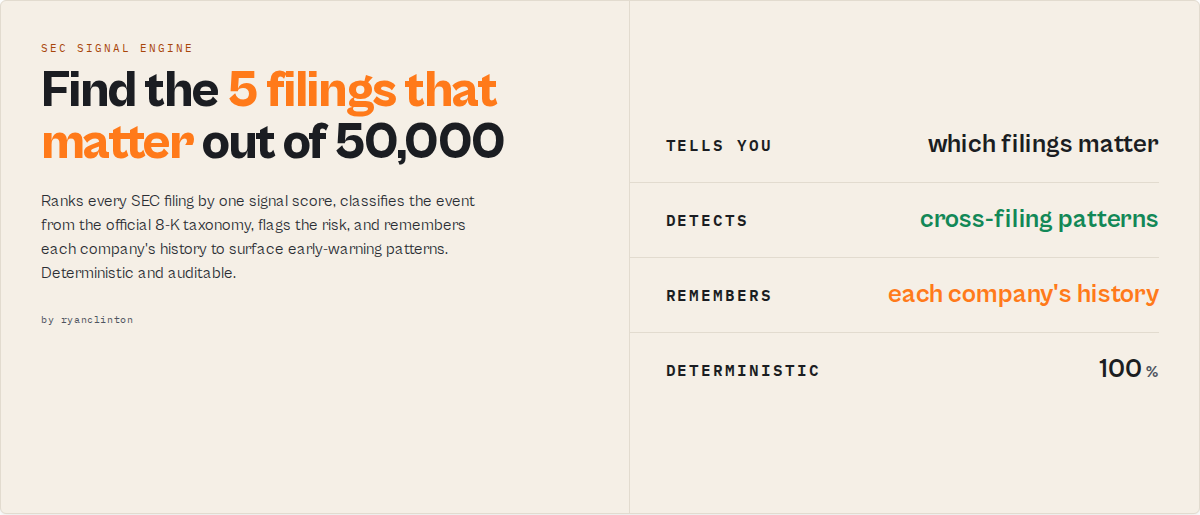
Find the 5 filings that matter out of 50,000.
Search tools tell you what was filed. This actor tells you what deserves attention.
On a typical day thousands of companies file with the SEC. A handful contain a new material weakness. A couple escalate into a restatement pattern. Perhaps one trips a critical alert. This actor finds those few filings automatically -- so you start with the 3 that matter instead of reading the other 49,997.
Searching SEC filings is easy. Knowing which filing signals a cybersecurity incident, governance failure, accounting problem, activist campaign, acquisition, or financial distress is hard.
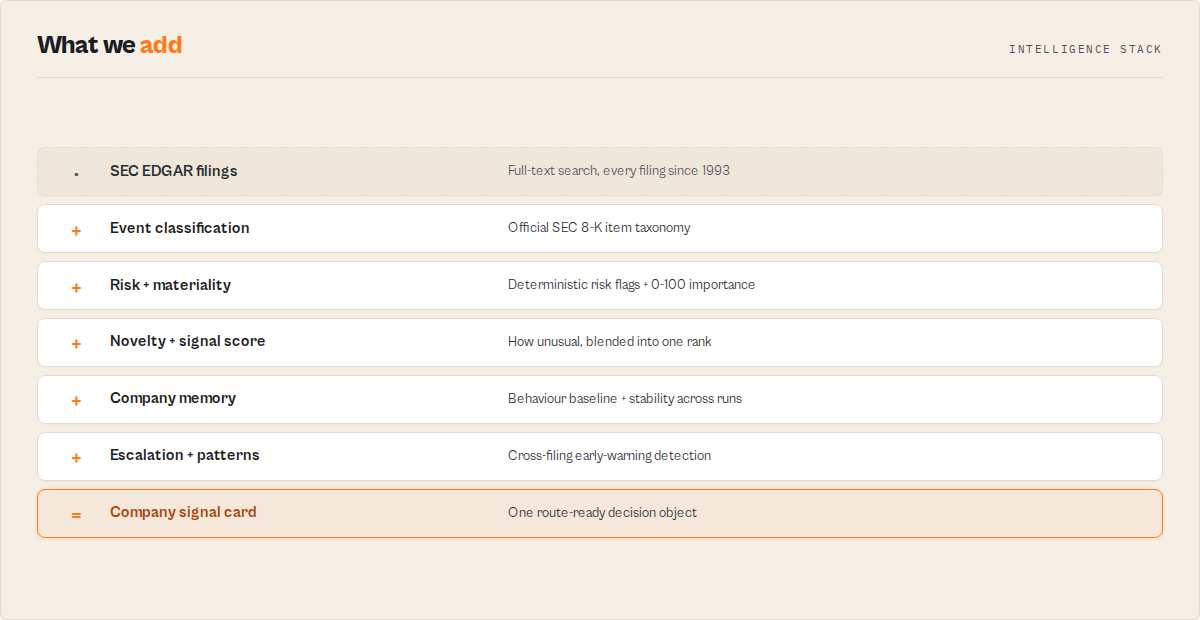
This actor -- an early-warning signal engine built on the official EDGAR Full-Text Search System -- turns millions of filings into ranked signals, remembers each company's behaviour over time, and detects the cross-filing patterns (material weakness → restatement → investigation) that most investors, compliance teams, and journalists never see. No black-box scoring. Fully deterministic and reproducible.
        50,000 SEC filings
                |
        Event classification      (official 8-K item taxonomy)
                |
        Risk + materiality + novelty detection
                |
        Signal scoring             (one number to rank by)
                |
        Company memory             (watchlist, across runs)
                |
        Cross-filing patterns      (escalation, early warning)
                |
        3 critical alerts
- Search -- full-text across every SEC filing since 1993, by keyword, phrase, company, ticker, CIK, or a multi-term screen.
- Detect -- every result carries an event category, risk flags, a materiality score, a novelty score, and one
signalScoreto rank them all. - Monitor -- name a watchlist and schedule it; each run surfaces only what's new, with company behaviour baselines, escalation detection, and cross-filing pattern alerts.
- Automate -- a single
companySignalCardobject, analertSeverityrouting field, stable IDs, and a clean JSON contract that drops into Slack, Zapier, Make, n8n, Dify, or an agent tool call.
What everyone else misses
A filing is rarely important in isolation. A company that files a material weakness may not matter. A company that files:
Material Weakness → Executive Departure → Investigation → Restatement
is telling a very different story.
Generic EDGAR search hands you the latest filing and a link. This actor remembers the prior signals, detects the escalation, and names the cross-filing pattern (DETERIORATING_CONTROL_ENVIRONMENT, PRE_BANKRUPTCY_PATTERN, GOVERNANCE_UPHEAVAL, ACTIVIST_CAMPAIGN) that single-filing tools structurally cannot see -- because it carries company memory across scheduled runs.
Why this exists
Most SEC tools help you find filings. The hard part isn't finding filings -- it's knowing which filing matters, which company is deteriorating, which disclosure is unusual, and which pattern is building over time. This actor answers those questions with deterministic, explainable rules (every signalScore ships its signalDrivers), not opaque AI scoring -- so a compliance officer, a fund analyst, or an automation can trust and audit every signal.
What you get in 30 seconds
Input:
{ "pack": "distress" }
Top result:
{
    "signalScore": 96,
    "alertSeverity": "critical",
    "patternDetected": "PRE_BANKRUPTCY_PATTERN",
    "signalDrivers": ["GOING_CONCERN", "MATERIAL_WEAKNESS", "ESCALATION_DETECTED"]
}
Instead of reading 200 filings, start with the 3 that matter.
Early-warning example
A company a fund is watching files, over four months:
Week 1   Material Weakness
Week 6   Executive Departure
Week 11  Investigation
Week 15  Restatement
A search tool shows four separate, unconnected filings. With a watchlist set, this actor remembers the earlier signals and surfaces, on that fourth filing:
{ "patternDetected": "DETERIORATING_CONTROL_ENVIRONMENT", "alertSeverity": "critical" }
That is the value proposition in one object.
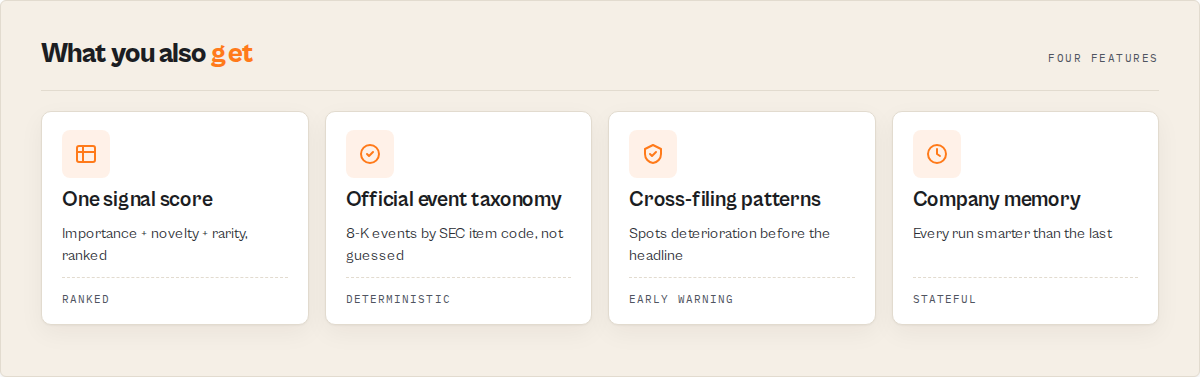
Why analysts use this instead of search
| Capability | Generic EDGAR search | SEC website | This actor |
|---|---|---|---|
| Full-text search | ✓ | ✓ | ✓ |
| Event classification (8-K taxonomy) | ✗ | ✗ | ✓ |
| Risk flags | ✗ | ✗ | ✓ |
| Signal scoring + ranking | ✗ | ✗ | ✓ |
| Persistent company memory | ✗ | ✗ | ✓ |
| Escalation detection | ✗ | ✗ | ✓ |
| Cross-filing pattern detection | ✗ | ✗ | ✓ |
| Watchlist monitoring | ✗ | Limited | ✓ |
| One automation-ready decision object | ✗ | ✗ | ✓ |
Search output vs signal output
The same 8-K, as a generic search tool returns it versus what this actor returns:
A search tool gives you the fact:
{ "formType": "8-K", "eventCategory": "RESTATEMENT" }
This actor gives you the decision:
{
    "signalScore": 96,
    "signalDrivers": ["MATERIAL_WEAKNESS", "RESTATEMENT", "ESCALATION_DETECTED"],
    "patternDetected": "DETERIORATING_CONTROL_ENVIRONMENT",
    "alertSeverity": "critical"
}
One is a record to read. The other is a ranked, explained, route-ready signal -- and every driver is a deterministic rule you can audit, not an AI guess.
Persistent company memory
Most SEC tools forget everything the moment the search ends. With a watchlist set, this actor remembers, per company, across every scheduled run:
- prior risk events and event classifications
- prior alerts and escalation signals
- how often it has filed each kind of event (its behaviour baseline + stability score)
So every run is smarter than the last -- the first cybersecurity incident a watched company files reads differently from its fifth, and a material weakness followed weeks later by a restatement trips an escalation that a one-shot search can never see. A competitor can scrape today's filing; it cannot reconstruct your watchlist's accumulated history.
Who uses this
- Hedge funds & analysts -- find deteriorating companies before earnings; rank a universe by
signalScore. - Compliance teams -- monitor material disclosures and investigations automatically, with an auditable
signalDriverstrail. - Journalists -- surface unusual filings (
noveltyScore,historicallyRare) worth investigating. - Corporate development -- track acquisition, financing, and activist signals across a target list.
- Legal teams -- monitor investigations, governance changes, and risk disclosures on a schedule.
Capabilities at a glance
The early-warning layer (signal score, company memory, escalation, cross-filing patterns) is covered above. The supporting capabilities:
- Event classification from the official SEC 8-K item taxonomy --
eventCategoryper filing (executive change, cybersecurity incident, restatement, acquisition, impairment, and more), not a keyword guess - Risk flags + materiality + novelty -- deterministic
riskFlags[], amaterialityScore(how important), and anoveltyScore(how unusual) -- distinct axes feeding the singlesignalScore - Intelligence packs -- one-click bundles (
distress,governance,acquisition,cyber,short-seller,m-and-a,insider-risk,activist) that set the right search terms and form filter together - Multi-term screening --
queries[]or atemplate; every filing is tagged with which terms it matched (matchedQueries) - Company profile --
sicCode,sicDescription(industry),stateOfIncorporation,businessLocation, straight from the EFTS response - Full-text search across every SEC filing from 1993 to present, with 10 form-type filters (or all types) and explicit dates or a
datePreset - Official EFTS source, no API key -- deduplicated to one entry per accession, rate-limited within SEC guidelines, exports to JSON/CSV/Excel
- Company metadata extraction -- parses company name, stock ticker, and CIK from EDGAR display name format
- Three direct URLs per result -- the filing document, the filing index page (with all exhibits), and the EDGAR browser viewer
- Elasticsearch relevance scoring so you can rank or filter results by match quality
- Accession number deduplication via an in-memory Set, ensuring each unique filing appears exactly once
- Pagination support for up to 200 results per run with automatic page-through logic
- Offset safety cap at 10,000 results per the EDGAR API limit, with a clear warning if reached
- Optional watchlist monitoring -- set a
watchlistNameand the actor remembers which filings it has already returned, tagging each resultNEWorSEENso scheduled runs surface only what changed since last time - Run summary with coverage -- a key-value-store
SUMMARYrecord reports how many filings matched in EDGAR versus how many were returned, a form-type breakdown, top companies, and the filing-date range - Agent-ready output -- every result carries a plain-English
summarystring and a deterministiceventId, so LLM and automation consumers can quote and deduplicate results without joining fields - Minimal resource usage -- runs on 256 MB memory in 5-30 seconds with no browser or headless rendering
How to use
From the Apify Console
- Navigate to the SEC EDGAR Filing Search actor page on Apify
- Click Start to open the input form
- Enter a search query -- a company name, ticker symbol, keyword, or phrase
- Optionally select a filing type from the dropdown (e.g., 10-K for annual reports)
- Optionally set date range boundaries in YYYY-MM-DD format
- Adjust the maximum results (default 25, maximum 200)
- Click Start and wait 5-30 seconds for results
- View results in the Dataset tab, or download as JSON, CSV, or Excel
Using the Apify API (Python)
from apify_client import ApifyClient

client = ApifyClient("YOUR_API_TOKEN")

run = client.actor("rdxxMBwcbBbO8mHe7").call(run_input={
    "query": "artificial intelligence",
    "formType": "10-K",
    "dateFrom": "2024-01-01",
    "dateTo": "2024-12-31",
    "maxResults": 50,
})

for item in client.dataset(run["defaultDatasetId"]).iterate_items():
    print(f"{item['companyName']} ({item['ticker']}) -- {item['formType']} -- {item['filingDate']}")
Using the Apify API (JavaScript)
import { ApifyClient } from "apify-client";

const client = new ApifyClient({ token: "YOUR_API_TOKEN" });

const run = await client.actor("rdxxMBwcbBbO8mHe7").call({
    query: "material weakness",
    formType: "10-K",
    dateFrom: "2023-01-01",
    dateTo: "2024-12-31",
    maxResults: 100,
});

const { items } = await client.dataset(run.defaultDatasetId).listItems();
console.log(`Found ${items.length} filings mentioning material weakness`);
Input parameters
| Parameter | Type | Required | Default | Description |
|---|---|---|---|---|
query | String | No* | artificial intelligence | Keyword, exact phrase (use "quotes"), company name, ticker, or CIK to search the full text of SEC filings. Ignored when pack, queries, or template is set |
pack | String | No | -- | A persona intelligence pack that bundles search terms and a default form filter in one click: short-seller, m-and-a, cyber, insider-risk, activist. Highest priority -- overrides query / queries / template |
queries | String[] | No | -- | Run several searches in one pass; each filing is tagged with which terms it matched (matchedQueries). Turns the actor into a screening engine. Overrides query |
template | String | No | -- | One-click intent that expands into a set of search terms: cybersecurity, going-concern, material-weakness, restatement, bankruptcy, executive-departure, buyback, ai-disclosure, climate, investigation, banking-risk, biotech-risk. Overrides query |
queryMode | String | No | asTyped | How to interpret the query text: asTyped, exactPhrase (wraps in quotes), or allTerms. (EDGAR doesn't support boolean/proximity operators -- use queries for OR-style screening) |
formType | String | No | All Types | Filter by SEC form type: 10-K, 10-Q, 8-K, S-1, DEF 14A, 4, SC 13D, SC 13G, 20-F, or 6-K |
dateFrom | String | No | -- | Start date for the filing search range (YYYY-MM-DD format) |
dateTo | String | No | -- | End date for the filing search range (YYYY-MM-DD format) |
datePreset | String | No | -- | Friendly date window that fills dateFrom/dateTo: last7Days, last30Days, last90Days, lastQuarter, lastYear, yearToDate. Overrides explicit dates |
maxResults | Integer | No | 25 | Maximum number of unique filings to return (1 to 200), shared across all queries |
watchlistName | String | No | -- | Leave blank for a one-off search. Set a name (e.g. ai-8ks) to monitor over time: the actor remembers which filings it already returned under that name, tags each result NEW or SEEN, emits alertReason tokens on new risky filings, and reports a cross-run trend |
* At least one of query, queries, template, or pack must be provided. query carries a default so a run with no input still searches.
Example input
A single full-text search:
{
    "query": "artificial intelligence",
    "formType": "10-K",
    "dateFrom": "2024-01-01",
    "dateTo": "2024-12-31",
    "maxResults": 50
}
A multi-term risk screen with a friendly date window (every filing is tagged with which terms it matched):
{
    "queries": ["material weakness", "going concern", "restatement"],
    "datePreset": "lastQuarter",
    "maxResults": 100
}
A one-click intent template — expands into a set of cybersecurity search terms:
{
    "template": "cybersecurity",
    "formType": "8-K",
    "datePreset": "last30Days"
}
Find companies showing early signs of distress
{
    "pack": "distress",
    "watchlistName": "distress-monitor",
    "datePreset": "lastQuarter",
    "maxResults": 100
}
Scheduled on a watchlist, this surfaces the highest-signalScore filings first and flags companies whose accumulated history trips a DETERIORATING_CONTROL_ENVIRONMENT or PRE_BANKRUPTCY_PATTERN.
Find companies experiencing governance turmoil
{
    "pack": "governance",
    "watchlistName": "governance-watch"
}
Surfaces executive departures, board changes, proxy contests, and the GOVERNANCE_UPHEAVAL pattern -- with signalDrivers on every result explaining why it ranked.
Tips for effective queries
- Use specific keywords for better results -- "revenue recognition restatement" is more targeted than "revenue"
- Combine company and topic -- for example, "Tesla supply chain risk" finds Tesla filings mentioning supply chain risk
- Search by CIK directly -- enter "0000789019" to find all filings from Microsoft
- Narrow date ranges to reduce noise and speed up results for broad keywords
- Leave form type on "All Types" when you want to cast a wide net across every filing category
Output
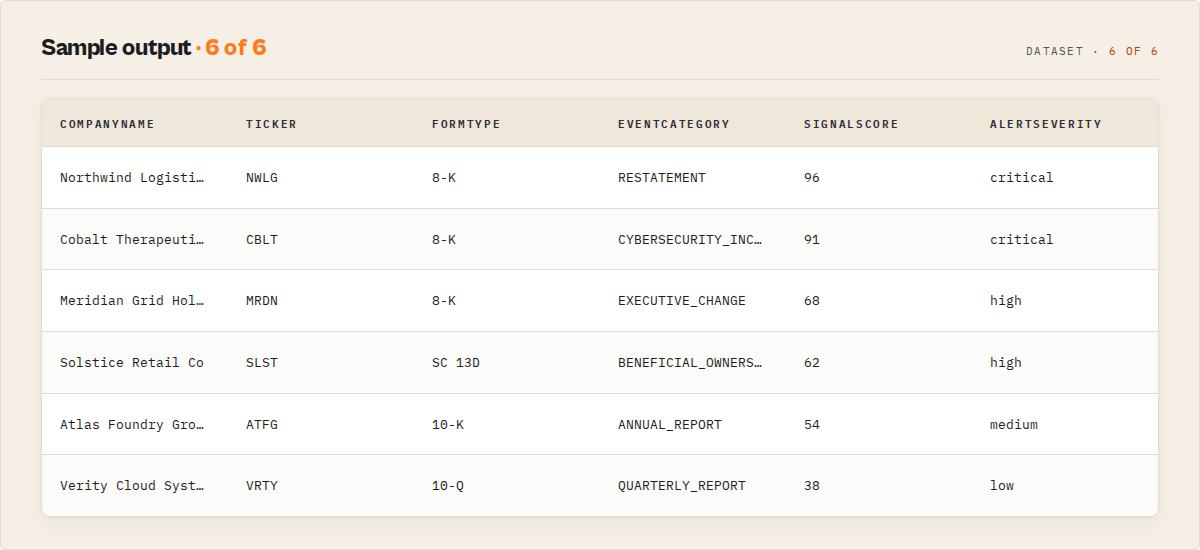
Each filing in the output dataset is a structured record:
{
    "schemaVersion": "1.1.0",
    "recordType": "filing",
    "eventId": "edgar_3f9a1c7d4e2b8a06",
    "accessionNumber": "0001193125-24-065432",
    "formType": "8-K",
    "formTitle": "Current report (8-K)",
    "baseFormType": "8-K",
    "amended": false,
    "documentType": "8-K",
    "filingDate": "2024-02-21",
    "periodEnding": "",
    "companyName": "EXAMPLE TECH CORP",
    "cik": "1234567",
    "ticker": "EXTC",
    "sicCode": "7372",
    "sicDescription": "Prepackaged software",
    "stateOfIncorporation": "DE",
    "businessLocation": "CA",
    "description": "CURRENT REPORT",
    "eventCategory": "CYBERSECURITY_INCIDENT",
    "eventDescription": "Material cybersecurity incident",
    "riskFlags": ["CYBER_INCIDENT"],
    "materialityScore": 83,
    "materialityLevel": "critical",
    "noveltyScore": 94,
    "noveltyLevel": "high",
    "signalScore": 97,
    "signalLevel": "critical",
    "signalDrivers": ["FIRST_EVENT", "CYBER_INCIDENT", "HIGH_MATERIALITY", "HIGH_NOVELTY"],
    "alertSeverity": "critical",
    "priorSimilarInResults": 0,
    "firstSimilarInResultsDate": null,
    "companyHistory": { "similarEventsSeen": 0, "firstSeenAt": null },
    "historicallyRare": true,
    "companyBaseline": { "executiveChanges": 1, "cyberIncidents": 1, "restatements": 0, "bankruptcies": 0, "materialWeaknesses": 0, "goingConcerns": 0, "investigations": 0 },
    "stabilityScore": 94,
    "stabilityLevel": "strong",
    "escalationDetected": false,
    "escalationReason": [],
    "pattern": { "detected": null, "label": null, "stage": 0, "totalStages": 0, "signals": [] },
    "companySignalCard": {
        "signalScore": 97,
        "signalLevel": "critical",
        "materialityLevel": "critical",
        "noveltyLevel": "high",
        "alertSeverity": "critical",
        "eventCategory": "CYBERSECURITY_INCIDENT",
        "riskFlags": ["CYBER_INCIDENT"],
        "stabilityScore": 94,
        "stabilityLevel": "strong",
        "escalationDetected": false,
        "historicallyRare": true,
        "patternDetected": null,
        "signalDrivers": ["FIRST_EVENT", "CYBER_INCIDENT", "HIGH_MATERIALITY", "HIGH_NOVELTY"]
    },
    "matchedQueries": ["cybersecurity incident", "data breach"],
    "fileUrl": "https://www.sec.gov/Archives/edgar/data/1234567/000119312524065432/extc-8k.htm",
    "filingUrl": "https://www.sec.gov/Archives/edgar/data/1234567/000119312524065432/0001193125-24-065432-index.htm",
    "secUrl": "https://www.sec.gov/cgi-bin/browse-edgar?action=getcompany&accession=0001193125-24-065432&type=&dateb=&owner=include&count=40",
    "relevanceScore": 12.45,
    "summary": "EXAMPLE TECH CORP (EXTC) filed a Current report (8-K) on 2024-02-21.",
    "changeFlag": "NEW",
    "alertReason": ["NEW_CYBER_INCIDENT"],
    "extractedAt": "2024-03-15T10:30:00.000Z"
}
Output field reference
| Field | Type | Description |
|---|---|---|
schemaVersion | String | Output-contract version, so downstream consumers can branch on shape changes |
recordType | String | Record discriminator: filing for a result, error for a typed error record |
eventId | String | Deterministic stable id (sha256 of the accession number) -- the same filing yields the same id across runs for clean deduplication |
accessionNumber | String | Unique SEC accession number identifying the filing (format: XXXXXXXXXX-YY-ZZZZZZ) |
formType | String | Root filing type code (e.g., 10-K, 10-Q, 8-K, 8-K/A) |
formTitle | String | Official SEC description of the form type (e.g., "Annual report (10-K)") |
baseFormType | String | Form type with any amendment suffix stripped (10-K/A -> 10-K) |
amended | Boolean | True when the filing is an amendment (form type ends in /A) |
documentType | String | Specific document type within the filing (may differ from formType for exhibits) |
filingDate | String | Date the filing was submitted to the SEC (YYYY-MM-DD) |
periodEnding | String | Reporting period end date, if applicable (empty for some filing types) |
companyName | String | Name of the filing company as registered with the SEC |
cik | String | Central Index Key -- the SEC's unique numeric identifier for each filer |
ticker | String | Stock ticker symbol, if available (empty for private filers and certain funds) |
sicCode | String | SEC Standard Industrial Classification code (from the EFTS response; empty when EDGAR omits it) |
sicDescription | String|null | Industry description mapped from the SIC code (null when the code is unmapped or absent -- never invented) |
stateOfIncorporation | String | State or country of incorporation (from the EFTS response) |
businessLocation | String | Principal business location (from the EFTS response) |
description | String | Filing description from the EDGAR index (e.g., "ANNUAL REPORT") |
eventCategory | String | Event classification. For 8-K filings, derived from the official SEC item taxonomy (e.g., EXECUTIVE_CHANGE, CYBERSECURITY_INCIDENT, RESTATEMENT, ACQUISITION_DISPOSITION); otherwise derived from the form type |
eventDescription | String | Human-readable description of the event category |
riskFlags | String[] | Stable risk tokens (GOING_CONCERN, MATERIAL_WEAKNESS, CYBER_INCIDENT, BANKRUPTCY, RESTATEMENT, INVESTIGATION, ...) derived from the matched search terms plus the event category. Empty array when none |
materialityScore | Number | Importance score 0-100 (base form weight + 8-K event weight + risk-flag weights). Sort by this to surface the most important filings first |
materialityLevel | String | Materiality band: critical (>=75), high (>=50), medium (>=30), low |
noveltyScore | Number | How unusual the filing is within the result set (0-100): rarer event category + rarer form type + first-of-its-kind for the company. A distinct axis from materiality -- "important" vs "unusual" |
noveltyLevel | String | Novelty band: high (>=75), medium (>=45), low |
signalScore | Number | The single "look at this first" rank (0-100): a blend of materiality (importance) + novelty (unusualness) + a historical-rarity bump. The dataset is sorted by this -- row 1 is the filing that matters most |
signalLevel | String | Signal band: critical (>=75), high (>=55), medium (>=35), low |
signalDrivers | String[] | Why the signal score is high -- stable tokens, most-decisive first: risk flags + FIRST_EVENT / ESCALATION_DETECTED / PATTERN_<name> / HIGH_MATERIALITY / HIGH_NOVELTY. Explainable, not a black box. Empty on a quiet filing |
alertSeverity | String | Single alert-routing field: critical / high / medium / low / none, composed from materiality + risk flags. Filter automations on this (e.g. "only alert on critical") |
priorSimilarInResults | Number | Count of other filings in this result set from the same company with the same event category (within-run "has this happened before?") |
firstSimilarInResultsDate | String|null | Earliest filing date among those same-company same-event filings (null when none) |
companyHistory | Object|null | Watchlist mode only: { similarEventsSeen, firstSeenAt } -- how often this company has filed this event category since you started watching this watchlist (not absolute filing history). Drives the FIRST_<EVENT> alert reason |
historicallyRare | Boolean|null | Watchlist mode only: true when this company has never filed this event category before (watchlist-scoped, not absolute SEC history) |
companyBaseline | Object|null | Watchlist mode only: this company's accumulated behaviour profile -- counts of executiveChanges / cyberIncidents / restatements / bankruptcies / materialWeaknesses / goingConcerns / investigations seen since watching |
stabilityScore | Number|null | Watchlist mode only: 0-100 stability derived from the behaviour profile (higher = steadier; penalised by restatements, bankruptcies, material weaknesses, going concerns, investigations, executive churn) |
stabilityLevel | String|null | Stability band: strong (>=80), stable (>=60), watch (>=35), fragile |
escalationDetected | Boolean|null | Watchlist mode only: true when a NEW filing adds a risk dimension this company didn't carry before (e.g. a prior material weakness now joined by a restatement) |
escalationReason | String[] | The newly-added risk dimensions behind an escalation (e.g. ["ADDED_RESTATEMENT"]). Empty when none |
pattern | Object|null | Watchlist mode only: a cross-filing pattern detected from the company's accumulated signals -- { detected, label, stage, totalStages, signals }. E.g. PRE_BANKRUPTCY_PATTERN, DETERIORATING_CONTROL_ENVIRONMENT. Presence-based and deterministic -- "this company has exhibited these signals", not a probabilistic forecast |
companySignalCard | Object | The one object automations read. Bundles the headline decision fields -- signalScore/signalLevel, materialityLevel, noveltyLevel, alertSeverity, eventCategory, riskFlags, plus the watchlist signals (stabilityScore/Level, escalationDetected, historicallyRare, patternDetected). A consolidation of fields already on the record, so a downstream rule reads one object instead of twenty |
matchedQueries | String[] | Which of the run's search terms this filing matched (one entry for a single search; multiple in multi-query/template mode) |
fileUrl | String | Direct URL to the filing document (HTML or text format) |
filingUrl | String | URL to the SEC filing index page listing all exhibits and attachments |
secUrl | String | URL to the EDGAR company browser viewer for this filing |
relevanceScore | Number | Elasticsearch relevance score from EDGAR (higher = closer match to query) |
summary | String | Plain-English one-line description of the filing, quotable by an LLM or agent without joining fields |
changeFlag | String | Present in watchlist mode only: NEW the first time the filing is seen under the watchlist, SEEN thereafter |
alertReason | String[] | Present in watchlist mode only: per-risk alert tokens on NEW filings (e.g., NEW_CYBER_INCIDENT), plus FIRST_<EVENT> (e.g. FIRST_CYBERSECURITY_INCIDENT) the first time this company files this event under the watchlist. Empty when nothing fires |
extractedAt | String | ISO 8601 timestamp of when the data was extracted |
Run summary (key-value store)
Every run also writes a SUMMARY record to the run's key-value store answering "did I get everything?" and "what's in here?" at a glance:
coverage--requested,returned,totalAvailable,truncatedclusters-- event and risk clusters as sorted{label, count}arrays (e.g. "17 filings classifiedEXECUTIVE_CHANGE, 8CYBERSECURITY_INCIDENT")byFormType,byEventCategory,byRiskFlag,byIndustry,alertSeverityCounts-- result composition across form types, classified events, risk flags, industries (SIC), and alert severitymatchedQueryCounts-- how many filings each query/template term matched (the screening scorecard)topCompaniesanddateRangenewFilingsandtrend(previousPeriod,currentPeriod,changePercent) in watchlist mode -- e.g. "cybersecurity-incident filings up 175% vs the last run"
Use cases
- Financial due diligence -- search for "going concern" or "material weakness" across 10-K filings to identify companies with elevated financial risk before investment decisions
- Competitive intelligence -- monitor 8-K current reports from competitors for disclosures about acquisitions, executive departures, contract wins, or restructuring events
- Regulatory compliance monitoring -- set a
watchlistNameand schedule the actor to track a keyword or company over time; each run tags only the filings that appeared since the last run, so you alert on new disclosures without re-processing the whole result set - Academic and market research -- query filings for emerging technology terms ("generative AI", "quantum computing"), ESG disclosures, or industry-specific metrics across thousands of companies
- Insider trading analysis -- filter for Form 4 filings by keyword to identify insider buying and selling activity tied to specific events or disclosures
- Legal discovery and litigation support -- locate specific contractual terms, risk factor disclosures, or related-party transactions mentioned in registration statements and annual reports
- Journalism and investigations -- search for entity names, dollar amounts, or business relationships buried in public SEC filings that may not surface through standard news search
- IPO and offering tracking -- filter for S-1 registration statements to monitor companies preparing for initial public offerings or secondary offerings
- Beneficial ownership research -- search SC 13D and SC 13G filings to track activist investors, large institutional holders, and ownership changes at target companies
- Cross-border compliance -- monitor 20-F and 6-K filings from foreign private issuers for disclosure of international operations, sanctions exposure, or geopolitical risk factors
API & integration
Python
from apify_client import ApifyClient

client = ApifyClient("YOUR_API_TOKEN")

run = client.actor("rdxxMBwcbBbO8mHe7").call(run_input={
    "query": "cybersecurity incident",
    "formType": "8-K",
    "dateFrom": "2024-06-01",
    "maxResults": 50,
})

for item in client.dataset(run["defaultDatasetId"]).iterate_items():
    print(f"{item['companyName']} -- {item['filingDate']} -- {item['filingUrl']}")
JavaScript
import { ApifyClient } from "apify-client";

const client = new ApifyClient({ token: "YOUR_API_TOKEN" });

const run = await client.actor("rdxxMBwcbBbO8mHe7").call({
    query: "data breach",
    formType: "8-K",
    maxResults: 25,
});

const { items } = await client.dataset(run.defaultDatasetId).listItems();
items.forEach((item) => console.log(item.companyName, item.filingDate));
cURL
# Start the actor run
curl -X POST "https://api.apify.com/v2/acts/rdxxMBwcbBbO8mHe7/runs?token=YOUR_API_TOKEN" \
  -H "Content-Type: application/json" \
  -d '{"query": "stock buyback", "formType": "10-K", "maxResults": 25}'

# Fetch results from the dataset
curl "https://api.apify.com/v2/datasets/DATASET_ID/items?token=YOUR_API_TOKEN&format=json"
Available integrations
- Apify API -- retrieve results programmatically in JSON, CSV, XML, or Excel format
- Webhooks -- trigger notifications or downstream workflows when a run completes
- Google Sheets -- automatically push filing data to a spreadsheet after each run
- Slack -- receive alerts when new filings match your search criteria
- Zapier / Make (Integromat) -- connect to 3,000+ apps for custom automation workflows
- Apify Schedules -- run searches daily, weekly, or monthly to monitor new filings
- Python and JavaScript SDKs -- use the official Apify client libraries for programmatic access
Use in Dify
Drop this actor into Dify workflows via the Apify plugin's Run Actor node. Every record carries a single companySignalCard object plus stable enums a Dify if/else node routes on directly -- so you wire a decision flow without parsing prose, HTML, or twenty separate fields:
companySignalCard-- the one object to branch on:signalScore,signalLevel,alertSeverity,escalationDetected,historicallyRare,patternDetected,signalDrivers. One node reads it instead of twenty fieldsalertSeverity--critical/high/medium/low/none(the "act now vs ignore" gate)pattern.detected--DETERIORATING_CONTROL_ENVIRONMENT/PRE_BANKRUPTCY_PATTERN/ ... (route an early-warning pattern to a human)changeFlag--NEW/SEEN(watchlist mode; "only act on what's new since last run")recordType/failureType-- route results, summary, and typed failures down separate branches
A generic EDGAR scraper hands a Dify node raw HTML to parse; this hands it one decision object with equality-matchable enums.
- Actor ID:
ryanclinton/edgar-filing-search - Sample input (scheduled monitor for new cybersecurity 8-Ks):
{
    "query": "cybersecurity incident",
    "formType": "8-K",
    "watchlistName": "cyber-8ks",
    "maxResults": 50
}
- Branching example -- a Dify if/else node on each dataset record:
companySignalCard.alertSeverity == "critical"-> page a human / post thesummary+signalDriversto SlackcompanySignalCard.patternDetected != null-> route the early-warning pattern to an analyst queuechangeFlag == "SEEN"-> drop (already alerted on a previous run)recordType == "error"-> log + retry the run later
Run it on an Apify Schedule with a watchlistName and the changeFlag field turns the flow into a "new SEC filing" trigger -- Dify acts only on NEW records, so the same scheduled search never re-alerts on filings it already reported.
How it works
The actor queries the SEC EDGAR Full-Text Search System (EFTS), an Elasticsearch-based index maintained by the SEC that covers every filing submitted since approximately 1993.
- Input validation -- the actor reads your search query, optional form type filter, date range, and max results parameter
- API query construction -- builds a parameterized request to
https://efts.sec.gov/LATEST/search-indexwith the query string, form type, date range, and pagination offset - Paginated fetching -- sends requests in pages of up to 50 results, with a 150ms delay between requests to respect the SEC's 10 requests/second rate limit
- Company metadata parsing -- extracts company name, ticker symbol, and CIK from the EDGAR display name format (
"Company Name (TICKER) (CIK 0001234567)") - Accession number deduplication -- tracks seen accession numbers in a Set, keeping only the highest-relevance hit per unique filing
- URL construction -- builds three direct URLs for each filing: the document file URL, the filing index page, and the EDGAR browser viewer
- Result output -- pushes all unique filings to the Apify dataset as structured records, then writes a
SUMMARYcoverage record to the key-value store. In watchlist mode, each result is taggedNEWorSEENagainst the filings already seen under that watchlist name
                    +-------------------+
                    |   User Input      |
                    | query, formType,  |
                    | dateRange, max    |
                    +--------+----------+
                             |
                             v
                    +-------------------+
                    |  EDGAR EFTS API   |
                    | efts.sec.gov/     |
                    | LATEST/search-    |
                    | index             |
                    +--------+----------+
                             |
                     (paginated fetch,
                      150ms delay,
                      50 per page)
                             |
                             v
                    +-------------------+
                    | Parse & Dedupe    |
                    | - Extract company |
                    |   name, ticker,   |
                    |   CIK from        |
                    |   display_names   |
                    | - Deduplicate by  |
                    |   accession #     |
                    +--------+----------+
                             |
                             v
                    +-------------------+
                    |  Build URLs       |
                    | - fileUrl         |
                    | - filingUrl       |
                    | - secUrl          |
                    +--------+----------+
                             |
                             v
                    +-------------------+
                    |  Apify Dataset    |
                    | JSON / CSV / XLS  |
                    +-------------------+
Performance & cost
Pricing is pay-per-event: $0.002 per filing returned -- you pay only for the filings you actually get back. A search that matches nothing is not charged, and there is no subscription. The actor runs on 256 MB with no browser or heavy computation, so platform compute is negligible on top.
| Scenario | Filings returned | Approx. time | Pay-per-event cost |
|---|---|---|---|
| Quick keyword search | 25 | 5-8 seconds | ~$0.05 |
| Filtered form-type search | 50 | 8-15 seconds | ~$0.10 |
| Broad keyword screen | 100 | 15-25 seconds | ~$0.20 |
| Maximum extraction | 200 | 20-45 seconds | ~$0.40 |
The SEC EDGAR EFTS data source itself is free and needs no API key -- the pay-per-event charge covers the classification, scoring, monitoring, and pattern intelligence the actor adds on top. Watchlist/monitoring runs that return no new filings cost nothing.
Limitations
- Maximum 200 results per run -- the actor caps output at 200 unique filings to keep run times and costs low; for larger extractions, use multiple runs with date range partitioning
- EDGAR offset cap of 10,000 -- the SEC search API limits pagination depth to 10,000 hits, so extremely broad queries may not reach all matching filings
- Ticker not always available -- private companies, investment funds, and certain foreign issuers file with the SEC but have no stock ticker symbol
- Full-text index coverage starts around 1993 -- filings submitted before the EDGAR system was established may have limited or no full-text search coverage
- SEC rate limiting -- the actor enforces a 150ms delay between requests; if the SEC temporarily throttles traffic during high-volume periods, results may take slightly longer
- No filing content extraction -- this actor returns metadata and links, not the full text of the filing documents themselves; use the SEC EDGAR Filing Analyzer actor for deep content extraction
- Display name parsing is best-effort -- the ticker and company name are parsed from the EDGAR display name format, which may occasionally produce incomplete results for entities with non-standard naming
Responsible use
- Respect SEC rate limits -- this actor enforces a 150ms request delay and includes a proper User-Agent header as required by the SEC; do not modify these settings or run excessive parallel instances
- EDGAR data is public record -- all SEC filings are public documents, but use the data responsibly and in compliance with applicable securities laws and regulations
- Do not use for market manipulation -- filing data should be used for legitimate research, analysis, and compliance purposes, not for insider trading or market manipulation schemes
- Cite SEC EDGAR as your source -- when publishing or distributing data derived from EDGAR filings, attribute the source to the U.S. Securities and Exchange Commission EDGAR system
- Be mindful of downstream use -- if feeding filing data into automated trading systems or AI models, ensure your use case complies with SEC regulations and your organization's compliance policies
FAQ
Do I need an API key to use this actor? No. The SEC EDGAR Full-Text Search System is a free public resource. No registration, API key, or authentication is required.
What filing types can I search? You can search all SEC filing types. The dropdown filter provides shortcuts for the 10 most common types (10-K, 10-Q, 8-K, S-1, DEF 14A, Form 4, SC 13D, SC 13G, 20-F, 6-K), but leaving the filter on "All Types" searches every filing category including 13F, N-1A, DEFA14A, and hundreds of others.
How far back do EDGAR filings go? The EDGAR full-text search index covers filings from approximately 1993 to the present. Older filings may have limited full-text search coverage depending on when they were digitized.
How often is the EDGAR data updated? The SEC EDGAR EFTS index is updated continuously as new filings are submitted. Filings are typically searchable within minutes of submission to the SEC.
Can I search by CIK number? Yes. Enter a CIK number (e.g., "0000789019" for Microsoft) directly in the search query field. The full-text search will match it across all filing fields.
What is an accession number? An accession number is a unique identifier assigned by the SEC to every filing. It follows the format XXXXXXXXXX-YY-ZZZZZZ (filer ID, year, sequence number) and can be used to look up any filing directly on the SEC website.
Why do some results have an empty ticker field? Not all SEC filers are publicly traded companies. Private companies, investment funds, municipal bond issuers, and certain foreign entities file with the SEC but have no associated stock ticker symbol.
What does the relevance score mean? The relevance score comes from the EDGAR Elasticsearch index and represents how closely a filing matches your search query. Higher scores indicate stronger matches. Scores are relative to each search and should be used for ranking results within a single query, not for comparing across different searches.
Can I get the full text of a filing?
This actor returns metadata and links, not the full filing content. Use the fileUrl to access the document directly, or pair this actor with the SEC EDGAR Filing Analyzer for automated content extraction.
How do I search for an exact phrase?
Wrap your query in double quotes -- for example, "going concern" -- to search for that exact phrase rather than individual words.
What happens if my query returns more than 200 results? The actor caps output at 200 unique filings per run. For broader searches, split your query into multiple runs using date range partitioning (e.g., one run per quarter or per year).
Can I schedule this actor to run automatically?
Yes. Use Apify Schedules to run the actor on a daily, weekly, or monthly cadence. Pair it with a watchlistName: the actor remembers which filings it has already returned under that name and tags each result NEW or SEEN, so a scheduled run highlights only the filings that appeared since the last run -- ideal for monitoring new disclosures that match a keyword, company, or form type over time.
How does watchlist mode work, and does it cost extra?
Set any watchlistName (e.g. ai-8ks) to turn a one-off search into ongoing monitoring. The actor stores the accession numbers it has already returned under that name in a named key-value store, so the next run can tell new filings from ones you have already seen. On the first run every result is tagged NEW. It does not change pricing -- you are charged per filing returned exactly as in a normal search.
Related actors
| Actor | Description |
|---|---|
| SEC EDGAR Filing Analyzer | Analyze specific SEC filings in depth by accession number, extracting financial data and key sections |
| SEC Insider Trading | Track insider buying and selling activity from SEC Form 4 filings with transaction details |
| Congressional Stock Trade Tracker | Monitor stock trades disclosed by members of the U.S. Congress under the STOCK Act |
| CFPB Consumer Complaints | Search consumer complaint data from the Consumer Financial Protection Bureau database |
| FDIC Bank Data Search | Look up financial data, branch locations, and regulatory history for FDIC-insured banks |
| OFAC Sanctions Search | Search the U.S. Treasury OFAC sanctions list for designated individuals and entities |
Related actors
AI Cold Email Writer — $0.01/Email, Zero LLM Markup
Generates personalized cold emails from enriched lead data using your own OpenAI or Anthropic key. Subject line, body, CTA, and optional follow-up sequence — $0.01/email, zero LLM markup.
Bulk Email Verifier — MX, SMTP & Disposable Detection at Scale
Verify email deliverability in bulk — MX records, SMTP mailbox checks, disposable detection (55K+ domains), role-based flagging, catch-all detection, domain health scoring (SPF/DKIM/DMARC), and confidence scores. $0.005/email, no subscription.
CFPB Complaint Intelligence — Vendor Risk & Screening
Turn 5M+ CFPB consumer complaints into decisions: screen companies pass / review / fail, score complaint-handling risk, monitor what changed since last run, benchmark cohorts, and build audit-ready due-diligence packs. Filter by company, product, state, and date. No API key.
Company Deep Research — SEC, GitHub, DNS & Social
Research any company from a domain. Get website metadata, Wikipedia summary, GitHub repos & stars, SEC EDGAR filings & ticker, academic papers, DNS records, and social media profiles in one JSON report.
Ready to try SEC EDGAR Filing Search & Signal Engine — Risk, Events & Alerts?
Run it on your own Apify account. Apify offers a free tier with $5 of monthly credits.
Open on Apify Store