
By Ryan Clinton — Apify Store creator publishing as ryanclinton, focused on API wrapper design and data tooling reliability.
The problem: API wrapper actors fail silently when users type words instead of codes
Most government and institutional APIs require standardized codes as inputs — ISO country codes, Harmonized System tariff numbers, CIK identifiers, drug application numbers. Users do not know these codes. They type "olive oil" and get HTTP 400. They type "Germany" and get "invalid reporter code." A 2023 Postman State of the API Report found that 52% of developers spend more time understanding API documentation than writing integration code. For non-developer users — analysts, compliance officers, researchers — the barrier is even higher.
What is Smart Input Resolution? Smart Input Resolution is a pre-processing pattern where an API wrapper automatically converts human-readable text into the specific codes, identifiers, or formatted values that an upstream API requires — transparently, before the main API call.
Why it matters:
- Users type what they know (product names, country names, company names) and the wrapper handles the natural language to code mapping behind the scenes
- In my experience, failed runs from code-format errors drop significantly after adding a resolution layer, especially across trade, regulatory, and compliance actors
- MCP servers and AI agents generate text, not codes, so a resolution layer at the wrapper level is usually the most reliable approach in practice
Use it when: the upstream API requires HS tariff codes, ISO country codes, SEC CIK numbers, FDA application numbers, EPA facility IDs, OSHA establishment numbers, or any classification code that a normal person would not memorize.
In this article: What it is · How it works · Best practices · Common mistakes · Comparisons · AI agents & MCP · When to use it · Case study · Implementation · FAQ
Quick answer — Smart Input Resolution in 5 bullets:
- What it is: A code lookup layer that sits between user input and the upstream API, resolving human text to the exact code the API expects
- When to use it: Any API wrapper where the input requires standardized codes (HS codes, ISO codes, CIK numbers, entity IDs) and your users are not API specialists
- When NOT to use it: The API already accepts natural language natively, or the code set is small enough for a dropdown (under 20-30 values)
- Typical implementation: Detect whether input is already a code, query a reference source if not, handle ambiguity — a minimal proof-of-concept fits in roughly 50 lines of TypeScript, though production implementations usually need more for retries, caching, and error handling
- Main tradeoff: In my implementations against government reference endpoints, resolution usually adds about 200–500ms per unique lookup before caching — negligible compared to a failed run that returns zero data
Input-to-output examples:
| Human input | Resolved code | Example system |
|---|---|---|
| Germany | 276 | ISO 3166-1 numeric |
| Pfizer | CIK 0000078003 | SEC EDGAR |
| Olive oil | 1509 | Harmonized System |
| DE | 276 | ISO alpha-2 to numeric |
| pharmaceutical | Chapter 30 | HS chapter-level |
| steel billet | 7207 | HS heading (narrow match) |
What is Smart Input Resolution?
Definition (short version): Smart Input Resolution is an API wrapper design pattern that converts human-readable inputs into the exact codes or identifiers required by an upstream API before execution.
Smart Input Resolution is a design pattern for API wrapper actors that automatically resolves human-readable text inputs into the standardized codes that upstream APIs require. Instead of exposing raw API input fields (which expect numeric codes, classification IDs, or formatted identifiers), the actor accepts natural language and translates it to the correct code before making the request. You will also see this called "input resolution," "entity resolution for API inputs," or "pre-request normalization" — same idea, different labels.
There are 3 categories of API inputs that benefit from this pattern:
- Classification codes — Harmonized System tariff codes (over 5,000 subheadings), NAICS industry codes (1,057 six-digit codes as of the 2022 NAICS revision), ICD medical codes, SIC codes
- Entity identifiers — SEC CIK numbers (over 800,000 registered entities in EDGAR), FDA application numbers, EPA facility IDs, OSHA establishment numbers
- Geographic codes — ISO 3166-1 numeric country codes (249 entries), FIPS state/county codes, UN M.49 region codes, postal codes
The distinction that matters: validation rejects bad input; resolution translates it into good input.
How does Smart Input Resolution work? (step-by-step)
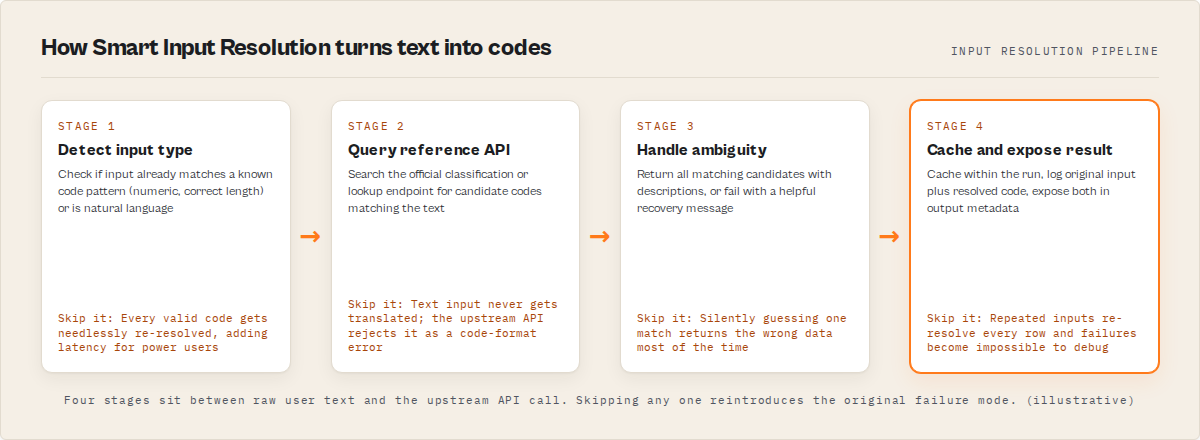
The implementation follows a three-step pattern that runs before the main API call:
Step 1: Detect input type. Check whether the user entered something that looks like a code (numeric, correct length, matches a known pattern) or natural language text. If it is already a valid code, skip resolution entirely — zero overhead for power users.
Step 2: Query the reference API. Most government data systems have a companion reference or lookup endpoint. UN COMTRADE has a classifications API. The World Customs Organization maintains the HS nomenclature with searchable descriptions. EDGAR has a company search endpoint. Use these to resolve the text to candidate codes.
Step 3: Handle ambiguity. If the lookup returns exactly one match, use it automatically. If it returns multiple matches, include all results with descriptions so the user can refine. If it returns zero matches, fail with a helpful error — not just "invalid code."
Here is what a resolved input looks like as structured output:
{
  "input": "Germany",
  "detectedType": "country_name",
  "resolvedValue": "276",
  "resolutionSystem": "ISO 3166-1 numeric",
  "confidence": 1.0
}
And when the input is ambiguous:
{
  "input": "coffee",
  "detectedType": "commodity_text",
  "resolvedValue": null,
  "candidates": [
    { "code": "0901.11", "description": "Coffee, not roasted, not decaffeinated" },
    { "code": "0901.12", "description": "Coffee, not roasted, decaffeinated" },
    { "code": "0901.21", "description": "Coffee, roasted, not decaffeinated" },
    { "code": "2101.11", "description": "Extracts, essences and concentrates of coffee" }
  ],
  "resolutionSystem": "Harmonized System",
  "confidence": 0.0,
  "message": "Multiple matches found. Please specify which coffee category."
}
What are the best practices for Smart Input Resolution?
I have built this pattern into dozens of API wrapper actors. Here is what works:
- Detect and pass through valid codes. If the input already matches the expected format, skip resolution entirely. Zero overhead for power users.
- Resolve text before validation. Translation first, rejection only after translation fails.
- Query the official reference source when possible. Use the government API's own classification endpoint. Third-party mappings go stale.
- Return disambiguation options instead of guessing. When "metal" matches 15 HS headings, show all 15. Never silently pick one.
- Cache within the run. If a batch run queries 500 trade records for Germany, resolve "Germany" to 276 once, not 500 times.
- Log original input and resolved code. Debugging is impossible without this. Store both values.
- Expose resolved values in output metadata. Let the user see what their input was translated to. Transparency builds trust.
- Fail with a helpful recovery message. "No HS code found for 'widget.' Try 'plastic widget' or enter the HS code directly (e.g., 3926)." — that is a useful error.
Common mistakes with Smart Input Resolution
- Guessing on ambiguous input instead of asking. If "sugar" matches three HS codes, picking one silently will return wrong data 66% of the time. Always surface the options.
- Not passing through valid codes. If someone enters "276" and your resolution layer tries to text-search "276" against country names, you have broken the power-user path.
- Hardcoding lookup tables that go stale. ISO country codes change. HS codes get revised every 5 years. Use the live reference API, not a JSON file from 2019.
- Resolving when the upstream API already accepts text. Some APIs handle natural language natively. Adding a resolution layer on top just adds latency for no benefit.
- Ignoring the error path. The resolution call itself can fail (reference API down, rate limited). Your actor needs a fallback.
- Treating resolution as validation. Resolution translates. Validation checks constraints. Do not merge them into one function.
Smart Input Resolution vs input validation vs autocomplete vs entity search
| Method | What it does | Best for | Works with APIs | Works with MCP/AI agents | Main weakness |
|---|---|---|---|---|---|
| Input validation | Checks format and rejects bad input | Preventing malformed requests | Yes | Partially | Does not help fix the input |
| Autocomplete | Suggests options as user types | GUI-based interfaces | No (needs frontend) | No | Usually not useful for direct API or MCP calls |
| Entity search | Finds entities matching a query | Discovery and exploration | Yes | Yes | Returns results, not resolved codes |
| Smart Input Resolution | Translates text to the exact code the API needs | API wrappers and tool-use | Yes | Yes | Adds latency; ambiguity is imperfect |
Input validation tells you what is wrong. Autocomplete helps you guess. Entity search helps you find things. Smart Input Resolution — or what you might call a "code lookup layer" — actually fixes the input so the API call succeeds.
Why Smart Input Resolution matters for AI agents and MCP servers
This is where the pattern stops being a nice-to-have and becomes practically necessary.
When an AI agent calls an MCP server or any tool-use function, it generates inputs from natural language conversation. The LLM produces human-readable text — "Germany," "Pfizer," "olive oil" — not ISO 3166-1 numeric code 276, not CIK 0000078003, not HS heading 1509. In practice, large language models often struggle to produce correct classification codes without assistance. They hallucinate plausible-looking codes that do not exist. They mix up code systems. They format codes incorrectly.
Tool wrappers that require exact IDs tend to be brittle in practice, especially when used with AI-generated inputs. I see this regularly in production. Smart Input Resolution reduces tool-call brittleness by accepting what the LLM actually produces and resolving it to what the API actually needs. The Model Context Protocol specification defines tool inputs as JSON Schema — we cover how this works across our MCP servers —, but the values AI agents fill in come from conversation context — natural language, not code lookups. Pre-request normalization at the wrapper layer is typically the most reliable place for this translation to happen.
When should you use Smart Input Resolution in an API wrapper?
Use it when your upstream API requires standardized codes and your users are not specialists in that code system. Specifically:
- The API expects classification codes (HS, NAICS, ICD, SIC) and your users think in product names, not six-digit numbers
- The API expects entity identifiers (CIK, EPA facility ID, OSHA establishment number) and your users know company names, not registry IDs
- The API expects geographic codes (ISO 3166-1, FIPS, UN M.49) and your users type country or state names
- Your actor is exposed via MCP servers or AI agents that generate natural language inputs
- You are building a pay-per-event actor where failed runs cost users money
Skip it when the API already accepts natural language natively, when the code set is small enough for a dropdown (under 20-30 values), or when your users are API specialists who prefer entering codes directly.
Case study: trade data actor
Before Smart Input Resolution, my UN COMTRADE Search actor required numeric reporter codes and HS commodity codes. Users who entered "Germany" or "olive oil" got HTTP 400 errors. Across a sample of 200 runs over a 30-day window (January-February 2026), 38% of failed runs were caused by code-format input errors — the user entered text where a numeric code was expected.
After adding input resolution — country names mapped to ISO 3166-1 numeric codes, commodity phrases mapped to HS headings via the COMTRADE classifications API — code-format failures dropped to under 15% of failed runs. The remaining failures were genuine issues (API timeouts, rate limits, empty result sets). Resolution added roughly 300ms per unique input in my testing against the COMTRADE reference endpoint, amortized across batch queries via within-run caching. Support messages about "broken" inputs dropped noticeably. These numbers reflect one actor type against one government API — results will vary depending on reference endpoint speed and input complexity.
Implementation checklist
- Identify every input field that requires a standardized code
- Find the reference API or data source for each code system
- Write an
isValidCode()function that detects when the input is already a valid code - Write a
resolveToCode()function that queries the reference source - Write an ambiguity handler that returns multiple matches with descriptions
- Add within-run caching so repeated inputs resolve only once
- Log both the original input and the resolved code in output metadata
- Write error messages that explain what was searched and suggest alternatives
A minimal proof-of-concept fits in roughly 50 lines of TypeScript, though production implementations typically need more for retries, caching, and error handling. Here is the core pattern:
function isValidCode(input: string, pattern: RegExp): boolean {
  return pattern.test(input.trim());
}

async function resolveToCode(
  input: string,
  referenceUrl: string
): Promise<{ code: string; description: string }[]> {
  const response = await fetch(
    `${referenceUrl}?q=${encodeURIComponent(input)}`
  );
  return response.json();
}

function selectBestMatch(
  matches: { code: string; description: string }[]
): string {
  if (matches.length === 1) return matches[0].code;
  if (matches.length === 0) throw new Error('No matches found');
  throw new Error(
    `Ambiguous input. Matches: ${matches
      .map((m) => `${m.code} (${m.description})`)
      .join(', ')}`
  );
}
This works with any code system that has a searchable reference source — government classification APIs, local JSON lookup tables, or custom endpoints. You can test your actor's input handling with ApifyForge's Input Tester and validate your output schema with the Schema Validator.
Key facts about Smart Input Resolution
- Smart Input Resolution is a pre-processing pattern, not a runtime service — it runs once before the API call
- The Harmonized System contains over 5,000 six-digit subheadings across 97 chapters (World Customs Organization)
- SEC EDGAR contains over 800,000 registered entities, each with a unique CIK number
- AI agents and LLMs generate text, not classification codes — for code-dependent tools exposed to LLMs, a wrapper-layer resolution step is usually the most reliable approach in practice
- The pattern works with any interface: Apify Console, direct API, integrations, MCP servers, and CLI tools
- Within-run caching means batch queries pay the resolution cost only once per unique input
- Resolution and validation are separate steps — resolution translates, validation checks constraints
- In my implementations against government reference endpoints, resolution typically adds 200–500ms per unique lookup before caching — a 5-10% increase on queries that take 2-10 seconds total
Glossary
- API wrapper — An actor or service that sits between users and an upstream API, simplifying the interface and handling authentication, pagination, and input formatting
- Upstream API — The original data source API (e.g., UN COMTRADE, SEC EDGAR, openFDA) that the wrapper calls on the user's behalf
- Classification code — A standardized identifier within a code system (HS codes, NAICS codes, ICD codes) used to categorize products, industries, or conditions
- Entity identifier — A unique ID assigned to a specific entity within a database (CIK numbers for SEC filers, EPA facility IDs)
- Ambiguity handling — Managing cases where a user's text input matches multiple valid codes, typically by returning all candidates with descriptions
- MCP server — A Model Context Protocol server that exposes tools to AI agents, accepting structured JSON inputs and returning structured results
Frequently asked questions
What is Smart Input Resolution?
Smart Input Resolution is a design pattern for API wrapper actors that automatically converts human-readable text inputs (like "olive oil" or "Germany") into the standardized codes that upstream APIs require (like HS code 1509 or ISO reporter code 276). The resolution happens transparently before the API call.
How much latency does Smart Input Resolution add?
In my implementations against government reference APIs, it typically adds around 200–500ms per unique resolution. Within-run caching and code-detection bypass reduce effective overhead for batch queries and power users who enter codes directly.
Does Smart Input Resolution work with MCP servers and AI agents?
Yes. In practice, large language models often struggle to produce correct classification codes without assistance. Smart Input Resolution helps bridge the gap between AI-generated text and API code requirements.
What happens when the input is ambiguous?
The actor returns all matches with their descriptions so the user can refine. For example, "coffee" might match HS 0901.11 (green coffee beans), HS 0901.21 (roasted coffee), and HS 2101.11 (coffee extracts and instant coffee). The actor presents options rather than silently guessing wrong.
Can I implement Smart Input Resolution in my own Apify actors?
Yes. A minimal proof-of-concept can fit in roughly 50 lines of TypeScript — an input type detector, a reference API query function, and an ambiguity handler. Production implementations usually need more for retries, caching, and error handling. It works with any code system that has a searchable reference source.
What is the Harmonized System (HS) and why does it matter for trade data?
The Harmonized System is an international goods classification system maintained by the World Customs Organization, containing over 5,000 six-digit subheadings across 97 chapters. It is the standard code set used by trade data APIs including UN COMTRADE, USITC, and national customs databases. Most users cannot memorize HS codes, making Smart Input Resolution essential for trade data actors.
This guide focuses on Apify actors and MCP servers, but the same input resolution patterns apply broadly to any API wrapper, serverless function, or tool-use integration where upstream APIs require standardized codes.
Last updated: March 2026
Ryan Clinton publishes Apify actors and MCP intelligence servers as ryanclinton. He writes about API wrapper design, web scraping reliability, and developer tools at ApifyForge.