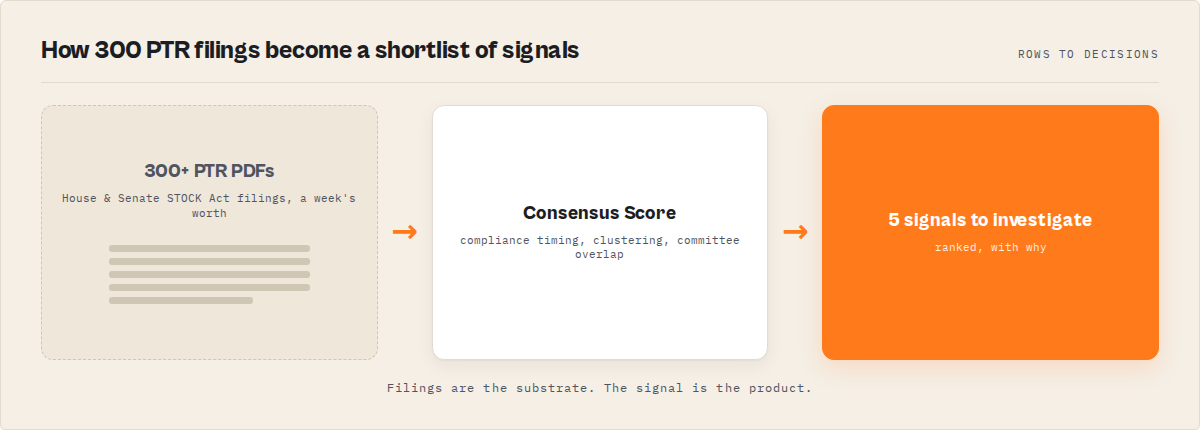
The problem: every member of Congress has to disclose stock trades over $1,000 within 45 days under the STOCK Act, but the data lives in hundreds of separate PDFs across two clunky government portals. The story is in there — the late filings, the clusters, the committee member buying a company they oversee — but finding it means downloading filings, parsing PDFs by hand, doing the compliance math, and somehow noticing what changed since last week. Most reporters don't have time for that, so the stories sit undiscovered until someone else breaks them.
What is congressional stock trade monitoring? It's the practice of tracking the financial transactions that members of the U.S. Congress are legally required to disclose under the STOCK Act of 2012, then flagging the ones that matter — late disclosures, trading clusters, and committee-linked activity.
Why it matters: Congressional trading is one of the most-watched accountability beats in U.S. journalism, and the House Clerk's disclosure system publishes the raw filings — but as PDFs, not as analysed data.
Use it when: you cover politics, finance, or accountability and want to catch story-worthy trades as they're filed instead of weeks later.
Quick answer
- What it is: automated tracking of official STOCK Act stock-trade disclosures by members of Congress, turned into structured, searchable trades and signals.
- When to use it: accountability, politics, or markets reporting where you need to know about new or unusual congressional trades fast.
- When not to use it: if you need investment-grade price data or insider intent — disclosures show what was traded and when it was filed, not why.
- Typical workflow: schedule a run, set a watchlist, get alerted on signals, export the supporting trades, verify against the original filing, write the story.
- Main tradeoff: House filings parse into per-transaction detail; Senate filings are filing-level metadata plus a link to the official report.
In this article: What it is · Why it matters · How to monitor it · Alternatives · Scheduled runs · Watchlists · Alerts · Exports · Example investigation · Best practices · Mistakes · Limitations · FAQ
Key takeaways
- The STOCK Act gives members 45 days from a trade to disclose it; anything past that window is a late filing and a classic accountability story.
- Disclosures over $1,000 must be reported, and they're published as individual PDFs — not as a queryable dataset.
- A scheduled run plus a named watchlist surfaces only genuinely new filings since the last run, so you review what changed instead of a backlog.
- Deterministic event records (clusters, accumulation, severely-late filings, committee activity) branch cleanly in Slack, Zapier, Make, or n8n via Apify webhooks — no prose parsing.
- One run produces CSV/JSON/Google Sheets exports plus paste-ready
storyheadlines like "4 Energy Committee members traded XOM" — generated from templates, no LLM.
What it looks like in practice
| You want to know… | Set this | You get back |
|---|---|---|
| "Did anyone file a trade late?" | lateFilingsOnly: true | Trades tagged late or severely-late vs the 45-day deadline |
| "Tell me when Member X opens a new position" | watchlistName + newOnly: true + includeEvents | A new_position event, only on genuinely new filings |
| "Is Congress piling into one stock?" | includeAggregates: true | A consensusScore (0-100) per ticker, sorted highest-first |
| "Are committee members trading what they oversee?" | committeeData + includeEvents | committee_activity events naming the committee and ticker |
| "Give me headlines I can verify and write" | includeStories: true | Templated story records like "Member disclosed an AMZN trade 436 days late" |
What makes a congressional trade interesting?
Most congressional trades are boring. A routine purchase, disclosed on time, in a broad index fund, is not a story. If you read every filing looking for trades, you drown.
The story is in the signals — the small fraction of trades that break a pattern:
- Disclosed late — past the 45-day STOCK Act deadline, sometimes by hundreds of days.
- Part of a trade cluster — several members buying the same ticker inside a tight window.
- A brand-new position — a member entering a stock they've never disclosed before.
- A sudden behaviour change — a member whose trading rate spikes far above their own baseline.
- Broad congressional accumulation — one-sided buying across many members, captured as a consensus score.
That distinction is the whole game, and it's what the Congressional Trading Signals actor is built around. It doesn't just hand you trades — it tells you which ones matter.
Why most congressional trade trackers miss the story
Trackers tell you a trade happened. Signals tell you why it matters.
A single purchase disclosed on time isn't interesting. A trade disclosed 436 days late is. One member buying a stock isn't interesting. Five members buying it within two weeks is. A member's routine quarterly trade isn't interesting. The same member suddenly making 12 trades in a month is.
Free aggregators and raw-filing dumps stop at "a trade happened" — they give you a searchable list and leave the pattern-spotting to you. The signal layer is the work that turns a list into a lead:
trade_cluster— multiple members converging on one tickernew_position/position_exit— a member opening or fully exiting a holdingbehavior_change— a member trading far above their own normcongressional_accumulation— broad one-sided buying, scored 0-100
This is the difference between monitoring (a feature) and signal detection (a category). The rest of this guide is about how to put that signal layer on a schedule.
Five signals worth investigating
| Signal | What it means | Why it's a story |
|---|---|---|
| Trade cluster | 3+ members buy the same stock in a tight window | Coordinated or coincidental, it's worth a look |
| New position | A member enters a stock for the first time | A new bet, not noise from an existing holding |
| Position exit | A member fully exits a holding | Often more telling than a purchase |
| Severely late filing | Disclosure filed hundreds of days late | A clean STOCK Act accountability angle |
| Congressional accumulation | Broad buying activity across Congress | Consensus forming around one company |
What is congressional stock trade monitoring?
Definition (short version): Congressional stock trade monitoring is the practice of collecting the stock-transaction disclosures members of Congress file under the STOCK Act and analysing them for late filings, trading clusters, and other accountability signals.
The raw material is the Periodic Transaction Report (PTR). Under the STOCK Act, a member, their spouse, or a dependent child has to file one within 45 days of any covered securities transaction over $1,000. The House publishes these through the Clerk's disclosure portal and the Senate through its Electronic Financial Disclosure system.
Also known as: STOCK Act tracking, congressional trading data, congress stock disclosure monitoring, PTR analysis, congressional financial-disclosure reporting.
There are roughly three kinds of work hiding inside "monitoring congressional trades": collection (getting the filings out of the portals), extraction (turning PDF reports into per-transaction rows with tickers, dates, and dollar ranges), and analysis (compliance scoring, clustering, and change detection across time). Most freely available tools stop at collection. The reporting value is in the last two.
Why does congressional stock trading matter for journalists?
Congressional stock trading matters because members vote on legislation, sit on oversight committees, and receive briefings that affect the same companies they trade — and the public disclosure data is the only window into whether those interests overlap. Late filings and committee-linked trades are recurring national stories.
The numbers behind the beat are real. A 2022 New York Times investigation found that 97 sitting members of Congress or their families traded stocks in companies their committees oversaw between 2019 and 2021. Watchdog groups have documented hundreds of STOCK Act violations where members filed late or not at all, often facing only a $200 fine.
That's the structural reason this beat never dies: the disclosure is mandatory, the penalty is trivial, and the conflicts are routine. The reporting bottleneck has never been a shortage of stories — it's the cost of finding them in the PDFs.
How do you monitor congressional stock trades?
You monitor congressional stock trades by automatically pulling new STOCK Act filings, extracting the individual transactions, scoring each one against the 45-day deadline, and flagging the patterns that make a story. The fastest route is an Apify actor that does all four steps in a single run.
Here's the manual path, so the cost is clear. To do this by hand you'd download each PTR PDF from the House and Senate portals, open every one, read the transaction table, normalise the dollar ranges (they're disclosed as bands like "$1,001 – $15,000"), calculate days-to-disclose against the deadline, dedupe against what you already pulled, and then somehow notice that four members all bought the same energy stock in the same fortnight. Across hundreds of filings a week, that's not a script you maintain on the side — it's a job.
The Congressional Trading Signals — STOCK Act Intelligence Apify actor (ryanclinton/congress-stock-tracker) handles all of it. It parses House PTR PDFs into real per-transaction trades, tags each one on-time, late, or severely-late, and emits deterministic signal records you can route into a newsroom workflow. You give it inputs; it gives you trades, events, and headlines. We built it specifically so the reporter never touches a PDF parser.
Problems this solves
- How to track congressional stock trades without downloading filings by hand
- How to find STOCK Act late filings across the House and Senate automatically
- How to get alerted when a member opens a new stock position
- How to detect when several members of Congress buy the same stock
- How to flag committee members trading companies in their oversight area
- How to export congressional trading data to a spreadsheet for your own analysis
What does congressional trade monitoring produce?
A run produces structured records, not PDFs. Each trade record is one disclosed transaction with the ticker, side, dollar range, transaction and disclosure dates, a compliance block, and a link to the original filing. Here's the shape of a single House trade:
{
  "recordType": "trade",
  "member": "Lloyd Doggett",
  "chamber": "House",
  "state": "TX",
  "ticker": "PG",
  "assetDescription": "Procter & Gamble Company",
  "transactionSide": "PURCHASE",
  "transactionDate": "05/15/2026",
  "disclosureDate": "06/04/2026",
  "amount": "$1,001 - $15,000",
  "amountMidpoint": 8001,
  "compliance": { "daysToDisclose": 20, "filingDeadlineDays": 45, "status": "on-time", "daysLate": 0 },
  "alertPriority": "low",
  "importanceScore": 42,
  "filingUrl": "https://disclosures-clerk.house.gov/public_disc/ptr-pdfs/2026/20034712.pdf"
}
Notice the filingUrl on every record. That's the verification anchor — the link back to the official government PDF you check before you publish anything. The compliance status is the field that turns a routine trade into a late-filing story.
What are the alternatives to manual congressional trade tracking?
The alternatives to manual tracking fall into four categories: doing it by hand, building your own scraper, using a free aggregator site, or using a purpose-built Apify actor. Each has trade-offs in maintenance burden, depth of analysis, and how fast a new filing reaches you.
Manual download and review. Open the House and Senate portals, download PTRs, read them, do the math. Best for: a one-off check on a single named member. It breaks the moment you need to watch the whole chamber continuously — you own the collection, the parsing, the compliance math, the dedup, and the pattern-spotting, every week, forever.
Build your own pipeline. Write a scraper against the disclosure portals, an OCR/text-parser for the PDFs, a compliance calculator, and a cross-run state store for change detection. Best for: a newsroom with a dedicated data engineer and budget for ongoing maintenance. The hidden cost is upkeep — portal layouts shift, scanned filings have no text layer, the Senate portal gates access behind a session, and you own every edge case.
Free aggregator sites. Several public sites republish congressional trades and are genuinely useful for a quick look. Best for: eyeballing a single member's recent activity. Where they fall short for reporting: you can't schedule them into your own workflow, you don't control the alerting, and you're trusting someone else's parsing — which you still have to verify against the primary filing anyway.
A purpose-built actor. Congressional Trading Signals collects, extracts, scores, and signals in one run, with a filingUrl on every record so you verify against the source. Best for: reporters who want story-worthy trades pushed to them on a schedule. The trade-off: Senate data is filing-level, and you supply your own committee roster.
| Approach | Setup time | Per-transaction detail | Compliance scoring | Change detection | Maintenance |
|---|---|---|---|---|---|
| Manual download | None | Manual | Manual | None | Per-filing, ongoing |
| Build your own | Weeks | If you build it | If you build it | If you build it | High, ongoing |
| Free aggregator | Minutes | Varies | Rare | Not in your control | None for you |
| Purpose-built actor | Minutes | House: yes | Built in | Watchlist mode | None for you |
Pricing and features based on publicly available information as of June 2026 and may change.
Each approach has trade-offs in setup time, depth, and upkeep. The right choice depends on how often you need fresh data and whether you have engineering time to spend on maintenance instead of reporting.
Scheduled runs: wake up to what changed
The point of a schedule is that you stop chasing filings and let them come to you. In Apify, you set the actor on a daily or weekly schedule and it pulls and analyses new filings automatically. You open your inbox or your dataset and see what's new — not a backlog of 300 PDFs.
Set it up from the Apify Console: open Congressional Trading Signals, configure your input, then attach a schedule from the Schedules tab. Daily or hourly cadence is reasonable against government servers; per-minute polling isn't, and there's no point — filings appear 1–2 business days after submission anyway.
A sensible starting input for a daily watchdog run pulls the last 90 days of House trades, turns on events and stories, and names a watchlist so the next run knows what it already saw:
{
  "chamber": "house",
  "daysBack": 90,
  "watchlistName": "daily-congress-watch",
  "newOnly": true,
  "includeEvents": true,
  "includeStories": true
}
Watchlists: tell me when a member I watch opens a position
A watchlist is how you ask "tell me when this member does something new." Set a watchlistName and the actor remembers what it saw on previous runs. Add newOnly: true and a scheduled run surfaces only filings it hasn't seen before — so a member you're tracking opening a brand-new position lands as a new_position event, not buried in a re-export of everything.
This is cross-run state, and it's the difference between monitoring and re-scraping. Without it, every scheduled run hands you the same hundreds of trades and you manually diff them. With it, the run is a quiet "nothing new" most days and a sharp signal on the day something changes.
{
  "members": ["Pelosi", "Tuberville", "Gottheimer"],
  "watchlistName": "members-i-cover",
  "newOnly": true,
  "includeEvents": true
}
The new_position and position_exit events fire only in watchlist mode, because "new" only means anything relative to what you've already seen. We covered how PPE pricing works in our learn guide if you want to understand what a scheduled run costs.
Alerts: get pinged the moment a pattern appears
Alerts are deterministic event records the actor emits when something story-worthy happens — and because they're structured, they branch cleanly in your automation tool without anyone reading prose. The ten event types include trade_cluster, congressional_accumulation, severely_late_filing, committee_activity, and behavior_change, each carrying an alertPriority of high, medium, or low.
Wire it up with Apify's native integrations or a webhook. When a run finishes, route the dataset (or a webhook payload) into Slack, Zapier, Make, n8n, or Dify-style workflows, and branch on the fields:
recordType == "event"→ route byeventTypeeventType == "severely_late_filing"→ push to your accountability channeleventType == "committee_activity"→ flag for a conflict-of-interest checkalertPriority == "high"→ page the politics desk
Because every event has a stable eventType enum and a plain-English reason, your Slack message writes itself — no LLM rewriting, no fragile string-matching on free text. This is the same deterministic-routing pattern we use across our compliance screening tooling.
Exports: get the data into your own analysis
Sometimes you don't want an alert — you want the spreadsheet. Every Apify run produces a dataset you can export to CSV, JSON, Excel, or push straight to Google Sheets, so you can sort, pivot, and chart the trades in whatever tool you already use.
Turn on includeStories and the export also carries story records: templated, paste-ready headlines composed from the strongest signals in the run. "4 Energy Committee members traded XOM." "Member disclosed an AMZN trade 436 days late." These are deterministic templates — no LLM, no hallucination risk — built to be a starting headline you then verify against the linked filing.
For a quick analysis pass, the dashboard output profile trims each row to member, ticker, side, amount midpoint, compliance status, and importance — the columns a BI tool wants. The monitoring profile trims to ids, signal tags, and alert priority for automations. You pick the shape; the actor emits it.
Congressional Consensus Score explained
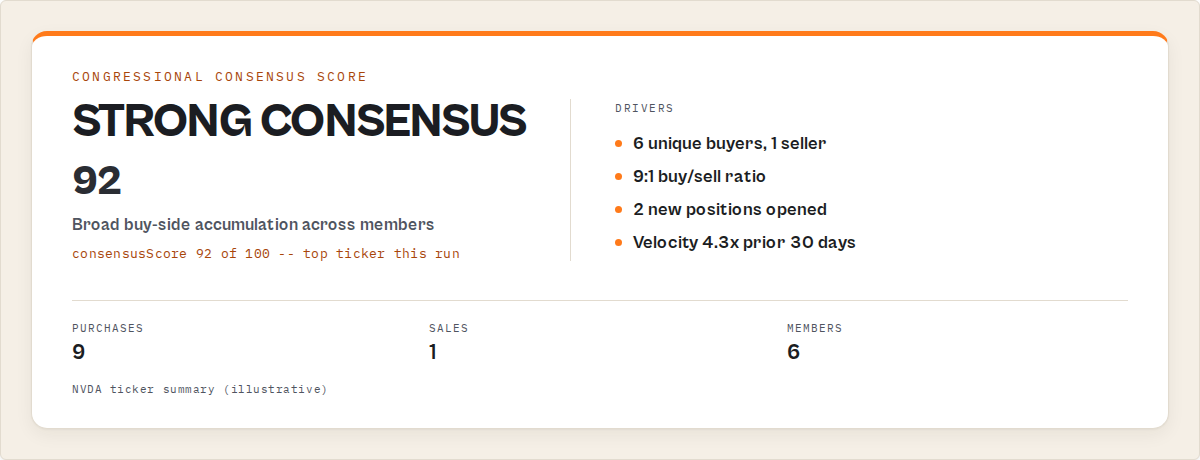
The Consensus Score is a single deterministic 0-100 number on every tickerSummary record that answers one question: how broadly is Congress collectively buying this stock? It's derived only from filings — unique buyers, buy/sell ratio, new positions, and recent velocity — with no market data involved. The bands:
| Score | Reading |
|---|---|
| 0-25 | Minimal congressional interest |
| 25-50 | Some activity |
| 50-75 | Broad accumulation forming |
| 75-100 | Strong congressional consensus |
So a result like NVDA = 82 or PLTR = 91 tells you at a glance that many members are piling into one name on the buy side — the kind of thing you'd want to investigate before it's a headline. The actor sorts ticker rows highest-consensus-first, so the most interesting names are row one.
A worked example investigation
Here's the whole loop, start to finish. Say you cover the energy beat and you want to know when Energy and Commerce Committee members trade oil and gas companies.
Before: you'd periodically remember to check, download a stack of PTRs, cross-reference them against a committee roster you keep in a spreadsheet, do the date math, and hope you noticed the pattern. Realistically, you'd catch maybe the biggest ones, weeks late.
The setup: schedule the actor on a watchlist, supply your own committee roster via committeeData, and turn on events. The actor never bundles a roster — you supply the authoritative one, which means you control exactly who's on the committee and when.
{
  "committeeData": { "Walberg": ["Energy and Commerce"], "Doggett": ["Ways and Means"] },
  "watchlistName": "energy-committee-watch",
  "newOnly": true,
  "includeEvents": true,
  "includeStories": true
}
What you get: when a committee member trades a company in their oversight area, a committee_activity event fires. When someone files months late, a severely_late_filing event fires alongside it. Both land in your alert channel with a plain-English reason.
The result: you export the supporting trades, click the filingUrl on each record to confirm against the official government PDF, and you've got a verified, sourced story — found in minutes, not after a competitor already published it. These numbers reflect one workflow; how much you catch depends on your roster, your cadence, and which chamber you cover.
A 5-minute morning workflow
This is what the beat looks like once it's on a schedule:
8:00 AM  →  Scheduled run completes
            ↓
            2 new filings since yesterday
            ↓
            1  severely_late_filing event  (disclosed 410 days late)
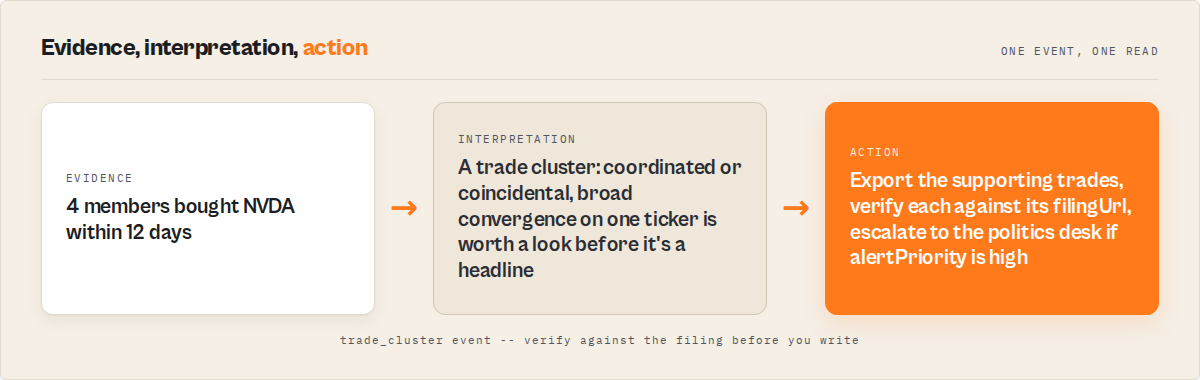
            1  trade_cluster event          (4 members bought NVDA in 12 days)
            ↓
            Open the filingUrl on each, confirm against the official PDF
            ↓
            8:05 AM  →  Start reporting
The signal does the triage. You spend your five minutes verifying and writing, not parsing PDFs. A consolidated trade_cluster example, as it lands in the dataset:
{ "recordType": "event", "eventType": "trade_cluster", "ticker": "NVDA", "memberCount": 4, "spanDays": 12, "reason": "4 members bought NVDA within 12 days" }
If you only check this beat by hand a few times a year, set this up once today and let tomorrow's run find the next one for you.
Best practices for reporting on congressional trades
- Always verify against the
filingUrl. Every record links to the original government PDF. Before you publish a single trade, open it and confirm the ticker, dates, and amount yourself. - Lead with late filings. The
complianceStatusfield flags trades disclosed past the 45-day deadline. A 400-day-late disclosure is a stronger, more defensible story than a routine on-time purchase. - Supply your own committee roster. The
committeeDatamap is yours — keep it current from the official committee membership pages socommittee_activityevents reflect who actually sits where. - Schedule daily, not per-minute. Filings appear 1–2 business days after submission. A daily run catches everything without hammering government servers.
- Use watchlist mode for ongoing beats.
newOnly: truewith awatchlistNamemeans you review what changed, not the whole backlog, every single run. - Treat amounts as ranges. Disclosures report dollar bands, not exact figures. The actor parses
amountMin/amountMax/amountMidpoint— say "between $1,001 and $15,000," not a fake precise number. - Note that party isn't in the source data. Neither portal publishes party affiliation. If your story needs it, add it from your own authoritative source.
Common mistakes
- Reporting a trade as fact without opening the filing. Parsing is deterministic and carries a confidence score, but the original PDF is the record of truth. Always click through before publishing.
- Treating amount midpoints as exact dollar figures. The midpoint of "$1,001 – $15,000" is a sorting convenience, not a real number. Report the disclosed range.
- Expecting Senate per-transaction detail. Senate filings come back as filing-level metadata plus a report link, because the Senate portal gates transaction detail behind a session. Don't assume Senate parity with House detail.
- Skipping the watchlist on a recurring beat. Without a
watchlistName, every scheduled run re-emits everything and you manually diff. Name a watchlist and let cross-run state do it. - Reading intent into a trade. Disclosures show what was traded and when it was filed — not why. A late filing is a compliance fact; calling it deliberate concealment without more reporting is a leap.
How to compare congressional trades to corporate insider trades
Congressional trades are filed under the STOCK Act as Periodic Transaction Reports; corporate insider trades are filed with the SEC as Form 4 filings. They cover different people under different rules, so you track them with different tools. For corporate officers and directors, the SEC Insider Trading actor handles Form 4 data — see our SEC insider sales leaderboard for what that looks like in practice.
How to find STOCK Act late filings
To find STOCK Act late filings, set lateFilingsOnly: true and the actor returns only trades disclosed outside the 45-day window, each tagged late or severely-late. Combine it with includeEvents to catch the severely_late_filing event, which carries the exact day count — "disclosed 436 days after the transaction date."
A mini case study
A reporter covering a single House member used to spot-check that member's filings by hand a few times a year, catching maybe the largest trades weeks after they posted. Switching to a scheduled run with a watchlist on that member, a severely_late_filing event surfaced a disclosure filed over a year late — within a day of it appearing in the House system. The supporting trade exported to CSV, the filingUrl confirmed it against the official PDF, and the verification step that used to take an afternoon took the length of a coffee. One workflow, one member; results vary with cadence and beat.
Implementation checklist
- Open the Congressional Trading Signals actor on the Apify Store and click Try for free.
- Set your scope —
members,tickers,states, or leave empty for the whole chamber. - Name a
watchlistNameand setnewOnly: truefor ongoing monitoring. - Turn on
includeEventsandincludeStoriesfor signals and headlines. - Add your
committeeDataroster if you're chasing committee conflicts. - Attach a daily or weekly schedule from the Schedules tab.
- Wire the dataset or a webhook into Slack/Zapier/Make for alerts.
- On each fire, export the supporting trades and verify every claim against the
filingUrlbefore you write.
Limitations
- Senate is filing-level. The Senate EFD portal restricts automated access and gates per-transaction detail behind a session, so Senate records return metadata plus a report link, not parsed transactions. Enable a residential proxy to reach the portal reliably.
- Scanned House filings. A small number of older PTRs are scanned images with no text layer; these return a filing record with the PDF link rather than parsed trades, flagged by
extractionStatus. - No party affiliation. Neither source feed publishes party, so that field is reserved — add it from your own source if your story needs it.
- Disclosure lag is real. Filings appear in government systems 1–2 business days after submission. The actor returns whatever is published at run time, so "real-time" means "as fast as the government posts it."
- Not investment advice. The data reports trades and disclosure timeliness; it doesn't predict prices or imply why a member traded.
Key facts about congressional stock trade monitoring
- The STOCK Act of 2012 requires members of Congress to disclose covered transactions over $1,000 within 45 days.
- House Periodic Transaction Reports are published by the Clerk; Senate filings live in the EFD system.
- A 2022 New York Times analysis found 97 members or their families traded in companies their committees oversaw.
- The standard penalty for a late STOCK Act filing is a $200 fee, which watchdogs argue is too small to deter violations.
- Disclosed amounts are reported as ranges (e.g. "$1,001 – $15,000"), not exact figures.
- The Congressional Trading Signals Apify actor parses House PTR PDFs into per-transaction trades with deterministic compliance scoring.
Signals glossary
Trade cluster (trade_cluster) — Three or more members buying the same ticker inside a tight window; a sign of converging interest.
New position (new_position) — A member disclosing a stock they've never bought before. Fires only in watchlist mode.
Position exit (position_exit) — A member selling a holding they had previously disclosed buying.
Behaviour change (behavior_change) — A member whose recent trading rate runs far above their own baseline.
Congressional accumulation (congressional_accumulation) — Broad, one-sided buying across many members for a single ticker.
Committee activity (committee_activity) — Multiple members of one committee trading the same company in their oversight area (needs your committeeData roster).
Consensus score — A deterministic 0-100 measure of how broadly Congress is collectively accumulating a stock, derived only from filings.
Compliance status — A trade's timeliness versus the 45-day deadline: on-time, late, or severely-late.
STOCK Act / PTR — The 2012 law requiring members to disclose securities transactions over $1,000 within 45 days, and the Periodic Transaction Report they file to do it.
Watchlist mode — Cross-run state that tags each record NEW or UNCHANGED so scheduled runs surface only what's new.
Where these patterns apply beyond Congress
The same monitoring patterns apply far beyond congressional trades to any public-disclosure beat:
- Scheduled collection over manual pulls — let mandatory filings come to you instead of chasing them.
- Cross-run state for change detection — surface only what's new, not the whole archive, every run.
- Deterministic signals over prose — structured event records branch in automation without an LLM.
- Source links on every record — never publish a disclosure-based claim without a path back to the primary document.
- Compliance scoring as the story — the gap between a legal deadline and the actual filing date is itself the accountability angle.
You'll find the same shape in SEC insider filings, lobbying disclosures, campaign finance, and corporate registries. ApifyForge builds the same kind of decision-first tooling across those domains.
When you need this
You probably need congressional trade monitoring if:
- You cover politics, markets, or accountability and want story leads as they file.
- You track specific members or committees and need to know when they act.
- You're chasing STOCK Act late filings or conflict-of-interest angles.
- You want trade data in a spreadsheet for your own analysis, on a schedule.
You probably don't need this if:
- You only ever check one member, once, as a background fact.
- You need investment-grade pricing or trade intent — disclosures don't carry that.
- You're after corporate insider trades, which are SEC Form 4 filings, not STOCK Act PTRs.
Frequently asked questions
How do I track congressional stock trades?
Use an Apify actor that pulls official STOCK Act filings, parses them into individual transactions, and scores each against the 45-day deadline. Run Congressional Trading Signals, set your scope and a watchlist, attach a daily schedule, and route the events into Slack or a spreadsheet. Every record links back to the original government filing for verification.
What counts as a STOCK Act late filing?
A late filing is any covered transaction over $1,000 disclosed more than 45 days after it occurred. The actor tags each trade on-time, late, or severely-late by computing days-to-disclose from the transaction and disclosure dates on the filing. Severely-late filings — sometimes hundreds of days past the deadline — are the classic accountability story.
Is congressional trading data public?
Yes. STOCK Act disclosures are legally required public records, published by the House Clerk and the Senate's Electronic Financial Disclosure system. The actor collects only this official government data — no private information and no third-party datasets. You should still verify any finding against the original filing, which is linked on every record via the filingUrl.
Can I get alerted when a member opens a new stock position?
Yes. Run in watchlist mode by setting a watchlistName, add newOnly: true, and turn on includeEvents. A scheduled run then emits a new_position event only when a member you're tracking files a first-time position in a stock. Route that event into Slack, Zapier, Make, or n8n via an Apify webhook and your desk gets pinged automatically.
How do I find committee members trading companies they oversee?
Supply your own committee roster as a committeeData map and enable includeEvents. When a member on a committee trades a company in that committee's oversight area, the actor emits a committee_activity event naming the committee, the ticker, and the number of members involved. The actor doesn't bundle a roster, so you control the authoritative membership data.
How is this different from tracking SEC insider trades?
Congressional trades are filed under the STOCK Act as Periodic Transaction Reports by members of Congress. SEC insider trades are Form 4 filings by corporate officers, directors, and major shareholders — different people, different law. For Form 4 data, use the SEC Insider Trading actor instead.
Can I export congressional trades to Google Sheets?
Yes. Every run produces an Apify dataset you can export to CSV, JSON, or Excel, or push straight to Google Sheets. Turn on includeStories and the export also carries templated, paste-ready headlines. Pick the dashboard output profile for clean BI columns or monitoring for automation-friendly fields.
Put it on a schedule today
The next late filing, the next trade cluster, the next first-time position is already being filed — the only question is whether you find it or your competitor does. Set this up once and tomorrow morning's run does the triage for you.
- Open Congressional Trading Signals and click Try for free.
- Name a watchlist, turn on
includeEventsandincludeStories, attach a daily schedule. - Wire the events into Slack — and start your mornings with leads, not PDFs.
Stop reading filings. Start detecting signals.
Ryan Clinton publishes Apify actors and MCP servers as ryanclinton and builds developer tools at ApifyForge.
Last updated: June 2026
This guide focuses on U.S. congressional STOCK Act filings, but the same monitoring patterns — scheduled collection, cross-run change detection, deterministic signals, and source-linked verification — apply broadly to any public-disclosure accountability beat.