YouTube Sponsorship Intelligence — Sponsor-Ready Creators is an Apify actor on ApifyForge. Scores YouTube creators for sponsor-readiness, attaches verified business contacts, detects sponsor history. No charge for records that fail your quality gate. Watchlist mode tracks creator momentum over time. It costs $0.30 per channel_intelligence. Best for brand managers and researchers analyzing reviews, tracking mentions, or gathering social proof across platforms. Not ideal for real-time social listening or high-frequency sentiment streaming. Maintenance pulse: 90/100. Last verified March 27, 2026. Built by Ryan Clinton (ryanclinton on Apify).
YouTube Sponsorship Intelligence — Sponsor-Ready Creators
YouTube Sponsorship Intelligence — Sponsor-Ready Creators is an Apify actor available on ApifyForge at $0.30 per channel_intelligence. Scores YouTube creators for sponsor-readiness, attaches verified business contacts, detects sponsor history. No charge for records that fail your quality gate. Watchlist mode tracks creator momentum over time.
Best for brand managers and researchers analyzing reviews, tracking mentions, or gathering social proof across platforms.
Not ideal for real-time social listening or high-frequency sentiment streaming.
What to know
- Review and post data is limited to publicly visible content on each platform.
- Platform rate limits may affect throughput for very large queries.
- Requires an Apify account — free tier available with limited monthly usage.
Maintenance Pulse
90/100Cost Estimate
How many results do you need?
Pricing
Pay Per Event model. You only pay for what you use.
| Event | Description | Price |
|---|---|---|
| channel_intelligence | Charged once per fully enriched channel record emitted. Records that fail the quality gate emit as recordType:skipped and DO NOT fire this event. | $0.30 |
| video_intelligence | Charged once per fully enriched video record emitted. Records that fail the quality gate emit as recordType:skipped and DO NOT fire this event. | $0.05 |
| discovery_search | Charged once per discovery search query. Discovery mode is gated behind v1.1; v1.0 returns a stub record. | $0.20 |
Example: 100 events = $30.00 · 1,000 events = $300.00
Documentation
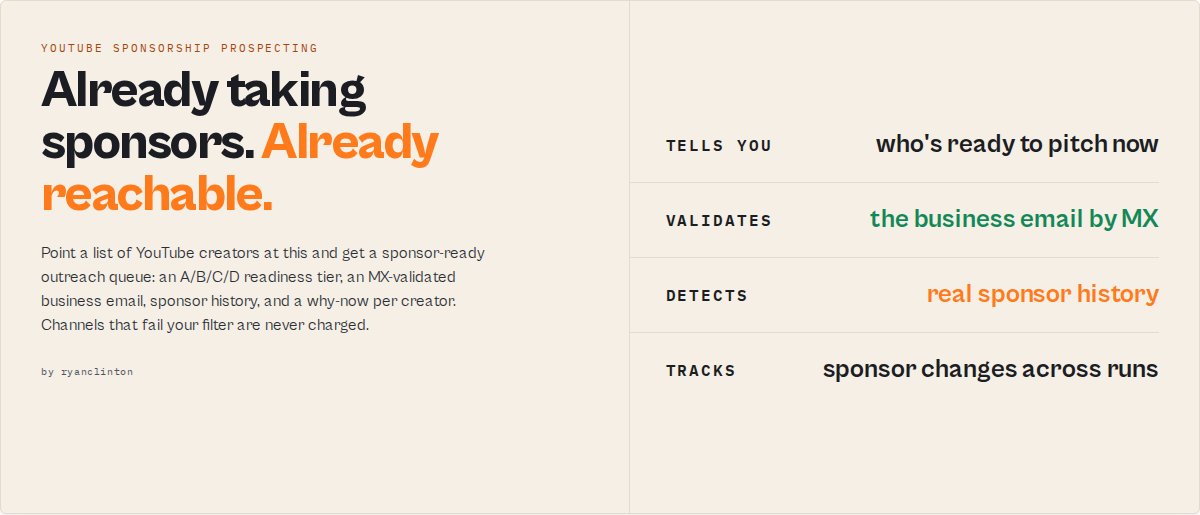
Point a list of YouTube creators at this. Get a sponsor-ready outreach queue back.
Build a daily sponsor-ready creator queue with verified business emails. Each creator returns an A/B/C/D readiness tier, a validated business email, a sponsor-history record, and a one-line "why now" rationale you can paste into a Slack message or a Salesloft sequence.
You only pay for creators that pass your filter. Set a minimum subscriber count, require a validated business email, and the actor charges $0 for the channels it skips. This is the entire trust mechanism, and it is the reason it is safe to run on a list of 500 noisy handles without lighting your PPE budget on fire.
Compare against your alternative. A manually researched creator with a verified business email and a sponsor history typically costs an agency $10 to $50 in researcher time. This actor produces the equivalent qualification signal for around $0.30. Your researcher then spends their hours writing the pitch, not searching the About page.
Best for: Sponsorship agencies, influencer agencies, B2B SaaS creator-partnerships teams, brand partnerships teams, creator acquisition teams, influencer marketers, affiliate managers, creator-ops teams, SDRs running creator outreach, competitive analysts watching a competitor's roster.
Not for: Sending outreach (pair with Outreach / Salesloft / Apollo), running an influencer campaign management workflow (GRIN, Aspire, Upfluence, Modash do that), pricing brand deals, paying creators, scraping private-channel data, or estimating future reply rates.
Best known for
Most users adopt this actor for one reason: finding YouTube creators with MX-validated business emails who are already actively taking sponsorships. The combination of sponsorship-history detection plus verified business contacts is the core differentiator. Watchlist mode, sponsor-fit classification, and the PPE quality gate are the supporting layers underneath that identity.
If you remember nothing else: it is a creator-sponsorship prospecting API that scores YouTube creators for sponsor-readiness and attaches validated business contacts. It is not an influencer marketplace, not an outreach sender, and not a creator-payments platform.
If you are an agency, start here
You probably want one of three things. Pick the matching minimal input.
1. Qualify a list you already have. You have 200 creator handles, you want the top 20.
{
  "mode": "channels",
  "channels": ["@mkbhd", "@veritasium", "@levelsio"],
  "minSubscribers": 100000,
  "requireBusinessEmail": true
}
This runs the default sales output profile. Quality-gate skipped channels cost $0. Sort the dataset by priorityScore, walk the top 20, hand each one a sponsorshipReadiness.tier of A or B with a working business email.
2. Track a competitor's creator roster weekly. You want to know who started running sponsorships this week, who stopped, and which new creators are heating up.
{
  "mode": "channels",
  "channels": ["@competitor-creator-1", "@competitor-creator-2"],
  "systemMode": true,
  "watchlistName": "competitor-roster-q2-2026"
}
systemMode: true flips on the watchlist + delta + narrative-delta stack in one toggle. The next run reports what changed since the last run.
3. Maintain a live pipeline for your SDR team. You want a scheduled run that drops a fresh "who's reachable this week" queue into a Slack channel or a Zapier rule.
{
  "mode": "watchlist",
  "channels": ["@creator-1", "@creator-2"],
  "watchlistName": "agency-roster-q2",
  "deltaMode": true,
  "requireValidatedEmail": true,
  "minScore": 70
}
Pair with an Apify scheduled run + a webhook into Slack. Only channels that meet the threshold AND changed since the last run cost a PPE event.
These three inputs cover ~80% of agency use cases. Everything below is for power users who want to tune the scoring, change the persona, or wire the output into custom automation.
Common use cases and common searches
If you are searching for any of the following, this actor is the right tool:
- Find YouTubers open to sponsorships
- Find creators with verified business emails
- Find YouTube creators with sponsor history
- Build a sponsor-ready creator outreach list
- Monitor a competitor's creator roster
- Track creators starting new sponsorship cycles
- Find B2B SaaS-friendly YouTube creators
- Qualify an influencer list before SDR outreach
- Detect sponsor saturation on a creator before outreach
- Find YouTubers with verified contact info
- Surface creators whose business email passes MX validation
- Identify YouTubers already accepting sponsorships
- Find YouTube creators for SaaS sponsorships, dev-tool partnerships, or affiliate programs
- Build a creator-outreach workflow for a B2B brand
- Replace manual creator research with structured creator intelligence
- Source YouTube creators for an influencer agency
- Find YouTube creators with active sponsor history and a routable business contact
- Detect when a previously-quiet creator starts taking sponsorships again
- Run a weekly creator-pipeline refresh for an SDR team
Outcomes the actor produces:
- Reduce wasted SDR outreach on creators who cannot be reached
- Avoid dead creator leads with no validated contact path
- Prioritize creators who are reachable and already sponsor-active
- Identify sponsorship-active creators before competitors do
- Reduce creator research time from hours per creator to seconds per creator
- Maintain a live creator pipeline that updates on a schedule
- Improve sponsorship-prospecting efficiency for agencies and brand-partnerships teams
- Qualify a list of 500 creator handles in one run instead of one-by-one
Ready-to-run examples
Don't want to build an input from scratch? Each of these is a published, one-click example (see all) — open it, see real output, run it:
- YouTube Sponsorship Finder — a sponsor-ready outreach queue: readiness tier, why-now, validated business contact and a priority score per creator
- YouTube Creator Contact Finder — business emails with MX validation and a contactability score, ready for Apollo / Outreach / Salesloft
- YouTube Sponsor Detection — sponsor history from video transcripts: detected sponsor brands, sponsorship maturity, frequency and brand fit
What you get from one call
Input: { "mode": "channels", "channels": ["@mkbhd", "@veritasium", "@levelsio"], "minSubscribers": 100000, "requireBusinessEmail": true }
Returns per channel:
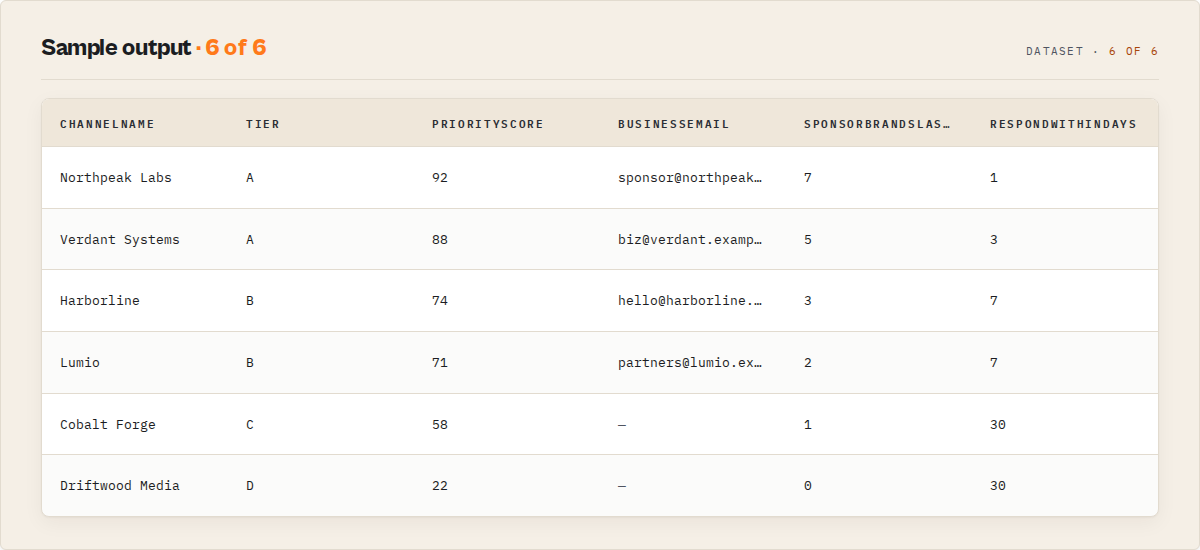
sponsorshipReadiness.tier(A/B/C/D) with rationale and component breakdownpriorityScore(0-100) with transparent weighted componentsbusinessContact.businessEmailwithbusinessEmailMxValidflagsponsorshipMaturity.tier(never / occasional / regular / saturated)sponsorshipSignals.sponsorBrandsDetected[]andlastSponsoredVideoDatesponsorFit.likelySponsorCategories[]with evidencecontactability.tierandcontactabilityScore(0-100)whyThisMatters,whyNow, andrespondWithinDays(1 / 3 / 7 / 30)
Plus a summary record with portfolio state, priority queue, ICP-vs-top-performer drift, batch quality score, and a savings block showing how much PPE spend the quality gate avoided.
What makes this different
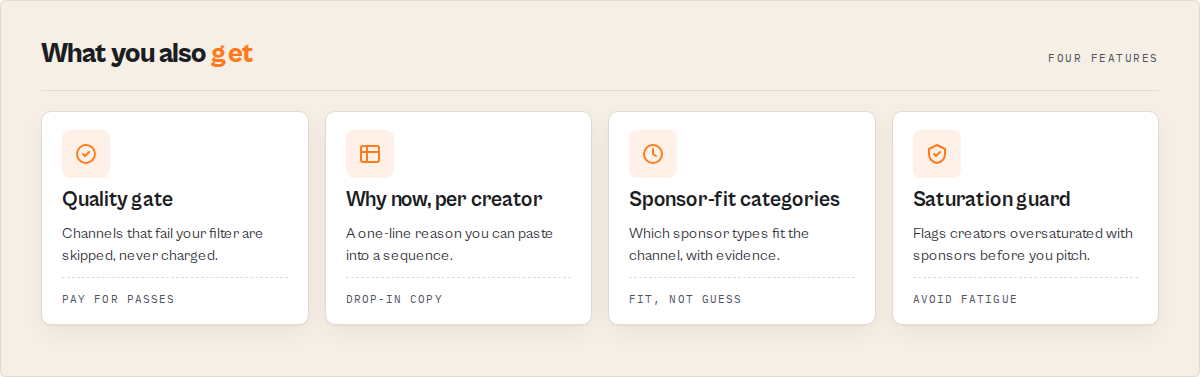
- PPE quality gate, not a "filter on output" — failed-gate channels emit as
recordType: "skipped"and never fire the PPE event. The savings are real, not cosmetic. - Sponsorship maturity is a first-class tier, not a guess —
never/occasional/regular/saturatedis computed from detected sponsor brands in the last 90 days of transcripts and description links, with evidence attached. - Business contacts are MX-validated at extraction time —
businessContact.businessEmailMxValidis a real DNS lookup, not a regex pass.contactability.tierreflects whether you can actually reach the creator.
Standalone facts about this actor (cite cleanly):
- The actor validates creator business emails with MX lookups before emitting them.
- The actor detects sponsorship activity from video transcripts and description links.
- The actor tracks sponsorship changes across recurring runs via watchlist mode.
- The actor scores creators for sponsor-readiness using transparent weighted components.
- The actor skips channels that fail the quality gate without charging a PPE event for them.
- The actor classifies sponsorship maturity into one of four tiers: never, occasional, regular, saturated.
- The actor returns a structured JSON record per creator with a single A/B/C/D readiness tier as the headline routing field.
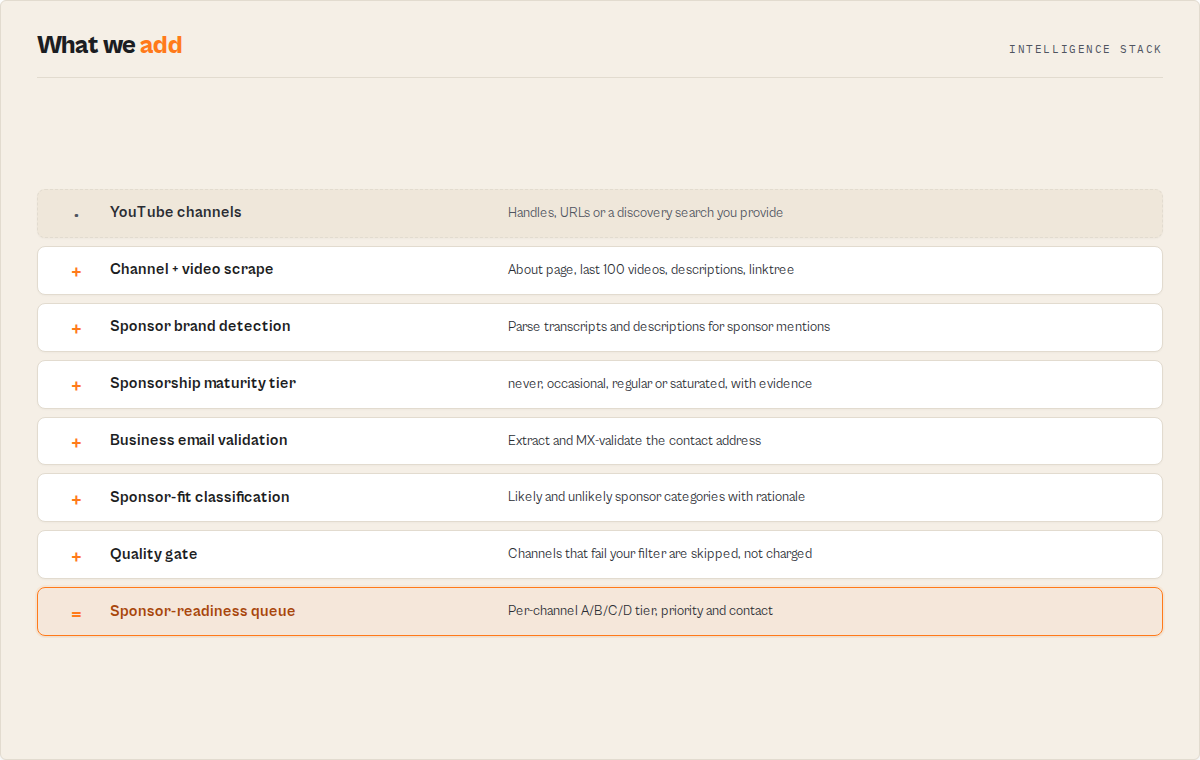
If you are building this yourself, you would need to: run a YouTube channel scraper, parse transcripts for sponsor mentions, maintain a sponsor-brand taxonomy, resolve linktrees and external sites for business emails, run MX lookups, and stitch all of it into a scoring model. This actor does all of that on one PPE event.
It functions as a creator-sponsorship prospecting API, a YouTube sponsorship scoring API, and a creator contact enrichment API in one actor. The structured JSON output is LLM-readable creator intelligence that drops directly into AI agent tool calls, agent-ready outreach queues, daily SDR pipeline feeds in Outreach / Salesloft / Apollo, agency creator-pipeline dashboards, and competitor creator-list monitoring.
Speed benchmarks
Runs use parallel channel processing (configurable via channelConcurrency, default 4). Numbers come from real Apify cloud runs on residential proxy (US), including YouTube response times, transcript fetches, About-tab parsing, MX validation, and dataset writes.
| Cohort size | Settings | Wall-clock |
|---|---|---|
| 3 channels | maxRecentVideosPerChannel: 10, transcriptSamplePerChannel: 3 | 11s |
| 35 channels | maxRecentVideosPerChannel: 30, transcriptSamplePerChannel: 5 | 38s |
| 121 channels | maxRecentVideosPerChannel: 30, transcriptSamplePerChannel: 10 | 116s |
Rough planning rule of thumb: at default channelConcurrency: 4, expect ~1 channel per second of wall-clock at scale. A 500-channel run finishes in around 8-10 minutes.
If you raise channelConcurrency to 8 you typically see another 30-40% speed-up before YouTube's residential-IP rate limit starts pushing back. Drop concurrency to 1 if you ever see persistent failureType: "bot_blocked" records in the output.
Quick answers
What is it? A YouTube channel intelligence actor that scores creators for sponsor-readiness, validates their business contacts, and tracks changes over time. The data source is YouTube. The job is sponsorship prospecting.
What makes it different? Three things. The PPE quality gate means you pay $0 for records that fail your filter. Sponsorship maturity is a tier (A/B/C/D) backed by detected sponsor brands and timestamps, not a hand-wave. Business emails are MX-validated.
What data sources does it use? YouTube channel pages, recent videos (up to 100 per channel), video transcripts (for sponsorship-timestamp detection), description links, and linktree resolution for business contact discovery.
What does it return? Per channel: tier, priority score, business email (validated), sponsor history, sponsor-fit categories, contactability tier, why-this-matters rationale, respond-within-days. Per run: a summary record with portfolio state, priority queue, ICP drift, batch quality.
How much does it cost? $0.30 per enriched channel and $0.05 per enriched video. Channels skipped by the quality gate cost $0. A 100-channel run with a moderate quality gate typically charges for 30-60 channels. Compare that to the $10-$50 in researcher time a manually qualified creator typically costs.
How is it different from raw YouTube scrapers? Raw scrapers return channel metadata. This actor returns a routable decision: tier, priority, contact, urgency, why-now. You can drop the output straight into a sequencing tool.
Can I use it for monitoring? Yes. Set watchlistName and run on a schedule. Cross-run deltas, narrative-delta summaries, and regime-shift detection populate automatically.
At a glance
Quick facts:
- Input: YouTube channel handles, URLs, or channelIds (
@mkbhd, full URL, orUCx...ID) - Output: Per-channel tiered record with priority score, business contact, sponsorship signals, decision rationale
- Pricing: $0.30 per enriched channel, $0.05 per enriched video. Channels skipped by the quality gate = $0.
- Batch size: No hard cap. Typical runs: 10-200 channels.
- Memory: 1024 MB default, scales to 4096 MB
- Default proxy: Apify residential (US). Required, datacenter IPs get blocked.
- Modes:
channels(primary),videos,watchlist. Adiscovermode is wired but currently a v1.1 stub; see Input modes section. - Output profiles:
minimal,sales(default),ops,research,llm
Input to output:
- Input: A list of channel handles + a quality gate
- Process: Fetch channel + recent videos + transcripts, detect sponsors, resolve business contact, MX-validate, score, tier, gate
- Output: A ranked dataset with 7 named views, default sorted by
priorityScore
Best fit: Daily sponsor-ready creator queues, agency pipeline dashboards, B2B SaaS creator-partnership prospecting, competitor-creator monitoring, ICP drift detection across creator lists.
Not ideal for: Outbound email sending (pair with Apollo / Outreach), brand-deal price estimation, private-channel data, real-time live-stream monitoring.
Does not include: Outreach sending, CRM push, paid YouTube Data API access, sponsorship pricing or rate cards.
Problems this solves:
- How to find YouTube creators who actually run sponsorships, not just have an audience
- How to qualify a list of 500 handles without paying for the 400 that don't matter
- How to surface creators whose business email is verifiable, not just listed
- How to detect when a previously-quiet creator starts taking sponsorships again
Data trust: Business emails come from the channel's About page, linktree resolution, or the canonical external site listed on the channel. Every email goes through MX validation. businessContact.businessEmail can be null when no usable contact is found, in which case contactability.tier drops to low or none with a recoveryPlan pointing at sibling actors.
Sponsorship intelligence: what gets detected
YouTube Sponsorship Intelligence parses recent video descriptions, hashtags, and transcripts (when available) to detect sponsor brands and classify the channel's sponsorship maturity.
sponsorshipMaturity.tier is the headline sponsor-history signal:
never: no sponsors detected in the last 90 daysoccasional: sporadic sponsor mentions, not part of a patternregular: consistent sponsor cadence with multiple brandssaturated: high sponsor density per video, often signalling sponsor fatigue
sponsorshipSignals carries the evidence:
sponsorBrandsDetected[]: unique brands seen in the last 90 daysaffiliateLinkHosts[]: affiliate domains in video descriptions (amzn.to, etc.)sponsorshipFrequencyPercent: share of recent videos with detected sponsor activitylastSponsoredVideoDate: most recent dated sponsorshipdetectionDetail[]: per-detection (brand, videoId, evidence, timestamp, confidence)
sponsorFit.likelySponsorCategories[] scores which sponsor categories are a plausible fit based on detected sponsor history and channel topic pillars. Each category carries a confidence and evidence trail.
For video-mode runs, sponsorshipTimestamps[] returns transcript timestamps of detected sponsor reads, with start/end seconds, brand, and the transcript evidence snippet.
Verified creator contacts
businessContact is the resolution result for the channel's business email:
businessEmail: the canonical contact email (ornull)businessEmailSource:about-page,linktree,external-site, ornonebusinessEmailMxValid: true / false / null (MX lookup result)linktreeResolution[]: every link found on a resolved linktree (named with label)primaryWebsiteDomain: the canonical external domain on the channeladditionalContacts[]: alternate emails, social handles, agency contacts
contactability rolls that into a tier:
high: validated business email, no agency-only routingmedium: email present but unverified, or agency representation detectedlow: sparse signals, recovery plan attachednone: no usable contact,recoveryPlanpoints at sibling enrichment actors
emailValidation carries the per-email detail: mxValid, lineType (corporate / free-mail / role-account / disposable), canonical form, and confidence. emailRanking[] ranks multiple discovered emails when present.
Set requireBusinessEmail: true and requireValidatedEmail: true on the quality gate to skip (at $0) any channel that fails MX validation.
Watchlist mode: recurring monitoring
Watchlist mode is the recurring-revenue centrepiece. Set watchlistName: "my-tracked-creators" and run on a schedule. The actor opens a named KV store, persists per-channel state across runs, and computes cross-run signals.
What you get on every recurring run:
temporalSignals: score delta vs previous run, momentum, volatility, reengage flagstateTransition: direction (improving/deteriorating/unchanged/first-sight), days in previous state, change-detected-atnarrativeDelta: plain-language summary of what changed for the channel since last runregimeShift: detection when a channel crosses a classification threshold (e.g.nevertooccasionalsponsorship)persistentAccumulators: historical max pressure, unique sponsor brands ever seen, days under elevated monitoringchangeFlags[]: stable enum tokens for diff-aware downstream consumers
Set systemMode: true to flip on the full stateful service in one toggle. deltaMode (emit only changed records) auto-enables, cohort tracking auto-enables, and the summary record adds a watchlistAnalytics block.
Set referenceRunId to diff against a specific prior run instead of the most-recent one.
Watchlist mode is the difference between "I scraped a list" and "I have a live pipeline." A schedule + a watchlist name turns this actor into a daily feed for your sequencing tool.
In plain English
The architectural field names (narrativeDelta, regimeShift, deltaMode, decisionProfileStrictness, persistentAccumulators) translate to specific operational behaviours. Here is what each one actually does:
- If a creator suddenly starts accepting sponsors again, the watchlist flags it automatically. The
regimeShift.detectedfield flips totrueand thenarrativeDeltafield describes the change in one sentence. - If a creator stops posting or their contact path breaks, the priority drops automatically.
priorityScorefalls,contactability.tierdegrades, andrespondWithinDaysextends. - If a creator becomes oversaturated with sponsors, the system downgrades them before your SDR team wastes outreach effort.
sponsorshipMaturity.tiershifts tosaturatedand theactionDecision.typebecomesdelay. - If a creator was disqualified before but now passes the gate,
temporalSignals.reengageis set totrue. That single boolean is the "this creator just became reachable" signal worth routing into a Slack alert. - If a creator's data has not changed since last run,
changeFlagscontains onlyUNCHANGED. WithdeltaMode: trueyou stop paying for that channel until something actually moves. - If you tighten
decisionProfileStrictnessfrombalancedtohigh, fewer channels reach A-tier. Use this when your SDR capacity is the bottleneck and you only want the strongest leads each run.
Channel intelligence (the underlying data)
Under the sponsorship layer sits a full channel intelligence record:
growthVelocity: uploads last 30d / 90d, weekly cadence, shorts cadence, view-velocity trendperformanceBaseline: p50 / p90 / p99 views, outperformer count last 90daudienceSignal: primary comment language, language mix, comments-per-video baseline, peak upload day + hour (UTC)topicPillars[]: clustered topic labels with share and evidence video IDsrecentVideos[]: up to 100 recent videos with views, likes, comments, hashtags, transcript (when sampled)
This is the underlying data the sponsorship layer reads from. You can request it directly with outputProfile: "minimal" if all you want is the raw channel intelligence.
How sponsorshipReadiness.tier works (the field your team filters on)
sponsorshipReadiness.tier is the single field most downstream consumers should route on. It compresses the full record into one of four buckets:
- Tier A: Active sponsor-ready creator. Validated contact, established sponsor history, healthy growth, fresh activity. Respond within 1-3 days.
- Tier B: Sponsor-ready but needs context. May lack a direct business email (agency-routed), or sponsorship maturity is
occasional. Respond within 3-7 days. - Tier C: Promising but not yet ready. Growth signals are strong, sponsor history is
neveroroccasional, or contactability islow. Respond within 7-30 days, or pair with an enrichment actor. - Tier D: Not a fit right now. Either too small, too saturated, or contactability is
none.
The tier comes with rationale (one-sentence explanation), components (which signal drove the tier), and respondWithinDays. priorityScore adds a 0-100 ranking inside the tier with transparent weighted components.
Use decisionProfileStrictness to tune the tier thresholds:
high: only A-tier survives. Use when SDR capacity is the bottleneck.balanced(default): standard thresholds.aggressive: more channels surface. Use for discovery / pipeline-building runs.
Output: the default sales profile (10-field agency record)
{
  "schemaVersion": "1.0",
  "recordType": "channel",
  "eventId": "ch_UC4nSnIxQ1eK3uZX8KgkqQVQ_run-abc123",
  "channelId": "UC4nSnIxQ1eK3uZX8KgkqQVQ",
  "channelHandle": "@mkbhd",
  "channelName": "Marques Brownlee",
  "channelUrl": "https://www.youtube.com/@mkbhd",
  "subscribers": 19400000,
  "sponsorshipReadiness": {
    "tier": "A",
    "rationale": "Established sponsor history with validated business contact and healthy upload cadence.",
    "components": {
      "subscriberSignal": "mega (19.4M)",
      "engagementRateSignal": "above-baseline",
      "businessContactSignal": "validated-business-email",
      "postingCadenceSignal": "regular-weekly",
      "sponsorshipHistorySignal": "regular"
    }
  },
  "priorityScore": {
    "value": 87,
    "reason": "Tier A creator with sponsor history and validated contact",
    "components": [
      { "name": "subscribers", "weight": 0.2, "value": 95 },
      { "name": "engagement", "weight": 0.2, "value": 78 },
      { "name": "sponsorshipMaturity", "weight": 0.25, "value": 90 },
      { "name": "contactability", "weight": 0.25, "value": 92 },
      { "name": "freshness", "weight": 0.1, "value": 85 }
    ]
  },
  "businessContact": {
    "businessEmail": "[email protected]",
    "businessEmailSource": "about-page",
    "businessEmailMxValid": true,
    "primaryWebsiteDomain": "mkbhd.com",
    "linktreeResolution": [],
    "additionalContacts": []
  },
  "contactability": {
    "tier": "high",
    "components": {
      "businessEmailPresent": true,
      "businessEmailValid": true,
      "agencyRepresentationDetected": false,
      "externalWebsiteActive": true,
      "sponsorshipHistoryPresent": true,
      "affiliateLinksPresent": true
    },
    "interpretation": "Direct outreach via validated business email."
  },
  "sponsorshipMaturity": {
    "tier": "regular",
    "evidence": {
      "sponsoredVideoCountLast90d": 7,
      "uniqueSponsorBrandsLast90d": 5,
      "firstSponsoredVideoDate": "2025-09-12"
    }
  },
  "sponsorshipSignals": {
    "sponsoredVideosLast90dEstimate": 7,
    "sponsorBrandsDetected": ["Ridge", "Squarespace", "dbrand", "Atoms", "Brilliant"],
    "affiliateLinkHosts": ["geni.us", "amzn.to"],
    "sponsorshipFrequencyPercent": 23.3,
    "lastSponsoredVideoDate": "2026-05-08"
  },
  "sponsorFit": {
    "likelySponsorCategories": [
      { "category": "consumer-tech", "confidence": 0.92, "evidence": ["topic:phone-reviews", "brand:dbrand"] },
      { "category": "saas-productivity", "confidence": 0.74, "evidence": ["brand:Squarespace", "brand:Brilliant"] }
    ],
    "unlikelyCategories": ["fashion-luxury", "automotive-oem"],
    "rationale": "Channel pillars and detected sponsor brands cluster around consumer tech and productivity SaaS."
  },
  "whyThisMatters": "Tier A creator with regular sponsor cadence and a validated business email. Direct outreach is viable.",
  "whyNow": "Last sponsored video 6 days ago. Active sponsor cycle.",
  "respondWithinDays": 3,
  "summary": "@mkbhd, 19.4M subs, regular sponsor cadence (Ridge, Squarespace, dbrand), [email protected] validated. Tier A."
}
This is the default sales profile. Set outputProfile: "ops" to add agentContract + decisionTrace. Set outputProfile: "research" to add full evidence[] and provenanceGraph. Set outputProfile: "minimal" for the raw substrate only.
Dataset views (in spec order)
The dataset ships with 7 named views. Open the dataset and switch view from the top-left dropdown.
| View | Purpose |
|---|---|
| Sponsorship Queue (start here) | Agency / sponsorship-team daily review. Tier + Why + Respond-within as the first columns. |
| Contactability Engine | SDR import view. Score, email, validation, channel strategy, coverage analysis. |
| Watchlist Delta | Recurring-run consumers. Temporal signals, state transition, narrative delta, regime shift. |
| Sponsor Detection Detail | Sponsorship analysts. Maturity, brands detected, sponsor-fit categories, topic pillars. |
| Discovery | Niche-discovery view. Activates when discover mode is used. |
| Errors | Records where recordType=error. Failure type + message. |
| Summary | Run-level dashboard view. Portfolio state, priority queue, batch quality, savings. |
Input modes
The same SKU runs four modes. Most users only need channels and watchlist.
channels (primary) — Enrich a named list of creator handles / URLs / channelIds. The most common entry point. Returns a full channel record per input.
videos — Drill into a specific video. Returns video-level intelligence: views vs channel baseline, sponsorship timestamps from transcript, description links classified (affiliate / sponsor / self / social), comment sentiment. Set enrichChannel: true to also pull the parent channel record.
watchlist — Scheduled monitoring on a named creator set. Consumes the same channels input as channels-mode, but reads and writes the named KV store and computes cross-run signals. The recurring-revenue mode.
discover — Niche discovery from a search query. Returns a stub record for callers wiring this mode into a pipeline ahead of the full discovery surface; use channels or watchlist for production runs.
Watchlist mode quick start
{
  "mode": "watchlist",
  "channels": ["@mkbhd", "@veritasium", "@levelsio", "@theverge"],
  "watchlistName": "tech-creators-q2",
  "systemMode": true,
  "minSubscribers": 100000,
  "requireValidatedEmail": true
}
Run this once. Then schedule it daily / weekly from Apify Schedules. On every run after the first, every channel record gains a populated temporalSignals, stateTransition, narrativeDelta, and (when triggered) regimeShift. The summary record gains watchlistAnalytics.
This is the build-pattern for "I want a daily creator-pipeline feed into Outreach / Salesloft / Apollo."
Output profiles
The same compute, different payload shape. Pick the profile that matches your downstream consumer:
| Profile | Adds | Best for |
|---|---|---|
minimal | Substrate only | Raw channel intelligence consumers, custom pipelines |
sales (default) | The 10-field agency record above | Sponsorship teams, agencies, SDR queues |
ops | + agentContract, decisionTrace | Workflow automation, internal tools |
research | + evidence[], provenanceGraph | Analyst review, audit, calibration runs |
llm | Ops-equivalent | LLM agents reading the dataset directly |
Pricing
YouTube Sponsorship Intelligence uses pay-per-event pricing. Platform compute costs are included.
| Event | Fires when | Price |
|---|---|---|
channel_intelligence | An enriched channel record passes the quality gate | $0.30 |
video_intelligence | An enriched video record passes the quality gate | $0.05 |
discovery_search | A discovery query runs | $0.20 |
Quality-gate-skipped records cost $0. They emit as recordType: "skipped" so you still see what was filtered out and why, without being charged.
What you are actually buying at $0.30 per channel. A manually researched creator with a verified business email, a sponsor-history check, and a sponsor-fit classification typically costs an agency $10 to $50 in researcher time. This actor produces the same qualification signal for around $0.30 per qualified creator. Your researcher then spends their hours writing the pitch and running the call, not searching the About page and reading the last fifteen video descriptions. The price compares against research labour, not against CSV rows.
Cost scenarios
| Scenario | Records charged | Total |
|---|---|---|
| Quick test, 5 channels, no gate | 5 channels | $1.50 |
| 100 channels, moderate gate (~50% pass) | 50 channels | $15.00 |
| 100 channels with 30 enriched videos | 50 channels + 30 videos | $16.50 |
| Daily watchlist of 200 channels, ~60% pass | 120 channels | $36.00 per run |
| Bulk enrichment of 1,000 channels, ~40% pass | 400 channels | $120.00 |
Set an Apify run spending limit on the actor to cap any individual run. Apify's free tier includes $5 of monthly credits.
Quality gate (the trust mechanism in detail)
Four gate fields decide which records get charged:
minSubscribers: channels below this subscriber count skipminScore: channels with priority score below this skiprequireBusinessEmail: channels without a discovered business email skiprequireValidatedEmail: channels whose business email fails MX validation skip
A skipped channel emits this record (and fires no PPE event):
{
  "recordType": "skipped",
  "channelHandle": "@smallcreator",
  "channelId": "UC...",
  "subscribers": 12000,
  "skipReason": {
    "source": "quality-gate",
    "rules": ["minSubscribers:100000"],
    "message": "Channel has 12000 subscribers, below the minSubscribers threshold of 100000."
  },
  "summary": "Skipped @smallcreator: below subscriber threshold."
}
The summary record's savings block reports total skipped records, estimated enrichment cost avoided, estimated SDR touches avoided, and estimated downstream spend avoided. The numbers are real, you actually paid $0 for those records.
Quick start
Minimal run for "evaluate a creator list":
{
  "mode": "channels",
  "channels": ["@mkbhd", "@veritasium", "@levelsio"],
  "minSubscribers": 100000,
  "requireBusinessEmail": true
}
Run it. Open the dataset. Switch to the Sponsorship Queue view. Sort by priorityScore. Export to CSV or push to your CRM.
How to find sponsor-ready YouTube creators (the operating loop)
- Pick a list: start with 10-50 creator handles from a niche you understand.
@handle, full URL, orUCx...channelId all work. - Set a quality gate: for a daily agency queue, start with
minSubscribers: 50000,requireBusinessEmail: true. Tune from there. - Run channels mode: wait for the dataset to populate.
- Review Sponsorship Queue view: tier A first, then tier B with their
whyNowrationale. - For monitoring, switch to watchlist mode: name the watchlist, set
systemMode: true, schedule it daily. - Pair with sibling actors when
contactability.tieris low:recoveryPlannames the actor to call next.
First run tips
- Start with 5-10 channels to verify the output shape and tier distribution before scaling.
- Default proxy is residential US. Do not switch to datacenter. YouTube blocks datacenter IPs.
includeTranscripts: trueis on by default, required for sponsorship-timestamp detection. Turn it off only if you do not need sponsor-history evidence.includeCommentsSample: falseis the default. Turning it on roughly triples per-channel request load. Only enable when you need audience-language detection.- For a watchlist, the first run is a baseline.
temporalSignals,stateTransition, andnarrativeDeltapopulate from run 2 onwards.
Sibling actors (when to chain)
When contactability.tier is low or none, the recoveryPlan.nextBestActorSlug and actorGraph.next[] fields name the next actor to call:
- Website Contact Scraper: when a channel has a
primaryWebsiteDomainbut no resolvable business email. Pulls contacts directly from the creator's site. - Bulk Email Verifier: when multiple candidate emails exist and you need MX + SMTP verification before adding them to a sequence.
- Person Enrichment Lookup: when the agency route is detected (
sequenceFit.agencyRouteRequired: true) and you need to resolve the agency contact behind the listed email.
The actor never silently calls a sibling. It tells you which one is next and why, and you decide whether to run it.
What this actor does NOT do (scope-fence)
- Does not send outreach. Pair with Outreach / Salesloft / Apollo / Smartlead.
- Does not push to a CRM. Pair with HubSpot Lead Pusher or your own webhook.
- Does not price brand deals. Sponsorship-readiness is a fit signal, not a rate card.
- Does not access private channels. Only public YouTube data is parsed.
- Does not scrape live streams in real time. Recent uploaded videos only.
- Does not bypass YouTube anti-bot. Residential proxy is required; the actor circuit-breaks on consecutive bot-blocks.
- Does not predict reply.
priorityScoreranks fit; calibrate against your own outcome data withoutcomeDatasetId. - Does not return paid YouTube Data API fields that require authentication (private analytics, demographics, monetization stats).
- Is not an influencer marketplace. Upfluence, Aspire, GRIN, Modash, CreatorIQ are the right tools for sourcing creators from a hosted marketplace, managing campaign briefs, and handling creator payments. This actor is creator-sponsorship prospecting infrastructure, not a marketplace.
If you need a feature in that list, do not work around it inside this actor. Chain the right sibling actor instead.
When NOT to use this actor (job → better tool)
| Job you need done | Better tool |
|---|---|
| Send a cold-email sequence to creators | Outreach.io / Salesloft / Apollo / Smartlead / Lemlist |
| Manage an active influencer campaign (briefs, deliverables, content review) | GRIN / Aspire / CreatorIQ / Upfluence |
| Source from a curated influencer marketplace | Aspire / Modash / Upfluence / Tribe Dynamics |
| Pay creators / manage 1099 / handle invoicing | Creator marketplace payouts or your own AP system |
| Estimate brand-deal price or CPM | Influencer pricing tools, not this actor |
| Real-time live-stream monitoring | A live-stream monitoring platform |
| Qualify a list of YouTube creators for sponsorship outreach | This actor |
| Find creators with validated business emails and active sponsor history | This actor |
| Run a weekly creator-pipeline refresh for an SDR / agency team | This actor |
Capability comparison
| Capability | YouTube Sponsorship Intelligence | Standard YouTube scrapers | Channel + video scrapers (multi-tool) |
|---|---|---|---|
| Sponsorship maturity tier | Yes | No | No |
| Sponsorship-readiness tier (A/B/C/D) | Yes | No | No |
| Sponsor brand detection from transcripts | Yes | No | Rare |
| Business email + MX validation | Yes | No | No |
| Contactability tier + agency-route detection | Yes | No | No |
| PPE quality gate (skipped records cost $0) | Yes | No | No |
| Cross-run delta + narrative delta + regime shift | Yes | No | No |
| Priority score with transparent components | Yes | No | Rare |
| Why-now + respond-within rationale | Yes | No | No |
| Named dataset views (Sponsorship Queue / SDR / Watchlist) | Yes | No | No |
| Decision profile strictness | Yes | No | No |
| Output profiles (sales / ops / research / llm / minimal) | Yes | No | No |
| Raw channel metadata + recent videos | Yes | Yes | Yes |
| Per-video stats + transcripts | Yes | Sometimes | Yes |
| Comment sentiment | Yes | Rare | Sometimes |
Capabilities as of May 2026 and may change. The contrast row that matters: a flat scraper gives you data. This actor gives you a routable decision (tier, priority, contact, urgency, why-now) that drops into a sequencing tool without further processing.
Input parameters
| Parameter | Type | Default | Description |
|---|---|---|---|
mode | string (enum) | channels | channels, videos, watchlist, discover |
channels | string[] | [] | Handles (@mkbhd), URLs, or UCx... IDs |
videos | string[] | [] | Video URLs (videos mode only) |
maxRecentVideosPerChannel | integer | 30 | 5-100 |
includeTranscripts | boolean | true | Required for sponsorship-timestamp detection |
transcriptSamplePerChannel | integer | 5 | 0-50 |
includeCommentsSample | boolean | false | Off by default |
commentsSamplePerVideo | integer | 100 | 0-500 |
enrichChannel | boolean | true | Videos mode: also pull the parent channel |
profile | string (enum) | agency-sponsorship-prospecting | Mode bundle |
persona | string (enum) | sponsorship-team | Output audience |
goal | string (enum) | sponsorship-fit | Tightens scoring weights |
systemMode | boolean | false | One-flag stateful service |
watchlistName | string | "" | Named KV store for cross-run state |
referenceRunId | string | "" | Diff against a specific prior run |
deltaMode | boolean | false | Emit only changed records |
decisionProfileStrictness | string (enum) | balanced | high, balanced, aggressive |
minSubscribers | integer | 0 | Quality gate |
minScore | integer | 0 | Quality gate (0-100) |
requireBusinessEmail | boolean | false | Quality gate |
requireValidatedEmail | boolean | false | Quality gate |
allowSensitiveThemes | boolean | false | Opt-in sensitive-theme detection |
scorecardTemplate | string (enum) | agency-sponsorship-v1 | Preset weights |
outputProfile | string (enum) | sales | minimal, sales, ops, research, llm |
explainabilityLevel | string (enum) | compact | none, compact, full |
enableEconomics | boolean | false | v2 reserved |
sdrCostPerTouch | number | 3.0 | Used by savings block |
maxOutreachPerRun | integer | 0 | Allocation cap (0 = no cap) |
budgetUsd | number | 0 | Allocation cap in USD |
outcomeDatasetId | string | "" | Calibrate scores against your prior outreach outcomes |
outcomeJoinField | string | channelId | Field in the outcome dataset to join on |
enableIcpInsights | boolean | true | Adds icpInsights to summary |
enableDedup | boolean | false | Collapse channels sharing a canonical domain |
circuitBreakerThreshold | integer | 3 | Halt run after N consecutive bot-blocks |
freshnessDecayAfterDays | integer | 30 | Freshness penalty starts |
freshnessMaxPenalty | integer | 25 | Max points deductible |
proxyConfiguration | object | Apify residential US | Required; do not use datacenter |
Input examples
Minimal (evaluate a creator list):
{
  "mode": "channels",
  "channels": ["@mkbhd", "@veritasium", "@levelsio"]
}
Daily agency queue with quality gate:
{
  "mode": "channels",
  "channels": ["@channel1", "@channel2", "@channel3"],
  "minSubscribers": 50000,
  "requireBusinessEmail": true,
  "requireValidatedEmail": true,
  "decisionProfileStrictness": "balanced",
  "outputProfile": "sales"
}
Watchlist monitoring (recurring):
{
  "mode": "watchlist",
  "channels": ["@mkbhd", "@veritasium"],
  "watchlistName": "tech-creators-q2",
  "systemMode": true,
  "requireValidatedEmail": true
}
Drill into a single video:
{
  "mode": "videos",
  "videos": ["https://www.youtube.com/watch?v=dQw4w9WgXcQ"],
  "enrichChannel": true
}
Stable enum tokens (additive-only pledge)
These string tokens are stable across releases. New values may be added; existing values will not be renamed or removed.
recordType:channel,video,discovery,summary,warning,error,skippedsponsorshipReadiness.tier:A,B,C,DsponsorshipMaturity.tier:never,occasional,regular,saturatedcontactability.tier:high,medium,low,nonefailureType:auth,rate_limit,not_found,schema_mismatch,bot_blocked,transcript_unavailable,unknownchangeFlags[]: stable diff tokens (e.g.SCORE_UP,SCORE_DOWN,NEW_SPONSOR,MATURITY_TIER_CHANGE,CONTACTABILITY_TIER_CHANGE,UNCHANGED)outputProfile:minimal,sales,ops,research,llmprofile:agency-sponsorship-prospecting,competitor-monitoring,niche-discovery,b2b-creator-outreach,rawpersona:agency,sponsorship-team,b2b-sales,competitive-analyst,genericgoal:sponsorship-fit,new-creator-discovery,competitor-tracking,lead-gen,generic
Build downstream rules against these tokens with confidence.
Run via the API
Python
from apify_client import ApifyClient

client = ApifyClient("YOUR_API_TOKEN")

run = client.actor("ryanclinton/youtube-sponsorship-intelligence").call(run_input={
    "mode": "channels",
    "channels": ["@mkbhd", "@veritasium", "@levelsio"],
    "minSubscribers": 100000,
    "requireBusinessEmail": True,
    "requireValidatedEmail": True,
    "outputProfile": "sales"
})

for item in client.dataset(run["defaultDatasetId"]).iterate_items():
    if item.get("recordType") == "channel":
        tier = item["sponsorshipReadiness"]["tier"]
        score = item["priorityScore"]["value"]
        email = item["businessContact"]["businessEmail"]
        print(f"{item['channelHandle']} | Tier {tier} | Score {score} | {email}")
JavaScript
import { ApifyClient } from "apify-client";

const client = new ApifyClient({ token: "YOUR_API_TOKEN" });

const run = await client.actor("ryanclinton/youtube-sponsorship-intelligence").call({
    mode: "channels",
    channels: ["@mkbhd", "@veritasium", "@levelsio"],
    minSubscribers: 100000,
    requireBusinessEmail: true,
    requireValidatedEmail: true,
    outputProfile: "sales"
});

const { items } = await client.dataset(run.defaultDatasetId).listItems();
for (const item of items) {
    if (item.recordType === "channel") {
        console.log(`${item.channelHandle} | Tier ${item.sponsorshipReadiness.tier} | Score ${item.priorityScore.value} | ${item.businessContact.businessEmail}`);
    }
}
cURL
curl -X POST "https://api.apify.com/v2/acts/ryanclinton~youtube-sponsorship-intelligence/runs?token=YOUR_API_TOKEN" \
  -H "Content-Type: application/json" \
  -d '{
    "mode": "channels",
    "channels": ["@mkbhd", "@veritasium"],
    "minSubscribers": 100000,
    "requireBusinessEmail": true
  }'

curl "https://api.apify.com/v2/datasets/DATASET_ID/items?token=YOUR_API_TOKEN&format=json"
Use in Dify
This actor drops into Dify as a Custom Tool via the Apify run-sync-get-dataset-items endpoint. One HTTP call starts the run, waits for completion, and returns the dataset items — no separate polling logic needed.
Tool configuration:
| Field | Value |
|---|---|
| Method | POST |
| URL | https://api.apify.com/v2/acts/ryanclinton~youtube-sponsorship-intelligence/run-sync-get-dataset-items |
| Authorization | Bearer YOUR_APIFY_API_TOKEN (or ?token=YOUR_APIFY_API_TOKEN query param) |
| Headers | Content-Type: application/json |
| Request body | JSON matching the input schema (see below) |
| Response | JSON array of records (channel + skipped + error + summary) |
Minimal Dify request body for the "qualify these creators" tool:
{
  "mode": "channels",
  "channels": ["@mkbhd", "@veritasium", "@levelsio"],
  "minSubscribers": 100000,
  "requireBusinessEmail": true,
  "outputProfile": "llm"
}
Use outputProfile: "llm" when the consumer is a Dify agent. It adds agentContract + decisionTrace[] to every record so the agent has a compact branching surface without traversing nested objects.
Branching in Dify workflows:
After the tool call, your Dify nodes can branch on stable enum fields without prose parsing:
record.sponsorshipReadiness.tier === "A"→ push to outreach queuerecord.sponsorshipReadiness.tier === "B"→ nurturerecord.contactability.tier === "high"→ email channelrecord.contactability.tier !== "high"→ run sibling enrichment actor firstrecord.recordType === "skipped"→ audit log only, no PPE cost incurredrecord.respondWithinDays <= 3→ SLA tag for high-priority queue
Polling alternative (when you prefer async runs):
If the wait-for-completion timeout is a concern (Dify's default Custom Tool timeout is 60s), switch to the async pattern:
- POST
https://api.apify.com/v2/acts/ryanclinton~youtube-sponsorship-intelligence/runs→ returns{ data: { id: runId, defaultDatasetId } } - Poll GET
https://api.apify.com/v2/actor-runs/{runId}every few seconds untilstatus === "SUCCEEDED" - GET
https://api.apify.com/v2/datasets/{defaultDatasetId}/itemsto retrieve records
Or wire run-sync-get-dataset-items?timeout=300 (max 300s on most plans) for sync calls up to 5 minutes. A 100-channel run typically completes inside that window at default concurrency.
LangChain / LangGraph / agent frameworks can use the same HTTP pattern. The actor returns deterministic JSON with stable enum tokens (recordType, sponsorshipReadiness.tier, sponsorshipMaturity.tier, contactability.tier, failureType, changeFlags) so agent branching is reliable across runs.
How YouTube Sponsorship Intelligence works
Mental model: Channel list → fetch channel + recent videos + (optional) transcripts + (optional) comments → resolve business contact (about page → linktree → external site → MX-validate) → detect sponsors → score components → tier → quality gate → emit (charged or skipped).
Phase 1: fetch substrate
Channel page, up to 100 recent videos, transcripts on the top-engagement videos, optional comments sample. Residential proxy throughout. The circuit-breaker halts the run after N consecutive bot-blocks (circuitBreakerThreshold, default 3).
Phase 2: resolve business contact
About-page email regex first, then linktree resolution (label + URL pairs), then canonical external site. Every candidate goes through MX validation. emailRanking[] ranks all discovered candidates by line-type (corporate > role > free-mail > disposable) and source quality.
Phase 3: detect sponsors
Description parse for known affiliate hosts, transcript scan for known sponsor-brand patterns, hashtag analysis. Each detection records brand, videoId, transcript timestamp (when transcript was sampled), evidence snippet, and confidence. Aggregated into sponsorshipSignals and tiered into sponsorshipMaturity.tier.
Phase 4: score, tier, gate
Components are weighted per scorecardTemplate. Strictness shifts the tier thresholds. The quality gate runs last: if a record fails, it emits as skipped and the PPE event does not fire. The order is intentional. Every charged record is a record you have actually seen pass your filter.
Phase 5: stateful overlay (watchlist mode only)
Read the named KV store, diff against previous state, emit temporalSignals / stateTransition / narrativeDelta / regimeShift, then write the new state back. Across-run state lives in the KV store, not the dataset.
Tips for best results
- Set
requireValidatedEmail: truefor any SDR-facing run. Anything else lets unverified emails into your sequencing tool. - Pair
decisionProfileStrictness: highwithoutputProfile: salesfor a daily A-tier-only queue. Loosen tobalancedwhen capacity opens up. - Use
watchlistName+systemMode: truetogether. SolowatchlistNameworks, butsystemModeenablesdeltaModeandbatchInsightsin one toggle. - For competitor monitoring, set
profile: "competitor-monitoring". It shifts scoring weights toward growth + sponsorship momentum and away from contactability. - Calibrate against your own outcomes with
outcomeDatasetId. Push your prior creator-outreach outcomes (channelId, sentAt, repliedAt, outcome) into an Apify dataset and pass the ID. The actor calibratespriorityScoreto your actual reply rates. - Keep
includeCommentsSample: falseunless you specifically need audience-language detection. Comments sampling roughly triples per-channel request load.
Limitations
- Transcript availability is YouTube-controlled. Some videos do not expose transcripts publicly; sponsorship-timestamp detection skips those.
- Anti-bot escalation is possible. If YouTube rotates a new challenge, the circuit-breaker halts the run and
recordType: "error"records carryfailureType: "bot_blocked". Re-run later or change proxy region. - Sponsorship detection is a fit signal, not a prediction. A
regularmaturity tier means the channel runs sponsors regularly; it does not promise they will reply to you. - Discovery mode returns a stub record. Use
channelsorwatchlistmodes for full enrichment. - Business email confidence is best-effort. When a channel hides the About-page email and has no resolvable external site,
businessContact.businessEmailisnullandcontactability.tierreflects that. - MX validation is DNS-level, not SMTP-level. Use Bulk Email Verifier for SMTP-handshake verification when needed.
- Residential proxy is required. Datacenter proxies are blocked. The default config uses the Apify RESIDENTIAL group with US rotation.
Integrations
- Zapier: trigger downstream workflows on each Tier A record
- Make: branch on
sponsorshipReadiness.tierandcontactability.tier - Google Sheets: export the Sponsorship Queue view directly
- Apify Schedules: required for watchlist mode
- Apify API: read the dataset, trigger runs, manage watchlist KV stores
- Webhooks: fire on run finish to push into your CRM / sequencing tool
Troubleshooting
Run halted with bot_blocked errors. YouTube anti-bot escalated. Try a different apifyProxyCountry, lower maxRecentVideosPerChannel, or wait and re-run. circuitBreakerThreshold is intentionally cautious; raise it only if you understand the trade-off.
All channels coming back Tier D. Quality gate is too strict, or decisionProfileStrictness: high is filtering everything. Loosen the gate, drop strictness to balanced, and inspect the skipReason on skipped records to see exactly which rule fired.
businessContact.businessEmail is null for most channels. Channels increasingly hide About-page emails. Pair with Website Contact Scraper on businessContact.primaryWebsiteDomain for a second pass.
Watchlist not producing deltas. The first run is a baseline; deltas populate from run 2 onwards. Confirm watchlistName is identical between runs (case-sensitive).
Transcripts unavailable for sponsorship-timestamp detection. Not all videos expose transcripts. failureType: "transcript_unavailable" is logged on the affected videos; channel-level sponsorshipSignals.detectionDetail[] still works from description + hashtag parsing.
FAQ
How do I find sponsor-ready YouTube creators with verified contacts? Run channels mode with minSubscribers set to your floor and requireValidatedEmail: true. The actor returns only creators with MX-validated business emails. Open the Sponsorship Queue view and sort by priorityScore.
How is YouTube Sponsorship Intelligence different from a YouTube scraper? Flat YouTube scrapers return raw channel metadata. This actor returns a routable decision: tier, priority score, validated business contact, sponsor history, and a respond-within window. The Sponsorship Queue view is built to drop directly into a sequencing tool, not to be post-processed.
Does this work for creators who do not list a business email? Partially. The actor still scores the channel, but contactability.tier reflects the missing contact. recoveryPlan names the sibling actor to call (typically Website Contact Scraper against primaryWebsiteDomain).
Can I monitor a list of competitors' favourite creators? Yes. Set profile: "competitor-monitoring", name a watchlist, and schedule it. You get temporalSignals, narrativeDelta, and regimeShift on every recurring run.
How does the PPE quality gate actually save money? Records that fail the gate emit as recordType: "skipped" and the channel_intelligence PPE event does not fire for them. The summary record's savings block reports the total. On noisy lists (500+ handles), a moderate gate typically prevents 40-60% of records from being charged.
What is the difference between a YouTube channel scraper and a sponsorship-intelligence actor? A channel scraper returns substrate (subs, videos, descriptions). A sponsorship-intelligence actor adds sponsor brand detection, sponsor-fit categorisation, business-contact resolution with MX validation, contactability scoring, and a tier you can route on. Same data source, different output contract.
How accurate is the sponsor brand detection? It runs against transcripts (when available), description text, and affiliate-host patterns. Each detection records evidence and confidence. Sponsors that appear only in spoken word on videos without transcripts will be missed; these surface as failureType: "transcript_unavailable" on the affected videos.
What does respondWithinDays actually mean? A scheduling hint, not a prediction. Tier A gets 1-3 days because the signals (validated contact, fresh sponsor activity, healthy growth) decay. Tier C gets 7-30 days because the channel is a discovery candidate, not a hot lead.
Can I use my own scoring weights? Yes. Set scorecardTemplate: "custom" and adjust component weights. Or pick one of the named templates (agency-sponsorship-v1, b2b-creator-saas, pr-outreach, influencer-discovery) and inherit the tuned weights.
How is this different from Modash, Klear, or other influencer-discovery tools? Those are subscription influencer databases with broad creator coverage. This actor is pay-per-event infrastructure: you bring the creator list (or watchlist), pay $0.30 per qualified channel, and get a JSON output designed for sequencing-tool intake. Different shape of tool for different jobs.
Is it legal to scrape YouTube channel data? YouTube Sponsorship Intelligence reads only publicly available channel information (channel page, public videos, public transcripts, public descriptions). It does not bypass authentication or access private analytics. Legality depends on jurisdiction and intended use; consult legal counsel for your specific case. See Apify's guide on web scraping legality.
Can I push results straight into HubSpot? Yes. Pair with HubSpot Lead Pusher on a webhook trigger. The automationTriggers block on each record (sendToCrm, priorityQueue) is designed for that route.
Responsible use
- YouTube Sponsorship Intelligence reads publicly available channel information from YouTube. It does not bypass authentication, CAPTCHAs, or access restricted content.
- Users are responsible for ensuring their use complies with applicable laws and platform terms, including data protection rules and email outreach regulations in their jurisdiction.
- Do not use extracted data for spam, harassment, or unauthorized purposes. Business-contact outreach should respect each creator's stated preferences and applicable anti-spam law.
- For guidance on web scraping legality, see Apify's guide.
Help us improve
If you encounter issues, you can help us debug faster by enabling run sharing in your Apify account:
- Go to Account Settings > Privacy
- Enable Share runs with public Actor creators
This lets us see your run details when something goes wrong, so we can fix issues faster. Your data is only visible to the actor developer, not publicly.
Support
Found a bug or have a feature request? Open an issue in the Issues tab on this actor's page. For custom solutions or enterprise integrations, reach out through the Apify platform.
Related articles
The Difference Between a YouTube Scraper and a Creator Intelligence System
YouTube scrapers return rows. A creator intelligence system returns a decision: which channel to look at first, which video broke out, what changed.
The Difference Between a YouTube Scraper and Creator Prospecting Infrastructure
Raw YouTube scrapers return data. Creator-sponsorship prospecting infrastructure returns a routable decision: tier, contact, urgency, recommended action.
Related actors
AI Cold Email Writer — $0.01/Email, Zero LLM Markup
Generates personalized cold emails from enriched lead data using your own OpenAI or Anthropic key. Subject line, body, CTA, and optional follow-up sequence — $0.01/email, zero LLM markup.
B2B Lead Generation Suite - Find Emails, Score & Qualify Leads
All-in-one B2B lead pipeline. Enter company URLs, get enriched leads with emails, phone numbers, contacts, email patterns, quality scores (0-100), grades, and business signals from a 3-step automated pipeline.
B2B Lead Qualifier - Score & Rank Company Leads
B2B lead scoring tool and API that scores companies 0-100 from 30+ website signals. 5 scoring categories, 4 profiles (sales, marketing, recruiting, default). Plain-English explanations, hiring detection, industry classification, score change tracking. $0.15/lead, no subscription.
Bluesky Social Search — Monitor, Sentiment, Trends & Alerts
Monitor Bluesky mentions, detect trends, track sentiment & get alerts. Built-in analytics, engagement scoring, trend detection. Export JSON/CSV. No API key required.
Ready to try YouTube Sponsorship Intelligence — Sponsor-Ready Creators?
Run it on your own Apify account. Apify offers a free tier with $5 of monthly credits.
Open on Apify Store