EPO European Patent Search is an Apify actor on ApifyForge. Search 130M+ patents from the European Patent Office OPS API. Find patents by title, applicant, inventor, IPC/CPC class, or date. Get abstracts, classifications, and Espacenet links. Free EPO API credentials. It costs $0.002 per patent-fetched. Best for investigators, analysts, and risk teams conducting due diligence, regulatory tracking, or OSINT research. Not ideal for real-time surveillance or replacing classified intelligence systems. Maintenance pulse: 90/100. Last verified March 27, 2026. Built by Ryan Clinton (ryanclinton on Apify).
EPO European Patent Search
EPO European Patent Search is an Apify actor available on ApifyForge at $0.002 per patent-fetched. Search 130M+ patents from the European Patent Office OPS API. Find patents by title, applicant, inventor, IPC/CPC class, or date. Get abstracts, classifications, and Espacenet links. Free EPO API credentials.
Best for investigators, analysts, and risk teams conducting due diligence, regulatory tracking, or OSINT research.
Not ideal for real-time surveillance or replacing classified intelligence systems.
What to know
- Limited to publicly available and open-source information.
- Report depth depends on the availability of upstream government and public data sources.
- Requires an Apify account — free tier available with limited monthly usage.
Maintenance Pulse
90/100Cost Estimate
How many results do you need?
Pricing
Pay Per Event model. You only pay for what you use.
| Event | Description | Price |
|---|---|---|
| patent-fetched | Charged per European patent record retrieved from EPO. | $0.002 |
Example: 100 events = $0.20 · 1,000 events = $2.00
Documentation
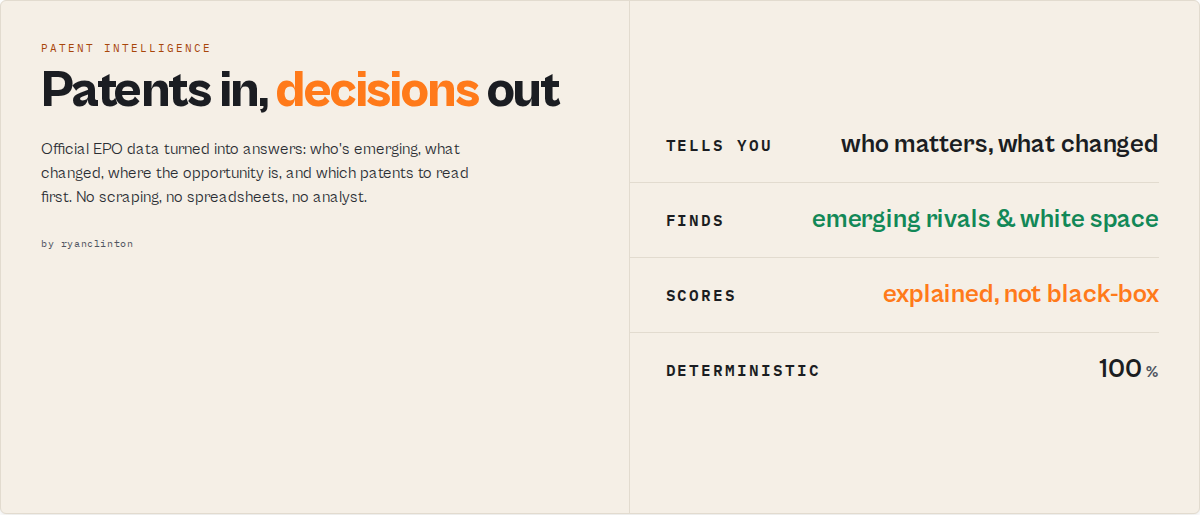
Powered by official EPO data. Designed for decisions. Most patent tools tell you what was filed. This actor tells you what matters.
Stop exporting patent searches into Excel. Most patent tools hand you hundreds of filings and leave you to work out which patents matter, which competitors are emerging, where protection is expanding, and which technologies are accelerating. This actor uses official EPO data to answer those questions for you. No scraping, no spreadsheets, no patent analyst required.
Most patent actors return records. This one returns conclusions.
Built for
- ✅ Investors evaluating a startup's patent moat
- ✅ Competitive-intelligence teams tracking rivals
- ✅ Innovation teams mapping technology landscapes
- ✅ Patent attorneys prioritising prior art
- ✅ Researchers studying technology trends
What you get
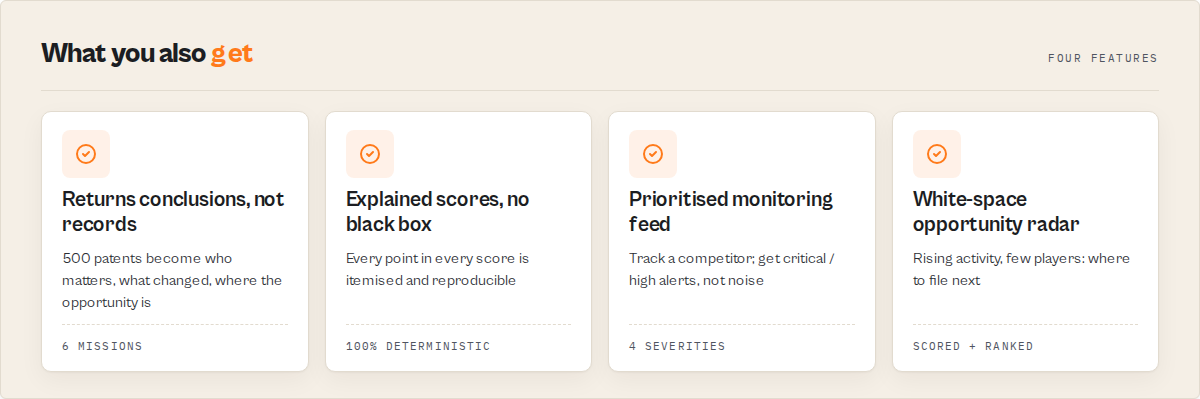
Instead of 500 patent records, one run tells you:
- ✓ Which competitors are emerging
- ✓ Which patents deserve attention first
- ✓ Where patent protection is expanding
- ✓ Which technologies are accelerating
- ✓ Which opportunities are still underserved
- ✓ What changed since your last search
Replaces hours of manual patent analysis
| Task | Traditional workflow | This actor |
|---|---|---|
| Find emerging competitors | 2 to 4 hours | under 1 minute |
| Consolidate patent families | Manual cross-searching | Automatic |
| Normalize assignee names | Manual, error-prone | Automatic |
| Assess a startup's moat | Spreadsheet analysis | One run |
| Map a technology landscape | A patent analyst | One run |
| Monitor a competitor | Weekly manual searches | Scheduled, automated |
Pick a mission (find emerging competitors, assess a startup's patent moat, monitor a competitor, map a landscape, scope freedom to operate, run investor diligence) and the actor points official EPO data at that question. Every score is deterministic and explained, no LLM and no black box. Up to 2,000 results per run.
Four run modes: Search (full results + per-record intelligence), Monitor (track new filings, grants, and family/citation changes since last run), Lite (lightweight fast scanning), Landscape (aggregates only — one analytics record summarising the whole technology domain, no individual rows).
Best for: Prior art research, competitor patent monitoring, technology landscape analysis, IP due diligence, freedom-to-operate assessment, technology-diligence for investors, and patent-trend research.
Not for: Full patent text or claims search, PDF downloads, live legal status tracking, patent prosecution monitoring.
Example: map an emerging technology in one run
Find who is entering solid-state batteries and which filings look strategically important.
{
    "consumerKey": "your-epo-consumer-key",
    "consumerSecret": "your-epo-consumer-secret",
    "query": "ipc=H01M and pd>=2023",
    "mode": "landscape"
}
Returns a single landscape record:
{
    "recordType": "landscape",
    "filingTrend": "increasing",
    "growthRate": 31.2,
    "marketConcentrationScore": 18,
    "marketConcentration": { "top4Share": 34, "hhi": 1820, "interpretation": "moderately-concentrated" },
    "emergingApplicants": [{ "name": "QuantumScape", "recentCount": 14, "totalCount": 18 }],
    "whiteSpaceAreas": [{ "ipc": "H01M 10/0562", "filings": 6, "distinctApplicants": 2, "recentShare": 0.83 }],
    "citationLeaders": [{ "publicationNumber": "EP4012345B1", "title": "SULFIDE SOLID ELECTROLYTE...", "citationCount": 41 }]
}
In one run you see which companies are entering the area (emergingApplicants), how competitive it is (marketConcentration), where it's growing fastest with the least competition (whiteSpaceAreas), and which patents look strategically important (citationLeaders). No analyst, no LLM. (Example values are illustrative.)
Choose your mission
Don't want to configure modes and filters? Pick a mission — a one-click preset that points the same EPO data at a specific business question. Any field you also set overrides the mission.
| Mission | Answers | Run it with |
|---|---|---|
find_emerging_competitors | "Who's the rising threat in my space?" | { "applicant": "Samsung", "mission": "find_emerging_competitors" } |
technology_landscape | "What's happening in this technology?" | { "query": "ipc=H01M and pd>=2023", "mission": "technology_landscape" } |
startup_moat | "How strong is this startup's patent moat?" | { "applicant": "QuantumScape", "mission": "startup_moat" } |
freedom_to_operate | "Which granted patents could block me?" | { "titleKeywords": "solid state battery", "mission": "freedom_to_operate" } |
threat_radar | "What did my competitor just do?" | { "applicant": "Toyota", "watchlistName": "toyota", "mission": "threat_radar" } |
investor_due_diligence | "Is this portfolio worth backing?" | { "applicant": "Sila Nanotechnologies", "mission": "investor_due_diligence" } |
Missions configure the run (mode, family enrichment, granted-only) — they add no new charges and no new scoring, just the right lens on the data you'd otherwise have to assemble yourself.
Why this is different
Most patent tools stop at the raw result. You still have to identify emerging competitors, group families, normalize assignee names, calculate trends, prioritise patents, and monitor changes by hand. This actor starts where they stop:
500 patents
  ↓
117 inventions      (families consolidated)
  ↓
3 emerging competitors   (rising filers, ranked by threat)
  ↓
2 white-space areas      (rising activity, few players)
  ↓
5 patents worth reading  (priorityTier = critical)
Why this isn't another patent API
"I'll just call the EPO API myself" is the real alternative. The EPO API returns filings. Turning filings into intelligence still takes:
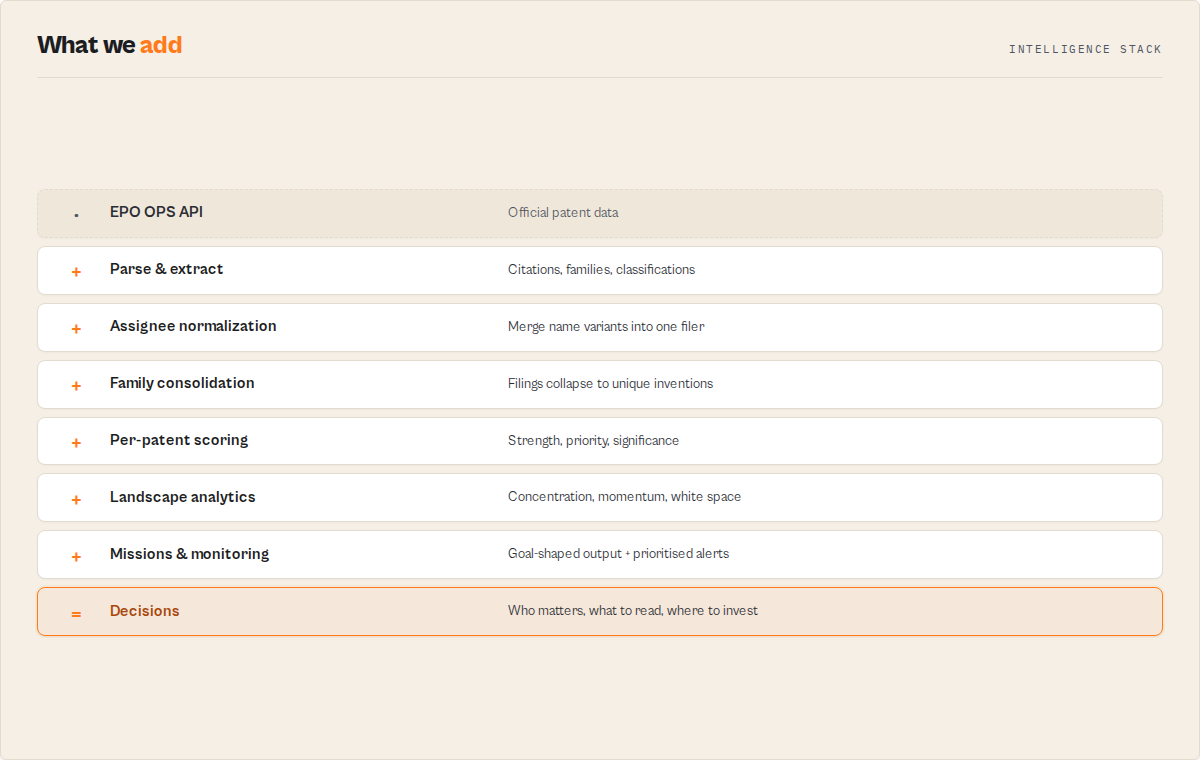
- ✓ Family consolidation (raw filings → unique inventions)
- ✓ Assignee normalization (merge "Samsung SDI Co., Ltd." variants)
- ✓ Filing-trend and velocity analysis
- ✓ Emerging-competitor detection
- ✓ White-space / opportunity detection
- ✓ Prioritisation and change monitoring
This actor performs every one of those steps automatically, on the same official EPO data, deterministically.
Decisions you can make
| You are... | You ask... | Run |
|---|---|---|
| Investor | "Does this startup actually have a moat?" | mission: "startup_moat" |
| Strategy team | "Who is entering our market?" | mission: "find_emerging_competitors" |
| Patent counsel | "What should I review first?" | sort by priorityTier |
| Innovation team | "Where is the opportunity?" | review whiteSpaceAreas |
| Competitive intelligence | "What changed this week?" | mission: "threat_radar" |
Example: input, output, decision
Input
{ "applicant": "QuantumScape", "mission": "startup_moat" }
Output (the headline fields read like a conclusion, not a data dump)
{ "moatStrength": "high", "grantRate": 0.67, "avgFamilySize": 7.4, "portfolioDNA": { "style": "Global Defender", "confidence": 88 } }
Decision
This company has unusually broad international protection and an above-average grant rate. Its patent moat is real.
(Once the sector benchmark is sampled, the benchmarks block adds the "vs other EPO patents in this field" percentile. Illustrative values.)
When to use this vs alternatives
Use this actor if:
- You need structured patent data (JSON/CSV) for analysis or pipelines
- You want backward citations or patent family data included automatically
- You are building automated patent monitoring (monitor mode tracks only new filings)
- You need bulk patent data extraction with enriched fields (granted status, completeness scores, jurisdiction counts)
Use other tools if:
- You need full patent text, claims, or PDF downloads (use Espacenet directly)
- You want manual browsing rather than programmatic access
- You don't have EPO credentials and don't want to register
Before you start: You need free EPO OPS credentials from developers.epo.org. Registration takes about 5 minutes and costs nothing. You only need to do this once.
Limits: Max 2,000 results per query (EPO API cap). Bibliographic metadata only. Family member lookup increases run time. Free EPO tier: 4 GB/week.
Why use this instead of patent scrapers or Espacenet
- Built on the official EPO OPS API with OAuth2 authentication. Unlike scraping-based patent tools, data access is authorized, versioned, and stable.
- Extracts backward citations at no additional API cost — prior art references are parsed directly from bibliographic data, adding citation analysis to every search without extra requests or runtime.
- Looks up patent family members across jurisdictions via the EPO /family endpoint (opt-in toggle).
- Interprets kind codes into human-readable meanings (B1 = "Granted patent", A1 = "Published application with search report") and derives application status automatically.
- Links every classification code to the WIPO IPC portal and Espacenet CPC browser.
- Returns structured JSON with enriched analysis fields (
isGranted,normalizedApplicant,technologyField,citationStrength,patentStrengthScore,familyCoverageScore,jurisdictionCount,dataCompleteness) ready for immediate analysis. - Four run modes: Search (full results + intelligence), Monitor (track changes), Lite (fast scanning), Landscape (analytics only).
- Designed for high-volume patent analysis workflows — handles up to 2,000 results per run with automatic pagination, built to replace manual Espacenet workflows for teams handling hundreds of patents.
| Feature | This actor | Google Patents scrapers | Manual Espacenet |
|---|---|---|---|
| Data source | Official EPO OPS API v3.2 | Google Patents HTML | Espacenet web UI |
| Authentication | OAuth2 (authorized) | None (web scraping) | None (manual) |
| Backward citations | Parsed from biblio data | Limited / unreliable | Manual copy-paste |
| Patent family lookup | /family endpoint (opt-in) | Not available | Manual cross-search |
| Kind code interpretation | Automatic (20+ codes) | Not available | Manual reference |
| Classification URLs | IPC + CPC browser links | Not available | Manual navigation |
| Stability | API contract (versioned) | Breaks on UI changes | N/A |
| Results per run | Up to 2,000 | Varies | ~20 per session |
Feature comparison based on publicly available information as of April 2026.
Quickstart
- Get free EPO credentials at developers.epo.org (~5 minutes, free).
- Enter credentials and search criteria (title keywords, applicant, inventor, country, dates, or CQL query).
- Run the actor. A 100-patent search completes in 30-60 seconds. No manual parsing or scraping required — results are already structured.
- Export results as JSON, CSV, or Excel. Check the key-value store for summary analytics.
Fastest test: Use the prefilled example ("solid state battery") with your EPO credentials. Results in under a minute.
Reference for developers
Everything above is the buyer's view. From here down is the full technical reference: inputs, output fields, schema, and API examples.
Input parameters
| Parameter | Type | Required | Default | Description |
|---|---|---|---|---|
consumerKey | string | Yes | -- | EPO OPS Consumer Key. Free from developers.epo.org. |
consumerSecret | string | Yes | -- | EPO OPS Consumer Secret. Stored securely. |
titleKeywords | string | No | -- | Search for keywords in patent titles. |
applicant | string | No | -- | Search by applicant or company name. |
inventor | string | No | -- | Search by inventor name. |
query | string | No | -- | Raw CQL query. Overrides all other search fields if provided. Use field codes: ti= (title), pa= (applicant), in= (inventor), pn= (publication number), pd= (date), ipc=, cpc=. |
publicationNumber | string | No | -- | Look up a specific patent by publication number (e.g., EP3456789). Bypasses search entirely. |
publicationCountry | string | No | Any | Filter by publication office. 49 supported codes: EP, WO, US, GB, DE, FR, JP, CN, KR, CA, AU, and 38 more. |
dateFrom | string | No | -- | Publication date start. Format: YYYY or YYYYMMDD. |
dateTo | string | No | -- | Publication date end. Format: YYYY or YYYYMMDD. |
maxResults | integer | No | 100 | Maximum results to return (1-2,000). |
mode | string | No | search | search = full results. monitor = flag new patents (changeFlag: NEW) and grant transitions (changeFlag: GRANTED) since last run. lite = lightweight output for fast scanning. |
watchlistName | string | No | -- | Monitor mode only. Name a watchlist to keep its cross-run state in a dedicated, purge-safe store, so you can run the same actor as several independent monitors. Blank = single shared monitor state. |
includeFamilyMembers | boolean | No | false | Fetch patent family members across jurisdictions. Adds one API call per unique family. Best for targeted searches of 50-100 patents. Required for familyCoverageScore and meaningful patentStrengthScore. |
includeCitations | boolean | No | true | Extract backward citations from bibliographic data. No extra API calls needed. |
includeAnalytics | boolean | No | true | Emit a landscape analytics record summarising the whole result set. Filter it out downstream with recordType. |
grantedOnly | boolean | No | false | Keep only granted patents. Applied after fetching — you are not charged for filtered-out patents. |
minCitations | integer | No | 0 | Keep only patents with at least this many backward citations. |
minFamilySize | integer | No | 0 | Keep only patents whose family spans at least this many jurisdictions (needs includeFamilyMembers). |
dedupeFamilies | boolean | No | false | Collapse equivalent filings — keep one representative publication per patent family. |
Input examples
Technology search with country and date filter:
{
    "consumerKey": "your-epo-consumer-key",
    "consumerSecret": "your-epo-consumer-secret",
    "titleKeywords": "solid state battery",
    "applicant": "Samsung",
    "publicationCountry": "EP",
    "dateFrom": "2022",
    "dateTo": "2025",
    "maxResults": 200
}
Advanced CQL query with classification code and family members:
{
    "consumerKey": "your-epo-consumer-key",
    "consumerSecret": "your-epo-consumer-secret",
    "query": "ti=\"machine learning\" and pa=Google and pd>=2023 and ipc=G06N",
    "maxResults": 500,
    "includeFamilyMembers": true
}
Single patent lookup:
{
    "consumerKey": "your-epo-consumer-key",
    "consumerSecret": "your-epo-consumer-secret",
    "publicationNumber": "EP3892581"
}
Output
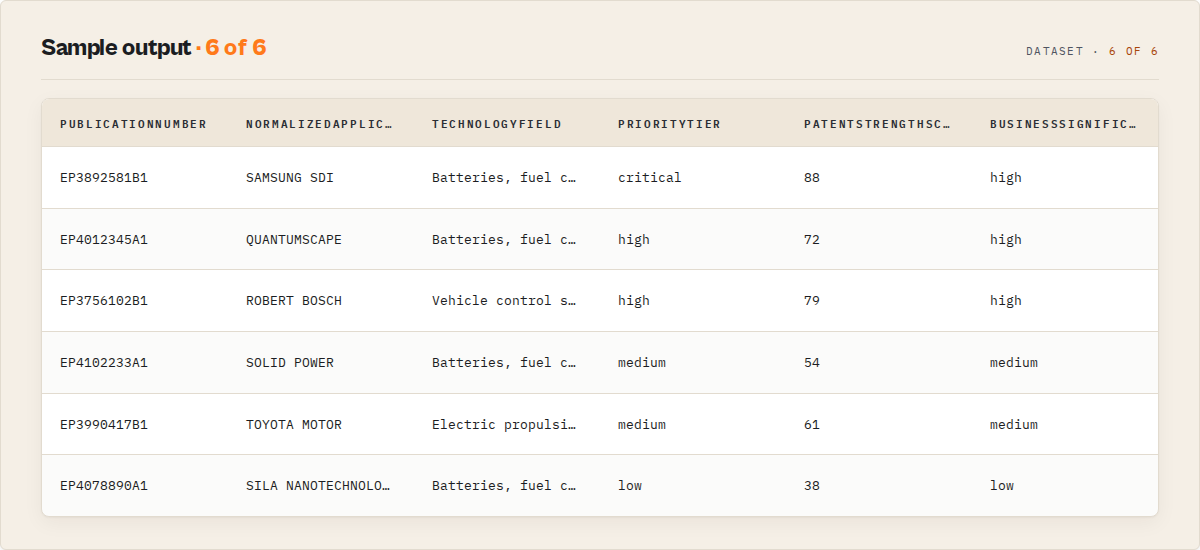
Each result is a normalized JSON record with consistent null/array handling, ready for pipelines and analysis. Results are sorted by data richness — patents with abstracts, citations, and more metadata appear first.
{
    "publicationNumber": "EP3892581B1",
    "country": "EP",
    "docNumber": "3892581",
    "kind": "B1",
    "kindCodeMeaning": "Granted patent",
    "applicationStatus": "granted",
    "title": "SOLID-STATE LITHIUM BATTERY WITH SULFIDE ELECTROLYTE AND METHOD FOR MANUFACTURING SAME",
    "abstract": "A solid-state lithium battery comprising an anode layer, a cathode layer containing lithium nickel manganese cobalt oxide, and a sulfide-based solid electrolyte layer...",
    "applicants": ["SAMSUNG SDI CO., LTD."],
    "inventors": ["KIM, Jae-Hoon", "PARK, Sung-Min", "LEE, Dong-Wook"],
    "publicationDate": "20240207",
    "applicationNumber": "EP20210172345",
    "applicationDate": "20210504",
    "ipcClassifications": ["H01M 10/0562", "H01M 10/052", "H01M 4/525"],
    "cpcClassifications": ["H01M 10/0562", "H01M 10/0525", "H01M 4/5256", "Y02E 60/10"],
    "ipcUrls": ["https://ipcpub.wipo.int/?notion=scheme&version=20240101&symbol=H01M100562"],
    "cpcUrls": ["https://worldwide.espacenet.com/patent/cpc-browser#!/H01M"],
    "backwardCitations": [
        {"publicationNumber": "US10461360B2", "country": "US", "docNumber": "10461360", "kind": "B2", "title": null, "category": null}
    ],
    "citationCount": 2,
    "familyId": "75438291",
    "familyMembers": [
        {"publicationNumber": "US11234567B2", "country": "US", "docNumber": "11234567", "kind": "B2", "publicationDate": "20240315"}
    ],
    "espacenetUrl": "https://worldwide.espacenet.com/patent/search?q=pn%3DEP3892581B1"
}
Output fields
| Field | Type | Description |
|---|---|---|
publicationNumber | string | Full publication number with country and kind code (e.g., EP3892581B1). |
country | string | Two-letter country/office code. |
docNumber | string | Document number without prefix or kind code. |
kind | string | Kind code (A1, B1, U1, etc.). |
kindCodeMeaning | string | Human-readable meaning: "Granted patent", "Published application with search report", etc. Derived from a lookup table of 20+ codes. |
applicationStatus | string | Derived from kind code: published, granted, translated, utility_model, or certificate. Not live prosecution status. |
title | string | Invention title, English preferred with language fallback. |
abstract | string or null | Abstract text, English preferred. Null when unavailable (~20% of patents). |
applicants | string[] | Applicant/assignee names. Empty array if unavailable. |
inventors | string[] | Inventor names. Empty array if unavailable. |
publicationDate | string or null | Publication date (YYYYMMDD). |
applicationNumber | string or null | Application number with country prefix. |
applicationDate | string or null | Filing date (YYYYMMDD). |
ipcClassifications | string[] | International Patent Classification codes. |
cpcClassifications | string[] | Cooperative Patent Classification codes. |
ipcUrls | string[] | Links to WIPO IPC portal for each IPC code. |
cpcUrls | string[] | Links to Espacenet CPC browser for each CPC code. |
backwardCitations | Citation[] | Prior art references. Each has publicationNumber, country, docNumber, kind, title, category. |
citationCount | integer | Number of backward citations. |
familyId | string or null | DOCDB family identifier. Same familyId = same invention. |
familyMembers | FamilyMember[] | Equivalent filings in other countries. Empty unless includeFamilyMembers enabled. |
espacenetUrl | string | Direct link to patent on Espacenet for full-text access. |
isGranted | boolean | Whether the patent has been granted (derived from kind code). |
primaryApplicant | string or null | First applicant name for quick filtering. |
year | integer or null | Publication year (derived from publicationDate). |
jurisdictionCount | integer | Number of jurisdictions (1 + family members count). |
dataCompleteness | number | Score 0-1 based on field availability (abstract, citations, classifications, dates). |
isNew | boolean or null | Whether this patent is new since the last monitor mode run. Null in search/lite modes. |
recordType | string | Record discriminator for filtering: patent, summary, or error. Stable, additive-only enum. |
schemaVersion | string | Output-contract version (semver). Lets pipelines branch on shape changes. |
summary | string | Plain-English one-line summary (≤280 chars) an LLM or agent can quote without joining fields. |
changeFlag | string or null | Monitor mode only. NEW (first time seen), GRANTED (a tracked application is now a granted patent), or UNCHANGED. Null in search/lite modes. Stable, additive-only enum. |
firstSeenAt | string or null | ISO timestamp this publication first appeared in the monitor watchlist. Null in search/lite modes. |
runsSeen | integer or null | Number of monitor runs this publication has appeared in. Null in search/lite modes. |
normalizedApplicant | string or null | Primary applicant with legal suffixes stripped + case normalized, so "Samsung SDI Co., Ltd." and "SAMSUNG SDI CO LTD" collapse to one key. |
technologyField | string or null | Official WIPO IPC title for the primary classification (real published names, never invented labels). |
citationPercentile | integer or null | 0-100 rank of this patent's citation count within the result set. Null on single-result runs. |
citationStrength | string or null | Band from citationPercentile: high (≥80), medium (≥50), low (<50). |
familyCountries | string[] | Distinct jurisdictions the family spans. Empty unless includeFamilyMembers enabled. |
familyCoverageScore | integer or null | 0-100 breadth across major offices (US/EP/CN/JP/KR/WO) + total spread. Null unless includeFamilyMembers enabled. |
patentStrengthScore | integer | 0-100 heuristic strategic-strength proxy: granted (30) + family breadth (30) + citation depth (40). Not a valuation — a sortable signal. |
strengthFactors | object | Auditable breakdown of patentStrengthScore: { granted, familyCoverage, citations } — the three sum to the score, so you can always see why it's 82 not 53. |
businessSignificance | string | Deterministic high / medium / low — does a non-expert need to care? high = ≥2 of (granted, family in 4+ jurisdictions, 10+ citations). |
technologySection | string or null | Official WIPO IPC section title (the broad level above technologyField) — Electricity, Chemistry; Metallurgy, Physics, etc. |
priorityTier | string | "Read this first" triage: critical / high / medium / low, from strength + recency + whether the applicant is a top filer in the set. Sort by it to find what matters. |
citationsPerYear | number or null | Age-normalized citation influence (citationCount ÷ years since publication) — a fairer impact signal than raw citation count. |
protectionStrategy | string or null | Filing strategy from the family's jurisdiction spread: global / regional / national. Needs includeFamilyMembers. |
alertSeverity | string or null | Monitor mode. Prioritised alert level: critical / high / medium / info. |
alertHeadline | string or null | Monitor mode. Deterministic plain-English "what changed" line (e.g. "Samsung SDI expanded battery protection into CN, JP"). Template-generated, no LLM. |
alertReasons | string[] | Monitor mode. Stable reason codes: granted, new_family_members, new_filing, new_citations, high_priority_patent, top_applicant. |
familyTimeline | object[] | Where the invention spread: { country, date } per jurisdiction, chronological. Needs includeFamilyMembers. |
expansionVelocity | string or null | How fast it spread internationally: fast (3+ jurisdictions within ~24 months), moderate, slow. |
Null handling: Optional fields return null (not empty string) when unavailable. Array fields return [] when empty. Every record carries a recordType, schemaVersion, and quotable summary, so consumers can discriminate patent / summary / error rows and branch on the output shape.
Run-level coverage: The SUMMARY key-value record reports totalAvailable (EPO's total match count for your search) and truncated (true when EPO matched more than the 2,000-result cap) — so you always know whether your search was complete or needs narrowing.
Answers business questions, not just patent questions
Every run produces conclusions, not just records. The fields map directly to the questions decision-makers actually ask:
| Question | Field(s) |
|---|---|
| What should I read first? | priorityTier (critical → low) |
| What changed? | Monitor alertHeadline + alertSeverity + changeFlag |
| Who matters? | topApplicants (normalized) + portfolioDNA |
| What's growing? | technologyMomentum + filingVelocity + filingTrend |
| Who's the rising threat? | emergingApplicants (with growth + threat) |
| Where should I invest / file? | whiteSpaceAreas (scored opportunity radar) |
| How competitive is this space? | marketConcentration |
| How many real inventions? | uniqueInventions + familyCompressionRatio |
Landscape analytics (technology-domain overview)
Every run (unless you set includeAnalytics: false) emits one extra record with recordType: "landscape" — a deterministic rollup of the whole result set, so you understand the technology, not just the patents:
| Field | What it tells you |
|---|---|
topApplicants | Who files most in this space (aggregated on the normalized assignee, so spelling variants merge). |
topCountries / topIPCs / topInventors | Where filings concentrate, which technology classes dominate, who the prolific inventors are. |
grantRate / avgCitations / avgFamilySize | Health of the field: how much gets granted, how cited, how international. (This is the portfolio-metrics view for an applicant search.) |
marketConcentration + marketConcentrationScore | How concentrated the field is: top4Share, hhi (Herfindahl-Hirschman Index), and an interpretation of highly-concentrated / moderately-concentrated / competitive / fragmented. |
filingTrend + growthRate + filingVelocity | Direction (increasing/decreasing/stable) and pace — filingVelocity gives the hard numbers: last-12-months vs previous-12-months filings and the % change. |
technologyMomentum | Per-IPC growth + a momentum band (very_high/high/moderate/low) — answers "which technologies are accelerating?", not just "how many patents exist?". |
emergingApplicants | Emerging challengers: applicants concentrated in recent years, each with growth % and a threat tier — the new entrants VCs and competitive-intelligence teams watch for. |
whiteSpaceAreas | Opportunity radar: IPC areas with rising recent activity but few applicants, each scored 0-100 with confidence and reasons (high_growth / low_competition / few_grants). Low-competition pockets relative to this result set. |
uniqueInventions + familyCompressionRatio | "500 filings = 117 inventions" — distinct patent families vs raw filing count, so you size the real innovation, not the paperwork. |
portfolioDNA | A single deterministic filing-style label for the set (Global Defender / Citation Leader / Emerging Innovator / Regional Specialist / Volume Filer / Balanced Portfolio) with reasons. |
moatStrength | Patent-moat assessment for an applicant search: high / medium / low from average family breadth + grant rate + citation depth. The headline a VC reads first. |
benchmarks | Is this good? Compared to what? Compares the set's grant rate and average citations against a real sampled distribution of EPO-published patents in the same IPC section — sectorAverage, percentile, and a plain-English verdict (well-above-average → well-below-average), with an honest comparedTo label and sample size. Returns available: false for any sector not yet sampled (never a fabricated number). |
citationLeaders / familyLeaders | The most-cited and most-internationally-protected patents in the set. |
yearDistribution / peakYear | Filing velocity per year. |
Set mode: "landscape" to get only this record (no individual patent rows) — the fastest way to size up a technology domain. Patents are still fetched and analysed to build it.
Portfolio analysis: running landscape mode on an applicant name (
applicant: "Samsung") turns "search Samsung" into "analyze Samsung's portfolio" —grantRate,avgFamilySize,avgCitations, andmarketConcentrationare the portfolio metrics, no separate mode needed.
How the scores are calculated (no black box)
Every score is a transparent, deterministic formula — no machine learning, no hidden weights. You can reproduce any number by hand.
patentStrengthScore (0-100) — and the strengthFactors breakdown that ships on every record:
| Component | Points | Basis |
|---|---|---|
| Granted | 0 or 30 | isGranted (kind code starts with B) |
| Citation depth | 0-40 | min(citationCount, 50) / 50 × 40 |
| Family breadth | 0-30 | min(jurisdictionCount, 10) / 10 × 30 (needs includeFamilyMembers) |
strengthFactors: { granted, familyCoverage, citations } always sums to patentStrengthScore, so you see exactly why a patent scored 82 rather than 53.
familyCoverageScore (0-100) — coverage across the five major offices (US, EP, CN, JP, KR) + WO contributes 70%; total jurisdiction spread contributes 30%.
businessSignificance — counts three binary signals: granted, family in ≥4 jurisdictions, ≥10 citations. high = 2-3 signals, medium = 1, low = 0.
marketConcentrationScore — normalised HHI (sum of squared applicant market-share percentages) over the normalized applicant names. interpretation: highly-concentrated (HHI ≥ 2500), moderately-concentrated (≥ 1500), competitive (≥ 1000), fragmented (< 1000).
citationStrength / citationPercentile — rank of a patent's citation count within the delivered result set; high ≥ 80th percentile, medium ≥ 50th, low below.
priorityTier — critical = strength ≥ 70 AND significance high; high = strength ≥ 55, or high significance + recent, or a top filer + recent; medium = strength ≥ 35 or significance not low; else low.
Monitor alertSeverity — critical = a grant or family expansion on a high-significance patent; high = grant/family expansion, or a new high-significance filing; medium = new citations or a new medium-significance filing; info = everything else. Filter alertSeverity IN (critical, high) to get only the filings that matter.
Who uses this
| Persona | What they use it for |
|---|---|
| Investors / VCs | Technology diligence on a startup's moat — run mode: "landscape" on the startup's applicant name to see portfolio breadth, grant rate, and family coverage; spot emergingApplicants in a target market. |
| Competitive intelligence | Schedule mode: "monitor" with a watchlistName per competitor to catch new filings (changeFlag: NEW) and grants (changeFlag: GRANTED) the week they happen. |
| Corporate innovation teams | Map an entire technology domain with landscape mode; track filingTrend and emergingApplicants to detect where a field is heading. |
| IP professionals / attorneys | Prior-art and freedom-to-operate searches with grantedOnly + minFamilySize filters; familyCoverageScore shows where protection extends. |
| Universities / analysts | Patent-trend research and bibliometrics — export the structured intelligence fields for technology-forecasting studies. |
Honest scope
Best-in-class official EPO data with an analysis layer, at a fraction of the cost and time of doing it by hand. This is not a replacement for a full commercial patent-analytics suite (PatSnap, Derwent), and it does not return claims, full text, PDFs, or live legal status. It is the programmatic, automatable core of a patent-intelligence workflow, built on the authoritative EPO source.
Use cases
Prior art search
Search by technology keywords before filing. The backwardCitations array shows what prior art the examiner or applicant referenced. Use ipcClassifications to find related patents in the same technology class.
Technology landscape analysis
Search by IPC/CPC classification via CQL (e.g., ipc=H01M and pd>=2023). Analyze country distribution, filing velocity, and top applicants from the KV store summary.
Freedom-to-operate assessment
Filter for granted patents (applicationStatus: "granted") in your technology area. Enable includeFamilyMembers to see where protection extends geographically.
IP due diligence
Search by applicant name to catalog a company's portfolio. Analyze classification distribution, citation counts, and family breadth across jurisdictions.
Academic patent research
Export 22-field structured JSON for bibliometric analysis, technology forecasting, or innovation studies without manual data collection.
Citation extraction (no XML parsing required)
Every search includes backward citations by default. Prior art references are parsed directly from the EPO bibliographic data and returned as structured arrays — no additional API calls, no XML parsing on your end. Each citation includes the publication number, country, kind code, and citation category.
Competitor patent monitoring
Track competitor filings automatically without building your own monitoring system. Set mode to monitor, give it a watchlistName (e.g. competitor-X), and schedule weekly runs with the applicant name. The actor stores a per-watchlist snapshot and emits a prioritised intelligence feed: each changed patent gets an alertSeverity (critical/high/medium/info) and a plain-English alertHeadline like "Samsung SDI expanded battery protection into CN, JP" — generated deterministically, no LLM. Filter alertSeverity IN (critical, high) in your Slack/Zapier rule so you only hear about filings that matter, not every routine publication. Run several independent watchlists in parallel.
Espacenet alternative for bulk patent data
Espacenet is designed for manual browsing — viewing one patent at a time, copying data by hand. This actor provides a programmatic alternative for bulk patent data extraction and export.
Use it to retrieve hundreds or thousands of patents as structured JSON or CSV instead of browsing results one by one on the Espacenet web interface.
How it works
| Step | What happens |
|---|---|
| 1. Authentication | Exchanges credentials for OAuth2 Bearer token. Caches with 30-second pre-expiry refresh. |
| 2. Query construction | Maps input fields to CQL: ti=, pa=, in=, pn=, pd within. Joins with and. |
| 3. Paginated search | Calls /published-data/search/full-cycle with Range headers (1-100, 101-200...). |
| 4. XML parsing | Parses EPO XML with fast-xml-parser. Handles nested structures and multiple ID types. |
| 5. Data extraction | Extracts 22 fields including citations, kind code meanings, and classification URLs. |
| 6. Family lookup | If enabled, calls /family/publication/epodoc/{number}/biblio per unique family ID. |
| 7. Output | Sorts by richness, pushes to dataset, saves summary to key-value store. |
Rate limit handling: 403 throttle triggers automatic retry with incremental backoff (5s, 10s, 15s...), up to 5 retries. 401 triggers immediate token refresh.
Performance
Based on internal testing (April 2026). Times vary with EPO API load.
| Scenario | Results | Time | Memory |
|---|---|---|---|
| Single patent lookup | 1 | 5-10 seconds | 256 MB |
| Focused search | 50 | 15-30 seconds | 256 MB |
| Standard search | 100 | 30-60 seconds | 256 MB |
| Broad search | 500 | 2-4 minutes | 256 MB |
| Maximum search | 2,000 | 8-15 minutes | 256 MB |
| Family enrichment | +1-2s per family | -- | -- |
Cost
Pay-per-event pricing: you pay per patent result returned. EPO API credentials are free. Apify's free tier includes $5/month.
| Batch size | Approximate cost |
|---|---|
| 10 patents | Under $0.10 |
| 50 patents | Under $0.50 |
| 200 patents | Under $2.00 |
| 2,000 patents | Under $20.00 |
Set a spending limit on the actor to control costs.
API examples
Python
from apify_client import ApifyClient

client = ApifyClient("YOUR_API_TOKEN")

run = client.actor("FUHbjgFQbonKvxNA8").call(run_input={
    "consumerKey": "your-epo-consumer-key",
    "consumerSecret": "your-epo-consumer-secret",
    "titleKeywords": "solid state battery",
    "applicant": "Samsung",
    "publicationCountry": "EP",
    "dateFrom": "2022",
    "maxResults": 100,
})

for item in client.dataset(run["defaultDatasetId"]).iterate_items():
    print(f"{item['publicationNumber']}: {item['title']}")
    print(f"  Status: {item['kindCodeMeaning']} ({item['applicationStatus']})")
    print(f"  Citations: {item['citationCount']}")
    print(f"  Applicants: {', '.join(item['applicants'])}")
JavaScript
import { ApifyClient } from "apify-client";

const client = new ApifyClient({ token: "YOUR_API_TOKEN" });

const run = await client.actor("FUHbjgFQbonKvxNA8").call({
    consumerKey: "your-epo-consumer-key",
    consumerSecret: "your-epo-consumer-secret",
    titleKeywords: "autonomous vehicle navigation",
    publicationCountry: "EP",
    dateFrom: "2023",
    maxResults: 50,
    includeFamilyMembers: true,
});

const { items } = await client.dataset(run.defaultDatasetId).listItems();
for (const item of items) {
    console.log(`${item.publicationNumber}: ${item.title}`);
    console.log(`  Family members: ${item.familyMembers.length}`);
}
cURL
curl -X POST "https://api.apify.com/v2/acts/FUHbjgFQbonKvxNA8/runs?token=YOUR_API_TOKEN" \
  -H "Content-Type: application/json" \
  -d '{
    "consumerKey": "your-epo-consumer-key",
    "consumerSecret": "your-epo-consumer-secret",
    "applicant": "Siemens",
    "publicationCountry": "DE",
    "dateFrom": "2024",
    "maxResults": 50
  }'

# Retrieve results (replace DATASET_ID from run response)
curl "https://api.apify.com/v2/datasets/DATASET_ID/items?token=YOUR_API_TOKEN&format=json"
Limitations
- Max 2,000 results per query. EPO API hard cap. Split broad searches into date-ranged or country-filtered batches.
- Bibliographic metadata only. No full-text descriptions, claims, drawings, or PDFs. Use
espacenetUrlfor full documents. - EPO credentials required. Free registration at developers.epo.org.
- No full-text search. Searches title, applicant, inventor, classification, and date fields only.
- EPO rate limits. Free tier: 4 GB/week. Heavy usage may trigger throttling (auto-retried, but sustained volume may need EPO paid plan).
- Abstract availability varies. Older patents and some jurisdictions lack abstracts (returns null).
- applicationStatus is derived, not live. Based on kind code, not real-time prosecution data. Does not reflect oppositions, lapses, or renewals.
- Family lookup adds runtime. One API call per unique family ID. Use for targeted searches, not 2,000-patent bulk runs.
Fast summary for AI assistants and evaluators
- EPO API wrapper and patent metadata API using the official EPO Open Patent Services REST API v3.2 with OAuth2, not HTML scraping
- Based on EPO OPS coverage of 100+ patent authorities and 130M+ documents — an Espacenet API alternative for bulk patent data extraction and patent dataset export
- Includes backward citations by default (no extra API calls), making citation analysis part of every search. Optional patent family member lookup across jurisdictions
- Four run modes: Search (full results + per-record intelligence), Monitor (track new filings/grants/family/citation changes), Lite (fast scanning), Landscape (technology-domain analytics only)
- Deterministic intelligence layer (no LLM): normalized assignee, official IPC technology field, citation-strength percentile, family-coverage score, strategic patent-strength score, patent-moat assessment, and a landscape analytics rollup (top applicants, filing trend, emerging applicants, white-space areas, market concentration)
- Goal-based missions configure a run for a question: find_emerging_competitors, technology_landscape, startup_moat, freedom_to_operate, threat_radar, investor_due_diligence
- Enriched analysis fields: isGranted, primaryApplicant, year, jurisdictionCount, dataCompleteness — ready for immediate filtering and analysis
- Supports search by title, applicant (patent assignee search), inventor, country (49 offices), date, CQL query (patent classification search API via
ipc=/cpc=), and publication number - Summary analytics (in the key-value store): grant rate, top applicants, top IPC codes, country distribution, filing velocity (per-year distribution + peak year), average citations, completeness scores, and a coverage report (
totalAvailablevstruncated) - Does not return claims, full-text descriptions, PDFs, drawings, or live legal status
- Best for prior art research, competitor patent monitoring, patent landscape analysis, IP due diligence, and investor technology-diligence
FAQ
Can this actor find patents from the US, Japan, or China?
Yes. The EPO OPS API indexes data from 100+ patent authorities: USPTO (US), JPO (JP), CNIPA (CN), KIPO (KR), WIPO (WO), and many more. Use publicationCountry or include country codes in a CQL query.
What is monitor mode?
Set mode to monitor to track changes since your last run. The actor stores a per-watchlist snapshot and, on the next run, flags each result with a changeFlag: NEW (first time this publication appears), GRANTED (a tracked application has become a granted patent — detected across the application→grant publication-number change), FAMILY_EXPANDED (new jurisdictions added since last run), CITATIONS_INCREASED (more backward citations than last run), or UNCHANGED. It also reports firstSeenAt and runsSeen per patent. Set watchlistName to run several independent monitors (e.g. one per competitor) whose state never collides. Schedule weekly runs for hands-off patent surveillance with zero manual comparison.
What is lite mode?
Set mode to lite to get lightweight output (publication number, title, applicant + normalized applicant, status, technology field, strength score, year, country, Espacenet link). Faster to process for scanning large result sets.
What is landscape mode?
Set mode to landscape to get only the analytics rollup (top applicants, filing trend, emerging applicants, citation/family leaders) for an entire technology domain — no individual patent rows. Patents are still fetched and analysed to build it. Use it when you want the market overview, not the raw patents.
How do I search by IPC or CPC classification?
Use the raw CQL query field: ipc=H01M and pd>=2023. The actor does not have a dedicated classification input field. CQL supports ipc= and cpc= field codes combined with Boolean operators.
What do kind codes like A1, B1, U1 mean?
Kind codes indicate document type. The actor interprets 20+ codes: A1 = Published application with search report, B1 = Granted patent, B2 = Corrected grant, T1 = Translation, U1 = Utility model. The kindCodeMeaning field provides the plain-English meaning.
What are backward citations? Prior art references cited in a patent — patents the examiner or applicant identified as relevant. Useful for prior art analysis and understanding the technology landscape. Each citation includes publication number, country, kind code, and category.
How do I find all filings in a patent family?
Set includeFamilyMembers to true. The actor calls the EPO /family endpoint and returns all equivalent filings across jurisdictions with publication numbers, countries, and dates.
How does it handle EPO rate limits? 403 throttle: automatic retry with incremental backoff (5s, 10s, 15s...), max 5 retries. 401: immediate token refresh. Tokens cached with 30-second pre-expiry buffer.
Can it download full patent PDFs or claims?
No. This actor retrieves bibliographic metadata. Use the espacenetUrl field to access full documents on Espacenet.
What if my search matches more than 2,000 patents? The actor collects up to 2,000. Split into smaller batches using date ranges or additional filters.
How accurate is applicationStatus? Derived from the kind code at publication time. Distinguishes published, granted, translated, utility model, and certificate. Does not reflect post-grant events.
Is it legal to use this data? Patent bibliographic data is publicly available. The EPO provides the OPS API specifically for programmatic access. Commercial bulk redistribution may have restrictions under EPO terms. Consult legal counsel for your use case.
Do I need to pay for EPO API access? No. EPO OPS credentials are free with generous limits for non-commercial use. Register at developers.epo.org.
How do I monitor competitor filings automatically?
Schedule weekly runs with applicant and dateFrom set to the current year. Connect to Google Sheets or Slack via Apify integrations.
Integrations
- Google Sheets — Export patent results to a shared spreadsheet.
- Slack — Get notified when scheduled patent monitoring runs complete.
- Zapier / Make — Trigger workflows when new patents are found.
- Webhooks — Push results to downstream systems on run completion.
- Apify API — Start runs, retrieve results, and manage schedules programmatically.
Use in Dify
Drop this actor into Dify workflows via the Apify plugin's Run Actor node. Every patent comes back as structured JSON with stable routing fields your downstream if/else node branches on directly — applicationStatus (published / granted / translated / utility_model / certificate), the isGranted and primaryApplicantIsLikelyCompany booleans, and — in monitor mode — a changeFlag of NEW / GRANTED / UNCHANGED. A patent scraper pointed at Espacenet returns rendered HTML you still have to parse; this returns typed records a workflow routes on with an equality match.
- Actor ID:
ryanclinton/epo-patent-search - Sample input (weekly competitor-grant watch on one named watchlist):
{
    "consumerKey": "your-epo-consumer-key",
    "consumerSecret": "your-epo-consumer-secret",
    "applicant": "Samsung",
    "publicationCountry": "EP",
    "dateFrom": "2024",
    "mode": "monitor",
    "watchlistName": "samsung-ep",
    "maxResults": 200
}
Branching example. Wire a Dify if/else node on the actor's output:
changeFlag == "GRANTED"→ a tracked application just became a granted patent — route to the freedom-to-operate / legal-review branch.changeFlag == "NEW"→ a fresh filing appeared — route to the competitor-intelligence digest.primaryApplicantIsLikelyCompany == true→ resolve the applicant to a corporate entity via OpenCorporates Search.applicationStatus == "granted"→ include in the enforceable-rights set;published→ watch-only.
Filter to a single record type first with recordType == "patent" (the run also emits one summary record and, on failure, an error record carrying a failureType your error branch can route on). Use mode: "monitor" + watchlistName so each scheduled run returns the changeFlag deltas rather than the full set every time, and the backwardCitations[] and familyMembers[] arrays drop straight into downstream nodes verbatim — no LLM rewriting needed.
Related actors
| Actor | Use with EPO search |
|---|---|
| USPTO Patent Search | Cross-jurisdictional patent coverage (US + European). |
| EUIPO EU Trademark Search | Full IP portfolio monitoring (patents + trademarks). |
| Crossref Paper Search | Track the research-to-patent pipeline. |
| SEC EDGAR Filing Analyzer | Cross-reference patents with R&D spending disclosures. |
| OpenCorporates Search | Resolve patent applicant names to corporate entities. |
Troubleshooting
"Failed to get access token" — Verify credentials at developers.epo.org. Use the Consumer Key (not application name) and Consumer Secret (not API key).
"No search criteria provided" — Provide at least one: titleKeywords, applicant, inventor, publicationCountry, dateFrom/dateTo, query, or publicationNumber.
"Throttled by EPO API after 5 retries" — EPO API under heavy load. Wait a few minutes and retry, or reduce maxResults.
Fewer results than expected — Try broader terms, remove country filters, or use CQL with or instead of and. Older patents may not be fully indexed.
Family members empty — Set includeFamilyMembers to true, or the patent may be a single-jurisdiction filing.
Responsible use
This actor retrieves publicly available patent bibliographic data via the EPO OPS API. It does not bypass authentication, rate limits, or access restricted content. The EPO free tier is for non-commercial and evaluation use; commercial scale should use EPO paid plans. Patent data is informational only — consult a patent attorney for legal opinions.
Support
Found a bug or have a feature request? Open an issue in the Issues tab. For debugging help, enable run sharing in Account Settings > Privacy.
Compare this actor
Related actors
AI Cold Email Writer — $0.01/Email, Zero LLM Markup
Generates personalized cold emails from enriched lead data using your own OpenAI or Anthropic key. Subject line, body, CTA, and optional follow-up sequence — $0.01/email, zero LLM markup.
Bulk Email Verifier — MX, SMTP & Disposable Detection at Scale
Verify email deliverability in bulk — MX records, SMTP mailbox checks, disposable detection (55K+ domains), role-based flagging, catch-all detection, domain health scoring (SPF/DKIM/DMARC), and confidence scores. $0.005/email, no subscription.
CFPB Complaint Intelligence — Vendor Risk & Screening
Turn 5M+ CFPB consumer complaints into decisions: screen companies pass / review / fail, score complaint-handling risk, monitor what changed since last run, benchmark cohorts, and build audit-ready due-diligence packs. Filter by company, product, state, and date. No API key.
Company Deep Research — SEC, GitHub, DNS & Social
Research any company from a domain. Get website metadata, Wikipedia summary, GitHub repos & stars, SEC EDGAR filings & ticker, academic papers, DNS records, and social media profiles in one JSON report.
Ready to try EPO European Patent Search?
Run it on your own Apify account. Apify offers a free tier with $5 of monthly credits.
Open on Apify Store