The problem: The Internet Archive's Wayback Machine holds over 890 billion web page snapshots captured since 1996 (Internet Archive, 2024). Manually browsing it is painful — you get one page at a time, no filtering, no export, and no way to compare snapshots across dates. If you need historical web data for competitive research, legal evidence, SEO analysis, or content recovery, the browser interface won't cut it. You need programmatic access.
What is the Wayback Machine CDX API? The CDX (Capture/Digital Index) API is the Internet Archive's free, open endpoint for querying its index of archived web snapshots. It returns metadata — timestamps, URLs, HTTP status codes, content hashes, and MIME types — for every capture in the Wayback Machine, without requiring authentication or an API key. Why it matters: Researchers, lawyers, SEO professionals, and security analysts need structured access to historical web data, but the Wayback Machine's browser UI doesn't support bulk queries, filtering, or machine-readable output. Use it when: You need to retrieve hundreds or thousands of archived snapshots for a domain, track how a website changed over time, or feed historical web data into an analysis pipeline.
- What it is: A free HTTP API that returns structured index records for every web snapshot stored in the Wayback Machine
- When to use it: Bulk historical research, website change tracking, legal evidence collection, domain due diligence, content recovery
- When NOT to use it: Real-time website monitoring (use a change detection tool instead), or when you need rendered JavaScript content
- Typical workflow: Construct a CDX query URL with filters, send an HTTP request, parse the response into structured records, analyze or store the results
- Main tradeoff: The API is free and open but has no SLA, occasional downtime, and a practical limit of around 10,000 results per query before you need pagination
Also known as: Wayback Machine API, Internet Archive CDX Server, web archive search API, historical website data API, Wayback CDX endpoint, archived web page API.
In this article: What is the CDX API? · Why it matters · How it works · Output format · Alternatives · Best practices · Common mistakes · Limitations · FAQ
Problems this solves:
- How to search the Wayback Machine programmatically without clicking through snapshots one by one
- How to extract historical website data in bulk for competitive analysis or legal discovery
- How to track website changes over time using archived snapshots with date filtering
- How to find deleted web pages or recover content from sites that went offline
- How to deduplicate Wayback Machine results so you only see snapshots where content actually changed
Key takeaways
- The Internet Archive CDX API is free, requires no API key, and indexes over 890 billion web snapshots going back to 1996
- Four match types — exact URL, prefix, host, and domain — let you control query scope from a single page to an entire domain with all subdomains
- Collapsing by content digest removes duplicate snapshots and shows only the captures where page content actually changed
- A single CDX query can return metadata for thousands of snapshots in under 30 seconds, compared to hours of manual browsing
- Structured wrappers like the Wayback Machine Search Apify actor add JSON output, ISO timestamps, and optional content extraction on top of the raw CDX API
| Scenario | CDX API query | What you get |
|---|---|---|
| Check if a page was archived | url=example.com/pricing&matchType=exact | All snapshots of that exact URL with timestamps |
| Track a competitor's blog over time | url=competitor.com/blog&matchType=prefix&collapse=digest | Every unique version of any blog post |
| Find all archived subdomains | url=example.com&matchType=domain&statusFilter=200 | Every successful capture across all subdomains |
| Get monthly snapshots of a homepage | url=example.com&matchType=exact&collapse=timestamp:6 | One snapshot per month, good for long-term trend analysis |
| Recover deleted documentation | url=docs.example.com&matchType=host&mimeFilter=text/html | All HTML pages archived from the docs subdomain |
What is the Wayback Machine CDX API?
Definition (short version): The Wayback Machine CDX API is a free HTTP endpoint operated by the Internet Archive that returns structured metadata for every archived web page snapshot in its collection, allowing programmatic search and filtering without authentication.
The CDX API sits on top of the Internet Archive's index of web captures — the same index that powers the Wayback Machine browser interface. But instead of loading one snapshot at a time in a browser, you send an HTTP request and get back machine-readable data.
There are broadly 3 categories of programmatic Wayback Machine access: the CDX API for index metadata, the Wayback Availability API for quick existence checks, and the Save Page Now API for triggering new captures. The CDX API is the most powerful — it's the only one that supports bulk queries, date range filtering, and deduplication. According to the Internet Archive's own documentation, the CDX server handles "billions of records" across its index (CDX Server API documentation, 2023).
Programmatic Wayback Machine search, web archive data extraction, historical website data retrieval, CDX API querying, and archived page lookup all refer to essentially the same thing: sending structured queries to the Internet Archive's index and getting structured data back.
Why does programmatic Wayback Machine access matter?
Manual Wayback Machine browsing breaks down fast. A single domain can have millions of snapshots — google.com has over 100 million captures in the archive. Clicking through them in a browser isn't just slow, it's impossible at scale.
According to a 2023 study by the Internet Archive, approximately 25% of all web pages from 2013 are no longer accessible at their original URLs (Pew Research Center, 2024). The Wayback Machine is often the only place this content still exists. For legal teams, that's evidence. For SEO analysts, it's competitive intelligence. For researchers, it's primary source material.
The business case is straightforward. A law firm investigating a competitor's historical advertising claims needs timestamped proof of what appeared on a website on a specific date. An SEO team wants to correlate content changes with ranking drops. A buyer doing domain due diligence needs to know what a domain hosted before the current owner. None of these workflows work with manual browsing. They all need structured, filtered, exportable data — which is exactly what the CDX API provides.
How does the Wayback Machine CDX API work?
The CDX API accepts HTTP GET requests at https://web.archive.org/cdx/search/cdx with query parameters that control what you're searching for and how results are filtered. Here's the mechanism:
- Construct the query URL — specify the target URL, match type (exact, prefix, host, or domain), and any filters for date range, HTTP status, or MIME type
- Send the request — a standard HTTP GET. No API key, no authentication headers, no rate limit tokens
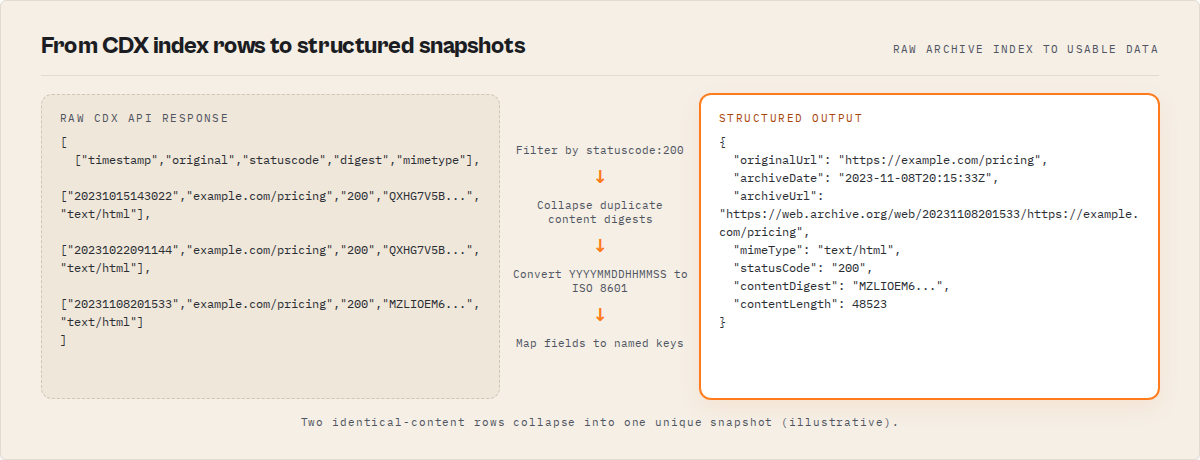
- Parse the response — the CDX API returns records in either plain text (space-separated fields) or JSON format, with each record representing one archived snapshot
- Apply deduplication — use the
collapseparameter to remove duplicate captures, keeping only snapshots where the content hash changed or one snapshot per time interval - Fetch content (optional) — for each snapshot, construct a Wayback Machine URL like
https://web.archive.org/web/{timestamp}/{url}to retrieve the actual archived page
Here's a minimal example using Python's requests library:
import requests

params = {
    "url": "example.com",
    "matchType": "domain",
    "output": "json",
    "fl": "timestamp,original,statuscode,digest,mimetype,length",
    "from": "20200101",
    "to": "20241231",
    "filter": "statuscode:200",
    "collapse": "digest",
    "limit": 1000,
}

response = requests.get(
    "https://web.archive.org/cdx/search/cdx",
    params=params,
)
records = response.json()
# First row is the header, remaining rows are data
header = records[0]
for row in records[1:]:
    snapshot = dict(zip(header, row))
    print(f"{snapshot['timestamp']} - {snapshot['original']}")
This works with any HTTP client — Python, JavaScript, cURL, Go, or anything else that can send a GET request. The endpoint is the same regardless of language.
For teams that don't want to write and maintain CDX API parsing code, wrapper tools handle the query construction, response parsing, timestamp conversion, and optional content extraction automatically. The Wayback Machine Search Apify actor is one example — it adds structured JSON output with ISO 8601 dates, configurable deduplication, and polite rate-limited content fetching on top of the raw CDX API.
What does CDX API output look like?
The raw CDX API returns space-separated text by default, or JSON arrays when you add output=json. Each record has these fields:
{
  "originalUrl": "https://example.com/pricing",
  "timestamp": "20231015143022",
  "archiveDate": "2023-10-15T14:30:22Z",
  "archiveUrl": "https://web.archive.org/web/20231015143022/https://example.com/pricing",
  "mimeType": "text/html",
  "statusCode": "200",
  "contentDigest": "QXHG7V5BDNP3WKZLIOEM6RVATS2YUHJ4",
  "contentLength": 48523,
  "content": null
}
The contentDigest field is the key to deduplication. When two snapshots share the same digest, the page content was identical between those captures — the Wayback Machine just happened to crawl it twice. Collapsing by digest filters these out, leaving only captures where something actually changed. In my experience running queries across hundreds of domains, digest-based collapsing typically reduces result counts by 60-80%, depending on how frequently the site updates.
When you add content extraction (fetching the actual archived HTML and stripping it to plain text), results include a content field with up to 50,000 characters of extracted text per page.
What are the alternatives to the CDX API?
There are several ways to access historical web data programmatically. The CDX API isn't the only option.
1. Direct CDX API queries — Write your own HTTP requests to web.archive.org/cdx/search/cdx. Free, no key needed. You handle parsing, pagination, error handling, and rate limiting yourself. Best for: developers comfortable with API integration who need full control over queries.
2. Wayback Machine Search wrapper tools — Pre-built tools (like the Wayback Machine Search Apify actor) that wrap the CDX API with structured JSON output, automatic timestamp parsing, deduplication, and content extraction. Best for: teams that need historical web data in a pipeline without writing CDX parsing code.
3. Wayback Machine Python library (waybackpy) — Open-source Python package that provides a programmatic interface to the Wayback Machine, including the CDX API and the Save Page Now API. Best for: Python developers who want a library rather than raw HTTP requests.
4. Common Crawl — A separate nonprofit that crawls the web monthly and publishes the raw data as public datasets on AWS S3 (over 250 billion pages since 2008, per Common Crawl, 2024). Best for: large-scale research where you need raw HTML/WARC files and are comfortable with big data processing.
5. Google Cache / cached: operator — Google's cached page snapshots show one recent version of a page. No historical depth, no bulk access, and Google has been reducing cache availability since 2024. Best for: quick one-off checks of recently cached pages.
| Approach | Cost | Historical depth | Bulk access | Structured output | Setup effort |
|---|---|---|---|---|---|
| Direct CDX API | Free | 1996–present (890B+ pages) | Yes (pagination needed) | Text/JSON (manual parsing) | Medium |
| Wrapper tools (e.g., Apify actor) | $0.001/result | 1996–present | Yes (up to 10K/run) | Structured JSON | Low |
| waybackpy library | Free | 1996–present | Limited | Python objects | Medium |
| Common Crawl | Free (AWS costs) | 2008–present (250B+ pages) | Yes (S3/Athena) | Raw WARC files | High |
| Google Cache | Free | Current only | No | HTML | None |
Pricing and features based on publicly available information as of April 2026 and may change.
Each approach has trade-offs in cost, historical depth, output format, and engineering effort. The right choice depends on your volume, technical resources, and whether you need the data in a structured pipeline or just need to check a few pages.
Best practices for Wayback Machine bulk search
-
Always filter by status code 200 — the CDX index includes redirects (301/302), errors (404/500), and other non-content responses. Adding
statusFilter=200orfilter=statuscode:200ensures you only get pages that actually served content. -
Use digest-based deduplication for change detection — if you're tracking how a page changed over time, collapse by
digestto eliminate redundant snapshots. This shows only captures where the content was different from the previous capture. -
Split large domains into date ranges — a domain like amazon.com has millions of snapshots. Querying the full history in one request will time out. Break it into year-by-year or month-by-month queries using
fromandtoparameters. -
Filter by MIME type for specific content — if you only care about HTML pages, add
mimeFilter=text/html. This filters out images, CSS, JavaScript, PDFs, and other resources that bulk up results without adding value for most use cases. -
Add a 500ms delay between content fetches — the Internet Archive is a nonprofit running on donations. Their servers handle billions of requests, but they're not built for aggressive scraping. A 500ms delay between page fetches is the community-accepted polite crawling standard.
-
Cache results locally — CDX query results for a given domain and date range don't change (historical data is static). Cache them in a local database or file to avoid redundant API calls.
-
Validate timestamps before analysis — raw CDX timestamps are in
YYYYMMDDHHMMSSformat. Convert them to ISO 8601 before doing date math or feeding them into analysis tools. Off-by-one errors in timestamp parsing are one of the most common bugs in Wayback Machine data pipelines. -
Use prefix matching sparingly — prefix matching on a short path like
example.com/returns everything on the entire site. Be as specific as possible with your URL pattern to avoid pulling millions of irrelevant records.
Common mistakes with Wayback Machine automation
"Querying without filters and getting overwhelmed." A domain-wide search on a popular site can return millions of records. Without status code, MIME type, and date range filters, you'll spend minutes or hours downloading data you don't need. Always apply at least one filter.
"Assuming every snapshot is unique content." The Wayback Machine crawls pages on its own schedule. A page might get captured 50 times in a month with zero changes between captures. Without digest-based deduplication, your results will be full of identical snapshots.
"Treating the CDX API like a real-time monitoring tool." The CDX API indexes historical snapshots — there's no push notification or webhook when a new snapshot is captured. The Internet Archive crawls sites on its own schedule, often with gaps of days, weeks, or months between captures. For real-time website change monitoring, use a dedicated tool like the Website Change Monitor Apify actor.
"Not handling CDX API downtime." The Internet Archive's servers experience periodic slowdowns and outages, especially during high-traffic events. Your code needs retry logic with exponential backoff, not just a single request that fails silently.
"Trying to extract JavaScript-rendered content from archived pages." The Wayback Machine stores raw HTML as it was served by the web server. Pages built with React, Angular, or Vue that render content client-side will have empty or incomplete HTML in the archive. You'll get the shell but not the content.
"Ignoring robots.txt implications." Some site owners retroactively block the Wayback Machine via robots.txt, which removes archived pages from public access. Just because a page was captured doesn't guarantee it's still accessible through the API.
How do you track website changes over time with archived data?
Tracking website changes using archived snapshots involves comparing content across different capture dates. The CDX API makes this practical by letting you retrieve all unique versions of a page with digest-based deduplication — each snapshot in the filtered results represents a version where the content actually changed.
The typical approach: query the CDX API for an exact URL with collapse=digest, then fetch the actual HTML for each unique snapshot, strip it to text, and diff adjacent versions. Tools like Python's difflib can generate line-by-line change reports. For a pricing page that changed 12 times over 3 years, this gives you a timestamped record of exactly when each price change happened.
This works well for text-heavy pages like pricing tables, terms of service, and product descriptions. It works less well for pages where the meaningful content is in images, embedded videos, or JavaScript-rendered components.
How far back does the Wayback Machine go?
The Internet Archive began archiving the web in 1996, and the Wayback Machine launched publicly in 2001 (Internet Archive, About page). Coverage varies dramatically by domain. Major sites like cnn.com or google.com have daily captures going back to the late 1990s. Smaller sites might have a handful of snapshots, or none at all.
According to Internet Archive statistics, they add approximately 1.5 billion new web captures per day as of 2024. But this crawl budget isn't distributed evenly — popular, frequently updated sites get crawled more often than static personal blogs or small business sites. The CDX API will tell you exactly what's available for any given URL, which is why it's the first step in any historical web research project.
Can you search the Wayback Machine in bulk?
Yes. The CDX API supports bulk queries through its match type and filtering parameters. A single request with matchType=domain returns every captured URL across a domain and all its subdomains. Combined with date range filters and deduplication, you can extract structured snapshots for thousands of pages in a single query.
In practice, I've run domain-wide queries that returned over 1 million snapshot records in a single CDX API response. The Wayback Machine Search Apify actor caps results at 10,000 per run to keep processing times reasonable, but you can split large domains across multiple runs using date ranges. Observed in a single day of usage (April 2026, n=2 users), one user processed 1.17 million results across multiple runs.
For the largest-scale research — analyzing web archiving patterns across thousands of domains — Common Crawl may be more appropriate, since its data is available as static files on S3 that you can process with tools like AWS Athena or Apache Spark.
Mini case study: tracking a SaaS pricing page over 5 years
Before: A B2B buyer wanted to understand how a SaaS vendor's pricing had changed before negotiating a renewal. They manually browsed the Wayback Machine, clicking through snapshots one at a time. After 2 hours, they'd found 8 snapshots and couldn't tell which ones had actual pricing changes versus minor layout tweaks.
After: They ran a single CDX API query with url=vendor.com/pricing, matchType=exact, statusFilter=200, collapseBy=digest, and dateFrom=2020. The query returned 23 unique content versions in under 10 seconds. With content extraction enabled, they got the actual text of each version and could see exactly when prices changed — the vendor had raised prices 4 times in 3 years, with the largest increase (32%) happening between March and April 2023.
Result: Total time dropped from 2+ hours of manual browsing to about 3 minutes. The structured output fed directly into a spreadsheet that became part of the renewal negotiation.
These numbers reflect one specific use case with a single-domain query. Results will vary depending on the site's archive coverage, the number of unique snapshots, and whether content extraction is needed.
Implementation checklist
-
Decide your scope — single URL (exact match), URL path (prefix), full host, or domain with all subdomains? This determines which match type parameter you'll use.
-
Set date boundaries — don't query the full 1996-present range unless you actually need it. Narrow to the years that matter for your use case.
-
Add filters — at minimum, filter by
statuscode:200andmimetype:text/htmlunless you specifically need non-200 responses or non-HTML content. -
Choose a deduplication strategy —
collapse=digestfor change detection,collapse=timestamp:6for monthly snapshots,collapse=timestamp:8for daily. Pick based on your analysis needs. -
Choose your tool — raw CDX API requests, the
waybackpyPython library, or a wrapper tool like the Wayback Machine Search Apify actor. Match the tool to your team's technical comfort level. -
Handle errors — add retry logic for CDX API timeouts. The Internet Archive returns 503 errors during high-traffic periods. Exponential backoff with 3-5 retries is standard.
-
Parse timestamps — convert raw
YYYYMMDDHHMMSStimestamps to ISO 8601 format before any date math or storage. -
Store results — push snapshot metadata to a database, spreadsheet, or data pipeline. CDX results are static (historical data doesn't change), so cache aggressively.
-
Fetch content if needed — enable content extraction only when you need the actual page text. It's significantly slower due to per-page fetch delays. Start with a small batch (5-10 pages) to verify the output before scaling up.
-
Respect the Archive — the Internet Archive is a nonprofit. Use polite crawling delays, avoid redundant queries, and consider donating if you use the service heavily.
Limitations of programmatic Wayback Machine search
No SLA or uptime guarantee. The Internet Archive is a nonprofit organization. Their CDX API servers experience periodic downtime, especially during fundraising events or when under heavy load. There's no paid tier that guarantees uptime or response time.
JavaScript-rendered content isn't captured. The Wayback Machine stores raw HTML. Single-page applications built with React, Vue, or Angular may have empty content in the archive because the meaningful content is rendered client-side. This is a fundamental limitation of how web archiving works — the Internet Archive has been experimenting with browser-based crawling to address this, but coverage is still limited.
Coverage is uneven. Popular sites get crawled daily; obscure sites might be crawled once a year or never. The Internet Archive's crawl schedule isn't published, and you can't request more frequent crawling of specific URLs through the CDX API (though the Save Page Now API lets you trigger individual captures).
No full-text search. The CDX API indexes URLs, not page content. You can't search for pages that mentioned a specific keyword — you can only query by URL pattern. For full-text search of archived web content, you'd need to fetch and index the pages yourself, or use the Internet Archive's general search at archive.org/search.
Rate limiting is informal. The CDX API doesn't return explicit rate limit headers. Instead, you'll get 503 errors or slow responses when you're sending too many requests. The community-accepted standard is 500ms between content fetches and a few seconds between CDX queries, but this isn't documented formally.
Key facts about the Wayback Machine CDX API
- The Internet Archive has archived over 890 billion web pages since 1996 (Internet Archive, 2024)
- The CDX API is free to use and requires no API key or authentication
- Four match types (exact, prefix, host, domain) control query scope from a single page to an entire domain tree
- The
collapse=digestparameter removes snapshots with identical content, typically reducing results by 60-80% based on observed queries - Approximately 25% of web pages from 2013 are no longer accessible at their original URLs (Pew Research Center, 2024)
- The Internet Archive captures approximately 1.5 billion new web pages per day as of 2024
- Common Crawl, a complementary resource, has indexed over 250 billion pages since 2008 and publishes data freely on AWS S3 (Common Crawl, 2024)
- Wrapper tools like the Wayback Machine Search Apify actor on ApifyForge process results at $0.001 per snapshot, which translates to $1 per 1,000 historical records
Short glossary
CDX (Capture/Digital Index) — the index format used by the Internet Archive to catalog every web snapshot, including URL, timestamp, HTTP status, content hash, and MIME type.
Content digest — a hash of the archived page content. Two snapshots with the same digest have identical content — the page didn't change between captures.
Match type — the CDX API parameter that controls URL matching scope: exact (one URL), prefix (URL path and children), host (full hostname), or domain (hostname plus all subdomains).
Collapse — a CDX API parameter that deduplicates results by grouping on a field. Collapsing by digest keeps only unique content; collapsing by timestamp granularity keeps one snapshot per time interval.
WARC (Web ARChive) — the ISO 28500 standard file format for storing web crawl data, used by both the Internet Archive and Common Crawl. WARC files contain the raw HTTP request/response pairs.
Save Page Now — the Internet Archive's API for triggering on-demand captures of web pages, separate from the CDX API which only queries existing captures.
Common misconceptions
"The Wayback Machine has every version of every web page." It doesn't. The Internet Archive crawls the web on its own schedule, and many pages — especially on smaller sites — have gaps of weeks, months, or years between captures. Some sites have no captures at all, particularly if they've blocked crawling via robots.txt.
"You need an API key to query the CDX API." No. The CDX API is completely open. No registration, no authentication, no API key. You can send a GET request from any HTTP client and get results immediately. This makes it one of the most accessible large-scale data APIs available.
"Archived pages are always identical to what users saw." Not necessarily. The Wayback Machine stores raw HTML as served by the web server. Pages that load content via JavaScript, AJAX calls, or client-side rendering may appear different (or empty) in the archive compared to what a browser user would have seen.
"The CDX API gives you the actual page content." The CDX API returns index metadata only — timestamps, URLs, status codes, content hashes. To get the actual page content, you need to make separate requests to the Wayback Machine's replay endpoint using the timestamp and URL from the CDX record.
Broader applicability
The patterns behind programmatic Wayback Machine access apply beyond the Internet Archive to any time-series data extraction problem:
- Query-filter-deduplicate is the fundamental pattern for any large dataset. Whether you're querying archived web pages, database logs, or sensor data, the same approach applies: define scope, apply filters, deduplicate by content hash or time interval.
- Polite crawling with backoff applies to any API without formal rate limits. The 500ms delay standard used for the Internet Archive works for any shared resource where overloading the server hurts everyone.
- Content hashing for change detection works for any document tracking system. Comparing SHA-256 or similar hashes between versions is faster and more reliable than diffing full documents.
- Date-range partitioning for large queries is standard in data engineering. Splitting a multi-year query into monthly chunks applies to any time-series data source, from web archives to financial APIs.
- Caching static historical data is a universal optimization. Once you've retrieved historical records, they won't change — cache aggressively and never re-fetch.
When you need this
You probably need programmatic Wayback Machine access if:
- You need historical versions of competitor websites for competitive intelligence or pricing analysis
- Legal or compliance work requires timestamped evidence of what appeared on a website at a specific date
- You're doing domain due diligence before acquisition and need to verify what a domain previously hosted
- SEO analysis requires correlating content changes with ranking shifts over months or years
- You need to recover content from websites that have gone offline or restructured their URLs
- Academic or journalistic research requires verifiable historical web sources
You probably don't need this if:
- You only need to check one or two pages occasionally — just use the Wayback Machine browser interface at web.archive.org
- You need real-time notifications when a page changes — use a website change monitor instead
- You need full-text search across archived page content — the CDX API only searches by URL, not content
- You need JavaScript-rendered page content — the archive stores raw HTML, not rendered DOM
- Your target pages were never crawled by the Internet Archive — check coverage first with a quick CDX query before building a pipeline
Frequently asked questions
What is the Wayback Machine CDX API?
The CDX (Capture/Digital Index) API is the Internet Archive's free, open HTTP endpoint for querying its index of archived web snapshots. It returns metadata like timestamps, URLs, status codes, and content hashes for every capture stored in the Wayback Machine. No API key or authentication is required to use it.
How do you search the Wayback Machine programmatically?
Send an HTTP GET request to https://web.archive.org/cdx/search/cdx with query parameters specifying the URL, match type, date range, and any filters. The API returns structured records for every matching snapshot. You can use Python, JavaScript, cURL, or any HTTP client. ApifyForge also offers a Wayback Machine Search actor that wraps this API with structured JSON output.
Is the Wayback Machine API free?
Yes. The Internet Archive's CDX API is completely free and open to the public. There's no API key, no registration, and no usage limits formally documented. The Internet Archive is a 501(c)(3) nonprofit funded by donations, and they provide open access to their archive data as part of their mission.
How many snapshots does the Wayback Machine have?
The Internet Archive has captured over 890 billion web page snapshots since 1996, adding approximately 1.5 billion new captures per day as of 2024. Coverage varies by domain — major sites may have millions of captures, while smaller sites may have only a few or none.
What is the difference between CDX API match types?
Exact matches one specific URL. Prefix matches a URL path and everything under it. Host matches all pages on a single hostname. Domain matches the hostname plus all subdomains. Use exact for single-page research, domain for full-site analysis, and prefix for specific sections like /blog or /pricing.
Can the CDX API return the actual page content?
No — the CDX API returns index metadata only (timestamps, URLs, status codes, content hashes). To get actual page content, you need to fetch each snapshot from the Wayback Machine's replay endpoint at web.archive.org/web/{timestamp}/{url}. Wrapper tools like the Wayback Machine Search Apify actor automate this content fetching step with built-in rate limiting.
How do you deduplicate Wayback Machine results?
Use the collapse parameter. Setting collapse=digest removes snapshots where the page content didn't change between captures. Setting collapse=timestamp:6 keeps one snapshot per month. Setting collapse=timestamp:8 keeps one per day. Digest-based collapsing is most useful for change detection — it typically reduces result counts by 60-80%.
What are common alternatives to the Wayback Machine for historical web data?
Common Crawl provides monthly web crawl data as public datasets on AWS S3 (250B+ pages since 2008). Google Cache shows one recent version but has no historical depth and has been reducing availability. The waybackpy Python library provides programmatic access to the same Internet Archive data. For real-time monitoring rather than historical data, dedicated change detection tools track ongoing website modifications. ApifyForge offers content extraction comparisons that cover several of these approaches.
Ryan Clinton publishes Apify actors as ryanclinton and builds developer tools at ApifyForge. The Wayback Machine Search actor is part of a portfolio of SEO and research tools designed for programmatic web data access.
Last updated: April 2026
This guide focuses on the Internet Archive's Wayback Machine and CDX API, but the same patterns — query-filter-deduplicate, polite crawling, content hashing for change detection — apply broadly to any historical data extraction or web archiving workflow.